





Google Cloud’s Suite of DevOps Speeds Up ForgeRock’s Development

5683
Of your peers have already read this article.
3:00 Minutes
The most insightful time you'll spend today!
Editor’s note: Today we hear from ForgeRock, a multinational identity and access management software company with more than 1,100 enterprise customers, including a major public broadcaster. In total, customers use the ForgeRock Identity Platform to authenticate and log in over 45 million users daily, helping them manage identity, governance, and access management across all platforms, including on-premises and multicloud environments.
Operating at that kind of scale isn’t easy. In this blog post, ForgeRock Engineering Director, Warren Strange discusses the three things that help make their developers efficient and productive, and the Google Cloud tools they use along the way.
At ForgeRock, we’ve been an early adopter of Kubernetes, viewing it as a strategic platform. Running on Kubernetes allows us to drive multicloud support across Google Kubernetes Engine (GKE), Amazon (EKS), and Azure (AKS). So no matter which cloud our customers are running on, we are able to seamlessly integrate our products into customers’ environments.
Making it easier for ForgeRock’s developers and operators to build, deploy and manage applications has been crucial in our ability to continually provide high quality solutions for our customers. We’re always looking for tools to improve productivity and keep our developers focused on coding instead of configuration. Google Cloud’s suite of DevOps tools have streamlined three specific practices to help keep our developers productive:
1. Make developers productive within IDEs
Developer productivity is core to the success of any organization, including ForgeRock. Since developers spend most of their time within their IDE of choice, our goal at ForgeRock has been to make it easier for our developers to write Kubernetes applications within the IDEs they know and love. Cloud Code helps us precisely with that: it makes the process of building, deploying, scaling, and managing Kubernetes infrastructure and applications a breeze.
In particular, working with the Kubernetes YAML syntax and schema takes time, and a lot of trial and error to master. Thanks to YAML authoring support within Cloud Code, we can easily avoid the complicated and time consuming task of writing YAML files at ForgeRock. With YAML authoring support, developers save time on every bug. Cloud Code’s inline snippets, completions, and schema validation, a.k.a. “linting,” further streamline working with YAML files.
The benefits of Cloud Code extend to local development as well. Iterating locally on Kubernetes applications often requires multiple manual steps, including building container images, updating Kubernetes manifests, and redeploying applications. Doing these steps over and over again can be a chore. Cloud Code supports Skaffold under the hood, which tracks changes as they come and automatically rebuilds and redeploys—reducing repetitive development tasks.
Finally, developing for Kubernetes usually involves jumping between the IDE, documentation, samples etc. Cloud Code reduces this context switching with Kubernetes code samples. With samples, we can get new developers up and running quickly. They spend less time learning about configuration and management of the application—and spend more time on writing and evolving the code.
2. Drive end-to-end automation
To further improve developer productivity, we’ve focused on end-to-end automation: from writing code within IDEs, to automatically triggering CI/CD pipelines and running the code in production. In particular, Tekton, Cloud Build, Container Registry, and GKE have been critical to Forgerock as we streamline the flow of code, feedback and remediation through the build and deployment processes. The process looks something like this:
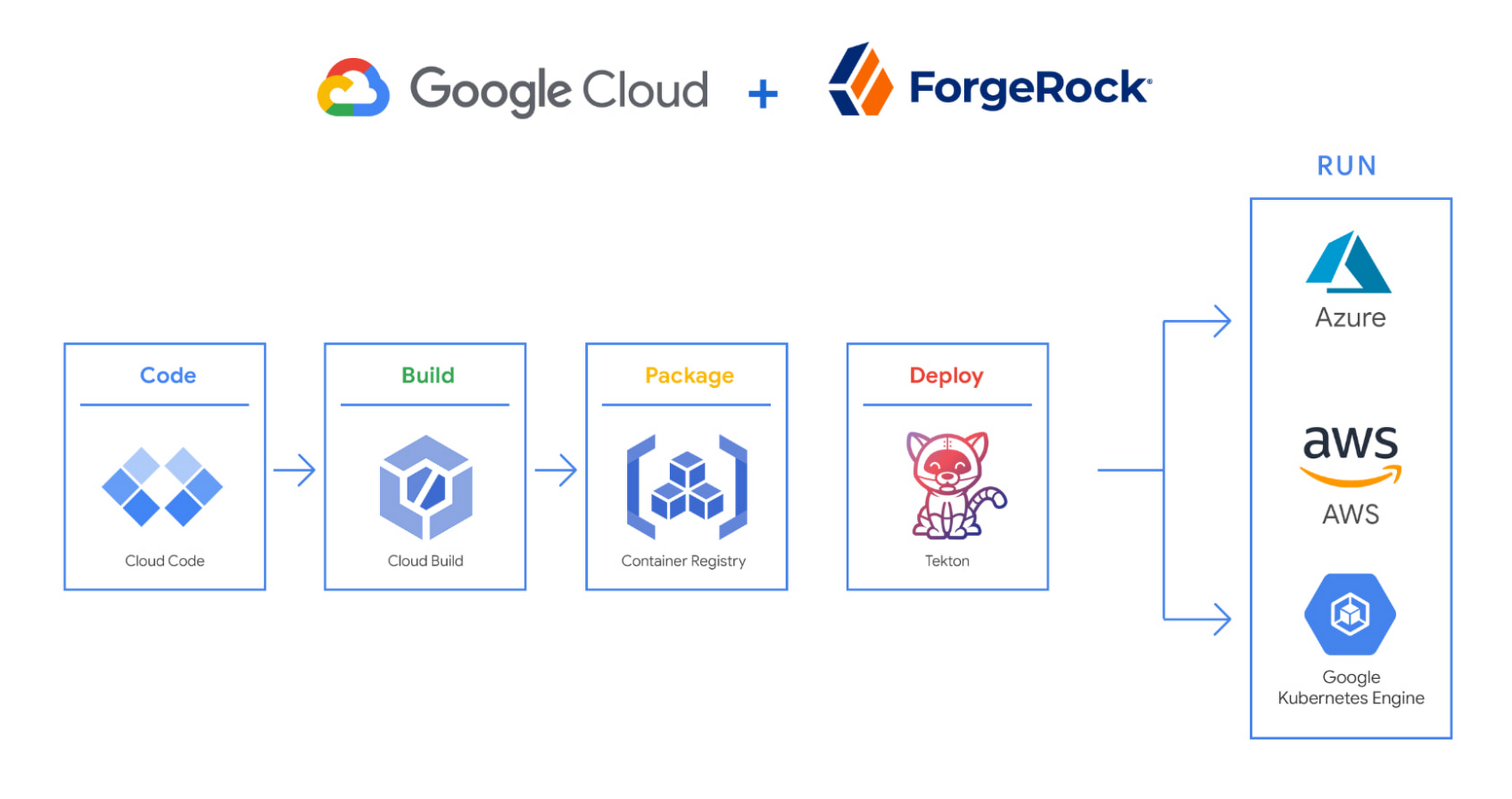
We begin by developing Kubernetes manifests and dockerfiles using Cloud Code. Then we use Skaffold to build containers locally, while Cloud Build helps with continuous integration (CI). The Cloud Build GitHub app allows us to automate builds and tests as part of our GitHub workflow. Cloud Build is differentiated from other continuous integration tools since it is fully serverless. It scales up and scales down in response to load, with no need for us to pre-provision servers or pay in advance for additional capacity. We pay for the exact resources we use.
Once the image is built by Cloud Build, it is stored, managed, and secured in Google’s Container Registry. Just like Cloud Build, Container Registry is serverless, so we only pay for what we use. Additionally, since Container Registry comes with automatic vulnerability scanning, every time we upload a new image to Container Registry, we can also scan it for vulnerabilities.
Next, a Tekton pipeline is triggered, which deploys the docker images stored in Container Registry and Kubernetes manifests to a running GKE cluster. Along with Cloud Build, Tekton is a critical part of our CI/CD process at ForgeRock. Most importantly, since Tekton comes with standardized Kubernetes-native primitives, we can create continuous delivery workflows very quickly.
After deployment, Tekton triggers a functional test suite to ensure that the applications we deploy perform as expected. The test results are posted to our team Slack channel so all developers have instant access and insights about each cluster. From there, we are able to provide our customers with their finished product request.
3. Leverage multicloud patterns and practices
The industry has seen a shift towards multicloud. Organizations have adopted multicloud strategies to minimize vendor lock-in, take advantage of best-in-class solutions, improve cost-efficiencies, and increase flexibility through choice.
At ForgeRock, we’re big proponents of multicloud. Part of that comes from the fact that our identity and access management product works across Google Cloud, AWS, and Azure. Developing products using open-source technologies such as Kubernetes has been particularly helpful in driving this interoperability.
Tekton has been another critical project that has allowed us to prevent vendor lock-in. Thanks to Tekton, our continuous delivery pipelines can deploy across any Kubernetes cluster. Most importantly, since Tekton pipelines run on Kubernetes, these pipelines can be decoupled from the runtime. Like Tekton and Kubernetes, both Cloud Build and Container Registry are based on open technologies. Community-contributed builders and official builder images allow us to connect to a variety of tools as a part of the build process. And finally, with support for open technologies like Google Cloud buildpacks within Cloud Build, we can build containers without even knowing Docker.
Making it easier for developers and operators to build, deploy and manage applications is critical for the success of any organization. Driving developer productivity within IDEs, leveraging end-to-end automation, and support for multi-cloud patterns and practices are just some of the ways we are trying to achieve this at ForgeRock. To learn more about ForgeRock, and to deploy the ForgeRock Identity Platform into your Kubernetes cluster, check out our open-source ForgeOps repository on GitHub.
4186
Of your peers have already watched this video.
2:00 Minutes
The most insightful time you'll spend today!
How Intuit Solved a Long-standing Dilemma: Frictionless, But Secure, Collaboration
If there’s one thing that the folks at Intuit hold dear, it’s the ability to stay agile.
“Intuit is a 35-year-old start-up. We’re about 9,000 people in eight countries around the world,” is how Atticus Tysen, SVP and CIO, Intuit, describes the company.
Founded in 1983, Intuit is a financial software company that creates financial, accounting, and tax software for small businesses, accountants, and individuals, with revenues of $6 billion. It’s products include TurboTax, QuickBooks, ProConnect, and Mint, among others.
A few years ago, different groups, in different parts of the world, used different tools. “We had a lot of siloed solutions and people worked locally and then emailed attachments and documents,” says Brynna Donn, Director, Collaboration and Productivity at Intuit.
What Intuit needed was a way for teams to work together and collaborate without friction—yet securely. Box for G-Suite did that for them.
“Box for G-Suite has allowed us to enable our global workforce to pick the right tools for collaboration but also have all the information in one place. It makes everything easy to find, govern and manage,” says Tysen.
Find out how Intuit benefitted from Box for G-Suite. Watch this two-minute case study.
6876
Of your peers have already watched this video.
14:21 Minutes
The most insightful time you'll spend today!
How Anthos Helps Organizations Implement Multi and Hybrid Cloud Strategy
Organizations have become increasingly focused on using modernization solutions to build competitive advantage, for faster time to market, serve customers better and seamlessly operate in hybrid and multi-cloud environments. Anthos by Google Cloud, a managed application platform plays an important role in application modernization and also in empowering customers to deploy a hybrid or multi-cloud strategy with opensource technologies and platforms like Kubernetes.
Watch the video to refer to the real use-cases of Anthos for application modernization and hybrid/multi cloud deployment across retail, digital natives, banking and manufacturing space.
Also, explore the latest tool, Migrate for Anthos if you are a traditional enterprise looking to skip rewriting of applications and lift-and-shift process!
New research reveals who’s targeted by email attacks

4076
Of your peers have already read this article.
03:30 Minutes
The most insightful time you'll spend today!
Every day, we stop more than 100 million harmful emails from reaching Gmail users. Last year, during the peak of the pandemic crisis we saw 18 million daily malware and phishing emails related to COVID-19. This is in addition to more than 240 million COVID-related daily spam messages. Our ML models evolve to understand and filter new threats, and we continue to block more than 99.9% of spam, phishing, and malware from reaching our users.
We wanted to explore what factors influence being targeted by email phishing and malware and whether higher-risk users are adopting the strongest protections we have to offer. To do this, we teamed up with researchers at Stanford University to study over a billion phishing and malware emails and their anonymized targets. We recently presented our study at the Internet Measurement Conference (IMC), and it’s now available here.
We found that multiple factors correlate with higher risk: where you live, what devices you use, and whether your information appeared in previous third-party data breaches.
Phishing and malware evolves faster than you think
We aggregated and analyzed all of the phishing and malware campaigns that Gmail automatically blocked over a five-month period to identify patterns.
- We found that users in the United States were the most popular targets (42% of attacks), followed by the United Kingdom (10% of attacks), and Japan (5% of attacks).
- Most attackers don’t localize their efforts, using the same English email template for users in multiple countries.
- There is, however, some evidence of regional attackers: 78% of the attacks targeting users in Japan occurred in Japanese, while 66% of attacks targeting Brazilian users occurred in Portuguese.
We also noticed some patterns among attackers and botnets that distribute phishing and malware emails:
- They rely on fast-churning campaigns. A similar email based on a template is sent to 100–1,000 targets on average.
- The campaigns are brief and bursty, lasting just one to three days on average.
- In a single week, these small-scale campaigns accounted for over 100 million phishing and malware emails in aggregate, targeting Gmail users around the globe.
While the users that attackers target change from week to week, in aggregate these patterns remain largely stable over time.
Factors that correlate with heightened risk
Beyond how attackers operate phishing and malware campaigns, we also analyzed what factors put a user at higher risk of attack. In order to avoid singling out any individual user or their personal data, we used an anonymization technique called “k-anonymity” to ensure any risk trends that we identified applied to a broad group of similar users. We modeled the likelihood of receiving any phishing or malware emails in a given week as a function of geographic location, demographics, security posture, device access, and prior security incidents (such as having personal data revealed by a third-party data breach).
Here is what our model found:
- Having your email or other personal details exposed in a third-party data breach increased the odds of being targeted by phishing or malware by 5X.
- Where you live also affects risk. In Australia, users faced 2X the odds of attack compared to the United States, despite the United States being the most popular target by volume (not per capita).
- With respect to demographics, the odds of experiencing an attack was 1.64X higher for 55- to 64-year-olds, compared to 18- to 24-year-olds.
- Mobile-only users experienced lower odds of attack: 0.80X compared to multi-device users. This may stem from socioeconomic factors related to device ownership and attackers targeting wealthier groups.
These correlations help us understand that risk is not evenly spread across geographic and demographic boundaries.
How to stay safer
Gmail’s phishing and malware protections are automatically turned on by default. Here’s our top recommendations for what you can do today to stay safer.
For individual users:
- Complete a Security Checkup for personalized and actionable security advice.
- If appropriate, consider enrolling in Google’s Advanced Protection program, which provides Google’s strongest security to users at increased risk of targeted online attacks.
- Enable Enhanced Safe Browsing Protection in Google Chrome to substantially increase your defenses against dangerous websites and downloads on the web.
- Browse these additional tips to manage your online security and choose the right level of protection for yourself.
For Workspace admins:
- New research reveals who’s targeted by email attacks. Take a look at our advanced phishing and malware protection. These are turned on by default across all Google Workspace licenses, and you can further customize them according to the unique needs of your organization.
Maximize your downtime with these 12 cost-effective Google Cloud learning opportunities

2986
Of your peers have already read this article.
3:30 Minutes
The most insightful time you'll spend today!
The holiday season is upon us! If you are making your list and checking it twice, we’ve got a few learning gifts you can tick off the list and share with others too. For the season of giving, we’ve wrapped up some of our most popular training and certification opportunities and made them available at no-cost.
This December we’re aiming to offer something for everyone, whether you’re just getting started with cloud, or knee deep in preparing for a professional certification exam. Start with the fundamentals to gain a deeper understanding of cloud whether you’re in a business or technical role. Perhaps you’re looking to flex your data analytics and ML muscle with BigQuery and SQL, earn a Google Cloud skill badge, or enhance your technical cloud skills. Or jump into a hot topic like sustainability and learn about Google’s commitment to a clean cloud, and how to use sustainability tools. Read on to find something on your learning wishlist.
We also have a variety of learning formats to fit your needs. Complete hands-on labs, view courses and webinars, or jump into competitions like the Google Cloud Fly Cup Challenge or our most popular #GoogleClout Challenge of 2022 – and let the fun begin!
Are you ready to learn? Take a look at the training we’ve recommended below to work towards your goals as we head into the new year, with new skills, to make the most of new opportunities.
We’re giving plenty of learning gifts to choose from this month, so take your pick from the topics below:
ML, AI and data analytics
Who it’s for: ML, AI and data engineers
What you’ll take away: A deeper understanding of working in BigQuery and SQL.
Level: Foundational
Start learning now:
- Introduction to SQL for BigQuery and Cloud SQL – Get started with this one hour and 15 minute hands-on lab to learn fundamental SQL querying keywords, which you will run in the BigQuery console on a public dataset, and how to export subsets of a dataset into CSV files, then upload to Cloud SQL. You’ll also learn how to use Cloud SQL to create and manage databases and tables, with hands-on practice on additional SQL keywords that manipulate and edit data.
- Weather Data with BigQuery – In this 45 minute lab, you’ll use BigQuery to analyze historical weather observations, and run analytics on multiple datasets.
- Insights from Data with BigQuery – Earn a shareable skill badge when you complete this five hour quest. It includes interactive labs covering the basics of BigQuery, from writing SQL queries, creating and managing database tables in Cloud SQL, and querying public tables to loading sample data into BigQuery.
- The Google Cloud Fly Cup Challenge – This is a three-stage competition in the sport of drone racing in the Drone Racing League (DRL). You will use DRL’s race data to predict outcomes and give performance improvement tips to pilots (these are the best drone pilots in the world!). There’s a chance to win exclusive swag, prizes, and an expenses paid trip to the DRL World Championship. Registration closes on December 31, 2022.
CI/CD
Who it’s for: Software Developers
What you’ll take away: Take part in our most popular #GoogleClout challenge of 2022! Build a simple containerized application.
Level: Fundamental
Start learning now:
- GoogleClout – CI/CD in a Google Cloud World – Flex your #GoogleClout in this cloud puzzle that challenges you in a lab format to create a Cloud Build Trigger to rebuild a containerized application hosted on a remote repository. Register it in the Artifact Registry and deploy. You’ll be scored on your results and earn a badge to share.
Preparing for Google Cloud certification
Who it’s for: Cloud engineers and architects, network and security engineers and Google Workspace administrators
What you’ll take away: Explore the breadth and scope of the domains covered in the cloud certification exams, assess your exam readiness and create a study plan.
Level: Foundational to advanced
Start learning now:
- Preparing for Google Cloud certification – These courses are for Associate Cloud Engineers, Professional Cloud Architects, Professional Cloud Network Engineers, Professional Cloud Security Engineers, and Google Workspace Administrators preparing for Google Cloud certification exams. You’ll also earn a completion badge when you finish the course.
- Preparing for the Cloud Architect certification exam – Join this 30 minute on-demand webinar to learn about resources to maximize your study plan, and get tips from a #GoogleCloudCertified Professional Cloud Architect.
Intro to Google Cloud for technical professionals
Who it’s for: Software Developers
What you’ll take away: Boost your Google Cloud operational and efficiency skills to drive innovation by navigating the fundamentals of compute, containers, cloud storage, virtual machines, and data and machine learning services.
Level: Foundational
Start learning now:
- Getting Started with Google Cloud Fundamentals – This on-demand webinar takes a little less than three hours to complete. Navigate Compute Engine, container strategies, and cloud storage options through sessions and demos. You’ll also learn how to create VM instances, and discover Google Cloud’s big data and machine learning options.
Intro to Google Cloud for business professionals
Who it’s for: Business roles in the cloud space like HR, marketing, operations and sales
What you’ll take away: A deeper understanding of cloud computing and how Google Cloud products help achieve organizational goals.
Level: Foundational
Start learning now:
- Cloud Digital Leader learning path -There are four courses in this learning path covering digital transformation, innovating with data, infrastructure and application modernization, and Google Cloud security and operations.
- Preparing for the Cloud Digital Leader certification exam – In this 30 minute webinar continue your learning journey by preparing for the Google Cloud Digital Leader certification exam. The webinar covers all the resources we’ve made available to help you prepare.
Sustainability
Who it’s for: Software Developers
What you’ll take away: Learn how the cleanest cloud in the industry can help you save your cloud bill, and save the planet.
Level: Foundational
Start learning now
- A Tour of Google Cloud Sustainability -Work through this one hour, hands-on lab, to explore your carbon footprint data, use the Cloud Region Picker, and reduce your cloud carbon footprint with Active Assist recommendations.
Keep connected and learning with us in 2023
Accelerate your growth on Google Cloud by joining the Innovators Program. No-cost for users of Google Cloud (including Workspace), it’s for anyone who wants to advance their personal and professional development around digital transformation, drive innovation, and solve difficult business challenges.
Continue your learning with Google Cloud in 2023 by starting an annual subscription1 with Innovators Plus benefits. Gain access to $500 in Google Cloud credits, live learning events, our entire on-demand training catalog, a certification voucher, access to special events, and other benefits.
Build your skills, reach your goals and advance your career with 12 no-cost ways to learn Google Cloud!
- Start an annual subscription on Google Cloud Skills Boost with Innovators Plus for $299/year, subject to eligibility limitations.
5340
Of your peers have already watched this video.
26:00 Minutes
The most insightful time you'll spend today!
On-Demand Webinar: 3 Ways Collaboration Transforms How Your Company Works
A majority of your employees and teams spend 38% of their time unsuccessfully searching and recreating content, according to IDC.
They also spend 20% of their time looking for information, according to McKinsey. That’s 58% of time lost in unproductive tasks that could have been spent coming up with the next big innovative idea that actually impacts business.
Now you know why there are no new ideas, no new innovations, no room for business to grow. Savvy organizations like Nielsen, Whirlpool, and Colgate-Palmolive have had enough of that and are embracing the cloud to collaborate in real-time and transform how their companies work.
The only way to achieve business growth and beat competition is to invest less time in unproductive tasks—like looking for information—and more time innovating with intelligent systems that provide your teams with information they need without even having to look for it: The ability to search smart, find fast, collaborate in real-time, and build new ideas quickly. Embracing Artificial Intelligence enabled-cloud collaboration platforms is one way to get there.
In this webinar, Allen Yang, Product Manager, Google Cloud, talks about how big corporations are turning to the power of the cloud to enable real-time collaboration, faster decision making, smarter and more productive employees and teams, and embracing a new way of working.
More Relevant Stories for Your Company
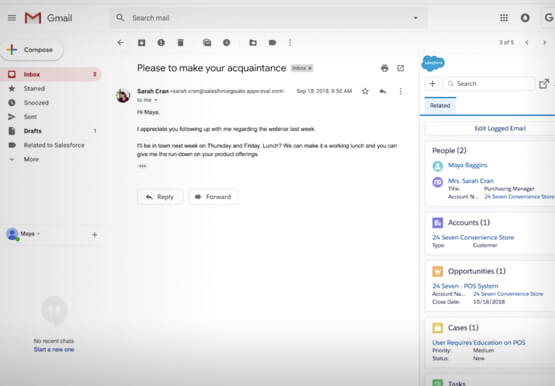

The Simple Salesforce Extension on Gmail That Can Make Sales and Marketing More Productive
What’s one of the big problems of sales and marketing? The inability to get a more holistic picture of a customer when reaching out to them. There’s a fix for that if you’re using Gmail. It’s a Salesforce Lightning Chrome extension. As you read and respond to emails in your

Download the Forrester Study to Explore the Benefits of AI for IT Operations in Cloud Environment
Organizations are currently modernizing their businesses in order to meet the increasing complexity of today’s business landscape. In effect, business leaders must evaluate the best way to mitigate the challenges which plague their cloud operations, all while meeting customers’ growing expectations around digital experience (DX) through agility, automation, and proactive

How the Telegraph is Reimagining Media with Google Cloud
Whether they’re reading the newspaper on the way to work, or catching up on the latest headlines on their smartphones, readers expect up-to-the-minute news wherever and whenever makes the most sense for them. As a result, media companies are increasingly looking for ways to improve, expand, and simplify their offerings,



Teamwork from anywhere: G Suite’s vision for content collaboration
So the world has changed. We all know that the COVID-19 pandemic has fundamentally shifted where we work, when we work, and how we work. And during this time period, there has been a dramatic increase in the number of people working from home. It went from just 13% before
