





4061
Of your peers have already watched this video.
45:00 Minutes
The most insightful time you'll spend today!
CFO Watch: Easily Control Your Cloud Costs with the Google Toolkit
With businesses increasingly making the shift from on-premises to cloud, it’s more important than ever to put financial governance policies in place to control cloud costs. However, this is easier said than done as companies constantly struggle to control costs, which is evident from the fact that 35% of customer cloud spend is wasted, according to the 2018 State of the Cloud report by Rightscale.
What companies need are financial governance controls like quotas, permissions, and budgets that help prevent unexpected cost overruns. In addition, programmatic notifications can help take automated actions to control and cap the cloud usage and costs.
Since there is no one size that fits all for financial governance needs, Google Cloud provides a tool kit which helps organizations easily set-up and manage their financial governance in the cloud.
Watch this video to understand how this toolkit works and how you can use it to control your cloud costs.
5 Features IT Departments Love About Google Cloud

3667
Of your peers have already read this article.
5:30 Minutes
The most insightful time you'll spend today!
Throughout the past couple of years, I have helped a good number of companies, big and small, migrate their systems to the Google Cloud Platform (aka GCP). During the course of these migrations, there are always a few of those moments where people look at a specific Google Cloud feature and say, “now, that’s cool!”.
More often than not, it is because, coming from other platforms, they have gotten used to some features requiring multiple steps, or some operations being complicated, etc. And often they find out that in GCP you can do this specific operation in a couple of clicks, or by setting up a simple text-based configuration. Then you see that light bulb turning on in their head, and there you go… happy customer.
A few of these happen so often that I compiled them in a list to share with others who might also benefit from these “aha!” moments. You could say these are the five things I wish they told me when I started using Google Cloud.
Projects: Naturally Group Resources Together
A project is a namespace where resources live. Every resource you instantiate in GCP, from load balancers to Kubernetes clusters to virtual machines, belongs to a single project, and has no access (by default) to resources in other projects. User roles and authorisations can be defined per-project and trickle down to everything in it. This has two immediate benefits: you can group things that belong together in neat logical units, and things that don’t belong together are isolated from each other (and isolation is a Good Thing)
This is powerful and quite simple, but it often takes new users off-guard. I’ve had many clients call me and ask me “How can I make sure my developers cannot access the production machines? What’s the best way to create access policies? ”
The answer to this is actually super-simple:
- have a project for development where your developers have rights,
- have a project for production where they don’t.
- That’s it.
Every machine/other resource in the production project won’t be accessible to developers.
Of course there is a lot more to it, and you can refine roles and permissions to a much greater degree using Organizations, Folders, etc. Not to mention all the crazy things you can do with per-project billing. But at least you can say “hey, if it’s a machine in the staging environment then it can be found in the “staging” project”.
Global Virtual Networks Are *Truly* Global
Imagine you are using a Cloud provider and that you have servers in the US, and servers in Singapore, and that they need to communicate.
So you create a VPC (Virtual Private Cloud) network in the US data center, another one in the Singapore data center, and then you will connect them by setting up inter-region VPC peering or a VPN (Virtual Private Network) or a transit VPC or other routing magic.
Lots of work, right? And many moving parts, so lots of opportunities for things to break.
With GCP, however, what makes my clients go “aha!” is when they realize that in GCP a single VPC network covers the entire planet. Only subnets are attached to a geographic location, and virtual machines communicate between subnets on private IPs (good old RFC1918 addresses) — no extra routing needed.
So, to make your server communicate across continents on GCP, here are the steps:
- create a VPC network
- create a subnet in the US, put your US servers in it
- create a subnet in Singapore, put your Singapore servers in it
That’s all there is to it. Your VPC network spanning 2 continents is ready to use. Below is a screenshot of how it looks on my account, for a VPC network called ‘my-global-network’ with 2 subnets. The first column (“us-central1” and “asia-southeast1”) contains the name of the GCP regions (read: data centers). The second column is the subnet name that I picked when I created them.

A machine in the US (on the “us-central” subnet) with IP 10.0.0.5 can communicate directly with a machine in Singapore (on the “singapore”) subnet with IP 10.10.0.8.
Nothing else to set up.
And thanks to the way these networks work, the Google Cloud Load Balancer can present a single IP to the world, and forward traffic to the instances that are the closest to you geographically without having to setup a tedious DNS-based load balancing. But that’s worth an entire blog. I’ll save it for another day.
Firewalls with Tags and (Almost) No IP Addresses
There is no network security without a firewall so unsurprisingly GCP comes with one built-in.
Now, I don’t know about you, but nothing makes my brain hurt like a list of firewall rules displaying IP ranges and addresses and ‘Allow/Deny’ directives. It looks a bit like this:

If you imagine a normal network with a few dozen (hundred?) servers, you can quickly see how this can get out of control. You’d better have a solid printout of your network layout to refer to when you start adding and changing rules. And good luck debugging things!
Wouldn’t it be nice if, instead, you could just tell the firewall: “the HTTP traffic from outside can only reach the HTTP servers and the MySQL database is only reachable by the HTTP server(s) on the same network?”
Turns out it’s pretty simple on GCP by using a little thing called network tags. As the documentation says:
“Network tags are text attributes you can add to Compute Engine virtual machine (VM) instances. Tags allow you to make firewall rules and routes applicable to specific VM instances.”
So let’s see how it works. Firewall rules in GCP are defined in terms of source and target (the traffic flows from the source to the target). You can define filtering rules that apply to the source or the target, and in both cases you can use tags.
This is simpler shown with an example. The rule below states that on the default network, the traffic to the VMs with the tag mysql-server can come from the VMs with the tag http-appserver. Any other traffic is “Deny”-ed by default.

All you have to do is to tag your machines properly, and they will automatically be covered by the rule. You don’t need to enter their IP range.
That’s neat if you ask me. It makes it a lot simpler to grasp what’s happening.
Of course, there’s a TON more to firewalls in GCP. Tags also apply to routes and you can mix and match IP-based rules with tag-based rules. Not to mention that thing called service accounts, but I’ll leave those for another day.
The bottom line is that you can create most rules by just expressing a business need and not having to remember complicated network layouts. I have no hard stats, but I’m pretty sure this has saved me hours of work.
Console Access to VMs from the Browser
Easily access virtual machines (VMs) from the Google Cloud console was one of my first “aha!” moments when I started using GCP.
This is a screen capture of my Google Cloud console, with a virtual machine and its internal IP.

The last column has a header that says “Connect” and when you click on the word “SSH” a separate windows pops up. You wait for a few seconds, and… this is what you get. Your personal shell access — in a browser popup no less.

You are connected through ssh to the virtual machine of your choice. You did not have to download ssh keys and put them in the ~/.ssh directory, do the correct chmod command and run a long-winded ssh -i ~/.ssh/somekey me@<it-took-me-forever-to-copy-paste-the-address-here>
In addition, you have access to a few nifty features such as uploading and downloading files, changing the user etc. Just use the menu behind the cog icon at the top right.
In truth, you should not need to connect directly that often, but when you have to, this is a godsend.
Your Personal Jumphost from the Google Cloud Console
The Google Cloud console has a cool trick: you can actually connect to a virtual environment that is managed by the Google Cloud console itself. It serves a bit as a jump host. You can access most resources from the projects from it, and you can activate it directly from the top menu with, no particular setup on your side. It’s called the Cloud Shell.
This is how it looks at the top right of the console:

When you activate the Cloud Shell, the session opens at the bottom of the console. You get a command line prompt and it’s fully configured with the gcloud command line tool (the jack-of-all-trades of Google Cloud scripting).

You can do a great many things from there, and this even includes uploading and downloading files, editing code or deploying it, a web preview for your AppEngine application, and more.
So you can get access to a fully configured shell environment in your project from any laptop where you can connect with your credentials. On top of this, it persists between connections so you can fine-tune it to your needs and have these changes available the next time you re-connect.
This has saved me many times during my previous life as a traveling consultant!
Live migration
Did I say 5 “Aha!” moments ? Well, you’ve been patient reading all the way to here, so here’s one more for free.
Google Cloud has an amazing way to literally “teleport” a running virtual machine between physical hosts without stopping it. It’s called Live Migration. It allows Google to move your virtual machine away from a defective host, or a host that needs a patch or an upgrade, or for any other infrastructure related reason.
It’s all done in the background, and is totally transparent, so you never really see it happening. Unless you look VERY closely. I once did a demo to a client, where a machine was live migrated while he was simulating a solid network load — and we did not lose a single packet, with no noticeable degradation in latency.
And that’s a wrap!
So there you go. These are 5+1 things that made me go “Aha!” when I became more familiar with the Google Cloud Platform, and that still make my clients do the same.
There is a lot of depth to the platform, and my examples above only scratch the surface of our features. I encourage you to try it yourself. There is a generous free tier, and when you are ready to take the plunge and create that new company, please contact us at Google Cloud for Startups. We’ll get you up and running in no time.
Jerome is a Startup Architect at Google Cloud. Based in Singapore, he helps startups make the most of the Google Cloud Platform.

IDC: Firms Should Migrate VM-based Enterprise Workloads to Google Cloud for Optimal Price, Performance, and Security
DOWNLOAD WHITEPAPER4448
Of your peers have already downloaded this article
5:30 Minutes
The most insightful time you'll spend today!
Public cloud platforms provide the scale, elasticity, and operational efficiency that enable enterprises to both innovate and deliver more products and services to the market faster. This increased ability to innovate provides enterprises a competitive advantage and the businesses agility to stay ahead of their competition. Enterprises should leverage the business agility that public cloud infrastructure enables to their strategic advantage. Thus incorporating a cloud platform is an inherent part of their initiatives to modernize their IT infrastructure.
Enterprise cloud adoption is not without challenges. Enterprises cite a lack of skill set, decision fatigue, operational challenges, security concerns, and unpredictable TCO as significant inhibitors to adopting a public cloud service provider. Information technology decision makers (ITDMs) are caught between the need to innovate faster and the fear of instability and mismatched expectations. This dilemma is why enterprises that partner with a trusted service provider before, during, and after migration are more likely to succeed in their cloud journey.
Google Cloud is an ideal platform for virtual machine (VM)–based applications due to its key technical capabilities, such as high-performing virtual machines, including compute-optimized and memory-optimized VMs; custom sizes for virtual machines; high-performance network infrastructure for faster data transfers; and data protection capabilities.
Download this IDC report to understand why ITDMs should consider Google Cloud as the preferred cloud services partner — owing to Google Cloud being a reliable platform for VM-based applications; a trusted partner before, during, and after application migration; and an innovator to future proof the enterprise IT infrastructure.
Towards The Next Wave of Google Cloud Infrastructure Innovation: New C3 VM and Hyperdisk

2804
Of your peers have already read this article.
3:00 Minutes
The most insightful time you'll spend today!
Meeting the rapidly growing demands of our customers’ high performance computing and data-intensive workloads requires deep innovation — at Google Cloud, we know we can’t rely on ever-faster CPUs alone, like Moore’s Law has enabled in the past. Customers can either optimize their workloads for a given platform, or we can offer them a platform that is optimized for their specific needs. At Google Cloud, we choose the latter.
Today, we have an exciting new release resulting from these efforts: the new C3 machine series powered by the 4th Gen Intel Xeon Scalable processor and Google’s custom Intel Infrastructure Processing Unit (IPU). Along with the recently announced Hyperdisk block storage which offers 80% higher IOPS per vCPU for high-end database management system (DBMS) workloads when compared to other hyperscalers. C3 machine instances can deliver strong performance gains to enable high performance computing and data-intensive workloads. Customers such as Snap, for example, have seen approximately a 20% increase in performance for a key workload over the previous generation C2.
The C3 machine series is just the latest example of this architectural approach. For over two decades, Google has purpose-built and designed some of the world’s most efficient and scalable computing systems to meet the needs of our customers. We built the Tensor Processing Unit (TPU) to power real-time voice search, photo object recognition, and interactive language translation; unveiled Titan, a secure, low-power microcontroller to help ensure that every machine boots from a trusted state; and launched Video Coding Units (VCUs) to enable video distribution that addresses a range of formats and client requirements. We engineer golden paths from silicon to the console, using a combination of purpose-built infrastructure, prescriptive architectures, and an open ecosystem to deliver what we term workload-optimized infrastructure.
Getting to know the C3 machine series
The Compute Engine C3 machine series, now available in Private Preview, is the first VM in the public cloud with the 4th Gen Intel Xeon Scalable processor and with Google’s custom Intel IPU. C3 machine instances use offload hardware for more predictable and efficient compute, high-performance storage, and a programmable packet processing capability for low latency and accelerated, secure networking.
“We are pleased to have co-designed the first ASIC Infrastructure Processing Unit with Google Cloud, which has now launched in the new C3 machine series. A first of its kind in any public cloud, C3 VMs will run workloads on 4th Gen Intel Xeon Scalable processors while they free up programmable packet processing to the IPUs securely at line rates of 200Gb/s. This Intel and Google collaboration enables customers through infrastructure that is more secure, flexible, and performant.” – Nick McKeown, Senior Vice President, Intel Fellow and General Manager of Network and Edge Group
The System on a Chip hardware architecture introduced in C3 VMs can enable better security, isolation, and performance. In the future, this purpose-built architecture will also allow us to offer a richer product portfolio, such as support for native bare-metal instances.
Hyperdisk block storage and 200 Gbps networking
Block storage and VMs go hand in hand. Last month, we announced the Preview release of Hyperdisk, our next-generation block storage. The new architecture decouples compute instance sizing from storage performance to deliver 80% higher IOPS per vCPU than other leading hyperscale cloud provider. And compared with the previous generation C2, C3 VMs with Hyperdisk deliver 4x higher throughput and 10x higher IOPS. Now, you don’t have to choose expensive, larger compute instances just to get the storage performance you need for data workloads such as Hadoop and Microsoft SQL Server.
To enable high performance computing workloads, C3 VMs also feature 200 Gbps low-latency networking powered by our custom IPU, as well as line-rate encryption using the open source PSP protocol.
What our customers and partners are saying

“We were pleased to observe a 20% increase in performance over the current generation C2 VMs from Google Cloud in testing with one of our key workloads. These continued performance improvements enable better end user experience and application cost efficiency.” – Aaron Sheldon, Sr. Software Engineer, Snap Inc.

“Based on the initial performance data, running weather research and forecasting (WRF) on C3 clusters can deliver as much as 10x quicker time to results for about the same computational cost. This will significantly accelerate R&D for our customers in weather, environment, and engineering domains.” — Michael Wilde, CEO, Parallel Works Inc.

“In early testing with our flagship products, including Ansys Fluent, Mechanical and LS-DYNA, on the new Google Cloud C3 VM, we’re seeing up to 3x performance gains over C2 VMs due to higher memory bandwidth and lower network latency.” – Shane Emswiler, Senior Vice President of Products, Ansys
Where we are headed
With the exponential rise in the complexity of cloud infrastructure, we as an industry must turn to automation to manage these platforms efficiently at scale. Along with Infrastructure as Code, custom chips like the Titan, the TPU and the IPU, pave the way for a not-so-distant future where we’ll automate over half of all infrastructure decisions, configuring systems dynamically in response to usage patterns. At Google Cloud, we are committed to continuing our long history of hardware innovation with a focus on workload optimization and automation.
To learn more about C3 VMs and Hyperdisk, check out our session at NEXT ‘22, How Google Cloud optimizes infrastructure for your workloads. To request access to the C3 VMs or Hyperdisk, please reach out to your sales representative or account manager.
3475
Of your peers have already watched this video.
3:30 Minutes
The most insightful time you'll spend today!
Rightmove’s Right Move to Google Cloud
In 2020, Rightmove, UK’s renowned property website app saw over a billion minutes from users and clocked about 100 busy days in 2021. To continue innovating their products and improve customer experiences while achieving sustainability goals, Rightmove chose Google Cloud to migrate their infrastructure!
The property search application platform already boasts of dedicated tech teams running heavily code-driven multi-data center infrastructure and high velocity CI/CD platform. To reduce time to product and time to market, Rightmove selects Google Cloud. Watch further to learn how Google Cloud Products helped them add new features, update their existing services and adhere to sustainability objectives.
How to Get Your Cloud Migration Journey Started Off on the Right Foot

3612
Of your peers have already read this article.
2:30 Minutes
The most insightful time you'll spend today!
When moving to the cloud, many organizations concentrate their focus on the change in technology, and overlook an area just as complex: cultural change.
At Google, we’ve spent years nurturing our culture and workforce to best operate in the cloud, and the Google Cloud Professional Services team leverages the lessons we’ve learned for the benefit of enterprise customers embarking on their own cloud journeys.
While it can be tempting to believe in a universally ‘correct’ strategy for change management, there is no one-size-fits-all answer. Every organization will have its own unique considerations. But with that said, there are some core strategies we’ve found to be relevant and useful across a broad range of businesses.
1. Define your purpose for moving to Cloud
While pockets of cloud use and experimentation can evolve independently and in parallel across an organization, it’s important to make some deliberate decisions before starting a larger migration. At this stage, we recommend having a detailed answer to two key questions to ensure a successful cloud migration:
- Where do you want to go? (Or “What’s your cloud vision?”)
- How do you plan to get there?
Start by having a conversation with leaders and those who will be key to the journey about how far you want to push your cloud vision. This alignment ensures everyone is on the same page—and will provide greater direction, allowing more deliberate action.
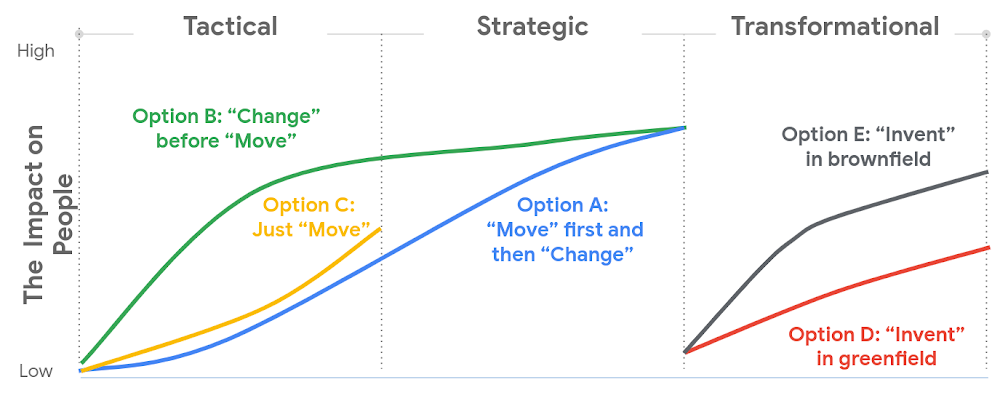
2. Find the change path which is right for you
Whether a ‘lift and shift’ approach to the cloud is right for you, or a more transformative approach with a lot of re-architecting—the most important thing is to find the flavor of change which is appropriate to your context and level of ambition.This will both shape your key migration activities, but also the level of impact to be managed within your organization.
There are many ways to embark on a change journey for cloud migration (which one can find in the chart below). It is important to deeply understand the needs of your business and its people and determine what strategy makes the most sense.
3. Learn from best practices
Based on the lessons we’ve learned along our own journey, and the work we’ve done with customers, there are a number of recommendations we can share that can make a cloud migration more successful. We go into these in more detail in our new whitepaper, but below you can find the ones we think are most relevant:
- Share the vision—and measure, measure, measure. Once you’ve crystallised your cloud vision with leadership and key stakeholders, share that vision widely. Set success goals and communicate them to hold yourself accountable.
- Be clear about the capabilities you will need in the future—and where you’ll get them. For example, if your vision is to become a cloud-first, data and AI-led organization, ensuring you have the right data science skills and machine learning capabilities in your organization to achieve that vision becomes a critical step—be they home-grown or bought-in.
- Find the right balance between capabilities that should be under central control, and capabilities that should be decentralized, or agile. For example, should machine learning be something that sits centrally, or should it be spread across your organization? For every business, the solution will be a little different, and there’s no “one true answer.” There’ll be lots of different opinions about this, so the sooner the conversation starts, the better.
- Start thinking about the needed tech and non-tech skills now, and how you’ll fill the gaps. Building the tech skills will take time, and not everyone will feel comfortable with the future picture of collaboration, innovation, and agility.
To help businesses navigate their own cloud journeys, Google Cloud Professional Services has released a new whitepaper that can help guide organizations. “Managing Change in the Cloud” is closely aligned with the Google Cloud Adoption Framework and is a practical guide for organizations looking to maintain momentum in their cloud adoption. You can download the whitepaper here.
More Relevant Stories for Your Company

Cloud Bigtable brings database stability and performance to Precognitive
At Precognitive, we were able to start with a blank technology slate to support our fraud detection software products. When we started building the initial version of our platform in 2017, we had some decisions to make: What coding language to use? What cloud infrastructure provider to choose? What database

Media CDN to Intelligently Deliver Streaming Experiences to Viewers around the World!
The digital media and entertainment industry is experiencing dramatic growth, as audiences migrate to online experiences and content providers seek to deliver new and innovative content. According to The Global Internet Phenomena Report, streaming video accounted for 53.7% of internet bandwidth traffic, up by 4.8% from a year ago. This

withVR Uses the Power of VR to Prep People with Speech Disorders for Real-life Speaking Situations
Editor’s note: Meet Gareth Walkom, an entrepreneur dedicated to helping others with speech disorders. Turning life experience into innovation Did you know that 3% of Americans have a speech disorder, while 1% of the world’s population have a stutter? Just getting what they need in everyday interactions can be stressful,

The Pathway to Innovation: Migrating SAP to the Cloud
While innovation remains a top priority across all industries, many companies are not achieving the results they want from their innovation efforts. As companies migrate their SAP enterprise resource planning (ERP) systems to the cloud, technology leaders see this as an opportunity to reimagine business processes and propel their innovation
