






3454
Of your peers have already downloaded this article
5:30 Minutes
The most insightful time you'll spend today!
Modernize your Windows Server Workloads using Google Cloud Platform
DOWNLOAD RESEARCH REPORTS6270
Of your peers have already downloaded this article
1:30 Minutes
The most insightful time you'll spend today!
Application Modernization is an important enabler of Digital Transformations (DX), which fuel competitive advantage through increased productivity and business agility. Public cloud infrastructure proves to be a solid foundation for application modernization by providing Self-Service Provisioning capabilities, cloud-based & cloud-native technologies, and easier access to technology innovations such as AI/ML.
Windows Server-based enterprise applications rely on the underlying infrastructure for platform performance, security, and availability. A better performing cloud platform enables them to perform better and hence prove to be more resource-optimized and cost-effective.
Download this IDC report to understand why you should move your Windows Server workloads to Google Cloud and the benefits you can derive.
Simplify Your Modernization Journey from Windows

4283
Of your peers have already read this article.
1:30 Minutes
The most insightful time you'll spend today!
Microsoft and Windows on Google Cloud provides a first-class experience for Windows workloads. You can self-manage workloads or leverage managed services and use license-included images or bring your own licenses. Now, easily migrate, optimize, and modernize your Windows workloads for agility and scalability.
Start with migration
Migrate to increase IT agility and reduce on-premises footprint. Tools like Migrate for Compute and Migrate for Anthos can help migrate and upgrade.
Optimize license usage to reduce cost
Optimize VM usage. Managed SQL Server and Active Directory reduce total cost of ownership. Move .NET to .NET core. Move SQL Server to Linux.
Modernize to reduce single-vendor dependency
Create an open path to modernization—containerization of Windows server, cloud-native development, and multi-cloud readiness with Anthos.
Drive a strategy for migration, optimization, and modernization
Plan for the future while reducing your Microsoft licensing dependency. Get all you need to migrate, optimize, and modernize your legacy platform.
Bring your own licenses
In addition to on-demand licenses, Google Cloud provides you with flexibility for bringing your existing licenses and running them on Compute Engine. Use Sole-Tenant Nodes to run on dedicated hardware with configurable maintenance policies to support your on-premises licenses while maintaining workload uptime and security through host-level live migration.
License-included VM images
You can deploy your Windows applications (including SQL Server) on our fully tested images with bundled licenses on Compute Engine and take advantage of many benefits available to virtual machine instances such as reliable storage options, the speed of the Google network, and autoscaling.
Fully managed SQL Server and Active Directory
Use an easy-to-manage and compatible relational database service in the cloud to reduce operational overhead. Use a highly available, hardened service to manage authentication and authorization for your AD-dependent workloads, automate AD server maintenance and security configuration, and connect your on-premises AD domain to the cloud.
Windows on Kubernetes
Running your Windows Server containers on GKE can save you on licensing costs, as you can pack many Windows Server containers on each Windows node.
Reducing Data Costs by 80% with Google Cloud: Inshorts’ Success in the Indian Mobile News Market

2805
Of your peers have already read this article.
3:30 Minutes
The most insightful time you'll spend today!
About inshorts
Mobile news platform inshorts condenses the latest national and international news into 60-word briefs in English and Hindi. With 10 million downloads so far, it’s expanding to cater to millions more on-the-go Indians reading news on mobile devices.

Across India, hundreds of millions of people turn to their smartphones for news that will enhance their lives and help them achieve their goals. According to Professor Rasmus Kleis Nielsen, Director of the Reuters Institute for the Study of Journalism: “The past few years have seen explosive growth in mobile internet access, and the rapid move to digital media will have profound implications for the practice of journalism, the business of news, media institutions, and thus by extension political and public life in India.” The Institute reports that Indians with internet access have risen from 100 million to 500 million in the past decade alone. The report identifies India’s news industry as “a mobile-first market,” with 66% of Indians citing smartphones as the device they most frequently use to access online news.
Seeing an opportunity to meet the growing need for news on the go, inshorts developed a mobile news platform for Indians on the move who want to stay informed but don’t have time to read long articles. The inshorts solution condenses news, from politics to cricket, into briefs of under 60 words and has been well received, with 10 million downloads since launching in 2013.
To keep the attention of its always-on news consumers and attract more users for continued growth, inshorts knows it must continuously evolve and improve its platform. The company turned to Google Cloud in 2016 in order to free its developers from time-consuming infrastructure maintenance tasks and enable them to focus on creating innovative applications instead. It was also looking for powerful yet cost-effective data and scaling tools to reach more remote corners of India and found this in Google Cloud.
“There’s a new wave of 300 to 400 million first time mobile users projected for India,” says Manish Bisht, Head of Technology at inshorts. “We want to capture those users, and Google Cloud is helping us succeed.”
Freeing up resources for new solutions
By migrating to Google Cloud, inshorts has been able to free up its development team to experiment with new ideas, without worrying about backend management or costs. The company worked with cloud consultancy Searce, a Google Cloud Premier Partner, to define the best solutions for achieving its goals. Searce partners with clients to help them scale their business by leveraging Cloud, AI/ML, and data analytics while reducing the operational IT infrastructure spend. Because it specializes in AI/ML, Anthos, and Cloud Search, inshorts chose it as the ideal partner for futurifying its business on Google Cloud. According to Manish, the Searce team was focused not only on helping inshorts to migrate and adopt a on-demand computing mindset, but helping it to decrease monthly costs as well. “There’s always a positive push from Searce, to help us move forward, and to really put our company’s priorities first,” he says.
Through the application development solutions of Firebase, for example, inshorts is able to test new features in a rapidly shifting market. The product’s ease-of-use and built-in data analytics mean that inshorts can now allocate its developer resources more efficiently across multiple projects, instead of needing an entire team to focus on one project. Product cycles are now just one week long, instead of one month, and each backend and frontend developer in the team of four is able to focus on a separate project, meaning that more work gets done in a shorter time.
Dataflow, which enables real-time data processing, has been a major factor in allowing inshorts to instantly recommend content to users. Previously, the company had managed its own instances, first manually recording what users were doing and later pushing out recommendations. That all changed with Dataflow. “Dataflow freed a lot of our development and instance management time, because we can process data in real time now,” says Manish. “And that means giving users what they want instantly.”
Perhaps one of the biggest time savings came from using Dataproc, which released the inshorts team from the task of managing clusters. “We simply moved to Dataproc, provisioned the machines, and let Google Cloud take over all the management for us,” says Manish. “This one change translated into labor savings of up to six hours a day.”
Where costs are concerned, inshorts is happy to report that Google Cloud has led to not just time savings, but monetary savings as well. The company had begun its cloud journey with a leading provider, but soon found that data analytics services were driving up costs. Meanwhile, the service required high levels of technical expertise to manage the growing infrastructure, which meant it needed to hire a DevOps expert. After switching to Google Cloud products such as Google Kubernetes Engine (GKE), Cloud Deployment Manager, and Cloud Build, inshorts has now reduced most of its DevOps burden.
“At the time, we were spending around USD100,000 per month in data analysis and data-related fields alone. We had to pursue a cost optimization drive,” recalls Manish. “We had no idea how much we would save just by migrating to Google Cloud. We brought down our costs for the entire infrastructure to around USD20,000 per month.”
The company now uses BigQuery with Looker Studio to analyze and predict its tech expenditure. With Looker Studio, it can easily visualize infrastructure costs and break them down by team, services, and project stakeholders.
Processing millions of images quickly, delivering news instantly
inshorts cites the move to GKE as one of its most important moves. “At one point, we were processing a quarter of a million images per day. Because images are uploaded by our users, traffic is unpredictable; planning the exact amount of compute needed in a given moment is almost impossible. Load balancing itself was no longer enough,” shares Manish. “Google Kubernetes Engine makes life easier for our developers, reducing the need for them to be ever present, and giving them a tool that’s easy to work with.”
The inshorts team moved to GKE primarily to gain this ease of use, where its team can now push a few configurations, then spin up clusters, tell them how to handle the load and what kind of machines to provision, and manage resources effectively. The team has reduced its dependency on DevOps since there’s no need for developers to worry about what size of machines they need for their applications. “The size of machine needed depends on the specific job, and with Google Kubernetes Engine it’s very easy to accommodate a whole range of jobs. We simply optimize our resources, scaling up or down as needed,” says Manish.
As inshorts’ platform becomes more feature-rich and sophisticated, it is taking advantage of the global network of Google Cloud. With its data center in the United States, the platform had begun to experience latency of about 600ms, too great a lag in an age of instant news. Because Google Cloud has regional data centers around the world, inshorts was able to simply move its data center closer to home, bringing down average latency to 100 ms. “We achieved significant app performance improvements thanks to being able to migrate our data center,” says Manish. “The loading was faster; everything was faster.”
Mapping the future with localized news
Being able to develop features even faster is enabling inshorts to pursue its goal of expanding into every corner of India. To capture the wave of new mobile consumers, inshorts realizes that it needs to start by finding out exactly where they are. Using Google Maps Platform, the company has launched a location-based social video app called Public, which offers news that’s highly localized to specific Indian communities and relevant to what they want to read.
As a developing nation, India’s mapping landscape is constantly changing. There were 722 administrative regions when inshorts began its work, but by 2018, 10 new districts had been added to this number. Because Public serves rural and suburban audiences, it’s crucial that it can stay on top of these rapid and sometimes confusing changes. According to Manish, Google Maps Platform not only offers granular geo-location through the Geolocation API but adapts to mapping changes in near real time. It’s a capability that inshorts is harnessing to make the Public app into its next success. “The app is experiencing tremendous growth in the tier two and three cities,” shares Manish, “In the short span of six months, it has already become the category’s number-one ranked app on the Google Play store.”
Tell us your challenge. We’re here to help.
HarbourBridge Schema Assistant Allows Quick, Bulk Migration to Cloud Spanner

5486
Of your peers have already read this article.
1:30 Minutes
The most insightful time you'll spend today!
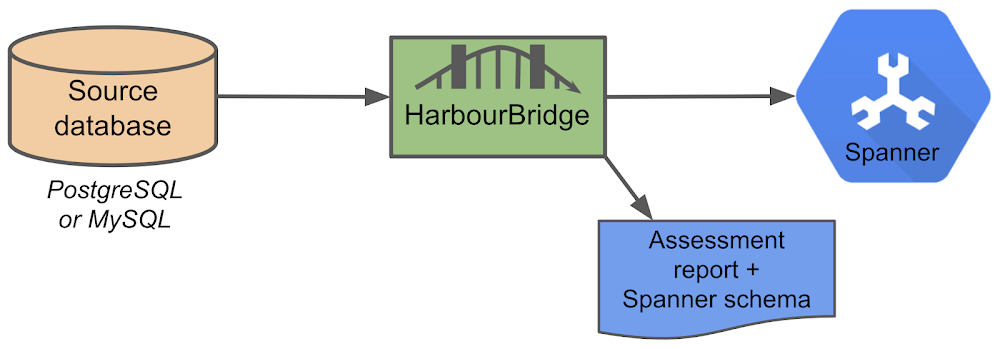
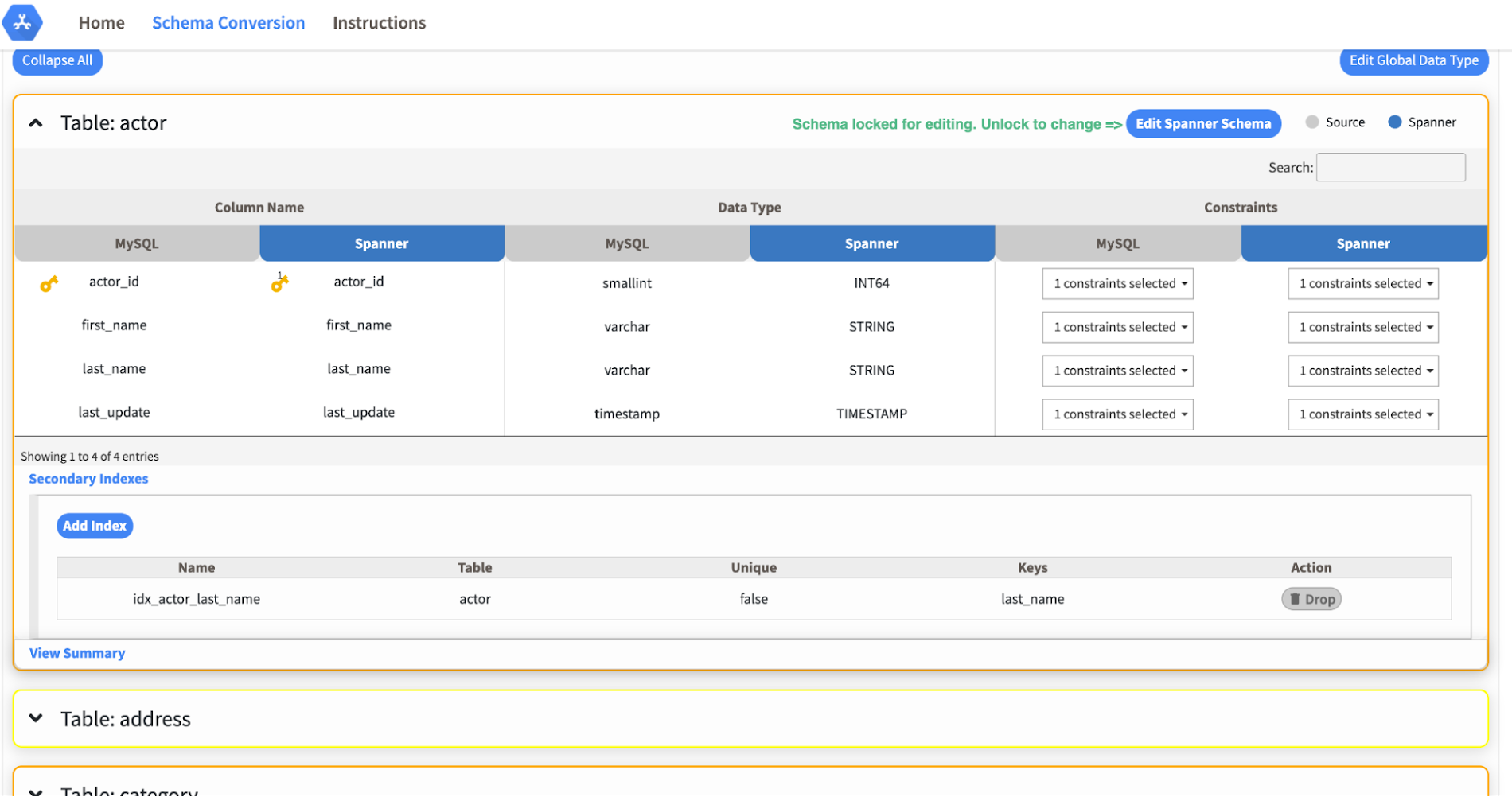
Today we’re announcing the HarbourBridge Schema Assistant, which provides a guided schema-design workflow for migrating from MySQL or PostgreSQL to Spanner. HarbourBridge imports dump files (from mysqldump or pg_dump) or directly connects to your source database, and converts the source database schema to an equivalent Spanner schema. The new Schema Assistant capability displays the source schema and Spanner schema side-by-side, highlights errors and walks you through a series of steps to validate and optimize your Spanner schema. It also produces a browsable assessment report with an overall migration-fitness score for Spanner, a table-by-table detailed analysis of type mappings and a list of features used in the source database that aren’t supported by Spanner. It supports editing of table and column names, column types, primary keys and constraints, as well as dropping of tables, columns, foreign keys and secondary indexes.
The new Schema Assistant complements HarbourBridge’s existing data and schema migration capabilities and is a critical step towards our goal of building a complete open-source migration toolkit. HarbourBridge continues to support command-line schema and data migration and turn-key Spanner evaluation.
Complementing the bulk data migration capabilities of HarbourBridge, we are also announcing the ability to migrate change events from MySQL to Cloud Spanner.
Supported Features in Schema Assistant
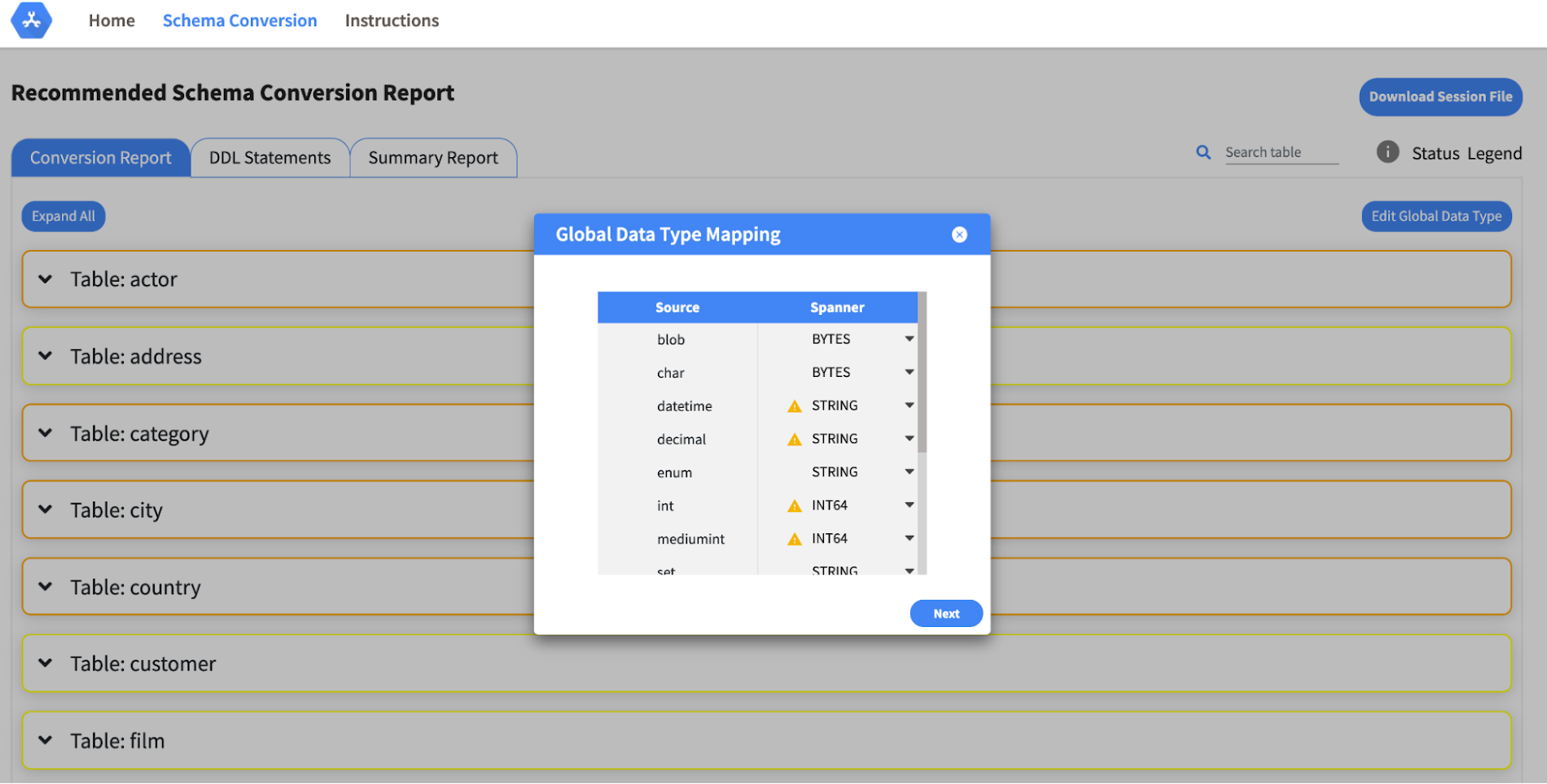
- Global type mapping. Users can customize the global mapping for how types should be mapped to Spanner consistently across the schema. For example, mapping large integers in source schema to Spanner’s NUMERIC.
- Local type mapping. Users can override the custom type mapping for a given table/column.
- Session management. A session keeps track of all the changes made to the schema mapping.
- Customization of secondary indexes. Users can add, edit and delete secondary indexes to optimize their Spanner performance.
- Customization of foreign keys and interleaved tables. Table interleaving is an important design consideration when migrating to Cloud Spanner as explained in more detail in this blog post.
Features in the pipeline
We are already working to further expand the supported set of schema editing features and welcome your feedback. We are particularly excited to expand the Schema Assistant’s design recommendations for optimizing Spanner schemas e.g. in-depth recommendations for primary key design.
HarbourBridge is open source and we gladly accept contributions from the wider community.
5 Features IT Departments Love About Google Cloud

3669
Of your peers have already read this article.
5:30 Minutes
The most insightful time you'll spend today!
Throughout the past couple of years, I have helped a good number of companies, big and small, migrate their systems to the Google Cloud Platform (aka GCP). During the course of these migrations, there are always a few of those moments where people look at a specific Google Cloud feature and say, “now, that’s cool!”.
More often than not, it is because, coming from other platforms, they have gotten used to some features requiring multiple steps, or some operations being complicated, etc. And often they find out that in GCP you can do this specific operation in a couple of clicks, or by setting up a simple text-based configuration. Then you see that light bulb turning on in their head, and there you go… happy customer.
A few of these happen so often that I compiled them in a list to share with others who might also benefit from these “aha!” moments. You could say these are the five things I wish they told me when I started using Google Cloud.
Projects: Naturally Group Resources Together
A project is a namespace where resources live. Every resource you instantiate in GCP, from load balancers to Kubernetes clusters to virtual machines, belongs to a single project, and has no access (by default) to resources in other projects. User roles and authorisations can be defined per-project and trickle down to everything in it. This has two immediate benefits: you can group things that belong together in neat logical units, and things that don’t belong together are isolated from each other (and isolation is a Good Thing)
This is powerful and quite simple, but it often takes new users off-guard. I’ve had many clients call me and ask me “How can I make sure my developers cannot access the production machines? What’s the best way to create access policies? ”
The answer to this is actually super-simple:
- have a project for development where your developers have rights,
- have a project for production where they don’t.
- That’s it.
Every machine/other resource in the production project won’t be accessible to developers.
Of course there is a lot more to it, and you can refine roles and permissions to a much greater degree using Organizations, Folders, etc. Not to mention all the crazy things you can do with per-project billing. But at least you can say “hey, if it’s a machine in the staging environment then it can be found in the “staging” project”.
Global Virtual Networks Are *Truly* Global
Imagine you are using a Cloud provider and that you have servers in the US, and servers in Singapore, and that they need to communicate.
So you create a VPC (Virtual Private Cloud) network in the US data center, another one in the Singapore data center, and then you will connect them by setting up inter-region VPC peering or a VPN (Virtual Private Network) or a transit VPC or other routing magic.
Lots of work, right? And many moving parts, so lots of opportunities for things to break.
With GCP, however, what makes my clients go “aha!” is when they realize that in GCP a single VPC network covers the entire planet. Only subnets are attached to a geographic location, and virtual machines communicate between subnets on private IPs (good old RFC1918 addresses) — no extra routing needed.
So, to make your server communicate across continents on GCP, here are the steps:
- create a VPC network
- create a subnet in the US, put your US servers in it
- create a subnet in Singapore, put your Singapore servers in it
That’s all there is to it. Your VPC network spanning 2 continents is ready to use. Below is a screenshot of how it looks on my account, for a VPC network called ‘my-global-network’ with 2 subnets. The first column (“us-central1” and “asia-southeast1”) contains the name of the GCP regions (read: data centers). The second column is the subnet name that I picked when I created them.

A machine in the US (on the “us-central” subnet) with IP 10.0.0.5 can communicate directly with a machine in Singapore (on the “singapore”) subnet with IP 10.10.0.8.
Nothing else to set up.
And thanks to the way these networks work, the Google Cloud Load Balancer can present a single IP to the world, and forward traffic to the instances that are the closest to you geographically without having to setup a tedious DNS-based load balancing. But that’s worth an entire blog. I’ll save it for another day.
Firewalls with Tags and (Almost) No IP Addresses
There is no network security without a firewall so unsurprisingly GCP comes with one built-in.
Now, I don’t know about you, but nothing makes my brain hurt like a list of firewall rules displaying IP ranges and addresses and ‘Allow/Deny’ directives. It looks a bit like this:

If you imagine a normal network with a few dozen (hundred?) servers, you can quickly see how this can get out of control. You’d better have a solid printout of your network layout to refer to when you start adding and changing rules. And good luck debugging things!
Wouldn’t it be nice if, instead, you could just tell the firewall: “the HTTP traffic from outside can only reach the HTTP servers and the MySQL database is only reachable by the HTTP server(s) on the same network?”
Turns out it’s pretty simple on GCP by using a little thing called network tags. As the documentation says:
“Network tags are text attributes you can add to Compute Engine virtual machine (VM) instances. Tags allow you to make firewall rules and routes applicable to specific VM instances.”
So let’s see how it works. Firewall rules in GCP are defined in terms of source and target (the traffic flows from the source to the target). You can define filtering rules that apply to the source or the target, and in both cases you can use tags.
This is simpler shown with an example. The rule below states that on the default network, the traffic to the VMs with the tag mysql-server can come from the VMs with the tag http-appserver. Any other traffic is “Deny”-ed by default.

All you have to do is to tag your machines properly, and they will automatically be covered by the rule. You don’t need to enter their IP range.
That’s neat if you ask me. It makes it a lot simpler to grasp what’s happening.
Of course, there’s a TON more to firewalls in GCP. Tags also apply to routes and you can mix and match IP-based rules with tag-based rules. Not to mention that thing called service accounts, but I’ll leave those for another day.
The bottom line is that you can create most rules by just expressing a business need and not having to remember complicated network layouts. I have no hard stats, but I’m pretty sure this has saved me hours of work.
Console Access to VMs from the Browser
Easily access virtual machines (VMs) from the Google Cloud console was one of my first “aha!” moments when I started using GCP.
This is a screen capture of my Google Cloud console, with a virtual machine and its internal IP.

The last column has a header that says “Connect” and when you click on the word “SSH” a separate windows pops up. You wait for a few seconds, and… this is what you get. Your personal shell access — in a browser popup no less.

You are connected through ssh to the virtual machine of your choice. You did not have to download ssh keys and put them in the ~/.ssh directory, do the correct chmod command and run a long-winded ssh -i ~/.ssh/somekey me@<it-took-me-forever-to-copy-paste-the-address-here>
In addition, you have access to a few nifty features such as uploading and downloading files, changing the user etc. Just use the menu behind the cog icon at the top right.
In truth, you should not need to connect directly that often, but when you have to, this is a godsend.
Your Personal Jumphost from the Google Cloud Console
The Google Cloud console has a cool trick: you can actually connect to a virtual environment that is managed by the Google Cloud console itself. It serves a bit as a jump host. You can access most resources from the projects from it, and you can activate it directly from the top menu with, no particular setup on your side. It’s called the Cloud Shell.
This is how it looks at the top right of the console:

When you activate the Cloud Shell, the session opens at the bottom of the console. You get a command line prompt and it’s fully configured with the gcloud command line tool (the jack-of-all-trades of Google Cloud scripting).

You can do a great many things from there, and this even includes uploading and downloading files, editing code or deploying it, a web preview for your AppEngine application, and more.
So you can get access to a fully configured shell environment in your project from any laptop where you can connect with your credentials. On top of this, it persists between connections so you can fine-tune it to your needs and have these changes available the next time you re-connect.
This has saved me many times during my previous life as a traveling consultant!
Live migration
Did I say 5 “Aha!” moments ? Well, you’ve been patient reading all the way to here, so here’s one more for free.
Google Cloud has an amazing way to literally “teleport” a running virtual machine between physical hosts without stopping it. It’s called Live Migration. It allows Google to move your virtual machine away from a defective host, or a host that needs a patch or an upgrade, or for any other infrastructure related reason.
It’s all done in the background, and is totally transparent, so you never really see it happening. Unless you look VERY closely. I once did a demo to a client, where a machine was live migrated while he was simulating a solid network load — and we did not lose a single packet, with no noticeable degradation in latency.
And that’s a wrap!
So there you go. These are 5+1 things that made me go “Aha!” when I became more familiar with the Google Cloud Platform, and that still make my clients do the same.
There is a lot of depth to the platform, and my examples above only scratch the surface of our features. I encourage you to try it yourself. There is a generous free tier, and when you are ready to take the plunge and create that new company, please contact us at Google Cloud for Startups. We’ll get you up and running in no time.
Jerome is a Startup Architect at Google Cloud. Based in Singapore, he helps startups make the most of the Google Cloud Platform.
More Relevant Stories for Your Company

Making Mothers’ Day Special: How Google Cloud Migration for 1-800-FLOWERS.COM, Inc Impacts CX
Editor’s note: In honor of Mother’s Day, we look at how 1-800-FLOWERS.COM, Inc. migrated to Google Cloud as part of its digital transformation to quickly deploy seamless and convenient customer experiences across multiple brands on Mother’s Day and every day. As a leading provider of gifts designed to help customers

Gartner Names Google Cloud a Leader in the 2019 Cloud Infrastructure as a Service Market
As increasing amount of cloud IaaS is being bought for traditional IT, with an emphasis on cost reduction, safety and security, service providers are offering a high-quality service, with excellent availability, good performance, high security and good customer support. In its Magic Quadrant for Cloud Infrastructure as a Service (IaaS),

Southwire Completes SAP Migration to Google Cloud as a First Step of its Tech Evolution
“Talk about tough times, right?” That’s how Dan Stuart, Senior Vice President of IT Services at Southwire Company, refers to the months following a December 2019 ransomware event, and the COVID crisis that began in spring of 2020. Those events hit just as the company was preparing for an overhaul

What Swiggy and You Can Learn From This Company’s Use of ML to Engage Customers
The app economy has enabled a huge range of unique business models to flourish. One such model is online food ordering and delivery services, in which apps leverage geo-location data to aggregate local food choices and offer personalized options to consumers. A leading company in this space is Just Eat.
