





This Chart, from Home Depot, Dramatically Demonstrates the Power of a Cloud Data Warehouse

7578
Of your peers have already read this article.
2:30 Minutes
The most insightful time you'll spend today!
The Home Depot (THD) is the world’s largest home-improvement chain, growing to more than 2,200 stores and 700,000 products in four decades. Much of that success was driven through the analysis of data. This included developing sales forecasts, replenishing inventory through the supply chain network, and providing timely performance scorecards.
However, to compete in today’s business world, THD has taken this data-driven approach to an entirely new level of success on Google Cloud, providing capabilities not practical on legacy technologies.
The pressures of contemporary growth that drove much of the work are familiar to many businesses. In addition to everything it was doing, THD needed to better integrate the complexities in its related businesses, like tool rental and home services. It needed to better empower teams, including a fast-growing data analysis staff and store associates with mobile computing devices. It wanted to better use online commerce and artificial intelligence to meet customer needs, while maintaining better security.
Even before addressing these new challenges, THD’s existing on-premises data warehouse was under stress as more data was required for analytics and data analysts were utilizing the data with increasingly complex use cases. This drove rapid growth of the data warehouse, but also created constant challenges for the team in managing priorities, performance, and cost.
In order to add capacity to the environment, it was a major planning, architecture, and testing effort. In one case, adding on-premises capacity took six months of planning and a three-day service outage. Within a year, capacity was again scarce, impacting performance and ability to execute all the reporting and analytics workloads required. The capacity refresh cycles were shrinking, and the expecations for data were growing. There had to be a better way.
Still, THD did not take its move to the cloud lightly. A large-scale enterprise data warehouse migration involves tremendous effort among people, process, and technology. After careful consideration, THD chose Google Cloud’s BigQuery for its cloud enterprise data warehouse.
BigQuery, a scalable serverless data warehouse, was better on cost, infrastructure agility, and analytics capability, driving better insights with improved performance. There are no service interruptions when capacity is added, and that capacity can be added within a week (and soon same day). It doesn’t require complex system administration, and its standard SQL support means people can easily ramp up quickly. Valuable BigQuery products like Identity and Access Management meant THD could create many separate Google Cloud projects, while ensuring that different teams weren’t interfering with each other or accessing protected data.
THD also utilizes BigQuery’s flat-rate monthly pricing model that allows teams to budget their capacity based on need and provides billing predictability. The capacity not being used by a given project is available for enterprise use. This ensures no surprises when the monthly bill arrives and provides all analytical users access to significant computing power.
While THD’s legacy data warehouse contained 450 terabytes of data, the BigQuery enterprise data warehouse has over 15 petabytes. That means better decision-making by utilizing new datasets like website clickstream data and by analyzing additional years of data.
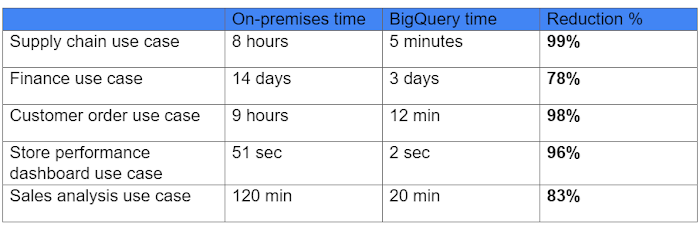
As for performance, look at this chart:
With the cloud EDW migration complete, and the legacy on-premises data warehouse retired, analysts now execute more complex and demanding workloads that they would not have been able to complete before, such as utilizing Datalab for orchestrating analytics through Python Notebooks, utilizing BigQuery ML for machine learning directly against the BigQuery data (no movement of large datasets), and AutoML to help determine the best model for predictions.
Additionally, engineers at THD have adapted BigQuery to monitor, analyze, and act on application performance data across all its stores and warehouses in real time, something that was not practical in the on-premises system.
With over 600 projects that THD now has on Google Cloud, the BigQuery story is just one of the many ways that Google Cloud is working with THD to deliver meaningful business results, every day.
Recommendations for Modelling SAP Data inside BigQuery

8392
Of your peers have already read this article.
4:00 Minutes
The most insightful time you'll spend today!
Over the past few years, many organizations have experienced the benefits of migrating their SAP solutions to Google Cloud. But this migration can do more than reduce IT maintenance costs and make data more secure. By leveraging BigQuery, SAP customers can complement their SAP investments and gain fresh insights by consolidating enterprise data and easily extending it with powerful datasets and machine learning from Google.
BigQuery is a leading cloud data warehouse, fully managed and serverless, and allows for massive scale, supporting petabyte-scale queries at super-fast speeds. It can easily combine SAP data with additional data sources, such as Google Analytics or Salesforce, and its built-in machine learning lets users operationalize machine learning models using standard SQL — all at a comparatively low cost.
If your SAP-powered organization is looking to supercharge its analytics with the strength of BigQuery, read on for considerations and recommendations for modeling with SAP data. These guidelines are based on our real-world implementation experience with customers and can serve as a roadmap to the analytics capabilities your business needs.
Considerations for data replication
Like most technology journeys, this one should start with a business objective. Keeping your intended business value and goals in mind is critical to making the right decisions in the early steps of the design process.
When it comes to replicating the data from an SAP system into BigQuery, there are multiple ways to do it successfully. Decide which method will work best for your organization by answering these questions:
- Does your business need real-time data? Will you need to time travel into past data?
- Which external datasets will you need to join with the replicated data?
- Are the source structures or business logic likely to change? Will you be migrating the SAP source systems any time soon? For instance, will you be moving from SAP ECC to SAP S/4HANA?
You’ll also need to determine whether replication should be done on a table-by-table basis or whether your team can source from pre-built logic. This decision, along with other considerations such as licensing, will influence which replication tool you should use.
Replicating on a table-by-table basis
Replicating tables, especially standard tables in their raw form, allows sources to be reused and ensures more stability of the source structure and functional output. For example, the SAP table for sales order headers (VBAK) is very unlikely to change its structure across different versions of SAP, and the logic that writes to it is also unlikely to change in a way that affects a replicated table.
Something else to consider: Reconciliation between the source system and the landing table in BigQuery is linear when comparing raw tables, which helps avoid issues in consolidation exercises during critical business processes, such as period-end closing. Since replicated tables aren’t aggregated or subject to process-specific data transformation, the same replicated columns can be reused in different BigQuery views. You can, for instance, replicate the MARA table (the material master) once and use it in as many models as needed.
Replicating pre-built logic
If you replicate pre-built models, such as those from SAP extractors or CDS views, you don’t need to build the logic in BigQuery, since you’re using existing logic. Some of these extraction objects have embedded delta mechanisms, which may complement a replication tool that can’t handle deltas. This will save initial development time, but it can also lead to challenges if you create new columns, or if customizations or upgrades change the logic behind the extraction.
It’s also important to note that different extraction processes may transform and load the same source columns multiple times, which creates redundancy in BigQuery and can lead to higher maintenance needs and costs. However, replicating pre-built models may still be a good choice, since doing so can be especially useful for logic that tends to be immutable, such as flattening a hierarchy, or logic that is highly complex.
How you approach replication will also depend on your long-term plans and other key factors — for example, the availability (and curiosity) of your developers, and the time or effort they can put into applying their SQL knowledge to a new data warehouse.
With either replication approach, bear in mind when designing your replication process that BigQuery is meant to be an append-always database — so post-processing of data and changes will be required in both cases.
Processing data changes
The replication tool you choose will also determine how data changes are captured (known as CDC – change data capture). If the replication tool allows for it (for example as SAP SLT does) the same patterns described in the CDC with BigQuery documentation also apply to SAP data.
Because some data, like transactions, are known to be less static than others (e.g., master data), you need to decide what should be scanned in real time, what will require immediate consistency, and what can be processed in batches to manage costs. This decision will be based on the reporting needs from the business.
Consider the SAP table BUT000, containing our example master data for business partners, where we have replicated changes from an SAP ERP system:

In an append-always replication in BigQuery, all updates are received as new records. For example, deleting a record in the source will be represented as a new record in BigQuery with a deletion flag. This applies to whether the records are coming from raw tables like BUT000 itself or pre-aggregated data, as from a BW extractor or a CDS view.
Let’s take a closer look at data coming particularly from the partners “LUCIA” and “RIZ”. The operation flag tells us whether the new record in BigQuery is an insert (I), update (U) or deletion (D), while the timestamps help us identify the latest version of our business partner.

If we want to find the latest updated record for the partners LUCIA and RIZ, this is what the query would look like:
SELECT partner,ARRAY_AGG(i1 ORDER BY i1.recordstamp DESC LIMIT 1) AS rowFROM SAP_ECC.but000 i1WHERE partner in ('LUCIA','RIZ')GROUP BY partner
With the following result:

After identifying stale records for “LUCIA” and “RIZ” business partners, we can proceed to deleting all stale records for “LUCIA” if we do not want to retain the history. In this example, we are using a different table to which the same replication has been done, for the purpose of comparison and to check that all stale records have been deleted for the selection made and that we only kept last updated records. For example:
DELETE SAP_HANA.but000 i1WHEREi1.recordstamp < TIMESTAMP_SUB(CURRENT_TIMESTAMP(), INTERVAL 3 HOUR) ANDi1.recordstamp < (SELECT MAX(recordstamp) FROM SAP_HANA.but000 i2WHEREi1.partner = i2.partnerand partner="LUCIA")
You can also use the following query to retrieve stale records for “LUCIA” partner before moving forward with deletion
SELECT partner, operation_flag, recordstamp FROM SAP_HANA.but000 i1WHEREi1.recordstamp < TIMESTAMP_SUB(CURRENT_TIMESTAMP(), INTERVAL 3 HOUR)ANDi1.recordstamp < (SELECT MAX(recordstamp) FROM SAP_HANA.but000 i2WHEREi1.partner = i2.partnerand partner="LUCIA")
Which produces all of the records, except the latest update:

Partitioning and clustering
To limit the number of records scanned in a query, save on cost and achieve the best performance possible, you’ll need to take two important steps: determine partitions and create clusters.
Partitioning
A partitioned table is one that’s divided into segments, called partitions, which make it easier to manage and query your data. Dividing a large table into smaller partitions improves query performance and controls costs because it reduces the number of bytes read by a query.
You can partition BigQuery tables by:
- Time-unit column: Tables are partitioned based on a “timestamp,” “date,” or “datetime” column in the table.
- Ingestion time: Tables are partitioned based on the timestamp recorded when BigQuery ingested the data.
- Integer range: Tables are partitioned based on an integer column.
Partitions are enabled when the table is created, as in the example below. A great tip is to always include the partition filter as shown on the left-hand side of the query.

Clustering
Clustering can be created on top of partitioned tables by applying the fields that are likely to be used for filtering. When you create a clustered table in BigQuery, the table data is automatically organized based on the contents of one or more of the columns in the table’s schema. The columns you specify are then used to colocate related data.
Clustering can improve the performance of certain query types — for example, queries that use filter clauses or that aggregate data. It makes a lot of sense to use them for large tables such as ACDOCA, the table for accounting documents in SAP S/4HANA. In this case, the timestamp could be used for partitioning, and common filtering fields such as the ledger, company code, and fiscal year could be used to define the clusters.

A great feature is that BigQuery will also periodically recluster the data automatically.
Materialized views
In BigQuery, materialized views are precomputed views that periodically cache the results of a query for better performance and efficiency. BigQuery uses precomputed results from materialized views and, whenever possible, reads only the delta changes from the base table to compute up-to-date results quickly. Materialized views can be queried directly or can be used by the BigQuery optimizer to process queries to the base table.
Queries that use materialized views are generally completed faster and consume fewer resources than queries that retrieve the same data only from the base table. If workload performance is an issue, materialized views can significantly improve the performance of workloads that have common and repeated queries. While materialized views currently only support single tables, they are very useful common and frequent aggregations like stock levels or order fulfillment.
Further tips on performance optimization while creating select statements can be found in the documentation for optimizing query computation.
Deployment pipeline and security
For most of the work you’ll do in BigQuery, you’ll normally have at least two delivery pipelines running — one for the actual objects in BigQuery and the other to keep the data staging, transforming, and updated as intended within the change-data-capture flows. Note that you can use most existing tools for your Continuous Integration / Continuous Deployment (CI/CD) pipeline — one of the benefits of using an open system like BigQuery. But, if your organization is new to CI/CD pipelines, this is a great opportunity to gradually gain experience. A good place to start is to read our guide for setting up a CI/CD pipeline for your data-processing workflow.
When it comes to access and security, most end-users will only have access to the final version of the BigQuery views. While row and column-level security can be applied, as in the SAP source system, separation of concerns can be taken to the next level by splitting your data across different Google Cloud projects and BigQuery datasets. While it’s easy to replicate data and structures across your datasets, it’s a good idea to define the requirements and naming conventions early in the design process so you set it up properly from the start.
Start driving faster and more insightful analytics
The best piece of advice we can give you is this: Try it yourself. Anyone with SQL knowledge can get started using the free BigQuery tier. New customers get $300 in free credits to spend on Google Cloud during the first 90 days. All customers get 10 GB storage and up to 1 TB queries/month, completely free of charge. In addition to discovering the massive processing capabilities, embedded machine learning, multiple integration tools, and cost benefits, you’ll soon discover how BigQuery can simplify your analytics tasks.
If you need additional assistance, our Google Cloud Professional Services Organization (PSO) and Customer Engineers will be happy to help show you the best path forward for your organization. For anything else, contact us at cloud.google.com/contact.
Navigating the Next Wave of B2B Digital Commerce: Trends and Insights for 2023

1454
Of your peers have already read this article.
1:30 Minutes
The most insightful time you'll spend today!
Editor’s note: Google Cloud partner commercetools shares how modern technologies like composable commerce, cloud-native infrastructure and artificial intelligence/machine learning (AI/ML) will lead the way in business-to-business (B2B) digital commerce this year.
Digital commerce in B2B has been predicted as the next big thing for years; yet, at the start of COVID-19, 60% of B2B companies had zero or limited eCommerce capabilities. The pandemic accelerated digitization and eCommerce has finally taken off: As of February 2022, 65% of B2B companies offered eCommerce capabilities.
The behavior of B2B buyers is also changing: Consumer-like expectations are at the heart of successful B2B commerce, and this is how manufacturers, distributors and wholesalers will shape their customer experiences. Today, 73% of B2B buyers want a personalized business-to-consumer or B2C-like experience. 83% prefer ordering or paying through digital commerce and 72% are eager to purchase across channels.
With digital commerce dictating how B2Bs will grow in 2023 and beyond, what trends will spur digital transformations across this business model? Here’s what the team at commercetools expects to unfold in B2B eCommerce this year.
#1 B2B firms are switching to cloud-native, composable commerce
B2B players still plagued with manual processes and siloed backend systems will move away from monolithic platforms and choose composable commerce. In a nutshell, composability enables businesses to select best-of-breed components, such as search, cart or checkout, and “compose” them into a custom application.
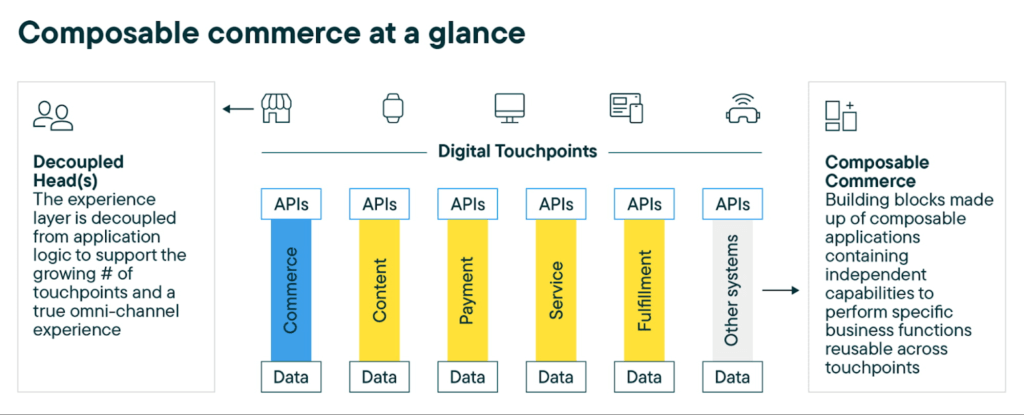
B2B firms will modernize their commerce backend, interoperating siloed systems like Configure Price Quote solutions (CPQs) for sales and enterprise resource planning solutions (ERPs) for order entry with an API-first and composable commerce stack. They will also pivot from on-premise deployments to cloud-native architectures as the baseline for auto-scaling capabilities instead of pre-provisioning online capacity during traffic peaks. That way, B2Bs can customize customer-centric experiences to boost revenue while reducing the complexity and cost of in-house IT infrastructure, as well as gaining operational efficiencies
B2Bs will maximize the cross-section of composable commerce and cloud-native infrastructure by leveraging a commerce backend like commercetools Composable Commerce hosted on Google Cloud. This combined solution provides commercetools’ ready-to-use components built as microservices and exposed as APIs, such as product information management (PIM) and unified cart, integrated through the Google Cloud Marketplace.
#2 Strong focus on data quality and personalization
Focusing on data quality continues to be a big trend in 2023. B2B buyers expect product, pricing, inventory and shipping data points to be accurate across every touchpoint so they can make better purchasing decisions, such as when to order products and calculate quantities.
With so many data points to capture throughout the customer journey — product, inventory, pricing and customer data — we’ll see more B2B companies reorganizing their vast information pools to elevate customer experiences. They will pivot to modular and API-first solutions, plus flexible data models, so they can break data silos from legacy monolithic platforms and access such data when needed.
We also expect to see more customer analytics to unlock data on buyer behavior. By understanding what customers see, click and add to their shopping lists, B2B businesses get valuable insights into how buyers behave, using this data in the shopping journey according to product interests. That way, it’s possible to offer personalized experiences across touchpoints without hassle.
“It is important for B2B companies to look at their data as if it is one of their products; invest in its upkeep and integrity while finding ways to continuously improve it. Using advanced analytics powered by AI and ML to identify patterns from large amounts of data, B2B companies can activate insights into customer decision journeys to maintain loyalty, personalize experiences to improve satisfaction and boost revenue, while also finding ways to optimize costs. For example, with analytics, enterprises can streamline spend to focus on the highest-performing channels and reduce waste.” — Carrie Tharp, Google Cloud VP of Retail and Consumer
With data-driven tools coming into play like Google Cloud’s Discovery AI, Recommendations AI and Vision Product Search connected with composable commerce, B2B players can boost customer analytics to personalize experiences, improve customer satisfaction and reduce churn.
#3 The B2B customer experience will be redesigned
B2B players are taking a page out of the B2C playbook to elevate experiences throughout the customer journey. While intense work needs to happen in the backend commerce engine, B2B players will also redesign their digital frontends. That means boosting website performance, while mobile responsiveness and personalization will be at the forefront of these advanced digital initiatives.
More than ever, B2B companies are looking for digital storefronts delivered as progressive web applications (PWAs) for optimized performance and responsiveness across devices, as well as fast-loading and responsive experiences to boost your digital presence, SEO rankings and conversion rate. B2Bs can further streamline frontend development with solutions natively connecting to Google Cloud Marketplace, which supports a variety of storefront providers, including commercetools Frontend.
Leveraging Google Cloud’s unique capabilities, such as PWA web app development, Google Cloud Discovery AI solutions that include Retail Search and Vision API Product Search, among many others, B2B companies are well positioned to boost digital commerce in the years to come.
What’s next in 2023?
2022 was already a turbulent year; for better or worse, 2023 is expected to have a similar fate. For B2Bs, even the ones with tight budgets, investing in digital commerce can help future-proof businesses for whatever’s happening this year. To dive deeper into all predictions and insights by commercetools in collaboration with Google Cloud, read the guide Pivotal Trends and Predictions in B2B Digital Commerce in 2023.
Accelerating AI Inference at Scale: Introducing Google Cloud TPU v5e

938
Of your peers have already read this article.
4:30 Minutes
The most insightful time you'll spend today!
Google Cloud’s AI-optimized infrastructure makes it possible for businesses to train, fine-tune, and run inference on state-of-the-art AI models faster, at greater scale, and at lower cost. We are excited to announce the preview of inference on Cloud TPUs. The new Cloud TPU v5e enables high-performance and cost-effective inference for a broad range AI workloads, including the latest state-of-the-art large language models (LLMs) and generative AI models.
As new models are released and AI becomes more sophisticated, businesses require more powerful and cost efficient compute options. Google is an AI-first company, so our AI-optimized infrastructure is built to deliver the global scale and performance demanded by Google products like YouTube, Gmail, Google Maps, Google Play, and Android that serve billions of users — as well as our cloud customers.
LLM and generative AI breakthroughs require vast amounts of computation to train and serve AI models. We’ve custom-designed, built, and deployed Cloud TPU v5e to cost-efficiently meet this growing computational demand.
Cloud TPU v5e is a great choice for accelerating your AI inference workloads:
- Cost Efficient: Up to 2.5x more performance per dollar and up to 1.7x lower latency for inference compared to TPU v4.
- Scalable: Eight TPU shapes support the full range of LLM and generative AI model sizes, up to 2 trillion parameters.
- Versatile: Robust AI framework and orchestration support.
In this blog, we’ll dive deeper into how you can leverage TPU v5e effectively for AI inference.
Up to 2.5x more performance per dollar and up to 1.7x lower latency for inference
Each TPU v5e chip provides up to 393 trillion int8 operations per second (TOPS), allowing complex models to make fast predictions. A TPU v5e pod consists of 256 chips networked over ultra-fast links. Each TPU v5e pod delivers up to 100 quadrillion int8 operations per second, or 100 PetaOps, of compute power.
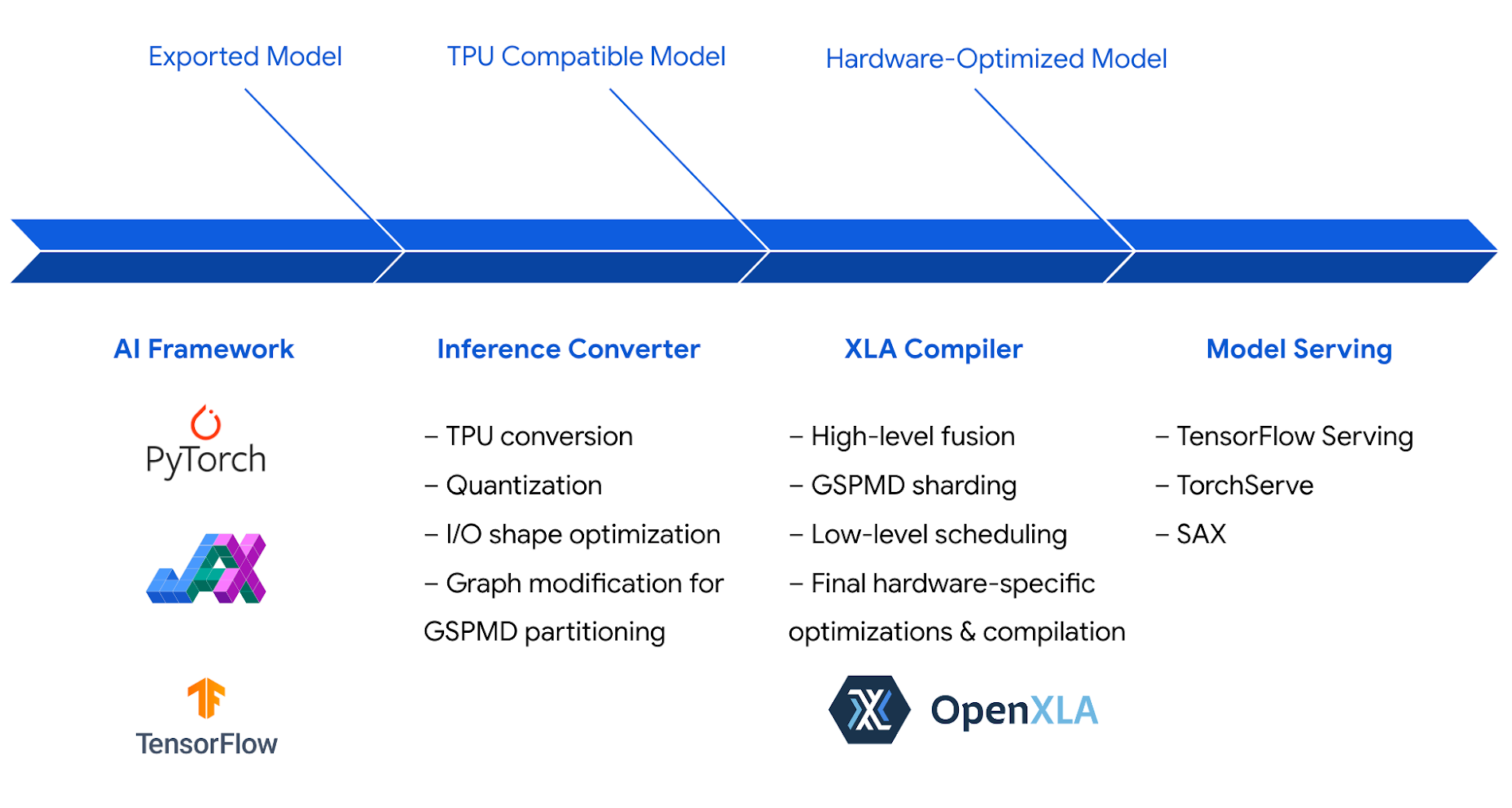
We optimized the Cloud TPU inference software stack to take full advantage of this powerful hardware. The inference stack leverages XLA, Google’s AI compiler, which generates highly-efficient code for TPUs to maximize performance and efficiency.
The combined hardware and software optimizations, including int8 quantization, enable Cloud TPU v5e to achieve up to 2.5x greater inference performance per dollar than Cloud TPU v4 on state-of-the-art LLM and generative AI models, including Llama 2, GPT-3, and Stable Diffusion 2.1:
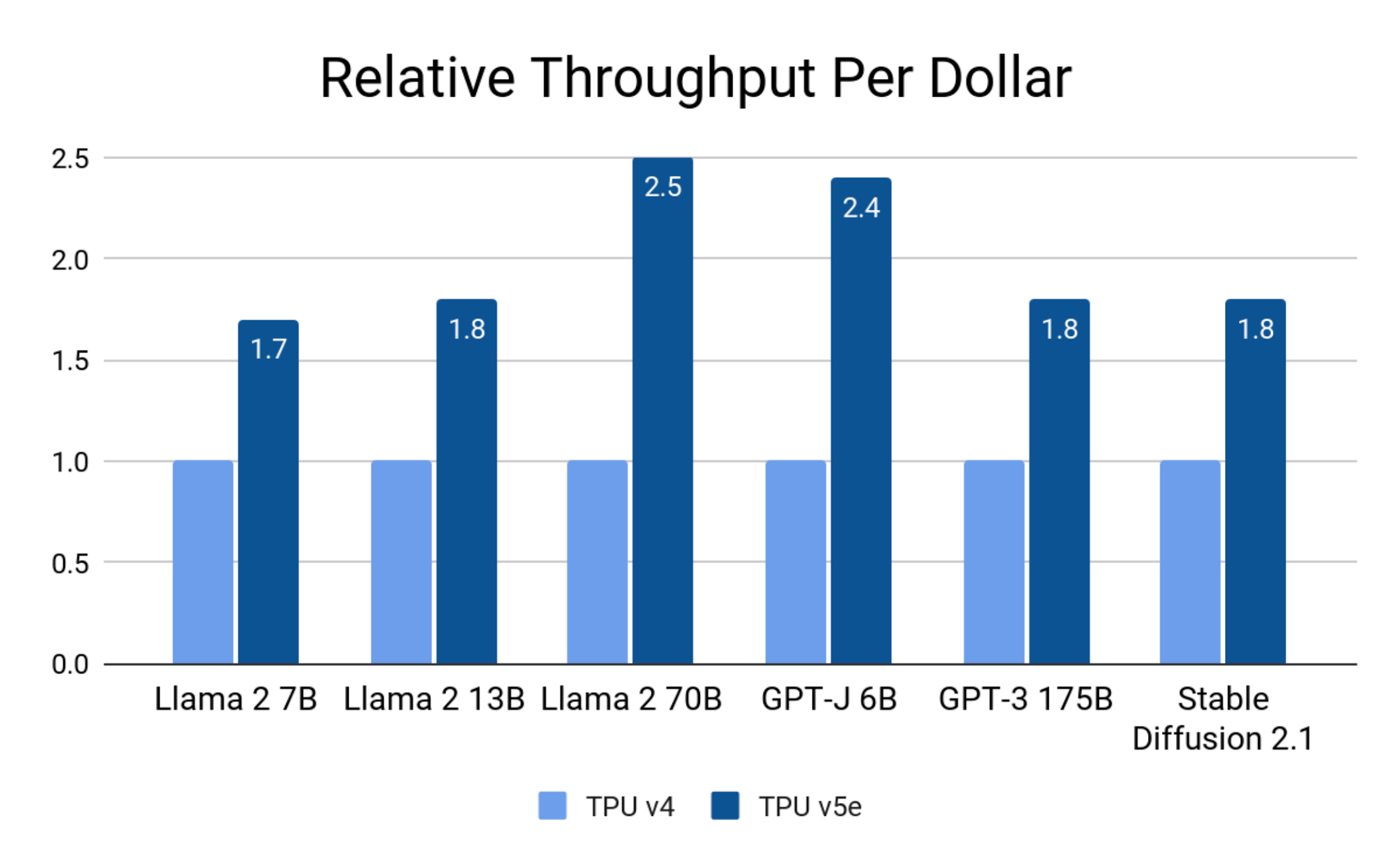
Google Internal Data. August 2023. Normalized to single-chip throughput. Precision: Llama 2 7B, 13B, 70B, GPT-J 6B: int8; GPT-J 175B, Stable Diffusion 2.1: bf16.
On latency, Cloud TPU v5e achieves up to 1.7x speedup compared to TPU v4:
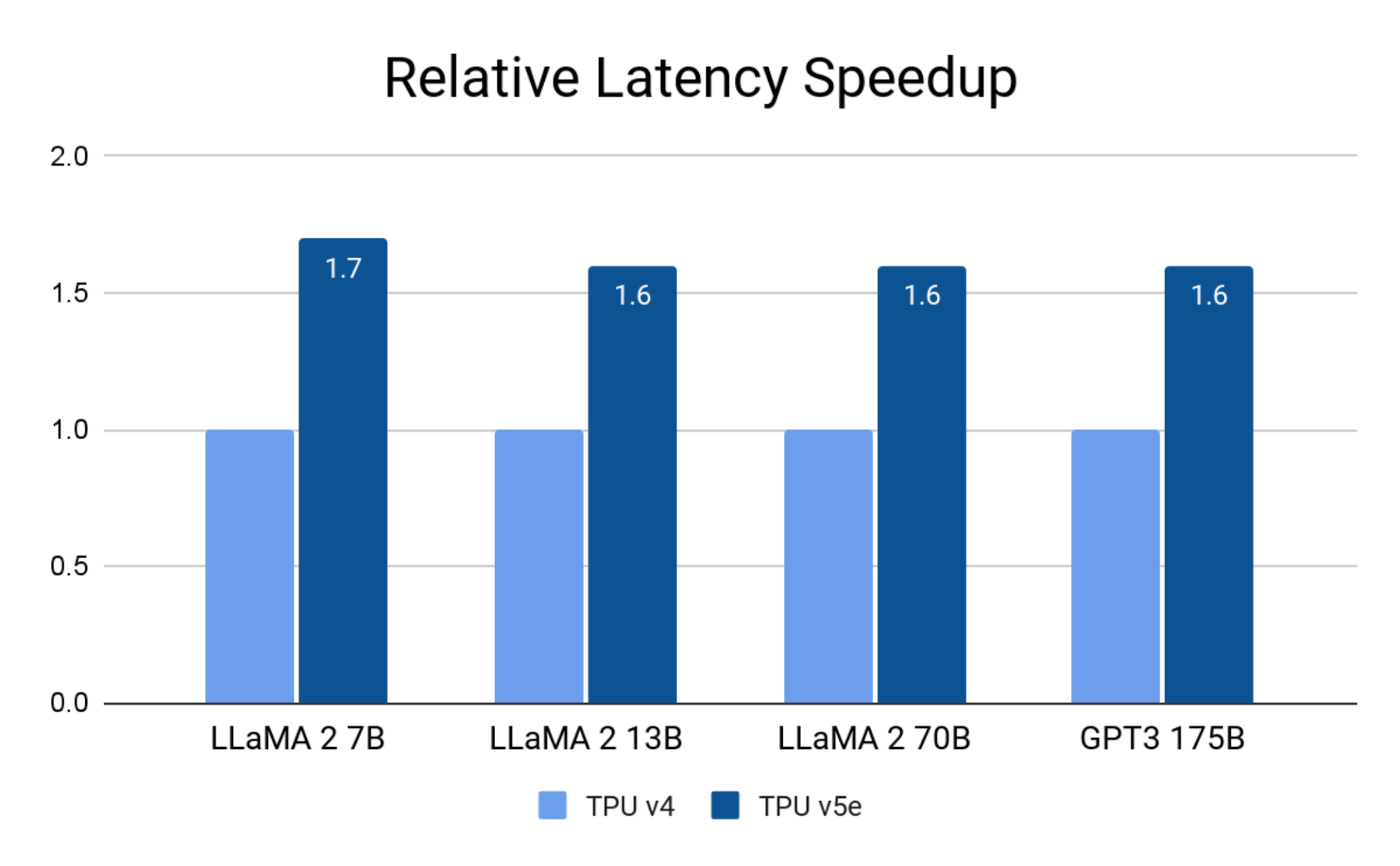
Google Internal Data. August 2023. Precision: Llama 2 7B, 13B and 70B: int8; GPT-3 175B: bf16.
Google Cloud customers have been running inference on Cloud TPU v5e, and some have seen even greater speedups on their particular workloads.
AssemblyAI offers dozens of AI models to their customers for speech recognition and understanding with over 25 million inference calls on a daily basis.
“Cloud TPU v5e consistently delivered up to 4X greater performance per dollar than comparable solutions in the market for running inference on our production model. The Google Cloud software stack is optimized for peak performance and efficiency, taking full advantage of the TPU v5e hardware that was purpose-built for accelerating the most advanced AI and ML models. This powerful and versatile combination of hardware and software dramatically accelerated our time to solution: instead of spending weeks hand-tuning custom kernels, within hours we optimized our model to meet and exceed our inference performance targets.” – Domenic Donato, VP of Technology, AssemblyAI
Scale to the full range of LLM and Generative AI model sizes
LLMs and generative AI models continue to grow in size and computational cost. The largest models require the combined compute and memory of hundreds of hardware accelerators. Cloud TPU v5e enables inference for a wide range of model sizes. A single v5e chip can run models with up to 13B parameters. From there, you can scale up to hundreds of chips and run models with up to 2 trillion parameters.
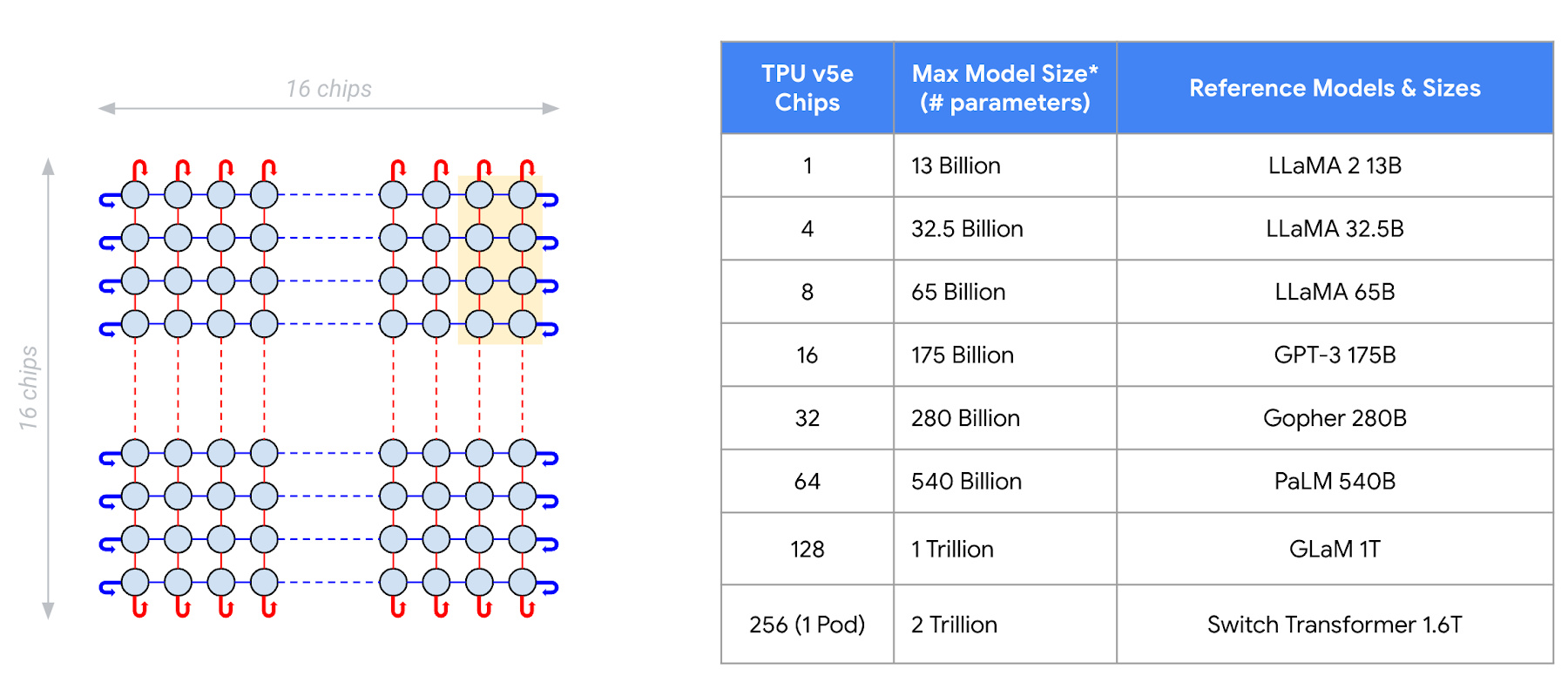
Google Internal Data. August 2023. Batch size = 1. Multi-head attention based decoder only language models: prefix length = 2048, decode steps = 256, beam size = 32 for sampling.
Gridspace leverages Google Cloud TPU infrastructure to power its full-stack conversational AI platform – building and integrating real-time conversational ASR, LLMs, semantic search, and neural TTS.
“We’re a huge fan of Google Cloud TPUs. Our benchmarks are demonstrating a 5X increase in the speed of AI models when training and running on Google Cloud TPU v5e. We are also seeing a 6x improvement in the scale of our inference metrics. We’ve scaled our AI models to billions of conversations per year across financial services, capital markets, and healthcare with Google Cloud’s AI infrastructure. Our Grace bots are powered by models trained using Cloud TPUs and served at scale on GKE with support for PCI, HITRUST, and SOC 2 compliance.” – Wonkyum Lee, Head of Machine Learning, Gridspace
Robust AI framework and orchestration support
Leading AI frameworks, including PyTorch, JAX, and TensorFlow, provide robust support for inference on Cloud TPU v5e. This means you can now train and serve models end-to-end on Cloud TPUs: what you train is what you serve.
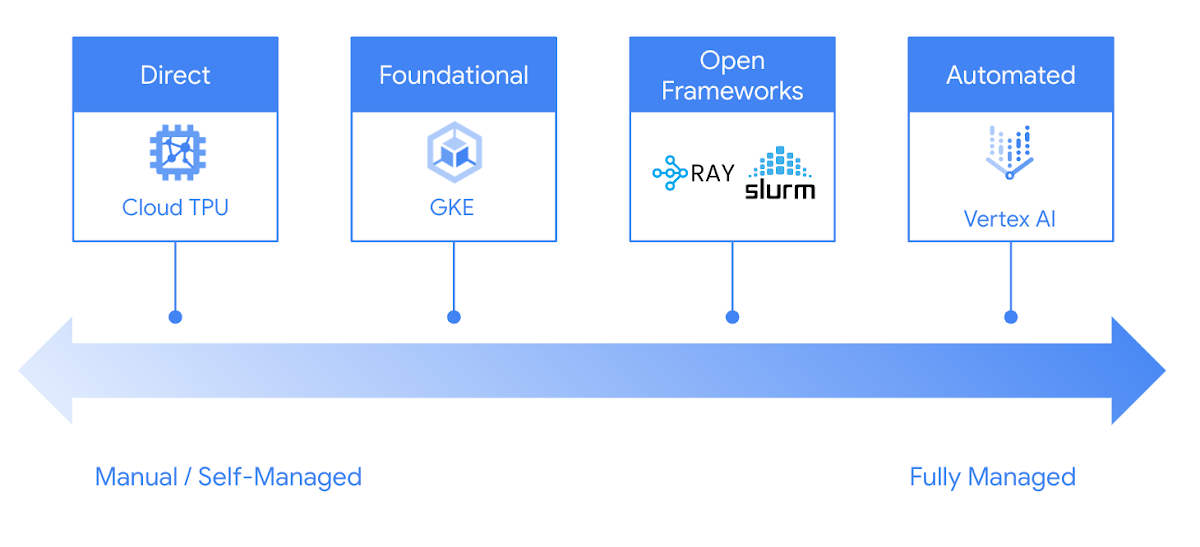
Google Cloud offers you many choices to run inference on Cloud TPUs easily and reliably. From GKE and Vertex AI, to popular open-source frameworks such as Ray and Slurm, you can leverage Google Cloud TPUs in your preferred way to fit your development process.
Try Cloud TPU v5e for inference today
Cloud TPU v5e provides a high-performance, cost-efficient, scalable, and reliable inference platform for LLMs and generative AI models. Leading AI companies are leveraging the power of Cloud TPU v5e to serve AI models at scale:
To get started with inference on Cloud TPU, reach out to your Google Cloud account manager or contact Google Cloud sales.
3464
Of your peers have already watched this video.
3:30 Minutes
The most insightful time you'll spend today!
Rightmove’s Right Move to Google Cloud
In 2020, Rightmove, UK’s renowned property website app saw over a billion minutes from users and clocked about 100 busy days in 2021. To continue innovating their products and improve customer experiences while achieving sustainability goals, Rightmove chose Google Cloud to migrate their infrastructure!
The property search application platform already boasts of dedicated tech teams running heavily code-driven multi-data center infrastructure and high velocity CI/CD platform. To reduce time to product and time to market, Rightmove selects Google Cloud. Watch further to learn how Google Cloud Products helped them add new features, update their existing services and adhere to sustainability objectives.
How AI-powered ML Models Helps Run Unemployment Claims Verification at Scale

8363
Of your peers have already read this article.
2:00 Minutes
The most insightful time you'll spend today!
With unemployment application submissions reaching record numbers over the past year, state and local agencies in the United States have faced the challenge of processing unprecedented numbers of claims per week. The digital infrastructure most agencies have in place is unable to handle this volume, resulting in constituents waiting longer, and bad actors taking advantage of vulnerable systems. The Department of Labor Inspector General estimates that $63 billion in claims distributed is either an improper payment or fraud.
Validating claims also requires secure data sharing with other agencies for document and identity verification. Government leaders need a way to allow case adjudicators to quickly and confidently release backlogged claims, integrate with existing systems, and segment legitimate claims from potentially fraudulent ones — all within limited government budgets — securely and at scale.
Implementing a fraud detection solution on Google Cloud
States were under pressure to release payments, while also filtering out potentially fraudulent claims. SpringML and Google Cloud developed a framework to give adjudicators a reliable verification process that quickly filters potentially fraudulent claims, while processing the remaining claims so benefits reach citizens in a timely manner. SpringML and Google Cloud, applied AI-powered machine learning models to detect anomalous patterns in large datasets. Using Google Cloud tools, SpringML implemented a solution to streamline workflows, improve efficiencies, automate processes and identify potentially fraudulent claims.
SpringML used a variety of Google Cloud products to deliver a fraud detection solution, including:
- Google Cloud Storage to store and manage data
- BigQuery to store tabular data and BigQuery Machine Learning (BQML) to conduct machine learning on that data
- AutoML solutions to build predictive models and risk scoring
- Visualization tools such as Looker and Data Studio to present data and help government leaders make informed decisions.
Implementing machine learning to detect improper payments allows agencies to classify claims as “fraud” or “not fraud” based on the number of flags, as well as prioritize the most urgent claims. Deploying intelligent virtual agents to handle frequently asked questions meant that live agents could focus their time on more challenging cases.
Even once the pandemic is behind us, there will be bad actors trying to take advantage of overwhelmed or legacy systems. We’ve identified a few best practices for agencies managing enormous case loads and looking to improve improper payment analytics:
- Move your systems to the cloud. Many on-premises legacy systems can’t update their applications and scale to meet the volume of claims. Moving to a cloud environment enables rapid solution deployment and ingestion of large amounts of data without fear of overloading the system. The cloud scales with you–cost-effectively and securely.
- Understand patterns in the data. The answer is always in the data — we used deep analysis to help uncover suspicious patterns in large data sets. We implemented unsupervised machine learning to learn behaviors and create configurable rules that adjust to new information that comes into the system. We can uncover patterns that are likely associated with fraud – ones that a human might have missed.
- Use AI/ML tools to automate your existing systems and teams. These tools enable humans to work smarter and more efficiently. We automate anomaly detection and create dashboards for adjudicators to rapidly process claims. We are enabling the Wisconsin Department of Workforce Development by implementing automatic calculations and processing of recharge amounts, resulting in faster processing times and fewer human errors. Proactive fraud detection and timely calculation of recharge payment allowed DWD to ensure the benefits reached the right individuals.
- Build flexibility into your systems. We discovered that fraud patterns change over time. For instance,flags for fraud during March-May 2020 were vastly different from those we found in June-July 2020. Google Cloud tools make it easy to continually update algorithms to detect patterns and integrate external data sources.
Using Google Cloud tools, we can update digital infrastructure and incorporate machine learning best practices to help organizations efficiently process large volumes of claims and identify high probability fraudulent ones. SpringML provides consulting and implementation services and industry-specific analytics solutions that deliver high-impact business value to accelerate data-driven digital transformation. Learn more about fraud detection and how to improve improper payments analytics by watching our webinar.
More Relevant Stories for Your Company

DB Corp Opts For Google Cloud to Drive Transformation to Real-Time Operation
Headquartered in Bhopal, India, and listed on the Bombay Stock Exchange, DB Corp is India’s largest newspaper group. DB Corp publishes 62 editions in four languages and sells about 6 million newspaper copies per day. Beyond newspapers, DB Corp operates 29 radio stations, 13 portals and two mobile apps. Like

Beany’s Cloud-Based Accounting Solutions Transform Small Business Finance
Many people start a small business that aligns with their passions, but soon discover the day-to-day running of a business is very different than anticipated. Dealing with accounting, finance, and other daily activities can quickly overwhelm even the most promising of new businesses. Recognizing the unique challenges facing small businesses,

Google Cloud: Craft Your Successful Migration Path
There is no one-size-fits-all solution to cloud migration. Every approach has unique considerations, so you need to understand the trade-offs of each to execute an effective migration plan. We’ve outlined the key things to consider when crafting your migration journey, including: The benefits of having your applications in the cloud.

A Year of Going Carbon-free! Google’s Road to Sustainability Looks Promising
Last year, we announced our most ambitious sustainability goal yet: to operate everywhere on 24/7 carbon-free energy by 2030. We’ve set this goal to ensure that Google Cloud continues to be the cleanest cloud in the industry, and to show that full-scale decarbonization of electricity use is possible. Since setting our target,
