





5179
Of your peers have already watched this video.
24:40 Minutes
The most insightful time you'll spend today!
Case Study: How Texas’ Largest Grocery Chain Successfully Modernized its Legacy Mainframes
H-E-B, like many enterprises, is moving away from legacy mainframes in favor of microservices and public cloud infrastructure. With hundreds of applications powering their 100+ year-old grocery business (with more than 400 stores in Texas and Mexico), H-E-B needs to be confident that the platform they are building will provide them the agility and security to continue to innovate for their customers.
In this session, the H-E-B engineering team provides details on how they’ve started breaking down their Curbside and Home Delivery monoliths into microservices, why they chose to make Kubernetes a first-class citizen, and why they’re leveraging Anthos as a hybrid cloud platform.
The grocer began to map out a two- to four-year modernization plan in 2017. Initially, the enterprise signed on with Google Cloud and used GKE to move toward a container-first approach to app delivery. Later, it decided to adopt Anthos. Today, Anthos gives H-E-B tighter control over compliance and better proximity to its retail data.
Join the discussion with Joe Rodriguez, Platform Engineering Manager for H-E-B, and. Justin Turner, Sr. Software Engineering Manager for Curbside and Delivery Fulfillment at H-E-B, to learn about the lessons that led to the company’s successful transformation. Find out how Anthos, when deployed on-premises, will expedite their journey to microservices. Learn about the challenges that come with adopting a hybrid modernization strategy and how Anthos plays a critical role in their success in this session.
How This Leading Trading Company Uses APIs to Build Fintech Apps Quickly and Cost-Effectively

4607
Of your peers have already read this article.
5:10 Minutes
The most insightful time you'll spend today!
Tradier uses the Apigee API management platform from Google to abstract the legacy complexities of capital markets so that developers can build FinTech applications in an agile, nimble, and quick fashion at minimal cost. The company embodies the evolution of what cloud technology can enable in the form of an API-first business delivered as a service.
The rise of API-powered FinTech
Historically, companies that wanted to build systems, applications, or services to interact with the stock market would have to build an entire brokerage operation from scratch. This would include data infrastructure, compliance infrastructure, and storage capabilities. It could take years and massive capital expense to accomplish everything that was required to be ready to serve customers.
Tradier provides this infrastructure as an API-based service so that the same companies can launch investor applications in as little as a few weeks. This democratized access means that FinTech innovation can come from anywhere, giving the same opportunities to create new products to everyone, from enterprise customers to startups.
“Financial markets are becoming fundamentally decentralized and unbundled,” says Dan Raju, co-founder, CEO, and chairman at Tradier. “The services that large legacy banks and brokerage firms used to offer are being supplanted by Tradier’s microservices and APIs, which power innovation.”
More than 200 companies use Tradier to develop and launch new products, or to add new features and functions that they traditionally would not have offered in existing products. With a large and diverse user base, Tradier faced the challenge of managing its partners in way that helps ensure it can grant credentials, track, monitor, and report in an efficient and equitable manner.
At the same time, the company recognized the inherent value of its partners for their power to leverage Tradier APIs to innovate. Tradier’s fundamental market disruption is the partner ecosystem, where the company is engaged along with its partners to deliver value to the entire ecosystem in the form of new products and services.
Embracing an API-powered ecosystem
Tradier has moved beyond providing great APIs toward engaging its ecosystem. If a customer wants a specific dataset, the company doesn’t automatically build a new product. Instead, Tradier looks to the ecosystem to build the product. With this approach, Tradier has taken its capabilities and multiplied them by hundreds.
“The fundamental difference between thinking about an API ecosystem versus an API product is the difference between being a participant who’s enabling innovation and not just a company delivering a set of technical capabilities,” Raju says.
Tradier takes an outside-in approach toward engaging its API ecosystem. Constantly listening to participants and helping to enable and empower them to create value is fundamental to the company’s business model. Rather than simply focusing on building new capabilities on its own, Tradier listens to what functionalities customers need and facilitates development. In many cases, the ecosystem generates the requested product organically rather than Tradier needing to do it.
“I love APIs because they allow you to empower others to create value. The concept of empowering others to create value along with you is what is the most satisfying, and the most fascinating, thing about APIs,” says Raju.
Delivering value at scale
Tradier handles between 500 million to 1 billion API calls and a billion dollars in transactions a month, and all of them run through the Apigee API management platform. Apigee’s last mile forms the single layer that manages Tradier’s infrastructure, including security, analytics, developer interactions, and execution. The company also uses Apigee to comply with an array of regulatory reporting, mandated by Tradier’s status as a FINRA (Financial Industry Regulatory Authority)-regulated entity.
“Apigee is integral to the Tradier offering. They have been great partners and have always collaborated and enabled us to innovate at a pace that helped Tradier attract developers and innovative companies. We see tremendous potential in the synergy of Apigee and Google as it brings to the market a vast extended capability set based on the Google Cloud Platform.”
Tradier is an API-centric ecosystem that delivers value to an entire set of players where the nucleus is the Apigee API management suite, which helps deliver, innovate, publish, manage, monitor, and secure the ecosystem on a day-to-day basis. Simplicity combined with product evangelism is the key to success in the API space, Raju says.
Tradier’s capabilities to innovate, iterate, and travel the journey with its customers, partners, and developers has yielded many rewards. The company’s long history of working with Apigee has enabled it to assemble a set of people and resources for creating engagement, as well as to create a winning set of APIs for delivering FinTech capabilities.
Considering the transformative future
Looking toward a future in which the financial services industry will experience ongoing disruption, Raju predicts that Tradier will continue to leverage APIs to lead the way.
“I think traditional banks are under attack. They are being replaced by a set of nimble, agile players that are offering a lot of new functionality to customers. This is forcing banks to think about how they can digitize their products through APIs so that they can provide the same functionalities as newer players.”
With companies like Tradier and others offering functionality that used to be in-house and exposing it outside, traditional brokerage firms are also being forced to rethink their model. Raju believes that this line of thinking also extends to the Blockchain.
“Exposing Blockchain-like capabilities through APIs is going to be a disruptive influence, and it will be critical for companies to think about how APIs, and more importantly Blockchain, can create value for us.”
2,602 Uses of AI for Social Good, and What We Learned from Them

5262
Of your peers have already read this article.
12:30 Minutes
The most insightful time you'll spend today!
For the past few years, we’ve applied core Google AI research and engineering to projects with positive societal impact, including forecasting floods, protecting whales and predicting famine. Artificial intelligence has incredible potential to address big social, humanitarian and environmental problems, but in order to achieve this potential, it needs to be accessible to organizations already making strides in these areas. So, the Google AI Impact Challenge, which kicked off in October 2018, was our open call to organizations around the world to submit their ideas for how they could use AI to help address societal challenges.
“Accelerating social good with artificial intelligence” sheds light on the range of organizations using AI to address big problems. It also identifies several trends around the opportunities and challenges related to using AI for social good. Here are some of the things we learned—check out the report for more details.
AI is globally relevant
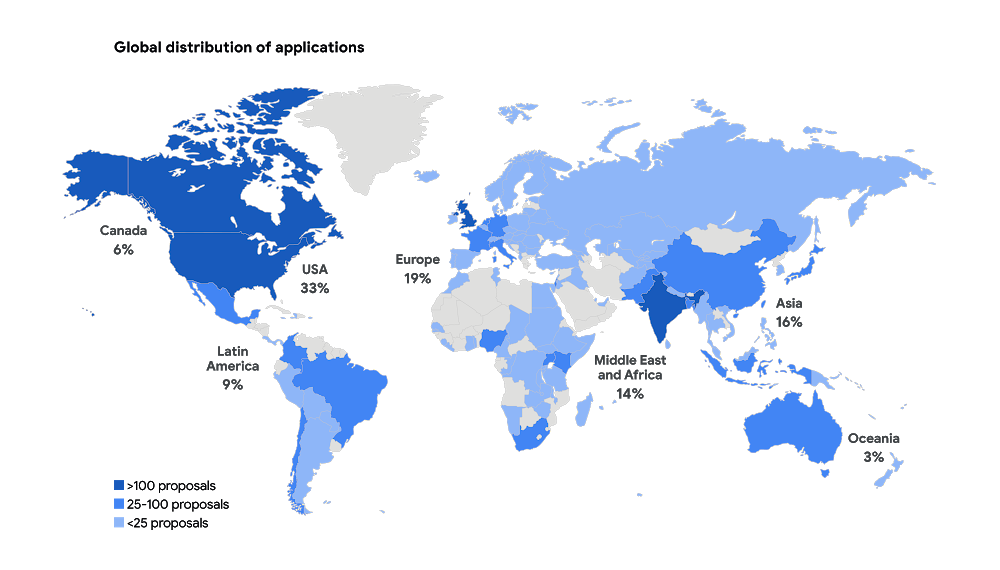
We received 2,602 applications from six continents and 119 countries, with projects addressing a wide range of issue areas, from education to the environment. Some of the applicants had experience with AI, but 55 percent of not-for-profit organizations and 40 percent of for-profit social enterprises reported no prior experience with AI.
Similar projects can benefit from shared resources
When we reviewed all the applications, we saw that many people are trying to tackle the same problems and are even using the same approaches to do so. For example, we received more than 30 applications proposing to use AI to identify and manage agricultural pests. The report includes a list of common project submissions, which will hopefully encourage people to collaborate and share resources with others working to solve similar problems.
You don’t need to be an expert to use AI for social good
AI is becoming more accessible as new machine learning libraries and other open-source tools, such as Tensorflow and ML Kit, reduce the technical expertise required to implement AI. Organizations no longer need someone with a deep background in AI, and they don’t have to start from scratch. More than 70 percent of submissions, across all sectors and organization types, used existing AI frameworks to tackle their proposed challenge.
Successful projects combine technical ability with sector expertise
Few organizations had both the social sector and AI technical expertise to successfully design and implement their projects from start to finish. The most comprehensive applications established partnerships between nonprofits with deep sector expertise, and academic institutions or technology companies with technical experience.
ML isn’t the only answer
Some problems can be addressed by using alternative methods to AI—and result in faster, simpler and cheaper execution. For example, several organizations proposed using machine learning to match underserved populations to legal knowledge and tools. While AI could be helpful, similar results could be achieved through a well-designed website. While we’ve seen the impact AI can have in solving big problems, you shouldn’t rule out more simple approaches as well.
Global momentum around AI for social good is growing—and many organizations are already using AI to address a wide array of societal challenges. As more social sector organizations recognize AI’s potential, we all have a role to play in supporting their work for a better world.
4053
Of your peers have already watched this video.
2:20 Minutes
The most insightful time you'll spend today!
Telstra Leverages APIs To Accelerate Digital Transformation
Telstra is Australia’s leading telecommunications and technology company, offering a full range of communication services and competing in all telecommunications markets.
In Australia, it provides 17.7 million retail mobile services, 4.9 million retail fixed voice services and 3.6 million retail fixed broadband services.
But owing to legacy infrastructure the company was unable to boost business efficiency and agility. To address these challenges, the company decided to leverage the Apigee platform.
“One of the key challenges that Apigee helped us solve was ensuring greater efficiency. Efficiency in business is absolutely critical. The more efficient you become the quicker you can solve problems and hence lower costs of solving those problems,” says David Freeman, General Manager of API enablement, Telstra.
Freeman also highlights that the Apigee platform has helped Telstra reduce the cycle time of delivery from months to days and sometimes even minutes. It also empowered the organization to efficiently track their developer community as well.
“Apigee was not only able to take systems and services and turn them into APIs but it also provided an analytics capability where we could keep an eye on the developer community, we could see what the developers were doing with APIs. On top of that, it also provided a great way to monetize APIs. This ensures that our developers can quickly and easily consume APIs,” says Freeman.
Watch this short video and get greater insights into how Apigee is helping Telstra accelerate digital transformation.
Google Cloud Accelerates Financial Organizations’ Journey towards Digital Transformation

10485
Of your peers have already read this article.
2:00 Minutes
The most insightful time you'll spend today!
When I reflect back on the past year and the pandemic, I’m struck by how the reliance on remote work and operations has changed the fundamentals of business forever. For the financial services industry, this rings particularly true. Many conversations I’m having right now with organizations revolve around embracing a transformation cloud, and thinking of cloud computing not just as an infrastructure decision, but also as the locus for transformation throughout the company.
Today, as we welcome the industry to our Financial Services Summit, we’ll demonstrate just how Google Cloud accelerates a financial organization’s digital transformation through app and infrastructure modernization, data democratization, people connections, and trusted transactions. We hope you’ll join us.
How we’re helping financial services firms build their transformation clouds
At Google Cloud, we continue to focus on areas where we can bring the best of our capabilities to banking, capital markets, insurance, and payments customers around the world. Our work with financial services industry customers has given us a deep understanding of the real-world, specific use cases that matter most to them. This groundwork led us to engineer products and solutions that are open and flexible, not ones that force them to rip out existing investments in ERP or other early IaaS cloud implementations.
It’s why we’ve engineered solutions such as Lending DocAI, Open Banking with Apigee, and Datashare for financial services to help transform the industry. These solutions were created with our customers’ security and compliance top-of-mind and are built at the intersection of user-optimized experience, technology, and sovereignty.
At their core, financial institutions want to drive growth, reduce costs, mitigate risk, stay compliant, and increase efficiency. As a result, when we partner with them on their transformation journeys, we consider three essential focus areas:
- Enabling the human experience and connected interactions
- Building an open and intelligent data foundation for better insights
- Providing the most trusted and secure cloud in the industry
Enabling humans and connected interactions
A company’s transformation is about more than technology; people and culture ultimately drive change. HSBC, for example, recognized its business users would benefit from guided answers to common questions around risk policy compliance, and turned to Google Cloud to leverage AI and machine learning bots to assist employees, ease the burden on policy experts, and improve the user experience. Using Dialogflow, a core component of Contact Center AI, HSBC was able to build a conversational platform that quickly and accurately addresses user needs at scale.
Another example is Equifax, which used Google Workspace to support collaboration not only internally between employees, but also externally with customers. Customers can use Google Cloud solutions for financial services to build these sorts of technology-enabled human interactions quickly and easily—supporting organizational change at scale.
Building an open and intelligent data foundation for smarter, faster insights
The real impact of Google Cloud solutions for financial services comes when the whole company has access to the right information at the right time, and can act more intelligently on that data. Our solutions help businesses safely leverage their data and get a complete 360-degree view of their customers’ information, which can often be scattered across multiple systems (CRM, lending, credit, etc.). This helps financial institutions improve the overall customer experience—and sometimes even develop new products quickly.
Indeed, all financial institutions are looking for ways to grow revenue and reduce expenses, and data can be a critical ingredient to doing both effectively. As daily transactions rise, so does the volume and complexity of data. But to implement new customer experience innovations (and new revenue streams), financial institutions must first capture data effectively. This is why AXA Switzerland, for example, uses real-time analytics on Google Cloud to gain cross-industry insights about future trends and customer preferences.
Financial services organizations also need the confidence of building on a platform that provides choice, flexibility, and agility to move fast. It’s why we have an open cloud approach that allows Google Cloud services to run in different physical locations such as on-premises, other public clouds, and the edge. Customers can also harness the power of data and AI through our open APIs, machine-learning services, and analytics engines on any major cloud platform. This is why companies like Macquarie Bank are taking advantage of Google Cloud’s open, hybrid architecture to modernize and empower its developers.
Compliant and secure to address risk and regulatory needs
As a highly regulated industry, financial services is focused on security and compliance, risk and regulations, and fraud detection and prevention. Google Cloud offers unique capabilities to earn customers’ trust as part of our continuing work to be the most trusted cloud in the industry. Google Cloud provides a secure foundation that you can verify and independently control. Our cloud technology reduces risk and data loss, because it is built on comprehensive zero-trust architecture. Finally, we offer a shared-fate model built on best practices in risk management via automation, guidance, and insurance. This is why customers like BBVA have confidence anywhere their systems may operate.
On the regulatory front, global legislators and regulators continue to focus on the stability of the industry that only a decade ago went through one of the biggest liquidity crises in history. With this oversight comes strong expectations of risk mitigation. Google Cloud offers a single, global set of controls, reviewed by financial institutions and regulators around the world, and verified in collaborative audits—making compliance simpler and less costly for our customers.
Finally, Google Cloud allows financial services firms to operate confidently with advanced security tools that help protect data, applications, and infrastructure, as well as their customers from fraudulent activity, spam, and abuse. We help protect your data against threats, using the same infrastructure and security services we use for our own operations, ensuring you never have to trade-off between ease of use and security. Google Cloud encrypts data at-rest and in-transit. And we now also offer the ability to encrypt data-in use, while it’s being processed for customer VM and container workloads.
Let us help you with your transformation cloud journey
We’ve seen leading financial services companies embrace Google Cloud to help them move beyond infrastructure toward the next phase of their cloud evolution. This is an era where no company is better positioned to lead than Google Cloud, and we’re excited to help you with your journey.
Learn more about Google Cloud for financial services.
GKE Feature Guide: 5 Ways to Optimize Your Kubernetes Clusters

1571
Of your peers have already read this article.
7:00 Minutes
The most insightful time you'll spend today!
In this post, we’ll be discussing 5 features in GKE you can use to optimize your clusters today. To get started with testing these in GKE, check out our interactive tutorials for getting started with standard and autopilot clusters.
If you find value from running workloads on Kubernetes clusters in your organization, chances are your footprint will grow – be it through larger clusters or more clusters.
Whichever your approach, one thing is certain: you’ll have more resources that you pay for. And you know what they say – more resources, more problems. The more resources you have across clusters, the more critical it becomes to make sure you’re using them efficiently.
Google Kubernetes Engine has numerous features built-in that you as a cluster admin can use to navigate this continuous journey of optimizing your use of resources in GKE.
Let’s review five of them you can get started with today.
#1 – Cluster view cost optimization in the console
If you don’t know where to start with optimizing your clusters, the best place to start is looking for a big problem that stands out. That’s probably most visible by looking at a view that spans all of your clusters.
In GKE, we have a cluster-level cost optimization tab built into the console, rich with information that may be cumbersome to gather on your own otherwise.
You can find this as seen in the following image:
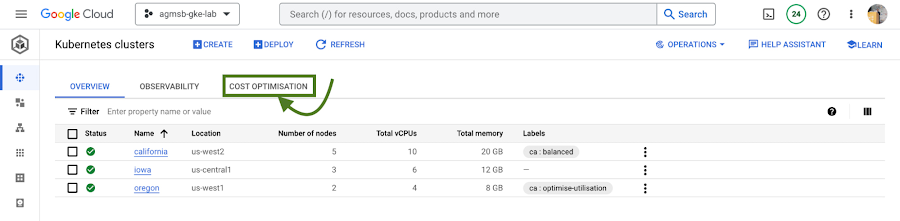
Fig. 1 – Navigating to the cost optimization tab in the cloud console
Once you navigate to this tab, you’re greeted with a time series visualization.
For GKE standard clusters, this visualization is a time series representation that shows three key dimensions for CPU and Memory across all of your clusters in a project:
Total CPU/Memory allocatable– # of CPU or GB of memory that can be allocated to user workloadsTotal CPU/Memory request– # of CPU or GB of memory that has been requested by user workloadsTotal CPU/Memory usage– actual usage by # of CPU or GB of memory by user workloads
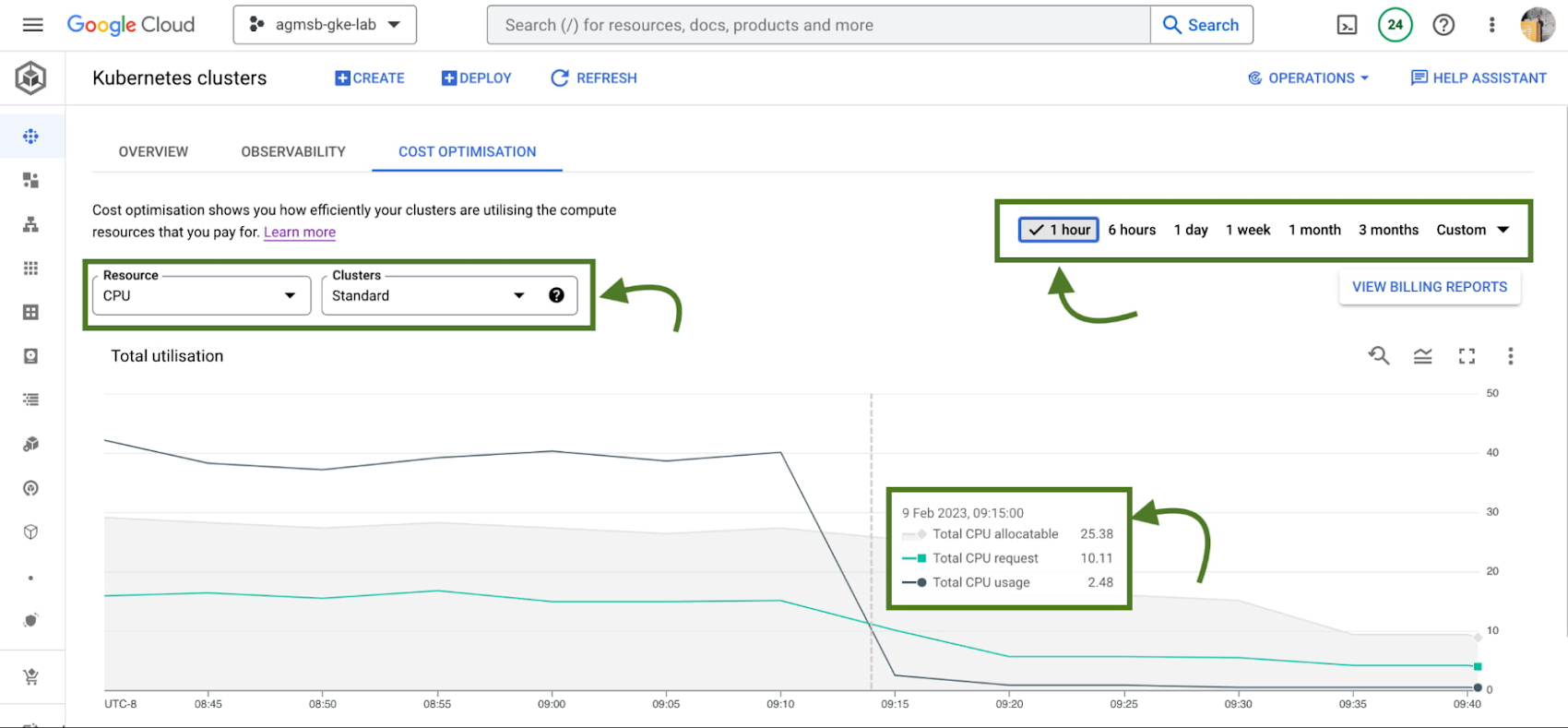
Fig. 2 – Allocatable, requested, and usage time series data across CPU or memory in all standard GKE clusters over a specified window
Analyzing these in relationship to one another can help identify answers to important optimization questions such as:
- Do we have too much allocatable CPU and memory idle across our GKE standard clusters? If so, can we do things like re-evaluate the machine types we use in node pools? This can help us bin pack the cluster, by having a higher percentage of allocatable resources allocated to Pod requests.
- Are workloads running in our GKE standard clusters requesting too much CPU and memory that goes unused? If so, can we do things like work with workload owners to adjust requests? This can help us workload right-size, by setting requests to more closely reflect expected usage.
If we’re using GKE Autopilot, this time series visualization will look slightly different, as seen in the following image:
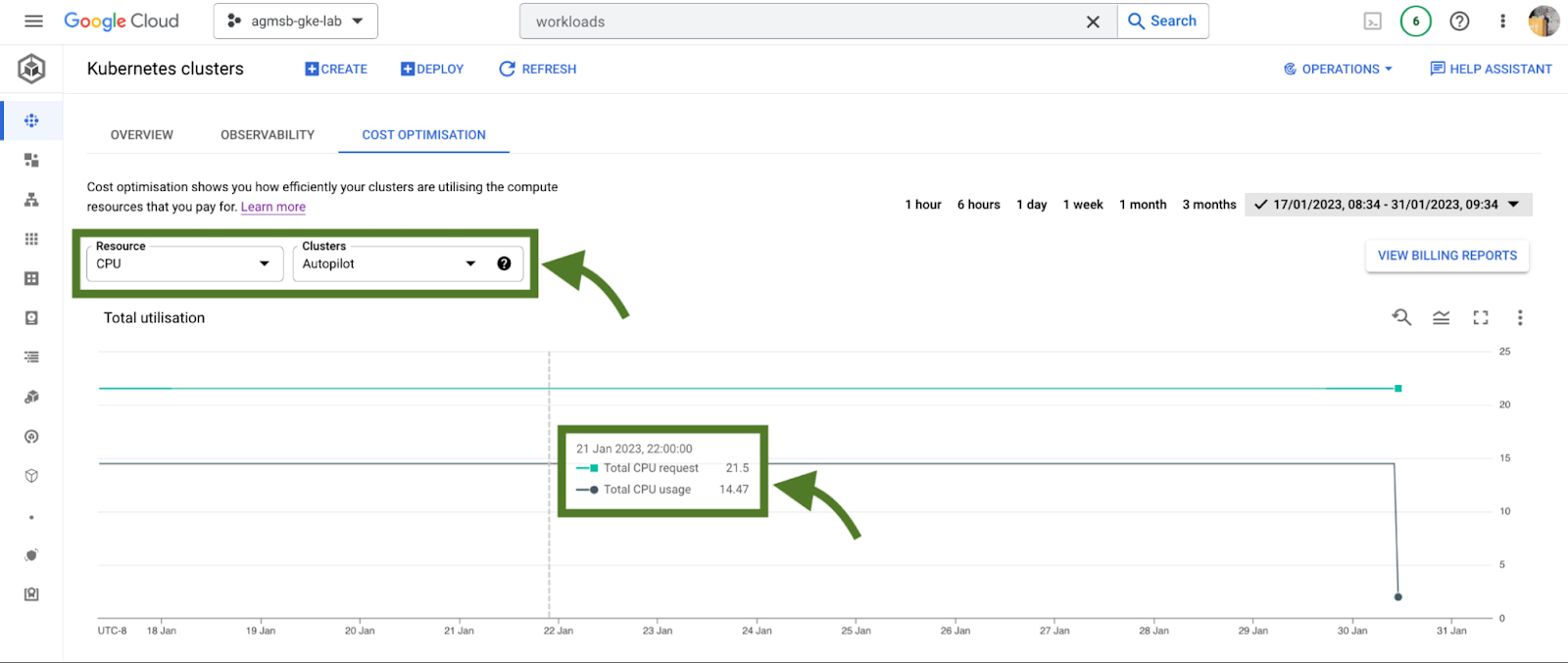
Fig. 3 – Requested and usage time series data across CPU or memory in all GKE Autopilot clusters
In the case of GKE Autopilot clusters, we’re only able to view the Total CPU/Memory request and the Total CPU/Memory usage data. But nothing here is actually missing!
In Autopilot clusters, you only pay per Pod based on its requests; Autopilot automatically handles provisioning the infrastructure that gives us our allocatable resources based on whatever you set Pod requests to. When we trade in that ownership of node provisioning, we also trade in the control to optimize at that layer.
For a cluster administrator, this information can be a spark to spur actions such as diving into individual clusters or meeting with workload teams to work through their requests and limits that they set for workloads. In our research, this is perhaps the most impactful area many teams optimize. We’ll dive into how GKE can enable this exercise a bit further in this blog.
When going down those paths, it helps to have financial data to quantify the impact of the optimization to the business. Gathering this info on your own can require a bit of work (for some, a lot of spreadsheets as well!), but luckily GKE has another native feature to help make this easily accessible to you.
#2 – GKE cost allocation
GKE cost allocation is a native GKE feature that integrates workload usage with Cloud Billing and its reports, allowing you to see and alert on billing not only on a per-cluster level, but on a per-Kubernetes namespace or per-Kubernetes label level.
It must be enabled on your cluster in order for it to function, so if you’re working with an existing GKE cluster and want to enable it, use the following gcloud command once you have set your appropriate zone or region:
$ gcloud beta container clusters create $CLUSTER_NAME \
    --enable-cost-allocation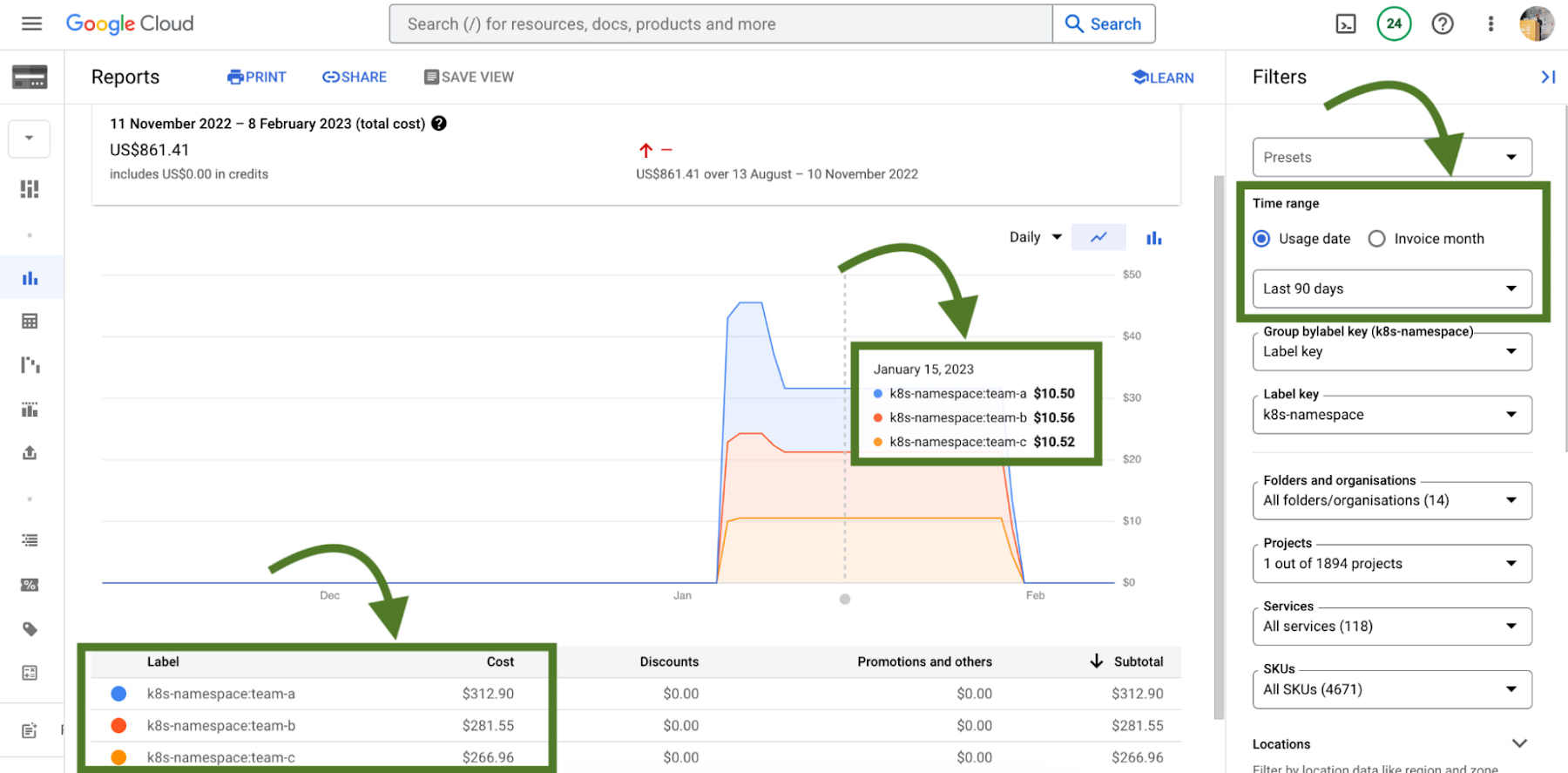
Without GKE cost allocation, the financial impact of a cluster and all of the different workloads it might run were a bit obfuscated. With the cluster as the deepest level of detail in billing, finding areas to optimize or even performing showback and chargeback was a challenge.
With Namespaces and Labels bubbling up into billing reports, you can now understand the cost of the CPU/Memory requests that workloads define in Kubernetes. A caveat – this works best when you are using Namespaces and Labels to logically define and organize teams and their workloads.
This integration also gives the bigger picture of optimization – in that GKE does not typically live on an island! In theory, workloads in a team’s namespace could be using external backing services like Cloud Memorystore that are also a key part of its usage.
Because Cloud Billing data has all GCP services, we can now filter and query across namespaces and their corresponding backing services.
# 3 – Workload view cost optimization in the console
Once you have teams identified that you may want to work with, GKE provides a cost optimization tab at the workload level, where you can then begin to drill down and identify specific workloads that could be optimized through an exercise called “workload right-sizing”. This is the act of making sure that Pod requests more closely reflect their expected usage.
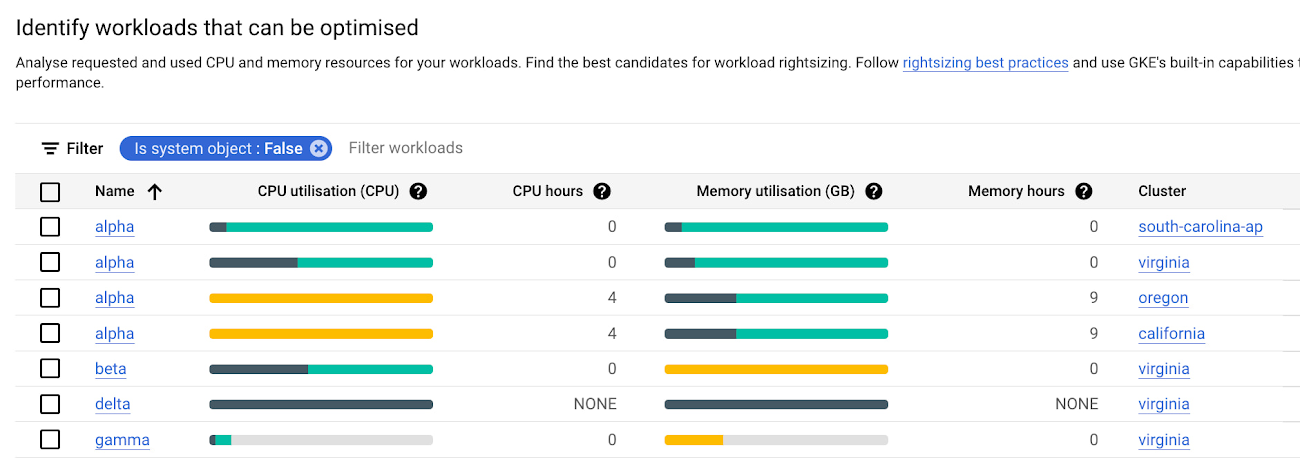
As you can see here, we’re given bar charts to represent the relationship of usage, requests, and limits to one another.
- Dark green: CPU/Memory usage
- Light green: CPU/Memory requests
- Grey: CPU/Memory Limits
- Yellow: Scenarios in which CPU/Memory usage exceeds requests
You can also hover over each individual workload bar chart to reveal a small on-screen report of this data. Similar to the cluster view cost optimization tab, you can filter down to a custom time window; we recommend viewing this data in a window greater than an hour (IE a day, week, month) to potentially uncover diurnal or weekly patterns that would otherwise be obfuscated.
In the preceding screenshot of these charts, we can call out a few patterns that might stand out to you:
- If we have too much light green stacked above dark green in a bar, we may have workloads that are over provisioned.
- If we have a yellow bar, we have a workload where requests are not set high enough, which can be a stability/reliability risk – consuming additional resources on its node and potentially being throttled or OOMKilled if it hits its limits.
- If we have a bar that is all dark green, this means that we don’t have requests set for a workload – which is not best practice! Set those requests.
With this information, it becomes easier to quickly identify workloads that need requests and limits tuned for either cost optimization or stability and reliability.
# 4 – Recommendations for adjusting workload requests
In scenarios where we need to increase or reduce CPU/Memory requests, it is easier to know that it needs to be done than to know how it needs to be done. What should we set the requests to?
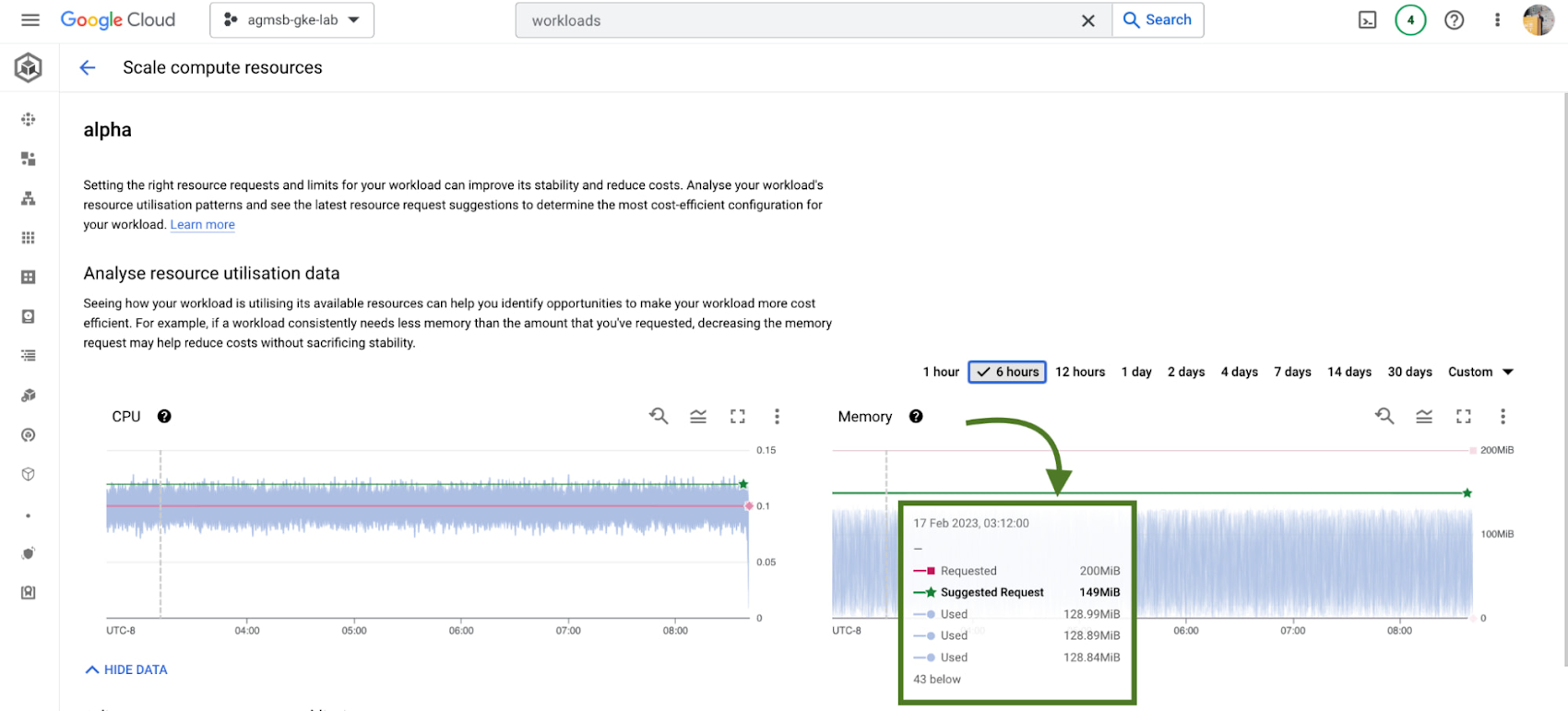
GKE integrates recommendations from the Kubernetes Vertical Pod Autoscaler (VPA) directly into its workload console, currently for all deployments in your clusters. You can find this by navigating to the Actions > Scale > Scale compute resources menu when viewing the page for a specific workload.
It’s important to remember that these recommendations are just that – recommendations. They’re based on historical usage data, so when viewing these values, it’s important to work with workload owners to see if these suggestions make sense to incorporate into their respective Kubernetes manifests.
# 5 – Cost estimation and cluster creation setup guides
Finally, if you’re just getting started with GKE and you want to get started on the right, optimized foot, we have tooling incorporated into the GKE cluster creation page.
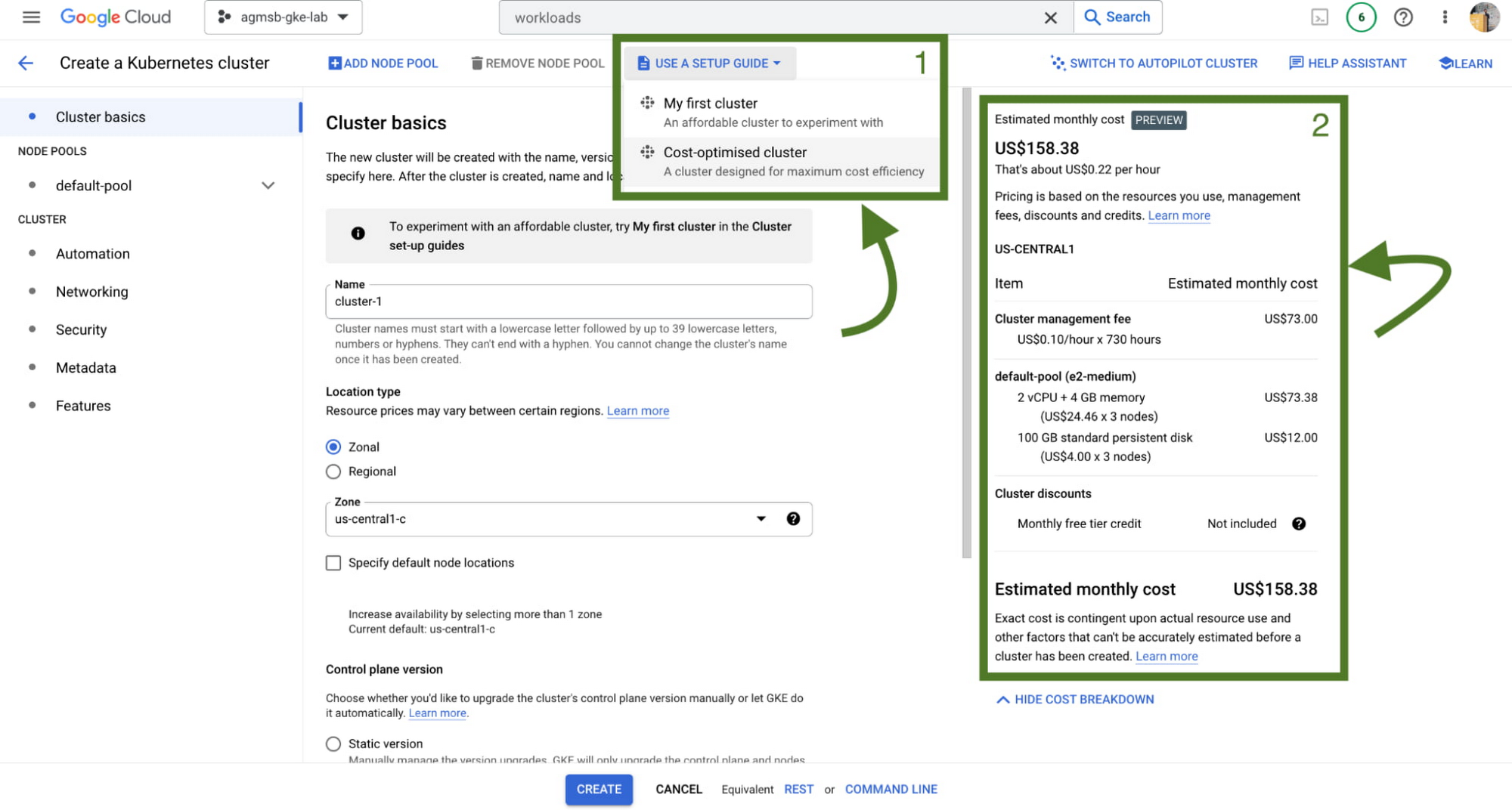
First, we have a setup guide that will help you create an opinionated GKE standard cluster with some things we discussed here already enabled, such as GKE cost allocation and Vertical Pod Autoscaler.
Second, we also have a cost estimation panel that, depending on the configuration of your GKE standard cluster, will show you an estimated monthly cost. This even helps you get a range of potential costs if you expect your cluster to scale up and down!
Now what?
Optimization across a set of GKE clusters can include a handful of areas to think about – and isn’t a one time task! Instead, it’s a continuous journey that cluster administrators, workload owners, and even billing managers all take part in. GKE provides the tooling to make this journey and process easier, with the right data and insights at your fingertips.
To familiarize yourself with these features in GKE, check out our interactive tutorials for getting started with standard and autopilot clusters.
You can also watch a demo showing most of these features in the following video:
A special thanks to Laurie White, Fernando Rubbo, and Bobby Allen for their review on this blog post.
More Relevant Stories for Your Company

Google Cloud Celebrates Journey of 3 Inspiring Founders for the Asian Pacific American Heritage Month
May is Asian Pacific American Heritage Month —a time for us to come together to celebrate and remember the important people and history of Asian and Pacific Island heritage. This feature highlights three AAPI founders from the Google For Startups community. Read on to learn how these three founders built

Optimizing Cloud Load Balancing in Hybrid and Multicloud Architectures
Today’s enterprise applications are often assembled across distributed environments. This includes the integration of services across multi-cloud, multi-SaaS and on-premises environments. While the approach has the advantage of enabling enterprises to choose the best service available to support their applications, it adds the complexity of delivering services across heterogeneous environments.




Enhancing Collaboration with Sheets, Python, and Google Cloud
See how you can enhance collaboration within your organization using Google Sheets. Watch to learn about a new set of tools to create custom functions that tap into the power of Python and to expose functions in a standardized fashion throughout your organization.

Transforming Media Industry: Three Strategies for Media Leaders to Leverage Generative AI
The digital era turned the traditional formula for media and entertainment success on its head, ushering in new technologies that have changed how content is produced, distributed, experienced, and monetized. Audiences have more choice, flexibility, and power over what they consume, and today’s media companies have to embrace ongoing transformation
