





5573
Of your peers have already watched this video.
1:30 Minutes
The most insightful time you'll spend today!
A Quick Guide to Cloud Monitoring
Cloud Monitoring is a tool that allows you to gain visibility into the performance, availability, and health of your applications and infrastructure. In this video, we show you what Cloud Monitoring is and how you can use it to custom define service-level objectives (SLOs), monitor application metrics, and the overall health of your applications infrastructure. Watch to learn how you can use Cloud Monitoring!
Iroquois Healthcare Association Leverages Chrome OS to Keep Staff, Patients and Families Remotely Connected

3970
Of your peers have already read this article.
3:00 Minutes
The most insightful time you'll spend today!
Editor’s note: Today’s post is by Eileen Murphy, Senior Director of Special Projects, and Andrew Nault, Director of Business Development, both from Iroquois Healthcare Association Workforce Investment Organization (IHA WIO). The health association represents 44 hospitals in 32 counties in New York State, providing advocacy, cost-saving initiatives, and business solutions. IHA WIO has provided its participating long-term care organizations with more than 5,000 Chromebooks to support 80 organizations in several ways, including training staff, connecting nursing home residents to their families, and helping administrative staff work safely from home.
Since early 2020, clinicians and staff at IHA WIO participant organizations have had to adapt to constant change—everything from implementing pandemic safety protocols to helping nursing-home residents stay in touch with families. We’re proud of the wonderful work they’ve done and continue to do.
During the pandemic, our use of Chrome OS and Chrome devices was expanded and changed to meet the needs of organizations dealing with an unprecedented event. Chrome devices were used to not only train staff but to enable remote work, as well as to connect residents to their friends and families during long periods of isolation. In the morning, a Chromebook could be in a managed guest session mode, helping a grandmother virtually attend her grandkids’ birthday party; at lunch, a nursing assistant could log in to her latest continuing education classes on that same Chromebook.
That evening, the Chrome OS devices could be found at check-in desks, helping visitors fill out a COVID-19 survey. All it took to change a device’s purpose were a few clicks in the Google Admin console, all of which could be done remotely.
Chrome OS for training
Most of our 5,000 Chrome OS devices came from a New York State grant to provide continued education training for long-term care organizations and its employees. We wanted to offer online classes, which meant we’d have to give people the technology to access that training. Our partner, CDW, recommended Chrome OS for us because it’s an operating system built for the cloud. In addition, devices running Chrome OS are easy to use, easily shared, and cost-effective.
Best of all, Chromebook Enterprise came with all the enterprise capabilities of Chrome OS unlocked. This allowed us to use the Google Admin console to manage our entire Chromebook Enterprise fleet remotely. We were able to set up one high-level organizational unit across IHA, with almost 80 organizational units for facilities and groups.
To support training, Lenovo helped us create a five-minute video that we added to our HealthStream learning platform so staff could learn the basics of using Chromebooks. This video was created because we didn’t realize there were people who have never touched a laptop before. The video and Chrome OS ease of use made it possible to get the folks who needed the most help up to speed quickly.
Chrome OS for connecting residents to loved ones
Once the pandemic began and people could no longer visit nursing home residents, the staff for one of our facilities asked about using a training Chromebook for video calls between residents and families. We loved this idea as it was still in line with our mission: to enable the workforce to provide higher-quality care.
With the Admin console, the process was easy. We changed the managed guest session to auto load, and changed what is populated on startup. With help from healthcare staff, residents were able to choose from several video apps including Google Meet, Zoom, and Facebook.
Chrome OS for remote workers
When office and administrative staff had to work remotely, Chromebooks again came to the rescue. Since staff could access all their work applications via Citrix—like Outlook, office phone systems, and other public documents—we placed the remote-work laptops in managed guest session mode and loaded the Citrix app at startup. All the employees had to do was connect to Wi-Fi and log into Citrix, and they were ready to work.
With our training program still running and virtual remote ability on the rise, we realized we would need more Chromebooks. CDW informed us that Chrome OS device supply was running low, but they located 1,000 Chromebooks for us and sent them to our home office in Clifton Park, New York.
Normally, the job of configuring and shipping 1,000 laptops would strike fear into the hearts of the IT team. Not this time: With zero-touch enrollment, all of the Chromebooks were enrolled in our high-level organizational unit before the boxes arrived at our Clifton Park office. We created a list of Chromebook serial numbers for each IHA location getting a shipment, then packed up the boxes. We never had to open a Chromebook box, or even turn the devices on before preparing them for use by employees.
Chrome OS for telehealth and clinic kiosks
There were more Chromebook transformations to come. In the interest of keeping residents and medical professionals safe, we enabled Chromebooks for non-urgent telehealth sessions. Doctors and nurses could see and talk to nursing home residents, using the same video conferencing apps that residents used to talk to loved ones. In these cases, we had PointClickCare, our electronic medical records app, loaded at startup on doctors’ Chromebooks.
We even turned a few Chromebooks into guest kiosks at IHA member hospitals that have walk-in clinics. If the clinics required visitors to fill out a COVID-19 screening form, the Chromebook, in kiosk mode, was stationed at the front desk. Once visitors submitted the form, a new blank form appeared, ready for the next visitor without any data stored on the device.
Chrome OS for whatever’s needed next
What’s amazing is that we could help people in all these different ways in just a few minutes—without visiting a nursing home, getting someone to ship laptops back to us, or loading software. Chromebooks are so versatile that sometimes they’re used in various modes several times a day. One user can log in, while another user can use managed guest sessions to login as a guest user. No matter what changes come to our healthcare association in the future, we’ll be ready.
Now on Mobile: Manage Your Google Cloud Support Cases Anywhere, Anytime

937
Of your peers have already read this article.
2:30 Minutes
The most insightful time you'll spend today!
We’re excited to announce that Google Cloud Support is now available as Public Preview* in the Google Cloud mobile app.
View and manage Google Cloud Support cases
We understand how important it is to be able to access and collaborate on Cloud Support cases. As such, we’ve made it easy for you to manage your cases via the mobile app. There is no need to log in to the mobile browser, search for a proper website, and navigate to the place where you need to be. Your Cloud Support cases are now available at your fingertips.
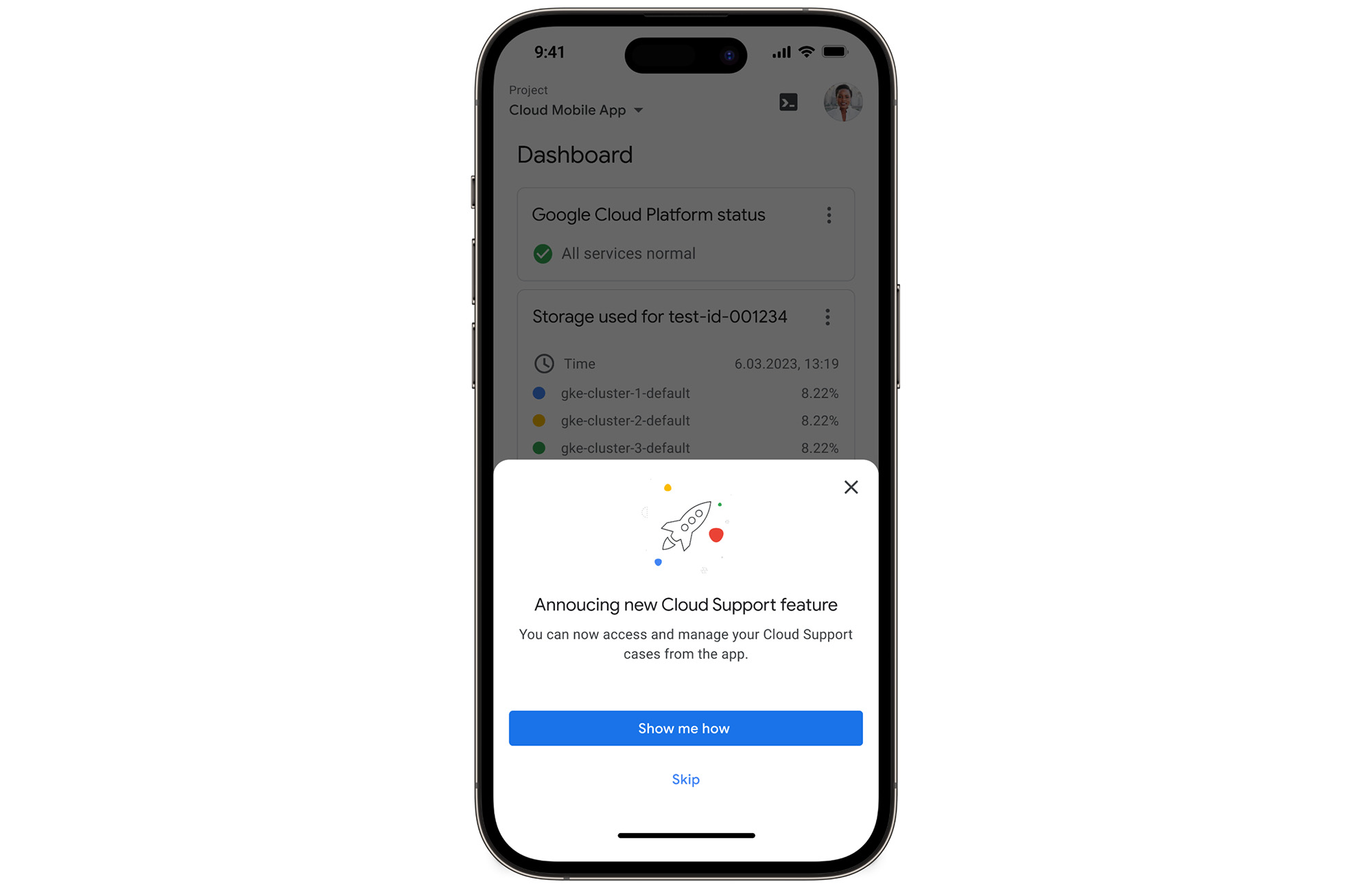
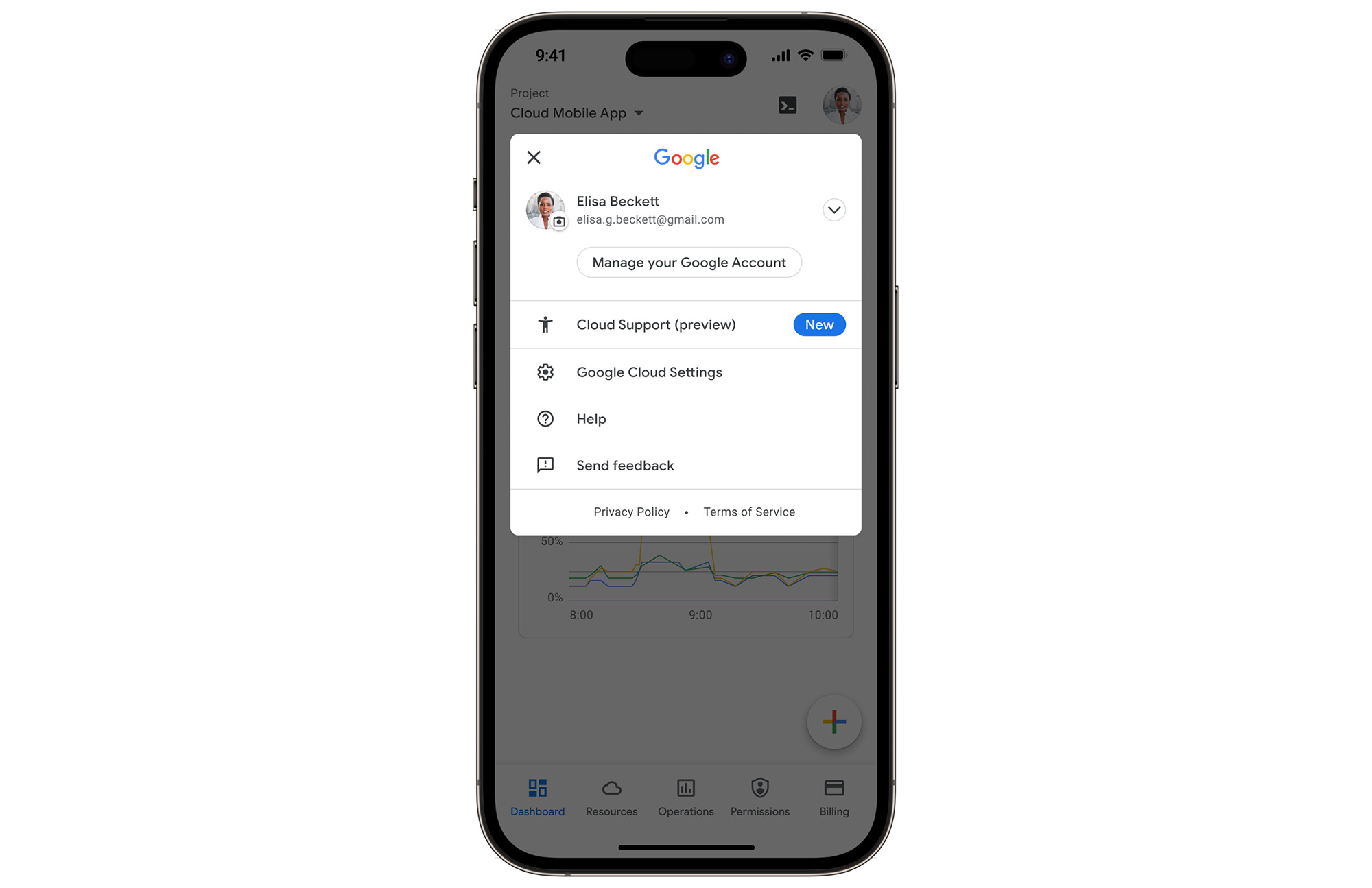
In the Google Cloud mobile app, simply navigate to “Cloud Support (preview)” from any screen by touching your profile picture.
With just one touch you can see the list of all your support cases and easily dive into their important details.
Create Google Cloud Support cases and take action
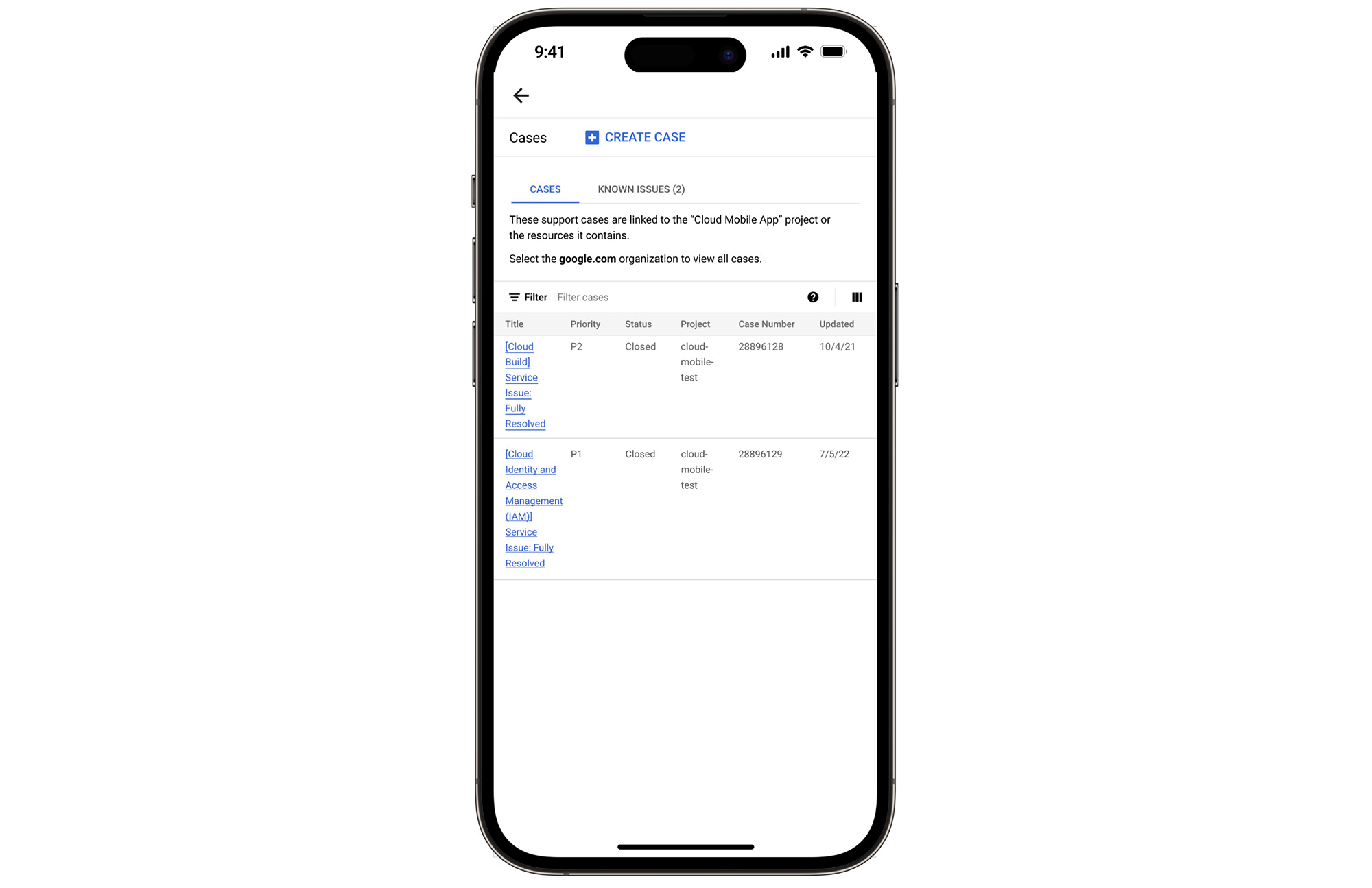
Not only can you easily view and manage your existing Cloud Support cases, you can also create new ones on the fly with the Google Cloud mobile app.
Seamlessly browse case comments to see the full history of the support case, and respond to the case with new comments.
Download the Google Cloud app today
The Google Cloud app is a powerful tool for managing your Google Cloud environment on the go, and it just got better. To summarize, we’ve added Cloud Support cases to our mobile app, which lets you:
- Read existing conversations with the Google Cloud Support Team
- Respond to Google Cloud Support cases
- Create new Google Cloud Support cases
These new features are available for you to use today in Public Preview. Download the Google Cloud mobile app from Google Play or the Apple App Store to try it out. Check out the Google Cloud app documentation to learn more about what you can do on-the-go. If you have any feedback, we would love to hear from you — simply click on the “send feedback” button in the app to share your experience.
*Preview – This product or feature is covered by the Pre-GA Offerings Terms of the Google Cloud Terms of Service. Pre-GA products and features might have limited support, and changes to pre-GA products and features might not be compatible with other pre-GA versions. For more information, see the launch stage descriptions.
Google Cloud’s Suite of DevOps Speeds Up ForgeRock’s Development

5688
Of your peers have already read this article.
3:00 Minutes
The most insightful time you'll spend today!
Editor’s note: Today we hear from ForgeRock, a multinational identity and access management software company with more than 1,100 enterprise customers, including a major public broadcaster. In total, customers use the ForgeRock Identity Platform to authenticate and log in over 45 million users daily, helping them manage identity, governance, and access management across all platforms, including on-premises and multicloud environments.
Operating at that kind of scale isn’t easy. In this blog post, ForgeRock Engineering Director, Warren Strange discusses the three things that help make their developers efficient and productive, and the Google Cloud tools they use along the way.
At ForgeRock, we’ve been an early adopter of Kubernetes, viewing it as a strategic platform. Running on Kubernetes allows us to drive multicloud support across Google Kubernetes Engine (GKE), Amazon (EKS), and Azure (AKS). So no matter which cloud our customers are running on, we are able to seamlessly integrate our products into customers’ environments.
Making it easier for ForgeRock’s developers and operators to build, deploy and manage applications has been crucial in our ability to continually provide high quality solutions for our customers. We’re always looking for tools to improve productivity and keep our developers focused on coding instead of configuration. Google Cloud’s suite of DevOps tools have streamlined three specific practices to help keep our developers productive:
1. Make developers productive within IDEs
Developer productivity is core to the success of any organization, including ForgeRock. Since developers spend most of their time within their IDE of choice, our goal at ForgeRock has been to make it easier for our developers to write Kubernetes applications within the IDEs they know and love. Cloud Code helps us precisely with that: it makes the process of building, deploying, scaling, and managing Kubernetes infrastructure and applications a breeze.
In particular, working with the Kubernetes YAML syntax and schema takes time, and a lot of trial and error to master. Thanks to YAML authoring support within Cloud Code, we can easily avoid the complicated and time consuming task of writing YAML files at ForgeRock. With YAML authoring support, developers save time on every bug. Cloud Code’s inline snippets, completions, and schema validation, a.k.a. “linting,” further streamline working with YAML files.
The benefits of Cloud Code extend to local development as well. Iterating locally on Kubernetes applications often requires multiple manual steps, including building container images, updating Kubernetes manifests, and redeploying applications. Doing these steps over and over again can be a chore. Cloud Code supports Skaffold under the hood, which tracks changes as they come and automatically rebuilds and redeploys—reducing repetitive development tasks.
Finally, developing for Kubernetes usually involves jumping between the IDE, documentation, samples etc. Cloud Code reduces this context switching with Kubernetes code samples. With samples, we can get new developers up and running quickly. They spend less time learning about configuration and management of the application—and spend more time on writing and evolving the code.
2. Drive end-to-end automation
To further improve developer productivity, we’ve focused on end-to-end automation: from writing code within IDEs, to automatically triggering CI/CD pipelines and running the code in production. In particular, Tekton, Cloud Build, Container Registry, and GKE have been critical to Forgerock as we streamline the flow of code, feedback and remediation through the build and deployment processes. The process looks something like this:
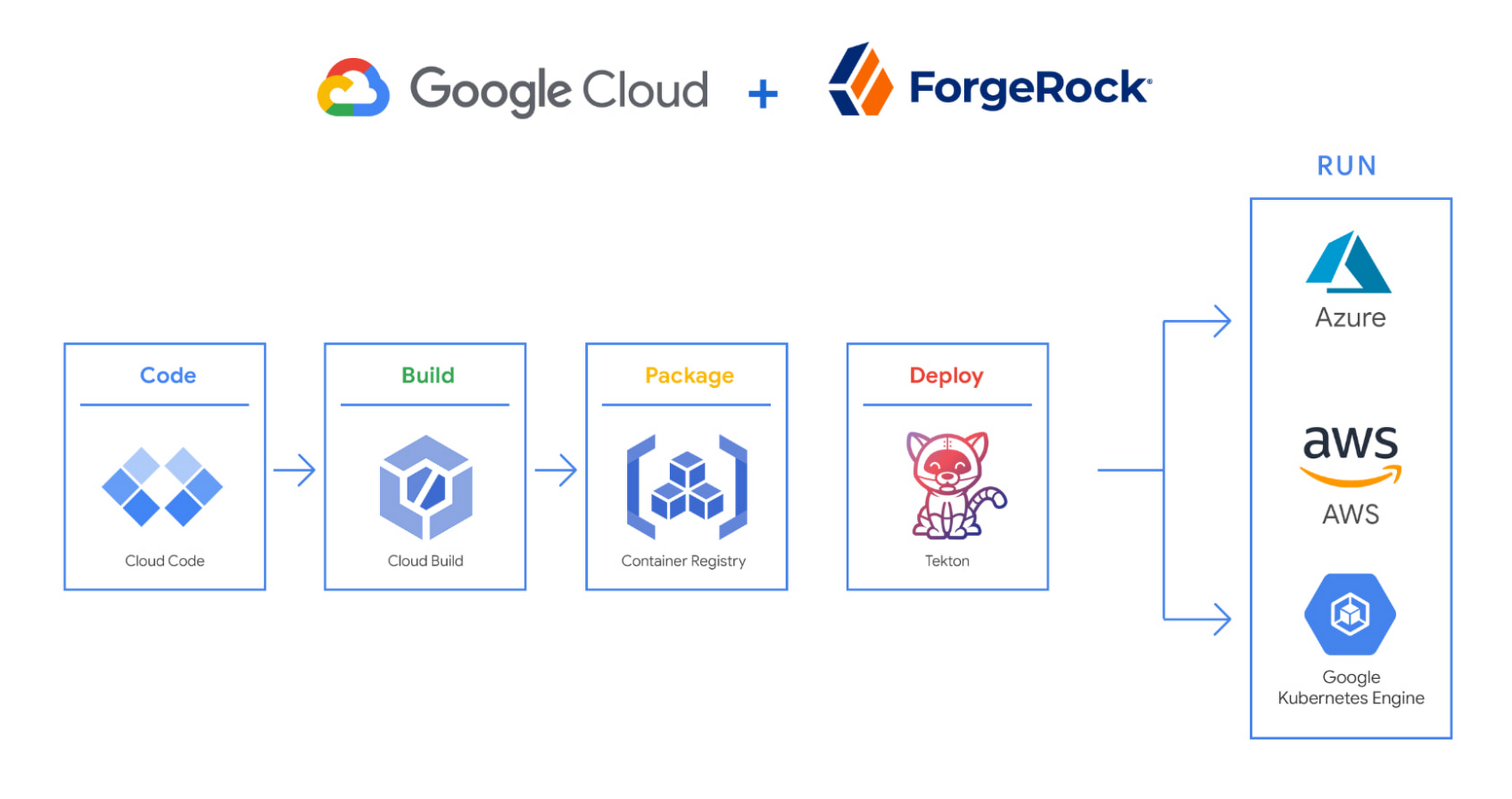
We begin by developing Kubernetes manifests and dockerfiles using Cloud Code. Then we use Skaffold to build containers locally, while Cloud Build helps with continuous integration (CI). The Cloud Build GitHub app allows us to automate builds and tests as part of our GitHub workflow. Cloud Build is differentiated from other continuous integration tools since it is fully serverless. It scales up and scales down in response to load, with no need for us to pre-provision servers or pay in advance for additional capacity. We pay for the exact resources we use.
Once the image is built by Cloud Build, it is stored, managed, and secured in Google’s Container Registry. Just like Cloud Build, Container Registry is serverless, so we only pay for what we use. Additionally, since Container Registry comes with automatic vulnerability scanning, every time we upload a new image to Container Registry, we can also scan it for vulnerabilities.
Next, a Tekton pipeline is triggered, which deploys the docker images stored in Container Registry and Kubernetes manifests to a running GKE cluster. Along with Cloud Build, Tekton is a critical part of our CI/CD process at ForgeRock. Most importantly, since Tekton comes with standardized Kubernetes-native primitives, we can create continuous delivery workflows very quickly.
After deployment, Tekton triggers a functional test suite to ensure that the applications we deploy perform as expected. The test results are posted to our team Slack channel so all developers have instant access and insights about each cluster. From there, we are able to provide our customers with their finished product request.
3. Leverage multicloud patterns and practices
The industry has seen a shift towards multicloud. Organizations have adopted multicloud strategies to minimize vendor lock-in, take advantage of best-in-class solutions, improve cost-efficiencies, and increase flexibility through choice.
At ForgeRock, we’re big proponents of multicloud. Part of that comes from the fact that our identity and access management product works across Google Cloud, AWS, and Azure. Developing products using open-source technologies such as Kubernetes has been particularly helpful in driving this interoperability.
Tekton has been another critical project that has allowed us to prevent vendor lock-in. Thanks to Tekton, our continuous delivery pipelines can deploy across any Kubernetes cluster. Most importantly, since Tekton pipelines run on Kubernetes, these pipelines can be decoupled from the runtime. Like Tekton and Kubernetes, both Cloud Build and Container Registry are based on open technologies. Community-contributed builders and official builder images allow us to connect to a variety of tools as a part of the build process. And finally, with support for open technologies like Google Cloud buildpacks within Cloud Build, we can build containers without even knowing Docker.
Making it easier for developers and operators to build, deploy and manage applications is critical for the success of any organization. Driving developer productivity within IDEs, leveraging end-to-end automation, and support for multi-cloud patterns and practices are just some of the ways we are trying to achieve this at ForgeRock. To learn more about ForgeRock, and to deploy the ForgeRock Identity Platform into your Kubernetes cluster, check out our open-source ForgeOps repository on GitHub.
Enterprises can Push the Limits of Edge Even Further!

6995
Of your peers have already read this article.
2:30 Minutes
The most insightful time you'll spend today!
Whether with the cloud or within their own data centers, enterprises have undergone a period of remarkable consolidation and centralization of their compute resources. But with the rise of ever more powerful mobile devices, and increasingly capable cellular networks, application architects are starting to think beyond the confines of the data center, and looking out to the edge.
What exactly do we mean by edge? Think of the edge as distributed compute happening on a wide variety of non-traditional devices — mobile phones of course, but also equipment sensors in factories, industrial equipment, or even temperature and reaction monitoring in a remote lab. Edge devices are also connected devices, and can communicate back to the mothership over wireless or cellular networks.
Equipped with increasingly powerful processors, these edge devices are being called upon to perform tasks that have thus far been outside the scope of traditional IT. For enterprises, this could mean pre-processing incoming telemetry in a vehicle, collecting video in kiosks at a mall, gathering quality control data with cameras in a warehouse, or delivering interactive media to retail stores. Enterprises are also relying on edge to ingest data from outposts or devices that have even more intermittent connectivity, e.g., oil rigs or farm equipment, filtering that data to improve quality, reducing it to right-size information load, and processing it in the cloud. New data and models are then pushed back to the edge; in addition, we can also push configuration, software, and media updates and decentralize processing workload.
Edge isn’t all about enabling new use cases – it’s also about right-sizing environments and improving resource utilization. For example, adopting an edge model can also relieve load on existing data centers.
But while edge computing is full of promise for enterprises, there are many pieces that are still works in progress. Further, developing edge workloads is very different from developing traditional applications, which enjoy the benefits of persistent data connections and run on well-resourced hardware platforms. As such, cloud architects are still in the early days of figuring out how to use and implement edge for their organizations.
Fortunately, there are tools you can use to help ease the transition to edge computing — and that likely fit into your organization’s existing computing systems. Kubernetes, of course, but also higher level management tools like Anthos, which provides a consistent control plane across cloud, private data center and edge locations. Other parts of the Anthos family – Anthos Config Management and Anthos Service Mesh — go one step further and provide consistent, centralized management to your edge and cloud deployments. And there’s more to come.
For the remainder of this blog post, we’ll dive deeper into the past and current state of edge computing, and the benefits that architects and developers can expect to see from edge computing. In a next post, we’ll take a deeper look at some of the challenges that designing for edge introduces, and some of the advantages the average enterprise has in adopting the edge model. Finally, we’ll look at the Google Cloud tools that are available today to help you build out your edge environment, and look at some early customer examples that highlight what’s possible today — and that will spark your imagination for what to do tomorrow.
The evolution of edge computing
The edge is not a new concept. In fact, it’s been around for the last two decades, spanning many use cases that are prevalent today. One of the first applications for edge was to use content delivery networks (CDN) to cache and serve daily static website pages near clients, for example, web servers in California data centers serving financial data to European customers.
As connectivity has improved and software evolved, the edge has evolved too, and the focus has shifted towards using edge to distribute services. First, simple services expanded from static HTML to javascript libraries or image repositories. Common functions like image transformation, credit and address validation support services followed. Soon, organizations were deploying more complex cloudlet and clustered microservices installations, as well as distributed and replicated datasets. The term “endpoint” became ubiquitous, and APIs profilerated.
In parallel, there’s been an explosion of creativity in hardware, microcontrollers and dedicated edge devices. Fit-for-purpose products were deployed globally. Services like Google Cloud IoT Core extended our ability to manage and securely connect these dispersed devices, allowing platform managers to register tools and leverage managed services like Pub/Sub and Dataflow for data ingestion. And with Kubernetes, large remote clusters — mini private clouds in and of themselves — operate as self-healing, autoscaling services across the broader internet, opening the door to new models for applications and architectural patterns. In short, both distributed asynchronous systems and economies have blossomed.
What does this mean for enterprises? For the purposes of this series, edge means you can now go beyond the corporate network, beyond cloud VPCs, and beyond hybrid. The modern edge is not sitting at a major remote data center, nor is it a CDN, cloud provider, or in a corporate data center rack — it’s just as likely to look like 100 of these attached to a thousand sensors.
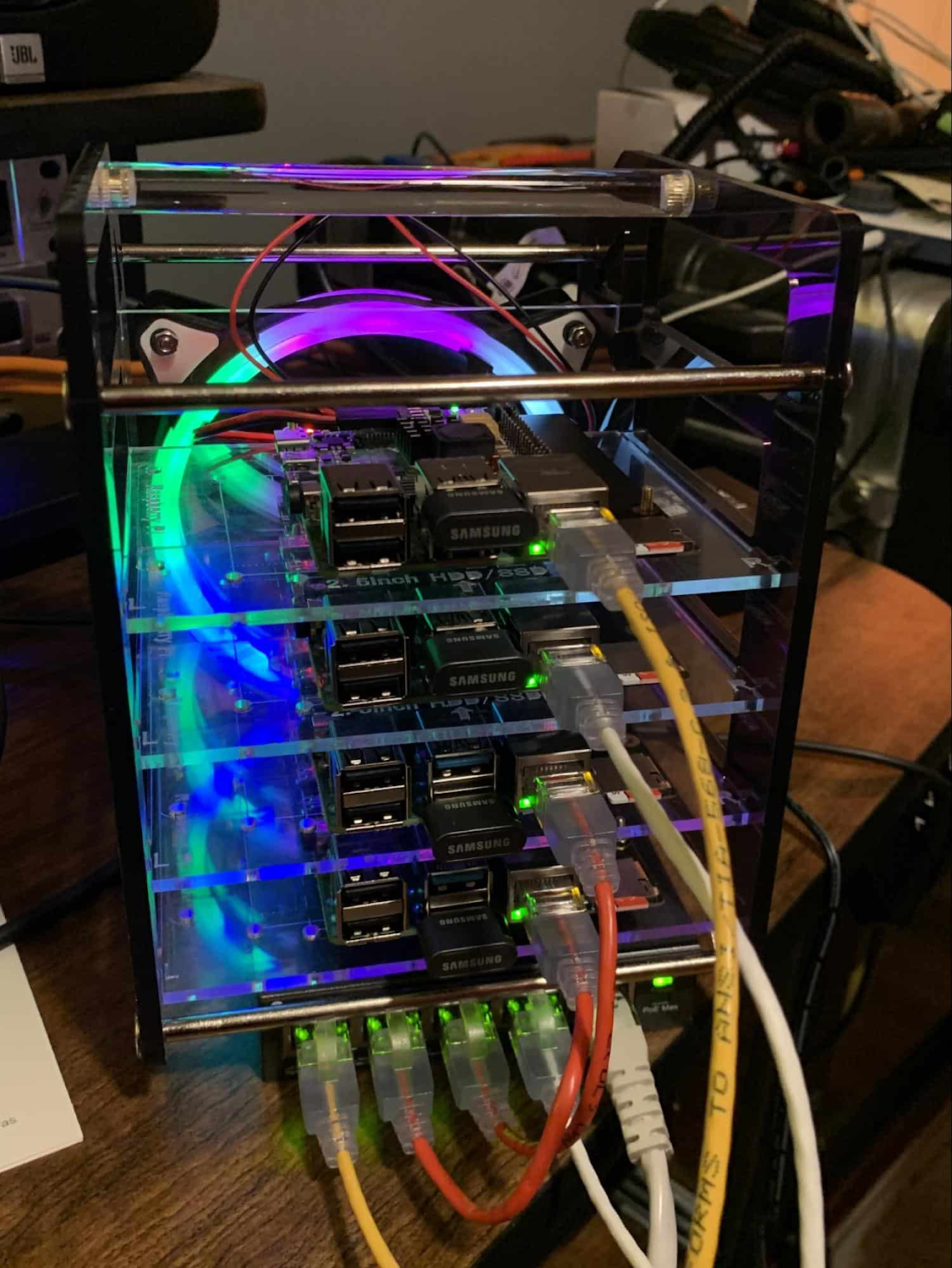
Edge, in short, is about having hardware and devices installed at remote locations that can process and communicate back the information they collect and generate. The edge management challenge, meanwhile, is being able to push configuration and software/model/media updates to these remote locations when they are connected.
Enable new use cases
Today, we have reached a new threshold for edge computing — one where micro-data-processing centers are deployed as the edge of a fractal arm, as it were. Together, they form a broad, geographically distributed, always-on framework for streaming, collecting, processing and serving asynchronous data. This big, loosely coupled application system lives, breathes and grows. Always changing, always learning from the data it collects — and always pushing out updated models when the tendrils are connected.
Right now, the rise of 5G is pushing the limits of edge even further. Devices enabled with 5G can transmit using a mobile network — no ISP required — enabling connectivity anywhere within reach of a cell tower. Granted, these networks have lower bandwidth, but they are often more than adequate for certain types of data, for example fire sensors in forests bordering remote towns that emit temperature or carbon monoxide data periodically. Recently, Google Cloud partnered with AT&T to enhance business use of 5G edge technology but there is so much more that can be done.
Reduce data center investments
In addition to enabling the digitization of a broad range of new use cases, adopting edge can also benefit your existing data center.
Let’s face it: data centers are expensive to maintain. Moving some data center load to edge locations can reduce your data center infrastructure investment, as well as compute time spent there. Edge services tend to have much lower service level objectives (SLOs) than data center services, driving lower levels of hardware investment. Edge installations also tend to tolerate disconnectedness, and thus function perfectly well with lower SLOs — and lower costs.
Let’s look at an example of where edge can really reduce costs: big data. Back in the day, we used to build monolithic serial processors — state machines — that had to keep track of where they were in processing in case of failure. But time and again, we’ve seen that smaller, more distributed processing can break down big, expensive problems into smaller, more cost-effective chunks.
Starting with the explosion of MapReduce almost 20 years ago, big-data workloads were parallelized across clusters on a network, and state management was simplified with intermediate output to share, wait for, or restart processing from checkpoints. Those monolithic systems were replaced by cheaper, smarter, networked clusters and data repositories where parallel work could be executed and rendered into workable datasets.
Flash forward to today, and we are seeing those same concepts applied and distributed to edge data-collection points. In this evolution of big data processing, we are scaling up and out to the point where observation data is so massive that it must first be prefiltered, and then preprocessed down to a manageable size and still be actionable. Only then should it be written back to the main data repositories for more resource-intensive processing and model building.
In short, data collection, cleanup, and potentially initial aggregation happens at the edge location, which reduces the amount of junk data sitting in costly data stores. This increases performance of the core data warehouse, and reduces the size and cost of network transfers and storage!
The edge is a huge opportunity for today’s enterprises. But designing environments that can make effective use of the edge isn’t without its challenges. Stick around for part two of this series, where we look at some of the architectural challenges typically encountered while designing for the edge and how we begin to address them.
Google’s Intelligent Products Essentials Assist Manufacturers in Product Development Journey

6937
Of your peers have already read this article.
3:00 Minutes
The most insightful time you'll spend today!
Expectations for both consumer and commercial products have changed. Consumers want products that evolve with their needs, adapt to their preferences, and stay up-to-date over time. Manufacturers, in turn, need to create products that provide engaging customer experiences not only to better compete in the marketplace, but also to provide new monetization opportunities.
However, embedding intelligence into new and existing products is challenging. Updating hardware is costly, and existing connected products do not have the capability to add new features. Furthermore, manufacturers do not have sufficient customer insights due to product telemetry and customer data silos, and may lack the AI expertise to quickly develop and deploy these features.
That’s why today we’re launching Intelligent Products Essentials, a solution that allows manufacturers to rapidly deliver products that adapt to their owners, update features over-the-air using AI at the edge, and provide customer insights using analytics in the cloud. The solution is designed to assist manufacturers in their product development journeys—whether developing a new product or enhancing existing ones.
With Intelligent Products Essentials, manufacturers can:
- Personalize customer experiences: Provide a compelling ownership experience that evolves over the lifetime of the product. For example, a chatbot that contextualizes responses based on product status and customer profile.
- Manage and update products over-the-air: Deploy updates to products in the field, gather performance insights and evolve capabilities over time with monetization opportunities.
- Predict parts and service issues: Detect operating thresholds, anomalies and predict failures to proactively recommend service using AI, reducing warranty claims, decreasing parts shortages and increasing customer satisfaction.
In order to help manufacturers quickly deploy these use cases and many more, Intelligent Products Essentials provides the following:
- Edge connections: Connect and ingest raw or time-series product telemetry from various device platforms utilizing IoT Core or Pub/Sub and enable deployment and management of firmware over-the-air and machine learning models with Vertex AI at the edge.
- Ownership App Template: Easily build connected product companion apps that work on smartphones, tablets, and computers. Use a pre-built API and accompanying sample app that can incorporate product or device registration, identity management, and provide application behavior analytics using Firebase.
- Product fleet management: Manage, update and analyze fleets of connected products via APIs, Google Kubernetes Engine, and Looker.
- AI services: Create new features or capabilities for your products using AI and machine learning products such as DialogFlow, Vision AI, AutoML, all from Vertex AI.
Enterprise data integration: Integrate data sources such as Enterprise Asset Management (EAM), Enterprise Resource Planning (ERP), Customer Relationship Management (CRM) systems and others using Dataflow and BigQuery.
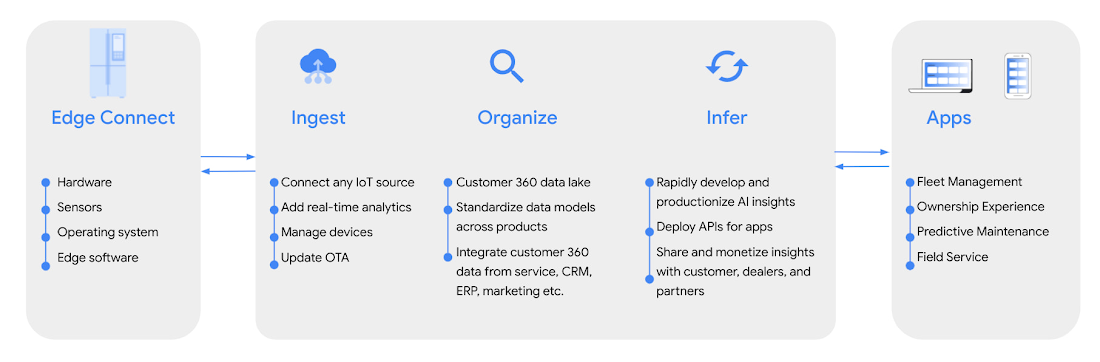
Intelligent Products Essentials helps manufacturers build new features across consumer, industrial, enterprise, and transportation products. Manufacturers can implement the solution in-house, or work with one of our certified solution integration partners like Quantifi and Softserve.
“The focus on intelligent products that Google Cloud is deploying provides a digital option for manufacturers and users. At its heart, systems like Intelligent Product Essentials are all about decision making. IDC sees faster and more effective decision-making as the fundamental reason for the drive to digitize products and processes. It’s how you can make faster and more effective decisions to meet heightened customer expectations, generate faster cash flow, and better revenue realization,” said Kevin Prouty, Group Vice President at IDC. “Digital offerings like Google’s Intelligent Product Essentials potentially go the last mile with the ability to connect the digital thread all the way through to the final user.”
Customers adopting Intelligent Products Essentials
GE Appliances, a Haier company, are enhancing their appliances using new AI-powered intelligent features to enable:
- Intelligent cooking: Help cook the perfect meal to personal preferences, regardless of your expertise and abilities in the kitchen.
- Frictionless service: Build smart appliances that know when they need maintenance and make it simple to take action or schedule services.
- Integrated digital lifestyle: Make appliances useful at every step of the way by integrating them with digital lifestyle services – for example, automating appliance behaviors according to customer calendars, such as oven preheating or scheduling the dishwasher to run in the late evening.
“Intelligent Products Essentials enhances our smart appliances ecosystem, offering richer consumer habit insights. This enables us to develop and offer new features and experiences to integrate with their digital lifestyle.“ —Shawn Stover, Vice-president Smart Home Solutions at GE Appliances.https://www.youtube.com/embed/zaWAJN8aKOw?enablejsapi=1&
Serial 1, Powered by Harley-Davidson, is using Intelligent Product Essentials to manage and update its next generation eBicycles, and personalize its customers’ digital ownership experiences.
“At Serial 1, we are dedicated to creating the easiest and most intuitive way to experience the fun, freedom, and adventure of riding a pedal-assist electric bicycle. Connectivity is a key component of delivering that mission, and working together to integrate Intelligent Product Essentials into our eBicycles will ensure that our customers enjoy the best possible user experience.”— Jason Huntsman, President, Serial 1.
Magic Leap, an augmented reality pioneer with industry-leading hardware and software, is building field service solutions with Intelligent Products Essentials with the goal of connecting manufacturers, dealers, and customers to more proactive and intelligent service.
“We look forward to using Intelligent Products Essentials to enable us to rapidly integrate manufacturers’ product data with dealer service partners into our field service solution. We’re excited to partner with Google Cloud as we continue to push the boundaries of physical interaction with the digital world.” — Walter Delph, Chief Business Officer, Magic Leap
Intelligent Product Essentials is available today. To learn more, visit our website.
More Relevant Stories for Your Company
How Mailjet Sends 1.5 billion Emails a Month with Google Cloud
Mailjet allows companies to create, send, and track millions of emails to their customers and prospects around the world each month. The company’s offerings range from routing these emails to tailor-made tools that allow clients to design and send marketing campaigns with messages related to sales, user clubs, coupons and discounts,

Chrome OS’s Hybrid Work Model Powers Google’s Return to Work Strategy
The pandemic continues to deeply affect our lives around the globe. In some places, new cases are surging and returning to work is the last thing on people’s minds. In other areas, conditions are improving and companies are starting to think about transitioning their workforce back to the office. Exactly




How a Furniture Retailer Found a Cool Way to Innovate Every Day and Beat Competition
MADE.COM is a London-based company that designs and retails homewares and furniture online, and across a network of experiential showrooms in Europe. Founded by serial entrepreneur Ning Li and Brent Hoberman, with Julien Callède and Chloe Macintosh in 2010, the company works with independent designers to create world-class furniture for
Salesforce Enhances Business Outcome with Real-time Collaboration
Nearly 20 years after its debut, the Customer Relationship Management (CRM) software company, Salesforce, “dominates the market,” as Bloomberg puts it, with 19.6 percent market share in 2017, according to International Data Corporation. The company as also recently named number 1 in Fortune’s 2018 list of 100 Best Companies to Work For. In
