





4641
Of your peers have already watched this video.
1:30 Minutes
The most insightful time you'll spend today!
How a Furniture Retailer Found a Cool Way to Innovate Every Day and Beat Competition
MADE.COM is a London-based company that designs and retails homewares and furniture online, and across a network of experiential showrooms in Europe.
Founded by serial entrepreneur Ning Li and Brent Hoberman, with Julien Callède and Chloe Macintosh in 2010, the company works with independent designers to create world-class furniture for its customers at affordable prices.
With a team of over 150 people, spread across four countries, collaboration was beginning to be a huge challenge and would eventually slow them down. In a competitive market, that’s something it couldn’t afford.
“For a company that was built online, it’s in our culture to do things fast. That’s the big part of our culture: moving fast and keep innovating every day,” says Li.
In order to make that possible, MADE.COM turned to G Suite. Watch the video to find out how G Suite makes that happen.
6546
Of your peers have already watched this video.
17:00 Minutes
The most insightful time you'll spend today!
Eli Lilly’s Custom-built Translation Service Leverages Google’s Translation Engine
Eli Lilly leverages Google Cloud’s machine translation to globalize content to serve their multilingual employees. Watch the video to learn how the healthcare company built an in-house solution powered by Google Cloud APIs to address the challenge of translating multilingual content at scale. Also explore Google’s innovations and investments into services for language translations produced for machine learning (also called as machine translation or neural machine translation) for safe and secure documents and text translation via an easy-to-use interface and API.
Migrating MySQL to Spanner? Here’s What You Need to Know

5616
Of your peers have already read this article.
2:00 Minutes
The most insightful time you'll spend today!
Since its initial release in 1995, MySQL has not only been the de-facto database for many data storage needs, but has gathered much attention over the years as one of the most well-recognized databases around when it comes to Relational Database Management Systems and transactional data processing.
Any application in retail, e-commerce, or banking has likely had its fair share of business depending on a relational database for its transactional needs. Many of these applications are built on MySQL due to its flexibility, open source nature, and strong community support.
Whether in the context of a migration from a relational database (like MySQL or PostgreSQL) , migration from a NoSQL database (like Cassandra), or a green grass workload, many companies turn to Cloud Spanner seeking a high availability SLA (99.99% for regional instances and 99.999% for multi region instances), unlimited scale, and low operational overhead – no patching required, no maintenance or other planned downtimes, just to name a few benefits.
The tooling and open source ecosystem around Spanner has evolved and grown ever since the service was introduced. HarbourBridge is a part of this ecosystem, and it’s meant to help customers port their existing MySQL or PostgreSQL schema to a Cloud Spanner schema.
Application Migration Tips
Despite helpful tools like HarbourBridge, database migrations are never trivial. Here are a few things to pay attention to when migrating from MySQL to Spanner, and how to update your application logic to address them.
Note – The following snippets use the PHP client for Cloud Spanner. A couple of the snippets reference a partial Magento port that our friends over at Searce have been working on. Once you understand the operations, you should be able to implement the same in any of the other languages that Cloud Spanner supports.
Cloud spanner enforces strict data types
In a MySQL query, the value of an attribute can be referenced as either a string or an integer. Example:
- select * from catalog_eav_attribute where attribute_id = 46;
- select * from catalog_eav_attribute where attribute_id = “46”;
Both are valid and equivalent.
In Cloud Spanner, the query will return an error if you try to reference an integer type by using a string representation.
Here is an example of a working query from Cloud Spanner:
- select * from catalog_eav_attribute where attribute_id = 46; — this will work
- Select * from catalog_eav_attribute where attribute_id = “46” — will fail, since we are supplying a string with “46”
You may use a function like the following to assist you with such transformations.
/*** Formats the SQL for Cloud Spanner* Example* Input SQL : <select statement> WHERE* (`product_id` = '340') ORDER BY position ASC* Output SQL : <select statement> WHERE* (`product_id` = 340) ORDER BY position ASC* In the above example integer*`340` is sanitized by removing single quotes.* Sanitization is required since Cloud Spanner* has strict typing* @param string $sql* @return string $sql*/public function sanitizeSql(string $sql){if (preg_match_all("/('[^']*')/", $sql, $m)) {$matches = array_shift($m);for($i = 0; $i < count($matches); $i++) {$curr = $matches[$i];$curr = filter_var($curr,FILTER_SANITIZE_NUMBER_INT);if (is_numeric($curr)) {$sql = str_replace($matches[$i],$curr, $sql);}}}return $sql;}
Using sequences in primary keys is not a Spanner best practice
Cloud Spanner does not implement a sequence generator, and it is not a Spanner best practice to use sequential IDs because doing so can cause hotspotting.
An alternative mechanism of generating a unique primary key is to use a UUID or any other similar mechanisms that result in non-sequential values. For more information, please refer to this article.
In order to convert all existing primary keys to a UUID pattern, you can change the schema using the snippet here
You may use this code snippet to modify the application code to generate the UUID for the auto increment. There are other ways to do this as well, such as using PHP built-in uniqid function.
/*** Generate UUID.* @return string*/public function getAutoIncrement(){if (function_exists('com_create_guid') === true) {return trim(com_create_guid(), '{}');}return sprintf('%04X%04X-%04X-%04X-%04X-%04X%04X%04X',mt_rand(0, 65535), mt_rand(0, 65535),mt_rand(0, 65535), mt_rand(16384, 20479),mt_rand(32768, 49151), mt_rand(0, 65535),mt_rand(0, 65535), mt_rand(0, 65535));}
Implicit casting and the need for explicit casting of field data types
Both MySQL and Cloud Spanner follow the SQL standard, hence much of the query syntax is the same. One notable difference is that the Cloud Spanner field types are implicitly cast to an appropriate data type out of the ones mentioned here. When implicit casting of the field type fails, Spanner returns a read error, so it would be safer to perform the casting to the appropriate type when issuing the SELECT statement.
Modify application code to cast to respective data type before execution of query.
$con = $this->getSpannerConnection();/*** Cloud Spanner follows strict type so cast the columns appropriately*/$select = $con->addCast($select, "`t_d`.`value`", 'string');$select = $con->addCast($select, "`t_s`.`value`", 'string');$select = $con->addCast($select, "IF(t_s.value_id IS NULL,t_d.value, t_s.value)", 'string');$values = $con->fetchAll($select);
Modify the application code to cast the column to its respective type
/*** Cast the column with type* @param string $sql* @param string $col* @param string $type* @return string*/public function addCast(string $sql,string $col, string $type){$cast = "cast(".$col." as ".$type.")";return str_replace($col, $cast, $sql);}
Using interleaved tables to improve read performance
Cloud Spanner’s table interleaving is a great choice for many parent-child relationships where the child table’s primary key includes the parent table’s primary key columns. Interleaving ensures that child rows are collocated with their parent rows, which can significantly improve query performance.
Refer to the statements here for a few samples of creating interleaved tables. To learn more about table interleaving, visit the documentation.
Conclusion
Database migrations are complicated. Hopefully, using HarbourBridge and the list of tips in this article can make that task easier. For additional tips, please take a look at this migration guide and read more about HarbourBridge.
Streamlining Your Experience: Enhanced Search and Navigation in Google Cloud Console
1367
Of your peers have already read this article.
4:30 Minutes
The most insightful time you'll spend today!
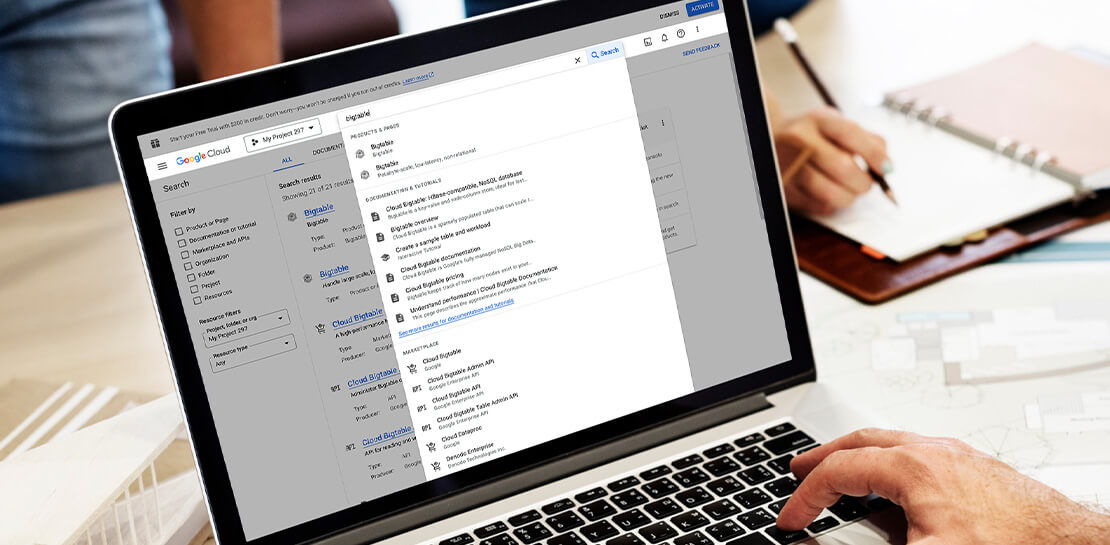
The Google Cloud console is a powerful platform that lets users manage their cloud projects end-to-end with an intuitive web-based UI. With over 120 Google Cloud products across thousands of pages, it can be challenging to navigate through the console quickly, and many users don’t like to use the command line interface. To help, Google Cloud console team recently made several improvements to our search and navigation features, making it easier to find what you need, when you need it.
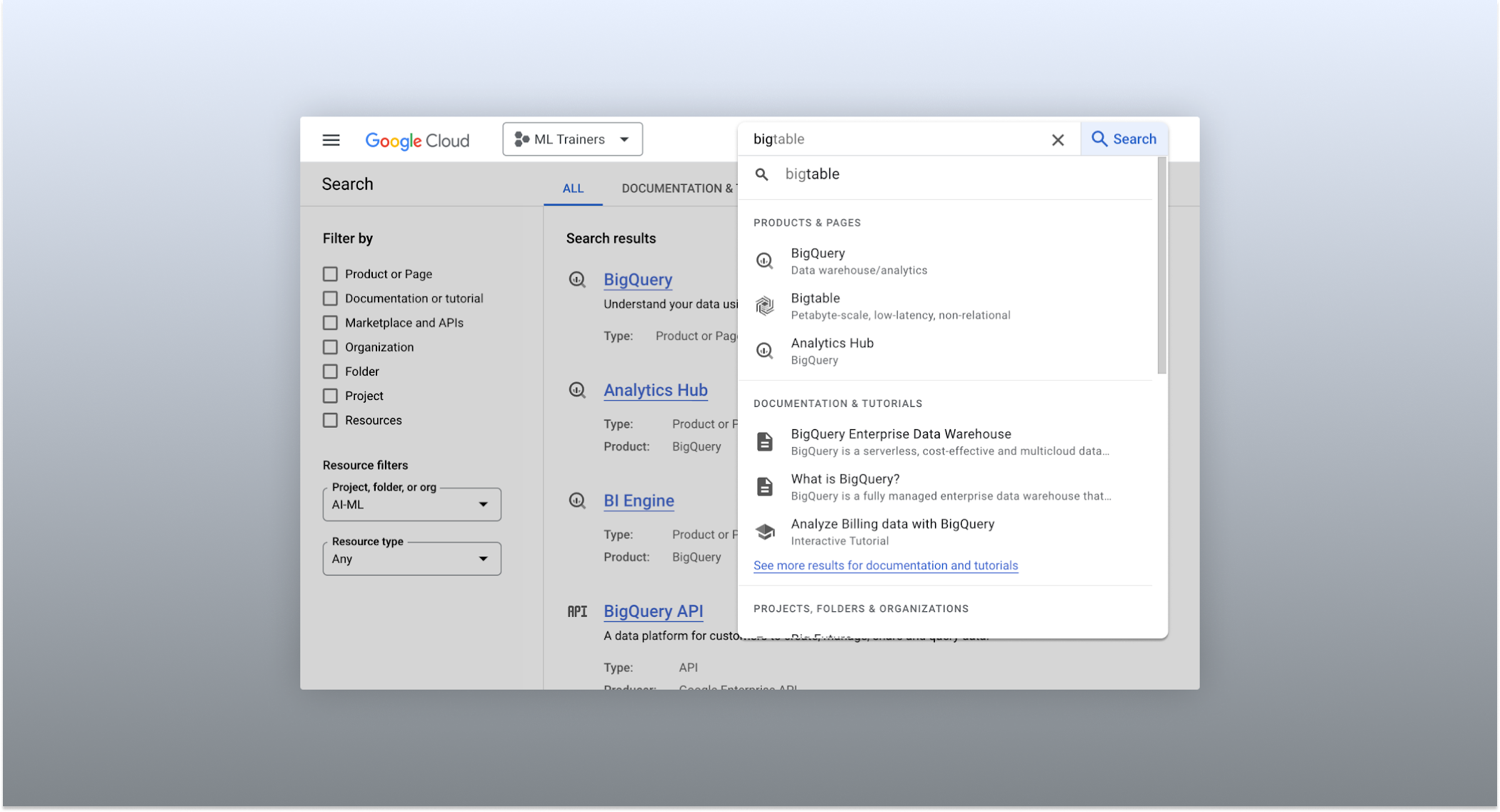
The Cloud console’s search dropdown and result page
Expanded resource-type search
One of the most significant improvements to the console’s search feature is the increased resource-type coverage. You can now find instances of nearly all of the over 120 products that Google Cloud offers directly from the search bar, rather than by manually clicking to the details section nested within specific product pages. This wider coverage saves you time compared to browsing through the different product categories to find what you’re looking for. This improvement also allows the console experience team to continuously add new resource types as we develop new features and capabilities in our various product offerings.
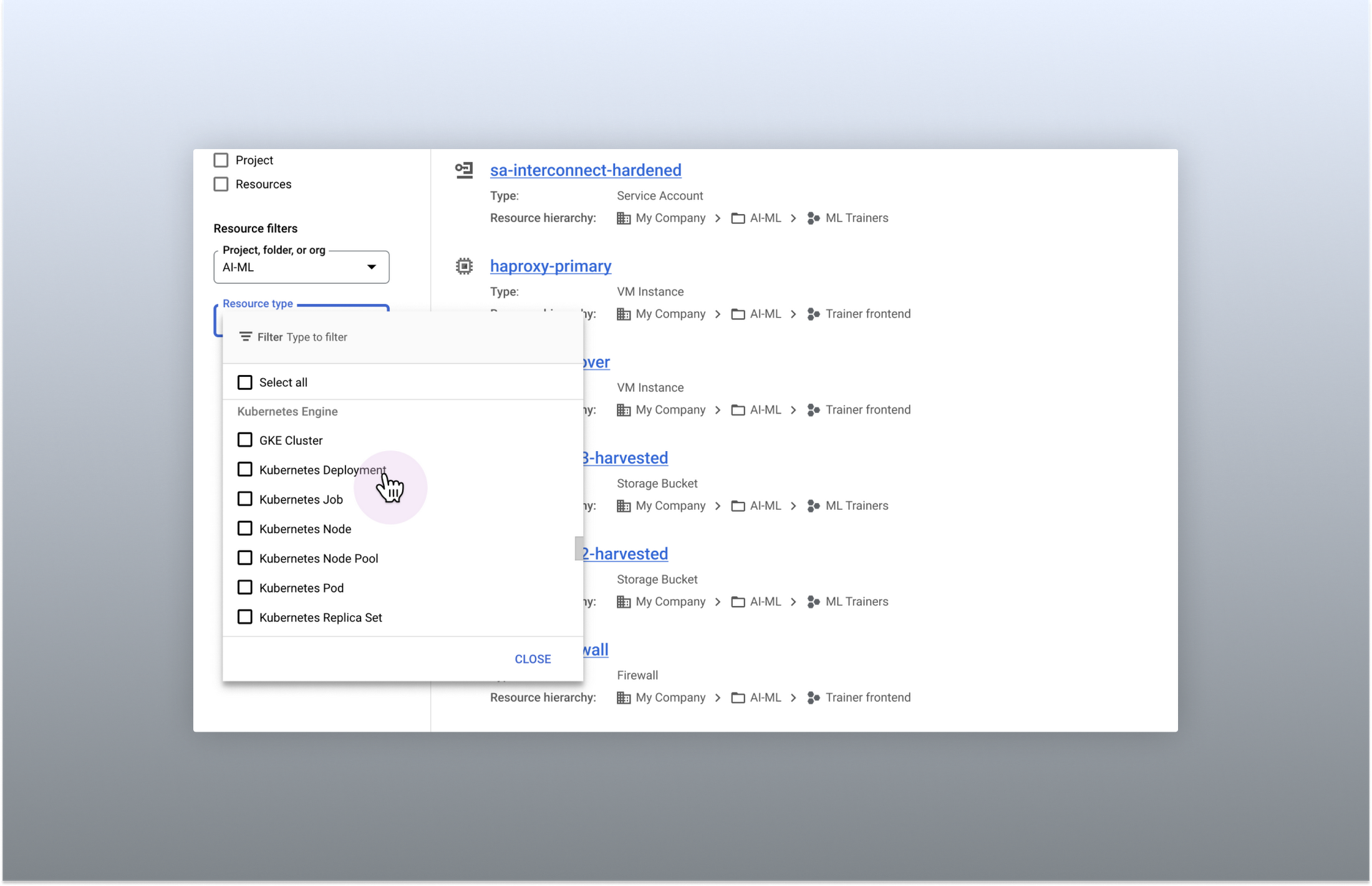
Search for more than 90 types of resources using Google Cloud console
Improved documentation search
We also improved the coverage and accuracy of the search experience for documentation, making it easier to find specific pages or interactive tutorials. Developers looking to get started with something they’re unfamiliar with may want to undertake tutorials in the context of their own working environment. Even experienced developers just looking for a quick answer to their question may not want to leave the console, so we expect these improvements can help users of all experience levels.
We’ve heard from you that finding the right documentation from within the console can be tricky, and so we hope this change can save you from needing to switch over to web search to be confident that they’ll find what you’re looking for.
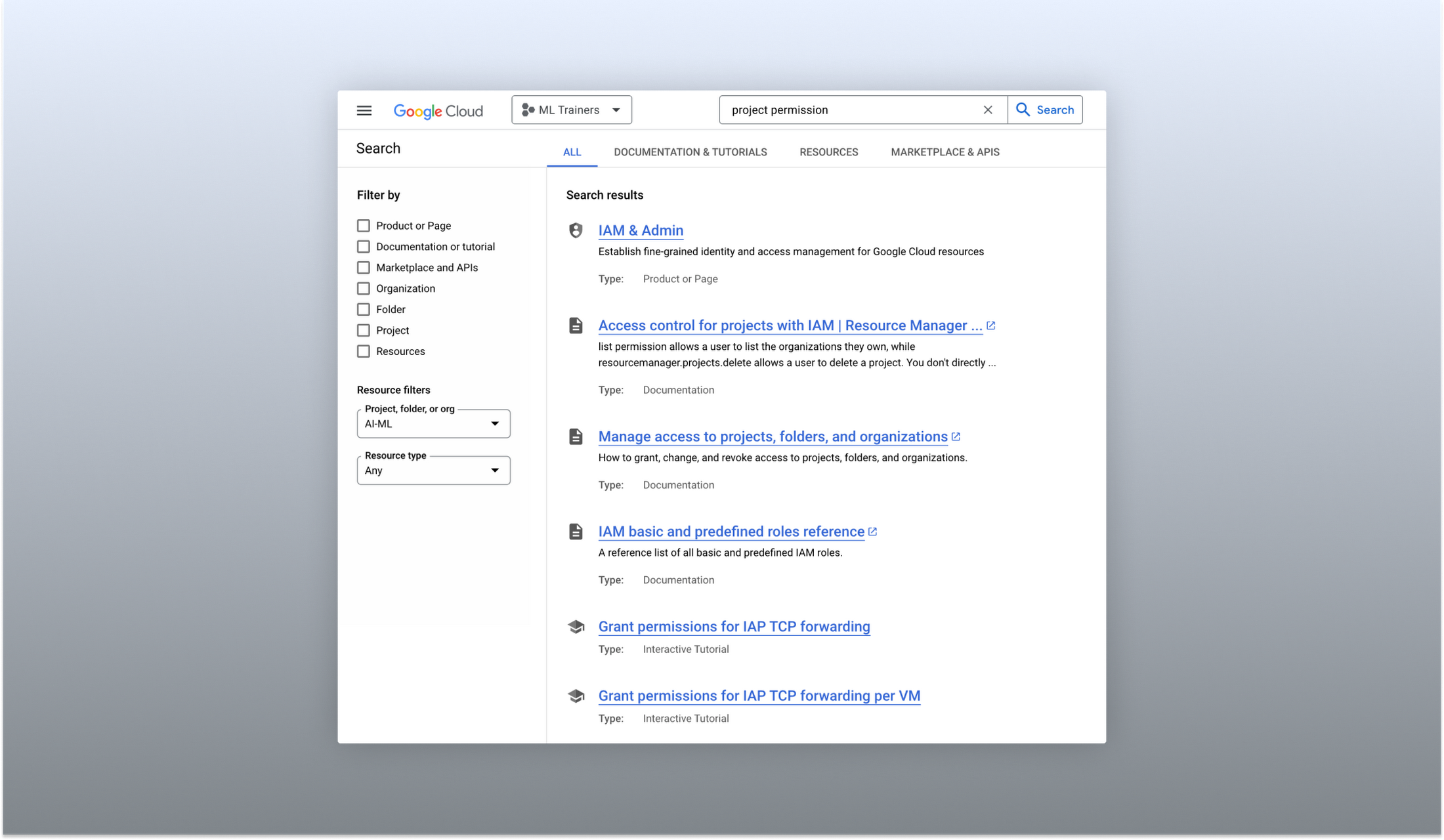
Cloud documentation and tutorials are available for search in the console
A refreshed search results page
To make browsing search results easier, we also overhauled our search results page by dividing results into tabs, similar to Google web search. This means that you can refine your search by diving into one of those categories individually. In addition to maintaining an “all results” tab, there are tabs for:
- Documentation and tutorials
- Resource instances, and
- Marketplace and APIs
Each tab also has a better filtering experience that’s unique to that search result category. For instance, the Resources tab lets you filter by metadata like the last time a resource was interacted with, while the Documentation tab allows you to search for interactive tutorials only. If you can’t find what you’re looking for in the autocomplete dropdown, try the search results page. It can provide additional results or context to help you find exactly what you’re looking for.
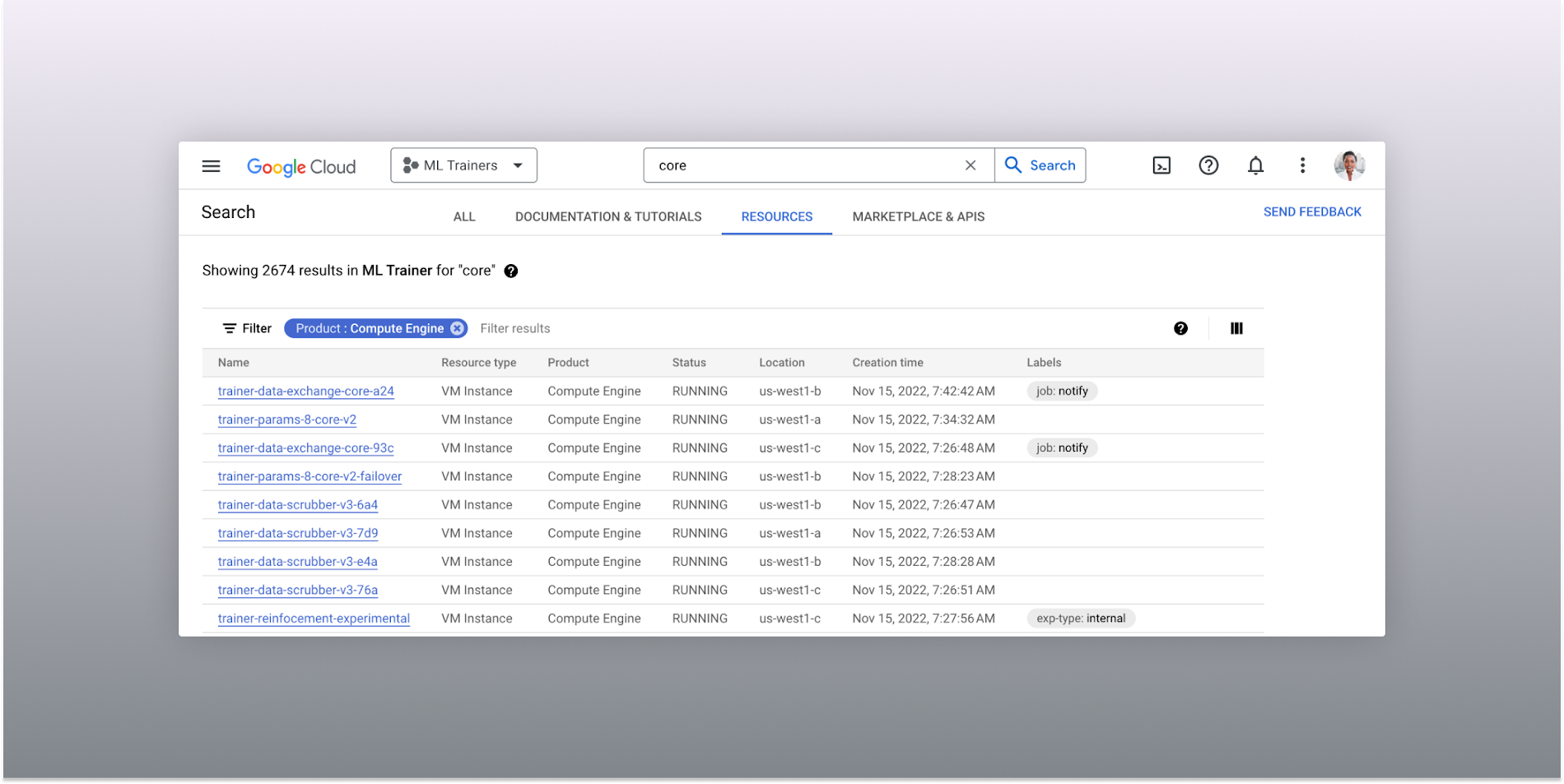
The Resources tab lists results in a denser, metadata-rich format with filtering available
Accurate industry-wide synonyms
Google Cloud console search now interprets industry-wide synonyms accurately — if you’re coming from AWS or Azure and know the name of a product in that ecosystem, searching for it will return the Google Cloud equivalent. A full list of synonyms can be found here.
General usability improvements
We also shipped several smaller quality-of-life improvements related to search, including:
- Improvements to accessibility, including better color contrast and zoom behaviors
- Faster latency targets and shorter load times for results
- A search keyboard shortcut — just type “/” to begin searching without using your mouse
- The ability to search for an API resource by its key
We also updated the look and feel of our platform bar to a cleaner, more modern experience that’s more in line with the branding across other Google Cloud interfaces.
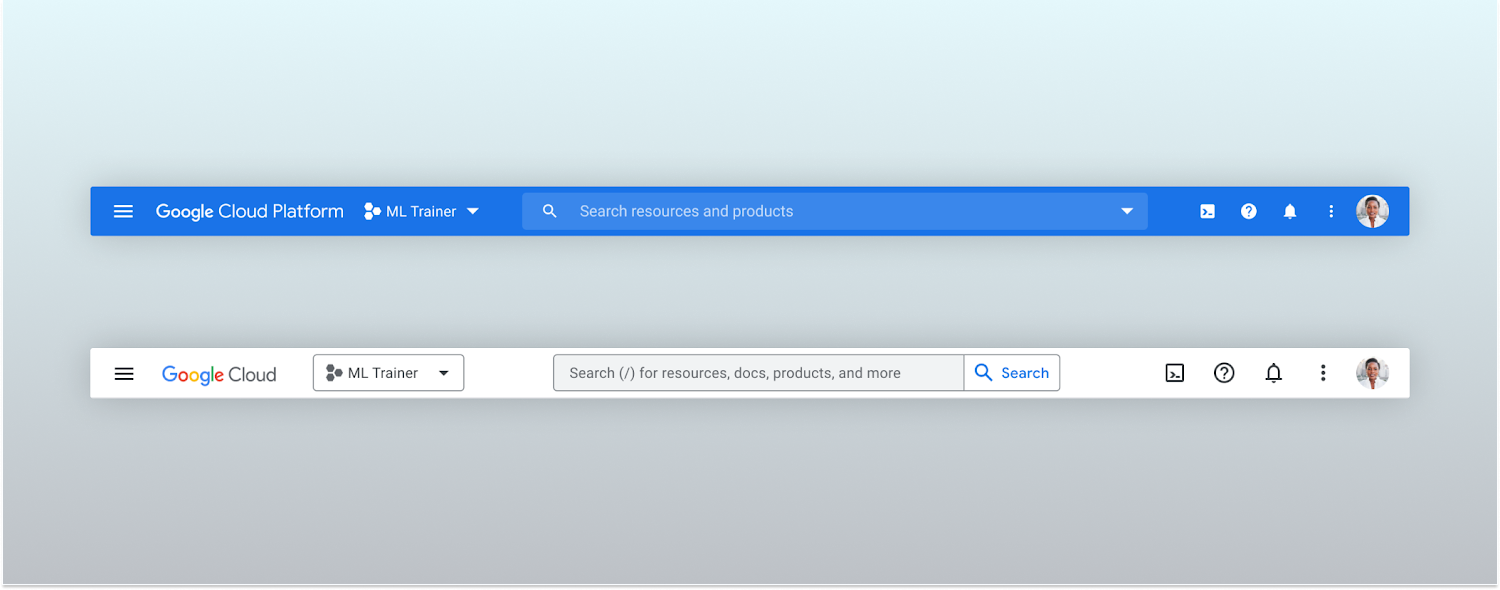
Google Cloud console’s old platform bar (top) and the updated version (bottom)
A customizable navigation menu
Finally, we made usability improvements to the left-hand navigation menu by allowing you to pin specific products. Products can be pinned from the left nav menu or our brand new All Product Page. This is a shift away from the default ordering of products that attempted a “one size fits all” approach to navigation. This customization feature lets you tailor the console to your specific needs and work more efficiently.
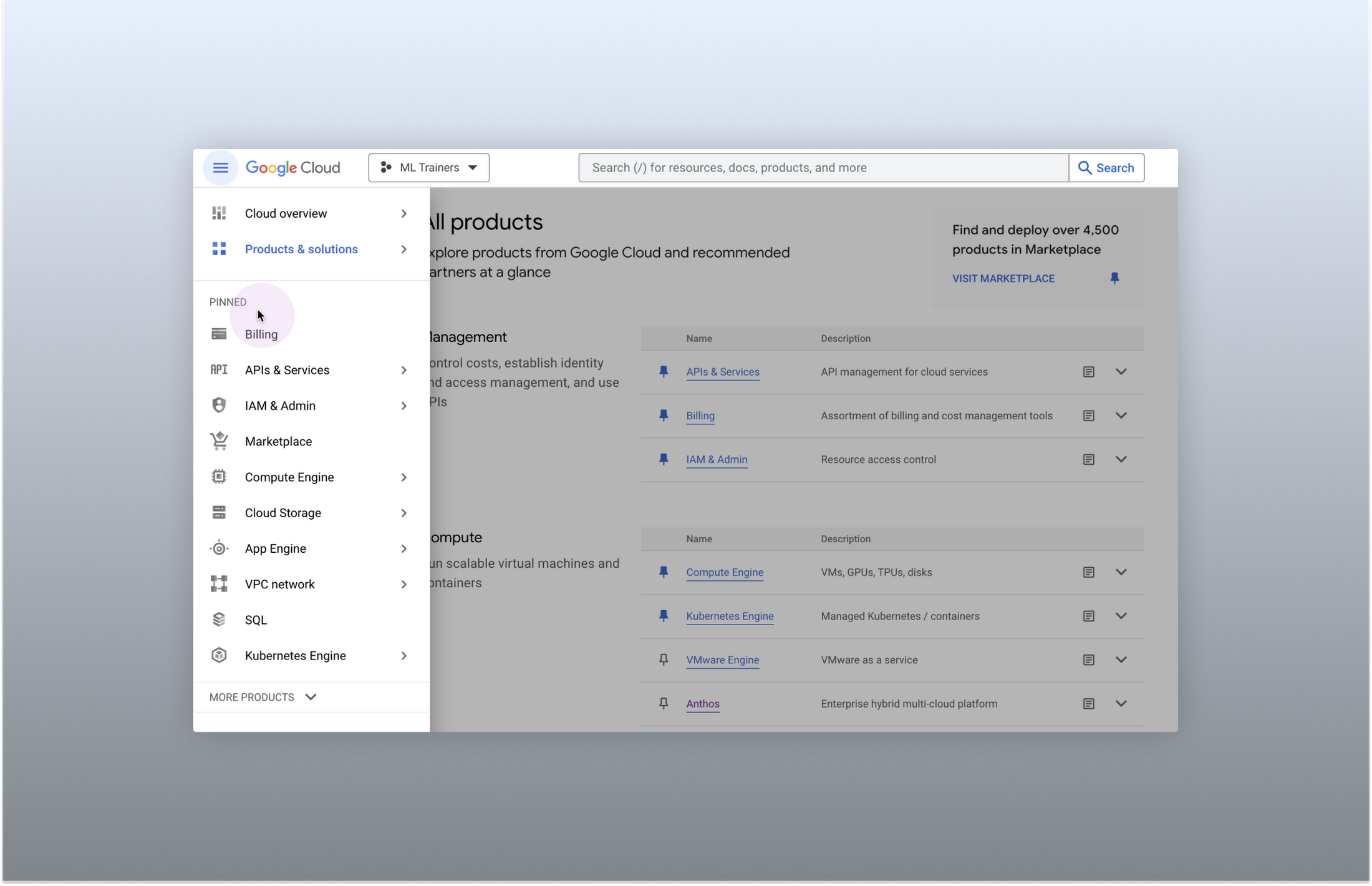
Products can be pinned to the left nav menu for easy access
Final thoughts
The Google Cloud console’s navigation and search features have come a long way. With these recent improvements, you can find what you need quickly and efficiently, making it easier to manage your cloud resources. From expanded resource-type search to improved documentation search and refined search results, the console is more user-friendly than ever before.
Two Ways to Deploy SAP HANA System on Google Cloud

7880
Of your peers have already read this article.
4:00 Minutes
The most insightful time you'll spend today!
Many of the world’s leading companies run on SAP—and deploying it on Google Cloud extends the benefits of SAP even further. Migrating your current SAP S/4HANA deployment to Google Cloud—whether it resides on your company’s on-premises servers or another cloud service—provides your organization with a flexible virtualized architecture that lets you scale your environment to match your workloads, so you pay only for the compute and storage capacity you need at any given moment. Google Cloud includes built-in features, such as Compute Engine live migration and automatic restart, that minimize downtime for infrastructure maintenance. And it allows you to integrate your SAP data with multiple data sources and process it using Google Cloud technology such as BigQuery to drive data analytics.
SAP server-side architecture consists of two layers: the SAP HANA database, and the Netweaver application layer. In this blog post, we’ll look at the options and steps for moving the database layer to Google Cloud as a lift and shift or rehost, a straightforward approach that entails moving your current SAP environment unchanged onto Google Cloud.
Deploying an SAP HANA system on Google Cloud
Google Cloud offers SAP-certified virtual machines (VMs) optimized for SAP products, including SAP HANA and SAP HANA Enterprise Cloud, as well as dedicated servers for SAP HANA for environments greater than 12TB. (For a complete list of VM and hardware options, visit the Certified and Supported SAP HANA Hardware Directory.)
Before proceeding with a rehost migration to Google Cloud, your current (source) environment and Google Cloud (target) environments should meet these specifications:
Prerequisites:
- The configuration of the Google Cloud environment (i.e., VM resources, SSD storage capacity) should be identical to that of the source environment. If the underlying hardware is different, however, you must use Option 2 for your migration, detailed below.
- Both environments should be running the same operating system (SUSE or RHEL Linux).
- The HANA version, instance number, and system ID (SID) should be identical.
- Schema names must remain the same.
- Establishing the network connection between the on-premises environment and Google Cloud will be required in this phase to support rehost of the SAP application.you can use Cloud VPN or Dedicated Interconnect. Learn more about Dedicated Interconnect and Cloud VPN.
Note: Depending on your internet connection and bandwidth requirements, we recommend using a Dedicated Interconnect over Cloud VPN for production environments.
We offer a number of automated processes to accelerate your cloud journey. To deploy the SAP HANA system on Google Cloud, you can use the Google Cloud Deployment manager or Terraform and Ansible scripts available on GitHub with configuration file templates to define your installation. For more details, see the Google Cloud SAP HANA Planning Guide.
Note: To deploy SAP HANA on Google Cloud machine types that are certified by SAP for production, please review the Certification for SAP HANA on Google Cloud page.
Moving an SAP HANA Database to Google Cloud
There are two different options you can use to rehost your SAP HANA database to Google Cloud, and each has pros and cons that you should consider when deciding on your approach.
Option 1: Asynchronous replication uses SAP’s built-in replication tool to provide continuous data replication from the source system (also known as the primary system) to the destination or secondary system—in this case residing on Google Cloud. It’s best for mission-critical applications for which minimum downtime is a high priority, and for large databases. In addition, the high level of automation means that the process requires less manual intervention. Here’s where you can learn more on HANA Asynchronous Replication.
Option 2: Backup and restore relies on SAP’s backup utility to create an image of the database that is then transferred to Google Cloud, where it is restored in the new environment. Downtime for this method varies by database size, so large databases may require more downtime via this method vs. asynchronous replication. It also involves more manual tasks. However, it requires fewer resources to perform, making it an attractive option for less urgent use cases. Here’s where you can learn more on SAP HANA database Backup and restore.

How to migrate the SAP HANA database to Google Cloud using Asynchronous Replication

- Create and configure Dedicated Interconnect or Cloud VPN between the current environment and Google Cloud.
- Set up SAP HANA asynchronous replication. You can configure system replication using SAP HANA Cockpit, SAP HANA Studio, or hdbnsutil. See Setting Up SAP HANA System Replication in the SAP HANA Administration Guide.
- Be sure to use the same instance number and HANA SID in the template as the primary instance.
- Configure the Google Cloud instance as the secondary node for using HANA Asynchronous replication.
- Perform data validation once full data replication is completed to the SAP HANA database in Google Cloud. To learn more: HANA System Replication overview.
- Perform an SAP HANA takeover on your standby database. This switches your active system from the current primary system onto the secondary system on Google Cloud. Once the takeover command runs, the system on Google Cloud becomes the new primary system.To learn more: HANA Takeover.
How to migrate the SAP HANA database to Google Cloud using Backup and Restore

- Create a full backup of your SAP HANA database in your current environment.
- Create a new storage bucket in your Google Cloud environment. Visit Creating Storage Buckets in the Google Cloud Storage documentation.
- Download and install gsutil onto the source environment and run it to upload the HANA backup to the Google Cloud storage bucket. To install gsutil utility on any computer or server, visit Install gsutil in the Google Cloud Storage documentation.
Note: You can run parallel multi thread/multi processing in gsutil to copy large files more quickly. - Recover the HANA database on Google Cloud using SAP’s RECOVER DATABASE statement. See RECOVER DATABASE Statement (Backup and Recovery) in the SAP HANA SQL Reference Guide for SAP HANA Platform.
Note: BackInt agent is an integrated SAP interface tool used for HANA database on Google Cloud.Backint agent for SAP HANA can be used to store and retrieve backups directly from Google Cloud Storage. It is supported and certified by SAP on Google Cloud. To learn more: SAP HANA Backint Agent on Google Cloud.
In summary, we recommend using Asynchronous Replication (Option 1) for mission-critical applications that require the lowest downtime window. For all other applications, we recommend Backup and Restore (Option 2), as this approach requires fewer resources. It’s also a great way to implement the backup and restore functionality on Google Cloud.
A rehost migration is the most straightforward path to getting your SAP on HANA system up and running on Google Cloud. And the sooner you migrate, the sooner you can take advantage of the many benefits Google Cloud brings to your SAP solution. For more information on the different migration options please review: SAP on Google Cloud: Migration strategies.
Learn more about deploying SAP on Google Cloud. Technical resources can be found here.
The Incredible Story of How Hero MotoCorp Moved 6,000 Users to the Cloud in 45 Days
7806
Of your peers have already read this article.
5:00 Minutes
The most insightful time you'll spend today!
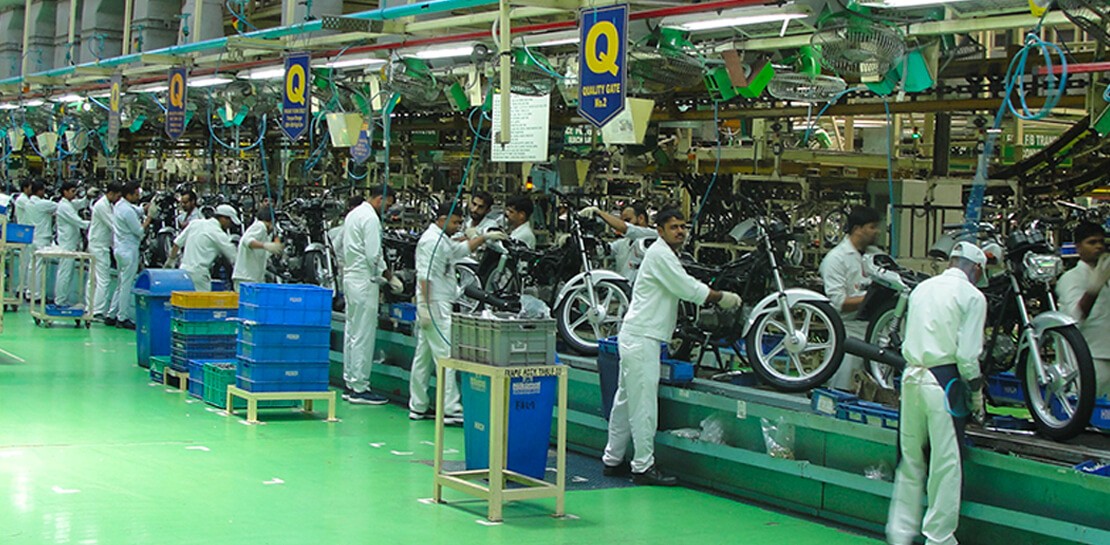
Assembling thousands of parts into one motorbike or scooter every 17 seconds is a complex task requiring accuracy and precision. For Hero MotoCorp — an India-headquartered manufacturer of two-wheeler vehicles — workforce collaboration, security, and mobility complement these processes and provide the cornerstone of the organization’s global operations.
Based in New Delhi, Hero MotoCorp is one of the world’s largest makers of two-wheeler vehicles, with a production capacity of 9 million units from five manufacturing plants in India and one each in Colombia and Bangladesh. The business has more than 90 million customers and operates in 37 countries across Asia, Africa, and South and Central America. In its home market, HeroMotoCorp sells one in every two two-wheelers.
Innovation and agility
Innovation and agility are deeply embedded in Hero MotoCorp’s culture and operations. Its Center of Innovation and Technology at Jaipur in Rajasthan, northern India, undertakes extensive product design and development, testing, and validation.
Hero MotoCorp has also established a technology center at Stephanskirchen, near Munich in Germany, to develop new vehicle concepts and technologies.
For several years, Hero MotoCorp relied on a traditional email solution to enable its employees to communicate and complete tasks. However, this solution could not provide the functionality, performance, ease of use, and security the business needed to maintain its market leadership.
“Our Chief Information Officer, Mr. Vijay Sethi, was the first to migrate to and embrace the features of G Suite and set an example to our workforce.”
Sujoy Brahmachari, Sr. GM and CISO, Hero MotoCorp
“Security, in particular, is extremely important — we don’t want our product design and development details falling into the wrong hands,” says Sujoy Brahmachari, Sr. GM and CISO, Hero MotoCorp. “We needed a solution that would allow us to control and monitor the distribution of sensitive information within and outside our organization.”
In early 2015, Hero MotoCorp’s technology team began evaluating email and workplace collaboration applications that could help the business realize its longer-term ambitions.
Collaboration key to success
“We were focused on a product that could drive greater collaboration among our workforce,” says Brahmachari. “In addition, we wanted to use the product on our desktops, laptops, mobile devices, and other devices. Finally, we needed to ensure email, other applications, and data were secure and available as and when we needed them.”
Hero MotoCorp’s evaluation found G Suite met all these requirements while being intuitive and easy to use. Furthermore, the cloud-based suite of intelligent applications provided a lower total cost of ownership than the business’s existing email solution and potential alternatives.
A 45-day migration
The business completed its review and completed the migration in just 45 days in 2015. “We worked closely with Google and our partners to complete the process in an innovative way that prioritized speed,” says Brahmachari. “For example, we migrated only three months’ worth of emails from our incumbent solution to G Suite, rather than the entire data repository.”
“Our teams are very happy and collaborative – employees can use Gmail through G Suite without being concerned about storage limits and can connect with colleagues, partners, customers, and other stakeholders through the chat, video, and audio call capabilities of Hangouts Meet.”
Sujoy Brahmachari, Sr. GM and CISO, Hero MotoCorp
Hero MotoCorp started the migration with a function-wise approach, creating batches and moving them overnight to G Suite. It created an internal video for employees to learn how to work using G Suite. It also created intranet posts to provide easy reference to all employees and established a service desk to respond to questions.
“Our Chief Information Officer, Mr. Vijay Sethi, was the first to migrate to and embrace the features of G Suite and set an example to our workforce,” says Brahmachari.
Deployed to 6,000 users
Hero MotoCorp has deployed G Suite to about 6,000 users in its core business and many users in affiliate companies. The company’s user-focused approach to the deployment, and the intuitive, easy-to-use nature of the product, has prompted the business’s workforce to embrace the full potential of G Suite.
“Our teams are very happy and collaborative — employees can use Gmail through G Suite without being concerned about storage limits and can connect with colleagues, partners, customers, and other stakeholders through the chat, video, and audio call capabilities of Hangouts Meet,” says Brahmachari.
Employees can also create, store, and access Docs, Sheets, Slides, and other file types on Drive — helping to ensure new product development, delivery schedules, budgeting, and other activities needed to keep a leading multinational manufacturer ahead of its competitors can be completed quickly and collaboratively.
Deployed to mobile devices
“With G Suite, information is available in the cloud to any employee at any time. The collaboration this enables plays a vital role in sustaining our leadership position.”
Sujoy Brahmachari, Sr. GM and CISO, Hero MotoCorp
Hero MotoCorp has also been able to give employees access to G Suite on a range of mobile devices — with administrators using mobile management to secure access applications and data on iOS and Android devices. The business is using the feature to require devices to have a screen lock or password; remote-wipe information from lost or stolen devices; and monitor from a central console the devices that access corporate data.
Further, Hero MotoCorp can use G Suite features to set and enforce policies and control system configuration and administration, while taking advantage of independently verified security, privacy, and compliance controls to meet business requirements.
With G Suite deployed and delivering value, Hero MotoCorp is now implementing or evaluating a range of Google technologies. For example, the business is using Google Maps Platform to power navigation for owners of new Hero MotoCorp two-wheelers and use Cloud Vision AI to enable immediate recognition of spare parts. “We are also evaluating Google Cloud data search and management technologies for potential application within the organization,” says Brahmachari.
The business is now well-positioned to accelerate into new markets and product development. “With G Suite, information is available in the cloud to any employee at any time,” says Brahmachari. “The collaboration this enables plays a vital role in sustaining our leadership position.”
More Relevant Stories for Your Company

Jeni’s Splendid Ice Creams
At Jeni's Splendid Ice Creams, Jeni and her staff are all passionate about ice cream and sharing that passion with the world by creating ice creams that you can fall madly in love with. To do this every day, requires incredible teamwork and collaboration, and Google Workspace is helping support

Google’s Open Subsea Cable ‘Firmina’ to Improve South Americans’ Access to Google Products
Today, we’re announcing Firmina, an open subsea cable being built by Google that will run from the East Coast of the United States to Las Toninas, Argentina, with additional landings in Praia Grande, Brazil, and Punta del Este, Uruguay. Firmina will be the longest cable in the world capable of

Cloud-Native Observability: Google Cloud and Chronosphere Join Forces
As digital transformation continues apace, cloud native adoption has skyrocketed — and so has the volume, velocity, and variety of data that organizations must monitor to maintain visibility over their IT environments. Rather than a fixed number of virtual machines (VMs) running a single application each, systems are more flexible

Business Messages drives 85% CSAT scores for Levi Strauss
Founded in 1853, clothing company Levi Strauss & Co. gained fame for their Levi’s® denim jeans. Over 150 years later, Levi’s is a globally-recognized brand that sells jeans and other apparel in more than 3,100 retail stores across 110 countries. The summary During the COVID-19 pandemic, Levi’s saw that their
