






Google’s Lesson on Leveraging AI and More to Optimize Cloud Value for Innovation
READ FULL INTRODOWNLOAD AGAIN4846
Of your peers have already downloaded this article
1:30 Minutes
The most insightful time you'll spend today!
How Kinguin Notched Up Shopping Experience with Google Recommendations AI

6456
Of your peers have already read this article.
3:00 Minutes
The most insightful time you'll spend today!
Over 2.14 billion people worldwide are expected to buy online this year, according to Statista. Online retail sales will account for 22% of all purchases by 2023. But in a competitive retail landscape, positive interactions can mean the difference between a sale and an abandoned shopping cart.
One of the leading global marketplaces – Kinguin.net is a haven for gamers. Their bustling ecommerce business conducts over 500,000 new transactions monthly. Users will encounter over 50,000 unique digital products, from video games, gift cards, in-game items to computer software and services. With over 10 million registered users, Kinguin improved their experience by helping users find items quickly and deliver service at scale.
Helping customers find what they want, fast
Because of Kinguin’s high volume of users—both buyers and sellers—and breadth of digital products, browsing and shopping can be challenging. “Customers shop online for choice and convenience, but it can sometimes be overwhelming. We want anyone who shops at Kinguin to find what they are looking for quickly and easily,” says Viktor Romaniuk Wanli, Kinguin CEO and Founder.
Today’s retailers know that creating personalized shopping experiences is crucial for establishing and maintaining customer loyalty. Kinguin discovered their users were getting a rather standard retail experience. They wondered how they could offer them a more tailored, personalized experience.
They knew product recommendations were a great way to personalize experiences because they help customers discover products that match their tastes and preferences. But it’s not that easy to recommend products. Various shifting factors make recommendations much more complex:
- Customer behavior. Understanding customers is tough. How do you recommend something to a cold start user who’s never been to your site before? What happens when their behavior changes?
- Omnichannel context. According to Harvard Business Review, 73% of all customers use many channels when they buy. What happens when they go from desktop to mobile or from social media shopping to a proprietary app?
- Product data challenges. How do you recommend new products within a large catalog of items? What if your product data has sparse labeling or unstructured metadata?
Data wasn’t a problem for Kinguin. They had data orders, history, wishlists, and could collect events based on their platform interactions. It was the machine learning model expertise they lacked. So rather than building their own solution, they determined it was more cost effective for them to find a reliable partner. It was also essential that the solution integrated easily with Kubernetes, which enabled their global network.
With these considerations in mind, they applied for the Google Recommendations AI beta program. Kinguin became the first gaming e-commerce platform in Europe to use Recommendations AI when it launched in 2020.
Pro gamer move: using a fully managed AI service
Google Recommendations AI uses algorithms to deliver highly personalized suggestions tailored to a customer’s preferences. Google Cloud based these algorithms on the same research that powers models by YouTube search and Google Shopping. Algorithms are always being tuned and adjusted to focus on individuals themselves—not just items.
Many shopping AIs rely on manually provisioning infrastructure and training machine learning models. Instead, Recommendations AI’s deep learning models use item and user metadata to gain insights. It processes Kinguin’s thousands of products at scale, iterating in real time. First, Kinguin pieces together a customer’s history and shopping journey. Then, using Recommendations AI, they can serve up personalized products—even for long-tail products and cold-start users.
By leveraging internal tools, Kinguin didn’t need to start implementation from scratch. After a few trial sessions with Google Cloud engineers, they got started right away. Due to the fast-paced nature of a marketplace—i.e., price changes, out-of-stock items—Kinguin needed their recommendations to be as close to real time as possible. They used internal event buses to stream events and their product catalog directly to the recommendations API.
Kinguin rolled out in high-traffic areas, including their home page, product page, and category pages. They analyzed heat maps and scroll maps to figure out where to test placements. They also experimented with different recommendation models such as “recently bought together” and “you may like.” Engineers also factored in where they were implementing the models. For example, the “others you might like” model would fit best on the homepage, while “frequently bought together” made sense at checkout.
Understanding how product recommendations influence financials is critical for demonstrating the impact of personalization. Using BigQuery, Kinguin could analyze different cost projection models. BigQuery helped them dig into specific financial data to understand their margins and revenue gains.
Playing to win: enhanced customer experience
Since adopting Recommendations AI, Kinguin has improved both customer experience and satisfaction. Search times have shortened by 20 seconds. Additionally, their average cart value has increased by 5 EUR. Conversion rates have quadrupled since the outset. Click-thru rates have doubled, increasing by 2.16 on product pages and 2.8 times on recommendations pages.
“Google Recommendations AI has helped us evolve our service, increase customer loyalty and satisfaction. It has also contributed to a significant rise in sales,” says Wanli. Kinguin is already thinking about other ways of enhancing user experiences with recommendations. Ideas include their checkout process, other landing pages, and email marketing.
Kinguin’s journey with Google Cloud shows how companies can leverage AI to optimize sales and deliver high-performing, low-latency recommendations to any customer touchpoint.
Learn more about Recommendations AI and Google Cloud AI and machine learning solutions.
BigQuery Explainable AI for Demystifying the Inner Workings of ML Models. Now GA!

6569
Of your peers have already read this article.
2:00 Minutes
The most insightful time you'll spend today!
Explainable AI (XAI) helps you understand and interpret how your machine learning models make decisions. We’re excited to announce that BigQuery Explainable AI is now generally available (GA). BigQuery is the data warehouse that supports explainable AI in a most comprehensive way w.r.t both XAI methodology and model types. It does this at BigQuery scale, enabling millions of explanations within seconds with a single SQL query.
Why is Explainable AI so important? To demystify the inner workings of machine learning models, Explainable AI is quickly becoming an essential and growing need for businesses as they continue to invest in AI and ML. With 76% of enterprises now prioritizing artificial intelligence (AI) and machine learning (ML) over other initiatives in 2021 IT budgets, the majority of CEOs (82%) believe that AI-based decisions must be explainable to be trusted according to a PwC survey.
While the focus of this blogpost is on BigQuery Explainable AI, Google Cloud provides a variety of tools and frameworks to help you interpret models outside of BigQuery, such as with Vertex Explainable AI, which includes AutoML Tables, AutoML Vision, and custom-trained models.
So how does Explainable AI in BigQuery work exactly? And how might you use it in practice?
Two types of Explainable AI: global and local explainability
When it comes to Explainable AI, the first thing to note is that there are two main types of explainability as they relate to the features used to train the ML model: global explainability and local explainability.
Imagine that you have a ML model that predicts housing price (as a dollar amount), based on three features: (1) number of bedrooms, (2) distance to the nearest city center, and (3) construction date.
Global explainability (a.k.a. global feature importance) describes the features’ overall influence on the model and helps you understand if a feature had a greater influence than other features over the model’s predictions. For example, global explainability can reveal that the number of bedrooms and distance to city center typically has a much stronger influence than the construction date on predicting housing prices. Global explainability is especially useful if you have hundreds or thousands of features and you want to determine which features are the most important contributors to your model. You may also consider using global explainability as a way to identify and prune less important features to improve the generalizability of their models.
Local explainability (a.k.a. feature attributions) describes the breakdown of how each feature contributes towards a specific prediction. For example, if the model predicts that house ID#1001 has a predicted price of $230,000, local explainability would describe a baseline amount (e.g. $50,000) and how each of the features contributes on top of the baseline towards the predicted price. For example, the model may say that on top of the baseline of $50,000, having 3 bedrooms contributed an additional $50,000, close proximity to the city center added $100,000, and construction date of 2010 added $30,000, for a total predicted price of $230,000. In essence, understanding the exact contribution of each feature used by the model to make each prediction is the main purpose of local explainability.
What ML models does BigQuery Explainable AI apply to?
BigQuery Explainable AI applies to a variety of models, including supervised learning models for IID data and time series models. The documentation for BigQuery Explainable AI provides an overview of the different ways of applying explainability per model. Note that each explainability method has its own way of calculation (e.g. Shapley values), which are covered more in-depth in the documentation.
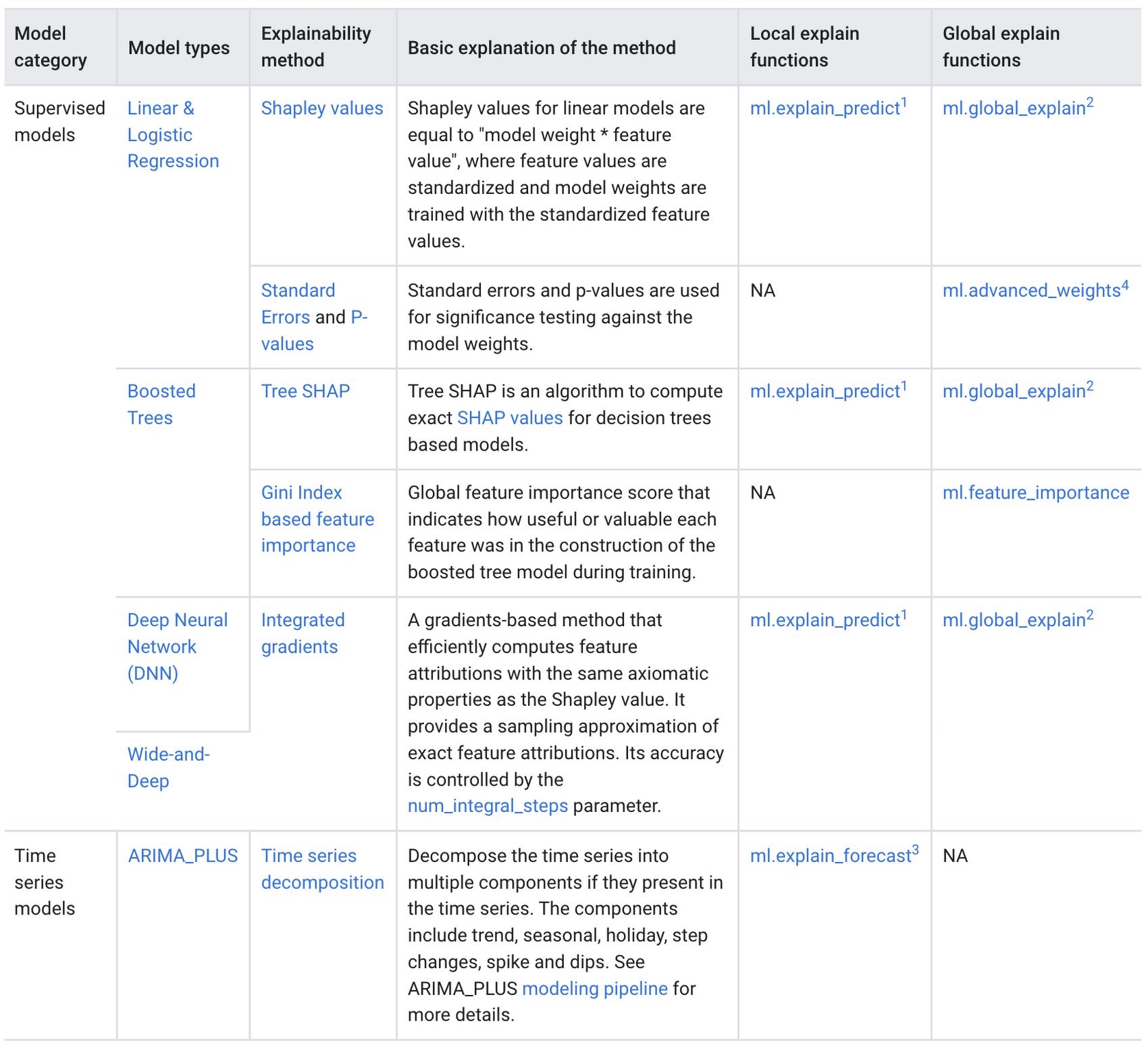
Examples with BigQuery Explainable AI
In this next section, we will show three examples of how to use BigQuery Explainable AI in different ML applications:
Regression models with BigQuery Explainable AI
Let’s use a boosted tree regression model to predict how much a taxi cab driver will receive in tips for a taxi ride, based on features such as number of passengers, payment type, total payment and trip distance. Then let’s use BigQuery Explainable AI to help us understand how the model made the predictions in terms of global explainability (which features were most important?) and local explainability (how did the model arrive at each prediction?).
The taxi trips dataset comes from the BigQuery public datasets and is publicly available in the table: bigquery-public-data.new_york_taxi_trips.tlc_yellow_trips_2018.
First, you can train a boosted tree regression model.
CREATE OR REPLACE MODEL bqml_tutorial.taxi_tip_regression_modelOPTIONS (model_type='boosted_tree_regressor',input_label_cols=['tip_amount'],max_iterations = 50,tree_method = 'HIST',subsample = 0.85,enable_global_explain = TRUE) ASSELECTvendor_id,passenger_count,trip_distance,rate_code,payment_type,total_amount,tip_amountFROM`bigquery-public-data.new_york_taxi_trips.tlc_yellow_trips_2018`WHERE tip_amount >= 0LIMIT 1000000
Now let’s do a prediction using ML.PREDICT, which is the standard way in BigQuery ML to make predictions without explainability.
SELECT *FROMML.PREDICT(MODEL bqml_tutorial.taxi_tip_regression_model,(SELECT"0" AS vendor_id,1 AS passenger_count,CAST(5.85 AS NUMERIC) AS trip_distance,"0" AS rate_code,"0" AS payment_type,CAST(55.56 AS NUMERIC) AS total_amount))

But you might wonder—how did the model generate this prediction of ~11.077?
BigQuery Explainable AI can help us answer this question. Instead of using ML.PREDICT, you use ML.EXPLAIN_PREDICT with an additional optional parameter top_k_features. ML.EXPLAIN_PREDICT extends the capabilities of ML.PREDICT by outputting several additional columns that explain how each feature contributes to the predicted value. In fact, since ML.EXPLAIN_PREDICT includes all the output from ML.PREDICT anyway, you may want to consider using ML.EXPLAIN_PREDICT every time instead.
SELECT *FROMML.EXPLAIN_PREDICT(MODEL bqml_tutorial.taxi_tip_regression_model,(SELECT"0" AS vendor_id,1 AS passenger_count,CAST(5.85 AS NUMERIC) AS trip_distance,"0" AS rate_code,"0" AS payment_type,CAST(55.56 AS NUMERIC) AS total_amount),STRUCT(6 AS top_k_features))
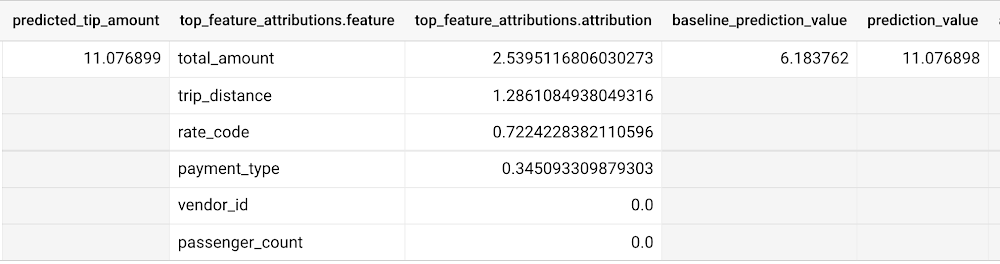
The way to interpret these columns is:
Σfeature_attributions + baseline_prediction_value = prediction_value
Let’s break this down. The prediction_value is ~11.077, which is simply the predicted_tip_amount. The baseline_prediction_value is ~6.184, which is the tip amount for an average instance. top_feature_attributions indicates how much each of the features contributes towards the prediction value. For example, total_amount contributes ~2.540 to the predicted_tip_amount.
ML.EXPLAIN_PREDICT provides local feature explainability for regression models. For global feature importance, see the documentation for ML.GLOBAL_EXPLAIN.
Classification models with BigQuery Explainable AI
Let’s use a logistic regression model to show you an example of BigQuery Explainable AI with classification models. We can use the same public dataset as before: bigquery-public-data.new_york_taxi_trips.tlc_yellow_trips_2018.
Train a logistic regression model to predict the bracket of the percentage of the tip amount out of the taxi bill.
CREATE OR REPLACE MODEL bqml_tutorial.taxi_tip_classification_modelOPTIONS(model_type='logistic_reg',input_label_cols=['tip_bucket'],enable_global_explain=true) ASSELECTvendor_id,passenger_count,trip_distance,rate_code,payment_type,total_amount,CASEWHEN tip_amount > total_amount*0.20 THEN '20% or more'WHEN tip_amount > total_amount*0.15 THEN '15% to 20%'WHEN tip_amount > total_amount*0.10 THEN '10% to 15%'ELSE '10% or less'END AS tip_bucketFROM`bigquery-public-data.new_york_taxi_trips.tlc_yellow_trips_2018`WHERE tip_amount >= 0LIMIT 1000000
Next, you can run ML.EXPLAIN_PREDICT to get both the classification results and the additional information for local feature explainability. For global explainability, you can use ML.GLOBAL_EXPLAIN. Again, since ML.EXPLAIN_PREDICT includes all the output from ML.PREDICT anyway, you may want to consider using ML.EXPLAIN_PREDICT every time instead.
SELECT *FROMML.EXPLAIN_PREDICT(MODEL bqml_tutorial.taxi_tip_classification_model,(SELECT"0" AS vendor_id,1 AS passenger_count,CAST(5.85 AS NUMERIC) AS trip_distance,"0" AS rate_code,"0" AS payment_type,CAST(55.56 AS NUMERIC) AS total_amount),STRUCT(6 AS top_k_features))
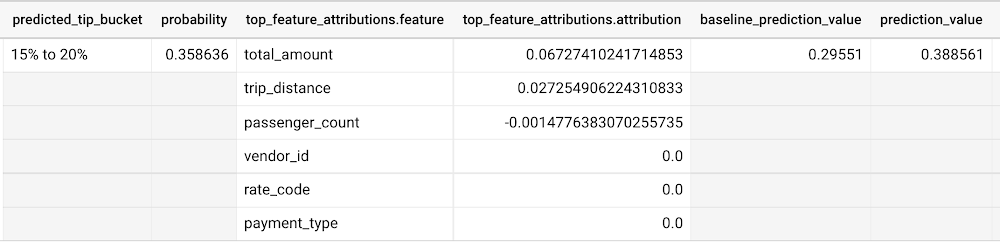
Similar to the regression example earlier, the formula is used to derive the prediction_value:
Σfeature_attributions + baseline_prediction_value = prediction_value
As you can see in the screenshot above, the baseline_prediction_value is ~0.296. total_amount is the most important feature in making this specific prediction, contributing ~0.067 to the prediction_value, though followed by trip_distance. The feature passenger_count contributes negatively to prediction_value by -0.0015. The features vendor_id, rate_code, and payment_type did not seem to contribute much to the prediction_value.
You may wonder why the prediction_value of ~0.389 doesn’t equal the probability value of ~0.359. The reason is that unlike for regression models, for classification models, prediction_value is not a probability score. Instead, prediction_value is the logit value (i.e., log-odds) for the predicted class, which you could separately convert to probabilities by applying the softmax transformation to the logit values. For example, a three-class classification has a log-odds output of [2.446, -2.021, -2.190]. After applying the softmax transformation, the probability of these class predictions is [0.9905, 0.0056, 0.0038].
Time-series forecasting models with BigQuery Explainable AI
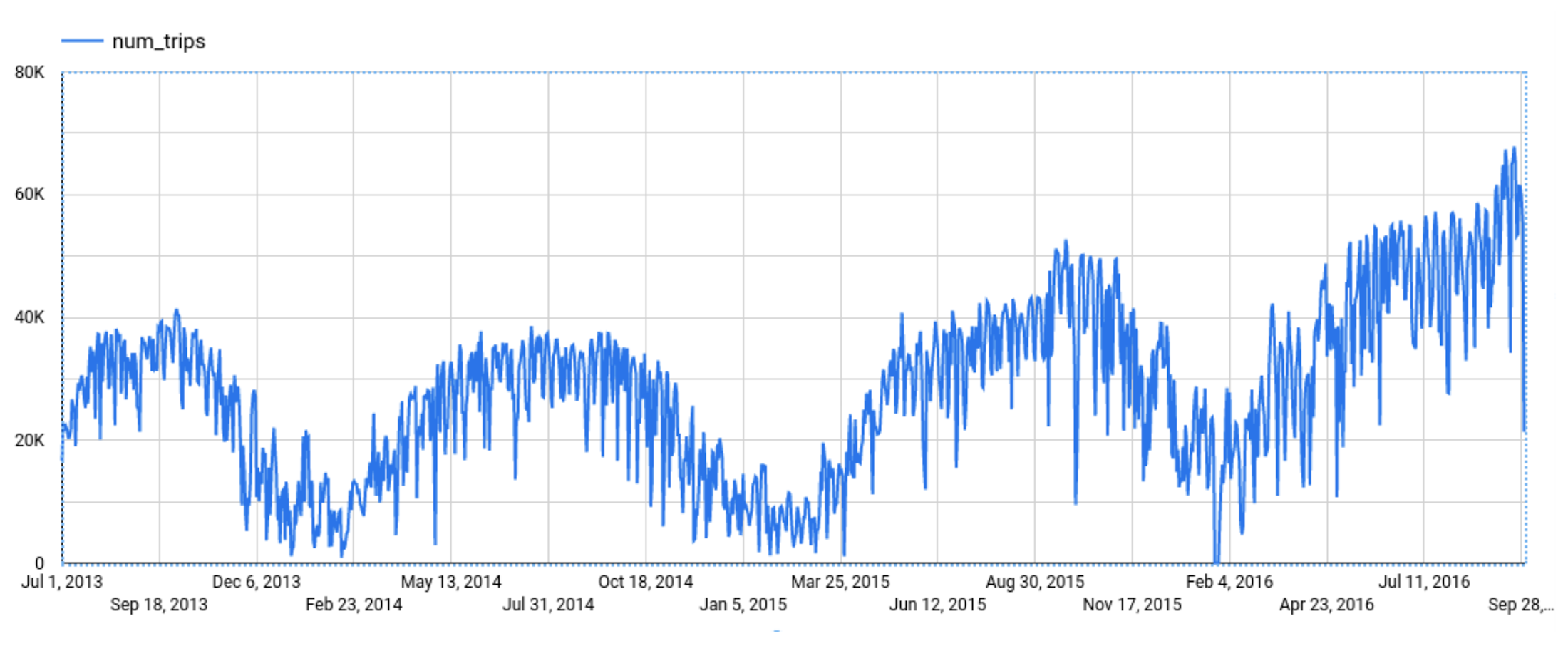
Explainable AI for forecasting provides more interpretability into how the forecasting model came to its predictions. Let’s go through an example of forecasting the number of bike trips in NYC using the new_york.citibike_trips public data in BigQuery.
You can train a time-series model ARIMA_PLUS:
CREATE OR REPLACE MODEL bqml_tutorial.nyc_citibike_arima_modelOPTIONS(model_type = 'ARIMA_PLUS',time_series_timestamp_col = 'date',time_series_data_col = 'num_trips',holiday_region = 'US') ASSELECTEXTRACT(DATE from starttime) AS date,COUNT(*) AS num_tripsFROM`bigquery-public-data.new_york.citibike_trips`GROUP BY dateNext, you can first try forecasting without explainability using ML.FORECAST:SELECT*FROMML.FORECAST(MODEL bqml_tutorial.nyc_citibike_arima_model,STRUCT(365 AS horizon, 0.9 AS confidence_level))
This function outputs the forecasted values and the prediction interval. Plotting it in addition to the input time series gives the following figure.
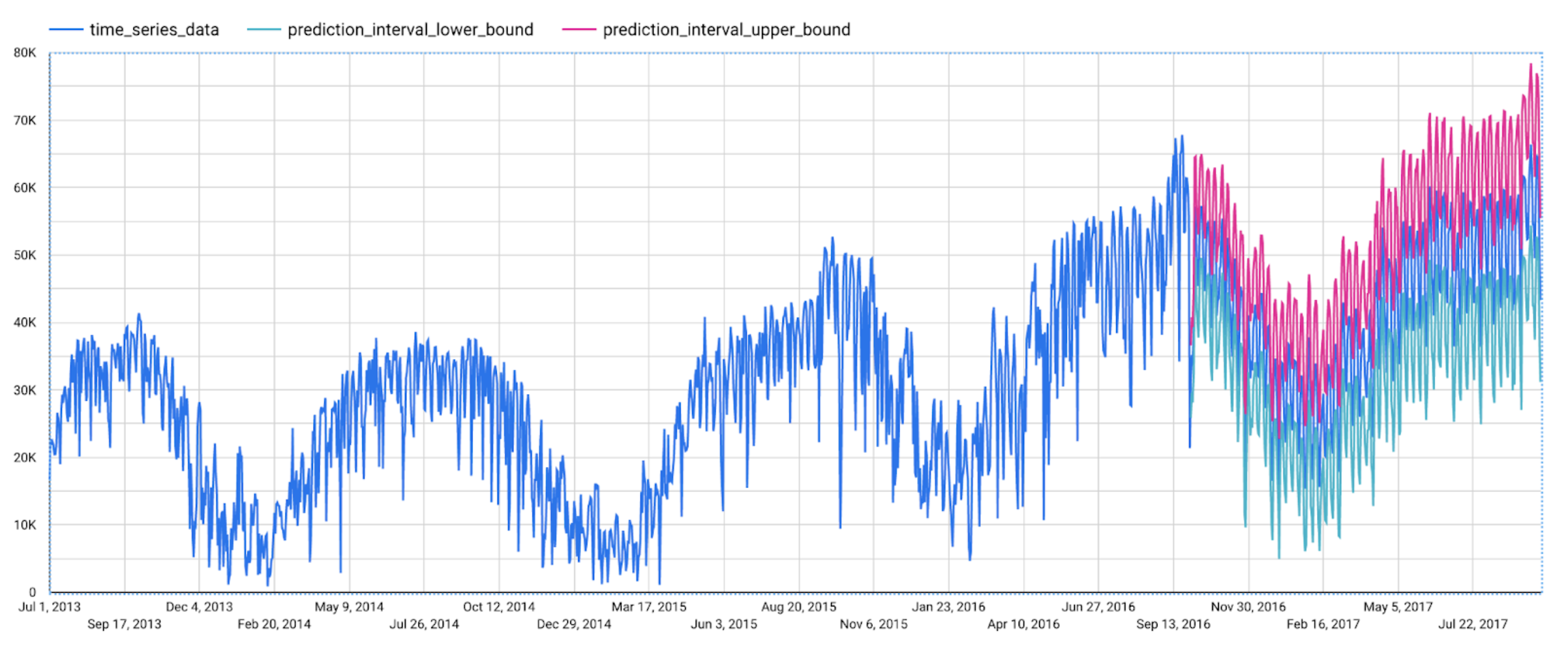
But how does the forecasting model arrive at its predictions? Explainability is especially important if the model ever generates unexpected results.
With ML.EXPLAIN_FORECAST, BigQuery Explainable AI provides extra transparency into the seasonality, trend, holiday effects, level (step) changes, and spikes and dips outlier removal. In fact, since ML.EXPLAIN_FORECAST includes all the output from ML.FORECAST anyway, you may want to consider using ML.EXPLAIN_FORECAST every time instead.
SELECT*FROMML.EXPLAIN_FORECAST(MODEL bqml_tutorial.nyc_citibike_arima_model,STRUCT(365 AS horizon, 0.9 AS confidence_level))
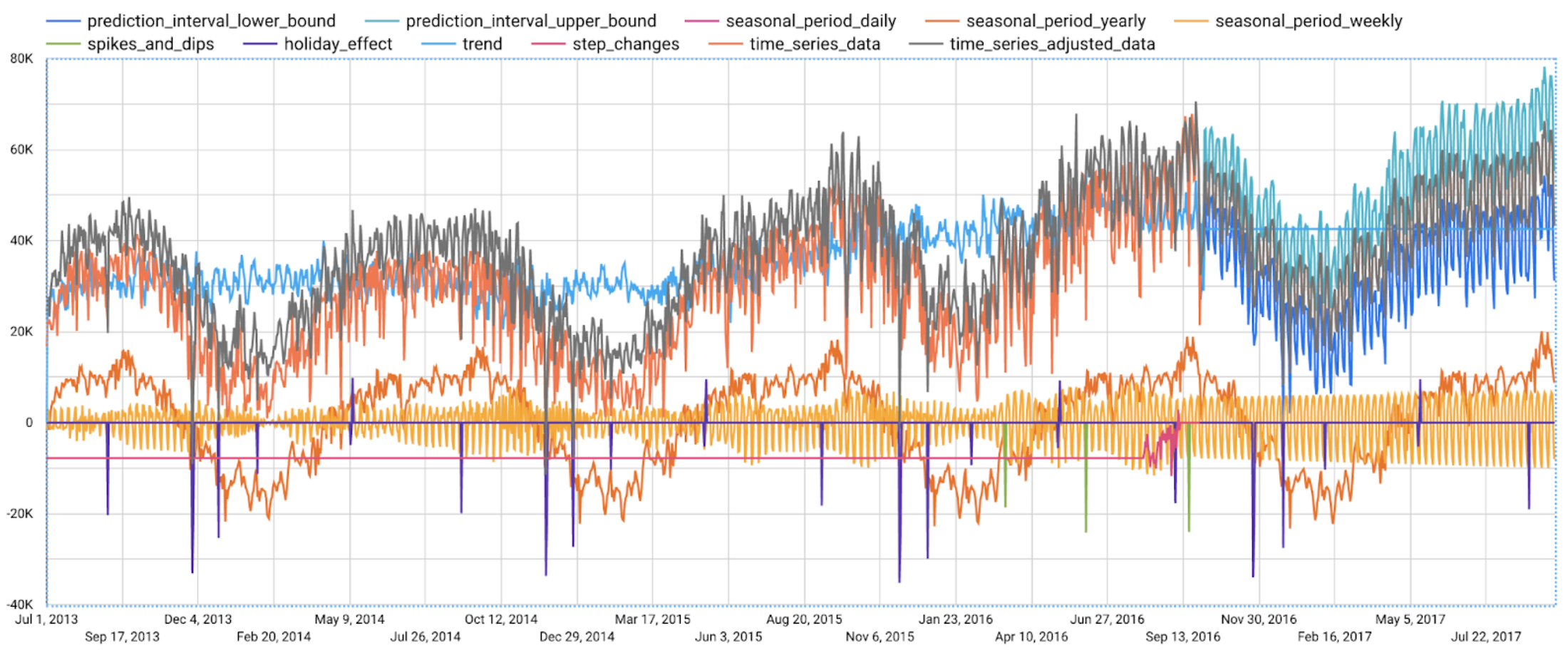
Compared to the previous figure which only shows the forecasting results, this figure shows much richer information to explain how the forecast is made.
First, it shows how the input time series is adjusted by removing the spikes and dips anomalies, and by compensating the level changes. That is:
time_series_adjusted_data = time_series_data - spikes_and_dips - step_changes
Second, it shows how the adjusted input time series is decomposed into different components such as both weekly and yearly seasonal components, holiday effect component and trend component. That is
time_series_adjusted_data = trend + seasonal_period_yearly + seasonal_period_weekly + holiday_effect + residual
Finally, it shows how these components are forecasted separately to compose the final forecasting results. That is:
time_series_data = trend + seasonal_period_yearly + seasonal_period_weekly + holiday_effect
For more information on these time series components, please see the documentation here.
Conclusion
With the GA of BigQuery Explainable AI, we hope you will now be able to interpret your machine learning models with ease.
Thanks to the BigQuery ML team, especially Lisa Yin, Jiashang Liu, Amir Hormati, Mingge Deng, Jerry Ye and Abhinav Khushraj. Also thanks to the Vertex Explainable AI team, especially David Pitman and Besim Avci.
Google Migration and BigQuery Brings PedidosYa Closer towards its Goal of Becoming Data-driven

7249
Of your peers have already read this article.
2:00 Minutes
The most insightful time you'll spend today!
Editor’s note: PedidosYa is the market leader for online food ordering in Latin America, serving 15 markets and over 400 cities. It’s also one of the largest brands within the German multinational company Delivery Hero SE. With over 20 million app downloads, PedidosYa provides the best online delivery experience through 71,000+ online partners, including restaurants, shops, drugstores, and specialized markets.
Having constant access to fresh customer data is a key requirement for PedidosYa to improve and innovate our customer’s experience. Our internal stakeholders also require faster insights to drive agile business decisions. Back in early 2020, PedidosYa’s leadership tasked the data team to make the impossible possible. Our team’s mission was to democratize data by providing universal and secure access while creating a comprehensive information ecosystem across PedidosYa. We also had to achieve this goal while keeping costs under control— even during the migration stage and removing operational bottlenecks.
Challenges with legacy cloud infrastructure
PedidosYa first built its data platform on top of AWS. Our data warehouse ran on Redshift, and our data lake was in S3. We used Presto and Hue as the user interfaces for our data analysts. However, maintaining this infrastructure was a daunting task. Our legacy platform couldn’t keep up with the increasing analytics demands. For example, the data stored on S3 complemented by Presto/Hue required high operational overhead. This was because Presto and our IAM (identity access management) didn’t integrate well in our legacy ecosystem. Managing individual users and mapping IAM roles with groups and Kerberos was operationally time-consuming and costly. Further, sharding access on the S3 files was far too complicated to enable seamless ACLs (access control lists).
There were also challenges with workload management. Our data warehouse had batch data loaded overnight. If one analyst scheduled a query to run during the overnight ETL (extract, transform, load) workload, it would disrupt the current ETL task. This could stop the entire data pipeline. We’d have to wait until data engineers intervened with a manual fix.
It was also difficult to understand whether a query error was due to performance issues or platform resource exhaustion. This lack of clarity affected our data analysts’ ability to autonomously improve querying efficiency. Data team members needed to manually inspect personal queries looking for performance issues. Also, the current architecture was prone to a ‘tragedy of the commons’ situation; it was seen as an unlimited and free resource. As a result, it was impossible to disentangle the infrastructure from different stakeholder teams, as all had very different needs.
The decision to modernize our data warehouse
Given the growing challenges from our legacy platform, our tech team decided to transform our analytics environment with a modern data warehouse. They required the following key criteria from their next data platform:
- Scalability – The ability to grow with elastic infrastructure.
- Cost control – Cost management and transparency. These factors promote efficiency and ownership—both key aspects of data democratization.
- Metadata management – Intuitive data platform focusing on users’ previous SQL knowledge. Plus, being able to enrich the informational ecosystem with metadata, to diminish data gatekeepers.
- Ease of management – The team needed to reduce operational costs with a serverless solution. Data engineers wanted to focus on their key roles rather than acting as database administrators and infrastructure engineers. The team also wanted much higher availability, and to reduce the impact of maintenance windows and vacuum/analysis.
- Data governance and access rights – With a growing employee base with varying data access requirements, the team needed a simple yet comprehensive solution to understand and track user access to data.
Migrating to Google Cloud
After exploring other alternatives, we concluded Google Cloud had an answer to each of our decision drivers. Google Cloud’s serverless, managed, and integrated data platform, coupled with its seamless integration across open-source solutions, was the perfect answer for our organization. In particular, the natural integration with Airflow as a job orchestrator and Kubernetes for flexible on-demand infrastructure was key.
We used Dataflow together with Pub/Sub and Cloud Functions for our data ingestion requirements, which has made our deployment process with Terraform seamless. Because we set up everything in our environment programmatically, operation time has diminished. Google Cloud reduced the deployment process from about 16 hours in our legacy platform to 4 hours. This is partly due to the friendliness of automating the deployment (such as schema check, load test, table creation, build.) process with Terraform, Cloud Functions, Pub/Sub, Dataflow, and BigQuery on GCP. Input messages processed with Dataflow allow us to abstract and plan the schema changes according to the needs of the functional team. For example, schema changes raise an alarm, and then we can modify the raw layer table schema. By doing this, we ensure that backend modifications that we don’t control do not affect upper layers.
A key reason why we picked Google Cloud was because of its advanced cost and workload management coupled with its transparent log analytics. This information gives us a complete view into any query performance issues to make improvements on the fly. Further, we achieved a significant amount of cost savings by consolidating multiple tools to BigQuery.With BigQuery, we’ve been able to reduce our total cost per query by 5x.
This was due to a number of reasons:
- Automating pipeline deployment made it much simpler to maintain the data processing processes.
- Analysts are conscious about what queries they’re running, resulting in running better, more optimized queries.
- Analysts use a Data Studio dashboard to see their queries and all the associated costs. As a result, there’s a lot more transparency for each persona.
With these changes, we can easily manage and assign costs associated with each workload with their own cost centers using specific Google Cloud projects.
Change management is always challenging. However, BigQuery is intuitive and doesn’t have a steep learning curve from Hue/Hive on SQL basics. BigQuery also allowed the team to expand its capabilities and enabled them to properly work with nested structures, avoiding unnecessary joins and improving query efficiency. Additionally, we now use Data Catalog as our unique point of truth for metadata management. This allows our team to break the data access barriers and enable federation of data across the organization. By using Airflow to orchestrate everything, we keep track of every data stream. With this information, each end user can see their regularly used data entities’ status via the dashboard. This also adds transparency to our everyday data processes.
Finally, with Google Cloud’s IAM rules applied across the different products, data sharing and access is close to a noOps experience. We have programmatically implemented access according to roles and level access within the company. This allows certain pre-validated roles to view more sensitive information. These solutions help drive a more automated data governance experience.
Up next: Google Cloud AI/ML
The new stack based on BigQuery has created significant productivity gains. Freed from the burden of operational management, PedidosYa’s data team can now focus on adding value through data tools and products.
- Our data engineers are better equipped to integrate constantly changing transactional and operational data.
- The dataOps team can automate the infrastructure and provide autonomy to the end user.
- Our data quality team can focus on bringing added value to data stakeholders.
- Data scientists and data analytics can spend more time analyzing data and less time asking data gatekeepers for data access.
PedidosYa can now democratize data access with a well-governed architecture. We are still at the beginning of our journey, but we are closer to achieving our vision of building a data-driven organization. Up next: expanding our artificial intelligence and machine learning capabilities.
Tune in to Google Cloud’s Applied ML Summit on June 10th, 2021, or listen on-demand later, to learn how to apply groundbreaking machine learning technology in your projects.

Customer Voices: How Firms from Across Industries Leverage Google Cloud
DOWNLOAD CASE STUDY14127
Of your peers have already downloaded this article
1:30 Minutes
The most insightful time you'll spend today!
From powering everyday operations and accelerating application innovation, to providing tools for specific business needs and executing on big ideas, to advancing the security of technology solutions, companies from across industries have leveraged Google Cloud for business benefits.
Companies from across industries have turned to Google Cloud for transforming their business, modernizing their infrastructure, and gleaning intelligence from data. For instance:
- Johnson & Johnson achieved a 41% increase in search results from high-quality job applicants, significantly improving the company’s ability to quickly hire top talent.
- Sony Network Communications now processes 10 billion monthly queries faster, which advances data analysis.
- University College Dublin saw significant 6-figure savings by eliminating legacy hardware, software, and maintenance.
And there are many such examples. Read the collection of case studies to find out how companies from across industries and geographies leveraged Google Cloud for measurable business benefits and for solving complex problems.
CCAI Platform goes GA: Deliver World-class CX and Accelerating Time-to-value with AI

2784
Of your peers have already read this article.
2:30 Minutes
The most insightful time you'll spend today!
Customers reach out to contact centers for help in moments of urgent need, but due to increasing demands, new channels, peak times, and operational pressures, contact centers often struggle to provide timely help. To bridge this gap, enterprises are increasingly investing in AI-driven solutions that balance addressing customer expectations with operational efficiency.
But building and generating value from such solutions can be complicated and challenging. Google Cloud built Contact Center AI (CCAI) to streamline and shorten this time to value, and CCAI Platform, our newest addition, takes a crucial step in this effort by introducing end-to-end call center capabilities. After debuting these new capabilities in March, we are excited to announce that CCAI Platform is now generally available across the US, Canada, UK, Germany, France, Italy and Spain—with more markets soon to come.
Delivering world-class customer experiences and accelerating time-to-value with CCAI
CCAI encompasses a comprehensive set of offerings to address the top pain points of the three main user groups in the contact center: contact center owners, their agents, and the customers they serve.
Dialogflow lets the contact center manager scale their operations while balancing cost and customer satisfaction, including reducing painful, long waiting times endured by end users. Using Dialogflow, contact center managers can build complex chat and voice virtual agents—a proven, cost-effective way to scale contact centers while continuing to provide great customer experiences. Available 24/7, without any waiting queue, these virtual agents can converse naturally with customers, identify their issues, and address them effectively.
Agent Assist reduces overall handling time and coaches human agents to become more effective and helpful. The service uses AI to “listen” to the voice and chat conversations between the human representative and the customer, then provides real-time guidance and recommendations to the agent, based on historical conversations, knowledge bases, and best practices of experienced agents. It also automates post-call actions such as transcription and call summarization, saving significant time and overhead at the end of every call.
CCAI Insights stores and analyzes all the customer conversations in the contact center, whether with human or virtual agents, to provide leaders with real-time, actionable data points on customer queries, agent performance, sentiment trends, and opportunities for automation.
At the heart of these technologies is our conversational AI brain. It uses Google Research’s technology to talk, understand, and interact, enabling and orchestrating high-quality conversational experiences at scale.
CCAI Platform: a modern CCaaS and the shortest path to CCAI value
While the value of the CCAI offerings is clear to our customers, we also hear from them that integrating these solutions with legacy infrastructure takes too long.
To minimize these integration difficulties, accelerate time-to-value using the CCAI offerings, and help businesses provide outstanding customer experiences, we’re pleased to announce the general availability of CCAI Platform, the Contact Center as a Service (CCaaS) solution from Google Cloud built in partnership with UJET.
CCAI Platform is a modern, turnkey Contact Center as a service solution, designed with user-first, AI-first, and mobile-first principles. It offers:
- Turnkey core Contact Center capabilities out-of-the-box, for faster time to production, lower implementation overhead, and custom development needed
- AI-powered experiences, from routing to better handling customer interactions
- Deep integration with CCAI’s offerings, to provide a unified end-to-end experience for contact center transformation
- Mobile-first design that enables interactions in line with the way people expect to communicate across channels
- CRM-centered design with automated updates, so agents can focus on the customer
- Deployment flexibility, with customer data residing in their CRM and the flexibility to bring their own telephony carrier to minimize cost
All of this is available without the typical need to integrate complex technologies from multiple providers.
“With Google Cloud and CCAI Platform, we will quickly move our contact center to the cloud, supporting both our customers and agents with industry-leading CX innovations, all while streamlining operations through more efficient customer care operations,” said Dean Kontul, Division CIO of KeyBank.
For customers looking to change platforms for a cloud-native CCaaS with deep Google AI integrations, CCAI Platform offers end-to-end capabilities that accelerate call center transformations. We also remain strongly committed to customer choice, and customers will continue to have the option to integrate our latest and greatest CCAI offerings through our existing OEM partners.
The Contact Center conversation is just beginning
This launch is part of a broader effort to deliver more value, faster, to more CCAI customers. As companies replace interactive voice response (IVR) with intelligent virtual agents (IVA) and begin to collect and analyze data, use cases are likely to grow more sophisticated—which is one reason Google Cloud is continuing to invest in technologies to make our CCAI offerings even more useful, as well as best practices like the following:
- CCAI Agent Assist and Insights are a great first step in AI transformation. They let contact center owners enable call transcription and use Topic Modeling to identify conversation themes that demand attention. Human agents can automatically generate high-quality conversation summaries to reduce call wrap-up time, and the associated costs, while improving business insights. We are working to make these features available both in CCAI Platform and with our partner ISVs.
- Chat and call steering are the first step for IVA automation. Another area of broad impact is conversational chat or call steering, in which friction is reduced by routing customers to the correct virtual or live agent experience. Many call centers rely on IVR systems in which customers have to use a keypad to select an option. Enterprise leaders tell us that attrition is very high throughout this process: some customers angrily hang up without resolution and, just as bad, many simply pound a single key in hopes of reaching a human agent, leading to the customer reaching the wrong person because their issue was never correctly identified or routed. Using Dialogflow’s natural language understanding (NLU) capabilities can sweep away such problems, with the customer more likely to not only reach the appropriate resources, but also share conversational data from which insights can be gleaned. It’s an approach that can pay dividends right away, and a quick first step to IVA automation.
In coming months, we will continue to work on these and other capabilities that are targeted to deliver higher and quicker value to our customers. We plan to release pre-built components to help companies tackle call center use cases in specific industries, for example. We’ll also continue to partner with companies that share our vision of transforming customer experiences with AI, such as TTEC, a provider of customer experience technology and software.
“TTEC Digital and Google Cloud have a shared vision for transforming global CX delivery through artificial intelligence, digital innovation, and operational excellence,” said Sam Thepvongs, VP of TTEC Digital. “With CCAI Platform, we can offer our largest enterprise customers a strategic blueprint for moving to the cloud while adopting a leading, AI-powered contact center platform. We couldn’t be more excited about this evolution of Google Cloud’s groundbreaking CCAI portfolio, and the opportunity to help our customers digitally transform their CX through this partnership.”
To get started with CCAI Platform, visit our solutions page or checkout our new omni channel demo video—and don’t forget to join us at Google Cloud Next ’22, where I’ll be sharing exciting new updates for CCAI in my session, “Delight customers in every interaction with Contact Center AI.”
More Relevant Stories for Your Company

Supercharging Security with Generative AI
At Google Cloud, we continue to invest in key technologies to progress towards our true north star on invisible security: making strong security pervasive and simple for everyone. Our investments are based on insights from our world-class threat intelligence teams and experience helping customers respond to the most sophisticated cyberattacks. Customers can tap into

2021 was the Momentum for Contact Center AI!
2021 has been a high-stakes year for call centers, with many organizations forced to rapidly scale up their call center operations in response to ongoing pandemic disruptions. We’re proud that 2021 has also been an amazing year for Google Cloud’s Contact Center AI (CCAI), which has helped our customers adapt

Google Data Studio Makes Reporting a Breeze For Genesys
As a customer experience platform, Genesys helps clients nurture great relationships with customers, and creates seamless user journeys across all channels and devices. Its technologies are used by more than 10,000 companies in over 100 countries, making Genesys the top provider of its kind for 25 years in a row.

Streamlining Business Processes with Google’s Document AI: Invoices, Contracts, and Beyond
Editor's note: In this post, I'll be showing some amazing ways Document AI can help you extract meaning from your documents - keep reading, or jump directly into a tutorial using the Cloud Console! Documents are a crucial part of most businesses, used to store and communicate important information. The variety
