





Streamlining Business Processes with Google’s Document AI: Invoices, Contracts, and Beyond

1144
Of your peers have already read this article.
3:30 Minutes
The most insightful time you'll spend today!
Editor’s note: In this post, I’ll be showing some amazing ways Document AI can help you extract meaning from your documents – keep reading, or jump directly into a tutorial using the Cloud Console!
Documents are a crucial part of most businesses, used to store and communicate important information. The variety is vast: invoices, contracts, receipts, applications, plus documents unique within industries and geographies. Unfortunately, making the information contained in these documents accessible can be a time-consuming and manual process.
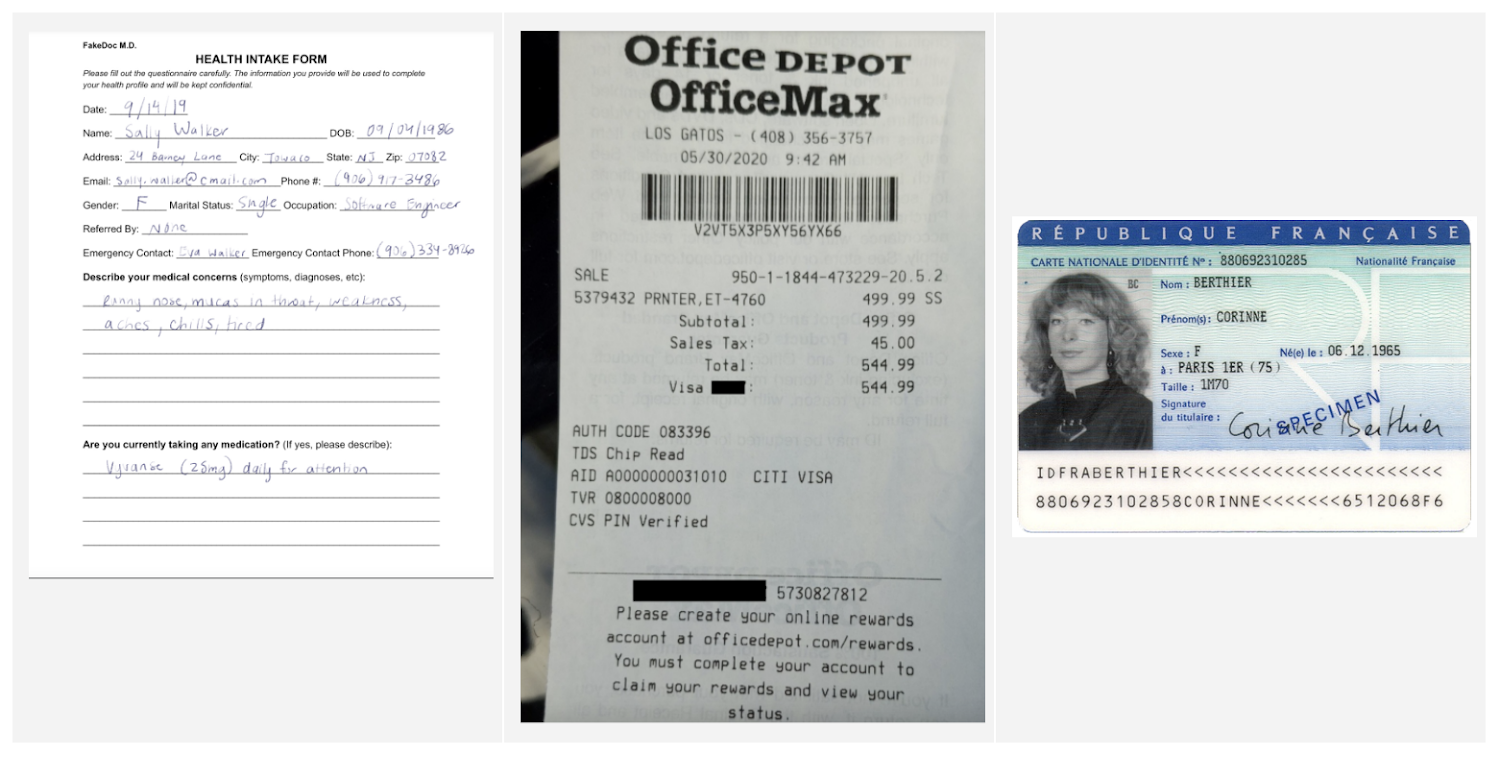
Document AI is a document understanding platform in Google Cloud that takes unstructured data from documents and transforms it into structured data, making them easier to understand, analyze, and consume. By using this technology, you can streamline your document processing workflows, reduce errors, and unlock insights that were previously buried in mountains of paperwork.
Whether you’re a small business owner or an enterprise looking to bring efficiency to your operations, Document AI has something to offer. So let’s take a look and see what it can do!
Understanding documents with Document AI
When we say that Document AI can understand documents, we mean that it is able to analyze the content within documents and derive meaningful insights from it. This goes beyond simply recognizing the characters and words within a document (which is what traditional OCR technology does) – Document AI can actually comprehend the meaning behind the text.
For example, let’s say you have a contract that needs to be processed. Traditional OCR technology might be able to extract the text from the document, but it would not be able to understand the legal terms and clauses within it. Document AI, on the other hand, can actually interpret the meaning of the text and extract key information such as parties involved, terms and conditions, dates, and signatures.
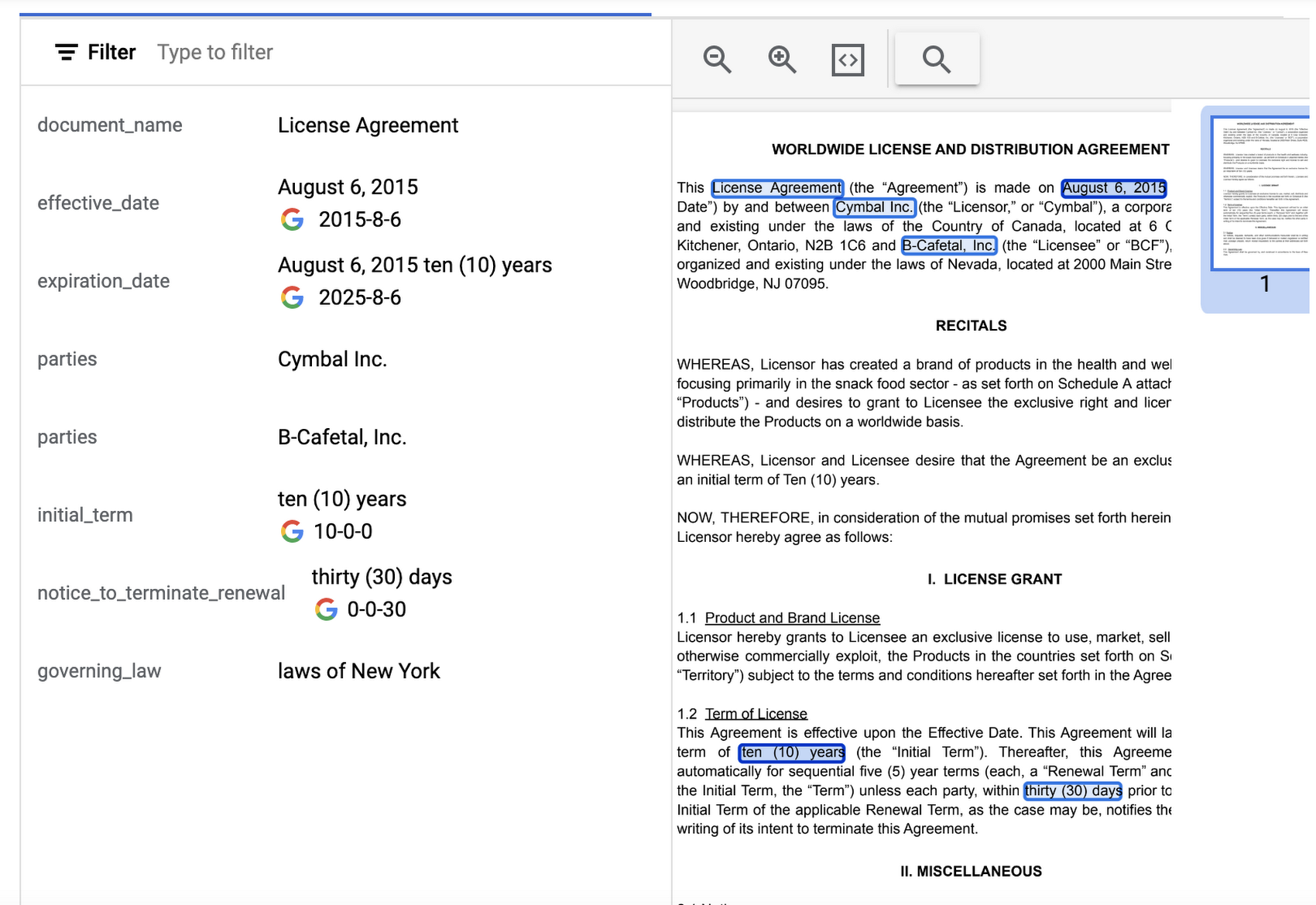
Document AI offers several pre-built models and processors that are specifically designed to extract different types of data from various document types. Within the specific document types, the processors can perform several tasks such as Optical Character Recognition (OCR), form parsing, splitting, classification or entity extraction. These processors can be customized and combined to create powerful document processing workflows that are tailored to a business’s unique needs.
Let’s look closer at a few of the processors available in Document AI, including the Form Parser, Invoice Parser, Expense Parser, Identity Document Proofing Parser, and Intelligent Document Quality Processor.
Form Parser
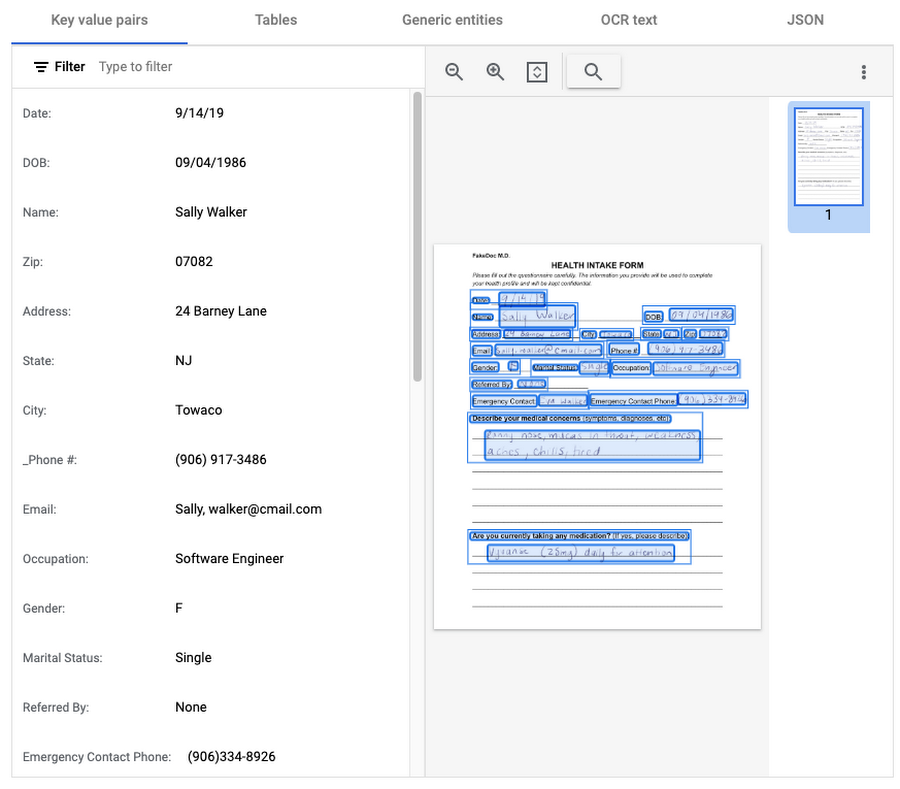
This general processor is designed to extract structured data from forms such as application forms, surveys, and questionnaires. It automatically identifies and extracts data from form fields (key-value pairs), such as names, addresses, dates, and other types of structured data; even checkboxes and tables. This processor also leverages deep learning models to extract generic entities that are common in various document types, meaning it can identify if something is an email address, phone number, datetime, organization, quantity, price, person, and more.
In this visualization of the API response, you can see that Document AI has identified several key value pairs that correspond to the form’s fields and the responder’s answers.
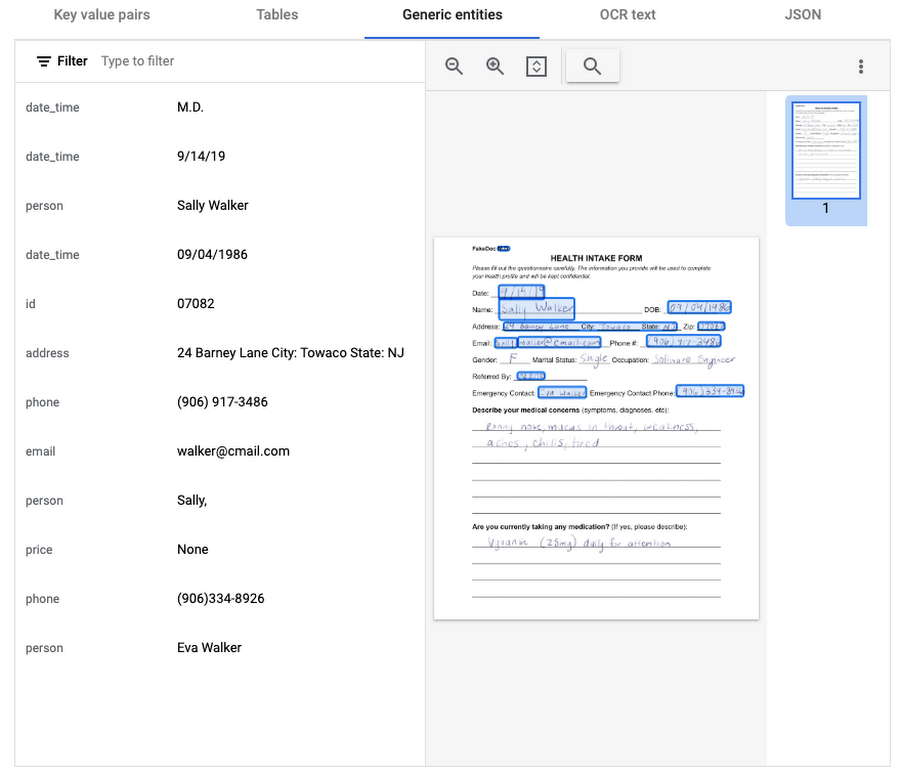
Also of interest is that the form parser recognized certain generic entities including: several dates, an address, phone numbers, email, and two people (the responder and their listed emergency contact).
Invoice Parser
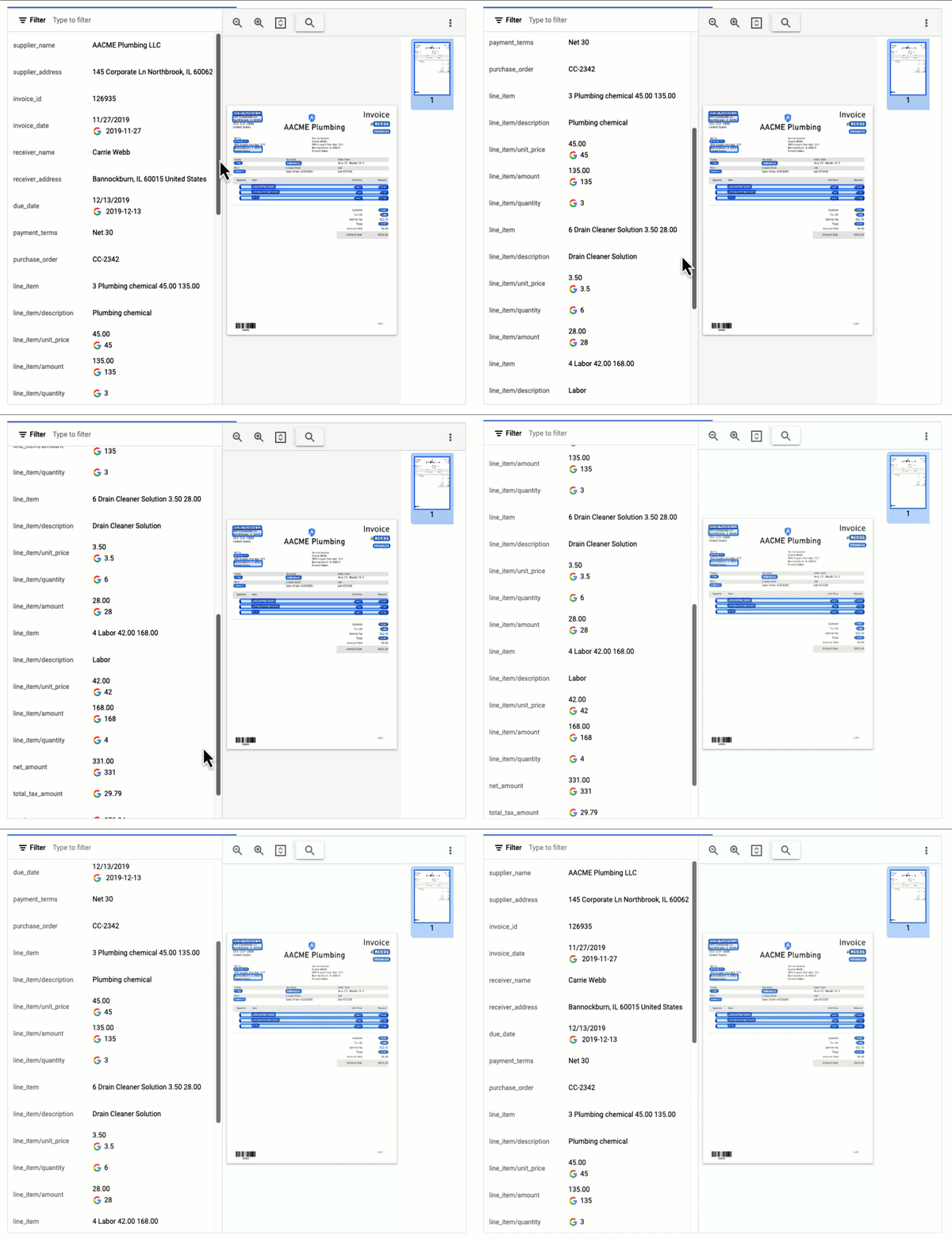
This parser is designed to identify and extract relevant information from invoices including a large number of typical invoice fields, but can also be customized (uptrained) to recognize different invoice layouts, languages, and data fields. Invoices are a critical part of the accounts payable process, making this functionality valuable across industries and companies building A/P features into their products.
In this visualization of the API response, you can see that Document AI has extracted a large number of key-value pairs and even provided normalized values for several of the fields.
Expense Parser
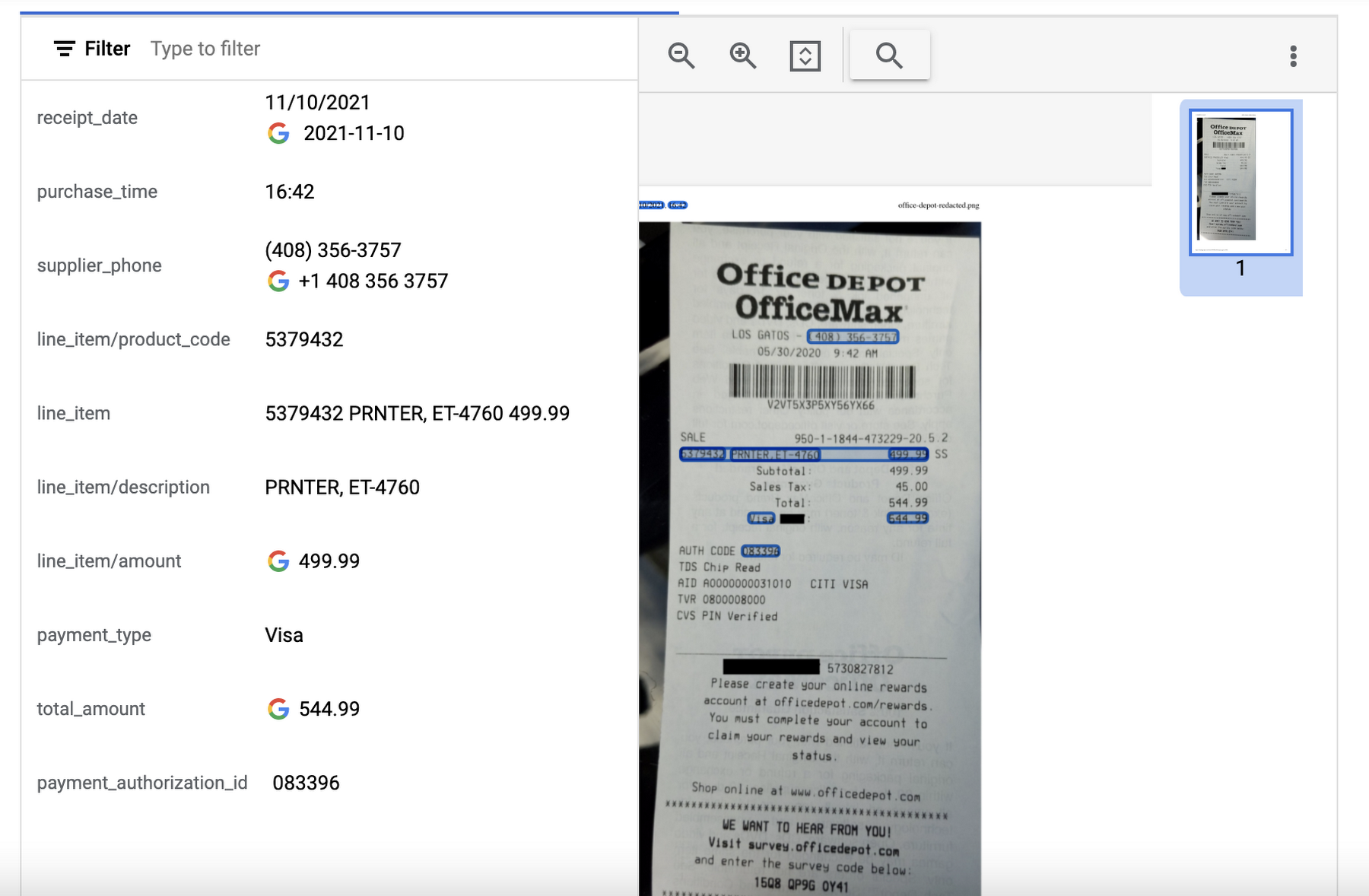
This specialized processor is designed to extract data from receipts and invoices, such as vendor name, date, and total amount paid. It can also identify line items within an invoice and categorize them based on the type of expense (e.g. meals, travel, office supplies). The expense parser makes it easier for you to process expense reports and other financial documents, and it can integrate with other tools and systems to completely automate the entire expense reporting process.
In this visualization of the API response, you can see that Document AI has extracted the text from the receipt and identified several typical entities such as purchase date and time, payment type, and total amount.
Identity Document Proofing Parser
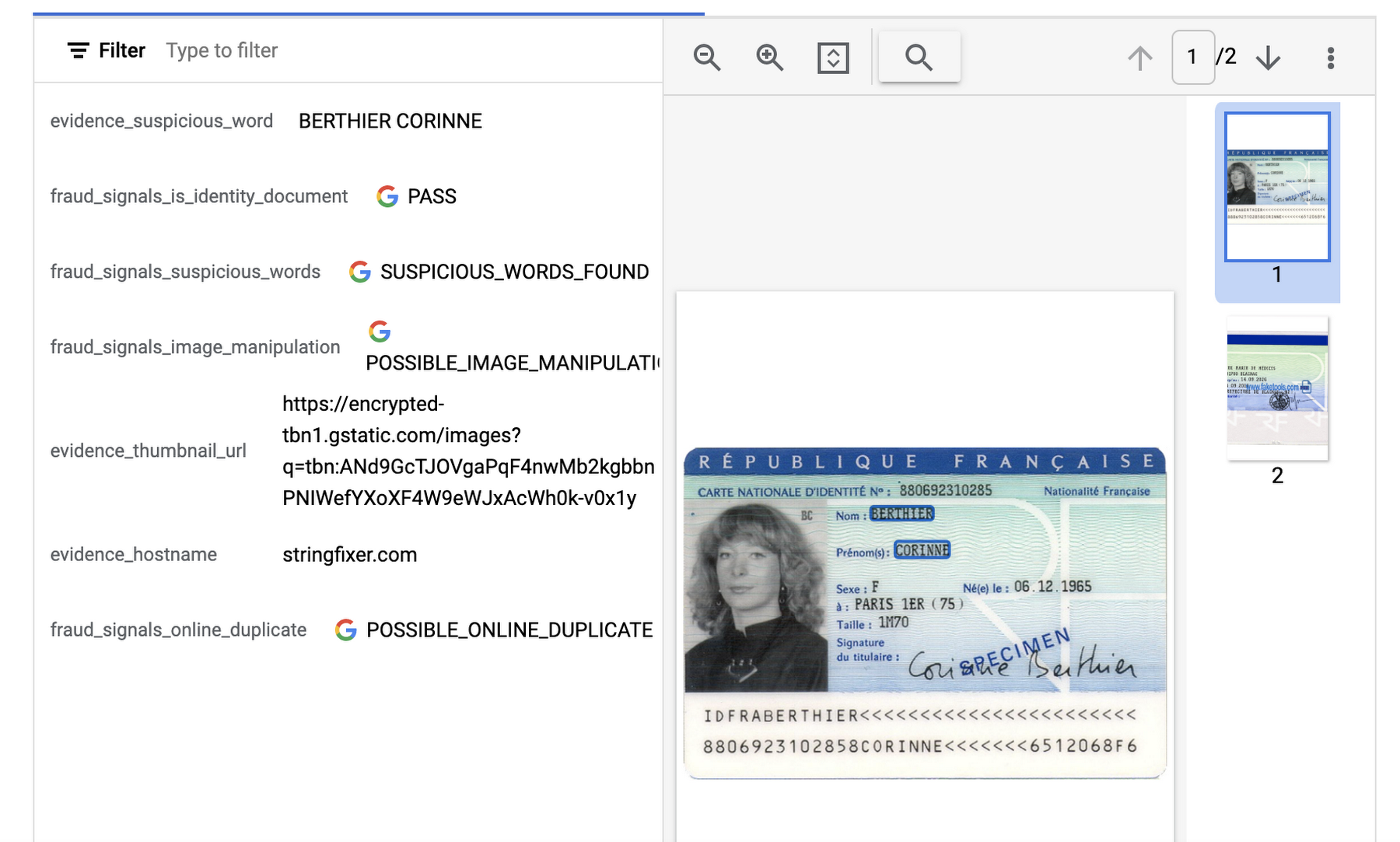
This processor is designed to help predict the validity of ID documents with four different signals.
- is_identity_document detection: Predicts whether an image contains a recognized identity document.
- suspicious_words detection: Predicts whether words are present that aren’t typical on IDs.
- image_manipulation detection: Predicts whether the image was altered or tampered via an image editing tool.
- online_duplicate detection: Predicts whether the image can be found online.
If suspicious words are detected or the image can be found online, additional information is provided to explain these signals.
This can be particularly useful for businesses that need to verify the identity of customers or employees as part of their operations. This processor could be used in conjunction with other processors that extract key information such as name, date of birth, ID number, and expiration date from specific identity documents (US Driver License Parser, US Passport, France National ID Parser, etc.).
In this visualization of the API response, you can see that Document AI has passed the document on the first detection point (is_identity_document), but failed the document for the other three items and provided additional information in the evidence fields.
Intelligent Document Quality Processor
This general use processor is designed to detect a variety of document quality issues, such as missing pages, blurry images, low contrast, inconsistent formatting, and incorrect data, and flag these potential issues which could affect their usability, accuracy, or compliance. It can also identify sensitive information that has not been redacted or missing information required by regulatory standards.
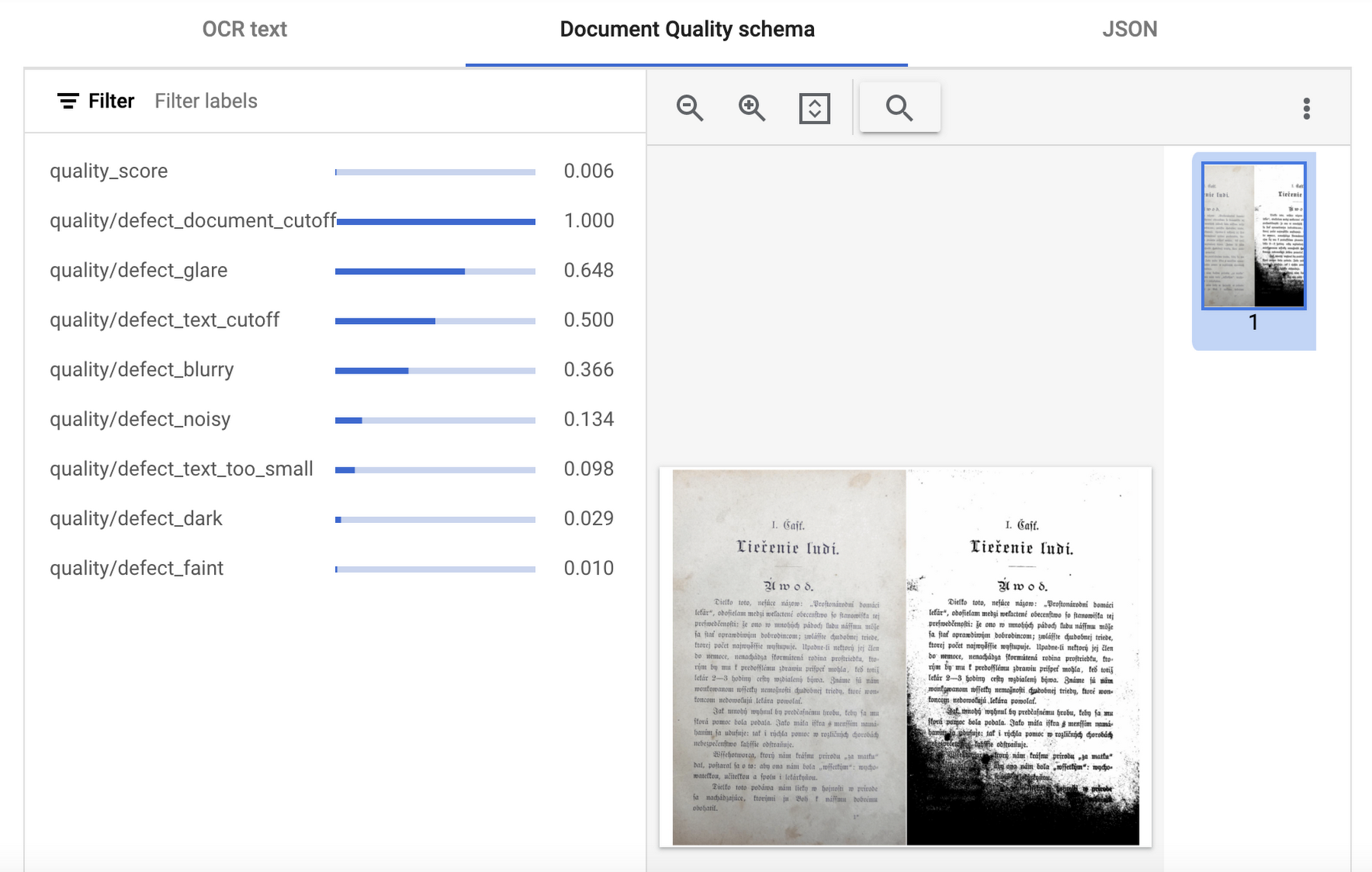
This quality assessment is returned as a quality score from 0 to 1, where 1 means perfect quality. If the quality score detected is lower than 0.5, a list of negative quality reasons (sorted by the likelihood) is also returned.
In this visualization of the API response, you can see that Document AI has determined a quality_score of 0.006 and also provided a list of several reasons including document and text cutoff, blurriness, and glare (among others).
Next steps
These are just a few examples of the types of processors that Document AI offers. Perusing the current documentation, you can find it has more than 40 processors, with each providing several functions, to explore. Document AI also offers you the ability to uptrain certain processors and supports the option to build your own custom processor. Across the board, if a document contains structured or unstructured text, Document AI has the capability to extract valuable data from it.
Get started and learn more by heading to our tutorials in the Cloud Console:
Data to Business Outcomes with Google’s Data Analytics Design Pattern

6745
Of your peers have already read this article.
1:30 Minutes
The most insightful time you'll spend today!
Companies today are inundated with vast amounts of data from various sources. This overwhelming amount of data is meant to benefit the company, but often leaves data teams feeling overwhelmed, which can create data bottlenecks and result in a slow time to value. In fact, only twenty seven percent of companies agree that data and analytics projects produce insights and recommendations that are highly actionable (Accenture). This means that nearly 3 in 4 companies are not unlocking value in their data, which poses a huge challenge for organizations trying to move the needle and drive real business results. We at Google Cloud, however, saw opportunity in this challenge, which is why we created Data Analytics Design Patterns: cross-product technical solutions designed to accelerate a customer’s path to value realization with their data. These industry solutions bring together product capabilities alongside design methodology, open source deployable code, data models, and reference architectures to accelerate your business outcomes.

With Data Analytics Design Patterns, you get access to more than 30 ready-to-deploy data analytics solutions. Design patterns leverage the best of Google and our rich partner ecosystem, including Technology Partners & System Integrators. In this blog, we will cover 3 examples on how a design pattern can be applied to unlock the value of data:
- Improve mobile app experience with Unified App Analytics
- Maximize digital shop’s revenue with Price Optimization
- Protect internal systems from security and malware threat with Anomaly Detection
Unified App Analytics
If mobile apps are part of your go-to-market strategy, you have several data sources that can provide invaluable customer insights. In addition to tools such as CRM (e.g. Salesforce) and customer care (e.g. Zendesk), you likely use Google Analytics to log app events and Firebase Crashlytics to gather data about app errors. But can you easily combine back-end server data with app front-end data to unlock customer insights?
The Unified App Analytics design pattern makes it easy to plug all the disparate data sources into a single warehouse (BigQuery) and start analyzing it with a Business Intelligence tool (Looker). Once you have a complete and real time view of your customer experience with your app, you can take action. For example, if you notice an increase in app errors, you can quickly combine your Crashlytics data with your CRM data to narrow down the crashes with the highest revenue impact and prioritize their resolution. Further, you can automate your issue resolution workflow by creating a rule for any future crash that impacts a subset of VIP customers.

With the Unified App Analytics design pattern, you’ll gain access to valuable insights about your user experience with your app so you can inform your future app strategy. For example, NPR, an American media company, increased user engagement by showing content that better mapped to listener interests and behaviors.
Price Optimization
In a competitive and hectic global marketplace, strategic pricing matters more than ever, but often projects are consumed by the tedium of standardizing, cleaning, and preparing data—from transactions, inventory, demand, among other sources.
Price Optimization solution allows retailers to build a data driven pricing model. The solution consists of three main components:
- Dataprep by Trifacta: integrates different data sources into a single Common Data Model (CDM). Dataprep is an intelligent data service for visually exploring, cleaning, and preparing structured and unstructured data for analysis, reporting, and machine learning.
- BigQuery: allows you to create and store pricing models in a consistent and scalable way as a serverless Cloud Data Warehouse service
- Looker dashboards: surface insights and enable business teams to take action with enterprise ready BI platform
With the Price Optimization design pattern from Google Cloud and our partner Trifacta, you’ll be able to rapidly unify multiple data sources and create a real-time and ML-powered analysis, leveraging predictive models to estimate future sales. For example, PDPAOLA, an online jewelry company, doubled sales with dynamic pricing adjustments enabled by a single data view.

Anomaly Detection
Organizations need to anticipate and act on risks and opportunities to stay competitive in a digitally transforming society. Anomaly detection helps organizations identify and respond to data points and data trends in high velocity, high volume data sets that deviate from historical standards and expected behaviors, allowing them to take action on changing user needs, mitigate malicious actors and behaviors, and prevent unnecessary costs and monetary losses.
The Anomaly Detection design pattern uses Google Pub/Sub, BigQuery, Dataflow, and Looker to:
- Stream events in real time
- Process the events, extract useful data points, train the detection algorithm of choice
- Apply the detection algorithm in near-real time to the events to detect anomalies
- Update dashboards and/or send alerts
The challenge of finding the important insights and anomalies in vast amounts of data applies to organizations across all industries and lines of business, but is especially important to protecting the security of an organization. For example, TELUS, a national communications company, modernized their security analytics platform leveraging this pattern, allowing them to detect anomalies in near real time to detect and mitigate suspicious activity.
Get started
Turn your data into business outcomes with Google Cloud and our broad partner ecosystem by deploying Data Analytics Design Patterns at your organization. There are more than 30 Data Analytics Design Patterns ready for you to use. We have more than 200+ more ideas in the pipeline, so be sure to check in regularly as new patterns will be added soon.
To dive deeper and find out more about how Data Analytics Design Patterns can help your organization accelerate use cases and create faster time to value, check out this video.
AI-powered Business Messages for Timely, Engaging and Helpful Conversations with Customers

9384
Of your peers have already read this article.
2:00 Minutes
The most insightful time you'll spend today!
Over the last two years, we’ve seen a significant uptick in the number of people using messaging to connect with businesses. Whether it was checking hours of operation, verifying what was in stock, or scheduling a pick-up, the pandemic caused a significant shift in consumer behavior.
- 45% of users are spending more time on messaging services because of the pandemic
- 85% of consumers would like to message brands directly
With the rise in demand for messaging, consumers expect communication with businesses to be speedy, simple, and convenient. For businesses, keeping up with customer inquiries can be a labor-intensive process, and offering 24/7 support outside of store hours can be costly.
To help businesses seamlessly deliver helpful, timely, and engaging conversations with customers when and where they need help, we introduced AI-powered Business Messages.
https://youtube.com/watch?v=fcgP3RHjBLY%3Fenablejsapi%3D1%26
What is AI-powered Business Messages?
With AI-powered Business Messages, you can connect with your customers in their moment of need, in the places they’re looking for answers—such as Google Search, Google Maps, or any brand-owned channel. For instance, check out how Walmart customers in the US are able to receive real-time information on product availability, straight from a search results page.
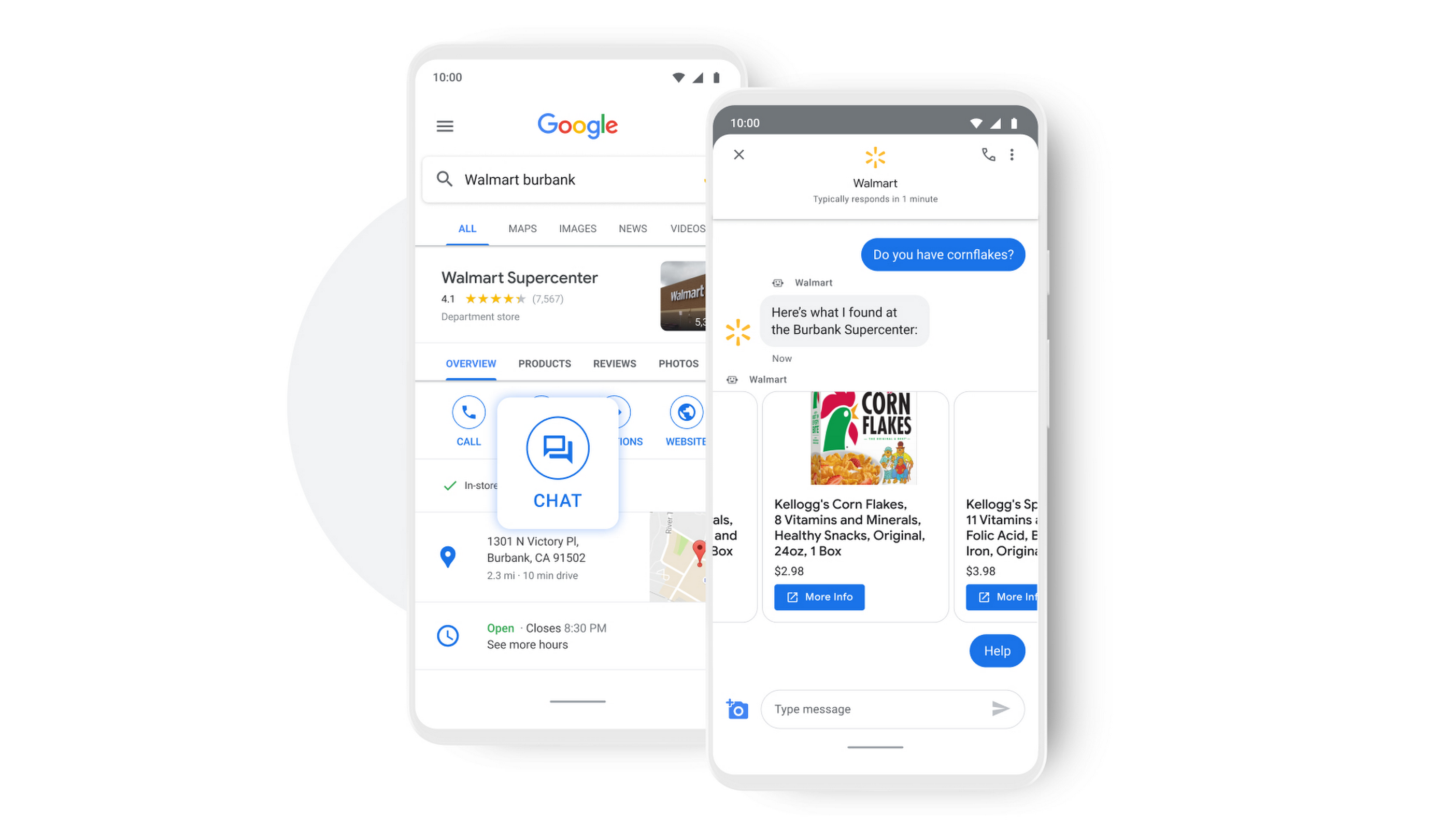
People turn to Google when they are searching for answers to their questions, looking to buy something, or trying to accomplish a particular task with one of our many tools. In fact, 68% of all online experiences begin with a search engine.
At Google, we know how important it is for interactions with a brand to be personalized, helpful, and simple. With AI-powered Business Messages, customers are able to chat with virtual agents that understand, interact, and respond in natural ways.
We are also combining smart automation with the ability for customers to chat with live agents when it’s really needed. This approach saves your customers precious time, while also saving you money. And with Business Messages automatically handling many customer inquiries in the background, businesses have the option to distribute their human customer service agents to address other needs.
Getting started with conversational AI is easy with Bot-in-a-Box
We know it can be difficult to get started with AI. That’s why we are utilizing existing Google AI tools like Dialogflow—part of Google Cloud Contact Center AI—to create the capability within Google’s Business Messages called Bot-in-a-Box, which makes getting started with Conversational AI easy. Bot-in-a-Box allows for fast and effective adoption of automation for businesses of all sizes.
Enabling Business Messages with Bot-in-a-Box can be as simple as leveraging an existing customer FAQ document you already have, whether it’s from a web page or an internal document. And since the conversational AI is powered by Business Messages and Dialogflow working together, your chat bot is able to understand and respond to customer questions automatically without the need to write code.
Bot-in-a-Box also supports other critical journeys like “Custom Intents.” That means that your bot is able to understand the different ways customers express a similar question and respond accurately by using machine learning capabilities.

Finding success
In April 2021, Wake County courthouses in North Carolina partnered with Tango Technology to implement Business Messages when it became apparent that being able to provide the public and attorneys with around-the-clock access to information would significantly reduce the pressure on courthouse staff. Using Bot-in-a-Box, Tango Technology was able to customize a solution for Wake County Courthouse, Justice Center, and Clerk of Superior Court in just four days.
“With the combination of Google’s Business Messages, GCP, and Dialogflow, we were able to spin up an AI-driven bot for the courts in days. And the technology stack allows us to continually improve by adding functionality in an agile process.”— Mike Lotz, Co-Founder, Tango Technology
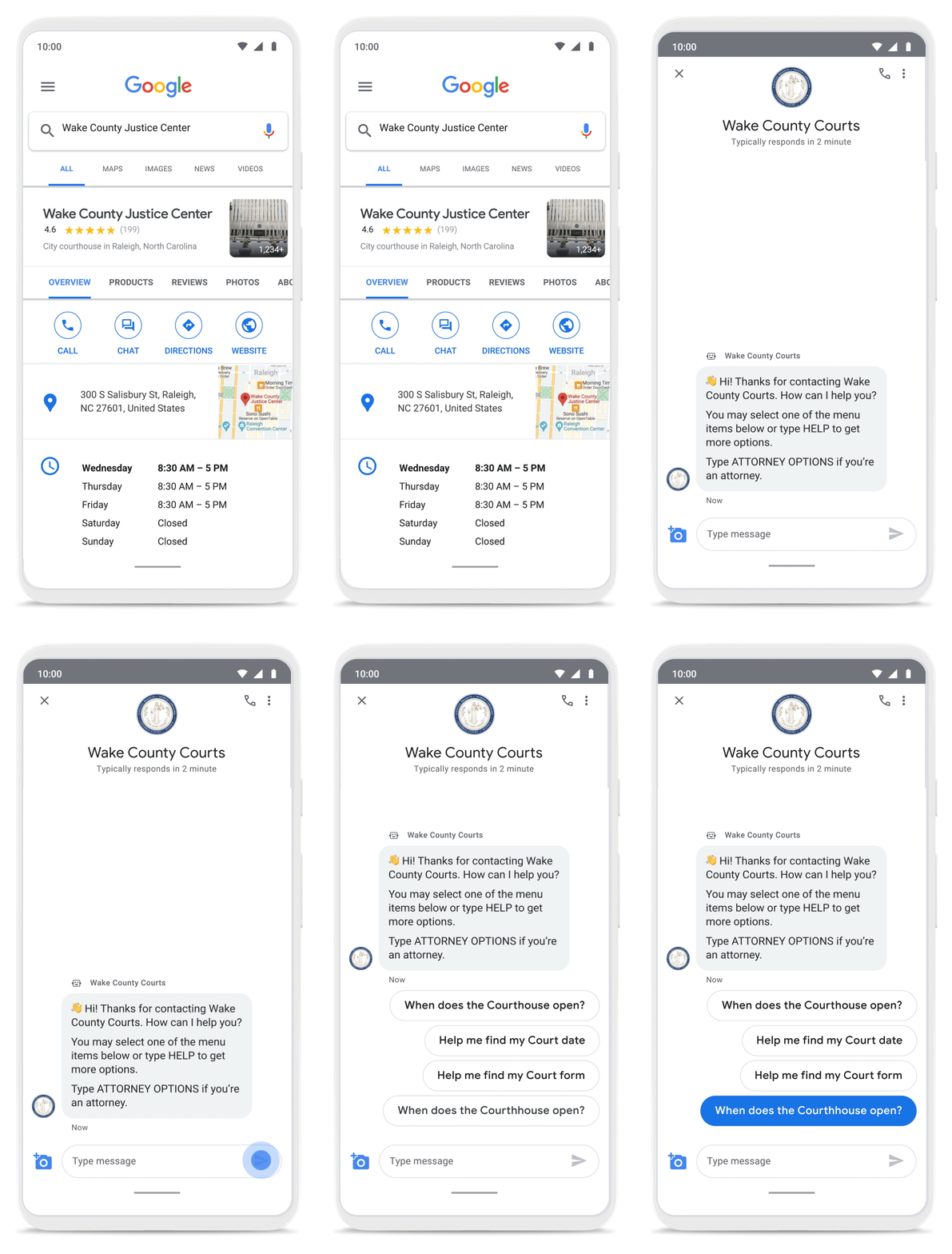
With Business Messages, North Carolina courthouses saw a 37% decrease in the call volume handled by courthouse staff. With 398,298 fewer phone calls during the first year of operation, the AI-based messages helped Wake County Courthouse work more efficiently and productively.
We’ve seen many brands benefiting from AI-powered Business Messages. For instance, Levi’s saw a 30% increase in off-hours shoppers and surpassed 85% customer satisfaction scores after implementing Business Messages. They also drove 30x more store-related questions than Levi’s website chat.
Bring Google’s conversational AI to your storefront with Business Messages
Google’s Business Messages makes it easier for businesses of all sizes to engage their existing or potential customers in a virtual conversation, when and where they need it.
To learn more, watch our Cloud Next session here or visit us at g.co/businessmessages. We have specialized services to help you get started and can share the wisdom of our channel partners and dedicated experts who specialize in unleashing the potential of conversational AI.
Google is a Leader in the 2023 Gartner® Magic Quadrant™ for Enterprise Conversational AI Platforms

1292
Of your peers have already read this article.
1:30 Minutes
The most insightful time you'll spend today!
We’re excited to share that Gartner has recognized Google as a Leader in the 2023 Gartner® Magic Quadrant™ for Enterprise Conversational AI Platforms, authored by Bern Elliot and Gabriele Rigon.
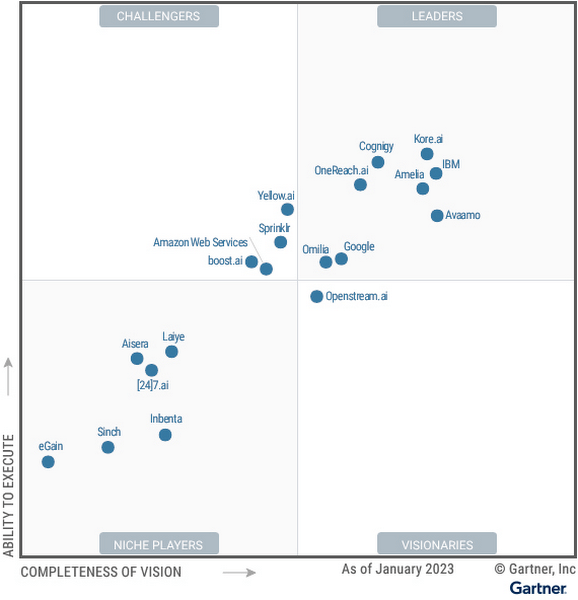
We believe this recognition is a testament to Google Cloud’s robust investments and commitment to innovation in AI, coupled with a deep understanding of enterprise customer needs. Enterprises are increasingly investing in AI-driven solutions that balance addressing customer expectations with operational efficiency. At a time when the demand for quality, performant, and trustworthy conversational AI has never been higher, we’re thrilled to continue to deliver best-in-class technologies, purpose-built to solve our customers’ most critical use cases.
In 2022, Google Cloud delivered cutting-edge conversational AI technologies with many launches to our Conversational AI API portfolio. Together, these enabled developers to leverage Google’s technologies to power their applications with our end-to-end Contact Center AI (CCAI) suite, designed to solve the needs of Customer Experience (CX) and contact center leaders.
Google Cloud’s Conversational AI APIs include pre-trained models for Speech to Text, Text to Speech and Natural Language Understanding. This conversational AI core leverages Google Research’s technology for speech, understanding and interaction, enabling and orchestrating high-quality conversational experiences at scale.
With Contact Center AI, organizations see improved customer satisfaction, higher agent productivity and reduced costs through increased agent efficiency. By focusing on user needs, Google Cloud provides comprehensive and integrated solutions that are ready for the enterprise. CCAI encompasses a comprehensive set of offerings to address the needs of the contact center.
In 2022, we launched Contact Center AI Platform, our AI-first, mobile-first, user-first contact center as a service (CCaaS), providing AI-powered experiences, CRM-centered design and deployment flexibility in a single platform without the need for multiple providers. Contact Center AI Platform auto-scales on the backend, with capacity for up to 100k concurrent users on a single tenant. It also offers multi-provider voice resiliency with global low-latency routing for best possible call quality and is optimized for enhanced customer/business data security, reduced downtime, and increased agent productivity. Segra, one of the largest independent fiber infrastructure bandwidth companies in the Eastern U.S., is leveraging CCAI Platform to reimagine their customer experience through predictive flows for common experiences and greatly expanding their channels for customer interaction.
CCAI also includes Dialogflow for building virtual agents, enabling businesses to meet their customers across multiple channels. It offers robust, flexible self-service voice and chat interactions that are just as natural as a live agent. Dialogflow enables both a great customer experience and a cost-effective way to scale services.
Our Agent Assist service gives businesses the ability to transition a call from a virtual agent to a human agent while maintaining context. It efficiently guides the agent to an accurate response, while providing real-time suggestions, more accurate responses and informed recommendations.
To improve contact center operations, CCAI Insights analyzes all customer conversations to provide leaders with real-time, actionable data points on customer queries, agent performance, and sentiment trends. Its topic modeling capabilities enable deeper understanding of key investment areas and greater classification accuracy.
To ensure our enterprise customers deploying CCAI realize value faster, Google Cloud offers CCAI through three defined transformation stages with out-of-the-box packages. The first stage starts with efficiency basics in the first week that include transcription and summarization. The second stage covers automation basics within six months using Agent Assist and Insights. The final stage is full automation within a year with industry use cases and pre-built components. All of this leads to higher agent efficiency, improved customer satisfaction and increased containment.
As we look forward to the rest of 2023 and beyond, elevating the customer experience through user-first design, AI-first capabilities and accelerating time-to-value will be our north star. We plan to announce exciting new capabilities over the next few months to enable that vision to become a reality for many more organizations.
We are honored to be a Leader in the 2023 Gartner® Magic Quadrant™ for Enterprise Conversational AI Platforms, and look forward to continuing to innovate and partner with customers on their digital transformation journeys.
Download the complimentary copy of the report: 2023 Gartner® Magic Quadrant™ for Enterprise Conversational AI Platforms.
Learn more about how organizations are transforming their business with Google Cloud solutions with Contact Center AI.
GARTNER is a registered trademark and service mark of Gartner and Magic Quadrant is a registered trademark of Gartner, Inc. and/or its affiliates in the U.S. and internationally and are used herein with permission. All rights reserved.
This graphic was published by Gartner, Inc. as part of a larger research document and should be evaluated in the context of the entire document. The Gartner document is available upon request from Google.
Gartner does not endorse any vendor, product or service depicted in its research publications and does not advise technology users to select only those vendors with the highest ratings or other designation. Gartner research publications consist of the opinions of Gartner’s research organization and should not be construed as statements of fact. Gartner disclaims all warranties, expressed or implied, with respect to this research, including any warranties of merchantability or fitness for a particular purpose.
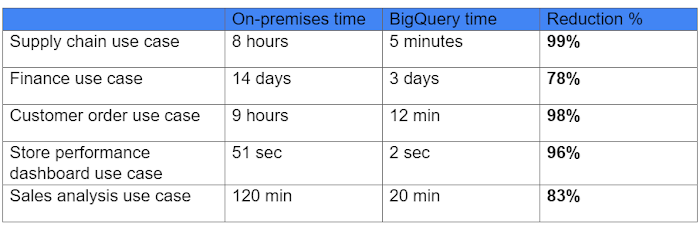
This Chart, from Home Depot, Dramatically Demonstrates the Power of a Cloud Data Warehouse
7612
Of your peers have already read this article.
2:30 Minutes
The most insightful time you'll spend today!
The Home Depot (THD) is the world’s largest home-improvement chain, growing to more than 2,200 stores and 700,000 products in four decades. Much of that success was driven through the analysis of data. This included developing sales forecasts, replenishing inventory through the supply chain network, and providing timely performance scorecards.
However, to compete in today’s business world, THD has taken this data-driven approach to an entirely new level of success on Google Cloud, providing capabilities not practical on legacy technologies.
The pressures of contemporary growth that drove much of the work are familiar to many businesses. In addition to everything it was doing, THD needed to better integrate the complexities in its related businesses, like tool rental and home services. It needed to better empower teams, including a fast-growing data analysis staff and store associates with mobile computing devices. It wanted to better use online commerce and artificial intelligence to meet customer needs, while maintaining better security.
Even before addressing these new challenges, THD’s existing on-premises data warehouse was under stress as more data was required for analytics and data analysts were utilizing the data with increasingly complex use cases. This drove rapid growth of the data warehouse, but also created constant challenges for the team in managing priorities, performance, and cost.
In order to add capacity to the environment, it was a major planning, architecture, and testing effort. In one case, adding on-premises capacity took six months of planning and a three-day service outage. Within a year, capacity was again scarce, impacting performance and ability to execute all the reporting and analytics workloads required. The capacity refresh cycles were shrinking, and the expecations for data were growing. There had to be a better way.
Still, THD did not take its move to the cloud lightly. A large-scale enterprise data warehouse migration involves tremendous effort among people, process, and technology. After careful consideration, THD chose Google Cloud’s BigQuery for its cloud enterprise data warehouse.
BigQuery, a scalable serverless data warehouse, was better on cost, infrastructure agility, and analytics capability, driving better insights with improved performance. There are no service interruptions when capacity is added, and that capacity can be added within a week (and soon same day). It doesn’t require complex system administration, and its standard SQL support means people can easily ramp up quickly. Valuable BigQuery products like Identity and Access Management meant THD could create many separate Google Cloud projects, while ensuring that different teams weren’t interfering with each other or accessing protected data.
THD also utilizes BigQuery’s flat-rate monthly pricing model that allows teams to budget their capacity based on need and provides billing predictability. The capacity not being used by a given project is available for enterprise use. This ensures no surprises when the monthly bill arrives and provides all analytical users access to significant computing power.
While THD’s legacy data warehouse contained 450 terabytes of data, the BigQuery enterprise data warehouse has over 15 petabytes. That means better decision-making by utilizing new datasets like website clickstream data and by analyzing additional years of data.
As for performance, look at this chart:
With the cloud EDW migration complete, and the legacy on-premises data warehouse retired, analysts now execute more complex and demanding workloads that they would not have been able to complete before, such as utilizing Datalab for orchestrating analytics through Python Notebooks, utilizing BigQuery ML for machine learning directly against the BigQuery data (no movement of large datasets), and AutoML to help determine the best model for predictions.
Additionally, engineers at THD have adapted BigQuery to monitor, analyze, and act on application performance data across all its stores and warehouses in real time, something that was not practical in the on-premises system.
With over 600 projects that THD now has on Google Cloud, the BigQuery story is just one of the many ways that Google Cloud is working with THD to deliver meaningful business results, every day.

3135
Of your peers have already downloaded this article
22:30 Minutes
The most insightful time you'll spend today!
Companies everywhere are seeking to leverage the power of AI. And rightly so. The smart applications of AI enable organizations to improve, to scale, and to accelerate the decision-making process across most business functions, so as to work both more efficiently and more effectively. It can also open up new avenues and new revenue streams, providing the organization with an additional competitive edge.
In short, many believe (as we do) that the enterprises that invest in building industry-specific AI solutions today are positioning themselves to be the global economic leaders of tomorrow. But the path to building an effective AI capability is not an easy one. There are many challenges to overcome. Challenges with the technology to develop platforms and solutions. With the people who will implement and manage that technology. With the data that fuels the technology. And with the processes that govern the whole of it. How do you harness the power inherent in AI, while avoiding any potential missteps?
That’s where Google Cloud comes in. Our framework for AI adoption provides a guide to technology leaders who want to build an effective AI capability, one that enables them to leverage the power of AI to enhance and streamline their business, smoothly and smartly. The framework is informed by Google’s own evolution, innovation, and leadership in AI, including experience deploying AI in production through products such as Gmail and Google Photos. It is also inspired by many years of experience helping cloud customers — from startups to enterprises, in various industries — to solve complex challenges.
With Google Cloud’s AI Adoption Framework, you’ll be able to create and evolve your own transformative AI capability. You’ll have a map for assessing where you are in the journey and where, at the end of it, you’d like to be. You’ll have a structure for building scalable AI capabilities to create better insights from big data with powerful algorithms across the entire business.
With Google Cloud as your guide, the path to AI is considerably smoother.
Download this whitepaper to find out:
- A map for assessing where you are in your AI journey and where you want to be
- A comprehensive structure for building an effective AI capability across your entire organisation to create actionable insights from data
- A technical deep dive for technology leaders
More Relevant Stories for Your Company
Moving Your Data Warehouse to the Cloud? Here’s What You Need to Know
Modernizing your data warehouse is one way to keep up with evolving business requirements and harness new technology. For many companies, cloud data warehousing offers a fast, flexible, and cost-effective alternative to traditional on-premises solutions. In a report sponsored by Google Cloud, TDWI examines the rise of cloud-based data warehouses


Can Your Data Warehouse Handle a 100-Trillion Row Query?
Today's enterprise demands from data go far beyond the capabilities of traditional data warehousing and for many leaders, the need to digitally transform their businesses is a key driver for data analytics spending. Businesses want to make real-time decisions from fresh information as well as make future predictions from their

Telegraph Media Group Creates More Marketing Opportunities With Google Cloud Platform
London-based Telegraph Media Group is a multimedia news publisher with titles including The Daily Telegraph, The Sunday Telegraph, The Telegraph website and The Telegraph digital edition. The Daily Telegraph is the UK’s best-selling quality daily newspaper with a long-established history of over 160 years and is unique in having maintained



Baking Gets Sweeter: Build ML Models that Help Predict the Best Recipe!
Baking recipes and ML models have one thing in common—they follow a pattern. Machine Learning is all about finding pattern in data sets, you can predict what you are baking based on the core ingredients and their respective amounts! Bread, cake or cookies, watch the video to make you make
