





5660
Of your peers have already downloaded this article
5:30 Minutes
The most insightful time you'll spend today!
The Power of Two: Best Practices for Mergers & Acquisitions on Google Cloud

3390
Of your peers have already read this article.
3:00 Minutes
The most insightful time you'll spend today!
Congratulations! Your company just acquired or merged with another organization, beginning an important new chapter in its history. But like with many business deals, the devil is in the details — particularly when it comes to integrating the two companies’ cloud domains and organizations. In this blog post, we look at how to approach mergers and acquisitions (M&A) from the perspective of Google Cloud. These are the best practices that your Google Cloud Technical Account Managers follow — or that we recommend you follow if you plan to perform the integration yourself.
Although there are various M&A scenarios, here are the two most common ones we will focus on:
- Both entities engaged in the M&A have some presence on Google Cloud and are looking for some level of integration
- Only one of the entities has a presence on Google Cloud, and is looking at best ways to work together
Depending on your situation, your approach to integrating the two companies will vary substantially.
When both companies have a Google Cloud presence
In the first scenario, let’s assume company A is acquiring company B. Prior to the M&A, both companies have their own Google Cloud Organizations — the top level structures in the Google Cloud resource hierarchy — and have one or more billing accounts associated with them. There are also various Folders and Projects below each Google Cloud Organization. In this scenario, here are the key questions to ask:
- How do you plan to integrate/consolidate two distinct Google Cloud Organizations?
- How do you plan to organize the billing structure?
- How do you handle Projects under the two Organizations?
- What is the identity management strategy for the two Organizations?
For each of these key questions, go ahead and formulate a detailed plan of action. If you have access to the Technical Account Manager service through Google Cloud Premium Support, you can reach out to them to further develop this plan.
Understanding Google Cloud Organizations
From an organizational integration standpoint, when each entity in an M&A has its own Google Cloud Organization, you have various options: no integration, partial, or full.
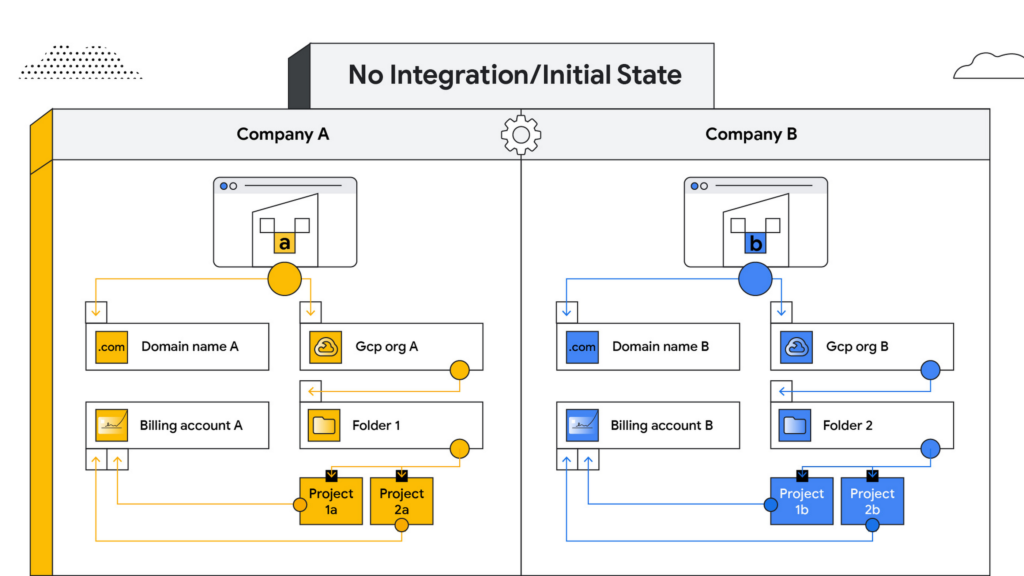
No integration – When company B operates as an independent entity from company A, no migration is required. One caveat is if company A has negotiated better pricing terms/discounts and support packages with Google Cloud. In that case, you can sign an affiliate addendum by working with your Google Cloud account team to help unlock the same benefits for company B.
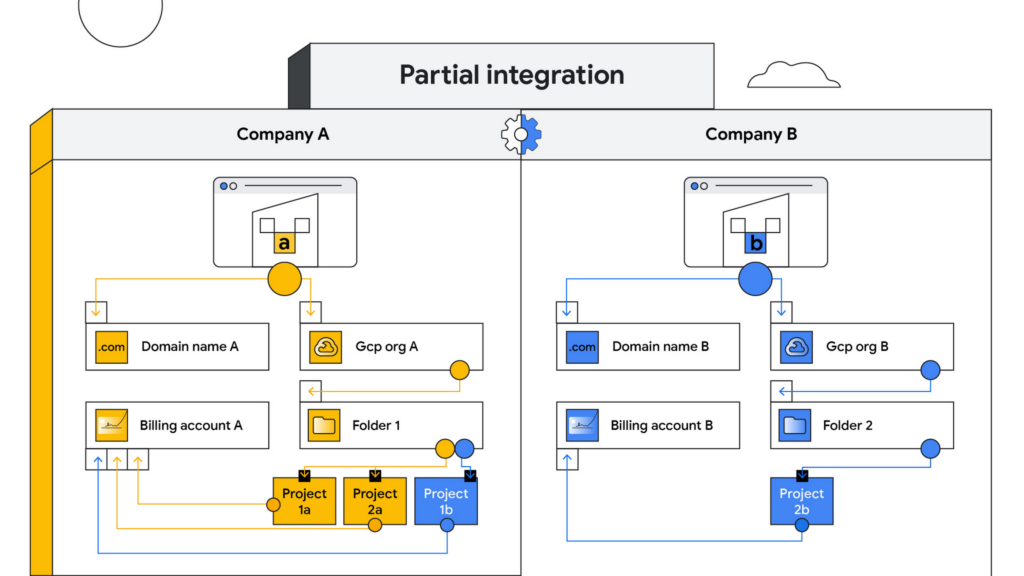
Partial integration – Some projects move over to company A from company B and others stay with Company B. There can be some shared access between the two companies and each of the organizations can continue to use their existing identity providers. This can be a self-serve or a paid services engagement with Google Cloud depending on the complexity of the two companies and how many project migrations need to take place between them.
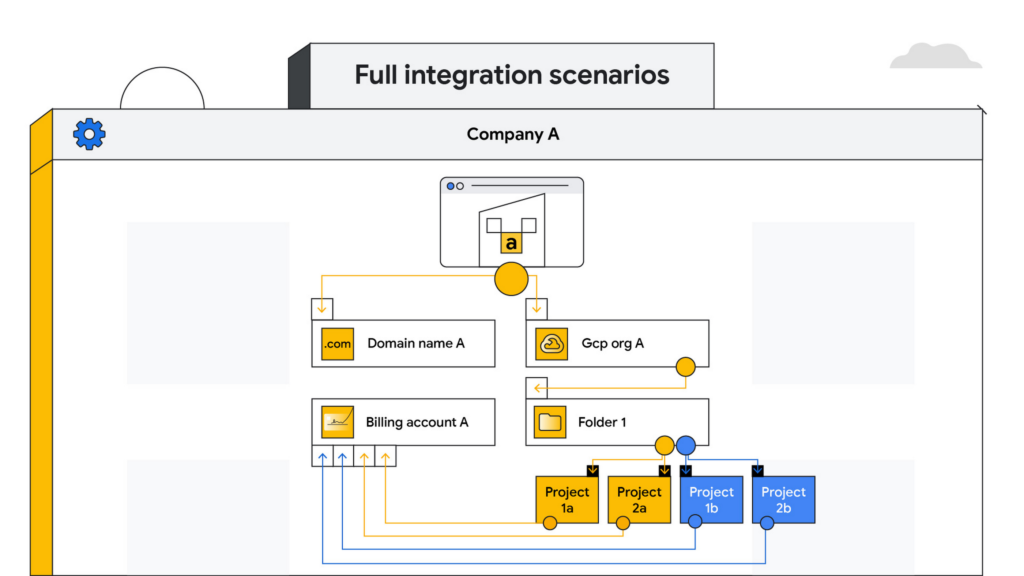
Full integration – Company B is fully incorporated into company A. This means you go through a full billing, Google Workspace identity and project migration from company B into company A. This can be a complex process and we highly recommend engaging your Google Cloud account teams to scope out a paid services engagement to go through this transition.
Planning your project migration
No matter what you want your end state to look like, project migration requires careful planning. Again, if you have an assigned Technical Account Manager, please reach out to them to ensure that you have a conversation around best practices before starting this migration.
If you’re taking a self-service approach, at a high level, we recommend leveraging the Resource Manager API to manage your project migrations. Do keep in mind that there are several prerequisites and required permissions documented here that need to be assigned before going down this path.
In addition, please be sure to read the billing and identity management considerations below to ensure that you are covering all of the bases associated with such a migration, as your choices can fundamentally alter your Google Cloud footprint.
Billing considerations
When deciding how to structure your Organizations and billing accounts, our recommendation is to always limit the number of Organization nodes and use the Folder structure to manage departments/teams within it. Creating additional Organization nodes is only advised in cases where you require a level of isolation for certain Projects from central administration for a specific business reason, for example, if the company being acquired already has their own Organization node and there is a business justification to let it operate as a standalone entity.
Warning: If you have multiple Organization nodes, be aware that you will not have central visibility across all your organizational resources, and that policy management across different Organization nodes can be cumbersome. You will also have to manage multiple Workspace accounts and manage identities across them, which can be difficult, especially when operating at scale.
From a billing account management perspective, our recommendation is to create one central billing account that lives within the Organization node with tags and labels incorporated for additional granularity. However, there are a few business cases which warrant the creation of additional billing accounts such as:
- You need to split charges for legal or accounting purposes
- Invoices are paid in multiple currencies
- You need to segregate usage to draw down on a Google Cloud promotional credit
- Subsidiaries need their own invoice
Keep in mind that committed-use and spend-based discounts and promotional credits cannot be shared across billing accounts and are provisioned on a per-billing-account basis. As such, more billing accounts can make it harder to leverage these discounts and credits.
Identity management
As you might expect, merging two entities has identity management implications. Cloud Identity is the solution leveraged by Google Cloud to help you manage your user and group identities. Even if the acquired company only uses the productivity products that are part of Google Workspace, the identities would still be managed by Cloud Identity.
Google Workspace considerations
To move large amounts of content into a Google Workspace domain, we recommend one of three options, depending on your end goal and data complexity:
- For general migrations: Leverage Google Workspace Migrate to move data into your Workspace domain from either another Workspace domain or a third-party productivity solution
- For manual migrations: Use the Export tool to move your organization’s data to a Cloud Storage archive so you can selectively download exported data by user and service
- For complex Google Workspace scenarios: Speak with your Google Cloud Technical Account Manager about the possibility of using a custom scoped engagement to merge two Google Workspace environments without business interruption
When only one company is on Google Cloud
Now, let’s consider the scenario where only company A has a presence on Google Cloud but company B does not. The approach you take to integrate the two organizations largely depends on your desired end state — full, partial or no integration.
If the plan is to eventually integrate company B into company A, your approach here will have a lot of similarities with the ‘full integration’ option mentioned above — just at a later point in time.
You may also run into a scenario where company B has a presence on an alternative cloud platform and you need to migrate resources into or out of Google Cloud. Again, similar to the partial integration option called out above, a paid engagement or a self-service exercise would be a good fit depending on the complexity of the desired end state.
Here to help
A merger or acquisition is an exciting milestone for any company, but one that needs to be managed carefully. Once you carefully review these considerations, develop a plan of action for your organization. You can also engage Google’s Professional Services for a paid engagement or Google’s Technical Account Management Service for a self-managed process to achieve the desired results.
If you are going through or considering going through M&A at your organization and have a different scenario than what we have discussed, please feel free to reach out to your account teams for guidance or contact us at https://cloud.google.com/contact.
Dataflow Guarantees 50+% Increase in Developer Productivity and Infrastructure Cost Savings: Read More

8419
Of your peers have already read this article.
3:00 Minutes
The most insightful time you'll spend today!
In our conversations with technology leaders about data-driven transformation using Google Data Cloud – industry’s leading unified data and AI solution – , one important topic is incorporating continuous intelligence to move from answering questions such as “What has happened? to questions like “What is happening?” and “What might happen?”. The core to this evolution is the need for an underlying data processing that not only provides powerful real-time capabilities for events happening close to origination, but also brings together existing data sources under one unified data platform to enable organizations to draw insights and take actions holistically. Dataflow, Google’s cloud-native data processing and streaming analytics platform, is a key component of any modern data and AI architecture and data transformation journey, along with BigQuery, Google’s internet-scale warehouse with built-in streaming, BI engine and ML; Pub/Sub, a global no-ops event delivery service; and Looker, a modern BI and embedded analytics platform. One of the key evaluation factors is potential economic value of Dataflow to their organization, particularly in the context of engaging other stakeholders is key for many of the leaders that we engage with. So we commissioned Forrester Consulting to conduct a comprehensive study on the impact that Dataflow had on their organization by interviewing actual customers .
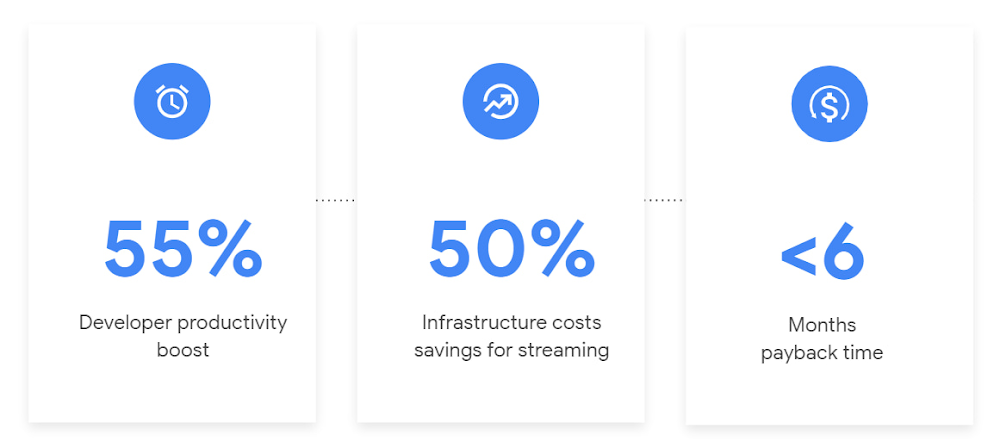
Today we’re excited to share our commissioned study conducted by Forrester Consulting, the Total Economic Impact™ of Google Cloud Dataflow, which allows data leaders to understand and quantify the benefits of Dataflow, and use cases it enables. Forrester conducted interviews with Dataflow customers to evaluate the benefits, costs, and risks of investing in Dataflow across an organization. Based on their interviews, Forrester identified major financial benefits across four different areas: business growth, infrastructure cost savings, data engineer productivity, and administration efficiency. In fact, Forrester found that customers adopting Dataflow can achieve a 55% boost in developer productivity and a 50% reduction in infrastructure costs. In fact, Forrester projects that customers adopting Dataflow can achieve a range of up to 171% Return on Investment (ROI) and a less than six months payback period. Customers can now use figures in the report to compute their own Return on Investment (ROI) and payback period.
“Dataflow is integral to accelerating time-to-market, decreasing time-to-production, reducing time to figure out how to use data for use cases, focusing time on value-add tasks, streamlining ingestion, and reducing total cost of ownership.” – Lead technical architect, CPG
Let’s take a deeper look at the ways that Forrester found that Dataflow can help you achieve your goals and unlock your business potential.
Benefit #1: Increase data engineer productivity by 55%
Developers can choose among a variety of programming languages to define and execute data workflows. Dataflow also seamlessly integrates with other Google Cloud Platform and open source technologies to maximize value and applicability to a wide variety of use cases. Dataflow streamlined workflows with code reusability,dynamic templates, and the simplicity of a managed service. Engineers trusted pipelines to run correctly and adhere to governance. Data engineers avoided laborious issue-monitoring and remediation tasks that were common in the legacy environments such as poor performance, lack of availability, and failed jobs. Teams valued the language flexibility and open source base.
“Dataflow provided us with ETL replacement that opened limitless potential use cases and enabled us to do smarter data enhancement while data remains in motion.” — Director of data projects, financial services
Benefit #2: Reduce infrastructure costs by up-to 50% for batch and streaming workloads
Dataflow’s serverless autoscaling and discrete control of job needs, scheduling, and regions eliminated overhead and optimized technology spending. Consolidating global data processing solutions to Dataflow further eliminated excess costs while ensuring performance, resilience, and governance across environments. Dataflow’s unified streaming and batch data platform gives organizations the flexibility to define either workload in the same programming model, run it on the same infrastructure, and manage it from a single operational management tool.
“Our costs with our cloud data platform using Dataflow are just a fraction of the costs we faced before. Now we only pay for cloud infrastructure consumption because the open source base helps us avoid licensing costs. We spend about $120,000 per year with Dataflow, but we’d be spending millions with our old technologies.” – Lead technical architect, CPG
Benefit #3: Increase top-line revenue by improving customer experience and retention with payback time of < 6 months
Streaming analytics is an essential capability in today’s digital world to gain real-time actionable insights. Likewise, organizations must also have flexible, high- performance batch environments to analyze historical data for building machine learning models, business intelligence, and advanced analytics. Dataflow enabled real-time streaming use cases, improved data enrichment, encouraged data exploration,improved performance and resiliency, reduced errors, increased trust, and eliminated barriers to scale. As a result, organizations provided customers with more accurate, relevant, and in-the-moment data-backed services and insights — boosting customer experience, creating new revenue streams, and improving acquisition, retention, and enrichment.
“It’s already been proven that we are getting more business [with Dataflow] because we can turn around results faster for customers.” – VP of technology, financial services technology
“When we provide data to our customers and partners with Dataflow, we are much more confident in those numbers and can provide accurate data within a minute. Our customers and partners have taken note and commented on this. It’s reduced complaints and prevented churn.” – Senior software engineer, media
Other benefits
Eliminated administrative overhead and toil
As a cloud-native managed service, all administration tasks such as provisioning, scaling, and updates are automatically handled by Google Cloud. Teams no longer need to manage servers and related software for legacy data processing solutions. Admins also streamlined processes for setting up data sources, adding pipelines, and enforcing governance.
Saved business operations costs for support teams and data end users
Dataflow improved the speed, quality, reliability, and ease of access to data for insights for general business users, saving time and empowering users to drive better data-backed outcomes. It also reduced support inquiry volume while automating manual job creation.
What’s next?
Download the Forrester Total Economic Impact study today to dive deep into the economic impact Dataflow can deliver your organization. We would love to partner with you to explore the potential Dataflow can unlock in your teams. Please reach out to our sales team to start a conversation about your data transformation with Google Cloud.
New Histogram Features in Cloud Logging Make it Easier to Track Log Volumes, Errors and Anomalies!

3411
Of your peers have already read this article.
2:30 Minutes
The most insightful time you'll spend today!
Visualizing trends in your logs is critical when troubleshooting an issue with your application. Using the histogram in Logs Explorer, you can quickly visualize log volumes over time to help spot anomalies, detect when errors started and see a breakdown of log volumes. But static visualizations are not as helpful as having more options for customization during your investigations.
That’s why we’re excited to announce that we recently added three new query controls along with separate colors for log severity to the histogram. These new features make it even easier to refine and analyze your logs by time range. The new histogram controls help find logs before or after the current period, jump to a specific time range represented in a histogram bar and zoom in/out of the current time window in the histogram.
Histogram colors
The histogram now makes it easier to view the breakdown of logs by severity with the introduction of color coding. For example, the severity colors make it easy to spot an increasing number of errors even when the volume of requests is relatively constant. Looking at the histogram below, the red vs blue shading makes it clear that there has been an increase in overall log volume and provides a visual breakdown of errors within that log volume.

Pan left/right to scroll through time
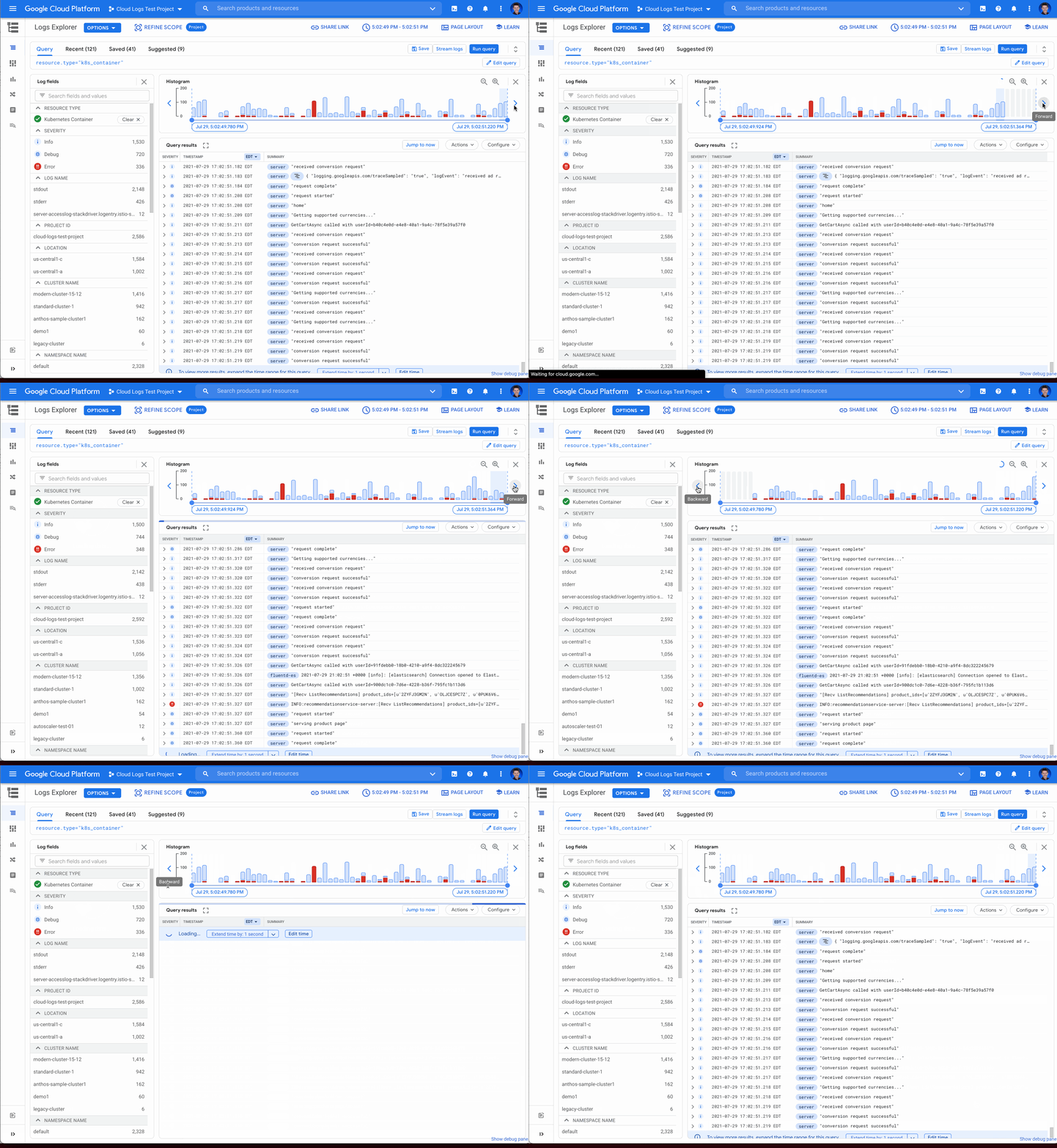
Sometimes in your troubleshooting journey, you may want to look at the logs directly before or after the current set of logs. Perhaps there was an unexpected spike in errors at the beginning of the time range and you need to see the logs in the time period directly preceding the current time range. Pressing the left arrow on the left side of the histogram shifts the time range earlier while the arrow on the right side of the histogram shifts the time range ahead. Either arrow will refine the time range in the query and rerun the query to return the logs in the new time range.
Zooming in or out
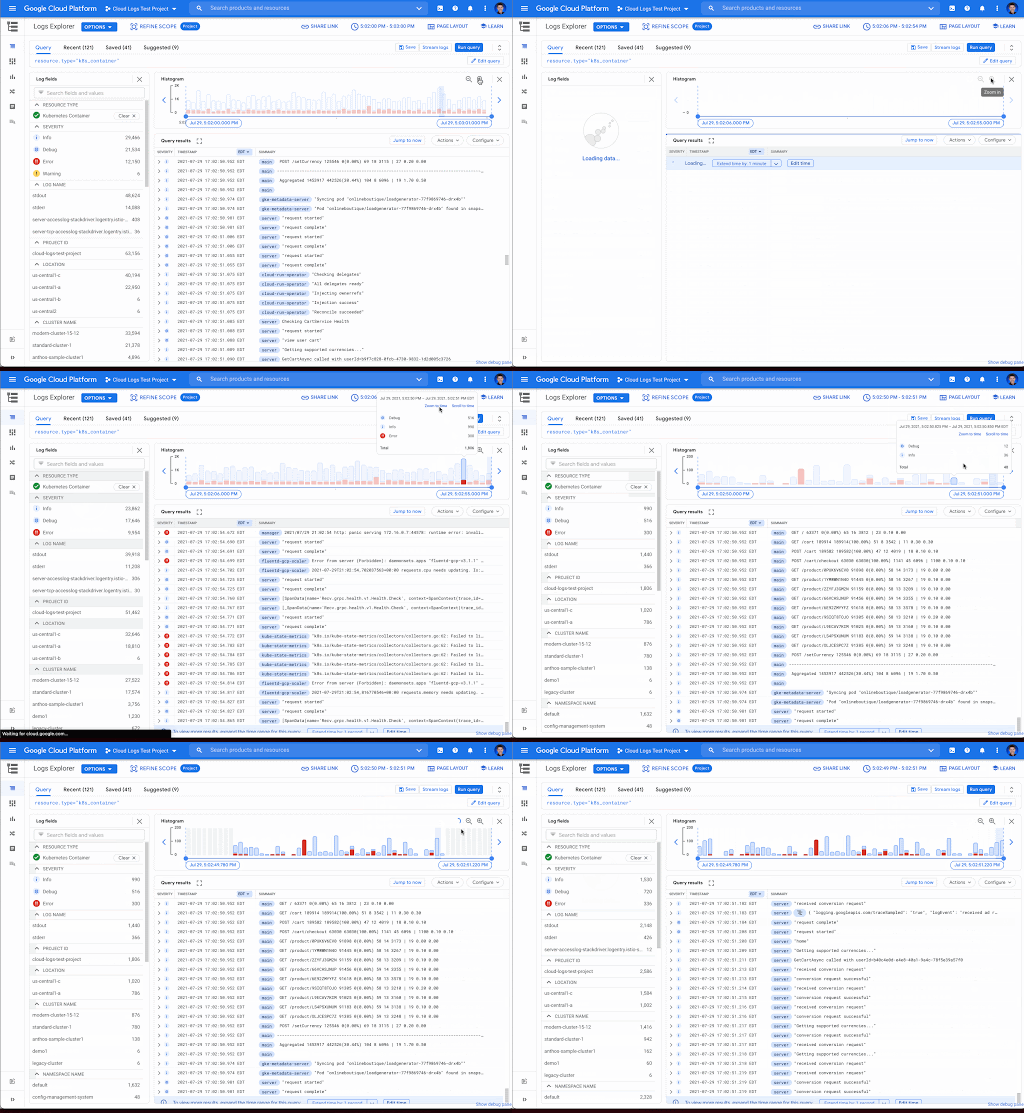
Zooming in or out from a given time range may be useful to visualize fine-grained details or a broader trend Clicking the zoom in or out icons in the upper right corner of the histogram refines the time range in the query and then reruns the query, returning the logs in the newly defined time range.
Scrolling to time
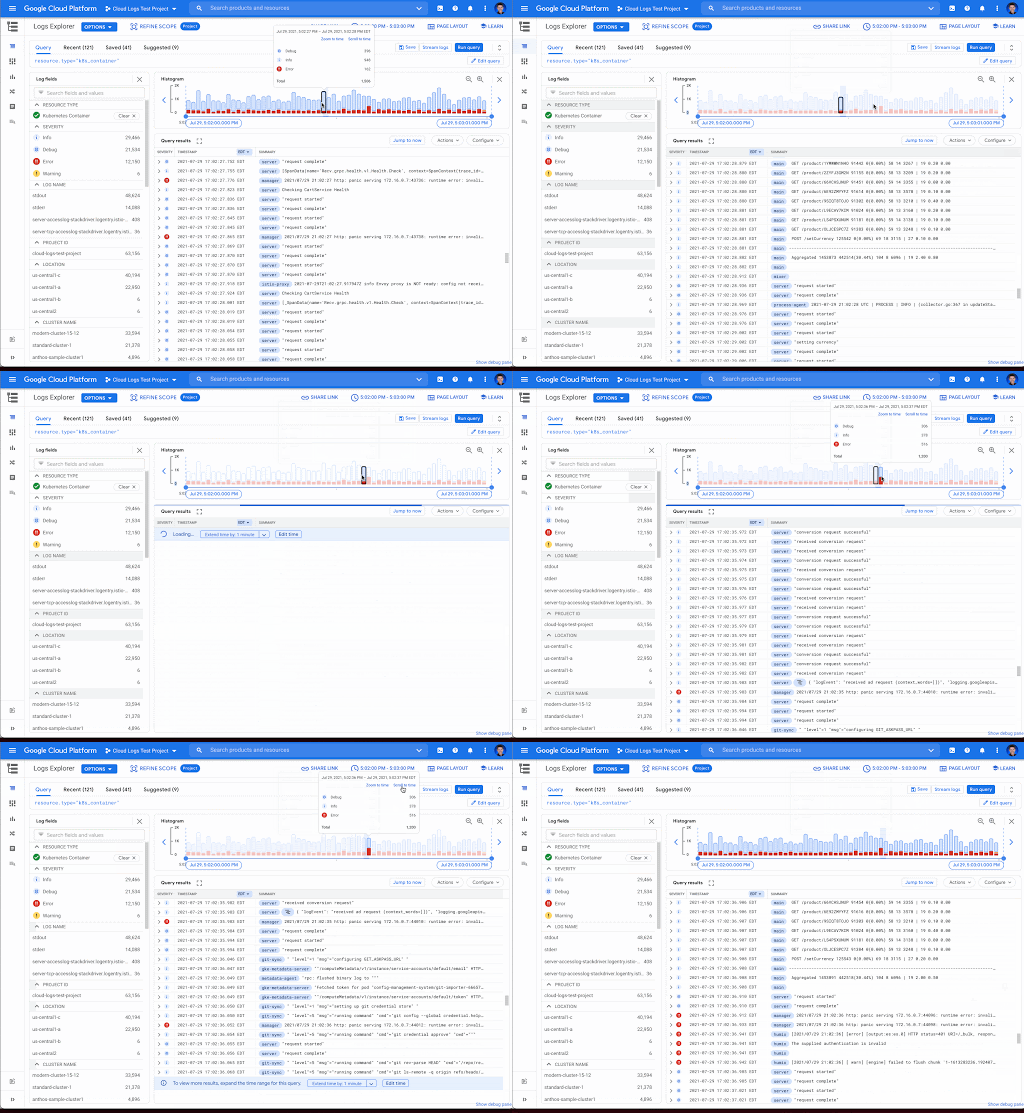
If you see a large spike in logs volume in the histogram, it’s useful to quickly review the logs generated during that spike. Clicking on the histogram bar that contains the spike now scrolls you to the logs generated during that time period.
Where to find the histogram
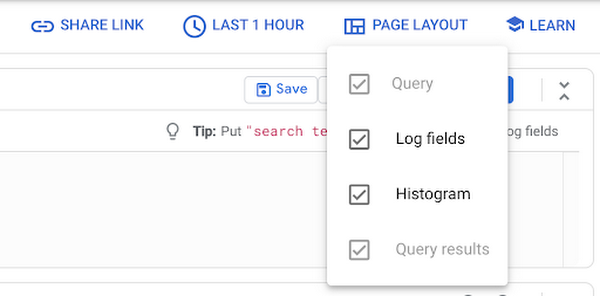
The histogram is a panel in Logs Explorer that can be displayed or hidden using the controls in the Page Layout menu. When you no longer want to display the histogram, click the “X” button in the upper right corner to quickly close it. To open it again, use the same Page Layout menu to enable the histogram display.
Get started with the histogram
These improvements move the histogram from a utility for visualization to an integral part of the troubleshooting journey. We are continuously working to launch new features that make Cloud Logging the best place to troubleshoot your Google Cloud logs. If you are not already a Cloud Logging user, review this getting started documentation or watch a quick video on troubleshooting services on Google Kubernetes Engine (GKE) to learn more. If you have specific questions or feedback, please join the discussion on our Google Cloud Community, Cloud Operations page.
Google Cloud Launches Digital Assets Team to Power the Emerging Blockchain Space

3115
Of your peers have already read this article.
1:30 Minutes
The most insightful time you'll spend today!
Blockchain technology is yielding tremendous innovation and value creation for consumers and businesses around the world. As the technology becomes more mainstream, companies need scalable, secure, and sustainable infrastructure on which to grow their businesses and support their networks. We believe Google Cloud can play an important role in this evolution.
Building on our existing work with blockchain developers, exchanges, and other companies in this space, we are announcing today a new, dedicated Digital Assets Team within Google Cloud to support our customers’ needs in building, transacting, storing value, and deploying new products on blockchain-based platforms. This new team will enable our customers to accelerate their efforts in this emerging space and help underpin the blockchain ecosystems of tomorrow.
What We’re Doing Today (and Into the Future)
Blockchain and distributed-ledger-based companies like Hedera, Theta Labs, and Dapper Labs have already chosen to build on top of Google Cloud for scalability, flexibility, and security. Moving forward, Google Cloud’s Digital Assets Team will undertake a number of short- and long-term initiatives to support companies in the digital assets/blockchain ecosystem, including:
- Providing dedicated node hosting/remote procedure call (RPC) nodes for developers, allowing users to deploy blockchain validators on Google Cloud via a single click (“click to deploy”).
- Participating in node validation and on-chain governance with select partners.
- Helping developers and users host their nodes on the cleanest cloud in the industry, supporting their environmental, social, and governance initiatives.
- Supporting on-chain governance via participation from Google Cloud executives and senior engineers.
- Hosting several public BigQuery datasets on our Marketplace, including full blockchain transaction history for Bitcoin, Ethereum, Bitcoin Cash, Dash, Litecoin, Zcash, Theta, Hedera Hashgraph, Band Protocol, Polygon, XRP, and Dogecoin.
- Driving co-development and integration into Google’s robust partner ecosystem, including participating in the Google Cloud Marketplace.
- Embracing joint go-to-market initiatives with our ecosystem partners where Google Cloud can be the connective tissue between traditional enterprise and blockchain technologies.
As we build out our team, we’re also exploring opportunities in the future to enable Google Cloud customers to make and receive payments using cryptocurrencies.
Why Partner with Google Cloud
Our customers in this space—both traditional firms seeking to implement blockchain strategies and blockchain-native companies, such as exchanges, app providers, and decentralized platforms—are choosing Google Cloud for three key reasons:
- First, their businesses and their developer ecosystems can build on the industry’s cleanest cloud. Growing in a sustainable manner is top-of-mind for many businesses, but is particularly relevant in the blockchain space, where the ability to run and scale sustainably is critical. Google is carbon neutral today, and we’ve announced our goal to run on carbon-free energy, 24/7 at all of our data centers by 2030. We’ve also rolled out the ability for customers to choose a Google Cloud region in which to run based on carbon footprint data.
- Second, developers building on blockchain-based platforms can benefit from Google’s world-class developer platform. Google Cloud infrastructure ensures that developers can speed up the delivery of software and data on the blockchain, delivering fast access to applications for users.
- Third, Google Cloud technologies and services will ensure that blockchain-based companies can scale securely and reliably. Google can ensure that data, applications, games, or digital assets like NFTs will be delivered on a stable, secure, and trusted global network.
Google Cloud’s Approach to Blockchain and Digital Assets
Blockchains and digital assets are changing the way the world stores and moves its information —as well as value. As an infrastructure provider, Google Cloud views the evolution of blockchain technology and decentralized networks today as analogous to the rise of open source and the internet 10-15 years ago. Just as open source developments were integral to the early days of the internet, blockchain is yielding innovation and value creation for consumers and businesses. As the technology becomes more mainstream, companies will need scalable, secure infrastructure on which to grow their businesses and support their networks.
As such, we’re applying Google Cloud technology to the blockchain market with the following principles:
- Consistent with Google Cloud’s core business: We are specialists in data-powered innovation with leading infrastructure, industry solutions, and other cutting-edge technology. We pursue blockchain projects and partnerships that align with our mission and our expertise.
- User trust and governance: Blockchain networks raise novel questions concerning legal compliance and user privacy. We will maintain our commitment to our users through a robust focus on privacy and user trust, as well as an uncompromising focus on compliance with applicable laws.
- Network-agnostic: Google’s infrastructure will seek to preserve optionality of networks for the benefit of users.
We’re inspired by the work already done in the digital assets space by our customers, and we look forward to providing the infrastructure and technologies to support what’s possible with blockchain technologies in the future. If you’re eager to learn more about Google Cloud’s new Digital Assets Team, please reach out to your Google Cloud sales representative or partner manager.
4049
Of your peers have already watched this video.
15:00 Minutes
The most insightful time you'll spend today!
Modernize your Windows Workloads by Migrating them to Google Cloud
Google has plenty to offer when it comes to migrating and modernizing traditional enterprise Windows workloads to the cloud. Explore different approaches for re-hosting, modernizing, and transforming Windows applications, and the benefits of moving to Google Cloud.
Learn from demos on some of the cutting-edge technologies that can offload some of the operational IT burden into optimized managed services.
More Relevant Stories for Your Company

Mambu’s Journey: Modernizing Core Banking with Google Cloud
When our founders began Mambu in 2011, their goal was to bring the latest digital technologies to the banking and finance world. Banking, in particular, is an industry built on decades of deep legacy technology. So initially, Mambu was embraced by microfinance — 100 organizations in 26 countries in just

How One Company Improved Security Significantly–Without Increasing Staff
Quanta Services is the leading specialty contractor with the largest and highly-skilled trained workforce in North America. It provides fully-integrated solutions for the electric power pipeline industrial and telecommunications industries the company's geographic footprint which includes North America Latin America and Australia. It’s network of companies ensures world-class execution with

How Google Cloud’s Scalable Data Storage and High Compute Resources Fuel Investment Research
Investment management is a heavily data-driven industry—portfolio managers and investment researchers require a large number of data sources to guide them in shaping their investment strategies. New cloud capabilities and technologies enable investment managers to process data faster than ever before and iterate on ideas quickly to fuel innovation in



Greenovation: Adani and Google Cloud Join Forces for a Sustainable and Data-Driven India
As the biggest renewable energy developer, Adani aims to put India on the green map. Working with the world's cleanest cloud inspired the organisation to solve their own efficiency issues, and better manage their facilities across the country to lower their carbon footprint. For more on Adani, visit: https://www.adani.com/ For
