





Mambu’s Journey: Modernizing Core Banking with Google Cloud

926
Of your peers have already read this article.
3:30 Minutes
The most insightful time you'll spend today!
When our founders began Mambu in 2011, their goal was to bring the latest digital technologies to the banking and finance world. Banking, in particular, is an industry built on decades of deep legacy technology. So initially, Mambu was embraced by microfinance — 100 organizations in 26 countries in just the first two years.
Since then, acceptance of modernizing core banking services by using composable, cloud technologies has grown across financial services institutions (FSIs). We now service top-tier banks, fintech startups, and other finance organizations across six continents, helping them deliver flexible, personalized, customer-centric banking products and services that their customers can depend upon.
One of the main reasons we’ve been able to scale the Mambu composable banking platform across the globe and at our current pace is our partnership with Google Cloud. The decision to move forward with Google Cloud happened for several reasons.
1. Flexibility and openness. Many FSIs are on hybrid and multicloud technology stacks, as they may still be transitioning from legacy systems, or have data residency requirements that have led them to use different clouds in different regions. Mambu meets customers wherever they are in their cloud journeys. We support interoperability without vendor lock-in. This need for openness, as well as the scalability benefits, led Mambu to evolve our platform on Google Kubernetes Engine (GKE). Many customers use open-source Kubernetes because, this common foundation can help streamline integration, speed up time to market, and reduce development. Just as important, the Google Cloud open cloud approach matches our company values.
2. Security and data residency. For customers in highly regulated finance industries, security isn’t just top of mind, it’s the No. 1 requirement. In addition to Google Cloud’s secure infrastructure, external audit certifications, and encryption, its wide array of regions has allowed us to expand into more countries, where we serve banks that must meet local data residency requirements. For example, Google Cloud’s Jakarta Cloud Region, has allowed us to support Bank Jago in Indonesia as it brings more financial inclusion to the unbanked in that country.
3. Availability. It’s critical for banks to maintain basic financial functionality, like accepting deposits and serving cash, even amid a service disruption. We needed a cloud partner with impeccable redundancy, failover, and disaster recovery capabilities.
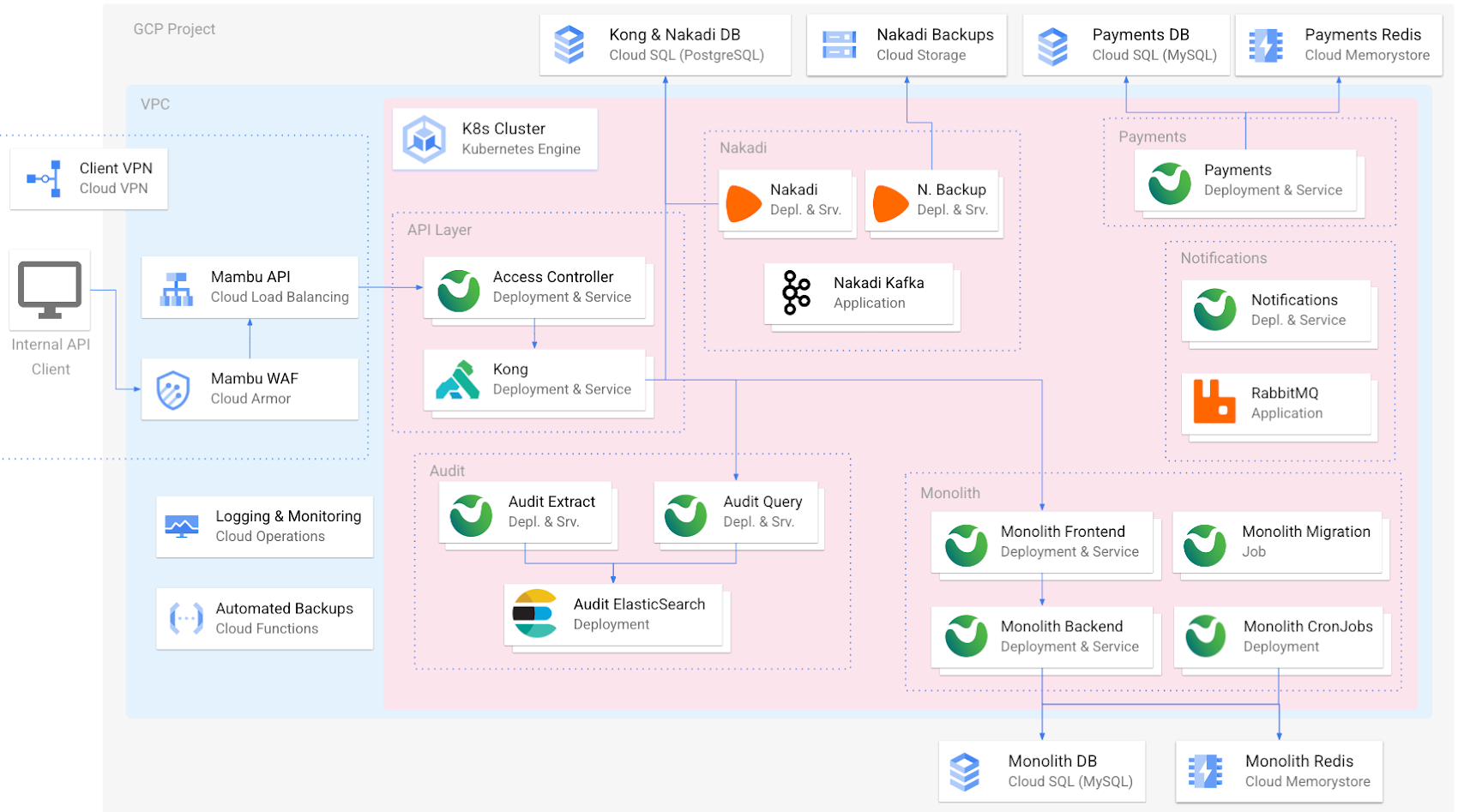
In addition to GKE, the Mambu platform uses several other Google Cloud services for specific functions, including Cloud Armor, Cloud Load Balancing, Cloud VPN, Cloud Memorystore, and Google Cloud Operations.
Another important reason we chose to partner with Google Cloud was its expansive ecosystem and commitment to innovation. We are midway into a three-year journey to modernize our own technology stack to meet customer needs.
Building a roadmap with Google Cloud
Our customers need a core banking technology platform that will grow with them as they bring to market innovative services built on the latest technology advances. For Mambu to be that platform, we need a cloud partner that supports and scales with our growth. While we originally built our cloud architecture on GKE and Compute Engine (among a few other Google Cloud services), we’re now looking to a serverless future where we can scale more easily and leverage managed services within Google Cloud and its partner ecosystem to focus on our core offerings.
These are just some of the modernization and customer-led innovations that we’re cooking up:
- More workloads in GKE: Like many companies, our cloud transformation is a work in progress. While much of our codebase is in GKE, we’re continuing to break up some larger pieces of code into microservices to increase agility and velocity, enabling us to make consistent updates to discrete areas of our platform without affecting the whole. GKE is the leader for orchestrating microservices at scale and continues to be a natural fit.
- Native BigQuery integration: Mambu customers collect a tremendous amount of data within the platform that can be used for analytics, personalization, and other use cases. We’re planning to create a seamless integration for feeding core banking data from Mambu into BigQuery so that customers can better leverage their valuable data.
- CloudSQL vs. self-managed MySQL: We have almost completed migrating from our own MySQL instances to managed Cloud SQL databases, which will open up new opportunities to implement customer-centric solutions such as BigQuery integration.
- A serverless future with Cloud Run: Compute Engine is working well for Mambu, providing the flexibility to choose the virtual machines that best balance performance and cost needs. As we seek even more time and cost efficiencies, we believe the elastic scalability of a serverless architecture built on Cloud Run will get us there, and we’re considering going serverless in the future. Doing so would abstract infrastructure for simpler management, while allowing us to fire up containers to meet our customers’ high transactions-per-second needs, spin them down when not needed, and pay only when they run. It would also boost security: Without long-running compute, there are no patches or fixes, and each new instance is isolated and fresh by default.
These are just a handful of examples of the ways we want to best leverage Google Cloud services to simplify how we manage our tech stack, as well as continue to bolster security, scalability, and performance. There are many other ideas we’re exploring: using Dataproc and Datastream to support the specific data needs of Islamic banking, Cloud Functions so that customers can run their own queries against Mambu, and AI-enabled features.
At Mambu, our mission is to empower our customers to deliver great modern financial experiences easily to everyone around the world. Every time Google Cloud opens a new data center, we can enter a new market. Every time we move to a new-to-us managed service via the Google Cloud Marketplace, we free up time to build new ways to deliver customer-centric banking solutions. And so, we look forward to continuing this partnership with Google Cloud well into the future.
Google Cloud is Every Retailer’s Most Trusted Cloud

6598
Of your peers have already read this article.
3:00 Minutes
The most insightful time you'll spend today!
Whether they were ready for it or not, the COVID-19 pandemic transformed many retailers into digital businesses. Retailers made huge investments into commerce technologies, customer experience tools, sales and fulfillment technology, and improving digital experiences to continue providing their goods and services to their customers. Now, more than a year into the COVID-19 pandemic, digital retail is the new normal. In fact, many retailers are planning on expanding their digital investments. However, as their digital footprint expands, so do their threats and security concerns.
As a digital-focused retailer, your website is the most visible part of your attack surface. Your website is where your customers search for goods or services, make payments, or learn more about your brand. However, your website does not operate in isolation. There is an underlying infrastructure as well as the services that run on top of it that need protection from a wide array of attacks that may seek to compromise your data, internal employees, business, and customers. During this week’s Google Cloud Retail Summit, we’ve shared why Google Cloud is built to be the most trusted cloud for retailers. From providing you with control over your data as you move from your own data centers to the public cloud to giving you built-in technology to protect your applications all the way to your end users, Google Cloud helps you safely migrate to and operate in our Trusted Cloud.
Trusted Cloud Gives You Control, Transparency, and Sovereignty
- Access Transparency: We offer the ability to monitor and approve access to your data or configurations by Google Cloud support and engineering based on specific justifications and context, so you have visibility and control over insider access.
- Certificate Authority Service (CAS): CAS is a highly scalable and available service that simplifies and automates the management and deployment of private CAs while meeting the needs of modern developers and applications. With CAS, you can offload to the cloud time-consuming tasks associated with operating a private CA, like hardware provisioning, infrastructure security, software deployment, high-availability configuration, disaster recovery, backups, and more, allowing you to stand up a private CA in minutes, rather than the months it might normally take to deploy.
- Confidential Computing: We already encrypt data at-rest and in-transit, but customer data needs to be decrypted for processing. Confidential Computing is a breakthrough technology which encrypts data in-use—while it’s being processed. Confidential VMs take this technology to the next level by offering memory encryption so that you can further isolate your workloads in the cloud. With the beta launch of Confidential VMs, we’re the first major cloud provider to offer this level of security and isolation while giving you a simple, easy-to-use option for your newly built and “lift and shift” applications.
- Cloud Key Management: We allow you to configure the locations where your data is stored, where your encryption keys are stored, and where your data can be accessed from. We give you the ability to manage your own encryption keys, even storing them outside Google’s infrastructure. Using our External Key Management service, you have the ability to deny any request by Google to access encryption keys necessary to decrypt customer data at rest for any reason.
Trusted cloud Helps You Prevent, Detect, and Respond to Threats
- BeyondCorp Enterprise is Google’s comprehensive zero trust product offering. Google has over a decade of experience managing and securing cloud applications at a global scale, and this offering was developed based on learnings from our experience managing our own enterprise, feedback from customers and partners, as well as informed by leading engineering and security research. We understand that most customers host resources across different cloud providers. With this in mind, BeyondCorp Enterprise was purpose-built as a multicloud solution, enabling customers to securely access resources hosted not only on Google Cloud or on-premises, but also across other clouds such as Azure and Amazon Web Services (AWS).
- Cloud Armor: We’re simplifying how you can use Cloud Armor to help protect your websites and applications from exploit attempts, as well as Distributed Denial of Service (DDoS) attacks. With Cloud Armor Managed Protection Plus, you will get access to DDoS and WAF services, curated rule sets, and other services for a predictable monthly price.
- Chronicle: Chronicle is a threat detection solution that identifies threats, including ransomware, at unparalleled speed and scale. Google Cloud Threat Intelligence for Chronicle surfaces highly actionable threats based on Google’s collective insight and research into Internet-based threats. Threat Intel for Chronicle allows you to focus on real threats in the environment and accelerate your response time.
- Google Workspace Security: Used by more than five million organizations worldwide, from large banks and retailers with hundreds of thousands of people to fast-growing startups, Google Workspace and Google Workspace for Education include the collaboration and productivity tools found here. Google Workspace and Google Workspace for Education are designed to help teams work together securely in new, more efficient ways, no matter where members are located or what device they use. For instance, Gmail scans over 300 billion attachments for malware every week and prevents more than 99.9% of spam, phishing, and malware from reaching users. We’re committed to protecting against security 1 threats of all kinds, innovating new security tools for users and admins, and providing our customers with a secure cloud service.
- Identity & Access Management IAM: Identity and Access Management (IAM) lets administrators authorize who can take action on specific resources, giving you full control and visibility to manage Google Cloud resources centrally. For enterprises with complex organizational structures, hundreds of workgroups, and many projects, IAM provides a unified view into security policy across your entire organization, with built-in auditing to ease compliance processes.
- reCAPTCHA Enterprise: reCAPTCHA has over a decade of experience defending the internet and data for its network of more than 5 million sites. reCAPTCHA Enterprise builds on this technology with capabilities, such as two-factor authentication and mobile application support, designed specifically for enterprise security concerns. With reCAPTCHA Enterprise, you can defend your website against common web-based attacks like credential stuffing, account takeovers, and scraping and help prevent costly exploits from malicious human and automated actors. And, just like reCAPTCHA v3, reCAPTCHA Enterprise will never interrupt your users with a challenge, so you can run it on all webpages where your customers interact with your services.
- Security Command Center: With Security Command Center (SCC), our native posture management platform, you can prevent and detect abuse of your cloud resources, centralize security findings from Google Cloud services and partner products, and detect common misconfigurations, all in one easy-to-use platform. We have Premium tier for Security Command Center to provide even more tools to protect your cloud resources. It adds new capabilities that let you spot threats using Google intelligence for events in Google Cloud Platform (GCP) logs and containers, surface large sets of misconfigurations, perform automated compliance scanning and reporting. These features help you understand your risks on Google Cloud, verify that you’ve configured your resources properly and safely, and document it for anyone who asks.
- VirusTotal: VirusTotal inspects items with over 70 antivirus scanners and URL/domain blocklisting services, in addition to a myriad of tools to extract signals from the studied content. Any user can select a file from their computer using their browser and send it to VirusTotal.
- Web Risk API: With Web Risk, you can quickly identify known bad sites, warn users before they click infected links, and prevent users from posting links to known infected pages from your site. Web Risk includes data on more than a million unsafe URLs and stays up to date by examining billions of URLs each day.
Trusted cloud Plays an Active Role in Our Shared Fate
Our trusted cloud provides a shared-fate model for risk management. We stand with retailers from day one, helping them implement best practices for safely migrating to and operating in our trusted cloud.
We hope you enjoy the sessions we’ve created for you with Google Cloud Retail Summit and that they help you understand the ways our trusted cloud can help secure retailers all over the world.
What You Need to Know About Compute Engines

6528
Of your peers have already read this article.
1:30 Minutes
The most insightful time you'll spend today!
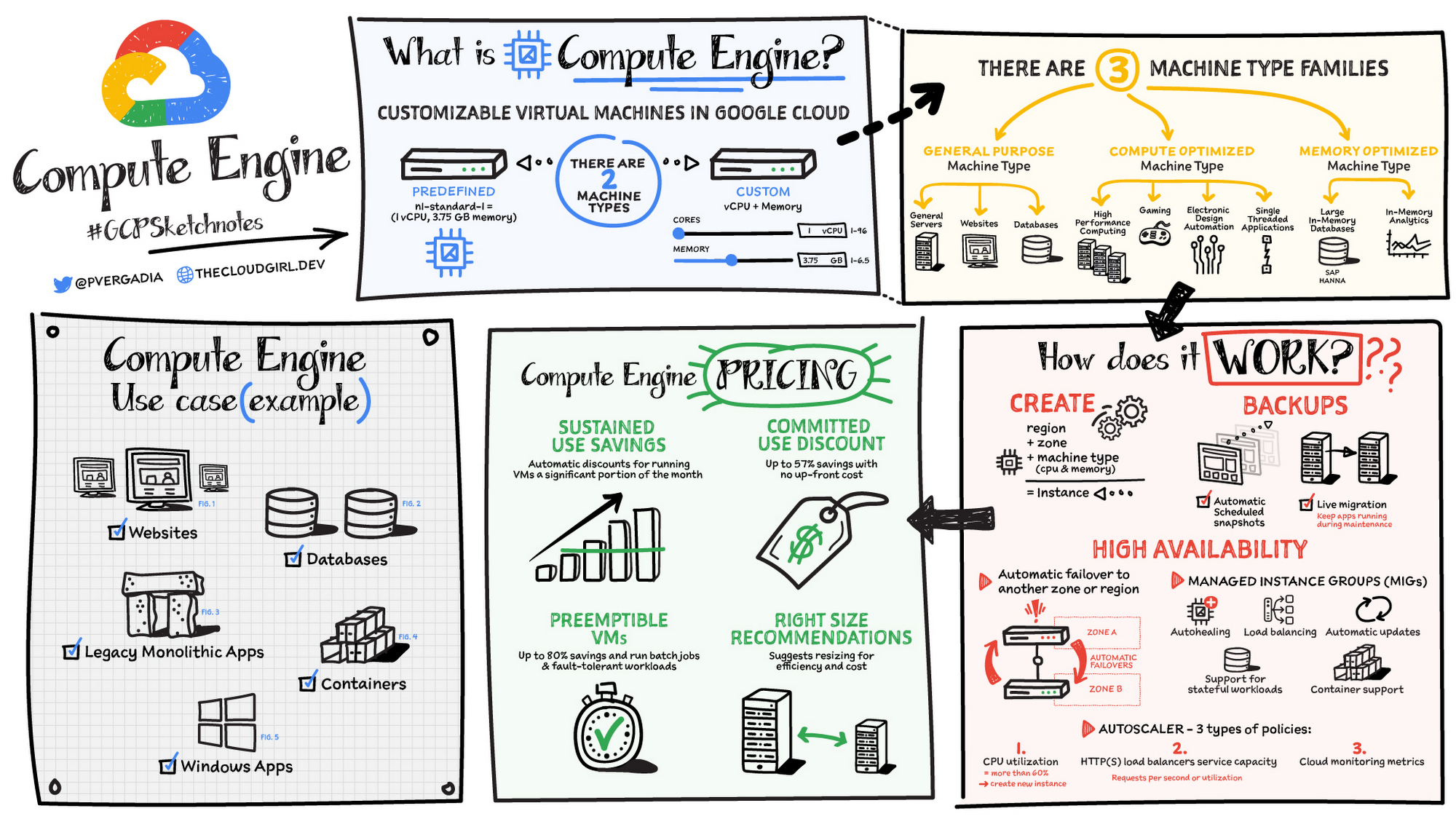
Compute Engine is a customizable compute service that lets you create and run virtual machines on Google’s infrastructure. You can create a Virtual Machine (VM) that fits your needs. Predefined machine types are pre-built and ready-to-go configurations of VMs with specific amounts of vCPU and memory to start running apps quickly. With Custom Machine Types, you can create virtual machines with the optimal amount of CPU and memory for your workloads. This allows you to tailor your infrastructure to your workload. If requirements change, using the stop/start feature you can move your workload to a smaller or larger Custom Machine Type instance, or to a predefined configuration.
Machine types
In Compute Engine, machine types are grouped and curated by families for different workloads. You can choose from general-purpose, memory-optimized, compute-optimized and accelerator-optimized families.
- General-purpose machines are used for Day-to-day computing at a lower cost and for balanced price/performance across a wide range of VM shapes. The use cases that best fit here are web serving, app serving, back office applications, databases, cache, media-streaming, microservices, virtual desktops, development environments.
- Memory-Optimized machine are recommended for ultra high-memory workloads such as in-memory analytics and large in-memory databases such as SAP HANA
- Compute-Optimized machines are recommended for ultra high performance workloads such as High Performance Computing (HPC), Electronic Design Automation (EDA), gaming, video transcoding, single-threaded applications.
- Accelerator-Optimized machines are optimized for high performance computing workloads such as Machine learning (ML), Massive parallelized computations and High Performance Computing (HPC)
How does it work?
You can create a VM instance using a boot disk image, a boot disk snapshot, or a container image. The image can be a public operating system (OS) image or a custom one. Depending on where your users are you can define the zone you want the virtual machine to be created in. By default all traffic from the internet is blocked by the firewall and you can enable the HTTP(s) traffic if needed.
Use snapshot schedules (hourly, daily, or weekly) as a best practice to back up your Compute Engine workloads. Compute Engine offers live migration by default to keep your virtual machine instances running even when software or hardware update occurs. Your running instances are migrated to another host in the same zone instead of requiring your VMs to be rebooted.
Availability
For High Availability (HA) Compute Engine offers automatic failover to other regions or zones in event of a failure. Managed instance groups (MIGs) help keep the instances running by automatically replicating instances from a predefined image. They also provide application based autohealing health checks. If an application is not responding on a VM, the auto healer automatically recreates that VM for you. Regional MIGs let you spread app load across multiple zones. This replication protects against zonal failures. MIGs work with load balancing services to distribute traffic across all of the instances in the group.
Compute Engine offers autoscaling to automatically add or remove VM instances from a managed instance group based on increases or decreases in load. Autoscaling lets your apps gracefully handle increases in traffic, and it reduces cost when the need for resources is lower. You define the autoscaling policy for automatic scaling based on the measured load, CPU utilization, requests per second or other metrics.
Active Assist’s new feature, predictive autoscaling, helps improve response times for your applications–When you enable predictive autoscaling, Compute Engine forecasts future load based on your Managed Instance Group’s (MIG) history and scales it out in advance of predicted load, so that new instances are ready to serve when the load arrives. Without predictive autoscaling, an autoscaler can only scale a group reactively, based on observed changes in load in real time. With predictive autoscaling enabled, the autoscaler works with real-time data as well as with historical data to cover both the current and forecasted load. That makes predictive autoscaling ideal for those apps with long initialization times and whose workloads vary predictably with daily or weekly cycles. For more information, see How predictive autoscaling works or check if predictive autoscaling is suitable for your workload, and to learn more about other intelligent features, check out Active Assist.
Pricing
You pay for what you use. But you can save cost by taking advantage of some discounts! Sustained use saving are automatic discounts applied for running instances for a significant portion of the month. If you know your usage upfront, you can take advantage of committed use discounts which can lead up to significant savings without any upfront cost. And by using short lived preemptive instances you can save up to 80%, they are great for batch jobs and fault tolerant workloads. You can also optimize resource utilization with automatic recommendations. For example if you are using a bigger instance for a workload that can run on a smaller instance you can save costs applying these recommendations.
Security
Compute Engine provides you default hardware security. Using Identity and Access Management (IAM) you just have to ensure that proper permissions are given to control access to your VM resources. All the other basic security principles apply, if the resources are not related and don’t require network communication amongst themselves, consider hosting them on different VPC networks. By default, users in a project can create persistent disks or copy images using any of the public images or any images that project members can access through IAM roles. You may want to restrict your project members so that they can create boot disks only from images that contain approved software that meet your policy or security requirements. You can define an organization policy that only allows Compute Engine VMs to be created from approved images. This can be done by using the Trusted Images Policy to enforce images that can be used in your organization.
By default all VM families are Shielded VMs. Shielded VMs are virtual machine instances that are hardened with a set of easily configurable security features to ensure that when your VM boots, it’s running a verified bootloader and kernel — is the default for everyone using Compute Engine, at no additional charge. For more details on Shielded VMs refer to the documentation here.
For additional security, you also have the option to use Confidential VM to encrypt your data in use, while it’s being processed in Compute Engine. For more details on Confidential VM refer to the documentation here.
Use cases
There are many use cases Compute Engine can serve in addition to running websites and databases. You can also migrate your existing systems onto Google Cloud, with Migrate for Compute Engine, enabling you to run stateful workloads in the cloud within minutes rather than days or weeks. Windows, Oracle or VMware applications have solution sets enabling a smooth transition to Google Cloud. To run windows applications either bring your own license leveraging Sole-tenant nodes or using the included licenced images.
Conclusion
Whatever your application use case may be, from legacy enterprise applications to digital native applications, Compute Engine’s families will fit it. For a more in-depth look into Compute Engine check out the documentation.
For more #GCPSketchnote, follow the GitHub repo. For similar cloud content follow me on Twitter @pvergadia and keep an eye out on thecloudgirl.dev
BURGER KING Germany: Serving Up Marketing Insights and Supply Chain Visibility Easily

13934
Of your peers have already read this article.
8:30 Minutes
The most insightful time you'll spend today!
Do hamburgers really come from Hamburg? This may still be a matter of debate, but the popularity of American-style burger joints not just in Hamburg but all over Germany, is clear. Germany’s top two fast food companies are both burger chains. One of them is BURGER KING®, a global brand that welcomes more than 11 million customers worldwide every day. The company arrived in Germany in 1976, when its first restaurant opened in Berlin. It now operates more than 100 restaurants across Germany, with franchisees operating more than 600 restaurants of their own.
“In the fast food industry, being able to move quickly is very important. That means delivering the right promotion to our app or launching a viral campaign within days. To do that across more than 700 restaurants, we need the support of the right technology.”
—Oliver Mielentz, IT Manager, BURGER KING® Deutschland GmbH
Previously a subsidiary of the U.S. business, BURGER KING® Germany became an independent company in 2015. As a result, it needed to develop its own IT infrastructure, and the changeover needed to happen fast. “We had to put in place systems that would work for the entire network of franchisees and enable us to easily roll out campaigns,” explains Oliver Mielentz, IT Manager at BURGER KING® Deutschland GmbH.
With the help of Google Cloud Premier partner Cloudwürdig, BURGER KING® Germany chose Google Cloud and G Suite as the right combination to suit its needs.
“In the fast food industry, being able to move quickly is very important,” says Oliver. “That means delivering the right promotion to our app or launching a viral campaign within days. To do that across more than 700 restaurants, we need the support of the right technology.”
Building a franchisee platform in just three months
When a business has multiple franchisees, it’s important to make sure everyone is on the same page, especially in the fast-paced fast food environment. “We have to collate data from all our franchisees and produce reports quickly in order to react to changes in customer behavior,” explains Oliver. “That means processing every transaction that takes place in our restaurants.” Following the restructure, BURGER KING® Germany also needed to build a secure invoicing system with data storage and optimize its communication channels.
“Using Tableau with BigQuery, we’re able to produce reports very quickly. Previously, it took much longer, as data had to be fetched manually. Our reaction time is now almost a business day faster.”
—Oliver Mielentz, IT Manager, BURGER KING® Deutschland GmbH
With support from Witter-IT, BURGER KING® Germany chose Cloudwürdig to build its BKD Connect internal platform on Google Cloud. Thanks to the ready-to-go tools on Google Cloud, it was able to put its invoicing system and data warehouse in place in just three months.
For the BURGER KING® Germany data warehouse, Cloudwürdig built an ETL pipeline that channels ticket data for every sale into BigQuery. “Data is gathered from the restaurants,” says Oliver, “and using Tableau with BigQuery, we’re able to produce reports very quickly. Previously, it took much longer, as data had to be fetched manually. Our reaction time is now almost a business day faster.”
As the ticket data for every transaction is stored in BigQuery, the marketing team can easily see exactly which products are selling well. That’s crucial for tweaking promotions as well as monitoring the supply chain to make sure enough produce is delivered to restaurants in response to changes in demand.
“Thanks to BigQuery, we have a speedy data pipeline that enables us to react on the same day to changes in the market and eliminate bottlenecks in production,” says Oliver.
Switching to G Suite to improve communication
To enable franchisees to sign in to its BKD Connect Platform, BURGER KING® Germany needed a secure authentication system. To solve that problem, it chose to provide franchisees with G Suite accounts. “It’s really easy to set up a new franchisee on the platform. I just create a new G Suite account and Drive folder for it, and it’s ready to go,” says Oliver. G Suite also helps the franchise network to run efficiently, as daily reports are automatically saved to Drive and shared to the appropriate regional network. “Thanks to that system, it’s much easier for any team at headquarters to access the information it needs,” Oliver explains.
BURGER KING® Germany also recently extended its use of G Suite across the whole company. “Following an evaluation of our previous email and productivity software, I made the decision to switch solely to G Suite,” says Oliver. BURGER KING® Germany employees now use Gmail, Calendar, and Drive for their day-to-day productivity needs. “We only just completed the migration, but already, everyone’s happy,” says Oliver. “It’s so easy to share a file using Drive or set up a meeting on Calendar.”
“We’re big fans of Hangouts Meet, and we have two rooms here at our Hanover headquarters equipped with Hangouts Meet hardware,” Oliver adds. “The speech quality is good, and it’s helpful to be able to see every participant, especially when you’re running a meeting with multiple franchisees.”
Optimizing infrastructure to power innovative campaigns
The BURGER KING® app, available for iOS and Android, helps the company to deliver a great customer experience. Through their MyBK accounts, guests can access coupons and special promotions. “We had a really interesting campaign for Easter: guests used the app to hunt for virtual Easter eggs,” explains Oliver. “We knew it was going to be big, and our previous back end wouldn’t have been able to handle the traffic.”
To enable the marketing campaign to go ahead, BURGER KING® Germany moved the back end of the app, along with its website, to Google Cloud. For developing and running its web and app back ends, it now uses App Engine and virtual machines on Compute Engine, as well as Memorystore and Cloud Functions. For monitoring and logging, it uses Stackdriver, and Cloud CDN and Cloud DNS to easily handle its traffic.
“We ran the campaign without any performance issues, even though we were receiving several million hits a day,” says Oliver. Since migrating the back end to Google Cloud, the marketing team also launched the popular “Escape the Clown” campaign. “That campaign blew our minds!” says Oliver. “It wouldn’t have been possible without Google Cloud, because it required a lot of back end capacity.”
To develop the app infrastructure it needs, BURGER KING® Germany relies on Cloudwürdig. “Working with Cloudwürdig is great because the team has the same agile mindset as us,” says Oliver. “When we have a new idea, we just set up a meeting, and in a couple of days the new infrastructure is in place. For Escape the Clown, it only took a few weeks to get everything ready to launch.”
Leveraging integrated tools to grow the business
Using Google Cloud together with G Suite enables BURGER KING® Germany to run its franchise network efficiently, while keeping its IT team lean. “Google Cloud and G Suite are the perfect fit for the way of working at BURGER KING® Germany,” says Oliver. “Many of the company’s operatives are often on the road, visiting restaurants and franchisees. With these tools, they can work flexibly and react quickly to the situation on the ground.”
“In order to grow the business, we need to use the data we receive every day to understand exactly what is happening in our restaurants. With the tools provided by Google Cloud, we can get more guests through the door and offer them a better experience.”
—Oliver Mielentz, IT Manager, BURGER KING® Deutschland GmbH
It also helps to keep infrastructure costs under control. “With Google Cloud, we only pay for what we use, which is really important for us,” Oliver explains. “It means we can scale up quickly if we see an opportunity to react to a trend in customer behavior and launch a new marketing campaign that resonates with the moment. When it’s finished, we can then scale down again, and that definitely saves us money.”
BURGER KING® is now working with Cloudwürdig to add more functionality to the BURGER KING® app using Google Kubernetes Engine. “We like to work with customers long-term to support their digital transformation. BURGER KING® Germany is a great example of how one project can develop into a great collaboration,” says Benny Woletz, Managing Director of Cloudwürdig.
BURGER KING® also plans to expand its presence in Germany and gain a greater market share by further tailoring both its marketing and the way it runs its restaurants to answer its guests’ needs. “In order to grow the business, we need to use the data we receive every day to understand exactly what is happening in our restaurants,” says Oliver. “With the tools provided by Google Cloud, we can get more guests through the door and offer them a better experience.”
Delivering 10X Improvement to Risk and Regulatory Reporting Through Cloud and AI
4982
Of your peers have already read this article.
2:30 Minutes
The most insightful time you'll spend today!
Enterprise agility and the ability to innovate, adapt and respond quickly to the ever-changing risk and regulatory landscape is no longer a choice, but the cornerstone of successful digital transformation and commercial growth. Traditional access to and ways of managing data invariably create challenges in dealing with multiple data repositories, reconciliations, fire-drills, etc.
In response, the move to cloud is increasing significantly. It enables risk analytics and regulatory reporting at scale in a secure environment with data storage, management and encryption capabilities as a standard. In addition, as regulatory reporting requirements become more granular, machine learning can help facilitate new insights and allow for risk management to become more embedded into operational processes.
This webinar will address the day-to-day challenges in risk management and regulatory compliance, while also exploring how technological innovations can provide massive improvements and potential.
Key themes
- Real-life data challenges in the eyes of risk managers: can compliance, fraud detection and identifying liquidity positions be improved through the use of AI?
- Innovative approaches to streamline regulatory reporting to derive deeper customer insights from data at the moment of truth.
- Reimagining operations: how to modernise the data infrastructure to accommodate data explosion, drive flexibility and deliver a more cost effective outcome.
Two Ways to Deploy SAP HANA System on Google Cloud

7874
Of your peers have already read this article.
4:00 Minutes
The most insightful time you'll spend today!
Many of the world’s leading companies run on SAP—and deploying it on Google Cloud extends the benefits of SAP even further. Migrating your current SAP S/4HANA deployment to Google Cloud—whether it resides on your company’s on-premises servers or another cloud service—provides your organization with a flexible virtualized architecture that lets you scale your environment to match your workloads, so you pay only for the compute and storage capacity you need at any given moment. Google Cloud includes built-in features, such as Compute Engine live migration and automatic restart, that minimize downtime for infrastructure maintenance. And it allows you to integrate your SAP data with multiple data sources and process it using Google Cloud technology such as BigQuery to drive data analytics.
SAP server-side architecture consists of two layers: the SAP HANA database, and the Netweaver application layer. In this blog post, we’ll look at the options and steps for moving the database layer to Google Cloud as a lift and shift or rehost, a straightforward approach that entails moving your current SAP environment unchanged onto Google Cloud.
Deploying an SAP HANA system on Google Cloud
Google Cloud offers SAP-certified virtual machines (VMs) optimized for SAP products, including SAP HANA and SAP HANA Enterprise Cloud, as well as dedicated servers for SAP HANA for environments greater than 12TB. (For a complete list of VM and hardware options, visit the Certified and Supported SAP HANA Hardware Directory.)
Before proceeding with a rehost migration to Google Cloud, your current (source) environment and Google Cloud (target) environments should meet these specifications:
Prerequisites:
- The configuration of the Google Cloud environment (i.e., VM resources, SSD storage capacity) should be identical to that of the source environment. If the underlying hardware is different, however, you must use Option 2 for your migration, detailed below.
- Both environments should be running the same operating system (SUSE or RHEL Linux).
- The HANA version, instance number, and system ID (SID) should be identical.
- Schema names must remain the same.
- Establishing the network connection between the on-premises environment and Google Cloud will be required in this phase to support rehost of the SAP application.you can use Cloud VPN or Dedicated Interconnect. Learn more about Dedicated Interconnect and Cloud VPN.
Note: Depending on your internet connection and bandwidth requirements, we recommend using a Dedicated Interconnect over Cloud VPN for production environments.
We offer a number of automated processes to accelerate your cloud journey. To deploy the SAP HANA system on Google Cloud, you can use the Google Cloud Deployment manager or Terraform and Ansible scripts available on GitHub with configuration file templates to define your installation. For more details, see the Google Cloud SAP HANA Planning Guide.
Note: To deploy SAP HANA on Google Cloud machine types that are certified by SAP for production, please review the Certification for SAP HANA on Google Cloud page.
Moving an SAP HANA Database to Google Cloud
There are two different options you can use to rehost your SAP HANA database to Google Cloud, and each has pros and cons that you should consider when deciding on your approach.
Option 1: Asynchronous replication uses SAP’s built-in replication tool to provide continuous data replication from the source system (also known as the primary system) to the destination or secondary system—in this case residing on Google Cloud. It’s best for mission-critical applications for which minimum downtime is a high priority, and for large databases. In addition, the high level of automation means that the process requires less manual intervention. Here’s where you can learn more on HANA Asynchronous Replication.
Option 2: Backup and restore relies on SAP’s backup utility to create an image of the database that is then transferred to Google Cloud, where it is restored in the new environment. Downtime for this method varies by database size, so large databases may require more downtime via this method vs. asynchronous replication. It also involves more manual tasks. However, it requires fewer resources to perform, making it an attractive option for less urgent use cases. Here’s where you can learn more on SAP HANA database Backup and restore.

How to migrate the SAP HANA database to Google Cloud using Asynchronous Replication

- Create and configure Dedicated Interconnect or Cloud VPN between the current environment and Google Cloud.
- Set up SAP HANA asynchronous replication. You can configure system replication using SAP HANA Cockpit, SAP HANA Studio, or hdbnsutil. See Setting Up SAP HANA System Replication in the SAP HANA Administration Guide.
- Be sure to use the same instance number and HANA SID in the template as the primary instance.
- Configure the Google Cloud instance as the secondary node for using HANA Asynchronous replication.
- Perform data validation once full data replication is completed to the SAP HANA database in Google Cloud. To learn more: HANA System Replication overview.
- Perform an SAP HANA takeover on your standby database. This switches your active system from the current primary system onto the secondary system on Google Cloud. Once the takeover command runs, the system on Google Cloud becomes the new primary system.To learn more: HANA Takeover.
How to migrate the SAP HANA database to Google Cloud using Backup and Restore

- Create a full backup of your SAP HANA database in your current environment.
- Create a new storage bucket in your Google Cloud environment. Visit Creating Storage Buckets in the Google Cloud Storage documentation.
- Download and install gsutil onto the source environment and run it to upload the HANA backup to the Google Cloud storage bucket. To install gsutil utility on any computer or server, visit Install gsutil in the Google Cloud Storage documentation.
Note: You can run parallel multi thread/multi processing in gsutil to copy large files more quickly. - Recover the HANA database on Google Cloud using SAP’s RECOVER DATABASE statement. See RECOVER DATABASE Statement (Backup and Recovery) in the SAP HANA SQL Reference Guide for SAP HANA Platform.
Note: BackInt agent is an integrated SAP interface tool used for HANA database on Google Cloud.Backint agent for SAP HANA can be used to store and retrieve backups directly from Google Cloud Storage. It is supported and certified by SAP on Google Cloud. To learn more: SAP HANA Backint Agent on Google Cloud.
In summary, we recommend using Asynchronous Replication (Option 1) for mission-critical applications that require the lowest downtime window. For all other applications, we recommend Backup and Restore (Option 2), as this approach requires fewer resources. It’s also a great way to implement the backup and restore functionality on Google Cloud.
A rehost migration is the most straightforward path to getting your SAP on HANA system up and running on Google Cloud. And the sooner you migrate, the sooner you can take advantage of the many benefits Google Cloud brings to your SAP solution. For more information on the different migration options please review: SAP on Google Cloud: Migration strategies.
Learn more about deploying SAP on Google Cloud. Technical resources can be found here.
More Relevant Stories for Your Company

How We Built a Brand New Bank on Google Cloud and Cloud Spanner: The First Scalable, Enterprise-grade, Database Service
Editor’s note: Technology today lets companies of any size take on entire industries simply with an innovative business model plus digital distribution. Take Shine, a French startup whose platform helps freelancers manage their finances -- and their administrative commitments. Here, Raphael Simon, Shine’s CTO and co-founder, talks about why Shine

Why the C-suite Can No Longer Ignore Cloud Computing
Gone are the days when technology was relegated to the sidelines of a business, only considered essential for industries and professionals directly dealing with it. Today, it is not just a value-add, but an integral part of every enterprise’s operations and ultimately, its success. This has wrought many changes in

TELUS and Google Cloud Partner to Move Towards a More Sustainable Future
Environmental sustainability is a key priority for TELUS, a world-leading communications technology company. It continues to rank in the top 100 most sustainably managed companies in the world, and seeks to make a healthier planet for all by leveraging its global-leading technology, compassion to drive social change and reduce our

Making Weather Predictions Easy with Weather Research and Forecasting (WRF) Models on Google Cloud!
Weather forecasting and climate modeling are two of the world's most computationally complex and demanding tasks. Further, they’re extremely time-sensitive and in high demand — everyone from weekend travelers to large-scale industrial farming operators wants up-to-date weather predictions. To provide timely and meaningful predictions, weather forecasters usually rely on high
