





Google Data Cloud: The Catalyst for Modern App Development and Innovation

1371
Of your peers have already read this article.
3:30 Minutes
The most insightful time you'll spend today!
97 zettabytes was the estimated volume of data generated worldwide in 20221. This sort of explosion in data volume is happening in every enterprise. Now imagine being able to access all this data you own from anywhere, at any time, analyze it, and leverage its insights to innovate your products and services? One of the biggest barriers to fulfilling this vision is the complexity inherent in dealing with data trapped across silos in an enterprise. Google Data Cloud offers a unified, open, and intelligent platform for innovation, allowing you to integrate your data on a common architectural platform. Across industries, organizations are able to reimagine their data possibilities in entirely new ways and quickly build applications that delight their customers.
Siloed data: The barrier to speed and innovation
Digital technologies ranging from transaction processing to analytics and AI/ML use data to help enterprises understand their customers better. And the pace of innovation has naturally accelerated as organizations learn, adapt, and race to build the next generation of applications and services to compete for customers and meet their needs. At Next 2022, we made a prediction that the barriers between transactional and analytical workloads will mostly disappear.
Traditionally, data architectures have separated transactional and analytical systems—and that’s for good reason. Transactional databases are optimized for fast reads and writes, and analytical databases are optimized for analyzing and aggregating large data sets. This has siloed enterprise data systems, leaving many IT teams struggling to piece together solutions. The result has been time consuming, expensive, and complicated fixes to support intelligent, data-driven applications.
But, with the introduction of new technologies, a more time-efficient and cost-effective approach is possible. Customers now expect to see personalized recommendations and tailored experiences from their applications. With hybrid systems that support both transactional and analytical processing on the same data, without impacting performance, these systems now work together to generate timely, actionable insights that can be used to create better experiences and accelerate business outcomes.
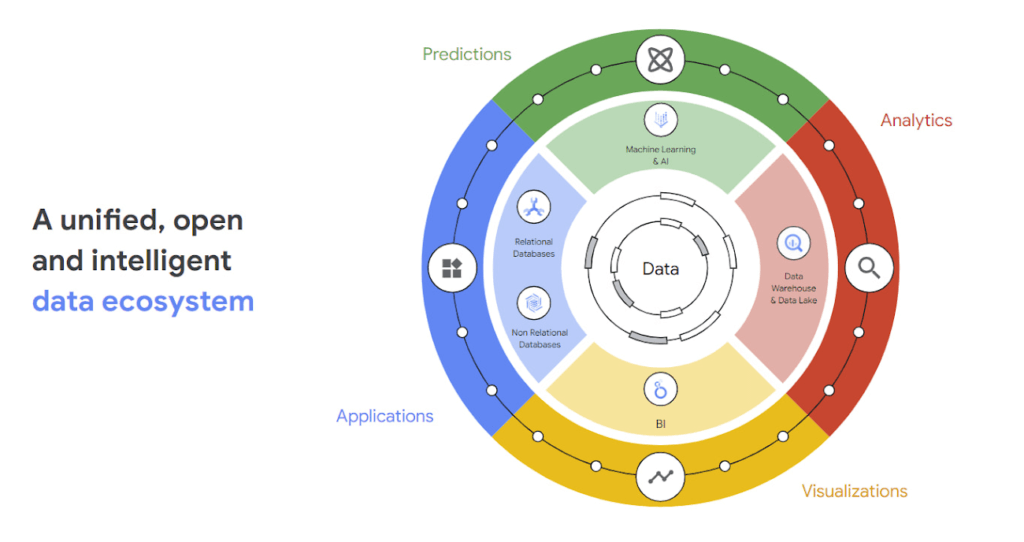
According to a 2022 research paper from IDC, unifying data across silos via a data cloud is the foundational capability enterprises need to gain new insights on rapidly changing conditions and to enable operational intelligence. The modern data cloud provides unified, connected, scalable, secure, extensible, and open data, analytics, and AI/ML services. In this platform, everything is connected to everything else.
Why reducing data barriers delivers more value
The primary benefit of a unified data cloud is that it provides an intuitive and timely way to represent data and allows easy access to related data points. By unifying their data, enterprises are able to:
- Ingest data faster – for operational intelligence
- Unify data across silos – for new insights
- Share data with partners – for collaborative problem solving
- Change forecasting models – to understand and prepare for shifting markets
- Iterate with decision-making scenarios – to ensure agile responses
- Train models on historical data – to build smarter applications
As generative AI applications akin to Bard, an early experiment by Google, become available in the workplace, it will be more important than ever for organizations to have a unified data landscape to holistically train and validate their proprietary large language models.
With these benefits enterprises can accelerate their digital transformation in order to thrive in our increasingly complex digital environment. A survey of more than 800 IT leaders indicated that using a data cloud enabled them to significantly improve employee productivity, operational efficiency, innovation, and customer experience, among others.
Build modern apps with a unified and integrated data cloud
Google Cloud technologies and capabilities reduce the friction between transactional and analytical workloads and make it easier for developers to build applications, and to glean real-time insights. Here are a few examples.
- AlloyDB for PostgreSQL, a fully managed PostgreSQL-compatible database, and AlloyDB Omni, the recently launched downloadable edition of AlloyDB, can analyze transactional data in real time. AlloyDB is more than four times faster for transactional workloads and up to a 100 times faster for analytical queries compared to standard PostgreSQL, according to our performance tests. This kind of performance makes AlloyDB the ideal database for hybrid transactional and analytical processing (HTAP) workloads.
- Datastream for BigQuery, a serverless change data capture and replication service, provides simple and easy real time data replication from transactional databases like AlloyDB, PostgreSQL, MySQL and Oracle directly into BigQuery, Google Cloud’s enterprise data warehouse.
- And, query federation with Cloud Spanner, Cloud SQL, and Cloud Bigtable, make data available right from the BigQuery console allowing customers to analyze data in real-time in transactional databases.
Speed up deployments and lower costs
By reducing data barriers, we’re taking a fundamentally different approach that allows organizations to be more innovative, efficient, and customer-focused by providing:
- Built-in industry leading AI and ML that helps organizations not only build improved insights, but also automate core business processes and enable deep ML-driven product innovation.
- Best-in-class flexibility. Integration with open source standards and APIs ensures portability and extensibility to prevent lock-in. Plus, choice of deployment options means easy interoperability with existing solutions and investments.
- The most unified data platform with the ability to manage every stage of the data lifecycle, from running operational databases to managing analytics applications across data warehouses and lakes to rich data-driven experiences.
- Fully managed database services that free up DBA/DevOps time to focus on high-value work that is more profitable to the business. Organizations that switch from self-managed databases eliminate manual work, realize significant cost savings, reduce risk from security breaches and downtime and increase productivity and innovation. In an IDC survey, for example, Cloud SQL customers achieve an average three-year ROI of 246% because of the value and efficiencies this fully managed service delivers.
Google Data Cloud improves the efficiency and productivity of your teams, resulting in increased innovation across your organization. This is the unified, open approach to data-driven transformation bringing unmatched speed, scale, security, and with AI built in.
In case you missed it: Check out our Data Cloud and AI Summit that happened on March 29th, to learn more about the latest innovations across databases, data analytics, BI and AI. In addition, learn more about the value of managed database services like Cloud SQL in this IDC study.
BigQuery Omni: A Game-Changer for Cross-Cloud Data Analysis

3058
Of your peers have already read this article.
4:00 Minutes
The most insightful time you'll spend today!
Research shows that over 90% of large organizations already deploy multicloud architectures, and their data is distributed across several public cloud providers. Additionally, data is also increasingly split across various storage systems such as warehouses, operational and relational databases, object stores, etc. With the proliferation of new applications, data is serving many more use cases such as data sciences, business intelligence, analytics, streaming and the list goes on. With these data trends, customers are increasingly gravitating towards an open multicloud data lake. However, multicloud data lakes present several challenges such as data silos, data duplication, fragmented governance, complexity of tools, and increased costs.
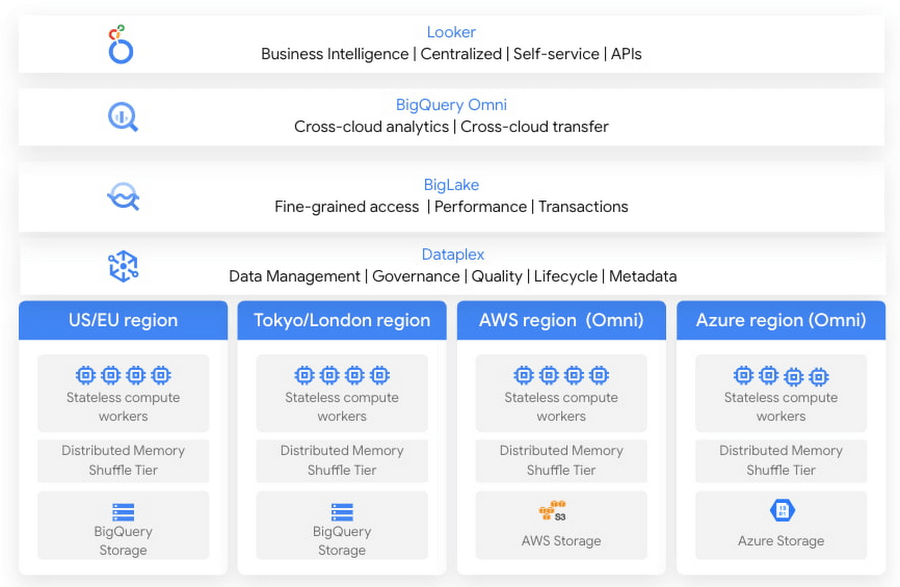
With Google’s data cloud technologies, customers can leverage the unique combination of distributed cloud services. They can create an agile cross-cloud semantic business layer with Looker and manage data lakes and data warehouses across cloud environments at scale with BigQuery and capabilities like BigLake and BigQuery Omni.
BigLake is a storage engine that unifies data warehouses and lake houses by standardizing across different storage formats including BigQuery managed table and open file formats such as Parquet and Apache Iceberg on object storage. BigQuery Omni provides the compute engine that runs locally to the storage on AWS or Azure, which customers can use to query data in AWS or Azure seamlessly. This provides several key benefits such as:
- A single pane of glass to query your multicloud data lakes (across Google Cloud Platform, Amazon Web Services, and Microsoft Azure)
- Cross-cloud analytics by combining data across different platforms with little to no egress costs
- Unified governance and secure management of your data wherever it resides
In this blog, we will share cross-cloud analytics use cases customers are solving with Google’s Data Cloud and the benefits they are realizing.
Unified marketing analytics for 360-degree insights
Organizations want to perform marketing analytics – ads optimization, inventory management, churn prediction, buyer propensity trends and many more such analytics. To do this before BigQuery Omni, customers had to use data from several different sources such as Google Analytics, public datasets and other proprietary information stored across cloud environments. This requires moving large amounts of data, managing duplicate copies and incremental costs to perform any cross-cloud analytics and derive actionable insights. With BigQuery Omni, organizations are able to greatly simplify this workflow. Using the familiar BigQuery interface, users can access data residing in AWS or Azure, discover and select just the relevant data that needs to be combined for further analysis. This subset of data can be moved to Google Cloud using Omni’s new Cross-Cloud Transfer capabilities. Customers can combine this data with other Google Cloud datasets and these consolidated tables can be made available to key business stakeholders through advanced analytics tools such as Looker and Looker Studio. Customers are also able to tie in this data now with world class AI models via Vertex AI.
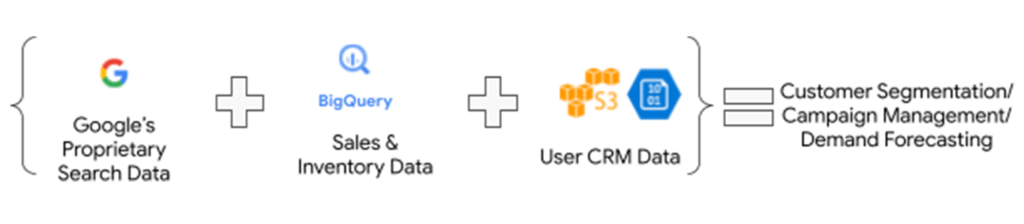
As an illustrative example, consider a retailer who has sales & inventory, user and search data spread across multiple data silos. Using BigQuery Omni they can seamlessly bring these datasets together and power several marketing analytics scenarios like customer segmentation, campaign management and demand forecasting etc.
“Interested in performing cross-cloud analytics, we tested BigQuery Omni and really liked the SQL support to easily get data from AWS S3. We have seen great potential and value in BigQuery Omni for adopting a multi-cloud data strategy.” — Florian Valeye, Staff Data Engineer, Back Market, a leading online marketplace for renewed technology based out of France
Data platform with consistent and unified cross-cloud governance
Another pattern is customers looking to analyze operational, transactional and business data across data silos in different clouds through a unified data platform. These data silos are a result of various factors such as merger and acquisitions, standardization of analytical tools, leveraging best of breed solutions in different clouds and diversification of data footprint across clouds. In addition to a single pane of glass for data access across silos, customers deeply desire consistent and uniform governance of their data across clouds.
“Achieve is looking to deliver a consistent analytics experience to all our customers and stakeholders. With our financial and credit report data distributed across clouds, accessing and getting insights holistically is difficult. Through our exploration with Omni, we are able to access datasets in different clouds using a single familiar BigQuery interface; we see its promise as one of the primary tools in our multi-cloud platform.” — James Simonson, Senior Data Engineer, Achieve
With BigLake and BigQuery Omni abstracting the storage and compute layers respectively, organizations can access and query their data in Google Cloud irrespective of where it resides. They can also set fine-grained row level and column access policies in BigQuery and consistently govern it across clouds. These building blocks enable data engineering teams to build a unified and governed data platform for their data users without having to deal with the complexity of building and managing complex data pipelines. Furthermore, with BigQuery Omni’s integration with Dataplex and Data Catalog, you can discover, search your data across clouds and enrich your data by adding relevant business context with business glossary and rich text.
“Several SADA customers use GCP to build and manage their data analytics platform. During many explorations and proofs of concepts, our customers have seen the great potential and value in BigQuery Omni. Enabling seamless cross-cloud data analytics has allowed them to realize the value of their data quicker while lowering the barrier to entry for BigQuery adoption in a low-risk fashion.” — Brian Suk, Associate Chief Technology Officer, SADA, one of the strategic partners of Google Cloud.
Simplified data sharing between data providers and their customers
A third emerging pattern in cross cloud analytics is data sharing. Several services have the business need to share information such as inventory data, subscriber data to their customers or users who in turn analyze or aggregate the data with their proprietary data and oftentimes share the results back with the service provider. In several cases, the two parties are on different cloud environments, requiring them to move data back and forth.
Consider a company operating in the customer data platform (CDP) space. CDPs were designed to help activate customer data, and a critical first step of that was unifying and managing that customer data. To enable this, many CDP vendors built their solution choosing one of the available cloud infrastructure technologies and copied data from the client’s systems.“Copying data from client applications and infrastructure has always been a requirement to deploy a CDP, but it doesn’t have to be anymore” — Justin DeBrabant, Senior Vice President of Product, ActionIQ.
While a small percentage of customers are fine with moving data across cloud environments, the majority are hesitant to onboard new services and would rather prefer providing governed access to their data sets.
“A new architectural pattern is emerging, allowing organizations to keep their data at one location and make it accessible, with the proper guardrails, to applications used by the rest of the organization’s stack” adds Justin at ActionIQ.
With BigQuery Omni, services in Google Cloud Platform can more easily access and share data with their customers and users in other cloud environments with limited data movement. One of UK’s largest statistics providers has explored Omni for their data sharing needs.
“We tested BigQuery Omni and really like the ability to get data from AWS directly into BQ. We’re excited about managing data sharing with different organizations without onboarding new clouds” – Simon Sandford-Taylor, Chief Information and Digital Officer, UK’s Office for National Statistics
With BigQuery Omni, customers are able to:
- Access and query data across clouds through a single user interface
- Reduce the need for data engineering before analyzing data
- Lower operational overhead and risks by deploying an application that runs across multiple clouds which leverages the same, consistent security controls
- Accelerate access to insights by significantly reducing the time for data processing and analysis
- Create consistent and predictable budgeting across multiple cloud footprints
- Enable long term agility and maximize the benefits every cloud investment
Over the last year, we’ve seen great momentum in customer adoption and added significant innovations to BigQuery Omni including improved performance and scalability for querying your data in AWS S3 or Azure Blob Storage, Iceberg support for Omni, Larger query result set size up to 20GB and Cross-cloud transfer that helps customers easily, securely, and cost effectively move just enough data across cloud environments for advanced analytics.
BigQuery Omni has launched several features to support unified governance of your data across multiple clouds – you can get fine-grained access to your multi-cloud data with row level and column level security. Building on this, we are excited to announce that BigQuery Omni now supports data masking. We’ve also made it easy for customers to try and see the benefits of BigQuery Omni through the limited time free trial available until March 30, 2023.
BigQuery Omni running on other public clouds outside of Google Cloud is available in AWS US East1 (N.Virginia) and Azure US East2 (US East) regions. We are also excited to share that we will be bringing BigQuery Omni to more regions in the future, starting with Asia Pacific (AWS Korea) coming soon.
Getting Started
Get started with a free trial to learn about Omni. Check out the documentation to learn more about BigQuery Omni. You can also leverage the self paced labs to learn how to set up BigQuery Omni easily.
BigQuery Admin Reference Guide Series: How to Optimize Data in Your Native Storage
3724
Of your peers have already read this article.
4:00 Minutes
The most insightful time you'll spend today!
So far on the BigQuery Admin Reference Guide series, we’ve talked about the different logical resources available inside of BigQuery. Now, we’re going to begin talking about BigQuery’s architecture. In this post we’re diving into how BigQuery stores your data in native storage, and what levers you can pull to optimize how your data is stored.
Columnar storage format
BigQuery offers fully managed storage, meaning you don’t have to provision servers. Sizing is done automatically and you only pay for what you use. Because BigQuery was designed for large scale data analytics data is stored in columnar format.
Traditional relational databases, like Postgres and MySQL, store data row-by-row in record-oriented storage. This makes them great for transactional updates and OLTP (Online Transaction Processing) use cases because they only need to open up a single row to read or write data. However, if you want to perform an aggregation like a sum of an entire column, you would need to read the entire table into memory.
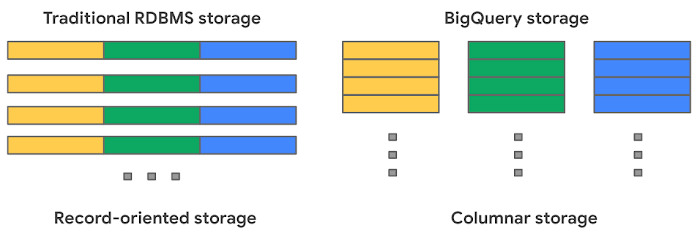
BigQuery uses columnar storage where each column is stored in a separate file block. This makes BigQuery an ideal solution for OLAP (Online Analytical Processing) use cases. When you want to perform aggregations you only need to read the column that you are aggregating over.
Optimized storage format
Internally, BigQuery stores data in a proprietary columnar format called Capacitor. We know Capacitor is a column-oriented format as discussed above. This means that the values of each field, or column, are stored separately so the overhead of reading the file is proportional to the number of fields you actually read. This doesn’t necessarily mean that each column is in its own file, it just means that each column is stored in a file block, which is actually compressed independently for increased optimization.
What’s really cool is that Capacitor builds an approximation model that takes in relevant factors like the type of data (e.g. a really long string vs. an integer) and usage of the data (e.g. some columns are more likely to be used as filters in WHERE clauses) in order to reshuffle rows and encode columns. While every column is being encoded, BigQuery also collects various statistics about the data — which are persisted and used later during query execution.
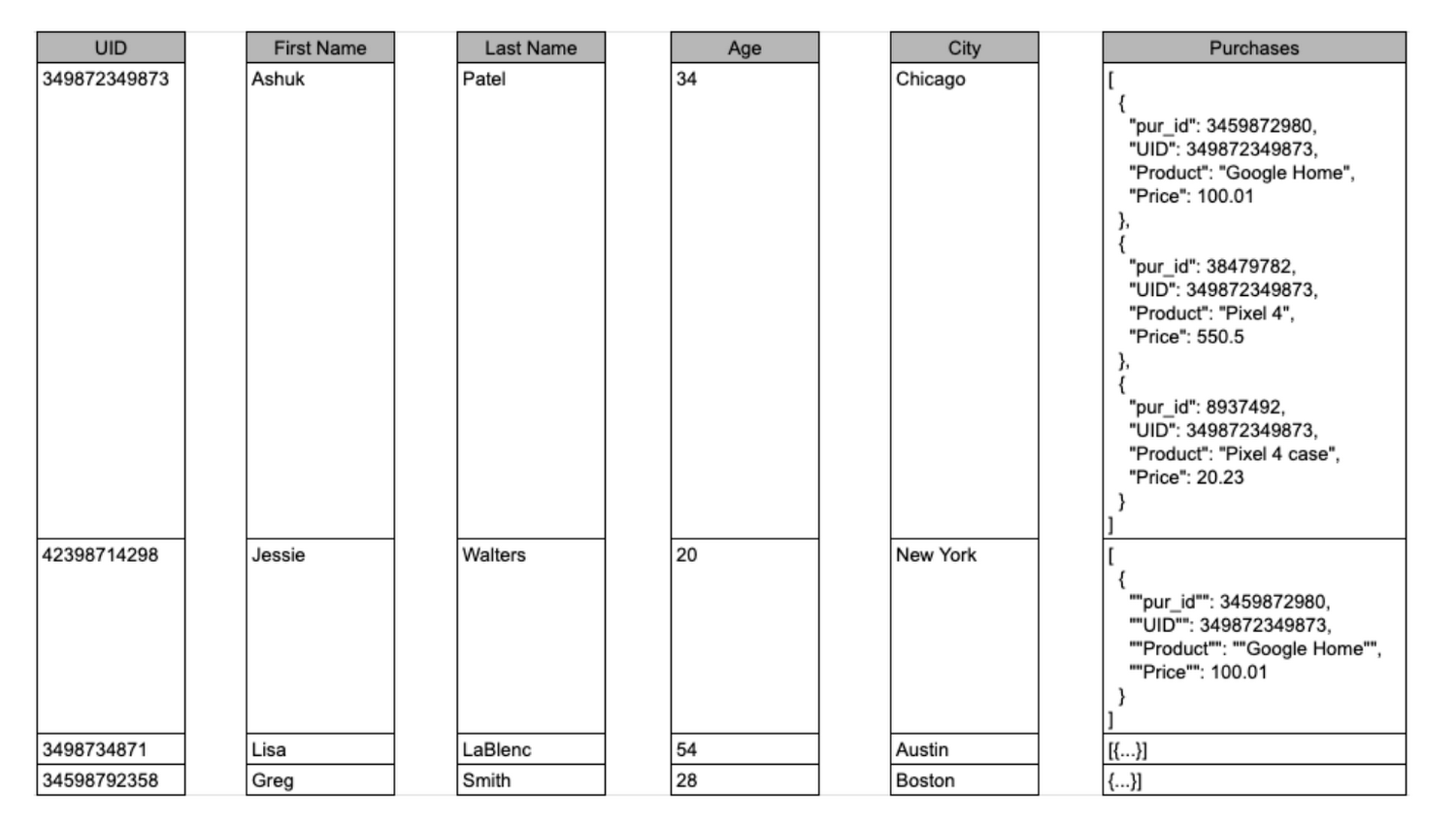
If you want to learn more about Capacitor, check out this blog post from Google’s own Chief BigQuery Officer.
Encryption and managed durability
Now that we understand how the data is saved in specific files, we can talk about where these files actually live. BigQuery’s persistence layer is provided by Google’s distributed file system, Colossus, where data is automatically compressed, encrypted, replicated, and distributed.
There are many levels of defense against unauthorized access in Google Cloud Platform, one of them being that 100% of data is encrypted at rest. Plus, if you want to control encryption yourself, you can use customer-managed encryption keys.
Colossus also ensures durability by using something called erasure encoding – which breaks data into fragments and saves redundant pieces across a set of different disks. However, to ensure the data is both durable and available, the data is also replicated to another availability zone within the same region that was designated when you created your dataset.
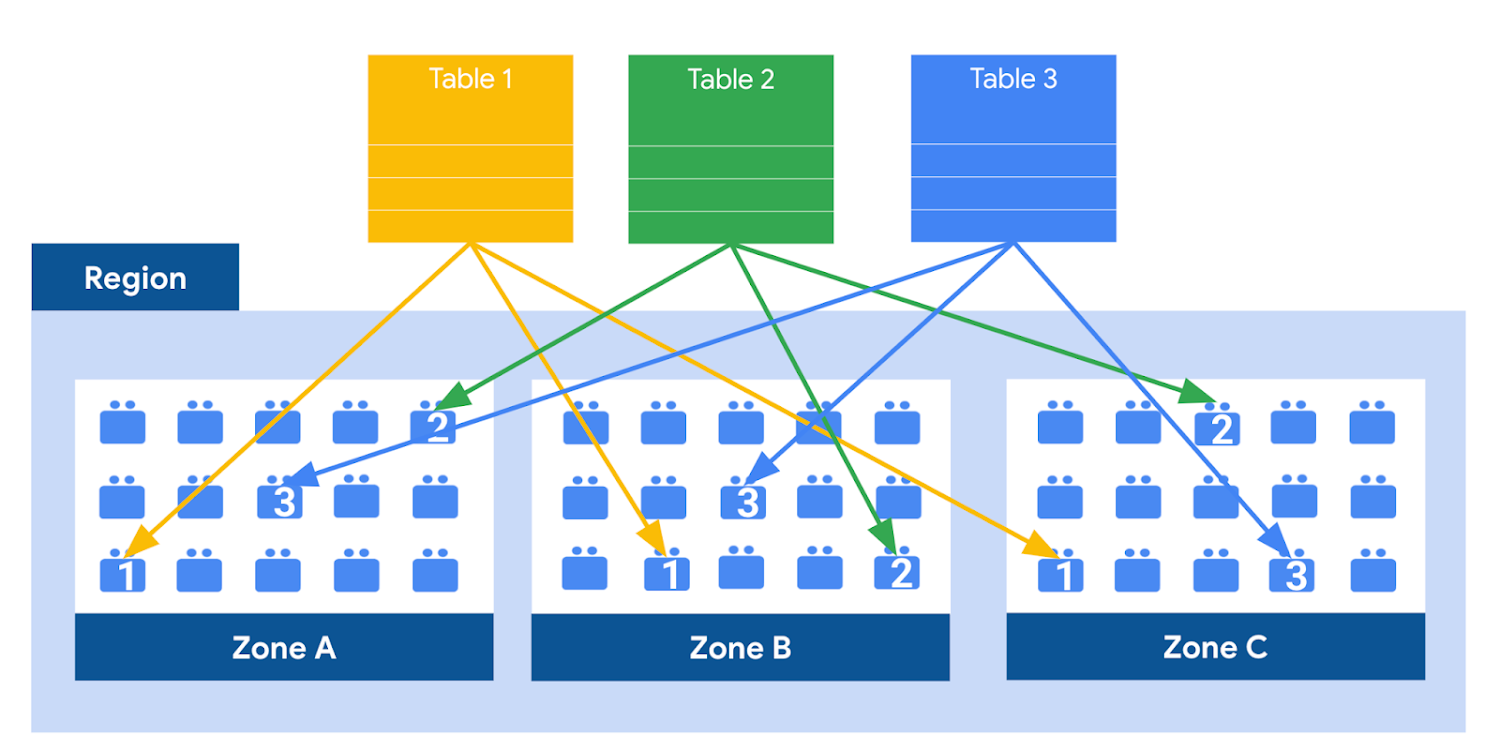
This means data is saved in a different building that has a different power system and network. The chances of multiple availability zones going offline at once is very small. But if you use “Multi-Region” locations – like the US or EU – BigQuery stores another copy of the data in an off-region replica. That way, the data is recoverable in the event of a major disaster.
This is all accomplished without impacting the compute resources available for your queries. Plus encoding, encryption and replication are included in the price of BigQuery storage – no hidden costs!
Optimizing storage for query performance
BigQuery has a built-in storage optimizer that helps arrange data into the optimal shape for querying, by periodically rewriting files. Files may be written first in a format that is fast to write but later BigQuery will format them in a way that is fast to query. Aside from the optimization happening behind the scenes, there are also a few things you can do to further enhance storage.
Partitioning
A partitioned table is a special table that is divided into segments, called partitions. BigQuery leverages partitioning to minimize the amount of data that workers read from disk. Queries that contain filters on the partitioning column can dramatically reduce the overall data scanned, which can yield improved performance and reduced query cost for on-demand queries. New data written to a partitioned table is automatically delivered to the appropriate partition.
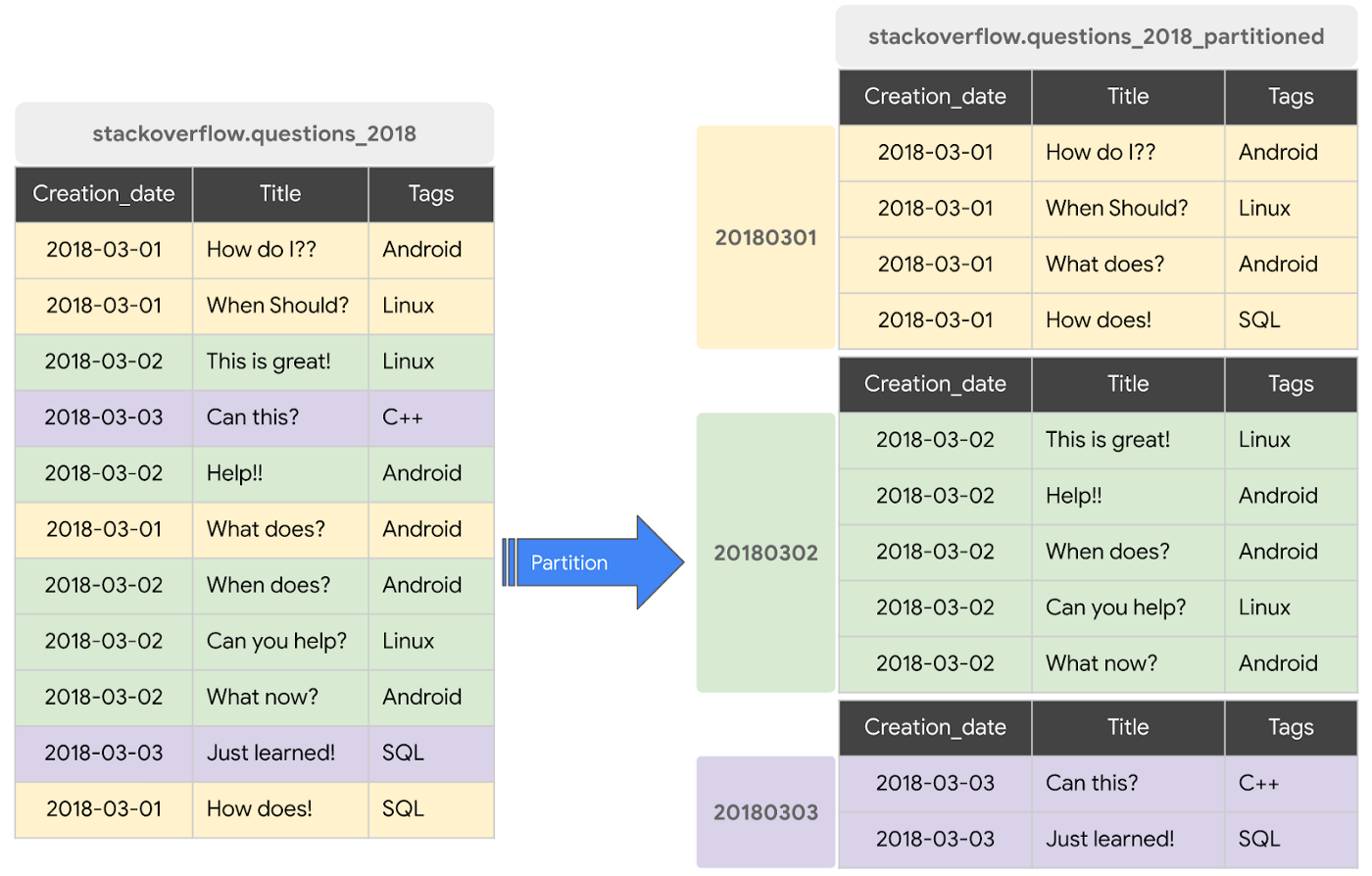
BigQuery supports the following ways to create partitioned tables:
- Ingestion time partitioned tables: daily partitions reflecting the time the data was ingested into BigQuery. This option is useful if you’ll be filtering data based on when new data was added. For example, the new Google Trends Dataset is refreshed each day, you might only be interested in the latest trends.
- Time-unit column partitioned tables: BigQuery routes data to the appropriate partition based on date value in the partitioning column. You can create partitions with granularity starting from hourly partitioning. This option is useful if you’ll be filtering data based on the date value in the table, for example looking at the most recent transactions by including a WHERE clause for transaction_created_date
- INTEGER range partitioned tables: Partitioned based on an integer column that can be bucketed. This option is useful if you’ll be filtering data based on an integer column in the table, for example focusing on specific customers using customer_id. You can bucket the integer values to create appropriately sized partitions, like having all customers with IDs from 0-100 in the same partition.
Partitioning is a great way to optimize query performance, especially for large tables that are often filtered down during analytics. When deciding on the appropriate partition key, make sure to consider how everyone in your organization is leveraging the table. For large tables that could cause some expensive queries, you might want to require partitions to be used.
Partitions are designed for places where there is a large amount of data and a low number of distinct values. A good rule of thumb is making sure partitions are greater than 1 GB. If you over partition your tables, you’ll create a lot of metadata – which means that reading in lots of partitions may actually slow down your query.
Clustering
When a table is clustered in BigQuery, the data is automatically sorted based on the contents of one or more columns (up to 4, that you specify). Usually high cardinality and non-temporal columns are preferred for clustering, as opposed to partitioning which is better for fields with lower cardinality. You’re not limited to choosing just one, you can have a single table that is both partitioned and clustered!
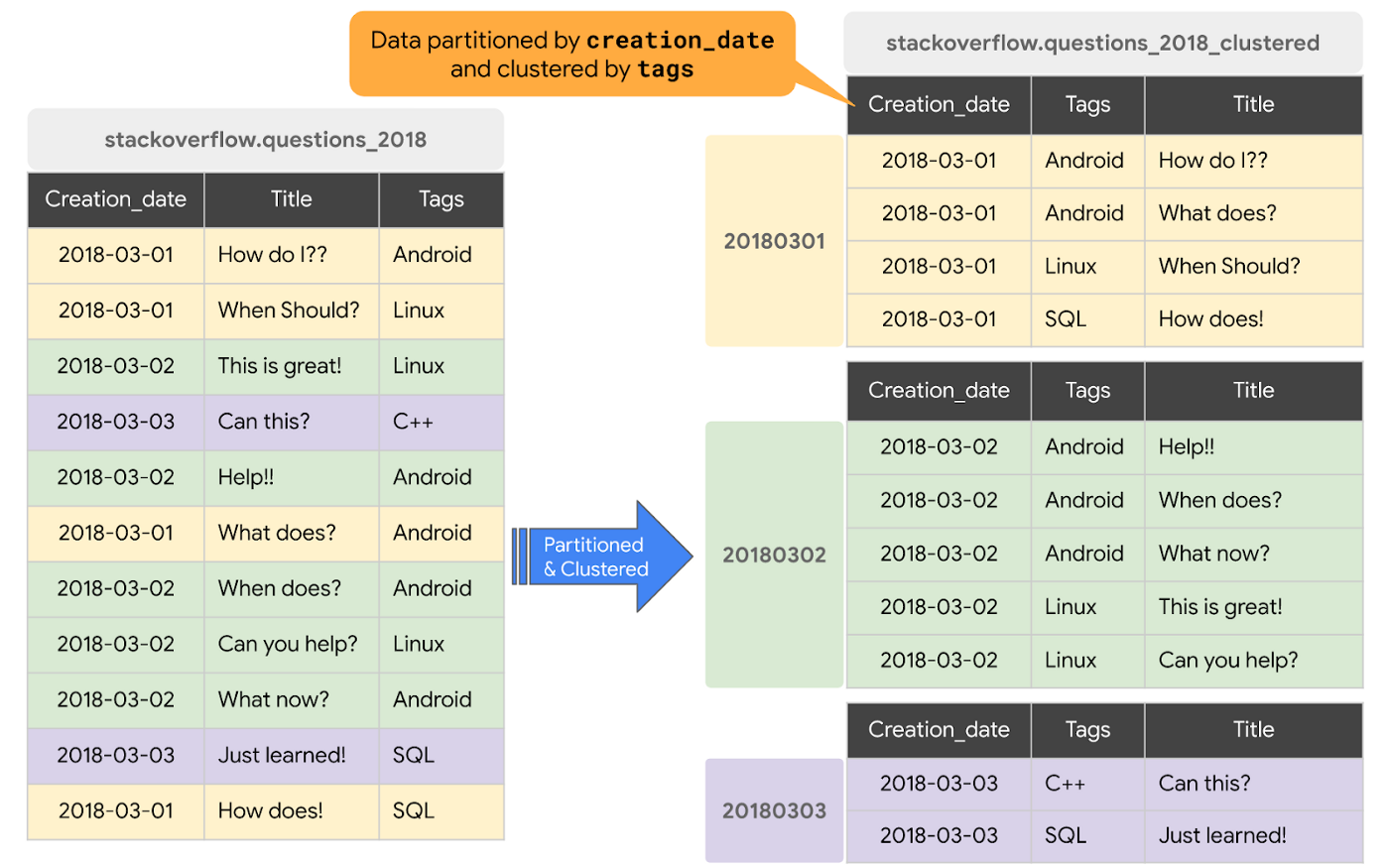
The order of clustered columns determines the sort order of the data. When new data is added to a table or a specific partition, BigQuery performs free, automatic re-clustering in the background. Specifically, clustering can improve the performance for queries:
- Containing where clauses with a clustered column: BigQuery uses the sorted blocks to eliminate scans of unnecessary data. The order of the filters in the where clause matters, so use filters that leverage clustering first
- That aggregate data based on values in a clustered column: performance is improved because the sorted blocks collocate rows with similar values
- With joins where the join key is used to cluster the table: less data is scanned, for some queries this offers a performance boost over partitioning!
Looking for some more information and example queries? Check out this blog post!
Denormalizing
If you come from a traditional database background, you’re probably used to creating normalized schemas – where you optimize your structure so that data is not repeated. This is important for OLTP workloads (as we discussed earlier) because you’re often making updates to the data. If your customer’s address is stored every place they have made a purchase, then it might be cumbersome to update their address if it changes.
However, when performing analytical operations on normalized schemas, usually multiple tables need to be joined together. If we instead denormalize our data, so that information (like the customer address) is repeated and stored in the same table, then we can eliminate the need to have a JOIN in our query. For BigQuery specifically, we can also take advantage of support for nested and repeated structures. Expressing records using STRUCTs and ARRAYs can not only provide a more natural representation of the underlying data, but in some cases it can also eliminate the need to use a GROUP BY statement. For example, using ARRAY_LENGTH instead of COUNT.
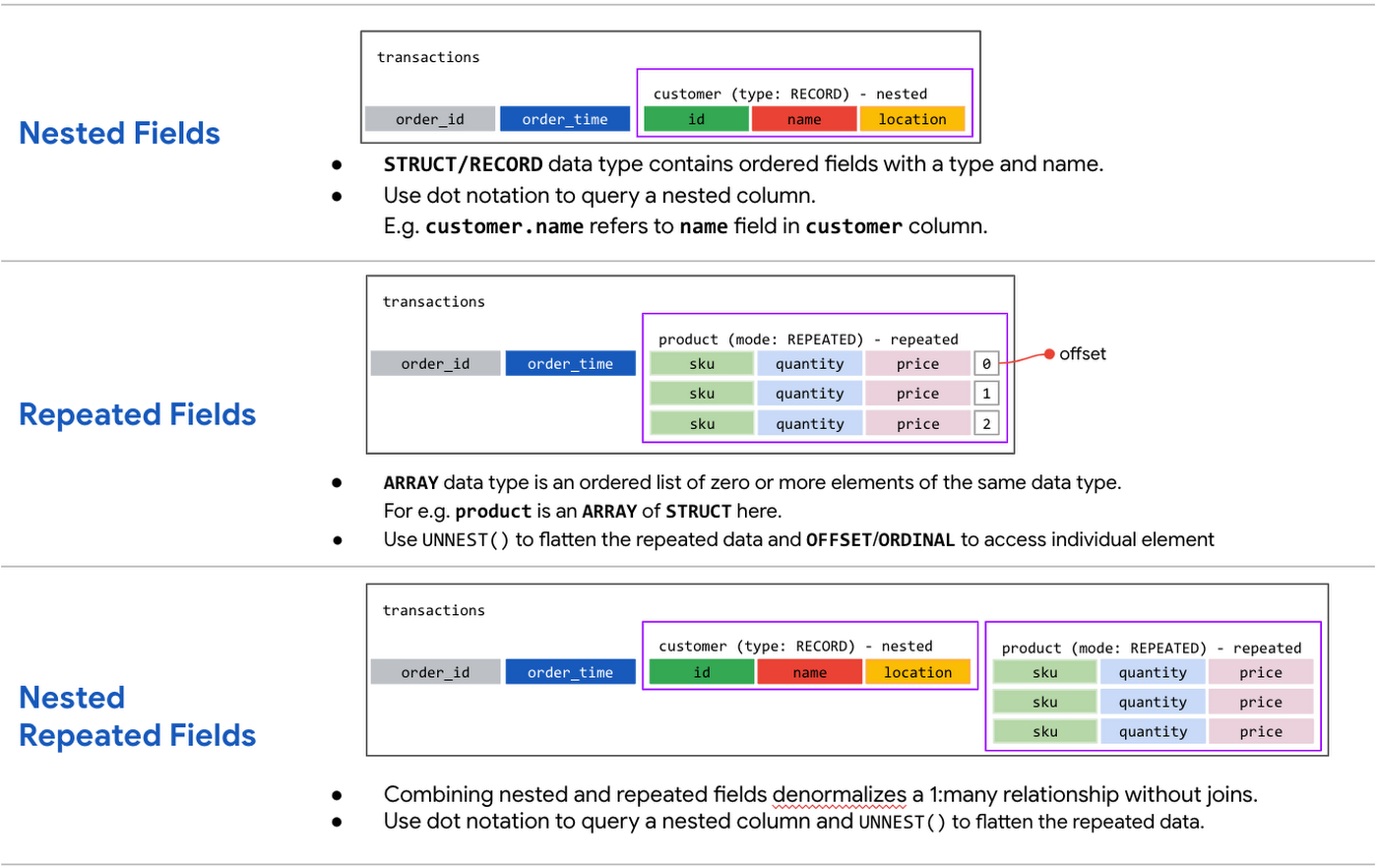
Keep in mind that denormalization has some disadvantages. First off, they aren’t storage-optimal. Although, many times the low cost of BigQuery storage addresses this concern. Second, maintaining data integrity can require increased machine time and sometimes human time for testing and verification. We recommend that you prioritize partitioning and clustering before denormalization, and then focus on data that rarely requires updates.
Optimizing for storage costs
When it comes to optimizing storage costs in BigQuery, you may want to focus on removing unneeded tables and partitions. You can configure the default table expiration for your datasets, configure the expiration time for your tables, and configure the partition expiration for partitioned tables. This can be especially useful if you’re creating materialized views or tables for ad-hoc workflows, or if you only need access to the most recent data.
Additionally, you can take advantage of BigQuery’s long term storage. If you have a table that is not used for 90 consecutive days, the price of storage for that table automatically drops by 50 percent to $0.01 per GB, per month. This is the same cost as Cloud Storage Nearline, so it might make sense to keep older, unused data in BigQuery as opposed to exporting it to Cloud Storage.Thanks for tuning in this week! Next week, we’re talking about query processing – a precursor to some query optimization techniques that will help you troubleshoot and cut costs. Be sure to stay up-to-date on this series by following me on LinkedIn and Twitter!
Why and How to Migrate to Google BigQuery

5364
Of your peers have already read this article.
6:30 Minutes
The most insightful time you'll spend today!
Over the past few decades, organizations have mastered the science of data warehousing. They have increasingly applied descriptive analytics to large quantities of stored data, gaining insight into their core business operations. Conventional Business Intelligence (BI), which focuses on querying, reporting, and Online Analytical Processing, might have been a differentiating factor in the past, either making or breaking a company, but it’s no longer sufficient.
Today, not only do organizations need to understand past events using descriptive analytics, they need predictive analytics, which often uses machine learning (ML) to extract data patterns and make probabilistic claims about the future. The ultimate goal is to develop prescriptive analytics that combine lessons from the past with predictions about the future to automatically guide real-time actions.
Traditional data warehouse practices capture raw data from various sources, which are often Online Transactional Processing (OLTP) systems. Then, a subset of data is extracted in batches, transformed based on a defined schema, and loaded into the data warehouse. Because traditional data warehouses capture a subset of data in batches and store data based on rigid schemas, they are unsuitable for handling real-time analysis or responding to spontaneous queries. Google designed BigQuery in part in response to these inherent limitations.
Innovative ideas are often slowed by the size and complexity of the IT organization that implements and maintains these traditional data warehouses. It can take years and substantial investment to build a scalable, highly available, and secure data warehouse architecture. BigQuery offers sophisticated software as a service (SaaS) technology that can be used for serverless data warehouse operations. This lets you focus on advancing your core business while delegating infrastructure maintenance and platform development to Google Cloud.
BigQuery offers access to structured data storage, processing, and analytics that’s scalable, flexible, and cost effective. These characteristics are essential when your data volumes are growing exponentially—to make storage and processing resources available as needed, as well as to get value from that data. Furthermore, for organizations that are just starting with big data analytics and machine learning, and that want to avoid the potential complexities of on-premises big data systems, BigQuery offers a pay-as-you-go way to experiment with managed services.
With BigQuery, you can find answers to previously intractable problems, apply machine learning to discover emerging data patterns, and test new hypotheses. As a result, you have timely insight into how your business is performing, which enables you to modify processes for better results. In addition, the end user’s experience is often enriched with relevant insights gleaned from big data analysis, as we explain later in this series.
The migration framework
Undertaking a migration can be a complex and lengthy endeavor. Therefore, we recommend adhering to a framework to organize and structure the migration work in phases:
- Prepare and discover: Prepare for your migration with workload and use case discovery.
- Assess and plan: Assess and prioritize use cases, define measures of success, and plan your migration.
- Execute: Iterate the following steps for each use case:
- Migrate (offload): Migrate only your data, schema, and downstream business applications.
- Migrate (full): Alternatively, migrate the use case fully end-to-end. The same as Migrate (offload), with the addition of the upstream data pipelines.
- Verify and validate: Test and validate the migration to assess return on investment.
The following diagram illustrates the recommended framework and shows how the different phases are connected:

For a deeper understanding, read Migrating data warehouses to BigQuery: Introduction and overview
Google and AI Researchers Work towards Building Data-centric AI

6072
Of your peers have already read this article.
1:30 Minutes
The most insightful time you'll spend today!
AI researchers and engineers need better data to enable better AI solutions. The quality of an AI solution is determined by both the learning algorithm (such as a deep-neural network model) and the datasets used to train and evaluate that algorithm. Historically, AI research has focused much more on algorithms than datasets, despite their vital importance. As a result, many algorithms are freely available as starting points, but many important problems lack large, high-quality open datasets. Further, creating new datasets is expensive and error-prone.
Recently, the data-centric AI movement has emerged, which aims to develop new methodologies and tools for constructing better datasets to fix this problem. Conferences, workshops, challenges, and platforms are being launched to support improving data quality and to foster data excellence. Thought leaders such as Andrew Ng at Landing.AI and Chris Re at Stanford University are encouraging AI developers to focus more on iterative data engineering than they do tuning their learning algorithms. Our CHI-best-paper-award-winning paper, “Everyone wants to do the model work, not the data work” highlighted the significance of data quality in the practice of ML.
At Google, we are excited to contribute to data-centric AI. Today, Google Cloud is adding a new high value dataset to the Public Dataset Program, and Google researchers are announcing DataPerf, a new multi-organizational effort to develop benchmarks for data quality and data centric algorithms.
Google Cloud is committed to helping users improve their data quality, starting with supporting better public data. The Public Datasets program provides high quality datasets pre-configured on GCP for easy access. Google Cloud is adding a new high-value dataset developed by the MLCommons™ Association (which Google co-founded) to the Public Datasets program: The Multilingual Spoken Words Corpus: a rich audio speech dataset with more than 340,000 keywords in 50 languages with upwards of 23.4 million examples.
This new public dataset is aligned with the MLCommons Association vision for “open” datasets – accessible by all – that are “living” – continually being improved to raise quality and increase representation and diversity.
Google researchers, in collaboration with multiple organizations, are announcing the DataPerf effort at the NeurIPS Data-Centric AI workshop today, to develop benchmarks to improve data quality. Much like the the MLPerf™ benchmarking effort which is now the industry standard for machine learning hardware/software speed, DataPerf brings together the originators of prior efforts including: CATS4ML, Data-Centric AI Competition, DCBench, Dynabench, and the MLPerf benchmarks to define clear metrics that catalyze rapid innovation. DataPerf will measure the utility of training and test data for common problems, and algorithms for working with datasets such as: selecting core sets, correcting errors, identifying under-optimized data slices, and valuing datasets prior to labeling.
Together, supporting open, living datasets for core ML tasks, and the development of benchmarks to direct the rapid evolution of those datasets will empower the researchers and engineers who use Google Cloud to do even more amazing things – and we can’t wait to see what they create!
Acknowledgements: In collaboration with Lora Aroyo and Praveen Paritosh.
“It’s an Astonishing Difference”: What Data Operation Execs say About Google Cloud’s Data Warehouse

5645
Of your peers have already read this article.
8:30 Minutes
The most insightful time you'll spend today!
The popularity of meal kit delivery services has surged in recent years as consumer attitudes toward home cooking and grocery shopping have shifted. As a pioneer in the category, Blue Apron helps its customers create incredible home cooking experiences by sending culinary-driven recipes with high-quality ingredients and step-by-step instructions straight to customers’ doors. Blue Apron also offers a monthly wine subscription service and a la carte culinary tools and products through its marketplace.
If that sounds simple, it isn’t.
Ingredients for the meal kits must be sourced at the right time, quality, and price. Orders must be packed efficiently and in exactly the right proportions. Most importantly, meal kits must be delivered to the customer fresh and on time.
To meet these criteria and make data meaningful and intuitive to its managers, one of the tools Blue Apron relies on is Looker, an analytics platform that lets business users explore data and ask sophisticated questions using familiar terms. Looker integrates its solution with Google Cloud Platform to help customers modernize their analytics.
“The combination of Looker and Google BigQuery is powerful, allowing us to get data-hungry analysts essential information much faster. Because we choose to pay by the query, it’s also flexible and cost effective—plus storage is cheap, so we can just put data in and query what we need.”
—Sam Chase, Tech Lead, Data Operations, Blue Apron
Blue Apron previously used Looker with a single database instance hosted on another cloud provider. As data volumes grew and queries became more complex, it became difficult to scale. Blue Apron’s only options were choosing ever-larger server classes and increasing storage throughput by purchasing a higher number of provisioned IOPS. To improve speed, scalability, and cost efficiency, Blue Apron moved its data warehouse to Google BigQuery.
“The combination of Looker and Google BigQuery is powerful, allowing us to get data-hungry analysts essential information much faster,” says Sam Chase, Tech Lead, Data Operations at Blue Apron. “Because we choose to pay by the query, it’s also flexible and cost effective—plus storage is cheap, so we can just put data in and query what we need.”
“After we moved to Google BigQuery, query time was reduced exponentially. It’s an astonishing difference, allowing us to run 300 queries per day.”
—Sam Chase, Tech Lead, Data Operations, Blue Apron
The analytics platform of the future
When you’re making business decisions about a customer’s dinner, speed matters. Looker takes full advantage of the power of Google BigQuery, making it easy to build a data exploration platform.
Blue Apron’s applications publish event data to Kafka—approximately 140 million events per day—and data is then streamed into Google BigQuery, which performs lightning-fast queries on both streamed and static data. Now, business users and analytics teams can make decisions based on near real-time information in Looker, instead of waiting until the next business day for results.
“After we moved to Google BigQuery, query time was reduced exponentially. It’s an astonishing difference, allowing us to run 300 queries per day,” says Sam.
Previously, Blue Apron spent up to a week out of every month optimizing its data warehouse to attempt to improve query performance. With Google BigQuery, all maintenance is handled by Google, reclaiming 25% of up to two engineers’ time. Even when multiple people are using Looker concurrently, query performance never degrades and storage never runs out.
“Because Google BigQuery is architected as a giant, shared cluster, growth is smooth,” says Lloyd Tabb, Founder and CTO of Looker. “Like a race car going from 0 to 120 mph, there are no shift points, just smooth acceleration. To us, it looks like the future.”
An empowering, integrated toolset
Looker takes advantage of aggressive caching and support for date-based table partitioning in Google BigQuery to increase performance, simplify the load process, and improve data manageability. By partitioning data by time, Blue Apron can also take advantage of better long-term storage pricing without sacrificing query performance. When using Google BigQuery with Looker, analysts can easily see how much data is going to be scanned before each query is run.
Blue Apron is also using Looker for Google BigQuery Data Transfer Service to provide actionable analytics for all of the company’s Google marketing data from Google AdWords and DoubleClick by Google in one place to understand campaign performance across channels, saving its data operations team months of work. Using Looker Blocks, marketers can quickly make sense of the data with reports and dashboards, and set alerts when campaign performance hits certain thresholds.
“Everyone at Blue Apron is excited about using Google BigQuery with Looker. Business users and marketers are more empowered to look for answers, instead of waiting for analytics teams. Because users know they can get results rapidly, our business processes are evolving and improving.”
—Sam Chase, Tech Lead, Data Operations, Blue Apron
Looker Blocks for Google AdWords and DoubleClick by Google provide all the analysis you’d get straight from the Google console, plus additional value-add analysis that’s impossible to replicate without SQL. Complex metrics such as ROI on ad spend, flexible multi-touch attribution, and predictive lifetime value empower marketers with a better understanding of their customers and where to spend their next dollar.
In addition to these turnkey dashboards and pieces of analysis, marketers can customize views to meet their unique needs and workflows. These capabilities help the Blue Apron marketing team make decisions regarding the allocation of spend to maximize customer acquisition and retention.
“Everyone at Blue Apron is excited about using Google BigQuery with Looker,” says Sam. “Business users and marketers are more empowered to look for answers, instead of waiting for analytics teams. Because users know they can get results rapidly, our business processes are evolving and improving.”
For data cleansing and transformation, Blue Apron uses Google Cloud Dataproc to run fully managed Apache Spark clusters on Google Cloud Platform. It’s also leveraging Google BigQuery integration with G Suite to bring data into Google Sheets for further distribution and analysis.
“Transferring data between Google tools is fast because it all happens on the Google network,” says Sam. “We can pull data from Google BigQuery, run transformations with Spark, and then write it back to Google BigQuery. That’s very helpful in providing our business users and data analysts with the richest, most current data.”
A perfect match for better insights
As Blue Apron seeks to expand its reach and deepen its engagement with customers, it is making Google BigQuery and Looker available to more users, providing a high-quality interactive analytics experience. “Our ability to pull a lot of data in and compute fast results affects everyone in our company,” says Sam. “Using Google BigQuery and Looker to iterate quickly and build new models to make our operations more efficient will directly impact our customers.”
For Looker, Google BigQuery represents the next step in data warehouse evolution. “Google BigQuery is a perfect match for Looker, combining easy setup with near infinite scale-out and elasticity,” says Lloyd. “People can make smarter decisions faster that directly benefit their business and customers.”
More Relevant Stories for Your Company


Can Your Data Warehouse Handle a 100-Trillion Row Query?
Today's enterprise demands from data go far beyond the capabilities of traditional data warehousing and for many leaders, the need to digitally transform their businesses is a key driver for data analytics spending. Businesses want to make real-time decisions from fresh information as well as make future predictions from their

Choose the Right Google Database Service With This Chart
A growing number of Indian enterprises are leveraging the Google Cloud to run their database workloads. This is because Google Cloud offers fully managed, scalable database services to support all applications today and tomorrow. In fact, Forrester has named Google as a Leader in The Forrester Wave™: Database-as-a-Service, Q2 2019.

Architecting Data Pipelines Directly Improves Customer Experience at Universe.com
At Universe, we serve customers day and night and are always working to make sure they have a great experience, whether online or at one of our live events. Our technology has to make that possible, and our legacy systems weren’t cutting it anymore. What we needed was a consistent,

Business Modernization with Oracle Workloads in Google Cloud
With today's ever-changing business dynamics, business continuity is a key focus for all of us, and enterprise databases like Oracle play a critical role. We’ll explore how running Oracle workloads in Google Cloud creates a variety of solutions, from a Bare Metal Solution to open source and cloud-native databases, to
