





6069
Of your peers have already watched this video.
48:30 Minutes
The most insightful time you'll spend today!
Can Your Data Warehouse Handle a 100-Trillion Row Query?
Today’s enterprise demands from data go far beyond the capabilities of traditional data warehousing and for many leaders, the need to digitally transform their businesses is a key driver for data analytics spending.
Businesses want to make real-time decisions from fresh information as well as make future predictions from their data in order to remain competitive.
In this video, Jordan Tigani, Director of Product Management, Google BigQuery reveals the power of Google Cloud’s modern data warehouse, BigQuery, that helps businesses make informed decisions quickly.
In addition, he talks about how big Google BigQuery can get. He shares examples of how one customer ran a query against a giant table of 100 trillion rows. “I think it was something like 19 petabytes of data scanned. It took about took about 20 minutes. It used 39,000 slots, which is about 20,000 cores,” says Tigani.
He also shares examples of how businesses, such as online retailer, Zulily generate real business benefits from being able to query large datasets faster, and more easily than ever–without having to invest time managing infrastructure.
Finally, Amir Aryanpour, Technical Architect, Channel 4, talks abouut how connecting connecting Google BigQuery to other solutions with the Google Cloud Platform, including storage, data visualisation, and a sentiment analysis engine, among others, helped the company.
Transforming Software Development Education with CourseMatix

1470
Of your peers have already read this article.
3:00 Minutes
The most insightful time you'll spend today!
As the world increasingly relies on software, businesses have struggled to find enough developer talent to build and maintain their applications. IDC estimates the global shortage of software developers reached 1.4 million in 2021 and expects that number to balloon to 4 million by 2025.
Higher education is a great starting point to solve the software development skills shortage. One institution — Spokane Community College — has made strides in enhancing student learning and serving more students with the right mix of software development and IT education while saving educators time.
Building a modern IT education platform
As a first step to improve computer science education and scale the number of students it could teach, Spokane Community College needed a platform that could help instructors more efficiently manage the teaching process. That’s where CourseMatix came in.
CourseMatix is an education platform that delivers the required tools, platforms, and frameworks such as automated grading, assignment tracking, and testing to save teachers time and enhance students’ learning.
CourseMatix is entirely made up of microservices, with significant compute demands because it creates and runs a unique dedicated environment for each student. The platform is complex by nature as it supports a range of technologies that computer science professors need to teach varying coursework. This led to issues with scalability, reliability, and uptime when running on legacy infrastructure.
“We really wanted to no longer manage our infrastructure, leaving us to focus entirely on our platform,” says Aleks Korn, chief executive officer of CourseMatix. “We engaged Google Cloud partner CDW to see how we could simplify and improve our IT environment. The decision was quickly made to migrate to Google Kubernetes Engine (GKE).”
GKE provides CourseMatix with automatic horizontal and vertical scaling to minimize costs and downtime, while removing management and maintenance requirements. This enables CourseMatix to expand the reach of its platform at the lowest possible price and maintain a lean team. CDW helped CourseMatix make this decision to migrate to GKE, managed the migration, and provided guidance on a storage solution.
Because CourseMatix has high data storage volume requirements (given the size of software development assignments) and needs to be fully reliable to ensure work is not lost, it also chose to work with NetApp. NetApp Cloud Volumes Service for Google Cloud perfectly complements GKE in its highly expandable, reliable, and user-friendly capabilities. The platform was now ready for its U.S. launch at Spokane Community College.
Transforming software development education
Spokane Community College needed a solution to address the challenges facing its professors, particularly with respect to time management.
“Each software development assignment can take an hour to grade,” says Bret Dickey, professor of software development at Spokane Community College. “When you have 100 students, you’re talking weeks of turnaround time to grade those projects. CourseMatix provides immediate feedback, which is a game changer for us as professors and our students.”
Students now complete and submit their assignments with real-world tools, using source control, creating branches to complete their work, and merging those branches to push up to the server where pipelines run the applications.
“It’s making our teaching better overall, including using real-world concepts to enhance teaching and outcomes,” says Dickey.
CourseMatix also provides the tooling to upskill on various programming languages and software packages required for coursework, helping Spokane Community College manage server-side frameworks and client-side languages that each have their own tools.
“Students can access their cloud-based coding environment and all the tools they may need for an assignment are ready to go,” says Karmen Blake, another software development professor at Spokane Community College. “Having a central system for tooling within CourseMatix has been a huge time saver, meaning more time for learning and practice that prepares students for careers as professional software developers.”
Karmen and Dickey have seen marked improvements in their ability to teach and in student learning by using CourseMatix. For example, the platform provides automated hints and varying error messages based on the number of attempts a student has made to solve a problem to help each student along without making the assignment too easy or too difficult.
As a cloud-based platform, CourseMatix also empowers students from a wide range of socioeconomic backgrounds to learn computer science.
“As long as students can access the internet on their laptops, they have everything to complete their assignments,” says Karmen. “The cloud-based CourseMatix offering improves efficiency and equity across all students in our computer science programs.”
With a more fluid experience for students and immense amounts of time saved on grading, Spokane Community College is in a better position to increase enrollment in software development classes.
“Now that we have automated our grading and optimized our assignment processes, I am beginning to take on more students and teach more classes,” says Dickey. “I could not have imagined this outcome only a couple of years ago, and it’s all possible thanks to CourseMatix.”
To learn more about how partners help organizations make the most of Google Cloud, you can visit our partner page.
Google Data Cloud: The Catalyst for Modern App Development and Innovation

1374
Of your peers have already read this article.
3:30 Minutes
The most insightful time you'll spend today!
97 zettabytes was the estimated volume of data generated worldwide in 20221. This sort of explosion in data volume is happening in every enterprise. Now imagine being able to access all this data you own from anywhere, at any time, analyze it, and leverage its insights to innovate your products and services? One of the biggest barriers to fulfilling this vision is the complexity inherent in dealing with data trapped across silos in an enterprise. Google Data Cloud offers a unified, open, and intelligent platform for innovation, allowing you to integrate your data on a common architectural platform. Across industries, organizations are able to reimagine their data possibilities in entirely new ways and quickly build applications that delight their customers.
Siloed data: The barrier to speed and innovation
Digital technologies ranging from transaction processing to analytics and AI/ML use data to help enterprises understand their customers better. And the pace of innovation has naturally accelerated as organizations learn, adapt, and race to build the next generation of applications and services to compete for customers and meet their needs. At Next 2022, we made a prediction that the barriers between transactional and analytical workloads will mostly disappear.
Traditionally, data architectures have separated transactional and analytical systems—and that’s for good reason. Transactional databases are optimized for fast reads and writes, and analytical databases are optimized for analyzing and aggregating large data sets. This has siloed enterprise data systems, leaving many IT teams struggling to piece together solutions. The result has been time consuming, expensive, and complicated fixes to support intelligent, data-driven applications.
But, with the introduction of new technologies, a more time-efficient and cost-effective approach is possible. Customers now expect to see personalized recommendations and tailored experiences from their applications. With hybrid systems that support both transactional and analytical processing on the same data, without impacting performance, these systems now work together to generate timely, actionable insights that can be used to create better experiences and accelerate business outcomes.
According to a 2022 research paper from IDC, unifying data across silos via a data cloud is the foundational capability enterprises need to gain new insights on rapidly changing conditions and to enable operational intelligence. The modern data cloud provides unified, connected, scalable, secure, extensible, and open data, analytics, and AI/ML services. In this platform, everything is connected to everything else.
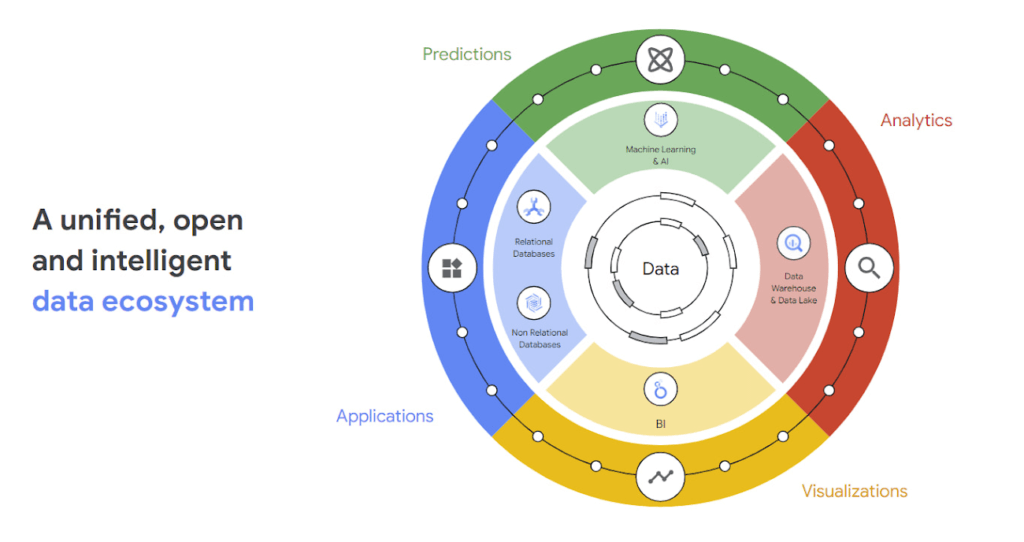
Why reducing data barriers delivers more value
The primary benefit of a unified data cloud is that it provides an intuitive and timely way to represent data and allows easy access to related data points. By unifying their data, enterprises are able to:
- Ingest data faster – for operational intelligence
- Unify data across silos – for new insights
- Share data with partners – for collaborative problem solving
- Change forecasting models – to understand and prepare for shifting markets
- Iterate with decision-making scenarios – to ensure agile responses
- Train models on historical data – to build smarter applications
As generative AI applications akin to Bard, an early experiment by Google, become available in the workplace, it will be more important than ever for organizations to have a unified data landscape to holistically train and validate their proprietary large language models.
With these benefits enterprises can accelerate their digital transformation in order to thrive in our increasingly complex digital environment. A survey of more than 800 IT leaders indicated that using a data cloud enabled them to significantly improve employee productivity, operational efficiency, innovation, and customer experience, among others.
Build modern apps with a unified and integrated data cloud
Google Cloud technologies and capabilities reduce the friction between transactional and analytical workloads and make it easier for developers to build applications, and to glean real-time insights. Here are a few examples.
- AlloyDB for PostgreSQL, a fully managed PostgreSQL-compatible database, and AlloyDB Omni, the recently launched downloadable edition of AlloyDB, can analyze transactional data in real time. AlloyDB is more than four times faster for transactional workloads and up to a 100 times faster for analytical queries compared to standard PostgreSQL, according to our performance tests. This kind of performance makes AlloyDB the ideal database for hybrid transactional and analytical processing (HTAP) workloads.
- Datastream for BigQuery, a serverless change data capture and replication service, provides simple and easy real time data replication from transactional databases like AlloyDB, PostgreSQL, MySQL and Oracle directly into BigQuery, Google Cloud’s enterprise data warehouse.
- And, query federation with Cloud Spanner, Cloud SQL, and Cloud Bigtable, make data available right from the BigQuery console allowing customers to analyze data in real-time in transactional databases.
Speed up deployments and lower costs
By reducing data barriers, we’re taking a fundamentally different approach that allows organizations to be more innovative, efficient, and customer-focused by providing:
- Built-in industry leading AI and ML that helps organizations not only build improved insights, but also automate core business processes and enable deep ML-driven product innovation.
- Best-in-class flexibility. Integration with open source standards and APIs ensures portability and extensibility to prevent lock-in. Plus, choice of deployment options means easy interoperability with existing solutions and investments.
- The most unified data platform with the ability to manage every stage of the data lifecycle, from running operational databases to managing analytics applications across data warehouses and lakes to rich data-driven experiences.
- Fully managed database services that free up DBA/DevOps time to focus on high-value work that is more profitable to the business. Organizations that switch from self-managed databases eliminate manual work, realize significant cost savings, reduce risk from security breaches and downtime and increase productivity and innovation. In an IDC survey, for example, Cloud SQL customers achieve an average three-year ROI of 246% because of the value and efficiencies this fully managed service delivers.
Google Data Cloud improves the efficiency and productivity of your teams, resulting in increased innovation across your organization. This is the unified, open approach to data-driven transformation bringing unmatched speed, scale, security, and with AI built in.
In case you missed it: Check out our Data Cloud and AI Summit that happened on March 29th, to learn more about the latest innovations across databases, data analytics, BI and AI. In addition, learn more about the value of managed database services like Cloud SQL in this IDC study.
The Benefits of Cloud SQL for Business: Faster Deployments, Lower Costs, and Enhanced Agility

2780
Of your peers have already read this article.
3:00 Minutes
The most insightful time you'll spend today!
If you’re self-managing relational databases such as MySQL, PostgreSQL or SQL Server, you may be thinking about the pros and cons of cloud-based database services. Regardless of whether you’re running your databases on premises or in the cloud, self-managed databases can be inefficient and expensive, requiring significant effort around patching, hardware maintenance, backups, and tuning. Are managed database services a better option?
To answer this question, Google Cloud sponsored a business value white paper by IDC, based on the real-life experiences of eight Cloud SQL customers. Cloud SQL is an easy-to-use, fully-managed database service for running MySQL, PostgreSQL and SQL Server workloads. More than 90% of the top 100 Google Cloud customers use Cloud SQL.
The study found that migration to Cloud SQL unlocked significant efficiencies and cost reductions for these customers. Let’s take a look at the key benefits in this infographic.

A deeper dive into Cloud SQL benefits
To read the full IDC white paper, you can download it here: The Business Value of Cloud SQL: Google Cloud’s Relational Database Service for MySQL, PostgreSQL, and SQL Server, by Carl W. Olofson, Research Vice President, Data Management Software, IDC and Matthew Marden, Research Vice President, Business Value Strategy Practice, IDC.
Looking for commentary from IDC? Listen to the on-demand webinar, How Enterprises Have Achieved Greater Efficiency and Improved Business Performance using Google Cloud SQL, where Carl Olofson discusses the downsides of self-managed databases and the benefits of managed services like Cloud SQL, including the cost savings and improved business performance realized by the customers interviewed in the study.
Getting started
You can use our Database Migration Service for an easy, secure migration to Cloud SQL. Since Cloud SQL supports the same database versions, extensions and configuration flags as your existing MySQL, PostgreSQL and SQL Server instances, a simple lift-and-shift migration is usually all you need. So let Google Cloud take routine database administration tasks off your hands, and enjoy the scalability, reliability and openness that the cloud has to offer.
Start your journey with a Cloud SQL free trial.
5 Reasons Your Legacy Data Warehouse Won’t Cut It
4469
Of your peers have already read this article.
8:15 Minutes
The most insightful time you'll spend today!
As we engage with enterprises across the globe, one thing is becoming clear: Today’s businesses are solving complex business problems that are data-intensive.
But often, their data platform infrastructure is holding them back. Data platform architectures that were designed in the 1990s are not ready to solve business problems for 2020. We don’t have to tell you about the explosive data growth that’s going on for businesses around the world. If you’re managing data infrastructure today, you already know plenty about that data growth.
Ever faster and larger data streams, global business needs, and tech-savvy users are all putting the pressure on IT teams to move faster, with more agility.
Despite all these changes, it is often the legacy, traditional data warehouse where most of the data analytics tasks take place, and they’re underprepared for those demands.
When we talk to people working in IT today, we hear a lot about the constraints that come with operating legacy technology while trying to build a modern data strategy. Those legacy data warehouses likely aren’t cutting it anymore. Here’s why—and here’s what you can do about it.
1. Business agility is hard to achieve with legacy tools.
Business agility is the main goal as organizations move toward completely digital operations. Think of online banking, or retailers staying ahead of always-on e-commerce needs in a competitive environment. All these great, cutting-edge innovations reflect cultural and technical change, where flexibility is essential. A business has to be able to manage and analyze data quickly to understand how to better serve customers, and allow its internal teams to do their best work with the best data available.
We hear that lots of data warehouses running today are operating at 95% or 100%, maxing out what they can provide to the business.
Whether it’s on-premises or an existing data warehouse infrastructure moved wholesale to cloud, those warehouses aren’t keeping up with all the data requests users have. Managing and preventing these issues can take up a lot of IT time, and the problems often compound over time. Hitting capacity limits slows down users and ties up database administrators too.
From a data infrastructure perspective, separating the compute and storage layers is essential to achieve business agility. When a data warehouse can handle your scalability needs and self-manage performance, that’s when you can really start being proactive.
2. Legacy data warehouses require a disproportionate degree of management.
Most of the reports and queries your business runs are probably time-sensitive, and that sense of urgency is only increasing as users and teams see the possibilities of data analytics.
In our engagements with customers, we often observe that they are spending a majority of the time on systems engineering, so that only about 15% of the time is spent analyzing data. That’s a lot of time spent on maintenance work.
Because legacy infrastructure is complex, we often hear that businesses continue to invest in hiring people to manage those outdated systems, even though they’re not advancing data strategy or agility.
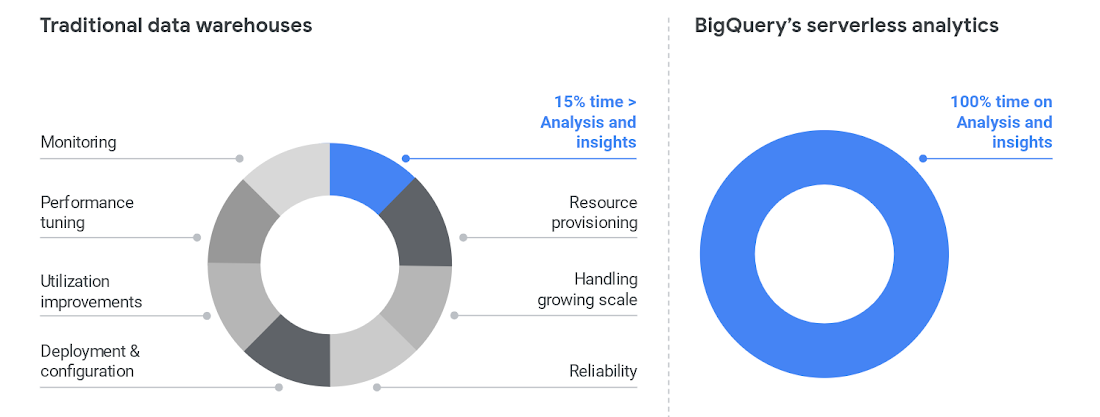
To cut time on managing a data warehouse, it helps to automate the system engineering work away from the analytics work, like BigQuery enables.
Once those functions are separated, the analytics work can take center stage and let users become less dependent on administrators. BigQuery also helps remove the user access issues that are common with legacy data warehouses. Once that happens, users can focus on building reports, exploring datasets, and sharing trusted results easily.
3. Legacy data warehouse costs make it harder to invest in strategy.
Like other on-prem systems, data warehouses adhere to the old-school model of paying for technology, with the associated hardware and licensing costs and ongoing systems engineering.
This kind of inefficient architecture drives more inefficiency. When the business is moving toward becoming data-driven, they’ll continue to ask your team for more data. But responding to those needs means you’ll run out of money pretty quickly.
Cloud offers much more cost flexibility, meaning you’re not paying for, or managing, the entire underlying infrastructure stack. Of course, it’s possible to simply port an inefficient legacy architecture into the public cloud.
To avoid that, we like to talk about total cost of ownership (TCO) for data warehouses, because it captures the full picture of how legacy technology costs and business agility aren’t matching up.
Moving to BigQuery isn’t just moving to cloud—it’s moving to a new cost model, where you’re cutting out that underlying infrastructure and systems engineering. You can get more detail on cloud data warehouse TCO comparisons from ESG.
4. A legacy data warehouse can’t flexibly meet business needs.
While overnight data operations used to be the norm, the global opportunities for businesses mean that a data warehouse now has to load streaming and batch data while also supporting simultaneous queries. Hardware is the main constraint for legacy systems as they struggle to keep up.
Moving your existing architecture into the cloud usually means moving your existing issues into the cloud, and we hear from businesses that doing so still doesn’t allow for real-time streaming.
That’s a key component for data analysts and users. Using a platform like BigQuery means you’re essentially moving your computational capabilities into the data warehouse itself, so it scales as more and more users are accessing analytics.
Unlimited compute is a pretty good way to help your business become digital. Instead of playing catch-up with user requests, you can focus on developing new features. Cloud brings added security, too, with cloud data warehouses able to do things like automatically replicate, restore and back up data, and offer ways to classify and redact sensitive data.
5. Legacy data warehouses lack built-in, mature predictive analytics solutions.
Legacy data warehouses are usually struggling to keep up with daily data needs, like providing reports to departments like finance or sales. It can be hard to imagine having the time and resources to start doing predictive analytics when provisioning and compute limits are holding your teams back.
We hear from customers that many of them are tasked with simplifying infrastructure and adding modern capabilities like AI, ML and self-service analytics for business users.
The best stories about digital transformation are those where the technology changes and business or cultural changes happen at the same time. One customer told us that because BigQuery uses a familiar SQL interface, they were actually able to shift the work of data analytics away from a small, overworked group of data scientists into the hands of many more workers.
Doing so also eliminated a lot of the siloed data lakes that had sprung up as data scientists extracted data one project at a time into various repositories to train ML models.
These large-scale computational possibilities save time and overhead, but also let businesses explore new avenues of growth. AI and ML are already changing the face of industries like retail, where predictive analytics can provide forecasting and other tasks to help the business make better decisions. BigQuery lets you take on sophisticated machine learning tasks without moving data or using a third-party tool.
We designed BigQuery so that our engineers deploy the resources needed for you to scale. It means your focus can change entirely toward meeting the needs the business has put forth, and bringing a lot more flexibility.
BigQuery is fully serverless and runs on underlying Google infrastructure, so it integrates with our ecosystem of data and analytics partner tools. This architecture means you’re continually getting the most up-to-date software stack—analytics that scale, real-time insights, and cutting-edge functionality that includes geospatial and machine learning right from the SQL interface.
Streamline your path to data warehouse modernization with BigQuery by learning about Google Cloud’s proven migration methodology and get started with your data warehouse by applying for our migration offer.
The Query Execution Graph: Your Key to Better BigQuery Analytics

3071
Of your peers have already read this article.
2:30 Minutes
The most insightful time you'll spend today!
BigQuery offers strong query performance, but it is also a complex distributed system with many internal and external factors that can affect query speed. When your queries are running slower than expected or are slower than prior runs, understanding what happened can be a challenge.
The query execution graph provides an intuitive interface for inspecting query execution details. By using it, you can review the query plan information in graphical format for any query, whether running or completed.
You can also use the query execution graph to get performance insights for queries. Performance insights provide best-effort suggestions to help you improve query performance. Since query performance is multi-faceted, performance insights might only provide a partial picture of the overall query performance.
Execution graph
When BigQuery executes a query job, it converts the declarative SQL statement into a graph of execution, broken up into a series of query stages, which themselves are composed of more granular sets of execution steps. The query execution graph provides a visual representation of the execution stages and shows the corresponding metrics. Not all stages are made equal. Some are more expensive and time consuming than others. The execution graph provides toggles for highlighting critical stages, which makes it easier to spot the potential performance bottlenecks in the query.
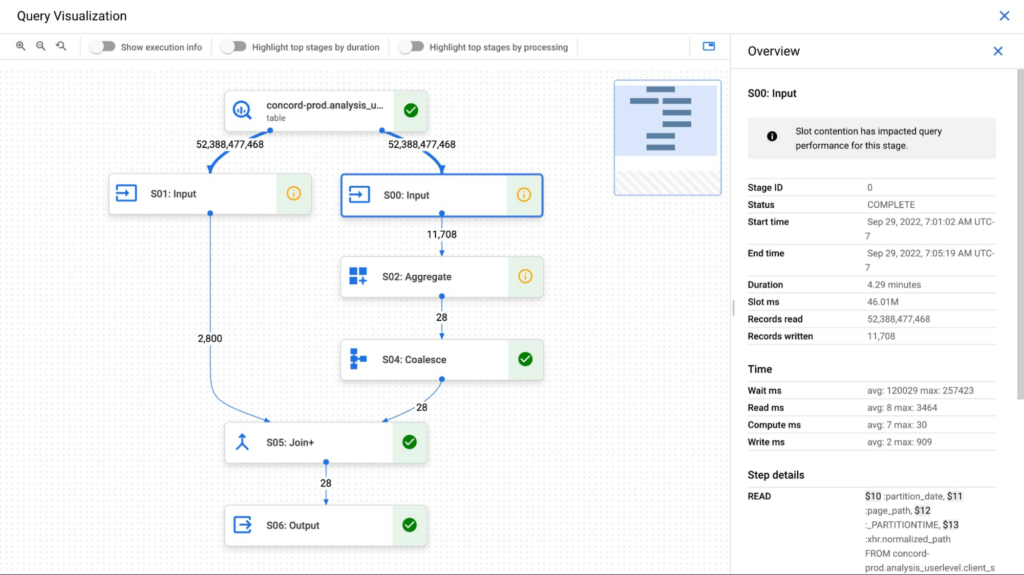
Query performance insights
In addition to the detailed execution graph BigQuery also provides specific insights on possible factors that might be slowing query performance.
Slot contention
When you run a query, BigQuery attempts to break up the work needed by your query into tasks. A task is a single slice of data that is input into and output from a stage. A single slot picks up a task and executes that slice of data for the stage. Ideally, BigQuery slots execute tasks in parallel to achieve high performance. Slot contention occurs when your query has many tasks ready for slots to start executing, but BigQuery can’t get enough available slots to execute them.
Insufficient shuffle quota
Before running your query, BigQuery breaks up your query’s logic into stages. BigQuery slots execute the tasks for each stage. When a slot completes the execution of a stage’s tasks, it stores the intermediate results in shuffle. Subsequent stages in your query read data from shuffle to continue your query’s execution. Insufficient shuffle quota occurs when you have more data that needs to get written to shuffle than you have shuffle capacity.
Data input scale change
Getting this performance insight indicates that your query is reading at least 50% more data for a given input table than the last time you ran the query and hence experiencing query slowness. You can use table change history to see if the size of any of the tables used in the query has recently increased.
What’s next?
We continue to work on improving the visualization of the graph. We are working on adding additional metrics to each step and adding more performance insights that will make query diagnosis significantly easier. We are just getting started.
More Relevant Stories for Your Company



Explore the Innovations and Architecture Powering Spanner and BigQuery
Previously, databases had architectures with tightly coupled storage and compute. This resulted in higher latency, and with faster networks these constraints no longer surface. With Google Cloud's BigQuery and CloudSpanner, the storage and compute architecture have been separated, allowing for better scalability and availability to address businesses' high throughput data

Why and How to Migrate to Google BigQuery
Over the past few decades, organizations have mastered the science of data warehousing. They have increasingly applied descriptive analytics to large quantities of stored data, gaining insight into their core business operations. Conventional Business Intelligence (BI), which focuses on querying, reporting, and Online Analytical Processing, might have been a differentiating factor

What Drives Your Organization to be Data-driven?
Every organization has its own unique data culture and capabilities. Yet each is expected to use technology trends and solutions in the same way as everyone else. Your organization may be built on years of legacy applications, you may have developed a considerable amount of expertise and knowledge, yet you

Boost Database Performance with AlloyDB Index Advisor: The Ultimate Optimization Tool
Intro One of the time consuming tasks for DBAs is to maximize query performance. To optimize slow-running queries, they often have to do detailed analysis, understand optimizer plans, and go through a lot of trial and error before getting to the best set of indexes that help with improved query
