





World’s Largest Online-only Grocery Retailer Uses AI to Figure Which Customers Need Most Attention

9475
Of your peers have already read this article.
4:20 Minutes
The most insightful time you'll spend today!
In the United Kingdom, the popularity of online grocery shopping is expected to surge from about 6% of the market today to 9% by 2021, according to market research firm Mintel. One of the pioneers of online-only grocery retailing is Ocado, based in Hatfield, Hertfordshire in the U.K. Since starting commercial deliveries in 2002, the company has grown to 600,000 active customers, 260,000 weekly orders, and £1.39 billion in annual revenue.
Ocado takes supermarket trips out of the equation by enabling shoppers to purchase items online through its convenient web and mobile applications. Items are then picked and packed in automated warehouses and shipped directly to customers in a one-hour time slot of their choosing. Ocado’s delivery punctuality is 95%, order accuracy is 99%, and its service footprint now reaches more than 70% of the U.K. population.
“Google Cloud Platform gives us the flexibility and performance to tackle the large and complex data challenges unique to our business.”
—Paul Clarke, Chief Technology Officer, Ocado
The company achieved its success by building in-house almost all the technology and automation that powers its end-to-end e-commerce, fulfillment, and logistics platform. Ocado also developed a new platform, the Ocado Smart Platform (OSP), which offers large brick-and-mortar grocery retailers around the world access to a best-in-class solution for online grocery.
Democratizing machine learning
The shopping journey for online grocery retailing differs significantly from other e-businesses. Customers often buy dozens of products at once, a single household may have multiple buyers using multiple devices, and product shelf life may only be a couple of days.
“We often say that having built an end-to-end platform that can do online grocery scalably and profitably, we can do other forms of online retail; but the reverse does not necessarily follow,” says Paul Clarke, Chief Technology Officer at Ocado. “Google Cloud Platform gives us the flexibility and performance to tackle the large and complex data challenges unique to our business.”
The Ocado business model takes advantage of consumers’ shifting preferences and the links between digital technology and shopping experiences.
“Google Cloud Machine Learning Engine gives us the agility we need. Our developers were able to try out TensorFlow and see firsthand the benefits of machine learning in the cloud.”
—Paul Clarke, Chief Technology Officer, Ocado
The company has been building machine learning into its systems for over five years. Until recently, Ocado machine learning applications required specialist data scientists, typically with PhDs in machine learning, who would build these solutions from the ground up. It also required the specialist who set up the system and costly on-premises infrastructure to train and run these systems.
However, working with Google as a private alpha testing site for Google Cloud Machine Learning Engine accelerated its adoption of artificial intelligence (AI).
“We’ve been talking about how the cloud could democratize AI for some time,” says Paul. “Google Cloud Machine Learning Engine gives us the agility we need. Our developers were able to try out TensorFlow and see firsthand the benefits of machine learning in the cloud.”
TensorFlow is an open source software library for machine learning developed by the Google Brain team. Ocado developers, engineers, and data scientists now use TensorFlow for many of their machine learning projects. They deploy the models they build on Google Cloud Machine Learning Engine, which lets them train models faster across servers, desktop computers, and mobile devices through a single application program interface (API). Additionally, Google Cloud Machine Learning Engine integrates easily with the other Google Cloud Platform products used widely at Ocado.
What do customers really want?
One of the first TensorFlow models Ocado created was a machine learning algorithm that tags and categorizes customer emails and then prioritizes them for response.
The contact center receives thousands of emails each day and Ocado wanted to automate determining which ones needed to be answered immediately and which ones could wait.
For example, a first-time customer expressing their delight in using Ocado doesn’t need to be responded to with the same urgency as a customer who is missing an item from their order or who won’t be home to receive the delivery.
“Enabling agents to respond without having to sort through less-urgent emails improves Ocado’s responsiveness and customer service.”
—James Donkin, General Manager, Ocado
“We get a lot of emails from customers saying, ‘Our service was great,’ or ‘The driver was very courteous,'” says James Donkin, General Manager, Ocado. “But when issues like weather or road conditions potentially affect delivery, we often get surges of urgent questions. Enabling agents to respond without having to sort through less-urgent emails improves Ocado’s responsiveness and customer service.”
Using Google Cloud Machine Learning Engine, TensorFlow, and a large data set culled from several years’ worth of manually categorized customer emails, Ocado experimented on which kind of neural network architecture would best prioritize emails. After testing its models, Ocado implemented the highest-performing one and has been able to respond to urgent messages four times faster. The company also discovered that 7% of its emails don’t require a response at all, which means call center representatives now have more time to devote to higher priority messages.
“Without Google Cloud Machine Learning Engine, it would have been a lot harder to succeed on a project like email classification,” says Roland Plaszowski, who has recently managed several big data projects and initiatives at Ocado.
“Even if we invested significantly in infrastructure, it would be difficult to manage because of the computational intensity. It’s challenging and expensive to run machine learning projects at the same time without infrastructure that you can scale easily.”
Ocado also uses machine learning to predict customer behavior and improve experiences. By analyzing order data, Ocado makes shopping as frictionless as possible. For example, the ordering system can pre-populate customers’ shopping carts with items they are most likely to purchase, remind customers about items they may have forgotten, and notify them of multi-buy offers they haven’t completed, for example, only buying one of a buy one, get one free offer. Based on machine learning from previous purchase data, the Ocado system can also offer new products that are likely to delight customers.
“You will regularly see items that are more personally relevant to you instead of items that are being promoted more generally,” says James. “I’m a vegetarian, so I’m offered specials for vegetarian products that I normally buy and new ones that I’ve never bought. I’m also less likely to see things that I’m not interested in.”
Machines and machine learning
Within the Internet of Things (IoT), Ocado is looking to enhance its warehouse robots with machine learning. An integral part of the OSP, thousands of robots continually stream data into Google Cloud Storage and Google BigQuery.
Ocado data scientists apply machine learning to create a type of swarm intelligence that enables warehouse robots to work cooperatively to achieve a common goal. Projects include modules to search robot telemetry data, such as whether a battery pack is operating within standard tolerances or whether firmware has been successfully loaded, and use it to optimize maintenance schedules or detect patterns in wear and tear.
“Another challenge we’re looking at is how to embed machine learning directly into robots so they become smarter in terms of self-testing, exception handling, and error recovery,” says Paul. “This is a challenging combination of IoT, data analytics, and machine learning that we believe Google BigQuery and Google Cloud Machine Learning are particularly well suited to helping Ocado achieve.”
The company also discovered that 7% of its emails don’t require a response at all, which means call center representatives now have more time to devote to higher priority messages.
Scaling for new business
Scalability is also a major reason behind some of Ocado’s cloud initiatives, including the migration of all its on-premises data to the cloud. Ocado wanted to improve customer experiences, empower business teams with greater insight, and reduce IT overhead, so it consolidated onto Google Cloud Platform.
“The old databases just weren’t fast enough,” says Paul. “We needed a solution that could scale with the amount of data we generate and how we use it. Google Cloud Storage and Google BigQuery now provide the backbone, from a data point of view, for the Ocado Smart Platform.”
Ocado estimates its business, product, and transaction data is approaching two petabytes. Combining customer and supply chain data helps both internal Ocado operations and the company’s ambitions to commercialize OSP.
“When compared with other options for expansion internationally, selling OSP as a managed service lets us turn companies that could have been competitors into customers,” says Paul. “We want to build OSP once and then turn it on for multiple business-to-business customers.”
Each time Ocado adds a new hosting customer to OSP, it will launch a customized instance to fit that customer’s requirements. The capacity and performance of each new OSP instance must be able to scale quickly as the backend platform for established retailers with large numbers of products, customers, and transactions.
Ocado’s first OSP customer, Morrisons, is already benefiting from this first-of-a kind solution. Morrisons is one of the UK’s four largest supermarkets and uses OSP to power its online retail business. Using Google Cloud Platform, Ocado has stored, processed, and analyzed terabytes of Morrisons’ data using a dedicated data lake and Google BigQuery.
In addition to using Google Cloud Platform for OSP, Ocado also adopted it for its own online grocery retail business operation. Ocado originally used the Apache Spark and Apache Hadoop open-source frameworks on Google Compute Engine for its data platform. Moving to Google BigQuery frees Ocado business analysts from the complex query setup and workflows associated with Spark and Hadoop. Plus, it lets Ocado share data analytics with suppliers and partners.
Google BigQuery is well integrated with TensorFlow on Google Cloud Machine Learning Engine and Google Cloud Dataproc, the Apache Spark and Apache Hadoop service that lets Ocado use open source data tools for batch processing, querying, streaming, and machine learning. Google Cloud Dataflow and Google Cloud Dataproc handle cluster management, and provide an easy-to-use framework so developers can spend less time and money on administration and more time on delivering valuable business features.
Switching from Hadoop to Google BigQuery revealed a series of cost and performance improvements. For example, Ocado no longer needed to decide how many instances to bring up in a cluster or wait for the instances to spin up. Google handled everything.
“We simply ran our queries and paid for the resources that we use,” adds Roland. “One big win with Google BigQuery is we don’t have to do maintenance. Best of all, we saw Google BigQuery outperform our Hadoop cluster by over 80 times on our largest dataset, and for only two-thirds the cost.”
BigQuery Explainable AI for Demystifying the Inner Workings of ML Models. Now GA!

6574
Of your peers have already read this article.
2:00 Minutes
The most insightful time you'll spend today!
Explainable AI (XAI) helps you understand and interpret how your machine learning models make decisions. We’re excited to announce that BigQuery Explainable AI is now generally available (GA). BigQuery is the data warehouse that supports explainable AI in a most comprehensive way w.r.t both XAI methodology and model types. It does this at BigQuery scale, enabling millions of explanations within seconds with a single SQL query.
Why is Explainable AI so important? To demystify the inner workings of machine learning models, Explainable AI is quickly becoming an essential and growing need for businesses as they continue to invest in AI and ML. With 76% of enterprises now prioritizing artificial intelligence (AI) and machine learning (ML) over other initiatives in 2021 IT budgets, the majority of CEOs (82%) believe that AI-based decisions must be explainable to be trusted according to a PwC survey.
While the focus of this blogpost is on BigQuery Explainable AI, Google Cloud provides a variety of tools and frameworks to help you interpret models outside of BigQuery, such as with Vertex Explainable AI, which includes AutoML Tables, AutoML Vision, and custom-trained models.
So how does Explainable AI in BigQuery work exactly? And how might you use it in practice?
Two types of Explainable AI: global and local explainability
When it comes to Explainable AI, the first thing to note is that there are two main types of explainability as they relate to the features used to train the ML model: global explainability and local explainability.
Imagine that you have a ML model that predicts housing price (as a dollar amount), based on three features: (1) number of bedrooms, (2) distance to the nearest city center, and (3) construction date.
Global explainability (a.k.a. global feature importance) describes the features’ overall influence on the model and helps you understand if a feature had a greater influence than other features over the model’s predictions. For example, global explainability can reveal that the number of bedrooms and distance to city center typically has a much stronger influence than the construction date on predicting housing prices. Global explainability is especially useful if you have hundreds or thousands of features and you want to determine which features are the most important contributors to your model. You may also consider using global explainability as a way to identify and prune less important features to improve the generalizability of their models.
Local explainability (a.k.a. feature attributions) describes the breakdown of how each feature contributes towards a specific prediction. For example, if the model predicts that house ID#1001 has a predicted price of $230,000, local explainability would describe a baseline amount (e.g. $50,000) and how each of the features contributes on top of the baseline towards the predicted price. For example, the model may say that on top of the baseline of $50,000, having 3 bedrooms contributed an additional $50,000, close proximity to the city center added $100,000, and construction date of 2010 added $30,000, for a total predicted price of $230,000. In essence, understanding the exact contribution of each feature used by the model to make each prediction is the main purpose of local explainability.
What ML models does BigQuery Explainable AI apply to?
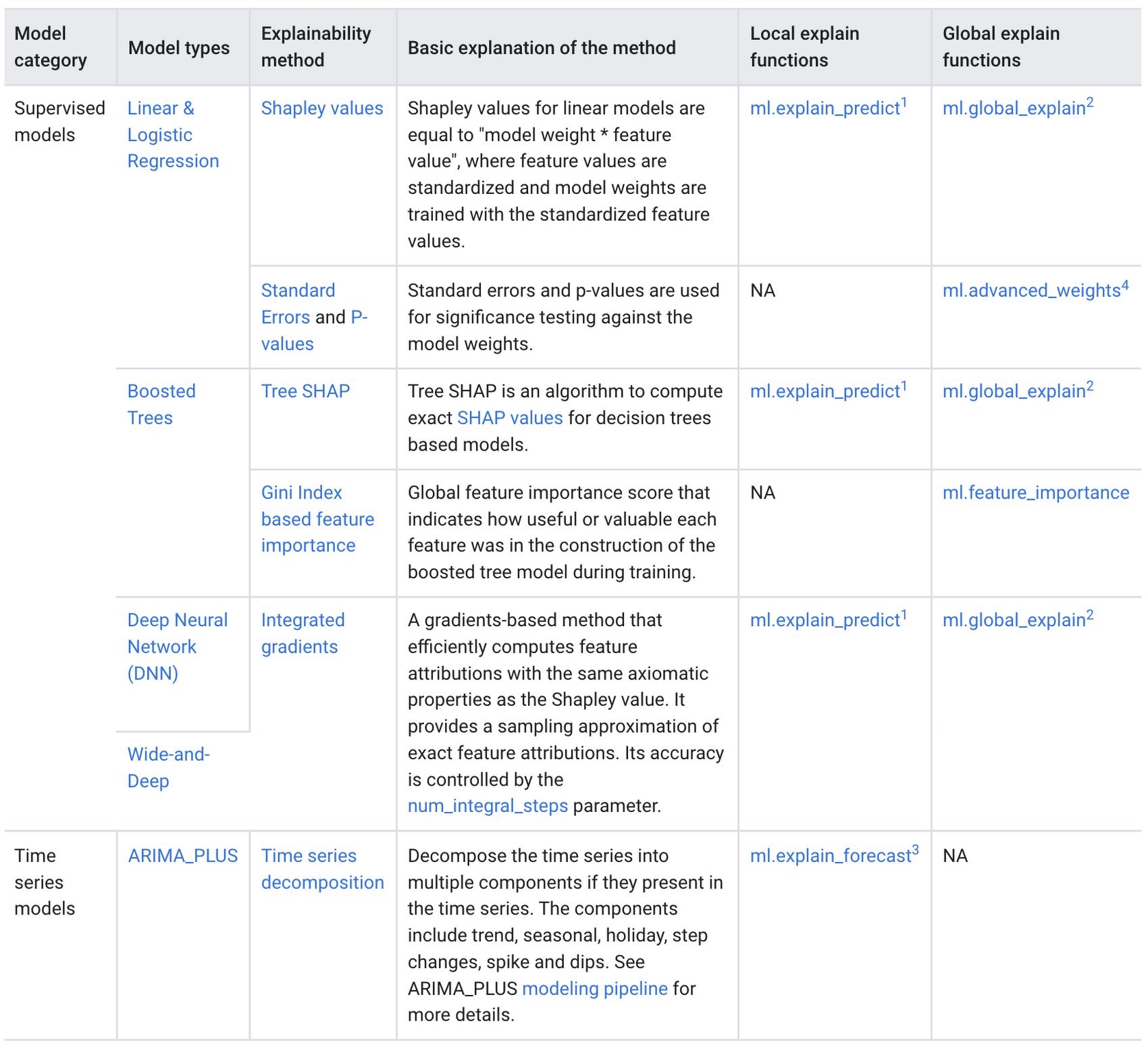
BigQuery Explainable AI applies to a variety of models, including supervised learning models for IID data and time series models. The documentation for BigQuery Explainable AI provides an overview of the different ways of applying explainability per model. Note that each explainability method has its own way of calculation (e.g. Shapley values), which are covered more in-depth in the documentation.
Examples with BigQuery Explainable AI
In this next section, we will show three examples of how to use BigQuery Explainable AI in different ML applications:
Regression models with BigQuery Explainable AI
Let’s use a boosted tree regression model to predict how much a taxi cab driver will receive in tips for a taxi ride, based on features such as number of passengers, payment type, total payment and trip distance. Then let’s use BigQuery Explainable AI to help us understand how the model made the predictions in terms of global explainability (which features were most important?) and local explainability (how did the model arrive at each prediction?).
The taxi trips dataset comes from the BigQuery public datasets and is publicly available in the table: bigquery-public-data.new_york_taxi_trips.tlc_yellow_trips_2018.
First, you can train a boosted tree regression model.
CREATE OR REPLACE MODEL bqml_tutorial.taxi_tip_regression_modelOPTIONS (model_type='boosted_tree_regressor',input_label_cols=['tip_amount'],max_iterations = 50,tree_method = 'HIST',subsample = 0.85,enable_global_explain = TRUE) ASSELECTvendor_id,passenger_count,trip_distance,rate_code,payment_type,total_amount,tip_amountFROM`bigquery-public-data.new_york_taxi_trips.tlc_yellow_trips_2018`WHERE tip_amount >= 0LIMIT 1000000
Now let’s do a prediction using ML.PREDICT, which is the standard way in BigQuery ML to make predictions without explainability.
SELECT *FROMML.PREDICT(MODEL bqml_tutorial.taxi_tip_regression_model,(SELECT"0" AS vendor_id,1 AS passenger_count,CAST(5.85 AS NUMERIC) AS trip_distance,"0" AS rate_code,"0" AS payment_type,CAST(55.56 AS NUMERIC) AS total_amount))

But you might wonder—how did the model generate this prediction of ~11.077?
BigQuery Explainable AI can help us answer this question. Instead of using ML.PREDICT, you use ML.EXPLAIN_PREDICT with an additional optional parameter top_k_features. ML.EXPLAIN_PREDICT extends the capabilities of ML.PREDICT by outputting several additional columns that explain how each feature contributes to the predicted value. In fact, since ML.EXPLAIN_PREDICT includes all the output from ML.PREDICT anyway, you may want to consider using ML.EXPLAIN_PREDICT every time instead.
SELECT *FROMML.EXPLAIN_PREDICT(MODEL bqml_tutorial.taxi_tip_regression_model,(SELECT"0" AS vendor_id,1 AS passenger_count,CAST(5.85 AS NUMERIC) AS trip_distance,"0" AS rate_code,"0" AS payment_type,CAST(55.56 AS NUMERIC) AS total_amount),STRUCT(6 AS top_k_features))
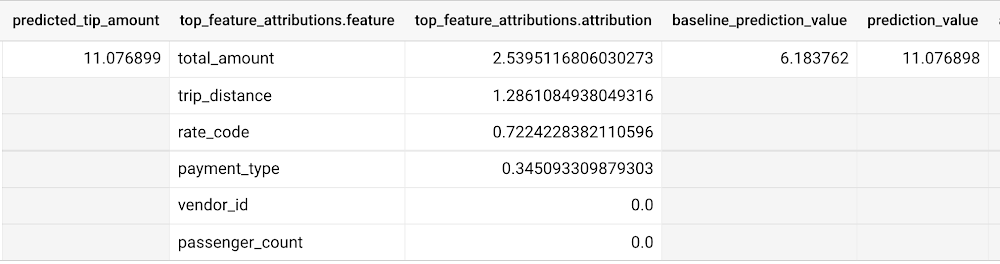
The way to interpret these columns is:
Σfeature_attributions + baseline_prediction_value = prediction_value
Let’s break this down. The prediction_value is ~11.077, which is simply the predicted_tip_amount. The baseline_prediction_value is ~6.184, which is the tip amount for an average instance. top_feature_attributions indicates how much each of the features contributes towards the prediction value. For example, total_amount contributes ~2.540 to the predicted_tip_amount.
ML.EXPLAIN_PREDICT provides local feature explainability for regression models. For global feature importance, see the documentation for ML.GLOBAL_EXPLAIN.
Classification models with BigQuery Explainable AI
Let’s use a logistic regression model to show you an example of BigQuery Explainable AI with classification models. We can use the same public dataset as before: bigquery-public-data.new_york_taxi_trips.tlc_yellow_trips_2018.
Train a logistic regression model to predict the bracket of the percentage of the tip amount out of the taxi bill.
CREATE OR REPLACE MODEL bqml_tutorial.taxi_tip_classification_modelOPTIONS(model_type='logistic_reg',input_label_cols=['tip_bucket'],enable_global_explain=true) ASSELECTvendor_id,passenger_count,trip_distance,rate_code,payment_type,total_amount,CASEWHEN tip_amount > total_amount*0.20 THEN '20% or more'WHEN tip_amount > total_amount*0.15 THEN '15% to 20%'WHEN tip_amount > total_amount*0.10 THEN '10% to 15%'ELSE '10% or less'END AS tip_bucketFROM`bigquery-public-data.new_york_taxi_trips.tlc_yellow_trips_2018`WHERE tip_amount >= 0LIMIT 1000000
Next, you can run ML.EXPLAIN_PREDICT to get both the classification results and the additional information for local feature explainability. For global explainability, you can use ML.GLOBAL_EXPLAIN. Again, since ML.EXPLAIN_PREDICT includes all the output from ML.PREDICT anyway, you may want to consider using ML.EXPLAIN_PREDICT every time instead.
SELECT *FROMML.EXPLAIN_PREDICT(MODEL bqml_tutorial.taxi_tip_classification_model,(SELECT"0" AS vendor_id,1 AS passenger_count,CAST(5.85 AS NUMERIC) AS trip_distance,"0" AS rate_code,"0" AS payment_type,CAST(55.56 AS NUMERIC) AS total_amount),STRUCT(6 AS top_k_features))
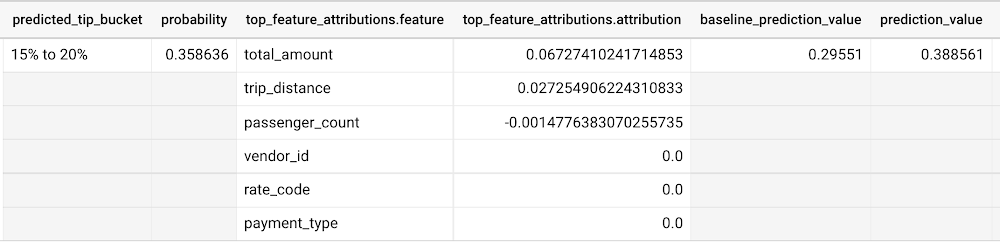
Similar to the regression example earlier, the formula is used to derive the prediction_value:
Σfeature_attributions + baseline_prediction_value = prediction_value
As you can see in the screenshot above, the baseline_prediction_value is ~0.296. total_amount is the most important feature in making this specific prediction, contributing ~0.067 to the prediction_value, though followed by trip_distance. The feature passenger_count contributes negatively to prediction_value by -0.0015. The features vendor_id, rate_code, and payment_type did not seem to contribute much to the prediction_value.
You may wonder why the prediction_value of ~0.389 doesn’t equal the probability value of ~0.359. The reason is that unlike for regression models, for classification models, prediction_value is not a probability score. Instead, prediction_value is the logit value (i.e., log-odds) for the predicted class, which you could separately convert to probabilities by applying the softmax transformation to the logit values. For example, a three-class classification has a log-odds output of [2.446, -2.021, -2.190]. After applying the softmax transformation, the probability of these class predictions is [0.9905, 0.0056, 0.0038].
Time-series forecasting models with BigQuery Explainable AI
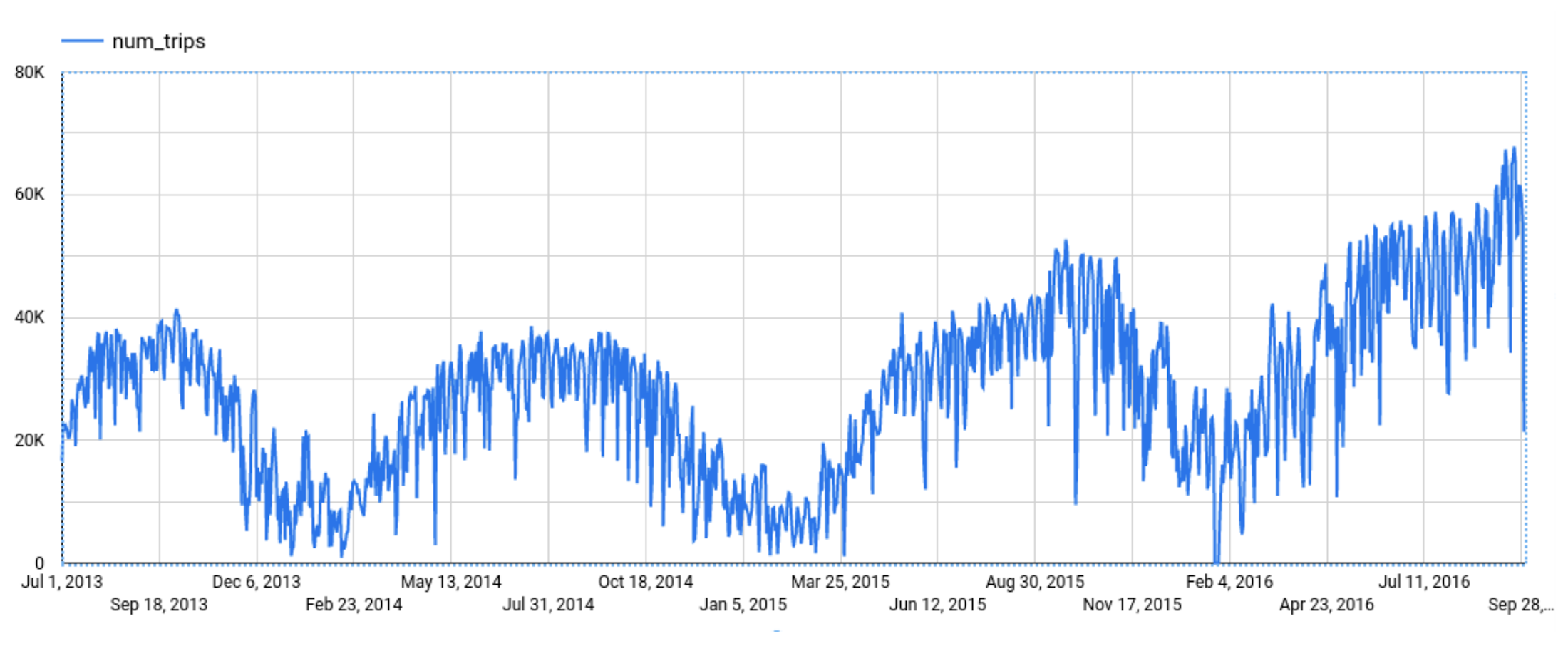
Explainable AI for forecasting provides more interpretability into how the forecasting model came to its predictions. Let’s go through an example of forecasting the number of bike trips in NYC using the new_york.citibike_trips public data in BigQuery.
You can train a time-series model ARIMA_PLUS:
CREATE OR REPLACE MODEL bqml_tutorial.nyc_citibike_arima_modelOPTIONS(model_type = 'ARIMA_PLUS',time_series_timestamp_col = 'date',time_series_data_col = 'num_trips',holiday_region = 'US') ASSELECTEXTRACT(DATE from starttime) AS date,COUNT(*) AS num_tripsFROM`bigquery-public-data.new_york.citibike_trips`GROUP BY dateNext, you can first try forecasting without explainability using ML.FORECAST:SELECT*FROMML.FORECAST(MODEL bqml_tutorial.nyc_citibike_arima_model,STRUCT(365 AS horizon, 0.9 AS confidence_level))
This function outputs the forecasted values and the prediction interval. Plotting it in addition to the input time series gives the following figure.
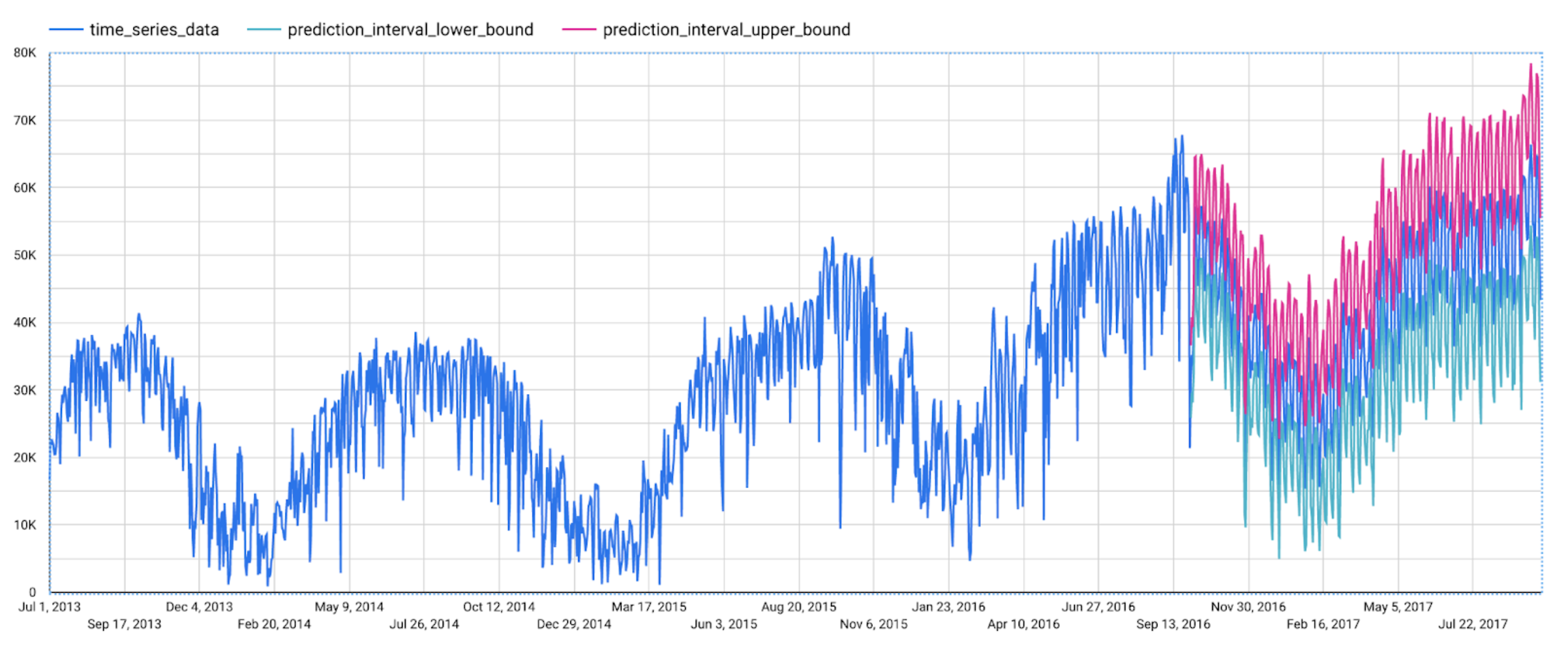
But how does the forecasting model arrive at its predictions? Explainability is especially important if the model ever generates unexpected results.
With ML.EXPLAIN_FORECAST, BigQuery Explainable AI provides extra transparency into the seasonality, trend, holiday effects, level (step) changes, and spikes and dips outlier removal. In fact, since ML.EXPLAIN_FORECAST includes all the output from ML.FORECAST anyway, you may want to consider using ML.EXPLAIN_FORECAST every time instead.
SELECT*FROMML.EXPLAIN_FORECAST(MODEL bqml_tutorial.nyc_citibike_arima_model,STRUCT(365 AS horizon, 0.9 AS confidence_level))
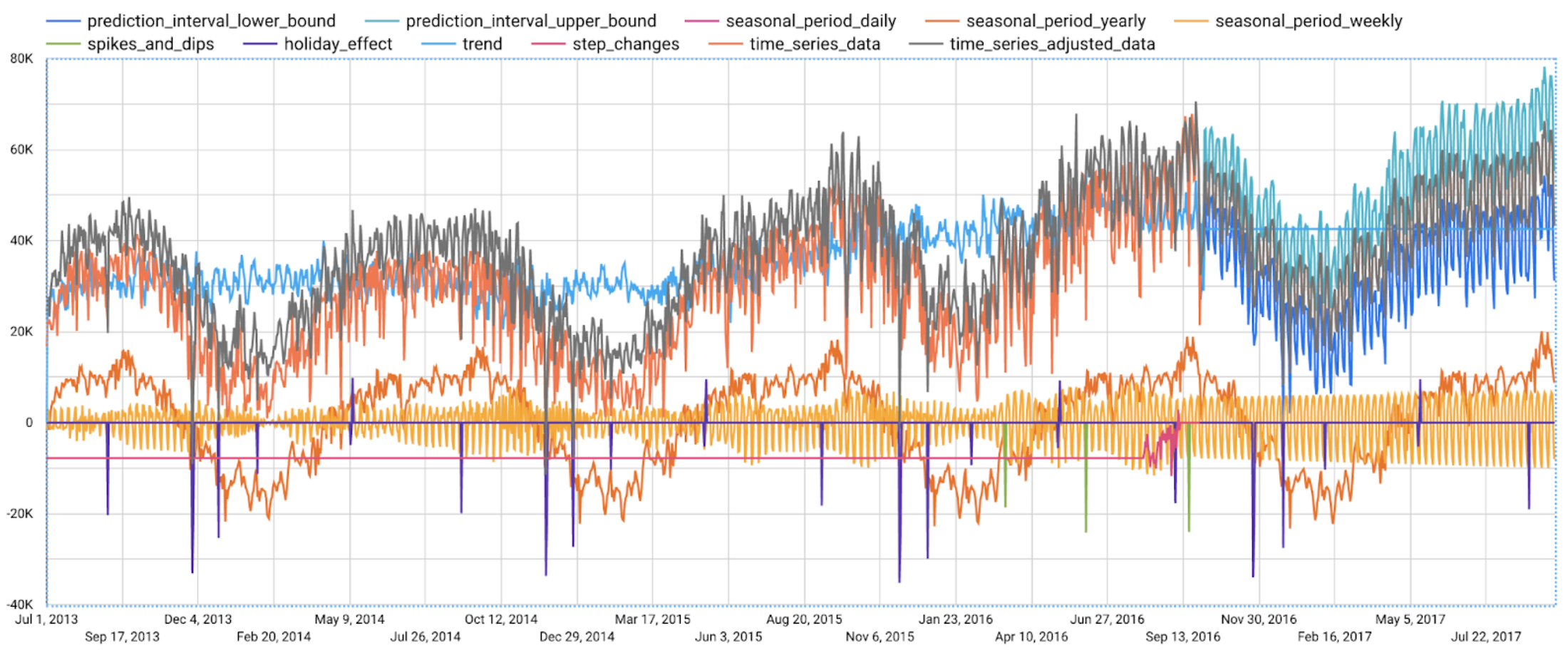
Compared to the previous figure which only shows the forecasting results, this figure shows much richer information to explain how the forecast is made.
First, it shows how the input time series is adjusted by removing the spikes and dips anomalies, and by compensating the level changes. That is:
time_series_adjusted_data = time_series_data - spikes_and_dips - step_changes
Second, it shows how the adjusted input time series is decomposed into different components such as both weekly and yearly seasonal components, holiday effect component and trend component. That is
time_series_adjusted_data = trend + seasonal_period_yearly + seasonal_period_weekly + holiday_effect + residual
Finally, it shows how these components are forecasted separately to compose the final forecasting results. That is:
time_series_data = trend + seasonal_period_yearly + seasonal_period_weekly + holiday_effect
For more information on these time series components, please see the documentation here.
Conclusion
With the GA of BigQuery Explainable AI, we hope you will now be able to interpret your machine learning models with ease.
Thanks to the BigQuery ML team, especially Lisa Yin, Jiashang Liu, Amir Hormati, Mingge Deng, Jerry Ye and Abhinav Khushraj. Also thanks to the Vertex Explainable AI team, especially David Pitman and Besim Avci.
Gen App Builder: Create Next-Level AI Search & Conversational Experiences

1272
Of your peers have already read this article.
3:00 Minutes
The most insightful time you'll spend today!
If you’ve been exploring recently-launched consumer generative AI tools like Bard and thinking about how to build similar experiences for your business, Generative AI App Builder, or Gen App Builder for short, is here to get you started.
Gen App Builder is part of Google Cloud’s recently announced generative AI offerings and lets developers, even those with limited machine learning skills, quickly and easily tap into the power of Google’s foundation models, search expertise, and conversational AI technologies to create enterprise-grade generative AI applications.
“Google Cloud’s leading AI technology enables STARZ customers to discover more relevant content, increasing engagement with, and the likelihood of completing the content served to them,” says Robin Chacko, EVP Direct-to-Consumer, STARZ. “We’re excited about how generative AI-powered search will help users find the most relevant content even easier and faster.”
Gen App Builder is exciting because unlike most existing generative AI offerings for developers, it offers an orchestration layer that abstracts the complexity of combining various enterprise systems with generative AI tools to create a smooth, helpful user experience. Gen App Builder provides step-by-step orchestration of search and conversational applications with pre-built workflows for common tasks like onboarding, data ingestion, and customization, making it easy for developers to set up and deploy their apps. With Gen App Builder developers can:
- Build in minutes or hours. With access to Google’s no-code conversational and search tools powered by foundation models, organizations can get started with a few clicks and quickly build high-quality experiences that can be integrated into their applications and websites.
- Combine the power of foundation models with information retrieval to find relevant, personalized information. Enterprises can build apps that understand user intent via natural language, and surface the right information with associated citations and attributions from a company’s public and private data. They can also fully control what data their applications access and the content or topics they want to address.
- Build multimodal apps that can respond with text, images, and other media. Gen App Builder supports not just text, but also other modalities such as images and videos. It allows developers to build apps using a combination of text and images as inputs to find information across documents, photos, and video content, enabling richer customer interactions.
- Combine natural conversations with structured flows. Developers can granularly blend the output of foundation models with controls to ground answers in enterprise content, and step-by-step conversation orchestration to guide customers to the right answers.
- Provide the ability to transact and connect to third party apps and services. Gen App Builder makes it simple to create digital assistants and bots that not only serve content, but also connect to purchasing and provisioning systems to enable transactions from the conversational UI, and escalate customer conversations to a human agent when the context demands.
A new generation of conversational AI experiences and assistants
Consumers of enterprise applications expect to interact with technology in a seamless, conversational way to quickly find the information they need and act on it. Gen App Builder can help reinvent these customer and employee experiences by ingesting large, complex datasets that are specific to your company–from websites, documents, and transactional systems like billing and inventory, to emails, chat conversations, and more. These AI-powered apps can synthesize information across all of these sources to provide specific, actionable responses, using only the data you have provided.
Some of the most popular uses are in customer service, where generative apps can contribute to increasing revenue, customer satisfaction, and customer loyalty. For example, if a retail customer reaches out to modify an order, a virtual agent can help them change it to another product. The customer doesn’t even need to provide the new product name—they can just upload an image and let the agent guide them through the rest. Watch this demo to see how a retail chatbot can use multimodal capabilities to help a consumer navigate various options on the website, including giving the customer ideas on how to use the product and even helping them complete the purchase with the ability to transact within the conversational UI. This scenario could apply to multiple industries and use cases, ranging from consumer goods and public services, to finance and internal corporate systems like intranets.
Combining the power of Google-quality search with foundation models
Finding the right information from data across the organization is a critical requirement within any enterprise. Yet it can be challenging to build high-quality enterprise search experiences with existing tools. Current systems struggle to understand user intent, are difficult to implement and customize, and don’t provide a high-quality user experience.
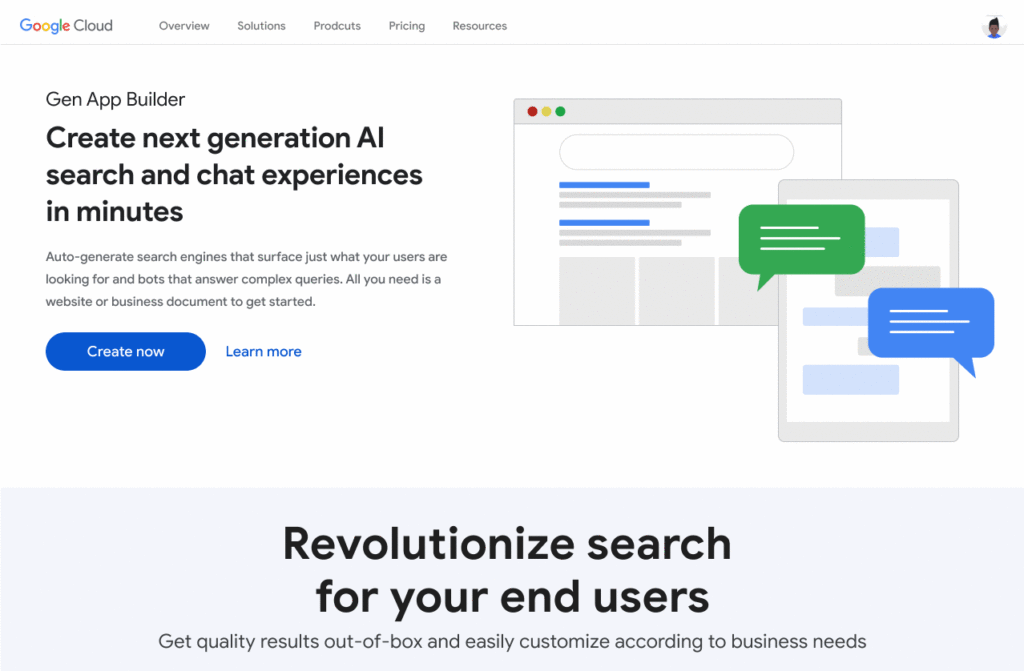
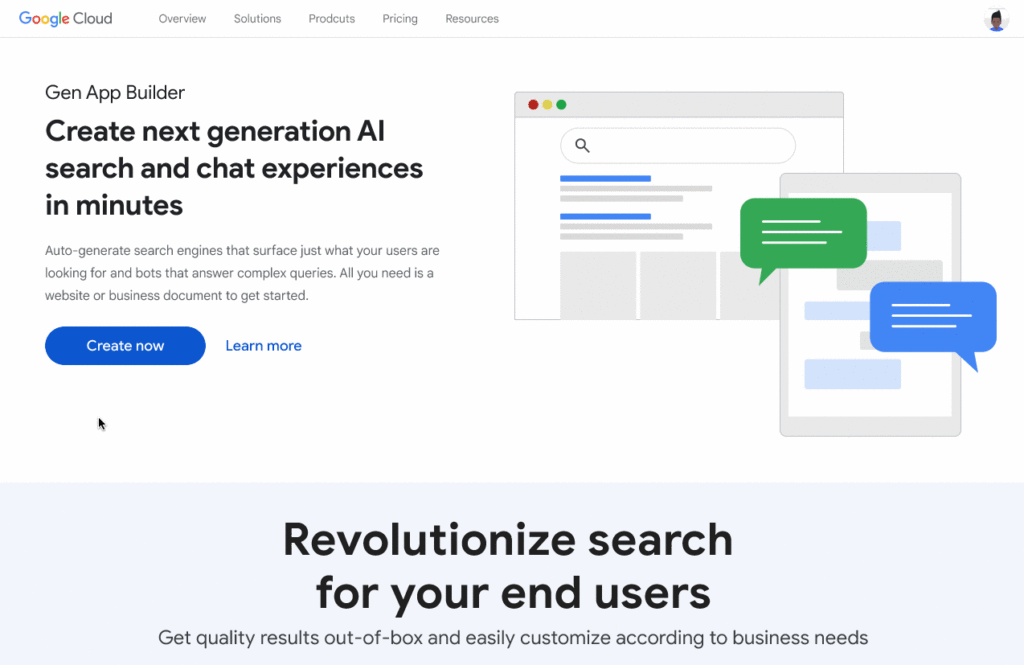
One of the most exciting features of Gen App Builder is the ability to combine the power of Google-quality search with generative AI to help enterprises find the most relevant and personalized information when they need it. With Gen App Builder, enterprises can build conversational search experiences across their public and private data in minutes or hours with no coding experience.
Enabling multimodal search across text, images and video within the enterprise is a key aspect of the search experiences in Gen App Builder. In addition to providing high-quality search results, Gen App Builder can conveniently summarize the results and provide corresponding citations in a natural, human-like fashion. Gen App Builder also automatically extracts key information from the data and enables personalized results for users. Watch this demo to see how these capabilities can come together to transform the search experience for employees at a financial services firm. The ability to integrate Google-quality search within the enterprise’s applications means they can enjoy a new level of data utilization, drive increased process efficiencies, and provide delightful experiences to their employees and customers.
“Customers have been shopping at Macy’s for generations. Being able to deliver 360° personalization and contextual recommendations will help ensure that Macy’s is still providing future generations of shoppers with a seamless, exceptional experience,” said Bennett Fox-Glassman, Senior Vice-President, Customer Journey, Macy’s. “We’ve already realized an increase in revenue per visit and conversion rates had great success using Google Cloud’s AI technology and are looking forward to exploring how these latest announcements bring together Natural Language Processing and Generative AI capabilities to deliver next-gen search and conversational experiences for our customers.”
The ability to intuitively interact with complex data across a variety of sources allows organizations to better serve their customers and deliver more relevant offerings. Combined with conversational and fulfillment abilities, the potential for improving customer engagement and employee productivity is immense. We’re excited to see how developers and enterprises use a mix of these capabilities to power new experiences and revenue opportunities.
If you’re interested in a closer look at the Gen App Builder, tune into this session at the Data Cloud & AI Summit. Take a step forward to getting hands-on and join the waitlist for our trusted tester program. And finally, bookmark our generative AI landing page to keep abreast of the latest news, updates and possibilities from this exciting new world of Gen Apps.
New ML-Powered API Abuse Detection

1585
Of your peers have already read this article.
3:30 Minutes
The most insightful time you'll spend today!
API security incidents are increasingly common and disruptive. With the growth of API traffic, enterprises across the world are also experiencing an uptick in malicious API attacks, making API security a heightened priority. According to our latest API Security Research Report, 50% of organizations surveyed have experienced an API security incident in the past 12 months and of those, 77% delayed the rollout of a new service or application.
At the RSA Conference 2023 today, we’re making it faster and easier to help detect API abuse incidents with the introduction of Advanced API Security Machine Learning powered abuse-detection dashboards. Our newly introduced Machine Learning models are trained to detect business logic attacks.
These types of attacks are notoriously hard to identify, and target APIs tied to intellectual property, business processes, or sensitive information, such as user data, listing of goods, or crediting accounts. These APIs must be accessible to provide business value, but have also become targets for attackers.
API security incidents can have a considerable impact on an organization’s operations and its bottom line. In June 2022, Imperva released a report titled Quantifying the Cost of API Insecurity, which estimates that lack of secure APIs could result in an average annual API-related total global cyber loss of between $41 billion to $75 billion annually. Furthermore, according to IBM’s 2022 Cost of a Data Breach Report, the average cost of a data breach is $4.35 million. It’s vital that organizations detect and mitigate API abuse incidents early to prevent prolonged fiscal and reputational damage to the business.
However, business logic attacks are harder to detect using static security policies, which allows attackers to manipulate legitimate functionality to achieve a malicious goal without triggering any static security alerts. For example, if a malicious actor gains control of a server and makes subtle changes, the shift in activity patterns of the server is generally undetectable to most monitoring tools. However, in this scenario, the Advanced API Security’s ML-powered API abuse detection model can help differentiate between legitimate and deviant traffic and immediately notify key stakeholders to act quickly and minimize blast radius of the problem.
The ML models that power API abuse detection have been trained and used by Google’s internal teams to help protect our public-facing APIs. The models rely on years of learning and best practices and are now available to all Apigee Advanced API Security customers.
Another challenge in detecting API abuse incidents is the volume of alerts. To reduce the risk of missing key security incidents, many static rules that detect less sophisticated attacks are incredibly sensitive: They generate a high volume of alerts. This makes finding the critical incidents within API traffic and acting to resolve them like “finding a needle in a haystack” for many IT teams. Apigee Advanced Security’s ML-powered dashboards more accurately identify critical API abuses and find similar patterns within the large number of bot alerts to help reduce the time to find and act on most important incidents.
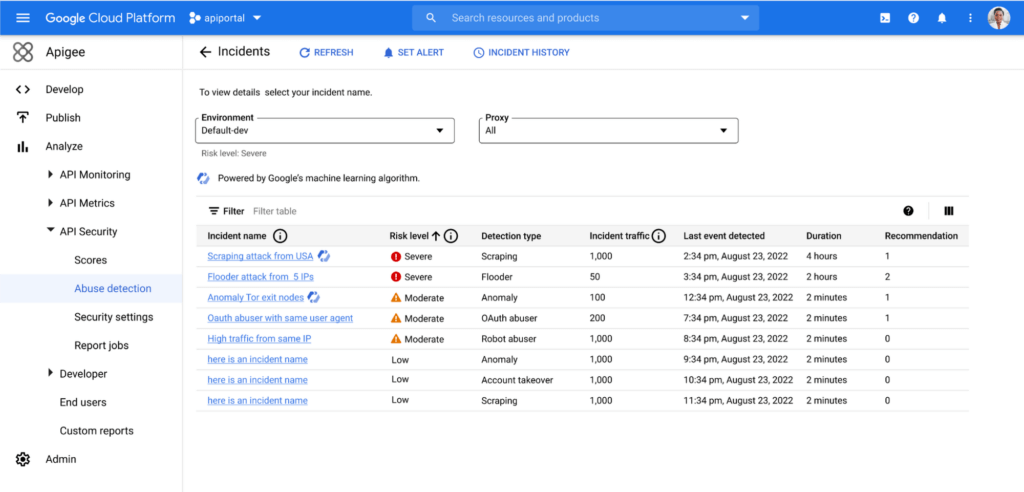
With the help of Apigee Advanced API Security’s ML-powered abuse detection dashboards, customers can uncover critical API abuse incidents, including business logic attacks, scraping, and anomalies, faster. Critical threats are surfaced with clear and concise descriptions to capture the essence of the attack along with the most important characteristics such as the source of the attack, the number of API calls, and the duration of the attack, to help resolve the incident more rapidly.
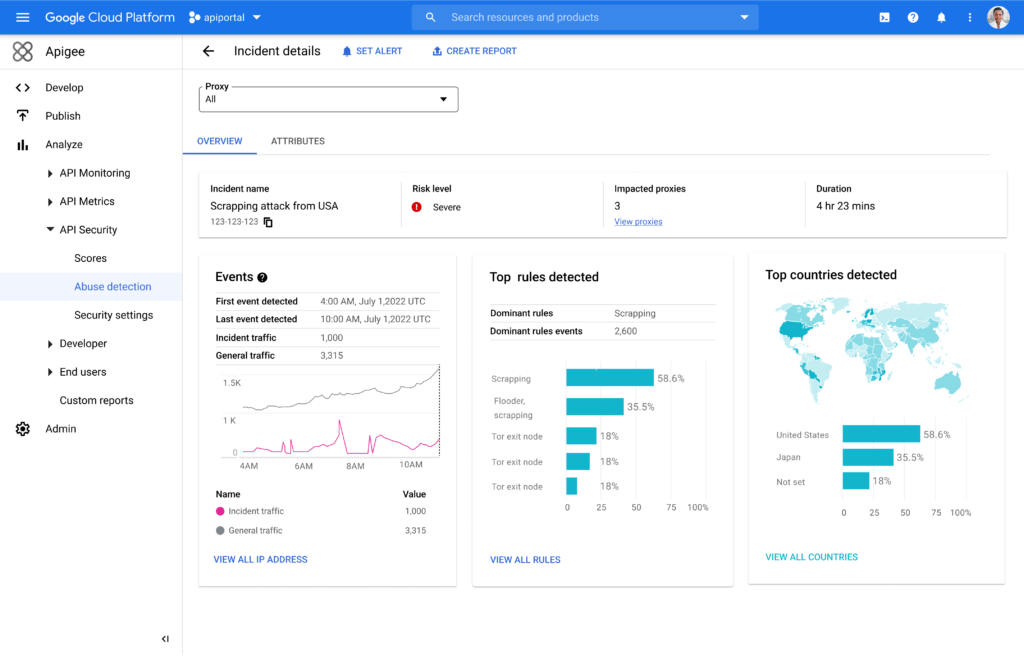
Machine Learning powered abuse-detection dashboards are available in Advanced API Security, a feature of Apigee API management that enables you to more easily detect API security misconfigurations, bad bots, and malicious activities.
To get started with Advanced API Security’s ML-powered dashboards, start your free Apigee trial now.
Revolutionizing Generative AI Applications with Google’s Vertex AI

1191
Of your peers have already read this article.
2:30 Minutes
The most insightful time you'll spend today!
At Google Cloud, we’re committed to making generative AI useful for everyone. Doing so requires more than making powerful foundation models available to businesses, governments, and developers. Models also need to be backed by platforms that make adoption faster and safer, with onramps to meet organizations wherever they are, regardless of their software or data science expertise.
Today, we’re excited to announce general availability of Generative AI support on Vertex AI, giving customers access to our latest platform capabilities for building and powering custom generative AI applications. With this update, developers can access our text model powered by PaLM 2, Embeddings API for text, and other foundation models in Model Garden, as well as leverage user-friendly tools in Generative AI Studio for model tuning and deployment. Backed by enterprise-grade data governance, security, and safety features, Vertex AI can make it easier than ever for customers to access foundation models, customize them with their own data, and quickly build generative AI applications.
Vertex AI powers generative AI model customization for enterprise developers, data scientists, and everyone in between
Foundation models are the starting point for creating customized generative AI applications—but models alone are not sufficient. That’s why in March, we announced Generative AI support on Vertex AI, the biggest-ever update to our machine learning platform, and began working with trusted testers. Now generally available to customers, Model Garden and Generative AI Studio leverage Google Cloud’s tight partnership with Google Research and Google DeepMind, making it easy for developers and data scientists to use, customize, and deploy models.
Model Garden lets customers access and experiment with foundation models from Google and its partners, with over 60 models available and many more to come. In addition to making Model Garden, PaLM 2, and Embeddings API for text generally available, we’re also making our recently-announced Codey model for code completion, generation, and chat available for public preview.
Along with these and other foundation models, Vertex AI offers a full ecosystem of tools to help builders tune, deploy, and govern models in production. For example, in May, we were the first enterprise ML platform to provide Reinforcement Learning with Human Feedback, or RLHF, which helps improve model usefulness and reduce cost. We’ve also upgraded Vertex AI’s suite of MLOps tools for model development and maintenance for customers who need to manage large models. With Generative AI Studio generally available, customers can now leverage an even wider range of tools, including multiple tuning methods for large models, that can significantly accelerate development of custom generative AI applications.
We’re already seeing innovative results from early adopters via our trusted tester program and preview period. For example, leading global airline supplier GA Telesis is using our PaLM model on Vertex AI to build a data extraction solution that automatically synthesizes email orders and provides customers a quote. This eliminates the need for their sales teams to manually cross-reference emails with inventory availability. GitLab is leveraging our Codey model on Vertex AI for their “Explain this Vulnerability” feature, which gives their users a natural language description of code vulnerabilities, along with recommendations for resolving them. Canva, the visual communication platform, is using Google Cloud’s rich generative AI capabilities in language translation to better support its non-English speaking users, letting users easily translate presentations, posters, social media posts, and more into over a hundred languages. The company is also testing ways that Google’s PaLM technology can turn short video clips into longer, more compelling stories.
And today, we’re pleased to share that Typeface, and DataStax are also building new generative AI capabilities with Vertex AI.
Now is the time to build
These announcements add to our news yesterday that we’ve added expanded access to Enterprise Search on Generative AI App Builder (Gen App Builder), allowing businesses to create custom chatbots and search engines that combine generative AI with Google’s semantic search technologies. Gen App Builder offers out-of-box solutions to common generative AI use cases, Vertex AI’s expansive platform capabilities can accelerate wide-ranging innovation, and growing ecosystem support from partners help our customers build freely. Together, these technologies and partnerships mean the full spectrum of developers and data scientists, from novices to seasoned experts, can build generative AI apps with enterprise-ready services on Google Cloud.
As with our entire Cloud portfolio, Vertex AI and Gen App Builder help give customers complete control over their data; it doesn’t need to leave the customer’s tenant, is encrypted both in transit and at rest, and is not shared or used to train Google models. Google rigorously evaluates our new models to ensure they meet our Responsible AI Principles, and all of our generative AI offerings include the user security, data management, and access controls Google Cloud customers have come to expect.
We’re grateful to our trusted testers for their integral role in bringing Generative AI support on Vertex AI to market, and we look forward to seeing what customers across all industries create with our growing catalog. To learn more about Google Cloud’s generative AI products, visit our solutions page, and to keep up with our latest AI news, don’t miss “The Prompt” or our generative AI primer for executives on Transform with Google Cloud.

Google’s Lesson on Leveraging AI and More to Optimize Cloud Value for Innovation
DOWNLOAD EXPLAINER4849
Of your peers have already downloaded this article
1:30 Minutes
The most insightful time you'll spend today!
Google has managed to stay ahead of the curve and demonstrate its ‘growth while staying innovative’ approach using advanced open technologies, AI/ML based analytics solutions, as well as tools for team collaboration and skill development, automation and storage security. Businesses too can achieve the same by deriving maximum value from its people and technology by following Google’s simple guide to stay innovative. Download to learn more.
More Relevant Stories for Your Company

Quick Recap on Google Cloud: Latest News, Launches, Updates, Events and More
Want to know the latest from Google Cloud? Find it here in one handy location. Check back regularly for our newest updates, announcements, resources, events, learning opportunities, and more. Tip: Not sure where to find what you’re looking for on the Google Cloud blog? Start here: Google Cloud blog 101: Full list

How TeamSnap Improved Return on Ad Spend Significantly
Anyone who has ever coached or played on a sports team, or had a child involved in sports, knows how difficult scheduling and logistics can be. From game and practice schedules, to uniforms and who’s bringing the snacks, it can be a lot for coaches, administrators, parents, and players to

How AI and Analytics in EdTech are Living Upto the Hype
Over the last year, COVID-19 presented unforeseen challenges for practically every type of business and organization—including schools, colleges, and universities. For educational institutions, the pandemic was an unapologetic agent of acceleration, shifting one billion learners from in-person to online learning within two months. The rapid transition to online learning exposed




Baking Gets Sweeter: Build ML Models that Help Predict the Best Recipe!
Baking recipes and ML models have one thing in common—they follow a pattern. Machine Learning is all about finding pattern in data sets, you can predict what you are baking based on the core ingredients and their respective amounts! Bread, cake or cookies, watch the video to make you make
