





Two Ways to Deploy SAP HANA System on Google Cloud

7909
Of your peers have already read this article.
4:00 Minutes
The most insightful time you'll spend today!
Many of the world’s leading companies run on SAP—and deploying it on Google Cloud extends the benefits of SAP even further. Migrating your current SAP S/4HANA deployment to Google Cloud—whether it resides on your company’s on-premises servers or another cloud service—provides your organization with a flexible virtualized architecture that lets you scale your environment to match your workloads, so you pay only for the compute and storage capacity you need at any given moment. Google Cloud includes built-in features, such as Compute Engine live migration and automatic restart, that minimize downtime for infrastructure maintenance. And it allows you to integrate your SAP data with multiple data sources and process it using Google Cloud technology such as BigQuery to drive data analytics.
SAP server-side architecture consists of two layers: the SAP HANA database, and the Netweaver application layer. In this blog post, we’ll look at the options and steps for moving the database layer to Google Cloud as a lift and shift or rehost, a straightforward approach that entails moving your current SAP environment unchanged onto Google Cloud.
Deploying an SAP HANA system on Google Cloud
Google Cloud offers SAP-certified virtual machines (VMs) optimized for SAP products, including SAP HANA and SAP HANA Enterprise Cloud, as well as dedicated servers for SAP HANA for environments greater than 12TB. (For a complete list of VM and hardware options, visit the Certified and Supported SAP HANA Hardware Directory.)
Before proceeding with a rehost migration to Google Cloud, your current (source) environment and Google Cloud (target) environments should meet these specifications:
Prerequisites:
- The configuration of the Google Cloud environment (i.e., VM resources, SSD storage capacity) should be identical to that of the source environment. If the underlying hardware is different, however, you must use Option 2 for your migration, detailed below.
- Both environments should be running the same operating system (SUSE or RHEL Linux).
- The HANA version, instance number, and system ID (SID) should be identical.
- Schema names must remain the same.
- Establishing the network connection between the on-premises environment and Google Cloud will be required in this phase to support rehost of the SAP application.you can use Cloud VPN or Dedicated Interconnect. Learn more about Dedicated Interconnect and Cloud VPN.
Note: Depending on your internet connection and bandwidth requirements, we recommend using a Dedicated Interconnect over Cloud VPN for production environments.
We offer a number of automated processes to accelerate your cloud journey. To deploy the SAP HANA system on Google Cloud, you can use the Google Cloud Deployment manager or Terraform and Ansible scripts available on GitHub with configuration file templates to define your installation. For more details, see the Google Cloud SAP HANA Planning Guide.
Note: To deploy SAP HANA on Google Cloud machine types that are certified by SAP for production, please review the Certification for SAP HANA on Google Cloud page.
Moving an SAP HANA Database to Google Cloud
There are two different options you can use to rehost your SAP HANA database to Google Cloud, and each has pros and cons that you should consider when deciding on your approach.
Option 1: Asynchronous replication uses SAP’s built-in replication tool to provide continuous data replication from the source system (also known as the primary system) to the destination or secondary system—in this case residing on Google Cloud. It’s best for mission-critical applications for which minimum downtime is a high priority, and for large databases. In addition, the high level of automation means that the process requires less manual intervention. Here’s where you can learn more on HANA Asynchronous Replication.
Option 2: Backup and restore relies on SAP’s backup utility to create an image of the database that is then transferred to Google Cloud, where it is restored in the new environment. Downtime for this method varies by database size, so large databases may require more downtime via this method vs. asynchronous replication. It also involves more manual tasks. However, it requires fewer resources to perform, making it an attractive option for less urgent use cases. Here’s where you can learn more on SAP HANA database Backup and restore.

How to migrate the SAP HANA database to Google Cloud using Asynchronous Replication

- Create and configure Dedicated Interconnect or Cloud VPN between the current environment and Google Cloud.
- Set up SAP HANA asynchronous replication. You can configure system replication using SAP HANA Cockpit, SAP HANA Studio, or hdbnsutil. See Setting Up SAP HANA System Replication in the SAP HANA Administration Guide.
- Be sure to use the same instance number and HANA SID in the template as the primary instance.
- Configure the Google Cloud instance as the secondary node for using HANA Asynchronous replication.
- Perform data validation once full data replication is completed to the SAP HANA database in Google Cloud. To learn more: HANA System Replication overview.
- Perform an SAP HANA takeover on your standby database. This switches your active system from the current primary system onto the secondary system on Google Cloud. Once the takeover command runs, the system on Google Cloud becomes the new primary system.To learn more: HANA Takeover.
How to migrate the SAP HANA database to Google Cloud using Backup and Restore

- Create a full backup of your SAP HANA database in your current environment.
- Create a new storage bucket in your Google Cloud environment. Visit Creating Storage Buckets in the Google Cloud Storage documentation.
- Download and install gsutil onto the source environment and run it to upload the HANA backup to the Google Cloud storage bucket. To install gsutil utility on any computer or server, visit Install gsutil in the Google Cloud Storage documentation.
Note: You can run parallel multi thread/multi processing in gsutil to copy large files more quickly. - Recover the HANA database on Google Cloud using SAP’s RECOVER DATABASE statement. See RECOVER DATABASE Statement (Backup and Recovery) in the SAP HANA SQL Reference Guide for SAP HANA Platform.
Note: BackInt agent is an integrated SAP interface tool used for HANA database on Google Cloud.Backint agent for SAP HANA can be used to store and retrieve backups directly from Google Cloud Storage. It is supported and certified by SAP on Google Cloud. To learn more: SAP HANA Backint Agent on Google Cloud.
In summary, we recommend using Asynchronous Replication (Option 1) for mission-critical applications that require the lowest downtime window. For all other applications, we recommend Backup and Restore (Option 2), as this approach requires fewer resources. It’s also a great way to implement the backup and restore functionality on Google Cloud.
A rehost migration is the most straightforward path to getting your SAP on HANA system up and running on Google Cloud. And the sooner you migrate, the sooner you can take advantage of the many benefits Google Cloud brings to your SAP solution. For more information on the different migration options please review: SAP on Google Cloud: Migration strategies.
Learn more about deploying SAP on Google Cloud. Technical resources can be found here.
Scope for Tech Adoption and Advancements in Healthcare are Still High: Google Cloud Research

5712
Of your peers have already read this article.
3:00 Minutes
The most insightful time you'll spend today!
Since the start of the COVID-19 pandemic, there’s been a rapid acceleration of digital transformation across the entire healthcare industry. Telehealth has become a more mainstream and safe way for patients and caregivers to connect. Machine learning modeling has helped speed up innovation and drug discovery. And new levels of integration and data portability have helped enable greater vaccine availability and equitable access to those who need it.
Data has been at the crux of this digital transformation — helping people stay healthy, accelerating life sciences research and delivering more personalized and equitable care. We recently unveiled partial results from our research with The Harris Poll, which revealed that nearly all physicians (95%) believe increased data interoperability will ultimately help improve patient outcomes. Today, we’re unveiling the second part of that research.
In February 2020, we commissioned The Harris Poll to survey 300 physicians in the U.S. about their biggest pain points — this was just before the COVID-19 pandemic strained the entire healthcare system and made us all hyper-aware of the risks we take in going to the hospital. In June 2021, we followed-up with those same questions and more. What it unveiled was just how much COVID-19 reshaped technology’s role in the healthcare field and how it’s changing day-to-day operations for physicians.
Here are some of the highlights:
Healthcare organizations accelerated technological upgrades over the course of the pandemic. After a year shaped primarily by the COVID-19 pandemic, use of telehealth saw substantial YOY growth, jumping nearly threefold from 32% in February 2020 to 90% this year. Forty-five percent of physicians say the COVID-19 pandemic accelerated the pace of their organization’s adoption of technology. In fact, more than 3 in 5 physicians (62%) say the pandemic has forced their healthcare organization to make technology upgrades that normally would have taken years. For example, 48% of physicians would like to have access to telehealth capabilities in the next five years. Before the COVID-19 pandemic, about half of physicians (53%) say their healthcare organization’s approach to the adoption of technology would best be described as “neutral” (i.e., willing to try new technologies only if they have been in the market for awhile or others have tried and recommended them).
Despite the technological leaps this year, most physicians still believe the industry lags behind in technology adoption but recognize the opportunity for technological support and advancement. The majority of physicians don’t view the healthcare industry as a leader when it comes to digital adoption. More than half of physicians describe the healthcare industry as lagging behind the gaming (64%), telecommunications (56%), and financial services industries (53%). However, the healthcare industry is not seen to be trailing as much as it was last year behind retail (54% in 2020; 44% in 2021); hospitality and travel (53% in 2020; 43% in 2021); and the public sector (39% in 2020; 26% in 2021).
Better interoperability alleviates physician burnout, improves health outcomes and speeds up diagnoses. The majority of physicians say increased data interoperability will cut the time to diagnosis for patients significantly (86%) and will ultimately help improve patient outcomes (95%.) In addition to better patient experiences and outcomes, more than half of physicians (54%) believe increased access to data via technology has had a positive impact on their healthcare organization overall. A majority believe that technology can alleviate the likelihood of physician “burn-out” (57%) and that efficient tools help decrease friction and stress (84%). And, as a result, 6 in 10 physicians say access to better technology and clinical data systems would allow them to have better work/life balance (60%) and that better access to/more complete patient data would reduce administrative burdens (61%). It is therefore not surprising that nearly 9 in 10 physicians (89%) say they are increasingly looking for ways to bring together all patient data into a single place for a more complete view of health.
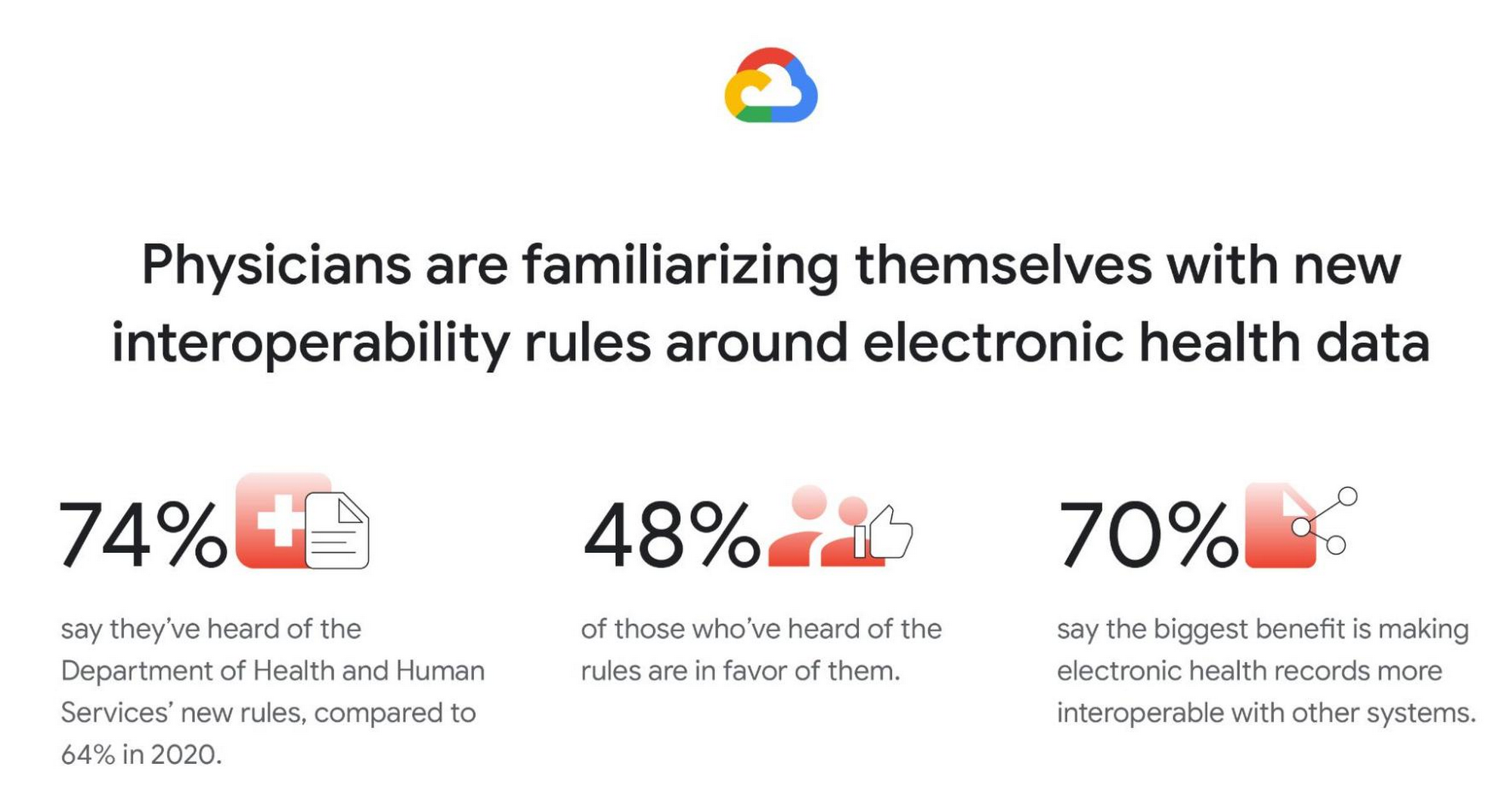
Familiarity with new Department of Health and Human Services (DHHS) interoperability rules grows, and many physicians are in favor. Most physicians (74%) say they have at least heard of the new DHHS rules (launched in 2019) to improve the interoperability of electronic health information. This is a clear rise from 2020 (64%), but deeper knowledge is fairly low. Only 30% of physicians say they are somewhat or very familiar with the new rules (though, again, this is a rise from 2020, when only 18% said they were very/somewhat familiar). Similar to in 2020, among those who have heard of the new rules, nearly half are in favor (48% in 2021; 45% in 2020) but a similar proportion remain unsure (46% in 2021; 50% in 2020). And like in 2020, by far the top potential benefit of the rules is thought to be forcing EHRs to be more interoperable with other systems (70%).
Google was founded on the idea that bringing more information to more people improves lives on a vast scale. In healthcare, that means creating tools and solutions that make data available in real time to help streamline operations and improve quality of care and patient outcomes. For example, our recently announced Healthcare Data Engine makes it easier for healthcare and life sciences leaders to make smart real-time decisions through clinical, operational, & groundbreaking scientific insights. To find out more about the Healthcare Data Engine, click here.
Survey methodology: The 2021 survey was conducted online within the United States by The Harris Poll on behalf of Google Cloud from June 9 – 29, 2021 among 303 physicians who specialize in Family Practice, General Practice, or Internal Medicine, who treat patients, and are duly licensed in the state they practice. The 2020 survey was conducted from February 18 – 25, 2020 among 300 physicians who specialize in Family Practice, General Practice, or Internal Medicine, who treat patients, and are duly licensed in the state they practice. Physicians practicing in Vermont were excluded from the research. This online survey is not based on a probability sample and therefore no estimate of theoretical sampling error can be calculated. For complete survey methodology, including weighting variables and subgroup sample sizes, please contact press@google.com.
How Recommendation AI Helps Retailers Optimize Click-through and Conversion Rates

7085
Of your peers have already read this article.
3:00 Minutes
The most insightful time you'll spend today!
Time to go outside again, I guess. I’ll need a sun hat. Sunscreen. Maybe some new sandals? What else?
With the Recommendations AI service, I might be reminded to grab a reusable water bottle and a swimsuit. Or some after-sun aloe lotion. Good thing, cause I’ll need it.

Recommendations AI is a solution that uses machine learning to bring product recommendations to their shoppers across any catalog or client list. This service is part of our full suite of Retail solutions. When you integrate with the Retail API, you get the benefit of Google’s Product Discovery. Integrating once to reap the benefits over and over. Recommendations is the starting point, and you can easily extend into Retail Search and Vision Product Search in the upcoming future.
The Recommendations solution is fully managed, global-scale and powered by deep learning, so you can focus on a great shopping experience and let someone else worry about the infrastructure.
Compared to baseline recommendation systems used by customers, Recommendations AI showed double digit uplift in conversion and clickthrough rates in A/B experiments controlled by the customers. You can optimize for click-through, conversion or session revenue, and fine tune the models to make sure you omit out-of-stock items or duplicates, for example.

So how does it work, and how do you get started? Read on, and we’ll walk you through the pipeline, starting with the data you already have to placement in your online store.
Formula: Data -> Model -> Placement
You start with your catalog, the list of all the things (postcards, movies, pie recipes) that you want to show your customers. Then you ingest your PII-redacted user events -this is the historic event data like home page views, add to cart events and more along with real time user events. This user event is joined with the product catalog and items that allows us to construct the sequence of shoppers’ activity, thus being able to predict what the shopper has a high propensity to purchase next. The user events can come from both online activity across devices or offline store purchases
The recommendation model will return a list of products, which are the recommendations. The brains of the operation, if you will. This model is trained using all the data that you ingest, using the latest neural network models and techniques that Google has built expertise over the years in flagship products like Youtube and News, that allows us to uncover shopper intent, so it can best predict the right recommendations to show to the right people.
Every model outputs a list of product identifiers, but where do they go? They go into placements, the spots, panels, carousels on your customer’s journey interacting with your brand that you’ve set aside to highlight recommendations. A model can send recommendations to one or more placements, but each placement only receives information from one recommendation model. Your pages will then need to render the products with the right images, text or other metadata, using the product ID that is returned by the model.
What do recommendations look like?
Let’s start by browsing our postcard-selling website, where I’ve been buying some vintage California postcards already. The recommendations algorithm has caught on to my interest, showing me other potential cards to purchase based on my history:

Put your data to work
To get started we need to bring your data into the recommendation model, so it can understand your customers, your inventory, and your sales patterns.
The model takes in the product catalog you use, and metadata about those products to better understand nuances in assortment, pricing and variables like size and style. You might already have this data stored in BigQuery or Merchant Center, and hence we provide easy integrations that you can leverage to get started even faster.
As for the user events, don’t worry if you already have systems in place to capture web and mobile activity. We make it easy to bring in your real time event logs by providing seamless integrations with Google Tag Manager, Javascript pixel, or even historic events from Cloud Storage, BigQuery or using inline API or JSON, so you can immediately train the models on this imported data. All this allows you to kickstart integrating with Recommendations AI in a matter of days.
The models then construct a sequence of activities that the user went through and joins with the products that the user engaged with. Once your data is ready to go, it takes a few days to train the model. Next onto making the data work for you.
Quickly customize your model
Setting up your own recommendations project in the console gives you the ability to choose what sort of model to train (based on what recommendations you want to generate) and your objective. Are you optimizing for click-through rate–more people click on the recommendation links or products–or for conversion rate–more people choose or buy what was suggested or revenue ?
Different models can be optimized for different optimization goals.; the GCP console explains what each one can do and how you can choose to optimize it.

Let’s unpack some of this terminology real quick.
We’ve got three model types:
- Recommended for you – Means we think these are items you’ll want to buy, based on your history; this is usually used on a home page to showcase items.
- Others you may like – Means if you’re browsing the page of a water bottle, we will recommend alternative brands of water bottles that you may like as well as a backpack, based on your engagement history.
- Frequently bought together – Means that when anyone buys sunscreen, we notice that they often also buy aloe lotion, so we will surface those items when someone adds any one of them to their cart.
And then we have three business objectives that the models optimize for:
- Click-through rate – How frequently did somebody click on a recommended item?
- Conversion rate– How frequently did somebody add a recommended item to their cart?
- Revenue per session – How much money did the recommendations generate for you?
Deliver anywhere along the journey
Now that you’re all set up in the Retail AI console, you can test out the recommendations in the console, even before you deploy to production.

You can integrate Recommendations into your frontend by calling the Predict APIt. The placements of recommendations will report data back into the dashboard and you can analyze and measure success for future iterations.
On top of that you can use the recommendations for other parts of your customer’s journey. Email promotions, storefront kiosks, display ads or follow-up notifications can include recommendations based on past activity and cart contents. The model gives you useful product recommendations for a wide variety of touchpoints and steps in the purchasing process.
More best practices, and guides, are available inside our documentation.
How to get started
Training your own models can be tedious, time-consuming, and expensive. On top of that it requires deeper data science expertise to set up. Let us do it instead!
You can see how IKEA Retail uses Recommendations AI in this recent talk and blog from the Google Cloud Retail Summit..
To get started today you’ll need to make a Cloud project and enable the Retail API, which then allows you to access all the recommendation tools in one menu. Bring in your catalog and purchasing data, define a placement or two, and you can start putting recommendations on your site in a matter of days.
Now on Mobile: Manage Your Google Cloud Support Cases Anywhere, Anytime
947
Of your peers have already read this article.
2:30 Minutes
The most insightful time you'll spend today!
We’re excited to announce that Google Cloud Support is now available as Public Preview* in the Google Cloud mobile app.
View and manage Google Cloud Support cases
We understand how important it is to be able to access and collaborate on Cloud Support cases. As such, we’ve made it easy for you to manage your cases via the mobile app. There is no need to log in to the mobile browser, search for a proper website, and navigate to the place where you need to be. Your Cloud Support cases are now available at your fingertips.
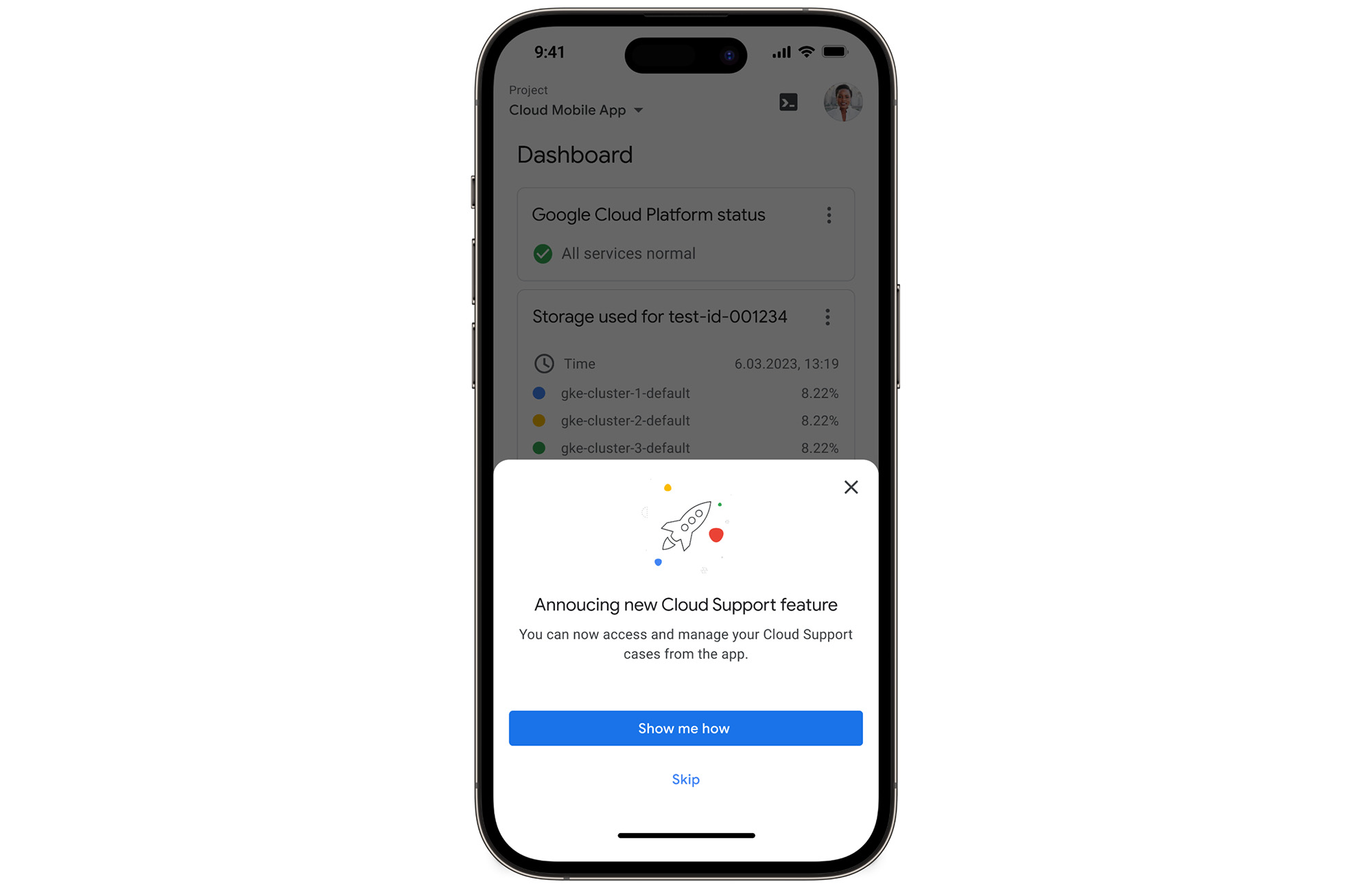
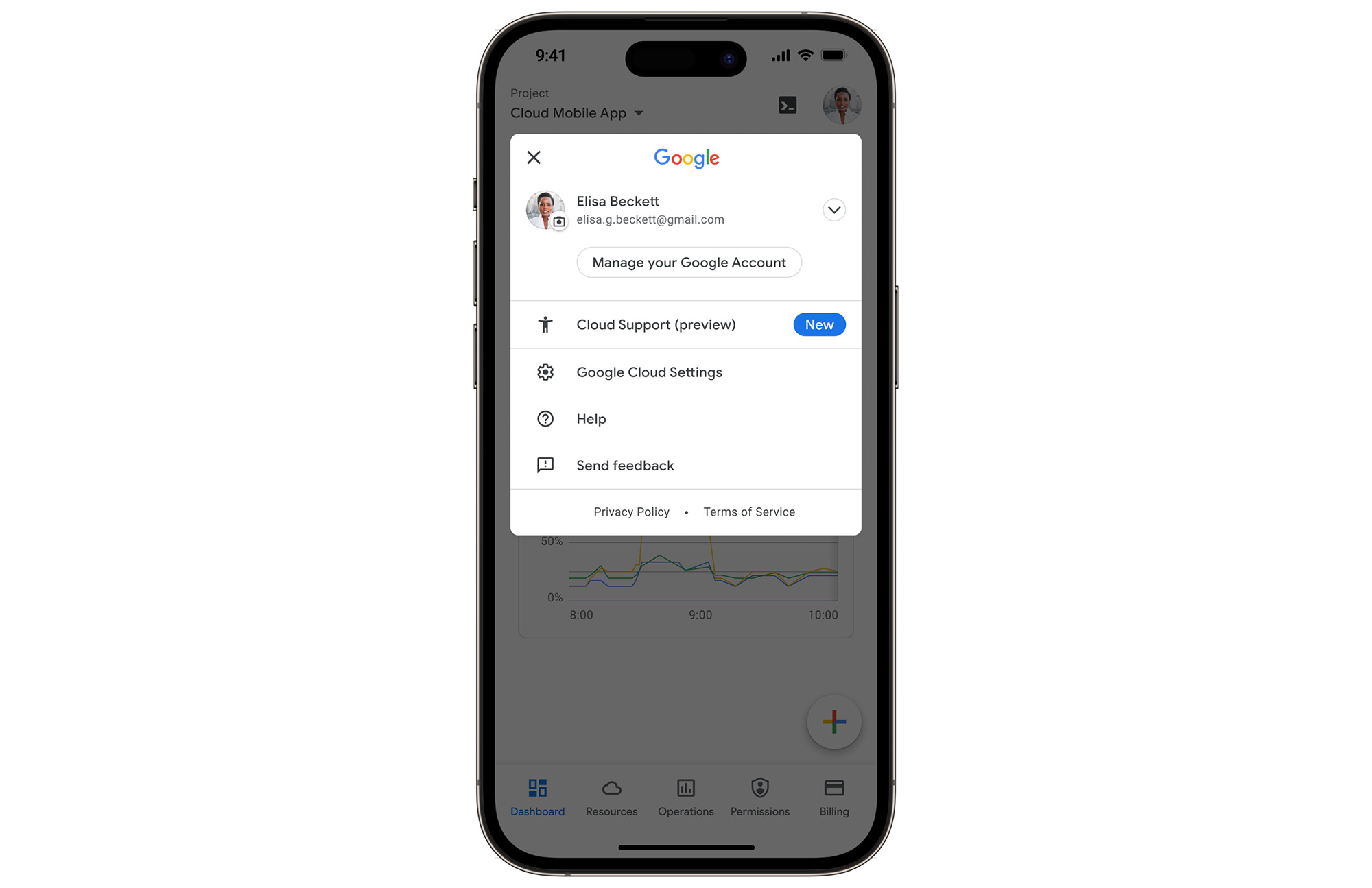
In the Google Cloud mobile app, simply navigate to “Cloud Support (preview)” from any screen by touching your profile picture.
With just one touch you can see the list of all your support cases and easily dive into their important details.
Create Google Cloud Support cases and take action
Not only can you easily view and manage your existing Cloud Support cases, you can also create new ones on the fly with the Google Cloud mobile app.
Seamlessly browse case comments to see the full history of the support case, and respond to the case with new comments.
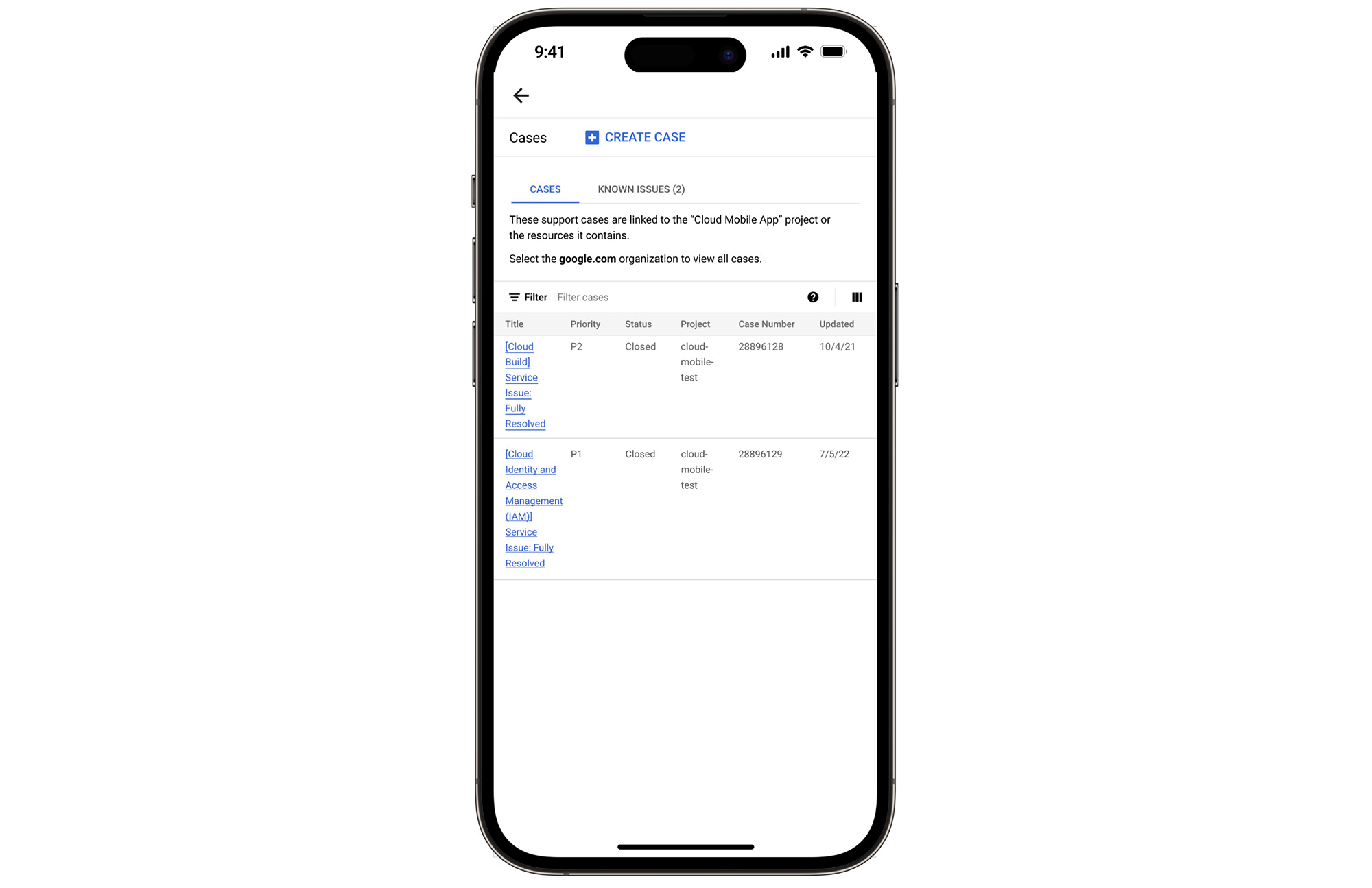
Download the Google Cloud app today
The Google Cloud app is a powerful tool for managing your Google Cloud environment on the go, and it just got better. To summarize, we’ve added Cloud Support cases to our mobile app, which lets you:
- Read existing conversations with the Google Cloud Support Team
- Respond to Google Cloud Support cases
- Create new Google Cloud Support cases
These new features are available for you to use today in Public Preview. Download the Google Cloud mobile app from Google Play or the Apple App Store to try it out. Check out the Google Cloud app documentation to learn more about what you can do on-the-go. If you have any feedback, we would love to hear from you — simply click on the “send feedback” button in the app to share your experience.
*Preview – This product or feature is covered by the Pre-GA Offerings Terms of the Google Cloud Terms of Service. Pre-GA products and features might have limited support, and changes to pre-GA products and features might not be compatible with other pre-GA versions. For more information, see the launch stage descriptions.
4070
Of your peers have already watched this video.
17:53 Minutes
The most insightful time you'll spend today!
Equip Your Frontline Workers for Success with Android
As more teams are working remotely, it’s more important than ever to have the right tools in the hands of all of your employees. More than ever, the customer is at the center. And their expectations are rising.
The hurdle to keep customers happy continues to rise as everyone becomes accustomed to having everything at their fingertips whenever they want it.
Over 30% of customers said a single bad experience would cause them to stop doing business with a brand that they love. Over 40% would stop supporting a brand if they had a bad experience with either poorly informed employees or if they had just an inefficient experience at all.
For many customer experiences, the front-line worker is the worker that’s actually in contact with the customer. Frontline workers are at the heart of an organization, performing critical behind-the-scenes operations, or working directly with customers in client-facing engagements. They perform task- and time-sensitive activities that often differ greatly from knowledge workers.
Gartner predicts that 70 percent of mobile and endpoint investments will be aimed at enabling frontline workers over the next five years.
In this video, hear from Walmart and Australia Post about how they’re using Android, with its diverse form factors and innovative app development tools, to address the needs of their frontline workers, unlocking the potential for improved collaboration, customer engagement, process efficiencies, and insights for better decision-making.
From operations to planning, G Suite customers scale data insights with Connected Sheets

4080
Of your peers have already read this article.
4:30 Minutes
The most insightful time you'll spend today!
We recently announced the general availability of Connected Sheets, which brings you the power and scale of a BigQuery data warehouse in the familiar context of Google Sheets. With Connected Sheets, you can analyze billions of rows and petabytes of data in Sheets without specialized knowledge of computer languages like SQL. This makes it easy for anyone, not just data analysts, to apply pivot tables, charts, and formulas to massive datasets and unlock insights.
Our customers use Connected Sheets to enable data-driven decision-making across their organizations. We’ve heard many stories about how Connected Sheets has enabled them to achieve operational efficiencies and new ways of unlocking the power of their data; we’d like to share a few here.
Operate with agility
Now more than ever, it’s critical for organizations to react with flexibility and agility to new realities. Connected Sheets helps organizations harness and collaborate on massive amounts of data, making it easier to understand and quickly respond to today’s dynamic landscape.
The United Nations Office for Project Services (UNOPS) helps the UN and its partners deliver peace and security, humanitarian, and development solutions. As COVID-19 emerged, UNOPS used Connected Sheets to help coordinate a swift global response. Says Tushar Dighe, Chief Information Officer at UNOPS, “When the COVID-19 pandemic started, we needed to quickly assess the status of our operational capacity in order to assist governments with the response. We used a Connected Sheet with data from our BigQuery data warehouse combined with manual status inputs on the same Sheet, where colleagues in more than 80 countries were able to collaboratively provide inputs. The results in the form of pivots and charts were instantly available live. It took less than three hours to design and implement the solution, and we had status information from more than 80 countries within the first 24 hours.”
Improve business and financial reporting
Reports and dashboards displaying business metrics, like revenue figures or operational KPIs, play a critical role in organizations. These reports help sales teams track performance, enable finance teams to make projections, and provide business leaders with a picture of their organization’s health. Especially now, as businesses adapt their planning to reflect the new normal and employees remain dispersed, it’s doubly important that teams can quickly access and collaborate on business and financial dashboards, from wherever they are. But building and maintaining these reports can be time consuming and error-prone, and requests for changes or new views result in manual work for data analysts. All of this just extends the time to insight and action.
Connected Sheets helps automate report creation, while maintaining a single source of truth for data in BigQuery. The live connection between BigQuery and Sheets also means that data stays fresh, minimizing the risk that people make decisions based on outdated information and avoiding the data integrity risks of manual data pulls.
Says Alexander Danilowicz, a Software Engineer at data connectivity company LiveRamp, “Our Finance team uses Connected Sheets to automate reports that are shared with other stakeholders to run the business. This enables our business partners to analyze and create pivot tables on massive datasets, which is not possible in a traditional spreadsheet.”
“Now that it’s all integrated, there’s no human error involved. Changes can be made at the click of a button, resulting in 10 hours saved per month,” he adds.
Track product adoption
It’s important for teams across the business to understand customer adoption of products and services, whether it’s the product team tracking usage of a newly released feature or the support team trying to anticipate incoming service requests. Similarly, IT teams need to analyze adoption of an organization’s internal applications and systems, so they know what tools employees are using and how they are being used. But product adoption datasets are often too large for traditional spreadsheets to handle, and new data is continuously being added.
Connected Sheets can provide teams access to large, powerful, and up-to-date usage datasets, in the familiar Sheets interface. PwC, a global professional services organization, uses Connected Sheets as part of its efforts to make technology and data more accessible across its workforce. One way PwC uses Connected Sheets is to monitor and analyze internal adoption of tools like G Suite.
Says Peter Van Nieuwerburgh, Global Change Manager at PwC, “If you look at our own adoption dashboarding, it’s more than three terabytes of data—good luck putting that in any spreadsheet. With Connected Sheets, we’re not really pulling the data into the spreadsheet, rather it lives in the database where it belongs. The ability to go and so easily analyze and visualize the data is really powerful.”
We hope Connected Sheets helps to scale data-driven decision making at your organization, by making powerful data easily accessible across your sales, finance, product, and IT teams.
More Relevant Stories for Your Company

The Story Behind How Woolworth Innovates to Better Customer Experience
As one of Australia and New Zealand's most innovative retailers, Woolworths is always looking for ways to use technology to give its customers more convenient ways to shop. This innovative approach does not stop with our customers. Our extensive staff needs intuitive technology to enable them to work more efficiently,

Accuracy and Real-time Updates with Google Maps’ On-Demand Rides and Delivery Solution Impacts CX
Last year we launched our on-demand rides and delivery solution to help businesses improve operations as well as transform the driver and customer journey from booking to arrival or delivery. When it comes to on-demand rides and deliveries, every minute matters. When users book a ride or order food, they want a

Google’s Intelligent Products Essentials Assist Manufacturers in Product Development Journey
Expectations for both consumer and commercial products have changed. Consumers want products that evolve with their needs, adapt to their preferences, and stay up-to-date over time. Manufacturers, in turn, need to create products that provide engaging customer experiences not only to better compete in the marketplace, but also to provide

AI-powered Business Messages for Timely, Engaging and Helpful Conversations with Customers
Over the last two years, we’ve seen a significant uptick in the number of people using messaging to connect with businesses. Whether it was checking hours of operation, verifying what was in stock, or scheduling a pick-up, the pandemic caused a significant shift in consumer behavior. 45% of users are
