





Trend 2: Google Research on Machine Learning Themes for 2022 and Beyond!
2883
Of your peers have already read this article.
6:00 Minutes
The most insightful time you'll spend today!
Trend 2: Continued Efficiency Improvements for ML
Improvements in efficiency — arising from advances in computer hardware design as well as ML algorithms and meta-learning research — are driving greater capabilities in ML models. Many aspects of the ML pipeline, from the hardware on which a model is trained and executed to individual components of the ML architecture, can be optimized for efficiency while maintaining or improving on state-of-the-art performance overall. Each of these different threads can improve efficiency by a significant multiplicative factor, and taken together, can reduce computational costs, including CO2 equivalent emissions (CO2e), by orders of magnitude compared to just a few years ago. This greater efficiency has enabled a number of critical advances that will continue to dramatically improve the efficiency of machine learning, enabling larger, higher quality ML models to be developed cost effectively and further democratizing access. I’m very excited about these directions of research!
Continued Improvements in ML Accelerator Performance
Each generation of ML accelerator improves on previous generations, enabling faster performance per chip, and often increasing the scale of the overall systems. Last year, we announced our TPUv4 systems, the fourth generation of Google’s Tensor Processing Unit, which demonstrated a 2.7x improvement over comparable TPUv3 results in the MLPerf benchmarks. Each TPUv4 chip has ~2x the peak performance per chip versus the TPUv3 chip, and the scale of each TPUv4 pod is 4096 chips (4x that of TPUv3 pods), yielding a performance of approximately 1.1 exaflops per pod (versus ~100 petaflops per TPUv3 pod). Having pods with larger numbers of chips that are connected together with high speed networks improves efficiency for larger models.
ML capabilities on mobile devices are also increasing significantly. The Pixel 6 phone features a brand new Google Tensor processor that integrates a powerful ML accelerator to better support important on-device features.
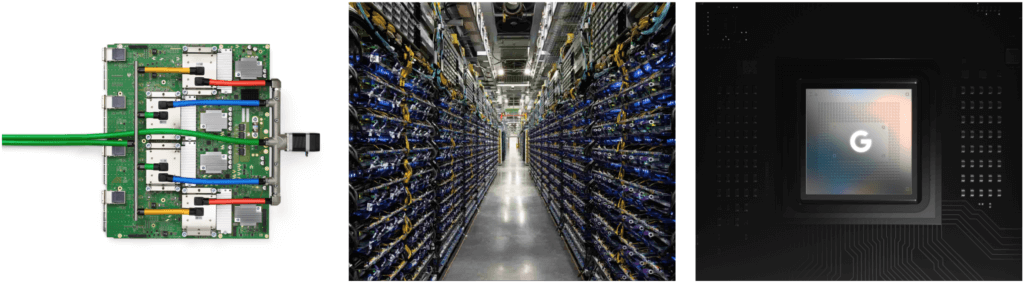
Our use of ML to accelerate the design of computer chips of all kinds (more on this below) is also paying dividends, particularly to produce better ML accelerators.
Continued Improvements in ML Compilation and Optimization of ML Workloads
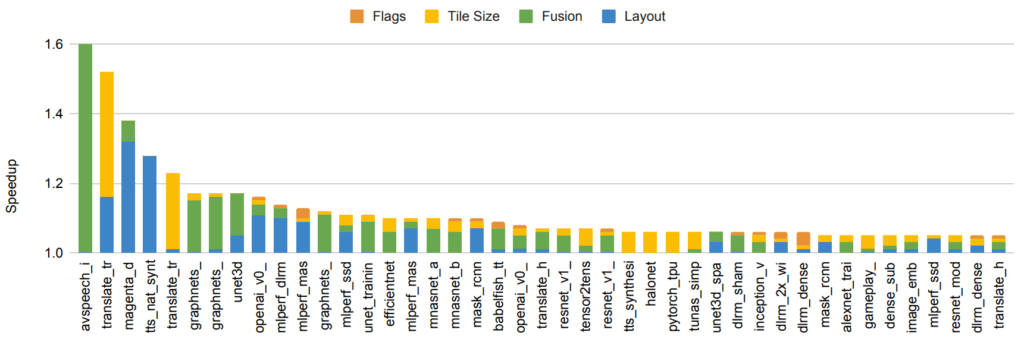
Even when the hardware is unchanged, improvements in compilers and other optimizations in system software for machine learning accelerators can lead to significant improvements in efficiency. For example, “A Flexible Approach to Autotuning Multi-pass Machine Learning Compilers” shows how to use machine learning to perform auto-tuning of compilation settings to get across-the-board performance improvements of 5-15% (and sometimes as much as 2.4x improvement) for a suite of ML programs on the same underlying hardware. GSPMD describes an automatic parallelization system based on the XLA compiler that is capable of scaling most deep learning network architectures beyond the memory capacity of an accelerator and has been applied to many large models, such as GShard-M4, LaMDA, BigSSL, ViT, MetNet-2, and GLaM, leading to state-of-the-art results across several domains.
Human-Creativity–Driven Discovery of More Efficient Model Architectures
Continued improvements in model architectures give substantial reductions in the amount of computation needed to achieve a given level of accuracy for many problems. For example, the Transformer architecture, which we developed in 2017, was able to improve the state of the art on several NLP and translation benchmarks while simultaneously using 10x to 100x less computation to achieve these results than a variety of other prevalent methods, such as LSTMs and other recurrent architectures. Similarly, the Vision Transformer was able to show improved state-of-the-art results on a number of different image classification tasks despite using 4x to 10x less computation than convolutional neural networks.
Machine-Driven Discovery of More Efficient Model Architectures
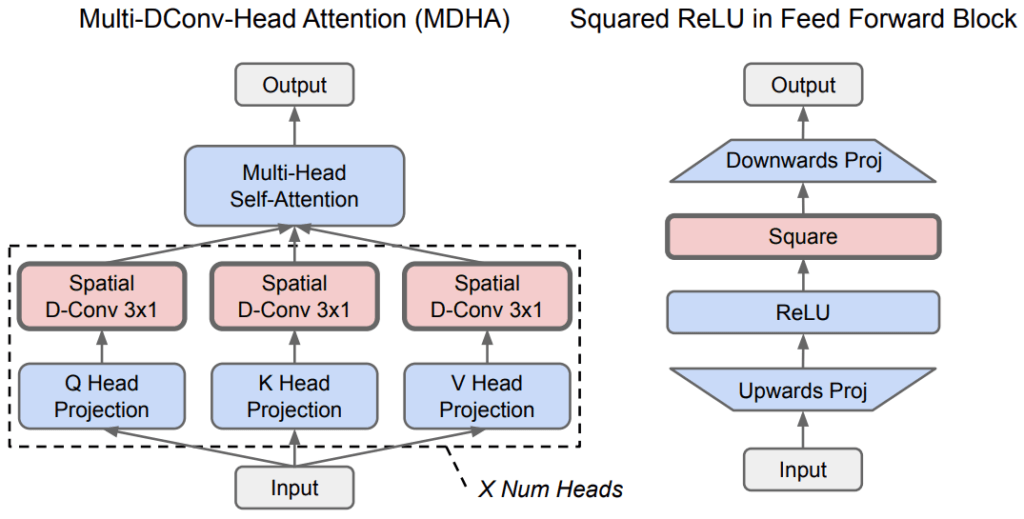
Neural architecture search (NAS) can automatically discover new ML architectures that are more efficient for a given problem domain. A primary advantage of NAS is that it can greatly reduce the effort needed for algorithm development, because NAS requires only a one-time effort per search space and problem domain combination. In addition, while the initial effort to perform NAS can be computationally expensive, the resulting models can greatly reduce computation in downstream research and production settings, resulting in greatly reduced resource requirements overall. For example, the one-time search to discover the Evolved Transformer generated only 3.2 tons of CO2e (much less than the 284t CO2e reported elsewhere; see Appendix C and D in this joint Google/UC Berkeley preprint), but yielded a model for use by anyone in the NLP community that is 15-20% more efficient than the plain Transformer model. A more recent use of NAS discovered an even more efficient architecture called Primer (that has also been open-sourced), which reduces training costs by 4x compared to a plain Transformer model. In this way, the discovery costs of NAS searches are often recouped from the use of the more-efficient model architectures that are discovered, even if they are applied to only a handful of downstream uses (and many NAS results are reused thousands of times).
NAS has also been used to discover more efficient models in the vision domain. The EfficientNetV2 model architecture is the result of a neural architecture search that jointly optimizes for model accuracy, model size, and training speed. On the ImageNet benchmark, EfficientNetV2 improves training speed by 5–11x while substantially reducing model size over previous state-of-the-art models. The CoAtNet model architecture was created with an architecture search that uses ideas from the Vision Transformer and convolutional networks to create a hybrid model architecture that trains 4x faster than the Vision Transformer and achieves a new ImageNet state of the art.
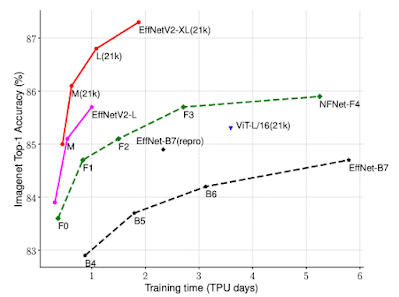
The broad use of search to help improve ML model architectures and algorithms, including the use of reinforcement learning and evolutionary techniques, has inspired other researchers to apply this approach to different domains. To aid others in creating their own model searches, we have open-sourced Model Search, a platform that enables others to explore model search for their domains of interest. In addition to model architectures, automated search can also be used to find new, more efficient reinforcement learning algorithms, building on the earlier AutoML-Zero work that demonstrated this approach for automating supervised learning algorithm discovery.
Use of Sparsity
Sparsity, where a model has a very large capacity, but only some parts of the model are activated for a given task, example or token, is another important algorithmic advance that can greatly improve efficiency. In 2017, we introduced the sparsely-gated mixture-of-experts layer, which demonstrated better results on a variety of translation benchmarks while using 10x less computation than previous state-of-the-art dense LSTM models. More recently, Switch Transformers, which pair a mixture-of-experts–style architecture with the Transformer model architecture, demonstrated a 7x speedup in training time and efficiency over the dense T5-Base Transformer model. The GLaM model showed that transformers and mixture-of-expert–style layers can be combined to produce a model that exceeds the accuracy of the GPT-3 model on average across 29 benchmarks using 3x less energy for training and 2x less computation for inference. The notion of sparsity can also be applied to reduce the cost of the attention mechanism in the core Transformer architecture.
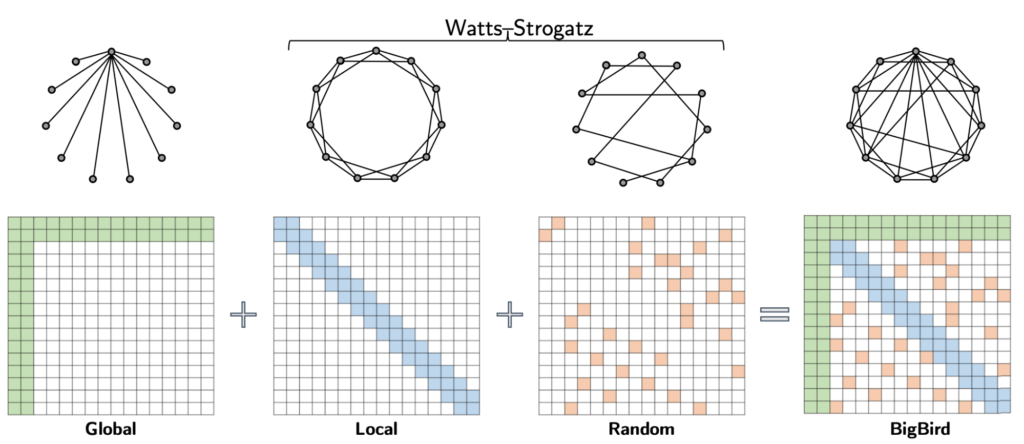
The use of sparsity in models is clearly an approach with very high potential payoff in terms of computational efficiency, and we are only scratching the surface in terms of research ideas to be tried in this direction.
Each of these approaches for improved efficiency can be combined together so that equivalent-accuracy language models trained today in efficient data centers are ~100 times more energy efficient and produce ~650 times less CO2e emissions, compared to a baseline Transformer model trained using P100 GPUs in an average U.S. datacenter using an average U.S. energy mix. And this doesn’t even account for Google’s carbon-neutral, 100% renewable energy offsets. We’ll have a more detailed blog post analyzing the carbon emissions trends of NLP models soon.
Transcend from Prototype to Production: Train Your ML models with Vertex AI

2614
Of your peers have already read this article.
1:30 Minutes
The most insightful time you'll spend today!
You’re working on a new machine learning problem, and the first environment you use is a notebook. Your data is stored on your local machine, and you try out different model architectures and configurations, executing the cells of your notebook manually each time. This workflow is great for experimentation, but you quickly hit a wall when it comes time to elevate your experiments up to production scale. Suddenly, your concerns are more than just getting the highest accuracy score.
Sound familiar?
Developing production applications or training large models requires additional tooling to help you scale beyond just code in a notebook, and using a cloud service provider can help. But that process can feel a bit daunting.
To make things a little easier for you, we’ve created the Prototype to Production video series, which covers all the foundational concepts you’ll need in order to build, train, scale, and deploy machine learning models on Google Cloud using Vertex AI.
Let’s jump in and see what it takes to get from prototype to production!
Getting started with Notebooks for machine learning
Episode one of this series shows you how to create a managed notebook using Vertex AI Workbench. With your environment set up, you can explore data, test different hardware configurations, train models, and interact with other Google Cloud services.
Storing data for machine learning
When working on machine learning problems, it’s easy to be laser focused on model training. But the data is where it all really starts.
If you want to train models on Vertex AI, first you need to get your data into the cloud. In episode 2, you’ll learn the basics of storing unstructured data for model training and see how to access training data from Vertex AI Workbench.
Training custom models on Vertex AI
You might be wondering, why do I need a training service when I can just run model training directly in my notebook? Well, for models that take a long time to train, a notebook isn’t always the most convenient option. And if you’re building an application with ML, it’s unlikely that you’ll only need to train your model once. Over time, you’ll want to retrain your model to make sure it stays fresh and keeps producing valuable results.
Manually executing the cells of your notebook might be the right option when you’re getting started with a new ML problem. But when you want to automate experimentation at scale, or retrain models for a production application, a managed ML training option will make things much easier.
Episode 3 shows you how to package up your training code with Docker and run a custom container training job on Vertex AI. Don’t worry if you’re new to Docker! This video and the accompanying codelab will cover all the commands you’ll need.
CODELAB: Training custom models with Vertex AI
How to get predictions from an ML model
Machine learning is not just about training. What’s the point of all this work if we don’t actually use the model to do something?
Just like with training, you could execute predictions directly from a notebook by calling model.predict. But when you want to get predictions for lots of data, or get low latency predictions on the fly, you’re going to need something more than a notebook. When you’re ready to use your model to solve a real world problem with ML, you don’t want to be manually executing notebook cells to get a prediction.
In episode 4, you’ll learn how to use the Vertex AI prediction service for batch and online predictions.
CODELAB: Getting predictions from custom trained models
Tuning and scaling your ML models
By this point, you’ve seen how to go from notebook code, to a deployed model in the cloud. But in reality, an ML workflow is rarely that linear. A huge part of the machine learning process is experimentation and tuning. You’ll probably need to try out different hyperparameters, different architectures, or even different hardware configurations before you figure out what works best for your use case.
Episode 5, covers the Vertex AI features that can help you with tuning and scaling your ML models. Specifically, you’ll learn about hyperparameter tuning, distributed training, and experiment tracking.
CODELAB: Hyperparameter tuning on Vertex AI
CODELAB: Distributed Training on Vertex AI
We hope this series inspires you to create ML applications with Vertex AI! Be sure to leave a comment on the videos if you’d like to see any of the concepts in more detail, or learn how to use the Vertex AI MLOps tools.
If you’d like try all the code for yourself, check out the following codelabs:

New Technology: The Projected Total Economic Impact™ Of Google Cloud Contact Center AI
DOWNLOAD RESEARCH REPORTS3366
Of your peers have already downloaded this article
15:30 Minutes
The most insightful time you'll spend today!
According to Forrester Research, customers expect easy and effective customer service that builds positive emotional connections every time they interact with a brand or organization. Additionally, 40% of surveyed business leaders say that improving their organization’s customer experience (CX) is a high priority, ahead of initiatives like improving products and differentiation and reducing costs.
While this is a huge opportunity, improving CX in contact centers presents a significant challenge to organizations because most legacy interactive voice response (IVR) systems were never designed with CX in mind, and they are often left unchanged for years at a time except for the addition of more options when a new product or service is launched.
Providing great CX is a top priority for most organizations, but because contact centers typically operate 24/7, decision makers are hesitant to make significant changes or upgrades out of fear of breaking their already overtaxed systems. This paradox has left many organizations to rely on outdated or bloated IVR systems far too long. And with constantly rising customer expectations around service and support, these organizations are falling further and further behind competitors that are investing in next-generation solutions.
Google Cloud Contact Center Artificial Intelligence (CCAI) provides a cloud-based platform that leverages Google Cloud’s artificial intelligence (AI) and machine learning (ML) capabilities, including natural language processing and speech capabilities to augment, support, and assist contact center agents, and to deploy voice bots and chatbots that can naturally converse with customers to understand their intent and help resolve their calls with minimal intervention from an agent.
CCAI also has the ability to tie into an organization’s back-end data to enable bots to perform higher-value tasks, identify and authenticate customers, and augment agent desktops to provide relevant information and turn-by-turn guidance through different scenarios.
Google commissioned Forrester Consulting to conduct a New Technology: Projected Total Economic Impact™ (New Tech TEI) study and examine the projected return on investment (PROI) enterprises may realize by deploying CCAI.
Read the report and find out:
- Why businesses say their traditional contact center tools introduced challenges
- How Google’s Contact Center AI overcomes these challenges
- What effect the switch had to their financial and productivity investments
Google Cloud Helps Northwell Health to Boost Caregiver Productivity and Access to Right Care Using AI

7957
Of your peers have already read this article.
2:00 Minutes
The most insightful time you'll spend today!
Lung cancer is the leading cause of cancer death in the United States and like any cancer, early detection is crucial to survival. Screening at-risk populations is an important part of reducing mortality, and if concerning nodules are found on imaging, further testing may be required. Today, we’ll share how Northwell Health uses Google Cloud products such as Cloud Healthcare APIs and BigQuery to increase caregiver productivity and deliver better care for patients with findings that indicate potential development of lung cancer.
Northwell is New York’s largest healthcare provider
Northwell Health is New York’s largest healthcare provider with 23 hospitals and nearly 800 outpatient facilities. Northwell’s nearly 4,000 doctors care for millions of patients each year, and at this scale, there is an immense amount of healthcare data to manage. To better manage and leverage this data, Northwell Health partnered with Google Cloud starting in 2018.
Enabling caregivers to spend more time with patients
Nic Lorenzen, the lead developer of Northwell Emerging Technology and Innovation team, has a mission to put together data for caregivers in a way that makes sense. It is no secret that inefficient electronic health records systems have a negative impact on a physician’s ability to deliver quality care. Traditional EHRs have information distributed across many tabs, which forces caregivers to spend considerable time at the computer trying to find information. Moreover, speed of care matters. If care is delayed, patients may have to spend more time in the hospital and may suffer worse health outcomes.
To solve this problem, Nic’s team focused on giving caregivers the most relevant pieces of data at the right time by developing an intelligent clinician rounding app. The data needed to derive these insights can depend on the caregiver’s role–a nurse cares about different things than a cardiologist. This system aggregates multiple data sources, and provides patient-specific insights to caregivers.
This system would not have been possible before with traditional EHRs and data warehouses that have proprietary data models and rarely sync data in real time. Now with data easily accessible through Google Cloud’s Healthcare solutions, Nic’s team can deliver the right clinical information to the right people instantly. These days, Nic says, “instead of spending 75% of our time dealing with architecting the underlying platforms, we spend 75% of our time focused on higher value use cases for clinicians and patients. Google Cloud’s Healthcare solutions have greatly improved our developer productivity and time to value.”
Caregivers have found this new system to be a game changer.Before the implementation of this system, caregivers would spend, on average, seven to nine minutes finding the data needed to make medical decisions for one patient. Now, that aggregated information is delivered to a caregiver’s mobile device in less than a second.
Ensuring patients get the right care with the power of AI
There are a number of reasons why patients might not get the care that they need. For example, patients today can go to multiple hospitals and clinics settings, and coordinating care across multiple facilities is complex. Regional hospitals and clinics have their own siloed view of their data, so pertinent information gathered by one clinic might not be seen by another. These gaps in clinical data lead to gaps in patient care.
When a patient gets radiologic imaging, they may have findings unrelated to the reason they initially got the imaging. For example, a chest CT for a car accident might reveal an incidental lung nodule that could be cancerous. Unfortunately, research shows that a large portion of patients do not get follow up for these incidental findings because it isn’t the primary reason why the patient is seeing a doctor. Moreover, social determinants of health are a factor that affects which patients receive follow-up care. Identifying these patients and providing the necessary follow up care prevents adverse events related to delayed detection of cancer.

With Cloud Healthcare solutions, Northwell built an AI model to identify these patients so that oncologists can appropriately follow up with patients who have findings suspicious for lung cancer. The AI model detects incidental pulmonary nodules in radiology reports so that doctors can then contact the patients that need follow-up care. Nic says his team was able to build this system in a week: “Google Cloud did a lot of heavy-lifting for us and allowed us to get to the AI applications much faster. It allowed us to build a platform that just works.”
Healthcare systems can now rapidly generate healthcare insights with one end-to-end solution, Google Cloud Healthcare Data Engine. It builds on and extends the core capabilities of the Google Cloud Healthcare API to make healthcare data more immediately useful by enabling an interoperable, longitudinal record of patient data. Northwell Health uses Google Cloud as the core of their platform, enabling their developers to create solutions to the most pressing healthcare problems.
Special thanks to Kalyan Pamarthy, Product Management Lead on Cloud Healthcare and Natural Language APIs for contributing to this blog post.
Google Search Feature with Document AI Simplifies Document Extraction!

3014
Of your peers have already read this article.
1:30 Minutes
The most insightful time you'll spend today!
Google Cloud introduced Document AI to automate document processing and to streamline workflows with state-of-the-art machine learning models. With the deep neural networks, the models generalize the learning from seeing hundreds of thousands variations of the documents. But when information is missing or ambiguous on a document – like a missing address or entity name – a human may need to search for it…often on Google.
With Document AI, we are bringing the power of this “Google search” to help customers understand their documents. This means that the same Google knowledge graph technology that helps you find the name, address or phone number of your favorite restaurant can now enrich your document extraction with the right name, fully qualified address, and updated phone number.
Here is a sample payslip…

Imagine a bank employee entering this to capture a customer’s income to qualify them for a loan. When extracting information from this payslip, what employer name should she key in? She might take the time to go into Google and find the right correct legal entity name; or she might just guess and move on, potentially creating data reconciliation headaches down the line.
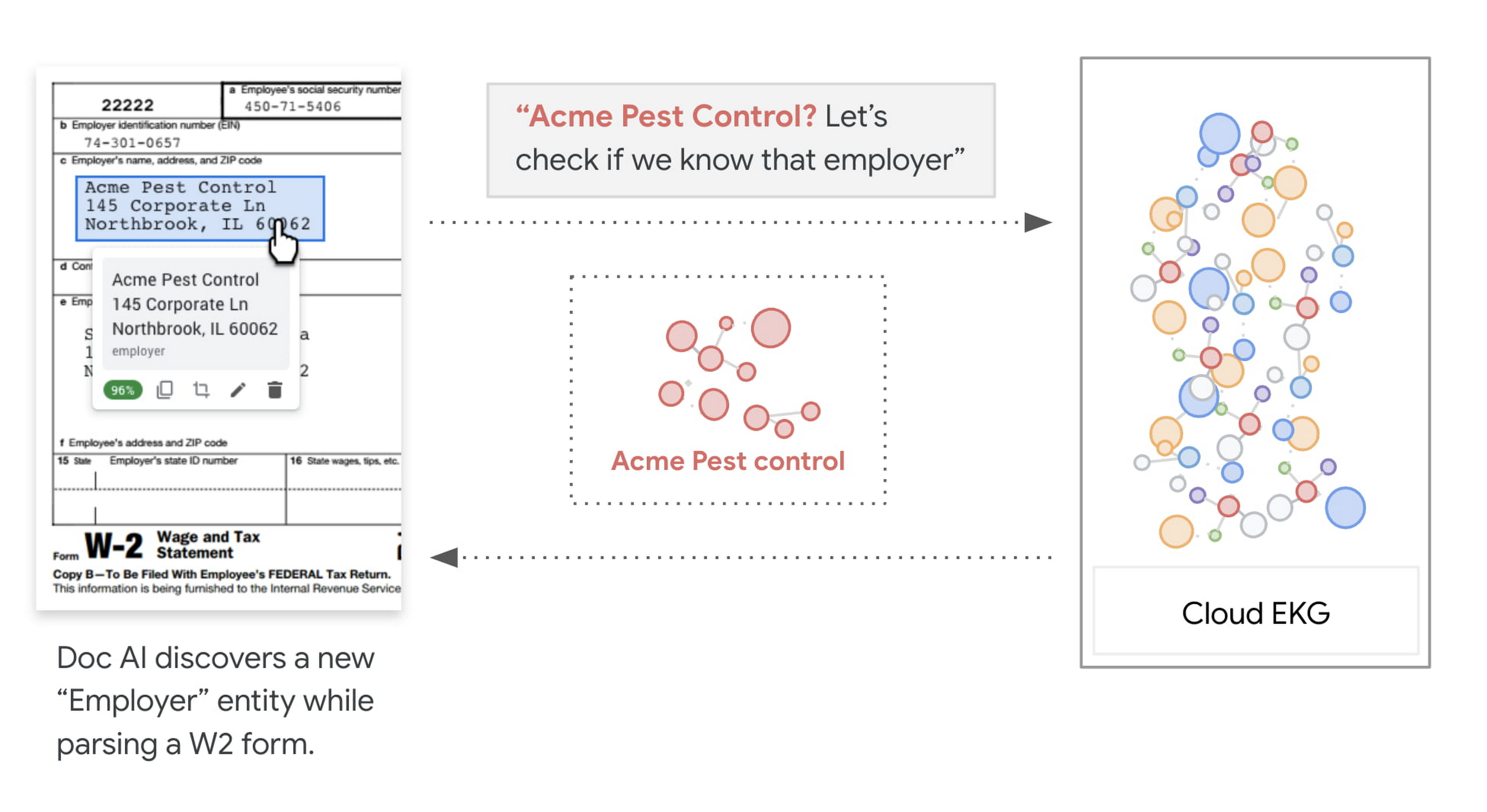
With Document AI, there is a better way. Our native integration with the knowledge graph means that we can deliver both the specific text from the payslip as well as Google’s best understanding of the actual name of the company that operates at this address. This is an important step to translate from “what has been said” on a document to “what does it mean”. By normalizing the value as you process millions of documents, you are improving accuracy and consistency at the beginning of the data processing workflow, making downstream integration, data analytics and business intelligence tasks at ease.
How EKG Enrichment Works
In a nutshell, Knowledge Graph is a knowledge base that uses a graph data model to integrate interlinked entities, including objects, events, processes or abstracted concepts. Google announced its Knowledge Graph in 2012 as a way to organize information from the Web and to enhance Search results. Different from Google Knowledge Graph, Cloud EKG (Enterprise Knowledge Graph) focuses on entities that are more relevant to enterprise customers, such as organization, product, people, locations, etc.
In EKG, every node is called an entity. Each entity in the graph represents an object, such as an organization. EKG aggregates all the information about a thing into a single entity, thus each entity represents a distinct and identifiable real world concept. The uniqueness of these entities in the graph is one of the reasons that make EKG useful. The edges between nodes are called relationships. When representing attributes, the relationships can be considered as properties, such as the name of a company, the price of a product, etc. When representing relationships, they connect entities in the graph, such as the CEO of a company, the seller of a product.

Entity linking, as its name suggests, is the task of assigning a unique identity to entities mentioned in text, images or videos. In the context of EKG, it connects the text mentions to entities in the graph. Under the hood, the recognition takes both the mention and its context information into consideration for linking to the best matching candidates in the graph.
Entity Enrichment, is essentially linking entities in EKG to documents, and using the attributes of linked entities to enrich the extracted information. The entity linking on documents is based on the understanding of both documents and the entities in the graph. First the document parser annotates entity mentions, which provides semantic meanings to the content of the document. Then Entity Linking selects a list of entities from EKG based on the types of these mentions, and matches to the best entity by comparing the attributes found in the document with the the relationships of the selected entities.
How to leverage the enrichment result
Knowledge graph enrichment is a built-in feature for Lending DocAI , Procurement DocAI and Contract DocAI today, and we are actively working on expanding it to cover more document types and parsers on the platform. To use the knowledge graph enriched values, look out for the entities fields under normalizedValue, returned by the API.
{entities: [{"textAnchor": {"content": "Google Singapore"},…."normalizedValue": {"text": "Google Asia Pacific, Singapore"}}]}
To learn more, check out the Document AI webpage, and EKG Enrichment page to see the list of supported parsers and fields.
3093
Of your peers have already watched this video.
24:30 Minutes
The most insightful time you'll spend today!
Creating Value With the Breadth and Depth of AI Platform
Watch Craig Wiley, Director of Product Management – Google Cloud, as he breaks down and simplifies AI for enterprises and the adoption of AI.
“As I think about AI, fundamentally AI only does two things. One it helps you grow your market, increase subscribership, increase users, increase their spend or increase their conversion. Or it helps you in the back-end. It can drive efficiencies, reduce costs and drive out waste from the system.
He also talks about how customers have unlocked the power of data by utilizing Google’s AI Platform. From APIs to AutoML to writing your own model code, he will show real-world examples of how customers create value, and critical tips on how to accelerate your own AI journey.
Finally, he will show how can Google Cloud maps business strategy to the right AI absorption strategy and the different ways that Google Cloud can help you deploy AI without compromising flexibility speed, quality or scale.
More Relevant Stories for Your Company

The 40 Most Astounding Stories of Tech-Enabled Innovation
These business and technology innovators are leveraging cloud computing, machine learning, APIs, collaborative platforms, among others to advance healthcare, financial services, retail, media and entertainment, manufacturing, and government. They include some of the biggest brands in the world, as well as some you've probably never heard of. But they all

The Strange Phenomenon AI Revealed at Ride-Hailing Company Go-Jek
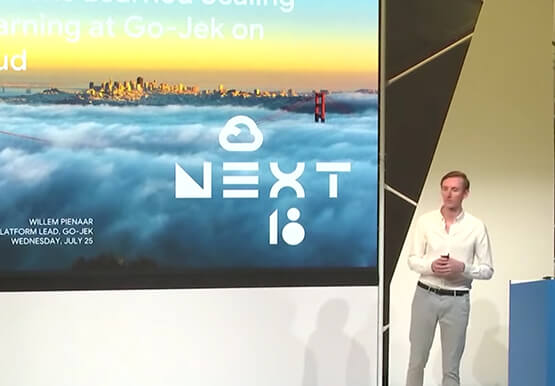
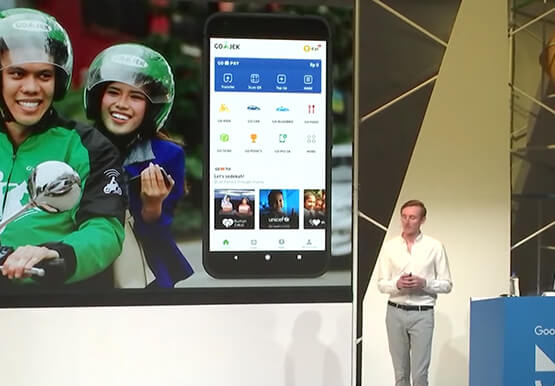
Go-Jek, Indonesia’s first billion-dollar startup, has seen an incredible amount of growth in both users and data over the past two years. Many of the ride-hailing company's services are backed by machine learning models hosted on Google Cloud Platform. Models range from driver allocation, to dynamic surge pricing, to food


How Google Secures its Data Centers: Watch Video
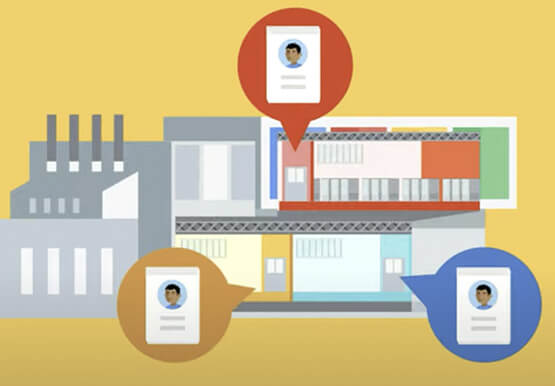
Security is in the DNA of Google Cloud's dozens of data centers, complex network and workloads scattered the globe. Take a tour to the nucleus of data center's six layers of physical security designed to keep unauthorized access at bay, and also learn about Google Cloud's security fundamentals to leverage

IBL Education’s GenAI-based chat mentor with Google
With more than 6 years of experience in building open source and Generative AI in education at scale, ibleducation.com continues to evolve its approach and services. More recently, the company became an education-focused Vertex AI integrator. They provide enterprises and academic institutions with a platform to build, train and securely customize large language models
