






7994
Of your peers have already downloaded this article
20:30 Minutes
The most insightful time you'll spend today!
Transcend from Prototype to Production: Train Your ML models with Vertex AI

2613
Of your peers have already read this article.
1:30 Minutes
The most insightful time you'll spend today!
You’re working on a new machine learning problem, and the first environment you use is a notebook. Your data is stored on your local machine, and you try out different model architectures and configurations, executing the cells of your notebook manually each time. This workflow is great for experimentation, but you quickly hit a wall when it comes time to elevate your experiments up to production scale. Suddenly, your concerns are more than just getting the highest accuracy score.
Sound familiar?
Developing production applications or training large models requires additional tooling to help you scale beyond just code in a notebook, and using a cloud service provider can help. But that process can feel a bit daunting.
To make things a little easier for you, we’ve created the Prototype to Production video series, which covers all the foundational concepts you’ll need in order to build, train, scale, and deploy machine learning models on Google Cloud using Vertex AI.
Let’s jump in and see what it takes to get from prototype to production!
Getting started with Notebooks for machine learning
Episode one of this series shows you how to create a managed notebook using Vertex AI Workbench. With your environment set up, you can explore data, test different hardware configurations, train models, and interact with other Google Cloud services.
Storing data for machine learning
When working on machine learning problems, it’s easy to be laser focused on model training. But the data is where it all really starts.
If you want to train models on Vertex AI, first you need to get your data into the cloud. In episode 2, you’ll learn the basics of storing unstructured data for model training and see how to access training data from Vertex AI Workbench.
Training custom models on Vertex AI
You might be wondering, why do I need a training service when I can just run model training directly in my notebook? Well, for models that take a long time to train, a notebook isn’t always the most convenient option. And if you’re building an application with ML, it’s unlikely that you’ll only need to train your model once. Over time, you’ll want to retrain your model to make sure it stays fresh and keeps producing valuable results.
Manually executing the cells of your notebook might be the right option when you’re getting started with a new ML problem. But when you want to automate experimentation at scale, or retrain models for a production application, a managed ML training option will make things much easier.
Episode 3 shows you how to package up your training code with Docker and run a custom container training job on Vertex AI. Don’t worry if you’re new to Docker! This video and the accompanying codelab will cover all the commands you’ll need.
CODELAB: Training custom models with Vertex AI
How to get predictions from an ML model
Machine learning is not just about training. What’s the point of all this work if we don’t actually use the model to do something?
Just like with training, you could execute predictions directly from a notebook by calling model.predict. But when you want to get predictions for lots of data, or get low latency predictions on the fly, you’re going to need something more than a notebook. When you’re ready to use your model to solve a real world problem with ML, you don’t want to be manually executing notebook cells to get a prediction.
In episode 4, you’ll learn how to use the Vertex AI prediction service for batch and online predictions.
CODELAB: Getting predictions from custom trained models
Tuning and scaling your ML models
By this point, you’ve seen how to go from notebook code, to a deployed model in the cloud. But in reality, an ML workflow is rarely that linear. A huge part of the machine learning process is experimentation and tuning. You’ll probably need to try out different hyperparameters, different architectures, or even different hardware configurations before you figure out what works best for your use case.
Episode 5, covers the Vertex AI features that can help you with tuning and scaling your ML models. Specifically, you’ll learn about hyperparameter tuning, distributed training, and experiment tracking.
CODELAB: Hyperparameter tuning on Vertex AI
CODELAB: Distributed Training on Vertex AI
We hope this series inspires you to create ML applications with Vertex AI! Be sure to leave a comment on the videos if you’d like to see any of the concepts in more detail, or learn how to use the Vertex AI MLOps tools.
If you’d like try all the code for yourself, check out the following codelabs:
5142
Of your peers have already watched this video.
44:51 Minutes
The most insightful time you'll spend today!
The Strange Phenomenon AI Revealed at Ride-Hailing Company Go-Jek
Go-Jek, Indonesia’s first billion-dollar startup, has seen an incredible amount of growth in both users and data over the past two years. Many of the ride-hailing company’s services are backed by machine learning models hosted on Google Cloud Platform. Models range from driver allocation, to dynamic surge pricing, to food recommendation, and process millions of bookings every day, leading to substantial increases in revenue and customer retention.
By embracing Google Cloud, Go-Jek has overcome many of the technical challenges brought on by its rapid growth. BigQuery has become the cornerstone of their data foundation, scaling seamlessly to meet their immense data storage and processing needs.
Using Pub/Sub as an event stream and Dataflow for unified batch and stream processing has prevented inconsistencies in production data, while simultaneously reducing costs through intelligent resource allocation.
Together, these technologies allow Go-Jek to react immediately to real world events, whether by retraining models with ML Engine, or refreshing data in a low latency data store like BigTable.
Find out how Go-Jek leverages Google Cloud and other lessons they have learned scaling machine learning.
Experts’ Guideline for Personalizing Platforms with the Right Recommendation System on Google Cloud

5002
Of your peers have already read this article.
5:00 Minutes
The most insightful time you'll spend today!
Over the past two decades, consumers have become accustomed to receiving personalized recommendations in all facets of their online life. Whether that be recommended products while shopping on Amazon, a curated list of apps in the Google Play store, or relevant videos to watch next on YouTube. In fact, in a Verge article “How YouTube perfected the feed: Google Brain gave YouTube new life,” the Google Brain team reveals how their recommendation engine has impacted the platform with “more than 70 percent of the time people spend watching videos on the site being driven by YouTube’s algorithmic recommendations” thereby increasing time spent on the platform by 20X in three years.
It’s become clear that personalized recommendations are no longer a differentiator for an organization but rather something consumers have come to expect in their day-to-day experiences online. So what should you do if you are behind the curve and want to get started or simply want to improve upon what you already have? While there are all sorts of techniques, from content-based systems to deep learning methods, our goal in this recommender-focused blog series is to demystify three available approaches to building recommendation systems on Google Cloud: Matrix Factorization in BigQuery Machine Learning (BQML), Recommendations AI, and deep retrieval techniques available via the Two-Tower built-in algorithm.
One of these approaches can be used to meet you where you are in your personalization journey, no matter if you are just starting or if you are well into it. This first blog post will introduce our three approaches and when to use them.
What is Matrix Factorization and how does it work?
Collaborative filtering is a foundational model for building a recommendation system as the input dataset is simple and the embeddings are learned for you. How does Matrix factorization fit into the mix you might be wondering? Matrix factorization is simply the model that applies collaborative filtering. BQML enables users to create and execute a matrix factorization model by using standard SQL directly in the data warehouse.
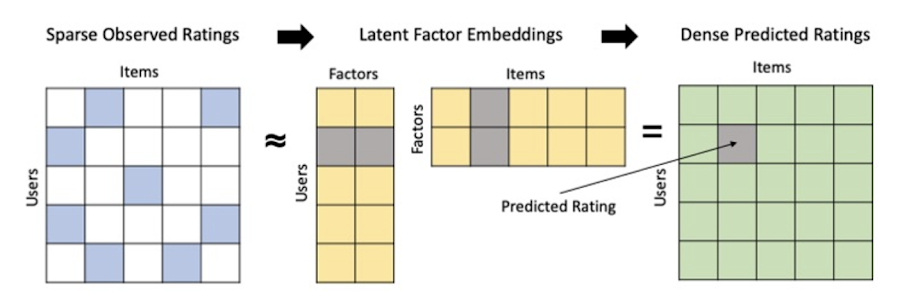
Collaborative filtering begins by creating an interaction matrix. The interaction matrix represents users as a row and items as columns in your dataset. This interaction matrix often is sparse in nature as not all users will have interacted with many items in your catalog. This is where embeddings come into play. Generating embeddings for users and items not only allows you to collapse many sparse features into a lower dimensional space but they also allow you to derive a similarity measure so that similar users/items fall nearby in the embedding space. These similarity measures are key as collaborative filtering uses similarities between users and items to make the end recommendations. The underlying assumption being that similar users will like similar items whether that be movies or handbags.
What’s required to get started?
To train a matrix factorization model you need a table that includes three input columns: user(s), item(s), and an implicit or explicit feedback variable (e.g., ratings is an example of explicit feedback). With the base input dataset in place, you can then easily run your model in BigQuery after specifying several hyperparameters in your CREATE MODEL SQL statement. Hyperparameters are available to specify the number of embeddings, the feedback type, the amount of L2 regularization applied and so on.
Why use this approach and who is it a good fit for?
As mentioned earlier, Matrix Factorization in BQML is a great way for those new to recommendation systems to get started. Matrix factorization has many benefits:
- Little ML Expertise: Leveraging SQL to build the model lowers the level of ML expertise needed
- Few Input Features: Data inputs are straightforward, requiring a simple interaction matrix
- Additional Insight: Collaborative filtering is adept at discovering new interests or products for users
While Matrix Factorization is a great tool for deriving recommendations it does come with additional considerations and potential drawbacks depending upon the use case.
- Not Amenable to Large Feature Sets: The input table can only contain two feature columns (e.g., user(s), item(s)). If there is a need to include additional features such as contextual signals, Matrix factorization may not be the right method for you.
- New Items: If an item is not available in the training data, the system can’t create an embedding for it and will have difficulty recommending similar items. While there are some workarounds available to address this cold-start issue, if your item catalog often includes new items, Matrix factorization may not be a good fit.
- Input Data Limitations: While the input matrix is expected to be sparse, training examples without feedback can cause problems. Filtering for items and users that have at least a handful of feedback (e.g., ratings) examples can improve the model. More information on limitations can be found here.
In summary, for users with a simplified dataset looking to iterate quickly and develop a baseline recommendation system, Matrix Factorization is a great approach to begin your personalization AI journey.
What is Recommendations AI and how does it work?
Recommendations AI is a fully managed service which helps organizations deploy scalable recommendation systems that use state-of-the-art deep learning techniques, including cutting-edge architectures such as two-tower encoders, to serve personalized and contextually relevant recommendations throughout the customer journey.
Deep learning models are able to improve the context and relevance of recommendations in part because they can easily address the previously mentioned limitations of Matrix Factorization. They incorporate a wide set of user and item features, and by definition they emphasize learning successive layers of increasingly meaningful representations from these features. This flexibility and expressivity allows them to capture complex relationships like short-lived fashion trends and niche user behaviors. However, this increased relevance comes at a cost, as deep learning recommenders can be difficult to train and expensive to serve at scale.
Recommendations AI helps organizations take advantage of serving these deep learning models and handles the MLOps required to serve these models globally with low latency. Models are automatically retrained daily and tuned quarterly to capture changes in customer behavior, product assortment, pricing, and promotions. Newly trained models follow a resilient CI/CD routine which validates they are fit to serve and promotes them to production without service interruption. The models achieve low serving latency by using a scalable approximate nearest neighbors (ANN) service for efficient item retrieval at inference time. And, to maintain consistency between online and offline tasks, a scalable feature store is used, preventing common production challenges such as data leakage and training-serving skew.
What’s required to get started?
To get started with Recommendations AI we first need to ingest product and user data into the API:
- Import product catalog: For large product catalog updates, ingest catalog items in bulk using the catalogItems.import method. Frequent catalog updates can be schedule with Google Merchant Center or BigQuery
- Record user events: User events track actions such as clicking on a product, adding items to cart, or even purchasing an item. These events need to be ingested in real time to reflect the latest user behavior and then joined to items imported in the product catalog
- Import historical user events: The models need sufficient training data before they can provide accurate predictions. The recommended user event data requirements are different across model types (learn more here)
Once the data requirements are met, we are able to create one or multiple models to serve recommendations:
- Determine your recommendation types and placements: The location of the recommendation panel and the objective for that panel impact model training and tuning. Review the available recommendations types, optimization objectives, and other model tuning options to determine the best options for your business objectives.
- Create model(s): Initial model training and tuning can take 2-5 days depending on the number of user events and size of the product catalog
- Create serving configurations and preview recommendations: After the model is activated, create serving configurations and preview the recommendations to ensure your setup is functioning as expected before serving to production traffic
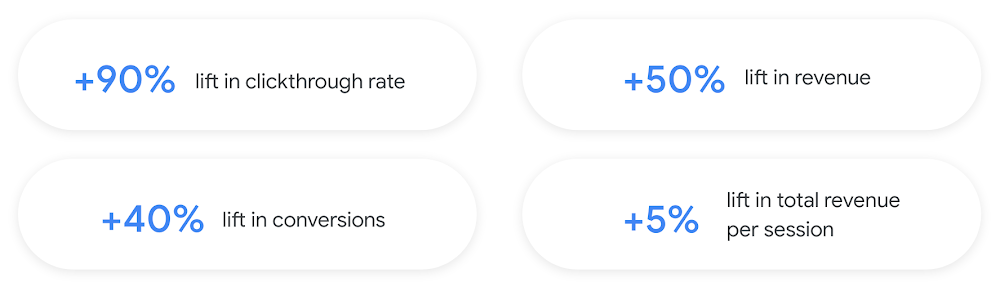
Once models are ready to serve, consider setting up A/B experiments to understand how newly trained models impact your customer experience before serving them to 100% of your traffic. In the Recommendations AI console, see the Monitoring & Analytics page for summary and placement-specific metrics (e.g., recommender-engaged revenue, click-through-rate, conversion rate, and more).
Why use this approach and who is it a good fit for?
Recommendations AI is a great way to engage customers and grow your online presence through personalization. It’s used by teams who lack technical experience with production recommendation systems, as well as customers who have this technical depth but want to allocate their team’s effort towards other priorities and challenges. No matter your team’s technical experience or bandwidth, you can expect several benefits with Recommendations AI:
- Fully managed service: no need to preprocess data, train or hypertune machine learning models, load balance or manually provision you infrastructure – this is all taken care of for you. The recommendation API also provides a user-friendly console to monitor performance over time.
- State-of-the-art AI: take advantage of the same modeling techniques used to serve recommendations across Google Ads, Google Search, and YouTube. These models excel in scenarios with long-tail products and cold-starts users and items
- Deliver at any touchpoint: serve high-quality recommendations to both first-time users and loyal customers anywhere in their journey via web, mobile, email, and more
- Deliver globally: serve recommendations in any language anywhere in the world at low-latency with a fully automated global serving infrastructure
- Your data, your models: Your data and models are yours. They’ll never be used for any other Google product nor shown to any other Google customer
For users looking to leverage state of the art AI to fuel their recommendation systems but need an existing solution to get up and running more quickly, Recommendations AI is the right solution for you.
What are Two Tower encoders and how do they work?
As a reminder, in recommendation system design, our objective is to surface the most relevant set of items for a given user or set of users. The items are usually referred to as the candidate(s) where we might include information about the items such as the title or description of the item, other metadata about the item like language, number of views, or even clicks on the item over time. User(s) are often represented in the form of a query to a recommendation system where we might provide details about the user such as the location of the user, preferred languages, and what they have searched for in the past.
Let’s start with a common example. Imagine that you are creating a movie recommendation system. The input candidates for such a system would be thousands of movies and the query set can consist of millions of viewers. The goal of the retrieval stage is to select a smaller subset of movies(candidates) for each user and then score and rank order them before presenting the final recommended list to the query/user.
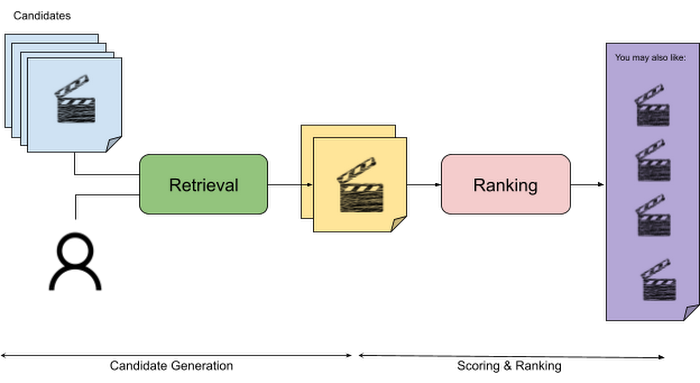
The retrieval stage is able to refine our list of candidates by encoding both the candidate and the query data so they share the same embedding space. A good embedding space will place candidates which are similar to one another closer together and dissimilar items/queries farther apart in the embedding space.
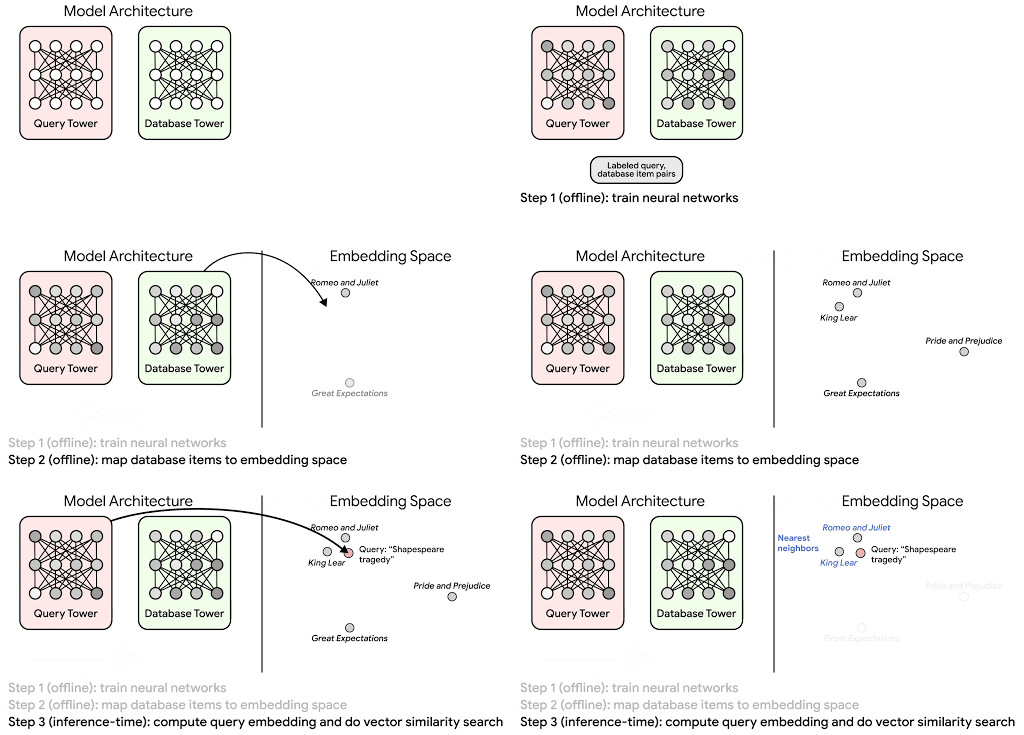
Once we have a database of query and candidate embeddings we can then use an approximate nearest neighbor search method to then generate a list of final “like” candidates, i.e. find a certain number of nearest neighbors for a given query/user and surface final recommendations.
What’s required to get started?
At the most basic level, in order to train a two-tower model you need the following inputs:
- Training Data: Training data is created by combining your query/user data with data about the candidates/items. The data must include matched pairs, cases where both user and item information is available. Data in the training set can include many formats from text, numeric data, or even images.
- Input Schema: The input schema describes the schema of the combined training data along with any specific feature configurations.
Several services within Vertex AI have come available that complement the existing Two-Tower built-in algorithm and can be leveraged in your execution:
- Nearest Neighbor (ANN) Service: Vertex AI Matching Engine and ScANN provide a high-scale and low-latency Approximate Nearest Neighbor (ANN) service so you can more easily identify similar embeddings.
- Hyperparameter Tuning Service: A hyperparameter tuning service such as Vizier can help you identify the optimal hyperparameters such as the number of hidden layers, the size of the hidden layers, and the learning rate in fewer trials.
- Hardware Accelerators: Specialized hardware, such as GPUs or TPUs, can be valuable in your recommendation system to help accelerate experiments and improve the speed of training cycles.
Why use this approach and who is it a good fit for?
The Two-Tower built-in algorithm can be considered the “custom sports car” of recommendation systems and comes with several benefits:
- Greater Control: While Recommendations AI uses the two-tower architecture as one of the available architectures it doesn’t provide granular control or visibility into model training, example generation, and model validation details. In comparison, the Two-Tower built in algorithm provides a more customizable approach as you are training a model directly in a notebook environment.
- More Feature Options: The Two Tower approach can handle additional contextual signals ranging from text to images.
- Cold Start Cases: Leveraging a rich set of features not only enhances performance but also allows the candidate generation to work for new users or new candidates.
While the Two-Tower built in algorithm is an excellent and best-in class solution for deriving recommendations, it does come with additional considerations and potential drawbacks depending upon the use case.
- Technical ML Expertise Required: Two tower encoders are not a “plug and play” solution like the other approaches mentioned above. In order to effectively leverage this approach, appropriate coding and ML expertise is required.
- Speed to Insight: Building out a custom solution via two-tower encoders may require additional time as the solution is not pre-built for the user.
For users looking for greater control, increased flexibility, and have the technical chops to easily work within a managed notebook environment – the two-tower built in algorithm is the right solution for them.
What’s next?
In this article, we explored three common methods for building recommendation systems on Google Cloud Platform. As you can see thus far, there are alot of considerations to take into account before choosing a final approach. In an effort to help you align more quickly we have distilled the decision criteria down to a few simple steps (see below for more details).
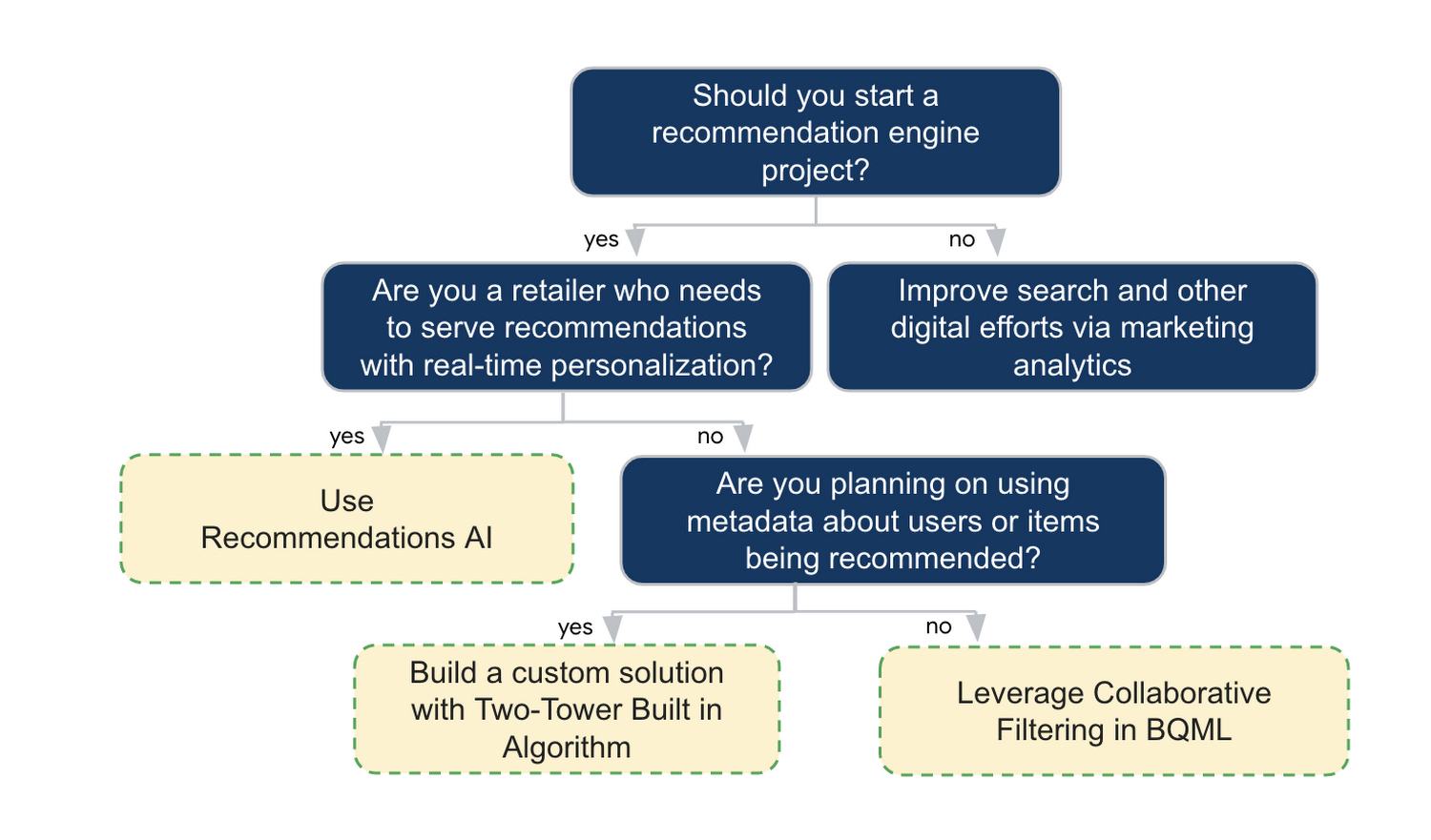
In the next installments of this series, we will dive more deeply into each method, explore how hardware accelerators can play a key role in recommendation system design, and discuss how recommendation systems may be leveraged in key verticals. Stay tuned for future posts in our recommendation systems series. Thank you for reading! Have a question or want to chat? Find authors here – R.E. [Twitter | LinkedIn], Jordan [LinkedIn], and Vaibhav [LinkedIn].
Acknowledgements
Special thanks to Pallav Mehta, Henry Tappen,Abhinav Khushraj, and Nicholas Edelman for helping to review this post.
References
Increasing Production Efficiency: How AI Can Improve Asset Utilization and Minimize Downtime

2695
Of your peers have already read this article.
1:30 Minutes
The most insightful time you'll spend today!
Today, manufacturers are advancing on their factory digitalization journey, betting on innovative technologies to strengthen competitiveness, deliver sustainable growth, and offer new services. Macroeconomic factors – such as high energy costs, increasing labor, and raw material shortages – drive the need for urgent operational optimizations and automation.
Cloud capabilities have matured at an accelerated pace, giving manufacturers practical avenues to achieve these goals. Manufacturers are finding new ways to bring AI and machine learning (ML) to practical use cases, like predictive maintenance, anomaly detection, and asset utilization management. However, manufacturers struggle to adopt AI at scale due to challenges around data accessibility, infrastructure, and technology.
Google Cloud created purpose-built tools and solutions to organize manufacturing data, make it accessible and useful, and help manufacturers quickly take significant steps on this journey by reducing the time to value. In this post, we will explore a practical example of how manufacturers can use Google Cloud manufacturing solutions to train, deploy and extract value from ML-enabled capabilities to predict asset utilization and maintenance needs.
The journey to machine learning insights starts with accessible data
The first step to a successful machine learning project is to unify necessary data in a common repository. For this, we will use Manufacturing Connect, the factory edge platform co-developed with Litmus Automation, to connect to manufacturing assets and stream the asset telemetries to Pub/Sub.
After the telemetry messages are published to Pub/Sub, Dataflow will identify each message based on its structure and apply corresponding normalizations and transformations, which are preconfigured in Manufacturing Data Engine. Once the messages are processed, the messages will be routed to Cloud Storage, BigQuery, and/or Cloud BigTable based on user configuration.
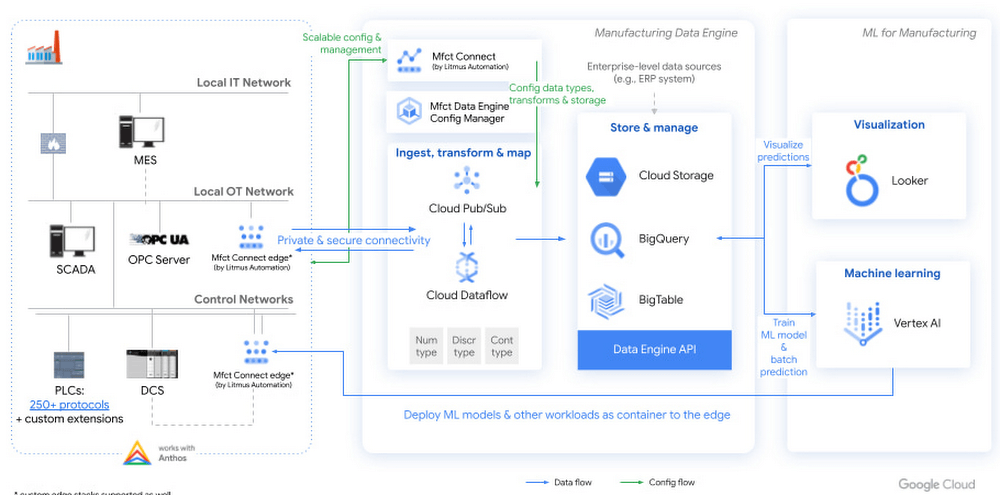
Figure 1. High level architecture diagram of machine learning with Manufacturing Data Engine
To train a machine learning model, manufacturers can use Vertex AI AutoML to build a no-code model based on the training data stored in the Manufacturing Data Engine.
Then, users can trigger a batch prediction job in Vertex AI or export the AutoML model to run on the edge component of Manufacturing Connect for real-time prediction. Regardless of the model deployment methods, the prediction and explanation results will be ingested into Manufacturing Data Engine, which can be analyzed and visualized in Looker.
A blueprint for classifying asset condition
The following scenario is based on a hypothetical company, Cymbal Materials. This company is a factitious discrete manufacturing company that runs 50+ factories in 10+ countries. 90% of Cymbal Materials manufacturing processes involve milling, which are accomplished using industrial computer numerical control (CNC) milling machines. Although their factories implement routine maintenance checklists, there are unplanned and unknown failures that happen occasionally. However, many of the Cymbal Materials factory workers lack the experience to identify and troubleshoot failures due to labor shortage and high turnover rate in their factories. Hence, Cymbal Materials is working with Google Cloud to build a machine learning model that can identify and analyze failures on top of Manufacturing Connect, Manufacturing Data Engine, and Vertex AI.
For the pilot, Cymbal Materials forms a team of manufacturing engineers and data scientists to evaluate the feasibility of solving the tool wear detection problem. To avoid compliance concern, the Cymbal Materials team chooses to start with a public tool wear detection dataset hosted on Kaggle. This dataset is collected from running machining experiments on 2″ x 2″ x 1.5″ wax blocks in a CNC milling machine. The dataset contains measurements from the 4 motors (X,Y, Z axes and spindle) and program values in the CNC machine, which maps well to the data that Cymbal Materials collects for their CNC milling machines.
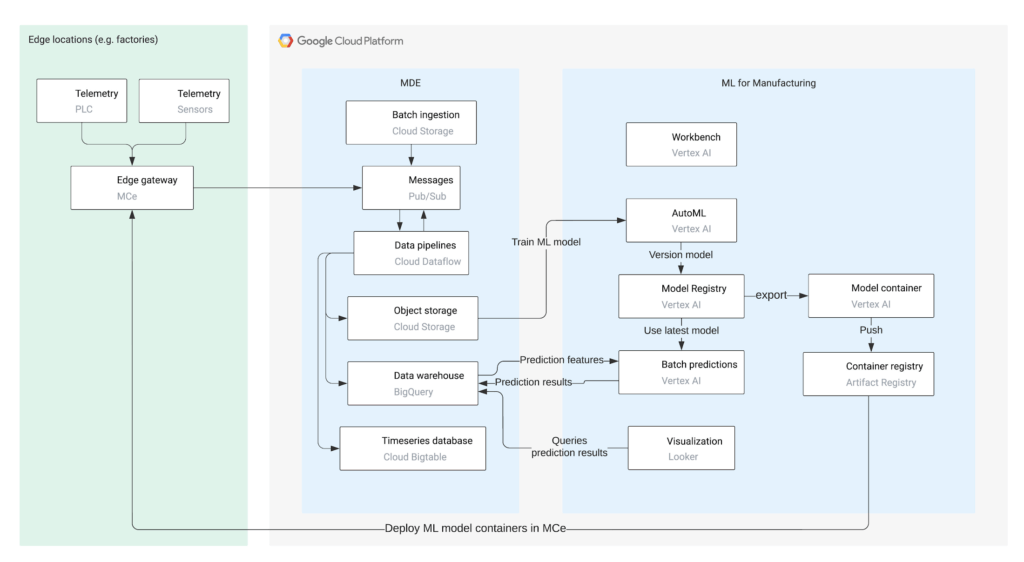
To start, the Cymbal Materials data scientists download the tool wear detection dataset from Kaggle and upload the dataset to Cloud Storage. Then, the data scientists use Vertex AI to:
- Perform exploratory data analysis using Vertex AI Workbench
- Train machine learning models using Vertex AI AutoML
- Deploy machine learning models to perform batch prediction and export AutoML models for edge deployment
- Interpret predictions using Vertex Explainable AI
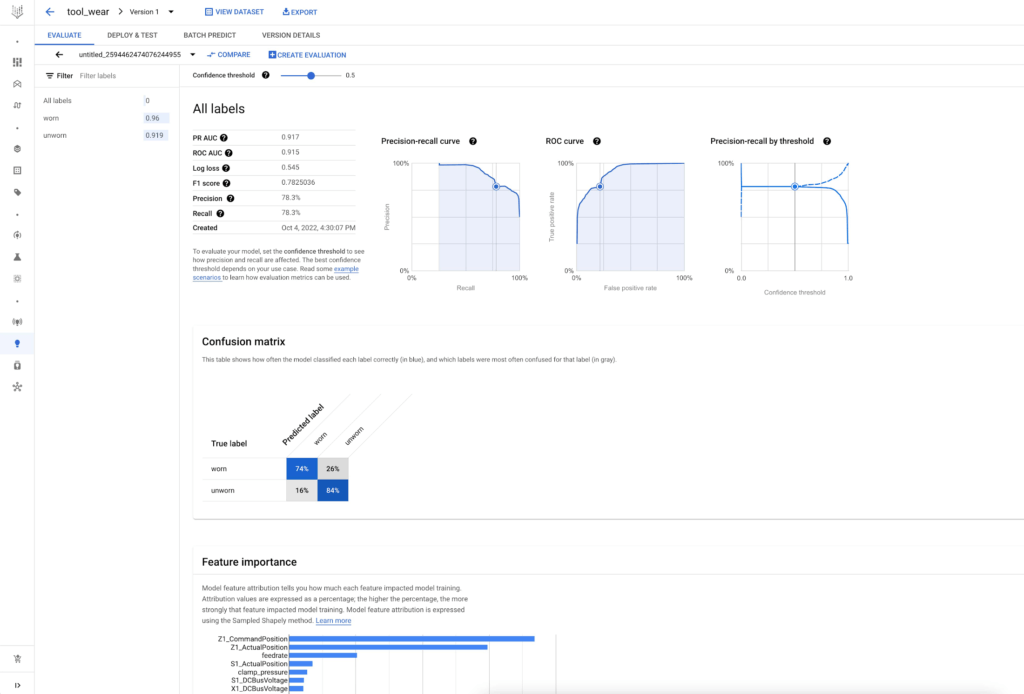
After seeing great performance of the AutoML tabular model, the Cymbal Materials data scientists decide to use the AutoML model to predict on the actual CNC milling machine telemetries from their factories and validate the generalizability of the AutoML model. They ask the manufacturing engineers to deploy Manufacturing Connect in a Cymbal Materials factory and stream telemetries for one CNC milling machine to the Manufacturing Data Engine.
Manufacturing Connect includes an edge component that can gather data from manufacturing assets via an extensive library of 250+ communication protocols. The edge component of Manufacturing Connect comes with built-in Node-RED and Docker runtime, which support running custom workflows and machine learning models at the edge.
Using pre-defined hierarchies, Manufacturing Connect pushes asset telemetries and states to Pub/Sub.
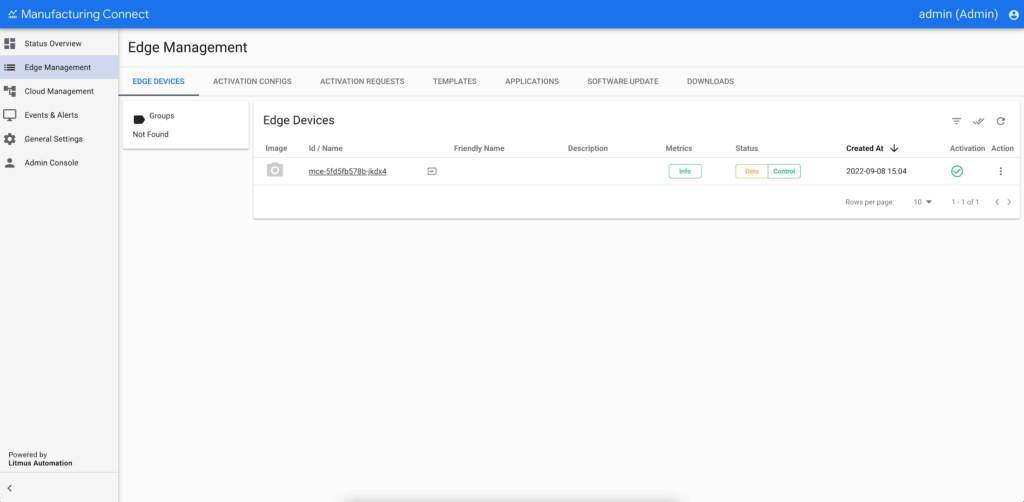
After the factory operational data are ingested into Pub/Sub, Cymbal Materials uses Manufacturing Data Engine to:
- Normalize, transform, and contextualize real-time operational data with slowly changing metadata
- Batch ingest historical operational data and prediction results
- Route data dynamically to Cloud Storage, BigQuery, and/or Cloud BigTable
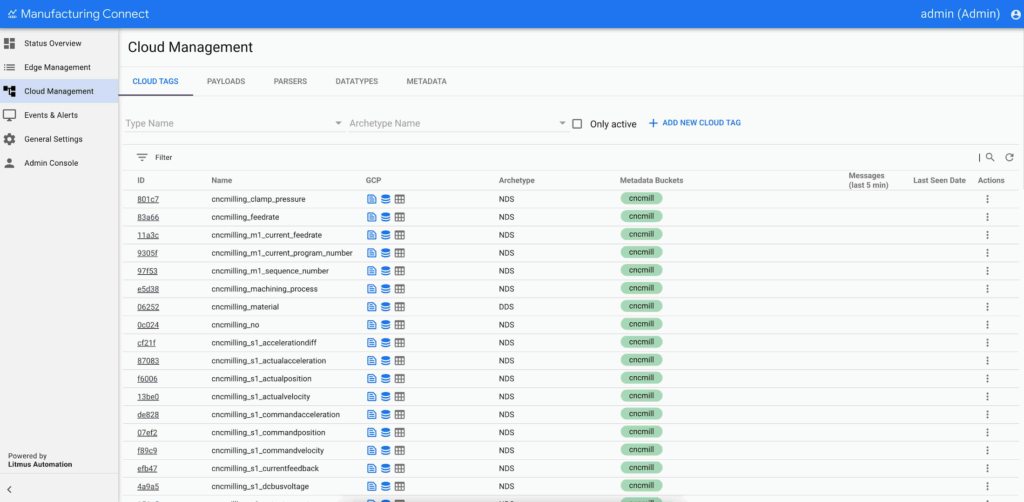
Figure 5. Manufacturing Data Engine configuration in Manufacturing Connect.
Using the trained AutoML tabular model and real-time telemetries from CNC milling machines, the data scientists trigger a batch prediction job on the CNC milling machine telemetries in BigQuery. The data scientists configure the batch prediction to output prediction results in Cloud Storage such that Manufacturing Data Engine can batch ingest the prediction results after the batch prediction job completes.
To consume the prediction results, the Cymbal Materials manufacturing engineers use Looker to create visualizations. The dashboard allows the manufacturing engineers to:
- Visualize the CNC milling machine actual and predicted tool conditions over time
- Explain the prediction results by summarizing the top attributing features
- Create alerts based on the predicted tool condition for their assets
- Take actions by contacting the supplier and/or scheduling maintenance for their assets
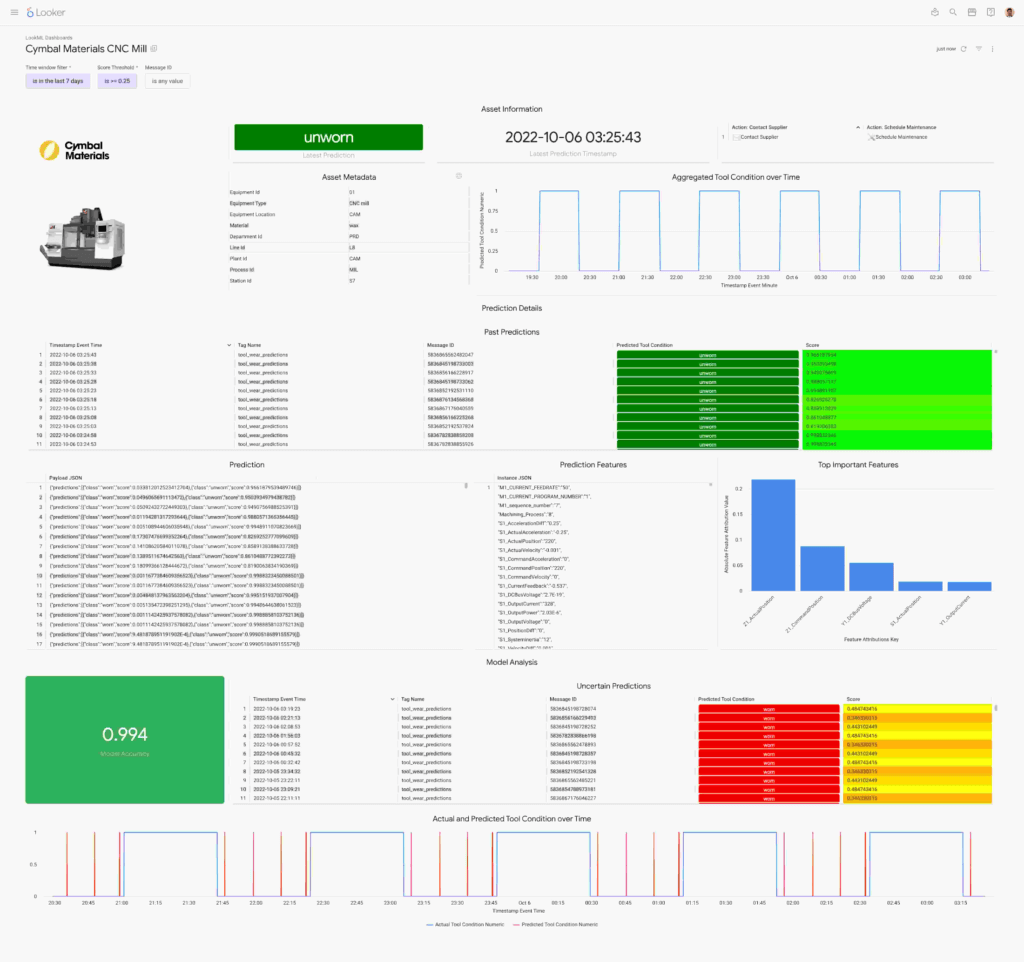
Figure 6. CNC mill wear prediction displayed in a Looker dashboard.
From edge to cloud, improving production efficiency for manufacturers
To support the entire factory digitalization value journey, manufacturers are looking for capabilities from simple visualizations to predictive ML models. Robust solutions, such as the one covered here, provide rapid paths for engineers to extract insight from their factory data.
Having a common data repository for manufacturing data, industry-leading machine learning platform, and versatile dashboard components accelerate manufacturer’s digital transformation.
This solution brings the best of Google Cloud’s data analytics and artificial intelligence capabilities in an industrial environment. Manufacturing Connect creates the link between industrial machinery and Manufacturing Data Engine, the cloud platform where the manufacturing data are processed, normalized, contextualized, and stored in a ready-to-consume format. Vertex AI can build, deploy, and scale machine learning models using data stored in the Manufacturing Data Engine. Vertex AI includes AutoML and Workbench for training models without code and training custom models with code-first experience respectively.
Learn more about how Google Cloud is transforming manufacturing to meet changing customer expectations at our Google Cloud Next Manufacturing playlist.
What’s next
Supercharging Security with Generative AI

1499
Of your peers have already read this article.
3:30 Minutes
The most insightful time you'll spend today!
At Google Cloud, we continue to invest in key technologies to progress towards our true north star on invisible security: making strong security pervasive and simple for everyone. Our investments are based on insights from our world-class threat intelligence teams and experience helping customers respond to the most sophisticated cyberattacks. Customers can tap into these capabilities to gain perspective and visibility on the most dangerous threat actors that no one else has.
Recent advances in artificial intelligence (AI), particularly large language models (LLMs), accelerate our ability to help the people who are responsible for keeping their organizations safe. These new models not only give people a more natural and creative way to understand and manage security, they give people access to AI-powered expertise to go beyond what they could do alone.
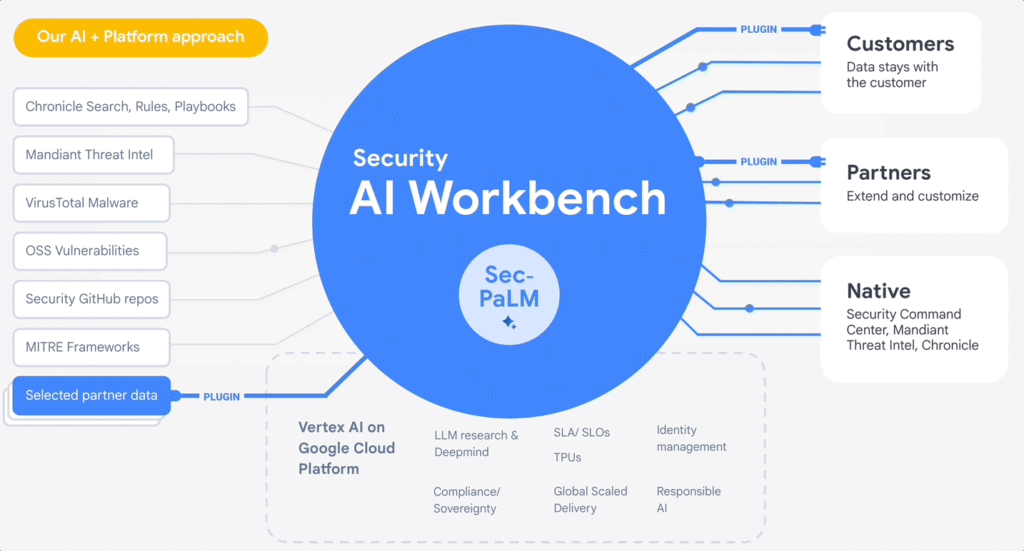
At the RSA Conference 2023, we are excited to announce Google Cloud Security AI Workbench, an industry-first extensible platform powered by a specialized, security LLM, Sec-PaLM. This new security model is fine-tuned for security use cases, incorporating our unsurpassed security intelligence such as Google’s visibility into the threat landscape and Mandiant’s frontline intelligence on vulnerabilities, malware, threat indicators, and behavioral threat actor profiles.
Google Cloud Security AI Workbench powers new offerings that can now uniquely address three top security challenges: threat overload, toilsome tools, and the talent gap. It will also feature partner plug-in integrations to bring threat intelligence, workflow, and other critical security functionality to customers, with Accenture being the first partner to utilize Security AI Workbench.
The platform will also let customers make their private data available to the platform at inference time; ensuring we honor all our data privacy commitments to customers. Because Security AI Workbench is built on Google Cloud’s Vertex AI infrastructure, customers control their data with enterprise-grade capabilities such as data isolation, data protection, sovereignty, and compliance support.
Preventing threats from spreading beyond the first infection
We already provide best-in-class capabilities to help organizations immediately respond to threats. But what if we could not just identify and contain initial infections, but also help prevent them from happening anywhere else? With our AI advances, we can now combine world class threat intelligence with point-in-time incident analysis and novel AI-based detections and analytics to help prevent new infections. These advances are critical to help counter a potential surge in adversarial attacks that use machine learning and generative AI systems. That’s why we’re excited to introduce:
- VirusTotal Code Insight uses Sec-PaLM to help analyze and explain the behavior of potentially malicious scripts, and will be able to better detect which scripts are actually threats.
- Mandiant Breach Analytics for Chronicle leverages Google Cloud and Mandiant Threat Intelligence to automatically alert you to active breaches in your environment. It will use Sec-PaLM to help contextualize and respond instantly to these critical findings.
These new updates build on the existing AI in Google’s industry-leading solutions. For example, Chronicle Security Operations already uses frontline intelligence, integrated reasoning, and machine learning to identify initial infections, prioritize impact, and contain threats. Another example is reCAPTCHA Enterprise, which uses image noising capabilities to help protect your site from adversaries that leverage novel AI advances, greatly enhancing our defenses against bots.
Adding intelligence to reduce toil
At Google Cloud, we help organizations modernize security wherever they are, in part by simplifying their security tools and controls whenever possible. Advances in generative AI can help reduce the number of tools organizations need to secure their vast attack surface areas and ultimately, empower systems to secure themselves. This will minimize the toil it takes to manage multiple environments, to generate security design and capabilities, and to generate security controls. Today, we’re announcing:
- Assured OSS will use LLMs to help us add even more open-source software (OSS) packages to our OSS vulnerability management solution, which offers the same curated and vulnerability-tested packages that we use at Google.
- Mandiant Threat Intelligence AI, built on top of Mandiant’s massive threat graph, will leverage Sec-PaLM to quickly find, summarize, and act on threats relevant to your organization.
These announcements build on existing capabilities that help customers centralize visibility and control, detect targets, and improve security across their platform. For example, Security Command Center (SCC) uses always-on machine learning to detect malicious scripts executing in the customer container environment and immediately alert the customer. In addition, Cloud Data Loss Prevention leverages machine learning to find and classify data, and with Confidential Computing you can collaborate on, train, and deploy sensitive and regulated AI models in the cloud, all while preserving confidentiality.
Evolving how practitioners do security to close the talent gap
At Google, we believe that to truly democratize security, we need to first acknowledge that AI will soon usher in a new era for security expertise that will profoundly impact how practitioners “do” security. Most people who are responsible for security — developers, system administrators, SRE, even junior analysts — are not security specialists by training.
Imagine a world where novices and security experts are paired with AI expertise to free themselves from repetition and burnout, and accomplish tasks that seem impossible to us today. To help power this evolution, we’re embedding Sec-PaLM-based features that can make security more understandable while helping to improve effectiveness with exciting new capabilities in two of our solutions:
- Chronicle AI: Chronicle customers will be able to search billions of security events and interact conversationally with the results, ask follow-up questions, and quickly generate detections, all without learning a new syntax or schema.
- Security Command Center AI: Security Command Center will translate complex attack graphs to human-readable explanations of attack exposure, including impacted assets and recommended mitigations. It will also provide AI-powered risk summaries for security, compliance, and privacy findings for Google Cloud.
These new releases bolster our existing efforts to tackle these issues through capabilities like IAM Recommender, which suggests permissions better suited to actual usage patterns. We will soon be augmenting this capability to cover organizational policies, further enabling the administrator to help improve the security posture of their organization. In addition, Mandiant Automated Defense applies machine learning to help reduce the repetitive Tier 1 alert triage problem and address alert fatigue.
Offering availability
VirusTotal Code Insight, available now in Preview, is our first example of putting Security AI Workbench to work for our customers. We will be rolling out other offerings to trusted testers in coming months, and they will be available in Preview more broadly this summer. Click here for the demo.
Security AI Workbench, including Sec-PaLM and partner integrations, in addition to the product innovations described in our demo, are all building blocks for a larger effort to elevate security across the ecosystem. So far, that effort:
- Provides assistive functions to rapidly develop IT generalist talent to Tier 1 security operator status in a way that wasn’t previously feasible. Security Command Center now can summarize threat intelligence insights and findings for Google Cloud, and Chronicle can quickly generate YARA-L rules or other detections.
- Provides advanced functions such as iterative query and multivariate detection generation, conversational filtering and interaction with results, and smart case awareness to empower advanced Tier 2 and 3 security operators to focus on threat analysis instead of struggling with process and toil. Mandiant Threat Intelligence users now can elevate their core competencies to hunt, investigate, and remediate threats — using the same tools our own Mandiant experts use.
- Fuses threat intelligence and AI-based analytic capabilities, which are unsurpassed in the market. VirusTotal Code Insight enables security teams to help gain insights and identify threats in suspicious code. This can significantly enhance their ability to detect and mitigate potential attacks.
However, this is just an initial step. We’ll continue to iterate and innovate, and we encourage customers and partners to leverage Security AI Workbench in new and exciting ways. Moving forward, we anticipate many new use cases to emerge over time.
Building a safer future
While generative AI has recently captured the imagination, Sec-PaLM is based on years of foundational AI research by Google and DeepMind, and the deep expertise of our security teams. This work includes new efforts to expand our partner ecosystem to provide businesses with security capabilities at every layer of the cybersecurity stack. We have only just begun to realize the power of applying generative AI to security, and we look forward to continuing to leverage this expertise for our customers and drive advancements across the security community.
More Relevant Stories for Your Company

A Road to Possibilities: Google Maps Platform Website
For more than 15 years, developers have used Google Maps Platform to deliver location-based experiences to their end users and used location intelligence to optimize their businesses. Along this journey, we’ve made a variety of changes to better support our community as needs have changed and new industries and technologies


How Apna is using data and AI to drive the gig economy in India
In this episode, Theo speaks to Ronak Shah, Head of Data at apna.co. As one of the largest gig economies in the world, India is seeing rising numbers among younger people joining the ecosystem. Driven by digital adoption and new ways of working, Apna saw an opportunity to help bridge

ML Models Built on Google Cloud Solutions Help You Virtually Participate in National Muffin Day!
If you’re here you’re probably wondering: what on Earth is the connection between muffins and machine learning, and what is National Muffin Day? To understand this, let’s start with National Muffin Day: an annual holiday co-founded by Jacob and his friend Julia Levy in 2015 to bake muffins and raise money for homelessness.




Navigating the AI Landscape: The Future of AI for ML Engineers
A podcast-style video series exploring how AI is shaping our future and how to prepare for changes. Developer advocate, Arwen Hauzhenga, shares his 10+ years of experience in machine learning and generative AI. He discusses the evolution of the field from data mining to data science and large-scale machine learning.
