





Transcend from Prototype to Production: Train Your ML models with Vertex AI

2623
Of your peers have already read this article.
1:30 Minutes
The most insightful time you'll spend today!
You’re working on a new machine learning problem, and the first environment you use is a notebook. Your data is stored on your local machine, and you try out different model architectures and configurations, executing the cells of your notebook manually each time. This workflow is great for experimentation, but you quickly hit a wall when it comes time to elevate your experiments up to production scale. Suddenly, your concerns are more than just getting the highest accuracy score.
Sound familiar?
Developing production applications or training large models requires additional tooling to help you scale beyond just code in a notebook, and using a cloud service provider can help. But that process can feel a bit daunting.
To make things a little easier for you, we’ve created the Prototype to Production video series, which covers all the foundational concepts you’ll need in order to build, train, scale, and deploy machine learning models on Google Cloud using Vertex AI.
Let’s jump in and see what it takes to get from prototype to production!
Getting started with Notebooks for machine learning
Episode one of this series shows you how to create a managed notebook using Vertex AI Workbench. With your environment set up, you can explore data, test different hardware configurations, train models, and interact with other Google Cloud services.
Storing data for machine learning
When working on machine learning problems, it’s easy to be laser focused on model training. But the data is where it all really starts.
If you want to train models on Vertex AI, first you need to get your data into the cloud. In episode 2, you’ll learn the basics of storing unstructured data for model training and see how to access training data from Vertex AI Workbench.
Training custom models on Vertex AI
You might be wondering, why do I need a training service when I can just run model training directly in my notebook? Well, for models that take a long time to train, a notebook isn’t always the most convenient option. And if you’re building an application with ML, it’s unlikely that you’ll only need to train your model once. Over time, you’ll want to retrain your model to make sure it stays fresh and keeps producing valuable results.
Manually executing the cells of your notebook might be the right option when you’re getting started with a new ML problem. But when you want to automate experimentation at scale, or retrain models for a production application, a managed ML training option will make things much easier.
Episode 3 shows you how to package up your training code with Docker and run a custom container training job on Vertex AI. Don’t worry if you’re new to Docker! This video and the accompanying codelab will cover all the commands you’ll need.
CODELAB: Training custom models with Vertex AI
How to get predictions from an ML model
Machine learning is not just about training. What’s the point of all this work if we don’t actually use the model to do something?
Just like with training, you could execute predictions directly from a notebook by calling model.predict. But when you want to get predictions for lots of data, or get low latency predictions on the fly, you’re going to need something more than a notebook. When you’re ready to use your model to solve a real world problem with ML, you don’t want to be manually executing notebook cells to get a prediction.
In episode 4, you’ll learn how to use the Vertex AI prediction service for batch and online predictions.
CODELAB: Getting predictions from custom trained models
Tuning and scaling your ML models
By this point, you’ve seen how to go from notebook code, to a deployed model in the cloud. But in reality, an ML workflow is rarely that linear. A huge part of the machine learning process is experimentation and tuning. You’ll probably need to try out different hyperparameters, different architectures, or even different hardware configurations before you figure out what works best for your use case.
Episode 5, covers the Vertex AI features that can help you with tuning and scaling your ML models. Specifically, you’ll learn about hyperparameter tuning, distributed training, and experiment tracking.
CODELAB: Hyperparameter tuning on Vertex AI
CODELAB: Distributed Training on Vertex AI
We hope this series inspires you to create ML applications with Vertex AI! Be sure to leave a comment on the videos if you’d like to see any of the concepts in more detail, or learn how to use the Vertex AI MLOps tools.
If you’d like try all the code for yourself, check out the following codelabs:

How Domino’s Increased Monthly Revenue By 6% with Google’s Analytical Tools
DOWNLOAD CASE STUDY3903
Of your peers have already downloaded this article
4:15 Minutes
The most insightful time you'll spend today!
Pizza purveyor Domino’s is dominating delivery sales around the world. Today, Domino’s is the most popular pizza delivery chain operating in the U.K., the Republic of Ireland, Germany, and Switzerland—and sales just keep growing.
In these regions in 2014, Domino’s sold 76 million pizzas and generated £766.6 million (1.02 billion USD) in revenue — a 14.6% increase from the previous year.
In the U.K. and Ireland, online sales are increasing 30% year over year and currently account for almost 70% of all sales. Notably, 44% of those online sales are now made via mobile devices.
Multi-Device Purchasing Means Fresh Opportunities
Domino’s is a consistent digital innovator. Much of the company’s success stems from early investments in ecommerce and mobile commerce platforms that help people easily purchase pizzas from different devices.
Domino’s sold its first pizza online in 1999. It then launched an iPhone app in 2010, quickly followed by apps for Android and iPad in 2011, and a Windows app in 2012. By late 2014, Domino’s customers could even order pizzas from Xboxes.
The Domino’s marketing team had assembled a variety of tools to measure marketing performance, keeping pace with the company’s rapid innovations. Unfortunately, measuring siloed analytics and channel-focused tools restricted the team’s ability to fully understand all of the different paths to purchase.
Find out how they worked around this challenge with Google Marketing Platform. Download the case study!
An Out-of-the-box, End-to-end Solution for Contact Centers!

3587
Of your peers have already read this article.
3:00 Minutes
The most insightful time you'll spend today!
Providing best-in-class customer service is crucial for the success of your business. Contact centers are a critical touch point, as they have to balance between representing your brand and prioritizing customer care. When your customers seek help and support, they expect efficient service that is accessible through modern voice and digital channels. In short, customer expectations are increasing—and that’s a problem if your contact center infrastructure and solutions are becoming outdated.
All of these factors are why today, we’re announcing Google Cloud Contact Center AI Platform, an expansion to Contact Center AI that offers an out-of-box, end-to-end solution for the contact center. It brings together the advantages of AI, cloud scalability, multi-experience capabilities, and tight integration with customer relationship management (CRM) platforms to unify sales, marketing, and support teams around data across the customer journey.
Improving customer experiences from all angles
Google Cloud’s Contact Center AI helps you leverage AI to scale your contact center interactions while maintaining a high level of customer satisfaction. Over the last two years, we have built a large group of partners, including the largest contact center and customer experience ISVs and our system integrator ecosystem, to bring Contact Center AI to customers. Today, we are helping enterprises across industries and geographies to cost-effectively reimagine contact center experiences. For example, Marks & Spencer reduced in-store call volume by 50%, and similarly, The Home Depot improved call containment by 185%, all while significantly increasing customer self-service engagement.
Adding to our Contact Center AI capabilities, Contact Center AI Platform is purpose-built for customer relationship management, extending your ability to offer personalized customer experiences that are consistent across your brand, whether delivered through a virtual agent, a human agent, or a combination of both. It eliminates many long-running pain points, from managing data fragmentation to replacing rigid customer experience flows with more engaging, personalized, and flexible support. With this addition, Contact Center AI now lets you:
- Orchestrate the customer journey by creating modern experiences that can be embedded in their chosen channels with mobile/web software developer kits (SDKs), compatible with iOS and Android;
- Leverage CRM as a single source of insight into the customer experience, to unify content, increase personalization, and automate processing with CRM data unification;
- Manage multiple channels without pivoting across voice, SMS, and chat support;
- Predict customer needs and route calls appropriately with AI-driven routing, based on both historical CRM data and real-time interactions;
- Automate scheduling, schedule adherence monitoring, and manage employee scheduling preferences with Workforce Optimization (WFO) integration;
- Provide customers with self-service via web or mobile interfaces using Visual Interactive Voice Response (IVR).
Helping you do more with contact centers
The addition of Contact Center AI Platform provides your partners the ability to integrate with Contact Center AI, so you can enjoy a more seamless experience operating your customer service center, with a complete view of the customer in a single workspace that includes real-time AI intelligence, native agent call controls, and real-time call transcription. For example, we are expanding our partnership with Salesforce to integrate Contact Center AI with Service Cloud Voice to deliver a unified Service Cloud agent console and Customer 360.
“Customers are continually raising their service expectations, and our research tells us 79% of consumers believe the experience a company provides is as important as its products and services,” said Ryan Nichols, SVP & GM, Contact Center, for Salesforce Service Cloud. “Through intelligence, workflows, and a deeper understanding of the customer, Salesforce’s Service Cloud Voice paired with Google’s Contact Center AI will empower agents with a seamless experience to help them wow customers.”
We are also excited to partner with UJET, an innovative and experienced Contact Center as a Service (CCaaS) provider. UJET offers secure user-centric design, scalability, and mobile-focused solution, with turnkey implementation, strong omnichannel capabilities, and best-in-class user experience, making their product a natural fit into Google’s contact center vision. To learn more about the partnership, see here.
Delivering impact for customers
Contact Center AI is already making a difference for our customers such as OneUnited Bank, the largest Black-owned bank in the U.S. “OneUnited Bank has been in partnership with Google Cloud and UJET, as well as a long-standing customer of Salesforce. The expansion and enhancements of Google Cloud’s Contact Center AI, along with its deeper integration with Salesforce, means better return on investment as we drive towards evolving our contact center to deliver exceptional client experiences,” said Teri Williams, President and Chief Operating Officer at OneUnited Bank.
Fitbit, which boasts more than 29 million active users, is also reaping the benefits. “Fitbit relies on Google Cloud and UJET to provide support to our customers with a mobile-first approach. This collaboration, in combination with a strong Salesforce integration, has helped us modernize our entire customer support experience,” stated Cassandra Johnson, VP, Devices & Services Customer Care & Vendor Management Office, at Google.
According to industry analyst Sheila McGee-Smith of McGee-Smith Analytics, “Google Cloud’s Contact Center AI is already a force in the contact center industry thanks to its early focus on AI for customer experience.” She continued, “Through their partnerships with UJET and Salesforce, as well as these expanded capabilities, Google Cloud’s Contact Center AI Platform will help define the future of customer service by powering more secure, engaging, and personalized customer experiences.”
Contact Center AI Platform is supported by a host of integration partners, including Accenture, CDW, Cognizant, Deloitte, HCL, IBM, Infosys, Quantiphi, Tata Consultancy Services, and Wipro. We will also continue to partner closely with the contact center and customer experience (CX) ISVs that our customers already rely on. If you already have a contact center solution provider, you can still integrate Google Cloud’s Contact Center AI into your existing environment.
To learn more about how you can leverage the power of AI to reimagine your contact center experience, visit our Contact Center AI page.
6093
Of your peers have already watched this video.
48:30 Minutes
The most insightful time you'll spend today!
Can Your Data Warehouse Handle a 100-Trillion Row Query?
Today’s enterprise demands from data go far beyond the capabilities of traditional data warehousing and for many leaders, the need to digitally transform their businesses is a key driver for data analytics spending.
Businesses want to make real-time decisions from fresh information as well as make future predictions from their data in order to remain competitive.
In this video, Jordan Tigani, Director of Product Management, Google BigQuery reveals the power of Google Cloud’s modern data warehouse, BigQuery, that helps businesses make informed decisions quickly.
In addition, he talks about how big Google BigQuery can get. He shares examples of how one customer ran a query against a giant table of 100 trillion rows. “I think it was something like 19 petabytes of data scanned. It took about took about 20 minutes. It used 39,000 slots, which is about 20,000 cores,” says Tigani.
He also shares examples of how businesses, such as online retailer, Zulily generate real business benefits from being able to query large datasets faster, and more easily than ever–without having to invest time managing infrastructure.
Finally, Amir Aryanpour, Technical Architect, Channel 4, talks abouut how connecting connecting Google BigQuery to other solutions with the Google Cloud Platform, including storage, data visualisation, and a sentiment analysis engine, among others, helped the company.
Adapting Regulatory Frameworks to Manage AI/ML Risks in Financial Services

1179
Of your peers have already read this article.
4:30 Minutes
The most insightful time you'll spend today!
Advances in artificial intelligence (AI) and machine learning (ML) have led to increased adoption in the financial services sector. A prominent use for this technology is to assist in key compliance and risk functions, including the detection of fraud, money laundering, and other financial crimes and illicit finance, as well as trade manipulation — collectively referred to as “Risk AI/ML.” As the use of these models grows, so do questions about managing risks associated with the models.
In particular, regulators, financial institutions, and technology service providers have been looking into whether existing Model Risk Management (MRM) guidance — which has traditionally been the regulatory regime applicable to managing model risk in the financial services industry — continues to be relevant for AI/ML models. And, if so, how should the guidance be interpreted and applied to this new technology?
As the financial sector increasingly adopts artificial intelligence and machine learning techniques, it is critical for regulators, financial companies and technology providers to work together to assure that there are clear rules of the road,” says Jo Ann Barefoot, AIR CEO and co-founder. “Updated guidelines on the responsible use of these models can help prevent novel technologies from causing harm, and can also open up better ways to combat risk in areas like money laundering, illicit finance, and fraud.
Our new white paper, written in partnership with the Alliance for Innovative Regulation (AIR), seeks to address that question, with the aim of fostering thought and dialogue among agencies, the financial services industry, risk model vendors, and entities interested in the performance, outputs, and compliance of models used to identify, mitigate, and combat risks in financial services. This white paper does not address issues that may arise with other applications of AI/ML in the financial services industry, such as consumer credit underwriting or models using generative AI or Large Language Models, which are better addressed iteratively.
The paper argues that MRM guidance, given its broad, principles-based approach, continues to provide an appropriate framework for assessing financial institutions’ management of model risk, even for Risk AI/ML models. Working within an existing framework takes advantage of the knowledge and operational capabilities of institutions that already understand this framework, instead of having to create an entirely new approach, which generally takes longer to implement and make effective. Nonetheless, the paper recognizes that AI/ML models have unique traits and characteristics compared to conventional models, including their potential dynamism and pattern recognition capabilities. These distinctions must be in focus when considering how MRM guidance should be applied to Risk AI/ML models.
Taking into account those unique aspects of AI/ML models, the paper offers specific observations and recommendations regarding the application of MRM guidance to Risk AI/ML models, including:
- Risk assessment: In assessing risk, it is important to recognize that AI/ML models are not inherently more risky than conventional models. A risk-tiering assessment must consider the targeted business application or process for which a model is used, as well as the model’s complexity and materiality. To assist in these assessments, regulators could clarify that the use of AI/ML alone does not place a model into a high-risk tier and publish further guidance to help set expectations regarding the materiality/risk ratings of AI/ML models as applied to common use cases.
- Safety and soundness: Due to the dynamic nature of Risk AI/ML models, reliance on extensive and ongoing testing focused on outcomes throughout the development and implementation stages of such models should be primary in satisfying regulatory expectations of soundness. To that end, the development of technical metrics and related testing benchmarks should be encouraged. Model “explainability,” while useful for purposes of understanding the specific outputs of AI/ML models, may be less effective or insufficient for establishing whether the model as a whole is sound and fit for purpose.
- Model documentation: The touchstone for the sufficiency of documentation should be what is needed for the bank to use and validate the model, and understand its design, theory, and logic. Disclosure of proprietary details, such as model code, is unnecessary and unhelpful in verifying the sufficiency of a model and would deter model builders from sharing best-in-class technology with financial institutions.
- Industry standards and best practices: Regulators should support the development of global standards and their use across the financial services and regulatory landscape by explicitly recognizing such standards as presumptive evidence of compliance with the MRM guidance and sound AI/ML risk mitigation practices. In addition, regulators should foster industry collaboration and training based on such standards.
Governance controls: Regulators should use guidance to advance the use of governance controls, including incremental rollouts and circuit breakers, as essential tools in mitigating risks associated with Risk AI/ML models.
In an era where AI technology has the potential to revolutionize financial services, we acknowledge the foresight of our regulators in setting a solid foundation and blueprint for navigating the labyrinth of potential risks through the MRM guidance,” says Philip Moyer, Global VP, AI and Business Solutions at Google Cloud. “We believe there is room for greater coherence and precision, enhanced risk-mitigation approaches, and refined best practices surrounding AI and ML risk models. Whether it’s in capacity building or information sharing, our call to action is for greater collaboration between regulators and financial institutions. We’re confident that our collective efforts today will help shape a more robust and resilient future for financial services.
We invite a discussion of additional considerations, including the importance of examiner and industry training and collaboration, as well as openness by regulators to continue to refine the MRM guidance as AI/ML technologies develop and standards emerge.
Implementing our recommendations would advance several goals. It would help regulators, financial institutions, and technology providers work together to better serve their shared purpose of protecting the safety and soundness of the financial system. At the same time, implementing the recommendations and continuing work in this space would promote the adoption of cutting-edge technologies in the industry, including those that combat such scourges as money laundering, illicit finance, and fraud.
You can read the full white paper here.
ML Workflow Made Simple: How to Automate ML Experiment Tracking with Vertex AI Experiments Autologging

1273
Of your peers have already read this article.
3:30 Minutes
The most insightful time you'll spend today!
Practical machine learning (ML) is a trial and error process. ML practitioners compare different performance metrics by running ML experiments till you find the best model with a given set of parameters. Because of the experimental nature of ML, there are many reasons for tracking ML experiments and making them reproducible including debugging and compliance.
But tracking experiments is challenging: you need to organize experiments so that other team members can quickly understand, reproduce and compare them. That adds overhead that you don’t need.
We are happy to announce Vertex AI Experiments autologging, a solution which provides automated experiment tracking for your models, which streamlines your ML experimentation
With Vertex AI Experiments autologging, you can now log parameters, performance metrics and lineage artifacts by adding one line of code to your training script without needing to explicitly call any other logging methods.
How to use Vertex AI autologging
As a data scientist or ML practitioner, you conduct your experiment in a notebook environment such as Colab or Vertex AI Workbench. To enable Vertex AI Experiments autologging, you call aiplatform.autolog() in your Vertex AI Experiment session. After that call, any parameters, metrics and artifacts associated with model training are automatically logged and then accessible within the Vertex AI Experiment console.
Here’s how to enable autologging in your training session with a Scikit-learn model.
# Enable autologging
aiplatform.autolog()

# Build training pipeline
ml_pipeline = Pipeline(...)

# Train model
ml_pipeline.fit(x_train, y_train)
This video shows parameters and training/post-training metrics in the Vertex AI Experiment console.
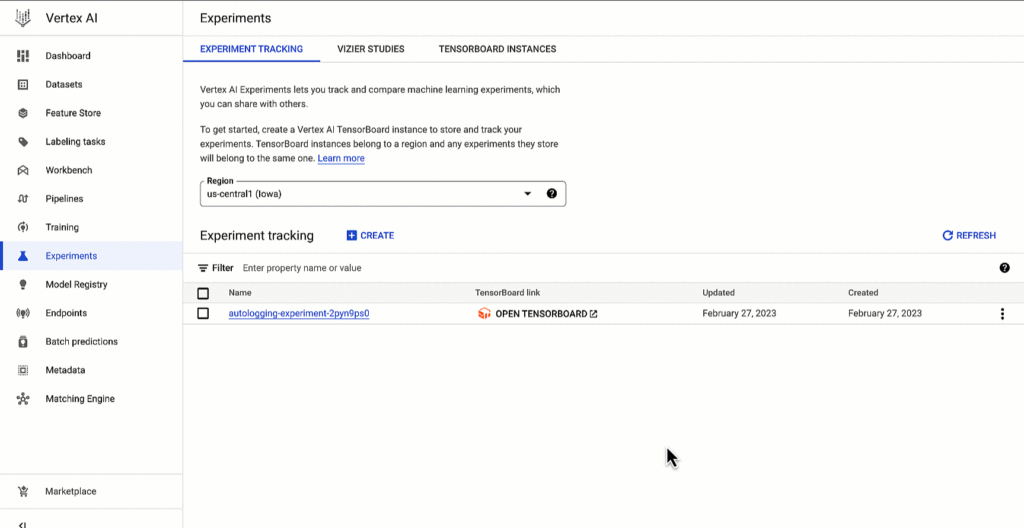
Vertex AI SDK autologging uses MLFlow’s autologging in its implementation and it supports several frameworks including XGBoost, Keras and Pytorch Lighting. See documentation for all supported frameworks.
Vertex AI Experiments autologging automatically logs model time series metrics when you train models along multiple epochs. That’s because of the integration between Vertex AI Experiments autologging and Vertex AI Tensorboard.
Furthermore, you can adapt Vertex AI Experiments autologging to your needs. For example, let’s say your team has a specific experiment naming convention. By default, Vertex AI Experiments autologging automatically creates Experiment Runs for you without requiring you to call `aiplatform.start_run()` or `aiplatform.end_run()`. If you’d like to specify your own Experiment Run names for autologging, you can manually initialize a specific run within the experiment using aiplatform.start_run() and aiplatform.end_run() after autologging has been enabled.
What’s next
You can access Vertex AI Experiments autologging with the latest version of Vertex AI SDK for Python. To learn more, check out these resources :
- Documentation: Autolog data to an experiment run
- Github: Get started with Vertex AI Experiments autologging
While I’m thinking about the next blog post, let me know if there is Vertex AI content you’d like to see on Linkedin or Twitter.
More Relevant Stories for Your Company

The 40 Most Astounding Stories of Tech-Enabled Innovation
These business and technology innovators are leveraging cloud computing, machine learning, APIs, collaborative platforms, among others to advance healthcare, financial services, retail, media and entertainment, manufacturing, and government. They include some of the biggest brands in the world, as well as some you've probably never heard of. But they all

UKG Ready: Meeting the Needs of Complex Machine Learning Models and Distributed Data Sets
Business ProblemUKG Ready primarily operates in the Small and Medium Business (SMB) space, so inherently many customers are forced to operate and make key business decisions with less Workforce Management (WFM) / Human Capital Management (HCM) data. In addition to volume, SMB lacks the variety of data needed to create

Google Cloud Helped Digitec Galaxus Personalize Over 2 Million Newsletters in a Week
Digitec Galaxus AG is the biggest online retailer in Switzerland, operating two online stores: Digitec, Switzerland's online market leader for consumer electronics and media products, and Galaxus, the largest Swiss online shop with a steadily growing range of consistently low-priced products for almost all daily needs. Known for its efficient, personalized shopping experiences,

Google and AI Researchers Work towards Building Data-centric AI
AI researchers and engineers need better data to enable better AI solutions. The quality of an AI solution is determined by both the learning algorithm (such as a deep-neural network model) and the datasets used to train and evaluate that algorithm. Historically, AI research has focused much more on algorithms
