





Three months, 30x demand: How we scaled Google Meet during COVID-19

4172
Of your peers have already read this article.
10:30 Minutes
The most insightful time you'll spend today!
As COVID-19 turned our world into a more physically distant one, many people began looking to online video conferencing to maintain social, educational, and workplace contact. As shown in the graph below, this shift has driven huge numbers of additional users to Google Meet.
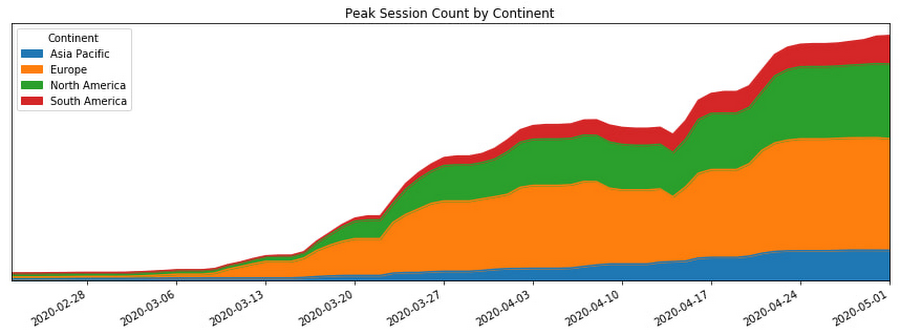
In this post, we’ll share how we ensured that Meet’s available service capacity was ahead of its 30x COVID-19 usage growth, and how we made that growth technically and operationally sustainable by leveraging a number of site reliability engineering (SRE) best practices.
Early alerts
As the world became more aware of COVID-19, people began to adapt their daily rhythms. The virus’s growing impact on how people were working, learning, and socializing with friends and family translated to a lot more people looking to services like Google Meet to keep in touch. On Feb. 17, the Meet SRE team started receiving pages for regional capacity issues.
The pages were symptomatic, or black-box alerts, like “Too Many Task Failures” and “Too Much Load Being Shed.” Because Google’s user-facing services are built with redundancy, these alerts didn’t indicate ongoing user-visible issues. But it soon became clear that usage of the product in Asia was trending sharply upward.
The SRE team began working with the capacity planning team to find additional resources to handle this increase, but it became obvious that we needed to start planning farther ahead, for the eventuality that the epidemic would spread beyond the region.
Sure enough, Italy began its COVID-19 lockdown soon thereafter, and usage of Meet in Italy began picking up.
A non-traditional incident
At this point, we began formulating our response. True to form, the SRE team began by declaring an incident and kicking off our incident response to this global capacity risk.
It’s worth noting, however, that while we approached this challenge using our tried-and-true incident management framework, at that point we were not in the middle of, or imminently about to have, an outage. There was no ongoing user impact. Most of the social effects of COVID-19 were unknown or very difficult to predict. Our mission was abstract: we needed to prevent any outages for what had become a critical product for large amounts of new users, while scaling the system without knowledge of where the growth would come from and when it would level off.
On top of that, the entire team (along with the rest of Google) was in the process of transitioning into an indefinite period of working from home due to COVID-19. Even though most of our workflows and tools were already accessible from beyond our offices, there were additional challenges associated with running such a long-standing incident virtually.
Without the ability to sit in the same room as everyone else, it became important to manage communication channels proactively to ensure we all had access to the information needed to achieve our goals. Many of us also had additional, non-work related challenges, like looking after friends and family members as we all adjusted. While these factors created extra challenges for our response, tactics like assigning and ramping up standbys and proactively managing ownership and communication channels helped us overcome these challenges.
Nevertheless, we carried on with our incident management approach. We started our global response by establishing an Incident Commander, Communications Lead, and Operations Lead in both North America and Europe so that we had around-the-clock coverage.
As one of the overall Incident Commanders, my function was like that of a stateful information router—albeit with opinions, influence, and decision-making power. I collected status information about which tactical problems lingered, who was working on what, and on the contexts that affected our response (e.g. governments’ COVID-19 responses), and then dispatched work to people who were able to help. By sniffing out and digging into areas of uncertainty (both in problem definition: “Is it a problem that we’re running at 50% CPU utilization in South America?” and solution spaces: “How will we speed up our turn-up process?”), I coordinated our overall response effort and ensured that all necessary tasks had clear owners.
Not long into the response, we realized that the scope of our mission was huge and the nature of our response would be long-running. To keep each contributor’s scope manageable, we shaped our response into a number of semi-independent workstreams. In cases where their scopes overlapped, the interface between the workstreams was well-defined.

We set up the following workstreams, visible in the diagram above:
- Capacity, which was tasked with finding resources and determining how much of the service we could turn up in which places.
- Dependencies, which worked with the teams that own Meet’s infrastructure (e.g., Google’s account authentication and authorization systems) to ensure that these systems also had enough resources to scale with the usage growth.
- Bottlenecks, which was responsible for identifying and removing relevant scaling limits in our system.
- Control knobs, which built new generic mitigations into the system in the case of an imminent or in-progress capacity outage.
- Production changes, which safely brought up all of the found capacity, re-deployed servers with newly-optimized tuning, and pushed new releases with additional control knobs ready to be used.
As incident responders, we continuously re-evaluated if our current operational structure still made sense. The goal was to have as much structure as required to operate effectively, but no more. With too little structure, people make decisions without having the right information, but with too much structure, people spend all of their time in planning meetings.
This was a marathon, and not a sprint. Throughout, we regularly checked in to see if anyone needed more help, or needed to take a break. This was essential in preventing burnout during such a long incident.
To help prevent exhaustion, each person in an incident response role designated another as their “standby.” A standby attended the same meetings as the role’s primary responder; got access to all relevant documents, mailing lists, and chat rooms; and asked the questions they’d need answers to if they had to take over for the primary without much notice. This approach came in handy when any of our responders got sick or needed a break because their standby already had the information they needed to be effective right away.
Building out our capacity runway
While the incident response team was figuring out how best to coordinate the flow of information and work needed to resolve this incident, most of those involved were actually addressing the risk in production.
Our primary technical requirement was simply to keep the amount of regionally available Meet service capacity ahead of user demand. With Google’s more than 20 data centers operating around the world, we had robust infrastructure to tap into. We quickly made use of raw resources already available to us, which was enough to approximately double Meet’s available serving capacity.
Previously, we relied on historical trends to establish how much more capacity we’d need to provision. But because we could no longer rely on the extrapolation of historical data, we needed to begin provisioning capacity based on predictive forecasts. To translate those models into terms our production changes team could act upon in production, the capacity workstream needed to translate the usage model into how much additional CPU and RAM we needed. Building this translation model is what later enabled us to speed up the process of getting available capacity in production, by teaching our tools and automation to understand it.
Soon, it became clear that merely doubling our footprint size was not going to be enough, so we started working against a previously unthinkable 50x growth forecast.
Reducing resource needs
In addition to scaling up our capacity, we also worked on identifying and removing inefficiencies in our serving stack. We could bucket much of this work into a couple of categories: tuning binary flags and resource allocations and rewriting code to make it cheaper to execute.
Making our server instances more resource-efficient was a multi-dimensional effort—the goal could be phrased as “the most requests handled at the cheapest resource cost, without sacrificing user experience or reliability of the system.”
Some investigative questions we asked ourselves included:
- Could we run fewer servers with larger resource reservations to reduce computational overhead?
- Had we been reserving more RAM than we needed, or more CPU than we needed? Could we better use those resources for something else?
- Did we have enough egress bandwidth at the edge of our network to serve video streams in all regions?
- Could we reduce the amount of memory and CPU needed by a given server instance by subsetting the number of backend servers in use?
Even though we always qualified new server shapes and configurations, at this point, it was very much worth reevaluating them. As Meet usage grew, its usage characteristics—like how long a meeting lasts, the number of meeting participants, how participants share audio time—also shifted.
As the Meet service required ever more raw resources, we began noticing that a significant percentage of our CPU cycles were being spent on process overhead like keeping connections to monitoring systems and load balancers alive, rather than on request handling.
In order to increase the throughput, or “number of requests processed per CPU per second,” we increased our processes’ resource specification in terms of both CPU and RAM reservation. This is sometimes called running “fatter” tasks.
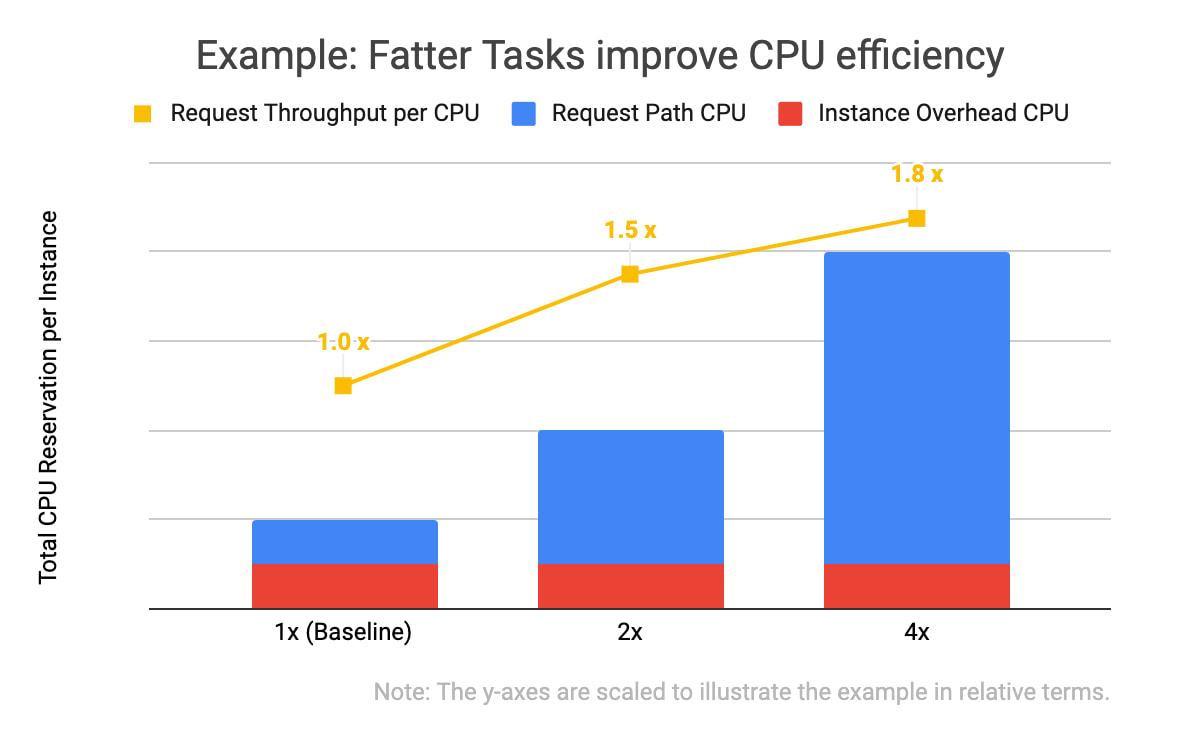
In the example data above, you will notice two things: that all three of the instance specifications have the same computational overhead (in red), and that the larger the overall CPU reservation of an instance, the more request throughput it has (in yellow). With the same total amount of CPU allocated, one instance of the 4x shape can handle 1.8 times as many requests as the four instances with the baseline shape. This is because the computational overhead (like persisting debug log entries, checking if network connection channels are still alive, and initializing classes) doesn’t scale linearly with the number of incoming requests the task is handling.
We kept trying to double our serving tasks’ reservations while cutting in half the number of tasks across our fleet until we hit a scaling limitation.
Of course, we needed to test and qualify each of these changes. We used canary environments to make sure that these changes behaved as expected and didn’t introduce or hit any previously undiscovered limitations. Similar to how we qualify new builds of our servers, we qualified that there weren’t any functional or performance regressions, and that the desired effects of the changes were indeed realized in production.
We also made functional improvements to our codebase. For example, we rewrote an in-memory distributed cache to be more flexible in how it sharded entries across task instances. This, in turn, let us store more entries in a single region when we grew the number of server instances in a cluster.
Crafting fire escapes
Though our confidence in our usage growth forecasts was improving, these predictions were still not 100% reliable. What would happen if we ran out of serving capacity in a region? What would happen if we saturated a particular network link? The control knob workstream’s goal was to provide satisfactory, if not ideal, answers to those kinds of questions. We needed an acceptable plan for any black swans that arrived on our consoles.
A group began working to identify and build more production controls and fire escapes—all of which we hoped we wouldn’t need. For example, these knobs would allow us to quickly downgrade the default video resolution from high-definition to standard-definition when someone joined a Meet conference. That change would buy us some time to course-correct using the other workstreams (provisioning and efficiency improvements) without substantial product degradation, but users would still be able to upgrade their video quality to high-definition if they wanted to.
Having a variety of instrumented controls like this built, tested, and ready to go bought us some additional runway if our worst-case forecasts weren’t accurate—along with some peace of mind.
Operational sustainability
This structured response involved large numbers of Googlers in a variety of roles. This meant that to keep making progress throughout the incident, we also needed some serious coordination and intentional communications.
We held daily handover meetings between our two time zones to accommodate Googlers based in Zurich, Stockholm, Kirkland, Wash., and Sunnyvale, Calif. Our communications leads provided regular updates to numerous stakeholders across our product team, executives, infrastructure teams, and customer support operations so that each team had up-to-date status information when they made their own decisions. The workstream leads used Google Docs to keep shared status documents updated with current sets of risks, points of contact, ongoing mitigation efforts, and meeting notes.
This approach worked well enough to get things going, but soon began to feel burdensome. We needed to lengthen our planning cycle from days to weeks in order to meaningfully reduce the amount of time spent coordinating, and increase the time we spent actually mitigating our crisis.
Our first tactic here was to build better and more trustworthy forecasting models. This increased predictability meant we could stabilize our target increase in serving capacity for the whole week, rather than just for tomorrow.
We also worked to reduce the amount of toil necessary to bring up any additional serving capacity. Our processes, just like the systems we operate, needed to be automated.
At that point, scaling Meet’s serving stack was our most work-intensive ongoing operation, due to the number of people who needed to be up-to-date on the latest forecast and resource numbers, and the number of (sometimes flaky) tools involved in certain operations.

As outlined in the life-cycle diagram above, the trick to automating these tasks was incremental improvements. First we documented tasks, and then we began automating pieces of them until finally, in the ideal case, the software could complete the task from start to finish without manual intervention.
To accomplish this, we committed a number of automation experts from within and outside the Meet organization to focus on tackling this problem space. Some of the work items here included:
- Making more of our production services responsive to changes in an authoritative, checked-in configuration file
- Augmenting common tools to support some of Meet’s more unique system requirements (e.g., its higher bandwidth and lower latency networking requirements)
- Tuning regression checks that had become more flaky as the system grew in scale
Automating and codifying these tasks made a significant dent in the manual operations required to turn up Meet in a new cluster or to deploy a new binary version that would unlock performance improvements. By the end of this scaling incident, we were able to fully automate our per-zone, per-serving job capacity footprint, which precluded hundreds of manually constructed invocations of command-line tools. This freed up time and energy for more than a few engineers to work on some of the more difficult (but equally important) problems.
At this point in scaling our operations, we could move to “offline” handoffs between sites via email, further reducing the number of meetings to attend. Now that our strategy was solidified and our runway was longer, we moved into a more purely tactical mode of execution.
Soon after, we wound down our incident structure and began to operate the remaining work more like how we’d run any long-term project.
Results
By the time we exited our incident, Meet had more than 100 million daily meeting participants. Getting there smoothly was not easy or straightforward; the scenarios the Meet team explored during disaster and incident response tests prior to COVID-19 did not encompass the length or the scale of increased capacity requirements we encountered. As a result, we formulated much of our response on the fly.
There were plenty of hiccups along the way, as we had to balance risk in a different way than we normally do during standard operations. For example, we deployed new server code to production with less canary baking time than normal because it contained some performance fixes that bought us additional time before we were due to run out of available regional capacity.
One of the most crucial skills we honed throughout this two month-long endeavour was the ability to catalog, quantify, and qualify risks and payoffs in a way that was flexible. Everyday, we learned new information about COVID-19 lockdowns, new customers’ plans to start using Meet, and available production capacity. Sometimes this new information made obsolete the work we’d started the day before.
Time was of the essence, so we couldn’t afford to treat each work item with the same priority or urgency, but we also couldn’t afford not to hedge our own forecast models. Waiting for perfect information wasn’t an option at any point, so the best we could do was build out our runway as much as possible, while making calculated but quick decisions with the data we did have.
All of this work was only possible because of the savvy, collaborative, and versatile people across a dozen teams and as many functions—SREs, developers, product managers, program managers, network engineers, and customer support—who worked together to make this happen.
We ended up well-positioned for what came next: making Meet available for free to everyone with a Google account. Normally, opening the product up to consumers would have been a dramatic scaling event all on its own, but after the intense scaling work we’d already done, we were ready for the next challenge.
Google Workspace’s Single Connected Experience Makes Workplaces Hybrid-ready

4032
Of your peers have already read this article.
1:30 Minutes
The most insightful time you'll spend today!
Our collective understanding of work—where it takes place and how it gets done—has been transformed over the last year. As companies and organizations across the globe reimagine work, new challenges and opportunities are emerging. How do people working “somewhere else” stay connected and part of the same conversations as those in the office? And if hybrid work is the sum of all the places and ways that work happens, how do employees create a shared experience, better manage their time and attention, and build stronger connections along the way?
For well over a decade, we’ve been building the future of work with products and experiences that transform how teams of all sizes connect, create, and collaborate together—on any device, from any location. Last October, we launched Google Workspace as an integrated solution with a singular promise: everything you need to get anything done, now in one place. In March, we introduced a series of innovations to help people better manage their time and build deeper connections with each other as the future of work continues to evolve. And at Google I/O last month, we took our next big step in transforming collaboration with smart canvas, a new product experience in Google Workspace. And today, we’re delivering additional innovations that address the specific challenges and opportunities of the hybrid work world.
A dedicated space for teamwork and collaboration
Chat and video meetings have been an essential part of work during the last year, serving as a bridge for separated colleagues to collaborate in real time. As we reflect on the lessons of a year where many people were working remotely, we know that distributed teams need a new type of dedicated, shared space. A place in Google Workspace to bring projects to life by connecting the right content, people, and conversations in new and powerful ways.
With the introduction of Spaces, we’re evolving the Rooms experience in Google Chat into a dedicated place for organizing people, topics, and projects in Google Workspace. Over the summer, we’ll evolve Rooms to become Spaces and launch a streamlined and flexible user interface that helps teams and individuals stay on top of everything that’s important. Powered by new features like in-line topic threading, presence indicators, custom statuses, expressive reactions, and a collapsible view, Spaces will seamlessly integrate with files and tasks, becoming a new home in Google Workspace for getting more done—together.

Spaces can provide a place to fuel knowledge sharing and community building for teams of all sizes, where all the relevant information, conversations, and files for a project can be organized, and where topics—even at the organization level—can be intelligently moderated. With the ability to pin messages where everyone can see them, Spaces will play a crucial role in helping people stay connected and informed as hybrid work evolves.
As we transition from Rooms to Spaces in Google Chat this summer we’ll be delivering new features on a rolling basis. Customers can have their admins turn on Google Chat in Gmail so their organizations can start using Rooms today, ensuring a seamless path to Spaces when it becomes available.
Keeping everyone in the conversation during hybrid meetings
Collaboration equity—the ability to contribute equally, regardless of location, role, experience level, language, and device preference—is a cornerstone of Google Workspace. When teammates were fully remote during the last year, everyone experienced meetings in much the same way and had access to the same communication features. But what happens when some colleagues are in a conference room together while others are joining from living rooms, home offices, or a remote co-working space? How do they all participate equally in the same conversation?
At Google I/O, we previewed Companion Mode in Google Meet as a way of fostering collaboration equity in a hybrid work world. Companion Mode is designed to seamlessly connect those in the room with their remote teammates, giving everyone advanced features to participate, while leveraging the best of in-room audio and video conferencing capabilities.

Companion Mode gives every meeting participant, no matter where they are, access to interactive features and controls like screen sharing, polls, in-meeting chat, hand raise, Q&A, live captions, and more. Colleagues who are in the same meeting room together will enable Companion Mode on their personal devices, giving them their own video tile in Meet and helping them to stay connected with their remote teammates. Companion Mode will be available on the web and our upcoming progressive web app in September, and it will be coming soon to mobile.
To allow meeting organizers to better plan for hybrid meetings, invitees will soon be able to RSVP with their join location, indicating whether they’ll be joining in a meeting room or remotely.
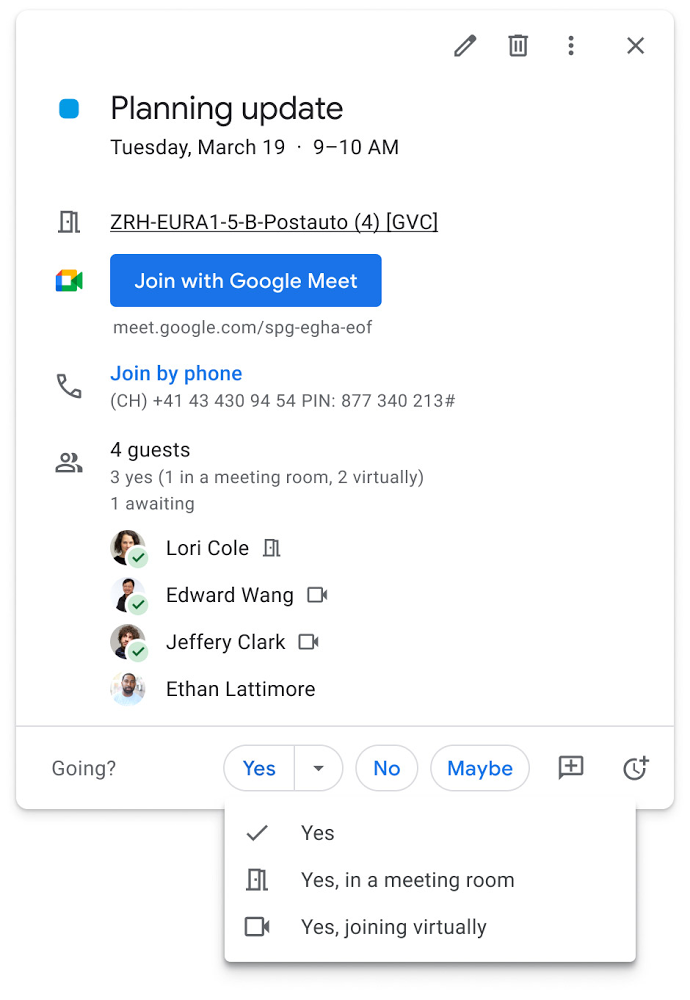
Updates to improve the in-room experience are also coming to Google Meet hardware in September, including the ability to see and use the hand-raise feature and receive notifications from polls and Q&As. The modular design of Meet’s Series One room kits can easily accommodate a variety of space layouts and be paired with an AV cart for optimum flexibility.
We’re also continually launching new controls to make meetings more safe and secure, including the ability for admins to set policies for who can join meetings, and how participants can engage within meetings. To help everyone stay focused in meetings without interruption, in the next few months we’ll introduce moderation controls for hosts, giving them the ability to prevent the use of in-meeting chat and prohibit presenting during meetings, as well as allowing them full control to mute and prevent participants from unmuting.
Together, these changes will make meetings a safer, more connected, and inclusive experience across all hybrid environments. Register today for our free webinar on how Google Workspace is enabling hybrid work and helping foster collaboration equity.
Trusted hybrid collaboration in Google Workspace
Security, data privacy, and trust continue to be the foundation that make anywhere, anytime collaboration possible. As organizations explore new ways for their teams to collaborate securely in a hybrid work world, we’re introducing several ways that we’re strengthening this foundation in Google Workspace.
Today, we’re announcing new security and privacy capabilities to help Google Workspace customers realize the full power of trusted, cloud-native collaboration. Google Workspace Client-side encryption will help customers strengthen the confidentiality of their data while addressing a range of data sovereignty and compliance needs. It will also strengthen meeting security when it comes to Google Meet this fall. Additionally, we’re rolling out a number of security enhancements for Google Drive, including trust rules for Drive that help control how files can be shared within and outside your organization; Drive labels that classify files and apply controls based on their sensitivity levels; and enhanced phishing and malware protections to help safeguard against insider threats and user error. For full details, please visit our security blog post.
A single, connected experience
As businesses move to a hybrid work environment, the importance of creating secure collaboration spaces and fostering human connection has never been more important. Because Google Workspace was designed to fuel anywhere, anytime collaboration, we’re now helping millions of organizations navigate the challenges and opportunities of the newly emerging work model. Our customers are using Google Workspace to rethink virtual meetings, provide people with modern tools to stay connected and manage their time and attention, and double down on security and privacy. In countless ways, Google Workspace was built for this moment.
See how we’re bringing Google Workspace to everyone. With this change, all of our 3 billion existing users across consumer, enterprise, and education now have access to the full Google Workspace experience, including Gmail, Chat, Calendar, Drive, Docs, Sheets, Meet and more.
Google Workspace to Extend Digital Sovereignity for EU Organizations in Later Part of 2022

4798
Of your peers have already read this article.
2:00 Minutes
The most insightful time you'll spend today!
European organizations are moving their operations and data to the cloud in increasing numbers to enable collaboration, drive business value, and transition to hybrid work. However, the cloud solutions that underpin these powerful capabilities must meet an organization’s critical requirements for security, privacy, and digital sovereignty. We often hear from European Union policymakers and business leaders that ensuring the sovereignty of their cloud data, through regionalization and additional controls over administrative access, is crucial in this evolving landscape.
Today, we’re announcing Sovereign Controls for Google Workspace, which will provide digital sovereignty capabilities for organizations, both in the public and private sector, to control, limit, and monitor transfers of data to and from the EU starting at the end of 2022, with additional capabilities delivered throughout 2023. This commitment builds on our existing Client-side encryption, Data regions, and Access Controls capabilities.
Offering enhanced customer controls, including Client-side encryption
Encryption is an important technical control that limits a cloud provider’s access to customer data. Google Workspace already uses the latest cryptographic standards to encrypt all data at rest and in transit between our facilities. The European Data Protection Board recommendations include encryption as part of the supplementary measures to protect data. Google Workspace is leading the way on such measures with our Client-side encryption feature that allows customers to continue benefiting from the powerful innovations of Google Cloud while retaining complete confidentiality and control over their data.
Google Workspace’s unique approach to client-side encryption provides our customers with authoritative privacy control over their data through encryption keys that they can hold on site, within a nation’s borders, or within any other boundary they define. Google never has access to the keys or key holders, which means the data is indecipherable to us and we have no technical ability to access it. We deliver this level of encryption without the need for legacy desktop clients, while maintaining the same high-quality experience for your users such as online co-authoring.
Organizations can choose to use Client-side encryption pervasively across all their users, or create rules that apply to specific users, organizational units, or shared drives. Client-side encryption is now generally available for Google Drive, Docs, Sheets, and Slides, with plans to extend the functionality to Gmail, Google Calendar, and Meet by the end of 2022.
Expanding data location controls
Data regions already allow our customers to control the storage location of their covered data at-rest. We will enhance this capability by the end of 2023 through expanded coverage of data storage and processing in-region along with an in-country copy.
As employees and organizations adopt new ways of working in a hybrid world, they need secure access to data to drive key business outcomes. But this trend, combined with complex technical architectures, presents significant challenges to retaining control over where data resides.
Our cloud-native architecture means that Google Workspace functions fully within a browser, without requiring caches or installed software on employee devices. We adopt a zero-trust approach, with built-in security that provides controls to geo-fence devices and users through Context Aware Access. Moreover, admins can set sharing boundaries and define rules that govern user communication.
In short, we empower admins with critical capabilities that can give them granular control over the flow of their data without hindering the modern collaboration capabilities that form the foundation of Google Workspace. We are enabling organizations to strike the right balance between data location and collaboration across teams, partners, and customers.
Control and transparency for administrative access
When moving to a cloud-based service, organizations need greater visibility and control over all forms of administrative access to their systems, including who has access, the nature and circumstances of that access, and the ability to specify that only certain personnel—in designated countries or regions—have access. These capabilities are core to our approach for meeting evolving digital sovereignty standards.
Building on this approach, we will implement a series of new Access Controls by the end of 2023 that will enable customers to:
- Restrict and/or approve Google support access through Access Approvals.
- Limit customer support to EU-based support staff through Access Management.
- Ensure round-the-clock support from Google Engineering staff, when needed, with remote-in virtual desktop infrastructure .
- Generate comprehensive log reports on data access and actions through Access Transparency, which is already available in GA.
Sovereign Controls for Google Workspace will deliver digital sovereignty through a comprehensive set of capabilities for organizations working in and across EU regions. In parallel, Google Cloud will continue to provide customers with legal mechanisms for international data transfer, which will include making the protections offered by the new EU data transfer framework available once it is implemented.
We remain committed to equipping our customers in Europe and across the globe with powerful technical solutions that help them adapt to, and stay on top of, a rapidly evolving regulatory landscape. We’ve designed and built Google Workspace to operate on a secure foundation, providing capabilities to keep our users safe, their data secure, and their information private. Digital sovereignty is core to our ongoing mission in Europe and elsewhere, and a guiding principle that customers can rely on now and into the future.
A Breakdown of Cloud-based Data Ingestion Practices

8809
Of your peers have already read this article.
3:00 Minutes
The most insightful time you'll spend today!
Businesses around the globe are realizing the benefits of replacing legacy data silos with cloud-based enterprise data warehouses, including easier collaboration across business units and access to insights within their data that were previously unseen. However, bringing data from numerous disparate data sources into a single data warehouse requires you to develop pipelines that ingest data from these various sources into your enterprise data warehouse. Historically, this has meant that data engineering teams across the organization procure and implement various tools to do so. But this adds significant complexity to managing and maintaining all these pipelines and makes it much harder to effectively scale these efforts across the organization. Developing enterprise-grade, cloud-native pipelines to bring data into your data warehouse can alleviate many of these challenges. But, if done incorrectly, these pipelines can present new challenges that your teams will have to spend their time and energy addressing.
Developing cloud-based data ingestion pipelines that replicate data from various sources into your cloud data warehouse can be a massive undertaking that requires significant investment of staffing resources. Such a large project can seem overwhelming and it can be difficult to identify where to begin planning such a project. We have defined the following principles for data pipeline planning to begin the process. These principles are intended to help you answer key business questions about your effort and begin to build data pipelines that address your business and technical needs. Each section below details a principle of data pipelines and certain factors your teams should consider as they begin developing their pipelines.
Principle 1: Clarify your objectives
The first principle to consider for pipeline development is clarify your objectives. This can be broadly defined as taking a holistic approach to pipeline development that encompasses requirements from several perspectives: technical teams, regulatory or policy requirements, desired outcomes, business goals, key timelines, available teams and their skill sets, and downstream data users. Clarifying your objectives clearly identifies and defines requirements from each key stakeholder at the beginning of the process and continually checks development against these requirements to ensure the pipelines built will meet these requirements.This is done by first clearly defining the desired end state for each project in a way that addresses a demonstrated business need of downstream data users. Remember that data pipelines are almost always the means to accomplish your end state, rather than the end state itself. An example of an effectively defined end-state is “enabling teams to gain a better understanding of our customers by providing access to our CRM data within our cloud data warehouse” rather than “move data from our CRM to our cloud data warehouse”. This may seem like a merely semantic difference, but framing the problem in terms of business needs helps your teams make technical decisions that will best meet these needs.
After clearly defining the business problem you are trying to solve, you should facilitate requirement gathering from each stakeholder and use these requirements to guide the technical development and implementation of your ingestion pipelines. We recommend gathering stakeholders from each team, including downstream data users, prior to development to gather requirements for the technical implementation of the data pipeline. These will include critical timelines, uptime requirements, data update frequency, data transformation, DevOps needs, and security, policy, or regulatory requirements by which a data pipeline must meet.
Principle 2: Build your team
The second principle to consider for pipeline development is build your team. This means ensuring you have the right people with the right skills available in the right places to develop, deploy, and maintain your data pipelines. After you have gathered your pipeline requirements, you can begin to develop a summary architecture that will be used to build and deploy your data pipelines. This will help you identify the human talent you will need to successfully build, deploy, and manage these data pipelines and identify any potential shortfalls that would require additional support from either third-party partners or new team members.
Not only do you need to ensure you have the right people and skill sets available in aggregate, but these individuals need to be effectively structured to empower them to maximize their abilities. This means developing team structures that are optimized for each team’s responsibilities and their ability to support adjacent teams as needed.
This also means developing processes that prevent blockers to technical development whenever possible, such as ensuring that teams have all of the appropriate permissions they need to move data from the original source to your cloud data warehouse without violating the concept of least privilege. Developers need access to the original data source (depending on your requirements and architecture) in addition to the destination data warehouse. Examples of this are ensuring that developers have access to develop and/or connect to a Salesforce Connected App or read access to specific Search Ads 360 data fields.
Principle 3: Minimize time to value
The third principle to consider for pipeline development is minimize time to value. This means considering the long-term maintenance burden of a data pipeline prior to developing and deploying it in addition to being able to deploy a minimum viable pipeline as quickly as possible. Generally speaking, we recommend the following approach to building data pipelines to minimize their maintenance burden: Write as little code as possible. Functionally, this can be implemented by:
1. Leveraging interface-based data ingestion products whenever possible. These products minimize the amount of code that requires ongoing maintenance and empower users who aren’t software developers to build data pipelines. They can also reduce development time for data pipelines, allowing them to be deployed and updated more quickly.
- Products like Google Data Transfer Service and Fivetran allow for managed data ingestion pipelines by any user to centralize data from SaaS applications, databases, file systems, and other tooling. With little to no code required, these managed services enable you to connect your data warehouse to your sources quickly and easily.
- For workloads managed by ETL developers and data engineers, tools like Google Cloud’s Data Fusion provide an easy-to-use visual interface for designing, managing and monitoring advanced pipelines with complex transformations.
2. Whenever interface-based products or data connectors are insufficient, use pre-existing code templates. Examples of this include templates available for Dataflow that allow users to define variables and run pipelines for common data ingestion use cases, and the Public Datasets pipeline architecture that our Datasets team uses for onboarding.
3. If neither of these options are sufficient, utilize managed services to deploy code for your pipelines. Managed services, such as Dataflow or Dataproc, eliminate the operational overhead of managing pipeline configuration by automatically scaling pipeline instances within predefined parameters.
Principle 4: Increase data trust and transparency
The fourth principle to consider for pipeline development is increase data trust and transparency. For the purposes of this document, we define this as the process of overseeing and managing data pipelines across all tools. Numerous data ingestion pipelines that each leverage different tools or are not developed under a coordinated management plan can result in “tech sprawl”, which significantly increases the management overhead of data ingestion pipelines as the quantity of data pipelines increases. This becomes especially cumbersome if you are subject to service-level agreements, or legal, regulatory, or policy requirements for overseeing data pipelines. Preventing tech sprawl is, by far, the best strategy for dealing with it by developing streamlined pipeline management processes that automate reporting. Although this can theoretically be achieved by building all of your data pipelines using a single cloud-based product, we do not recommend doing so because it prevents you from taking advantage of features and cost optimizations that come with choosing the best product for your use case.
A monitoring service such as Google Cloud Monitoring Service or Splunk that automates metrics, events, and metadata collection from various products, including those hosted in on-premise and hybrid computing environments, can help you centralize reporting and monitoring of your data pipelines. A metadata management tool such as Google Cloud’s Data Catalog or Informatica’s Enterprise Data Catalog can help you better communicate the nuances of your data so users better understand which data resources are best fit for a given use case. This significantly reduces your pipeline’s governance burden by eliminating manual reporting processes that often result in inaccuracies or lagging updates.
Principle 5: Manage costs
The fifth principle to consider for pipeline development is manage costs. This encompasses both the cost of cloud resources and the staffing costs necessary to design, develop, deploy, and maintain your cloud resources. We believe that your goal should not necessarily be to minimize cost, but rather maximizing the value of your investment. This means maximizing the impact of every dollar spent by minimizing waste in cloud resource utilization and human time. There are several factors to consider when it comes to managing costs:
- Use the right tool for the job – Different data ingestion pipelines will have different requirements for latency, uptime, transformations, etc. Similarly, different data pipeline tools have different strengths and weaknesses. Choosing the right tool for each data pipeline can help your pipelines operate significantly more efficiently. This can reduce your overall cost, free up staffing time to focus on the most impactful projects, and make your pipelines much more efficient.
- Standardize resource labeling – Implement and utilize a consistent labeling schema across all tools and platforms to have the most comprehensive view of your organization’s spending. One example is requiring all resources to be labeled by the cost center or team at time of creation. Consistent labeling allows you to monitor your spend across different teams and calculate the overall value of your cloud spending.
- Implement cost controls – If available, leverage cost controls to prevent errors that result in unexpectedly large bills.
- Capture cloud spend – Capture your spend on all cloud resource utilization for internal analysis using a cloud data warehouse and a data visualization tool. Without it, you won’t understand the context of changes in cloud spend and how they correlate with changes in business.
- Make cost management everyone’s job – Managing costs should be part of the responsibilities of everyone who can create or utilize cloud resources. To do this well, we recommend making cloud spend reporting more transparent internally and/or implementing chargebacks to internal cost centers based on utilization.
Long-term, the increased granularity in cost reporting available within Google Cloud can help you better measure your key performance indicators. You can shift from cost-based reporting (i.e. – “We spent $X on BigQuery storage last month”) to value-based reporting (i.e. – “It costs $X to serve customers who bring in $Y revenue”).
To learn more about managing costs, check out Google Cloud’s “Understanding the principles of cost optimization” white paper.
Principle 6: Leverage continually improving services
The sixth principle is leverage continually improving services. Cloud services are consistently improving their performance and stability, even if some of these improvements are not obvious to users. These improvements can help your pipelines run faster, cheaper, and more consistently over time. You can take advantage of the benefits of these improvements by:
- Automating both your pipelines and pipeline management: Not only should data pipelines be automated, but almost all aspects of managing your pipelines can also be automated. This includes pipeline/data lineage tracking, monitoring, cost management, scheduling, access management and more. This helps reduce long-term operational costs of each data pipeline that can significantly alter your value proposition and prevent any manual configurations from negating the benefits of later product improvements.
- Minimizing pipeline complexity whenever possible: While ingestion pipelines are relatively easy to develop using UI-based or managed services, they also require continued maintenance as long as they are in use. The most easily maintained data ingestion pipelines are typically the ones that minimize complexity and leverage automatic optimization capabilities. Any transformation in a data ingestion pipeline is a manual optimization of the pipeline that may struggle to adapt or scale as the underlying services improve. You can minimize the need for such transformations by building ELT (extract, load, transform) pipelines rather than ETL (extract, transform, load) pipelines. This pushes transformations down to the data warehouse that is use a specifically optimized query engine to transform your data rather than manually configured pipelines.
Next steps
If you’re looking for more information about developing your cloud-based data platform, check out our Build a modern, unified analytics data platform whitepaper. You can also visit our data integration site to learn more and find ways to get started with your data integration journey.
Once you’re ready to begin building your data ingestion pipelines, learn more about how Cloud Data Fusion and Fivetran can help you make sure your pipelines address these principles.
6 ways Google Workspace helps IT admins safely use BYOD

4185
Of your peers have already read this article.
6:30 Minutes
The most insightful time you'll spend today!
Many organizations, including Google, have moved quickly to embrace working from home. With this widespread remote work, it’s never been more important for IT admins to be certain that every device in their organization is secure, even when that device isn’t company-owned.
We pioneered zero-trust security through our BeyondCorp strategy and leverage it to offer advanced security for G Suite* users to protect secure access for all devices. Admins can enforce these controls across G Suite and other corporate applications and data, ensuring consistent security and user experience across your organization.
Today, we’re laying out six key controls that IT admins can use within G Suite to help keep their organizations safe when using the bring your own device approach (BYOD). You can also review our detailed security checklist here, and learn more from our course on Managing G Suite here.
Secure mobile and desktop devices with endpoint management

BYOD devices can differ widely across an organization, with a range of OS versions, hardware modes, patch versions, and more, so it’s impossible to rely on a one-size-fits-all approach to device management. With Google endpoint management, IT admins can easily support a variety of mobile and desktop devices by enforcing measures like minimum software versions and blocking jailbroken or rooted devices, in many cases without requiring full device rights for employee privacy.
When it comes to managing mobile devices, G Suite offers basic and advanced mobile device management:
- With basic mobile device management, BYOD devices are secured with baseline security features with no end user friction. Admins can enforce a passcode, get a device inventory, wipe Google accounts remotely, and even remotely install applications on Android devices.
- With advanced mobile device management, admins can apply more policy controls over BYOD devices, and Android users can keep their personal data private and separate from their work data with Android Work Profiles. You can also allow and manage work apps on iOS and Android devices.
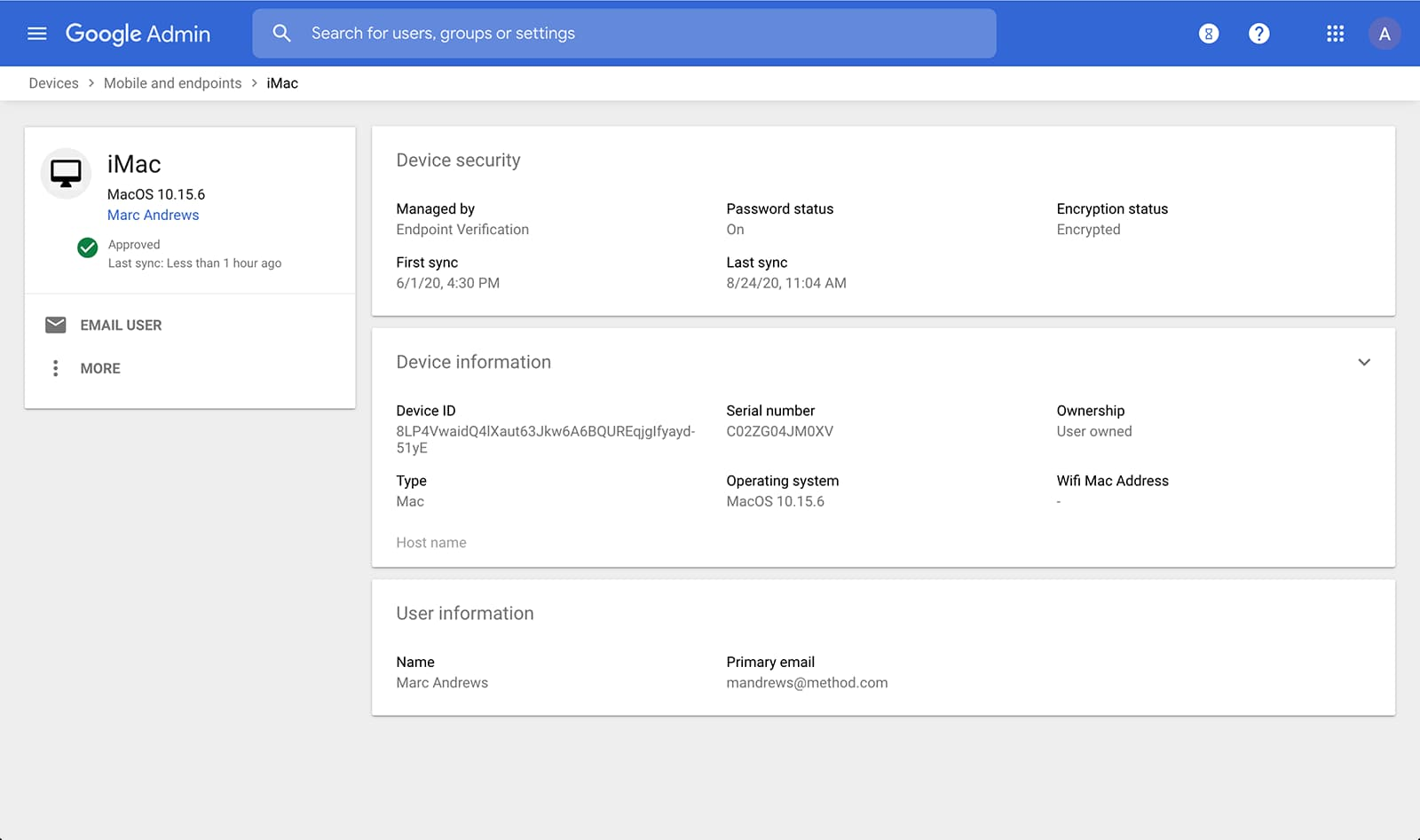
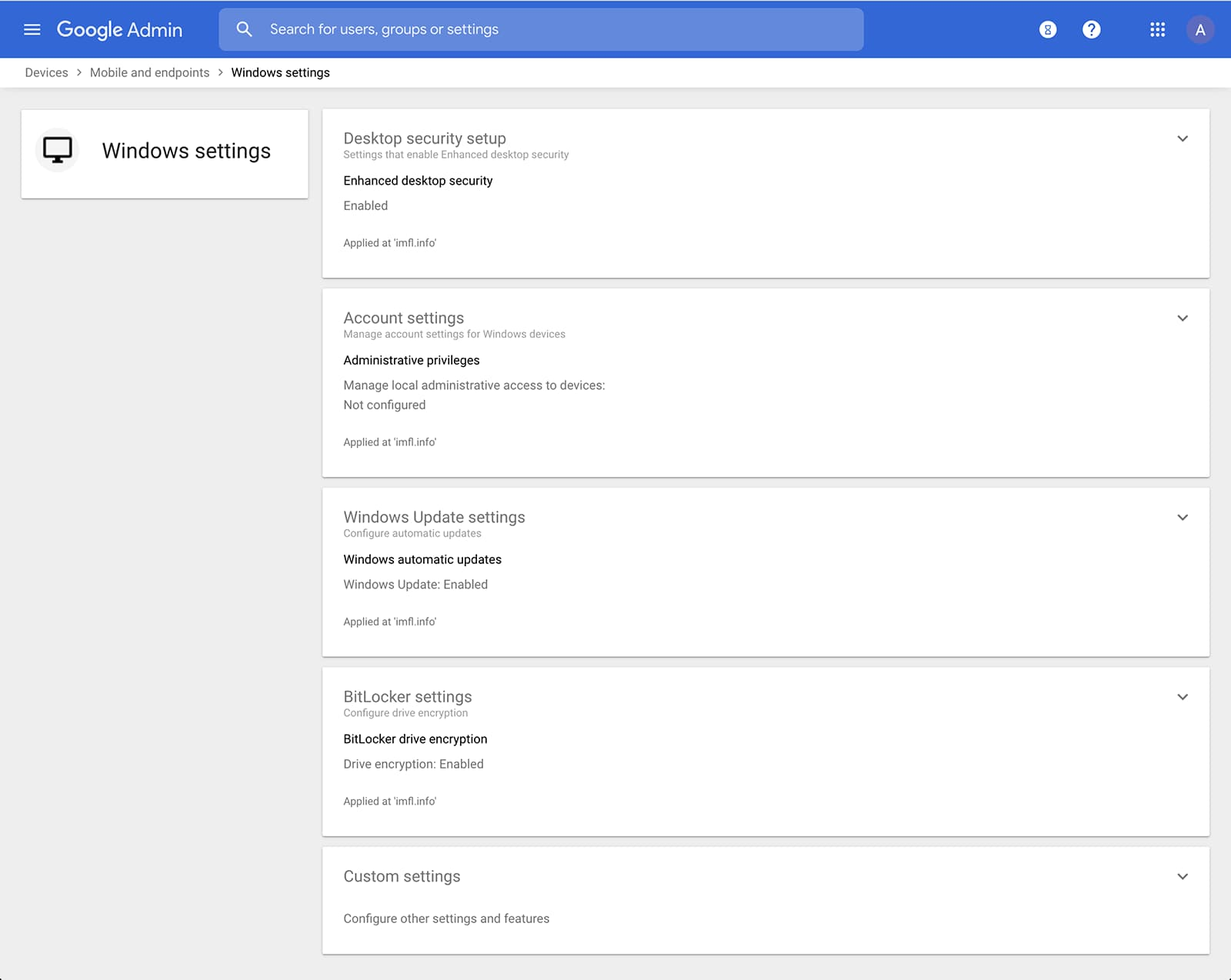
Admins can also manage and secure desktop devices with fundamental device management and enhanced desktop security for Windows. With fundamental device management, when a user logs into G Suite through any browser on a Windows, Mac, Chrome, or Linux device, that device will be automatically enrolled with endpoint management. This provides a base level of security to every desktop device that accesses G Suite data. With enhanced desktop security for Windows, admins can easily manage and secure Windows 10 devices through the admin console.
Enable secure connections without a corporate VPN using context-aware access
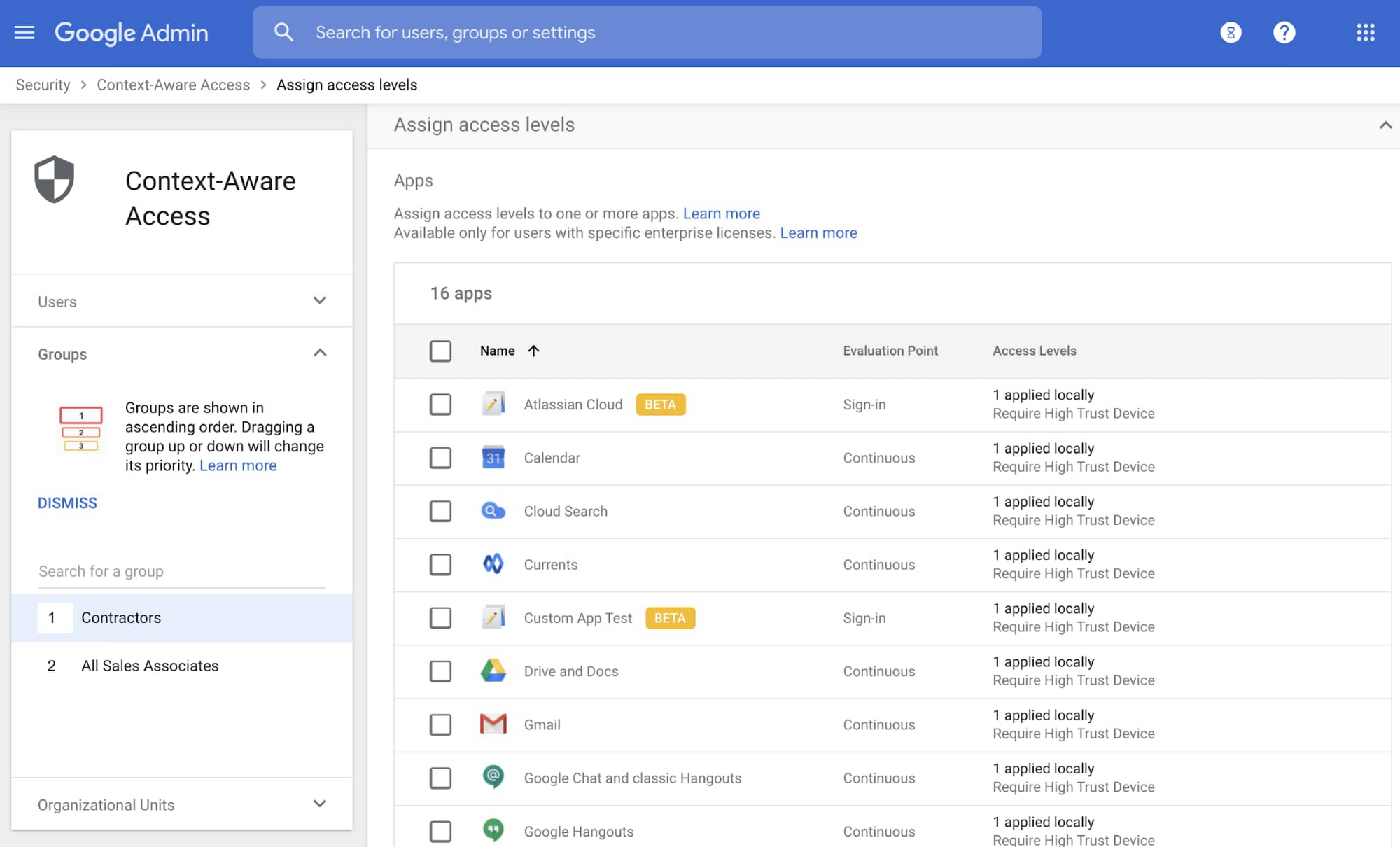
Context-aware access offers protection from unwanted access to G Suite services without the need for a VPN, and allows admins to set up different access levels based on a user’s identity and the context of the request, taking into account factors such as the country, device security status, and IP address of the request. For example, you can require BYOD devices accessing G Suite to meet encryption and password requirements, or restrict contractors from accessing G Suite from company managed Chromebooks.
Control data access with app access control
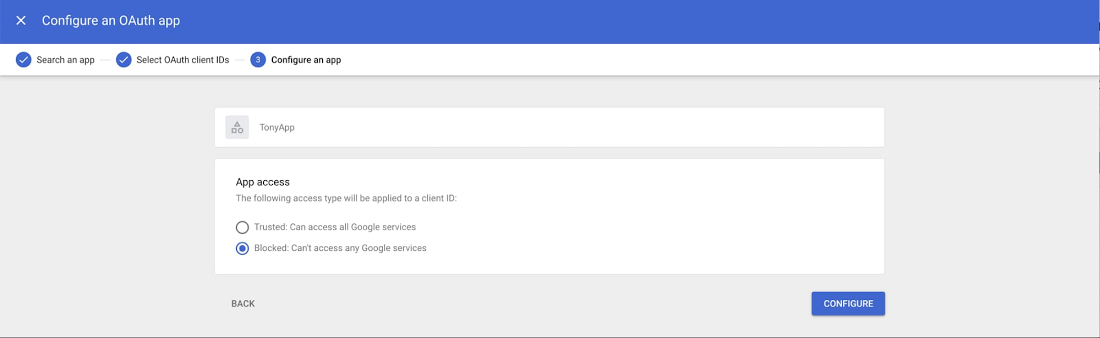
It’s important to protect all devices in your organization—corporate or BYOD—from malicious apps trying to gain access to corporate data. Using app access control, admins can take steps to prevent these apps from tricking users into mistakenly granting access to corporate data. With this feature, admins can choose which third-party apps are allowed to access users’ G Suite data by explicitly trusting, limiting, or blocking access for apps.
Enforce 2-Step Verification
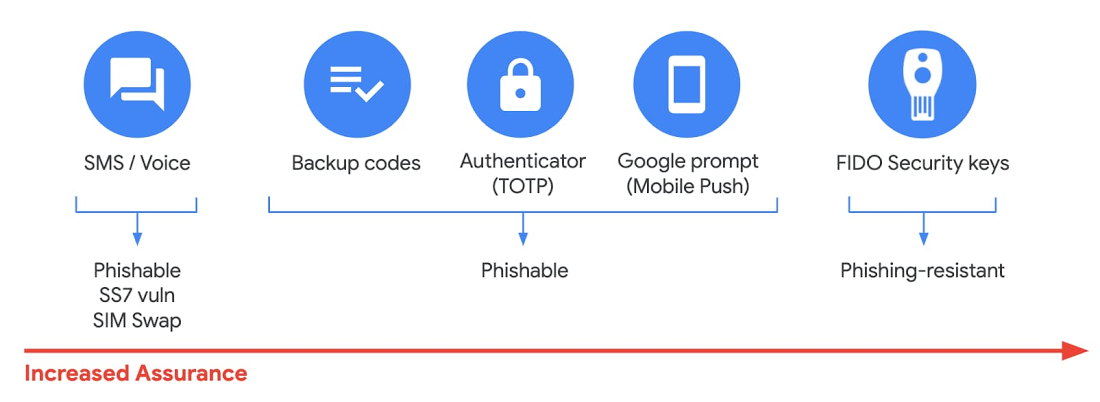
With 2-Step Verification, admins can reduce the risk of unauthorized access by asking users for additional proof of identity when signing in. And you can now use the Advanced Protection Program—our strongest protection for users at risk of targeted attacks. With the Advanced Protection Program for the enterprise, we’ll enforce a specific set of policies for enrolled users including security key enforcement, blocking access to untrusted apps and enhanced scanning for email threats
If you choose not to use security keys for any reason, you have multiple other options to enforce 2-Step Verification on BYOD devices. For Android and iOS, you can use Google prompt, Google Authenticator, text message, or phone call options for a second verification step.
Prevent data loss and leakage with data loss prevention
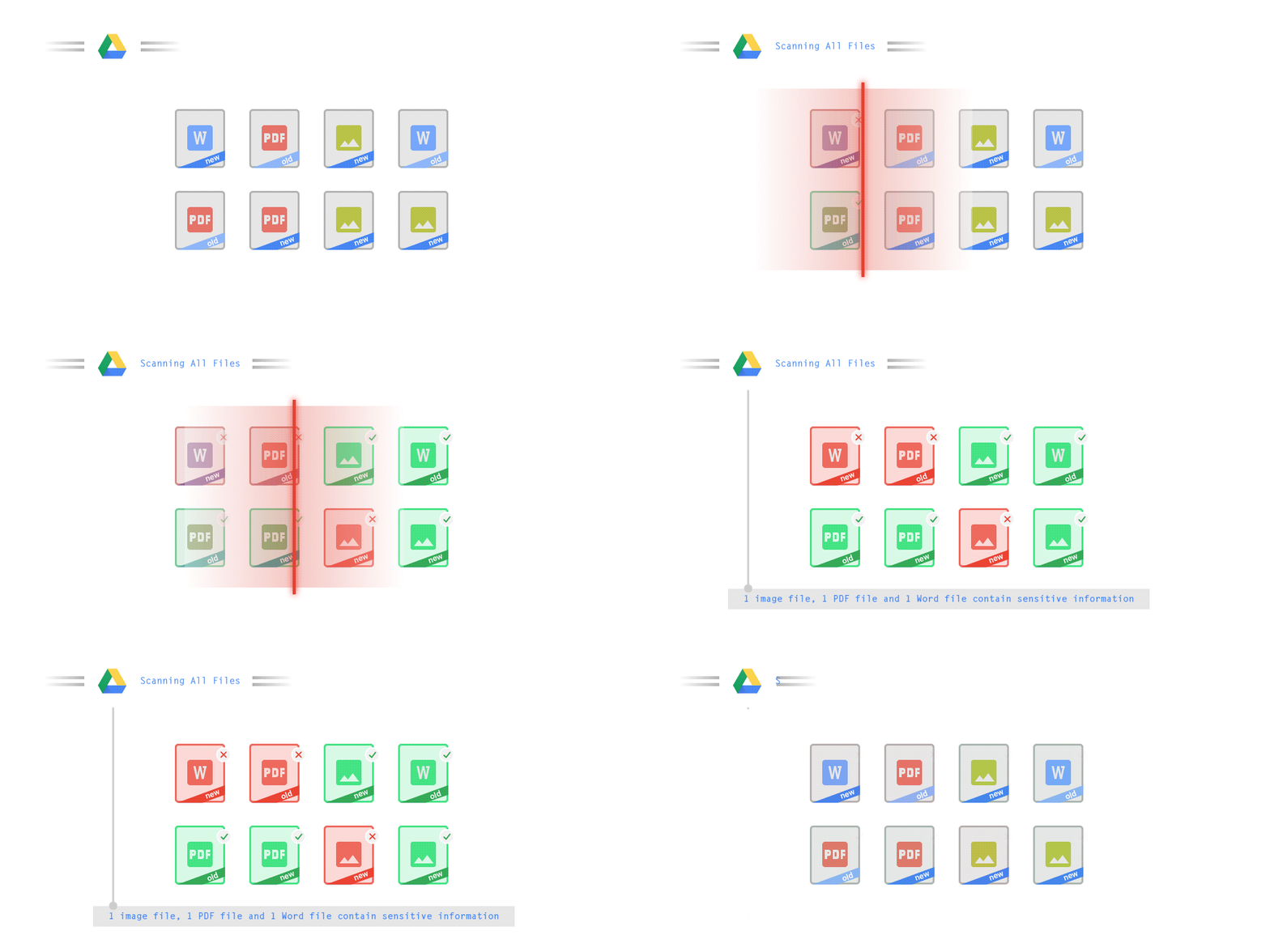
We know that as an admin, one of your highest priorities is to keep internal information safe and secure. That’s why we developed data loss prevention (DLP) policies to help protect sensitive information in Drive, Docs, Sheets, Slides, and Gmail from loss, misuse, or being accessed by unauthorized users. With G Suite DLP, admins can choose which types of data are sensitive and exactly how to protect them. Our controls enable easy detection of a wide variety of common info types, and administrators can supplement this with custom content detectors to meet their organization’s needs. You can also classify files in Drive automatically using DLP rules (beta) to categorize your data by sensitivity levels. DLP works on all the devices in your organization, including BYOD ones, since the protection is at the data and application level.
In addition to DLP, you can use DXP for iOS devices to restrict the copy/pasting of G Suite data to other accounts, personal or otherwise. DXP for iOS can also restrict users’ ability to drag and drop files from specific apps within their G Suite account. Similarly, you can use Google endpoint management to configure Android devices to prevent data sharing between personal and work profiles.
Make retention and eDiscovery possible on all your devices with Vault

To support your organization’s retention and eDiscovery needs, Vault enables corporate data that’s stored in G Suite and accessed by BYOD devices to be available for all your information governance needs. No matter the owner of the device, your organization’s data stored in Gmail, Drive, Chat, Groups, Voice, and Meet are accessible to Vault.
Using the zero-trust security model, the G Suite features above work together to keep your data protected and organization secure across all devices, whether they’re corporate-owned or BYOD.
(*Google Workspace was previously G Suite)
TELUS and Google Cloud Partner to Move Towards a More Sustainable Future

4470
Of your peers have already read this article.
2:30 Minutes
The most insightful time you'll spend today!
Environmental sustainability is a key priority for TELUS, a world-leading communications technology company. It continues to rank in the top 100 most sustainably managed companies in the world, and seeks to make a healthier planet for all by leveraging its global-leading technology, compassion to drive social change and reduce our collective carbon footprint through innovative technologies and sustainable business practices.
TELUS surpassed its sustainability objectives in 2019 and is now on a journey to procure all of its electricity from renewable or low-emitting sources by 2025. Next, it aims to achieve net carbon neutrality for its operations by 2030. TELUS has also been named to the Dow Jones Sustainability Index for 21 consecutive years, a feat unmatched by any other North American telecom or cable company. In 2021, it became the first company in Canada to release a Sustainability-linked bond (SLB) framework and complete an SLB offering, formally linking TELUS financing to its environmental performance.
“We’ve spent the last decade becoming a global leader in sustainability, helping make the planet healthier by ensuring that our operations are as environmentally responsible as possible,” said Geoff Pegg, Head of Sustainability and Environment at TELUS.
In part, TELUS’ strategy is focused on three key areas:
- Seek the best renewable energy options available
- Focus on migrating workloads to the cloud
- Embrace a multiplier effect through the use of sustainable partners
Renewable energy impact
Part of this environmental responsibility involves investing heavily in renewable energy sources through power purchase agreements (PPAs) that help renewable energy providers like wind farms and solar companies develop their infrastructure. TELUS executed PPAs with four Alberta-based solar and wind facilities to provide 100 per cent of its electricity load demand in a province where one-third of the grid is powered by coal.
As a technology company, electricity represents a large portion of TELUS’ energy needs: 80 percent of the operational carbon footprint comes from the power requirements for TELUS’ network and administrative buildings, Pegg explains. While TELUS is using renewable energy sources and low-emitting energy grids to power its buildings and network, there’s also the often-forgotten part of the carbon emissions equation: the energy it takes to power data centers. As the International Energy Agency recently reported, data centers represent 1 percent of the global electricity demand and that figure is expected to keep rising as the world increases usage of data-heavy technologies.
“It’s probably no surprise that everyone, whether you’re a business or a consumer, is concerned about reducing carbon emissions,” said Chris Talbott, the Google Cloud Sustainability Lead. “A lot of us think about the carbon emissions associated with our cars or with the electricity that powers our homes, but oftentimes we forget about the carbon emissions that come from the digital services that we use or the networks required to deliver that data.”
As a leader in sustainability, how can TELUS meet the energy demands of its customers while also protecting the environment? One way is through the company’s previously announced collaboration with Google Cloud. The two companies are working together to build a more sustainable world through technology and reduce TELUS’ carbon footprint, create value along the entire supply chain, and optimize industry solutions for social impact through data analytics and machine learning.
Taking a cloud first approach — reducing carbon emissions with green cloud computing
Google became carbon neutral in 2007 and has achieved 100 per cent renewable energy matching every year since 2017. Google has invested in renewable energy to match the electricity we use across our entire operations, including Google Cloud, meaning every workload that TELUS runs on Google Cloud has been matched with renewable energy purchases.
“The operational carbon footprint of running anything on Google Cloud is zero,” Talbott said. Also, by working with Google, TELUS gets the benefit of economies of scale using less electricity. Not only is TELUS leveraging Google data centers, it’s also relying on the digital collaboration made possible by Google Workspace to reduce the amount of travel required by employees attending meetings in different offices. Collaboration tools like Google Meet can reduce the carbon footprint of in-person conferences by 94 percent.
Google compensates for the environmental footprint of any electricity used in the data center and out to the edge network. “You can feel pretty good about using Google Meet because it’s carbon-neutral,” Talbott said.
Multiplier through sustainable partnerships — green cloud computing radiates out
By supporting TELUS in its environmental sustainability efforts, Google Cloud is also enabling TELUS to do the same for its various partnerships. For example, powered by Google Cloud’s infrastructure and data analytics capabilities, TELUS is partnering with Picacity (formerly NXN Digital) and Google Cloud to deliver an ecosystem of integrated smart technologies that enable cities to improve the lives of their residents.
From dynamic traffic signaling that reduces congestion and emissions, to data analytics that create smarter, more efficient city planning, the partnership is transforming the way municipalities operate in our increasingly digital world.The partnership is built on four foundational pillars of infrastructure and environmental sustainability, intelligent transportation, public safety and security, and health. In the case of intelligent transportation, this means sensors, cameras, and other devices are built into or near roads, sidewalks, and bike paths to provide data for innovative software to improve traffic flow in real time. The data can then foster informed decisions about infrastructure, city planning, fleet optimization, and public safety.
All of these environmental measures may seem small when compared with the enormity of the problem that is climate change, but as Talbott said, “Change begins with the small decisions we make every day such as paying attention to the practices of companies that we’ve come to rely on daily in the modern world. They may seem small and in the margins, but at scale, this is how we can make a real impact.”
More Relevant Stories for Your Company

How Google Maps Platform Boosts Domino’s Operations and Fast Growing Franchise across Indonesia
Editor’s note: Today’s blog post is from Mayank Singh, Chief Digital Officer and VP Marketing and IT at pizza delivery group Domino's Indonesia. He explains how Google Maps Platform is enabling their business to optimize their operations and supporting the franchise's ambitious expansion strategy in one of the world's most

How Google Cloud Platform Delivers 5X Performance Boost to SMBs
Small and medium-sized businesses are increasingly adopting cloud solutions, with Google Cloud Platform offering significant benefits. IDC interviews reveal that SMBs using Google Cloud Platform experience improved performance, reliability, and scalability while reducing costs. Key findings include: Empowering application development teams with infrastructure agility and scalability Enabling business growth by

New Map Customization Features for Enhanced User Experiences
A customized map can be key to delivering a frictionless experience that engages users and sets you apart in users’ minds–whether you’re a real estate company fine-tuning points of interest (POIs) on a map to help buyers decide where to live, or a regional pharmacy styling a map to ensure




How You Can Collaborate in Real Time to Build Pitch Proposals Overnight
It’s no secret that marketing and sales teams have a love-hate relationship. But there’s one thing that binds them like no other: The pressure of creating pitch decks overnight. The struggle is real. Be it for a new marketing campaign or a sales idea, pitch decks need multiple teams in
