





5324
Of your peers have already watched this video.
1:34 Minutes
The most insightful time you'll spend today!
How You Can Collaborate in Real Time to Build Pitch Proposals Overnight
It’s no secret that marketing and sales teams have a love-hate relationship. But there’s one thing that binds them like no other: The pressure of creating pitch decks overnight.
The struggle is real.
Be it for a new marketing campaign or a sales idea, pitch decks need multiple teams in different parts of the world to collaborate towards a single goal—and race with the clock.
That’s why, more often than not, marketing and sales teams watch deadlines fly past and risk losing potential customers, fail to beat the competition, and adversely impact revenue.
But with G Suite, marketing teams can now collaborate in real time, tweak proposals, add missing data, and write and edit the same file—all together. In fact, 74 percent of all time spent in Docs, Sheets, and Slides is on collaborative work—that is, multiple people creating and editing content together. That means they can create pitch decks overnight.
With AI and machine learning powering, and protecting, the G Suite, today’s marketing and sales teams have a smarter, quicker and more secure platform to ensure their ideas get to market faster and also remain within the organization.
That’s probably why companies like Whirlpool, Nielsen, BBVA, and Broadcom are among the many who chose G Suite to move faster, better connect their teams, and advance their competitive edge.
What Are India’s Biggest Companies Doing on Google Cloud?
9298
Of your peers have already read this article.
6:30 Minutes
The most insightful time you'll spend today!
In the last year, there’s been an upward trend in cloud adoption in India. In fact, NASSCOM finds that cloud spending in India is estimated to grow at 30% per annum to cross the US$7 billion mark by 2022.
At Google, in our conversations with customers, discussions have evolved beyond cost savings and efficiencies. While those are still very relevant reasons for adopting cloud technologies, Indian enterprises are looking to Google Cloud to help them drive digital transformation, identify new revenue generating business models, reach previously untapped consumer markets, and build customer loyalty through greater insight and personalization.
Here are some companies and their stories.
Tata Steel: Mining data and maximizing its power
Tata Steel is a great example of an established enterprise from a traditional industry that is modernizing and embracing cloud computing. With an ambition to be a leader in manufacturing in India and a digital-first organization by 2022, Tata Steel believes smart analytics is key to enhancing operational efficiency and gaining business advantage.
To organize data from siloed systems across the organization and make it easily accessible to all employees, Tata Steel is using Cloud Search and plans to scale it to more than one million documents and 28 disparate enterprise content sources including enterprise resource planning (ERP) and SharePoint. In fact, Tata Steel is one of the first Indian enterprises to harness the power of Cloud Search to meet some of the most aggressive ingestion demands, with indexing durations reduced from weeks to seconds.
They are also leveraging Google Cloud Platform (GCP) services like Google Cloud Storage and BigQuery to build their data lake and enterprise data warehouse so they can take advantage of advanced analytics and machine learning. Managed services such as AI Platform further enable Tata Steel to manage end-to-end AI/ML workflows within the GCP console. This complements their existing on-premise reporting and analytics tools, and brings data management to the forefront of everything they do—from forecasting market demand to predictive equipment maintenance.
“Digital is not just a goal, it’s become a way of life. We are digitizing everything from the deployment of factory vehicles to improving material throughput to marketing and sales. As a result, we have petabytes of structured and unstructured data that is not only waiting to be mined, but that we can generate intelligence from to create opportunities across our multiple lines of business using GCP,” said Sarajit Jha, Chief Business Transformation & Digital Solutions at Tata Steel.
Helping L&T Financial Services reach customers in rural communities
In rural communities, quick access to financial services can make a tremendous difference to livelihoods. L&T Financial Services provides farm-equipment finance, micro loans and two-wheeler finance to consumers across rural India backed by a strong digital and analytics platform. Their digital-loan approval app, which runs on GCP, makes it significantly faster and easier for people to apply for financial assistance to purchase important things such as farming equipment and two-wheelers. It also helps rural women entrepreneurs get quicker access to funds for their businesses through micro loans.
L&T Financial found G Suite to be a far better collaborative tool to help staff work together efficiently. Employees can interact with each other in real time using Hangouts Meet, and the task of information sharing is more seamless and secure through Drive. BigQuery also helps L&T Financial Services generate behavior scorecards to track credit quality of its micro-loan customers.
“Cloud is the technology that enables us to achieve scale and reach. Today there are countless data points available about rural consumers which enable us to personalize our products to serve them better. With access to faster compute power, we can also on-board consumers more efficiently. Our rural businesses have clocked a disbursement CAGR of 60% over the past three years.” said Sunil Prabhune, Chief Executive-Rural Finance, and Group Head-Digital, IT and Analytics, L&T Financial Services.
Creating conversational connections for Digitate’s customers
Digitate, a venture of TCS (Tata Consultancy Services), has integrated Dialogflow into its flagship brand ignio, an award-winning artificial intelligence platform for driving IT operations, workload operations and ERP operations for diverse enterprises. This integration is the next step in ignio’s product development journey, and will enable users to chat or talk with ignio to detect issues, triage problems, resolve them and even predict system behavior.
“ignio combines its unique self-healing AIOps capabilities for enterprise IT and business operations with Dialogflow’s AI/ML-based, easy to use, natural and rich conversational capabilities to create an unparalleled, intuitive and feature-rich experience for our customers,” says Akhilesh Tripathi, Head of Digitate.
Indian enterprises going G Suite
The base of Indian enterprises that are making the switch to G Suite to streamline their productivity and collaboration also continues to grow. Sharechat, BookMyShow, Hero MotorCorp, DB Corp and Royal Enfield are now able to move faster within their organizations, using intelligent, cloud-based apps to transform the way they work.
A hybrid and multi-cloud future in India
IDC predicts that by 2023, 55% of India 500 organizations will have a multi-cloud management strategy that includes integrated tools across public and private clouds. (IDC FutureScape: Worldwide Cloud 2019 Predictions — India Implications (# AP43922319). We look forward to sharing more success stories of Indian enterprises that have taken the next step in their digital transformation journey.
How to Use Data to Tell Compelling Stories and Win New Deals

4506
Of your peers have already read this article.
2:30 Minutes
The most insightful time you'll spend today!
A picture is worth a thousand words–especially at work. The data we present every day is what helps us drive decision-making in the workplace. But understanding how to visualize a story can be difficult if you’re left staring at numbers sitting stagnant in rows or columns within a spreadsheet.
This is where visualization with charts and reports becomes critical. Let’s say your team needs to understand global sales trends. If you have a waterfall chart that shows regional contribution to total revenue or a scatter plot that shows individual salesperson performance, it’s much easier to spot patterns, draw insights, and make informed recommendations. The same goes for analyzing travel expenses.
In Google Sheets, we have several built-in tools that make it easy to create and share useful charts and reports so that you can quickly visualize data (without having to leave the spreadsheet). Follow these tips to showcase your data in Sheets and influence decisions.
1. Pick the most compelling way to visualize your data.
Perhaps just as important as the data you reference is the way in which you present it. Charts are the basic building blocks for data visualization and can take many forms–from bar charts to line graphs to scatter plots. There are more than 30 chart types to choose from in Sheets, and we’re constantly adding more ways to express your data. Here are a few we recommend:
- To draw attention to a key metric or KPI, try the brand new scorecard chart. For example, you can show the total sales number for your organization’s top-selling product, and even call out percentage increase or decrease over time.
- To illustrate how values add to or subtract from a starting value, try a waterfall chart. For example, show how your product sales and restocking efforts led to a net decrease in inventory from last quarter to this quarter.
- To represent different data series using lines and bars, try a combo chart. For example, you can show revenue in bars and profit margins in a line across the same chart, giving you a more complete picture of your organization’s financial health.
If you’re unsure how to best present your data, Google’s built-in machine learning can help you choose the right visualization—Sheets intelligently suggests charts for you. Simply highlight data you would like to visualize, click the chart button, and then select one of the suggested charts. According to our internal data, more than 1.5 million charts are inserted into Sheets each week based on intelligent recommendations.
Note: Once you have a chart inserted into Sheets, you may want to control the look and feel. We recently made it possible to click directly on data labels, chart titles, or legends and drag to reposition them. You can also easily delete these elements using the delete or backspace keys, if you want to make other data points stand out. We’re exploring even more ways to customize charts—stay tuned.
2. Be sure to tell a complete story.
Data really comes to life when you put several charts and tables together into a report or dashboard. Going back to our sales data example, an individual line graph showing revenue over time gives you quick insight into the general sales trend for your organization (hopefully, up and to the right!). But when you surround that line graph with other charts and tables–like a pie chart showing total revenue breakdown by-product, or a stacked bar chart comparing revenue driven by each sales team–you can tell a more complete story.
If you do build reports featuring multiple charts, there are ways that Sheets can help you organize and format them more quickly. Earlier this year, we made it easier to align, size, and position objects within your spreadsheets so you can quickly put several charts together. We also recently added themes, which let you alter the look and feel of an entire spreadsheet—including charts, pivot tables, and cells—to ensure a consistent look and feel across the elements in your report. To apply a preset theme, select Format > Theme and choose the right option. Faster formatting can mean faster reporting.
How This Company Doubled in Size and Expanded its Business in Just Six Months

4125
Of your peers have already read this article.
3:00 Minutes
The most insightful time you'll spend today!
In the past six months, Mynd Property Management has doubled in size—in part by hiring, but also through acquisitions that help build our business. It’s an exciting time to be at Mynd—every week brings new people who need to be set up with email and network access, which can also be a bit hectic. To speed onboarding, we use G Suite Enterprise to get our new people working as soon as they walk through the door.
Streamlined onboarding
We started using G Suite when we launched the business because it fit our overall approach to technology—that is, deploying cloud tools that are flexible for our employees and easy for IT to manage. Good thing we picked G Suite, because given the pace of our acquisitions—13 at last count—we have our hands full with combining business systems and keeping people productive. Onboarding is literally 80 percent of our daily work!
Some people on our team don’t have technical backgrounds, so we are careful to only introduce new software tools once people are prepared to use them. With G Suite, people need very little ramp-up time because it is an intuitive, integrated solution. In one of our in-person training sessions, we showed an accountant how to open up a Microsoft Excel file in Google Sheets, and he started working on it right away, without much help.
We’re a remote-first company, so working in the cloud is second nature to us. About 75 percent of our total workforce are remote full-timers. G Suite tools are optimized for mobile, so they’re especially useful for the 50 full-time property managers who work solely on mobile devices in the field.
Better meetings, easier file storage
In Mynd’s early days, we used G Suite Basic, but upgraded to G Suite Enterprise after Google Cloud Premier Partner Suitebriar showed us the benefits of using tools like Hangouts Meet and shared drives in Google Drive. They’ve really helped us scale the business, so we can stay productive even in the midst of acquisitions—and of course, onboard people more quickly.
Many G Suite tools have become things we can’t live without. Our executives got first crack at using Hangouts Meet Hardware, and loved it so much—especially the recording feature—that now all of our conference rooms have it.
Google Drive got the same love from everyone. It’s all we need for file sharing and storage, which means we don’t have to pay for another storage solution. Drive also helps with onboarding; as soon we assign an employee a Google Account, she or he automatically gets access to the shared drives (in Drive) that they need to do their jobs.
Customizing the tech stack
As much as we love G Suite, we still like to use some non-G Suite tools. It helps that we can tailor G Suite to fit in our technology stack any way we want. We’d never get that control and customization from other vendors in the productivity space.
For example, we love using Slack for internal chat and messaging, so we turned off Hangouts Chat. We like that we can control these channels, and that G Suite is not an all-or-nothing product. That means we’re not afraid to try out new G Suite features, since we can roll them back if they’re not right for us.
The result of our day-to-day G Suite use is that we don’t suffer much down time even during acquisitions. We can pull relevant data from users’ old systems and easily automate user creation from start to finish. When we merge with companies that already use G Suite, we can move their data over to the business in less than a week.
When we recently moved over 80 new employees and 50 different web domains to G Suite, it was much less challenging than we expected. Since we don’t plan to slow down on acquisitions, we breathe easier knowing that G Suite keeps everyone working in the middle of so much change.

6308
Of your peers have already downloaded this article
4:04 Minutes
The most insightful time you'll spend today!
When it comes to data analysis, it’s easy to fall into routine. But no matter how much of a whiz you are at formulas or pivot tables, superb spreadsheet skills only take you so far if you’re working with multiple versions or outdated datasets.
On average, your employees spend up to eight hours each week—an entire work day—searching for and consolidating information.
What if businesses spent their time applying data insights instead of tracking them down?
Working in the cloud means your data can easily stay up to date because information is automatically saved as it’s typed. Multiple team members can collaborate in real-time from their phone, tablet or computer (online and offline) and create a single source of truth for projects, like quarterly budgets.
Powered by Google’s machine intelligence, Sheets does a lot
of the heavy
lifting for you when it comes to data analysis. You can ask a question
about your data and Sheets will return an answer using natural language
processing. Sheets also builds
charts, suggests
formulas and creates
pivot tables for you.
Google Workspace Now Available to Over 3 Billion Users!

3804
Of your peers have already read this article.
3:00 Minutes
The most insightful time you'll spend today!
Over the past year, Google Workspace rapidly evolved to meet the needs of users as we collectively grappled with remote and hybrid work. First, we launched Google Workspace to commercial customers, which brought together the powerful individual apps people know and love into a single, integrated solution. Then we made Google Workspace available to nonprofits, governments, and schools. And in June, we brought the power of Google Workspace to everyone, enabling more than 3 billion users to transform the way they connect, create, and collaborate. To extend these experiences further, we’ve seen a stunning 4.8 billion apps installed in Google Workspace to date. We’re excited to see so many users personalize their experience by adding third-party apps or by building their own to create a more powerful engine for productivity and collaboration.
As we celebrate the more than 5,300 public apps in the Google Workspace Marketplace that provide users with the opportunity to extend their experience, we’re increasing our investment in the underlying platform. Developers have been able to build applications that integrate with Gmail, Drive, and Docs for years. And today, we’re announcing significant enhancements to the Google Workspace platform by making it just as easy for developers to build applications and integrate with Google Meet, Chat and Spaces.

We’re releasing a new Jira integration for Google Chat and Spaces. This integration enables users to create new tickets quickly, see actionable previews, and monitor issues as they come into the space they’re already using for collaboration.
“Modern work requires people to switch contexts and tools faster than ever before. We believe an open ecosystem and tight integrations among the tools that users rely on every day is vital to their success. Since 2017, our Trello integration with Gmail has been installed by more than 7 million people. Today, we are excited to build on the partnership between Atlassian and Google to propel work collaboration further with the integration of Jira with Google Chat and Spaces,” said Joff Redfern, Chief Product Officer, Atlassian.
As work continues to evolve, we’re especially committed to the concept of collaboration equity: the ability for everyone to participate and drive impact no matter their location, technical ability, language preference, or device. Carrefour Property – Carmila is evolving how they innovate by connecting frontline workers to those in the office with our no-code development platform AppSheet. For example, after discovering a problem, onsite managers previously had to send an email, enter data into a spreadsheet, and sometimes attend a meeting to explain the issue. Now, with AppSheet, they can simply input the data on their phone in a single step, and the team back at headquarters can see and act on the issue while also tracking all the other issues being reported from other locations.
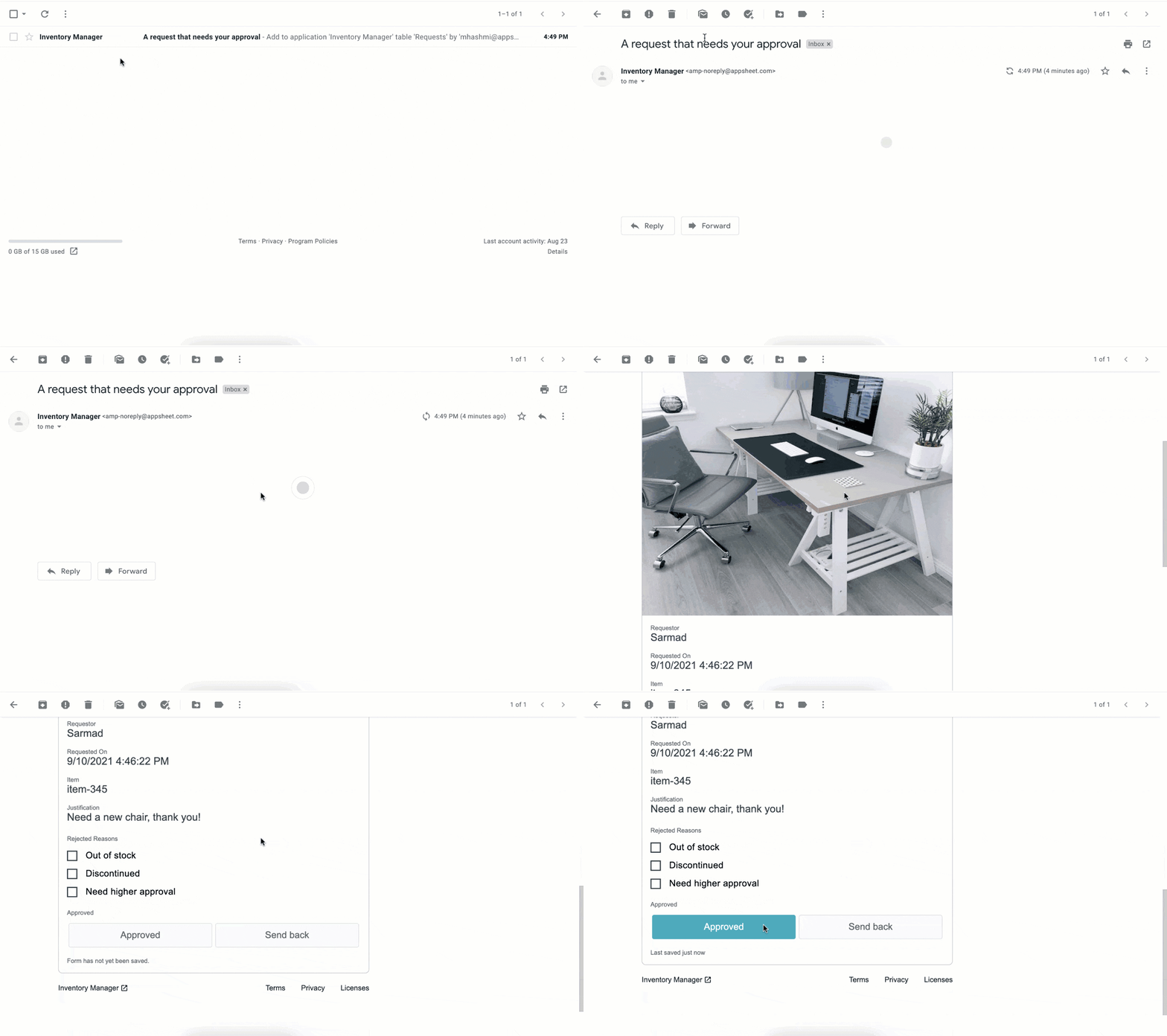
We continue to empower frontline workers and IT teams alike, bringing more flexibility into Google Workspace by integrating AppSheet into Gmail. This new integration allows anyone—regardless of their coding experience—to reclaim time with custom, no-code apps and automations. Budgets and vacation requests can be approved, inventories and asset management systems can be updated, and much more—all with AppSheet and directly from your inbox.
New investments in security
As we continue to deliver delightful new experiences for users, we are keeping security at the forefront; it’s infused in every layer of our product design so that customers have the flexibility and trust needed to operate in a secure environment. To build on this commitment, we’re announcing Google’s new Work Safer offering to help organizations, their employees, and partners collaborate and communicate securely and privately in today’s hybrid work environment. Work Safer will provide companies with access to best-in-class security for email, meetings, and messages, documents, and more. It uniquely brings together the cloud-native, zero-trust solutions of Google Workspace with industry-leading solutions from across Google and its cybersecurity partners, CrowdStrike and Palo Alto Networks.
To further strengthen security and privacy across the Google Workspace platform, we’re also announcing four key new capabilities:
- In June, we announced that Client-side encryption (CSE) was available in beta for Drive, Docs, Sheets, and Slides. Now we’re bringing CSE to Google Meet, giving customers complete control over encryption keys while helping them meet data sovereignty and compliance requirements. We’re also pleased to announce the beta of our Key Access Service Public APIs, which enables customers to directly manage their encryption keys without the need for a third-party partner.
- Data Loss Prevention (DLP) for Chat is now in beta. This is a continuation of our ongoing commitment to help organizations protect their sensitive data and information from getting into the wrong hands, without impacting the end-user experience. With DLP for Chat, you can enable the power of spontaneous conversation between individuals and teams, while preventing sensitive and confidential information from leaving your organization. Interested customers can sign up for the Client-side encryption and DLP for Chat betas today.
- Drive labels are now generally available. Organizations are now able to classify files stored in Drive based on their sensitivity level. Labels integrate with Google Workspace Data Loss Prevention, making it easier to manage external sharing, downloading, and printing of sensitive files.
- We’re rolling out additional protections to safeguard against abusive content and behavior. If a user opens a file that we think is suspicious or dangerous, we’ll display a warning to the user to help protect them and their organization from malware, phishing, and ransomware. This functionality is now available in Google Docs and will be rolling out soon for Google Sheets and Slides.
Fueling the future of work and collaboration
Our mission is to empower everyone with an innovative and seamless experience that gives people—no matter their location or technical ability—the opportunity to drive real impact. At its core, the vision of the Google Workspace platform is to help you build your own innovation momentum, while providing a foundation of security and privacy. I hope you’ll join me at the Google Cloud Next ’21 event where you can learn more about the Google Workspace vision, and even better, see these new experiences in action.
More Relevant Stories for Your Company

Discovery’s Massive Workspace Migration Fuels Innovation and Collaboration
In the past two decades, Discovery has moved from a purely cable business based in the U.S. to a global media and entertainment powerhouse. Like many other businesses in the industry, we’ve had to adjust to the unique shifts in people’s behaviors and preferences, almost all of which result from

How Google Meet Keeps Your Video Conferences Secure
All over the world, businesses, schools and users depend on G Suite to help them stay connected and get work done. Google designs, builds, and operates our products on a secure foundation, aimed at thwarting attacks and providing the protections needed to keep you safe. G Suite and Google Meet


Hospitals Can Offer Interconnected Patient Experiences Using Google’s Natural Language Services
Machine Learning (ML) in healthcare helps extract data from conversations, medical records, forms, research reports, insurance claims and other documents across the care value-chain to help care providers have a holistic view of their patients to draw insights for diagnoses and treatments. With Natural Language Processing(NLP), healthcare organizations can program

How Cardinal Group Created a Collaborative Culture and Reduced Support Tickets by 43% Per IT Team Member
At Cardinal Group, we have four distinct lines of business, each of which are critical to our overall company performance: real estate investment, third-party property management, construction management, and marketing. As the VP of IT and Data, one of my top priorities is giving each of our team members across
