





Take a Look at 30 Eventrac Locations!

4928
Of your peers have already read this article.
2:00 Minutes
The most insightful time you'll spend today!
New locations in Eventarc
Back in August, we announced more Eventarc locations (17 new regions, as well as 6 new dual-region and multi-region locations to be precise). This takes the total number of locations in Eventarc to more than 30. You can see the full list in the Eventarc locations page or by running gcloud eventarc locations list .
What does location mean in Eventarc?
An Eventarc location usually refers to the single region that the Eventarc trigger gets created in. However, depending on the trigger type, the location can be more than a single region:
- Pub/Sub triggers only support single-region locations.
- Cloud Storage triggers support single-region, dual-region, and multi-region locations.
- Cloud Audit Logs triggers support single-region locations and the special
globalregion.
Before looking into trigger location in more detail, let’s look at other locations relevant in Eventarc.
What other locations are relevant in Eventarc?
Triggers connect event sources to event targets:
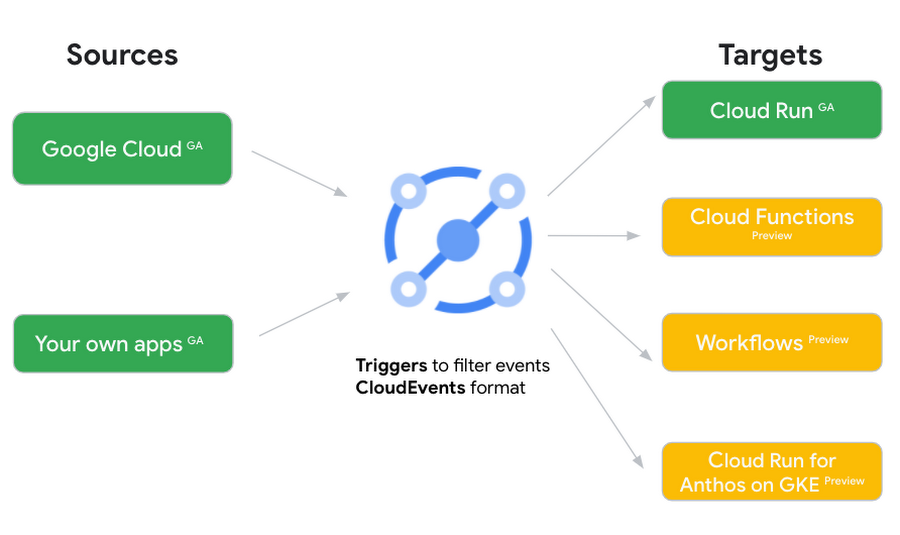
Each event source, event target, and trigger has its own location. Sometimes, these locations have to match and sometimes they can be different.
Here’s an example of a trigger connecting Cloud Storage events from a bucket in the europe-west1 region to a Cloud Run service in the us-central1 region with a trigger located in the europe-west1 region:
gcloud eventarc triggers create trigger-storage \--destination-run-service=hello \--destination-run-region=us-central1 \--location=europe-west1 \--event-filters="type=google.cloud.storage.object.v1.finalized" \--event-filters="bucket=my-bucket-in-europe-west1-region" \--service-account=$PROJECT_NUMBER-compute@developer.gserviceaccount.com
In many cases, you don’t have control over the location of the event source. In the example above, the Cloud Storage bucket is in the europe-west1 region. That’s the location that you need to work with and it has implications for the trigger location (which I’ll get to later).
The location of the event target is the region of the service where you want the events to go. You get to choose this from one of the supported regions when you deploy your Cloud Run service. You typically want this to be in the same region as your event source for latency and data locality reasons (but this is not strictly a requirement). In the example above, the event source (bucket) is in europe-west1 but the event target (Cloud Run service) is in us-central1 as specified by the --destination-run-region flag.
The location of the trigger is dictated by the event source location, but the trigger type also comes into play. It is specified by the –location flag. Let’s take a look at the trigger location for each trigger type in more detail.
Location in Pub/Sub triggers
In a Pub/Sub trigger, you connect a Pub/Sub topic to an event target. Pub/Sub topics are global and not tied to a single region. However, when you create a Pub/Sub trigger, you need to specify a region for it (because Eventarc triggers need to live in a region) with the --location flag as follows:
gcloud eventarc triggers create trigger-pubsub \--destination-run-service=hello \--destination-run-region=us-central1 \--location=us-central1 \--event-filters="type=google.cloud.pubsub.topic.v1.messagePublished" \--transport-topic=projects/your-projectid/topics/your-topic
By specifying a location, Eventarc automatically configures the geofencing feature in Pub/Sub such that events only persist in the specified location. As I noted above, you typically want to (but are not required to) choose the same region for the trigger and the Cloud Run service for lower latency and data locality. You can also use regional Pub/Sub service endpoints to publish to the topic to ensure that all of the data stays in a single region.
Location in Cloud Storage triggers
In a Cloud Storage trigger, you connect a Cloud Storage bucket to an event target. A Cloud Storage bucket can be in a single-region (e.g. europe-west1), dual-region (e.g. eur4), or multi-region (e.g. eu) location. The location of the bucket dictates the location of the trigger and they have to match. The earlier trigger example was for a bucket in the europe-west1 single-region location. Here’s another trigger connecting Cloud Storage events from a bucket in the eu multi-region location. Notice how the location flag matches the bucket region:
gcloud eventarc triggers create trigger-storage \--destination-run-service=hello \--destination-run-region=us-central1 \--location=eu \--event-filters="type=google.cloud.storage.object.v1.finalized" \--event-filters="bucket=my-bucket-in-eu-multi-region" \--service-account=$PROJECT_NUMBER-compute@developer.gserviceaccount.com
If the bucket region and the trigger region do not match, you’ll see an error:
ERROR: (gcloud.eventarc.triggers.create) INVALID_ARGUMENT: The request was invalid: Bucket "my-bucket-in-eu-multi-region" location "eu" does not match trigger location "europe-west1". Try again by creating the trigger in "eu".
Location in Cloud Audit Logs triggers
In a Cloud Audit Logs trigger, you connect any event source that emits Audit Logs to an event target. The location of the event source will dictate the trigger location. This is typically a single region but there is a special global region that’s necessary in some cases.
For example, if you want to read Cloud Storage events from a bucket in the europe-west1 region with an Audit Logs trigger, you will create the trigger with the same location. Note that this will match all buckets in the europe-west1 region as there’s no filter by bucket in Audit Logs:
gcloud eventarc triggers create trigger-auditlog \--destination-run-service=hello \--destination-run-region=us-central1 \--location=europe-west1 \--event-filters="type=google.cloud.audit.log.v1.written" \--event-filters="serviceName=storage.googleapis.com" \--event-filters="methodName=storage.objects.create" \--service-account=$PROJECT_NUMBER-compute@developer.gserviceaccount.com
On the other hand, if you want to match a dual-region or a multi-region bucket such as eu, you will create the trigger with the global location as Audit Logs triggers only support a single or global region. Note that this will match all buckets in all regions globally:
gcloud eventarc triggers create trigger-storage \--destination-run-service=hello \--destination-run-region=us-central1 \--location=global \--event-filters="type=google.cloud.storage.object.v1.finalized" \--event-filters="bucket=my-bucket-in-europe-west1-region" \--service-account=$PROJECT_NUMBER-compute@developer.gserviceaccount.com
As you can see from this example, if you want to read Cloud Storage events, the native Cloud Storage trigger is a much better option, but this example illustrates a typical case in which a global Audit Log trigger is necessary.
That wraps up this closer look at locations in Eventarc. Feel free to reach out to me on Twitter @meteatamel for any questions or feedback.
Neo4J & Google Cloud: Graph Data in Cloud to Address Challenges in FinServ Industry

6902
Of your peers have already read this article.
3:00 Minutes
The most insightful time you'll spend today!
Over the last decade, financial service organizations have been adopting a cloud-first mindset. According to InformationWeek, lower costs and enhanced scalability were the biggest drivers for cloud adoption in financial services, and cloud-native applications allow access to the latest technology and talent, enabling adopters to rebuild transaction processing systems capable of supporting very high volumes and low latency.
Both Neo4j and Google Cloud have been using relationship-based data representations since the beginning, and we’re dedicated to using this technology to help financial services customers drive business transformation. We are excited about the prospects of financial services (FinServ) cloud systems and believe that graph data in the cloud can help solve significant challenges in the industry.
Data Challenge #1: Risk Management and Compliance
First among the top concerns for any CIO moving to the cloud is risk management and compliance. Disconnected, uncontextualized, or stale data create opportunities for fraud and financial crimes to occur. The fact is when it comes to FinServ, the question is not “if” but rather how often an attack will occur. Unfortunately, incidents have been trending upward over the last decade, and COVID has only exacerbated this reality. Financial crimes affect the bottom line both in the remediation of these crimes and in intangibles like brand value.
Add to this the complexity of international banking, which makes “compliance” a moving target. Penalties due to noncompliance are a constant concern to any FinServ organization.
The tabular representation of information with a fixed number of columns that never change prevents a description of an ever changing world with changing characteristics. Relational databases are great if the world you describe does not move fast but have limitations when data structures are highly interlinked and not homogeneous.
Neo4j Aura on Google Cloud provides a foundation for creating dynamic, futureproof, scalable applications that adhere to the security standards and protocols today’s financial services organizations require to meet the challenges of finding and preventing bad actors. This also includes enterprise scalability; reaching over 1 Billion nodes and relationships to streamline queries and provide solutions that meet regulatory and privacy compliance across geographies. Neo4j has helped some organizations save billions of USD in fraud in the first year of deployment alone.
What makes graph technology the best choice for fraud detection use cases is that the relationships between the data-points are as important as the data-points themselves. Let’s take as an example, one John Smith approaches a multi-national banking institution to manage the primary account for his new holding corporation.
While no one has any record of John R Smith Holdings LLC, the bank’s application built on graph technology understands that there are several well-known entities owned by John Smith Holdings. The application also identifies several well-known board members who bank with this institution. Due to this relationship-driven approach, the bank now understands John R Smith is not “John Smith,” who previously attempted to open an account for his holding corporation, which had no information associated with it prior to two months ago.
Data Challenge #2 Manual Processes and Inefficiencies
The ubiquity of the cloud offers an opportunity to deploy automation at unprecedented levels to tackle the errors and inefficiencies that manual processing allows to creep into processes. When data comes from disparate, perhaps legacy systems – which may have become siloed and “untouchable” over the years – further complexity arises. As an example, if someone in sales types “John Smith” into a CRM system not knowing that John R Smith is the spelling in the customer data master, it may result in two separate and potentially conflicting records. Being able to join those records together in a mastered view helps to solve this problem. In addition, low data quality equates to an increase in risk, costs, and implementation times for new systems.
Neo4j Aura on Google Cloud provides automation and artificial intelligence (AI) that reduces manual processes and the errors that accompany them. In this graph architecture each node, which can represent a person, will have labels, relationships, and properties associated with it. This allows for the use of AI which can easily understand that John Smith in the CRM is the same John R Smith in the customer master. The information contained in Neo4j can be connected bi-directionally to ensure consistency across applications and data sources.
One of the benefits of this approach is that linking information allows organizations to keep the full value of the data, rather than forcing the data into predetermined tabular representations, with the risk of losing valuable information and insights.
Data Challenge #3: Customer Engagement and Insight
Another significant concern is the high expectations today’s customers have for every interaction. End users are accustomed to predictable experiences on their digital devices, and FinServ apps are no exception. Added to this, the “Covid economy” has driven digital adoption significantly across demographics; even among customers who might traditionally have used in-person services. This also equates to increased expectations for personalized, predictable experiences with every digital interaction. We know that latency has always been a key consideration for financial trading, but a recent ComputerWeekly study showed that every financial organization should ensure their visible latency is at 10 milliseconds or less. Customers no longer accept their broadband is at fault.
Finally, blind spots in the customer journey often result in dissatisfaction, which ultimately leads to increased churn. Without gaining actionable insights from your customers, there is no room to innovate and iterate on what they are looking for in your products and services. And this translates to losing market share and competitive advantage.
The NoSQL architecture, specifically the dynamic schema and structure of Neo4j Aura gives you the ability to take charge of your data and make changes according to your development cycles or newer data models. This equates to faster builds, more comprehensive releases and a wider, richer data-set that can be contextualized and understood instantly. Graph technology is the logical choice for building a Customer 360 application. Under this approach organizations not only get valuable insight into the individual client’s behavior and patterns, but also those of their family, friends and colleagues. This allows for stronger personalization, targeted campaigns and successful execution, resulting in increased customer satisfaction and retention levels.
Graph Technology on Google Cloud

Neo4j is a recognized leader in graph database technology and the only fully integrated graph solution on Google Cloud, helping to fill a common need for Google Cloud customers. Both Neo4j and Google Cloud are invested in continuing to grow our partnership and mutual product direction.
You can find and deploy the Neo4j graph database straight from the Google Cloud marketplace, whether you want to download the software for an on-premises deployment, use the virtual machine image, or use the hosted solution, Aura on Google Cloud, the graph database-as-a-service. In any deployment, you get the same enterprise-grade scalability, reliability, and connectivity along with successful, repeatable use cases you can rely on to resolve your particular challenges and integrated billing.
For a real-world example of how graph technology can optimize financial services, you can read our Case Study with fintech Current. Current, a leading U.S. financial technology platform with over three million members, used Neo4j Aura on Google Cloud to create a personalization engine based on client relationships.
To learn more about Neo4j Aura on Google Cloud for FinServ organizations, register for our webinar on Thursday, December 16 with Jim Webber, Chief Scientist, CTO Field Ops at Neo4j and Antoine Larmanjat, Technical Director, Office of the CTO, Google Cloud.
Qlik and Google Cloud Combo: Extending Integration of SAP Data on BigQuery
5464
Of your peers have already read this article.
2:00 Minutes
The most insightful time you'll spend today!
If your organization is one of the 52% of SAP customers whose top analytics pain point is data integration1, Google Cloud has got you covered. By working with partners like Qlik, we are expanding our integration options and bringing real-time replication capability for SAP to BigQuery.
Integrated data for accelerated insights
BigQuery—our fully managed, enterprise data warehouse that can scale up to petabytes on demand and execute queries in seconds—allows SAP customers to consolidate enterprise data silos and confidently derive more use and value from their data. Customers can accelerate and simplify the delivery of SAP data on BigQuery with the latest Qlik Data Integration platform offering for Google Cloud which allows data integration using an automated, near real-time data pipeline through Qlik Replicate, whether data originates from legacy SAP environments, SAP HANA, or SAP application servers. Additionally, Qlik Compose for Data Warehouses can be used to easily generate and automate logical data models from SAP directly in BigQuery freeing up more time for data analysts to leverage advanced built-in capabilities such as BigQuery ML to derive greater value and insights using standard SQL without the need for advanced programming expertise.
Delivering faster results with real-time
Traditional extract-transform-load (ETL) solutions operate on a batch basis, pulling data sets from SAP daily, hourly, or every minute. These tools often require manual mapping of multiple data fields so that data flows accurately. Given SAP’s highly complex table relationships, in which a single transaction can result in multiple changes, this can be a time consuming and tedious process. ETL can also increase the burden on your SAP systems.
Qlik Replicate simplifies this with its intuitive user interface where you can set up real-time data replication between SAP and BigQuery, eliminating the need for manual coding. And, to prevent system overhead, as soon as a new transaction is entered into SAP, the resulting data is replicated into BigQuery in a process known as change data capture (CDC) from SAP’s log layer. This means that data transfer can benefit from high performance with minimal impact on the source system’s resources. Read our latest white paper to learn how to extract SAP data into BigQuery leveraging Qlik Replicate.
Solution expertise for all core SAP workloads
It doesn’t matter what database your SAP system runs on, Qlik Replicate supports all core SAP systems. It automates real-time data replication and decodes SAP’s complex, application-specific data structures into formats that flow smoothly into BigQuery. This ensures that anyone who depends on data analytics has the most current and relevant SAP data they need. For its robust solution capabilities Qlik has received a new “SAP on Google Cloud Expertise” designation for supporting:
- Fast onboarding and accelerated replication of SAP data into Google Cloud
- Real-time and continuous data replication from SAP applications to BigQuery
- Support for all core SAP modules and a broad set of data sources
- Automated data integration, which cuts resource requirements for initial delivery and ongoing maintenance
Proven customer results
Many SAP customers have experienced the benefits of leveraging Qlik alongside BigQuery for data analytics and AI at scale, including German luxury department store chain Breuninger. In order to meet its customers’ growing and changing expectations,Breuninger needed to accelerate its time to insight from data sources across a highly dispersed landscape of on-premises databases and systems, including SAP. The company uses Qlik Replicate to feed corporate data from modules in its SAP system into BigQuery and integrate its varying on-premises databases with the Google Cloud environment. This has yielded game-changing, real-time customer insights for the retailer.
What could your business do with faster, more integrated insights? Learn more about BigQuery for SAP customers and also how Qlik and Google Cloud can help you modernize and automate data integration and analytics.
Explore Google Cloud SQL’s 3 Fault Tolerance Mechanism to Ease Data Pro

5216
Of your peers have already read this article.
2:00 Minutes
The most insightful time you'll spend today!
If you’re managing a crucial application that has to be fully fault-tolerant, you need your system to be able to handle every fault, no matter the type and scope of failure, with minimal downtime and data loss. Protecting against these faults means juggling numerous variables that can impact performance as well as recovery time and cost.
Today’s managed database services take over the operational complexity that used to exist for database administrators. Growing your organization’s tolerance required adding machines, compute, and storage, plus the operational costs of IT management: performing backups, writing scripts, creating dashboards, and carrying out testing to make sure your platform is ready when problems arise–all in a secure way.
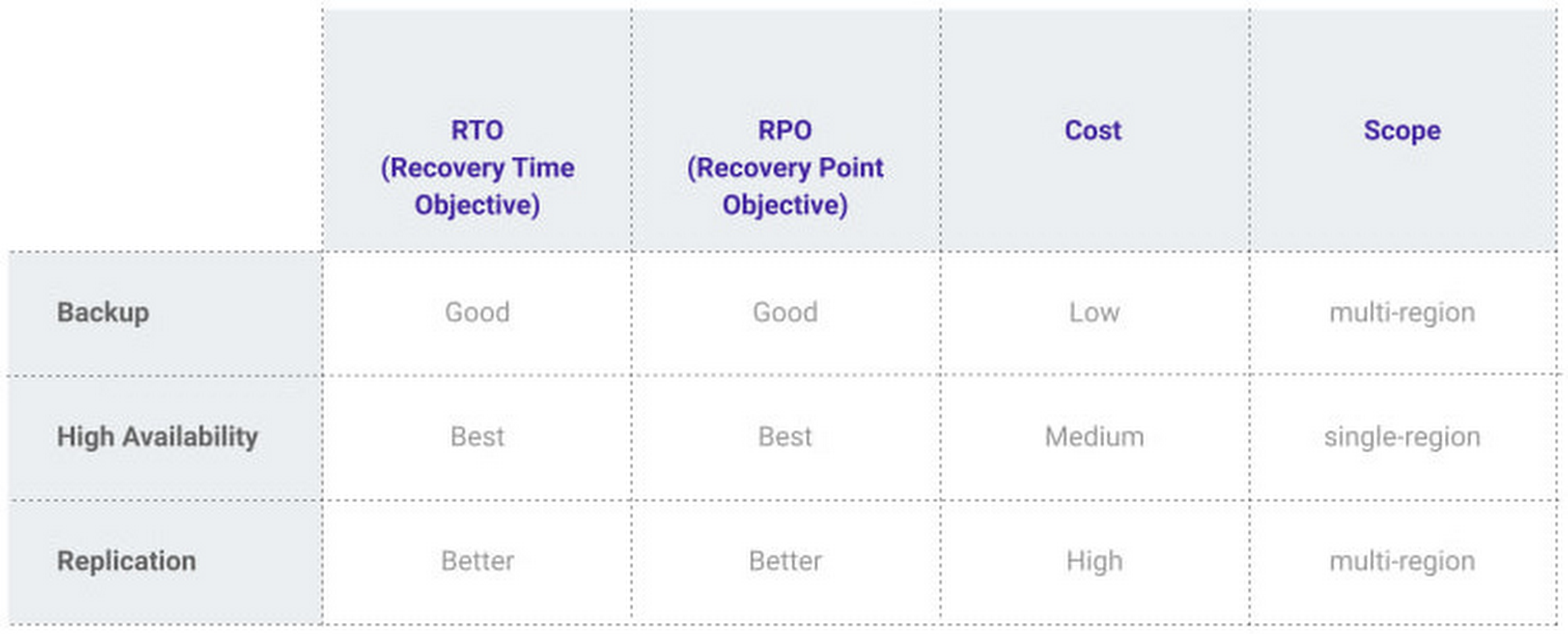
At Google, our Cloud SQL managed database service offers three fault tolerance mechanisms —backup, high availability, and replication—and there are three major factors to consider for each of them:
- RTO (recovery time objective): When a failure happens, how much time can be lost before significant harm occurs?
- RPO (recovery point objective): When a failure happens, how much data can be lost before significant harm occurs?
- Cost: How cost-effective is this solution?
We’ve heard from customers like Major League Baseball, HSBC, and Equifax that they have strict data-protection needs and require highly fault-tolerant multi-region applications—and they’ve all chosen Cloud SQL to meet those needs.
Let’s take a closer look at how the decision-making process plays out for each recovery solution.
High availability (HA)
If your application is business critical, you require minimum RTO and zero RPO— a high availability configuration ensures that you and your customers are protected. If the primary instance fails, there’s another standby instance ready to take over with no data loss. There’s an additional cost here, but doing this manually brings a great operational cost, since you have to detect and verify the fault, do the failover, and make sure it’s correct—you can’t have two primary instances or you risk data corruption—then finally connect the application to the new database.
Cloud SQL removes all that complexity. Choose high availability for a given instance and we’ll replicate the data across multiple zones, synchronously, to each zone’s persistent disk. If an HA instance has a failure, you don’t have to think about when to fail over because Cloud SQL detects the failure and automatically initiates failover, for a full recovery and no data loss within minutes. Cloud SQL also moves the IP address during failover so your application can easily reconnect. MLB, for example, uses Cloud SQL high availability to serve prediction data to live games with minimal downtime. Dev/test instances don’t need those same guarantees, but can use local backups to recover from any potential failure.
Cross-region replica
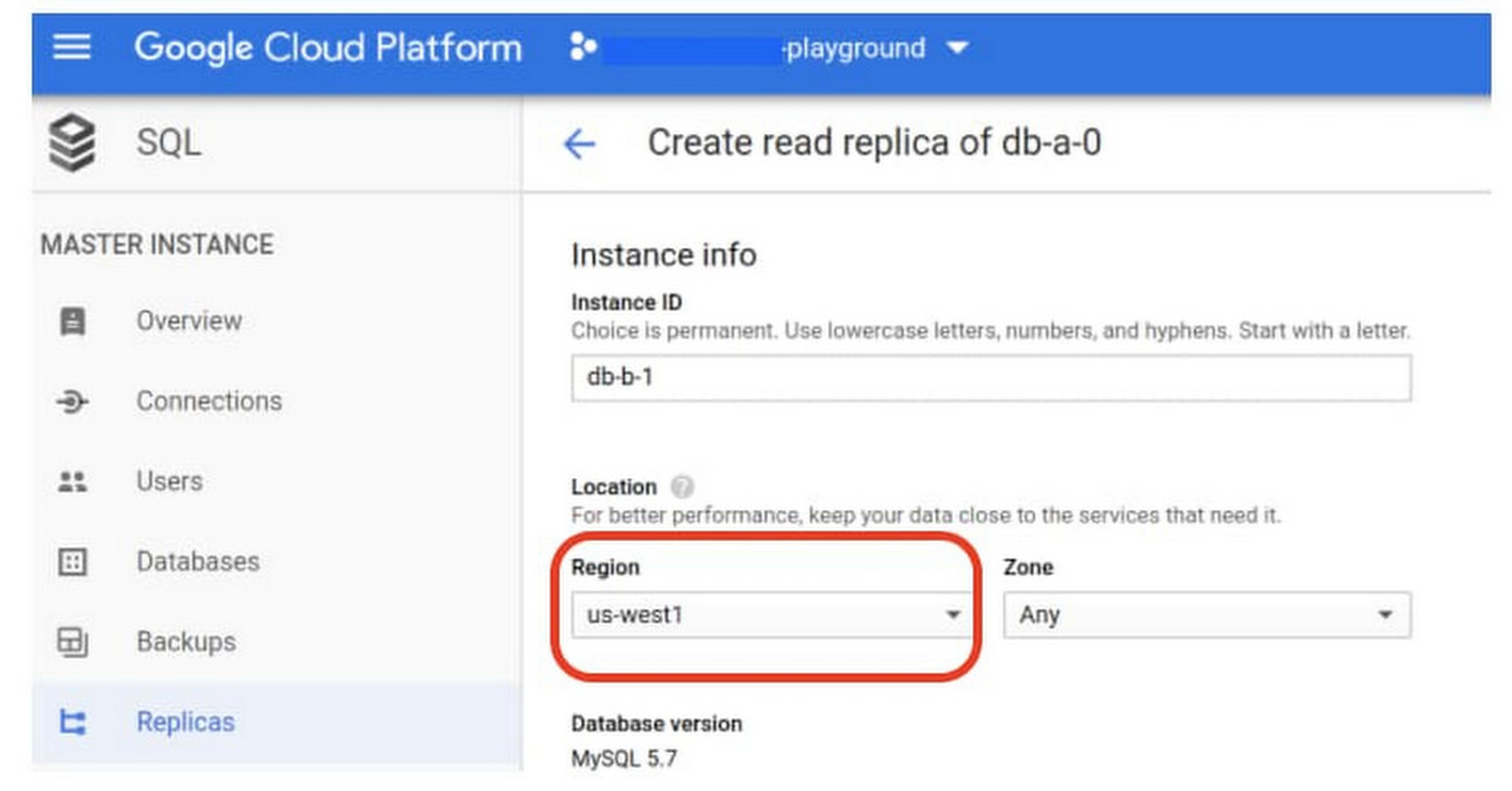
If a whole Google Cloud region goes down you still need your business to continue to run. That’s where cross-region replication comes in, a hot standby replica in another Google Cloud region provides RTO of minutes and RPO typically less than a minute . If you create a read replica in a region separate from your primary instance and you get hit with a regional outage, your application and database can start serving customers from another region within minutes. But this solution can be complex and enabling it yourself can be difficult and time-consuming. Securing cross-geography traffic demands end-to-end encryption and can bring connectivity issues too.
This is where the fully managed Cloud SQL solution shines. We offer MySQL, PostgreSQL and SQL Server database engines as a cross-region replication solution that’s easily configured and bolstered by Google’s interconnected global network. Just say, “I’m in U.S. East, I want to create a replica in U.S. West,” and it’s done, reliably and securely.
Backup
When you suffer data loss because of an operations error (for example, a bug in a script dropped your tables) or human error (for example, someone dropped the wrong table by accident), backups help you restore lost data to your Cloud SQL instance. Our low cost backup mechanism features point-in-time, granular recovery, meaning that if you accidentally delete data or something else goes wrong, you can ask for recovery of, for example, the state of that database down to the millisecond, such as Monday at 12:53pm. Your valuable data is replicated multiple times in multiple geographic locations automatically. This enables the automatic handling of failover in cases of major failure. You can always rest assured that your database is available and data is secure, even in the times of major failure crises.
Cloud SQL provides automated and on-demand backups. With automated backups, Google manages the backups so that you can easily restore them when required. Also, the scheduled backing is automatically taken by default. With on-demand backup, you can create a backup at any time. This could be useful if you are about to perform a risky operation on your database, as Cloud SQL lets you select a custom location for your backup data. When the backup is stored in multiple regions, and there’s an outage in the region that contains the source instance, you can restore a backup to a new or existing instance in a different region. This is also useful if your organization needs to comply with data residency regulations that require you to keep your backups within a specific geographic boundary.
Putting it all together
For critical workloads, MLB configures their Cloud SQL instances with backups, high availability, and cross-region replication. Doing so ensures they can recover from many failure types.
- To recover from human error (“Oops, I didn’t mean to delete that”), MLB uses backups and point-in-time recovery to recovery to a millisecond or specific database transaction
- To automatically recover from primary instance failures and zonal outages, MLB uses Cloud SQL’s high availability configuration
- To protect against regional outages, MLB uses cross-region replication
Creating a robust configuration, like MLB did, takes just a few minutes. Get started in our Console or review documentation.
3446
Of your peers have already downloaded this article
1:30 Minutes
The most insightful time you'll spend today!
Enterprises developing digital leadership are increasingly moving out of their data centers to focus on core business innovation, and save on complex infrastructure costs. This puts challenges related to demand peaks and business continuity under a magnifying glass.
Many CIOs are under pressure to complete migrations quickly — 68% of CIOs are seeking to migrate existing applications to the cloud, according to Forrester. Motivations range from cost or risk reductions, to refocusing on agility and speed.
As they assess their options, many enterprises face an enormous challenge of balancing the function of their existing infrastructure with a new operating model in the cloud. This involves thousands of variables, different technologies, different processes and skills, disparate teams, and competing interests.
Download this guide and see hoo to craft a strategy out of the data center and into public cloud. It surfaces typical industry patterns, key dimensions to be taken into account while designing the journey, as well as Google’s capabilities and approach to executing a successful modernization, to help you drive lower costs and increased agility.
Macy’s Uses Google Cloud to Streamline Retail Operations

3609
Of your peers have already read this article.
2:15 Minutes
The most insightful time you'll spend today!
As retailers strive to meet the growing expectations of shoppers, they are turning to Google Cloud to transform their businesses and tackle opportunities in an increasingly challenging industry. From optimizing inventory management to increasing collaboration between employees across locations and roles, to helping build omnichannel experiences for their customers, we are working together with retailers to help make the shopping experience as seamless and personalized as possible.
A standout Google Cloud customer is Macy’s, one of the world’s largest retailers. Founded in 1858, Macy’s operates approximately 680 Macy’s and Bloomingdale’s, and 190 specialty stores including Bloomingdale’s The Outlet, Bluemercury and Macy’s Backstage. And through macys.com, bloomingdales.com, and bluemercury.com, it also serves millions of customers across more than 100 countries.
By moving its infrastructure to the cloud, and taking advantage of Google Cloud data warehousing and analytics solutions, Macy’s is streamlining retail operational functions across its network.
With the opening of its new approximately 675,000 square-foot distribution center in Columbus, Ohio, Macy’s is leveraging the scalability of Google Cloud to ensure that merchandise is accurately and efficiently received, sorted, ticketed, picked, packed and shipped from the distribution center to the stores—even during peak retail seasons like back to school and the holidays.
“Powered by software developed at Macy’s technology, this new distribution center is a fantastic first step in our cloud journey. Working with Google Cloud allows us to be more nimble, efficient and flexible in how we utilize our warehouses,”
Naveen Krishna, CTO, Macy’s
Leveraging Google Cloud’s data management and analytics solutions, Macy’s new warehouse management system will initially service 200+ Macy’s Backstage off-price stores at launch. Macy’s will begin rolling out this software solution to additional distribution centers that service its nationwide fleet of Macy’s and Bloomingdale’s department stores, as well as Macys.com and Bloomingdales.com direct-to-customer orders.
Our continued work with Macy’s reflects their investment in technology to improve digital and mobile experiences, site stability, store technology, fulfillment, and logistics, and integrate its front line and back office to reinvent retail. I look forward to deepening our partnership with Naveen and his team to help them achieve these goals.
More Relevant Stories for Your Company
FAQs: Everything Your Need to Know About Cloud Computing
There are a number of terms and concepts in cloud computing, and not everyone is familiar with all of them. To help, we’ve put together a list of common questions, and the meanings of a few of those acronyms. You can find all these, and many more, in our learning resources.

World’s Largest Online-only Grocery Retailer Uses AI to Figure Which Customers Need Most Attention
In the United Kingdom, the popularity of online grocery shopping is expected to surge from about 6% of the market today to 9% by 2021, according to market research firm Mintel. One of the pioneers of online-only grocery retailing is Ocado, based in Hatfield, Hertfordshire in the U.K. Since starting commercial deliveries

Quick Migration, Zero Outages and Cost Savings: Rossi Residencial’s SAP to Google Cloud Journey!
After three migrations to different cloud providers, the company managed to migrate with no system outages for the first time, supported by partner Sky.One. Results Migrated four SAP environments and four servers in just one month with no system outagesZero unavailability periods since migratingLess time spent worrying about operational issues

withVR Uses the Power of VR to Prep People with Speech Disorders for Real-life Speaking Situations
Editor’s note: Meet Gareth Walkom, an entrepreneur dedicated to helping others with speech disorders. Turning life experience into innovation Did you know that 3% of Americans have a speech disorder, while 1% of the world’s population have a stutter? Just getting what they need in everyday interactions can be stressful,
