





Simplify Cloud Development with Duet AI on Google Cloud

1520
Of your peers have already read this article.
4:00 Minutes
The most insightful time you'll spend today!
Cloud developers — you’ve got it all. You can code in your choice of languages, enjoy portability with containers, minimize complexity with serverless, and manage the entire software lifecycle by following DevOps principles. But let’s face it, building and onboarding new cloud applications still requires a lot of manual planning, synthesis, and, yes, hard work. You need to research and plan your deployment, create a workable, secure architecture, and of course, you need to write the actual code,
For the last several decades, the cloud has been primarily a “do it yourself” model with volumes of options that have made development more complicated. The cloud went from overwhelmingly exciting to…. a bit overwhelming.
What if we all could bring that excitement back? What if you had some help that was available whenever and wherever you needed it?
Say hello to Duet AI for Google Cloud
Powered by Google’s state-of-the-art generative-AI foundation models, Duet AI for Google Cloud is an always-on AI collaborator that provides help to users of all skill levels where they need it. With Duet AI, we’re on a mission to deliver a new cloud experience that’s personalized and intent-driven, and can deeply understand your environment to assist you in building secure, scalable applications, while providing expert guidance.
As we evolve Google Cloud with Duet AI, we are looking to build a cloud platform that is more human-centric, holistic, and helpful, with responsible AI at the center of the experience:
- Human-centric: With Duet AI, we are making Google Cloud more accessible and personal to any type of user at any skill level by providing them with support whenever they need it, from code recommendations for developers, to prompt-based data insights for data engineers, to chat-based app creation for business users.
- Holistic: With generative AI at the center of the cloud experience, cloud development can be more cohesive, with fewer silos across functions, services, and tech stacks, providing a holistic picture in the format you want, wherever you are in Google Cloud.
- Helpful: To deliver smarter, contextual recommendations for building and operating apps with Google Cloud, we pre-trained Codey, one of the foundation models that powers Duet AI, with Google Cloud-specific content like documentation and sample code, and fine-tuned it based on Google Cloud user behaviors and patterns.
- Responsible: Our AI Principles set out our commitment to developing technology responsibly. Your code and recommendations will not be reused for any model learning and development. This helps ensure the privacy of your data and code, and also the integrity of the knowledge space from which our AI models are trained.
New capabilities available in Duet AI for Google Cloud
Here are some of the new capabilities available to get us started on our mission to deliver a new personalized and intent-driven cloud experience:
- Code assistance provides AI-driven code assistance for cloud users such as application developers and data engineers. It gives code recommendations as they type in real time, generates full functions and code blocks, and identifies vulnerabilities and errors in the code, while suggesting fixes.
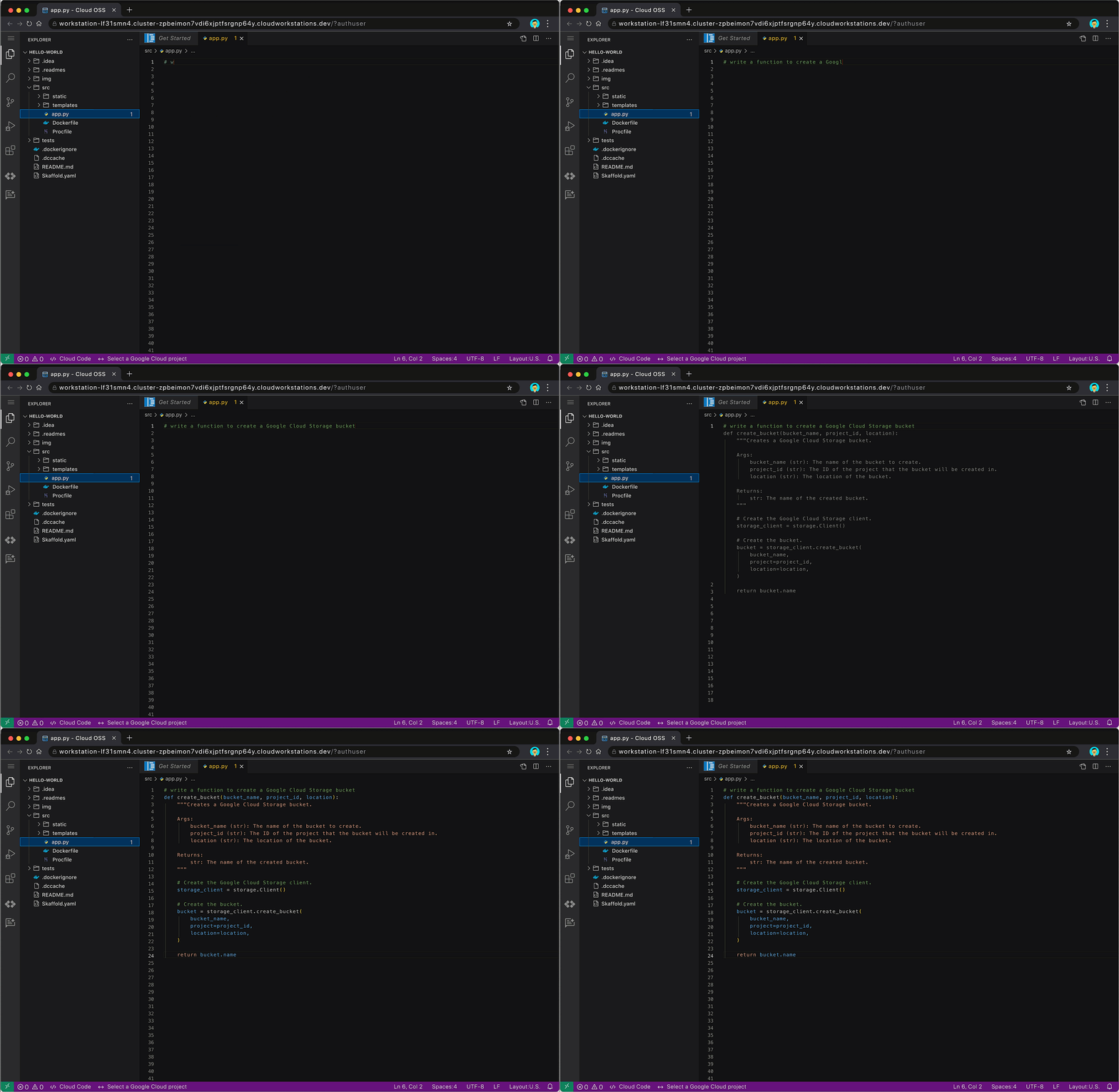
Code assistance auto-generates code for creating a Google Cloud Storage bucket
Code assistance will be available through multiple products and services across Google Cloud, such as in Cloud Workstations, our fully-managed secure development environment, and other code-editing experiences in the Google Cloud Console. Developers will also find code assistance in Cloud Shell Editor or via our Cloud Code IDE extensions for VSCode and JetBrains IDEs. It supports multiple languages including Go, Java, Javascript, Python, and SQL.
- Chat assistance allows people to use simple natural language to get answers on specific development or cloud-related questions. Users can engage with chat assistance to get real-time guidance on various topics, such as how to use certain cloud services or functions, or get detailed implementation plans for their cloud projects. It can also provide architectural or coding best practices, helping to reduce the need to go searching for relevant documents.

Use chat assistance to get the detailed steps for deploying an app on Cloud Run
Chat assistance will also be available across multiple Google Cloud surface areas, for example IDEs, the Cloud Console, and through products and services. Whether you’re a developer, operator, data engineer, or security professional, you’ll be able to leverage chat assistance to help get more work done faster.
Looking to optimize these features further for developers specialized in one particular area? With Generative AI support in Vertex AI, enterprises can fine-tune Codey using their own code base. They can consume these customized Codey models directly from Vertex AI today, and later this year, they will be able to connect it to the built-in Duet AI experience. And don’t worry, if you choose to train Codey with your code, your private data is kept private, and not used in the broader foundation model training corpus. You will have transparency and control over where data is stored and how or if it is used.
- Duet AI for AppSheet will let users create intelligent business applications, connect their data, and build workflows into Google Workspace via natural language. With no coding required, users will be able to build apps by describing their needs in a chat guided by AI-powered prompts. This makes app creation accessible to more users, which can allow developer teams to focus their time on other high-impact work.
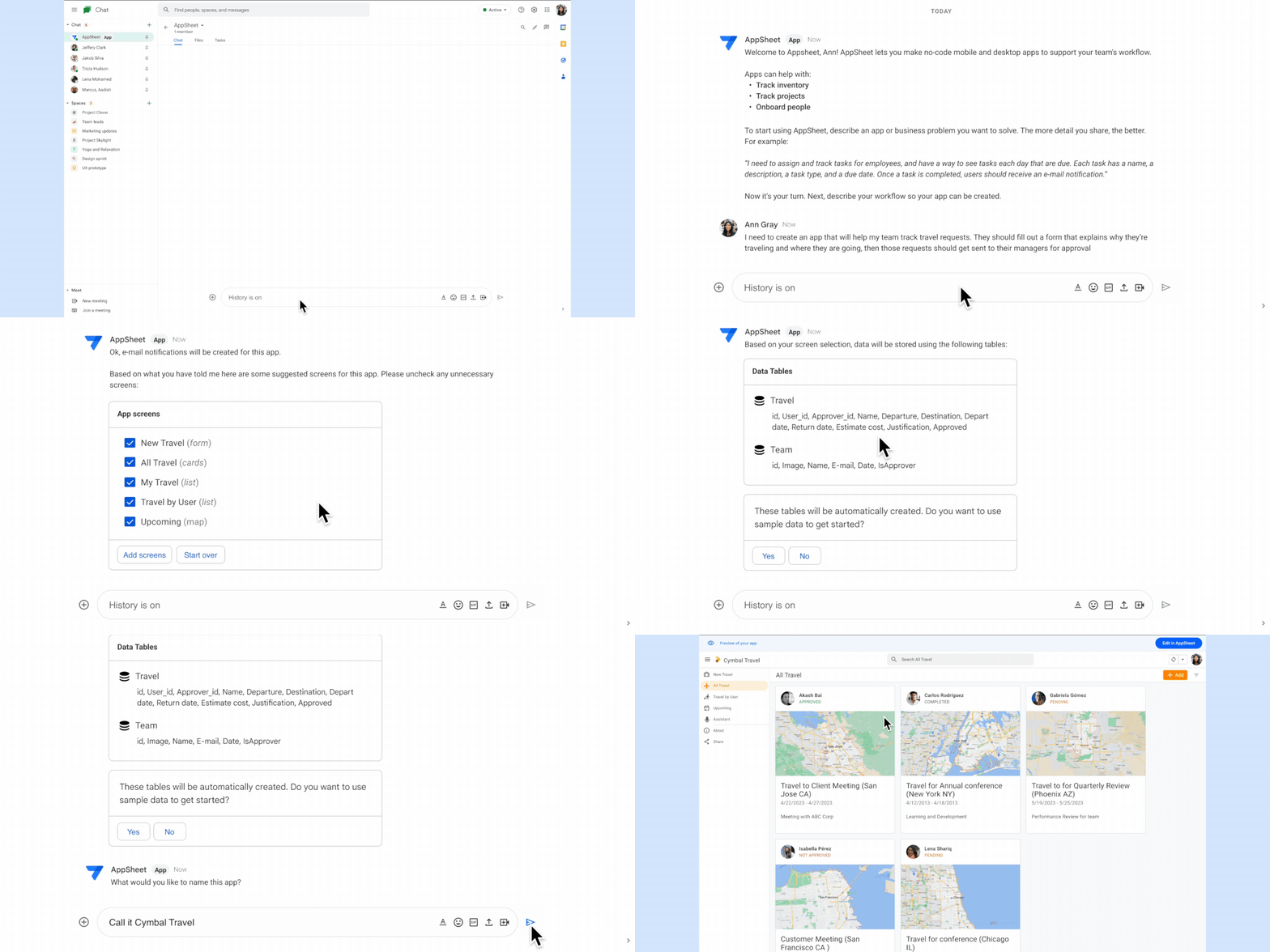
Create business applications with Duet AI for AppSheet using natural language
Experiment with Duet AI for Google Cloud today
We believe that having an assistant who is constantly evolving by your side will not only reduce an already overwhelmed developer’s workload, but also bring back the excitement of cloud development. With Duet AI, you can navigate the cloud with more confidence, ease, and — dare we say it — fun.
And this is just the beginning. The future of the cloud experience that we are shaping with Duet AI is full of possibilities. We believe the future of developer productivity is more targeted personalized assistance. Check here to see our vision for Duet AI for Google Cloud – the redefinition of productivity in the workplace through unique end-to-end AI assisted technologies.
These early features of Duet AI for Google Cloud are available today for limited users and we will be expanding access very soon. Sign up here to join Google Cloud’s AI Trusted Tester Program.
3303
Of your peers have already watched this video.
27:00 Minutes
The most insightful time you'll spend today!
Unburden Your Operations and Development Teams with Anthos
VMs are used to run the majority of services in enterprises. Whether due to specific technical requirements, developer preferences, or simply time and budget constraints, many applications are not moving to containers and Kubernetes yet.
Think services first
Microservices architectures present numerous benefits but also introduce challenges like added complexity and fragmentation for different workloads. The Anthos platform unburdens your operations and development teams by simplifying service delivery across the board, from traffic management and mesh telemetry to securing communications between services. Anthos Service Mesh, Google’s fully managed service mesh, lets you easily manage these complex environments and enjoy the benefits they promise.
Learn how to incorporate these existing VM workloads into Anthos Service Mesh. Also, see how to use Compute Engine to simplify the installation and management of the Envoy proxy and how to add VMs to the mesh. Lastly, explore how you can modernize your VMs in place or develop a strategy to migrate your VMs to containers. Regardless of the path chosen, we show how the VMs can participate in the mesh and get all the same benefits of security, policy, and telemetry that Anthos Service Mesh provides to Kubernetes workloads.
Bigbasket: Delivering Groceries Across 25 Cities in India

7309
Of your peers have already read this article.
1:30 Minutes
The most insightful time you'll spend today!
When Bigbasket was founded in December 2011, it guaranteed to deliver goods within a one-hour delivery slot of its customers’ choosing or it would refund them 10 percent of their orders. The company also introduced an express service, delivering groceries within 90 minutes of an order being placed.
Bigbasket needed a mapping platform that could help it meet its delivery times, and offer a familiar interface to customers. MediaAgility, a digital consulting company, recommended Google Maps Platform to Bigbasket.
When customers use the Bigbasket mobile app to place orders, they select their locations on a Google Map. The prices and availability of groceries varies according to location, so a customer’s location determines the cost of the order and what can be ordered.
Google Maps Platform Results
- Bigbasket handles more than one million orders per month, and delivers in more than two dozen cities in India
- Bigbasket now has more than four million customers
- Orders are delivered on time, increasing customer loyalty
It is also used to determine driver routes. Bigbasket used the Maps Javascript API to build a web-based app for the company’s backend that tracks all orders and delivery progress. Dispatchers use the Directions API to match drivers with orders and customers, and the Distance Matrix API to get estimate the time of arrival for deliveries. As dispatchers track the progress of deliveries on the map, they can tweak routes as necessary.
“We’ve built Bigbasket from the ground up using Google Maps Platform. It makes sure we have the right customer locations and deliver to them on time. We couldn’t have started Bigbasket without Google Maps. It helps us to be fast and efficient, and make sure our customers get what they’ve ordered quickly,” said Pramod Jajoo, Chief Technology Officer, Bigbasket
AI Features in Apigee X Helps Build and Manage APIs at Scale

5258
Of your peers have already read this article.
2:00 Minutes
The most insightful time you'll spend today!
APIs are the backbone of digital transformation. Via APIs, you can securely share data and functionality with developers both inside and outside of your organizational boundaries, letting you build applications faster, seamlessly connect and interact with partners, and drive new business revenue.
Because APIs encompass business-critical information, any downtime or performance degradation can lead to significant loss in revenue, customers, and brand value. Therefore, there’s mounting pressure on operations teams to ensure that APIs are always available and performing as expected. If the APIs go down, so too do the services that fuel customer experiences and on which the organization relies for collaboration and business processes.
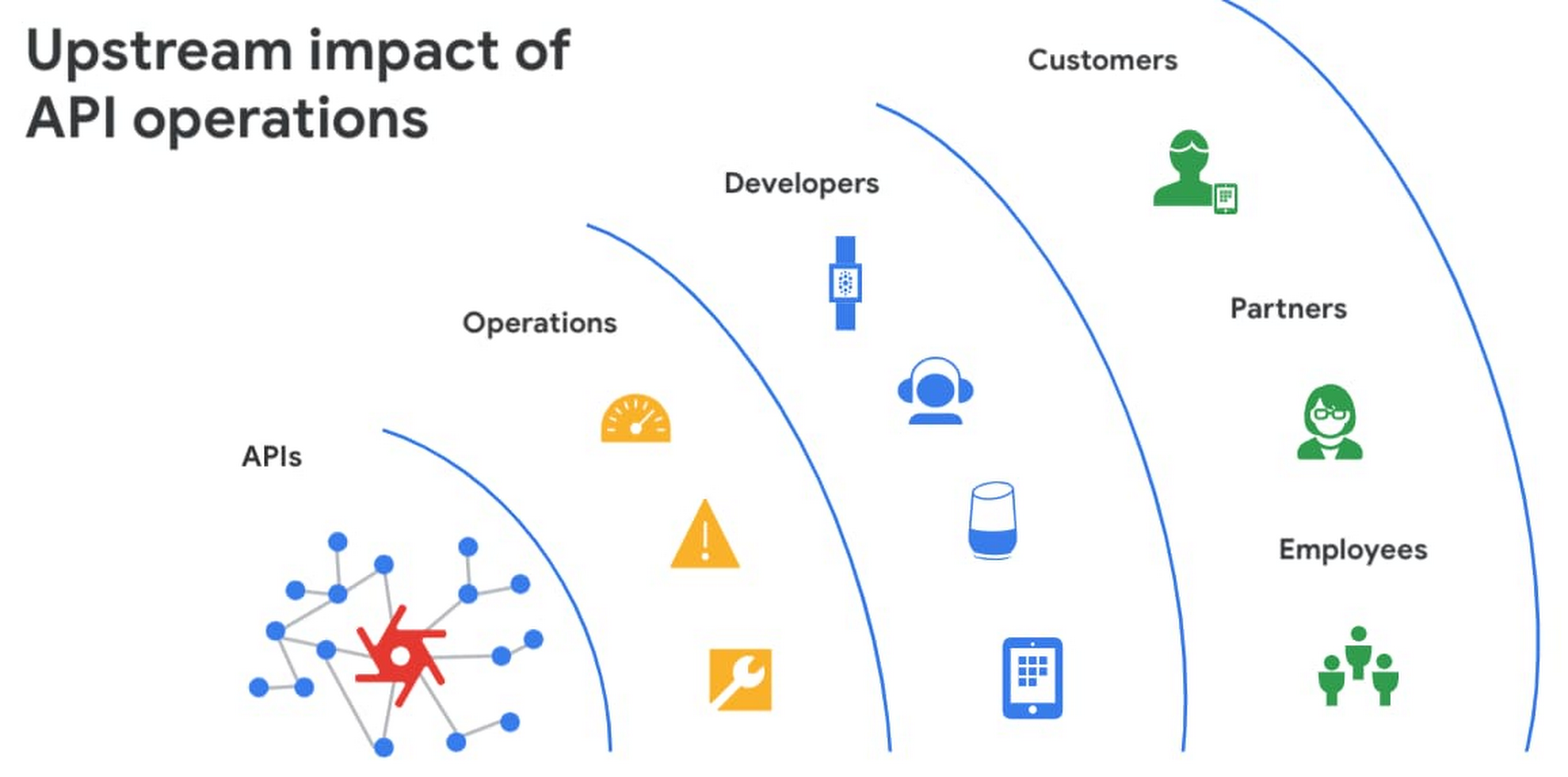
However, as you build and scale your API programs, it becomes practically impossible for API operators to manually monitor and manage all your APIs. To help, we brought the power of industry-leading AI and ML technologies to API operations via Apigee X, a major release of our API management platform. Apigee X seamlessly weaves together Google Cloud’s expertise in AI, security and networking to help you efficiently build and manage APIs at scale.
Put your API data into action
Apigee applies machine learning to your API metadata and provides you the required tools that simplify various aspects of API operations. A great example of AI for APIs is anomaly detection:
- AI-powered rules trigger alerts based on a set of predefined conditions that are determined by applying Google’s industry-leading machine learning models to your historical API data.
- Auto-thresholds adjust the monitoring criteria of your APIs and set them to pattern-based values.
- Reduce overhead results because operators don’t have to manually monitor anomalies or adjust the monitoring thresholds on APIs.
“By applying AI and ML models to our historical API data, these advanced features are able to alert us about scenarios we haven’t thought of. Such automation capabilities significantly reduce our upfront efforts. And from a security perspective, the actionable insights help us ensure that our proxies are exposed only over secure HTTPs ports and adhere to compliance requirements. We’re also able to closely monitor user activity and quickly pull out reports during audits.” – Adam Brancato, Sr. Manager, Global Technology and Security at Citrix

As our customers scale their API programs, they find it extremely useful to harness AI-powered capabilities. In our recent State of the API Economy 2021 report, we found a 230% increase in enterprises’ use of anomaly detection, bot protection, and security analytics features.

To learn more about Apigee X, and see AI and machine learning in action, check out this video, and to try Apigee X for free, click here.
3223
Of your peers have already watched this video.
2:00 Minutes
The most insightful time you'll spend today!
Simplified Document Processing with AppSheet Automation
Move over legacy, time-consuming systems and processes to update data from documents and invoices into disparate data systems. AppSheet integrates no-code development with Google Cloud’s state-of-the-art Document AI to automate the data extraction and validation from invoices, documents, receipts, etc.
You can end all ‘guesstimates’ and rely on the accuracy of the intelligent document processing feature, and set custom triggers for automation events or the way data is displayed from its unstructured source. Watch the video to understand how your business can save time and resources with automation and seamlessly manage high-volume, unstructured data.
Enhance Your GKE Deployment with Improved Control Plane Connectivity and Isolation

2706
Of your peers have already read this article.
3:00 Minutes
The most insightful time you'll spend today!
Once upon a time, all Google Kubernetes Engine (GKE) clusters used public IP addressing for communication between nodes and the control plane. Subsequently, we heard your security concerns and introduced private clusters enabled by VPC peering.
To consolidate the connectivity types, starting in March 2022, we began using Google Cloud’s Private Service Connect (PSC) for new public clusters’ communication between the GKE cluster control plane and nodes, which has profound implications for how you can configure your GKE environment. Today, we’re presenting a new consistent PSC-based framework for GKE control plane connectivity from cluster nodes. Additionally, we’re excited to announce a new feature set which includes cluster isolation at the control plane and node pool levels to enable more scalable, secure — and cheaper! — GKE clusters.
New architecture
Starting with GKE version 1.23 and later, all new public clusters created on or after March 15th, 2022 began using Google Cloud’s PSC infrastructure to communicate between the GKE cluster control plane and nodes. PSC provides a consistent framework that helps connect different networks through a service networking approach, and allows service producers and consumers to communicate using private IP addresses internal to a VPC.
The biggest benefit of this change is to set the stage for using PSC-enabled features for GKE clusters.
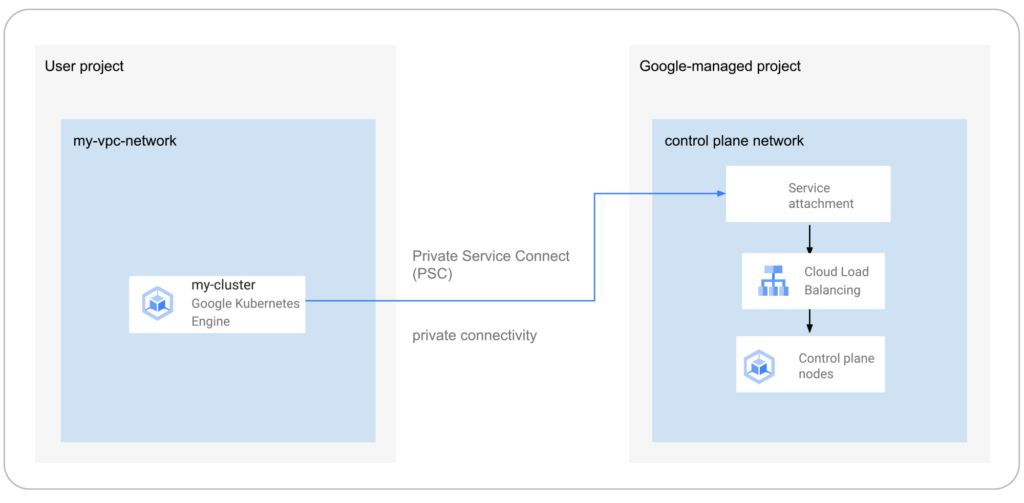
The new set of cluster isolation capabilities we’re presenting here is part of the evolution to a more scalable and secure GKE cluster posture. Previously, private GKE clusters were enabled with VPC peering, introducing specific network architectures. With this feature set, you now have the ability to:
- Update the GKE cluster control plane to only allow access to a private endpoint
- Create or update a GKE cluster node pool with public or private nodes
- Enable or disable GKE cluster control plane access from Google-owned IPs.
In addition, the new PSC infrastructure can provide cost savings. Traditionally, control plane communication is treated as normal egress and is charged for public clusters as a normal public IP charge. This is also true if you’re running kubectl for provisioning or other operational reasons. With PSC infrastructure, we have eliminated the cost of communication between the control plane and your cluster nodes, resulting in one less network egress charge to worry about.
Now, let’s take a look at how this feature set enables these new capabilities.
Allow access to the control plane only via a private endpoint
Private cluster users have long had the ability to create the control plane with both public and private endpoints. We now extend the same flexibility to public GKE clusters based on PSC. With this, if you want private-only access to your GKE control plane but want all your node pools to be public, you can do so.
This model provides a tighter security posture for the control plane, while leaving you to choose what kind of cluster node you need, based on your deployment.
To enable access only to a private endpoint on the control plane, use the following gcloud command:
gcloud container clusters update CLUSTER_NAME \
--enable-private-endpoint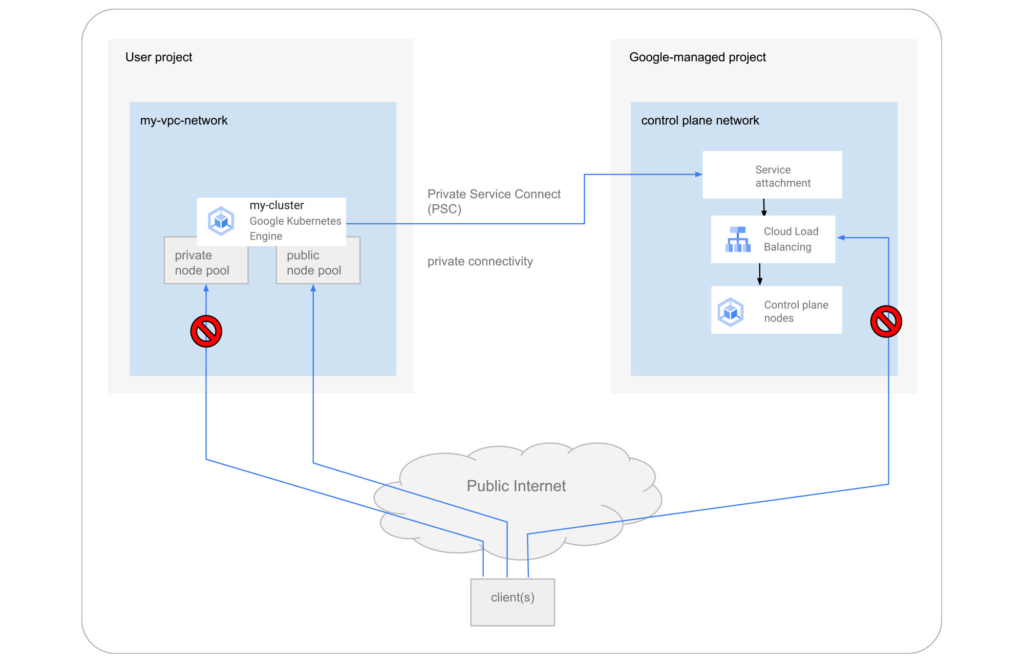
Allow toggling and mixed-mode clusters with public and private node pools
All cloud providers with managed Kubernetes offerings offer both public and private clusters. Whether a cluster is public or private is enforced at the cluster level, and cannot be changed once it is created. Now you have the ability to toggle a node pool to have private or public IP addressing.
You may also want a mix of private and public node pools. For example, you may be running a mix of workloads in your cluster in which some require internet access and some don’t. Instead of setting up NAT rules, you can deploy a workload on a node pool with public IP addressing to ensure that only such node pool deployments are publicly accessible.
To enable private-only IP addressing on existing node pools, use the following gcloud command:
gcloud container node-pools update POOL_NAME \
--cluster CLUSTER_NAME \
--enable-private-nodes
To enable private-only IP addressing at node pool creation time, use the following gcloud command:
gcloud container node-pools create POOL_NAME \
--cluster CLUSTER_NAME \
--enable-private-nodes
Configure access from Google Cloud
In some scenarios, users have identified workloads outside of their GKE cluster, for example, applications running in Cloud Run or any GCP VMs sourced with Google Cloud public IPs were allowed to reach the cluster control plane. To mitigate potential security concerns, we have introduced a feature that allows you to toggle access to your cluster control plane from such sources.
To remove access from Google Cloud public IPs to the control plane, use the following gcloud command:
gcloud container clusters update CLUSTER_NAME \
--no-enable-google-cloud-access
Similarly, you can use this flag at cluster creation time.
Choose your private endpoint address
Many customers like to map IPs to a stack for easier troubleshooting and to track usage. For example — IP block x for Infrastructure, IP block y for Services, IP block z for the GKE control plane, etc. By default, the private IP address for the control plane in PSC-based GKE clusters comes from the node subnet. However, some customers treat node subnets as infrastructure and apply security policies against it. To differentiate between infrastructure and the GKE control plane, you can now create a new custom subnet and assign it to your cluster control plane.
gcloud container clusters create CLUSTER_NAME \
--private-endpoint-subnetwork=SUBNET_NAME
What can you do with this new GKE architecture?
With this new set of features, you can basically remove all public IP communication for your GKE clusters! This, in essence, means you can make your GKE clusters completely private.
You currently need to create the cluster as public to ensure that it uses PSC, but you can then update your cluster using gcloud with the --enable-private-endpoint flag, or the UI, to configure access via only a private endpoint on the control plane or create new private node pools.
Alternatively, you can control access at cluster creation time with the --master-authorized-networks and --no-enable-google-cloud-access flags to prevent access from public addressing to the control plane.
Furthermore, you can use the REST API or Terraform Providers to actually build a new PSC-based GKE cluster with the default (thus first) node pools to have private nodes. This can be done by setting the enablePrivateNodes field to true (instead of leveraging the public GKE cluster defaults and then updating afterwards, as currently required with gcloud and UI operations).
Lastly, the aforementioned features extend not only to Standard GKE clusters, but also to GKE Autopilot clusters.
When evaluating if you’re ready to move these PSC-based GKE cluster types to take advantage of private cluster isolation, keep in mind that the control plane’s private endpoint has the following limitations:
- Private addresses in URLs for new or existing webhooks that you configure are not supported. To mitigate this incompatibility and assign an internal IP address to the URL for webhooks, set up a webhook to a private address by URL, create a headless service without a selector and a corresponding endpoint for the required destination.
- The control plane private endpoint is not currently accessible from on-premises systems.
- The control plane private endpoint is not currently globally accessible: Client VMs from different regions than the cluster region cannot connect to the control plane’s private endpoint.
All public clusters on version 1.25 and later that are not yet PSC-based are currently being migrated to the new PSC infrastructure; therefore, your clusters might already be using PSC to communicate with the control plane.
To learn more about GKE clusters with PSC-based control plane communication, check out these references:
- GKE Concept page for public clusters with PSC
- How-to: Change Cluster Isolation page
- How-to: GKE node pool creation page with isolation feature flag
- How-to: Schedule Pods on GKE Autopilot private nodes
- gcloud reference to create a cluster with a custom private subnet
- Terraform Providers Google: release v4.45.0 page
- Google Cloud Private Services Connect page.
Here are the more specific features in the latest Terraform Provider, handy to integrate into your automation pipeline:
More Relevant Stories for Your Company

Expert Takeaways on API Strategies from The State of API Economy 2021 Report
Did you know API traffic for Apigee customers increased 46% year-over-year, to 2.21 trillion calls, between 2019 and 2020? If you have more questions on APIs trends and their role in disrupting enterprises digitally, you can catch up on key take aways from the Google Cloud's State of API Economy

Benchmarking Report for Indian Businesses: The State of Digital Commerce APIs
APIs are the foundation for digital commerce, enabling retailers to evolve from web to mobile. APIs allow retailers to create services such as price check, compare and review products, get instant product availability, purchase, schedule pickup, and delivery, and improve customer engagement and loyalty--all from users’ mobile devices. Evolving from

Business Evolution with API Ecosystems
During uncertain times, ecosystem partnerships that leverage APIs have proven to help companies scale and address gaps in their businesses. Apigee customers, like CHAMP Cargosystems, have pursued API-first ecosystem models to enter adjacent markets, create new customer interaction models, and rapidly grow their brand reach and partner ecosystems. As a

The Modernization Imperative (TMI): The Beauty in Boring
You have something in your pocket right now that possesses more computing power than spacecraft fifteen billion miles away from Earth. No, not your mobile phone — the key fob for your car! Voyager 1 and Voyager 2 launched in 1977, and forty five years later, these little rascals still work and send data
