





Scaling Your Startup: Strategies for Optimization and Growth

2867
Of your peers have already read this article.
2:30 Minutes
The most insightful time you'll spend today!
Reboot your Startup with our technical guided series
At Google Cloud, we want to provide you with the access to all the tools you need to grow your business. Through the Google Cloud Technical Guides for Startups, leverage industry leading solutions with how-to video guides and resources curated for startups.
This multi-series contains 3 chapters: Start, Build and Grow, which matches your startup’s journey:
- The Start Series: Begin by building, deploying and managing new applications on Google Cloud from start to finish.
- The Build Series: Optimize and scale existing deployments to reach your target audiences.
- The Grow Series: Grow and attain scale with deployments on Google Cloud.
Additionally, at Google we have the Google for Startups Cloud Program, which is designed to help your business get off the ground and enable a sustainable growth plan for the future. The start of the Build Series delineates the benefits of the program, the application process, and more to help your business get started on Google Cloud.
A quick recap of the Build Series
Once you have applied for the Google for Startups Cloud Program, there’s so much to explore and try out on Google Cloud.
Figuring out a rapid but solid application development process can be key to many businesses in reducing time to market. Furthermore, learning what database to use to handle application data can be tricky. Deep dive into our Firestore video which walks through how Firestore can help you unlock application innovation with simplicity and speed.
We then move on to a deep dive into BigQuery and how it can help businesses. BigQuery is designed to support analysis over petabytes of data regardless of whether it’s structured or unstructured. This video is the goto video for getting started on BigQuery!If you are someone looking to run your Spark and Hadoop jobs faster and on the cloud, look to Dataproc. To learn more about Dataproc and how this has helped other customers with their Hadoop clusters, click the video below to learn all things Dataproc related.
Next, we find out what Dataflow can bring to your business; some advantages, sample architectures, demos on the console, and how other customers are using Dataflow.
We also talked about Machine Learning, starting from selecting the right ML solution to Machine Learning APIs on cloud to exploring Vertex AI. Following that we look into API management in Google Cloud and how Apigee helps operate your APIs with enhanced scale, security, and automation.
We ended the series with the last two episodes focusing around security deep-dive and using Cloud Tasks and Cloud Scheduler.
Coming up next – The Grow Series
Dive into the next chapter of this multi-series, with our upcoming Grow Series, where we will be focusing on growing and attaining scale with deployments on Google Cloud.
Check out our website and join us by checking out the video series on the Google Cloud Tech channel, and subscribe to stay up to date.
See you in the cloud!
Streamlining Your Experience: Enhanced Search and Navigation in Google Cloud Console
1366
Of your peers have already read this article.
4:30 Minutes
The most insightful time you'll spend today!
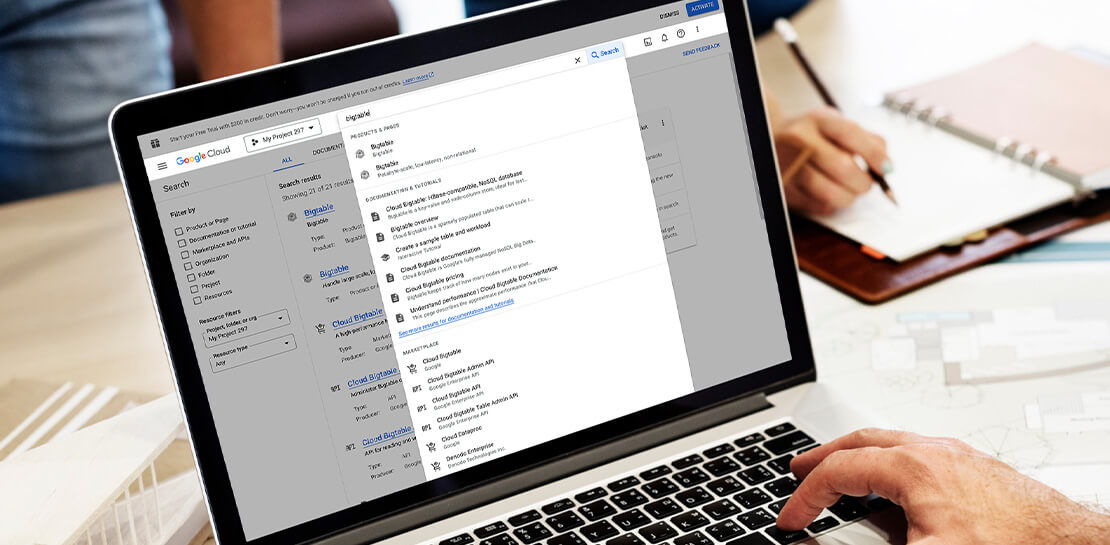
The Google Cloud console is a powerful platform that lets users manage their cloud projects end-to-end with an intuitive web-based UI. With over 120 Google Cloud products across thousands of pages, it can be challenging to navigate through the console quickly, and many users don’t like to use the command line interface. To help, Google Cloud console team recently made several improvements to our search and navigation features, making it easier to find what you need, when you need it.
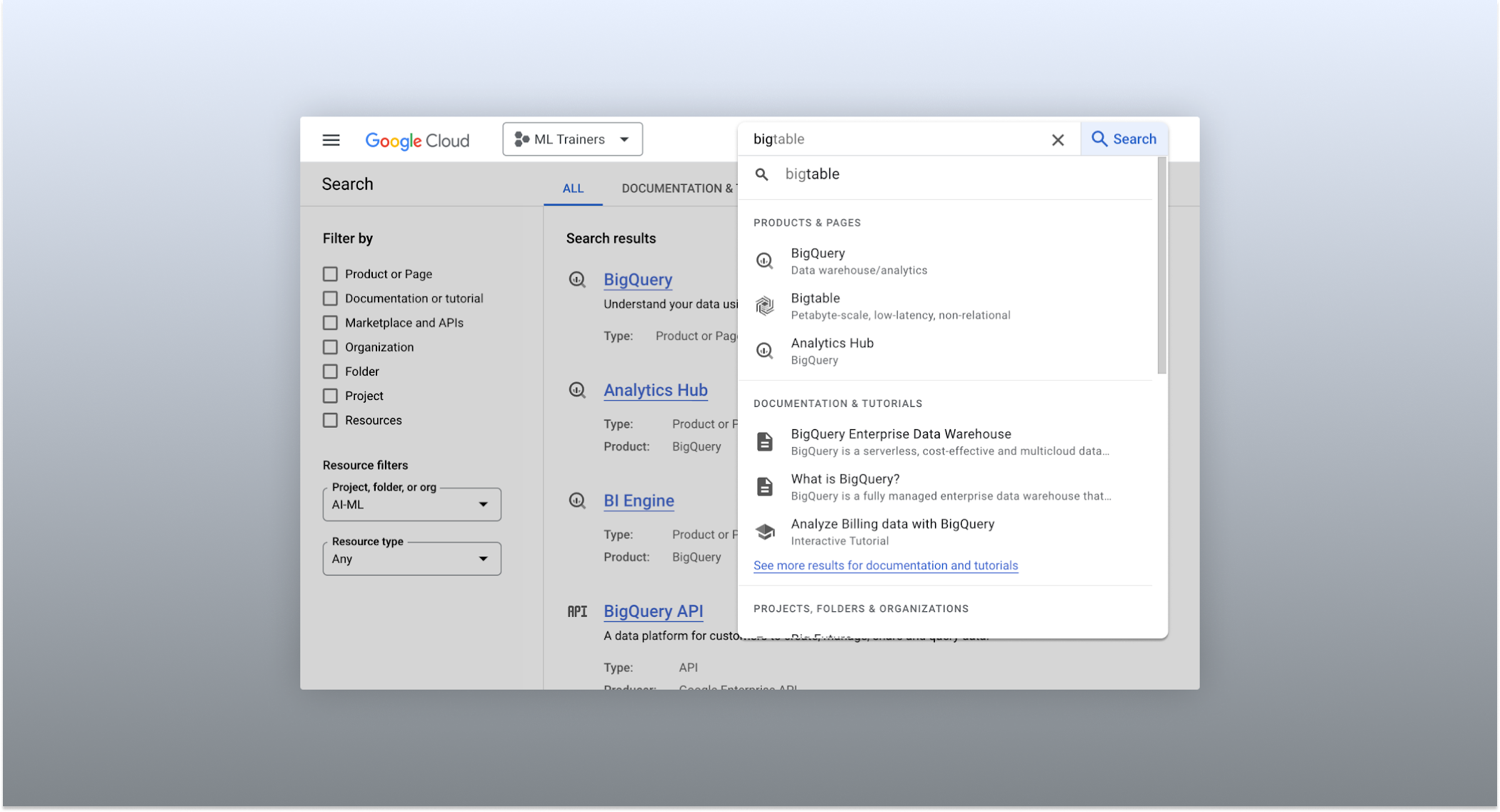
The Cloud console’s search dropdown and result page
Expanded resource-type search
One of the most significant improvements to the console’s search feature is the increased resource-type coverage. You can now find instances of nearly all of the over 120 products that Google Cloud offers directly from the search bar, rather than by manually clicking to the details section nested within specific product pages. This wider coverage saves you time compared to browsing through the different product categories to find what you’re looking for. This improvement also allows the console experience team to continuously add new resource types as we develop new features and capabilities in our various product offerings.
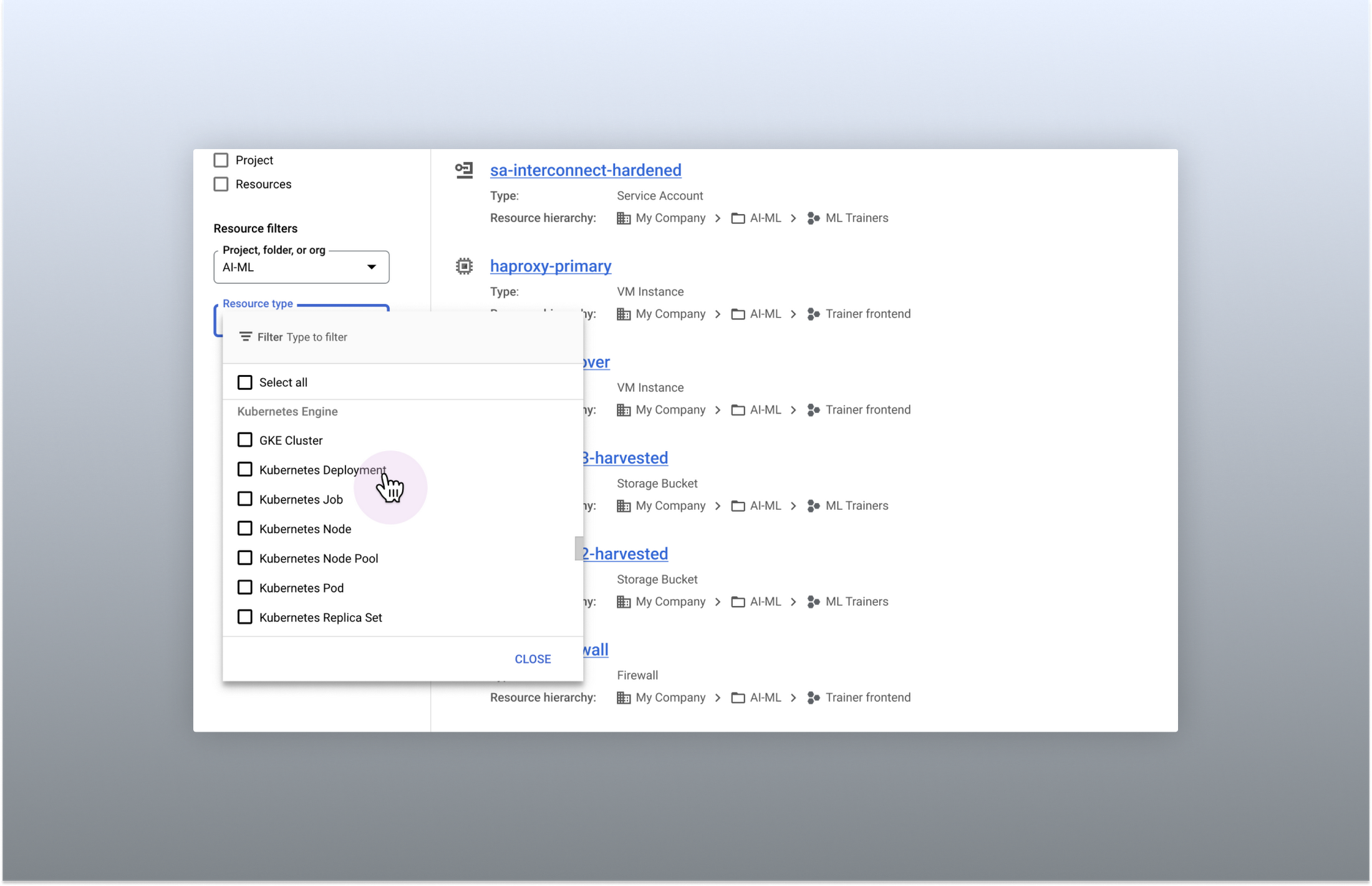
Search for more than 90 types of resources using Google Cloud console
Improved documentation search
We also improved the coverage and accuracy of the search experience for documentation, making it easier to find specific pages or interactive tutorials. Developers looking to get started with something they’re unfamiliar with may want to undertake tutorials in the context of their own working environment. Even experienced developers just looking for a quick answer to their question may not want to leave the console, so we expect these improvements can help users of all experience levels.
We’ve heard from you that finding the right documentation from within the console can be tricky, and so we hope this change can save you from needing to switch over to web search to be confident that they’ll find what you’re looking for.
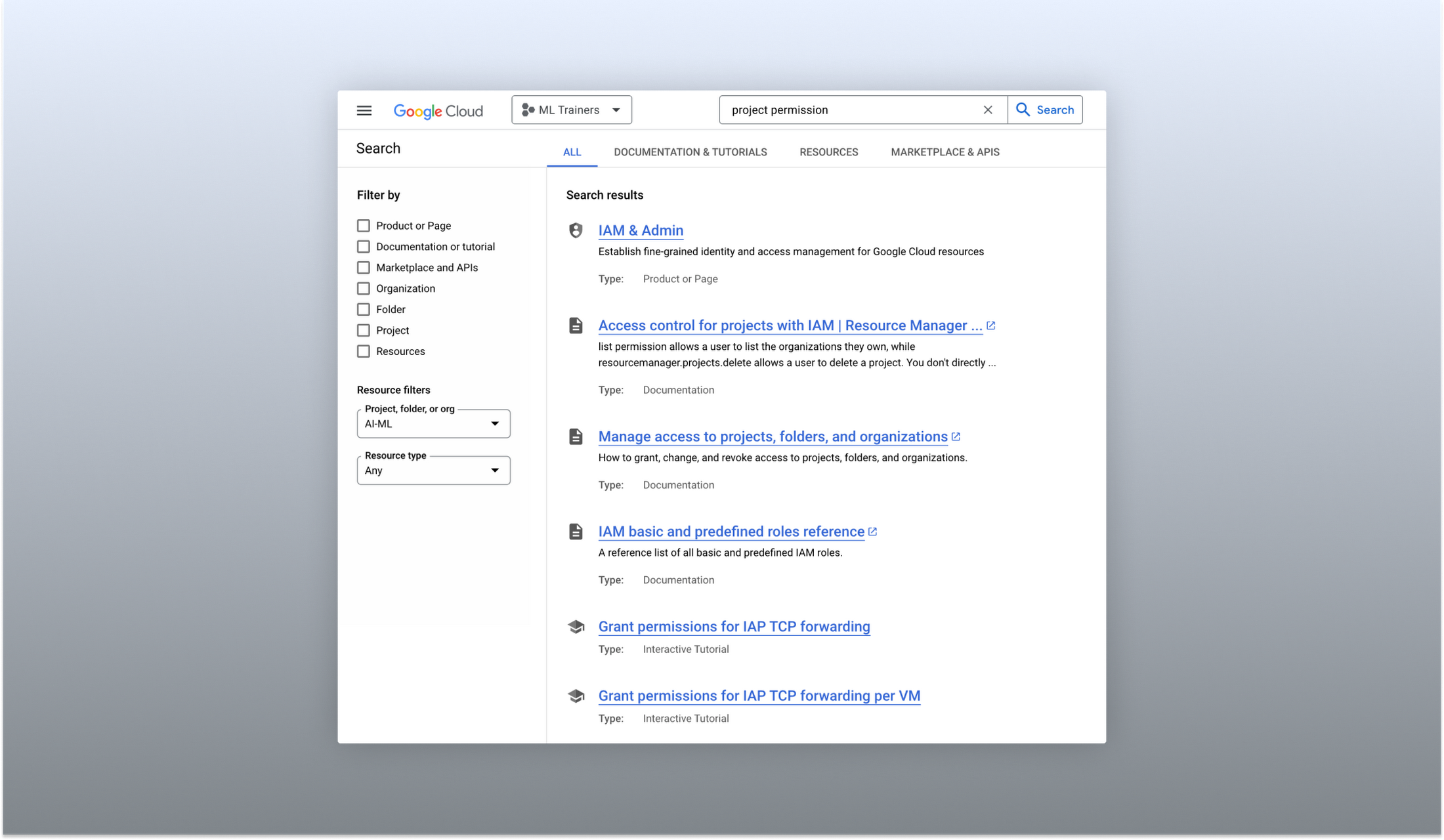
Cloud documentation and tutorials are available for search in the console
A refreshed search results page
To make browsing search results easier, we also overhauled our search results page by dividing results into tabs, similar to Google web search. This means that you can refine your search by diving into one of those categories individually. In addition to maintaining an “all results” tab, there are tabs for:
- Documentation and tutorials
- Resource instances, and
- Marketplace and APIs
Each tab also has a better filtering experience that’s unique to that search result category. For instance, the Resources tab lets you filter by metadata like the last time a resource was interacted with, while the Documentation tab allows you to search for interactive tutorials only. If you can’t find what you’re looking for in the autocomplete dropdown, try the search results page. It can provide additional results or context to help you find exactly what you’re looking for.
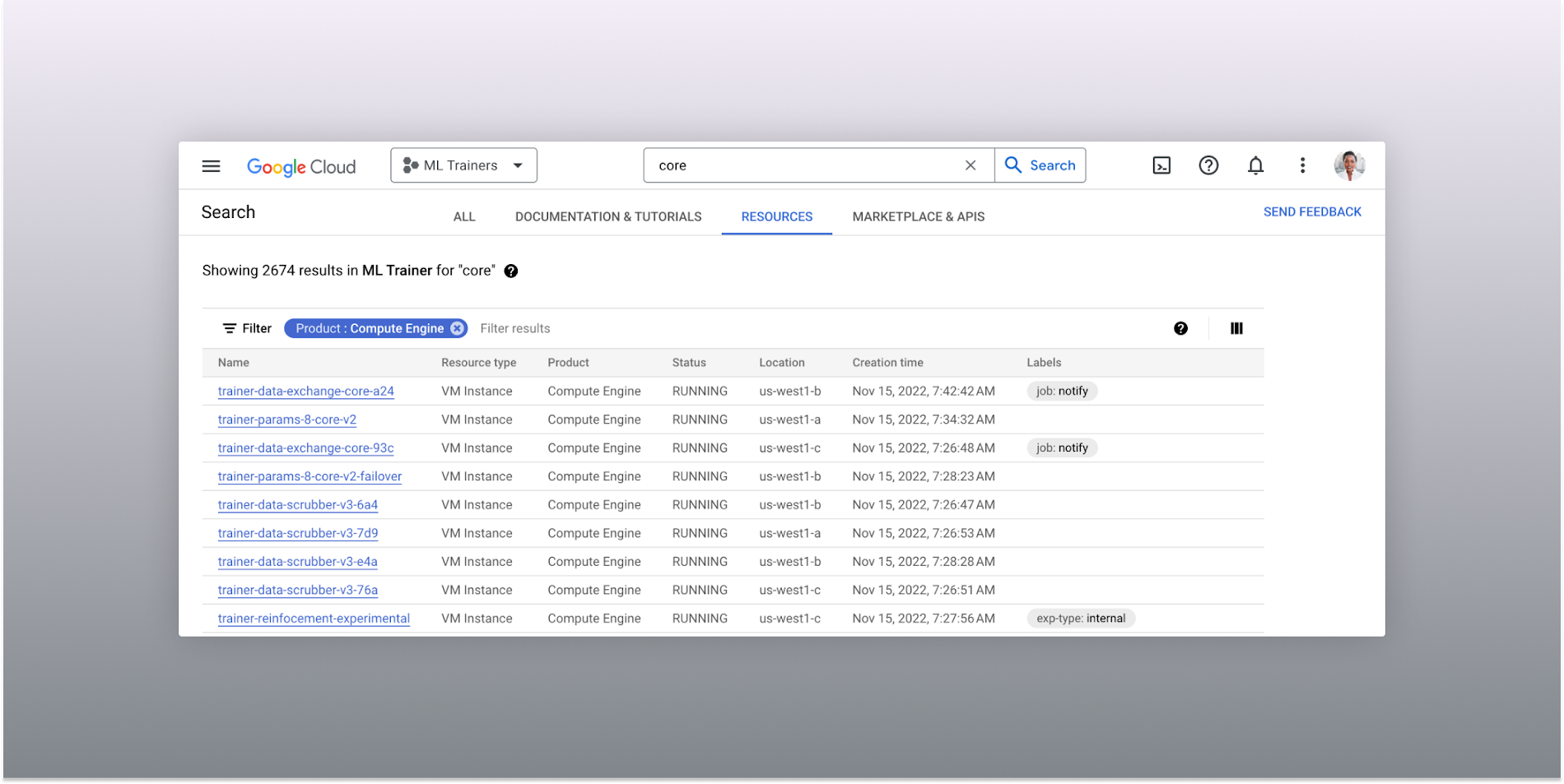
The Resources tab lists results in a denser, metadata-rich format with filtering available
Accurate industry-wide synonyms
Google Cloud console search now interprets industry-wide synonyms accurately — if you’re coming from AWS or Azure and know the name of a product in that ecosystem, searching for it will return the Google Cloud equivalent. A full list of synonyms can be found here.
General usability improvements
We also shipped several smaller quality-of-life improvements related to search, including:
- Improvements to accessibility, including better color contrast and zoom behaviors
- Faster latency targets and shorter load times for results
- A search keyboard shortcut — just type “/” to begin searching without using your mouse
- The ability to search for an API resource by its key
We also updated the look and feel of our platform bar to a cleaner, more modern experience that’s more in line with the branding across other Google Cloud interfaces.
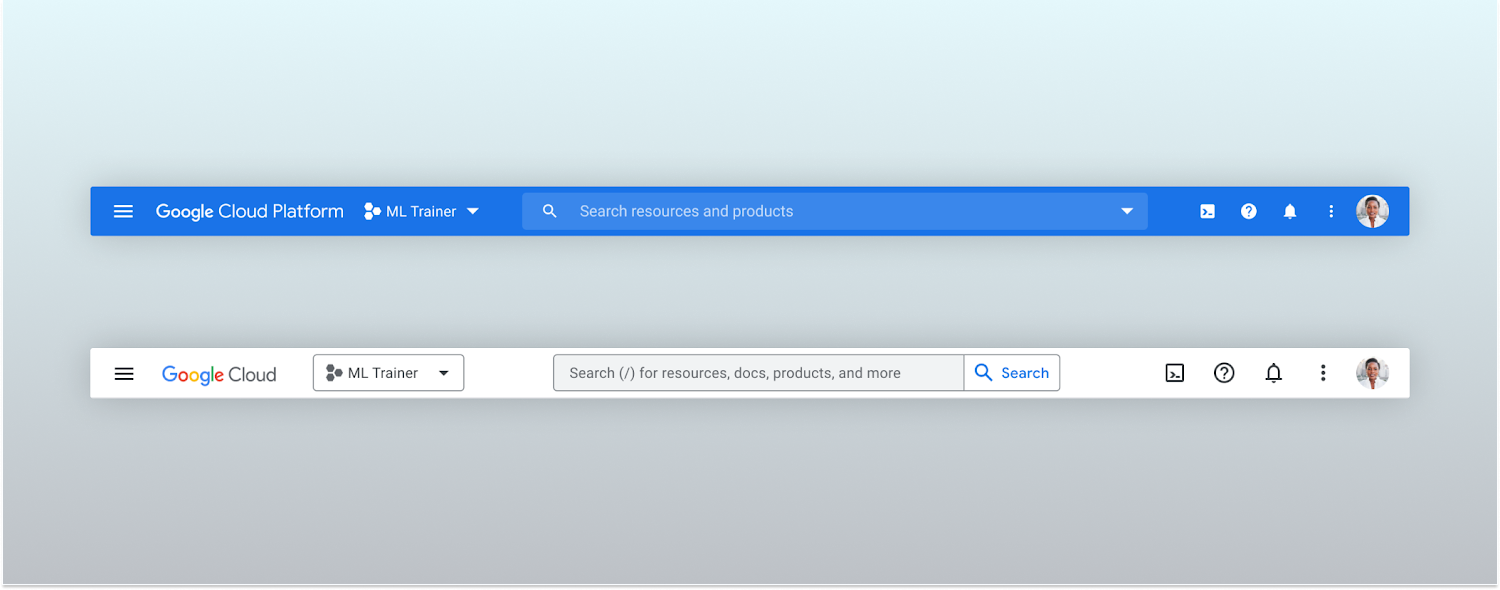
Google Cloud console’s old platform bar (top) and the updated version (bottom)
A customizable navigation menu
Finally, we made usability improvements to the left-hand navigation menu by allowing you to pin specific products. Products can be pinned from the left nav menu or our brand new All Product Page. This is a shift away from the default ordering of products that attempted a “one size fits all” approach to navigation. This customization feature lets you tailor the console to your specific needs and work more efficiently.
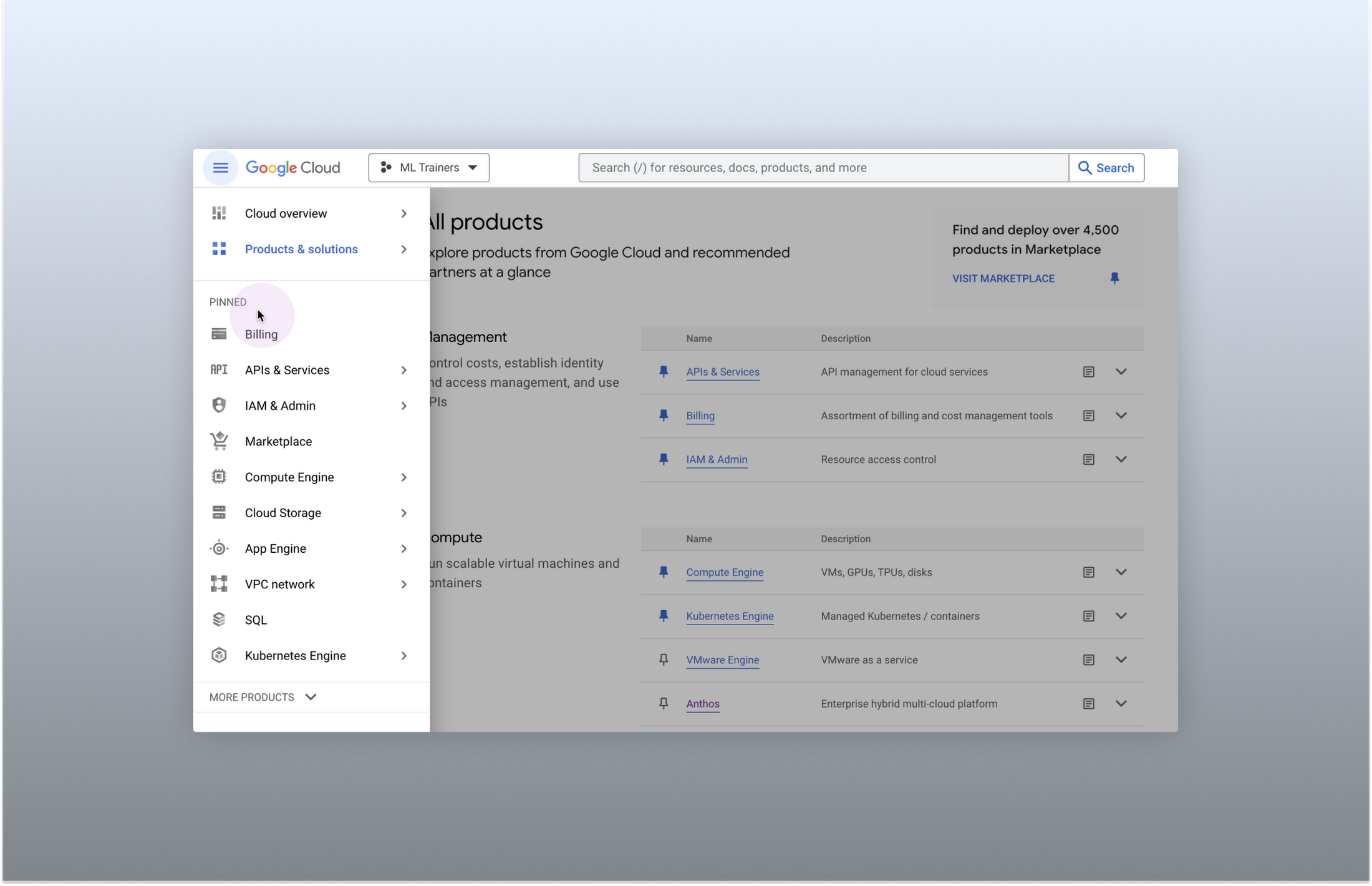
Products can be pinned to the left nav menu for easy access
Final thoughts
The Google Cloud console’s navigation and search features have come a long way. With these recent improvements, you can find what you need quickly and efficiently, making it easier to manage your cloud resources. From expanded resource-type search to improved documentation search and refined search results, the console is more user-friendly than ever before.
Transitioning to Hybrid Environment with Chrome Browser
4077
Of your peers have already read this article.
3:00 Minutes
The most insightful time you'll spend today!
It’s been quite a year. In general, and for work. Just the other day, I read a new study from Pew Research that shows 71% of people are currently working from home, and 50% of employees say they want to continue working from home at least three days a week. That’s more than half of people wanting to be remote over half the time!
As we’ve been navigating our own return to the office here at Google, one thing has become more clear than ever: the browser is no longer just a portal to the internet—it’s one of the most critical components of our tech stack. And we know we’re not alone in this. As our organization, and other organizations of all sizes, transition to a more hybrid way of working, it’s absolutely key to have a modern browser that’s built to support both admins and end users.
The good news is, Chrome is made for this! Literally. It’s purpose-built for flexible work—and as the future unfolds and businesses’ needs continue to evolve, we’re committed to making sure our browser is even easier to manage, even more secure, and even more helpful, so all of us can be more productive.
What’s next for Chrome
As we design and build Chrome to be a stronger asset for the enterprise, we are focused on these key areas:
- Simple management
- Modernized security
- Productivity enhancements
- Helpful integrations
We’ve already made great strides in all four areas, with more exciting releases to come soon. Let’s take a closer look at what’s new and available right now, what to look forward to, and how each feature is equipping Chrome browser-based businesses (and their users) for what’s next.
When it comes to simple management there have been a lot of exciting developments—Chrome Browser Cloud Management is built for this new hybrid reality, giving IT teams the advantage of powerful and flexible management capabilities both in the cloud and on premises, so they always have the visibility and insights they need to make more informed decisions, quickly.
With recent new releases admins can:
- Track all versions of Chrome from one place. Our new daily version report allows IT teams to see all versions, including minor versions, in a single report to support compliance and make it easier to see and manage their entire deployment.
- Report on apps and extensions across the organization. A new Apps & Usage report provides helpful visibility into all installed extensions, Progressive Web Apps (PWAs), Chrome apps, and Android apps. You can see versions and permissions for each individual app and even force install or block, right from the report.
- Remotely troubleshoot and clear browser data. This is one of my favorites because not only is it incredibly helpful, it was created from customer requests! Admins (and a lot of service desk employees) told us how useful it would be if they could clear an end user’s browsing data, cookies, and cache remotely – and our team made it happen.
- Extension management improvements. Coming this summer: extension request workflow will empower admins to change the behavior of Chrome Web Store so that end users request extensions and admins then approve or deny the installations from a centralized list in Admin Console. Another new release is extension details, where admins can now find out exactly what extensions are installed where, who makes them, what resources they’re using, and all other extension-related details – also right from the Admin console.
Of all of our priorities, modernized security often feels most urgent. In a recent security report, 65% of US and UK employees said they received a phishing email during the remote working period initiated by COVID-19. Further, a study by the Ponemon Institute found that 41% of responding organizations had dealt with an attack involving the compromise of employees’ passwords, costing an average of $267,408 per organization. Between the regular emergence of new threats and the increase in targeted mobile attacks, our new ways of working definitely demand a fresh approach to security.
- BeyondCorp Enterprise, our new modern zero trust solution, enables secure access to critical apps and services with integrated threat and data protection, all delivered through Chrome browser, was introduced in January 2021. Its agentless approach simplifies the admin and end-user experience. We also just launched BeyondCorp Enterprise protected profiles to help organizations protect their extended workforce, including contractors, frontline workers, and anyone working from home who needs to securely access corporate resources from shared or unmanaged devices.
To learn more about Google’s approach to modernizing security, tune into the Wall Street Journal’s Advancing Security in the New Business Environment event tomorrow from 10:35 am – 10:55 am EST, with very own Parisa Tabriz (Head of Chrome Engineering, Product Management and UX) and Phil Venables (CISO of Google Cloud).
When it comes to productivity enhancements, I’m proud to share that we’re consistently releasing features that support users no matter where they’re working. Now that the browser is where so much of our day-to-day work happens, it’s more important than ever before to build in new ways to save time and work together while apart.
Recently released productivity-boosting features include:
- A faster way to take action right from the address bar. Chrome Actions is a feature we launched last year, where you can simply type in commands such as “clear browsing data ” or “open incognito window”and get down to business in just a few clicks. We’re excited to announce new Chrome Actions are now available through our beta channel! Try one of these actions to check it out: “ Run Chrome safety check,” “Create doc,” and “Manage Google Account.”
- Link directly to highlighted text. If you like to share snippets and quotes from articles or websites with your colleagues, you’re in luck. Now, instead of sharing the URL link from the address bar, you can take advantage of the new “link to highlight” feature in Chrome to point to the specific content. Simply choose the content you want to share, right click, select “Copy link to highlight,” and then send the link – to the exact part of the page you want people to see. It’s available for desktop and Android now, and coming soon for iOS.
- Decreased Chrome CPU usage. This means more battery life, less heat coming off of your device, and less fan noise. 🎉 🙌🏻
- And there’s more! To explore additional productivity features, check out this blog post.
Our final area of focus is all about giving Chrome customers more choice with helpful integrations. We’re actively partnering with best-of-breed organizations to bring integrations —and your favorite tools— into Chrome, to create a more seamless and productive experience across the board. Stay tuned on this as we’ll have more to share later this year. In the meantime, hear from our Modern Computing Alliance partners, such as Box, HP, RingCentral, Okta and VMware, as they explore many of the most important questions about returning to the office.
We’re constantly thinking about how we can help people and organizations adapt and thrive as they begin to return to the office. See below for three events from the team that cover how to make the transition to hybrid easier for your team, be sure to check them out.
Modernizing Your Approach to Security session at the Wall Street Journal’s Advancing Security in the New Business Environment event
- Tomorrow June 2, 2021
- 10:35 – 10:55 AM EST
- Register here
Chrome Insider: Browser tips & tricks for IT admins
- June 10, 2021
- 10:00 AM – 11:15 PT
- Register here
Workspace’s Collaboration Equity Integral for Delivering the ‘Promise of Hybrid Workplace’

3816
Of your peers have already read this article.
3:00 Minutes
The most insightful time you'll spend today!
Like many businesses around the world, Google is trying to combine on-site and off-site work into an efficient hybrid model. And like most businesses, we’re also figuring out how to get it right. As we grow our vision for the best possible hybrid workplace, one theme consistently emerges: the need for collaboration equity.
Collaboration equity is when all workers have the ability to contribute and communicate equally, regardless of location, role, experience level, language, and device preference. A lack of collaboration equity can stem from hierarchies in video calls or language barriers on international calls. It can mean junior employees don’t feel empowered to speak up in meetings, off-site employees struggle to access their on-site managers, or frontline workers lack the communication tools their office colleagues enjoy.
When these disparities add up, they can damage an individual’s wellbeing, career potential, and effectiveness. When they permeate an organization, team performance suffers, innovation wanes, and talent leaves. In our recently commissioned global survey with Economist Impact, 62% of respondents agreed with the notion that “limited networking opportunities with senior employees and co-workers has a negative impact on career growth.” Proximity bias is just one of many new challenges we face in hybrid work environments.
We believe the location from which you participate shouldn’t influence your outcome. And while it’s easier to have everyone on-site or everyone off-site, hybrid models demand deeper thinking about social, organizational, and technological challenges. These ideas should be addressed at the C-Suite level with solutions that garner buy-in from every part of the organization.
So, how do we deliver on the promise of a hybrid workplace where flexibility, wellbeing, and meaningful impact coexist?
At Google, we’re bridging the gap between the in-person and the “somewhere else” by pushing technology, culture, and physical spaces to be more inclusive and maximize participation. We’re also innovating new Google Workspace features to power collaboration equity for our billions of users worldwide.
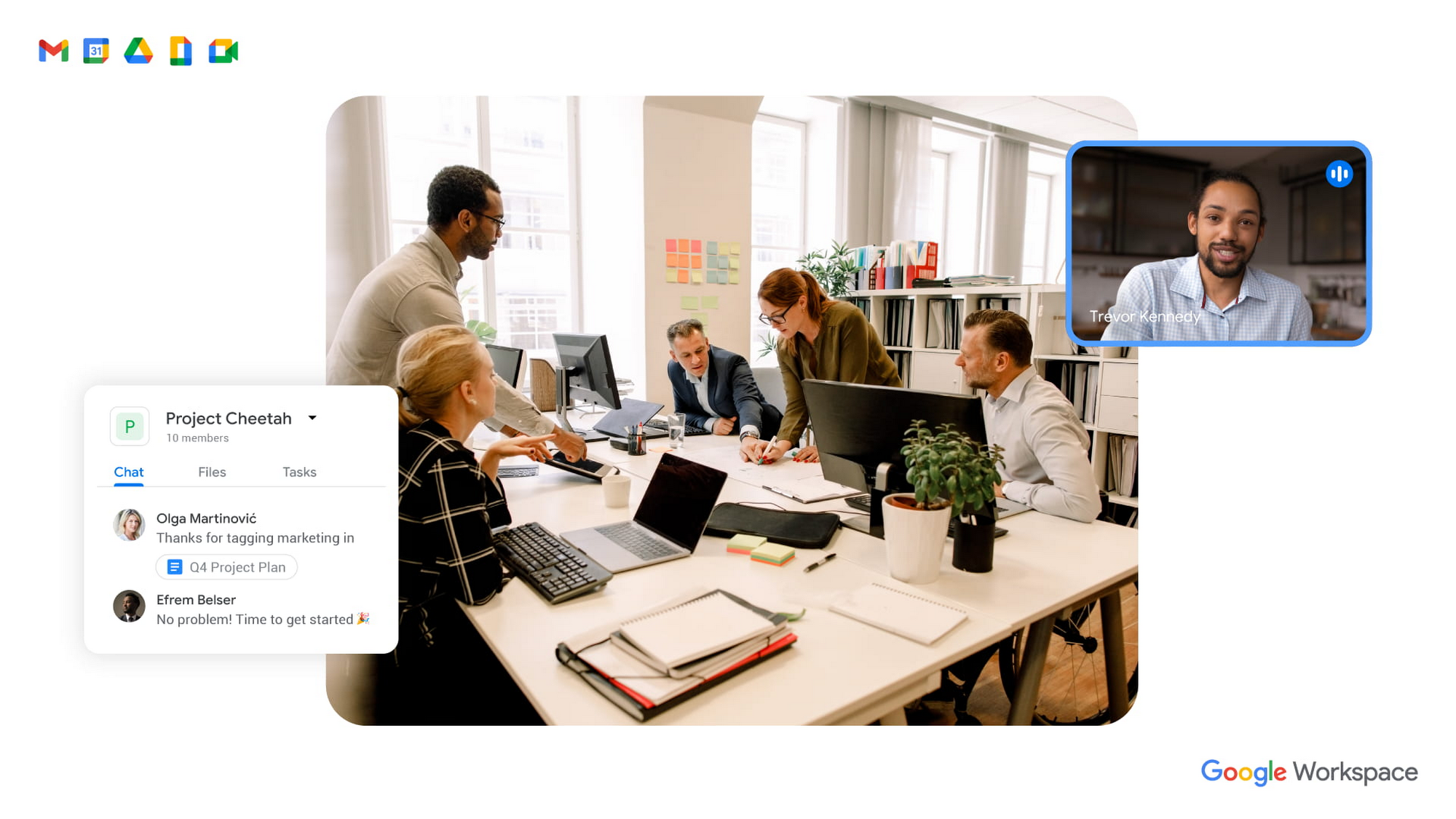
To guide our work, we’ve identified three pillars of collaboration equity: representation, participation, and information.
Representation equity
Achieving representation equity means that all employees can be seen, heard, and portrayed equally, whether working off-site or on-site. When the pandemic hit, we were all scrambling to make sure people could simply connect safely with one another. Google’s existing technology for distributed teams was pressure tested, and I’m proud of how well it performed. But we’re now faced with the disconnect that happens when you merge off-site work with on-site work.
When we were all participating in meetings remotely, everyone shared equal-sized tiles on videos. There was no one sitting in a corner office, no hierarchy—everyone was represented equally. In a hybrid environment, it’s distorted. The people participating remotely appear giant on a conference room monitor, while the people in the conference room appear tiny on screens at home. It can be difficult to decipher who’s even in the room. This is certainly not equal representation.
Some of these issues can be solved with technology. For example, we’ve been working on features like AI-driven video adjustments in Google Meet to compensate for low-light environments and auto-zoom to keep all participants in focus, and both will improve representation equity for hybrid workplaces. Additionally, we can now limit data usage on slow mobile networks so no one has to turn off video during a call. All of these technological innovations improve representation equity for hybrid workplaces, but we also need to adopt new workplace norms as well. For example, some organizations have implemented policies where if one person joins a meeting from off-site, then everyone joins via device so they are all represented equally.
Participation equity
We think of participation equity as the ability to host, present, and participate equally, regardless of location. At Google, we were already accustomed to joining meetings virtually from different offices. With the new tools we’ve developed in the last 18 months, everyone’s ability to participate equally has grown. Wider adoption of meeting tools like hand raise, polls, Q&A, and breakout rooms gives us an ordered, structured way of talking in distributed groups.
But how will we interact when many of us are back in the office? How do we ensure that off-site workers can still engage as meaningfully as others? Companion mode, a tool we’ve developed for Google Meet, gives both in-person and off-site attendees the same meeting experience. Each individual can host, present, and participate in meetings in the same way, with the same tools, regardless of their location.
Teams can also promote participation equity by using meeting moderators who encourage the use of hand-raising features so no one dominates the conversation or interrupts—a challenge that often arises when multiple people are in the same location. While it may feel forced and prevent natural back-and-forths, it does help everyone’s voices be heard. We’ve also learned that many people find it distracting to see their own image, so we’ve enabled users to hide their own video feed. I’ve seen firsthand how these tools and practices are improving participation equity.
Information equity
Information equity means that regardless of whether people work on- or off-site, they have equal access to information. Ensuring free flow of information is key to better long-term thinking, creativity, and cooperation among teams. As individuals exercise their autonomy for where and how they work best, their preferences affect recruiting and retention. If we’re going to accommodate a range of preferences, how do we best equalize access to information?
First, we should actively prioritize keeping each other informed. We can support this proactive mindset through technology by ensuring that meetings have agendas, are recorded or transcribed, and have shareable, accessible information. Our tools, including Spaces and Drive, can be used as information hubs where teammates can reliably access crucial files, conversations, and updates. And coworkers can leverage smart suggestions to @-mention others linked to the project, so no one is left out.
We must commit to solving the information equity problem together or risk ending up in a mushy middle ground where no one is satisfied. Because while most people enjoy working from home, they won’t sacrifice career progression to keep it. If the center of gravity tilts too far toward on-site work, the hybrid model will collapse. We’re not advocating a “choose your own adventure” mentality, nor a one-size-fits-all model. We’re empowering teams to meet the preferences of individual members in a deliberate fashion that supports the larger organization.
During this pivotal time, we are enthusiastic about how we’re seeing work change and advance around the globe. Delivering on the hybrid-work promise of “the best of both worlds” feels more within our reach than ever before. But if we’re going to succeed, we must strive for collaboration equity. Our experience tells us that when you give people freedom and opportunity, they will amaze you.
How to build collaboration equity in your hybrid workplace:
✅ Start with representation. Can every employee be seen and heard? Do they have the tools, technology, and devices to be adequately represented?
✅ Enable participation. Is everyone encouraged to provide their input and voice their opinions? What tools and forums exist to provide this input? How is the input acknowledged and acted upon?
✅ Share information. Do people have access to all the information they need to do their jobs? Does information flow freely or is it hoarded?
✅ Let teams and departments design their own hybrid schedules. Hybrid will not work if every individual is “choosing their own adventure.” Consider using on-site days for collaborative, creative, and brainstorming projects and reserving off-site days for deep focus work.
✅ Reward outcomes, not activities. An employee’s individual preference for how and where to work should not matter as long as they are getting things done. This means flexibility in location and work schedule to maximize impact.
✅ Highlight our shared responsibility to each other. Every manager should ask:
- What does the team need to know about how you work best?
- What are you personally doing to ensure the entire team is successful?
Follow other trends and insights on our Future of Work site.
Workspace powers business as usual for Optiva during COVID-19

3815
Of your peers have already read this article.
3:30 Minutes
The most insightful time you'll spend today!
Established companies in any industry, including telecommunications, often take a cautious approach when it comes to adopting new technology. This is true of any technology and especially of tools used across entire organizations and at all levels—like collaboration and communication tools. I joined Optiva Inc. as its Chief Marketing Officer in August 2018, and right off the bat I faced the need for cloud-based productivity and collaboration tools like Google Workspace (formerly G Suite), which was new to me.
Optiva was in the midst of making an organization-wide change to implement Google Workspace productivity and collaboration tools. Employees at that time—at Optiva and across other organizations I used to work with—primarily collaborated by attaching documents to company emails and meeting their colleagues in office corridors. Meetings were almost always in person or via phone. These processes were inefficient and contributed to version-control confusion and decreased overall productivity. They were also based on our pre-COVID world.
Today, Optiva is a fully remote-first organization, and our employees use all the tools in Google Workspace. Collaboration has increased dramatically, surprising even initial skeptics. Occasionally we still encounter resistance from new employees who are used to a different way of working. This is logical, but more often than not, they thank us later, and many have told me that they see the value for their productivity and the entire organization’s collaboration.
Google Workspace has become a real advantage, especially for a global company like Optiva with employees across the world and in so many different time zones. Instead of waiting for team members’ availability to review or collaborate on a document, wasting time coordinating who works on the latest version, or who is the “owner” of a deck, employees can open a document, view new changes, and add updates, even when others are working on the same document in parallel.
Google Workspace promotes business as usual during COVID-19
The combination of Optiva’s remote-first policy and Google Workspace collaboration tools proved a welcome addition during the challenges posed by COVID-19. Optiva was ahead of the curve of remote working policies in the telecommunications industry and in the software industry as a whole, so when the work-at-home orders went into effect in March last year, Optiva’s business charged ahead without missing a beat.
Google Meet has helped us maintain a strong corporate culture during this challenging time. For example, we constantly use video conferencing, which has been a great way to see the entire team and get a real sense for how each employee is doing—professionally as well as personally. Using Google Chat allowed us to keep in touch with everyone across our global teams. It helps us ensure that everyone feels secure and can work during this challenging time. Also, we have continued to create new teams with employees all around the world. If we attempted to onboard or train them using conference calls or emails, the experience wouldn’t be the same. Meet has helped us develop the strongest teams possible, faster, and much more effectively.
We also use Google Workspace tools to cross-train employees on tasks and processes in departments outside their own. That way, if one of our employees has to be out of the office unexpectedly, the company benefits from full business continuity. To make this possible, various teams and departments documented their specific processes, held training sessions on Meet, and recorded them so any employee could access them on demand.
Many struggled in the early days of the self-quarantine orders, especially when it came to the sudden need to select and deploy new technologies for remote collaboration and, more importantly, to keep supporting their customers. We were fortunate that our business was unphased—and we owe a lot of this success to Google Workspace.
Google Workspace Now Available to Over 3 Billion Users!

3795
Of your peers have already read this article.
3:00 Minutes
The most insightful time you'll spend today!
Over the past year, Google Workspace rapidly evolved to meet the needs of users as we collectively grappled with remote and hybrid work. First, we launched Google Workspace to commercial customers, which brought together the powerful individual apps people know and love into a single, integrated solution. Then we made Google Workspace available to nonprofits, governments, and schools. And in June, we brought the power of Google Workspace to everyone, enabling more than 3 billion users to transform the way they connect, create, and collaborate. To extend these experiences further, we’ve seen a stunning 4.8 billion apps installed in Google Workspace to date. We’re excited to see so many users personalize their experience by adding third-party apps or by building their own to create a more powerful engine for productivity and collaboration.
As we celebrate the more than 5,300 public apps in the Google Workspace Marketplace that provide users with the opportunity to extend their experience, we’re increasing our investment in the underlying platform. Developers have been able to build applications that integrate with Gmail, Drive, and Docs for years. And today, we’re announcing significant enhancements to the Google Workspace platform by making it just as easy for developers to build applications and integrate with Google Meet, Chat and Spaces.
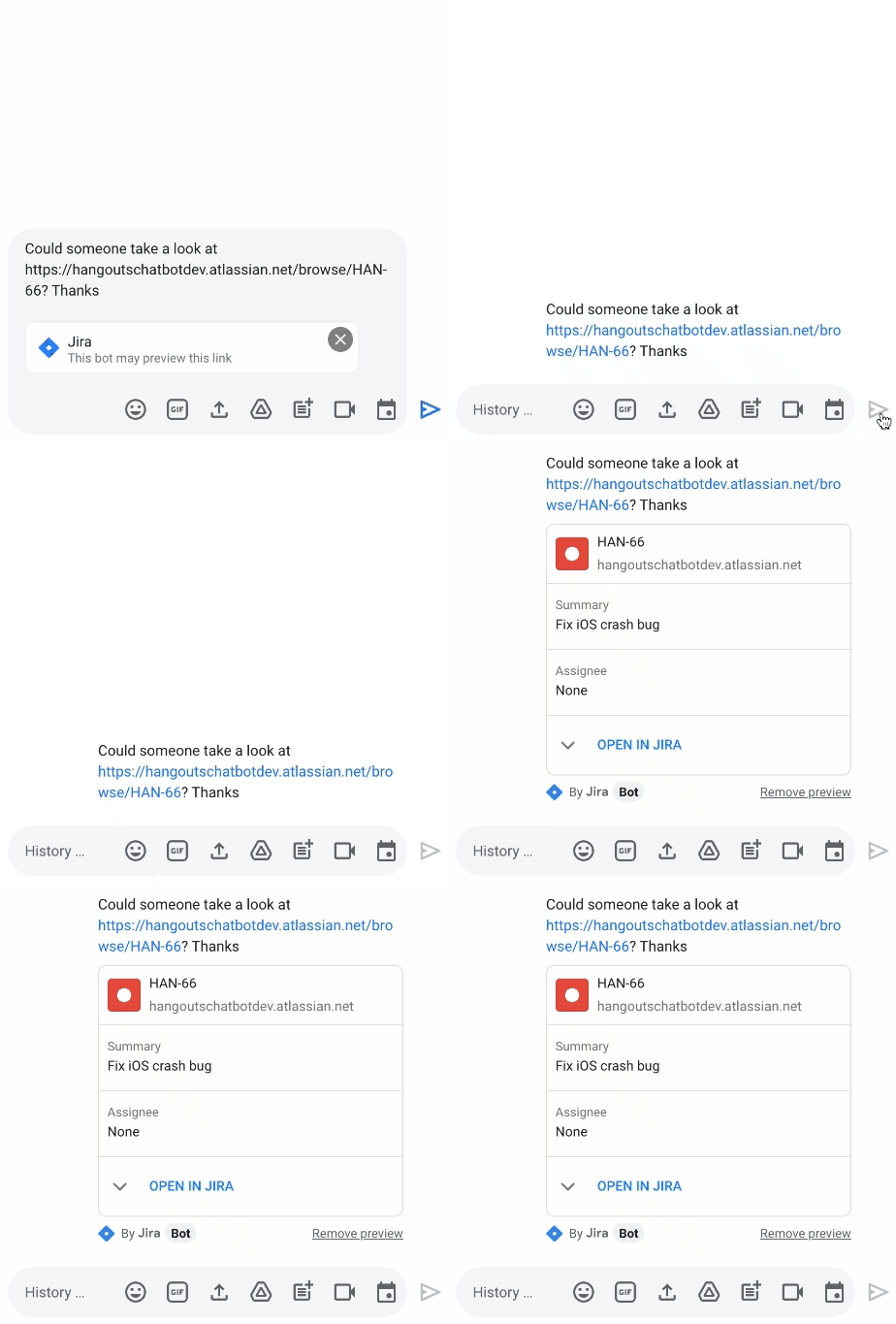
We’re releasing a new Jira integration for Google Chat and Spaces. This integration enables users to create new tickets quickly, see actionable previews, and monitor issues as they come into the space they’re already using for collaboration.
“Modern work requires people to switch contexts and tools faster than ever before. We believe an open ecosystem and tight integrations among the tools that users rely on every day is vital to their success. Since 2017, our Trello integration with Gmail has been installed by more than 7 million people. Today, we are excited to build on the partnership between Atlassian and Google to propel work collaboration further with the integration of Jira with Google Chat and Spaces,” said Joff Redfern, Chief Product Officer, Atlassian.
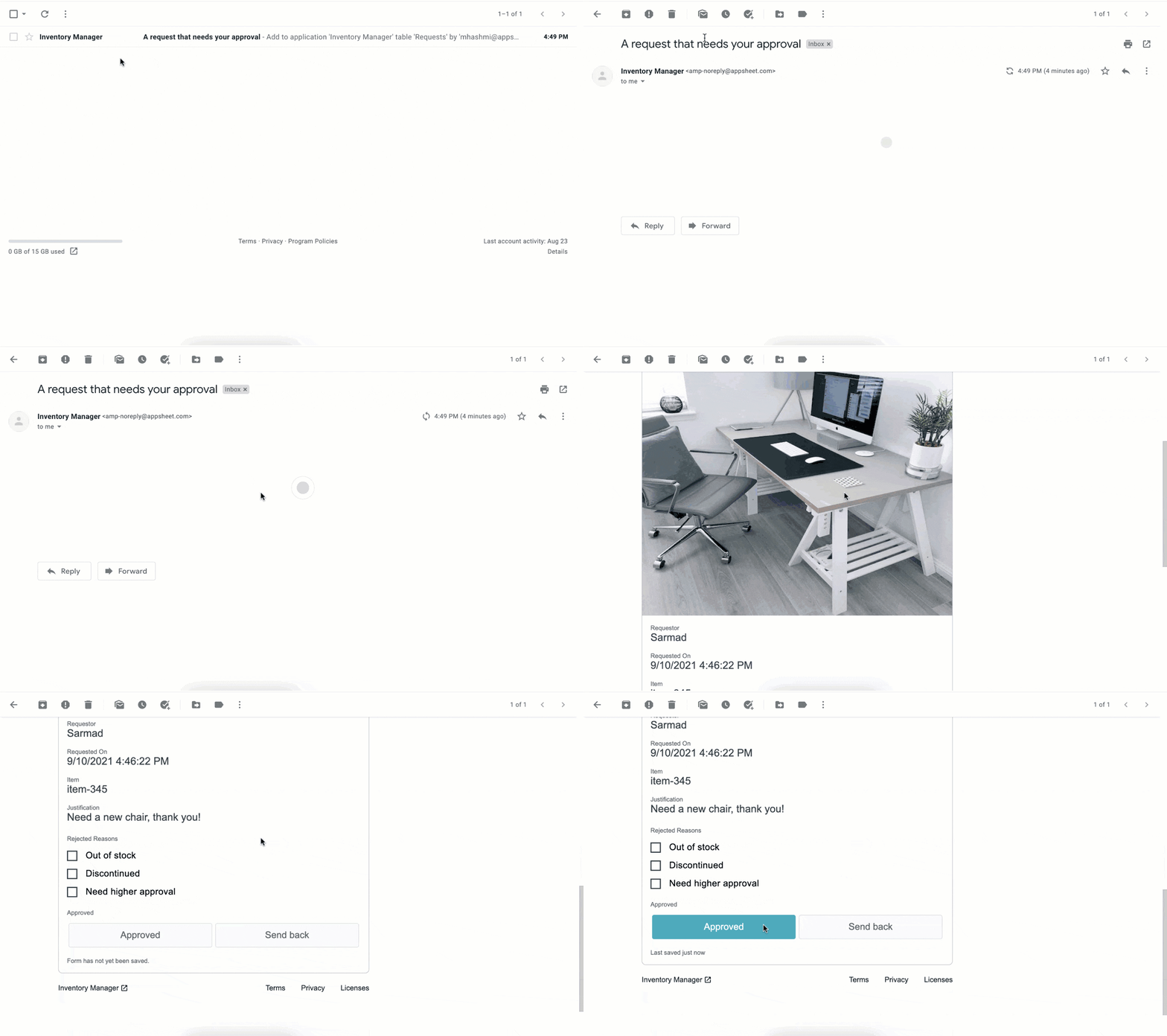
As work continues to evolve, we’re especially committed to the concept of collaboration equity: the ability for everyone to participate and drive impact no matter their location, technical ability, language preference, or device. Carrefour Property – Carmila is evolving how they innovate by connecting frontline workers to those in the office with our no-code development platform AppSheet. For example, after discovering a problem, onsite managers previously had to send an email, enter data into a spreadsheet, and sometimes attend a meeting to explain the issue. Now, with AppSheet, they can simply input the data on their phone in a single step, and the team back at headquarters can see and act on the issue while also tracking all the other issues being reported from other locations.
We continue to empower frontline workers and IT teams alike, bringing more flexibility into Google Workspace by integrating AppSheet into Gmail. This new integration allows anyone—regardless of their coding experience—to reclaim time with custom, no-code apps and automations. Budgets and vacation requests can be approved, inventories and asset management systems can be updated, and much more—all with AppSheet and directly from your inbox.
New investments in security
As we continue to deliver delightful new experiences for users, we are keeping security at the forefront; it’s infused in every layer of our product design so that customers have the flexibility and trust needed to operate in a secure environment. To build on this commitment, we’re announcing Google’s new Work Safer offering to help organizations, their employees, and partners collaborate and communicate securely and privately in today’s hybrid work environment. Work Safer will provide companies with access to best-in-class security for email, meetings, and messages, documents, and more. It uniquely brings together the cloud-native, zero-trust solutions of Google Workspace with industry-leading solutions from across Google and its cybersecurity partners, CrowdStrike and Palo Alto Networks.
To further strengthen security and privacy across the Google Workspace platform, we’re also announcing four key new capabilities:
- In June, we announced that Client-side encryption (CSE) was available in beta for Drive, Docs, Sheets, and Slides. Now we’re bringing CSE to Google Meet, giving customers complete control over encryption keys while helping them meet data sovereignty and compliance requirements. We’re also pleased to announce the beta of our Key Access Service Public APIs, which enables customers to directly manage their encryption keys without the need for a third-party partner.
- Data Loss Prevention (DLP) for Chat is now in beta. This is a continuation of our ongoing commitment to help organizations protect their sensitive data and information from getting into the wrong hands, without impacting the end-user experience. With DLP for Chat, you can enable the power of spontaneous conversation between individuals and teams, while preventing sensitive and confidential information from leaving your organization. Interested customers can sign up for the Client-side encryption and DLP for Chat betas today.
- Drive labels are now generally available. Organizations are now able to classify files stored in Drive based on their sensitivity level. Labels integrate with Google Workspace Data Loss Prevention, making it easier to manage external sharing, downloading, and printing of sensitive files.
- We’re rolling out additional protections to safeguard against abusive content and behavior. If a user opens a file that we think is suspicious or dangerous, we’ll display a warning to the user to help protect them and their organization from malware, phishing, and ransomware. This functionality is now available in Google Docs and will be rolling out soon for Google Sheets and Slides.
Fueling the future of work and collaboration
Our mission is to empower everyone with an innovative and seamless experience that gives people—no matter their location or technical ability—the opportunity to drive real impact. At its core, the vision of the Google Workspace platform is to help you build your own innovation momentum, while providing a foundation of security and privacy. I hope you’ll join me at the Google Cloud Next ’21 event where you can learn more about the Google Workspace vision, and even better, see these new experiences in action.
More Relevant Stories for Your Company

How the Telegraph is Reimagining Media with Google Cloud
Whether they’re reading the newspaper on the way to work, or catching up on the latest headlines on their smartphones, readers expect up-to-the-minute news wherever and whenever makes the most sense for them. As a result, media companies are increasingly looking for ways to improve, expand, and simplify their offerings,

How Russia’s Largest Housing Developer Reduced Construction Planning Time from Two Weeks to One Hour
PIK Group is the leading developer of large-scale residential housing projects in Russia. Founded in 1994, PIK Group has built more than 300,000 apartments – 19 million square meters of residential real estate in Moscow and other cities.To achieve and maintain its position at the top of the real estate industry,




FFF Enterprises See 80% Improvements in Speed at Lower Cost by Moving SAP Data to Google Cloud
FFF Enterprises, a pharmaceutical distributor of lifesaving biopharma products, vaccines and plasma products deployed SAP on Google Cloud to leverage its ability to scale server demands, reduce costs and improve speed and performance. Learn how the migration helps FFF empower healthcare to care!


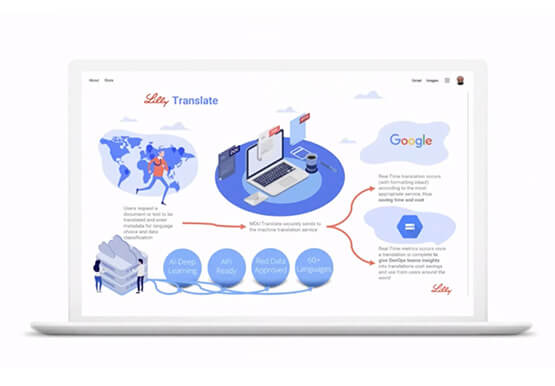
Eli Lilly’s Custom-built Translation Service Leverages Google’s Translation Engine
Eli Lilly leverages Google Cloud's machine translation to globalize content to serve their multilingual employees. Watch the video to learn how the healthcare company built an in-house solution powered by Google Cloud APIs to address the challenge of translating multilingual content at scale. Also explore Google's innovations and investments into
