





How Russia’s Largest Housing Developer Reduced Construction Planning Time from Two Weeks to One Hour

4607
Of your peers have already read this article.
2:30 Minutes
The most insightful time you'll spend today!
PIK Group is the leading developer of large-scale residential housing projects in Russia. Founded in 1994, PIK Group has built more than 300,000 apartments – 19 million square meters of residential real estate in Moscow and other cities.
To achieve and maintain its position at the top of the real estate industry, PIK Group has made innovation central to its business model, whether creating new building techniques or embracing automation. New technology, in particular, enables the company to achieve efficiencies at scale and streamline processes, such as with PIK Group’s app, developed in-house, through which engineers can send photographs as evidence of the quality of building work.
PIK Group looked for a reliable, fast way for teams to collaborate across multiple offices, on the road, and at construction sites. Because the company handles large volumes of sensitive customer data, security was a key concern. To create a collaboration platform ready to pull the company together, PIK Group looked for a cloud solution to streamline processes and improve productivity.
“The construction industry is progressing,” says Ilya Tikhomirov, CIO at PIK Group. “There are new ways of working, new construction processes, and new materials. PIK wants to lead change in that external context with an internal transformation.”
Automating collaborative processes for greater efficiency
“One team has information about the layout and condition of our buildings and can count the areas that need work, but then needs to match prices and the required work to that information. Previously, we would spend two to three weeks matching all the lists. Now, using Google Apps Script and Sheets, we can run calculations for a building in one hour.”
– Sergey Fuksman, Deputy CIO, PIK Group
Real estate companies of any size have to communicate between office-based staff and teams on the move. For PIK Group, with more than 7,000 employees and 70 offices in the Moscow region alone, communication has to operate at scale. Because each project involves multiple participants and numerous stages, the right collaboration tools can generate major efficiencies.
“Take costing and scheduling work in an apartment. What might sound simple is a complex process with numerous stages, says Ilya. “We need to define each and every step, and the materials required. One group of employees says what the task requires, then another group of employees cost the materials and labor, and yet another group matches the costs to the plan. That process alone requires a lot of communication and collaboration, and it’s just one of many in a single project.” To enhance collaboration, PIK Group looked to give staff instant access to a central, highly secure file repository from anywhere at anytime.
“It’s so much easier to work with our 2,000 suppliers when we share Docs and Sheets instead of emailing back and forth. The speed and convenience of this new way of working is immediately clear. A number of our third-party contractors have been so impressed that they’ve implemented G Suite at their own firms.”
– Ilya Tikhomirov, CIO, PIK Group
To do that, PIK Group implemented the full range of G Suite collaborative tools across more than 7,000 employees. “G Suite has helped change the way employees think about the work they do,” says Ilya. “It has helped them to foster the culture of a small start-up, with all of the agility associated with that.” Now staff at more than 70 offices in the Moscow region managing the construction and sale of apartment blocks, meet and communicate using Google Hangouts and collaborate over distance on Google Sheets and Google Docs, reducing the need to travel and increasing their efficiency by approximately 20%.
In order to reduce the complex, laborious work of prototyping projects, PIK Group automates aspects of the process using Google Apps Script to match lists in different Sheets and generate documents, as Sergey Fuksman, Deputy CIO at PIK Group explains: “One team has information about the layout and condition of our buildings and can count the areas that need work, but then need to match prices and the required work to that information. Previously, we would spend two to three weeks matching all the lists. Now, using Apps Script and Sheets, we can run calculations for a building in one hour.”
Migrating to the cloud for machine learning at scale
With over 7,000 G Suite accounts implemented, PIK Group has set its sights on migrating local infrastructure to Google Cloud Platform. “We have a big IT department with many developers, and we want to redirect them to important projects instead of IT maintenance,” says Ilya. “With machine learning and TensorFlow, we plan to use data from over 50 systems to inform business decisions.”
PIK Group’s internal change is already yielding external results. “It’s so much easier to work with our 2,000 suppliers when we share Docs and Sheets instead of emailing back and forth,” says Ilya. “The speed and convenience of this new way of working is immediately clear. A number of our third-party contractors have been so impressed that they’ve implemented G Suite at their own firms.”
Reactive Programming on Google Maps Platform: Watch Video to Learn

5315
Of your peers have already read this article.
1:30 Minutes
The most insightful time you'll spend today!
The Google Maps Platform Android SDK supports extensions for reactive programming, which helps you write code to handle asynchronous operations.
Write reactive and responsive mapping applications with Google Maps Platform
In mobile apps, asynchronous events can happen at any point in time: user touch events, waiting for network calls to complete, or receiving push notifications, to name a few. As an app developer, accounting for these events and composing them with other asynchronous events can be challenging. Reactive programming is an alternative to passing callbacks for different events and helps simplify the process of working with asynchronous events. In reactive programming, events are modeled as a stream, emitting items over time.
https://youtube.com/watch?v=1TmJvOZfBVQ%3Fenablejsapi%3D1%26
There are two libraries you can use to write reactive code: Kotlin Flows and RxJava. The next two videos show you how to use each one.
Writing reactive and responsive mapping applications using Kotlin
If you’re a Kotlin developer looking to use Coroutines and Flows, the KTX library allows you to use Kotlin Flows to receive events. The Maps KTX library includes extension functions that return Kotlin Flow objects, so you can listen to events in a reactive manner. Unlike suspending functions, which return a single value, Kotlin Flows can return several values over time. For example, you can use a Flow to receive camera event changes over time. To get started using Kotlin Flows in your app, include the Maps KTX library in the dependencies section in your build.gradle file.
https://youtube.com/watch?v=Cotx1ZmEYg8%3Fenablejsapi%3D1%26
Creating reactive maps on Android with RxJava
Integrate Google Maps Platform SDKs with popular Android library RxJava. RxJava is the Java implementation of Reactive Extensions, which is a library for composing asynchronous and event-based programs using observable sequences. One thing RxJava does is allows you to convert callback-based asynchronous code into a chain of transformations. Learn how this works and the other ways you can use RxJava in the third video in this series.
https://youtube.com/watch?v=AgGE7fAMrdA%3Fenablejsapi%3D1%26
We hope you learn more about reactive programming concepts to help you build responsive and reactive mobile apps in this three-part YouTube series. Have ideas for helpful videos you’d like to see on our channel? Leave a comment on any of our videos. And don’t forget to subscribe to our YouTube channel for the latest updates, tutorials, customer stories, and more.
For more information on Google Maps Platform, visit our website.
3854
Of your peers have already watched this video.
1:06 Minutes
The most insightful time you'll spend today!
PwC uses Connected Sheets to scale data insights
It’s important for teams across the business to understand customer adoption of products and services, whether it’s the product team tracking usage of a newly released feature or the support team trying to anticipate incoming service requests. Similarly, IT teams need to analyze the adoption of an organization’s internal applications and systems, so they know what tools employees are using and how they are being used. But product adoption datasets are often too large for traditional spreadsheets to handle, and new data is continuously being added.
Connected Sheets can provide teams access to large, powerful, and up-to-date usage datasets, in the familiar Sheets interface. PwC, a global professional services organization, uses Connected Sheets as part of its efforts to make technology and data more accessible across its workforce. One way PwC uses Connected Sheets is to monitor and analyze the internal adoption of tools like G Suite.
Says Peter Van Nieuwerburgh, Global Change Manager at PwC, “If you look at our own adoption dashboarding, it’s more than three terabytes of data—good luck putting that in any spreadsheet. With Connected Sheets, we’re not really pulling the data into the spreadsheet, rather it lives in the database where it belongs. The ability to so easily analyze and visualize the data is really powerful.”
Connected Sheets helps to scale data-driven decision-making at your organization, by making powerful data easily accessible across your sales, finance, product, and IT teams.

Google Workspace is a Highly Robust and Functional Collaboration Platform: Study Confirms
DOWNLOAD INFOGRAPHIC3456
Of your peers have already downloaded this article
3:00 Minutes
The most insightful time you'll spend today!
A recent IDC study on Google Workspace observed the productivity and economic benefits of the collaboration platform on many organizations. The findings revealed that 14 percent increase in daily productivity among Google Workspace users, 412 percent 3-year ROI and payback period of 11 months! Transform your teams’ productivity goals, enhance workplace communication and collaboration as well as experience operational gains with productivity and collaboration tools designed for the modern, hybrid workforce.
Download the infographics to read up more from IDC study on the Business Value of Google Workspace now!
5091
Of your peers have already watched this video.
1:30 Minutes
The most insightful time you'll spend today!
Ramco Cements: Enhancing Intelligence with Data Visualization
Ramco Cements chose Google Maps to integrate with its Ramco ERP system. By layering its data onto Google Maps, the result was a rich data visualization tool that facilitated idea generation and improved productivity. Over 1,000 employees across India access reports and transactions on a daily basis from the Ramco ERP system and integrated Google Maps.
Management at Ramco Cements uses Google Maps for visual analysis – for monitoring benchmarks, identifying discrepancies and deviation. Google Maps serves as a tool to help them develop appropriate strategies for business growth.
Also, the field sales team now has the capability to easily view information on their mobile devices – information ranging from competitor distribution networks in their area, to the best and worst performing dealers.
Active Assist Expands Globally: Unleashing Cloud Optimization Insights Worldwide

1291
Of your peers have already read this article.
3:30 Minutes
The most insightful time you'll spend today!
Active Assist provides insights and recommendations to help Google Cloud customers proactively optimize their cloud environments for cost, security, performance, and sustainability. If you’re like most customers, you’ve likely encountered these insights and recommendations in the console — either in the Recommendations Hub or embedded on a resource page, like IAM or the VM list pages. (Note that for the rest of this post, we’ll use the word “recommendations” to mean “insights and recommendations.”)
We heard from customers who love recommendations that it should be easier to discover and work with these valuable suggestions across an entire organization, so last year we launched the Recommendations BigQuery export feature to Preview. This allows you to automatically export the recommendations to a BigQuery dataset, which you can then investigate with tools like DataStudio or Looker, and integrate with your company’s existing monitoring solutions and workflows.
Many of you have told us how powerful this feature is, so we’ve been working hard on improvements to make it even more useful. We’re happy to announce that BQ Export 1.0 is now in GA, and that BQ Export 2.0 is in Preview, with new support for Billing Account-level recommendations and cost optimization recommendations that include discount information. This post will cover what’s new with Active Assist BQ Export, as well as a couple other new features of Active Assist.
New features to Active Assist BigQuery Export
Before we dive into the details, if you’re new to Recommendations BQ Export check out our handy getting started guide. It covers the permissions you’ll need and how to set up the export, including instructions for using a service account. It also includes some sample queries and instructions for interacting with the data using Google Sheets. You may also want to check out our prior blog post showing how to optimize your cloud spend with BigQuery and Looker.
Now, on to what’s new!
1. Non-project scoped recommendations
You can now see non-project scoped recommendations, such as billing account, organization, and folder-level recommendations in your export to BigQuery. This ensures that in your export, you are able to see the full portfolio of recommendations that are available to you.
2. Custom contract Pricing
If you have any applicable custom contract pricing for your company, your cost-related recommendations now take those into account (based on your historical costs) in the cost saving calculation when you export them to BigQuery. This will ensure that you have the most accurate cost savings data we have for you and your organization to help you make the best judgment and prioritization when choosing to adopt recommendations. However, you must have the correct permissions first in order to see the custom contract pricing. If the user executing the export to BigQuery does not have the correct permissions, you may continue to see list pricing in your estimated savings. Also, note that the console UI and the Recommender API already have this support.
3. Export now available globally
Customers outside of the US can now set up an export of recommendations to a BigQuery dataset.
Improvements to Active Assist discoverability and usability
1. Global Recommender Viewer role: You can now add the global Recommender Viewer role, which gives you view access to all insights and recommendations available to you, simplifying permission management for new recommenders. Newly launched recommendations will also automatically be added as they become generally available.
2. Dismiss recommendations via Recommender API: You can now directly dismiss recommendations via our API, allowing you to focus on the recommendations you care about and work more efficiently.
3. Shareable links: Another feature that quietly launched recently is the availability of shareable URLs that link to recommendation details in the console. You can access these links in the UI from the upper right of the details panel of any recommendation.
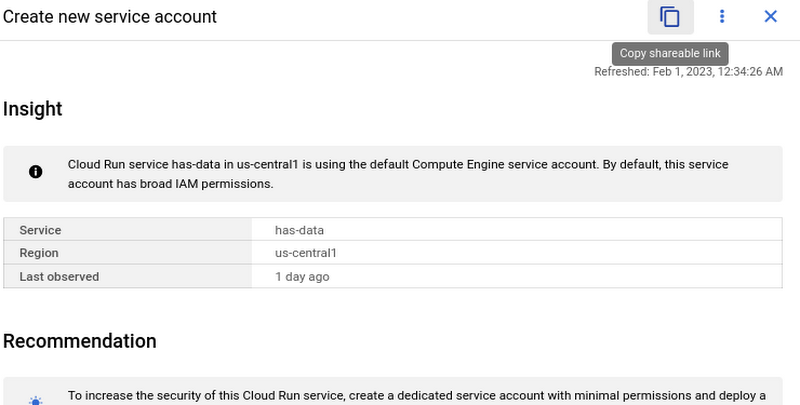
However, these links become even more powerful when combined with Recommendations BigQuery Export. The URLs all have a standard format. This means that within the BigQuery export tables you can easily calculate a new column containing these links using an expression like:
“https://console.cloud.google.com/home/recommendations/view-link/” +
name +
“?project=” +
cloud_entity_id
This example is for project level recommendations (where cloud_entity_type = PROJECT_NUMBER).
For cloud_entity_type = FOLDER, use:
“https://console.cloud.google.com/home/recommendations/view-link/” +
name +
“?folder=” +
cloud_entity_id
For cloud_entity_type = ORGANIZATION, use
“https://console.cloud.google.com/home/recommendations/view-link/” +
name +
“?organizationId=” +
cloud_entity_id
These links can then be embedded in your reports and dashboards, or used by other BigQuery clients.
As a reminder, if you’re interested in setting up reports or dashboards using Recommendations BigQuery Export, take a look at this previous blog post for some great ideas, or you can reference our getting started guide. If you have any feedback, please feel free to reach out to active-assist-feedback@google.com.
More Relevant Stories for Your Company

Learn to Easily Administer Multi-cluster Kubernetes Environs: Part 4 KRM Series
This is part 4 in a multi-part series about the Kubernetes Resource Model. See parts 1, 2, and 3 to learn more. Kubernetes clusters can scale. Open-source Kubernetes supports up to 5,000 Nodes, and GKE supports up to 15,000 Nodes. But scaling out a single cluster can only get you so far: if your cluster’s control plane

How This Sri Lankan Bank is Striving to Make Banking Accessible to All
Headquartered in the Sri Lankan capital of Colombo, Cargills Bank is not short on ambition or vision: it plans to make banking services accessible to all Sri Lankans and become a financial services leader at home and internationally. Founded in 2014 and licensed by the Central Bank of Sri Lanka to provide

Quick Recap on Google Cloud: Latest News, Launches, Updates, Events and More
Want to know the latest from Google Cloud? Find it here in one handy location. Check back regularly for our newest updates, announcements, resources, events, learning opportunities, and more. Tip: Not sure where to find what you’re looking for on the Google Cloud blog? Start here: Google Cloud blog 101: Full list

New ways Google Workspace works with tools you already use
Looking back on 2020, it’s clear that the ways we work have rapidly transformed—from the rise of remote work and increasingly digitized processes, to balancing time across work and personal responsibilities. But one thing hasn’t changed—businesses still rely on a staggering number of applications to get work done. Working from
