





Revolutionizing Cloud Computing: Introducing G2 VMs with NVIDIA L4 GPUs

1557
Of your peers have already read this article.
2:30 Minutes
The most insightful time you'll spend today!
Organizations across industries are looking to AI to turn troves of data into intelligence, powered by the latest advances in generative AI. Yet for many organizations, there is a barrier to adopting the latest models because they can be costly to train or serve. A new class of cloud GPUs is needed to lower the cost of entry for businesses that want to tap the power of AI.
Today, we’re introducing G2, the newest addition to the Compute Engine GPU family in Google Cloud. G2 is the industry’s first cloud VM powered by the newly announced NVIDIA L4 Tensor Core GPU, and is purpose-built for large inference AI workloads like generative AI. G2 delivers cutting-edge performance-per-dollar for AI inference workloads that run on GPUs in the cloud. By switching from NVIDIA A10G GPUs to G2 instances with L4 GPUs, organizations can lower their production infrastructure costs up to 40%. We also found that customers switching from NVIDIA T4 GPUs to L4 GPUs can achieve 2x-4x better performance. As a universal GPU offering, G2 instances also help accelerate other workloads, offering significant performance improvements on HPC, graphics, and video transcoding. Currently in private preview, G2 VMs are both powerful and flexible, and scale easily from one up to eight GPUs.
Currently organizations require end-to-end enterprise ready infrastructure that will future proof their AI and HPC initiatives for a new era. G2s will be ready to be deployed on Vertex AI, GKE, and GCE, giving customers the freedom to architect their own custom software stack to meet their performance requirements and budget. With optimized Vertex AI support for G2 VMs, AI users can tap the latest generative AI models and technologies. With an easy to use UI and automated workflows, customers can access, tune and serve modern models for video, text, images, and audio without the toil of manual optimizations. The combination of these services with the power of G2 will help customers harness the power of complex machine models for their business.
NVIDIA L4 GPUs with Ada Lovelace Architecture
G2 machine families enable machine learning customers to run their production infrastructure in the cloud for a variety of applications such as language models, image classification, object detection, automated speech recognition, and language translation. Built on the Ada Lovelace architecture with fourth-generation Tensor Cores, the NVIDIA L4 GPU provides up to 30 TFLOPS of performance for FP32, and 242 TFLOPs for FP16. Newly added FP8 support, on top of existing INT8, BFLOAT16 and TF32 capabilities, makes the L4 ideal for ML inference.
With the latest third-generation RT Cores and DLSS 3.0 technology, G2 instances are also great for graphics-intensive workloads such as rendering and remote workstations when paired with NVIDIA RTX Virtual Workstation. NVIDIA L4 provides 3x video encoding and decoding performance, and adds new AV1 hardware-encoding capabilities. For example, G2 can enable gaming customers running game engines such as Unreal and Unity with modern graphics cards to run real-time applications. Likewise, media and entertainment customers that need GPU-enabled virtual workstations can use the L4 to create photo-realistic, high-resolution 3D content for movies, games, and AR/VR experiences using applications such as Autodesk Maya or 3D Studio Max.
What customers are saying
A handful of early customers have been testing G2 and have seen great results in real-world applications. Here are what some of them have to say about the benefits that G2 with NVIDIA L4 GPUs bring:

AppLovin
AppLovin enables developers and marketers to grow with market leading technologies. Businesses rely on AppLovin to solve their mission-critical functions with a powerful, full stack solution including user acquisition, retention, monetization and measurement.
“AppLovin serves billions of AI powered recommendations per day, so scalability and value are essential to our business,” said Omer Hasan, Vice President, Operations at AppLovin. “With Google Cloud’s G2 we’re seeing that NVIDIA L4 GPUs offer a significant increase in the scalability of our business, giving us the power to grow faster than ever before.”

WOMBO
WOMBO aims to unleash everyone’s creativity through the magic of AI, transforming the way content is created, consumed, and distributed.
“WOMBO relies upon the latest AI technology for people to create immersive digital artwork from users’ prompts, letting them create high-quality, realistic art in any style with just an idea,” said Ben-Zion Benkhin, Co-Founder and CEO of WOMBO. “Google Cloud’s G2 instances powered by NVIDIA’s L4 GPUs will enable us to offer a better, more efficient image-generation experience for users seeking to create and share unique artwork.”

Descript
Descript’s AI-powered features and intuitive interface fuel YouTube and TikTok channels, top podcasts, and businesses using video for marketing, sales, and internal training and collaboration. Descript aims to make video a staple of every communicator’s toolkit, alongside docs and slides.
“G2 with L4’s AI Video capabilities allow us to deploy new features augmented by natural-language processing and generative AI to create studio-quality media with excellent performance and energy efficiency” said Kundan Kumar, Head of Artificial Intelligence at Descript.

Workspot
Workspot believes that the software-as-a-service (SaaS) model is the most secure, accessible and cost-effective way to deliver an enterprise desktop and should be central to accelerating the digital transformation of the modern enterprise.
“The Workspot team looks forward to continuing to evolve our partnership with Google Cloud and NVIDIA. Our customers have been seeing incredible performance leveraging NVIDIA’s T4 GPUs. The new G2 instances with L4 GPUS through Workspot’s remote Cloud PC workstations provide 2x and higher frame rates at 1280×711 and higher resolutions” said Jimmy Chang, Chief Product Officer at Workspot.
Pricing and availability
G2 instances are currently in private preview in the following regions: us-central1, asia-southeast1 and europe-west4. Submit your request here to join the private preview, or to receive a notification as when the public preview begins. Support will be coming to Google Kubernetes Engine (GKE), Vertex AI, and other Google Cloud services as well. We’ll share G2 public availability and pricing information later in the year.
Recommendations for Modelling SAP Data inside BigQuery

8415
Of your peers have already read this article.
4:00 Minutes
The most insightful time you'll spend today!
Over the past few years, many organizations have experienced the benefits of migrating their SAP solutions to Google Cloud. But this migration can do more than reduce IT maintenance costs and make data more secure. By leveraging BigQuery, SAP customers can complement their SAP investments and gain fresh insights by consolidating enterprise data and easily extending it with powerful datasets and machine learning from Google.
BigQuery is a leading cloud data warehouse, fully managed and serverless, and allows for massive scale, supporting petabyte-scale queries at super-fast speeds. It can easily combine SAP data with additional data sources, such as Google Analytics or Salesforce, and its built-in machine learning lets users operationalize machine learning models using standard SQL — all at a comparatively low cost.
If your SAP-powered organization is looking to supercharge its analytics with the strength of BigQuery, read on for considerations and recommendations for modeling with SAP data. These guidelines are based on our real-world implementation experience with customers and can serve as a roadmap to the analytics capabilities your business needs.
Considerations for data replication
Like most technology journeys, this one should start with a business objective. Keeping your intended business value and goals in mind is critical to making the right decisions in the early steps of the design process.
When it comes to replicating the data from an SAP system into BigQuery, there are multiple ways to do it successfully. Decide which method will work best for your organization by answering these questions:
- Does your business need real-time data? Will you need to time travel into past data?
- Which external datasets will you need to join with the replicated data?
- Are the source structures or business logic likely to change? Will you be migrating the SAP source systems any time soon? For instance, will you be moving from SAP ECC to SAP S/4HANA?
You’ll also need to determine whether replication should be done on a table-by-table basis or whether your team can source from pre-built logic. This decision, along with other considerations such as licensing, will influence which replication tool you should use.
Replicating on a table-by-table basis
Replicating tables, especially standard tables in their raw form, allows sources to be reused and ensures more stability of the source structure and functional output. For example, the SAP table for sales order headers (VBAK) is very unlikely to change its structure across different versions of SAP, and the logic that writes to it is also unlikely to change in a way that affects a replicated table.
Something else to consider: Reconciliation between the source system and the landing table in BigQuery is linear when comparing raw tables, which helps avoid issues in consolidation exercises during critical business processes, such as period-end closing. Since replicated tables aren’t aggregated or subject to process-specific data transformation, the same replicated columns can be reused in different BigQuery views. You can, for instance, replicate the MARA table (the material master) once and use it in as many models as needed.
Replicating pre-built logic
If you replicate pre-built models, such as those from SAP extractors or CDS views, you don’t need to build the logic in BigQuery, since you’re using existing logic. Some of these extraction objects have embedded delta mechanisms, which may complement a replication tool that can’t handle deltas. This will save initial development time, but it can also lead to challenges if you create new columns, or if customizations or upgrades change the logic behind the extraction.
It’s also important to note that different extraction processes may transform and load the same source columns multiple times, which creates redundancy in BigQuery and can lead to higher maintenance needs and costs. However, replicating pre-built models may still be a good choice, since doing so can be especially useful for logic that tends to be immutable, such as flattening a hierarchy, or logic that is highly complex.
How you approach replication will also depend on your long-term plans and other key factors — for example, the availability (and curiosity) of your developers, and the time or effort they can put into applying their SQL knowledge to a new data warehouse.
With either replication approach, bear in mind when designing your replication process that BigQuery is meant to be an append-always database — so post-processing of data and changes will be required in both cases.
Processing data changes
The replication tool you choose will also determine how data changes are captured (known as CDC – change data capture). If the replication tool allows for it (for example as SAP SLT does) the same patterns described in the CDC with BigQuery documentation also apply to SAP data.
Because some data, like transactions, are known to be less static than others (e.g., master data), you need to decide what should be scanned in real time, what will require immediate consistency, and what can be processed in batches to manage costs. This decision will be based on the reporting needs from the business.
Consider the SAP table BUT000, containing our example master data for business partners, where we have replicated changes from an SAP ERP system:

In an append-always replication in BigQuery, all updates are received as new records. For example, deleting a record in the source will be represented as a new record in BigQuery with a deletion flag. This applies to whether the records are coming from raw tables like BUT000 itself or pre-aggregated data, as from a BW extractor or a CDS view.
Let’s take a closer look at data coming particularly from the partners “LUCIA” and “RIZ”. The operation flag tells us whether the new record in BigQuery is an insert (I), update (U) or deletion (D), while the timestamps help us identify the latest version of our business partner.

If we want to find the latest updated record for the partners LUCIA and RIZ, this is what the query would look like:
SELECT partner,ARRAY_AGG(i1 ORDER BY i1.recordstamp DESC LIMIT 1) AS rowFROM SAP_ECC.but000 i1WHERE partner in ('LUCIA','RIZ')GROUP BY partner
With the following result:

After identifying stale records for “LUCIA” and “RIZ” business partners, we can proceed to deleting all stale records for “LUCIA” if we do not want to retain the history. In this example, we are using a different table to which the same replication has been done, for the purpose of comparison and to check that all stale records have been deleted for the selection made and that we only kept last updated records. For example:
DELETE SAP_HANA.but000 i1WHEREi1.recordstamp < TIMESTAMP_SUB(CURRENT_TIMESTAMP(), INTERVAL 3 HOUR) ANDi1.recordstamp < (SELECT MAX(recordstamp) FROM SAP_HANA.but000 i2WHEREi1.partner = i2.partnerand partner="LUCIA")
You can also use the following query to retrieve stale records for “LUCIA” partner before moving forward with deletion
SELECT partner, operation_flag, recordstamp FROM SAP_HANA.but000 i1WHEREi1.recordstamp < TIMESTAMP_SUB(CURRENT_TIMESTAMP(), INTERVAL 3 HOUR)ANDi1.recordstamp < (SELECT MAX(recordstamp) FROM SAP_HANA.but000 i2WHEREi1.partner = i2.partnerand partner="LUCIA")
Which produces all of the records, except the latest update:

Partitioning and clustering
To limit the number of records scanned in a query, save on cost and achieve the best performance possible, you’ll need to take two important steps: determine partitions and create clusters.
Partitioning
A partitioned table is one that’s divided into segments, called partitions, which make it easier to manage and query your data. Dividing a large table into smaller partitions improves query performance and controls costs because it reduces the number of bytes read by a query.
You can partition BigQuery tables by:
- Time-unit column: Tables are partitioned based on a “timestamp,” “date,” or “datetime” column in the table.
- Ingestion time: Tables are partitioned based on the timestamp recorded when BigQuery ingested the data.
- Integer range: Tables are partitioned based on an integer column.
Partitions are enabled when the table is created, as in the example below. A great tip is to always include the partition filter as shown on the left-hand side of the query.

Clustering
Clustering can be created on top of partitioned tables by applying the fields that are likely to be used for filtering. When you create a clustered table in BigQuery, the table data is automatically organized based on the contents of one or more of the columns in the table’s schema. The columns you specify are then used to colocate related data.
Clustering can improve the performance of certain query types — for example, queries that use filter clauses or that aggregate data. It makes a lot of sense to use them for large tables such as ACDOCA, the table for accounting documents in SAP S/4HANA. In this case, the timestamp could be used for partitioning, and common filtering fields such as the ledger, company code, and fiscal year could be used to define the clusters.

A great feature is that BigQuery will also periodically recluster the data automatically.
Materialized views
In BigQuery, materialized views are precomputed views that periodically cache the results of a query for better performance and efficiency. BigQuery uses precomputed results from materialized views and, whenever possible, reads only the delta changes from the base table to compute up-to-date results quickly. Materialized views can be queried directly or can be used by the BigQuery optimizer to process queries to the base table.
Queries that use materialized views are generally completed faster and consume fewer resources than queries that retrieve the same data only from the base table. If workload performance is an issue, materialized views can significantly improve the performance of workloads that have common and repeated queries. While materialized views currently only support single tables, they are very useful common and frequent aggregations like stock levels or order fulfillment.
Further tips on performance optimization while creating select statements can be found in the documentation for optimizing query computation.
Deployment pipeline and security
For most of the work you’ll do in BigQuery, you’ll normally have at least two delivery pipelines running — one for the actual objects in BigQuery and the other to keep the data staging, transforming, and updated as intended within the change-data-capture flows. Note that you can use most existing tools for your Continuous Integration / Continuous Deployment (CI/CD) pipeline — one of the benefits of using an open system like BigQuery. But, if your organization is new to CI/CD pipelines, this is a great opportunity to gradually gain experience. A good place to start is to read our guide for setting up a CI/CD pipeline for your data-processing workflow.
When it comes to access and security, most end-users will only have access to the final version of the BigQuery views. While row and column-level security can be applied, as in the SAP source system, separation of concerns can be taken to the next level by splitting your data across different Google Cloud projects and BigQuery datasets. While it’s easy to replicate data and structures across your datasets, it’s a good idea to define the requirements and naming conventions early in the design process so you set it up properly from the start.
Start driving faster and more insightful analytics
The best piece of advice we can give you is this: Try it yourself. Anyone with SQL knowledge can get started using the free BigQuery tier. New customers get $300 in free credits to spend on Google Cloud during the first 90 days. All customers get 10 GB storage and up to 1 TB queries/month, completely free of charge. In addition to discovering the massive processing capabilities, embedded machine learning, multiple integration tools, and cost benefits, you’ll soon discover how BigQuery can simplify your analytics tasks.
If you need additional assistance, our Google Cloud Professional Services Organization (PSO) and Customer Engineers will be happy to help show you the best path forward for your organization. For anything else, contact us at cloud.google.com/contact.
Pay-as-you-go AI Management Platform Available on Google Cloud Marketplace

3080
Of your peers have already read this article.
2:30 Minutes
The most insightful time you'll spend today!
Editor’s note: Prevision.io has built the first ever pay-as-you-go AI management platform that simplifies the machine learning project lifecycle while offering powerful analytics capabilities. Now available exclusively on Google Cloud Marketplace, users can experiment, build, deploy, and manage AI projects in the cloud in weeks—without having extensive data science knowledge.
Similar to the momentum that cloud technology has had in the business world, AI and machine learning are quickly becoming essential to the enterprise. 86% of companies now view AI as a “mainstream technology,” and corporate AI adoption rose 50% in 2021 from the year prior for initiatives such as service-operations optimization and product enhancement. But for companies that don’t fall into the Fortune 500, initiating AI projects can come with several challenges, ranging from one-size-fits-all subscription models to skills gaps and resource-heavy monitoring requirements.
My team of data scientists saw a real need for software that could democratize machine learning innovation by removing these common barriers. We knew that features like automation could make building and deploying AI much more doable for other data scientists, as well as citizen data scientists. So, we launched Prevision.io, a first-of-its-kind dedicated AI management platform built on Google Cloud and now available exclusively on Google Cloud Marketplace.
As a Google Cloud Partner Advantage Member, we knew the benefits of an elastic infrastructure, full integration with BigQuery, and access to a large library of complementary tools, such as Kubeflow on Google Cloud. As a result, it’s easier for our users to improve upon their robust AI projects.
Set up in minutes, deploy a machine learning model in weeks
Users can start building and deploying models in Prevision.io immediately after subscribing through Google Cloud Marketplace. Instead of taking weeks to onboard and months to launch a real-world model into production, Prevision.io’s intuitive interface and powerful predictive analytics capability makes it possible to set up in minutes–and have models up and running in three to four weeks. Since we believe in cost-efficient scaling, our platform operates on a pay-as-you-go model with no long-term contracts, licensing, or per-user fees.
Simply connect Prevision.io with your data–whether it exists in buckets or in an SQL data source like BigQuery. No matter your data source, set up is quick. There are even tutorials to help if you’re using APIs. Follow this tutorial for step-by-step set up details in Google Cloud.
Once historical data is imported, you can start applying your own models inside Prevision.io, or use Prevision.io to build a bespoke model. There’s more good news: expenditures on Prevision.io’s platform are applied toward customers’ Google Cloud spend commitments.
Full lifecycle AI project management made easy
By automating the complexity of AI project management with a no-code approach, businesses do not have to add more data scientists to their teams, risk data drift or outdated models, spend hundreds of thousands on unused software, or massively expand IT budgets. By connecting BigQuery or other datastores to Prevision.io, you can launch high-performing machine learning projects and manage them across the entire lifecycle. With Prevision.io you can:
- Experiment with iteration and optimization to get an effective model into production from the start. Track performance and compare versions to identify the most reliable model. Because there is no infrastructure to manage, users can focus only on the project and see ROI sooner.
- Automate training and prediction tasks to improve collaboration, reduce time-consuming manual operations, and boost results. Users can implement automation across the production pipeline with built-in features like AutoML and a scheduler for recurring tasks. Retrain automations and integrate custom code to keep processes aligned and relevant.
- Deploy scalable working models securely and reliably in one-click. Tailor deployments using REST APIs or as a component to generate batch predictions. Create dashboards to share with stakeholders, and swiftly update your model without worrying about service interruptions or breakages.
- Monitor infrastructure and model behavior to understand resource utilization and how data changes over time—without requiring more of IT. Put an end to endless maintenance meetings with reliable, real-time monitoring applications around drift, data in-and-out, and prediction distribution. If an issue arises, Prevision.io provides detailed alerts and analysis to understand the root of a problem.
Any business can benefit
Regardless of industry or department, we’ve seen Prevision.io help businesses solve some of their biggest challenges. Utilities companies are relying on better forecasts of the energy consumption (gas or electricity).. Transportation companies have deployed machine learning models that can inform logistical operations based on fluctuating supply and demand. Doing more with data not only improves what a business can offer their customers but can also yield significant savings. Here are a few real-life examples:
La Poste: delivery data saves the day
Global delivery company La Poste was having trouble meeting customers’ demand for speed and visibility, and inaccurate estimated arrival times for packages was costing them money. The team wanted to put its tracking and tracing data to work, and turned to Prevision.io to select technical metrics, set up personalized machine learning models for delivery rounds of all personnel, and speed up the iteration and training process. After deploying its model in four weeks, La Poste achieved an 89% accuracy rate for delivery times and saw a 10x improvement in IT infrastructure and operational costs. And of course, happier customers who keep coming back.
BPCE: machine learning helps us help our clients
An arm of BPCE Group, the second largest banking group in France, was feeling the effects of the pandemic’s impact on customers. It needed a more efficient way of determining who would need what type of help—and when–to reduce the number of customers entering the collections process. Using its wealth of data to create and deploy a machine learning model in Prevision.io, the firm was able to rapidly identify the most at-risk customers and better understand the root causes behind potential debt default—some of which are easily fixable. As a result, the firm has seen a fifteen-fold increase in the sums they have been able to recover, and decreased the number of collection cases by 50%.
Pharmaceutical company: marketing medicine with MLOps
The marketing department at a healthcare company serving pharmacies was able to reduce customer churn and improve growth by using Prevision.io to compute market segmentation based on anticipated customer revenue. This helped the company determine the best way to engage with each pharmacy—and when. Being able to make strategic decisions based on automated predictions and more targeted data saved the company $1.3M Euros in two fiscal quarters.
See how AI project management and MLOps made easy can transform your business. Access Prevision.io on Google Cloud Marketplace and take advantage of the 14-day free trial.
Google Research: Themes from 2021 and Beyond

2877
Of your peers have already read this article.
4:00 Minutes
The most insightful time you'll spend today!
Posted by Jeff Dean, Senior Fellow and SVP of Google Research, on behalf of the entire Google Research community
Over the last several decades, I’ve witnessed a lot of change in the fields of machine learning (ML) and computer science. Early approaches, which often fell short, eventually gave rise to modern approaches that have been very successful. Following that long-arc pattern of progress, I think we’ll see a number of exciting advances over the next several years, advances that will ultimately benefit the lives of billions of people with greater impact than ever before. In this post, I’ll highlight five areas where ML is poised to have such impact. For each, I’ll discuss related research (mostly from 2021) and the directions and progress we’ll likely see in the next few years.
· Trend 1: More Capable, General-Purpose ML Models
· Trend 2: Continued Efficiency Improvements for ML
· Trend 3: ML Is Becoming More Personally and Communally Beneficial
· Trend 4: Growing Benefits of ML in Science, Health and Sustainability
· Trend 5: Deeper and Broader Understanding of ML
Trend 1: More Capable, General-Purpose ML Models
Researchers are training larger, more capable machine learning models than ever before. For example, just in the last couple of years models in the language domain have grown from billions of parameters trained on tens of billions of tokens of data (e.g., the 11B parameter T5 model), to hundreds of billions or trillions of parameters trained on trillions of tokens of data (e.g., dense models such as OpenAI’s 175B parameter GPT-3 model and DeepMind’s 280B parameter Gopher model, and sparse models such as Google’s 600B parameter GShard model and 1.2T parameter GLaM model). These increases in dataset and model size have led to significant increases in accuracy for a wide variety of language tasks, as shown by across-the-board improvements on standard natural language processing (NLP) benchmark tasks (as predicted by work on neural scaling laws for language models and machine translation models).
Many of these advanced models are focused on the single but important modality of written language and have shown state-of-the-art results in language understanding benchmarks and open-ended conversational abilities, even across multiple tasks in a domain. They have also shown exciting capabilities to generalize to new language tasks with relatively little training data, in some cases, with few to no training examples for a new task. A couple of examples include improved long-form question answering, zero-label learning in NLP, and our LaMDA model, which demonstrates a sophisticated ability to carry on open-ended conversations that maintain significant context across multiple turns of dialog.


(Weddell Seal image cropped from Wikimedia CC licensed image.)
Transformer models are also having a major impact in image, video, and speech models, all of which also benefit significantly from scale, as predicted by work on scaling laws for visual transformer models. Transformers for image recognition and for video classification are achieving state-of-the-art results on many benchmarks, and we’ve also demonstrated that co-training models on both image data and video data can improve performance on video tasks compared with video data alone. We’ve developed sparse, axial attention mechanisms for image and video transformers that use computation more efficiently, found better ways of tokenizing images for visual transformer models, and improved our understanding of visual transformer methods by examining how they operate compared with convolutional neural networks. Combining transformer models with convolutional operations has shown significant benefits in visual as well as speech recognition tasks.
The outputs of generative models are also substantially improving. This is most apparent in generative models for images, which have made significant strides over the last few years. For example, recent models have demonstrated the ability to create realistic images given just a category (e.g., “irish setter” or “streetcar”, if you desire), can “fill in” a low-resolution image to create a natural-looking high-resolution counterpart (“computer, enhance!”), and can even create natural-looking aerial nature scenes of arbitrary length. As another example, images can be converted to a sequence of discrete tokens that can then be synthesized at high fidelity with an autoregressive generative model.

Because these are powerful capabilities that come with great responsibility, we carefully vet potential applications of these sorts of models against our AI Principles.
Beyond advanced single-modality models, we are also starting to see large-scale multi-modal models. These are some of the most advanced models to date because they can accept multiple different input modalities (e.g., language, images, speech, video) and, in some cases, produce different output modalities, for example, generating images from descriptive sentences or paragraphs, or describing the visual content of images in human languages. This is an exciting direction because like the real world, some things are easier to learn in data that is multimodal (e.g., reading about something and seeing a demonstration is more useful than just reading about it). As such, pairing images and text can help with multi-lingual retrieval tasks, and better understanding of how to pair text and image inputs can yield improved results for image captioning tasks. Similarly, jointly training on visual and textual data can also help improve accuracy and robustness on visual classification tasks, while co-training on image, video, and audio tasks improves generalization performance for all modalities. There are also tantalizing hints that natural language can be used as an input for image manipulation, telling robots how to interact with the world and controlling other software systems, portending potential changes to how user interfaces are developed. Modalities handled by these models will include speech, sounds, images, video, and languages, and may even extend to structured data, knowledge graphs, and time series data.

Often these models are trained using self-supervised learning approaches, where the model learns from observations of “raw” data that has not been curated or labeled, e.g., language models used in GPT-3 and GLaM, the self-supervised speech model BigSSL, the visual contrastive learning model SimCLR, and the multimodal contrastive model VATT. Self-supervised learning allows a large speech recognition model to match the previous Voice Search automatic speech recognition (ASR) benchmark accuracy while using only 3% of the annotated training data. These trends are exciting because they can substantially reduce the effort required to enable ML for a particular task, and because they make it easier (though by no means trivial) to train models on more representative data that better reflects different subpopulations, regions, languages, or other important dimensions of representation.
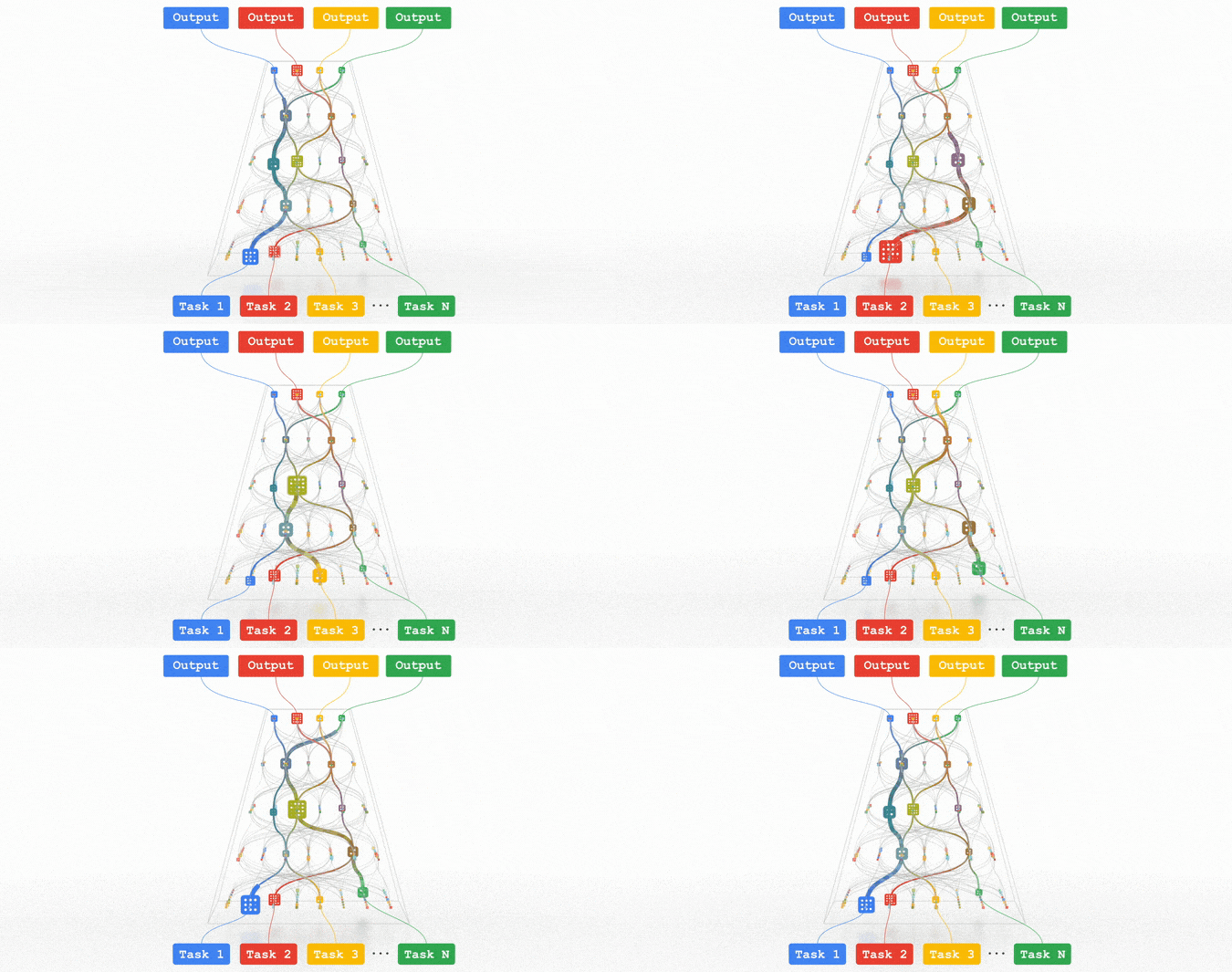
All of these trends are pointing in the direction of training highly capable general-purpose models that can handle multiple modalities of data and solve thousands or millions of tasks. By building in sparsity, so that the only parts of a model that are activated for a given task are those that have been optimized for it, these multimodal models can be made highly efficient. Over the next few years, we are pursuing this vision in a next-generation architecture and umbrella effort called Pathways. We expect to see substantial progress in this area, as we combine together many ideas that to date have been pursued relatively independently.
Google’s Latest ‘Carbon Footprint’ can Flag Users about Carbon Emission Levels from their Cloud Usage

7071
Of your peers have already read this article.
4:00 Minutes
The most insightful time you'll spend today!
Google Cloud is proud to support our customers with the cleanest cloud in the industry. For the past four years, we’ve matched 100% of our electricity use with renewable energy purchases, and we were the first company of our size to commit going even further by running on carbon-free energy 24/7 by 2030. As we work to achieve 24/7 carbon-free energy, we help you take immediate action to decarbonize your digital applications and infrastructure. We’re also working with our customers across every industry to develop new solutions for the unique climate change challenges that organizations face. Today, we’re excited to expand our portfolio of carbon-free solutions and announce new partnerships that will help every company build a more sustainable future.
First, we’re launching Carbon Footprint, a new product that provides customers with the gross carbon emissions associated with their Google Cloud Platform usage. Now available to every GCP user for free in the Cloud Console, this tool helps you measure, track and report on the gross carbon emissions associated with the electricity of your cloud usage. Of course, the net operational emissions associated with your Google Cloud usage is still zero. With growing requirements for Environmental Social and Governance (ESG) reporting, companies are looking for ways to show their employees, boards and customers their progress against climate targets. Using Carbon Footprint, you have access to the gross energy related emissions data you need for internal carbon inventories and external carbon disclosures, with one click.
Built in collaboration with customers like Atos, Etsy, HSBC, L’Oréal, Salesforce, Thoughtworks and Twitter, our Carbon Footprint reporting introduces a new standard of transparency to support you in meeting your climate goals. You can monitor your gross cloud emissions over time, by project, by product and by region, giving IT teams and developers metrics that can help them reduce their carbon footprint. Our detailed calculation methodology is published so that auditors and reporting teams can verify that their cloud emissions data meets GHG Protocol guidance.

“The power of knowledge combined with the power of technology innovation plays a vital role in proactively responding to the climate crisis we are facing. With Google Carbon Footprint reporting, Atos feeds emissions data in our Decarbonization Data Platform, demonstrating potential emissions reductions from the Google Cloud Platform to our customers. This reporting opens up new levels of emissions transparency, trajectory planning, and data insight to support our customers in meeting, and potentially accelerating towards, their climate goals.”—Nourdine Bihmane, Head of Decarbonization Business Line, Atos
“The capability to measure and understand the environmental footprint of our Public Cloud usage is among the key axis of our sustainable tech roadmap. With Google Cloud Carbon Footprint, we are now able to directly follow the impact of our sustainable infrastructure approach and architecture principles.”—Hervé DUMAS, Sustainability IT Director, L’Oreal
While digital infrastructure emissions are just one part of your environmental footprint, accurately accounting for IT carbon emissions is necessary to measure progress against the carbon reduction targets required to avert the worst consequences of climate change. To help you account for emissions beyond our cloud and across your organization, we’re excited to partner with Salesforce Sustainability Cloud, integrating our Google Cloud Platform emissions data into their carbon accounting platform.
“As we face unprecedented climate challenges, companies across the globe need to embed sustainability into the core of their business in order to meet growing customer and stakeholder expectations, and reduce their environmental impact. Together, Google Cloud and Salesforce Sustainability Cloud can help our joint customers accelerate their path to Net Zero, leveraging data-driven insights and visualizations to track and reduce their carbon emissions to drive sustainable change.”—Ari Alexander, GM of Salesforce Sustainability Cloud.
From information to action
With the gross energy-related emissions footprint of data associated with your Google Cloud usage now available, we’re committed to providing tools to not only measure your carbon footprint, but help you reduce it. We recently launched low-carbon region icons to help you choose cleaner regions to locate your Google Cloud resources. New users who see the icons are over 50% more likely to choose clean regions over others, ensuring their applications emit less carbon over time.
For current Google Cloud users, we’re pleased to announce that Active Assist Recommender will include a new sustainability impact category, extending its original core pillars of cost, performance, security, and manageability. Starting with the Unattended Project Recommender, you’ll soon be able to estimate the gross carbon emissions you’ll save by removing your idle resources. Unattended Project Recommender uses machine learning to identify, with a high degree of confidence, projects that are likely abandoned based on API and networking activity, billing, usage of cloud services, and other signals, and provides actionable recommendations on how to remediate those abandoned projects. By deleting these projects, not only can you reduce costs and mitigate security risks, but you can also reduce your carbon emissions. In August, Active Assist analyzed the aggregate data from all customers across our platform, and over 600,000 gross kgCo2e was associated with projects that it recommended for cleanup or reclamation. If customers deleted these projects they would significantly reduce future gross carbon emissions. Check out this blog to learn more about Active Assist.

Solutions for climate resilience
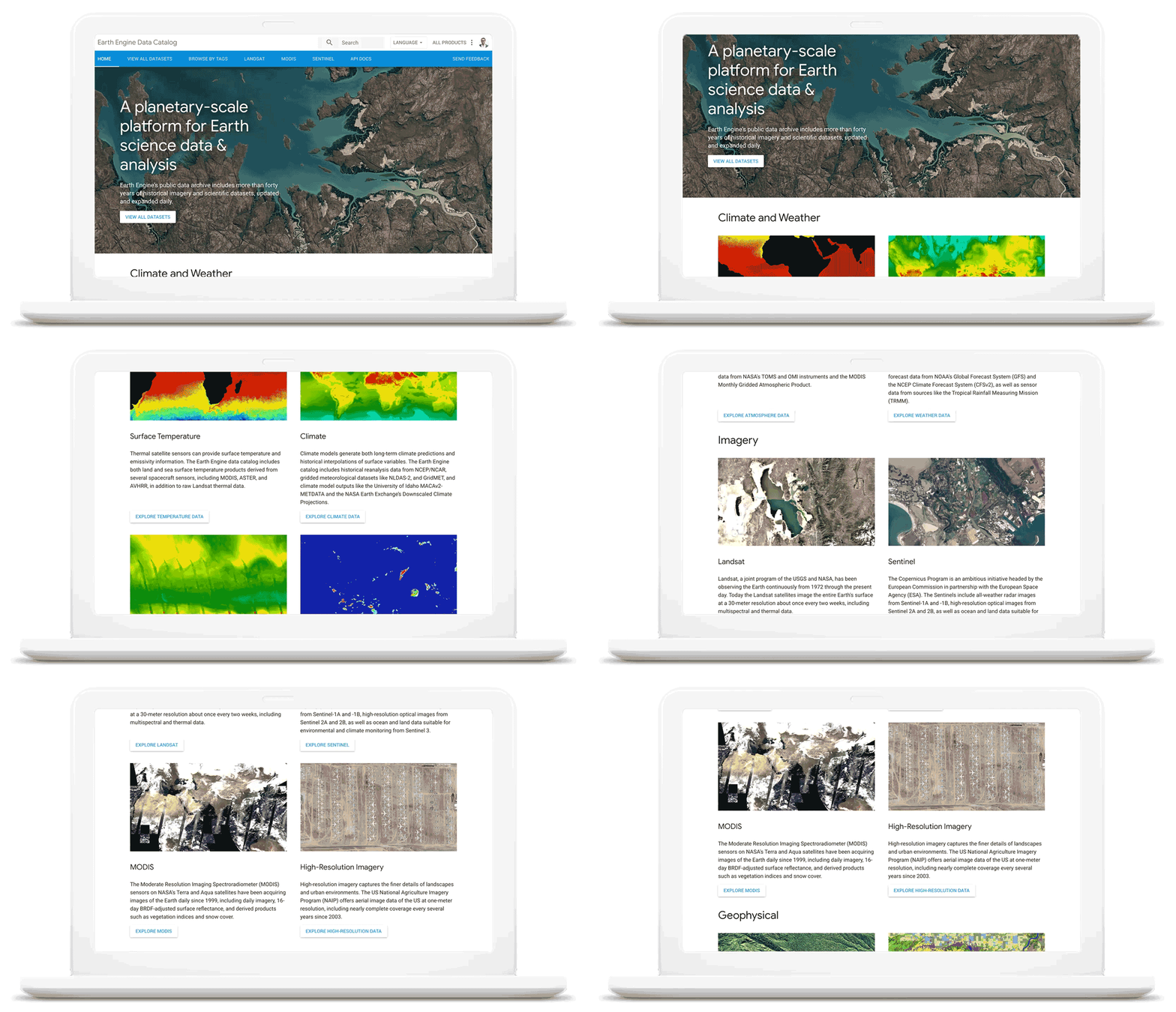
Many of our customers face difficult questions about how their business impacts the natural environment today, and how it will be affected by climate change in the future. Answering these questions requires rich datasets about the planet, better analytics tools and smarter models to predict potential outcomes. For over a decade Google Earth Engine has supported scientists and developers with hyperscale computing power and the world’s largest catalog of satellite image data. Today, we are delighted to announce the preview of Earth Engine as part of Google Cloud Platform. Now, you can access Earth Engine and combine it with other geospatial-enabled products like BigQuery. By extending Earth Engine’s powerful platform to enterprises through Google Cloud, we are bringing the best of Google together.
Over the past year we’ve worked with a number of organizations to use Earth Engine technology with tools like BigQuery and the Cloud AI Platform to develop new solutions for responsible commodity sourcing, sustainable land management and carbon emissions reduction. Earth Engine enables companies to track, monitor and predict changes in the Earth’s surface due to extreme weather events or human-caused activities, thus helping them save on operational costs, mitigate and better manage risks, and become more resilient to climate change threats. This new offering will wrap the unique data, insights and functionality of Earth Engine with a fully-managed, enterprise-grade experience and reliability.
As we work with our customers to accelerate their sustainability initiatives, earth observation data is proving critical to effectively plan for the long-term impacts of climate change. To extend our geospatial and sustainability use cases we’re also expanding our partnerships with CARTO, Climate Engine, Geotab, NGIS, and Planet to bring their data and core applications to Google Cloud.
These partners will each make their existing platforms and datasets available globally on Google Cloud, giving you low-latency and reliable access to critical data and applications that will inform your sustainability initiatives. By integrating water availability, agricultural data, weather risks, and extensive daily satellite imagery into Earth Engine and BigQuery, you can achieve more ambitious goals for the sustainability of your business and our planet.
Committing to help you meet your climate goals
With each of these tools, we’re working to reduce the barriers you face in adopting more sustainable technology practices. We understand that building more sustainable applications and infrastructure is not easy. You face competing priorities, technical challenges, and the perception that climate action is costly.
It doesn’t have to be this way. Today, we are making a sustainability pledge to you: teams across Google Cloud are committing to eliminating the barriers you face in building a more sustainable digital future for your organization, and will help you take action today to realize your climate goals. We’ll do this in a number of ways:
- In digital transformation projects and workshops, sustainability teams will always have a seat at the planning table, so we can work together on using cloud technology to build a more sustainable future.
- We’re putting low-carbon signals natively into our products to help developers choose more sustainable options early in their application development.
- We’ll ensure carbon impact is measured consistently with other key performance indicators. Leveraging the social cost of carbon, the ROI models and value assessments you conduct with Google Cloud will project your emissions impact too.
- We’ll be transparent about our carbon impact, by publishing third-party reviewed reports and methodologies, so you can trust the data for your own reports and disclosures.
- We’ll continue to work with the industry on best practices, including educational resources like Sustainable IT – Decoded, a new masterclass created in partnership with Intel, that shares the expertise of sustainability thought leaders.
For the next decade we need to work together to avert the worst consequences of climate change. We’ve made tremendous progress in building technology that helps everyone do more for the planet, and we’re excited to see what you do with it. Visit this page to learn more about Google Cloud’s sustainability efforts.
Use No-Cost Solutions To Bring ML Into Your Medical Research

2489
Of your peers have already read this article.
3:30 Minutes
The most insightful time you'll spend today!
There’s a lot we can learn from combining technology with science to help support the development of amazing discoveries. By using an AI system to predict protein shapes, we have the potential to accelerate research in every field of biology. Inside every cell in your body, billions of tiny molecular machines are hard at work. They are what allow your eyes to detect light, your neurons to fire, and the ‘instructions’ in your DNA to be read.
These intricate machines are known as proteins.
The protein folding puzzle
Protein folding is something that occurs naturally so that proteins become biologically functional, but it’s a complex process that sometimes fails. For decades, scientists have been trying to find a method to reliably predict a protein’s structure from its sequence of amino acids so we can better understand how proteins work.
The challenge? There are over 200 million known distinct proteins. Each one has a unique 3D shape that determines how it works and what it does. Because there are so many sequences and determining their 3-D structure experimentally is so time-consuming and expensive, scientists only know the exact structure of a tiny fraction of the proteins. And these experimental methods still fall far short of reliable statistical accuracy.
Deepmind’s gigantic leap
In 2020, Alphabet’s artificial intelligence research arm, DeepMind, made a massive breakthrough in predicting protein structures using a deep learning model called AlphaFold.
AlphaFold is trained on publicly available data consisting of about 170,000 protein structures, and is the first computational method that can regularly predict the 3D shape of a protein, at scale with a high degree of accuracy.
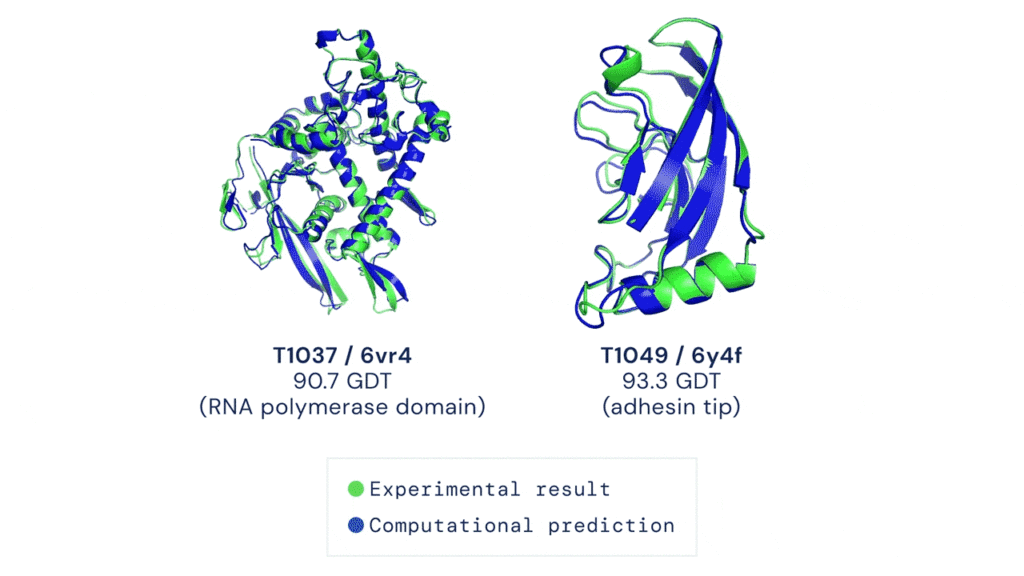
AlphaFold has already sent waves throughout the scientific community and has demonstrated the potential for AI to aid fundamental scientific discovery. Recently, Deepmind has made AlphaFold predictions available and open source to anyone. To date, more than 500,000 researchers from 190 countries have accessed the AlphaFold protein structure database to get closer to finding life-saving cures for diseases like Leishmaniasis and Chagas.
And now Deepmind has expanded the set of available predictions by more than 200 times (from nearly 1 million to nearly 214 million) to cover almost all cataloged proteins found in nature.
Open source predictions available on Google Cloud
Together, Google Cloud and Deepmind have released this dataset of predicted protein structures for plants, bacteria, animals, and other organisms as part of the Google Cloud Public Dataset program to enable bulk downloads at no cost. That means you can also create custom queries of the dataset using BigQuery!
Running AlphaFold on Google Cloud Vertex AI
Let’s say you want to run AlphaFold on your own in order to get protein structure predictions against your own set of data. There are a few challenges to keep in mind:
- You need to set up feature engineering against genetic sequence databases
- Preprocess data
- And run those inputs against pre-trained models
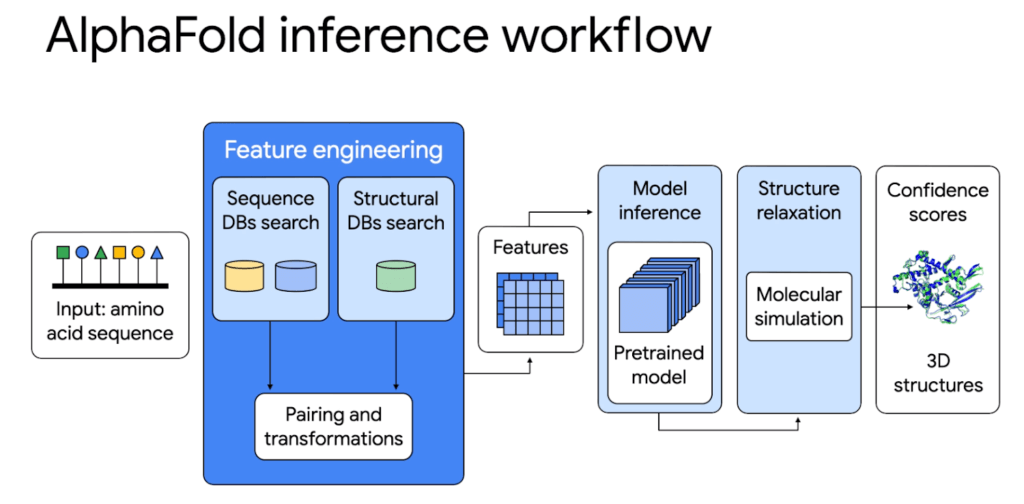
All of this requires allocating CPUs or GPUs, hosting a notebook environment, and scaling up for larger experiments. It’s hard to build and configure an on-premise system or cloud server to use AlphaFold whether you just want to try it out or run it at scale as a large organization.
That’s why we’re excited to share a deep integration between Google Cloud and Deepmind. On top of the Public Datasets program we have created end-to-end code samples for AlphaFold on Vertex AI, a managed end-to-end ML platform, to help address these challenges and speed up deployment. With AlphaFold on Vertex AI, you can manage a data science or machine learning workflow in a single development environment. You get access to pre-configured compute, storage, and end-to-end production notebooks. We have removed the heavy lifting needed to set up new ML environments, automate orchestration, and manage large clusters.
The AlphaFold inference workflow can be simplified with Vertex AI: from data preparation to feature engineering and deployment. Unlike the manual set up, the orchestrator makes it possible to parallelize steps, get predictions faster, and with better tracking.
Try it out first using Vertex AI Workbench
For those of you who want to try out a simplified version of AlphaFold, we have a Colab notebook that uses no templates (homologous structures) and a selected portion of the BFD database. You can deploy right on Vertex AI Workbench, which lets you specify a custom container image that we’ve already created for you. You’ll be able to:
- Configure access to genetic databases
- Configure GPU acceleration
- Search against genetic databases
- Use the pre-processed results as inputs to the AlphaFold model locally
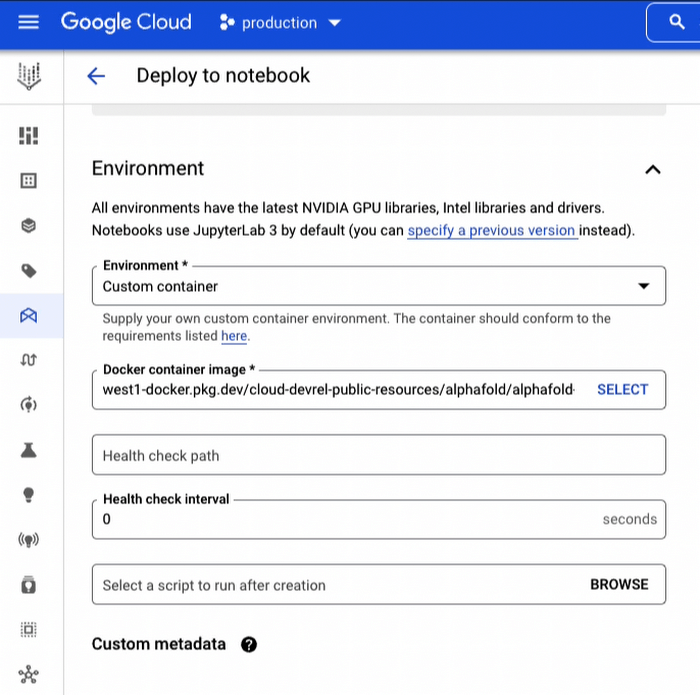
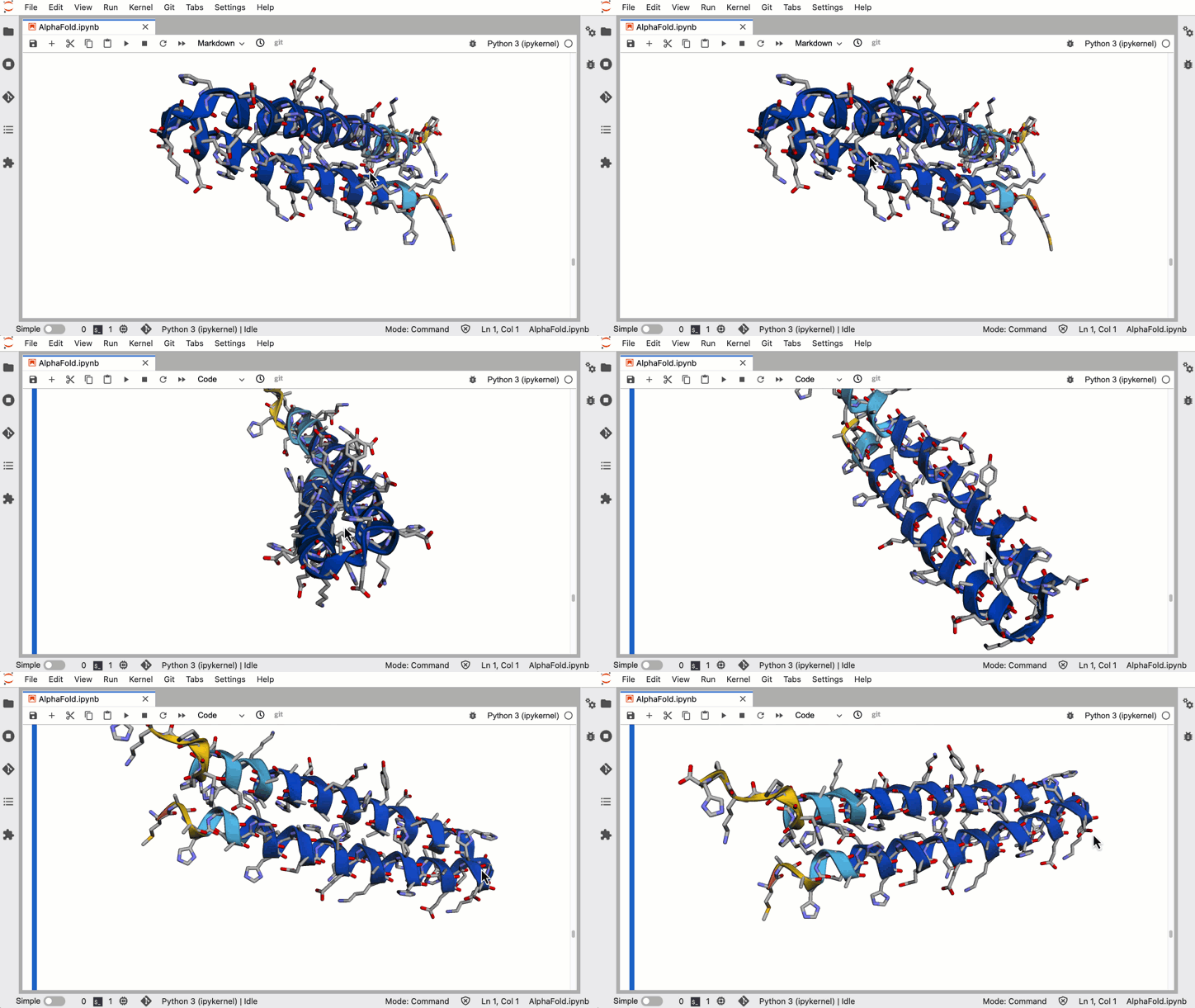
In a little over an hour you can harness the power of AlphaFold to generate 3-D protein structures from amino acid sequences.
Run hundreds of experiments reliably using Vertex AI Pipelines
For organizations that want to run a full blown version of AlphaFold for many protein folding experiments a week, you’ll want an ML pipeline orchestrator. The AlphaFold Batch Inference solution is a set of code samples that uses Vertex AI Pipelines to support hundreds of concurrent inference pipelines with higher throughput to help you run experiments at scale. The solution uses Vertex AI Pipelines as an orchestrator and runtime, Vertex ML Metadata for metadata and artifacts, and Cloud Filestore to manage databases.
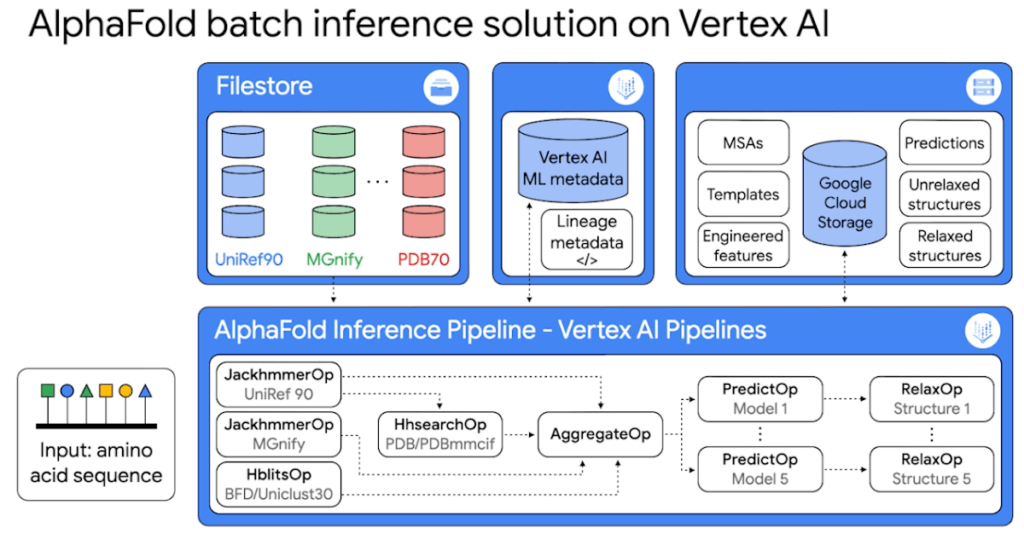
Because it’s built on Vertex AI Pipelines, you can automate, monitor, and experiment with interdependent parts of an ML workflow. The minimized inference elapsed times mean what normally would take you days, can now take you hours.
The solution includes two example pipelines:
1. The universal pipeline solution mirrors the exact logic in DeepMind’s open source inference script but decoupled into discrete tasks so you can run the same experiments faster, more efficiently, and with better tracking.
2. The customized pipeline solution shows you how to further optimize the inference workflow by parallelizing feature engineering steps so you can plug in your own database sources.
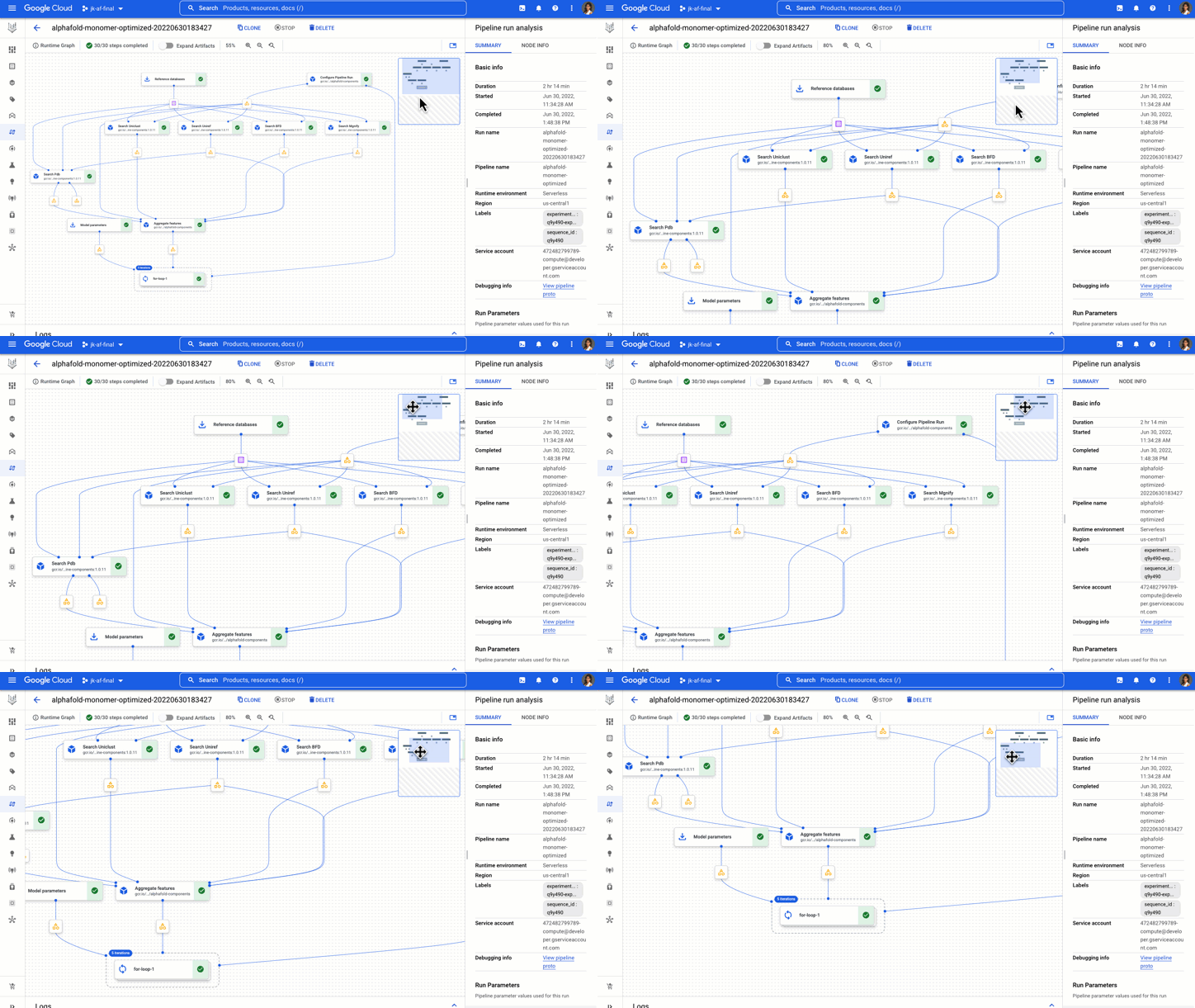
You get example components, pipelines, and notebooks to start, analyze, and recompile pipelines on different GPUs.
The AlphaFold Vertex AI Workbench solution is great for experimental use, while the AlphaFold Batch Inference solution on Vertex AI Pipelines is great for doing protein folding at scale with a strong process for reproducibility and tracking.
Now go forth and save the world!
Okay maybe that’s a bit hyperbolic, but this is inspiring stuff! What started as a 50 year challenge, to the discovery of AlphaFold, to being able to run it on Google Cloud, researchers, developers, and science enthusiasts now have access to one of the most pivotal advancements in the medical world. Even a non-specialist can easily use a Vertex AI notebook to exercise a simplified version of AlphaFold. The next answers to the mysteries of life and discovery of disease treatments have never felt more attainable. With these no-cost solutions to run AlphaFold on Vertex AI and the Public Dataset, you can help propel us in this worldwide endeavor.
Learn more about healthcare and life sciences solutions on Google Cloud here.
If you have feedback or want to share your experience with me, reach out to me at @stephr_wong.
More Relevant Stories for Your Company




Baking Gets Sweeter: Build ML Models that Help Predict the Best Recipe!
Baking recipes and ML models have one thing in common—they follow a pattern. Machine Learning is all about finding pattern in data sets, you can predict what you are baking based on the core ingredients and their respective amounts! Bread, cake or cookies, watch the video to make you make

How to Build A Basic Image Search Utility for Natural Language Queries
This post shows how to build an image search utility using natural language queries. Our aim is to use different GCP services to demonstrate this. At the core of our project is OpenAI's CLIP model. It makes use of two encoders - one for images and one for texts. Each encoder
Trend 2: Google Research on Machine Learning Themes for 2022 and Beyond!
Trend 2: Continued Efficiency Improvements for MLImprovements in efficiency — arising from advances in computer hardware design as well as ML algorithms and meta-learning research — are driving greater capabilities in ML models. Many aspects of the ML pipeline, from the hardware on which a model is trained and executed

Partnering with Google Cloud is the Key Behind Recent Healthcare Innovations
It’s simply amazing to witness how some of our systems integrators employ Google Cloud solutions to drive innovation in ways we at Google may never have considered—especially in healthcare. According to analyst firm MarketsandMarkets, the market for the Cloud in healthcare is projected to grow 43% between 2020 and 2025
