





Reference Guide to Get You Started with Development on GKE

5550
Of your peers have already read this article.
1:30 Minutes
The most insightful time you'll spend today!
Getting started with Kubernetes is often harder than it needs to be. While working with a cluster “from scratch” can be a great learning exercise or a good solution for some highly specialized workloads, often the details of cluster management can be made easier by utilizing a managed service offering. Google Kubernetes Engine (GKE) allows for an easier end-to-end developer experience with convenient tooling and built-in integrations along with the convenience of offering Kubernetes clusters as a managed service.
GKE is the most mature container orchestration service available today, delivering a fully-managed service and hands-off experience with the GKE Autopilot mode of operation. GKE provides industry-first capabilities such as release channels, multi-cluster support, unique four-way auto scaling, node auto repair, and can support up to 15K nodes in a single cluster.
Our modern, end-to-end platform is built on cloud-native principles you are already familiar with and prioritizes speed, security, and flexibility, in ways that are highly differentiated from other cloud platforms.
We have put together a new reference guide for you as you begin your journey developing on GKE. It covers every step of your journey from writing, running, operating, to managing code. Even if it isn’t your first time using GKE, this e-book will be a valuable resource highlighting important considerations and best practices. By implementing the technical recommendations, following the steps, and utilizing the tools described, you can reach the following goals:
- Write, deploy, and debug code faster with Cloud Code and Cloud Shell
- Continuously integrate and deliver updates with Cloud Build
- Run easily, securly, cost effectively at scale with GKE
- Monitor and troubleshoot with Google Cloud’s operations suite
Kick-start your journey by downloading the e-book and join us live June 22 at 9am PDT for our half-day Cloud OnBoard event: Getting Started with Google Kubernetes Engine.
4883
Of your peers have already watched this video.
9:37 Minutes
The most insightful time you'll spend today!
L’Oréal: Managing Big-data Complexity with Google Cloud
L’Oreal is a global company with a presence in 150 countries worldwide. Between managing all of its brands and requirements for different countries, L’Oreal looks to data to make insightful business decisions. How does L’Oreal unify its data across all its systems and databases? How does L’Oreal make the data accessible to thousands of employees? In this video, Antoine Castex, Enterprise Architect at L’Oreal, discusses with Martin Omander how L’Oreal built a serverless, multi-cloud warehouse based on Google Cloud.
Chapters:
0:00 – Intro
0:23 – Why does L’Oreal need a new data warehouse?
0:51 – Who is the L’Oreal group?
1:35 – Which systems does L’Oreal use?
2:14 – How does L’Oreal manage complexity?
3:59 – What is ELT?
4:57 – Who are L’Oreal’s data consumers?
5:41 – How L’Oreal built the data warehouse
8:51 – L’Oreal’s future plans
9:10 – Wrap up
Google Cloud Workflows → https://goo.gle/3q20M1V
Cloud Run → https://goo.gle/3CSWbXG
Eventarc → https://goo.gle/3B7qhFy
BigQuery → https://goo.gle/3KHgyJ3
Looker → https://goo.gle/3Rx4Ind
Checkout more episodes of Serverless Expeditions → https://goo.gle/ServerlessExpeditions
Subscribe to Google Cloud Tech → https://goo.gle/GoogleCloudTech
An Expert’s Guide to Productivity and Well-being while Embracing WFH and Hybrid Style

4393
Of your peers have already read this article.
1:30 Minutes
The most insightful time you'll spend today!
Driving impact over output in a new era of work
As Google’s productivity advisor, I spend a lot of time coaching executives on ways they can make the most of their work day. Over the years, people have come to me with very different ideas about what productivity is, why it matters, and how to achieve it. Often, they think it’s about extracting every last ounce of output from a day—likely because the idea of productivity comes from economics and is most closely associated with factory conveyor belts and efficiency.
My definition of personal productivity is different. It’s less about getting as much as you can out of each day and more about achieving the things you set out to accomplish and making an impact.
Productivity is grounded in understanding yourself as a whole person. What makes you happy at work and outside of work? What are your natural rhythms and peak times for creativity, focus, or efficiency? When are you most engaged in meetings? What makes you feel unstoppable when responding to emails? And when do you need to take a break, do some uninterrupted thinking, or deepen social connections with your colleagues?
When people don’t understand these aspects of productivity, they struggle to make an impact—no matter how well they manage their calendars and inboxes.
During the global pandemic, we’ve realized the importance of sustaining the wellbeing of ourselves and our families, setting healthy boundaries, and bringing intention to the work day. Among those lucky enough to have the flexibility to work from home, many had to juggle new obligations, from homeschooling to caregiving. And without a solid plan in place, people often found themselves working longer hours and facing burnout.
Now, even as the pandemic enters new and unforeseen phases, many organizations are gearing up for a hybrid work model, Google included. As we make those plans, it’s important that people take a fresh look at personal productivity and plan to maximize wellbeing and impact across all the places they work.
I developed this new guide with these challenges in mind. It gathers up all my best productivity and wellbeing tips from over the years, including how to:
- Rethink your time and your calendar
- Transform your inbox
- Make meetings more meaningful
- Bring productivity and wellbeing together
As we embrace new ways—and places—of working, all these areas feel more important than ever.
Download The Google Workspace guide to productivity and wellbeing.
Ease Your Migration and Modernization Journey with Microsoft and Windows on Google Cloud Demo Center

8265
Of your peers have already read this article.
2:00 Minutes
The most insightful time you'll spend today!
If you’re looking to migrate and modernize your Microsoft and Windows workloads, Google Cloud is your premiere destination. No matter what migration strategy you’ve selected or what value you’re looking to achieve, with Google Cloud you’re able to:
- simplify your migration and modernization journey
- reduce your on-prem footprint and increase agility
- optimize license usage to reduce costs
- modernize to reduce single-vendor dependencies
- rely on enterprise-class support backed by Microsoft
Whether you’re looking to migrate applications running on Windows virtual machines, adopt Windows containers in Google Kubernetes Engine (GKE), convert SQL databases to Cloud SQL, or something else, Google Cloud offers you the first-class experience you need.
But we don’t want you to take our word for it. Try it out yourself with our new online Microsoft and Windows on Google Cloud Demo Center without any commitment or friction.

The demo center uses hands-on guided simulations to walk you through several scenarios for solving business critical challenges with Google Cloud’s Microsoft and Windows solutions. Because these are all simulated, you’ll see how it works without any deployment, configuration, or commitment. It’s a seamless way for you to see exactly how Google Cloud can help you.
Run dedicated hardware and optimize with sole tenant
Sometimes you might want to run your workloads on dedicated hardware (with oversubscription options) for compliance, licensing, and management. Google Cloud provides sole-tenant nodes that allow you to easily deploy your virtual machines onto dedicated machines to avoid “noisy neighbor” issues, address regulatory or licensing constraints, and optimize inter-VM communications.
Plus, the CPU Overcommit option allows oversubscribing sole-tenant node resources by up to 2x, therefore helping save on per-physical core licensing for many licensed workloads like SQL Server.
Learn how to set up a sole tenant group and node.
Optimize license costs with premium images & custom VMs
One of the easiest ways to optimize your cloud experience with virtual machines (VM) is to pick the right VM image. Google Cloud provides premium license-included VM images that are thoroughly tested and optimized, including SQL Server options with pay-as-you-go licensing. These are great for workloads that don’t need to run all the time or when you do not have spare licenses for bring your own license (BYOL).
Explore some Windows & SQL images and learn how CPU/Memory options can help optimize deployment and save on licensing.
Modernize your databases with Managed SQL Server
Sometimes you need to manage your SQL Server instance to achieve certain business or operational goals. But more often, managing SQL Server deployments can be undifferentiated: backups, high-availability, updates, and patching are just some of the many things you have to take care of when going the do-it-yourself route. One way to modernize your database tier is to migrate to a managed service like Cloud SQL, which is a fully managed Relational Database service for SQL.
Explore the process of creating an instance in just a few clicks!
Extract apps from VMs and move to containers in GKE with Migrate for Anthos
Many Windows workloads running on virtual machines such as Internet Information Services (IIS) are ideal candidates for migrating to containers without major changes like rewriting or rearchitecting. However, doing this migration manually can be tedious, which is why Migrate for Anthos can help easily re-platform a .NET app running on IIS into a container-based app.
Simulate intelligently extracting, migrating, and modernizing applications to run natively on containers in GKE and Anthos clusters.
Move .NET applications to GKE on Windows without code changes
When you’re looking to go fully cloud native, you can leverage Windows containers in GKE without rewriting your .NET applications. Simply create clusters with Windows nodes and deploy containerized Windows workloads in a few clicks, even alongside Linux containers. These deployments reduce operational overhead with features such as auto-upgrade, auto-repair, and release channels.
Learn how easy it is to build a GKE cluster with a Windows node and deploy an app.
Now that you’ve gotten a feel for what’s available, go check out the Demo Center. You can also visit us at Windows and Microsoft on Google Cloud to learn more.

Google Workspace is a Highly Robust and Functional Collaboration Platform: Study Confirms
DOWNLOAD INFOGRAPHIC3446
Of your peers have already downloaded this article
3:00 Minutes
The most insightful time you'll spend today!
A recent IDC study on Google Workspace observed the productivity and economic benefits of the collaboration platform on many organizations. The findings revealed that 14 percent increase in daily productivity among Google Workspace users, 412 percent 3-year ROI and payback period of 11 months! Transform your teams’ productivity goals, enhance workplace communication and collaboration as well as experience operational gains with productivity and collaboration tools designed for the modern, hybrid workforce.
Download the infographics to read up more from IDC study on the Business Value of Google Workspace now!
3955
Of your peers have already watched this video.
36:30 Minutes
The most insightful time you'll spend today!
Lessons for the Indian Government: How the State of Arizona Innovates with Emerging Tech
Government agencies of every size and jurisdiction are being called upon to provide accurate and real-time information and deliver essential services across the globe in a world infested by COVID-19.
Doug Lange, Chief Strategy Officer, state of Arizona, is primarily responsible for two things. One is Arizona’s statewide IT Strategic plan. The other to find different ways to promote emerging technologies across the state of Arizona.
Arizona is constructed of roughly 130 agencies, boards, and commissions. You have everything from the Department of Transportation to the Department of Revenue, all the way down to the Board of Nursing or the Board of Barbers. An important call-out for the state of Arizona: It’s a Federated state. That means every one of the agencies have the ability to make decisions. Lange works with an asset, which would be the Arizona Strategic Enterprise Technology office, also known as the Office of the State CIO.
“Our charge is really to partner with the governor’s office, and find ways to really promote enterprise opportunities
across all 130 agencies across the state of Arizona, to really find those wins. And when you start to dig into our why,
I think that makes a little more sense. How do we run government at the speed of business,
start to break through some of those barriers, and ultimately, find efficiencies that are going to be real savings and real wins for the citizens that are ultimately consuming the services for our agencies,” says Lange.
So with that charge, technology plays a huge part. And not only is technology a part of what any organization is doing, whether you’re talking about the public sector or private sector. But when you get into government,
there are just so many different ways that emerging technologies can really make a difference, says Lange.
Find out how Lange is enabling the State of Arizona with emerging technologies that support remote working and meetings for government officials and ensuring they quicken decision-making and serve citizens efficiently.
More Relevant Stories for Your Company




Tech Helps This In-Home Healthcare Service Focus on Making Lives Better and Save Costs by 23%
Buurtzorg is an in-home healthcare organization based in the Netherlands, with more than 15,000 nurses working in small community teams across Europe. Working in small teams of empowered, highly qualified professionals, Buurtzorg provides nurse-led community care across the Netherlands. But as the number of clients grew, it was getting difficult for nurses
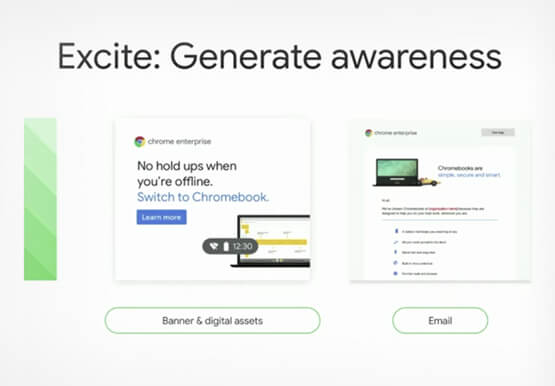
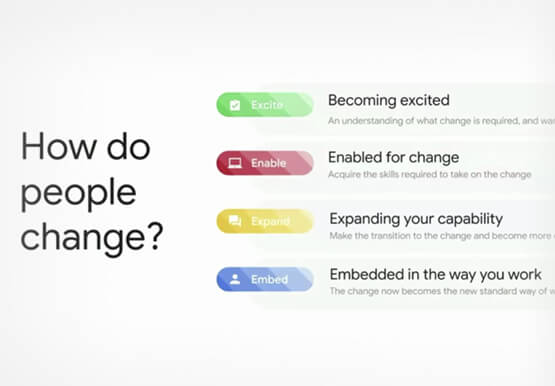
Boosting Chrome OS adoption with effective change management
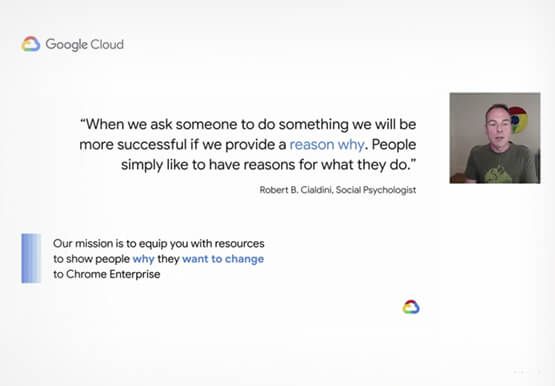
Can you remember the last time you asked a child to do something how did you convince them to do what you wanted? How many times did they ask you why probably more than once, right? So we know change is hard when we ask someone to make a change

Now on Mobile: Manage Your Google Cloud Support Cases Anywhere, Anytime
We’re excited to announce that Google Cloud Support is now available as Public Preview* in the Google Cloud mobile app. View and manage Google Cloud Support cases We understand how important it is to be able to access and collaborate on Cloud Support cases. As such, we’ve made it easy for you to

Transport Platform’s Richly-detailed Geospatial Data Allows Commuters to Track Buses in Real-time!
Vinayak Bhavnani, Co-Founder and CTO of India-based bus transport technology company Chalo, shares how Google Maps Platform is used to improve visibility for commuters and bus operators across India by visualizing geospatial data. Effective public transport networks contribute to the local economy and help make cities safe, pleasant, and sustainable.
