





Active Assist Expands Globally: Unleashing Cloud Optimization Insights Worldwide

1290
Of your peers have already read this article.
3:30 Minutes
The most insightful time you'll spend today!
Active Assist provides insights and recommendations to help Google Cloud customers proactively optimize their cloud environments for cost, security, performance, and sustainability. If you’re like most customers, you’ve likely encountered these insights and recommendations in the console — either in the Recommendations Hub or embedded on a resource page, like IAM or the VM list pages. (Note that for the rest of this post, we’ll use the word “recommendations” to mean “insights and recommendations.”)
We heard from customers who love recommendations that it should be easier to discover and work with these valuable suggestions across an entire organization, so last year we launched the Recommendations BigQuery export feature to Preview. This allows you to automatically export the recommendations to a BigQuery dataset, which you can then investigate with tools like DataStudio or Looker, and integrate with your company’s existing monitoring solutions and workflows.
Many of you have told us how powerful this feature is, so we’ve been working hard on improvements to make it even more useful. We’re happy to announce that BQ Export 1.0 is now in GA, and that BQ Export 2.0 is in Preview, with new support for Billing Account-level recommendations and cost optimization recommendations that include discount information. This post will cover what’s new with Active Assist BQ Export, as well as a couple other new features of Active Assist.
New features to Active Assist BigQuery Export
Before we dive into the details, if you’re new to Recommendations BQ Export check out our handy getting started guide. It covers the permissions you’ll need and how to set up the export, including instructions for using a service account. It also includes some sample queries and instructions for interacting with the data using Google Sheets. You may also want to check out our prior blog post showing how to optimize your cloud spend with BigQuery and Looker.
Now, on to what’s new!
1. Non-project scoped recommendations
You can now see non-project scoped recommendations, such as billing account, organization, and folder-level recommendations in your export to BigQuery. This ensures that in your export, you are able to see the full portfolio of recommendations that are available to you.
2. Custom contract Pricing
If you have any applicable custom contract pricing for your company, your cost-related recommendations now take those into account (based on your historical costs) in the cost saving calculation when you export them to BigQuery. This will ensure that you have the most accurate cost savings data we have for you and your organization to help you make the best judgment and prioritization when choosing to adopt recommendations. However, you must have the correct permissions first in order to see the custom contract pricing. If the user executing the export to BigQuery does not have the correct permissions, you may continue to see list pricing in your estimated savings. Also, note that the console UI and the Recommender API already have this support.
3. Export now available globally
Customers outside of the US can now set up an export of recommendations to a BigQuery dataset.
Improvements to Active Assist discoverability and usability
1. Global Recommender Viewer role: You can now add the global Recommender Viewer role, which gives you view access to all insights and recommendations available to you, simplifying permission management for new recommenders. Newly launched recommendations will also automatically be added as they become generally available.
2. Dismiss recommendations via Recommender API: You can now directly dismiss recommendations via our API, allowing you to focus on the recommendations you care about and work more efficiently.
3. Shareable links: Another feature that quietly launched recently is the availability of shareable URLs that link to recommendation details in the console. You can access these links in the UI from the upper right of the details panel of any recommendation.
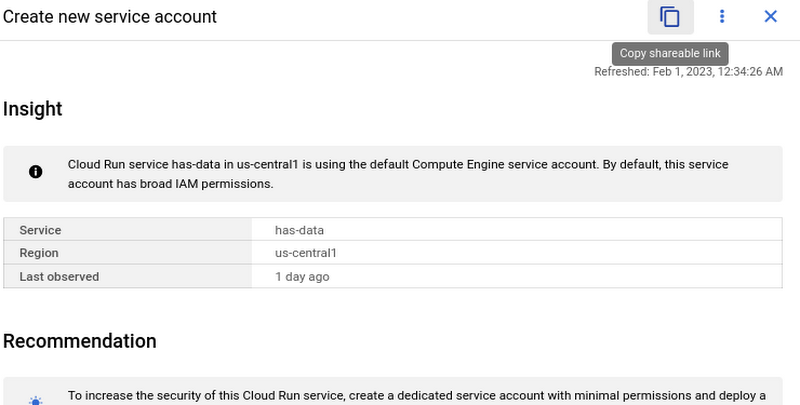
However, these links become even more powerful when combined with Recommendations BigQuery Export. The URLs all have a standard format. This means that within the BigQuery export tables you can easily calculate a new column containing these links using an expression like:
“https://console.cloud.google.com/home/recommendations/view-link/” +
name +
“?project=” +
cloud_entity_id
This example is for project level recommendations (where cloud_entity_type = PROJECT_NUMBER).
For cloud_entity_type = FOLDER, use:
“https://console.cloud.google.com/home/recommendations/view-link/” +
name +
“?folder=” +
cloud_entity_id
For cloud_entity_type = ORGANIZATION, use
“https://console.cloud.google.com/home/recommendations/view-link/” +
name +
“?organizationId=” +
cloud_entity_id
These links can then be embedded in your reports and dashboards, or used by other BigQuery clients.
As a reminder, if you’re interested in setting up reports or dashboards using Recommendations BigQuery Export, take a look at this previous blog post for some great ideas, or you can reference our getting started guide. If you have any feedback, please feel free to reach out to active-assist-feedback@google.com.
Bringing Multiple Security Elements Together: Chrome

5388
Of your peers have already read this article.
2:00 Minutes
The most insightful time you'll spend today!
Security and the way we’ve been able to advance user protections over the years is hands down one of my favorite topics when it comes to Chrome. I’ve been on the Chrome team for over 14 years and have seen the browser evolve to become a critical tool that helps people get work done at home or in the office. At the same time, Chrome is often the best line of defense to protect users against malicious software on the internet.
Now more than ever, security has to be top of mind for IT and security teams. Cybercrime is up 600% due to the COVID-19 pandemic, and remote work has increased the average cost of a data breach by $137,000. Those numbers are staggering. And IT teams need to make sure every piece of their tech stack helps support their security needs.
Chrome has worked for years to quickly mitigate risks, block malicious sites and content, and proactively improve web security to keep your users and corporate data safe, pioneering new layered defenses like sandboxing and site isolation. When we think of security and Chrome, we believe it takes multiple elements of security coming together to give organizations the best protection possible.
Security you don’t have to think about: Chrome has many built in protections in place by default that benefit all users. This includes our team’s work to minimize zero days and roll out fixes quickly. With auto updates enabled, Chrome offers enterprises fast and automatic fixes for zero day vulnerabilities. The Chrome security team recently published a post explaining the state of in-wild-bugs that’s worth a read. More examples of the defense-in-depth Chrome offers include capabilities like site isolation and sandboxing that keep malicious code from affecting other visited sites or impacting user machines. Our scanning infrastructure helps us detect and remove harmful extensions from the Chrome Web Store (in fact, last year we saw an almost 90% drop in malware) to prevent your end users from getting infected with malicious extensions. These are protections built directly into Chrome that automatically keep your users and organization safe.
Protections for Chrome users: We provide additional layers of protection that keep your end users safe while they’re on the web and give them helpful information whenever there are potential security risks. For example, Safe Browsing, offered natively in Chrome, helps protect devices by showing warnings to users when they attempt to navigate to dangerous sites or download malicious files. We also give users insights into the safety of their passwords, letting them know if their passwords have been compromised, or even prompting them to change their corporate password if they try to re-use it against company policies. You users are working hard to get things done, and Chrome’s layered security supports their workflows while helping them stay safe on the web.
Enterprise Controls: Every organization has unique security needs. That’s why Chrome provides enterprises with advanced safeguards and granular policy management to help meet those security goals. With hundreds of policy options, admins can use a variety of management tools, including Chrome Browser Cloud Management, to customize the browser. Chrome Browser Cloud Management goes even further, providing powerful enterprise extension management, a security priority for many organizations. Our extension request workflow allows end users to request extensions and admins to allow or deny extension requests. We also recently released extension pinning that allows admins to pin to specific versions of extensions to support any internal security review processes.
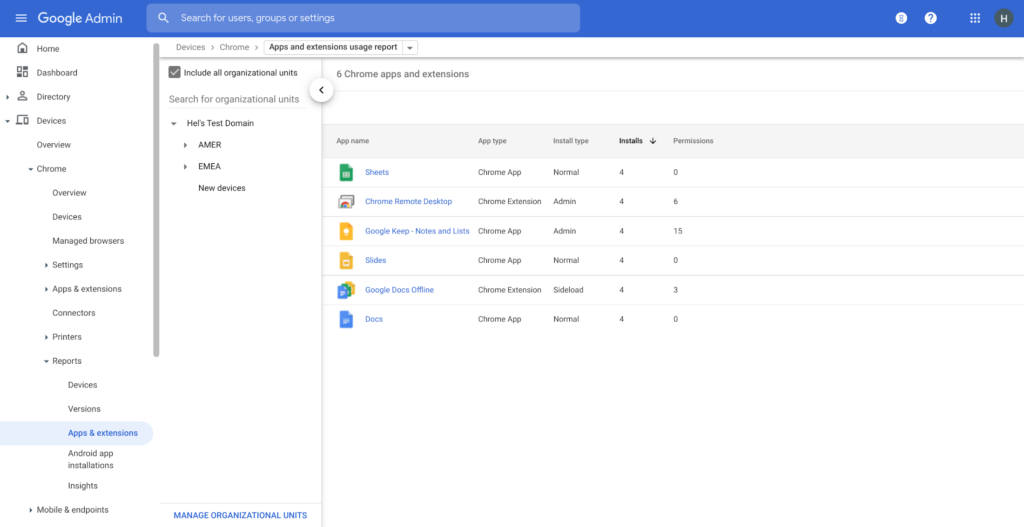
Visibility and reporting is another focus area to support IT teams. Through Chrome Browser Cloud Management, administrators can get more insight into their browser environment. This data can help IT teams make security decisions, better understand the devices running Chrome and investigate if issues arise.
Zero trust security: Finally, Chrome can help modernize an enterprise’s security strategy by migrating to Zero Trust access models. BeyondCorp Enterprise helps secure endpoints by directly integrating Threat and Data Protection in Chrome. This protects against intentional or accidental data loss and prevents malware and phishing in real-time. Additionally, Chrome and BeyondCorp Enterprise provide device trust and endpoint security signals directly from the browser, significantly easing deployment of zero-trust in your environment. In 2022, we plan to partner with leading players in the cybersecurity and zero trust space to add additional integrations.
For security recommendations, check out the new Chrome 2.1 CIS Benchmark that covers independent recommendations on which Chrome policies to configure to help support organizations’ security and compliance needs.
All About Cloud Run, its Scalability and Management Features

7404
Of your peers have already read this article.
3:00 Minutes
The most insightful time you'll spend today!
Mindful Containers is a fictitious company that is creating containerized microservice applications. They need a fully managed compute environment for deploying and scaling serverless containerized microservices. So, they are considering Cloud Run.
They are excited about Cloud Run because it abstracts away the cluster configuration, monitoring, and management so they can focus on building the features for their apps. Cloud Run is a fully-managed compute environment for deploying and scaling serverless containerized microservices.

What is Cloud Run?
Cloud Run is a fully-managed compute environment for deploying and scaling serverless HTTP containers without worrying about provisioning machines, configuring clusters, or autoscaling.
- No vendor lock-in – Because Cloud Run takes standard OCI containers and implements the standard Knative Serving API, you can easily port over your applications to on-premises or any other cloud environment.
- Fast autoscaling – Microservices deployed in Cloud Run scale automatically based on the number of incoming requests, without you having to configure or manage a full-fledged Kubernetes cluster. Cloud Run scales to zero— that is, uses no resources—if there are no requests.
- Split traffic – Cloud Run enables you to split traffic between multiple revisions, so you can perform gradual rollouts such as canary deployments or blue/green deployments.
- Custom domains – You can set up custom domain mapping in Cloud Run and it will provision a TLS certificate for your domain.
- Automatic redundancy – Cloud Run offers automatic redundancy so you don’t have to worry about creating multiple instances for high availability
How to use Cloud Run
With Cloud Run, you write your code in your favorite language and/or use a binary library of your choice. Then push it to Cloud Build to create a container build. With a single command—“gcloud run deploy”—you go from a container image to a fully managed web application that runs on a domain with a TLS certificate and auto-scales with requests.
How does Cloud Run work?
Cloud Run service can be invoked in the following ways:
HTTPS: You can send HTTPS requests to trigger a Cloud Run-hosted service. Note that all Cloud Run services have a stable HTTPS URL. Some use cases include:
- Custom RESTful web API
- Private microservice
- HTTP middleware or reverse proxy for your web applications
- Prepackaged web application
gRPC: You can use gRPC to connect Cloud Run services with other services—for example, to provide simple, high-performance communication between internal microservices. gRPC is a good option when you:
- Want to communicate between internal microservices
- Support high data loads (gRPC uses protocol buffers, which are up to seven times faster than REST calls)
- Need only a simple service definition you don’t want to write a full client library
- Use streaming gRPCs in your gRPC server to build more responsive applications and APIs
WebSockets: WebSockets applications are supported on Cloud Run with no additional configuration required. Potential use cases include any application that requires a streaming service, such as a chat application.
Trigger from Pub/Sub: You can use Pub/Sub to push messages to the endpoint of your Cloud Run service, where the messages are subsequently delivered to containers as HTTP requests. Possible use cases include:
- Transforming data after receiving an event upon a file upload to a Cloud Storage bucket
- Processing your Google Cloud operations suite logs with Cloud Run by exporting them to Pub/Sub
- Publishing and processing your own custom events from your Cloud Run services
Running services on a schedule: You can use Cloud Scheduler to securely trigger a Cloud Run service on a schedule. This is similar to using cron jobs. Possible use cases include:
- Performing backups on a regular basis
- Performing recurrent administration tasks, such as regenerating a sitemap or deleting old data, content, configurations, synchronizations, or revisions
- Generating bills or other documents
Executing asynchronous tasks: You can use Cloud Tasks to securely enqueue a task to be asynchronously processed by a Cloud Run service. Typical use cases include:
- Handling requests through unexpected production incidents
- Smoothing traffic spikes by delaying work that is not user-facing
- Reducing user response time by delegating slow background operations, such as database updates or batch processing, to be handled by another service,
- Limiting the call rate to backend services like databases and third-party APIs
Events from Eventrac: You can trigger Cloud Run with events from more than 60 Google Cloud sources. For example:
- Use a Cloud Storage event (via Cloud Audit Logs) to trigger a data processing pipeline
- Use a BigQuery event (via Cloud Audit Logs) to initiate downstream processing in Cloud Run each time a job is completed
How is Cloud Run different from Cloud Functions?
Cloud Run and Cloud Functions are both fully managed services that run on Google Cloud’s serverless infrastructure, auto-scale, and handle HTTP requests or events. They do, however, have some important differences:
- Cloud Functions lets you deploy snippets of code (functions) written in a limited set of programming languages, while Cloud Run lets you deploy container images using the programming language of your choice.
- Cloud Run also supports the use of any tool or system library from your application; Cloud Functions does not let you use custom executables.
- Cloud Run offers a longer request timeout duration of up to 60 minutes, while with Cloud Functions the requests timeout can be set as high as 9 mins.
- Cloud Functions only sends one request at a time to each function instance, while by default Cloud Run is configured to send multiple concurrent requests on each container instance. This is helpful to improve latency and reduce costs if you’re expecting large volumes.
Pricing
Cloud Run comes with a generous free tier and is pay per use, which means you only pay while a request is being handled on your container instance. If it is idle with no traffic, then you don’t pay anything.
Conclusion
After learning about the ease of set up, scalability, and management capabilities of Cloud Run the Mindful Containers team is using it to deploy stateless microservices. If you are interested in learning more, check out the documentation.https://www.youtube.com/embed/oR4btKLRdn4?enablejsapi=1&
For more #GCPSketchnote, follow the GitHub repo. For similar cloud content follow me on Twitter @pvergadia and keep an eye out on thecloudgirl.dev
How Google Classroom Helps State of Iowa Employees Serve the Public Better

5588
Of your peers have already read this article.
1:30 Minutes
The most insightful time you'll spend today!
Organizations are pressed with the need to engage, retain, and upskill employees with many positions staying fully or partially remote as the pandemic continues. The Center for Digital Government (CDG) reports that 74% of state and local governments believe they will continue hybrid operations for the long-term. This transition is the latest in a long list of reasons agencies are looking for solutions to help train their workforce digitally. Some have found Google Classroom to be the perfect solution.
The State of Iowa knew about the advantages of digital classrooms even before the pandemic. They were already successfully using Google Classroom for in-person training, making the transition to digital seamless when the state closed down. Jessica Van Heuveln, a Google support specialist for the State of Iowa CIO’s Office, says the switch to digital doesn’t deprive workers of hands-on training. “You can use Google Classroom for many different environments, so if you’re doing self-taught, in-person or virtual training, it’s going to work with all those approaches.”
The logistics of a digital classroom
Iowa uses Google Classroom to onboard and upskill employees as well as train volunteers. When the pandemic shifted the state’s workforce to 70% working from home, they needed a platform that could not only handle a vast range of topics and teaching styles to support remote workers but also scale to meet their demand. Van Heuveln notes that Google Classroom was particularly helpful for handling compliance training, especially with its integration with Google Meet. These trainings often require an entire sector of the workforce to attend a single class with more than 100 attendees, according to Van Heuveln. The logistics of these larger sessions cuts down on the number of total sessions the state needs to host. Iowa also found that employees were less apprehensive about learning when they could do it from the comfort of their own homes.
Iowa follows a train-the-trainer model to train employees expected to instruct using Google Classroom. Trainers working in departments across the state learn to use Google Classroom to create and host virtual learning experiences specific to their own departments.
Collaborative classrooms made simple
Google Classroom meets many needs for Iowa, such as setting up training, managing attendance, reviewing uploaded coursework, and communicating with attendees. Both course attendees and trainers have everything they need in one place, and robust engagement tools help attendees stay focused while giving trainers the feedback they need from their lessons. Built-in survey options let trainers gauge attendee knowledge, and the chat function ensures no one ever misses a question. The reporting dashboard gives trainers access to analytics to track engagement and attendance, providing insights that can improve future training sessions.
Google Classroom also makes it easier to ensure attendees stay on board throughout the training program. Coursework can be uploaded directly into Google Classroom, and training sessions can be recorded and archived. This feature allows employees to work at their own pace or lets them catch up when a scheduling conflict means they might miss a session.
The enterprise version of Google Classroom Iowa uses interfaces with other Google Workspace tools such as Google Meet, Google Calendar, Google Drive, and Gmail, which streamlines training and leads to more collaboration between employees and trainers. It can also interface with applications from other providers, further boosting its utility as an effective virtual classroom. Google Drive stores training materials securely. Lastly, Google Classroom enterprise comes with 24/7 support to make sure agencies always have everything they need for success.
Helping employees be better prepared to serve
Google Classroom can be a powerful part of any training program, whether it be digital or in-person. Building virtual connections empowers organizations to deliver better experiences. Google Classroom is helping the State of Iowa accomplish this for their constituents. Designed to scale and be accessible from anywhere, the platform helps public employees better serve the public. Virtual training strategies are essential for agencies that are looking to grow their workforce and build employee skill levels. The most important thing, however, is that training programs enable employees to further your agency’s mission. To learn more about Google Classroom and see more solutions designed with government in mind, check out the Google Cloud for government page.
Partner Delivery Excellence: Empowering Partners Deliver Customer value with Google Cloud

976
Of your peers have already read this article.
3:30 Minutes
The most insightful time you'll spend today!
With growing demand for Google Cloud, customers are increasingly expecting more reliable advisory and implementation skills from Google Cloud Systems Integrator (SI) Partners. Our model for professional services remains differentiated, with a heavy co-dependence on our SI Partner ecosystem to drive success for our customers. Therefore, enabling and nurturing strong delivery capabilities in our Partners is a responsibility we take seriously. The Google Cloud Global Services Delivery and Global Partner Ecosystem & Channels team jointly made significant investments earlier this year to underscore our commitment in this area. That’s why we’ve created the expanded Partner Delivery Excellence portfolio, a rich set of resources to help Google Cloud Partners deliver high-quality Google Cloud projects. Whether you’re a Partner just getting started with Google Cloud or have prior experience, we have the resources you need to succeed and we’ll meet you where you are in this journey.
Here are some of the key offerings in the Partner Delivery Excellence portfolio:

Stage: Building delivery skills | Pre-engagement
- Delivery Readiness Index (DRI): a framework that enables SI Partners to receive customized, individual level delivery enablement recommendations based on each consultant’s delivery readiness, assessed across training, certifications, delivery skills validation and prior delivery experience.
- Delivery Navigator (coming soon): A delivery management platform consisting of delivery methods, work management tools, and dashboards that enables Google PSO and Partners to drive a high-quality, globally consistent project experience. You’ll hear more about this in an upcoming blog post.
Stage: Develop delivery expertise | Preparing for a delivery project
- Delivery Runbooks: Workload-level detailed delivery guides which include reference architectures, detailed migration steps, validation guidelines, common troubleshooting tips and more.
- Delivery Bootcamps: In-person or hybrid mode multi-day sessions conducted by experienced Google Cloud Consultants and customizable to the specifics of a Google Cloud project for a customer.
- Use case learning: Self-paced learning in the form of bite-sized lectures to build foundational delivery skills at the workload level, with quiz based assessment to validate knowledge gained.
- Delivery labs: Hands-on labs, hosted on our Qwiklabs platform, that complement use-case learning to build and test core delivery skills through a series of practical delivery scenario challenges.
Stage: Leverage Google delivery SMEs | During active project delivery
- Onboarding accelerator: Enables Partners with advisory services to onboard customers on Google Cloud foundations and migrate the first workload quickly and efficiently, by imparting knowledge and best practices from the Technical Onboarding Center. Supported workloads span Infrastructure & Application modernization, Analytics & AI and Databases.
- Delivery Helpdesk: In-the-moment implementation support for Partners during a live Google Cloud project through a standard case management process. Google Global Services Delivery teams well versed in the technology area will advise and help Partners resolve the issue at hand.
- Delivery Assurance Services: Project-level safeguarding services that are delivered in the context of an active Partner-led customer project.
Stage: Leverage Google delivery expertise independent of projects | Build, scale and optimize Google Cloud practices
- Tooling advisory: Assessment of Partner tools with detailed recommendations to enhance tools architecture for better scale, security, ease of use and, where applicable, pointers to Google Cloud open-source tools and best practices.
- Resident Experts: We are selectively introducing this offering of specialists from Google Cloud Consulting teams embedded with Partners for a fixed period of time and with defined scope and deliverables. Partners can leverage these experts to build core delivery capabilities in new areas like generative AI, sharpen existing Google Cloud capabilities in adjacent solution areas like Data & Analytics or have access to expertise to define a comprehensive automation strategy for Google Cloud migration practices.
We are confident that the Partner Delivery Excellence portfolio brings forth much of what’s needed for our Partners to not only deliver high-quality services but also profitably grow their Google Cloud services business quickly and efficiently.
To learn more about the portfolio or to share your feedback or suggestions, please contact your Google Cloud Partner representative.
If you are attending Partner Summit during Google NEXT in August, we look forward to seeing you in the breakout series where we have a dedicated session on this topic.
Thank you for reading. And thank you for your partnership!
Google Cloud’s Virtual Appointment Scheduling Tool (VAST) Helps State of Arizona Recover from Unemployment Situation

6554
Of your peers have already read this article.
2:00 Minutes
The most insightful time you'll spend today!
When the world was forced to go primarily online, state governments also faced the reality of needing to provide community services without the health risk of meeting in person. Old systems that relied on interpersonal contact could not keep up. An unprecedented number of displaced workers swamped every unemployment system. The capacity challenges weren’t limited to state labor departments either. Everything from birth certificates and marriage licenses to apostilles and court system services that could usually be handled by a simple walk-in had to be scheduled in advance. Both internal and external communication suffered.
To meet these challenges, many organizations turned to new technology solutions and innovative approaches.
How VAST helped Arizona get back to work
The State of Arizona had tens of thousands of constituents who relied on pandemic unemployment insurance and would also need tools to reenter the workforce.Tim Tucker, Deputy Administrator of the Workforce Development Administration for the Arizona Department of Economic Security, started preparing in late 2020. He collaborated with Google Cloud and SADA to introduce the Virtual Appointment Scheduling Tool (VAST) to State of Arizona staff members. Using VAST reduced the excessive workload taken on by the Workforce Development Administration as they got Arizona back to work. VAST lets constituents book an appointment, upload documents and forms, and conduct career counseling virtually. This helped constituents move through the system faster so they could successfully reenter the workforce.
That preparation paid off. As of September 2021, Arizona had recovered the majority of the jobs lost during the pandemic. It has also seen one of the smallest percent change in employment compared with pre-pandemic numbers. Even more impressive, Arizona is one of only five states where unemployment claims are now lower than pre-pandemic numbers. Using VAST helped them get people back to work faster and has become a permanent part of their unemployment program.
Bringing streamlined services to the community
To fully realize a solution to the challenges faced by our public sector customers, we focused on three key areas in which we knew we needed VAST to excel:
- Efficient staff allocation
- Streamlined internal meetings
- Confident constituent interactions
We also knew our customers needed to get VAST online fast, and it needed to work with existing infrastructure without requiring a total overhaul. These areas informed the design of VAST’s features and have allowed us to meet the challenges faced by agencies such as the Arizona Department of Economic Security.
Virtual Agent support and integrations
VAST gives constituents 24×7 virtual agent support powered by Google Cloud’s contact center AI virtual agents. Virtual agents are custom programmed to fit the specific needs of each agency and community they serve. It’s easy to add new options and information whenever an update is needed. Virtual agents can be designed to understand the user’s intent and serve up relevant content for a smooth user experience on both ends of the system. Virtual agents run at scale and offer multi-language support, ensuring they can serve everyone in the community. By pairing these with VAST, constituents can experience seamless self-service.
6 week deployment time
Most of our public sector clients needed a solution yesterday. VAST can be deployed rapidly, taking about six weeks from start to finish, which includes everything–even staff training time.
Integration with Google Workspace and Chrome
VAST securely integrates with other Google solutions, such as Google Workspace and Chromebooks. We work to ensure VAST is fully functional within your existing systems.
Collaboration and support
SADA collaborates with each organization to ensure that the design, development, and functionality of VAST align with their needs. SADA specializes in helping public sector customers migrate to Google Cloud.
Analytics
Application administrators have access to analytic data gathered by VAST and options to customize and add additional datasets.This data helps organizations find blind spots in coverage, fix service bottlenecks, and better organize internal resources. Leveraging this data gives organizations the power to make changes, resulting in everything from a smoother customer experience to cost savings.
To learn more about how Google Cloud has supported Arizona during the pandemic, check out this blog on how their vaccination distribution system leveraged Google Cloud to get the vaccine to more people. For more information on how VAST can streamline a customer experience.
More Relevant Stories for Your Company

How Buffalo Tours CEO Found a Way to Increase Bookings by Over 1 Percent
Buffalo Tours serves tons of passengers each month, helping them with various aspects of their travel. These involve tour booking requests from passengers, request processing and information checking. Prior to the Google implementation, Buffalo Tour’s email exchange was supported by another email server. Employees lamented the frequent loss of emails

The Secret Behind How ATB Reduced Strategic Planning Time by 50 Percent
ATB Financial (ATB) operates in a highly competitive financial services space, with competitors ranging from big banks to financial technology startups, ready to grab a slice of the provincial market share. To retain its competitive advantage in an industry primed for disruption, ATB took an active role in its evolution by



No user left behind: Empowering collaboration with security
Your employees need to work from home to keep your business running. The traditional network-based on-premise approach to security is broken when your end-users are accessing core apps in the cloud from anywhere on any device.Our primary goal is to ensure that security does not get in the way of
Transitioning to Hybrid Environment with Chrome Browser
It’s been quite a year. In general, and for work. Just the other day, I read a new study from Pew Research that shows 71% of people are currently working from home, and 50% of employees say they want to continue working from home at least three days a week. That’s more
