






The Secret Behind How ATB Reduced Strategic Planning Time by 50 Percent
READ FULL INTRODOWNLOAD AGAIN4779
Of your peers have already downloaded this article
8:30 Minutes
The most insightful time you'll spend today!
Google Cloud Partnership Helps Lowe’s SRE Team Achieve 20X More Releases Per Month
5534
Of your peers have already read this article.
2:00 Minutes
The most insightful time you'll spend today!
Editor’s note: Today we hear from the Lowe’s SRE team. They share about how they have been able to increase the number of releases they can support by adopting Google’s Site Reliability Engineering (SRE) framework and leveraging their partnership with Google Cloud.
At Lowe’s, we’ve made significant progress in our multiyear technology transformation. To modernize our systems and build new capabilities for our customers and associates, we leverage Google’s SRE framework and Google Cloud, which helps us meet their needs faster and more effectively. With these efforts, we’ve been able to go from one release every two weeks to 20+ releases daily—about 20X more releases per month.
Our SRE transformation didn’t happen overnight, though. Every step along the way brought some challenges. But looking back, we are excited to see how much we have accomplished for our customers as a result.
Back in 2018, before adopting SRE practices, we were more reactive than proactive, following an “eyes on glass” approach. On-call structures and incident management efficiency were not at optimal levels with too many repetitive and manual tasks, resulting in operational toil. Production concerns were not surfaced into the product roadmap, which resulted in delays in making fixes.
Bootstrapping SRE at Lowe’s
As we moved from on-prem to Google Cloud, we decided to move from a monolithic- to microservices-based architecture. And to better manage this new architecture, we embarked on an SRE journey.
Then as COVID-19 hit, we really had to accelerate this journey as customers increasingly moved to online ordering and delivery to meet their Total Home Improvement needs. To do so, we followed four key principles that allowed us to meet changing customer needs quickly and release fast and reliably.
- Automate away toil
As we moved from traditional Ops to an SRE ecosystem, our biggest opportunity was reducing toil, so that engineers can spend time on activities that drive business impact and customer outcomes. We think of toil as work that is manual, repetitive, tactical, devoid of enduring value—but automatable. So, to tackle toil, we focused on automating away the need for manual intervention. As an example, we made sure engineers were not the first point of contact for any alert. Any triage or resolution that an engineer can perform, a machine can be trained to do the same. We used supervised and unsupervised learning techniques to automate our toil. With a long-term goal of “no toil,” our SREs work on identifying and reducing toil to a manageable level across the organization. - Engineer alignment through roadmaps
Our goal is to maximize the engineering velocity of developer teams while keeping products reliable. We want an engagement model where product, SRE and development teams are closely aligned. A key way we’ve been able to create this alignment is by having our SREs embedded into domain and product teams. Each domain has an SRE, who is involved at the beginning stages of product development to ensure that the domain stakeholders are in alignment with the SRE initiatives. As such, SREs are able to improve the reliability, performance, scalability and launch velocity of the services throughout all phases of the service lifecycle. - Adopt one-touch releases
Our path to production used to contain many manual steps and validations, slowing the rate at which we released features. Additionally, we used to bulk all our releases together to deploy at once, which increased the risk of failure and created a longer feedback loop from production. To tackle this with an SRE mindset, we created a one-touch release process in which SREs review the product team’s pull requests. When approved, this triggers a DevSecOps pipeline that deploys the approved changes to production securely. This process created a safe, reliable and sustainable continuous delivery pipeline with quick feedback loops. Striking the right balance between speed, innovation and stability, we were able to increase our releases exponentially for the year, taking less than 30 minutes per release to deliver quality code, including various automated quality checks and processes, all in just one click. - Embrace capacity planning
To ensure our services have enough spare capacity to handle any surge in traffic patterns, our SREs emphasize capacity planning, making recommended capacity changes in the continuous delivery (CD) pipeline. They constantly monitor performance to make sure the service is robust, stable and available. And when there’s a sudden surge beyond the forecasted volume, SREs change the capacity on demand and document changes for the performance and domain teams.
Capacity planning is especially important for us during peak holiday times such as Black Friday and Cyber Monday (BFCM). We lay out our SRE stability plan three months in advance and surface into the domain team’s product roadmap. This way development teams are able to allocate sufficient engineering time to reliability. We do performance testing to ensure the environment is able to sustain increased load over long periods of time and also handle sudden surges in traffic. We also do region failover testing at a global scale to validate the automatic failover duration of service level agreements (SLAs), SRE and domain readiness. Additionally, we conduct Black Friday and Cyber Monday-specific destructive testing to validate customer experience, reliability and more.
Google Cloud’s Black Friday and Cyber Monday white-glove service played a key role in ensuring our success in both BFCM 2019 and BFCM 2020. This service included on-site visits from Google’s Customer Reliability Engineering (CRE) team who reviewed Lowe’s web architecture, capacity planning, operations practices for event risks, and presented workshops on topics such as incident response best practices.
Looking ahead
There is always room for improvement, and at Lowe’s we aim to continuously improve our SRE practices. One thing that has worked well for us, which we plan to continue, has been our road shows, where senior SRE leads present to other SREs and application domain teams on the latest SRE principles and best practices, and to get input in real-time from them.
Google’s tools and methodology have played an instrumental role in helping reshape our SRE practices and better serve our customers. We look forward to building on the momentum and partnership as we continue our SRE journey at Lowe’s.
If you want to learn more about how to adopt SRE best practices on Google Cloud, check out our documentation. If you want to learn more about Google SRE, visit our website. Stay tuned for the next blogs with Lowe’s discussing how they trained their engineering talent to adopt SRE practices and tooling, and how they improved MTTR using SRE principles.
How MobileOne Expanded its Stores by 340% in Just Three Years

4825
Of your peers have already read this article.
7:30 Minutes
The most insightful time you'll spend today!
The mobile industry is extremely fast-paced. New smartphones arrive at rapid speed. Smartphone OS updates regularly add new features and capabilities. And by the end of 2018, 5G wireless, the game-changing successor to 4G, will begin to be available in some markets.
With more than 125 T-Mobile premium retail stores across the United States, MobileOne is at the forefront of the mobile industry’s constant, rapid-fire changes. The company is growing quickly, too, expanding its number of stores by 340% in just 3 years.
In this high-growth, non-stop environment, MobileOne’s mission is to keep frontline employees trained, informed, and updated at all times so that they, in turn, can serve as trusted experts to customers. Ultimately, the end game is to stay competitive by delivering the kind of positive experience that encourages customers to return, and to recommend MobileOne to friends.
But fulfilling this mission had become a major operational challenge for MobileOne. Information was typically created in the company’s productivity software suite and shared in emailed file attachments through the company’s on-premises email system. The method was slow and inefficient, and it could introduce errors if an outdated file was emailed.
In addition, there were no central, shared, easily accessible repositories of company knowledge. Thus, to find information shared a few months ago, team members might have to search their email archives for the appropriate file, and the search capabilities of MobileOne’s legacy email system were far from robust. Worse, a file that one employee suddenly needed may exist only on the hard drive of another employee who might be away on vacation.
“Without G Suite, I can’t imagine how we could keep up with everything.”
– Revel Stark, Director of Recruiting and Marketing, MobileOne LLC
MobileOne leaders recognized that a digital workforce transformation was needed to help the company stay focused on delivering excellent customer service. In response, the company began moving all employees to G Suite with the help of Suitebriar, a Google Cloud – G Suite Premier partner.
Sharing docs in seconds
G Suite applications help MobileOne team members collaborate, share information, and receive the latest training. G Suite also helps MobileOne move at an accelerated pace. For example, on a recent Sunday, Revel Stark, Director of Recruiting and Marketing at MobileOne, was on his way to the beach with his family when someone in the company needed a document from him right away.
“It took just seconds to launch the Google Drive smartphone app, do a quick search, and share the requested document,” says Revel. “Before G Suite, I’d have to start up my laptop, assuming I even had it with me, and search for the file. If the file wasn’t on my laptop’s drive, it might be Monday before I could have found and shared it. That just doesn’t work for us. Without G Suite, I can’t imagine how we could keep up with everything.”
Creating central repositories
“Now, with Drive and Sheets, everyone has access to the most recent, business-critical information at the same time. Having live spreadsheets helps us ensure that no important information gets lost, despite the rapid pace in which we work.”
– Revel Stark, Director of Recruiting and Marketing, MobileOne LLC
Drive, coupled with G Suite apps such as Docs and Sheets, streamlines document sharing at MobileOne by enabling the company to create central repositories of information that are easily accessible and, with Google search technology, easily searchable.
For example, the company used to track operations, growth metrics, and performance in its legacy productivity suite’s spreadsheet application. The spreadsheet files were shared via email. But given MobileOne’s rapid growth, the information in those spreadsheet files could become outdated quickly. And there was confusion at times about which file was the most recent version.
“Now, with Drive and Sheets, everyone has access to the most recent, business-critical information at the same time,” Revel says. “Having live spreadsheets helps us ensure that no important information gets lost, despite the rapid pace in which we work.”
MobileOne has set up a Team Drive for each of the company’s departments, too. “With Team Drives, department heads can make sure their department’s documents are well organized, up to date, and easy to find,” Revel says. “And they can give access only to the people who need it.”
Streamlining interview schedules
The thousands of apps in the G Suite Marketplace enable businesses to add even more functionality to the G Suite apps that their employees use every day. MobileOne uses a third-party scheduling app that integrates with Calendar to streamline the scheduling of job applicant interviews. “Job applicants can look at our calendar and pick an open slot to schedule their interview,” says Revel. “It speeds up the process by not having to go back and forth in email, trying to find a time that’s mutually agreeable.”
Simplifying admin duties
“Before G Suite, it was time-consuming to add a new user to our email system,” Revel says. “I’d have to ask our service provider, then wait for them to do it. But with the easy-to-use G Suite admin panel, we can add someone to Gmail ourselves in a minute or two.”
Receiving personalized service
To support the rollout, MobileOne worked with Suitebriar, a Google Cloud – G Suite Premier Partner. Suitebriar efficiently set up MobileOne on G Suite and now provides webinars and on-going support to help MobileOne users get more out of G Suite. “Suitebriar is incredibly responsive,” says Revel. “They know our business, they give us personalized service, and they get back to me quickly when I have questions, sometimes in as soon as 30 seconds.”
Driving new business with Forms
MobileOne uses Forms to help it organize public events and, in combination with Sheets, to measure the success of those events.
Last year MobileOne held 200 events across the company’s 125 stores and is planning to hold up to 400 events this year. The events are designed to connect MobileOne associates with local residents and bring people into its stores who might not otherwise visit.
“We developed a pre-event form that stores use to communicate with our corporate office about what’s needed to set up their event,” Revel explains. “And we have a post-event form that stores can fill out to capture what worked and what didn’t work at the event. The information in that form gets dropped into a Sheets spreadsheet, so we can track the success of events across all stores. It helps us focus on the events that drive the most traffic into stores, where we can connect with locals and show them how we can help them.”
Using Hangouts to train — and applaud
“When a team member in the field does something fantastic, we can gather a bunch of people in a conference room, get that team member into Hangouts, and give him or her a round of applause. It’s a great way to give someone a pat on the back.”
– Revel Stark, Director of Recruiting and Marketing, MobileOne LLC
At MobileOne, Hangouts is among the most used G Suite app. The company uses Hangouts to bring executives together in different locations for a weekly briefing. “Hangouts breaks down the barriers that geographical distances create, so that everyone gets quality time together,” Revel says.
Training is another key Hangouts use case. “Because keeping our people well informed is so important, we use Hangouts frequently to train team members,” says Revel. “We’re currently using Hangouts with a Hangouts Meet hardware in our corporate office for training, and we’re considering expanding that by adding 20 to 30 Hangouts Meet hardware in training rooms across all seven states where we operate.”
MobileOne uses Slides for training presentations, which are often scheduled using Calendar and presented in Hangouts. “Calendar makes it easy to set up training events and to see the availability of people you want to invite,” Revel says. When people find a time that works, they simply add a Hangouts link to the calendar event. Then during the Hangouts session, a presenter can launch a Slides presentation, and attendees can ask questions with Hangouts chat. All of this is easy to set up and the training happens in real-time, which gives it more of an impact.
The company is also leveraging Hangouts in a less conventional way. “When a team member in the field does something fantastic, we can gather a bunch of people in a conference room, get that team member into Hangouts, and give him or her a round of applause,” says Revel. “It’s a great way to give someone a pat on the back.
Hybrid Work with Google Workspace: What Customers can Expect

5852
Of your peers have already read this article.
4:00 Minutes
The most insightful time you'll spend today!
In June, we shared our vision for navigating the future of hybrid work with a single connected experience in Google Workspace. Now, as many of our customers begin to embark on their own hybrid journeys, I wanted to share how we’re helping them bridge the gaps in this new way of working.
A dedicated place for team collaboration: Spaces are now live
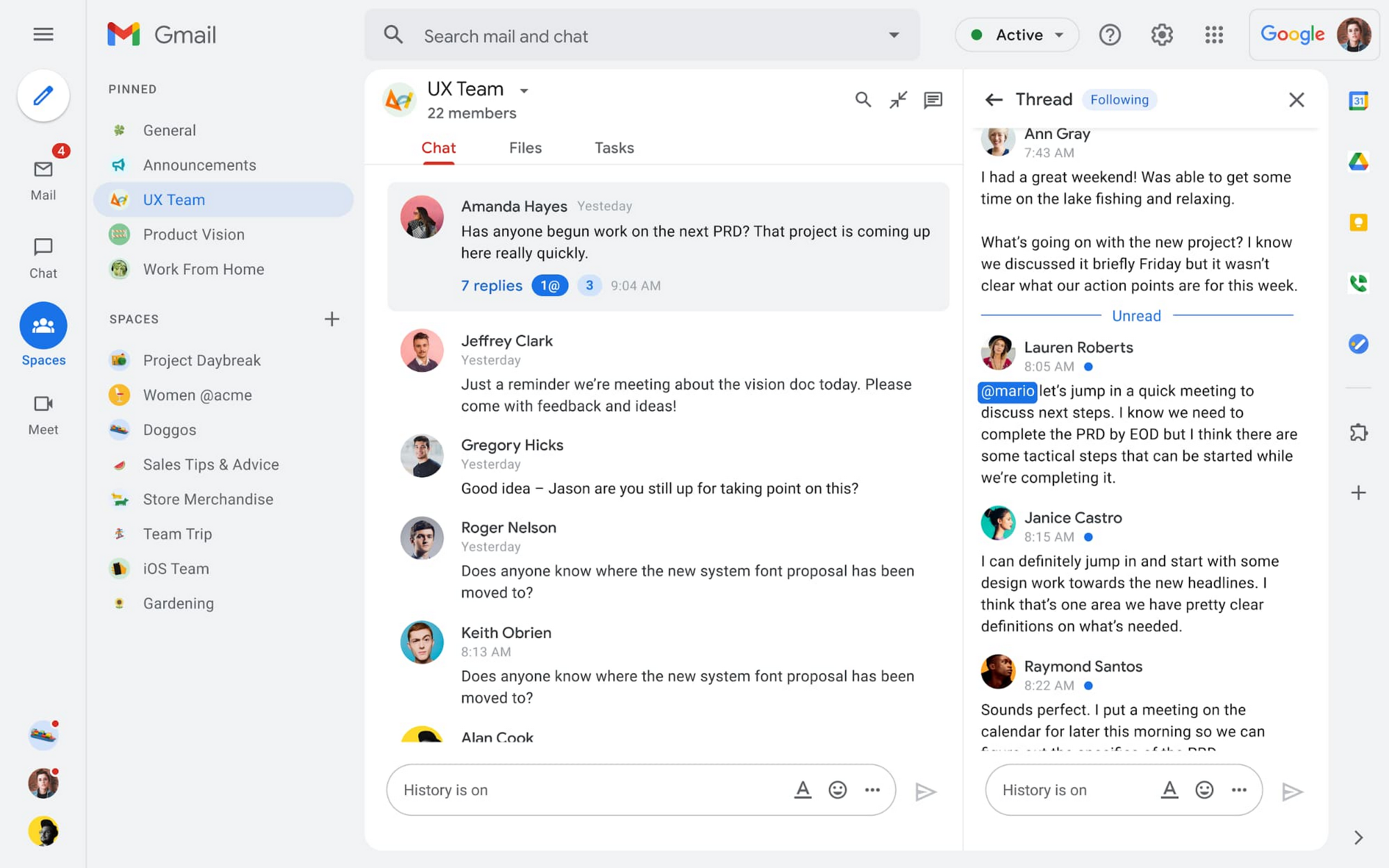
Spaces are the central place for team collaboration in Workspace and starting today, Spaces are live for all users. Spaces are unique in that they are tightly integrated with Google Workspace tools like Calendar, Drive, Docs, Sheets, Slides, Meet, and Tasks, providing a better way for people to engage in topic-based discussions, share knowledge and ideas, move projects forward and build communities and team culture.
We hear from our customers that they’re continuing to work across a broad range of locations and working hours, and that Spaces can be a central hub for collaboration, both in real time and asynchronously. Instead of starting an email chain or scheduling a video meeting, teams can come together directly in a Space to move projects and topics along, whether it’s a team of 10 for “2022 Roadmap Planning” or a team of 1,000 for the “Company-wide All-Hands.”
With Spaces, teams can share ideas, collaborate on documents, and manage tasks from a single place. Because all their work is preserved for future reference, team members can easily jump in and contribute at a time that works best for them, seeing a full history of the conversations, context, and content along the way. Using Spaces has already helped my own team, which is spread across time zones and varied in its working styles. It’s been helpful to rely on Spaces to retain and structure foundational knowledge, whether it’s for onboarding a new teammate or preserving context when someone moves to a new role.
We’re just getting started with Spaces and I’m excited to share a little more about where we’ll take it next.
In the coming months, our users will see:
- Streamlined navigation: A flexible user interface helps users easily access their inbox, chats, Spaces and meetings—all from a single location—so they can stay on top of everything that’s important.
- Discoverable Spaces: Spaces and their content can be made discoverable to all members of an organization, so other people can find and join the conversation. Administrators can also set discoverability as the default for their organization.
- Enhanced search: Allows users to easily find content from within and across Spaces, or even discover new Spaces to join. “Search everything” in Spaces opens up powerful new collaboration possibilities and makes it easier to access the team’s collective knowledge base.
- In-line topic threading: The ability to reply to any message within a Space fuels deeper discussions and collaboration across teams and organizations.
- Robust security & admin features: Tools for content moderation, managing Spaces, and establishing the right rules for healthy communication across domains and companies.
Making meetings more hybrid friendly
Spaces will play an important role in laying the groundwork for meetings and, in some cases, reduce the number of meetings a team needs to gain alignment. Having a dedicated space for asynchronous collaboration, with access to all the right content and context, will help teams be more deliberate about scheduling meetings. This is top of mind for us and many of our customers given the rise in meeting fatigue over the last 18 months. But when having a meeting genuinely feels worthwhile, the experience of transitioning into (and out of) it from different collaboration touchpoints should be seamless.
Over the past few months, in collaboration with many customers and across teams within Google, we developed a handbook for navigating hybrid work that includes best-practice blueprints for the five most common hybrid meeting types. Because meetings are a foundational piece of hybrid work, our goal is to make them as productive, immersive and inclusive as possible.
Scheduling meetings that work across the entire team
With hybrid work, many teams—my own included—have locations and working hours that can change daily. When many of us were together in the office, we might have tended to schedule meetings at a time that favored the “in-office majority,” but now it’s especially important to schedule meetings that scale across the entire distributed team.
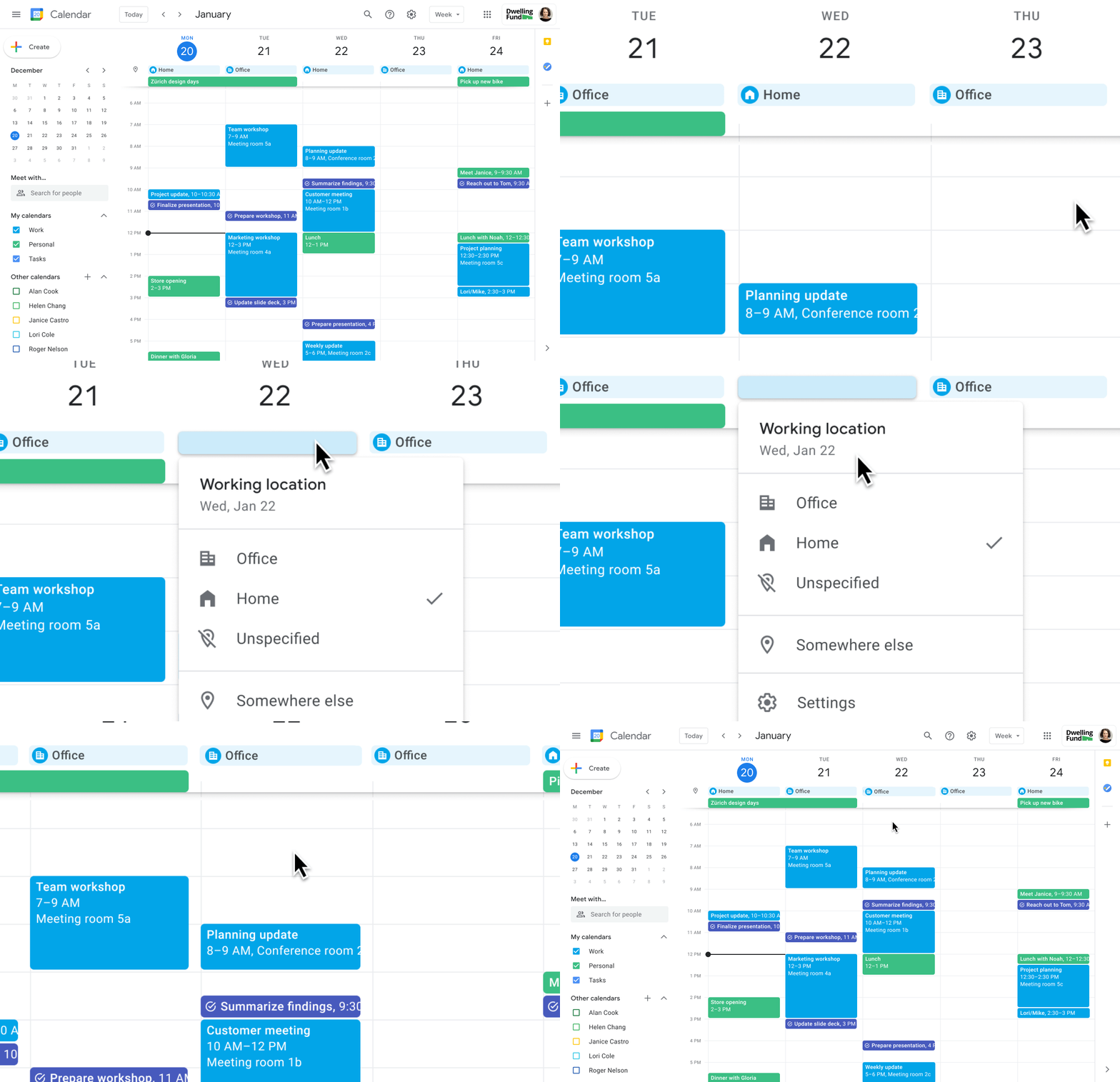
Now, beyond indicating their virtual or physical presence when accepting meeting invites, team members can set their location for each work day in Calendar. When combined, these capabilities allow meeting organizers and on-site support teams to plan for the right mix of in-person and virtual attendance. They can also provide greater visibility and help set expectations across hybrid teams.
Making meetings more spontaneous
Remember when you’d casually bump into a colleague in the office hallway or a break room and start a conversation that sparked new ideas? That’s perhaps the thing I’m looking forward to most as more of my team plan their part-time return to the office. These casual encounters were always a great way to build relationships and learn about topics that might not come up in structured meetings. To help enable these spontaneous connections when teammates aren’t in the office together, we’re bringing Google Meet calling to Workspace.
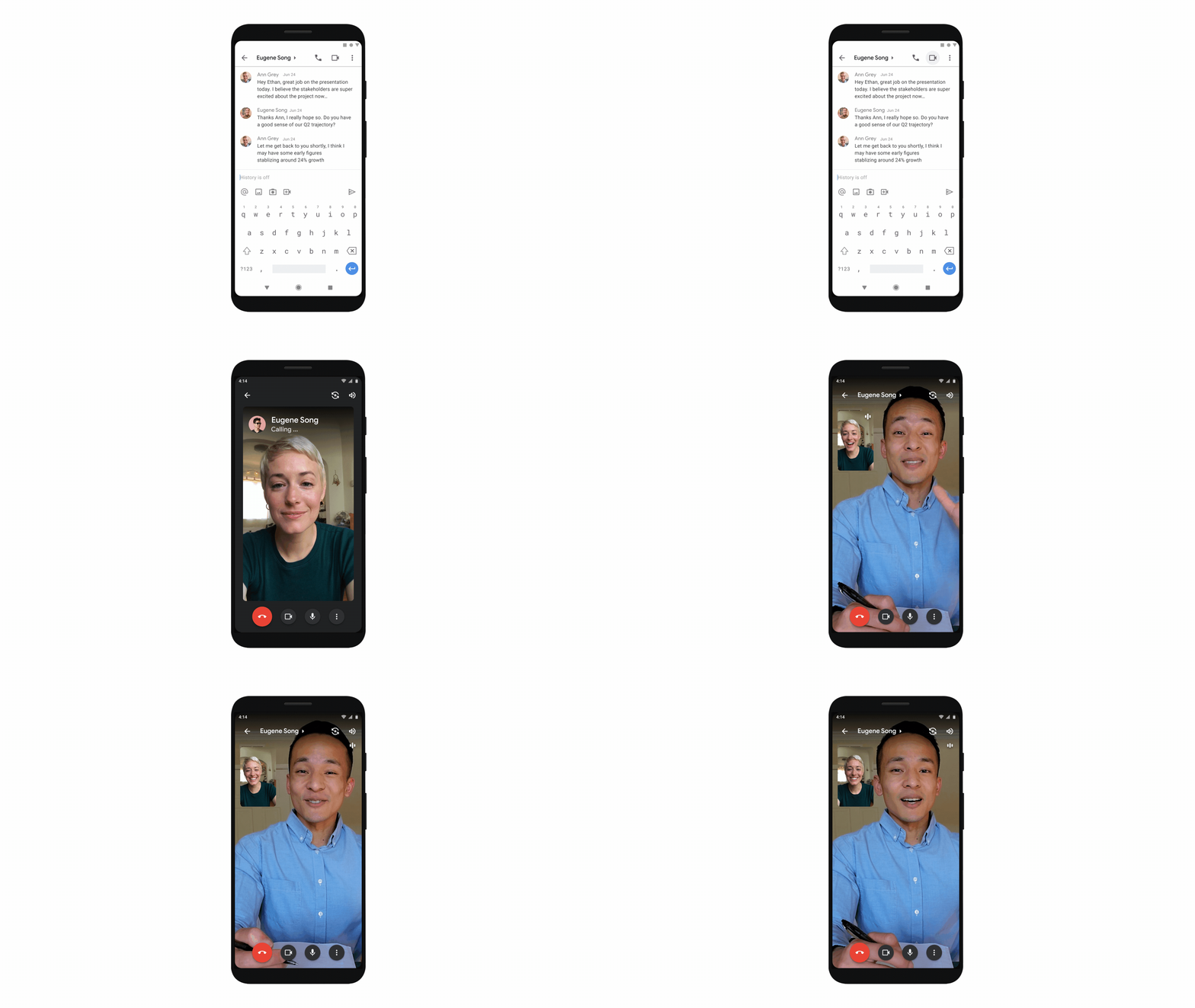
Google Meet calling is a seamless experience of initiating a video or audio call between one or more participants, complementing more structured, scheduled video meetings. Our intention is to bring Meet calling to all the natural endpoints in Workspace where you’d initiate an ad-hoc call including chats, people cards, and Spaces, but this will come first to one-to-one chats within the Gmail mobile app. Soon I’ll be able to call members of my team directly from a one-to-one chat. This will ring their device running the Gmail mobile app and send a call chip to our chat on their laptop, so they can easily answer from any device. It’s not quite the same as a spontaneous hallway conversation, but it might be the next best thing in a hybrid setting.
Ensuring collaboration equity in hybrid meetings
How do we ensure that hybrid meetings aren’t two meetings in one, divided between those in-person and those who are remote? Effective hybrid meetings need a unified experience so that the people sitting together in the same room can interact with their remote colleagues seamlessly, without it ever feeling like there are two parallel conversations.
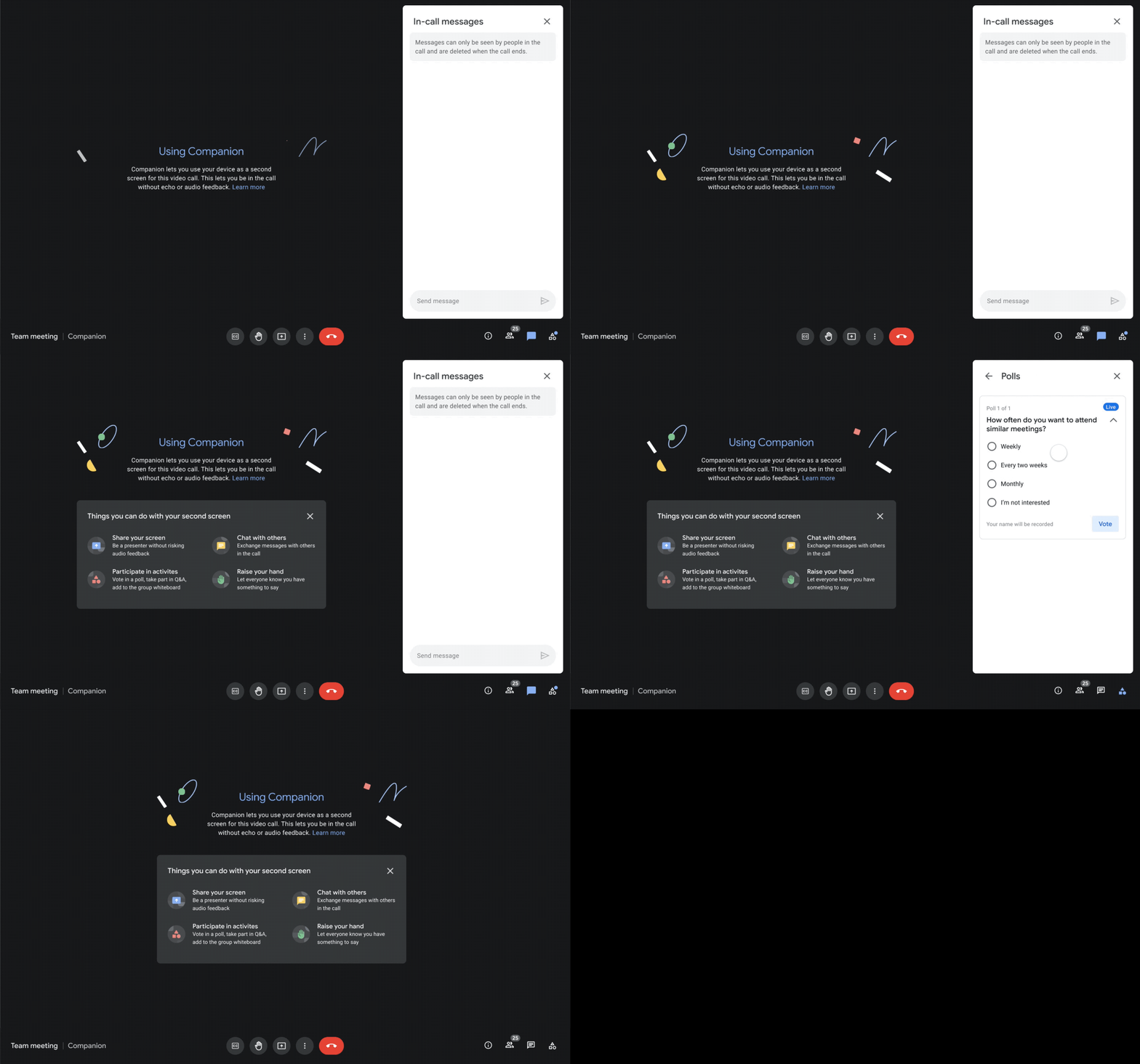
We designed Companion mode in Google Meet to specifically meet this challenge and we’ll start rolling it out to customers in November. With Companion mode I can host or join a meeting from within a conference room using my laptop while leveraging the in-room audio and video—and it all happens without any awkward audio feedback. This functionality lets me share content or see presentations up close on my own device, access the meeting chat and whiteboard, initiate and vote on polls, or post a question in Q&A, just as I would from home. And to ensure that users have greater choice over how they participate in meetings, live-translated captions will be available in Meet and through Companion mode by the end of the year. We’re currently working on translating meetings in English to French, German, Spanish and Portuguese, with many more languages coming in the future.
Expanding choice and flexibility for meeting hardware
While Companion mode keeps people in the room seamlessly connected to their remote colleagues, meeting hardware plays a crucial role in making hybrid meetings feel more immersive and human, with the ability for everyone to be clearly seen and heard. To provide more flexibility and choice on this foundation of how we come together in a hybrid work world, we’re announcing an expanded Google Meet hardware portfolio and interoperability with other conference room solutions.
First, we’re announcing two new all-in-one video conferencing devices to complement our Series One Room Kits. The Series One Desk 27 is an all-in-one 27” device that’s perfect for small shared spaces or your desktop, either in the office or at home. Series One Board 65 is an all-in-one 65” 4K device that can be paired with an optional stand for ultimate configuration flexibility—turning any room or space into a video collaboration hub in minutes.
Both devices feature collaboration capabilities with the Jamboard app built right in, and each can be used as an external display. While optimized for Google Meet, USB-C connection from your laptop gives you the flexibility to use the meeting app of your choice while leveraging the high-fidelity audio and high-definition video on Series One Desk 27 and Board 65. You can learn more about these devices developed in partnership with Avocor through our on-demand webinar starting at 9 AM PT today.
https://www.youtube.com/embed/BR81EAce5BQ?enablejsapi=1&
We’re also proud to announce new third-party devices coming to the Google Meet hardware ecosystem. Google has certified the Logitech Rally Bar Mini and Rally Bar for Google Meet, which provide complete room solutions for small and mid-sized rooms. You can learn more about these Google Meet-certified products in Logitech’s September 21 webinar. Additionally, the Rayz Rally Pro is a new mobile device speaker dock by Appcessori that will automatically launch Google Meet for video meetings and provide an improved audio experience from your mobile device.
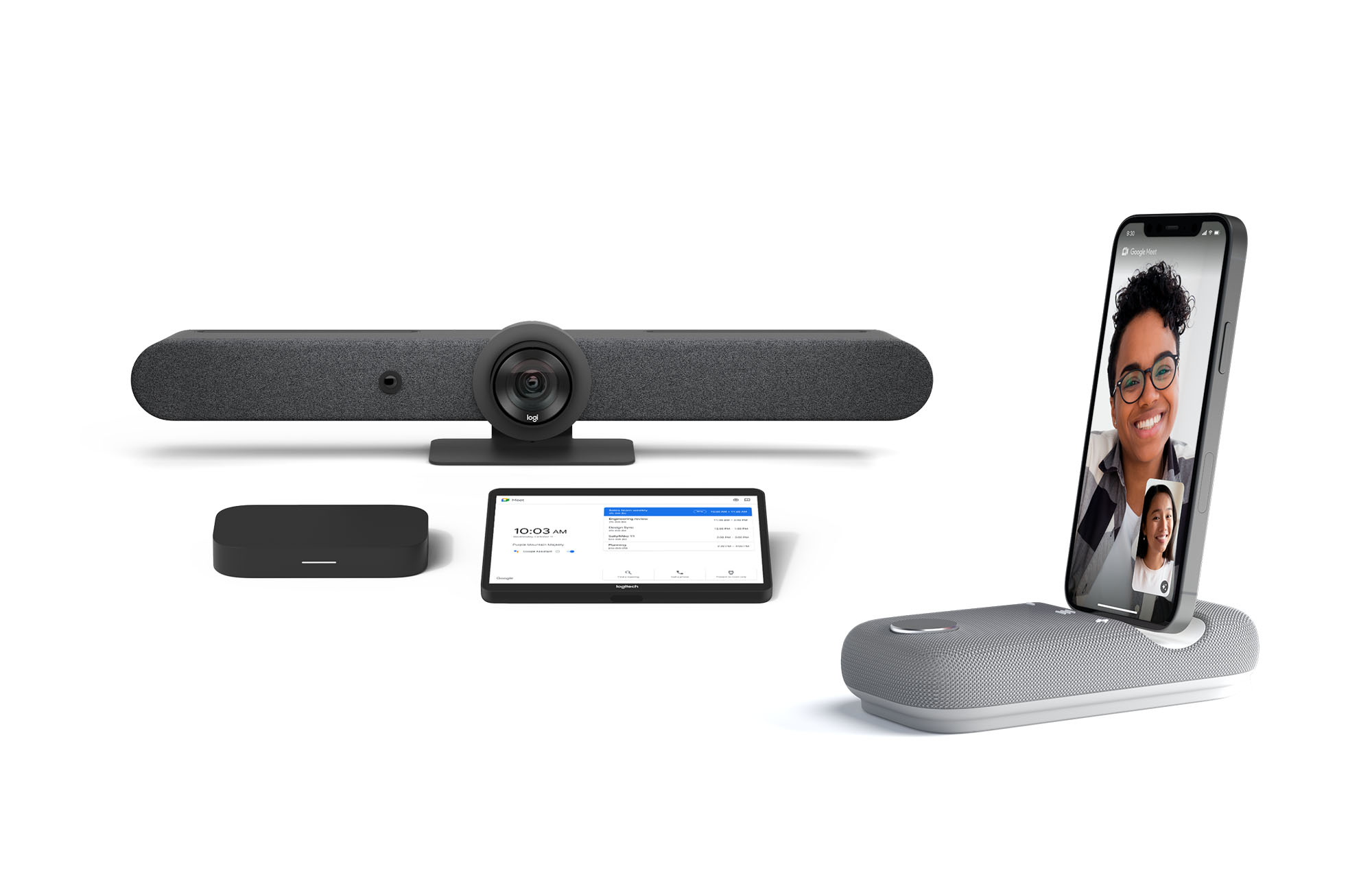
Certified Google Meet hardware ensures high-quality video and audio in meetings and is easy to deploy and manage. You can view our full Google Meet device portfolio and purchase directly from approved resellers by visiting the Google Meet Hardware website.
While Google Meet customers enjoy a full-featured experience on Meet hardware, we realize they sometimes need to connect with people outside of their video calling network. To enable this, organizations can use Pexip for Google Meet to seamlessly join Meet meetings from the widest range of third-party video conferencing solutions. Today, we’re also announcing support for bidirectional interoperability with devices from Webex by Cisco and Google Meet hardware. Soon you’ll be able to launch a Google Meet meeting on Webex hardware and a Webex meeting on Google Meet hardware. Calling interoperability between Meet and Webex is supported on Series One Board 65, Series One Desk 27, and the rest of the Google Meet hardware portfolio, as well as Webex Room Series, Room Kit Series, Desk Series and Board Series. We expect general availability later this year. You can find more details here. We plan to give Meet users even broader calling interoperability with support for other conferencing services in the near future.
Navigating hybrid work is a journey
We’re thrilled to bring these new Google Workspace experiences and devices to our customers, but we also realize that navigating hybrid work will be a journey of learning and adaptation for every organization. Two resources we recently developed can help along the way:
- Navigating hybrid work: A Google Workspace handbook
- The newly launched Future of Work site from Google Workspace, where you can keep up with all the ways work is changing.
Bridging the gaps in the emerging hybrid work world will necessarily be a combination of technology, workplace culture, and reimagining the use of physical spaces. But developing a “hybrid-first” mindset starts with the tools people use every day to connect, create, and collaborate, and Google Workspace will continue to play a crucial role in that evolution.
How Kisan Network is Connecting Over 30,000 Farmers to Help them Reap Over 10% More Profits from Their Crops

5716
Of your peers have already read this article.
5:33 Minutes
The most insightful time you'll spend today!
For many people, an Ivy League education is a promise of a better future. But Aditya Agarwalla, who studied computer science at Princeton, didn’t want to limit that future to just himself. He wanted to share his good fortune and create a positive social impact in his home country of India.
When Agarwalla discovered that small farmers didn’t have ways to demand fair prices owed to them for their crops, he knew he’d found his mission. His Princeton thesis project was the basis for a solution: Kisan Network, an online marketplace that connects farmers directly to buyers for produce, eliminating middlemen and increasing farmers’ profits.
Taking a leave from Princeton, Agarwalla returned to Delhi and launched Kisan Network with his father in 2015. Agarwalla and his 70 employees—software developers as well as field employees who consult with farmers throughout India—use G Suite to record crop information from farmers, share ideas for improving Kisan Network’s Android app, and recruit new hires.
Bringing technology back to earth
“Switching to G Suite was seamless. Almost everyone is familiar with the functionality and design of it from their own personal Google accounts.” — Aditya Agarwalla, Founder, Kisan Network
Farmers in rural communities struggle to earn a living without access to information and technology. India’s independent farmers often engage in an outdated selling system involving middlemen who help set low prices that only benefit buyers. Agarwalla saw Kisan Network as a way to connect farmers directly to buyers, so that farmers could be paid fairly.
“We connect a farmer in a Northern Indian state to a buyer located in a Southern Indian state—a 1,500-mile spread,” says Agarwalla. Farmers benefit by doing business with a far broader range of produce buyers than they can reach on their own.
Talking to farmers and buyers across India demanded email and other business tools that could be accessed in a remote field, in Kisan Network’s offices just outside of Delhi, or while meeting job candidates in person. When Kisan Network started out with just four employees, Agarwalla used Microsoft Outlook for email.
“When you’re doing sales and marketing, it matters that you’re reaching out from an authorized company email address,” Agarwalla says. “It conveys a sense of professionalism and gives you validity.”
Adding email addresses with the kisannetwork.com wasn’t easy in Outlook, and once Agarwalla created the addresses, he’d still have to set up accounts and buy licenses for other productivity tools like Microsoft Word.
As Agarwalla started hiring more people, he realized that just about all of the candidates had Gmail addresses, which got him thinking about choosing G Suite for email and workplace collaboration. Since most people already knew their way around Gmail, Agarwalla wouldn’t have to teach them how to use the tools; plus, it was easier for him to manage.
“The ease of setup was important,” Agarwalla says. “Once you set up a new email address in Gmail—which only took a few minutes—that person instantly has access to everything you want them to use in G Suite. My employees needed only a single account for everything.”
Agarwalla liked the ease of creating Kisannetwork.com addresses with G Suite. Another deciding factor was that G Suite could easily integrate with other systems he and his employees used for software development and supply chain management. G Suite was also more affordable than Microsoft Office 365, finalizing Agarwalla’s decision to go with G Suite.
“Switching to G Suite was seamless,” says Agarwalla. “Almost everyone is familiar with the functionality and design of it from their own personal Google accounts.”
Filling the hiring pipeline
Agarwalla had big plans to reform the produce buying process—but he needed more people to make that vision a reality. Right out of the gate, G Suite helped streamline Kisan Network’s hiring process with secure, paper-free tools.
Every job candidate fills out a Google Form, which everyone in the hiring process can access online during interviews. Once candidates are hired, Kisan Network’s hiring team then creates email addresses for new employees through the G Suite admin console—a process that only takes a few minutes.
New hires can browse orientation materials that are shared in Docs and Sheets. The shared online documents help Kisan Network hire people quickly and get new workers up to speed on their roles.
Shrinking the distance between farms
“G Suite seamlessly flows into our everyday work, whether it’s sending emails, setting up meetings, or creating shared documents and presentations.” — Aditya Agarwalla, Founder, Kisan Network
Kisen employees travel all over India to meet with farmers, covering roughly 175,000 miles to date. “We have field presence in many rural regions,” says Agarwalla. “The employees are collecting information like land assessments when they meet farmers and explore new crops.”
Field supervisors log their deployment and destination details into Sheets for quick reference, and use Forms to record the data they collect, including photos of crops and their conditions. In rural India, home internet access is not as common as in cities, so the field supervisors access G Suite apps on their phones.
“They’re constantly working in very remote areas,” Agarwalla says. “Using G Suite on mobile devices is the only way they can do what they do.”
When field supervisors need to speak to colleagues in New Delhi about farmers and their crops, they use Hangouts Meet or Hangouts Chat. “Hangouts is a much better option than Skype for Business, as it works in a browser and can be set up directly from a Calendar event,” Agarwalla says.
Today, Kisan Network employees work across seven Indian states and more than 2,500 villages. The 30,000-plus farmers in the Kisan Network control their entire crop-selling processes through online marketing, earning at least 10 percent more profits than before.
“G Suite seamlessly flows into our everyday work,” says Agarwalla. “Whether it’s sending emails, setting up meetings, or creating shared documents and presentations, we heavily depend on G Suite for everything we do.”
Google Maps Platform Helps BungkusIT Fulfil its Promise of Deliveries in One Hour!

5519
Of your peers have already read this article.
2:00 Minutes
The most insightful time you'll spend today!
Editor’s note: Today’s post is written by Hatim M, Chief Commercial Officer at BungkusIT. The on-demand delivery service delivers packages within the hour for one million customers across Malaysia and uses Google Maps Platform to create a seamless end-to-end delivery experience for its customers.
Imagine it’s the end of a long day at work, and you’re heading home for dinner as you look forward to a restful evening. Then just as you arrive at the doorstep, your phone buzzes with a message from a family member, asking if you could grab a carton of milk from the supermarket.
With moments like these in mind, we founded BungkusIT to alleviate the stress of everyday chores and give people a break from having to run seemingly mundane errands that can often be time-consuming. With so much to do and so few hours in a day, we want to make life simpler by providing our customers with an on-demand delivery service.

As a social enterprise, our mission is to create jobs and increase earning potential for BungkusIT roadies (those who run deliveries), while also increasing online visibility for local small and medium enterprises through an e-commerce platform. As such, we don’t charge merchants a fee for being featured on our app.
Our roadies help connect users with products and services that they need. Whether it’s picking up the keys you forgot, or buying a birthday cake for a loved one, our on-demand roadies can help accomplish your task quickly and efficiently. In fact, we’ve helped many seniors—a large and often underserved population—to run errands and provide last mile support.
Providing reliable service, 24/7
From the day we launched, our promise has always been to complete every task given to us within one hour. Google Maps Platform empowers us to fulfil this promise. We understand the importance of selecting a reliable mapping service from the get-go. After exploring different map products, we made the decision to go with Google Maps Platform due to its detailed and accurate location mapping system. With the support of our partner Searce, we’ve been able to quickly integrate all the relevant products on our platform and optimize our API calls.
On a day-to-day basis, our roadies rely on the Places API to navigate their journeys. It pinpoints the exact location set by customers so that our roadies can be sure they arrive at the correct destination. With so many small roads and alleys in Malaysia, it can be challenging to find the exact place based on an address. Dropping a pin on a specific location removes any confusion.
Because we price our services based on distance, it’s business critical to determine the exact distance of a location and the most efficient route to reach it. By automating that process with the Distance Matrix API, we can guarantee that customers don’t get overcharged, while making sure that we’re adequately compensated for our services.
Improving the user experience
At the end of the day, we want to make people’s lives easier. That’s why having an app that is intuitive is key. More than that, we want customers to be able to create a request as quickly as possible. By automatically completing the location a customer is typing after they’ve keyed in the first few characters, Place Autocomplete does that job for us.

As a fairly young company, we’ve got a long way to go. I believe that we’ll continue evolving alongside Google Maps Platform and exploring the new features it has to offer. We’re already talking to global brands to expand our services and I’m confident that with Google Maps Platform as our maps partner, we will go a long way.
For more information on Google Maps Platform, visit our website.
More Relevant Stories for Your Company
Transitioning to Hybrid Environment with Chrome Browser
It’s been quite a year. In general, and for work. Just the other day, I read a new study from Pew Research that shows 71% of people are currently working from home, and 50% of employees say they want to continue working from home at least three days a week. That’s more

New Map Customization Features for Enhanced User Experiences
A customized map can be key to delivering a frictionless experience that engages users and sets you apart in users’ minds–whether you’re a real estate company fine-tuning points of interest (POIs) on a map to help buyers decide where to live, or a regional pharmacy styling a map to ensure




How Haydenshapes Expanded its Business to 70 Countries With Real-Time Collaboration
Hayden Cox was only 15 years old when he broke his surfboard. And he was only 15 years old when he decided to make one. That’s how Haydenshapes, Cox’s surfboard manufacturing company, took form. That was five years ago. Today, the company has manufacturing units in Los Angeles, Sydney, and

Workspace powers business as usual for Optiva during COVID-19
Established companies in any industry, including telecommunications, often take a cautious approach when it comes to adopting new technology. This is true of any technology and especially of tools used across entire organizations and at all levels—like collaboration and communication tools. I joined Optiva Inc. as its Chief Marketing Officer
