





New Capabilities in Cloud Asset Inventory Allow Better Visibility into Google Cloud Environments

4713
Of your peers have already read this article.
2:00 Minutes
The most insightful time you'll spend today!
Businesses that operate in complex cloud environments, large fleets, or sophisticated security operations all require visibility into their cloud assets in order to keep their teams nimble and their data secure. Cloud Asset Inventory (CAI) helps these teams understand their Google Cloud and Anthos environments by providing complete visibility, real-time monitoring, and powerful asset analysis capabilities. Today, Cloud Asset Inventory gets four new capabilities that help you understand your environment more clearly and easily than ever before.
New user interface eases asset and insight discovery
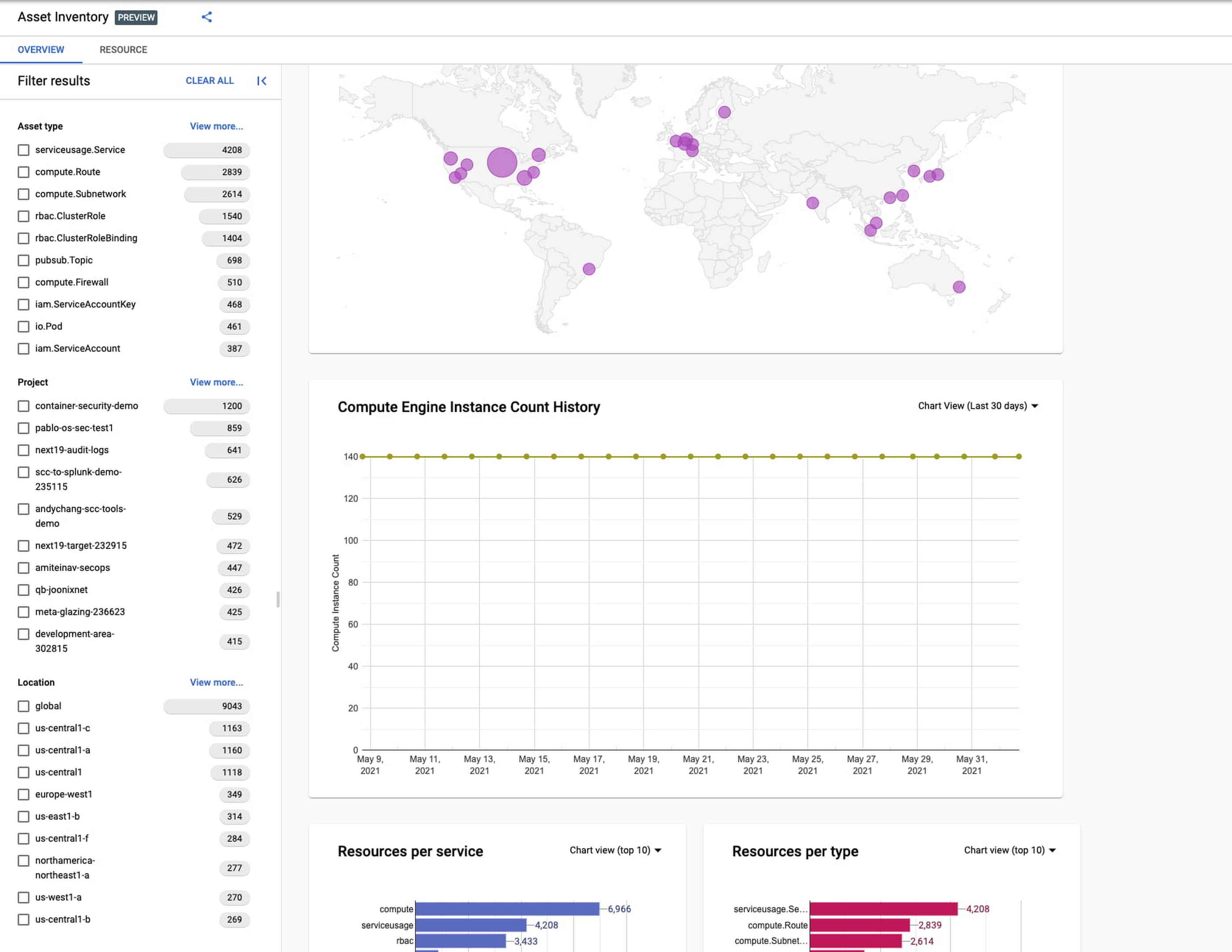
Cloud Asset Inventory console preview is now publicly available for GCP and Anthos customers. This preview provides insights into your cloud footprint, history and details of resource usage with powerful filtering and search capabilities. For example, you can view your global distribution of resources and policies, how your GCE VM footprint has been changing over time, as well as full metadata and change history for all your assets. The CAI console can be filtered at the organization, folder, or project-level, so each user can view the resources they have permissions for down to project level granularity.
Asset discovery and Datadog integration
A new asset list service in CAI provides quick and comprehensive asset discovery, including asset history, without needing to export the data to a storage destination. Datadog, a leading multi-cloud monitoring and security service provider, relies on deep integration with CAI for service and asset discovery. Datadog has been piloting and taking full advantage of the newly released asset list service. Datadog Product Manager, Steve Harrington, commented:
“Google’s new Cloud Asset Inventory API provides us with an immensely valuable, single source of truth for determining the resources present in a given GCP environment. Along with its rich metadata, this enables us to enhance multiple aspects of our integration with GCP, including streamlined metric collection and ingestion of custom labels. We plan to continue building around Cloud Asset Inventory in the future to improve existing features, and are envisioning ways it could help us provide entirely new insights to our customers.”
Answer “who can access what resources?”
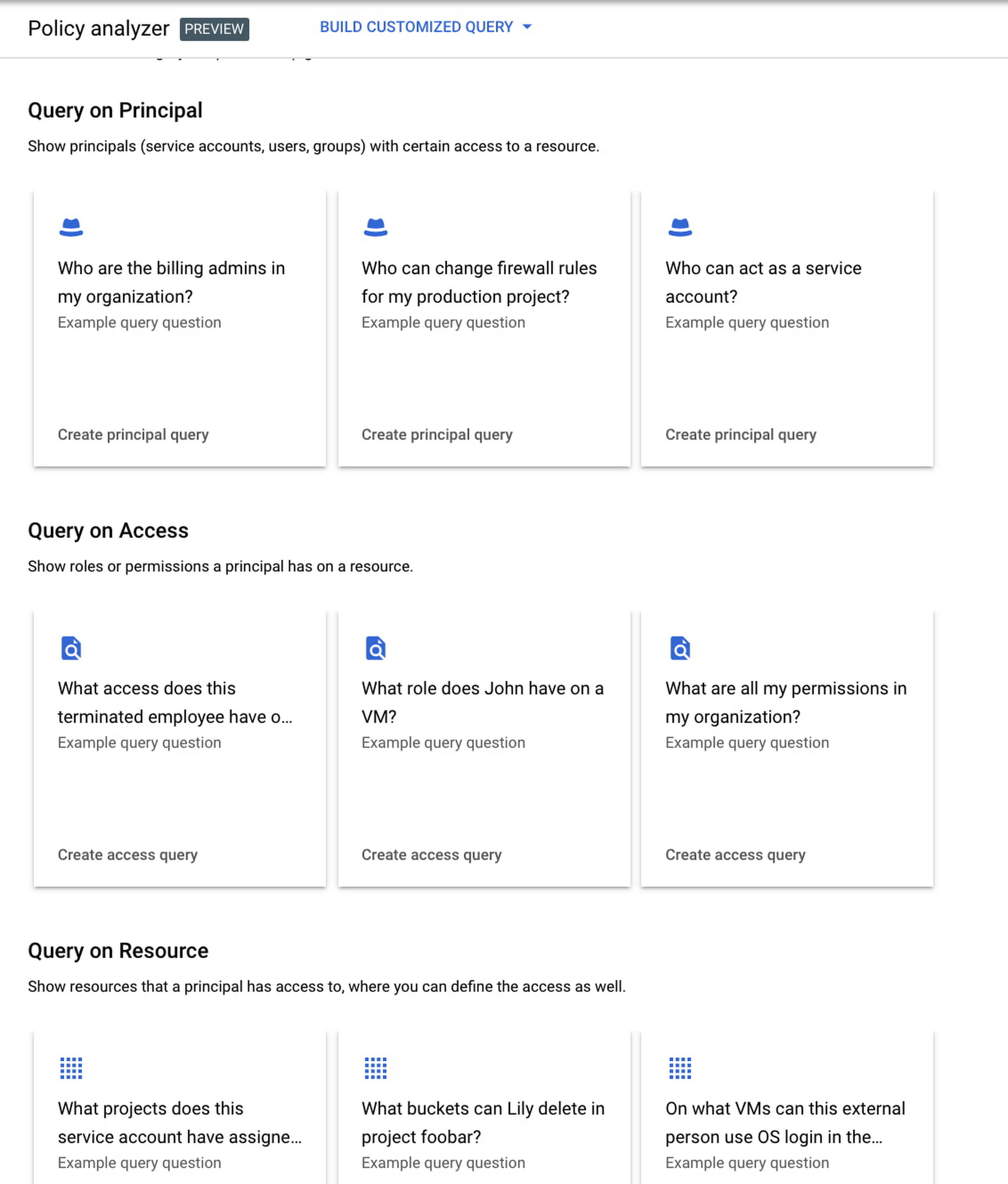
Determining authoritative answers to security-related questions like “Who can read data from my storage bucket that contains PII?” or “Does a terminated employee still have any remaining access to my system?” can be difficult and time consuming. This is why access management and identity certification is one of the top security priorities for enterprises running workloads in the cloud. To help alleviate this challenge, the new Policy Analyzer capability in CAI thoroughly analyzes the relationship between IAM policies and resources. The analysis includes powerful and efficient group expansion, service account impersonation, conditional access analysis, resource expansion, and more. You can even export the results to a BigQuery table or Cloud Storage bucket for further analysis and record keeping. CAI’s enhanced UI makes it even easier for you to build your own flexible queries and quickly get to a comprehensive answer.
Create asset posture visibility
Cloud Asset Inventory now provides seven types of Asset Insights through the Active Assist platform. These new asset insights help proactively detect anomalies within your organization’s IAM policies, which may be opportunities to improve your security posture. The insights can be aggregated at the Organization, Folder or Project level.
The seven new Asset Insights include:
- External members in IAM policies.
- External users that impersonate your service accounts.
- External members as policy editors.
- External users who can view cloud storage buckets.
- Terminated users/groups that are still in IAM policies
- IAM policies containing all users or all authenticated users.
- Projects with only terminated users as owners.
As a Google Cloud customer you can get started and use all the recently released capabilities and features immediately; check out our documentation to see how. We’d love to hear your feedback; email us with any questions or concerns!
Google Introduces ML-based Predictive Autoscaling to Forecast Capacity and Match Scaling Demands

4982
Of your peers have already read this article.
3:00 Minutes
The most insightful time you'll spend today!
At Google Cloud, we believe you get most benefits from the cloud when you scale infrastructure based on changing demand. Compute Engine allows you to configure autoscaling to save costs during periods of low demand, and add capacity to support peak loads.
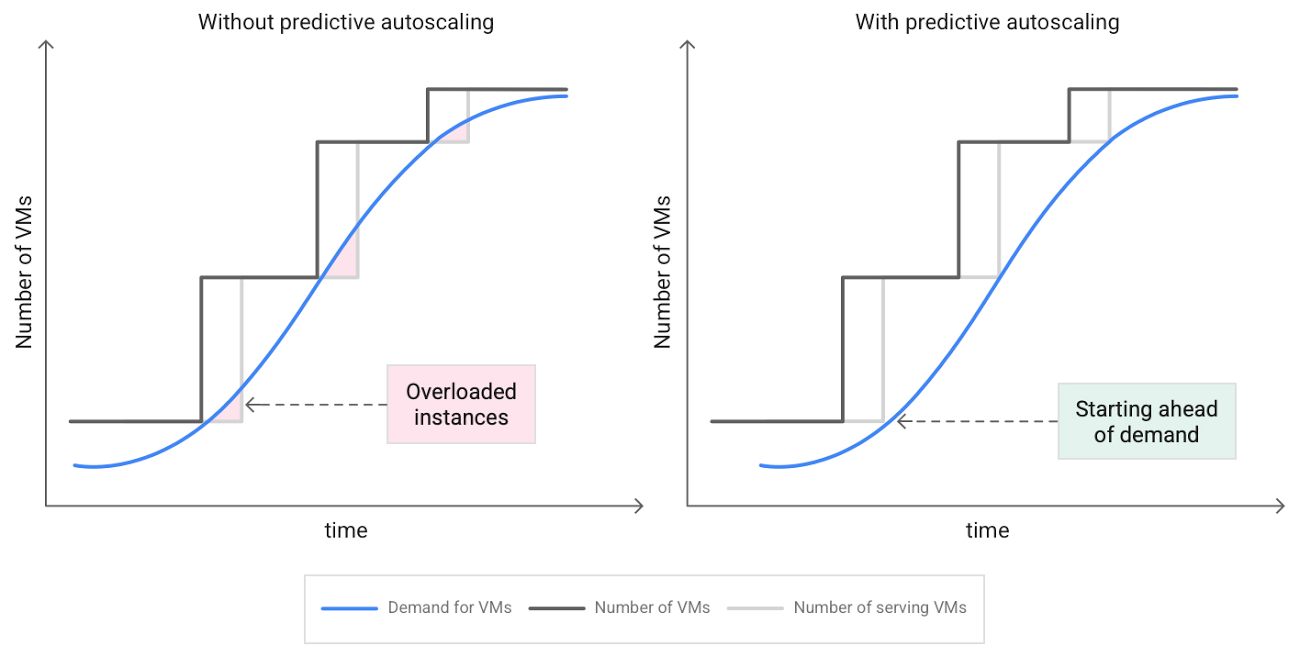
When you use a managed instance group (MIG), you can have an autoscaler automatically create or delete virtual machine (VM) instances based on increases or decreases in load. However, if your application takes several minutes to initialize, creating VMs in response to growing load might not increase your application’s capacity quickly enough. For example, if there’s a large increase in load (like when users first wake up in the morning), some users might experience delays while your application is initializing on new instances.
A good way to solve this problem would be to create VMs ahead of demand so that your application has enough time to initialize beforehand. This requires knowing upcoming demand. If only we could predict the future… Well, now we can!
Introducing predictive autoscaling
Predictive autoscaling uses Google Cloud’s machine learning capabilities to forecast capacity needs. It creates VMs ahead of growing demand allowing enough time for your application to initialize.
How does it work?
Predictive autoscaling uses your instance group’s CPU history to forecast future load and calculate how many VMs are needed to meet your target CPU utilization. Our machine learning adjusts the forecast based on recurring load patterns for each MIG.
You can specify how far in advance you want autoscaler to create new VMs by configuring the application initialization period. For example, if your app takes 5 minutes to initialize, autoscaler will create new instances 5 minutes ahead of the anticipated load increase. This allows you to keep your CPU utilization within the target and keep your application responsive even when there’s high growth in demand.
Many of our customers have different capacity needs during different times of the day or different days of the week. Our forecasting model understands weekly and daily patterns to cover for these differences. For example, if your app usually needs less capacity on the weekend our forecast will capture that. Or, if you have higher capacity needs during working hours, we also have you covered.
Why should you try it?
Predictive autoscaling continuously adapts forecasted capacity to best match upcoming demand. Autoscaler checks the forecast several times per minute and creates or deletes VMs to match its prediction. The forecast itself is updated every few minutes to match recent load trends so if your growth rate is higher or lower than usual we will adjust the forecast accordingly. This gives you capacity needed to cover peak load while saving on cost when demand goes down.
You can start using predictive autoscaling without worry as it’s fully compatible with the current autoscaler. Autoscaler will calculate enough VMs to cover both forecasted as well as real-time CPU load—whichever is higher. This works with other autoscaling features as well: you can scale based on schedule, your Load Balancer request target or Cloud Monitoring metrics. Autoscaler provides enough capacity to all of your configurations by taking the highest number of VMs needed to meet all your targets.
Getting started
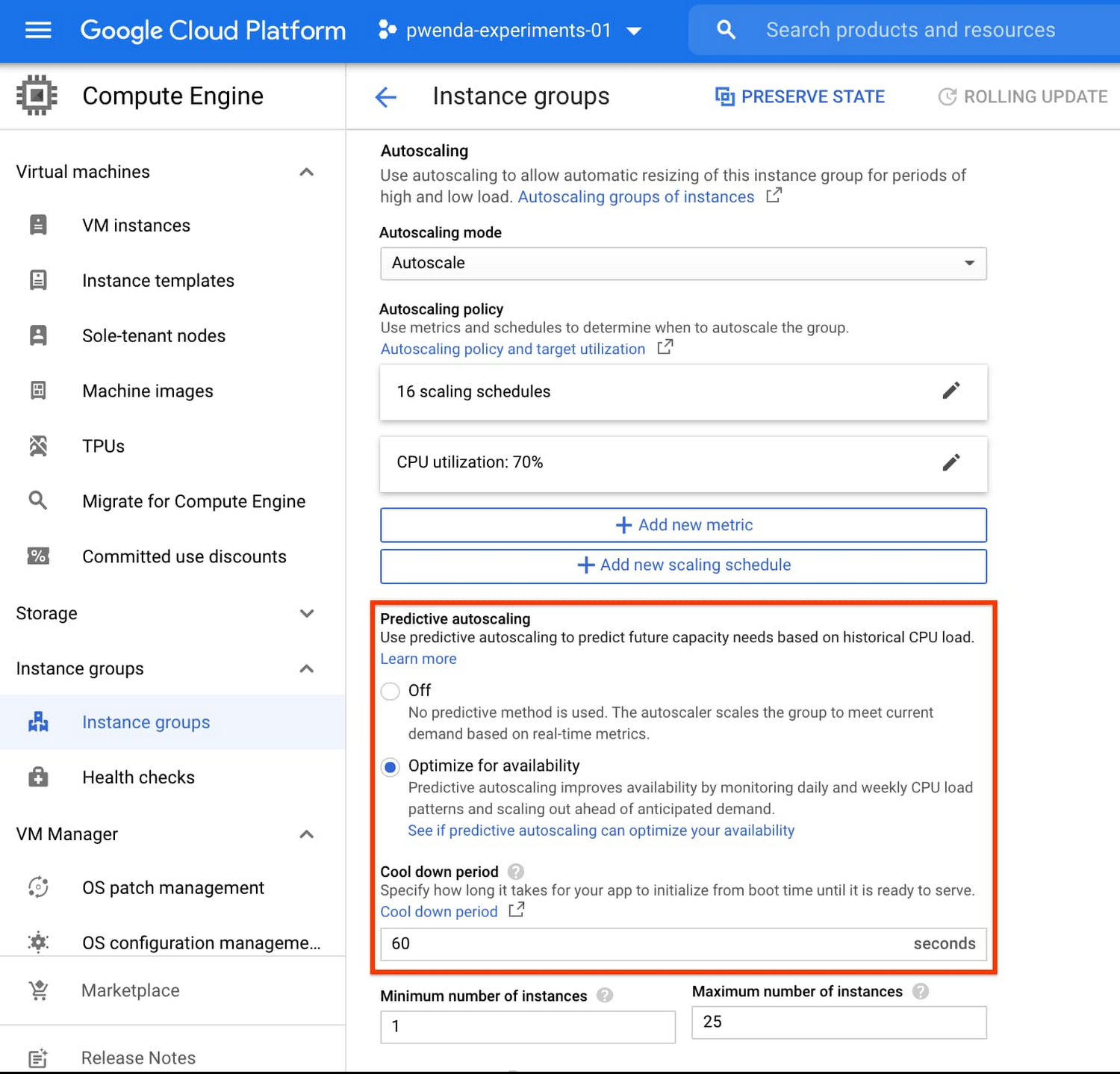
You can enable predictive autoscaling in the Google Cloud Console. Select an autoscaled MIG from the instance groups page and click Edit group. Change predictive autoscaling configuration from Off to Optimize for availability.
To better understand whether predictive autoscaling is good for your application, click the link See if predictive autoscaling can optimize your availability. This will show you a comparison of the last seven days with your current autoscaling configuration vs. with predictive autoscaling enabled.
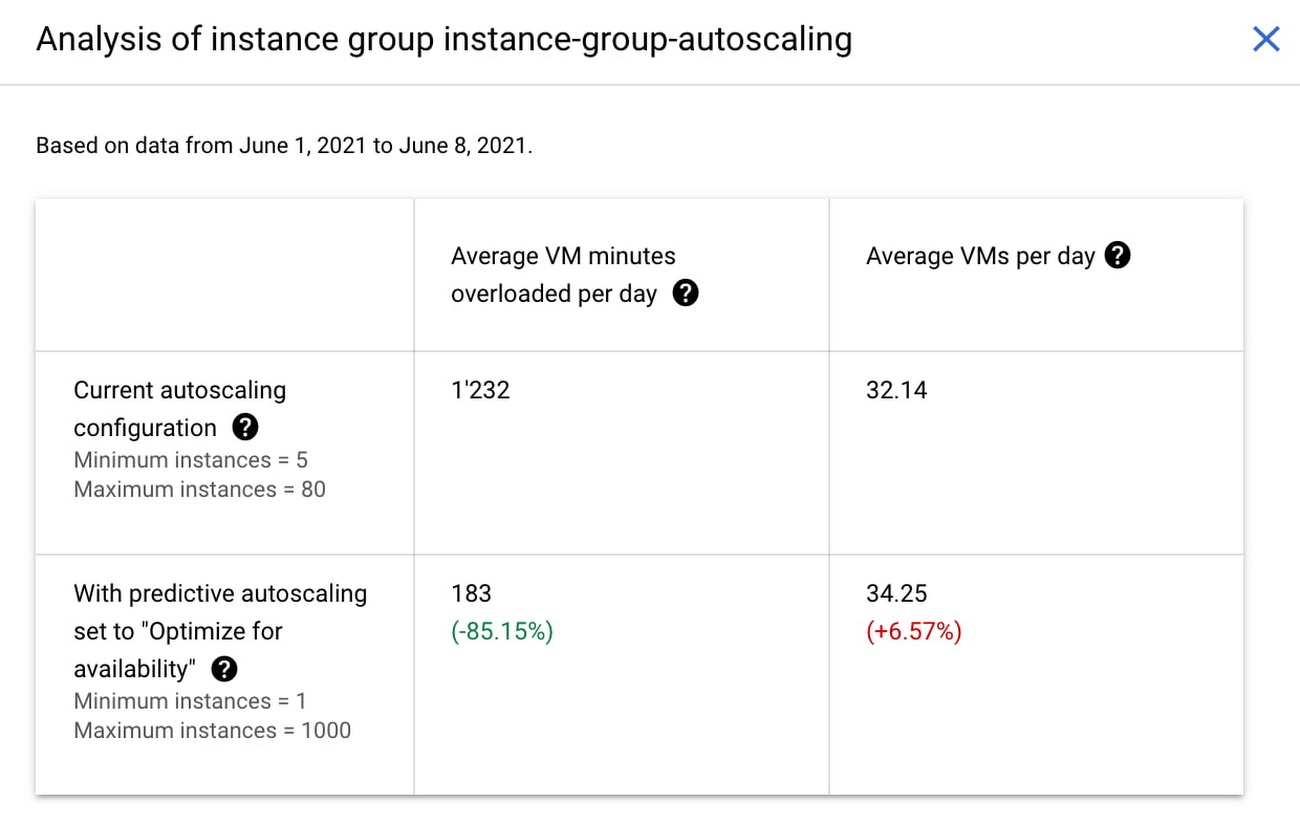
In the above chart,
- Average VM minutes overloaded per day shows how often your VMs exceed your CPU utilization target. This happens when demand is higher than available capacity. Predictive autoscaling can reduce this by starting VMs ahead of anticipated load.
- Average VMs per day is a proxy for cost. This shows how much additional VM capacity you need to keep your CPU utilization within the target you have set. You can optimize your cost by adjusting Minimum instances andCPU utilization as explained below.
Optimizing your configuration
Make sure your Cool down period reflects how long it takes for your application to initialize from VM boot time until it’s ready to serve the load. Predictive autoscaling will use this value to start VMs ahead of forecasted load. If you set it to 10 minutes (600 seconds) your VMs will start 10 minutes before the load is expected to increase.
Review your autoscaling CPU utilization target and Minimum number of instances. With predictive autoscaling you no longer need a buffer to compensate for the time it takes for a VM to start. If your application works best at 70% CPU utilization you don’t need to set target to a much lower value as predictive autoscaling will start VMs ahead of usual load. A higher CPU utilization and lower Minimum number of instances allows you to reduce the cost as you don’t need to pay for additional capacity to prepare for growing demand.
Try predictive autoscaling today
Predictive autoscaling is generally available across all Google Cloud regions. For more information on how to configure, simulate and monitor predictive autoscaling, consult the documentation.
3296
Of your peers have already watched this video.
1:30 Minutes
The most insightful time you'll spend today!
Fitbit’s Zero-Downtime Migration to GCP
In 2019, Fitbit moved all of its production operations from managed hosting to Google Cloud Platform without any downtime. The Fitbit experience is provided by a monolithic application backed by 200+ data stores, making the task of moving service by service impossible.
So, Fitbit decided to run services in both hosting environments and move user by user. This is the story of Fitbit’s migration to GCP, which was tested and executed mostly in production, without any effects to the users.
The tale starts with a review of goals and requirements for the migration. What should the user experience be during this period? How would we know if we are meeting that benchmark and can push forward? How would we slow or reverse migration if things weren’t going well? Answering these questions led us to a migration plan that started with the movement of internal users, followed by the careful transplant of a small number of real customers, and concluded with a mass migration of the majority of our users.
This migration path required significant new additions to Fitbit’s architecture, including new testing, routing, and caching techniques. As the journey approached its conclusion, we recognized that these methods were not merely allowing us to migrate; they were allowing Fitbit to operate in multiple hosting environments simultaneously. The lessons from this migration have provided the foundation for a mutli-region architecture that will unlock the full potential of life in Google Cloud Platform.
Groupe Dauphinoise Grows it Customer Base with G Suite and Google Cloud Platform

10375
Of your peers have already read this article.
2:45 Minutes
The most insightful time you'll spend today!
As a leading French agricultural cooperative, Groupe Dauphinoise places collaboration at the heart of its philosophy. Working with farmers in the Rhone-Alpes region, Groupe Dauphinoise takes on a diverse range of activities from agricultural production to research and development to running retail outlets.
As its operations expanded and strained its existing infrastructure, Groupe Dauphinoise saw the opportunity to upgrade its technology solutions and adopted G Suite, Chrome devices and ultimately Google Cloud Platform (GCP).
“We transitioned to G Suite to improve our staff’s collaboration. We quickly realized that as the company grew, we needed a new infrastructure. Based on our satisfaction with G Suite, we chose GCP. With Google, ‘any device, anytime, anywhere’ is not just a dream,” says Sylvain Claudel, Head of IT at Groupe Dauphinoise.
“We transitioned to G Suite to improve our staff’s collaboration. We quickly realized that as the company grew, we needed a new infrastructure. Based on our satisfaction with G Suite, we chose GCP. With Google, ‘any device, anytime, anywhere’ is not just a dream.”
—Sylvain Claudel, Head of IT, Groupe Dauphinoise
Flexible workforce, stable infrastructure
Many of Groupe Dauphinoise’s 1,500 employees spend their days out of the office. Five years ago, with the help of Google partner GoWizYou, the company transitioned to G Suite to improve the flexibility and collaboration of its staff.
As Groupe Dauphinoise began to expand and collect more data, the company reached the limits of its on-premise infrastructure. Adding new storage was not a simple matter. Acquiring, configuring and synchronising new servers costs Groupe Dauphinoise time as well as money. In addition, with all its servers stored in a single room, security was a concern. Groupe Dauphinoise needed a new infrastructure.
Google Cloud Platform was the only solution in mind after Groupe Dauphinoise’s experience with G Suite and Chromebooks. Disruption was kept to a minimum thanks to Google’s licensing agreements with Microsoft products, allowing the company to migrate without affecting its operations.
After migrating its infrastructure to Compute Engine, Groupe Dauphinoise can let Google look after the security and maintenance. Cloud IAM makes it easy for Groupe Dauphinoise to hand out permissions to sensitive resources across a number of sites with maximum security and minimum fuss. The company placed its archives in Cloud Storage, while Cloud SQL allows it to continue to make use of its MySQL databases without disrupting the day to day business. Meanwhile, BigQuery provides Groupe Dauphinoise with the raw power to analyse large datasets quickly.
“Our company is growing and we have more and more data to collect and analyze like sales data, weather patterns or production numbers. With GCP, we have more than a single on-premise data store, so our disaster recovery plan is much more flexible. Compute Engine allows us to add more storage quickly and easily, without having to spend days synchronizing data and installing new servers. We have improved security and maintained the stability of our infrastructure while keeping costs down,” says Sylvain.
Safeguarding the present, looking to the future
With Google Cloud Platform, Groupe Dauphinoise has expanded and secured its infrastructure without sinking costs into on-premise servers or DevOps staff. Its investment in Chrome devices and adoption of G Suite mean that its mobile workforce can fully reap the benefits of a cloud-based infrastructure while dramatically cutting the cost of hardware. Meanwhile, working with a 200 million line table of sales data in Google BigQuery, the cooperative found that queries ran ten times faster than with its previous database provider. Groupe Dauphinoise is experimenting with Google BigQuery to expand its BI capabilities. Products like Google BigQuery help Groupe Dauphinoise grow its business, safe in the knowledge that its infrastructure is stable and secure.
“The amount of data we collect is growing very quickly. We need to break our rules and evolve from the mindset that we had with on-premise infrastructure and our old databases. We can now look at collecting more customer fidelity data, or big data for our farmers. With our data and infrastructure in Google’s care, we can concentrate on growing our customer base instead of our IT department!” says Sylvain.
How Do You Cut Costs and Improve Staff Productivity, and Business Visibility? Ascend Money Has an Answer

10687
Of your peers have already read this article.
6:30 Minutes
The most insightful time you'll spend today!
Hundreds of millions of residents of South East Asia have only limited access to banking and finance services. However, help is at hand. One of South East Asia’s largest fintech businesses, Ascend Money is using digital technologies to realize its mission of enabling as many people as possible to access innovative financial services and live better lives.
According to Ascend Money, 60 percent of the region’s 620 million residents do not have access to a full suite of financial services. Even a relatively small proportion of this market represents a big opportunity for the business.
Ascend Money’s offerings include the TrueMoney regional payment platform for underserved and digital consumers. The TrueMoney platform supports more than 40 million consumers across six countries: Cambodia, Indonesia, Myanmar, the Philippines, Thailand, and Vietnam.
“We found, based on value, ease of use, effectiveness, and the skills and adaptability of our own team members, BigQuery and other Google Cloud Platform services were the best fit for our business.”
– Abraham Jarrett, Head of Engineering, Ascend Money
TrueMoney also provides an e-wallet app that provides easy ways to top up mobile phones, undertake online shopping, and pay for products and services; a network of 65,000 branded shops; and international remittances, initially between Thailand and Myanmar. In addition, Ascend Money offers financial products to small to medium businesses.
Ascend Money is part of the South East Asian online business Ascend Group, which also operates e-commerce, e-procurement, data centers, cloud services, fulfilment, and digital marketing services.
Cost is a key criteria
Ascend Money initially started operations using physical infrastructure and on-premises workforce productivity applications. However, as the business grew its customer base and expanded into new markets, its technology leaders began to explore options to improve value for money; reduce the maintenance load on in-house team members; improve its data management and analysis; and collaborate more effectively.
“Operating our own on-premises infrastructure entails a higher cost of ownership and maintenance, as well as requiring us to scale up our hardware as needed,” says Abraham Jarrett, Head of Engineering, Ascend Money. “We conducted an evaluation and found that moving to the cloud would deliver a range of benefits.”
G Suite and Google Cloud Platform the best fit
The business evaluated solutions available in the market and opted to move to G Suite and Google Cloud Platform.
“Moving to Google Cloud Platform was an optimization exercise, with lowering our costs our primary goal, and achieving better performance an added benefit,” says Jarrett. Google Cloud Platform monitoring, diagnostic, and analytics tools have enabled Ascend Money to reduce its infrastructure spending, becoming more efficient and cost-effective in the process.
“Managing software is a big cost for us. Through G Suite, we are significantly reducing our software deployment, licensing, and repair costs.”
– Abraham Jarrett, Head of Engineering, Ascend Money
The Ascend Money team saw Google Kubernetes Engine as enabling a seamless way of transitioning from an on-premises data center to a cloud service. “We considered industry trends such as what people were adopting and who we could hire when making our decision,” says Jarrett. “Engineering teams are focusing on using Kubernetes open source container management at scale and as a way of doing business, which was attractive to us.
“Google Kubernetes Engine presented the easiest way to manage and orchestrate our containers, and drive us away from our existing infrastructure.”
BigQuery best for cost and ease of use
Ascend Money also reviewed data infrastructure solutions, with its business intelligence and data platform teams considering a range of options. The teams quickly ruled out an on-premises solution due to the capital investment required and opted for a cloud service. Following a rigorous evaluation of Google Cloud Platform against the services offered by another cloud provider, Ascend Money opted to run on Google Cloud.
“We found, based on value, ease of use, effectiveness, and the skills and adaptability of our own team members, BigQuery and other Google Cloud Platform services were the best fit for our business,” says Jarrett. The business is now running an architecture comprising a BigQuery analytics data warehouse; Cloud Storage to store raw and archive data; Cloud Dataflow to process stream and batch data, and Cloud Pub/Sub for event ingestion and delivery.
“We’re expanding our utilization of BigQuery and other services on a daily basis,” says Jarrett.
Ascend Money is also using a range of Google Cloud Platform services for the infrastructure outside its data platform, including Stackdriver logging and monitoring; Cloud KMS to manage cryptographic keys for its cloud services, Cloud Build to undertake continuous integration, delivery, and deployment; Cloud DNS to provide domain name system services; and Cloud Functions to enable its developers to run and scale code in the cloud.
With Google Cloud Platform, Ascend Money is now processing about 12GB of batch data per day and streaming data from about 200 data marts per day in Thailand alone.
Cost effective scalability and faster to market
Google Kubernetes Engine has enabled the business to scale and deliver to market faster. “We can build on the platform, take the application and container and deploy them to scale out,” says Jarrett. “The Google Kubernetes Engine orchestration mechanism that provides containerized, elastic scalability is extremely important in allowing us to manage costs and expend our effort efficiently. Through Kubernetes, we can write once and deploy everywhere.”
With Google Cloud Platform, the business has saved 3,000,000 THB (about US$90,000) in licensing costs and, through automation tools, reduced the time to complete infrastructure activities by 50 percent.
“We don’t have as many meetings since we deployed G Suite and we can work effectively in a distributed fashion.”
– Abraham Jarrett, Head of Engineering, Ascend Money
Ascend Money’s entire workforce is now using G Suite to collaborate and operate productively. The business is achieving a range of benefits including being able to get new team members up and running more quickly and reduced cost. “Managing software is a big cost for us,” says Jarrett. “Through G Suite, we are significantly reducing our software deployment, licensing, and repair costs.” Meanwhile, the shorter time to onboard team members to G Suite is paying off with improved productivity and an accelerated ability to collaborate.
Ascend Money team members primarily use Sheets, Slides, and Docs to create internal materials, including product requirement documents in Docs and workforce and project planning spreadsheets in Sheets.
The organization also uses Hangouts Meet to collaborate when working from different locations. “We don’t have as many meetings since we deployed G Suite and we can work effectively in a distributed fashion,” says Jarrett. “People can work from home and we have five regions plus Thailand where they can collaborate live on a document, such as a slide deck for board meetings or meetings with our chief executive officer, head of engineering, or other senior managers.”
20 hours per week saved
Jarrett describes the time savings of using web browser-based productivity software and G Suite as saving them an average of 20 hours per week. This has improved productivity and the quality of life for Ascend Money’s hard-working team, increasing overall staff satisfaction.
“The ability to work remotely is a big win for us,” Jarrett says. “Our team members can keep one computer at work and one at home and access the same information, they can work in a plane while it sits on the tarmac, or update a Google Doc or a Google Sheet in real time on their phone. They can work anytime, from any location, as long as they have an internet connection. They have less dead time, meaning more uptime.”
With Google Cloud Platform and G Suite, Ascend Money is ideally positioned to support growing demand for its fintech services in South East Asia, particularly among people with limited access to banking. “We have the agility and dynamism to support rising demand and look forward to continuing to work with Google to realize our business ambitions,” says Jarrett.

Forrester Surveyed Indian Retailers About Digital Transformation. Here’s What They Found
DOWNLOAD WHITEPAPER3989
Of your peers have already downloaded this article
12:30 Minutes
The most insightful time you'll spend today!
As today’s empowered consumers demand more of the retail experience than ever before, leading retailers and brands in India are investing to rethink and reinvent in their customers’ cross-touchpoint experiences.
Our survey results demonstrate that retail decision makers understand that better customer experience can yield financial benefits, including faster revenue growth, and elevate the reach of influence and brand in the market.
Forty percent or more of retail executives are prioritizing revenue growth, improvement of customer experience (CX), and simplification of operations as the top priorities in their business agendas over the next year.
The survey also covers:
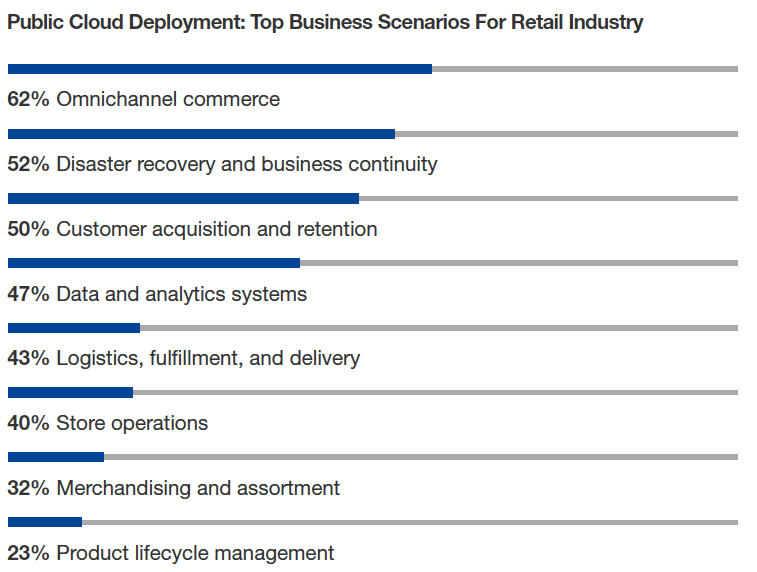
- Key Drivers For Retail Organizations To Migrate Application To Public Cloud
- Cloud Investments In The Retail Industry
- The Three Dimensions That The Industry’s Cloud Challenges Are Taking
- The Top Agendas Retailers Want to Accomplish with the Public Cloud
Download Forrester’s Retail Report Now.
More Relevant Stories for Your Company

HarbourBridge Schema Assistant Allows Quick, Bulk Migration to Cloud Spanner
Today we’re announcing the HarbourBridge Schema Assistant, which provides a guided schema-design workflow for migrating from MySQL or PostgreSQL to Spanner. HarbourBridge imports dump files (from mysqldump or pg_dump) or directly connects to your source database, and converts the source database schema to an equivalent Spanner schema. The new Schema Assistant

VMware Engine’s Exciting New Updates: A Google Cloud Journey
IT leaders today are being asked to simultaneously support their company’s infrastructure, find opportunities for growth, and meet their goals with fewer resources and smaller budgets than before. Recently we highlighted three customers who are leveraging Google Cloud VMware Engine to achieve these goals while lowering their TCO and transforming their organization.

RISE with SAP on Google Cloud is An Engine of Progress for Cloud Migrations!
The practical benefits of migrating SAP systems to the cloud aren’t lost on most businesses. Running SAP in the cloud lets companies simplify tasks, scale quickly, and reduce costs. But as a growing number of organizations are discovering, the cloud is more than the sum of improved processes and workflows.

What Our Google Cloud Experts Say About Multi-cloud Journey
Do you want to fire up a bunch of techies? Talk about multicloud! There is no shortage of opinions. I figured we should tackle this hot topic head-on, so I recently talked to four smart folks—Corey Quinn of Duckbill Group, Armon Dadgar of Hashicorp, Tammy Bryant Butow of Gremlin, and James Watters of VMware—about what multicloud is
