





RISE with SAP on Google Cloud is An Engine of Progress for Cloud Migrations!

3383
Of your peers have already read this article.
3:00 Minutes
The most insightful time you'll spend today!
The practical benefits of migrating SAP systems to the cloud aren’t lost on most businesses. Running SAP in the cloud lets companies simplify tasks, scale quickly, and reduce costs. But as a growing number of organizations are discovering, the cloud is more than the sum of improved processes and workflows. It offers unique and powerful ways to transform an enterprise.
That’s because the cloud is more than a technology. It’s a foundational layer for business and IT transformation. In the best scenario, it unleashes exponential gains that fundamentally change an enterprise. Organizations achieve greater agility and resilience, and they’re equipped to innovate and disrupt like never before.
RISE with SAP and Google Cloud sit at the intersection of these possibilities. RISE with SAP helps organizations embark on the cloud migration journey with minimal risk and on their own terms. Together with Google Cloud, it enables a more advanced framework for a move to the cloud. Think of RISE with SAP on Google Cloud as business-transformation-as-a-service.
Companies move their SAP systems to the cloud for very clear and compelling reasons: 44% say it fuels digital transformation, and 43% are looking to build out a modern IT infrastructure to lower costs and simplify processes. RISE with SAP on Google Cloud takes direct aim at these challenges.
MSC Industrial Supply Co., a premier North American distributor of metalworking and maintenance, repair, and operations products and services to industrial customers views RISE with SAP on Google Cloud as a way to make its IT systems and the business more flexible and scalable by expanding data access in the cloud. With approximately 2 million products and more than 6,500 associates, that’s no small task for the Melville, New York, company.
In June 2021, MSC successfully migrated to SAP S/4HANA Cloud, private edition, running on Google Cloud infrastructure. Through RISE with SAP, MSC adopted cloud resources that were both reliable and scalable, without any disruption to its business operations. Advanced data analytics, machine learning, and other AI capabilities are now available to MSC.
At the center of this transformation is BigQuery, with which MSC data scientists can pinpoint business insights among vast and complex data sets from diverse sources, including Ads, Maps, Shopping, or the Google Marketing Platform. The net effect is significantly less time needed to manage and analyze rich data sets.
Energizer Holdings Inc., a leading manufacturer and distributor of primary batteries (think Energizer Bunny), portable lights, and auto care products, has turned to RISE with SAP on Google Cloud to power its move to SAP S/4HANA. The company wants to automate essential business processes, improve customer service, and boost innovation. It had been using a private cloud solution but needed to gain flexibility while better containing costs.
After migrating through RISE with SAP on Google Cloud, Energizer is able to share data and intelligence to keep teams better informed. The framework has also helped contain costs and support business growth through reduced licensing costs and a more economical and efficient SaaS model.
Inchcape plc, the leading multi-brand automotive distributor for Toyota, Mercedes, BMW and others, is turning to RISE with SAP on Google Cloud to take its business-critical sales, marketing and operations systems, and data into the cloud. Doing so will allow the UK-based company to join a diverse range of datasets into a centralized, secure, and scalable platform for the first time.
With operations in over 40 markets and geographies, Inchcape has complex logistics requirements. Google Cloud supports and offers the types of advanced analytics and machine learning capabilities the company requires for today’s complex manufacturing environment.
GCP Applied Technologies Inc. (GCPAT) is dedicated to the development of high-performance products and the advancement in construction technologies, simplifying the complexities of construction worldwide and delivering value to its customers. As a part of their business transformation initiatives, the company was looking to move from an on-premise data center to a more modern framework that can keep up with evolving demands. GCPAT considered various solution options like non-cloud colocation, but ultimately opted to move to the cloud through RISE with SAP on Google Cloud.
The platform provides a resilient foundation for accelerating business process improvement and innovation while optimizing maintenance and licensing costs. With the ability to deliver transformative solutions across the enterprise, GCPAT is now well-positioned to handle the pace of business change.
Veolia is an international company with nearly 180,000 employees across the globe and activities in three main service and utility areas: water management, waste management and energy services. Veolia, which aims to become the benchmark company for ecological transformation, was looking to digitize its processes and operations with a modern, cloud-based enterprise management system. Fundamental to Veolia’s success is its ability to continually roll out new, digital services to its industrial and municipal clients, so the company needed an enterprise management system capable of adapting quickly as the company’s business model evolves.
Veolia Poland upgraded to S/4HANA Private Cloud Edition on Google Cloud through RISE with SAP. Not only has the company been able to take advantage of a simplified, fully managed, and shortened cloud implementation, it has also been able to extend its existing Google environment, including BigQuery, to place data at the center of its digitization strategy and develop predictive capabilities using Google Cloud AI.
4 steps to cloud success
These successful transformation stories share four key characteristics in common.
- Low-risk path: Each enterprise reduced its risk of migrating to the cloud while speeding up time-to-value. Subject matter experts from Google Cloud and its partners guided each enterprise through the transition, and they were able to take advantage of incentives to defray infrastructure costs through the Google Cloud Acceleration Program.
- Near-zero downtime: By increasing SAP application availability with Live Migration, our success stories dramatically reduced planned outages due to infrastructure and maintenance updates, down to less than 1 percent.
- Room to innovate: With advanced analytics, artificial intelligence, and machine learning capabilities, these enterprises are improving processes, reducing costs and driving new revenue streams. Additionally, they have the ability to experiment with modern applications faster and more securely using their SAP data with Apigee.
- IT sustainability: By moving SAP applications to smarter and more efficient data centers, these success stories instantly reduced their IT emissions, while eliminating guesswork. Now, they can set goals based on seamless, agentless assessments and track progress with Google Cloud tools, analytics and reporting capabilities.
The engine of progress for cloud migrations
RISE with SAP on Google Cloud delivers a modular and low-risk path to the cloud for organizations at various stages of the migration and transformation path by clearing roadblocks and using performance indicators and industry benchmarks to pinpoint the best place to start.
The result? Reporting that’s 100x faster, as well as embedded AI technology, real-time advanced analytics, streamlined data display, consumer-grade UX across devices, strong sustainability, and a 50% reduction in a company’s data footprint. In practical terms, all the numbers add up to a simple but profound conclusion: RISE with SAP on Google Cloud is an engine of progress for organizations looking to gain an advantage in today’s highly competitive business environment.
To learn more about RISE with SAP on Google Cloud click here.
Create and Protect Admin Accounts

4877
Of your peers have already read this article.
1:30 Minutes
The most insightful time you'll spend today!
Setting up your new cloud infrastructure is scary. Extra scary when you realize that someone (is it gonna be you?) gets to have phenomenal cosmic power over the whole thing.
Yes, I’m talking about the admin account, and today we’ll dig into why they are important, dangerous and different.
When the team at pistach.io got their nuts-as-a-service business growing fruitfully, they knew they needed to think carefully about admin accounts. These people would have tremendous control over their use of Google Cloud, and they could potentially cause very big problems if any were compromised. Definitely resources that require a protective shell.

Early in pistach.io’s development, an employee named Walter Nutt wanted to play a prank by changing his co-worker’s profile photo from an almond to a peanut (pretty devious, since a peanut is actually a legume). He didn’t have access to his friend’s computer, but he did have access to the company’s Cloud Storage bucket. While searching for the profile photo in question, Wally inadvertently deleted the entire contents of the bucket!
As he searched for ways to restore its contents, Wally modified access to two other pistach.io buckets. The company was ground to a halt for a week while teams worked to crack through the permissions issues.
Time to rethink permissions a bit, so this couldn’t spoil their buttery smooth operations in the future.
Following the resource manager guide, the team made a super admin email address that wasn’t tied to a particular individual or Workspace account, and secured it with strong multi-factor authentication. This would be their backup in case an admin account were to be compromised, so they could recover and repair.
The team already uses Google Workspace, so they have an organization set up already. That creation process established initial super administrators, allowing them to create and modify all other resources inside the organization. As they looked toward using Google Cloud, the super administrators could:
- Give the admin role to people, for Cloud
- Act as a point of contact for account recovery
- Modify or delete the organization if needed
Making admin users for the organization allows other people to then flesh out the resources and policies for pistach.io, before they go nuts and give everyone all the permissions. While that would speed things up, it would make it easy for an attacker to crack through the security shell because any account compromise could give ousize access. Yikes!

Instead, the IT leads specified certain people to act as organization admins, and then gave them permissions to:
- Define Identity and Access Management policies
- Structure the Resource Hierarchy
- Delegate control of specific Cloud elements to others on the team
Once those organization admins were set up, they could give management and oversight of Compute, Storage, Networking and other resource types to the relevant leads, making sure each person had just the right amount of permission for the role they needed to perform. The organization admins don’t have permissions themselves to make these resources. They just delegate.
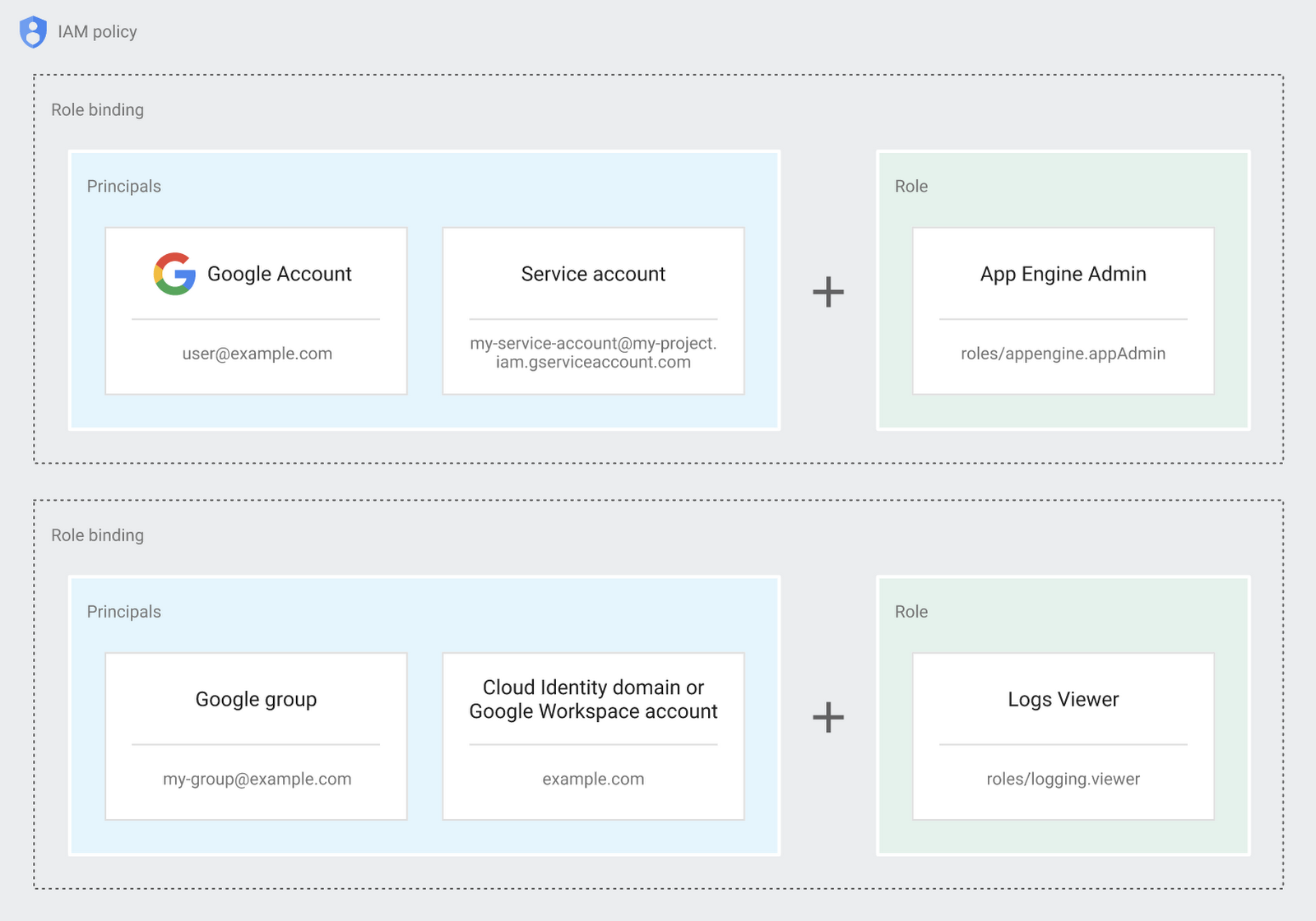
Now each person can accomplish the job they’re responsible for, but doesn’t have overly permissive access. Delegating like this keeps the entire organization safer, and limits the blast radius if someone does manage to break in.
You can go through these steps yourself with this tutorial.
By default the creation of an organization resource for the domain gives everyone the ability to create projects and billing accounts. Once they set up their Organization Admin at pistach.io they decided to remove some of these wide permissions and, in a nutshell, bring everything down to a much finer control. So people could get permissions for a folder or a project, but not the entire organization!
Remember to take care of your admin roles, as they have the power, and responsibility, to cause serious harm if not used safely. Be safe with your Identity and Access Management. And keep your data yours!
Next time we join you we’ll take a crack at creating and provisioning an app to run inside the policies and resource management frameworks created today.
Explore The New Era of Flexibility: Streamlined AWS-to-Google Cloud Migration

1352
Of your peers have already read this article.
3:30 Minutes
The most insightful time you'll spend today!
As an IT leader, you’re asked to do it all: innovate and optimize your tech stack for business outcomes — all while being secure and compliant. It takes heroic efforts to achieve innovation and progress while also tightening budgets and teams. This is why many of you are considering migrating applications to Google Cloud, for benefits like scalability and flexibility, security and compliance, disaster recovery and business continuity, and cutting-edge technologies at lower costs.
To help you do this, we suggest using Google Cloud’s Migrate to Virtual Machines – part of Migration Center. This managed cloud service lets you lift and shift workloads at scale to Google Cloud Compute Engine with minimal changes and risk.
And recently, we rolled out our latest release which introduces support for workload migration from AWS to Google Compute Engine. With this addition, you can now migrate both your on-prem and AWS workloads at scale. This means centralized management for your end to end workload migration journey from both sources via Cloud Console or APIs.
Simple and easy migrations from AWS and VMware sources to Google Cloud
Migration of AWS EC2 instances directly to Google Compute Engine using Migrate to Virtual Machines follows a well established and easy journey, which means a minimal learning curve for users who are already migrating workloads from VMware. Workload migration is agent-less, which means you do not need to access or alter workloads as a prerequisite for migration, allowing you to execute zero-touch migrations. Migrate instance data with no interruptions to the running workload at the source for a fast cutover to Google Cloud. In addition, our end-to-end cloud console interface surfaces your AWS EC2 inventory, migrations, and groups so you can execute migrations without ever leaving the cloud console interface.
Large-scale migrations
Completing a large-scale migration project in a timely manner calls for careful planning and streamlined migration sprints. The Migrate to Virtual Machines’ Groups construct enables you to group source VMs together in the planning phase. When it’s time to execute the planned migration, VM Groups let you execute migration operations on a group level, or on a subset of the group, streamlining the process at scale.
Minimal downtime and risk
Application uptime is key to keeping your business running. Every migration with this latest release of the service periodically replicates data from the source workload to the destination without manual steps or interruptions to the running workload, minimizing workload downtime and enabling fast cutover to Google Cloud. You can also launch non-disruptive migration tests — referred to as test-clones — to help you validate that these workloads will work properly in the cloud before cutting over. This helps avoid issues that might have otherwise been costly or disruptive to your business.
How the service works
Migrations simply work, at scale, in a managed service fashion. With Migrate to Virtual Machines, there’s no requirement to provision or manage migration-specific resources in the cloud. The service uses replication-based migration technology to lift and shift workloads from source environments to Google Cloud. The Migrate Connection replicates source VM disk snapshots in the background with no interruption to the source workload. Replicated data is encrypted in transit and at rest, and when you instantiate a migrating VM using a test-clone or cut-over, the service seamlessly adapts your source VM operating system to boot and run natively in the cloud — including configuring network settings and deploying Google Cloud guest packages.
The migration journey of an EC2 instance — or VMware VM — to Google Cloud is comprised of the following steps:
1. Onboarding a source VM for migration: Onboard one or more VMs for migration from the source environment fleet.
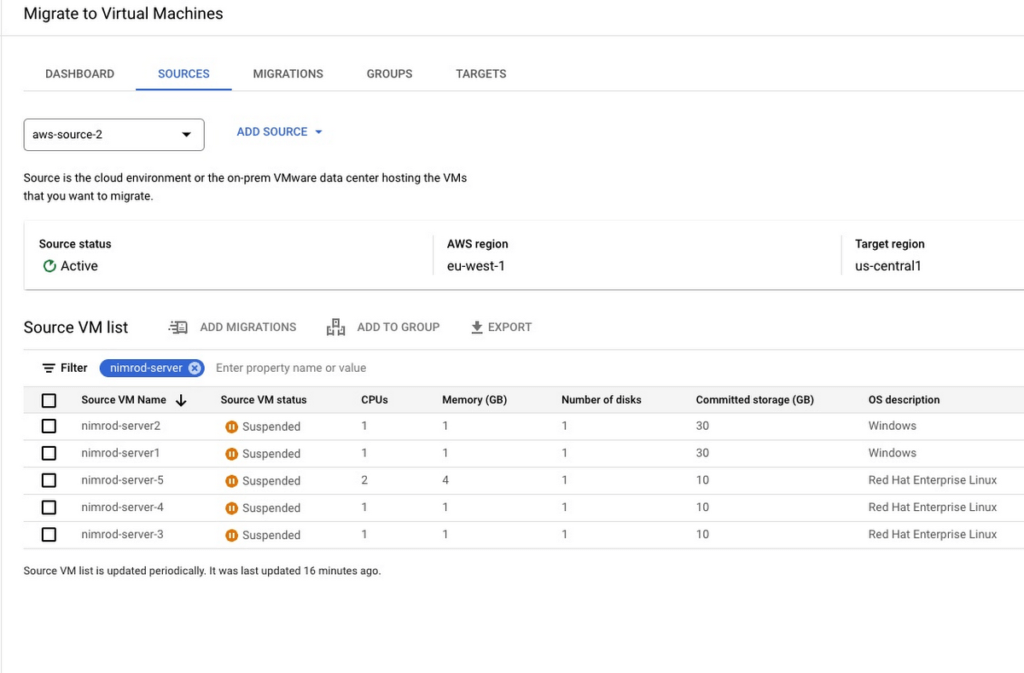
2. Configure landing zone target: You can migrate an instance to any Google Cloud project in your environment and update landing zone details at any time before executing a test-clone or cutover.
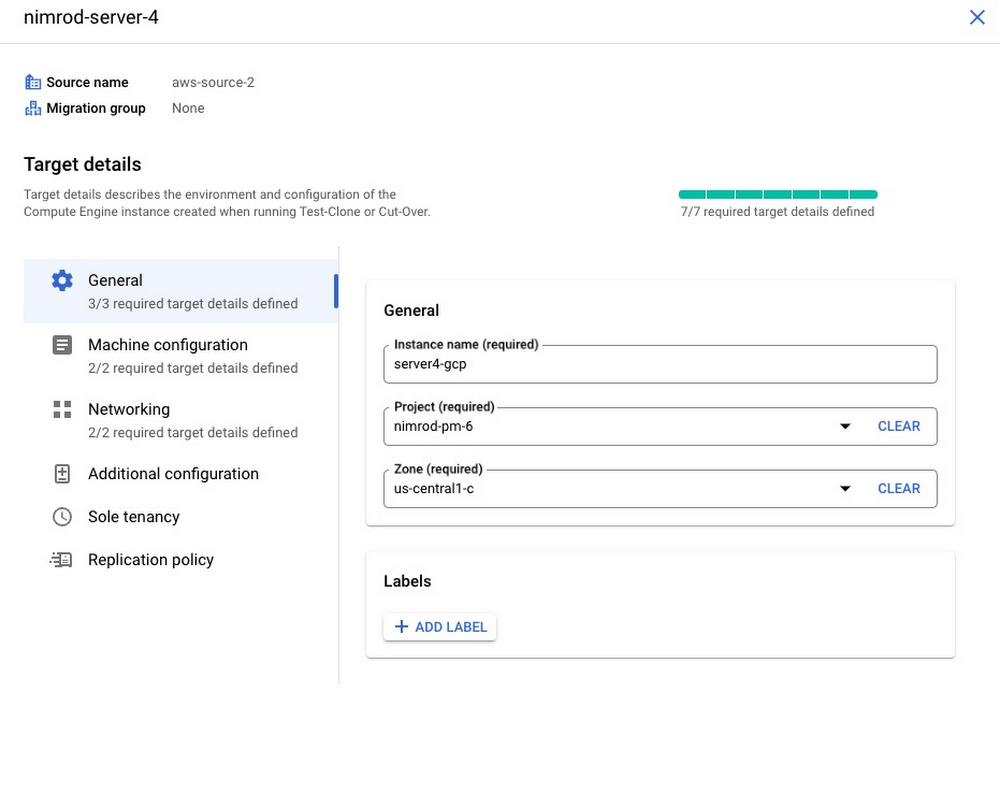
3. Initiate VM data replication of source workload: Migrate to Virtual Machines periodically replicates instance disks to the cloud with no interruption to the source instance. You can control replication frequently and pause or resume at any point in time.
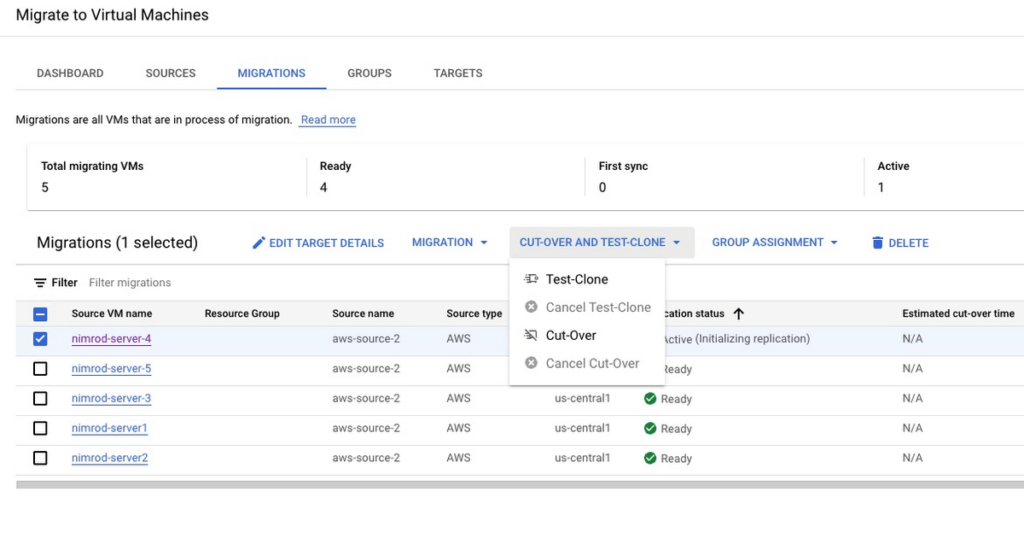
4. Test migrating instance: Test-clone creates a copy of your source instance in the defined landing zone to validate the migrating instance in the cloud before executing a cut-over. You can repeat the test-clone multiple times to multiple landing zones for thorough validation
5. Cutover migrating instance: Cutover operation shuts down your source instance and then performs the short final sync to Google Cloud. Migrated VM is instantiated in the target landing zone.
Getting started with Migrate to Virtual Machines
It’s quick and easy to start migrating your AWS EC2 instances and on-premises VMs today:
- Enable the vmmigration API in a Google Cloud project
- Create an AWS source in your environment
- Onboard and initiate replication of instance data from source
- Set migrating instance target details.
- Perform non-disruptive tests of your migrating instance using test-clone
- Cutover your instance to the cloud with minimal down time
You can also visit our website to learn more about Migrate to Virtual Machines. If you know you have to migrate in 2023 but aren’t sure how to get started, you can sign up for a free discovery and assessment of your current IT landscape so we can help craft the ideal migration plan for you and your business.
Mambu’s Journey: Modernizing Core Banking with Google Cloud

942
Of your peers have already read this article.
3:30 Minutes
The most insightful time you'll spend today!
When our founders began Mambu in 2011, their goal was to bring the latest digital technologies to the banking and finance world. Banking, in particular, is an industry built on decades of deep legacy technology. So initially, Mambu was embraced by microfinance — 100 organizations in 26 countries in just the first two years.
Since then, acceptance of modernizing core banking services by using composable, cloud technologies has grown across financial services institutions (FSIs). We now service top-tier banks, fintech startups, and other finance organizations across six continents, helping them deliver flexible, personalized, customer-centric banking products and services that their customers can depend upon.
One of the main reasons we’ve been able to scale the Mambu composable banking platform across the globe and at our current pace is our partnership with Google Cloud. The decision to move forward with Google Cloud happened for several reasons.
1. Flexibility and openness. Many FSIs are on hybrid and multicloud technology stacks, as they may still be transitioning from legacy systems, or have data residency requirements that have led them to use different clouds in different regions. Mambu meets customers wherever they are in their cloud journeys. We support interoperability without vendor lock-in. This need for openness, as well as the scalability benefits, led Mambu to evolve our platform on Google Kubernetes Engine (GKE). Many customers use open-source Kubernetes because, this common foundation can help streamline integration, speed up time to market, and reduce development. Just as important, the Google Cloud open cloud approach matches our company values.
2. Security and data residency. For customers in highly regulated finance industries, security isn’t just top of mind, it’s the No. 1 requirement. In addition to Google Cloud’s secure infrastructure, external audit certifications, and encryption, its wide array of regions has allowed us to expand into more countries, where we serve banks that must meet local data residency requirements. For example, Google Cloud’s Jakarta Cloud Region, has allowed us to support Bank Jago in Indonesia as it brings more financial inclusion to the unbanked in that country.
3. Availability. It’s critical for banks to maintain basic financial functionality, like accepting deposits and serving cash, even amid a service disruption. We needed a cloud partner with impeccable redundancy, failover, and disaster recovery capabilities.
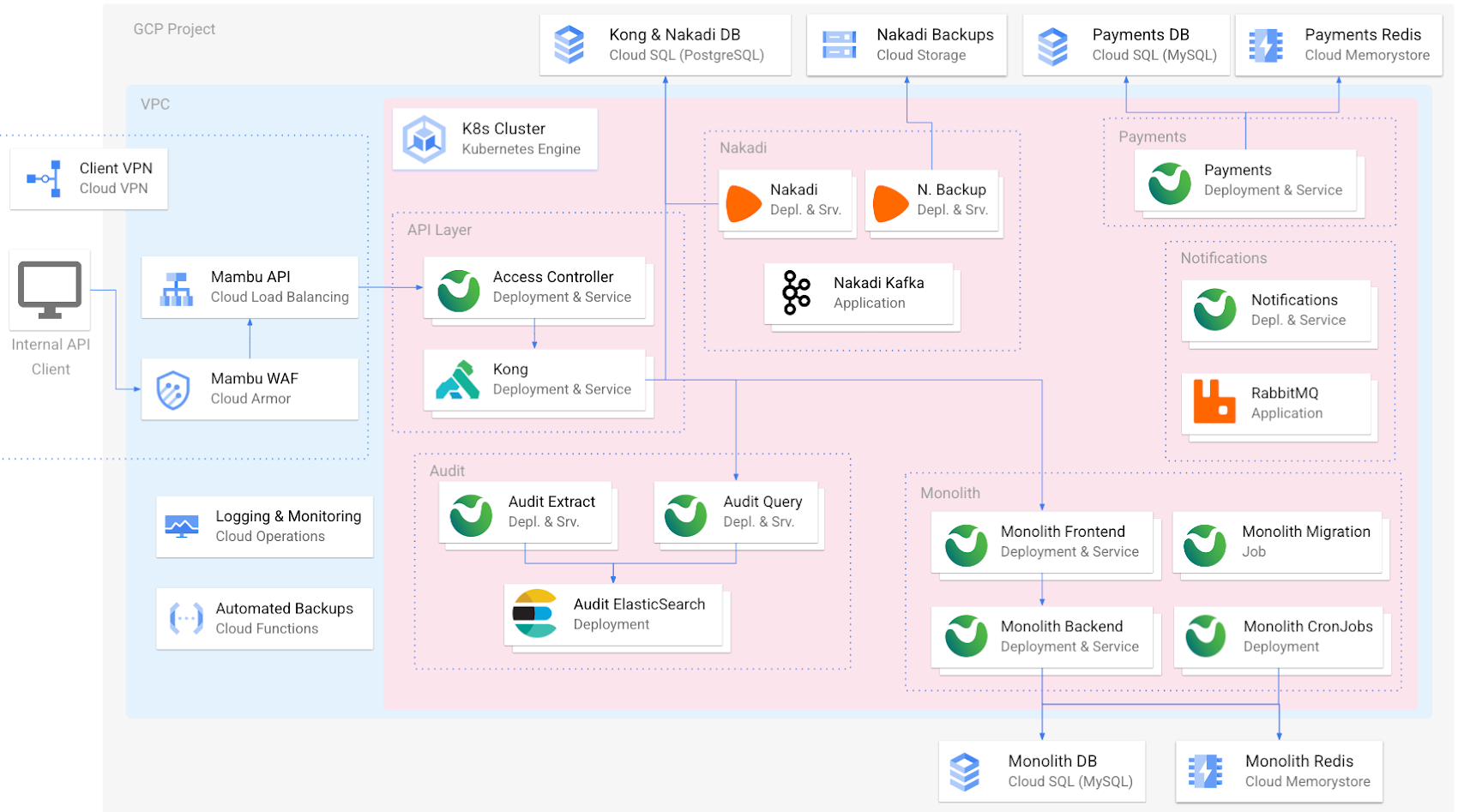
In addition to GKE, the Mambu platform uses several other Google Cloud services for specific functions, including Cloud Armor, Cloud Load Balancing, Cloud VPN, Cloud Memorystore, and Google Cloud Operations.
Another important reason we chose to partner with Google Cloud was its expansive ecosystem and commitment to innovation. We are midway into a three-year journey to modernize our own technology stack to meet customer needs.
Building a roadmap with Google Cloud
Our customers need a core banking technology platform that will grow with them as they bring to market innovative services built on the latest technology advances. For Mambu to be that platform, we need a cloud partner that supports and scales with our growth. While we originally built our cloud architecture on GKE and Compute Engine (among a few other Google Cloud services), we’re now looking to a serverless future where we can scale more easily and leverage managed services within Google Cloud and its partner ecosystem to focus on our core offerings.
These are just some of the modernization and customer-led innovations that we’re cooking up:
- More workloads in GKE: Like many companies, our cloud transformation is a work in progress. While much of our codebase is in GKE, we’re continuing to break up some larger pieces of code into microservices to increase agility and velocity, enabling us to make consistent updates to discrete areas of our platform without affecting the whole. GKE is the leader for orchestrating microservices at scale and continues to be a natural fit.
- Native BigQuery integration: Mambu customers collect a tremendous amount of data within the platform that can be used for analytics, personalization, and other use cases. We’re planning to create a seamless integration for feeding core banking data from Mambu into BigQuery so that customers can better leverage their valuable data.
- CloudSQL vs. self-managed MySQL: We have almost completed migrating from our own MySQL instances to managed Cloud SQL databases, which will open up new opportunities to implement customer-centric solutions such as BigQuery integration.
- A serverless future with Cloud Run: Compute Engine is working well for Mambu, providing the flexibility to choose the virtual machines that best balance performance and cost needs. As we seek even more time and cost efficiencies, we believe the elastic scalability of a serverless architecture built on Cloud Run will get us there, and we’re considering going serverless in the future. Doing so would abstract infrastructure for simpler management, while allowing us to fire up containers to meet our customers’ high transactions-per-second needs, spin them down when not needed, and pay only when they run. It would also boost security: Without long-running compute, there are no patches or fixes, and each new instance is isolated and fresh by default.
These are just a handful of examples of the ways we want to best leverage Google Cloud services to simplify how we manage our tech stack, as well as continue to bolster security, scalability, and performance. There are many other ideas we’re exploring: using Dataproc and Datastream to support the specific data needs of Islamic banking, Cloud Functions so that customers can run their own queries against Mambu, and AI-enabled features.
At Mambu, our mission is to empower our customers to deliver great modern financial experiences easily to everyone around the world. Every time Google Cloud opens a new data center, we can enter a new market. Every time we move to a new-to-us managed service via the Google Cloud Marketplace, we free up time to build new ways to deliver customer-centric banking solutions. And so, we look forward to continuing this partnership with Google Cloud well into the future.
Enable Specialized Workloads with Bare Metal Solution from Google Cloud

3863
Of your peers have already read this article.
2:00 Minutes
The most insightful time you'll spend today!
Enterprises want to embrace the pace of innovation and an operational business model of the modern-day cloud, but they don’t want to disrupt their existing IT landscape or upgrade all their legacy applications. This presents a conundrum, as most legacy applications were not designed to run in the cloud, and migrating them can be challenging, risky and cost-prohibitive.
The complexity, cost and risk of cloud migration often stand in the way of a successful digital transformation. At Google Cloud, we work to meet you where you are and help you craft a migration strategy that lets you run what you want, where you want, how you want. This is why we’re excited to introduce Bare Metal Solution: to jumpstart the migration of applications that have been holding back your cloud adoption.
Bare Metal Solution consists of all the infrastructure you need to run your specialized workload such as Oracle Database close to Google Cloud. This infrastructure is connected with a dedicated, low-latency and highly resilient interconnect, and connects to all native Google Cloud services. Bare Metal Solution uses OEM hardware that is certified to run multiple enterprise applications, most of which can be migrated to this infrastructure with little or no change, minimizing the risk of migration while simultaneously increasing its velocity.
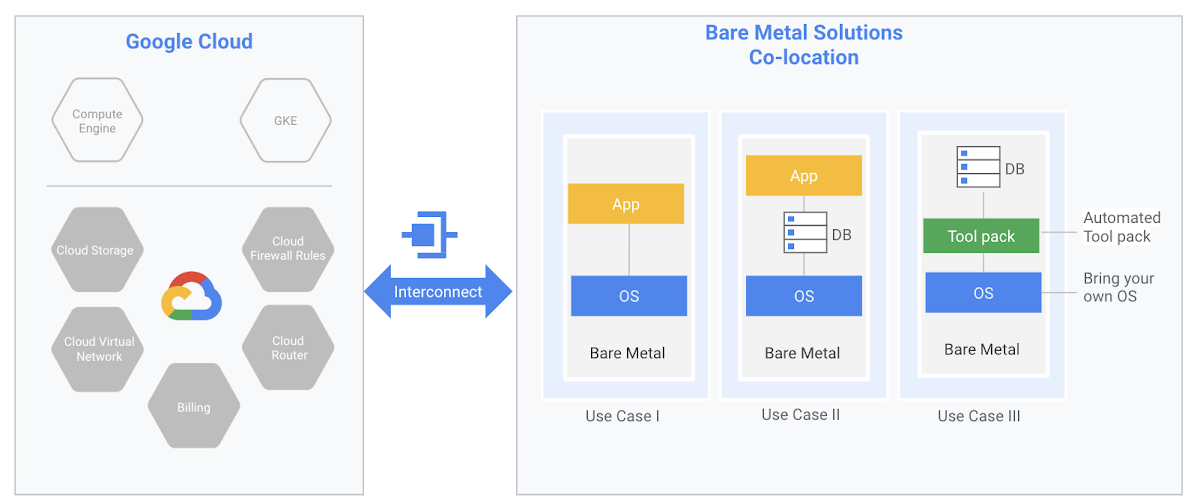
Bare Metal Solution also comes with automation tools to help you onboard your environment quickly—provisioning your applications, relational databases, configuring popular operating systems and setting up services such as backups and monitoring. The management interface will be familiar to your existing IT teams or systems integrator, allowing you to leverage your investments in existing tools, processes and personnel.
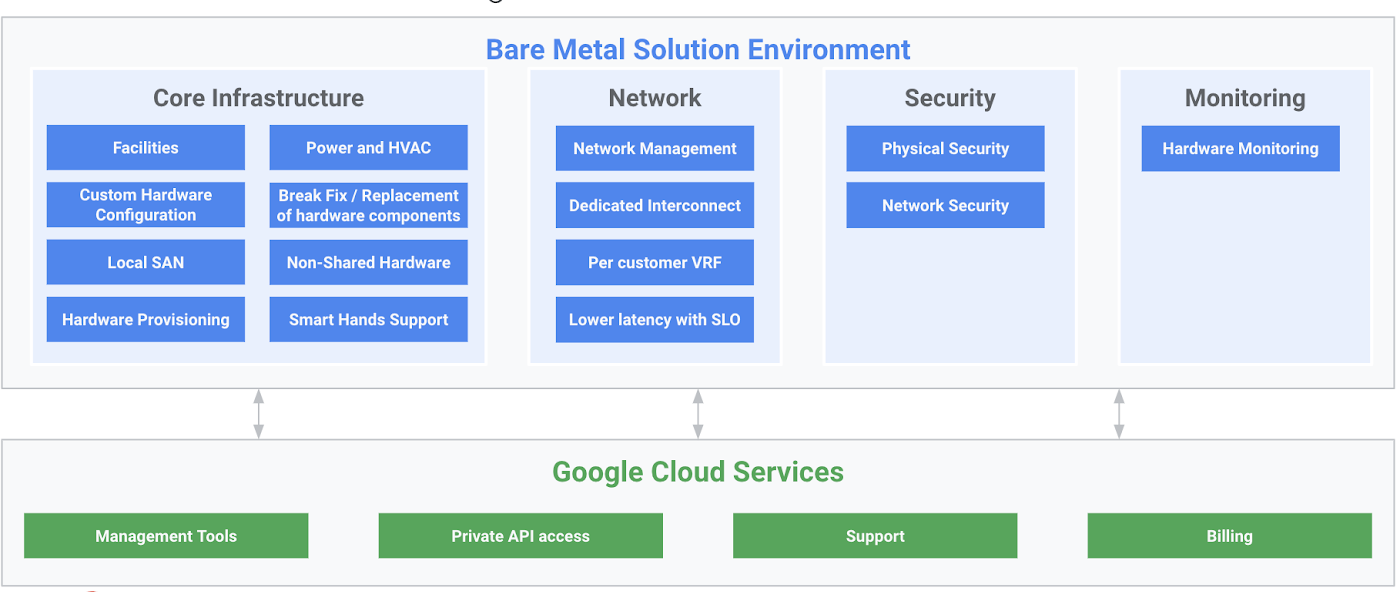
In addition to providing state-of-the-art infrastructure and integrated low-latency access to Google Cloud, Bare Metal Solution also provides the following:
- Completely managed hardware infrastructure: End-to-end infrastructure management such as compute, storage and networking, as well as fully managed and monitored environments such as power, cooling and facilities.
- Google Cloud support and billing: A seamless support experience with support for infrastructure, including defined SLAs for initial response. 24X7 coverage for all Priority 1 and 2 issues. Unified billing across Google Cloud and Bare Metal Solution.
- Service Level Agreements: Defined enterprise-grade SLA for hardware uptime and interconnect availability.
As an integral part of Google Cloud, Bare Metal Solution lets you off-load provisioning, managing and monitoring of your infrastructure to Google, so you can focus on your own data center modernization.
The nitty gritty
Many of the workloads that run on Bare Metal Solution have demanding CPU and I/O requirements. Bare Metal Solution provides a cost-effective and scalable architecture based on state-of-the-art x86 servers and high-performance, resilient storage. The servers are offered in several fixed configurations that support most mainstream enterprise operating systems:
- Dual-socket x86 systems
- 16 core with 384 GB DRAM
- 24 core with 768 GB DRAM
- 56 core with 1536 GB DRAM
- Quad-socket x86 systems
- 56 core with 1536 GB DRAM
- 112 core with 3072 GB DRAM
Bare Metal Solution servers can be used for standalone applications, or configured with application native or database native clustering technologies for high availability. Storage is offered in 1TB volume increments of either hybrid or all-flash disk. For applications that require custom compute shapes or special-purpose hardware, we also offer bespoke hardware configurations.
Bare Metal Solution uses OEM hardware that is certified for many ISV software applications as well as custom built applications, including those built on Oracle Database. These hardware configurations are offered as a subscription, billed monthly with a preferred term length of 36 months. There are no data ingress and egress charges between Bare Metal Solution and Google Cloud in the same region; customers are responsible for provisioning adequate bandwidth for their business needs.
Legacy apps are no barrier to cloud
Google Cloud is the preferred destination for organizations building cloud-native applications as well as migrating existing on-premises applications, bringing reliable infrastructure, leading data analytics capabilities, and a culture of innovation to your IT environment. Whether you’re looking to build new applications in the cloud or to overhaul your infrastructure, we’re here to help you reach your digital transformation goals. And now, with Bare Metal Solution, we’re excited to extend the power of Google Cloud to specialized, legacy workloads. To learn more please visit our website.
How Google Cloud’s PSO Supports Customers’ Migration Goals

5051
Of your peers have already read this article.
2:00 Minutes
The most insightful time you'll spend today!
Google Cloud’s Professional Services Organization (PSO) engages with customers to ensure effective and efficient operations in the cloud, from the time they begin considering how cloud can help them overcome their operational, business or technical challenges, to the time they’re looking to optimize their cloud workloads.
We know that all parts of the cloud journey are important and can be complex. In this blog post, we want to focus specifically on the migration process and how PSO engages in a myriad of activities to ensure a successful migration.
As a team of trusted technical advisors, PSO will approach migrations in three phases:
- Pre-Migration Planning
- Cutover Activities
- Post-Migration Operations
While this post will not cover in detail all of the steps required for a migration, it will focus on how PSO engages in specific activities to meet customer objectives, manage risk, and deliver value. We will discuss the assets, processes and tools that we leverage to ensure success.
Pre-Migration Planning
Assess Scope
Before the migration happens, you will need to understand and clarify the future state that you’re working towards. From a logistical perspective, PSO will be helping you with capacity planning to ensure sufficient resources are available for your envisioned future state.
While migration into the cloud does allow you to eliminate many of the considerations for the physical, logistical, and financial concerns of traditional data centers and co-locations, it does not remove the need for active management of quotas, preparation for large migrations, and forecasting. PSO will help you forecast your needs in advance and work with the capacity team to adjust quotas, manage resources, and ensure availability.
Once the future state has been determined, PSO will also work with the product teams to determine any gaps in functionality. PSO captures feature requests across Google Cloud services and makes sure they are understood, logged, tracked, and prioritized appropriately with the relevant product teams. From there, they work closely with the customer to determine any interim workarounds that can be leveraged while waiting for the feature to land, as well as providing updates on the upcoming roadmap.
Develop Migration Approach and Tooling
Within Google Cloud, we have a library of assets and tools we use to assist in the migration process. We have seen these assets help us successfully complete migrations for other customers efficiently and effectively.
Based on the scoping requirements and tooling available to assist in the migration, PSO will help recommend a migration approach. We understand that enterprises have specific needs; differing levels of complexity and scale; regulatory, operational, or organization challenges that will need to be factored into the migration. PSO will help customers think through the different migration options and how all of the considerations will play out.
PSO will work with the customer team to determine the best migration approach for moving servers from on-prem to Google Cloud. PSO will walk customers through different migration approaches, such as refactoring, lift-shift, or new installs. From there, the customer can determine the best fit for their migration. PSO will provide guidance on best practices and use cases from other customers with similar use cases.
Google offers a variety of cloud native tools that can assist with asset discovery, the migration itself, and post-migration optimization. PSO, as one example, will help work with project managers to determine the best tooling that accommodates the customer’s requirements for migrating servers. PSO will also engage Google product team to ensure the customer fully understands the capabilities of each tool and the best fit for the use case. Google understands from a tooling perspective, one size does not fit all, thus PSO will work with the customer on determining the best migration approach and tooling for different requirements.
Cutover Activities
Once all of the planning activities have been completed, PSO will assist in making sure the cutover is successful.
During and leading up to critical customer events, PSO can provide proactive event management services which deliver increased support and readiness for key workloads. Beyond having a solid architecture and infrastructure on the platform, support for this infrastructure is essential and TAMs will help ensure that there are additional resources to support and unblock the customer where challenges arise.
As part of event management activities, PSO liaises with the Google Cloud Support Organization to ensure quick remediation and high resilience for situations where challenges arise. A war room is usually created to facilitate quick communication about the critical activities and roadblocks that arise. These war rooms can give customers a direct line to the support and engineering teams that will triage and resolve their issues.
Post-Migration Activities
Once cutover is complete, PSO will continue to provide support in areas such incident management, capacity planning, continuous operational support, and optimization to ensure the customer is successful from start to finish.
PSO will serve as the liaison between the customer and Google engineers. If support cases need to be escalated, PSO will ensure the appropriate parties are involved and work to get the case resolved in a timely manner. Through operational rigor, PSO will work with the customer in determining if certain Google Cloud services will be beneficial to the customer objectives. If services will add value to the customer, PSO will help enable the services so it aligns with the customer’s goal and current cloud architecture. In cases where there are missing gaps in services, PSO will proactively work with the customer and Google engineering teams to close the gaps by enabling additional functionality in the services.
PSO will continue to work with the engineering teams to consistently review and provide recommendations on the customer’s cloud architecture in ensuring the most optimal and cost efficient design along with adhering to Google’s best practices guidelines.
Aside from migrations, PSO is also responsible for providing continuous training of Google Cloud to customers. To ensure consistent development of Google Cloud, PSO will work with the customer to jointly develop a learning roadmap to ensure the customer has the necessary skills to succeed in delivering successful projects in Google Cloud.
Conclusion
Google PSO will be actively engaged throughout the customer’s cloud journey to ensure the necessary guidance, methodology, and tools are presented to the customer. PSO will engage in a series of activities from pre-migration planning to post migration in key areas such as capacity planning to ensure sufficient resources are allocated for future workloads to providing support on technical cases for troubleshooting. PSO will serve as a long-term trusted advisor who will be the voice of the customer and provide the reliability and stability of the customer’s Google Cloud environment.
Click here if you’d like to engage with our PSO team on your migration. Or, you can also get started with a free discovery and assessment of your current IT landscape.
More Relevant Stories for Your Company
Google Cloud’s Role in Minimizing Memory Errors Impact for SAP Customers
Every cloud system begins with high-quality hardware infrastructure. Sometimes, however, hardware breaks — and when it happens, our most important goal is to minimize the impact on our customers and their cloud workloads. Memory errors are the most common type of hardware failure, and they're also one of the most

Google Cloud Announces Improvements in Private Catalog to Drive Terraform Deployments
As an enterprise admin, when you choose to use Google Cloud Private Catalog to enable curated, self-serve Google Cloud infrastructure provisioning, you need the ability to manage your organization’s deployments. Today, we’re pleased to announce support for several improvements to Terraform driven deployments through Private Catalog. With this new release, you can

Google Cloud Celebrates Journey of 3 Inspiring Founders for the Asian Pacific American Heritage Month
May is Asian Pacific American Heritage Month —a time for us to come together to celebrate and remember the important people and history of Asian and Pacific Island heritage. This feature highlights three AAPI founders from the Google For Startups community. Read on to learn how these three founders built

How Vertex Vizier’s Automated Hyperparameter Tuning Improves ML Models
We recently launched Vertex AI to help you move machine learning (ML) from experimentation into production faster and manage your models with confidence—speeding up your ability to improve outcomes at your organization. But we know many of you are just getting started with ML and there’s a lot to learn! In tandem
