





What Our Google Cloud Experts Say About Multi-cloud Journey

3438
Of your peers have already read this article.
1:30 Minutes
The most insightful time you'll spend today!
Do you want to fire up a bunch of techies? Talk about multicloud! There is no shortage of opinions. I figured we should tackle this hot topic head-on, so I recently talked to four smart folks—Corey Quinn of Duckbill Group, Armon Dadgar of Hashicorp, Tammy Bryant Butow of Gremlin, and James Watters of VMware—about what multicloud is all about, key considerations, and why you should (or shouldn’t!) do it.
Five important insights came out of these discussions. If you’re on a multicloud journey or considering one, keep reading.
Do: Choose to do multicloud for the right reasons
Don’t do multicloud because Gartner says so, implores Corey Quinn. Before embarking on a multicloud, define a “why” focused on business value journey, says Armon Dadger. For example, you might want to use services from each public cloud because of their differentiated services, according to Tammy Bryant Butow. Armon also calls out regulatory reasons, existing business relationships, and accommodating mergers and acquisitions. On the topic of M&A, Corey points out that if you acquire a company that uses another cloud, it’s usually expensive and difficult to consolidate. It can be smarter to stay put.
Don’t: Over-engineer for workload or data portability
Thinking that you’ll build a system that moves seamlessly among the various cloud providers? Hold up, says our group of experts. Armon points out that aspects of your toolchain or architecture may be multicloud—think of some of your workflows or global network routing—but that shifting workloads or data is far from simple. Corey says that trying to engineer for “write once, run anywhere” can slow you down, and ignores the inherent uniqueness that’s part of each platform. Specifically, Corey calls out the per-cloud stickiness of identity management, security features, and even network functionality. And data gravity is still a thing, says James, that causes some to dismiss multicloud outright.
If you’re using multiple public clouds, you take advantage of the distinct value each offers, Armon says. Use native cloud services where possible so that you see the benefits from useful innovations, built-in resilience, and baked-in best practices. The value from that cloud-infused workload may outweigh the benefits of seamless portability.
Do: Recognize different stakeholder interests and needs
James smartly points out that many multicloud debates happen because people are arguing from different perspectives. Context matters. If you’re an infrastructure engineer who invests heavily in a given cloud’s identity and access management model, multicloud looks tricky. Or if you’re a data engineer with petabytes of data homed in a particular cloud, multicloud may look unrealistic. James highlights that many developers default to multicloud because their local tools—where all the work happens—are multicloud. A developer’s IDE and preferred code framework(s) aren’t tied to any given cloud. Be aware that groups within your organization will come at multicloud from distinct directions. And this may impact your approach!
Don’t: Go it alone
Corey talks about the importance of asking others what worked, and what didn’t. Tammy offers her best practices around sharing results from experiments. It’s about sharing knowledge and tapping into it for community benefit. Others have probably tried what you’re trying, and can help you avoid common pitfalls. If you’ve just made an architectural choice that didn’t work out, share it, and help others avoid the pain.
Read research from analysts, go to conferences or watch videos to observe case studies, and join online communities that offer a safe place to share mistakes and learn from others.
Do: Experiment first using techniques like multi-region deployments
If you think you can operate systems across clouds, how about you first try doing it across regions in a specific cloud, suggests Corey. Getting a system to properly work across cloud regions isn’t trivial, he says, and that experience can help you uncover where you have architectural or operational constraints that will be even worse across cloud providers.
This is great guidance if your multicloud aspirations involve using multiple clouds to power one application—versus the more standard definition of multicloud where you use different clouds for different applications—but can also surface issues in your support process or toolchain that fail when faced with distributed systems. Start with muti-region deployments and chaos engineering experiments before aggressively jumping into multicloud architectures.
The Google Cloud take
Do the things above. It’s great advice. I’ll add three more things that we’ve learned from our customers.
- Don’t fear multicloud. You’re already doing it. You don’t single-source everything. As Corey mentioned, you probably already have one cloud for productivity tools, another for source code, another for cloud infrastructure. You’ll use software and application services from a mix of providers for a single app. You have that experience in your team and have been doing that for decades. What people do rightly worry about is using more than one infrastructure service beneath an application, as that can introduce latency, security, and logistical hurdles. Make sure you know which model your team is considering.
- Embrace the right foundational components, including Kubernetes. Will everything run on Kubernetes? Of course not. Don’t try to do that. But it also represents the closest thing we have to a multicloud API. Companies are using Kubernetes to stripe a consistent experience across clouds. And this isn’t just to orchestrate containers, but also to manage infrastructure and cloud-native services. Also, consider where you need other fundamental consistency across clouds, including areas like provisioning and identity federation.
- Use Google Cloud as your anchor. Here’s a fundamental question you have to decide for yourself: Are you going to bring your on-premises technology and practices to the cloud, or bring cloud technology and practices on-prem? We sincerely believe in the latter. Anchor to where you’re trying to get to. We offer Anthos as a way to build and run distributed Kubernetes fleets in Google Cloud and across clouds. By using a cloud-based backplane instead of an on-prem one, you’re offloading toil, leveraging managed services for scale and security, and introducing modern practices to the rest of your team.
We learned a lot about multicloud through these discussions, and it seems like others did too. That’s why we’re going to do a second round of interviews with a new crop of experts so that we can keep digging deeper into this topic. Stay tuned!

1096
Of your peers have already downloaded this article
5:30 Minutes
The most insightful time you'll spend today!
In this whitepaper, we outline migration frameworks that we built based on conversations we’ve had with CIOs, CTOs, and their technical staff. The goal of these frameworks is to help you devise a migration strategy that empowers both IT and the business.
Learn how to analyze migration strategies for your business, including:
- Moving up the stack before you migrate
- Migrating workloads into the cloud (mostly) as is
- Optimizing and modernizing workloads once you’ve migrated
The Power of Two: Best Practices for Mergers & Acquisitions on Google Cloud

3383
Of your peers have already read this article.
3:00 Minutes
The most insightful time you'll spend today!
Congratulations! Your company just acquired or merged with another organization, beginning an important new chapter in its history. But like with many business deals, the devil is in the details — particularly when it comes to integrating the two companies’ cloud domains and organizations. In this blog post, we look at how to approach mergers and acquisitions (M&A) from the perspective of Google Cloud. These are the best practices that your Google Cloud Technical Account Managers follow — or that we recommend you follow if you plan to perform the integration yourself.
Although there are various M&A scenarios, here are the two most common ones we will focus on:
- Both entities engaged in the M&A have some presence on Google Cloud and are looking for some level of integration
- Only one of the entities has a presence on Google Cloud, and is looking at best ways to work together
Depending on your situation, your approach to integrating the two companies will vary substantially.
When both companies have a Google Cloud presence
In the first scenario, let’s assume company A is acquiring company B. Prior to the M&A, both companies have their own Google Cloud Organizations — the top level structures in the Google Cloud resource hierarchy — and have one or more billing accounts associated with them. There are also various Folders and Projects below each Google Cloud Organization. In this scenario, here are the key questions to ask:
- How do you plan to integrate/consolidate two distinct Google Cloud Organizations?
- How do you plan to organize the billing structure?
- How do you handle Projects under the two Organizations?
- What is the identity management strategy for the two Organizations?
For each of these key questions, go ahead and formulate a detailed plan of action. If you have access to the Technical Account Manager service through Google Cloud Premium Support, you can reach out to them to further develop this plan.
Understanding Google Cloud Organizations
From an organizational integration standpoint, when each entity in an M&A has its own Google Cloud Organization, you have various options: no integration, partial, or full.
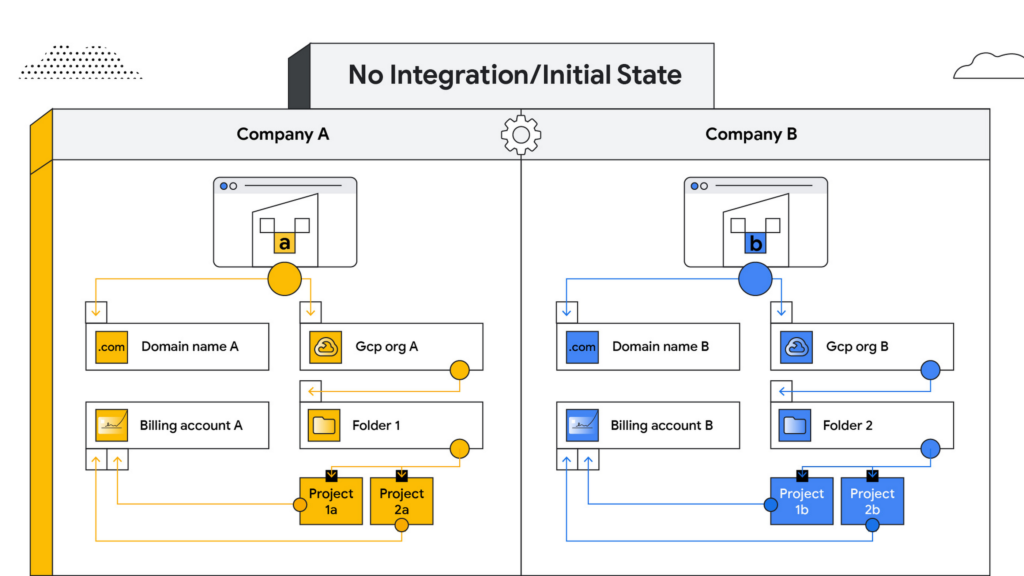
No integration – When company B operates as an independent entity from company A, no migration is required. One caveat is if company A has negotiated better pricing terms/discounts and support packages with Google Cloud. In that case, you can sign an affiliate addendum by working with your Google Cloud account team to help unlock the same benefits for company B.
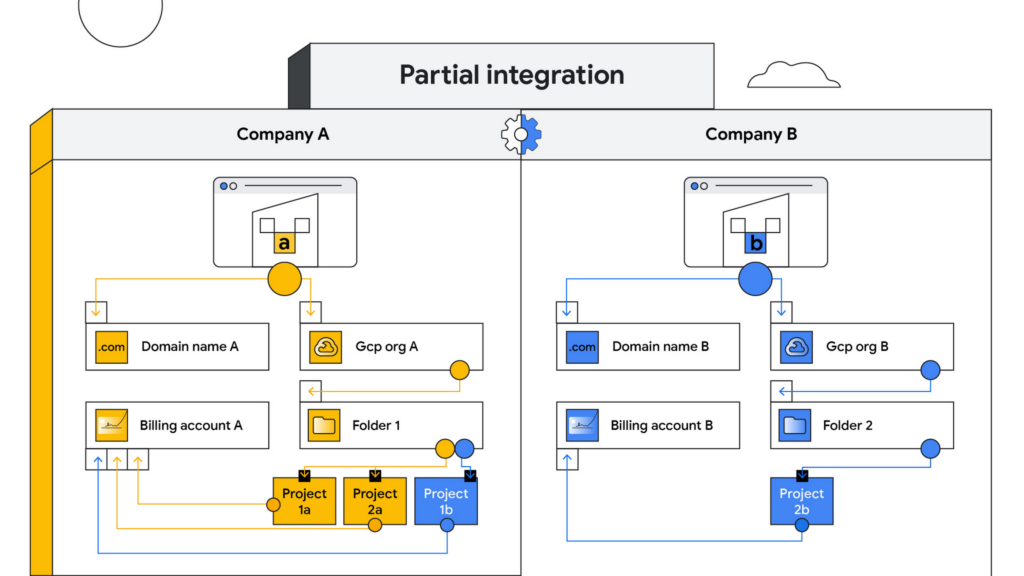
Partial integration – Some projects move over to company A from company B and others stay with Company B. There can be some shared access between the two companies and each of the organizations can continue to use their existing identity providers. This can be a self-serve or a paid services engagement with Google Cloud depending on the complexity of the two companies and how many project migrations need to take place between them.
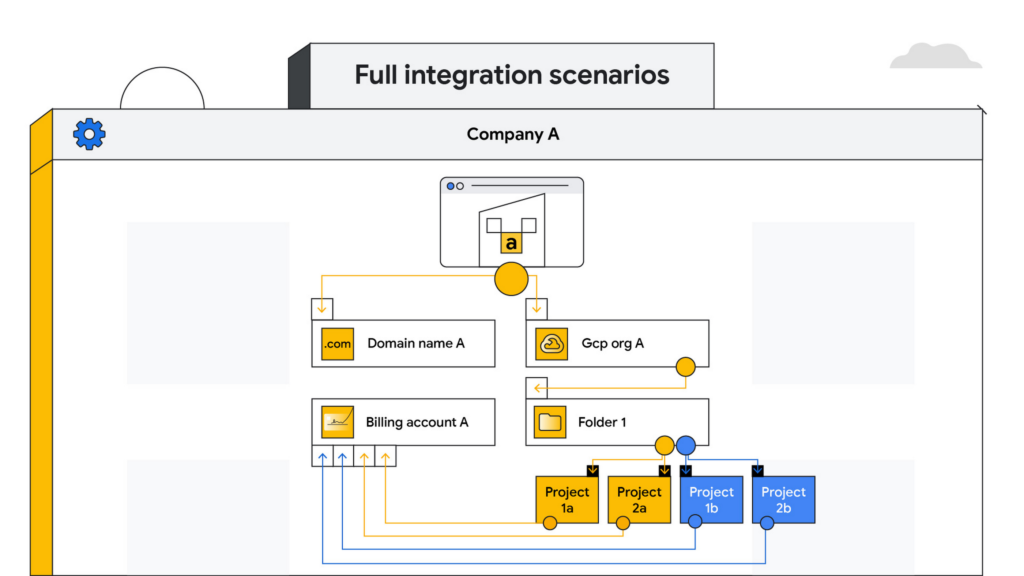
Full integration – Company B is fully incorporated into company A. This means you go through a full billing, Google Workspace identity and project migration from company B into company A. This can be a complex process and we highly recommend engaging your Google Cloud account teams to scope out a paid services engagement to go through this transition.
Planning your project migration
No matter what you want your end state to look like, project migration requires careful planning. Again, if you have an assigned Technical Account Manager, please reach out to them to ensure that you have a conversation around best practices before starting this migration.
If you’re taking a self-service approach, at a high level, we recommend leveraging the Resource Manager API to manage your project migrations. Do keep in mind that there are several prerequisites and required permissions documented here that need to be assigned before going down this path.
In addition, please be sure to read the billing and identity management considerations below to ensure that you are covering all of the bases associated with such a migration, as your choices can fundamentally alter your Google Cloud footprint.
Billing considerations
When deciding how to structure your Organizations and billing accounts, our recommendation is to always limit the number of Organization nodes and use the Folder structure to manage departments/teams within it. Creating additional Organization nodes is only advised in cases where you require a level of isolation for certain Projects from central administration for a specific business reason, for example, if the company being acquired already has their own Organization node and there is a business justification to let it operate as a standalone entity.
Warning: If you have multiple Organization nodes, be aware that you will not have central visibility across all your organizational resources, and that policy management across different Organization nodes can be cumbersome. You will also have to manage multiple Workspace accounts and manage identities across them, which can be difficult, especially when operating at scale.
From a billing account management perspective, our recommendation is to create one central billing account that lives within the Organization node with tags and labels incorporated for additional granularity. However, there are a few business cases which warrant the creation of additional billing accounts such as:
- You need to split charges for legal or accounting purposes
- Invoices are paid in multiple currencies
- You need to segregate usage to draw down on a Google Cloud promotional credit
- Subsidiaries need their own invoice
Keep in mind that committed-use and spend-based discounts and promotional credits cannot be shared across billing accounts and are provisioned on a per-billing-account basis. As such, more billing accounts can make it harder to leverage these discounts and credits.
Identity management
As you might expect, merging two entities has identity management implications. Cloud Identity is the solution leveraged by Google Cloud to help you manage your user and group identities. Even if the acquired company only uses the productivity products that are part of Google Workspace, the identities would still be managed by Cloud Identity.
Google Workspace considerations
To move large amounts of content into a Google Workspace domain, we recommend one of three options, depending on your end goal and data complexity:
- For general migrations: Leverage Google Workspace Migrate to move data into your Workspace domain from either another Workspace domain or a third-party productivity solution
- For manual migrations: Use the Export tool to move your organization’s data to a Cloud Storage archive so you can selectively download exported data by user and service
- For complex Google Workspace scenarios: Speak with your Google Cloud Technical Account Manager about the possibility of using a custom scoped engagement to merge two Google Workspace environments without business interruption
When only one company is on Google Cloud
Now, let’s consider the scenario where only company A has a presence on Google Cloud but company B does not. The approach you take to integrate the two organizations largely depends on your desired end state — full, partial or no integration.
If the plan is to eventually integrate company B into company A, your approach here will have a lot of similarities with the ‘full integration’ option mentioned above — just at a later point in time.
You may also run into a scenario where company B has a presence on an alternative cloud platform and you need to migrate resources into or out of Google Cloud. Again, similar to the partial integration option called out above, a paid engagement or a self-service exercise would be a good fit depending on the complexity of the desired end state.
Here to help
A merger or acquisition is an exciting milestone for any company, but one that needs to be managed carefully. Once you carefully review these considerations, develop a plan of action for your organization. You can also engage Google’s Professional Services for a paid engagement or Google’s Technical Account Management Service for a self-managed process to achieve the desired results.
If you are going through or considering going through M&A at your organization and have a different scenario than what we have discussed, please feel free to reach out to your account teams for guidance or contact us at https://cloud.google.com/contact.
Telus Ensures Workers’ Safety Using Edge and 5G

3192
Of your peers have already read this article.
1:30 Minutes
The most insightful time you'll spend today!
Editor’s note: In February 2021, Google Cloud and TELUS announced a 10-year strategic alliance to drive innovation of new services and solutions across data analytics, machine learning, and go-to-market strategies that support digital transformation within key industries, including communications technology, healthcare, agriculture, and connected home. By December 2021, TELUS had completed a pilot for a use case that leveraged Google Cloud AI and Machine Learning solutions and Telco Edge Anthos to increase safety in the workplace and save lives in manufacturing facilities. The use case leverages Multi-Access Edge Computing (MEC) to move the processing and management of traffic from a centralized cloud to the edge of TELUS’ 5G network, making it possible to deploy applications and process content closer to its customers, and thus yielding several benefits including better performance, security, and customization. Today, we invite Samer Geissah, Head of Technology Strategy and Architecture at TELUS, to share how the company is delivering on its promise to use this technology to drive meaningful change, starting with workers’ well-being.
Whenever a new technology buzzword comes along I think: what problems does this solve, and for whom is this going to make a real difference? That’s because at TELUS, we see innovation as a means to act on our social purpose to drive meaningful change, from modernizing healthcare and making our food supply more sustainable, to reducing our environmental footprint and connecting Canadians in need. Multi-Access Edge Computing (MEC) is a buzzword that offers an opportunity to do just this. That’s why we want to leverage cloud capabilities and optimize our network’s edge computing potential, tapping into our award-winning high-speed 5G connectivity to help solve some of industry’s most complex challenges.
The reason why this presents such a great opportunity is that companies across industries still rely on maintenance-heavy on-premises systems to manage core computing tasks. But, with cloud capabilities delivered at the edge of our 5G network, we open a new world of possibilities for them. For example, manufacturers who currently rely on IoT-enabled equipment in their facilities can deliver new experiences by running advanced AI-based visual inspections directly from 5G-enabled devices–all without the need for local processing power or extra on-site space. In fact, it’s this example that inspired our new use case, where our Connected Worker Safety solution can be applied across a range of business verticals to help improve safety, prevent injury, and save lives, demonstrating how the perfect combination of skilled people and digital technology can make the world a safer place.
Empowering intelligent decision making at the edge
Be it a farm, manufacturing facility, hospital, or a factory floor, workers should be able to work in environments where their health and safety are held as the highest priority. But how can employers ensure that their remote, frontline, and in-office employees are safe and healthy at all times? We’ve found the answer by combining Google Cloud AI/ML capabilities and Anthos as a platform for delivering workloads, with our network’s infrastructure.
Together with Google Cloud, we have been leveraging solutions with the power of MEC and 5G to develop a workers’ safety application in our Edmonton Data Center that enables on-premise video analytics cameras to screen manufacturing facilities and ensure compliance with safety requirements to operate heavy-duty machinery. The CCTV (closed-circuit television) cameras we used are cost-effective and easier to deploy than RTLS (real time location services) solutions that detect worker proximity and avoid collisions. This is a positive, proactive step to steadily improve workplace safety. For example, if a worker’s hand is close to a drill, that drill press will not bore holes in any surface until the video analytics camera detects that the worker’s hand has been removed from the safety zone area.
A few milliseconds could make all the difference when you are operating heavy equipment without guards in place. So, to power the solution’s predetermined actions with immediate response times, we worked with Accenture and hosted the application on an Anthos bare metal Google Cloud environment running on our TELUS multi-edge access computing.
Because all the conditions in our model are programmable, this solution can be replicated at scale across a variety of practical scenarios other than factory floors. The actions in response to the analysis are also programmable, which means companies can use this technology to look at workers’ conditions and decide the best course of action to educate, assist, and protect them. All this is done through a single pane of glass ecosystem, making it easy to customize this solution to meet various business needs.
Meanwhile, leveraging our existing global networks to process data and compute cycles at the edge eliminates the need to transport data to a central location for real-time computation. This means that we can offer this solution to partners while optimizing latency and lowering costs.
Powering blink-of-an-eye communication with Anthos
To put the importance of lowering speed into perspective, consider that the average latency of blinking your eye is about 300 milliseconds. From a safety point of view, preventative processes need to be much faster than that. For this use case, our machine learning models running on edge are currently processing data at a tenth of the time it takes for you to blink your eyes, and we’re aiming to lower that latency further to help build even safer systems.
Our plan is to deploy Anthos clusters on bare metal to our customers across Canada to take advantage of our existing enterprise infrastructure, making it possible for us to run our solution closer to partners and eventually enable just one millisecond of latency.
At that point, we’ll be able to power new use cases that require near real-time feedback, leaving absolutely no room for error. This could include remote surgery, platooning of fleets on autonomous vehicles, and many other cellular vehicle-to-everything (V2X) solutions that require high-speed communication for platform operators to manage remote edge fleets in far-away places.
Improving workers’ safety while enabling new sources of revenue
Although edge computing and 5G have been around for a while, we believe that use cases like this are only just starting to demonstrate the incredible speed of change and high potential that these models provide. The next step for us is to develop our workers’ safety solution and get it to market, making TELUS an early adopter of new 5G solutions at the edge that can help our business and industry partners make workplaces safer.
It’s a great win to be able to combine efforts with Google Cloud and reduce latency in a context where timing can impact and save lives, and I’m confident that workers’ safety is just the beginning of a series of industry challenges that we’ll address together.
Takeaways from the Google Cloud Public Sector Summit on Prioritizing Tech Investments

4774
Of your peers have already read this article.
3:00 Minutes
The most insightful time you'll spend today!
Editor’s note: Today’s post highlights five takeaways from our session at the first ever Google Cloud Public Sector Summit. To watch the full session, check out All the Right Moves: Prioritizing Investments in Technology.
Now more than ever, government agencies need to invest in digital services to fulfill their missions and better serve communities. Yet modernization isn’t a one-and-done approach; it’s a sustained effort, with multi-year implications, and requires careful consideration of how to integrate existing investments to optimize costs. Digital transformation requires coordination between different programs and agencies, including all of their many competing considerations. In short, maximizing technology investments requires careful planning, strategic thinking, and industry partners that can provide flexibility and security and meet agencies where they are.
I sat down with Suzette Kent, former U.S. federal chief information officer, and Dominic Sale, assistant commissioner for Technology Transformation Services at the General Services Administration (GSA) for a conversation to unpack this important topic and discuss industry best practices.
The panelists had five tips for government employees who are making technology purchasing decisions for their agency.
1. Put the agency’s mission first.Avoid getting distracted by exciting new trends and focus on long-term goals that can impact which procurement strategies or funds could be used. The discussion started with how government agencies could cut through the noise about technology and prioritize which technology is best for their needs. Sale and Kent agreed that an agency should focus on its core mission outcomes and let its technology needs flow from that. Sale also emphasized the importance of having technology design respond to humans’ needs, which has historically been a challenge for government agencies.
For agencies to stay focused on their mission, final decisions about technology need to be made by the program manager who best understands each program’s mission. The government CIO’s role is to be the enabler for the technology and leverage it at the enterprise level, particularly when it comes to sharing infrastructure. The takeaway: enable mission programs by empowering your teams and providing access to authorized, compliant, innovative data platforms that programs can move confidently and quickly with.
2. Invest in interoperability. Agency employees often struggle to balance the need for a positive return on investment (ROI) with requirements for meeting mission objectives. While the panelists agreed that the total cost of ownership was important, they also emphasized taking an expanded view of ROI, including future-proofing and investing in functionality that may not realize its return for many years based on the initiative. Saving money isn’t particularly valuable if the solution doesn’t meet an agency’s needs. When choosing a technology partner, government employees should understand its long-term vision to ensure that the partner fits agency priorities. Partners’ technologies should also integrate seamlessly with existing systems so agencies don’t duplicate investment costs.
For example, Google Anthos extends Google Cloud services and engineering practices into an organization’s existing environment, establishing operational consistency across apps and modernization. With Anthos, agencies can simply and securely build and deploy applications anywhere, integrating cloud services across platforms. This allows them to enjoy a consistent DevOps experience for hybrid and multi-cloud environments and enables new innovation. Most importantly, this enables an enterprise data platform, one of the largest catalysts for mission transformation and applied AI.
3. Take advantage of artificial intelligence (AI) benefits. Over the course of the pandemic, the rapid application of AI has improved government productivity, efficiency, and the ability to deliver critical new services to the public at scale. This has further cemented AI’s role as an essential government technology for the present and future. In fact, Nextgov reports that “46% of government IT specialists plan to use AI and machine learning (ML) for embedded systems in the near future.”
As we’ve seen over the course of the pandemic, government programs can start small with AI pilots before moving into broad deployment. This can help agencies understand AI’s potential before moving to full production. People always supervise AI technologies, and the possibilities are endless. Google Cloud’s Contact Center AI (CCAI) has helped government agencies improve the customer experience, by allowing citizens to schedule vaccine appointments via a platform of their choice with up to 28 languages and dialects, and manage vaccine deployment. The U.S. Navy spends billions annually to fight rust and corrosion on its ships. Inspections of ships, aircraft and vehicles are a time-consuming and critical part of keeping the U.S. Navy at top performance so Google Cloud and Simple Technology Solutions (STS) rapidly built an AI-based corrosion-detection and analysis system. The system detected and analyzed corrosion on vessels with 90% accuracy and will eventually be used to automate inspections of vessels, aircraft, and vehicles—saving billions of dollars. Document AI helps a variety of government agencies scale their document processing, reducing the time it typically takes to process enormous amounts of data and related citizen claims.
Successful adoption of AI also depends on the quality of the data. Ultimately, agencies need high-quality enterprise data pipes so that employees and the community trust the system and public sector agencies. Sale described a GSA project that used AI bots to read legal contracts and look for particular phrases that would indicate a specific use case. Previously, an employee would have had to read through the contracts and search for the information. In this way, AI is saving the government both money and time.
4. Creating better experiences for the public. Sale observed that, “trust is the government’s currency and profit motive.” And trust comes when the public can be served with the same modern tools and technology they’re used to – in real-time and with transparency in mind. For example, agencies can provide transparency in public-facing dashboards for programs and supply services that deliver information in real-time through solutions like CCAI.
Trust also requires that constituents feel that government agencies will keep their data safe and secure. The need for a globally secure infrastructure with systems that are up-to-date and designed with security at every level, underpinned by zero-trust enterprise-wide remains paramount – particularly after the series of recent cyberattacks targeting government IT infrastructure.
5. Finding the right technology partner. Government leaders need technology partners who provide a flexible and interoperable platform to integrate existing investments and maximize technical value. Historically, public sector agencies have largely been forced to adopt private clouds, which has reduced their access to richer features, and hindered their ability to adopt a full range of security and product capabilities. The right partner won’t require government leaders to compromise on functionality or service availability to achieve compliance. The right partner can harness the power of emerging technology to make it Government-ready and the true promise of cloud– the access and integration of open data– to make missions more powerful and impactful for the constituencies they serve.
DB Corp Opts For Google Cloud to Drive Transformation to Real-Time Operation

3865
Of your peers have already read this article.
2:30 Minutes
The most insightful time you'll spend today!
About DB Corp
DB Corp is India’s largest newspaper publisher delivering 62 editions in four languages and selling about 62 million copies per day. The business also has an extensive online and mobile presence.

Google Cloud Result
- Reduced time to complete sales reports and updates from a week to two hours
- Delivered a single source of truth and real-time data to support decision-making
- Hindi news source material with 95 percent accuracy
Headquartered in Bhopal, India, and listed on the Bombay Stock Exchange, DB Corp is India’s largest newspaper group. DB Corp publishes 62 editions in four languages and sells about 6 million newspaper copies per day. Beyond newspapers, DB Corp operates 29 radio stations, 13 portals and two mobile apps.
Like the media industry in general, DB Corp is having to adapt to readers’ increasing preference for accessing news content online – particularly on mobile devices. However, online advertising is yet to fill the gap left by the leakage of advertising revenues from print. Further disruption occurred when the Indian Government’s implemented a demonetization program in November 2016 that prompted a sharp surge in e-commerce transactions and online banking.
Facing a tsunami of change, DB Corp is developing and executing new strategies to engage consumers and build revenues. These plans include evolving from an IT-supported business to an IT enabled company, and finally to an IT-led business that complements its newspapers with online news and updates throughout the day. DB Corp is building e-commerce properties that leverage its print brands and is moving to increase advertising across its mobile services. Furthermore, the business is looking to capture information about readers and customers to tailor its publications and services more closely to their needs.
Expertise in managing large data volumes behind GCP selection
However, DB Corp’s on-premises infrastructure and traditional applications could not deliver the flexibility and agility needed to support the transition to real-time news delivery. In late 2015, DB Corp started evaluating public and private cloud services, including cloud-based application suites and platform as a service offerings. This process led the business to deploy G-Suite and start working with Google Cloud Platform (GCP). “We selected GCP due to Google’s experience in delivering cloud services, and because nobody else manages data volumes of the magnitude that they do,” says R D Bhatnagar, Chief Technology Officer, DB Corp. “We were also impressed by the fact GCP had a local team with the skills and expertise to educate us about how best to use its products.”
DB Corp is migrating its websites and key applications to GCP. The business is also upgrading its network to remove bandwidth restrictions that could impede the value provided by GCP services. The scale and scope of DB Corp’s G Suite and GCP projects has required the business to engage four partners and access technical expertise and support from Google itself. Technical and business experts from the platform as a service provider are providing monthly updates and training sessions with various groups within the organisation, including user communities and the board of directors.
The Google projects at DB Corp are driving a sharp increase in the speed, agility and performance of the business. “As a senior leader within the organisation, I see the key benefits of GCP and other technologies being lower cost; greater efficiency; and improved business continuity,” says Bhatnagar. “For example, the current data center team can be redeployed to other initiatives as the technical experts at GCP will be undertaking most of the management and maintenance tasks.
DB Corp is already making business and financial performance data available in real time from a single source, enabling business teams to make sound, consistent decisions about digital strategies and other key activities. These teams may also address issues or problems before they compromise the quality of content and services provided to consumers.
Deploying Chrome for Meetings across various offices has enabled teams to communicate and collaborate effectively in real time, breaking down geographic barriers, ensuring each member is on the same page and ensuring the business transformation proceeds smoothly. Sales teams are using Google Forms and Google Sheets to centralize and control tasks such as sales forecasting, reducing the time required to complete reports and updates from up to a week to two hours.
Furthermore, various teams are using calendars to improve organization and productivity. For example, editorial teams are using calendars to track Indian holidays and festivals and deliver relevant content to readers. Reporters are also using Google Cloud Speech API and Google Cloud Translation API services to capture and document interviews and source material for articles at accuracy rates of 95 percent for Hindi alone.
More Relevant Stories for Your Company

Google Introduces Cloud Career Jump Start Certification for the U.S. Underrepresented Communities
It’s no question that the cloud computing industry is booming and cloud experts are in high demand. In 2020, 67 percent of organizations surveyed in the IDG Cloud Computing Report added new cloud roles and functions (source). So there are plenty of cloud jobs out there, but if you don’t

Managing Change in the Cloud
When moving to the cloud, many organizations concentrate their focus on the change in technology and overlook an area just as complex and impactful: cultural change. Having your people ready to embrace the change — supporting them with the right processes, equipping them with the right skills — is as




How L&T Financial Services Processes 95% of Motorcycle Loans in Less Than Two Minutes
L&T Financial Services is one of the largest lenders in India. India’s demonetization policy in recent years has led to a shift from cash transactions to digital payments. In 2016, the government withdrew 500 and 1000 rupee notes from circulation and encouraged a heavily cash-based population to deposit their canceled notes

30 Guides to Ease Your Cloud Migration Journey
Getting started with your migration One of the challenges with cloud migration is that you’re solving a puzzle with multiple pieces. In addition to a number of workloads you could migrate, you’re also solving for challenges you’re facing, the use cases driving you to migrate, and the benefits you’re looking to gain.
