





VMware Engine’s Exciting New Updates: A Google Cloud Journey

1328
Of your peers have already read this article.
2:30 Minutes
The most insightful time you'll spend today!
IT leaders today are being asked to simultaneously support their company’s infrastructure, find opportunities for growth, and meet their goals with fewer resources and smaller budgets than before. Recently we highlighted three customers who are leveraging Google Cloud VMware Engine to achieve these goals while lowering their TCO and transforming their organization.
It’s because of these successful customer outcomes that we have been awarded the 2023 VMware Cloud Innovation and SaaS Transformation partner achievement award for delivering solutions that accelerate customers’ digital transformation journey. We’re honored to receive this award and continue to stay focused on delivering tremendous value to our customers.
In the past few months, we’ve also made several updates to Google Cloud VMware Engine. Today’s post provides a recap of the latest milestones that make it easier for you to migrate and run your vSphere workloads in a cloud-first, enterprise-class VMware environment in Google Cloud.
Back in September 2022, we announced a number of updates including the preview of API/CLI support (which is now available). In February 2023, we also talked about how to use NetApp CVS as datastores for VMware Engine.
Key updates this time around include:
Availability of VMware Engine in Delhi, Santiago and Milan regions: This brings the availability of VMware Engine to 17 regions worldwide, each supporting 4 9’s of uptime SLA for clusters 5 or more, serving the needs of our regional and multi-national customers. In addition, we have also added a second zone in the London region.
Filestore datastore support for VMware Engine: Generally Available in all VMware Engine regions, you can use Filestore High Scale and Enterprise tier instances as external NFS datastores for VMware Engine nodes. Filestore is VMware certified as an NFS datastore with VMware Engine. You can size compute and storage capacity independently to meet your workload requirements for your storage-intensive VMs. You can also leverage vSAN for low-latency VM requirements and scale Filestore from TBs to PBs for the capacity hungry VMs. If interested in this feature, please contact your Google account team.
Stretched private clouds: These private clouds stretch across two data zones and a witness zone all within the same Google Cloud region. Stretched private clouds use vSphere and vSAN stretched clusters to provide compute and storage high availability against zone-level failures. This capability is now available in Frankfurt and Sydney regions. Learn more here.
Zerto solution version 9.5u1 support: This recovery solution allows critical infrastructure and application virtual machines (VMs) to be replicated continuously from your on-premises vCenter to your private cloud. Learn more about setting up Zerto here.
Google Cloud Backup and Disaster Recovery (GCBDR): GCBDR is available to protect applications running in VMware Engine, and can be managed within the Google Cloud Console. We recently launched GCBDR under Google Cloud Platform Terms of Service simplifying customers’ purchasing and support experience.
vTPM support: Google Cloud VMware Engine private clouds now support the addition of a Trusted Platform Module (TPM) 2.0 virtual cryptoprocessor to a virtual machine. You can add vTPMs to VMs by following VMware instructions or upgrading your existing VMs to include a vTPM. You can read more about this in the VMware blog.
This brings us to the end of our updates this time. For the latest updates to the service, please bookmark our release notes.
3778
Of your peers have already watched this video.
8:00 Minutes
The most insightful time you'll spend today!
Target Leverages Google Cloud to Create Market-defining Online Experience
In the hyper-competitive world of online retail sales, ease-of-use and transaction speed can make or break business outcomes. However, a few years ago US Retail giant Target was going through a period of uncertainty.
While the company had over 1800 stores across the US with an estimated 85% of US consumers shopping at a Target store and over 25 million people visiting the Target website or using its app each month, it was still losing ground.
In spite of having millions of loyal customers, the company was dangerously late on digital and its technology wasn’t keeping pace with unstable systems to boot. The company faced the twin challenges of trying to operate today’s business as efficiently as possible and creating tomorrow’s business as quickly as possible. On the one hand it needed productivity and stability and on the other it wanted speed and disruption. Not an easy task to accomplish.
That’s when Target decided to use Google Cloud to solve its challenges. See how Target leveraged Google Cloud to create a market-defining online experience that has made customers happier and more loyal.
Google Cloud Announces Improvements in Private Catalog to Drive Terraform Deployments

3360
Of your peers have already read this article.
3:00 Minutes
The most insightful time you'll spend today!
As an enterprise admin, when you choose to use Google Cloud Private Catalog to enable curated, self-serve Google Cloud infrastructure provisioning, you need the ability to manage your organization’s deployments. Today, we’re pleased to announce support for several improvements to Terraform driven deployments through Private Catalog.
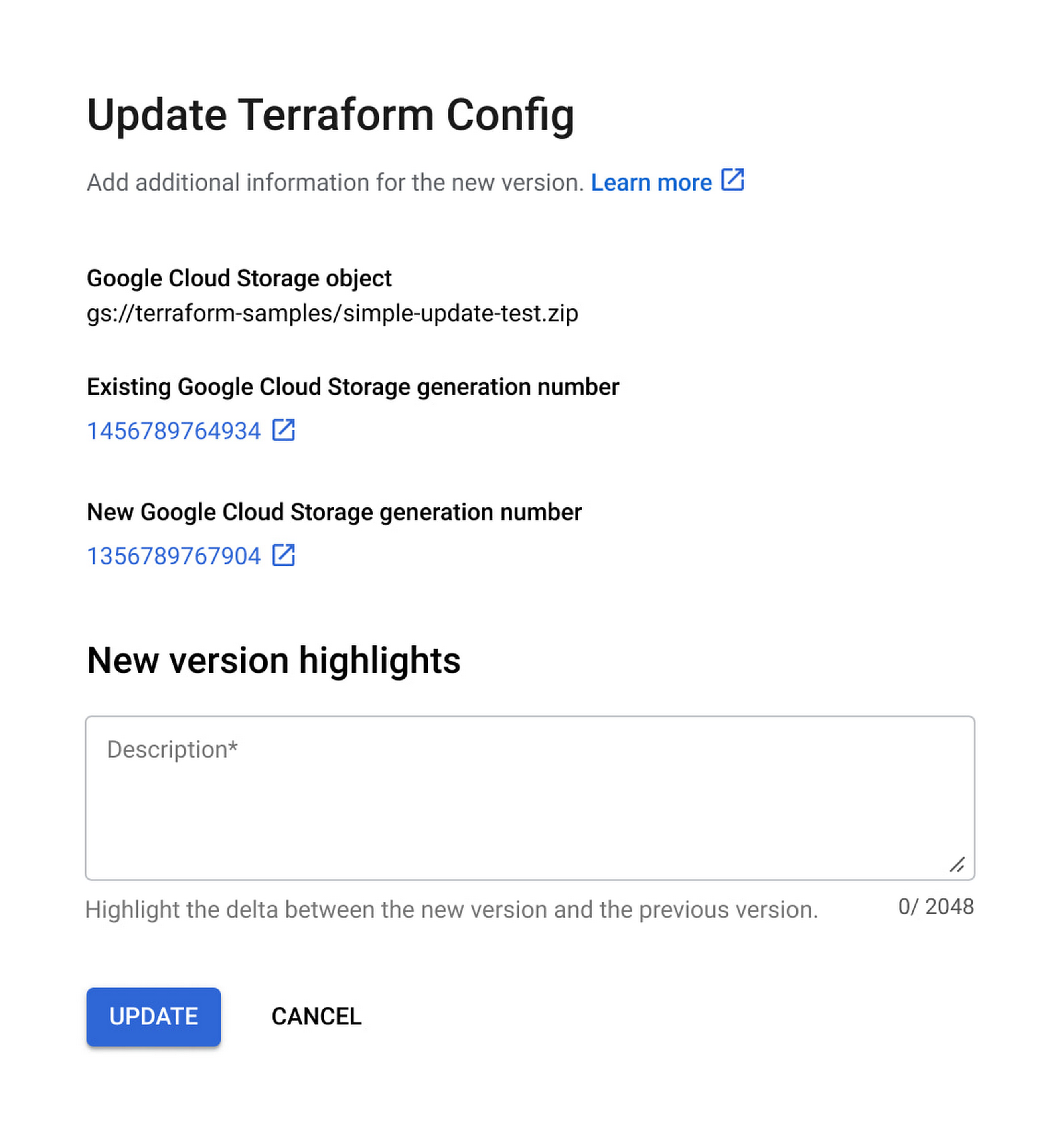
With this new release, you can update Terraform configurations and keep your end users informed about updates. At the same time, Private Catalog users have the ability to view new updates, note version highlights and then update the deployment. This gives you greater control over managing deployments for solutions provisioned through Private Catalog and ensuring compliance with organizational policies and standards.
Let’s take a closer look at the features you’ll find in this release.
Deployment change management
Terraform solutions use Cloud Storage’s Object Versioning to manage updates to configuration files. With this release, you may update configuration files using multiple approaches.
- Update the solution’s Cloud Storage object with a new configuration version
- Use a different Cloud Storage object that contains a new configuration file
Once you view and apply the changes to the solution in a Private Catalog, end users are immediately able to consume the new version of the deployment configuration.

Additionally, prior to applying any changes, you can evaluate the contents of an update by comparing versions to download and compare the current and latest versions of the configuration and use new version highlights to add a description about the updates.

Ease of consumption
Once Private Catalog detects a change to the deployment configuration, it automatically informs catalog users about the change. On the Solutions page, end users have the ability to:
- Get informed about solutions that have updates
- View version highlights published by the admin
- Apply the new version
Additionally, with this release, Catalog users can retry existing deployments by modifying deployment parameters.
Reporting improvements
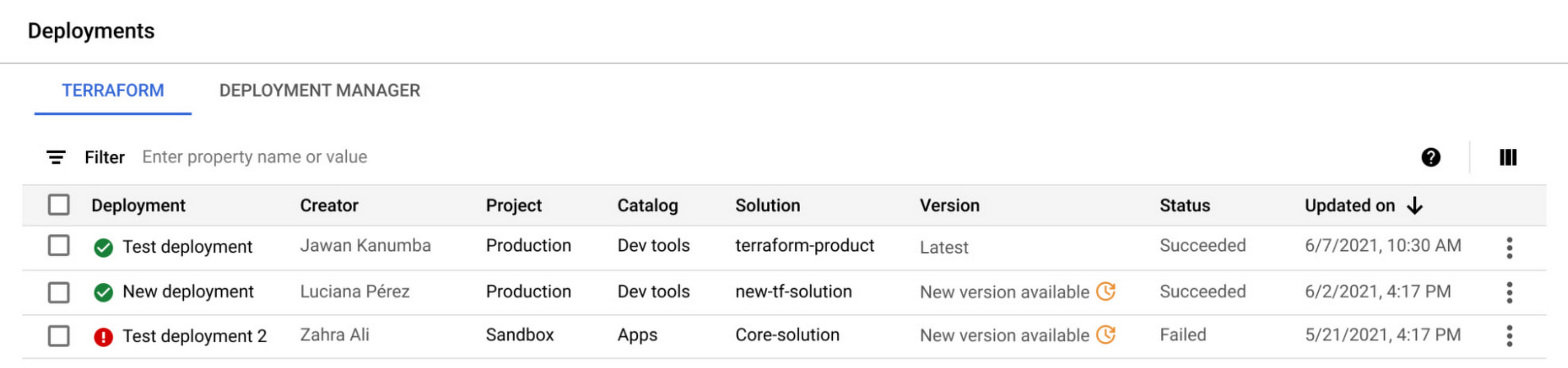
The deployment reporting dashboards for Private Catalog-based deployments now show additional information about the version of a solution deployed. This enables deeper insights into the overall deployment status across all Private Catalog solution assets.

Get started today
These new features are available to all Private Catalog customers. To learn how to use these features, refer to our documentation:
- Create a Terraform configuration in Private Catalog
- Manage and update your Terraform configurations in Private Catalog

3451
Of your peers have already listened to this podcast
1:30 Minutes
The most insightful time you'll spend today!
Rethinking Financial Services with Google Cloud
IT leaders today are being asked to simultaneously support their company’s infrastructure, find opportunities for growth, and meet their goals with fewer resources and smaller budgets than before. Recently we highlighted three customers who are leveraging Google Cloud VMware Engine to achieve these goals while lowering their TCO and transforming their organization.
It’s because of these successful customer outcomes that we have been awarded the 2023 VMware Cloud Innovation and SaaS Transformation partner achievement award for delivering solutions that accelerate customers’ digital transformation journey. We’re honored to receive this award and continue to stay focused on delivering tremendous value to our customers.
In the past few months, we’ve also made several updates to Google Cloud VMware Engine. Today’s post provides a recap of the latest milestones that make it easier for you to migrate and run your vSphere workloads in a cloud-first, enterprise-class VMware environment in Google Cloud.
Back in September 2022, we announced a number of updates including the preview of API/CLI support (which is now available). In February 2023, we also talked about how to use NetApp CVS as datastores for VMware Engine.
Key updates this time around include:
Availability of VMware Engine in Delhi, Santiago and Milan regions: This brings the availability of VMware Engine to 17 regions worldwide, each supporting 4 9’s of uptime SLA for clusters 5 or more, serving the needs of our regional and multi-national customers. In addition, we have also added a second zone in the London region.
Filestore datastore support for VMware Engine: Generally Available in all VMware Engine regions, you can use Filestore High Scale and Enterprise tier instances as external NFS datastores for VMware Engine nodes. Filestore is VMware certified as an NFS datastore with VMware Engine. You can size compute and storage capacity independently to meet your workload requirements for your storage-intensive VMs. You can also leverage vSAN for low-latency VM requirements and scale Filestore from TBs to PBs for the capacity hungry VMs. If interested in this feature, please contact your Google account team.
Stretched private clouds: These private clouds stretch across two data zones and a witness zone all within the same Google Cloud region. Stretched private clouds use vSphere and vSAN stretched clusters to provide compute and storage high availability against zone-level failures. This capability is now available in Frankfurt and Sydney regions. Learn more here.
Zerto solution version 9.5u1 support: This recovery solution allows critical infrastructure and application virtual machines (VMs) to be replicated continuously from your on-premises vCenter to your private cloud. Learn more about setting up Zerto here.
Google Cloud Backup and Disaster Recovery (GCBDR): GCBDR is available to protect applications running in VMware Engine, and can be managed within the Google Cloud Console. We recently launched GCBDR under Google Cloud Platform Terms of Service simplifying customers’ purchasing and support experience.
vTPM support: Google Cloud VMware Engine private clouds now support the addition of a Trusted Platform Module (TPM) 2.0 virtual cryptoprocessor to a virtual machine. You can add vTPMs to VMs by following VMware instructions or upgrading your existing VMs to include a vTPM. You can read more about this in the VMware blog.
This brings us to the end of our updates this time. For the latest updates to the service, please bookmark our release notes.
How Vertex Vizier’s Automated Hyperparameter Tuning Improves ML Models

5024
Of your peers have already read this article.
1:30 Minutes
The most insightful time you'll spend today!
We recently launched Vertex AI to help you move machine learning (ML) from experimentation into production faster and manage your models with confidence—speeding up your ability to improve outcomes at your organization.
But we know many of you are just getting started with ML and there’s a lot to learn! In tandem with building the Vertex AI platform, our teams are dropping as much best practices content as we can to help you come up to speed. Plus, we have a dedicated event on June 10th, Applied ML Summit, with sessions on how to apply ML technology in your projects, as well as grow your skills in this field.
In the meantime, we couldn’t resist a quick lesson on hyperparameter tuning, because (a) it’s incredibly cool (b) you will impress your coworkers (c) Google Cloud has some unique battle tested tech in this area and (d) you will save time by getting better ML models into production faster. Vertex Vizier, on average, finds optimal parameters for complex functions in over 80% fewer trials than traditional methods.
So it’s incredibly cool, but what is it?
While machine learning models automatically learn from data, they still require user-defined knobs which guide the learning process. These knobs, commonly known as hyperparameters, control, for example, the tradeoff between training accuracy and generalizability. Examples of hyperparameters are the optimizer being used, its learning rate, regularization parameters, the number of hidden layers in a DNN, and their sizes.
Setting hyperparameters to their optimal values for a given dataset can make a huge difference in model quality. Typically, optimal hyperparameter values are found via grid searching a small number of combinations, or tedious manual experimentation. Hyperparameter tuning automates this work for you by searching for the best configuration of hyperparameters for optimal model performance.
Vertex Vizier enables automated hyperparameter tuning in several ways:
- “Traditional” hyperparameter tuning: by this we mean finding the optimal value of hyperparameters by measuring a single objective metric which is the output of an ML model. For example, Vizier selects the number of hidden layers and their sizes, an optimizer and its learning rate, with the goal of maximizing model accuracy.
- When hyperparameters are evaluated, models are trained and evaluated on splits of the data set. If evaluation metrics are streamed to Vizier (e.g. as a function of epoch) as the model is trained, Vizier’s early stopping algorithms can predict the final objective value, and recommend which unpromising trials should be early stopped. This conserves compute resources and speeds up convergence.
- Oftentimes, models are tuned sequentially on different data sets. Vizier’s built in transfer learning learns priors from previous hyperparameter tuning studies, and leverages them to converge faster on subsequent hyperparameter tuning studies.
- AutoML is a variant of #1, where Vertex Vizier performs both model selection, and also tunes architectures/non-architecture modifying hyperparameters. AutoML usually requires more code on top of Vertex Vizier (to ingest data etc), but Vizier is in most cases the “engine” behind the process. AutoML is implemented by defining a tree like (DAG) search space, rather than a “flat” search space (like in #1). Note that you can use DAG search spaces for any other purpose where searching over a hierarchical space makes sense.
- There are times when you may wish to optimize more than one metric. For example, we would like to optimize model accuracy, while minimizing model latency. Vizier can find the Pareto frontier, which presents tradeoffs for multiple metrics, allowing users to choose the appropriate tradeoff. Simple example: I want to make a more accurate model, but would like to minimize serving latency. I do not know ahead of time what’s the tradeoff between the two metrics. Vizier can be used to explore and plot a tradeoff curve, so users can select on the most appropriate one. For example, “a latency decrease of 200ms will only decrease accuracy by 0.5%”
Google Vizier is all yours with Vertex AI
Google published the Vizier research paper in 2017, sharing our work and use cases for black-box optimization—i.e. The process of finding the best settings for a bunch of parameters or knobs when you can’t peer inside a system to see how well the knobs are working. The paper discusses our requirements, infrastructure design, underlying algorithms, and advanced features such as transfer learning that the service provides. Vizier has been essential to our progress with machine learning at Google, which is why we are so excited to make it available to you on Vertex AI.
Vizier has already tuned millions of ML models at Google, and its algorithms are continuously improved for faster convergence and handling of real-life edge cases. Vertex Vizier’s models are very well calibrated and are self-tuning (they adapt to user data), and offer unique power features, such as hierarchical search spaces and multi-objective optimization. We believe Vertex Vizier’s set of features is a unique capability to Google Cloud, and look forward to optimizing the quality of your models by automatically tuning hyperparameters for you.
To learn more about Vertex Vizier, check out these docs and if you are interested in what’s coming in machine learning over the next five years, tune in to our Applied ML Summit on June 10th, or watch the sessions on demand in your own time.
Finding Your Favorite Google Cloud Product is Now Easy!
3315
Of your peers have already read this article.
1:30 Minutes
The most insightful time you'll spend today!
Welcome to a new way of exploring Google Cloud products. Finding your favorite products and discovering new ones requires a user interface that’s easy-to-use, clear, informative, and delightful. Google Cloud users have primarily used our side menu to navigate, but with almost one hundred products and growing, it’s safe to say our product list has outgrown the side menu. Over time, we have listened long and hard to feedback from Google Cloud users, who have highlighted challenges navigating the console to explore our products. We’ve heard over and over that it’s difficult and time consuming to scroll through the long list of products and remember what each one offers.
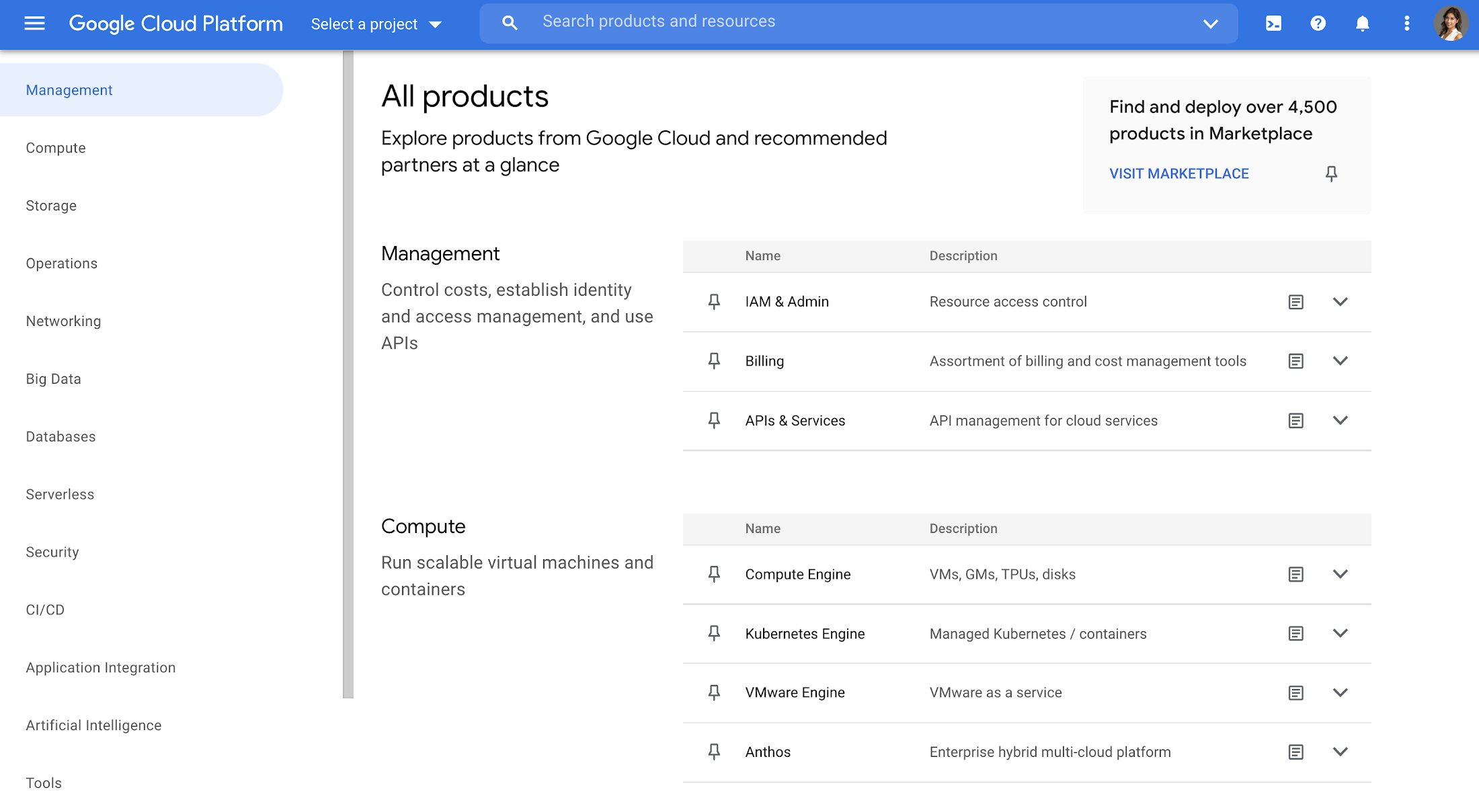
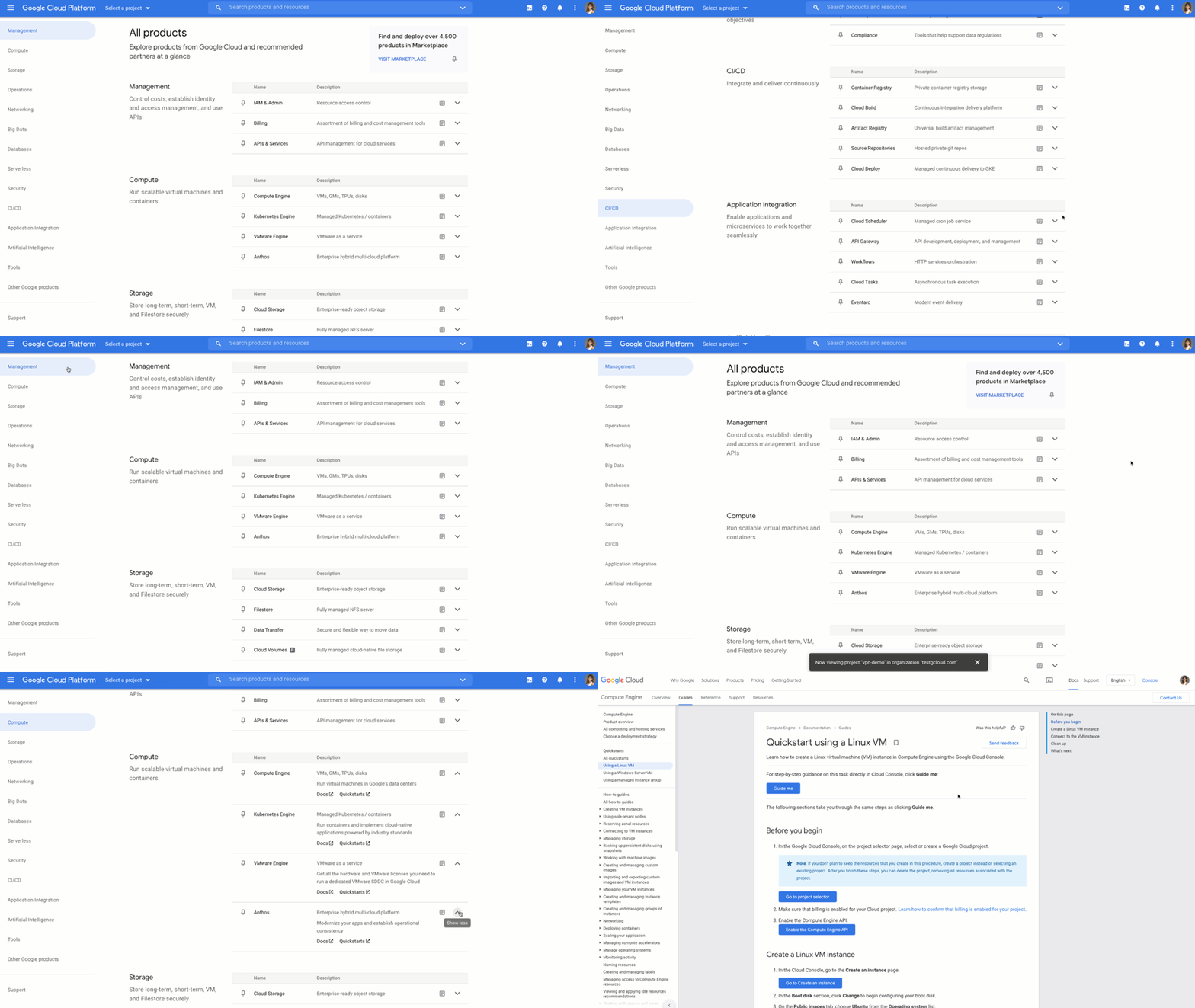
That’s why we created a new All products page to help you easily navigate to your favorite Google Cloud products. This page showcases all of the Google Cloud products as well as our key partner products in one, easy-to-navigate place. With one click, you can discover the right product that is right for your solution.
Explore all Google Cloud products
The page is organized into different categories, including Management (ie. IAM, Billing), Compute, Storage, Operations, Security, CI/CD, Artificial Intelligence, Support, and more. Quickly jump to the category of interest through the panel on the left, or you can scroll the entire page. Then you can click each product name to navigate directly to the product homepage. Each product listing also includes a short and long description so you can quickly understand what a product does and whether it fits your needs. This lets you compare categories at-a-glance, saving you the hassle of digging up product overviews elsewhere.
Under each product, you’ll also find a link to documentation and Quickstarts so you can understand it in more depth and try it out right away, removing the extra step of navigating to documentation in another tab.
Customize your navigation
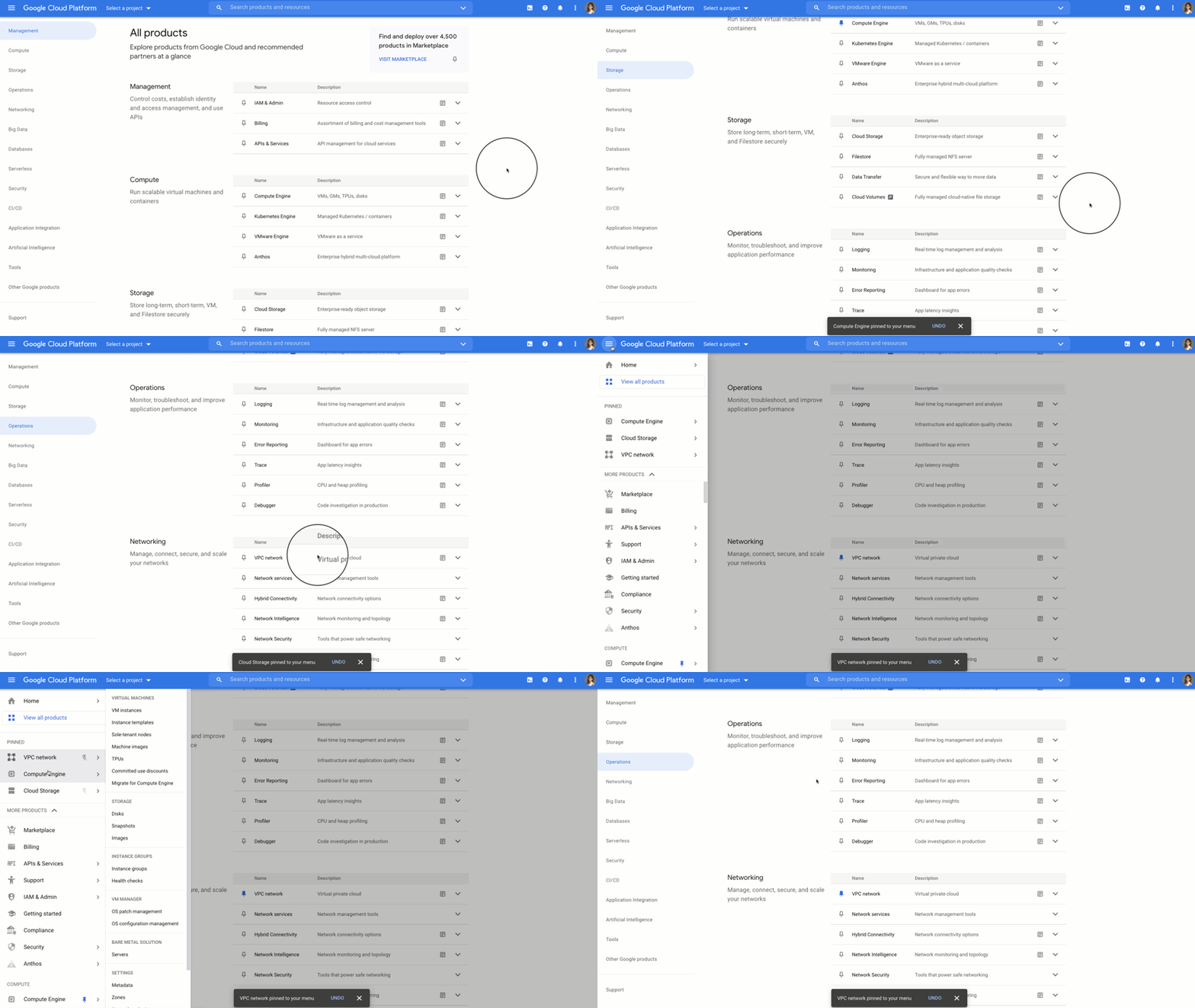
To make navigation even easier, you can pin products directly from the All products page, and they will show up at the top of your side menu. You can also customize your navigation by reordering your pins in the side menu. That way, you can quickly access your most-used products directly from the side menu instead of scrolling through the panel or the All products page.
Save time and get more done faster
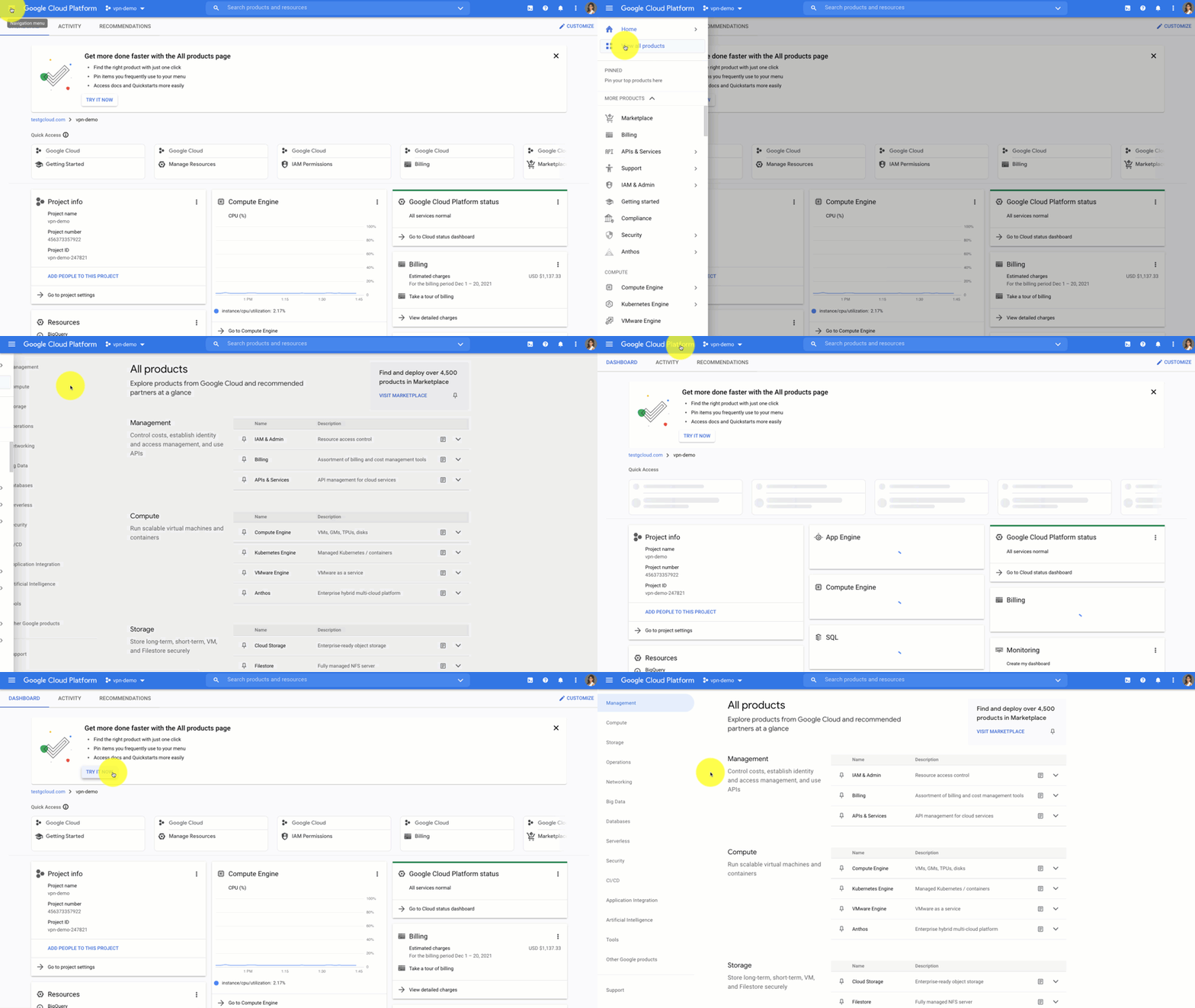
With the new All products page you can save time scrolling and cut straight to the good stuff – finding your products, discovering new ones, learning, and getting hands on. Try it out for yourself by heading to the Google Cloud Console. Click the side panel and click “View All products,” or on the home dashboard you’ll see a call out to try out the All products page.
If you have any feedback about this new experience, I want to hear! Reach out to me on Twitter at @stephr_wong or on Linkedin at stephrwong.
More Relevant Stories for Your Company


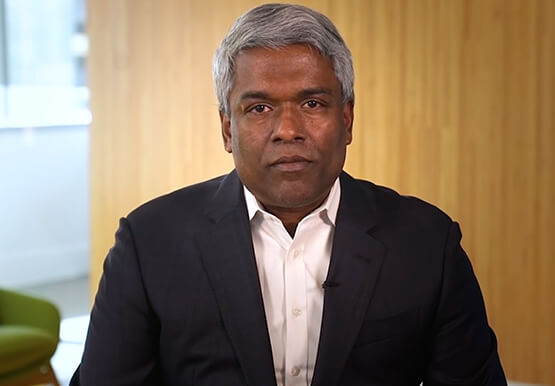

The Transformative Journeys of Financial Firms on Google Cloud: Watch Video
The reliance on cloud-based architectures, high performance computing, big data and more are accelerating in the banking, capital, insurance and financial services industries. Google Cloud had a strong role in transforming many businesses especially in the pandemic to smoothly transition into the digital space and understand their customers. Two years

7 Common Myths About Cloud Computing That Must Be Banished
No discussion about the emerging technologies that are shaping our future is complete without a mention of cloud computing. Unfortunately, too many of these discussions are filled with misinformation and fear-mongering. And while it’s always advisable to approach new technologies with a degree of healthy skepticism, this should always be

Your DW Need Scaling Up? Try What This Company Did: It Can Run 25,000 Events a Second
With access to more data than ever before, companies have never been better positioned to adopt precision marketing methods and target the right customers at the right time. Emarsys, a digital marketing platform, enables its clients to collect, analyze, and act on a wide variety of data. From websites to mobile

Google Cloud & Optiva Partnership Cements the Future of Telecom for Driving Strong Customer Experience
Editor’s note: Coming out of Mobile World Congress 2022, we are excited to share key learnings from our partner ecosystem on how to leverage advancements in 5G technologies to power customer experiences that seamlessly blend our physical and virtual world into one. The original version of this blog was published
