





Migrate Your Microsoft SQL Server Workloads to Google Cloud

3899
Of your peers have already read this article.
7:30 Minutes
The most insightful time you'll spend today!
Enterprise database workloads are the backbone of many of your applications and ecosystems. Also, guaranteed availability is critical when choosing a cloud provider.
Many enterprises built their mission-critical applications on Microsoft SQL Server 2008, and it’s common still to run into older versions of SQL Server as you’re working toward modernizing your on-prem environments.
According to Business insider, 60% of Microsoft users still use SQL Server 2008, which reached its end of life in July 2019. This provides the opportunity for many of you to find a place to host your SQL Server 2008 instances on newer technology with less operational burden.
We’re announcing that Cloud SQL for SQL Server is generally available globally. This means that Cloud SQL now helps you keep your SQL Server workloads running by providing a 99.95% uptime service-level agreement (SLA), which is consistent with the other Cloud SQL database engines.
Cloud SQL for SQL Server is fully managed and compatible with SQL Server 2017. Now you can migrate your critical production SQL Server workloads to Google Cloud and rely on the service’s stability and reliability.
We hear from enterprise companies how important the ability to migrate to Cloud SQL for SQL Server is to their larger goals of infrastructure modernization and a multi-cloud strategy. On-premises applications like HR, finance, and payroll often depend on these legacy databases to keep running.
Customers often cite the challenge of wanting to maintain compatibility with these existing systems and datasets, while also streamlining deployments and scale-out at a fraction of the overhead. Migrating these instances to Cloud SQL for SQL Server can save costs and maintenance time and improve efficiency and speed.
Getting started migrating SQL Server 2008
The migration for Microsoft SQL Server 2008 to Cloud SQL for SQL Server can be achieved in a simple five steps. For details, check out the full migration guide: SQL Server 2008 R2 server to Cloud SQL for SQL Server.
1. Create a Cloud SQL for SQL Server instance
gcloud beta sql instances create target  \
    --database-version=SQLSERVER_2017_ENTERPRISE \
    --cpu=2 \
    --memory=5GB \
    --root-password=sqlserver12@ \
    --zone=us-central1-f
2. Create a Cloud Storage bucket
gsutil mb -b off -l US "gs://bucket-name"3. Back up your Microsoft SQL Server 2008 database
osql -E -Q “BACKUP DATABASE db-name TO DISK=’c:\backup\db-name.bak'”
4. Import the database into Cloud SQL for SQL Server
gcloud beta sql import bak target \
    gs://bucket-namedb-name.bak \
    --database db-name
5. Validate the imported data
/opt/mssql-tools/bin/sqlcmd -U sqlserver -S 127.0.0.1 -Q “query-string”
If you’re working with newer versions of SQL Server, check out the SQL Server 2017 to Cloud SQL for SQL Server migration guide.
Since the launch of Cloud SQL for SQL Server, we’ve heard your feedback and have continued to improve the performance and durability of the service. We expect to continue our rapid pace of innovation and feature releases to meet our customers’ needs and address feedback. Cloud SQL for SQL Server has proven itself as a key component when migrating existing enterprise applications and infrastructure.
We’re continuing to rapidly improve Cloud SQL for SQL Server to meet all of your cloud database needs. Stay tuned for features in development that can help with Active Directory integration, online migrations, and more options for replicas and machine types.
What’s Google Cloud Firestore Database and What are it’s Benefits for Business and Developers?
5951
Of your peers have already read this article.
2:30 Minutes
The most insightful time you'll spend today!
Cloud Firestore is a NoSQL document database that simplifies storing, syncing, and querying data for your mobile and web apps at global scale.
Cloud Firestore is a fast, fully managed, serverless, cloud-native NoSQL document database that simplifies storing, syncing, and querying data for your mobile, web, and IoT apps at global scale.
Its client libraries provide live synchronization and offline support, while its security features and integrations with Firebase and Google Cloud Platform (GCP) accelerate building truly serverless apps.
Here’s other stuff it’s good at:
Sync data across devices, on or offline
With Cloud Firestore, your applications can be updated in near real time when data on the back end changes. This is not only great for building collaborative multi-user mobile applications, but also means you can keep your data in sync with individual users who might want to use your app from multiple devices.
With Firebase Realtime Database, we felt we had built the best force-plate testing software on the market. Thanks to Cloud Firestore, in only two weeks, we built a system that’s significantly better and includes features we never thought possible to ship on Day 1.
Chris Wales, CTO, Hawkin Dynamics
Cloud Firestore has full offline support, so you can access and make changes to your data, and those changes will be synced to the cloud when the client comes back online. Built-in offline support leverages local cache to serve and store data, so your app remains responsive regardless of network latency or internet connectivity.
Simple and effortless
Cloud Firestore’s robust client libraries make it easy for you to update and receive new data while worrying less about establishing network connections or unforeseen race conditions. It can scale effortlessly as your app grows. Cloud Firestore allows you to run sophisticated queries against your data. This gives you more flexibility in the way you structure your data and can often mean that you have to do less filtering on the client, which keeps your network calls and data usage more efficient.
Enterprise-grade, scalable NoSQL
Cloud Firestore is a fast and fully managed NoSQL cloud database. It is built to scale and takes advantage of GCP’s powerful infrastructure, with automatic horizontal scaling in and out, in response to your application’s load. Security access controls for data are built in and enable you to handle data validation via a configuration language.
Two Ways to Deploy SAP HANA System on Google Cloud

7869
Of your peers have already read this article.
4:00 Minutes
The most insightful time you'll spend today!
Many of the world’s leading companies run on SAP—and deploying it on Google Cloud extends the benefits of SAP even further. Migrating your current SAP S/4HANA deployment to Google Cloud—whether it resides on your company’s on-premises servers or another cloud service—provides your organization with a flexible virtualized architecture that lets you scale your environment to match your workloads, so you pay only for the compute and storage capacity you need at any given moment. Google Cloud includes built-in features, such as Compute Engine live migration and automatic restart, that minimize downtime for infrastructure maintenance. And it allows you to integrate your SAP data with multiple data sources and process it using Google Cloud technology such as BigQuery to drive data analytics.
SAP server-side architecture consists of two layers: the SAP HANA database, and the Netweaver application layer. In this blog post, we’ll look at the options and steps for moving the database layer to Google Cloud as a lift and shift or rehost, a straightforward approach that entails moving your current SAP environment unchanged onto Google Cloud.
Deploying an SAP HANA system on Google Cloud
Google Cloud offers SAP-certified virtual machines (VMs) optimized for SAP products, including SAP HANA and SAP HANA Enterprise Cloud, as well as dedicated servers for SAP HANA for environments greater than 12TB. (For a complete list of VM and hardware options, visit the Certified and Supported SAP HANA Hardware Directory.)
Before proceeding with a rehost migration to Google Cloud, your current (source) environment and Google Cloud (target) environments should meet these specifications:
Prerequisites:
- The configuration of the Google Cloud environment (i.e., VM resources, SSD storage capacity) should be identical to that of the source environment. If the underlying hardware is different, however, you must use Option 2 for your migration, detailed below.
- Both environments should be running the same operating system (SUSE or RHEL Linux).
- The HANA version, instance number, and system ID (SID) should be identical.
- Schema names must remain the same.
- Establishing the network connection between the on-premises environment and Google Cloud will be required in this phase to support rehost of the SAP application.you can use Cloud VPN or Dedicated Interconnect. Learn more about Dedicated Interconnect and Cloud VPN.
Note: Depending on your internet connection and bandwidth requirements, we recommend using a Dedicated Interconnect over Cloud VPN for production environments.
We offer a number of automated processes to accelerate your cloud journey. To deploy the SAP HANA system on Google Cloud, you can use the Google Cloud Deployment manager or Terraform and Ansible scripts available on GitHub with configuration file templates to define your installation. For more details, see the Google Cloud SAP HANA Planning Guide.
Note: To deploy SAP HANA on Google Cloud machine types that are certified by SAP for production, please review the Certification for SAP HANA on Google Cloud page.
Moving an SAP HANA Database to Google Cloud
There are two different options you can use to rehost your SAP HANA database to Google Cloud, and each has pros and cons that you should consider when deciding on your approach.
Option 1: Asynchronous replication uses SAP’s built-in replication tool to provide continuous data replication from the source system (also known as the primary system) to the destination or secondary system—in this case residing on Google Cloud. It’s best for mission-critical applications for which minimum downtime is a high priority, and for large databases. In addition, the high level of automation means that the process requires less manual intervention. Here’s where you can learn more on HANA Asynchronous Replication.
Option 2: Backup and restore relies on SAP’s backup utility to create an image of the database that is then transferred to Google Cloud, where it is restored in the new environment. Downtime for this method varies by database size, so large databases may require more downtime via this method vs. asynchronous replication. It also involves more manual tasks. However, it requires fewer resources to perform, making it an attractive option for less urgent use cases. Here’s where you can learn more on SAP HANA database Backup and restore.

How to migrate the SAP HANA database to Google Cloud using Asynchronous Replication

- Create and configure Dedicated Interconnect or Cloud VPN between the current environment and Google Cloud.
- Set up SAP HANA asynchronous replication. You can configure system replication using SAP HANA Cockpit, SAP HANA Studio, or hdbnsutil. See Setting Up SAP HANA System Replication in the SAP HANA Administration Guide.
- Be sure to use the same instance number and HANA SID in the template as the primary instance.
- Configure the Google Cloud instance as the secondary node for using HANA Asynchronous replication.
- Perform data validation once full data replication is completed to the SAP HANA database in Google Cloud. To learn more: HANA System Replication overview.
- Perform an SAP HANA takeover on your standby database. This switches your active system from the current primary system onto the secondary system on Google Cloud. Once the takeover command runs, the system on Google Cloud becomes the new primary system.To learn more: HANA Takeover.
How to migrate the SAP HANA database to Google Cloud using Backup and Restore

- Create a full backup of your SAP HANA database in your current environment.
- Create a new storage bucket in your Google Cloud environment. Visit Creating Storage Buckets in the Google Cloud Storage documentation.
- Download and install gsutil onto the source environment and run it to upload the HANA backup to the Google Cloud storage bucket. To install gsutil utility on any computer or server, visit Install gsutil in the Google Cloud Storage documentation.
Note: You can run parallel multi thread/multi processing in gsutil to copy large files more quickly. - Recover the HANA database on Google Cloud using SAP’s RECOVER DATABASE statement. See RECOVER DATABASE Statement (Backup and Recovery) in the SAP HANA SQL Reference Guide for SAP HANA Platform.
Note: BackInt agent is an integrated SAP interface tool used for HANA database on Google Cloud.Backint agent for SAP HANA can be used to store and retrieve backups directly from Google Cloud Storage. It is supported and certified by SAP on Google Cloud. To learn more: SAP HANA Backint Agent on Google Cloud.
In summary, we recommend using Asynchronous Replication (Option 1) for mission-critical applications that require the lowest downtime window. For all other applications, we recommend Backup and Restore (Option 2), as this approach requires fewer resources. It’s also a great way to implement the backup and restore functionality on Google Cloud.
A rehost migration is the most straightforward path to getting your SAP on HANA system up and running on Google Cloud. And the sooner you migrate, the sooner you can take advantage of the many benefits Google Cloud brings to your SAP solution. For more information on the different migration options please review: SAP on Google Cloud: Migration strategies.
Learn more about deploying SAP on Google Cloud. Technical resources can be found here.
What Swiggy and You Can Learn From This Company’s Use of ML to Engage Customers

9630
Of your peers have already read this article.
1:45 Minutes
The most insightful time you'll spend today!
The app economy has enabled a huge range of unique business models to flourish. One such model is online food ordering and delivery services, in which apps leverage geo-location data to aggregate local food choices and offer personalized options to consumers.
A leading company in this space is Just Eat. Launched in the UK in 2001 with a vision of ‘serving the world’s greatest menu. Brilliantly.’ The company has capitalized on the popularity of online food delivery and grown its presence across 12 markets.
Just Eat acts as an intermediary between take-out food outlets and hungry customers, giving local restaurants access to a broader base of potential diners, while providing consumers with an easy and secure way to order and pay for food from their favourite restaurants.
Today the company helps 27 million customers find food from more than 112,000 restaurants—everything from homemade Italian pasta, to Chinese noodle bowls, to fish-and-chips.
Data is the fuel of Just Eat’s rapid growth, but it wasn’t always looked at that way. In its early days, Just Eat struggled with the deluge of information and faced fragmentation across its systems. In fact, the company realized its legacy data vendor wasn’t capable of ingesting 90 percent of the data produced by its food platform. This was incredibly frustrating for Just Eat’s analysts and data scientists, who had to waste time cleaning up sources instead of leveraging the data to create a better user experience.
Just Eat turned to Google Cloud, and now uses machine learning (ML) to power sophisticated consumer recommendations on both its app and website. It also makes heavy use of features offered by Google Cloud Platform, including BigQuery for running analytics on its customer data set and Cloud Pub/Sub for messaging app users with relevant offers in real-time.
Having all of Just Eat’s data in one platform has translated into real value for its customers. With Google Cloud tools, Just Eat has created its own proprietary Customer Ontology framework, which today contains 5.5 billion features that better understand consumers’ behavior and food habits, and provides insights into previous visits.
Just Eat recently created an “Adventurous Index” to map its customers according to their ordering habits, enabling them to tailor their marketing and user experiences. For example, mid-adventurous customers are shown a choice of restaurants that serve their most ordered cuisine, while adventurous customers can choose from restaurants that serve a wider variety. This not only has prompted consumers to be more adventurous with their choices, but also has led to more business at a more diverse set of restaurants.
Matt Cresswell, Director of Customer Platforms at Just Eat said that Google Cloud has become integral to its product delivery: “Consumer food choice is a hugely nuanced topic. We know that individuals have their own unique journeys when they use Just Eat. We’ve sought to create a truly one-to-one relationship with every customer. The changes we’ve made to the platform mean they can access the dishes they enjoy at the touch of a fingertip, and find inspiration to discover new dishes they’ll love. We’re grateful to Google Cloud for helping us support our customers on their culinary explorations.”
Fairygoodboss and Google Cloud Tied to Advancing Diversity and Female Leadership at Workplaces

5112
Of your peers have already read this article.
2:00 Minutes
The most insightful time you'll spend today!
May is Asian American Pacific Islander Heritage Month — a time for us to come together to celebrate and remember the important people and history of Asian and Pacific Island heritage. This feature highlights founder Georgene Huang and how her startup Fairygodboss uses easy to use Google Cloud tools to grow and innovate.
Coming from a male-dominated industry like Wall Street, I never thought much about my gender. I was so focused on work that I didn’t feel like I could focus on my identity as a woman of color. That all changed when I found myself thrust into the job market while two months pregnant.
Traditionally, job-seeking sites are built by – and geared towards – men and their professional needs. There was no recruiting site that broke down what candidates who identify as women might expect from a company, let alone women of color like myself. I founded Fairygodboss to create a space where women can crowdsource information about opportunities and employers in order to make informed career decisions.
Fairygodboss
Fair•y•god•boss (noun): A person who elevates women at work.
Fairygodboss is the largest career community for women. In researching potential employers, I had many questions surrounding company culture, maternity leave, and women in leadership positions. While sites like Glassdoor provide high-level details for job seekers, I wanted more concrete examples and data than general salary information and anecdotes about work-life balance.
Fairygodboss began as a job review site geared towards women, but has expanded significantly since our initial launch. In addition to providing free resources like career connections, job listings, virtual recruiting events, community advice, and real research on how companies treat women, we also proactively help companies improve gender diversity. Fairygodboss partners with hundreds of top employers to create a 360-degree recruiting and employer branding program designed to drive female applicants to job postings by showcasing a company’s track record of women in leadership within a company, and their diversity investments.

Google Cloud + Fairygodboss: Data defined
At our core, Fairygodboss is a data-driven company, and we rely on Google Cloud to help us process, store, and analyze user-driven events occurring on the site. As a highly scalable, serverless, and cost-effective data warehousing solution, BigQuery collect millions of events each day, helping us identify where traffic is coming from (and where it goes next), and it produces actionable insights to provide better recommendations, information, and opportunities for women visiting our platform.
After seamlessly connecting our BigQuery data to Data Studio, we have been able to visualize and make sense of all the data we receive on our platform. Unlike some other data visualization tools, Data Studio allows us to analyze data in real time. With tools like BigQuery, we are now able to identify trends and gain a deep understanding for how our users interact with our site.
Google for Startups Accelerator: Women Founders
In order to provide more accurate job recommendations for our users, the Fairygodboss team wanted to build a machine learning prototype to classify our users and jobs into categories to facilitate more effective matching. So we applied for the Google for Startups Accelerator: Women Founders, a three-month digital accelerator program for high-potential Seed to Series A tech startups based in the U.S. and Canada. Along with tailored mentorship and product support from Googlers and industry experts, the Google for Startups Accelerator provided $100K in Google Cloud credits to scale our businesses. The mentorship we received from the Google Cloud technical experts as part of the Accelerator – special shout out to Peter Novig! – empowered us to integrate Cloud AutoML into our systems and ultimately curate more accurate job suggestions for our users.
Not only did the Google for Startups Accelerator program help to achieve our business goals for the year, it was also extremely beneficial to be connected with a cohort of other women founders of color. While we are all building different kinds of businesses across different industries, the guidance around fundraising, scaling teams, and coping with the struggles of being a founder rang true for all of us.
Advancing the community
It can be daunting to launch your own business – and even more so as an AAPI woman. Throughout my career, I am certain I have experienced unconscious bias around my race. Specifically, there have likely been “model minority” stereotypes about my demeanor and math abilities, assumptions that I may be mild-mannered or agreeable. While frustrating, these unfair tropes actually inspired me to see myself beyond others’ perceptions. Why be either analytical or creative, meek or brash, inspiring or agreeable? It’s the ors of life that prevent us from seeing ourselves as truly multi-dimensional individuals. I aspired to be more instead of or, and want my company to be as well.
As an inclusion-focused business, it is extremely important that Fairygodboss mindfully engage with all underrepresented groups. Diversity can be sliced in many different ways, and these intersections lead to great opportunities for change. We have a team of volunteer ‘culture wizards’ at work that provide educational resources and videos for those wanting to learn more about different cultures and identities from members of under-represented groups. We also practice what we preach at Fairygodboss by prioritizing diverse slates and diversity in our own hiring process. We aim for the talent we hire to be representative of the diverse communities we support. It is imperative to take an intentional approach to hiring diverse talent, as it falls on all employers to promote equity and inclusion—there are always ways in which we can all improve. Fairygodboss looks forward to evolving with Google Cloud in 2021 and beyond as we work together to foster inclusive teams around the world.
If you want to learn more about how Google Cloud can help your startup, visit our Startup Program application page here and sign up for our monthly startup newsletter to get a peek at our community activities, digital events, special offers, and more.
Explore Google Cloud SQL’s 3 Fault Tolerance Mechanism to Ease Data Pro

5209
Of your peers have already read this article.
2:00 Minutes
The most insightful time you'll spend today!
If you’re managing a crucial application that has to be fully fault-tolerant, you need your system to be able to handle every fault, no matter the type and scope of failure, with minimal downtime and data loss. Protecting against these faults means juggling numerous variables that can impact performance as well as recovery time and cost.
Today’s managed database services take over the operational complexity that used to exist for database administrators. Growing your organization’s tolerance required adding machines, compute, and storage, plus the operational costs of IT management: performing backups, writing scripts, creating dashboards, and carrying out testing to make sure your platform is ready when problems arise–all in a secure way.
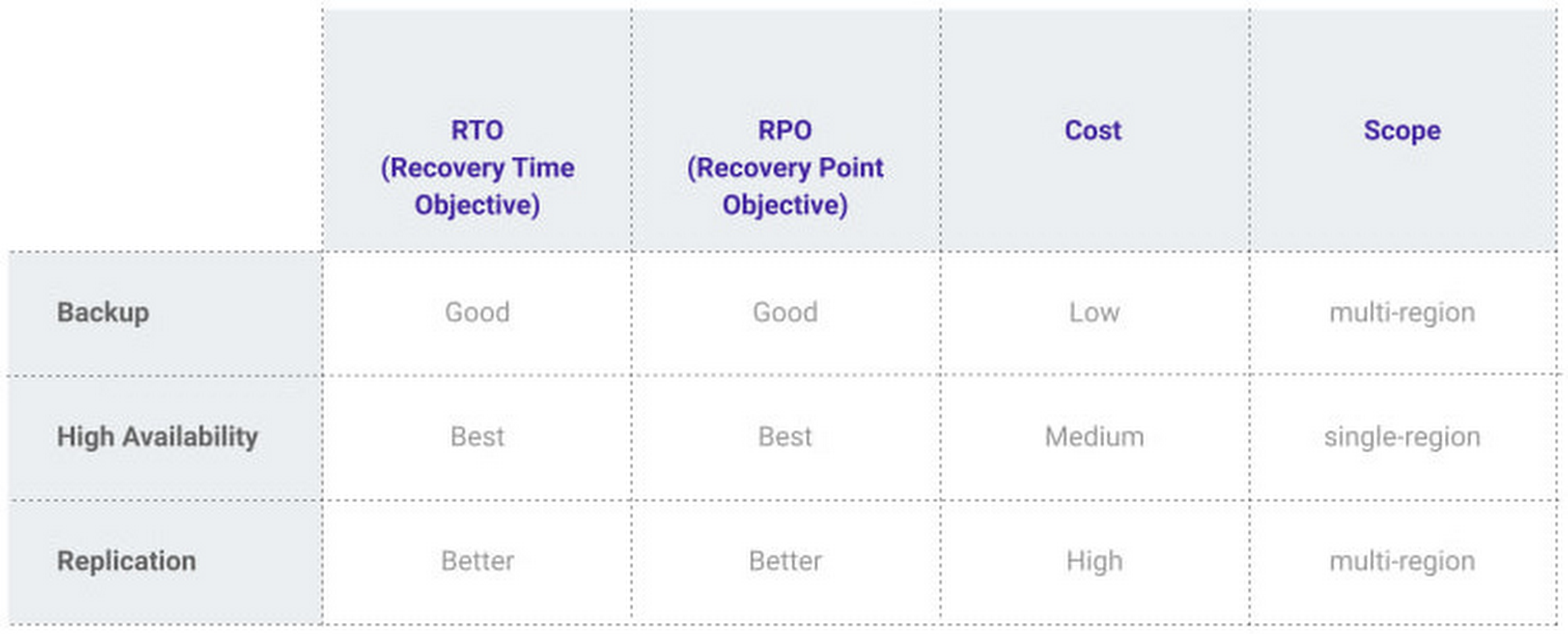
At Google, our Cloud SQL managed database service offers three fault tolerance mechanisms —backup, high availability, and replication—and there are three major factors to consider for each of them:
- RTO (recovery time objective): When a failure happens, how much time can be lost before significant harm occurs?
- RPO (recovery point objective): When a failure happens, how much data can be lost before significant harm occurs?
- Cost: How cost-effective is this solution?
We’ve heard from customers like Major League Baseball, HSBC, and Equifax that they have strict data-protection needs and require highly fault-tolerant multi-region applications—and they’ve all chosen Cloud SQL to meet those needs.
Let’s take a closer look at how the decision-making process plays out for each recovery solution.
High availability (HA)
If your application is business critical, you require minimum RTO and zero RPO— a high availability configuration ensures that you and your customers are protected. If the primary instance fails, there’s another standby instance ready to take over with no data loss. There’s an additional cost here, but doing this manually brings a great operational cost, since you have to detect and verify the fault, do the failover, and make sure it’s correct—you can’t have two primary instances or you risk data corruption—then finally connect the application to the new database.
Cloud SQL removes all that complexity. Choose high availability for a given instance and we’ll replicate the data across multiple zones, synchronously, to each zone’s persistent disk. If an HA instance has a failure, you don’t have to think about when to fail over because Cloud SQL detects the failure and automatically initiates failover, for a full recovery and no data loss within minutes. Cloud SQL also moves the IP address during failover so your application can easily reconnect. MLB, for example, uses Cloud SQL high availability to serve prediction data to live games with minimal downtime. Dev/test instances don’t need those same guarantees, but can use local backups to recover from any potential failure.
Cross-region replica
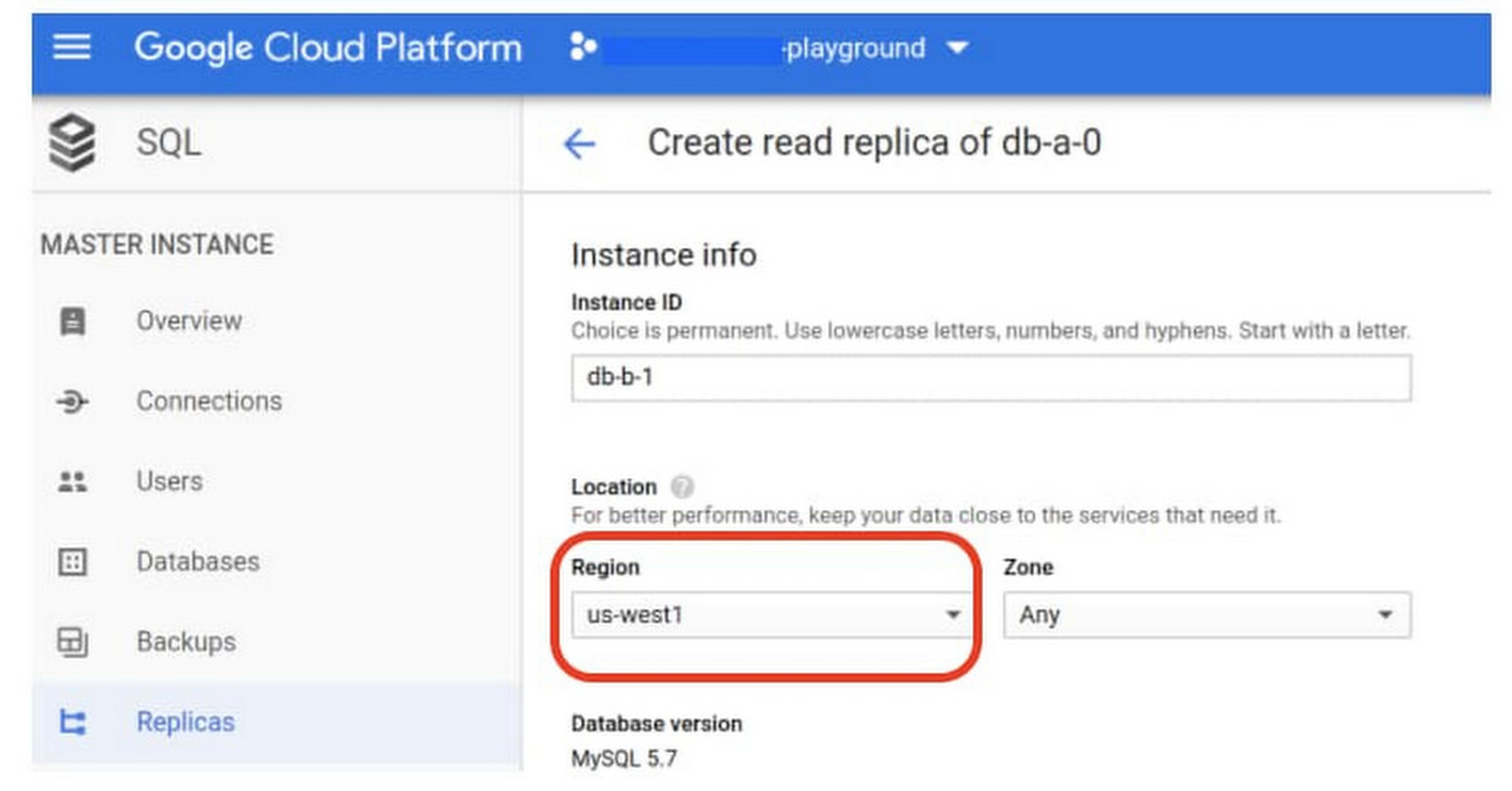
If a whole Google Cloud region goes down you still need your business to continue to run. That’s where cross-region replication comes in, a hot standby replica in another Google Cloud region provides RTO of minutes and RPO typically less than a minute . If you create a read replica in a region separate from your primary instance and you get hit with a regional outage, your application and database can start serving customers from another region within minutes. But this solution can be complex and enabling it yourself can be difficult and time-consuming. Securing cross-geography traffic demands end-to-end encryption and can bring connectivity issues too.
This is where the fully managed Cloud SQL solution shines. We offer MySQL, PostgreSQL and SQL Server database engines as a cross-region replication solution that’s easily configured and bolstered by Google’s interconnected global network. Just say, “I’m in U.S. East, I want to create a replica in U.S. West,” and it’s done, reliably and securely.
Backup
When you suffer data loss because of an operations error (for example, a bug in a script dropped your tables) or human error (for example, someone dropped the wrong table by accident), backups help you restore lost data to your Cloud SQL instance. Our low cost backup mechanism features point-in-time, granular recovery, meaning that if you accidentally delete data or something else goes wrong, you can ask for recovery of, for example, the state of that database down to the millisecond, such as Monday at 12:53pm. Your valuable data is replicated multiple times in multiple geographic locations automatically. This enables the automatic handling of failover in cases of major failure. You can always rest assured that your database is available and data is secure, even in the times of major failure crises.
Cloud SQL provides automated and on-demand backups. With automated backups, Google manages the backups so that you can easily restore them when required. Also, the scheduled backing is automatically taken by default. With on-demand backup, you can create a backup at any time. This could be useful if you are about to perform a risky operation on your database, as Cloud SQL lets you select a custom location for your backup data. When the backup is stored in multiple regions, and there’s an outage in the region that contains the source instance, you can restore a backup to a new or existing instance in a different region. This is also useful if your organization needs to comply with data residency regulations that require you to keep your backups within a specific geographic boundary.
Putting it all together
For critical workloads, MLB configures their Cloud SQL instances with backups, high availability, and cross-region replication. Doing so ensures they can recover from many failure types.
- To recover from human error (“Oops, I didn’t mean to delete that”), MLB uses backups and point-in-time recovery to recovery to a millisecond or specific database transaction
- To automatically recover from primary instance failures and zonal outages, MLB uses Cloud SQL’s high availability configuration
- To protect against regional outages, MLB uses cross-region replication
Creating a robust configuration, like MLB did, takes just a few minutes. Get started in our Console or review documentation.
More Relevant Stories for Your Company

BigQuery Now Supports Multi-statement Transactions
Mercury, the Roman god of commerce, is often depicted carrying a purse, symbolic of business transactions, wearing winged sandals, illustrating his abilities to move at great speeds. Transactions power the world’s business systems today, ranging from millions of packages moving worldwide tracked in real time by logistics companies to global

Daffodil Software Saves Hundreds of Hours Managing Databases with Google Cloud SQL
Daffodil Software is an India-based information technology services company with 180 employees and satellite offices in the US, Singapore, and the United Arab Emirates. Its product: A suite of web-based applications, including a business customer relationship management (CRM) program and an enterprise resource planning (ERP) app for schools. Daffodil’s Challenge

Google Migration and BigQuery Brings PedidosYa Closer towards its Goal of Becoming Data-driven
Editor’s note: PedidosYa is the market leader for online food ordering in Latin America, serving 15 markets and over 400 cities. It’s also one of the largest brands within the German multinational company Delivery Hero SE. With over 20 million app downloads, PedidosYa provides the best online delivery experience through
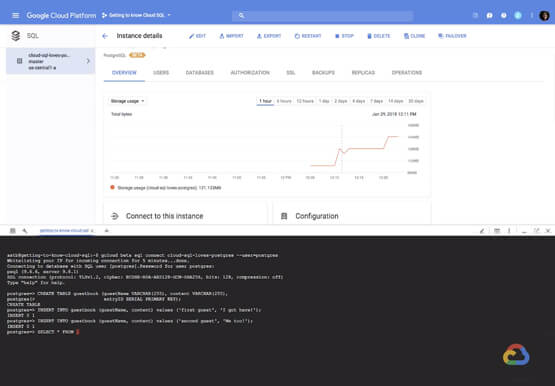

How to Create, Manage and Run SQL Instances in Google Cloud SQL
Database admins and application developers can easily create a database on Google Cloud SQL, which helps manage mundane administrative tasks so that they can focus on what matters the most. From MySQL to Postgres databases, they can spin up an instance in just a few simple steps. An instance can
