





IT Prediction: The Importance of Workload-Optimized, Ultra-Reliable Infrastructure in Today’s World

2553
Of your peers have already read this article.
2:30 Minutes
The most insightful time you'll spend today!
Editor’s note: This post is part of an ongoing series on IT predictions from Google Cloud experts. Check out the full list of our predictions on how IT will change in the coming years.
Prediction: By 2025, over half of cloud infrastructure decisions will be automated by AI and ML
Google’s infrastructure is designed with scale-out capabilities to support billions of people, powering services like Search, YouTube, and Gmail every day. To do that, we’ve had to pioneer global-scale computing and storage systems and shorten network latency and distance limitations with new innovations. Along the way, we’ve come to see cloud infrastructure as more than a simple commodity — it’s a source of inspiration and new capabilities.
But even as the demand on the industry’s cloud infrastructure continues to increase, there are simultaneously plateaus in the efficiency available from the underlying hardware. In the past, we saw annual performance gains of 30-40%, levels that often enabled a single infrastructure configuration to meet the needs of the vast majority of workloads. As these improvements have slowed and new workloads such as AI/ML and analytics have emerged, we have seen a corresponding explosion in the variety and capability of infrastructure. While empowering, the burden of picking the right combination of infrastructure components for a given workload still falls on an organization’s cloud architects.
But by 2025, we predict that the burden and complexity of infrastructure decision making will disappear through the power of AI and ML automation, which will automatically combine purpose-built infrastructure, prescriptive architectures, and an ecosystem to deliver a workload-optimized, ultra-reliable infrastructure. The focus for cloud architects will therefore be on enabling business logic and innovation, rather than how that logic maps to underlying infrastructure.
Already, we are making investments to turn this vision into reality, building custom silicon like the Infrastructure Processing Unit (IPU) for our new C3 VMs or a liquid-cooled board for the new tensor processing unit. The latter, the TPU v4 platform, is likely the world’s fastest, largest, and most efficient machine learning supercomputer. It can train large-scale workloads up to 80% faster and 50% cheaper than alternatives. Put another way, TPU v4 will nearly double the performance of critical ML and AI services at half the cost, unlocking new possibilities for what organizations can achieve when leveraging large-scale learning and inference for business services.
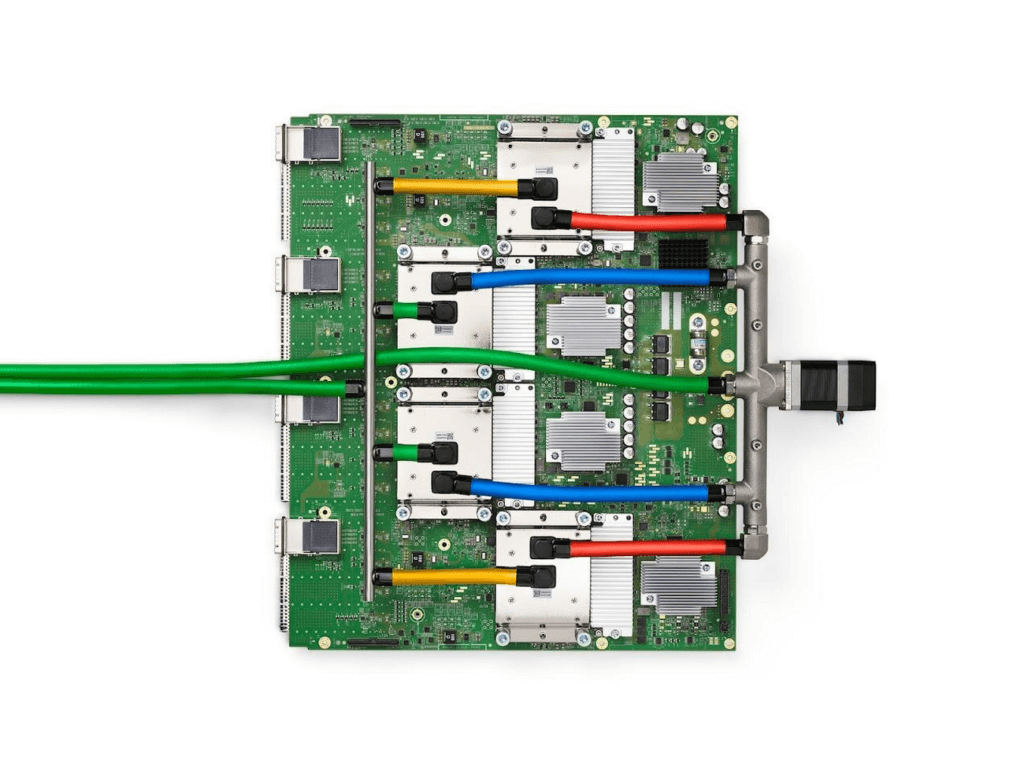
The TPUv4
These same IPUs and TPUs represent the foundation that will make it possible to automate cloud infrastructure decisions. They’ll be able to support the telemetry data and ML-based analytics for proactive infrastructure recommendations that will increase the performance and reliability of workloads.
Instead of determining hardware specifications and building the right infrastructure, you’ll only need to specify a workload. AI and ML will take over the burden and recommend, configure, and identify the best options based on your budgetary, performance, and scaling requirements. What is most exciting for us is how this will enable a much more rapid pace of service innovation, which is the primary end goal of great cloud infrastructure.
Recommendations for Modelling SAP Data inside BigQuery

8431
Of your peers have already read this article.
4:00 Minutes
The most insightful time you'll spend today!
Over the past few years, many organizations have experienced the benefits of migrating their SAP solutions to Google Cloud. But this migration can do more than reduce IT maintenance costs and make data more secure. By leveraging BigQuery, SAP customers can complement their SAP investments and gain fresh insights by consolidating enterprise data and easily extending it with powerful datasets and machine learning from Google.
BigQuery is a leading cloud data warehouse, fully managed and serverless, and allows for massive scale, supporting petabyte-scale queries at super-fast speeds. It can easily combine SAP data with additional data sources, such as Google Analytics or Salesforce, and its built-in machine learning lets users operationalize machine learning models using standard SQL — all at a comparatively low cost.
If your SAP-powered organization is looking to supercharge its analytics with the strength of BigQuery, read on for considerations and recommendations for modeling with SAP data. These guidelines are based on our real-world implementation experience with customers and can serve as a roadmap to the analytics capabilities your business needs.
Considerations for data replication
Like most technology journeys, this one should start with a business objective. Keeping your intended business value and goals in mind is critical to making the right decisions in the early steps of the design process.
When it comes to replicating the data from an SAP system into BigQuery, there are multiple ways to do it successfully. Decide which method will work best for your organization by answering these questions:
- Does your business need real-time data? Will you need to time travel into past data?
- Which external datasets will you need to join with the replicated data?
- Are the source structures or business logic likely to change? Will you be migrating the SAP source systems any time soon? For instance, will you be moving from SAP ECC to SAP S/4HANA?
You’ll also need to determine whether replication should be done on a table-by-table basis or whether your team can source from pre-built logic. This decision, along with other considerations such as licensing, will influence which replication tool you should use.
Replicating on a table-by-table basis
Replicating tables, especially standard tables in their raw form, allows sources to be reused and ensures more stability of the source structure and functional output. For example, the SAP table for sales order headers (VBAK) is very unlikely to change its structure across different versions of SAP, and the logic that writes to it is also unlikely to change in a way that affects a replicated table.
Something else to consider: Reconciliation between the source system and the landing table in BigQuery is linear when comparing raw tables, which helps avoid issues in consolidation exercises during critical business processes, such as period-end closing. Since replicated tables aren’t aggregated or subject to process-specific data transformation, the same replicated columns can be reused in different BigQuery views. You can, for instance, replicate the MARA table (the material master) once and use it in as many models as needed.
Replicating pre-built logic
If you replicate pre-built models, such as those from SAP extractors or CDS views, you don’t need to build the logic in BigQuery, since you’re using existing logic. Some of these extraction objects have embedded delta mechanisms, which may complement a replication tool that can’t handle deltas. This will save initial development time, but it can also lead to challenges if you create new columns, or if customizations or upgrades change the logic behind the extraction.
It’s also important to note that different extraction processes may transform and load the same source columns multiple times, which creates redundancy in BigQuery and can lead to higher maintenance needs and costs. However, replicating pre-built models may still be a good choice, since doing so can be especially useful for logic that tends to be immutable, such as flattening a hierarchy, or logic that is highly complex.
How you approach replication will also depend on your long-term plans and other key factors — for example, the availability (and curiosity) of your developers, and the time or effort they can put into applying their SQL knowledge to a new data warehouse.
With either replication approach, bear in mind when designing your replication process that BigQuery is meant to be an append-always database — so post-processing of data and changes will be required in both cases.
Processing data changes
The replication tool you choose will also determine how data changes are captured (known as CDC – change data capture). If the replication tool allows for it (for example as SAP SLT does) the same patterns described in the CDC with BigQuery documentation also apply to SAP data.
Because some data, like transactions, are known to be less static than others (e.g., master data), you need to decide what should be scanned in real time, what will require immediate consistency, and what can be processed in batches to manage costs. This decision will be based on the reporting needs from the business.
Consider the SAP table BUT000, containing our example master data for business partners, where we have replicated changes from an SAP ERP system:

In an append-always replication in BigQuery, all updates are received as new records. For example, deleting a record in the source will be represented as a new record in BigQuery with a deletion flag. This applies to whether the records are coming from raw tables like BUT000 itself or pre-aggregated data, as from a BW extractor or a CDS view.
Let’s take a closer look at data coming particularly from the partners “LUCIA” and “RIZ”. The operation flag tells us whether the new record in BigQuery is an insert (I), update (U) or deletion (D), while the timestamps help us identify the latest version of our business partner.

If we want to find the latest updated record for the partners LUCIA and RIZ, this is what the query would look like:
SELECT partner,ARRAY_AGG(i1 ORDER BY i1.recordstamp DESC LIMIT 1) AS rowFROM SAP_ECC.but000 i1WHERE partner in ('LUCIA','RIZ')GROUP BY partner
With the following result:

After identifying stale records for “LUCIA” and “RIZ” business partners, we can proceed to deleting all stale records for “LUCIA” if we do not want to retain the history. In this example, we are using a different table to which the same replication has been done, for the purpose of comparison and to check that all stale records have been deleted for the selection made and that we only kept last updated records. For example:
DELETE SAP_HANA.but000 i1WHEREi1.recordstamp < TIMESTAMP_SUB(CURRENT_TIMESTAMP(), INTERVAL 3 HOUR) ANDi1.recordstamp < (SELECT MAX(recordstamp) FROM SAP_HANA.but000 i2WHEREi1.partner = i2.partnerand partner="LUCIA")
You can also use the following query to retrieve stale records for “LUCIA” partner before moving forward with deletion
SELECT partner, operation_flag, recordstamp FROM SAP_HANA.but000 i1WHEREi1.recordstamp < TIMESTAMP_SUB(CURRENT_TIMESTAMP(), INTERVAL 3 HOUR)ANDi1.recordstamp < (SELECT MAX(recordstamp) FROM SAP_HANA.but000 i2WHEREi1.partner = i2.partnerand partner="LUCIA")
Which produces all of the records, except the latest update:

Partitioning and clustering
To limit the number of records scanned in a query, save on cost and achieve the best performance possible, you’ll need to take two important steps: determine partitions and create clusters.
Partitioning
A partitioned table is one that’s divided into segments, called partitions, which make it easier to manage and query your data. Dividing a large table into smaller partitions improves query performance and controls costs because it reduces the number of bytes read by a query.
You can partition BigQuery tables by:
- Time-unit column: Tables are partitioned based on a “timestamp,” “date,” or “datetime” column in the table.
- Ingestion time: Tables are partitioned based on the timestamp recorded when BigQuery ingested the data.
- Integer range: Tables are partitioned based on an integer column.
Partitions are enabled when the table is created, as in the example below. A great tip is to always include the partition filter as shown on the left-hand side of the query.

Clustering
Clustering can be created on top of partitioned tables by applying the fields that are likely to be used for filtering. When you create a clustered table in BigQuery, the table data is automatically organized based on the contents of one or more of the columns in the table’s schema. The columns you specify are then used to colocate related data.
Clustering can improve the performance of certain query types — for example, queries that use filter clauses or that aggregate data. It makes a lot of sense to use them for large tables such as ACDOCA, the table for accounting documents in SAP S/4HANA. In this case, the timestamp could be used for partitioning, and common filtering fields such as the ledger, company code, and fiscal year could be used to define the clusters.

A great feature is that BigQuery will also periodically recluster the data automatically.
Materialized views
In BigQuery, materialized views are precomputed views that periodically cache the results of a query for better performance and efficiency. BigQuery uses precomputed results from materialized views and, whenever possible, reads only the delta changes from the base table to compute up-to-date results quickly. Materialized views can be queried directly or can be used by the BigQuery optimizer to process queries to the base table.
Queries that use materialized views are generally completed faster and consume fewer resources than queries that retrieve the same data only from the base table. If workload performance is an issue, materialized views can significantly improve the performance of workloads that have common and repeated queries. While materialized views currently only support single tables, they are very useful common and frequent aggregations like stock levels or order fulfillment.
Further tips on performance optimization while creating select statements can be found in the documentation for optimizing query computation.
Deployment pipeline and security
For most of the work you’ll do in BigQuery, you’ll normally have at least two delivery pipelines running — one for the actual objects in BigQuery and the other to keep the data staging, transforming, and updated as intended within the change-data-capture flows. Note that you can use most existing tools for your Continuous Integration / Continuous Deployment (CI/CD) pipeline — one of the benefits of using an open system like BigQuery. But, if your organization is new to CI/CD pipelines, this is a great opportunity to gradually gain experience. A good place to start is to read our guide for setting up a CI/CD pipeline for your data-processing workflow.
When it comes to access and security, most end-users will only have access to the final version of the BigQuery views. While row and column-level security can be applied, as in the SAP source system, separation of concerns can be taken to the next level by splitting your data across different Google Cloud projects and BigQuery datasets. While it’s easy to replicate data and structures across your datasets, it’s a good idea to define the requirements and naming conventions early in the design process so you set it up properly from the start.
Start driving faster and more insightful analytics
The best piece of advice we can give you is this: Try it yourself. Anyone with SQL knowledge can get started using the free BigQuery tier. New customers get $300 in free credits to spend on Google Cloud during the first 90 days. All customers get 10 GB storage and up to 1 TB queries/month, completely free of charge. In addition to discovering the massive processing capabilities, embedded machine learning, multiple integration tools, and cost benefits, you’ll soon discover how BigQuery can simplify your analytics tasks.
If you need additional assistance, our Google Cloud Professional Services Organization (PSO) and Customer Engineers will be happy to help show you the best path forward for your organization. For anything else, contact us at cloud.google.com/contact.

7532
Of your peers have already downloaded this article
15:52 Minutes
The most insightful time you'll spend today!
Breakthroughs in artificial intelligence (AI) have captured the imaginations of business and technical leaders alike. The AI techniques underlying these breakthroughs are finding diverse application across every industry. Early adopters are seeing results, particularly encouraging is that AI is starting to transform processes in established industries, from retail to financial services to manufacturing.
However, an organization’s effectiveness in applying these breakthroughs is anchored in the basics: A disciplined foundation in capturing, preparing and analyzing data.
Data scientists spend up to 80% of their time on the “data wrangling,” “data munging” and “data janitor” work required well before the predictive capabilities promised by AI can be realized.
Capturing, preparing and analyzing data creates the foundation for successful AI initiatives. To help business and IT leaders create this virtuous cycle, Google Cloud has prepared a CIO’s guide to data analytics and machine learning that outlines key enabling technologies at each step. Crucially, the guide illustrates how managed cloud services greatly simplify the journey—regardless of an organization’s maturity in handling big data.
This is important because, for many companies, the more fundamental levels of data management present a larger challenge than new capabilities like AI. “Management teams often assume they can leapfrog best practices for basic data analytics by going directly to adopting artificial intelligence and other advanced technologies,” noted Oliver Wyman consultants Nick Harrison and Deborah O’Neill in a recent Harvard Business Review article (aptly titled If Your Company Isn’t Good at Analytics, It’s Not Ready for AI). “Like it or not, you can’t afford to skip the basics.
Building on new research and Google Cloud’s own contributions to big data since the beginning, this guide walks readers through each step in the data management cycle, illustrating what’s possible alongside examples.
Specifically, the CIO’s guide to data analytics and machine learning is designed to help business and IT leaders address some of the essential questions companies face in modernizing data strategy:
- For my most important business processes, how can I capture raw data to ensure a proper foundation for future business questions? How can I do this cost-effectively?
- What about unstructured data outside of my operational/transactional databases: raw files, documents, images, system logs, chat and support transcripts, social media?
- How can I tap the same base of raw data I’ve collected to quickly get answers as new business questions arise?
- Rather than processing historical data in batch, what about processes where I need a real-time view of the business? How can I easily handle data streaming in real time?
- How can I unify the scattered silos of data across my organization to provide a current, end-to-end view? What about data stored off-premises in the multiple cloud and SaaS providers I work with?
- How can I disseminate this capability across my organization—especially to business users, not just developers and data scientists?
Because managed cloud services deal with an organization’s sensitive data, security is a top consideration at each step of the data management cycle. From data ingestion into the cloud, followed by storage, preparation and ongoing analysis as additional data flows in, techniques like data encryption and the ability to connect your network directly to the Google Cloud must reflect data security best practices that keep data assets safe as they yield insights.
Wherever your company is on its path to data maturity, Google Cloud is here to help. We welcome the opportunity to learn more about your challenges and how we can help you unlock the transformational potential of data.
Enhancing SAP Build Process Automation with Google Document AI and Google Workspace

4150
Of your peers have already read this article.
4:00 Minutes
The most insightful time you'll spend today!
SAP Build Process Automation is designed to optimize business processes and boost efficiency. The platform helps both business users and developers alike digitize core workflows and incorporate artificial intelligence (AI) into time consuming and error-prone manual tasks.
All digital paths can benefit from automation. The pandemic, supply chain shortages, and other disruptive events have upped the pressure on businesses and their workers to perform in more efficient and flexible ways.
Google Cloud and SAP have responded by providing an integrated toolbox that can fundamentally change the way businesses operate — all while creating value for their customers.
With a focus on taking process automation to an even more advanced level and removing inefficiencies from workflows, SAP has introduced integrations with Google Cloud Document AI, and Google Workspace for SAP Build Process Automation customers. This integration can reduce or eliminate many repetitive and error-prone tasks, so that companies can help save money, operate more productively, and scale more easily.
AI unleashes innovation
Continuous advances in digital systems and advanced technology introduce new opportunities to rethink workflows. SAP recognizes the role that AI-powered automation can play in transforming workflows, and that the benefits of doing so extend beyond basic time savings and cost cutting. By plugging Google Cloud Document AI into the application, SAP Build Process Automation’s low-code, no-code platform enables SAP to help its customers in lines of business and IT integrate multiple applications while democratizing access to governed machine learning technology.
Machine learning and process automation can drive efficiency with SAP S/4HANA
Customers using SAP S/4HANA can build workflow improvements into all major core processes, such as order entry, invoice creation, asset posting, and many others, helping them to be faster and more efficient in the process. Google Cloud Document AI extracts key elements — including addresses, article numbers, price, quantity, and more — within emails, PDFs, handwritten notes, and other formats.
Integrated automation can drive results for invoice and purchase order processing
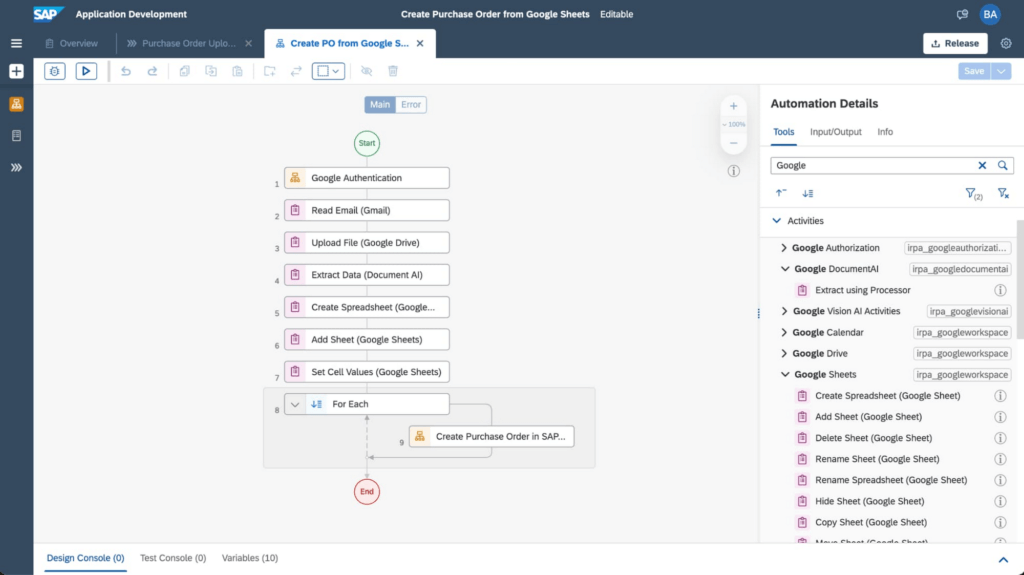
An example of the improvements these integrations have made to SAP Build Process Automation is the use of AI, productivity tools, and automation for processing purchase orders. In the past, workers had to manually select relevant orders in their Gmail accounts and extract key data from large PDF files, including the order date, supplier details, article numbers, quantity, unit price, and the total amount. Then, workers would have to enter all of the individual line items one by one into the SAP S/4HANA system.
Today, through SAP’s integrated automation platform, customers can automatically extract and organize data by Google Workspace (Google Sheets, Google Drive, and Gmail) and Document AI. This works by extracting data contained in Gmail attachments, downloading it into Google Drive and extracting fields using Document AI’s pretrained models. The tool then enters the consolidated order information from Google Sheets into SAP S/4HANA. For example, the Canton of Zurich in Switzerland experienced a significant reduction of workload to process compensation forms once the organization implemented this automation. Furthermore, implementing the automation can avoid audit and compliance issues, and improve data quality.
The screenshot below shows how a workflow operates within the SAP Build Process Automation software.
Sales, procurement, finance, and other functions are also able to handle more strategic work that delivers greater value to customers with these SAP and Google Cloud integrations. They’ve also boosted both security and regulatory compliance for customers, including those in the financial services space.
For example, the Google Cloud Document AI technology can process thousands of supply chain invoices, validates and systematically approves them. And, over time, the machine learning and AI components improve the analysis process and ensure that data processed with SAP Build Process Automation is adhering to a company’s best practices and essential regulatory requirements.
SAP and Google Cloud put automation to work
Achieving the most accurate, efficient business processes is possible with an automation framework that embeds collaboration and productivity applications while giving lines of business and IT users access to machine learning technology. SAP Build Process Automation combined with Google Cloud Document AI, and Google Workspace has proven to be a catalyst in driving innovation and business transformation for customers across multiple industries, leading to an average of 22% to 30% faster time to market, and significant financial gains, including up to 20% accounts payable savings potential. An example of these improvements includes those experienced by TasNetworks, which had a 25% reduction in back-office processing efforts after implementing these technologies.
To learn more about how Google Cloud and SAP are building solutions for accelerating business value, visit cloud.google.com/solutions/sap. You can find more information about SAP Build Process Automation at sap.com/build-automation.
To start your transformation journey today, choose the SAP Business Technology Platform region that’s best for you. We’re also happy to announce that Google Cloud offers the first and only option to run BTP in the cloud in India — learn more here: Google Cloud’s newest SAP Business Technology Platform Region.
Making Your Pictures Worth a Thousand Labels! (with Cloud Vision API)
1208
Of your peers have already read this article.
2:30 Minutes
The most insightful time you'll spend today!
In this post, I’ll be showing some amazing ways the Vision API can extract meaning from your images – keep reading, or jump directly into a tutorial using Python, Node.js, Go, or Java! This tutorial can be completed at no cost within the Google Cloud Free Tier.
They say a picture is worth a thousand words. But how do you make those words available and useful? Around the world, we are generating more images than ever before, and it’s no surprise that businesses are turning to image recognition technology to help meet the immense opportunities created with this growing set of data.
Cloud Vision API is a powerful tool that enables you to perform a variety of tasks including label detection, text recognition, and object tracking on your image data. Whether it’s identifying products in a retail store, analyzing social media posts for brand mentions, or scanning through millions of images to find a specific object, the Cloud Vision API can help businesses automate their image analysis workflows and gain valuable insights from their visual data. To protect privacy, and help you build responsibly, the Cloud Vision API offers features to limit personal identification, such as person blur, which hides identifiable features.
Let’s explore a few of the key features of the Cloud Vision API.
Detect famous landmarks
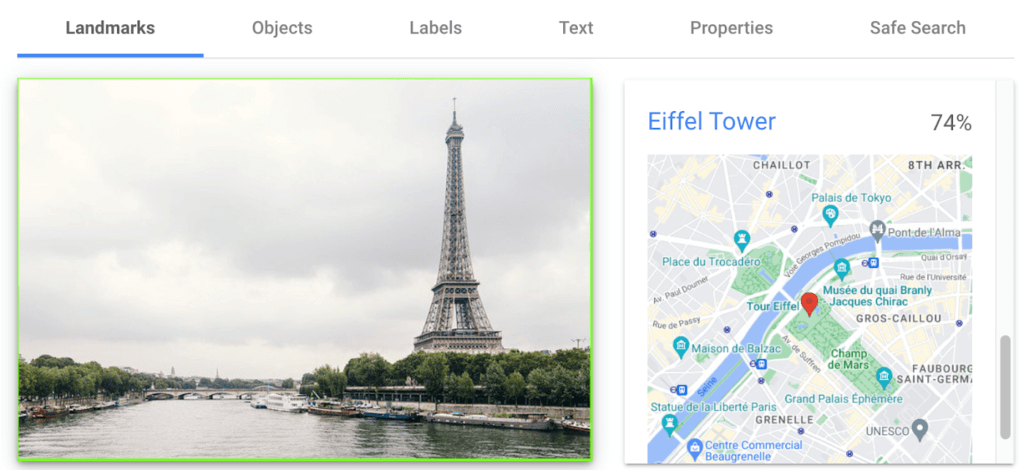
Landmark detection allows you to analyze images to identify specific landmarks such as buildings, natural features, and other recognizable locations. Cloud Vision API recognizes landmarks and provides information about them, including their name, location, and other relevant details. Perhaps you are trying to identify the landmarks in images shared by customers as part of social campaigns, or want to build a mobile app that provides information to tourists on famous landmarks.
In the below left-hand side image, Cloud Vision API has detected the Eiffel Tower, shown in the visualized response. Not shown in this visualization here, but also detected, were Pont de Bir-Hakeim (the bridge) and Champs de Mars (the park in front of the Eiffel Tower).
Detect objects and label images
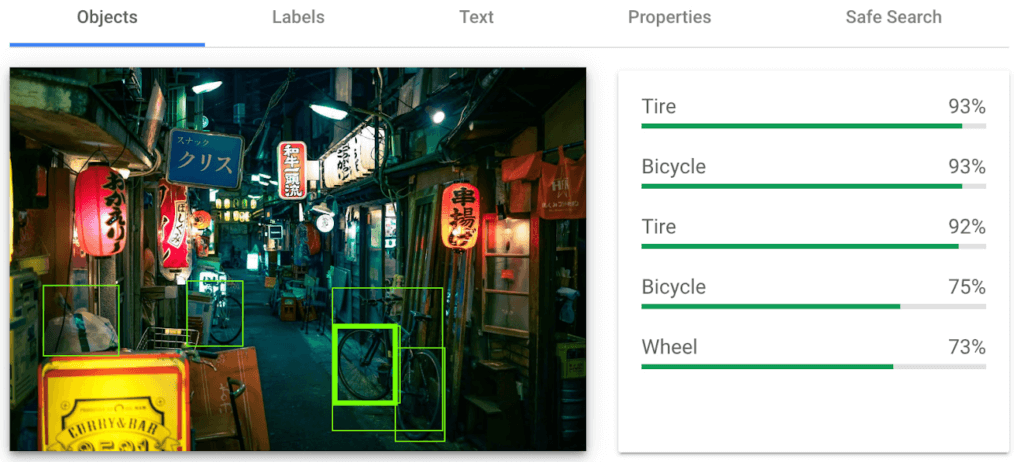
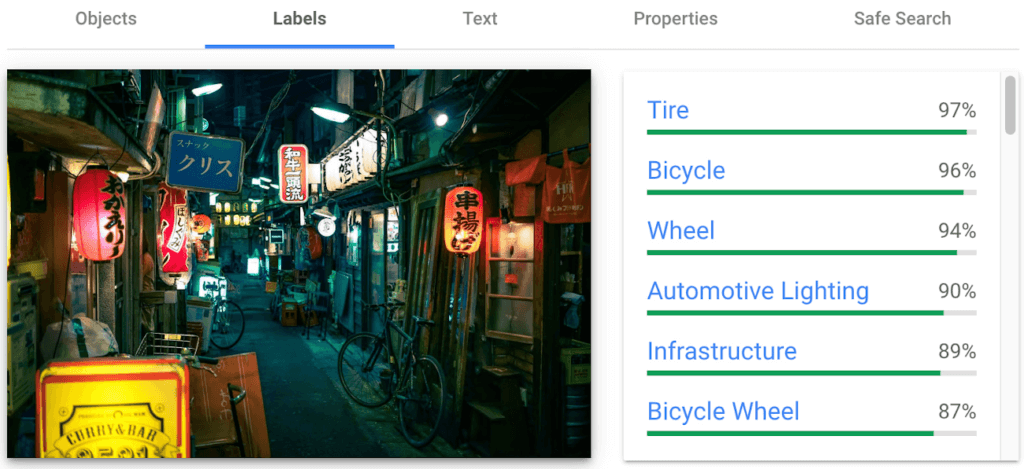
Object detection and labels are two related features that enable you to identify and classify objects within an image. Object detection detects and locates objects within an image, and provides information such as the position, size, and orientation of each object. Labels, on the other hand, provide a general classification of the content within an image.
Object detection has practical applications in many industries such as self-driving vehicles (where it’s critical), retail, manufacturing and more, while labels can be used to help classify and organize large collections of images, or to categorize and filter content.
You can see the similarities and differences in the responses provided by the object detection and labeling features in this image taken in Setagaya.
Detect text
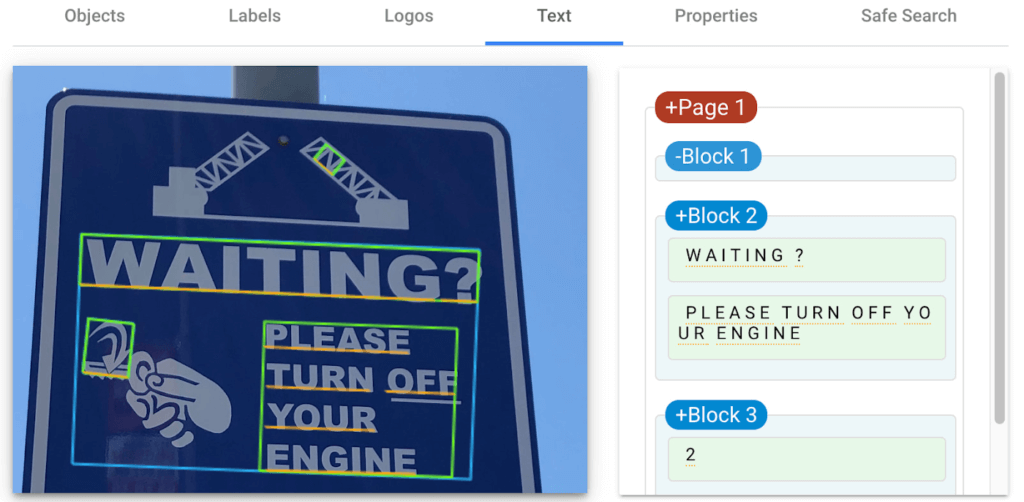
Cloud Vision API detects and extracts text from any image, even if it’s handwritten or in different languages. Once it detects text, the API can provide information about the position, orientation, and size of each text element, as well as individual words, and their bounding boxes.
In this image of a traffic sign, Cloud Vision API has detected the text and provided it in the response.
Detect explicit content
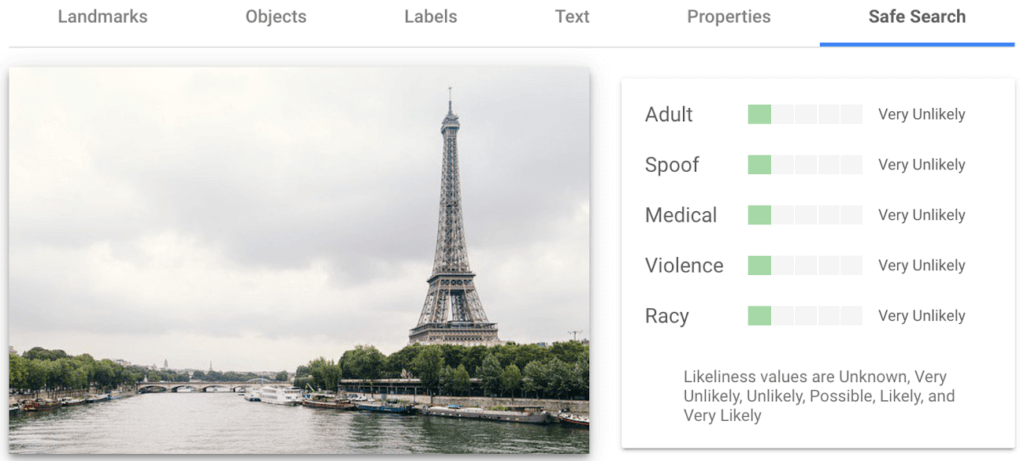
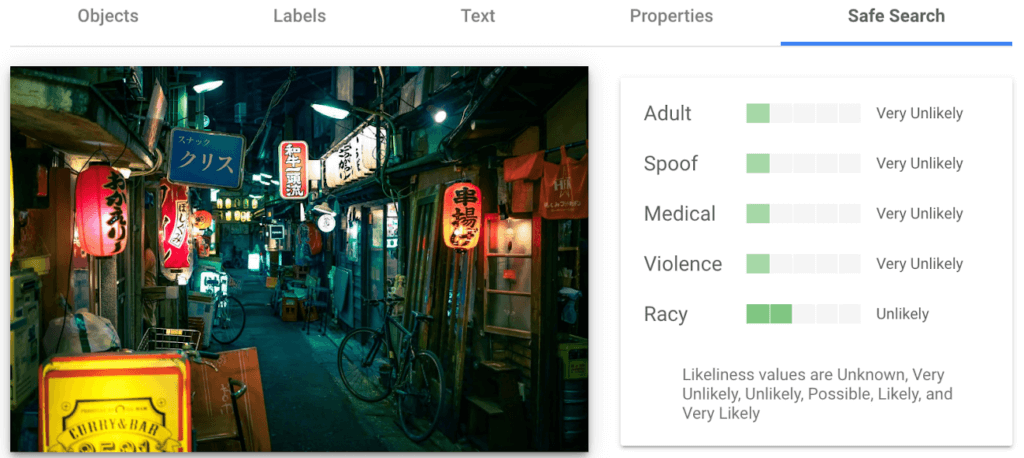
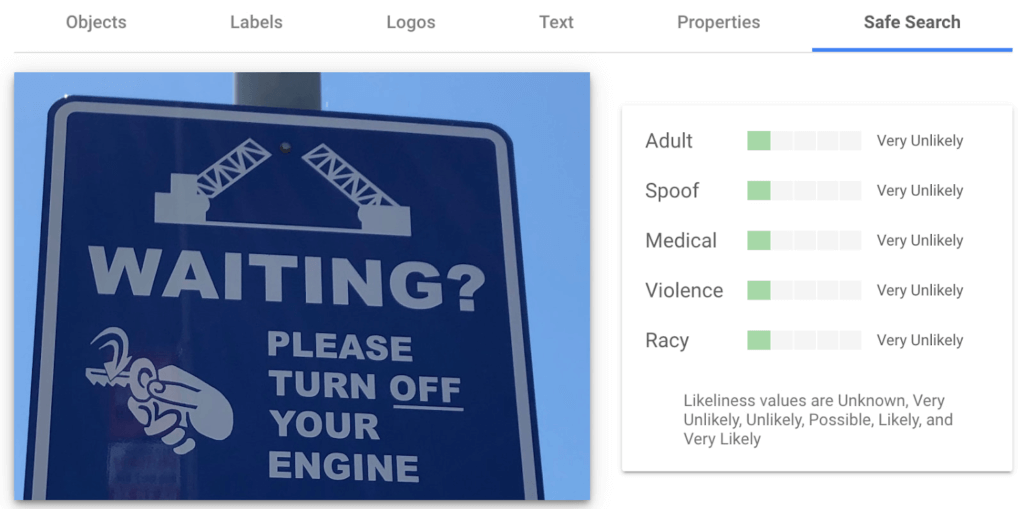
Cloud Vision API can automatically identify and flag explicit or inappropriate content within an image using five categories: adult, spoof, medical, violence, and racy. The API provides a score that indicates the likelihood for each category in the image, which you can use to set thresholds in your application and decide how to handle those that exceed them. This feature is particularly useful for filtering or moderating user-generated content.
Luckily for the images I shared here, each category has been deemed “very unlikely” to be present. Phew!
Next Steps
These are just a few features of the Cloud Vision API and how it can help your business with automating image analysis workflows and gaining valuable insights from your visual data.
Head to the interactive walkthrough tutorials in Python, Node.js, Go, and Java to see step-by-step how to access the API and learn more about all the features that you can integrate into your own applications! Again, this tutorial can be completed at no cost within the Google Cloud Free Tier.
5587
Of your peers have already watched this video.
1:20 Minutes
The most insightful time you'll spend today!
Nippon India Mutual Fund Re-Invents How Indians Buy with AI
Nippon India Mutual Fund, formerly Reliance Mutual Funds is changing the way Indians purchase funds making it easier and faster, with the help of Google Cloud.
In India, only 3-4 percent of the population has invested in mutual funds. There’s a sizeable market to tap into for mutual fund houses–if they can find ways to make it easier for first-time investors to take the plunge.
As the leading retail asset management company in the country, Reliance Mutual Funds, decided to use voice to facilitate transactions.
“That would create a delightful experience for the investor,” says Arpan Saha, Head of Digital Business, Nippon India Mutual Fund.
That’s exactly what the company did using the Google Cloud Platform.
Today, the company has over 10,000 interactions using the Google AI Platform.
“Today we see more consumer coming and doing more transactions with us, and we only see this going up as we make this experience razor-sharp,” says Saha.
More Relevant Stories for Your Company

How Public Sectors Leverage Google Cloud to Push the Envelop in Human Services and Labor
The COVID-19 pandemic tested our nation’s public benefits system in unimaginable ways. With an unprecedented 60 million individuals turning to unemployment and social services to satisfy their basic needs, state and local governments were stretched to meet the demand. But state and local government leaders have risen to the challenge

Google’s Intelligent Products Essentials Assist Manufacturers in Product Development Journey
Expectations for both consumer and commercial products have changed. Consumers want products that evolve with their needs, adapt to their preferences, and stay up-to-date over time. Manufacturers, in turn, need to create products that provide engaging customer experiences not only to better compete in the marketplace, but also to provide

Accelerate Innovation with Google Cloud’s Managed Database Services
Google Cloud’s managed database services can help you innovate faster and reduce operational overhead. The migration tools and resources included in this whitepaper will help you plan your migration. This whitepaper provides guidance on: Managing services for maximum compatibility with your workloads Leveraging services that are compatible with the most

Google is a Leader in the 2019 Gartner Magic Quadrant for Data Management Solutions for Analytics
As organizations continue to produce vast quantities of data, they increasingly need platforms that allow them to analyze, store, and extract meaningful insights from that data. And research from analyst firms like Gartner offer an important way for organizations to evaluate and compare cloud data warehouse providers. Earlier this year,
