





Google is a Leader in the 2019 Gartner Magic Quadrant for Data Management Solutions for Analytics

5970
Of your peers have already read this article.
2:10 Minutes
The most insightful time you'll spend today!
As organizations continue to produce vast quantities of data, they increasingly need platforms that allow them to analyze, store, and extract meaningful insights from that data. And research from analyst firms like Gartner offer an important way for organizations to evaluate and compare cloud data warehouse providers.
Earlier this year, Gartner named Google a Leader in the 2019 Gartner Magic Quadrant for Data Management Solutions for Analytics (DMSA) (report available here). This evaluation covers Google Cloud’s core data analytics offerings, including BigQuery, a serverless, managed data warehouse, Cloud Dataproc, a managed Spark and Hadoop service, and Cloud Dataflow, which enables you to stream and batch-process your data. Here are a few takeaways:
Simplicity and speed
BigQuery’s performance permits complex queries on large-scale data sets to return in seconds, and a substantial number of BigQuery customers maintain data warehouses that store more than 50 terabytes (and a few customers now use more than 100 petabytes). More than half of these customers are loading data either continuously or many times per day. These customers value the ability to extract, transform, load, and analyze their data on a serverless platform, all without maintaining any underlying infrastructure.
A versatile serverless data warehouse
One of BigQuery’s major advantages is its ability to allow customers to address a wide variety of use cases—from a traditional data warehouse to data science. Over the past year, we’ve worked hard to introduce new features in BigQuery like data types for financial and monetary uses, BigQuery GIS for geospatial data, and machine learning capabilities through BigQuery ML. BigQuery’s continuous ingest capabilities make it suitable for an operational—or a real-time—serverless data warehouse.
An expanding ecosystem
With overall increased market adoption, our analytics offerings continue to benefit from a fast-growing partner ecosystem of service providers, and business intelligence (BI) and data integration vendors. In particular, in 2018 we expanded our partnerships with established industry providers, including Confluent, Dell Boomi, Informatica, Looker, Reltio, Tableau, and ThoughtSpot.
More and more organizations are finding value in Google Cloud’s serverless data warehouse and analytics offerings. If you’d like to learn more, you can download a complimentary copy of the Gartner Magic Quadrant for Data Management Solutions for Analytics on the Google site (requires an email address).
Gartner does not endorse any vendor, product or service depicted in its research publications, and does not advise technology users to select only those vendors with the highest ratings or other designation. Gartner research publications consist of the opinions of Gartner’s research organization and should not be construed as statements of fact. Gartner disclaims all warranties, expressed or implied, with respect to this research, including any warranties of merchantability or fitness for a particular purpose.
3214
Of your peers have already watched this video.
14:30 Minutes
The most insightful time you'll spend today!
How AI Has Helped Enterprises Adapt Quickly to Moments of Change
The pandemic has clearly caused a tremendous amount of rapid change for businesses across industries and regions.
In this session, Michael Baldwin, Head of Product – Financial Services, Google Cloud speaks about ways that artificial intelligence has helped enterprises adapt to those changes.
He will cover trends that Google Cloud experts are witnessing as they work with enterprises and the impact those trends have on key industries.
Some of these include:
- Significant shifts in demand
- Increased cost pressures
- Supply chain uncertainty
- Spikes in customer support cases
- Virtual work for continuity of services
- Accelerated digital transformation
He then demonstrates, with specific examples, how AI can helpful in these moments of change.
Cohere uses Google Cloud’s new TPU v4 Pods on its quest to create larger and more powerful language models

2807
Of your peers have already read this article.
3:30 Minutes
The most insightful time you'll spend today!
Over the past few years, advances in training large language models (LLMs) have moved natural language processing (NLP) from a bleeding-edge technology that few companies could access, to a powerful component of many common applications. From chatbots to content moderation to categorization, a general rule for NLP is that the larger the model, the greater the accuracy it’s able to achieve in understanding and generating language.
But in the quest to create larger and more powerful language models, scale has become a major challenge. Once a model becomes too large to fit on a single device, it requires distributed training strategies, which in turn require extensive compute resources with vast memory capacity and fast interconnects. You also need specialized algorithms to optimize the hardware and time resources.
Cohere engineers are working on solutions to this scaling challenge that have already yielded results. Cohere provides developers a platform for working with powerful LLMs without the infrastructure or deep ML expertise that such projects typically require. In a new technical paper, Scalable Training of Language Models using JAX pjit and TPUv4, engineers at Cohere demonstrate how their new FAX framework deployed on Google Cloud’s recently announced Cloud TPU v4 Pods addresses the challenges of scaling LLMs to hundreds of billions of parameters. Specifically, the report reveals breakthroughs in training efficiency that Cohere was able to achieve through tensor and data parallelism.
This framework aims to accelerate the research, development, and production of large language models with two significant improvements: scalability and rapid prototyping. Cohere will be able to improve its models by training larger ones more quickly, delivering better models to its customers faster. The framework also supports rapid prototyping of models that address specific objectives — for example, creating a generative model that powers customer-service chatbot — by experimenting and testing new ideas. The ability to switch back and forth among model types and optimize for different objectives will ultimately allow Cohere to offer models optimized for particular use cases.
The FAX framework relies heavily on the partitioned just-in-time compilation (pjit) feature of JAX, which abstracts the relationship between device and workload. This allows Cohere engineers to optimize efficiency, and performance by aligning devices and processes in the ideal configuration for the task at hand. Pjit works by compiling an arbitrary function into a single program (an XLA computation), that runs on multiple devices — even those residing on different hosts.
Cohere’s new solution also takes advantage of Google Cloud’s new TPU v4 Pods to perform tensor parallelism. which is more efficient than the earlier pipeline parallelism implementation. As the name suggests, the pipeline parallel approach uses accelerators in a linear fashion to scale a workload, like a single long assembly line. Accelerators must process each micro-batch of data before passing it along to the next one, and then run the backward pass in reverse order.
Tensor parallelism eliminates the accelerator idle time of pipeline parallelism, also known as the pipeline bubble. Tensor parallelism involves partitioning large tensors (mathematical arrays that define the relationship among multiple objects such as the words in a paragraph) across accelerators to perform computations at the same time on multiple devices. If pipeline parallelism is an ever-lengthening assembly line, tensor parallelism is a series of parallel assembly lines — one making the engine, the other the body, etc. — that simultaneously come together to form a complete car in a fraction of the time.
These computations are then collated, a process made practical thanks to Google Cloud TPU v4 VMs, which more than double the computational power. The superior performance of v4 chips has enabled Cohere to iterate on ideas and validate them 1.7X faster in computation than before.
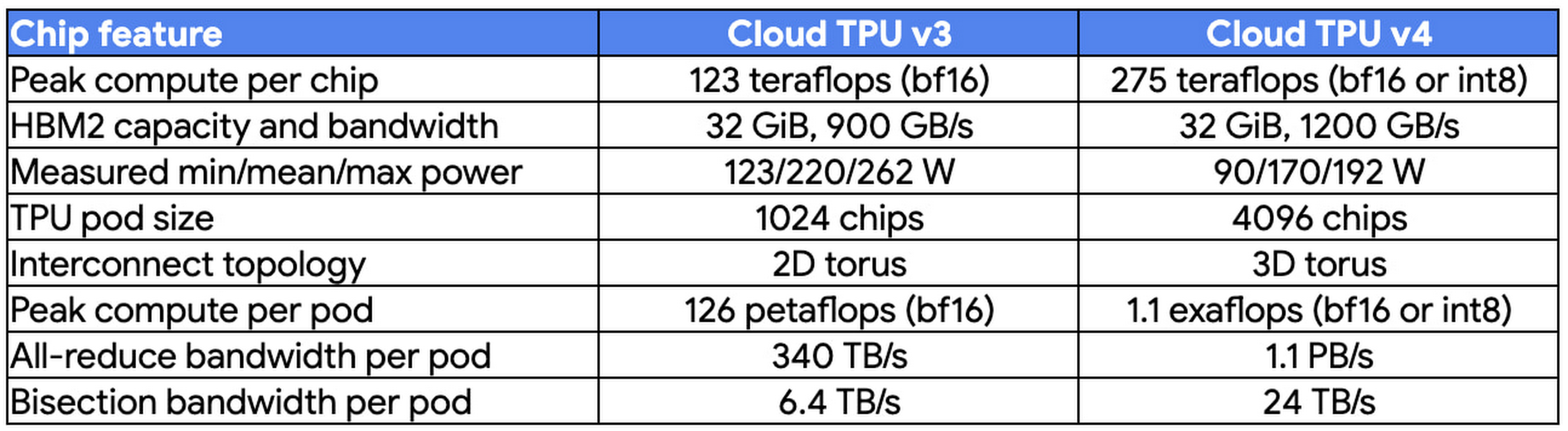
At Cohere, we build cutting-edge natural language processing (NLP) services, including APIs for language generation, classification, and search. These tools are built on top of a set of language models that Cohere trains from scratch on Cloud TPUs using JAX. We saw a 70% improvement in training time for our largest model when moving from Cloud TPU v3 Pods to Cloud TPU v4 Pods, allowing faster iterations for our researchers and higher quality results for our customers. The exceptionally low carbon footprint of Cloud TPU v4 Pods was another key factor for us.
Aidan Gomez
CEO and co-founder, Cohere
Why Google Cloud for LLM training?
As part of a multiyear technology partnership, Cohere leverages Google Cloud’s advanced AI and ML infrastructure to power its platform. Cohere develops and deploys its products on Cloud TPUs, Google Cloud’s custom-designed machine learning chips that are optimized for large-scale ML. Cohere’s recently announced their new model improvements and scalability by training an LLM using FAX on Google Cloud TPUs, and this model has demonstrated that transitioning from TPU v3 to TPU v4 has so far enabled them to achieve a total speedup of 1.7x. In addition to a significant performance boost, TPUs provide an excellent user experience with the new TPU VM architecture. Importantly, Google Cloud ensures that Cohere’s state-of-the-art ML training is achieved with the highest standards of sustainability, powered by 90% carbon-free energy in the world’s largest publicly available ML hub.
By adopting Cloud TPUs, Cohere is making LLM training faster, more economical, and more agile. This helps them provide larger and more accurate LLMs to developers, and put NLP technology in the hands of developers and businesses of all sizes.
To learn more about these LLM training advances, you can read the full paper, Scalable Training of Language Models using JAX pjit and TPUv4. To learn more about Cohere’s best practices and AI principles, you can check this article co-authored with Open AI and AI 21 Labs.
Google Cloud Helps Northwell Health to Boost Caregiver Productivity and Access to Right Care Using AI

7943
Of your peers have already read this article.
2:00 Minutes
The most insightful time you'll spend today!
Lung cancer is the leading cause of cancer death in the United States and like any cancer, early detection is crucial to survival. Screening at-risk populations is an important part of reducing mortality, and if concerning nodules are found on imaging, further testing may be required. Today, we’ll share how Northwell Health uses Google Cloud products such as Cloud Healthcare APIs and BigQuery to increase caregiver productivity and deliver better care for patients with findings that indicate potential development of lung cancer.
Northwell is New York’s largest healthcare provider
Northwell Health is New York’s largest healthcare provider with 23 hospitals and nearly 800 outpatient facilities. Northwell’s nearly 4,000 doctors care for millions of patients each year, and at this scale, there is an immense amount of healthcare data to manage. To better manage and leverage this data, Northwell Health partnered with Google Cloud starting in 2018.
Enabling caregivers to spend more time with patients
Nic Lorenzen, the lead developer of Northwell Emerging Technology and Innovation team, has a mission to put together data for caregivers in a way that makes sense. It is no secret that inefficient electronic health records systems have a negative impact on a physician’s ability to deliver quality care. Traditional EHRs have information distributed across many tabs, which forces caregivers to spend considerable time at the computer trying to find information. Moreover, speed of care matters. If care is delayed, patients may have to spend more time in the hospital and may suffer worse health outcomes.
To solve this problem, Nic’s team focused on giving caregivers the most relevant pieces of data at the right time by developing an intelligent clinician rounding app. The data needed to derive these insights can depend on the caregiver’s role–a nurse cares about different things than a cardiologist. This system aggregates multiple data sources, and provides patient-specific insights to caregivers.
This system would not have been possible before with traditional EHRs and data warehouses that have proprietary data models and rarely sync data in real time. Now with data easily accessible through Google Cloud’s Healthcare solutions, Nic’s team can deliver the right clinical information to the right people instantly. These days, Nic says, “instead of spending 75% of our time dealing with architecting the underlying platforms, we spend 75% of our time focused on higher value use cases for clinicians and patients. Google Cloud’s Healthcare solutions have greatly improved our developer productivity and time to value.”
Caregivers have found this new system to be a game changer.Before the implementation of this system, caregivers would spend, on average, seven to nine minutes finding the data needed to make medical decisions for one patient. Now, that aggregated information is delivered to a caregiver’s mobile device in less than a second.
Ensuring patients get the right care with the power of AI
There are a number of reasons why patients might not get the care that they need. For example, patients today can go to multiple hospitals and clinics settings, and coordinating care across multiple facilities is complex. Regional hospitals and clinics have their own siloed view of their data, so pertinent information gathered by one clinic might not be seen by another. These gaps in clinical data lead to gaps in patient care.
When a patient gets radiologic imaging, they may have findings unrelated to the reason they initially got the imaging. For example, a chest CT for a car accident might reveal an incidental lung nodule that could be cancerous. Unfortunately, research shows that a large portion of patients do not get follow up for these incidental findings because it isn’t the primary reason why the patient is seeing a doctor. Moreover, social determinants of health are a factor that affects which patients receive follow-up care. Identifying these patients and providing the necessary follow up care prevents adverse events related to delayed detection of cancer.

With Cloud Healthcare solutions, Northwell built an AI model to identify these patients so that oncologists can appropriately follow up with patients who have findings suspicious for lung cancer. The AI model detects incidental pulmonary nodules in radiology reports so that doctors can then contact the patients that need follow-up care. Nic says his team was able to build this system in a week: “Google Cloud did a lot of heavy-lifting for us and allowed us to get to the AI applications much faster. It allowed us to build a platform that just works.”
Healthcare systems can now rapidly generate healthcare insights with one end-to-end solution, Google Cloud Healthcare Data Engine. It builds on and extends the core capabilities of the Google Cloud Healthcare API to make healthcare data more immediately useful by enabling an interoperable, longitudinal record of patient data. Northwell Health uses Google Cloud as the core of their platform, enabling their developers to create solutions to the most pressing healthcare problems.
Special thanks to Kalyan Pamarthy, Product Management Lead on Cloud Healthcare and Natural Language APIs for contributing to this blog post.
Google Introduces ML-based Predictive Autoscaling to Forecast Capacity and Match Scaling Demands
4974
Of your peers have already read this article.
3:00 Minutes
The most insightful time you'll spend today!
At Google Cloud, we believe you get most benefits from the cloud when you scale infrastructure based on changing demand. Compute Engine allows you to configure autoscaling to save costs during periods of low demand, and add capacity to support peak loads.
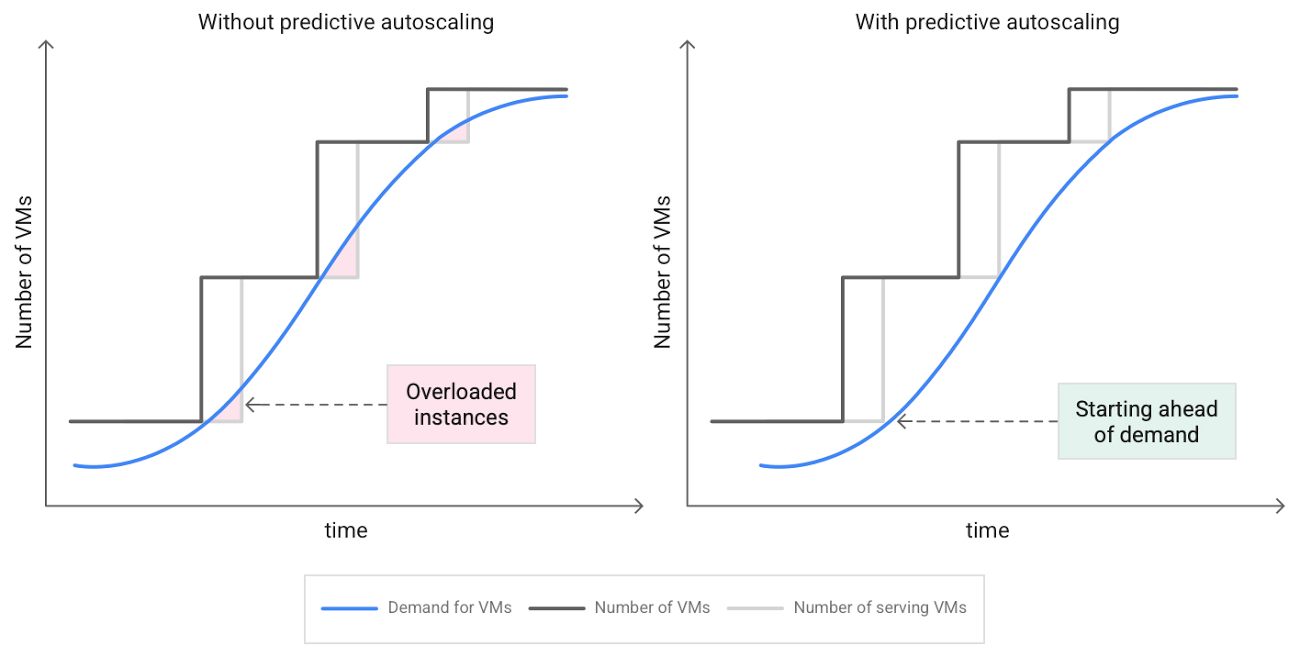
When you use a managed instance group (MIG), you can have an autoscaler automatically create or delete virtual machine (VM) instances based on increases or decreases in load. However, if your application takes several minutes to initialize, creating VMs in response to growing load might not increase your application’s capacity quickly enough. For example, if there’s a large increase in load (like when users first wake up in the morning), some users might experience delays while your application is initializing on new instances.
A good way to solve this problem would be to create VMs ahead of demand so that your application has enough time to initialize beforehand. This requires knowing upcoming demand. If only we could predict the future… Well, now we can!
Introducing predictive autoscaling
Predictive autoscaling uses Google Cloud’s machine learning capabilities to forecast capacity needs. It creates VMs ahead of growing demand allowing enough time for your application to initialize.
How does it work?
Predictive autoscaling uses your instance group’s CPU history to forecast future load and calculate how many VMs are needed to meet your target CPU utilization. Our machine learning adjusts the forecast based on recurring load patterns for each MIG.
You can specify how far in advance you want autoscaler to create new VMs by configuring the application initialization period. For example, if your app takes 5 minutes to initialize, autoscaler will create new instances 5 minutes ahead of the anticipated load increase. This allows you to keep your CPU utilization within the target and keep your application responsive even when there’s high growth in demand.
Many of our customers have different capacity needs during different times of the day or different days of the week. Our forecasting model understands weekly and daily patterns to cover for these differences. For example, if your app usually needs less capacity on the weekend our forecast will capture that. Or, if you have higher capacity needs during working hours, we also have you covered.
Why should you try it?
Predictive autoscaling continuously adapts forecasted capacity to best match upcoming demand. Autoscaler checks the forecast several times per minute and creates or deletes VMs to match its prediction. The forecast itself is updated every few minutes to match recent load trends so if your growth rate is higher or lower than usual we will adjust the forecast accordingly. This gives you capacity needed to cover peak load while saving on cost when demand goes down.
You can start using predictive autoscaling without worry as it’s fully compatible with the current autoscaler. Autoscaler will calculate enough VMs to cover both forecasted as well as real-time CPU load—whichever is higher. This works with other autoscaling features as well: you can scale based on schedule, your Load Balancer request target or Cloud Monitoring metrics. Autoscaler provides enough capacity to all of your configurations by taking the highest number of VMs needed to meet all your targets.
Getting started
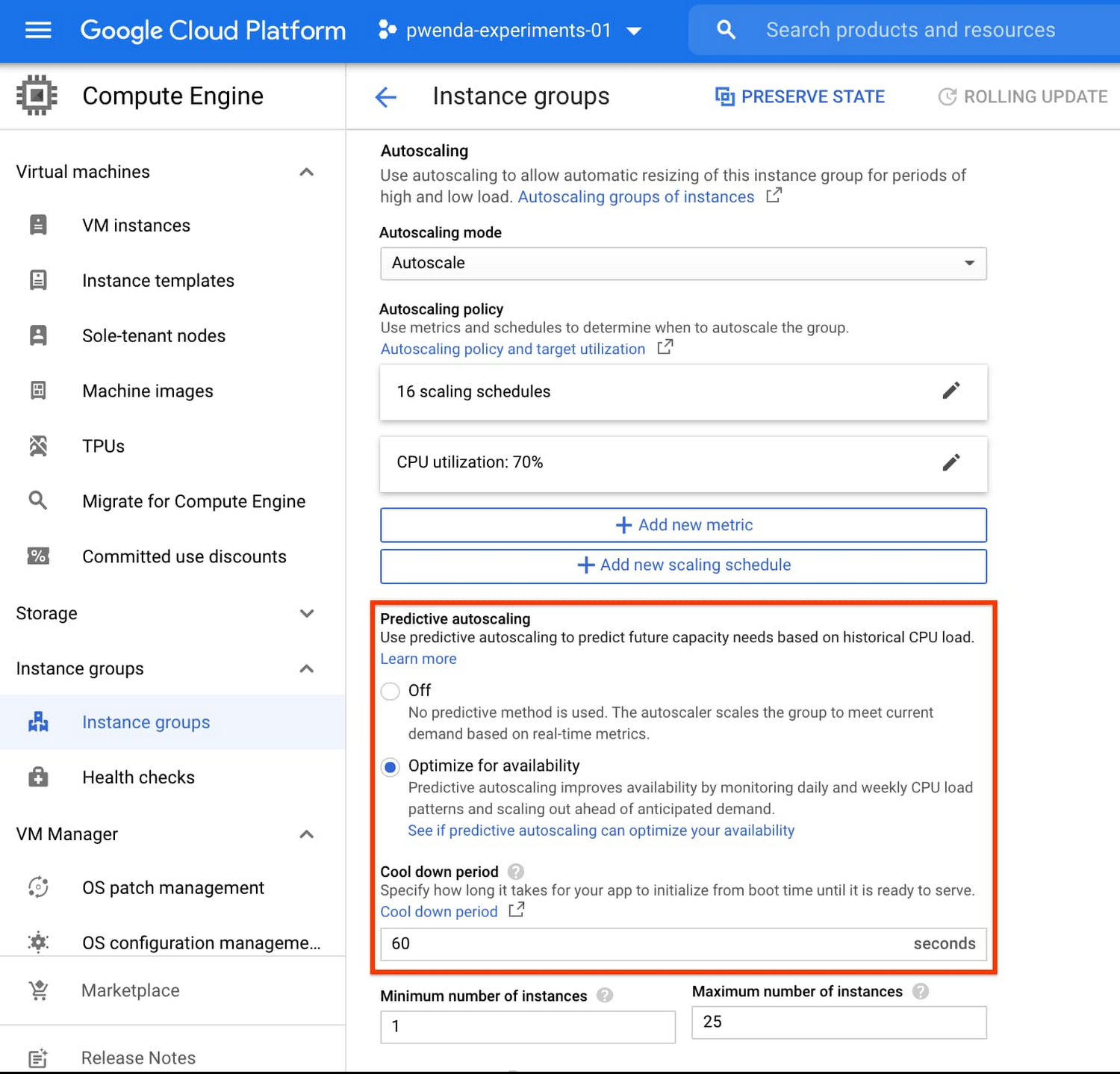
You can enable predictive autoscaling in the Google Cloud Console. Select an autoscaled MIG from the instance groups page and click Edit group. Change predictive autoscaling configuration from Off to Optimize for availability.
To better understand whether predictive autoscaling is good for your application, click the link See if predictive autoscaling can optimize your availability. This will show you a comparison of the last seven days with your current autoscaling configuration vs. with predictive autoscaling enabled.
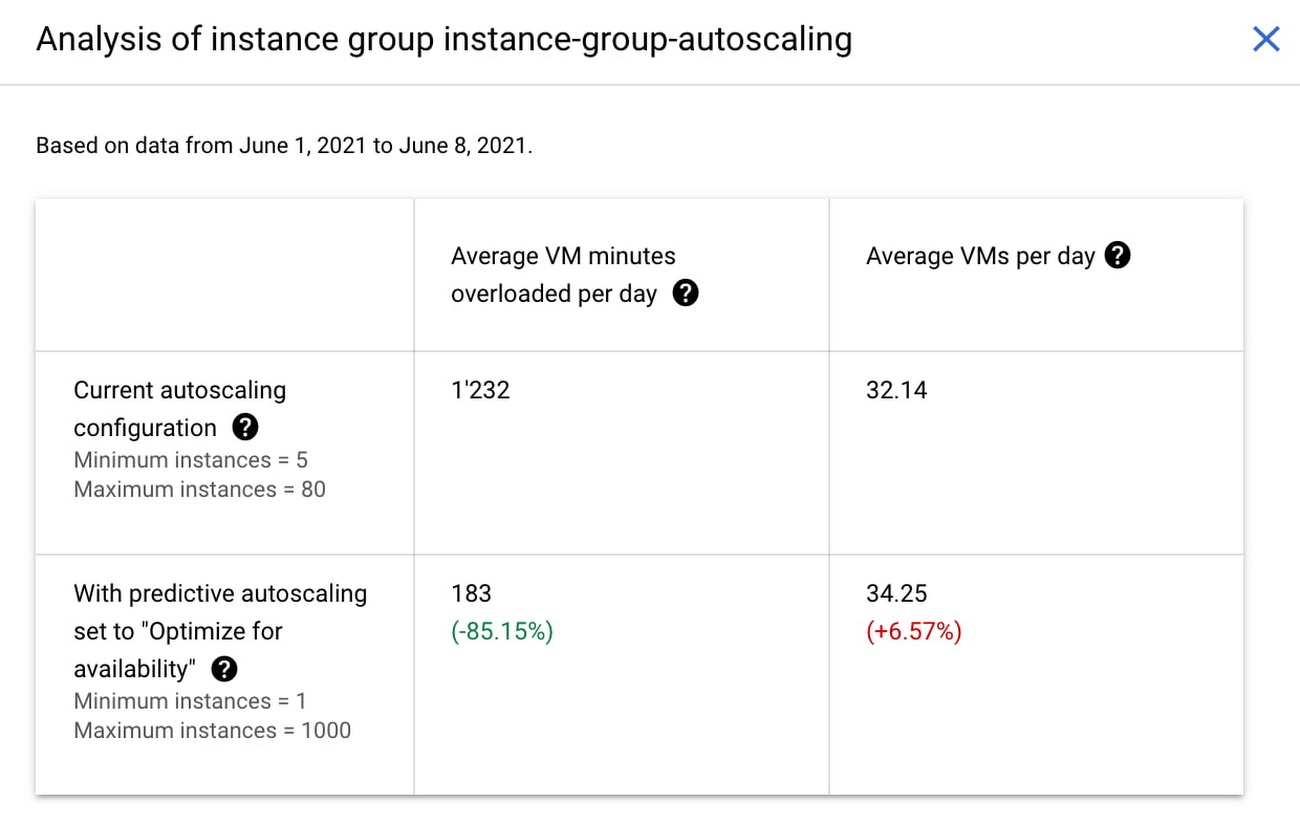
In the above chart,
- Average VM minutes overloaded per day shows how often your VMs exceed your CPU utilization target. This happens when demand is higher than available capacity. Predictive autoscaling can reduce this by starting VMs ahead of anticipated load.
- Average VMs per day is a proxy for cost. This shows how much additional VM capacity you need to keep your CPU utilization within the target you have set. You can optimize your cost by adjusting Minimum instances andCPU utilization as explained below.
Optimizing your configuration
Make sure your Cool down period reflects how long it takes for your application to initialize from VM boot time until it’s ready to serve the load. Predictive autoscaling will use this value to start VMs ahead of forecasted load. If you set it to 10 minutes (600 seconds) your VMs will start 10 minutes before the load is expected to increase.
Review your autoscaling CPU utilization target and Minimum number of instances. With predictive autoscaling you no longer need a buffer to compensate for the time it takes for a VM to start. If your application works best at 70% CPU utilization you don’t need to set target to a much lower value as predictive autoscaling will start VMs ahead of usual load. A higher CPU utilization and lower Minimum number of instances allows you to reduce the cost as you don’t need to pay for additional capacity to prepare for growing demand.
Try predictive autoscaling today
Predictive autoscaling is generally available across all Google Cloud regions. For more information on how to configure, simulate and monitor predictive autoscaling, consult the documentation.
3292
Of your peers have already watched this video.
38:24 Minutes
The most insightful time you'll spend today!
Using Google BigQuery for Marketing Analytics: How the7stars Saved Time and Money Using Google Cloud and Matillion
“Businesses that integrate multiple sources of customer and marketing data significantly outperform other companies in terms of sales, profits, and margin. They also had dramatically higher total shareholder returns.”
-HBR Study
For most marketers, this is not news. The challenge is in bringing together multiple silos of customer data—from CRM, EPR, POS, social, online transactions, etc—and gleaning intelligence.
According to Google Cloud, marketing teams use as many as 30+ tools to track customers, but most exist in isolation.
“If you want to unlock the power of your data, you need a customer data platform, not just new tools,” says Andrea Russell, Program Manager, Cloud for Marketing, Google Cloud.
Marketers should ask themselves:
- What are the top 3 data silos that could be combined to get a better view of the customer’s journey?
- What new customer insight could be unlocked by combining customer data?
- How can I connect audience insights to media activation and drive better performance?
In this video, you’ll learn how Google Cloud simplifies the process of bringing multiple silos of data together easily (no IT help needed!), and how it enables marketing teams to query large sets of data in seconds—as opposed to hours using non-Google Cloud platforms.
You’ll also find out how the7Stars, the UK’s largest Independent Media Agency, used the Google Cloud platform to overhaul its reporting and data visualization approach—which entailed extracting data from multiple tools and bringing it together on a spreadsheet—saving hundreds of hours in work.
More Relevant Stories for Your Company

Combining IoT and Analytics to Warn Manufacturers of Line Break Downs and Increase Profitability
Oden Technologies is using the Internet of Things (IoT) to improve the factories of today. The giant network of “things” (including people) connected to each other via the Internet has the potential to reduce waste, increase efficiency, and improve safety across all walks of life. Oden is leading IoT innovation in

Revolutionizing Cloud Computing: Introducing G2 VMs with NVIDIA L4 GPUs
Organizations across industries are looking to AI to turn troves of data into intelligence, powered by the latest advances in generative AI. Yet for many organizations, there is a barrier to adopting the latest models because they can be costly to train or serve. A new class of cloud GPUs

Want to Code for the Cloud? Get Started with the Native App Development Track
Earlier this year, we launched the Google Cloud skills challenge, which provides 30 days of free access to training to build your cloud knowledge and an opportunity to earn skill badges that showcase your Google Cloud competencies. Today, we’re adding a Native App Development track to the skills challenge, joining the Getting Started,

Unlocking the Power of Computer Vision: Vision AI Made Easy with Spring Boot and Java
In today's era of data-driven applications, leveraging advanced machine learning and artificial intelligence services like computer vision has become increasingly important. One such service is the Vision API, which provides powerful image analysis capabilities. In this blog, we will explore how to create a Computer Vision application using Spring Boot and
