





Investing for Future: Why Shifting Security Left Helps Your Bottom Line

4490
Of your peers have already read this article.
3:30 Minutes
The most insightful time you'll spend today!
The concept of “shifting left” has been widely promoted in the software development lifecycle. The concept is that introducing security earlier, or leftwards, in the development process will lead to fewer software-related security defects later, or rightwards, in production.
Shifting cloud security left can help identify potential misconfigurations earlier in the development cycle, which if unresolved can lead to security defects. Catching those misconfigurations early can improve the security posture of production deployments.
Why shifting security left matters
Google’s DevOps Research and Assessment (DORA) highlights the importance of integrating security into DevOps in the 2016 State of DevOps Report. The report discussed the placement of security testing in the software development lifecycle. The survey found that most security testing and tool usage happened after the development of a release, rather than continuously throughout the development lifecycle. This led to increased costs and friction because remediating problems found in testing may involve big architectural changes and additional integration testing, as shown in Figure 1. For example, security defects in production can lead to GDPR violations, which can carry fines up to 4% of global annual revenue.
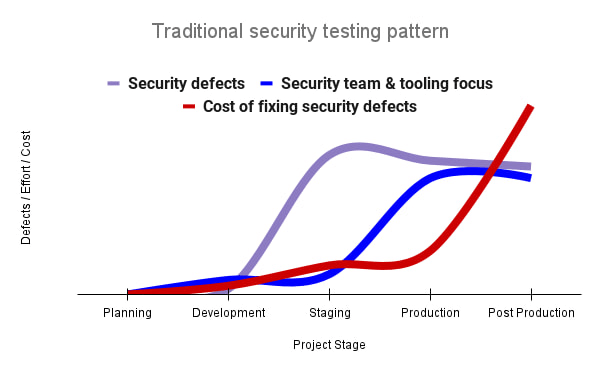
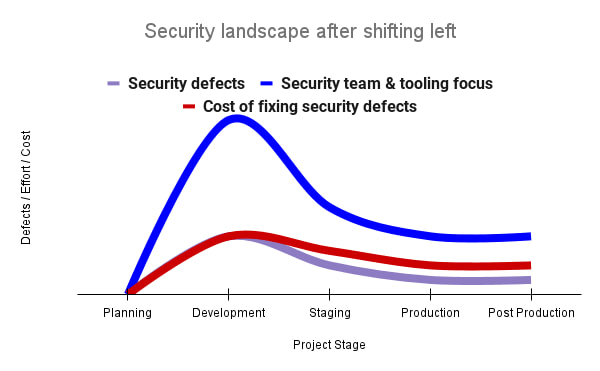
By inserting security testing into the development phase, we can identify security defects earlier and perform the appropriate remediation sooner. This results in fewer defects post-production and reduces remediation efforts and architectural changes. Figure 2 shows us that integrating security earlier in the SDLC results in overall decreases in security defects and associated remediation costs.
The 2021 State of DevOps Report expands the work of the 2016 report and advocates for integrating automated testing throughout the software development lifecycle. Automated testing is useful for continuously testing development code without the need for additional skills or intervention by the developer. Developers can continue to iterate quickly while other stakeholders can be confident that common defects are being identified and remediated.
From code to cloud
The DORA findings with regard to code security can also be applied to cloud infrastructure security. As more organizations deploy their workloads to the cloud, it’s important to test the security and configurations of cloud infrastructure. Misconfigurations in cloud resources can lead toward security incidents that could lead to data theft. Examples of such misconfigurations include overly permissive firewall rules, public IP addresses for VMs, or excessive Identity and Access Management (IAM) permissions on service accounts and storage buckets.
We can and should leverage different Google Cloud services to identify these misconfigurations early in the development process and prevent such errors from emerging in production to reduce the costs of future remediation, potential legal fines, and compromised customer trust.
The key tools in our toolshed are Security Command Center and Cloud Build. Security Command Center provides visibility into misconfigurations, vulnerabilities, and threats within a Google Cloud organization. This information is critical when protecting your cloud infrastructure (such as virtual machines, containers, web applications) against threats, or identifying potential gaps from compliance frameworks (such as CIS Benchmarks, PCI-DSS, NIST 800-53, or ISO 27001.
Security Command Center further supports shifting security left by allowing visibility of security findings at the cloud project level for individual developers, while still allowing global visibility for Security Operations. Cloud Build provides for the creation of cloud-native CI/CD pipelines. You can insert custom health checks into a pipeline to evaluate certain conditions (such as security metrics) and fail the pipeline when irregularities are detected. We will now explore two use cases that take advantage of these tools.
Security Health Checker
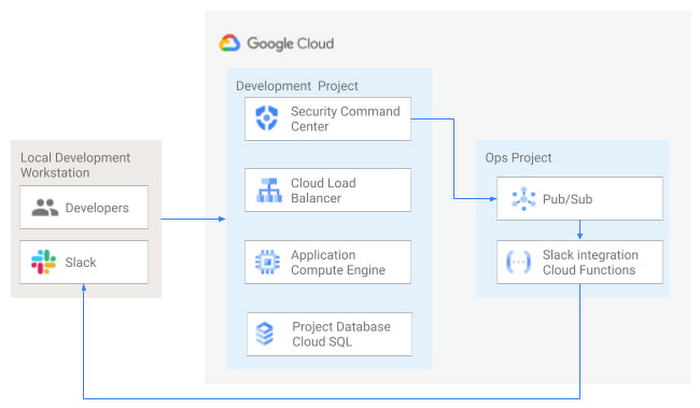
Security Health Checker continuously monitors the security health of a Google Cloud project and promptly notifies project members of security findings. Figure 3 shows developers interacting with a Google Cloud environment with network, compute, and database components. Security Command Center is configured to monitor the health of the project.
When Security Command Center identifies findings, it sends them to a Cloud Pub/Sub topic. A Cloud Function then takes the findings published to that topic and sends them to a Slack channel monitored by infrastructure developers. Just like a spell checker providing quick feedback on misspellings, Security Health Checker provides prompt feedback on security misconfigurations in a Google Cloud project that could lead to deployment failures or post-production compromises. No additional effort is required on the part of developers.
Security Pipeline Checker
In addition to using Security Command Center for timely notification of security concerns during the development process, we can also integrate security checks into the CI/CD pipeline by using Security Command Center along with Cloud Build as shown in Figure 4.
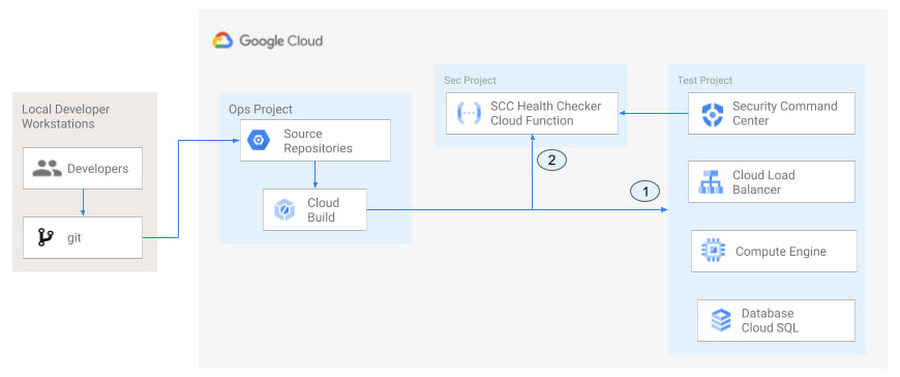
The pipeline begins with a developer checking code into a git repository. This repository is mirrored to Cloud Source Repositories. A build trigger will begin the build process. The build pipeline will include a short waiting period of a few minutes to give Security Command Center a chance to identify security vulnerabilities. A brief delay may appear undesirable at first, but the analysis that takes place during that interval can result in the reduction of security defects post-production.
At the end of the waiting period, a Cloud Function serving as a Security Health Checker will evaluate the findings from Security Command Center (Connector 1 in Figure 4). If the validator determines that unacceptable security findings exist, the validator will inject a failure indication into the pipeline to terminate the build process (Connector 2 in Figure 4). Developers have visibility into the failure triggers and remediate them before successfully deploying code to production. This is in contrast to the findings in the 2016 State of DevOps Report wherein organizations that didn’t integrate security into their DevOps processes spent 50% more time remediating security issues than those who “shifted left” on security.
Closing thoughts
DORA’s 2016 State of DevOps report called out the need for “shifting left” with security, introducing security earlier in the development process to identify security vulnerabilities early to reduce mitigation efforts post-production. The report also advocated for automated testing throughout the software development lifecycle.
We looked at two ways of achieving these objectives in Google Cloud. The Security Health Checker provides feedback to developers using Security Command Center and Slack to notify developers of security findings as they pursue their development activities. The Security Pipeline Checker uses Security Command Center as part of a Cloud Build pipeline to terminate a build pipeline if vulnerabilities are identified during the build process. To implement the Security Heath Checker and the Security Pipeline Checker, check out the GitHub repository. We hope these examples will help you to “shift left” using Google Cloud services. Happy coding!
This article was co-authored with Jason Bisson, Bakh Inamov, Jeff Levne, Lanre Ogunmola, Luis Urena, and Holly Willey, Security & Compliance Specialists at Google Cloud.
Transforming Businesses with Google Distributed Cloud Edge Appliance: A Look at Real-World Use Cases

2539
Of your peers have already read this article.
4:30 Minutes
The most insightful time you'll spend today!
While many organizations are driving digital transformation by migrating to the cloud, there are some industries, geographies, and use cases that require a different approach to cloud modernization. Regulated industries such as healthcare, insurance, pharmaceutical, energy, telecommunication, and banking have stringent data residency and sovereignty requirements. Other industries need to meet local data processing requirements, while others require real-time data processing with sub-millisecond latencies, for example to detect defects on manufacturing lines. These use cases demand a combination of edge, on-premises and cloud services for their infrastructure.
With these requirements in mind, Google Cloud launched Google Distributed Cloud powered by Anthos to extend the power of Google Cloud infrastructure and services to the edge (or closer). The underlying infrastructure for this service comes in two variants: a 42U rack filled with compute, storage, and networking devices called Google Distributed Cloud Edge Rack and a 1U appliance called Google Distributed Cloud Edge Appliance.
In this blog post, we discuss the Google Distributed Cloud Edge Appliance and how manufacturing, retail, and automotive industry verticals can use it to address common use cases.
How the appliance works
But first, let’s talk about the Google Distributed Cloud Edge Appliance itself.
Google Distributed Cloud Edge Appliances comprises two components: (1) Distributed Cloud Edge infrastructure and (2) the Distributed Cloud Edge service.
The Google Distributed Cloud Edge service runs on Google Cloud and serves as a control plane for the nodes and clusters running on your appliance. In order to perform remote management of the appliance and to collect metrics, the Distributed Cloud Edge service must be connected to Google Cloud at all times, allowing you to manage your workloads on the edge hardware through the Google Cloud Console. For customers who can’t be connected at all times for data residency or sovereignty reasons, we highly recommend that the appliance be connected to the cloud at least once a month to allow for needed security patches and updates.
Google Distributed Cloud Edge Appliances come with built-in network ports that provide connectivity to the control plane via the internet, Cloud VPN, or Dedicated Interconnect, and to your on-prem network. Each Google Distributed Cloud Edge Appliance is homed to a specific Google Cloud region but it is designed to also use any public Google Cloud endpoint to communicate with the control plane in Google Cloud, allowing you to move these appliances between different geographic locations.
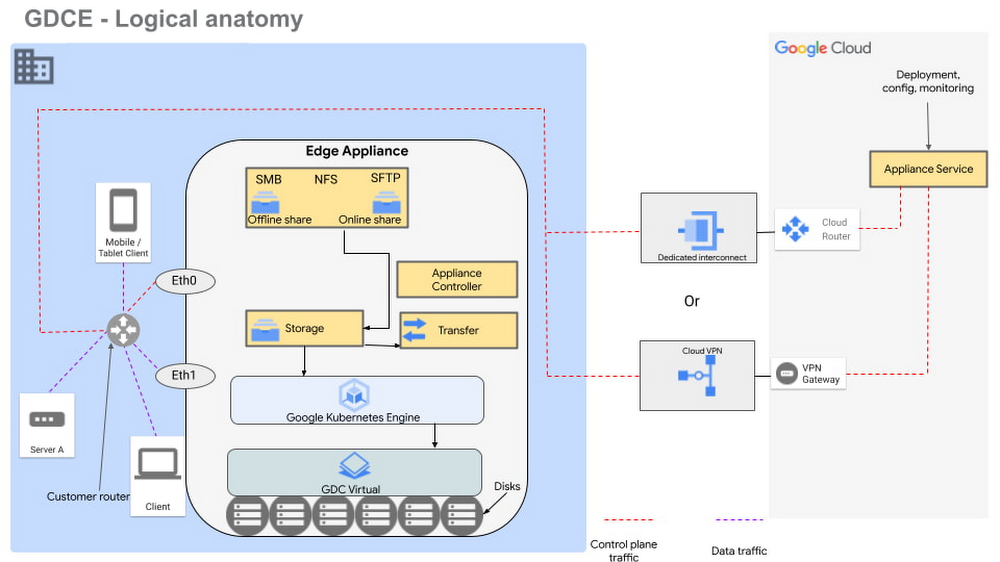
Figure 1 – Logical design of Google Distributed Cloud Edge Appliance
There are two NFS shares on each appliance; one is offline, meaning it does not transfer data to Google Cloud, and the other is online, meaning data saved to that share is synced to Cloud Storage on Google Cloud for further processing. The appliance supports Server Message Block (SMB) and Secure File Transfer Protocols (SFTP) for communication.
Each Google Distributed Cloud Edge Appliance runs Google Distributed Cloud Virtual, enabling you to build a single-node Kubernetes cluster with access to the underlying file system of the appliance. This allows you to build containerized applications on the underlying appliance hardware to address use cases in the following verticals.
Vertical use cases
Now that you understand how Google Cloud Edge Appliance is configured, let’s consider some of the industry use cases where it can provide unique value.
Manufacturing
In the manufacturing industry, quality control and safety is a crucial factor. Businesses need to ensure products are manufactured to the highest standards to remain competitive in their markets, to retain customers, and to keep factory workers safe. To do this, manufacturers need real-time data about the products being manufactured on the production lines, ensuring quality control and gaining a real-time view of where people are on the factory floor.
In manufacturing environments, Google Distributed Cloud Edge Appliance can be used to detect hazards or manufacturing defects in real-time. Figure 1 is a reference architecture for a hazard detection solution running off a Google Distributed Cloud Edge Appliance on a factory floor.
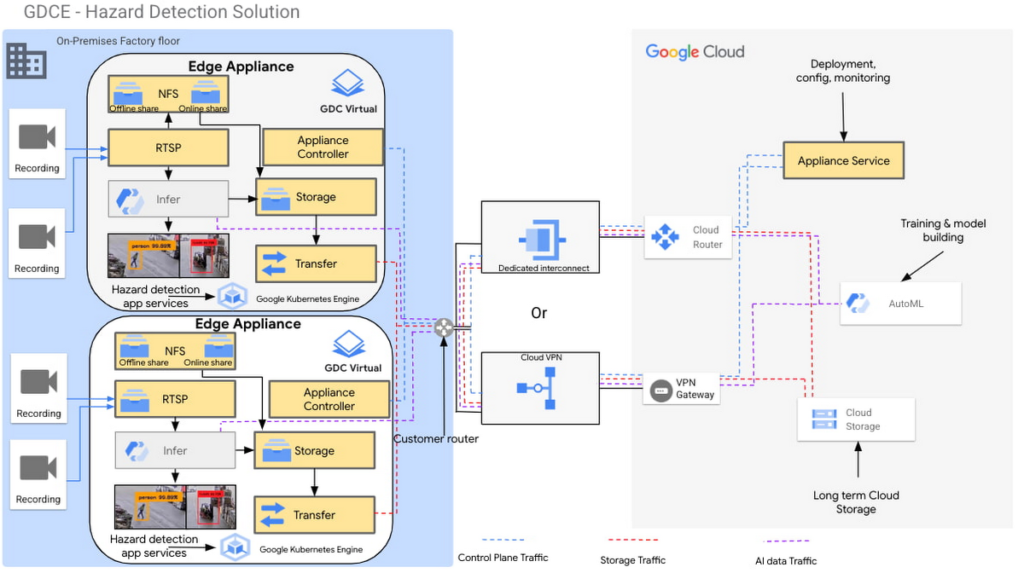
Figure 2 – Hazard detection architecture using Google Distributed Cloud Edge Appliance
In this architecture, cameras on the factory floor stream live video into the Google Distributed Cloud Edge Appliance. Depending on the number of cameras and appliances, cameras could be split or mapped to different appliances. This architecture makes it possible to initially transfer video data to Google Cloud using an online NFS share. Once in Google Cloud, you can use AutoML to train and build models that can be used as part of the hazard detection solution.
With these trained models, the cameras can stream video data into the appliance using the real-time streaming protocol (RTSP). You can then use AutoML inference to analyze the real-time video streaming data.
For example, in this reference architecture, if an individual comes too close to the fork lift, a function is triggered by the microservices running on the edge appliance that pushes a notification either to a messaging service, or to an enterprise resource planning tool. This alerts factory managers to factory floor hazards in real time so they can take corrective action.
You can also review messages and videos later on for preventive planning purposes, or push streamed videos to Cloud Storage for archive, to use the appliance’s storage space more efficiently.
Data transfers to Google Cloud can be done over Google Cloud Dedicated Interconnect, or VPN between the region and your site. This connectivity also allows you to send the appliance’s control-plane network traffic to the region.
You could also use the reference architecture in figure 2 for a product anomaly detection solution running off a Google Distributed Cloud Edge Appliance on a factory floor or manufacturing line. In this instance, machine learning models are trained to detect anomalies on finished products before final packaging.
Retail
In the retail industry, the Google Distributed Cloud Edge Appliance reference architecture in Figure 2 enables a number of transformative capabilities for retail operations, including:
- contactless checkout
- product scans
- mobile-scan-bag
- cashierless checkout
- unattended retail shops
- visual check-out monitoring
It does all this within a retailer’s facilities with the low latency and high throughput you need to process data locally, so you can obtain actionable insights from your data.
Or, you could use Google Distributed Cloud Edge Appliance at the edge to overhaul store management operations, for example, monitoring store occupancy, queue depth and wait times, detecting slips and falls and out-of-stock items, or monitoring inventory compliance.
Automotive
Advanced Driver Assistance Systems (ADAS) are becoming standard in modern automobiles. To successfully build and roll out continued improvements around ADAS, the automotive industry continues to run extensive tests on ADAS systems that are built into the vehicles they manufacture. Automotive companies can use Google Distributed Cloud Edge Appliance to modernize and transform how they collect data for the ADAS systems they’re developing. For example, test vehicles contain several different sensors that generate data, which can be quickly offloaded to an in-vehicle edge appliance.
Then, within the appliance, you can deploy containerized workloads to transform sensor data, infer videos and images and detect events. This alleviates the need for operators to label all events and allows development teams to quickly gather insights from the tests.
If you want to focus on a subset of information, you can transfer specific data or the entire data payload into Transfer Appliances when vehicles return to the development center. All these systems, i.e., transfer appliances and edge appliances, work in tandem to reduce local system administration and operational costs through a cloud-based control plane.
This approach allows you to deploy, track, monitor and configure services that are running in data centers or at edge locations from the cloud. From the factories, the data can be moved offline or online into Google Cloud where you can use different storage classes and processing capabilities to further process or store the data. You can also deploy newly trained models and business rules back to the edge appliances. In all this, data transfers between the cloud and the appliance are performed using end-to-end encryption, to give you control over your data.
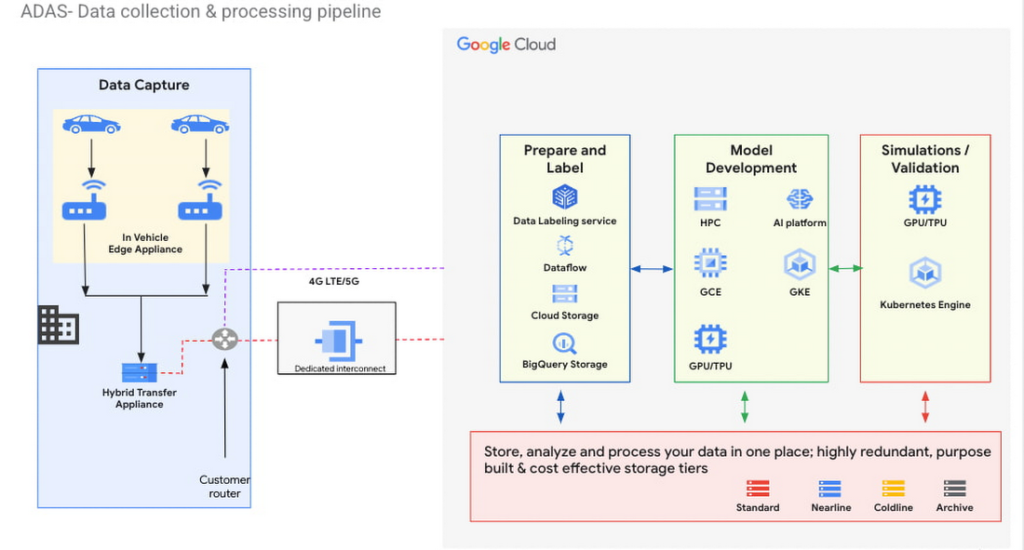
Figure 3 – ADAS implementation with a Google Distributed Cloud Edge Appliance
The reference architecture in Figure 3 shows an ADAS implementation where Google Distributed Cloud Edge Appliance is being used to gather, process and transform data at the edge in the automotive industry. It could also be applied to data capture and processing use cases in manned and unmanned vehicles. Notice how the Distributed Edge Appliance extends to the cloud by sending data there, or using other cloud-based services.
We’re just getting started
These are just a few of the use cases where organizations in the manufacturing, retail and automotive industries are using Google Distributed Cloud Edge Appliance with modern and containerized applications that are powered by Google Cloud. If you’re interested in bringing the power of Google Cloud to the edge using Google Distributed Cloud Edge Appliances to transform your business, reach out to us or any of our accredited partners.
Beyond Traditional Learning: AI-based Online Learning Platform and Google Cloud Solutions Push Learners to Get Ahead

10359
Of your peers have already read this article.
1:30 Minutes
The most insightful time you'll spend today!
The combination of a vital need for IT experts among businesses and a digital skills gap is making lifelong learning increasingly critical. Beyond professional development, learning new skills offers additional rewards from building peer connections to boosting your creativity. That’s why in 2020 Krishna Deepak Nallamilli and I launched KIMO.ai to reimagine how people approach learning, especially in developing markets. Our team is building the artificial intelligence needed to generate individual learning paths through a wide range of quality digital learning content.
Google Cloud and its Startup Program have been instrumental in connecting our team with the tools, people, processes, and best practices to grow our business.
Existing learning platforms lack engagement
Outside of traditional education settings, massive open online learning courses (MOOCs)—often modeled after university courses—can provide a flexible and affordable way to upskill or reskill. But the vast majority of people who participate in MOOC programs fail to complete courses. Based on our research, the challenge with existing learning platforms is a lack of engagement, primarily caused by limited direction on which skills to learn, whether AI, fintech, blockchain, or other in-demand disciplines.
We’ve also received feedback that many corporate learning management systems–developed as online training systems to upskill employees–tend to be poorly designed and time-consuming to use.
Overall, a significant challenge with most existing learning platforms is that they’re generic. For example, suppose you’re interested in learning about AI. In that case, you need AI-related coursework that applies to your industry and the job you want because AI in medicine is vastly different from AI in financial services. Today’s online learning options typically take a one-size-fits-all approach and fail to capture the nuances of what learners really need to get ahead.
Building a future-proof learning platform
The commitment to highly personalized, accessible learning inspired KIMO.ai, a platform that we believe is the future of education. Depending on your goals, current skills, location, and other factors, our AI-based platform will identify which coursework (and where to find those classes) to build the skills you need. The more personalized, relevant learning recommendations even take into account people’s preferences for podcasts, MOOCs, books, articles, videos, courses, publications, and more.
In a mix of cooperation and competition we call “coopetition,” KIMO.ai will regularly recommend courses from other established online learning systems if, based on our automated assessment, it’s the best option for a learner. There’s also the option to access free content only.
Google cultural alignment fosters trust
Our platform started with one developer exploring NLP models and Google APIs. As we’ve grown our team and launched our beta to 110,000 users in developing markets, we discovered there is a lot of interest in our platform, and we believe we can make a significant impact. In feedback forums, we also learned that we need to focus our efforts on the mobile experience to improve engagement since 99% of the beta testers use mobile devices.
Beyond our team’s high level of trust in Google Cloud solutions, our team also appreciates the cultural alignment with Google. We value Google’s developer-centric approach and rely on tools like Dataflow for batch data processing and Cloud TPU to reliably run machine learning models with AI services on Google Cloud. We also build all of our deployments on Google Kubernetes Engine (GKE), which makes it easy to manage all our containerized workloads
On the front end, Google App Engine makes it easy to deploy apps and experiment, and it integrates seamlessly with Firebase for authentication and more. BigQuery is our serverless data warehouse that efficiently scales to support the millions of articles, videos, and other learning resources we need to analyze to provide the targeted coursework recommendations our learners require.
As we grow our business having a network of trusted advisors is also extremely valuable. By working closely with DoIT International, the 2020 Google Cloud Global Reseller Partner of the Year, our team has access to their cloud, Kubernetes, and machine learning expertise. DoIT has already helped us quickly resolve IT issues and create analytics dashboards that give us insights to continually enhance our services.
Building for a growing industry
The dynamic edtech market is growing rapidly and estimated to become an $11B industry by 2025. We’re proud to be part of the next wave of personalized education that has the potential to empower people in developing markets and beyond to grow their skills with coursework tailored to their exact needs and how they like to learn. This year, we will deliver our platform to at least 400,000 more people. We’re excited to see how they use it and where it takes them.
If you want to learn more about how Google Cloud can help your startup, visit our Startup Program application page here to get more information about our program, and sign up for our communications to get a look at our community activities, digital events, special offers, and more.
How to Decide Whether to Run a Database on Kubernetes

5620
Of your peers have already read this article.
3:30 Minutes
The most insightful time you'll spend today!
Today, more and more applications are being deployed in containers on Kubernetes—so much so that we’ve heard Kubernetes called the Linux of the cloud.
Despite all that growth on the application layer, the data layer hasn’t gotten as much traction with containerization. That’s not surprising, since containerized workloads inherently have to be resilient to restarts, scale-out, virtualization, and other constraints. So handling things like state (the database), availability to other layers of the application, and redundancy for a database can have very specific requirements. That makes it challenging to run a database in a distributed environment.
However, the data layer is getting more attention, since many developers want to treat data infrastructure the same as application stacks.
Operators want to use the same tools for databases and applications, and get the same benefits as the application layer in the data layer: rapid spin-up and repeatability across environments. In this blog, we’ll explore when and what types of databases can be effectively run on Kubernetes.
Before we dive into the considerations for running a database on Kubernetes, let’s briefly review our options for running databases on Google Cloud Platform (GCP) and what they’re best used for.
- Fully managed databases. This includes Cloud Spanner, Cloud Bigtable and Cloud SQL, among others. This is the low-ops choice, since Google Cloud handles many of the maintenance tasks, like backups, patching and scaling. As a developer or operator, you don’t need to mess with them. You just create a database, build your app, and let Google Cloud scale it for you. This also means you might not have access to the exact version of a database, extension, or the exact flavor of database that you want.
- Do-it-yourself on a VM. This might best be described as the full-ops option, where you take full responsibility for building your database, scaling it, managing reliability, setting up backups, and more. All of that can be a lot of work, but you have all the features and database flavors at your disposal.
- Run it on Kubernetes. Running a database on Kubernetes is closer to the full-ops option, but you do get some benefits in terms of the automation Kubernetes provides to keep the database application running. That said, it is important to remember that pods (the database application containers) are transient, so the likelihood of database application restarts or failovers is higher. Also, some of the more database-specific administrative tasks—backups, scaling, tuning, etc.—are different due to the added abstractions that come with containerization.
Tips for running your database on Kubernetes
When choosing to go down the Kubernetes route, think about what database you will be running, and how well it will work given the trade-offs previously discussed.
Since pods are mortal, the likelihood of failover events is higher than a traditionally hosted or fully managed database. It will be easier to run a database on Kubernetes if it includes concepts like sharding, failover elections and replication built into its DNA (for example, ElasticSearch, Cassandra, or MongoDB). Some open source projects provide custom resources and operators to help with managing the database.
Next, consider the function that database is performing in the context of your application and business. Databases that are storing more transient and caching layers are better fits for Kubernetes. Data layers of that type typically have more resilience built into the applications, making for a better overall experience.
Finally, be sure you understand the replication modes available in the database. Asynchronous modes of replication leave room for data loss, because transactions might be committed to the primary database but not to the secondary database(s). So, be sure to understand whether you might incur data loss, and how much of that is acceptable in the context of your application.
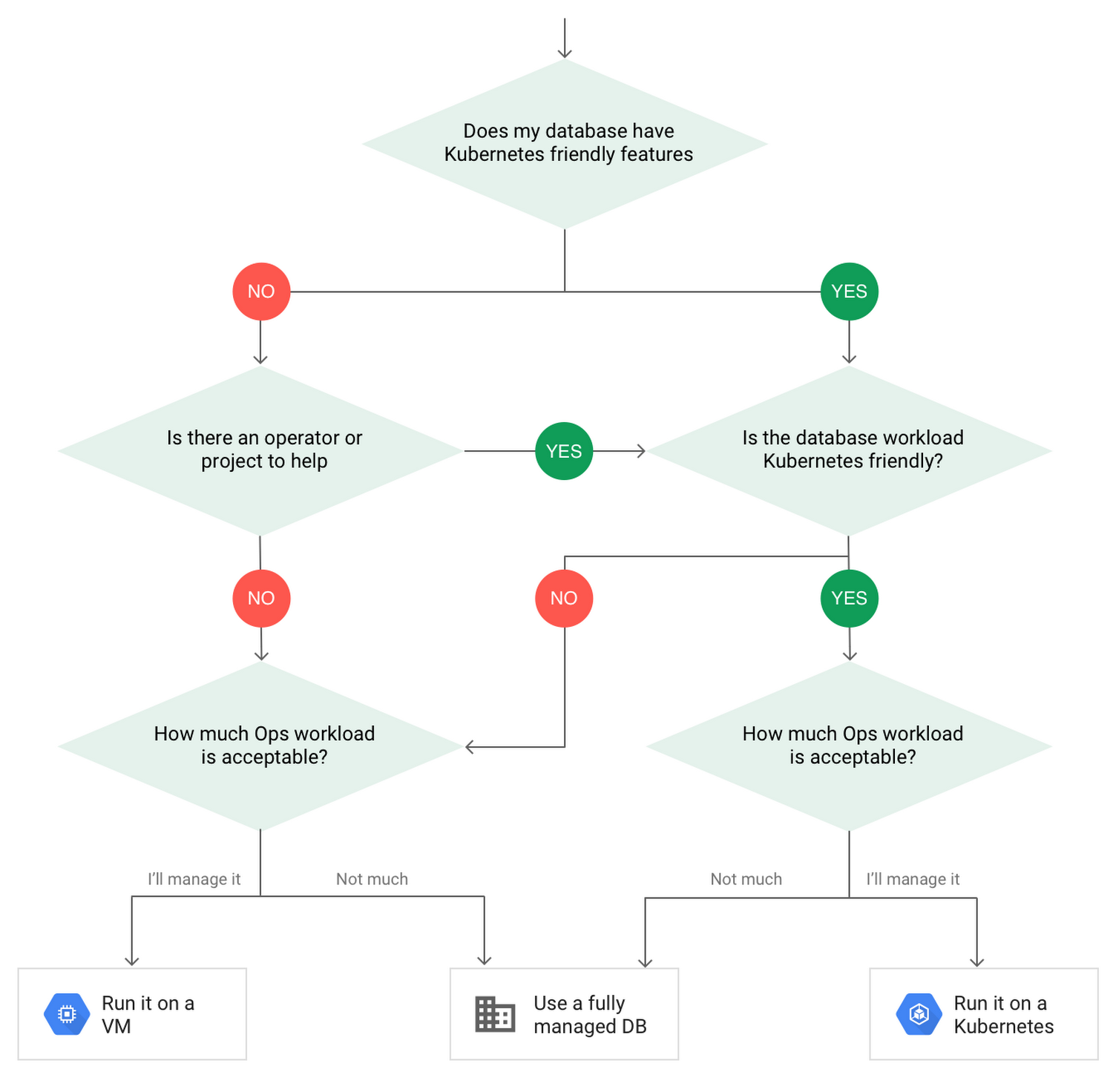
After evaluating all of those considerations, you’ll end up with a decision tree looking something like this:
How to deploy a database on Kubernetes
Now, let’s dive into more details on how to deploy a database on Kubernetes using StatefulSets.
With a StatefulSet, your data can be stored on persistent volumes, decoupling the database application from the persistent storage, so when a pod (such as the database application) is recreated, all the data is still there.
Additionally, when a pod is recreated in a StatefulSet, it keeps the same name, so you have a consistent endpoint to connect to. Persistent data and consistent naming are two of the largest benefits of StatefulSets. You can check out the Kubernetes documentation for more details.
If you need to run a database that doesn’t perfectly fit the model of a Kubernetes-friendly database (such as MySQL or PostgreSQL), consider using Kubernetes Operators or projects that wrap those database with additional features. Operators will help you spin up those databases and perform database maintenance tasks like backups and replication. For MySQL in particular, take a look at the Oracle MySQL Operator and Crunchy Data for PostgreSQL.
Operators use custom resources and controllers to expose application-specific operations through the Kubernetes API. For example, to perform a backup using Crunchy Data, simply execute pgo backup [cluster_name]. To add a Postgres replica, use pgo scale cluster [cluster_name].
There are some other projects out there that you might explore, such as Patroni for PostgreSQL. These projects use Operators, but go one step further. They’ve built many tools around their respective databases to aid their operation inside of Kubernetes. They may include additional features like sharding, leader election, and failover functionality needed to successfully deploy MySQL or PostgreSQL in Kubernetes.
While running a database in Kubernetes is gaining traction, it is still far from an exact science. There is a lot of work being done in this area, so keep an eye out as technologies and tools evolve toward making running databases in Kubernetes much more the norm.
When you’re ready to get started, check out GCP Marketplace for easy-to-deploy SaaS, VM, and containerized database solutions and operators that can be deployed to GCP or Kubernetes clusters anywhere.
Application Rationalization: Your App Development Team is Gonna Love It!

3605
Of your peers have already read this article.
2:00 Minutes
The most insightful time you'll spend today!
On April 6th, 2022, Google Cloud established a new partnership with CAST, to help accelerate the migration and application modernization programs of customers worldwide, complementing the Google capabilities already available through the Google Cloud Application Modernization Program (CAMP).
Application Rationalization (App Rat) is the first step towards a cloud adoption or migration journey, through which you go over the application inventory to determine which applications should be Retired, Retained, Refactored, Replatformed, or Reimagined.
Why is this important to you?
Have the majority of your in-house applications still not moved to the cloud? How much time does your development team spend on support (bug fix, tickets, etc.) versus feature(s) development? Have Infrastructure/Platform dependencies ever delayed product rollout? Would an auto-scalable, managed cloud, increase stakeholder buy-in?
Can Google simplify this journey?
Google Cloud Application Modernization Program (CAMP) has been designed as an end-to-end framework to help guide organizations through their modernization journey by assessing where they are today, and provide a path forward. When it comes to App Rationalization, this depends on what your role is.
Step 1 (Assess): Who is the target audience? The Platform team (or) the Application team?
This determines what kind of challenges we are trying to solve. For e.g. the centralized platform team wants to set some guardrails on how the App teams deploy their apps. Streamlining this would allow the platform team to mature themselves into the SRE territory. The application team, on the other hand, loves flexibility, and the ability to perform Continuous Delivery.
These examples are only the tip of the iceberg. Most of the enterprise customers have a majority of their applications in the legacy world. Unless we move those business critical applications to the cloud, it’s impossible to mature as an enterprise. For more information, check State of DevOps 2021 report.
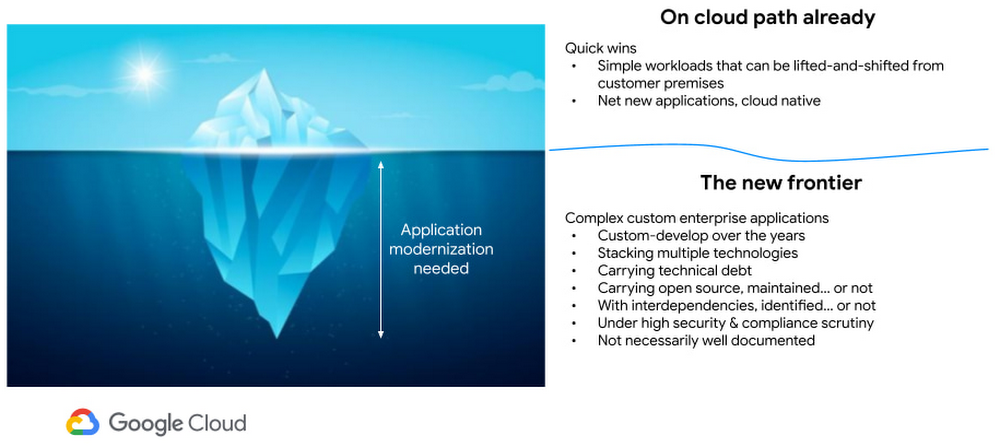
Step 2 (Analyze): Google Cloud offers the tooling and the framework to analyze your legacy applications.
Platform Owner (persona), usually have very little information on which workloads are a good fit for modernization.
Google’s StratoZone® SaaS platform provides customers with a data-driven cloud decision framework. The StratoProbe® Data Collector Application delivers the ability to easily deploy and scale the discovery of a customer’s IT environment for Private, Public, or Hybrid-cloud planning. To ease and accelerate the VM migration journey, Google Cloud offers assistance and guidance in making the right decisions when deciding to go to cloud.
Google’s mFit aims at unblocking customers in their transformation by providing workload selection for successful on-boarding, at scale, to Anthos, GKE and Cloud Run , in both pre-sales (e.g. proof-of-concept/proof-of-value) and post-sales (e.g. pilot and at scale execution) scenarios.
App and/or Business Owners (persona), get involved in a 1-week workshop, using CAST Highlight, which would provide rapid portfolio assessment through automated source code analysis for Cloud Readiness, Open Source risks, Resiliency, and Agility.
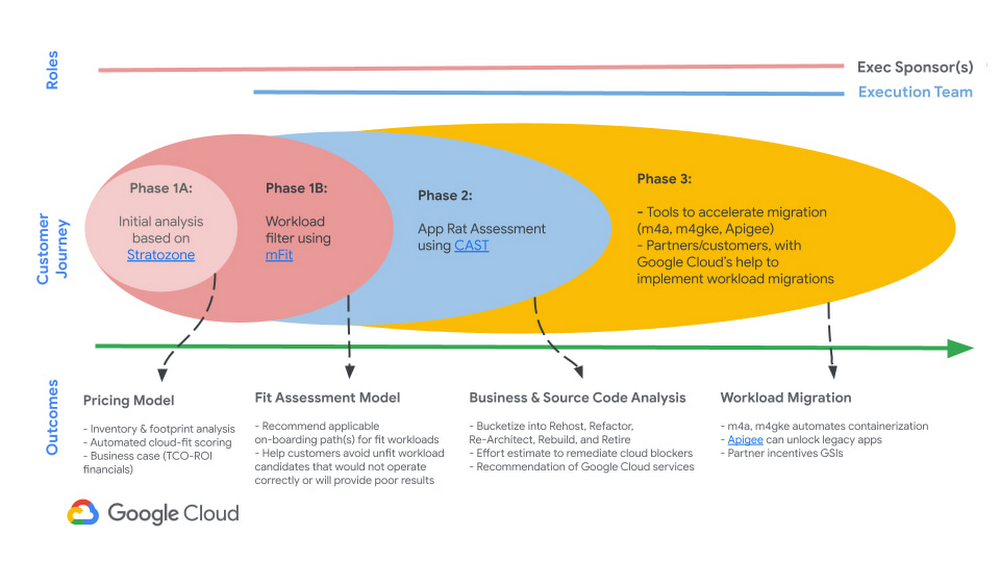
Step 3 (Plan & execute): Each organization is different. Some may follow the “Migration Factory” approach, and some may follow “Modernization Factory”, and some may follow both. Irrespective of which approach you choose to follow, it is important to plan just enough, so that you can start your execution. Ensure to set the OKRs, that would help with the right measurements, before you start the execution. The actual learning from the execution helps the team(s) to learn more about the cloud migration process, and refine it based on their organization.
Using CAST Highlight in the assessment step previously, we get the recommendation for the analyzed applications. From there, for certain workloads, we can use Migrate to Containers, to automate the containerization of suitable workloads. However, there are certain applications that require manual code changes. You have a few options for that,
- Our experts can help you get started.
- Our partners can help you
Step 4 (Measure & reiterate): Measure the progress using the predefined metrics in the previous step. Celebrate the wins. Consistently share the learnings and best practices with the developer community. Pick the next challenge
Take the next step
Tell us what you’re solving for. A Google Cloud expert will help you find the best solution.
Google’s Default Messaging Apps for AT&T Android Users Ensure Richer Conversations

5559
Of your peers have already read this article.
1:30 Minutes
The most insightful time you'll spend today!
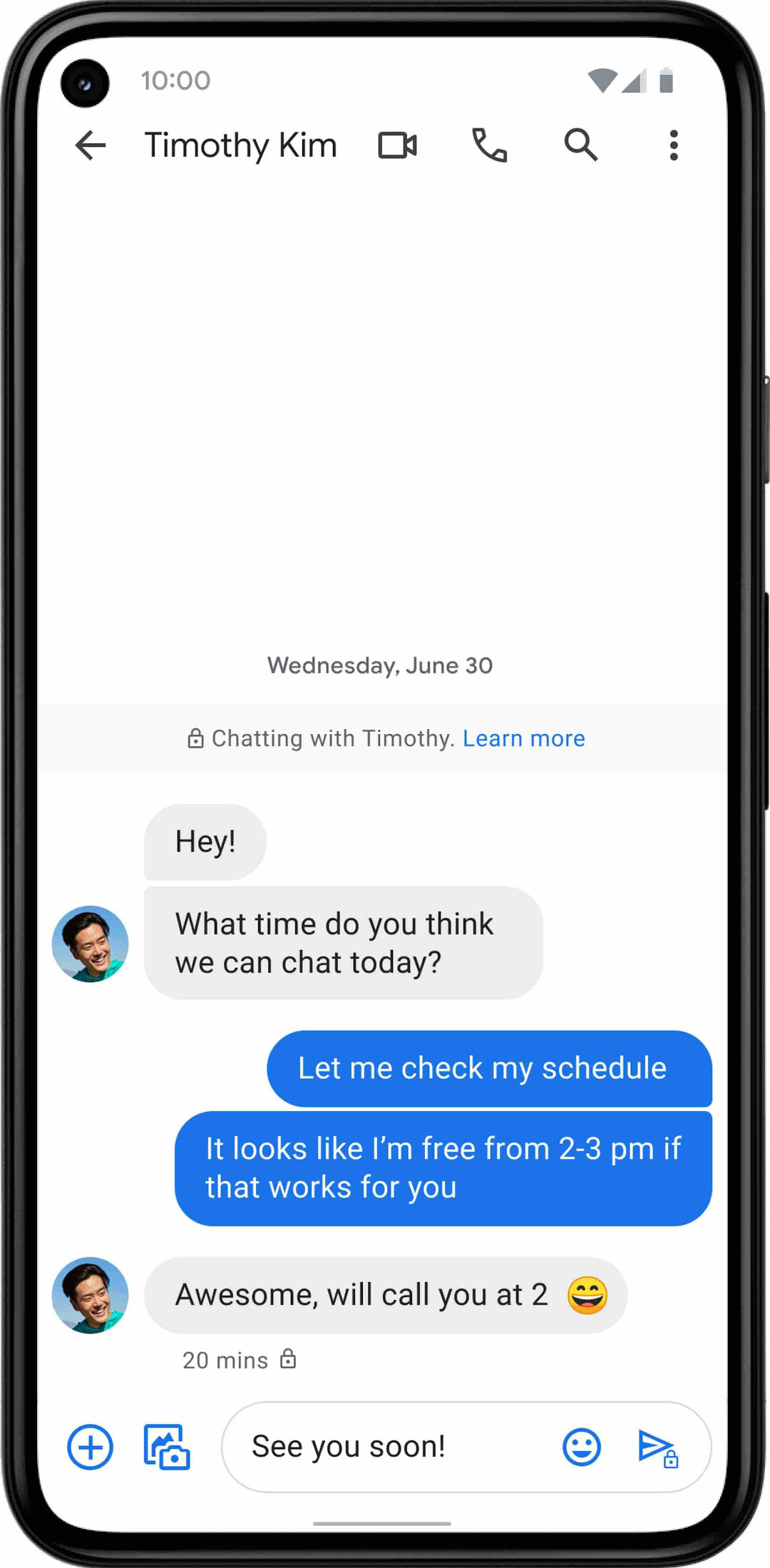
Today, we’re announcing that we’re working with AT&T to establish Messages by Google as the default messaging application for all AT&T customers in the United States using Android phones. The collaboration aims to help accelerate the industry toward global Rich Communication Services (RCS) coverage and interoperability to offer a consistent, secure, and enhanced messaging experience for all Android users around the world.
“Many AT&T customers have enjoyed the advantages of RCS for years when texting with friends and family,” said David Christopher, executive vice president and general manager – AT&T Mobility. “We look forward to working closely with Google to extend these benefits to even more of our customers as they enjoy richer conversations with others around the world.”
Working together, AT&T and Google will continue the momentum to upgrade SMS with enhanced messaging features offered in Messages, which includes the support of chat features based on the open RCS standard. With Messages as the default messaging application, all AT&T customers using Android devices will get enhanced features so they can:
- Share full-resolution pictures from a recent event or vacation
- Send a higher-quality video of that soccer goal and the celebration that followed
- Know when someone is replying to a text
- Send and receive messages over Wi-Fi or data
- Participate in group chats where it’s easy to add someone else to the conversation, or let someone leave, without starting a brand new thread

In addition to these features, we’re also rolling out end-to-end encryption for one-on-one RCS conversations between people using Messages and people who have chat features enabled.
For years, we’ve been working with the mobile industry and device makers to bring enhanced and secure messaging to everyone on Android. Today’s announcement—that AT&T customers using Android devices will soon be able to enjoy these features by default—is a major step forward.
More Relevant Stories for Your Company

Best Practices for Crafting Interfaces that Developers Love
Web APIs use HTTP, by definition. In the early days of web APIs, people spent a lot of time and effort figuring out how to implement the features of previous-generation distributed technologies like CORBA and DCOM on top of HTTP. This led to technologies like SOAP and WSDL. Experience showed



Enhancing Collaboration with Sheets, Python, and Google Cloud
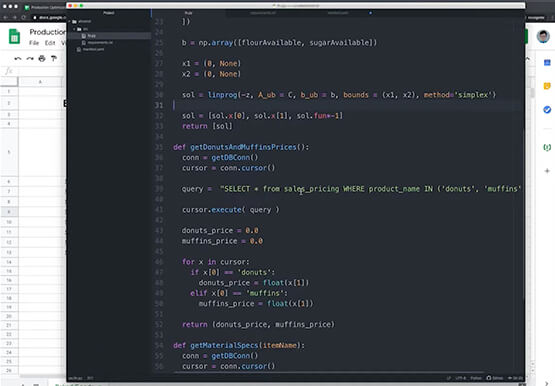
See how you can enhance collaboration within your organization using Google Sheets. Watch to learn about a new set of tools to create custom functions that tap into the power of Python and to expose functions in a standardized fashion throughout your organization.

Harnessing the Power of AI with Google Cloud: What Every IT Pro Needs to Know
As an IT architect or IT professional, you are essential to the success of your organization, responsible for designing, building, and maintaining the IT systems that your businesses and governments rely on. As if that wasn’t enough, you’ve also got to constantly learn and adapt to keep up with the

How This Leading Trading Company Uses APIs to Build Fintech Apps Quickly and Cost-Effectively
Tradier uses the Apigee API management platform from Google to abstract the legacy complexities of capital markets so that developers can build FinTech applications in an agile, nimble, and quick fashion at minimal cost. The company embodies the evolution of what cloud technology can enable in the form of an API-first business delivered
