






3935
Of your peers have already downloaded this article
2:20 Minutes
The most insightful time you'll spend today!
New to Cloud Functions? Here’s What You Need to Learn

3270
Of your peers have already read this article.
1:00 Minutes
The most insightful time you'll spend today!
Cloud Functions is a fully managed event-driven serverless function-as-a-service (FaaS). It is a small piece of code that runs in response to an event. Because it is fully managed, developers can just write the code and deploy it without worrying about managing the servers or scaling up/down with traffic spikes. It is also fully integrated with Cloud Operations for observability and diagnosis. Cloud Functions is based on an open source FaaS framework which makes it easy to migrate and debug locally.
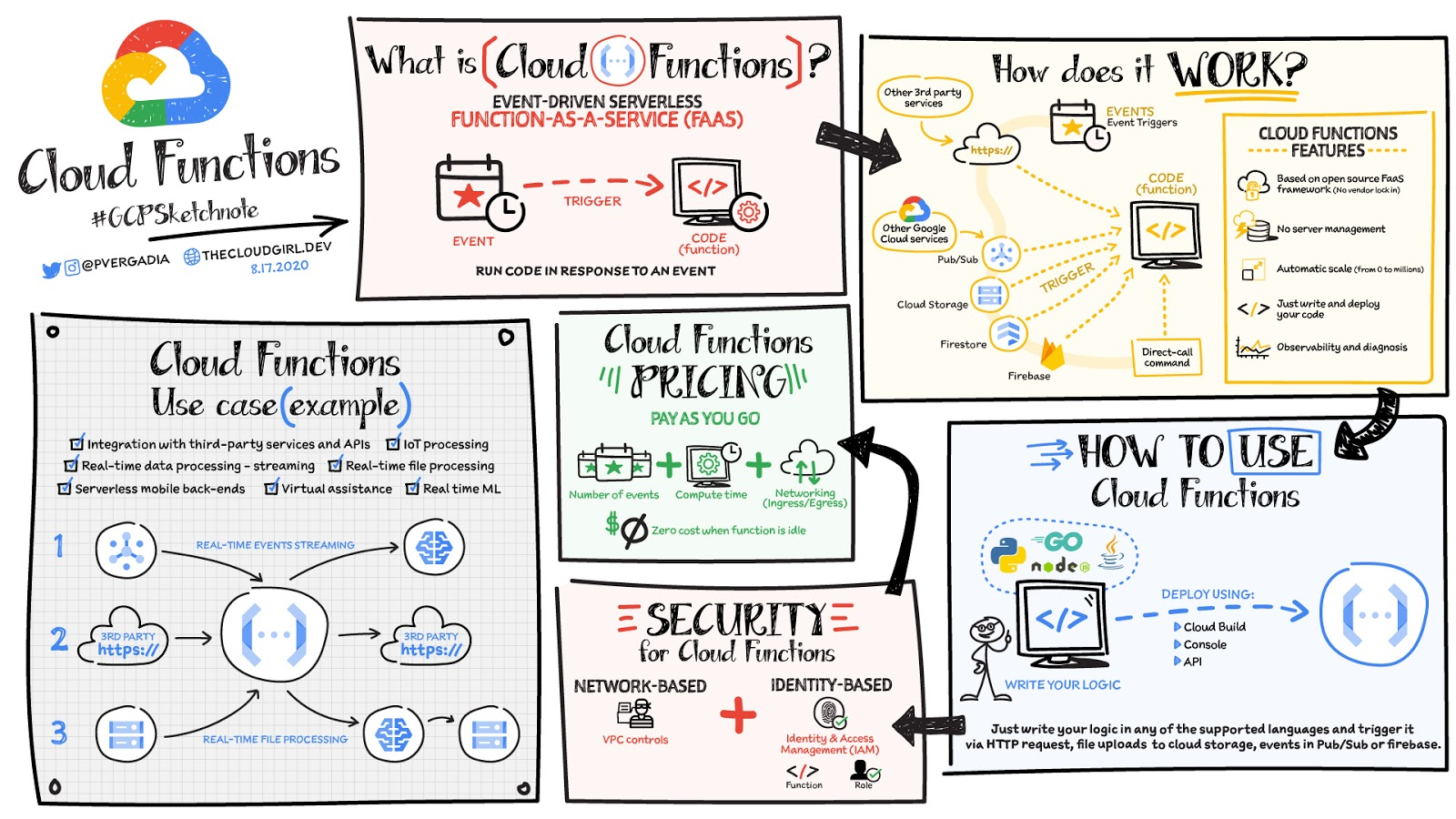
To use Cloud Functions, just write the logic in any of the supported languages (Go, Python, Java, Node.js, PHP, Ruby, .NET), deploy it using the console, API or Cloud SDK and then trigger it via HTTP(s) request from any service, for example: file uploads to Cloud Storage, events in Pub/Sub or Firebase, or even direct call via Command Line Interface CLI.
There is a generous free tier and the pricing is based on number of events, compute time, memory and ingress/egress requests and costs nothing if the function is idle. For security, using Identity and Access Management IAM you can define which services or personnel can access the function and using the VPC controls you can define network based access.
Cloud Functions use cases
Some Cloud Functions use cases include:
- Integration with third-party services and APIs
- Asynchronous workloads like lightweight ETL
- Lightweight APIs and webhooks
- IoT processing and update of the sensors/devices in the field
- Real-time file processing for use cases such as media transcoding or resizing as soon as the file is uploaded in Google Cloud Storage.
- Real-time ML solutions for use cases such as media translation or image recognition for files uploaded in GCS.
- Backend for chat applications and mobile apps.
Firebase Functions and Cloud Functions, are they different?
If you are a Firebase developer, you’d probably use Firebase Functions. Those are created from the Firebase dashboard / website. Both Cloud Functions and Firebase Functions can do the same things, they just have slightly different signatures and slightly different ways of deploying. Firebase Functions have a local emulator, which Cloud Functions uses the Functions Framework.
For a more in-depth look into Cloud Functions check out the documentation. Once you’ve got your Function up and running, check out some tips and tricks.https://www.youtube.com/embed/LTMChfWBHb0?enablejsapi=1&
For more #GCPSketchnote, follow the GitHub repo. For similar cloud content follow me on Twitter @pvergadia and keep an eye out on thecloudgirl.dev
How Eventrac and Workflows Integration Helps Implement Hybrid Architecture in Google Cloud

6526
Of your peers have already read this article.
3:00 Minutes
The most insightful time you'll spend today!
I previously talked about Eventarc for choreographed (event-driven) Cloud Run services and introduced Workflows for orchestrated services.
Eventarc and Workflows are very useful in strictly choreographed or orchestrated architectures. However, you sometimes need a hybrid architecture that combines choreography and orchestration.
For example, imagine a use case where a message to a Pub/Sub topic triggers an automated infrastructure workflow or where a file upload to a Cloud Storage bucket triggers an image processing workflow. In these use cases, the trigger is an event but the actual work is done as an orchestrated workflow.
How do you implement these hybrid architectures in Google Cloud? The answer lies in Eventarc and Workflows integration.
Eventarc triggers
To recap, an Eventarc trigger enables you to read events from Google Cloud sources via Audit Logs and custom sources via Pub/Sub and direct them to Cloud Run services:

One limitation of Eventarc is that it currently only supports Cloud Run as targets. This will change in the future with more supported event targets. It’d be nice to have a future Eventarc trigger to route events from different sources to Workflows directly.
In absence of such a Workflows enabled trigger today, you need to do a little bit of work to connect Eventarc to Workflows. Specifically, you need to use a Cloud Run service as a proxy in the middle to execute the workflow.
Let’s take a look at a couple of concrete examples.
Eventarc Pub/Sub + Workflows integration
In the first example, imagine you want a Pub/Sub message to trigger a workflow.
Define and deploy a workflow
First, define a workflow that you want to execute. Here’s a sample workflows.yaml that simply decodes and logs the Pub/Sub message body:
main:params: [args]steps:- init:assign:- headers: ${args.headers}- body: ${args.body}...- pubSubMessageStep:call: sys.logargs:text: ${"Decoded Pub/Sub message data is " + text.decode(base64.decode(args.body.message.data))}severity: INFODeploy the workflow with a single command:gcloud workflows deploy ${WORKFLOW_NAME} --source=workflow.yaml --location=${REGION}
Deploy a Cloud Run service to execute the workflow
Next, you need a Cloud Run service to execute this workflow. Workflows has an execution API and client libraries that you can use for your favorite language. Here’s an example of the execution code from a Node app.js file. It simply passes the received HTTP request headers and body to the workflow and executes it:
const execResponse = await client.createExecution({parent: client.workflowPath(GOOGLE_CLOUD_PROJECT, WORKFLOW_REGION, WORKFLOW_NAME),execution: {argument: JSON.stringify({headers: req.headers, body: req.body})}});
Deploy the Cloud Run service with the Workflows name and region passed as environment variables:
gcloud run deploy ${SERVICE_NAME} \--image gcr.io/${PROJECT_ID}/${SERVICE_NAME} \--region=${REGION} \--allow-unauthenticated \--update-env-vars GOOGLE_CLOUD_PROJECT=${PROJECT_ID},WORKFLOW_REGION=${REGION},WORKFLOW_NAME=${WORKFLOW_NAME}
Connect a Pub/Sub topic to the Cloud Run service
With Cloud Run and Workflows connected, the next step is to connect a Pub/Sub topic to the Cloud Run service by creating an Eventarc Pub/Sub trigger:
gcloud eventarc triggers create ${SERVICE_NAME} \--destination-run-service=${SERVICE_NAME} \--destination-run-region=${REGION} \--location=${REGION} \--event-filters="type=google.cloud.pubsub.topic.v1.messagePublished"
This creates a Pub/Sub topic under the covers that you can access with:
export TOPIC_ID=$(basename $(gcloud eventarc triggers describe ${SERVICE_NAME} --format='value(transport.pubsub.topic)'))
Trigger the workflow
Now that all the wiring is done, you can trigger the workflow by simply sending a Pub/Sub message to the topic created by Eventarc:
gcloud pubsub topics publish ${TOPIC_ID} --message="Hello there"
In a few seconds, you should see the message in Workflows logs, confirming that the Pub/Sub message triggered the execution of the workflow:

Eventarc Audit Log-Storage + Workflows integration
In the second example, imagine you want a file creation event in a Cloud Storage bucket to trigger a workflow. The steps are similar to the Pub/Sub example with a few differences.
Define and deploy a workflow
As an example, you can use this workflow.yaml that logs the bucket and file names:
main:params: [args]steps:...- log:call: sys.logargs:text: ${"Workflows received event from bucket " + bucket + " for file " + file}severity: INFO
Deploy a Cloud Run service to execute the workflow
In the Cloud Run service, you read the CloudEvent from Eventarc and extract the bucket and file name in app.js using the CloudEvent SDK and the Google Event library:
const cloudEvent = HTTP.toEvent({ headers: req.headers, body: req.body });//"protoPayload" : {"resourceName":"projects/_/buckets/events-atamel-images-input/objects/atamel.jpg}";const logEntryData = toLogEntryData(cloudEvent.data);const tokens = logEntryData.protoPayload.resourceName.split('/');const bucket = tokens[3]
Executing the workflow is similar to the Pub/Sub example, except you don’t pass in the whole HTTP request but rather just the bucket and file name to the workflow:
const execResponse = await client.createExecution({parent: client.workflowPath(GOOGLE_CLOUD_PROJECT, WORKFLOW_REGION, WORKFLOW_NAME),execution: {argument: JSON.stringify({bucket: bucket, file: file})}});
Connect Cloud Storage events to the Cloud Run service
To connect Cloud Storage events to the Cloud Run service, create an Eventarc Audit Logs trigger with the service and method names for Cloud Storage:
gcloud eventarc triggers create ${SERVICE_NAME} \--destination-run-service=${SERVICE_NAME} \--destination-run-region=${REGION} \--location=${REGION} \--event-filters="type=google.cloud.audit.log.v1.written" \--event-filters="serviceName=storage.googleapis.com" \--event-filters="methodName=storage.objects.create" \--service-account=${PROJECT_NUMBER}-compute@developer.gserviceaccount.com
Trigger the workflow
Finally, you can trigger the workflow by creating and uploading a file to the bucket:
echo "Hello World" > random.txtgsutil cp random.txt gs://${BUCKET}/random.txt
In a few seconds, you should see the workflow log the bucket and object name.
Conclusion
In this blog post, I showed you how to trigger a workflow with two different event types from Eventarc. It’s certainly possible to do the opposite, namely, trigger a Cloud Run service via Eventarc with a Pub/Sub message (see connector_publish_pubsub.workflows.yaml) from Workflows or a file upload to a bucket from Workflows.
All the code mentioned in this blog post is in eventarc-workflows-integration. Feel free to reach out to me on Twitter @meteatamel for any questions or feedback.
KRM Series Part 5: Learn to Manage and Configure Hosted Resources with Kubernetes

3201
Of your peers have already read this article.
3:00 Minutes
The most insightful time you'll spend today!
This is the fifth and final post in a multi-part series about the Kubernetes Resource Model. Check out parts 1, 2, 3, and 4 to learn more.
In part 2 of this series, we learned how the Kubernetes Resource Model works, and how the Kubernetes control plane takes action to ensure that your desired resource state matches the running state.
Up until now, that “running resource state” has existed inside the world of Kubernetes- Pods, for example, run on Nodes inside a cluster. The exception to this is any core Kubernetes resource that depends on your cloud provider. For instance, GKE Services of type Load Balancer depend on Google Cloud network load balancers, and GKE has a Google Cloud-specific controller that will spin up those resources on your behalf.
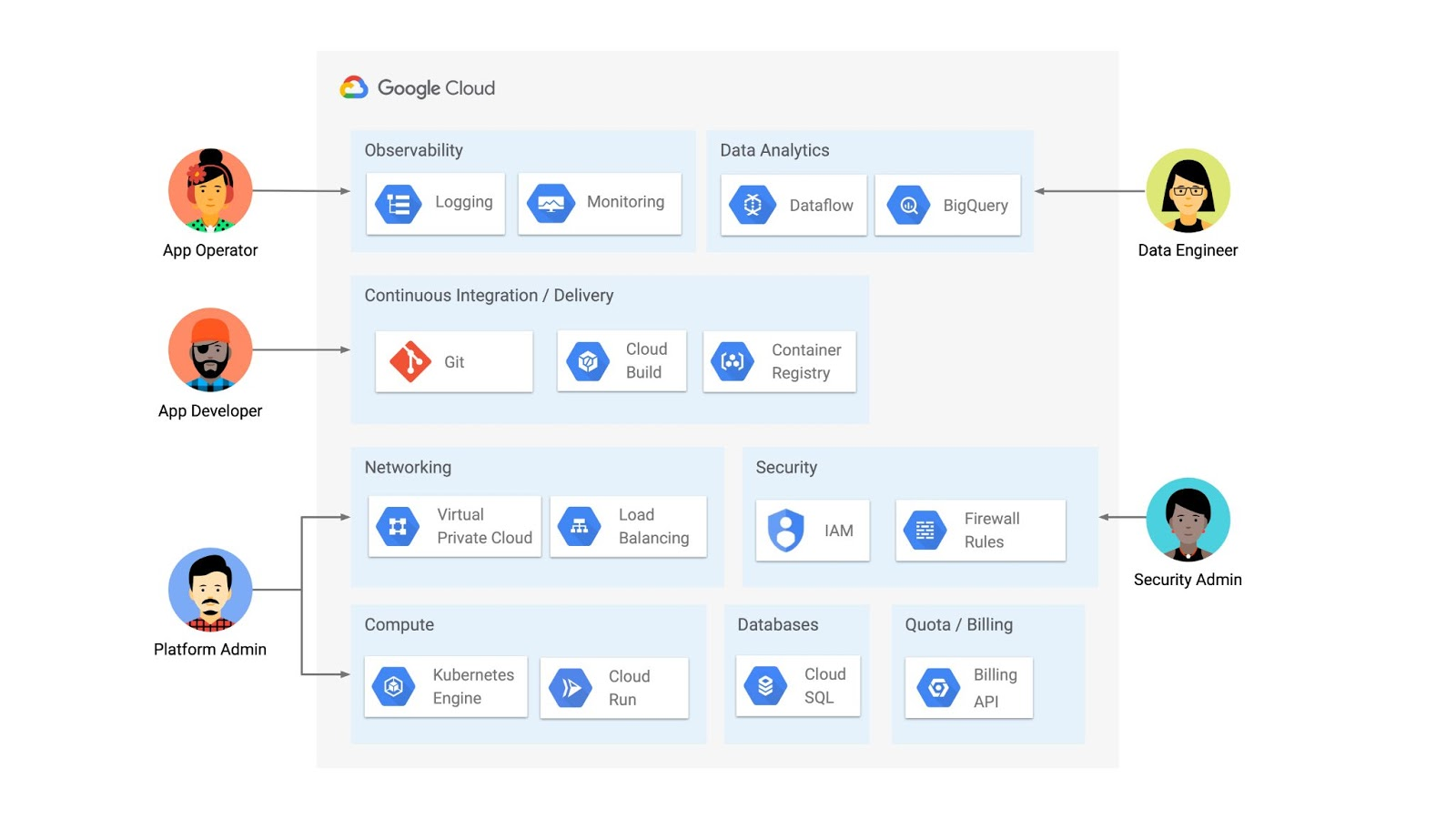
But if you’re operating a Kubernetes platform, it’s likely that you have resources that live entirely outside of Kubernetes. You might have CI/CD triggers, IAM policies, firewall rules, databases. The first post of this series introduced the platform diagram below, and asserted that “Kubernetes can be the powerful declarative control plane that manages large swaths” of that platform. Let’s close that loop by exploring how to use the Kubernetes Resource Model to configure and provision resources hosted in Google Cloud.
Why use KRM for hosted resources?
Before diving into the “what” and “how” of using KRM for cloud-hosted resources, let’s first ask “why.” There is already an active ecosystem of infrastructure-as-code tools, including Terraform, that can manage cloud-hosted resources. Why use KRM to manage resources outside of the cluster boundary?
Three big reasons. The first is consistency. The last post explored ways to ensure consistency across multiple Kubernetes clusters- but what about consistency between Kubernetes resources and cloud resources? If you have org-wide policies you’d like to enforce on Kubernetes resources, chances are that you also have policies around hosted resources. So one reason to manage cloud resources with KRM is to standardize your infrastructure toolchain, unifying your Kubernetes and cloud resource configuration into one language (YAML), one Git config repo, one policy enforcement mechanism.
The second reason is continuous reconciliation. One major advantage of Kubernetes is its control-loop architecture. So if you use KRM to deploy a hosted firewall rule, Kubernetes will work constantly to make sure that resource is always deployed to your cloud provider- even if it gets manually deleted.
A third reason to consider using KRM for hosted resources is the ability to integrate tools like kustomize into your hosted resource specs, allowing you to customize resource specifications without templating languages.
These benefits have resulted in a new ecosystem of KRM tools designed to manage cloud-hosted resources, including the Crossplane project, as well as first-party tools from AWS, Azure, and Google Cloud.
Let’s explore how to use Google Cloud Config Connector to manage GCP-hosted resources with KRM.
Introducing Config Connector
Config Connector is a tool designed specifically for managing Google Cloud resources with the Kubernetes Resource Model. It works by installing a set of GCP-specific resource controllers onto your GKE cluster, along with a set of Kubernetes Custom Resources for Google Cloud products, from Cloud DNS to Pub/Sub.
How does it work? Let’s say that a security administrator at Cymbal Bank wants to start working more closely with the platform team to define and test Policy Controller constraints. But they don’t have access to a Linux machine, which is the operating system used by the platform team. The platform team can address this by manually setting up a Google Compute Engine (GCE) Linux instance for the security admin. But with Config Connector, the platform team can instead create a declarative KRM resource for a GCE instance, commit it to the config repo, and Config Connector will spin up the instance on their behalf.
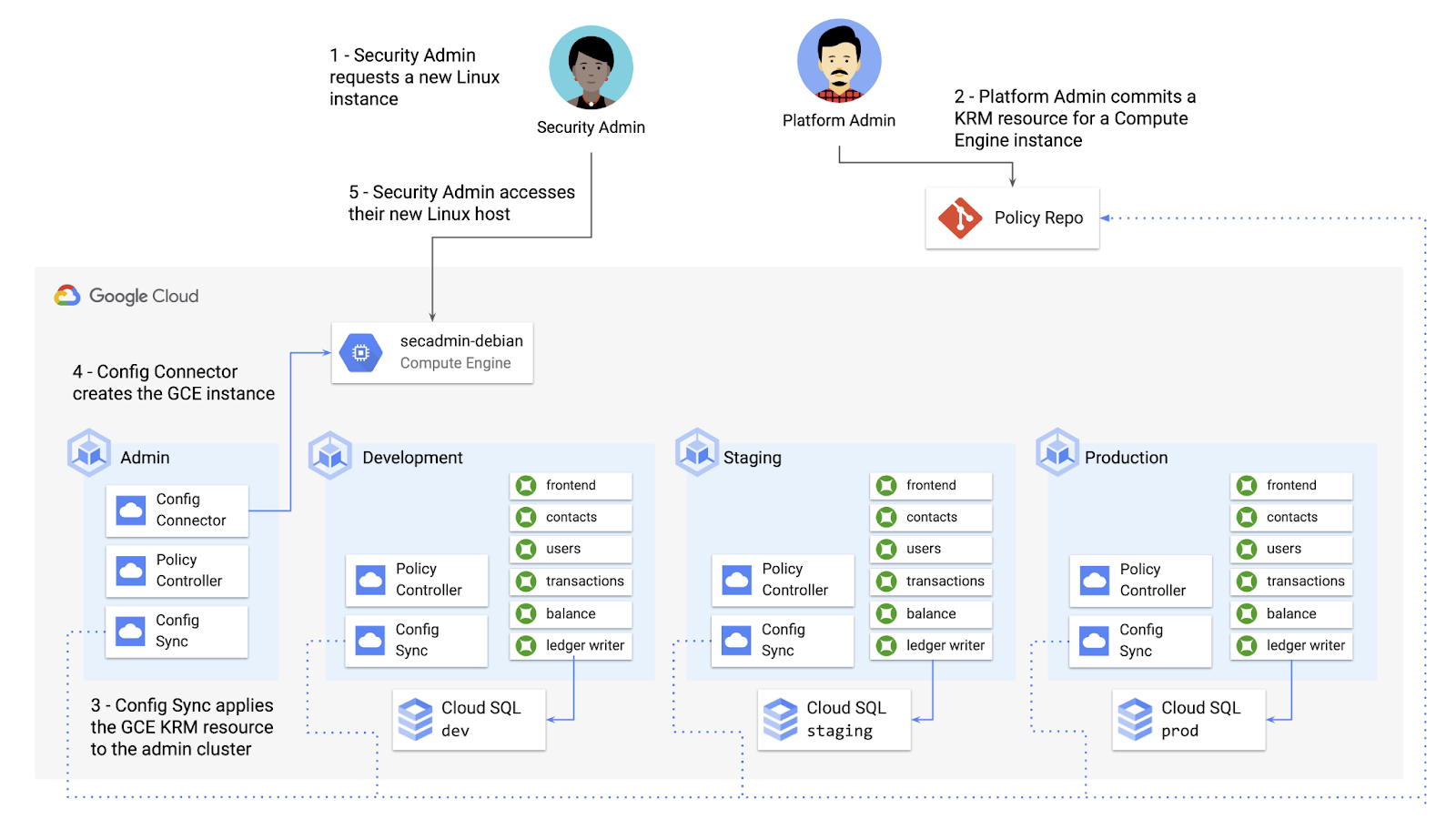
What does this declarative resource look like? A Config Connector resource is just a regular Kubernetes-style YAML file- in this case, a custom resource called Compute Instance. In the resource spec, the platform team can define specific fields, like what GCE machine type to use.
apiVersion: compute.cnrm.cloud.google.com/v1beta1kind: ComputeInstancemetadata:annotations:cnrm.cloud.google.com/allow-stopping-for-update: "true"name: secadmin-debianlabels:created-from: "image"network-type: "subnetwork"spec:machineType: n1-standard-1zone: us-west1-abootDisk:initializeParams:size: 24type: pd-ssdsourceImageRef:external: debian-cloud/debian-9...
Once the platform team commits this resource to the Config Sync repo, Config Sync will deploy the resource to the cymbal-admin GKE cluster, and Config Connector, running on that same cluster, will spin up the GCE resource represented in the file.
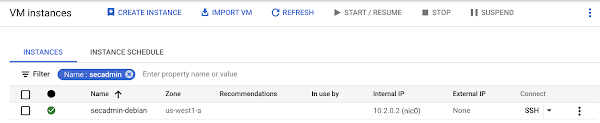
This KRM workflow for cloud resources opens the door for powerful automation, like custom UIs to automate resource requests within the Cymbal Bank org.
Integrating Config Connector with Policy Controller
By using Config Connector to manage Google Cloud-hosted resources as KRM, you can adopt Policy Controller to enforce guardrails across your cloud and Kubernetes resources.
Let’s say that the data analytics team at Cymbal Bank is beginning to adopt BigQuery. While the security team is approving production usage of that product, the platform team wants to make sure no real customer data is imported. Together, Config Connector and Policy Controller can set up guardrails for BigQuery usage within Cymbal Bank.
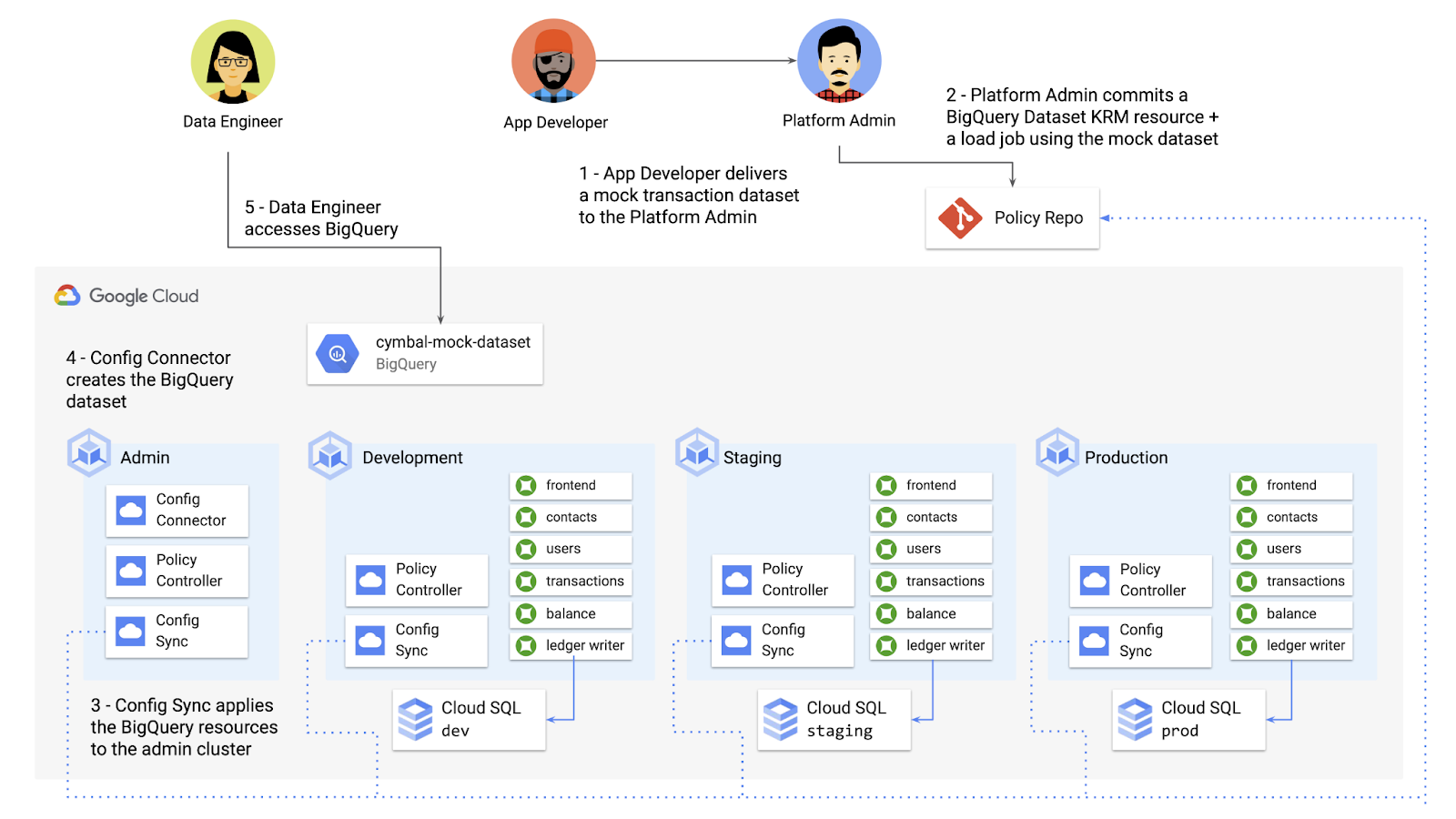
Config Connector supports BigQuery resources, including Jobs, Datasets, and Tables. The platform team can work with the analytics team to define a test dataset, containing mocked data, as KRM, pushing those resources to the Config Sync repo as they did with the GCE instance resource.
apiVersion: bigquery.cnrm.cloud.google.com/v1beta1kind: BigQueryJobmetadata:name: cymbal-mock-load-jobannotations:configsync.gke.io/cluster-name-selector: cymbal-adminspec:location: "US"jobTimeoutMs: "600000"load:sourceUris:- "gs://cymbal-bank-datasets/cymbal-mock-transactions.csv"
From there, the platform team can create a custom Constraint Template for Policy Controller, limiting the allowed Cymbal datasets to only the pre-vetted mock dataset:
rego: |package bigquerydatasetallownameviolation[{"msg": msg}] {input.review.object.kind == "BigQueryDataset"input.review.object.metadata.name != input.parameters.allowedNamemsg := sprintf("The BigQuery dataset name %v is not allowed", [input.review.object.metadata.name])}apiVersion: constraints.gatekeeper.sh/v1beta1
These guardrails, combined with IAM, can allow your organization to adopt new cloud products safely- not only defining who can set up certain resources, but within those resources, what field values are allowed.
Manage existing GCP resources with Config Connector
Another useful feature of Config Connector is that it supports importing existing Google Cloud resources into KRM format, allowing you to bring live-running resources into the management domain of Config Connector.
You can use the config-connector command line tool to do this, exporting specific resource URIs into static files:
config-connector export "//sqladmin.googleapis.com/sql/v1beta4/projects/cymbal-bank/instances/cymbal-dev" \--output cloudsql/
Output:
apiVersion: sql.cnrm.cloud.google.com/v1beta1kind: SQLInstancemetadata:annotations:cnrm.cloud.google.com/project-id: cymbal-bankname: cymbal-devspec:databaseVersion: POSTGRES_12region: us-east1resourceID: cymbal-dev...
From here, we can push these KRM resources to the config repo, and allow Config Sync and Config Controller to start lifecycling the resources on our behalf. The screenshot below shows that the cymbal-dev Cloud SQL database now has the “managed-by-cnrm” label, indicating that it’s now being managed from Config Connector (CNRM = “cloud-native resource management”).
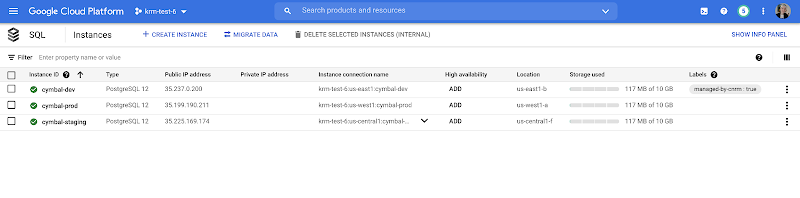
This resource export tool is especially useful for teams looking to try out KRM for hosted resources, without having to invest in writing a new set of YAML files for their existing resources. And if you’re ready to adopt Config Connector for lots of existing resources, the tool has a bulk export option as well.
Overall, while managing hosted resources with KRM is still a newer paradigm, it can provide lots of benefits for resource consistency and policy enforcement. Want to try out Config Connector yourself? Check out the part 5 demo.
This post concludes the Build a Platform with KRM series. Hopefully these posts and demos provided some inspiration on how to build a platform around Kubernetes, with the right abstractions and base-layer tools in mind.
Thanks for reading, and stay tuned for new KRM products and features from Google.
Elevating SAP Operations: Cardinal Health Implements Google Cloud Bare Metal Solution

2003
Of your peers have already read this article.
1:30 Minutes
The most insightful time you'll spend today!
Over the past few years, Google Cloud has become the platform of choice for a growing number of SAP enterprise customers. That’s especially true for companies looking to migrate large and challenging SAP workloads, including those moving to S/4HANA systems as part of a cloud modernization strategy.
Google Cloud’s Bare Metal Solution (BMS) for SAP systems plays an important role in our success with these customers. Our BMS offerings are dedicated, single-tenant systems that combine uncompromising performance with the advantages of fully managed cloud infrastructure solutions. With SAP-certified BMS offerings available in North America and Europe, we’re offering SAP customers a set of high-end infrastructure capabilities.
Cardinal Health: Building for the future
Cardinal Health, Inc. is a distributor of pharmaceuticals, a global manufacturer and distributor of medical and laboratory products, and a provider of performance and data solutions for healthcare facilities. With operations in more than 30 countries and approximately 46,500 employees, Cardinal Health is a crucial link between the clinical and operational sides of healthcare. The company serves 90% of U.S. hospitals, more than 60,000 U.S. pharmacies and more than 10,000 specialty physician offices and clinics.
Over the past several years, a series of acquisitions drove a major expansion of Cardinal Health’s business. These acquisitions also created an increasingly complex and unwieldy IT environment that included a variety of ERP systems and dozens of other legacy applications, in addition to multiple ERP instances.
Cardinal Health’s technology modernization strategy will migrate its business away from these legacy systems to a single, modern digital platform. This includes leveraging the Google Cloud Large Memory Bare Metal Solution to modernize and consolidate its SAP application architecture within its Pharma segment with a single, massively scalable SAP S/4HANA system and BigQuery to unify SAP data with a fully managed enterprise data warehouse.
Scaling up to support SAP consolidation goals
Cardinal Health’s SAP modernization effort presented significant challenges. The migration process had to take place within a very narrow window and at 100% accuracy to avoid significant financial and operational impacts. Additionally, Cardinal Health’s strategy of consolidating its pharma business onto a single SAP HANA scale-up instance, with no performance or capacity issues, would require Google Cloud to scale its SAP-certified server systems beyond their previous 12TB upper limit.
Google Cloud raised the bar with its SAP-certified Bare Metal Solution server options—one that supports up to 672 vCPUs and 18TB of memory, and another with up to 896 vCPUs and 24TB of memory. Additionally, customers have multiple storage options, offering up to a maximum of 96TB and 400,000 IOPS per system. Both offerings, along with a high-performance storage SKU, are certified for SAP HANA online transaction processing (OLTP) and meet SAP standard sizing requirements.
Our work with Cardinal Health involved some of the first production deployments of Google Cloud Large Memory Bare Metal Solution 24TB VMs to run the company’s SAP HANA in-memory database. Cardinal Health got what it needed: modern, fully managed, and SAP-certified cloud infrastructure that can support a single, consolidated scale-up SAP HANA instance for the company’s pharma operations. Google Cloud BMS also ensures that Cardinal Health’s SAP environment can scale effortlessly to support its goals, including plans to transform and migrate 200+ million business records onto its HANA system.
In addition, Cardinal Health leveraged Google Cloud’s ability to run SAP application servers on virtualized systems alongside its SAP HANA instance running on a 24TB BMS server. This hybrid approach to SAP cloud infrastructure offered significant advantages in terms of efficiency and cost-effectiveness: Cardinal Health’s use of the BMS server played a big role in achieving significant improvements in reporting and decision-making efficiency, as well as millions in cost savings over the first five years of the effort.
On top of these quantitative improvements, Google Cloud delivered the SAP migration for Cardinal Health in a single weekend—without user impacts or business disruptions.
An even bigger future for bare metal on Google Cloud
Based on raw performance, the Google Cloud server offerings define the cutting edge for our SAP customers. In fact, SAP’s certification of our 24TB Bare Metal Solution configuration earned us a world-record SAP HANA benchmark for Intel-based servers of 892,270 SAPS. And customers that combine our BMS server and high-performance storage offerings can expect to reload even the biggest SAP HANA datasets, following a full system restart, in as little as 30 minutes—a fraction of the time required in the past for an SAP HANA “rehydration” procedure.
More SAP customers are facing the same challenges that drove Cardinal Health to embark upon its modernization efforts: rapid business growth, pressure to consolidate sprawling and often chaotic SAP environments, and SAP HANA systems that now routinely require multi-TB memory capacities to run efficiently. For Google Cloud Bare Metal Solution customers, these industry-leading benchmarks translate directly into success with real-world SAP cloud modernization and growth initiatives.
It probably won’t take long for today’s boundary-pushing 24TB Bare Metal Solution systems to become tomorrow’s mainstream SAP HANA infrastructure. What we know for sure is that Google Cloud will be ready with cutting-edge solutions for our biggest and most demanding SAP customers.

3928
Of your peers have already downloaded this article
1:30 Minutes
The most insightful time you'll spend today!
One of the great opportunities of cloud technology is the ability to combine and integrate different tools, services, and platforms. But, the question of which cloud tools and platforms to use—and how to ensure they work together seamlessly and securely still persists.
According to recent research, 82 percent of enterprises have a hybrid cloud strategy, running applications in an average of 1.5 public clouds and 1.7 private clouds; and IDC predicts increasing adoption of hybrid cloud architectures. As a result, many large organizations already depend on mixed networks composed of multiple cloud service providers, third-party cloud platform vendors, and on-premises systems.
So, how do organizations implement a successful multi-cloud strategy while deriving the full benefits of the cloud?
What enterprises need is an open-source strategy and consistent governance that will help companies use multi-clouds to compete in the digital world. Download this Harvard Business Review whitepaper to know more.
More Relevant Stories for Your Company

Plainsight Vision AI Available for Google Cloud Customers to Unlock Accurate, Actionable Insights
Data-savvy businesses increasingly rely on images and videos for critical functions, and yet are challenged by the sheer mass of information—more than 3.2 billion images and 720,000 hours of video are created daily. This explosion in visual data has paved the way for the growth of computer vision, a form of

The Unintended Consequences of Scale
Cloud infrastructure offers so many advantages: on-demand scalability, built-in security, and a bevy of tooling to scale your business at the speed of the Internet. It enables companies to pursue “blitzscaling,” as Reid Hoffman calls it. Capital expenses that take years or decades to pay off are no longer required to

How PLAID’S Multi-cloud Approach with Anthos Clusters on AWS Drives Higher Business Growth
Editor’s note: Today’s post comes from Naohiko Takemura, Head of Engineering, and Kosukex Oya, Engineer, both from Japanese customer experience platform PLAID. The company runs its platform in a multicloud environment through Anthos clusters on AWS and shares more on its experiences and best practices. At PLAID, our mission is to maximize the value

Picsart’s Apigee-powered Pivot: From B2C to B2B, Bringing Graphic Design Capabilities to Businesses
With 150 million users and counting, Picsart was originally founded as a photo and video editing app we use to enhance our everyday life before uploading them to various social media platforms. As its user numbers continue growing, the company began exploring options for incorporating its easy-to-use editing tools into
