





Improved TabNet on Vertex AI: High-performance, scalable Tabular Deep Learning

2508
Of your peers have already read this article.
2:30 Minutes
The most insightful time you'll spend today!
Data scientists choose models based on various tradeoffs when solving machine learning (ML) problems that involve tabular (i.e., structured) data, the most common data type within enterprises. Among such models, decision trees are popular because they are easy to interpret, fast to train, and can obtain high accuracy quickly from small-scale datasets. On the other hand, deep neural networks offer superior accuracy on larger datasets, as well as the benefits of end-to-end learning, but are black-box and difficult to interpret. TabNet, an interpretable deep learning architecture developed by Google AI, combines the best of both worlds: it is explainable, like simpler tree-based models, and can achieve the high accuracy of complex black-box models and ensembles.
We’re excited to announce that TabNet is now available in Vertex AI Tabular Workflows! Tabular Workflows provides fully managed, optimized, and scalable pipelines, making it easier to use TabNet without worrying about implementation details, and to deploy TabNet with the MLOps capabilities of Vertex. TabNet on Vertex AI Tabular Workflows is optimized for efficient scaling to massive tabular datasets. Moreover, TabNet on Vertex AI Tabular Workflows come with machine learning improvements on top of the original TabNet, yielding better accuracy for real-world data challenges.
TabNet on Vertex AI is well-suited for a wide range of tabular data tasks where model explainability is just as important as accuracy, such as financial asset price prediction, fraud/cyberattack/crime detection, retail demand forecasting, user modeling, credit/risk scoring, diagnosis from healthcare records, and product recommendations.
Overview of Tabnet
TabNet has a specially-designed architecture (overviewed in Fig. 1), based on sequential attention, that selects which model features to reason from at each step. This mechanism makes it possible to explain how the model arrives at its predictions and the thoughtful design helps with superior accuracy. TabNet not only outperforms alternative models (including neural networks and decision trees) but also provides interpretable feature attributions. More details, including results on academic benchmarks, can be found in our AAAI 2021 paper.
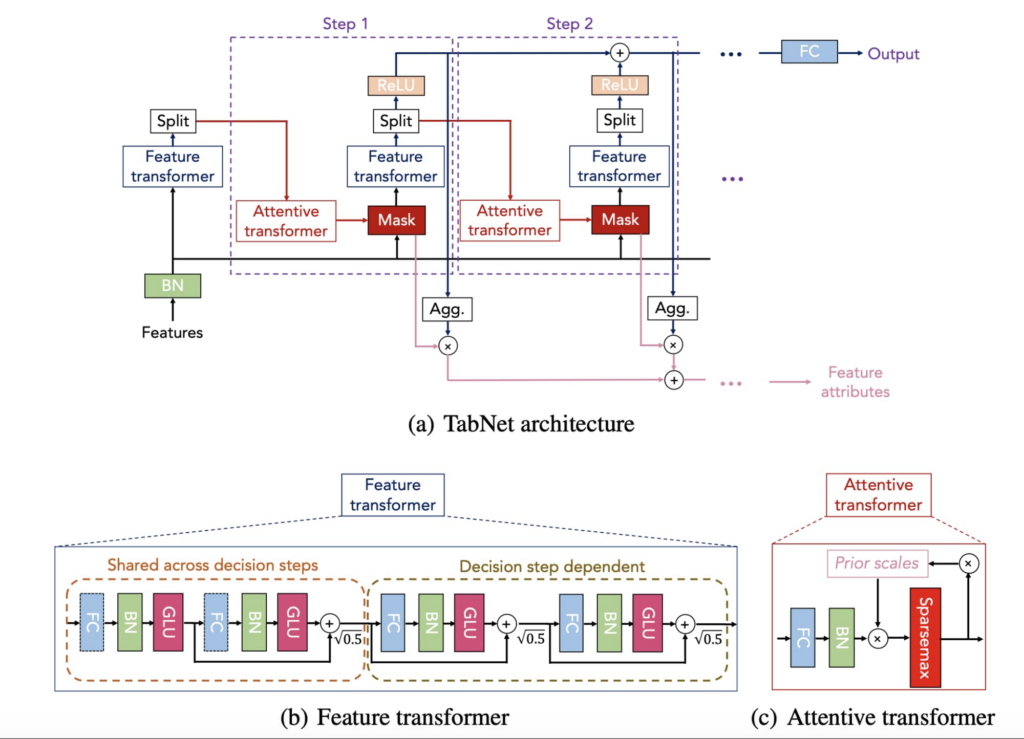
Since its publication, TabNet has received significant traction from various enterprises across different industries and a variety of high-value tabular data applications (most of which include the ones for which deep learning was not even used a priori). It has been used by numerous enterprises like Microsoft, Ludwig, Ravelin, and Determined. Given high customer interest on TabNet, we’ve worked on making it available on Vertex given the real-world deep learning development and productionization needs, as well as improving its performance and efficiency.
Highlights of TabNet on Vertex AI Tabular Workflows
Scaling to Very Large Datasets
Fueled by the advances in cloud technologies like BigQuery, enterprises are increasingly collecting more tabular data, and datasets with billions of samples and hundreds/thousands of features are becoming the norm. In general, deep learning models get better learning from more data samples, and more features, with the optimal methods as they can better learn the complex patterns that drive the predictions. The computational challenges become significant though when model development on massive datasets is considered. This results in high cost or very long model development times, constituting a bottleneck for most customers to fully take advantage of their large datasets. With TabNet on Tabular Workflows, we’re making it more efficient to scale to very large tabular datasets.
Key Implementation Aspects: The TabNet architecture has unique advantages for scaling: it is composed mainly of tensor algebra operations, it utilizes very large batch sizes, and it has high compute intensity (i.e., the architecture employs a high number of operations for each data byte transmitted). These open a path to efficient distributed training on many GPUs, utilized to scale TabNet training in our improved implementation.
In TabNet on Vertex AI Tabular Workflows, we have carefully engineered the data and training pipelines to maximize hardware utilization so that users can get the best return for their Vertex AI spending. The following features enable scale with TabNet on Tabular workflows:
- Parallel data reading with multiple CPUs in a pipeline optimized to maximize GPU utilization for distributed training, reflecting best practices from Tensorflow.
- Training on multiple GPUs that can provide significant speedups on large datasets with high compute requirements. Users can specify any available machine on GCP with multiple GPUs, and the model will automatically run on them with distributed training.
- For efficient data parallelism with distributed learning, we use Tensorflow mirrored distribution strategy to support data parallelism across many GPUs. Our results demonstrate >80% utilization with several GPUs on billion-scale datasets with 100s-1000s of features.
Standard implementations of deep learning models could yield a low GPU utilization, and thus inefficient use of resources. With our implementation, TabNet on Vertex, users can get the maximal return on their compute spend on large-scale datasets.
Examples on real-world customer data: We have benchmarked the training time specifically for enterprise use cases where large datasets are being used and fast training is crucial. In one representative example, we used 1 NVIDIA_TESLA_V100 GPU to achieve state-of-the-art performance in ~1 hour on a dataset with ~5 million samples. In another example, we used 4 NVIDIA_TESLA_V100 GPUs to achieve state-of-the-art performance in ~14 hours on a dataset with ~1.4 billion samples.
Improving Accuracy given Real-World Data Challenges
Compared to its original version, TabNet on Vertex AI Tabular Workflows has improved machine learning capabilities. We have specifically focused on the common real-world tabular data challenges. One common challenge for real-world tabular data is numerical columns having skewed distributions, for which we productionized learnable preprocessing layers (e.g. including parametrized power transform families and quantile transformations) that improve the TabNet learning. Another common challenge is the high number of categories for categorical data, for which we adopted tunable high-dimensional embeddings. Another one is imbalance of label distribution, for which we added various loss function families (e.g. focal loss and differentiable AUC variants). We have observed that such additions can provide a noticeable performance boost in some cases.
Case studies with real-world customer data: We have worked with large customers to replace legacy algorithms with TabNet for a wide range of use cases, including recommendation, rankings, fraud detection, and estimated arrival time predictions. In one representative example, TabNet was stacked against a sophisticated model ensemble for a large customer. It outperformed the ensemble in most cases, leading to a nearly 10% error reduction on some of the key tasks. This is an impressive result, given that each percentage improvement on this model resulted in multi-million savings for the customer!
Out-of-the-box Explainability
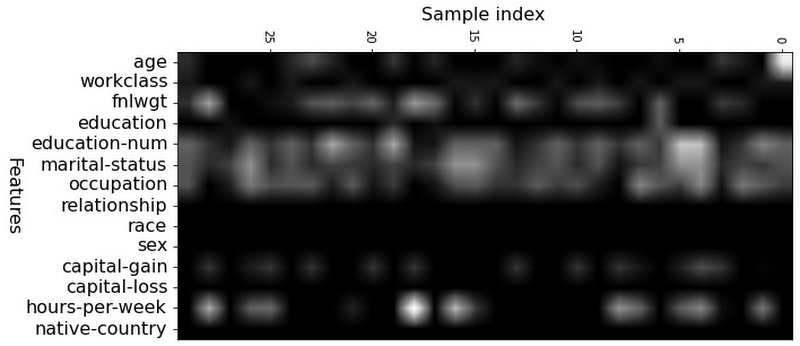
In addition to high accuracy, another core benefit of TabNet is that, unlike conventional deep neural network (DNN) models such as multi-layer perceptrons, its architecture includes explainability out of the box. This new launch on Vertex Tabular Workflows makes it very convenient to visualize explanations of the trained TabNet models, so that the users can quickly gain insights on how the TabNet models arrive at its decisions. TabNet provides feature importance output via its learned masks, which indicate whether a feature is selected at a given decision step in the model. Below is the visualization of the local and global feature importance based on the mask values. The higher the value of the mask for a particular sample, the more important the corresponding feature is for that sample. Explainability of TabNet has fundamental benefits over post-hoc methods like Shapley values that are computationally-expensive to estimate, while TabNet’s explanations are readily available from the model’s intermediate layers. Furthermore, post-hoc explanations are based on approximations to nonlinear black-box functions while TabNet’s explanations are based on what the actual decision making is based on.
Explainability example: To illustrate what is achievable with this kind of explainability, Figure 2 below shows the feature importance for the Census dataset. The figure indicates that education, occupation, and number of hours per week are the most important features to predict whether a person can earn more than $50K/year (the color of corresponding columns are lighter). The explainability capability is sample-wise, which means that we can get the feature importance for each sample separately.
Benefits as a Fully-Managed Vertex Pipeline
TabNet on Vertex Tabular Workflows makes the model development and deployments tasks much simpler – without writing any code, one can obtain the trained TabNet model, deploy it in their application, and use the MLOps capabilities enabled by Vertex Managed Pipelines! Some of these benefits are highlighted as:
- Compatibility with Vertex AI ML Ops for implementing automated ML at scale including products like Vertex AI Pipelines and Vertex AI Experiments.
- Deployment convenience: Vertex AI prediction services, both in batch and online mode, are supported out-of-the-box.
- Customizable feature engineering to enable the best utilization of the domain knowledge of users.
- Using Google’s state-of-the-art search algorithms, automatic tuning to identify the best-performing hyperparameters, with automatic selection of the appropriate hyper-parameter search space based on dataset size, prediction type, and training budget.
- Tracking the deployed model and convenient evaluation tools.
- Easiness in comparative benchmarking with other models (such as AutoML and Wide & Deep Networks) as the user journey would be unified.
- Multi-region availability to better address international workloads.
More details
If you’re interested in trying TabNet on Vertex AI on your tabular datasets, please check out Tabular Workflow on Vertex AI and fill out this form.
Acknowledgements: We’d like to thank Nate Yoder, Yihe Dong, Dawei Jia, Alex Martin, Helin Wang, Henry Tappen and Tomas Pfister for their contributions to this blog.
3094
Of your peers have already watched this video.
21:00 Minutes
The most insightful time you'll spend today!
Google Cloud’s AI Adoption Framework: Helping You Build a Transformative AI Capability
AI can help organizations improve the decision-making process across most business functions. However, building an effective AI capability encompasses more than just creating a technology platform.
To do this effectively requires alignment to business objectives, strong executive sponsorship, and collaboration between skilled employees and strategic partners.
Additionally, you need your initiatives to be powered by secure data management and cloud-native services to scale and automate ML workloads, and ensure all of this is underpinned by responsible AI principles.
Successfully adopting AI in your business is determined by your practices in these areas. Learn more about the AI journey and how you can gain value every step of the way.

5195
Of your peers have already downloaded this article
2:30 Minutes
The most insightful time you'll spend today!
For as long as business intelligence (BI) has been around, visualization tools have played an important role in helping analysts and decision-makers quickly get insights from data.
In our current era of big data analytics, that premise still holds. To provide an integrated platform for building BI dashboards on top of big data, GCP offers the combination of Google BigQuery, a cloud-native data warehouse that helps you analyze petabytes of data quickly, and Google Data Studio, a free tool that helps you quickly create beautiful reports.
First, imagine that you work for an online retailer that bases important decisions on customer interaction data in the form of large amounts (multiple TBs) of usage logs stored as date-partitioned tables in a BigQuery dataset called usage. To get business value out of that data as quickly as possible, you want to build a dashboard for analysts that will provide visualizations of trends and patterns in your data.
The good news is that a connector is available that lets you query data stored in BigQuery directly from Data Studio.
Learn how to build a BI dashboard with Data Studio as the front end, and powered by BigQuery on the back end (with some help from Google App Engine for added efficiency). Download this how-to now.
Tyson Foods’ Story of Unlocking Opportunities by Integrating Real-time Analytics with AI and BI

6479
Of your peers have already read this article.
3:00 Minutes
The most insightful time you'll spend today!
As data environments become more complex, companies are turning to streaming analytics solutions that analyze data as it’s ingested and deliver immediate, high-value insights into what is happening now. These insights enable decision makers to act in real time to take advantage of opportunities or respond to issues as they occur.
While understanding what is happening now has great business value, forward-thinking companies are taking things a step further, using real-time analytics integrated with artificial intelligence (AI) and business intelligence (BI) to answer the question, “what might happen in the future?” Arkansas-based Tyson Foods has embraced AI/BI analytics to enable predictive insights that unlock new opportunities and drive future growth.
Creating a digital twin for connected intelligence company wide
Before using AI/BI, Tyson’s analytics capabilities consisted of traditional BI solutions focused on KPIs and simplifying data so that humans could understand it. Tyson wanted to leverage its data to uncover ways to improve current processes and grow its business. But with BI alone, Tyson struggled to use data to run the simulations and scenarios essential to make educated decisions. To keep growing, it had to embrace the complexity of its data, building ways to analyze it and use it to inform decision making.
Tyson’s on-premises analytics solutions limited its ability to be aggressive and make intelligent, timely, prescriptive decisions. The solution was to create a digital twin to scale optimizations within business processes, moving from local optimizations to system-wide connected optimizations. Doing so meant shifting entirely to cloud computing, with an initial focus on building the ingestion component of the digital twin platform.
Investing in a digital twin enabled Tyson to accelerate new capabilities like supply chain simulation “what-if” scenarios, prescriptive price elasticity recommendations, and improvement of customer intimacy.
Solving the ingestion problem for faster time to insights
Before its migration to Google Cloud, analytics projects that Tyson suffered from uncertainty over how to obtain the data. This problem was prolific and caused project times to be extended for weeks or even months due to the need to write and support one-off data ingestion processes at the front end. This problem also prevented the IT team from delivering analytics solutions fast enough for the business to take full advantage of them.
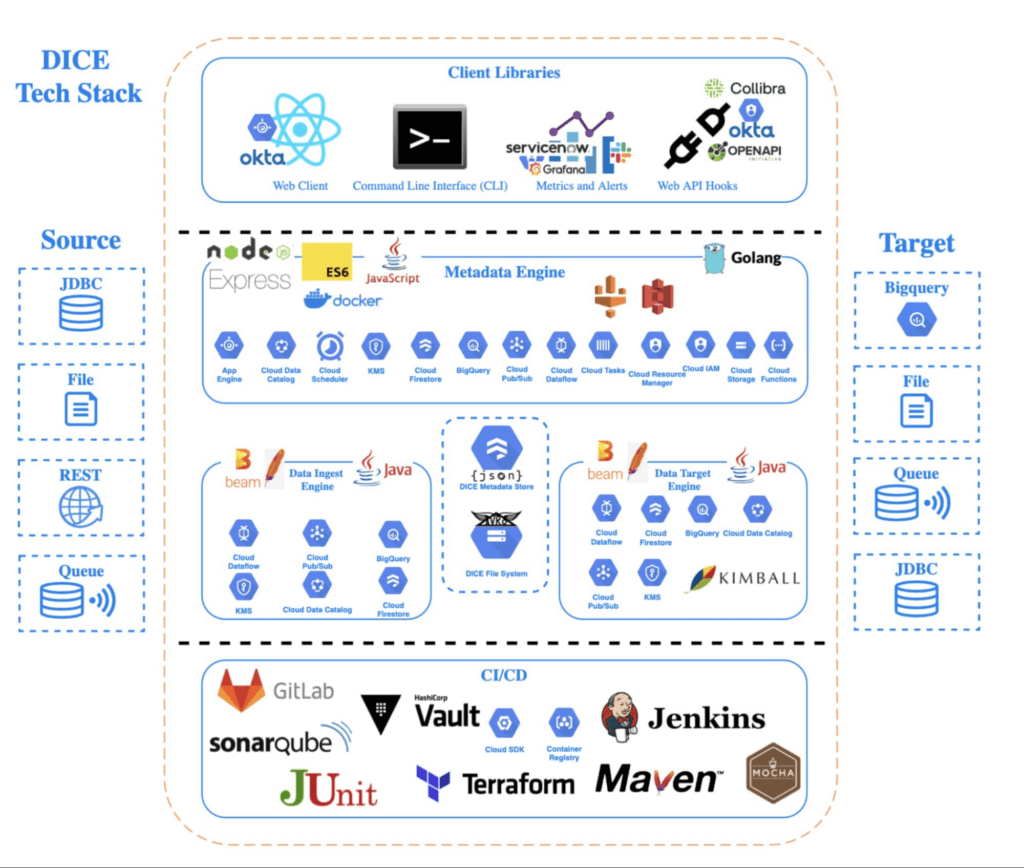
To solve this analytics problem, the team created Data Ingestion Compute Engine (DICE). DICE is a Google Cloud-hosted, open-source, cloud-native ingestion platform developed to provide configuration-based, no-ops, code-free ingestion from disparate enterprise data systems, both internal and external. It is centered on three high-level goals:
- Accelerate the speed of delivery of IT analytics solutions
- Enable growth of IT capabilities to produce meaningful insight
- Reduce long-term total cost of ownership for ingestion solutions
Creating DICE ingestion platform with Google Cloud services
Teams use DICE to set up secure data ingestion jobs in minutes without having to manage complex connections or write, deploy, and support their own code. DICE enables unbound scale, highly parallel processing, DevSecOps, open source, and the implementation of Lambda Data Architecture.
A DICE job is the logical unit of work in the DICE platform, consisting of immutable and mutable configurations persisted as JSON documents stored in Firestore. The job exists as an instruction set for the DICE data engine, which is Apache Beam running Dataflow to instruct which data to pull, how to pull it, how often to pull it, how to process it, when it changes, and where to direct it.
Two of DICE’s primary layers include the metadata engine and the data engine. The metadata engine is responsible for the creation and management of DICE job configuration and orchestration. It is made up of many microservices that interact with multiple Google Cloud services, including the job configuration creation API, job build configuration helper API, and job execution scheduler API.
The data engine is responsible for the physical ingestion of data, the change detection processing of that data, and the delivery of that data to specified targets. The data engine is Java code that uses the Apache Beam unified programming model and runs in Dataflow. It is comprised of streaming, jobs, and Dataflow flex template batch jobs. Logically, the data engine is segmented across three layers: the inbound processing layer, the DICE file system layer, and the target processing layer, which takes the data from the DICE file system and moves it to targets.
Rolling DICE for thousands of ingestion jobs each day
DICE was first deployed to a production environment in November 2019, and just two years later, it has more than 3,000 data ingestion jobs from more than a hundred disparate data systems, both internal and external to Tyson Foods. Most of these jobs run multiple times a day. On a daily basis the DICE environment sees more than 25,000 Dataflow jobs running and an average of 3.25 terabytes of new data being ingested.
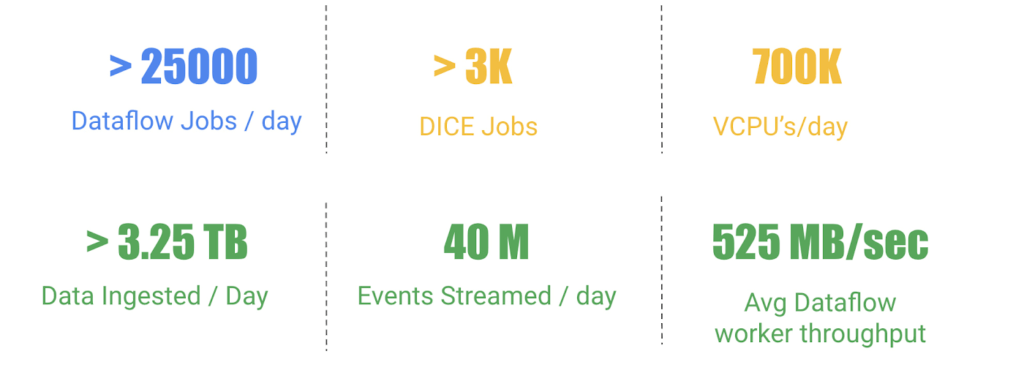
DICE supports ingestion from many different types of technologies, including BigQuery, SQL Server, SAP HANA, Postgres, Oracle, MySQL, Db2, various types of file systems, and FTP servers. Additionally, DICE supports target platform technologies for ingestion jobs that include multiple JDBC targets, multiple file system targets, and BigQuery and queue-based store and forward technologies.
The platform continues to see linear growth of DICE jobs, all while keeping platform costs relatively flat. With increasing demand for the platform, Tyson’s IT team is constantly enhancing DICE to support new sources and targets.
This intelligent platform keeps adding new value and makes it simple for Tyson to take advantage of its data. This innovation is a necessity in this fast-changing world of digital business in which companies must transform a high volume of complex data into actionable insight.
Vector Search: The Tech Powering Billions of Search Results for Google Users

4546
Of your peers have already read this article.
1:30 Minutes
The most insightful time you'll spend today!
Recently, Google Cloud partner Groovenauts, Inc. published a live demo of MatchIt Fast. As the demo shows, you can find images and text similar to a selected sample from a collection of millions in a matter of milliseconds:

Give it a try — and either select a preset image or upload one of your own. Once you make your choice, you will get the top 25 similar images from two million images on Wikimedia images in an instant, as you can see in the video above. No caching involved.
The demo also lets you perform the similarity search with news articles. Just copy and paste some paragraphs from any news article, and get similar articles from 2.7 million articles on the GDELT project within a second.

Vector Search: the technology behind Google Search, YouTube, Play, and more
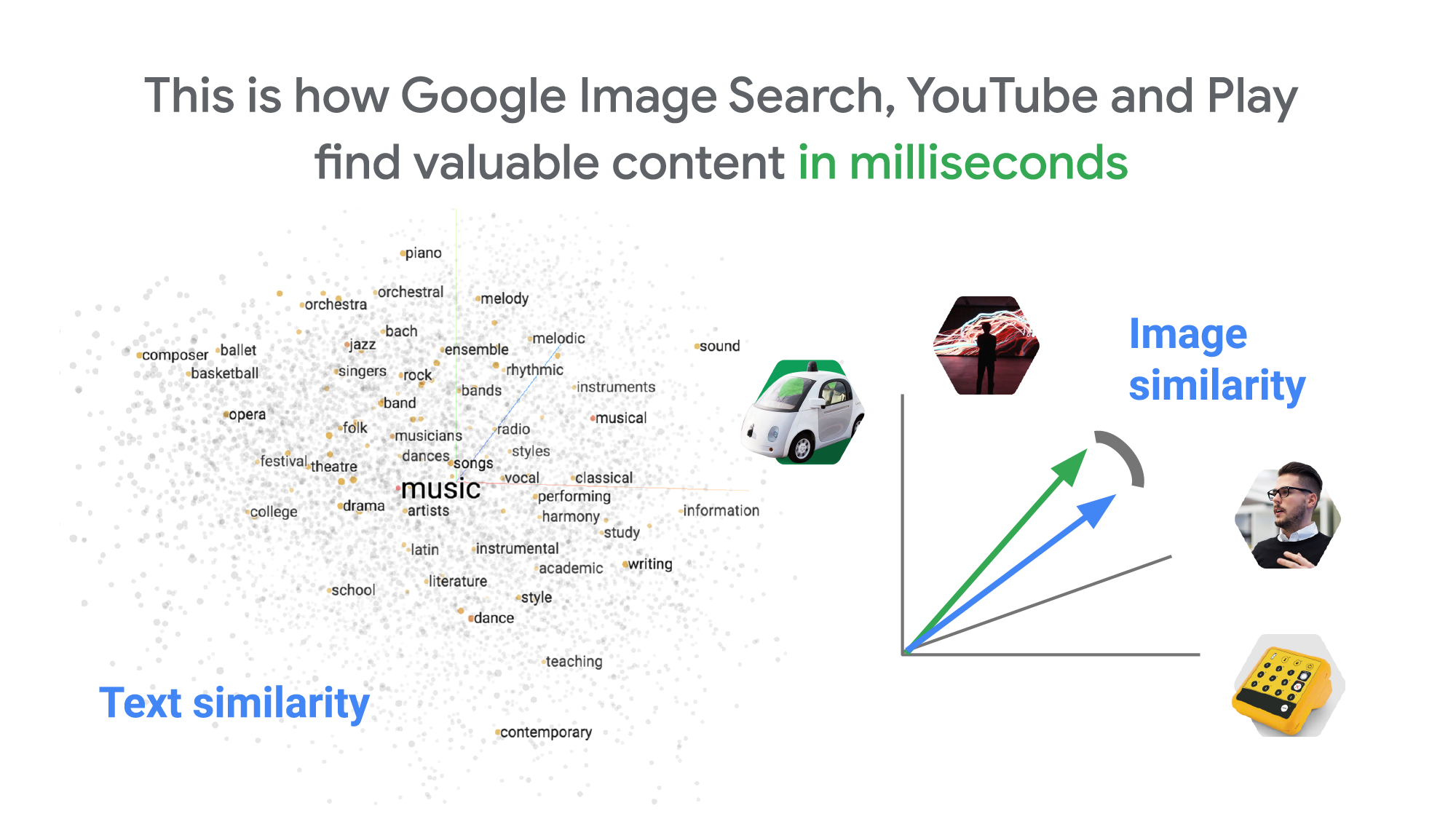
How can it find matches that fast? The trick is that the MatchIt Fast demo uses the vector similarity search (or nearest neighbor search or simply vector search) capabilities of the Vertex AI Matching Engine, which shares the same backend as Google Image Search, YouTube, Google Play, and more, for billions of recommendations and information retrievals for Google users worldwide. The technology is one of the most important components of Google’s core services, and not just for Google: it is becoming a vital component of many popular web services that rely on content search and information retrieval accelerated by the power of deep neural networks.
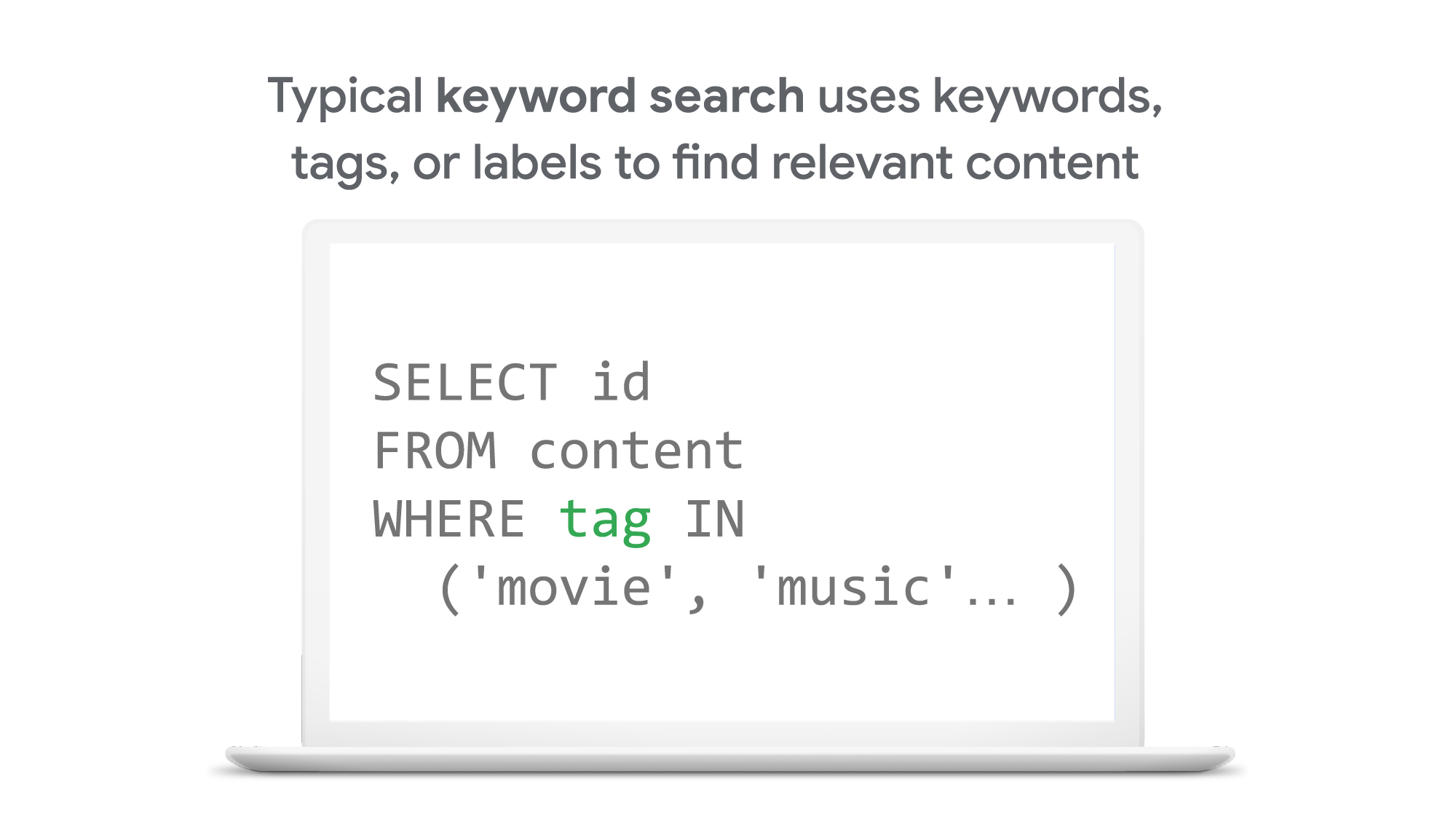
So what’s the difference between traditional keyword-based search and vector similarity search? For many years, relational databases and full-text search engines have been the foundation of information retrieval in modern IT systems. For example, you would add tags or category keywords such as “movie”, “music”, or “actor” to each piece of content (image or text) or each entity (a product, user, IoT device, or anything really). You’d then add those records to a database, so you could perform searches with those tags or keywords.
In contrast, vector search uses vectors (where each vector is a list of numbers) for representing and searching content. The combination of the numbers defines similarity to specific topics. For example, if an image (or any content) includes 10% of “movie”, 2% of “music”, and 30% of “actor”-related content, then you could define a vector [0.1, 0.02, 0.3] to represent it. (Note: this is an overly simplified explanation of the concept; the actual vectors have much more complex vector spaces). You can find similar content by comparing the distances and similarities between vectors. This is how Google services find valuable content for a wide variety of users worldwide in milliseconds.
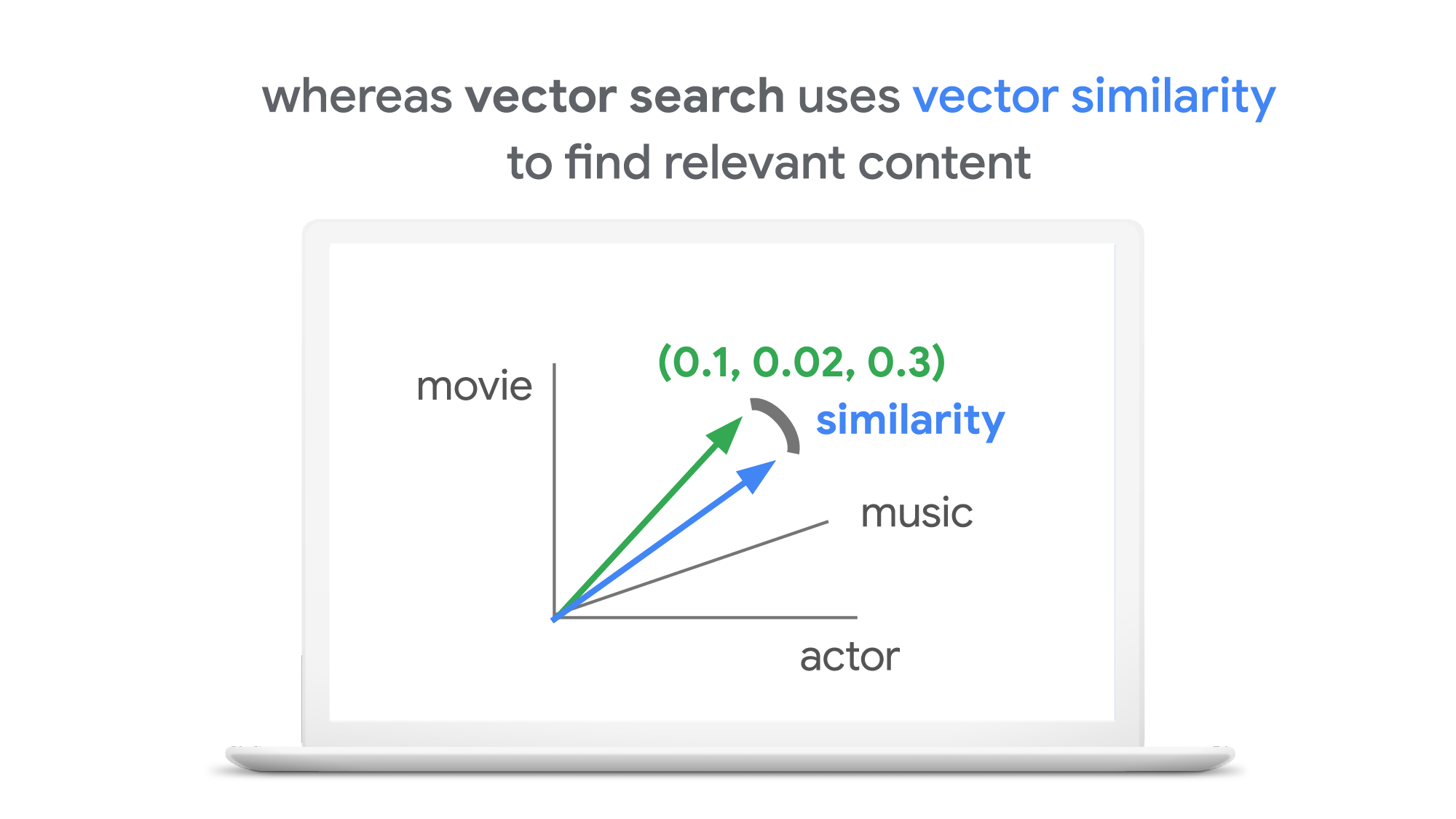
With keyword search, you can only specify a binary choice as an attribute of each piece of content; it’s either about a movie or not, either music or not, and so on. Also, you cannot express the actual “meaning” of the content to search. If you specify a keyword “films”, for example, you would not see any content related to “movies” unless there was a synonyms dictionary that explicitly linked these two terms in the database or search engine.
Vector search provides a much more refined way to find content, with subtle nuances and meanings. Vectors can represent a subset of content that contains “much about actors, some about movies, and a little about music”. Vectors can represent the meaning of content where “films”, “movies”, and “cinema” are all collected together. Also, vectors have the flexibility to represent categories previously unknown to or undefined by service providers. For example, emerging categories of content primarily attractive to kids, such as ASMR or slime, are really hard for adults or marketing professionals to predict beforehand, and going back through vast databases to manually update content with these new labels would be all but impossible to do quickly. But vectors can capture and represent never-before-seen categories instantly.
Vector search changes business
Vector search is not only applicable to image and text content. It can also be used for information retrieval for anything you have in your business when you can define a vector to represent each thing. Here are a few examples:
- Finding similar users: If you define a vector to represent each user in your business by combining the user’s activities, past purchase history, and other user attributes, then you can find all users similar to a specified user. You can then see, for example, users who are purchasing similar products, users that are likely bots, or users who are potential premium customers and who should be targeted with digital marketing.
- Finding similar products or items: With a vector generated from product features such as description, price, sales location, and so on, you can find similar products to answer any number of questions; for example, “What other products do we have that are similar to this one and may work for the same use case?” or “What products sold in the last 24 hours in this area?” (based on time and proximity)
- Finding defective IoT devices: With a vector that captures the features of defective devices from their signals, vector search enables you to instantly find potentially defective devices for proactive maintenance.
- Finding ads: Well-defined vectors let you find the most relevant or appropriate ads for viewers in milliseconds at high throughput.
- Finding security threats: You can identify security threats by vectorizing the signatures of computer virus binaries or malicious attack behaviors against web services or network equipment.
- …and many more: Thousands of different applications of vector search in all industries will likely emerge in the next few years, making the technology as important as relational databases.
OK, vector search sounds cool. But what are the major challenges to applying the technology to real business use cases? Actually there are two:
- Creating vectors that are meaningful for business use cases
- Building a fast and scalable vector search service
Embeddings: meaningful vectors for business use cases
The first challenge is creating vectors for representing various entities that are meaningful and useful for business use cases. This is where deep learning technology can really shine. In the case of the MatchIt Fast demo, the application simply uses a pre-trained MobileNet v2 model for extracting vectors from images, and the Universal Sentence Encoder (USE) for text. By applying such models to raw data, you can extract “embeddings” – vectors that map each row of data in a space of their “meanings”. MobileNet puts images that have similar patterns and textures closer to one another in the embedding space, and USE puts texts that have similar topics closer.
For example, a carefully designed and trained machine learning model could map movies into an embedding space like the following:
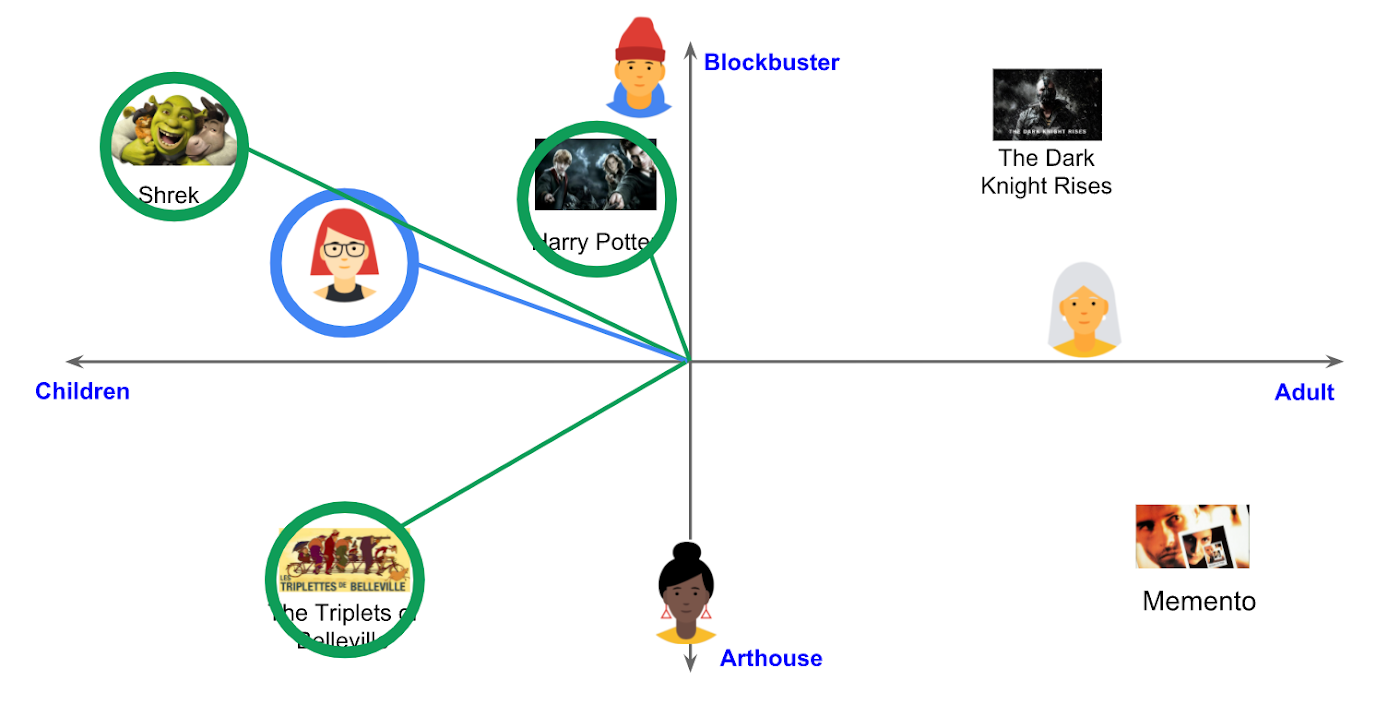
With the embedding space shown here, users could find recommended movies based on the two dimensions: is the movie for children or adults, and is it a blockbuster or arthouse movie? This is a very simple example, of course, but with an embedding space like this that fits your business requirements, you can deliver a better user experience on recommendation and information retrieval services with insights extracted from the model.
For more about creating embeddings, the Machine Learning Crash Course on Recommendation Systems is a great way to get started. We will also discuss how to extract better embeddings from business data later in this post.
Building a fast and scalable vector search service
Suppose that you have successfully extracted useful vectors (embeddings) from your business data. Now the only thing you have to do is search for similar vectors. That sounds simple, but in practice it is not. Let’s see how the vector search works when you implement it with BigQuery in a naive way:https://www.youtube.com/embed/wHNJspvxj2w?enablejsapi=1&
It takes about 20 seconds to find similar items (fish images in this case) from a pool of one million items. That level of performance is not so impressive, especially when compared to the MatchIt Fast demo. BigQuery is one of the fastest data warehouse services in the industry, so why does the vector search take so long?
This illustrates the second challenge: building a fast and scalable vector search engine isn’t an easy task. The most widely used metrics for calculating the similarity between vectors are L2 distance (Euclidean distance), cosine similarity, and inner product (dot product).
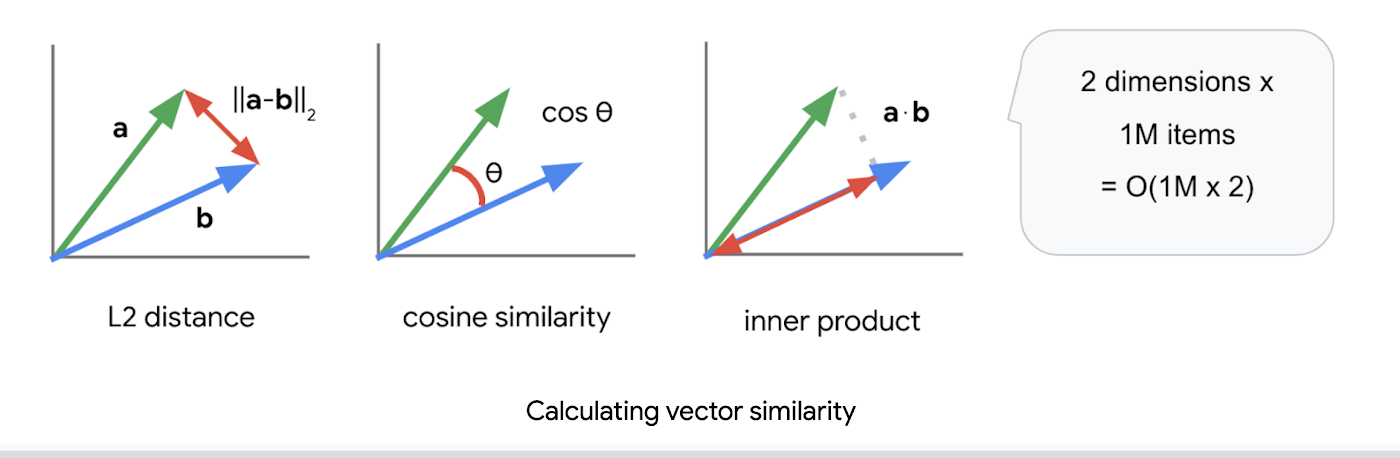
But all require calculations proportional to the number of vectors multiplied by the number of dimensions if you implement them in a naive way. For example, if you compare a vector with 1024 elements to 1M vectors, the number of calculations will be proportional to 1024 x 1M = 1.02B. This is the computation required to look through all the entities for a single search, and the reason why the BigQuery demo above takes so long.
Instead of comparing vectors one by one, you could use the approximate nearest neighbor (ANN) approach to improve search times. Many ANN algorithms use vector quantization (VQ), in which you split the vector space into multiple groups, define “codewords” to represent each group, and search only for those codewords. This VQ technique dramatically enhances query speeds and is the essential part of many ANN algorithms, just like indexing is the essential part of relational databases and full-text search engines.
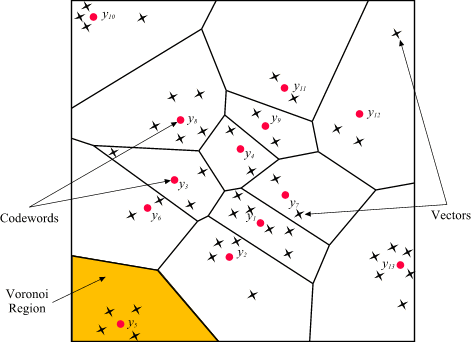
As you may be able to conclude from the diagram above, as the number of groups in the space increases the speed of the search decreases and the accuracy increases. Managing this trade-off — getting higher accuracy at shorter latency — has been a key challenge with ANN algorithms.
Last year, Google Research announced ScaNN, a new solution that provides state-of-the-art results for this challenge. With ScaNN, they introduced a new VQ algorithm called anisotropic vector quantization:
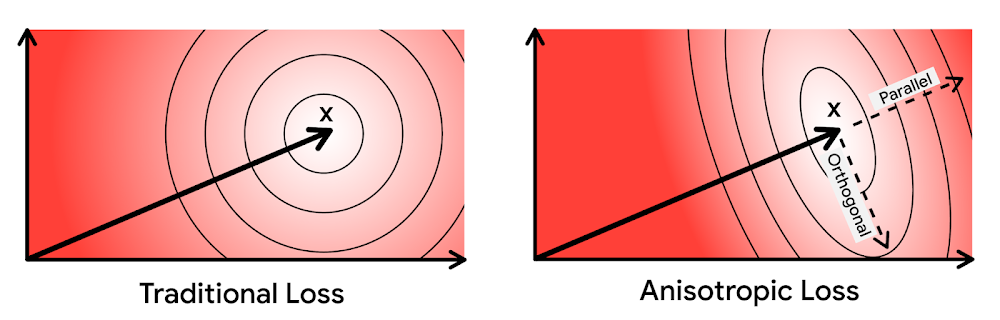
Anisotropic vector quantization uses a new loss function to train a model for VQ for an optimal grouping to capture farther data points (i.e. higher inner product) in a single group. With this idea, the new algorithm gives you higher accuracy at lower latency, as you can see in the benchmark result below (the violet line):
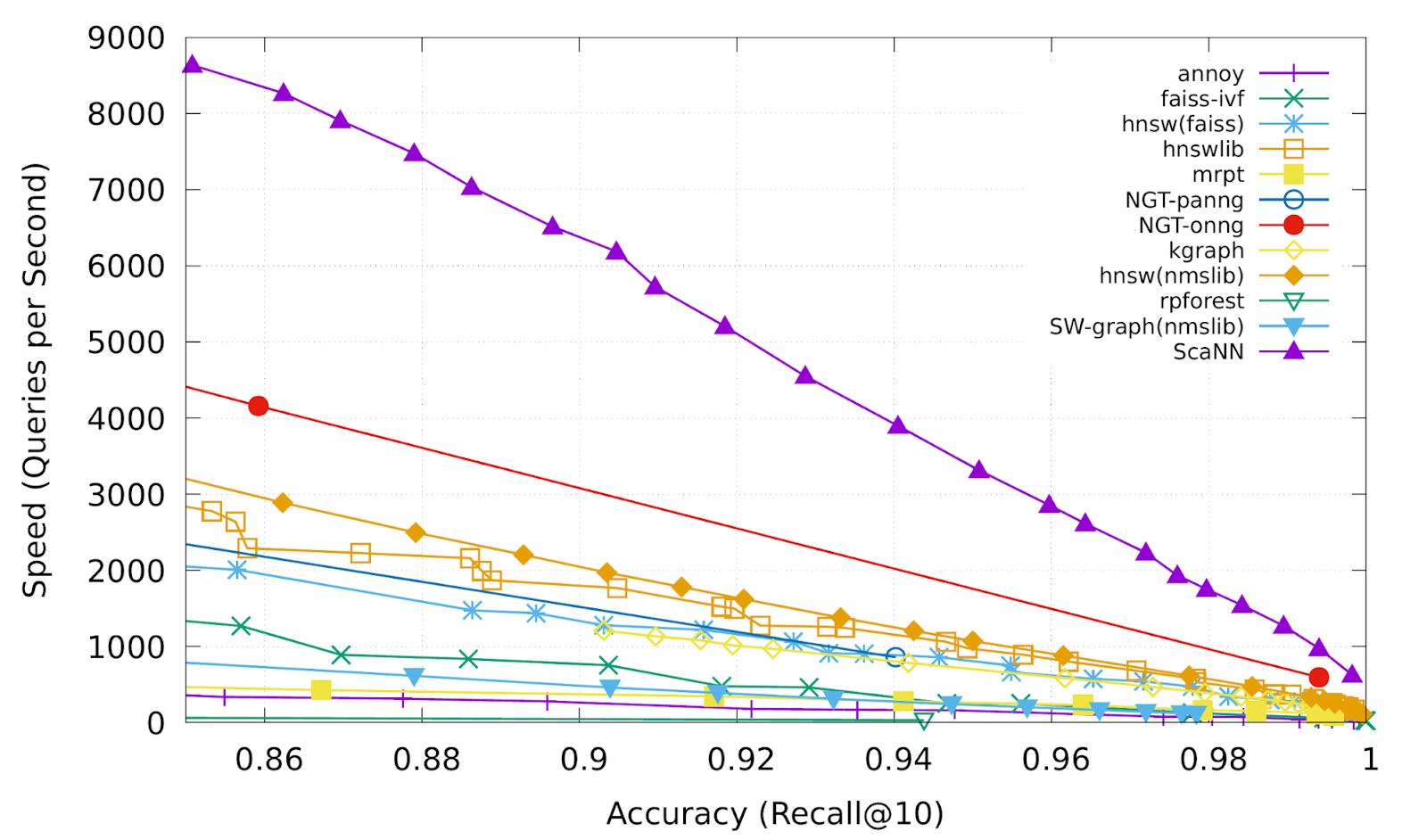
This is the magic ingredient in the user experience you feel when you are using Google Image Search, YouTube, Google Play, and many other services that rely on recommendations and search. In short, Google’s ANN technology enables users to find valuable information in milliseconds, in the vast sea of web content.
How to use Vertex AI Matching Engine
Now you can use the same search technology that powers Google services with your own business data. Vertex AI Matching Engine is the product that shares the same ScaNN based backend with Google services for fast and scalable vector search, and recently it became GA and ready for production use. In addition to ScaNN, Matching Engine gives you additional features as a commercial product, including:
- Scalability and availability: The open source version of ScaNN is a good choice for evaluation purposes, but as with most new and advanced technologies, you can expect challenges when putting it into production on your own. For example, how do you operate it on multiple nodes with high scalability, availability, and maintainability? Matching Engine uses Google’s production backend for ScaNN, which provides auto-scaling and auto-failover with a large worker pool. It is capable of handling tens of thousands of requests per second, and returns search results in less than 10 ms for the 90th percentile with a recall rate of 95 – 98%.
- Fully managed: You don’t have to worry about building and maintaining the search service. Just create or update an index with your vectors, and you will have a production-ready ANN service deployed. No need to think about rebuilding and optimizing indexes, or other maintenance tasks.
- Filtering: Matching Engine provides filtering functionality that enables you to filter search results based on tags you specify on each vector. For example, you can assign “country” and “stocked” tags to each fashion item vector, and specify filters like “(US OR Canada) AND stocked” or “not Japan AND stocked” on your searches.
Let’s see how to use Matching Engine with code examples from the MatchIt Fast demo.
Generating embeddings
Before starting the search, you need to generate embeddings for each item like this one:
{"Id":"b5c65fea9b0b8a57bfa574ea","Embedding": [0.16329009830951691,0.92436742782592773,0.00095699273515492678,0.011479727923870087,0.0089491046965122223,0.019959751516580582,0.031516745686531067,0.0066015380434691906,0.46404418349266052,...
This is an embedding with 1280 dimensions for a single image, generated with a MobileNet v2 model. The MatchIt Fast demo generates embeddings for two million images with the following code:
class Vectorizer:def __init__(self):self._model = tf.keras.Sequential([hub.KerasLayer("https://tfhub.dev/google/imagenet/mobilenet_v2_100_224/feature_vector/5", trainable=False)])self._model.build([None, 224, 224, 3]) # Batch input shape.def vectorize(self, jpeg_file):...snip...embedding = self._model.predict({"inputs": input_tensor})[0].tolist()return embedding
After you generate the embeddings, you store them in a Google Cloud Storage bucket.
Configuring an index
Then, define a JSON file for the index configuration:
{"contentsDeltaUri": "gs://match-it-fast-us-central1/wikimedia_images/index-1","config": {"dimensions": 1280,"approximateNeighborsCount": 150,"distanceMeasureType": "SQUARED_L2_DISTANCE","algorithm_config": {"treeAhConfig": {"leafNodeEmbeddingCount": 1000,"leafNodesToSearchPercent": 5}}}}
You can find a detailed description for each field in the documentation, but here are some important fields:
contentsDeltaUri: the place where you have stored the embeddingsdimensions: how many dimensions in the embeddingsapproximateNeighborsCount: the default number of neighbors to find via approximate searchdistanceMeasureType: how the similarity between embeddings should be measured, either L1, L2, cosine or dot product (this page explains which one to choose for different embeddings)
To create an index on the Matching Engine, run the following gcloud command where the metadata-file option takes the JSON file name defined above.
gcloud --project=gn-match-it-fast beta ai indexes create \--display-name=wikimedia-images \--description="Wikimedia Image Demo" \--metadata-file=metadata/wikimedia_images_index_metadata.json \--region=us-central1
Run the search
Now the Matching Engine is ready to run. The demo processes each search request in the following order:
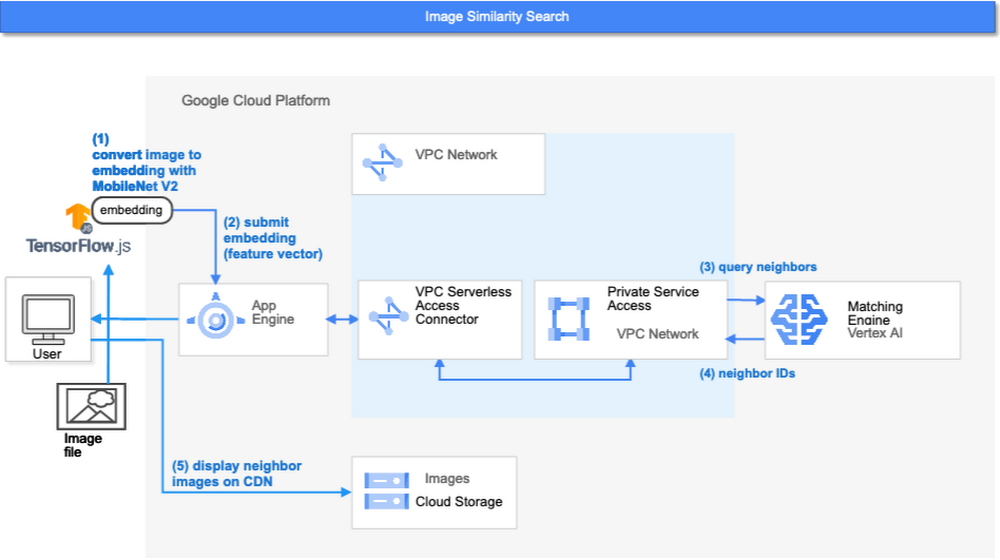
- First, the web UI takes an image (the one chosen or uploaded by the user) and encodes it into an embedding using the TensorFlow.js MobileNet v2 model running inside the browser. Note: this “client-side encoding” is an interesting option for reducing network traffic when you can run the encoding at the client. In many other cases, you would encode contents to embeddings with a server-side prediction service such as Vertex AI Prediction, or just retrieve pre-generated embeddings from a repository like Vertex AI Feature Store.
- The App Engine frontend receives the embedding and submits a query to the Matching Engine. Note that you can also use any other compute services in Google Cloud for submitting queries to Matching Engine, such as Cloud Run, Compute Engine, or Kubernetes Engine, or whatever is most suitable for your applications.
- Matching Engine executes its search. The connection between App Engine and Matching Engine is provided via a VPC private network for optimal latency.
- Matching Engine returns the IDs of similar vectors in its index.
Step 3 is implemented with the following code:
class MatchingQueryClient:...snip...def query_embedding(self, embedding, num_neighbors=30):request = match_service_pb2.MatchRequest()request.deployed_index_id = self._deployed_index_idfor v in embedding:request.float_val.append(v)request.num_neighbors = num_neighborsresponse = self._stub.Match(request)return response
The request to the Matching Engine is sent via gRPC as you can see in the code above. After it gets the request object, it specifies the index id, appends elements of the embedding, specifies the number of neighbors (similar embeddings) to retrieve, and calls the Match function to send the request. The response is received within milliseconds.
Next steps: Making changes for various use cases and better search quality
As we noted earlier, the major challenges in applying vector search on production use cases are:
- Creating vectors that are meaningful for business use cases
- Building a fast and scalable vector search service
From the example above, you can see that Vertex AI Matching Engine solves the second challenge. What about the first one? Matching Engine is a vector search service; it doesn’t include the creating vectors part.
The MatchIt Fast demo uses a simple way of extracting embeddings from images and contents; specifically it uses an existing pre-trained model (either MobileNet v2 or Universal Sentence Encoder). While those are easy to get started with, you may want to explore other options to generate embeddings for other use cases and better search quality, based on your business and user experience requirements.
For example, how do you generate embeddings for product recommendations? The Recommendation Systems section of the Machine Learning Crash Course is a great resource for learning how to use collaborative filtering and DNN models (the two-tower model) to generate embeddings for recommendation. Also, TensorFlow Recommenders provides useful guides and tutorials for the topic, especially on the two-tower model and advanced topics. For integration with Matching Engine, you may also want to check out the Train embeddings by using the two-tower built-in algorithm page.
Another interesting solution is the Swivel model. Swivel is a method for generating item embeddings from an item co-occurrence matrix. For structured data, such as purchase orders, the co-occurrence matrix of items can be computed by counting the number of purchase orders that contain both product A and product B, for all products you want to generate embeddings for. To learn more, take a look at this tutorial on how to use the model with Matching Engine.
If you are looking for more ways to achieve better search quality, consider metric learning, which enables you to train a model for discrimination between entities in the embedding space, not only classification:
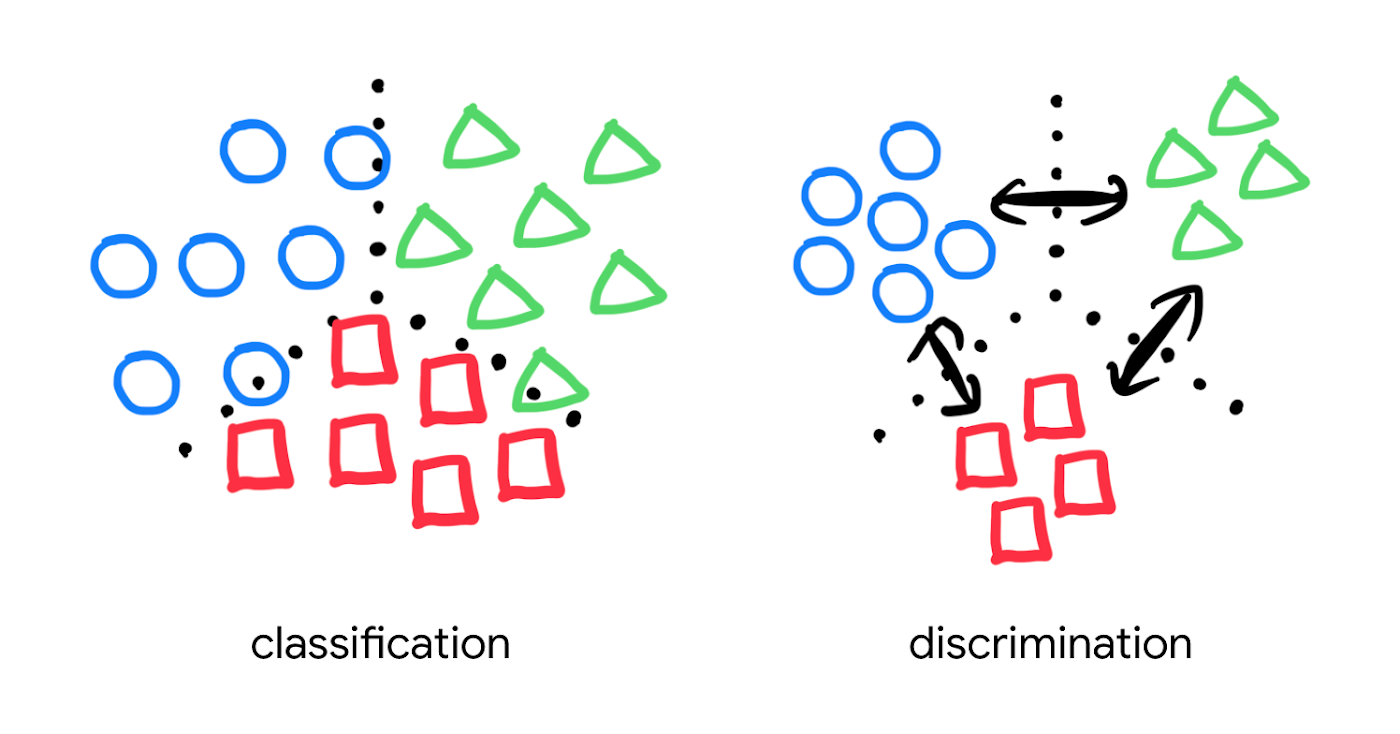
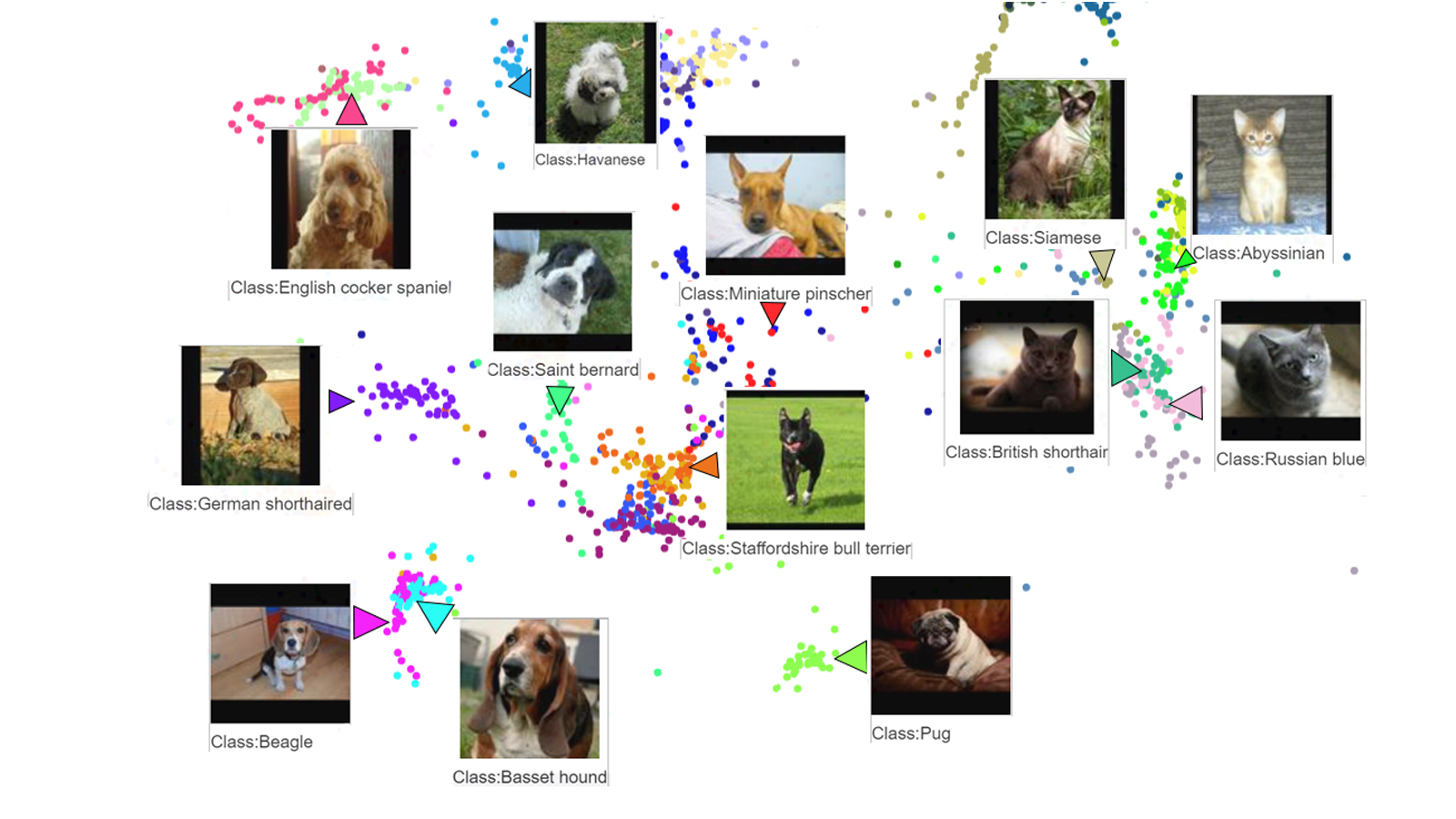
Popular pre-trained models such as the MobileNet v2 can classify each object in an image, but they are not explicitly trained to discriminate the objects from each other with a defined distance metric. With metric learning, you can expect better search quality by designing the embedding space optimized for various business use cases. TensorFlow Similarity could be an option for integrating metric learning with Matching Engine.
Interested? Today, we’re just beginning the migration from traditional search technology to new vector search. Over the next 5 to 10 years, many more best practices and tools will be developed in the industry and community. These tools and best practices will help answer many questions, like… How do you design your own embedding space for a specific business use case? How do you measure search quality? How do you debug and troubleshoot the vector search? How do you build a hybrid setup with existing search engines for meeting sophisticated requirements? There are many new challenges and opportunities ahead for introducing the technology to production. Now’s the time to get started delivering better user experiences and seizing new business opportunities with Matching Engine powered by vector search.
Acknowledgements
We would like to thank Anand Iyer, Phillip Sun, and Jeremy Wortz for their invaluable feedback to this post.
AL/ML and Data Products Delivered through Google Cloud Makes them Leader of Gartner 2022 Magic Quadrant

4874
Of your peers have already read this article.
2:00 Minutes
The most insightful time you'll spend today!
Gartner® named Google as a Leader in the 2022 Magic Quadrant™ for Cloud AI Developer Services report. This evaluation covered Google’s language, vision and structured data products including AutoML, all of which we deliver through Google Cloud. We believe this recognition is a reflection of the confidence and satisfaction that customers have in our language, vision, and AutoML products for developers. Google remains a Leader for the third year in a row, based upon the completeness of our vision and our ability to execute.
Developers benefit in many ways by using Cloud AI services and solutions. Customers recognize the advantages of Google’s AI and ML services for developers, such as Vertex AI, BigQuery ML, AutoML and AI APIs. In addition, customers benefit from the pace of progress in the field of Responsible AI and actionable ethics processes applied to all customer and partner solutions leveraging Google Cloud technology, as well as our core architecture including the Vertex AI platform, vision, conversational AI, language and structured data, and optimization services and key vertical industry solutions.
We believe that our ‘Leader’ placement validates this vision for AI developer tools. Let’s take a closer look at some of the report findings.
ML tools purpose-built for developers
Google’s machine learning tools have been built by developers, for developers, based on the groundbreaking research generated from Google Research and DeepMind. This developer empathy drives product development, which supports the developer community to achieve deep value from Google’s AI and ML services. An example of this is the unification of all of the tools needed for building, deploying and managing ML models into one ML platform, Vertex AI, resulting in accelerated time to production. They also cite BigQuery ML, AutoML for language, vision video and tabular data) and prebuilt ML APIs (such as speech and translation) as having high utility for developers at all levels of ML expertise to build custom AI and quickly infuse AI into their applications.
Leading organizations like OTOY, Allen Institute for AI and DeepMind (an Alphabet subsidiary) choose Google for ML, and enterprises like Twitter, Wayfair and The Home Depot shared more about their partnership with Google in their recent sessions at Google Next 2021.
Responsible AI principles and practices
Responsible AI is a critical component of successful AI. A 2020 study commissioned by Google Cloud and the Economic Intelligence Unit highlighted that ethical AI does not only prevent organizations from making egregious mistakes, but that the value of responsible AI practices for competitive edge, as well as talent acquisition and retention are notable. At Google, we not only apply our ethics review process to first party platforms and solutions, to ensure that our services design-in responsible AI from the outset, we also consult with customers and partners based on AI principles to deliver accountability and avoid unfair biases. In addition, our best-in-class tools provide developers with the functionality they need to evaluate fairness and biases in datasets and models. Our Explainable AI tools such as model cards provide model transparency in a structured, accessible way, and the What-If Tool is essential for developers and data scientists to evaluate, debug and improve their ML models.
Clear and understandable product architecture
Google Cloud’s investment in our ML product portfolio has led to a comprehensive, integrated and open offering that spans breadth (across vision, conversational AI, language and structured data, and optimization services) and depth (core AI services, with features such as Vertex AI Pipelines and Vertex Explainable AI built on top). Industry-specific solutions tailored by Google for retail, financial services, manufacturing, media and healthcare customers, such as Recommendations AI, Visual Inspection AI, Media Translation, Healthcare Data Engine, add another layer leveraging this foundational platform to help organizations and users adopt machine learning solutions more easily.
At Google Cloud, we refuse to make developers jump through hoops to derive value out of our technology; instead, we bring the value directly to them by ensuring that all of our AI and ML products and solutions work seamlessly together. To download the full report, click here. Get started on Vertex AI and talk with our sales team.
Disclaimer:
Gartner, Magic Quadrant for Cloud AI Developer Services, Van Baker, Arun Batchu, Erick Brethenoux, Svetlana Sicular, Mike Fang, May 23, 2022.
Gartner and Magic Quadrant are registered trademarks of Gartner, Inc. and/or its affiliates in the U.S. and internationally and is used herein with permission. All rights reserved.
Gartner does not endorse any vendor, product or service depicted in its research publications, and does not advise technology users to select only those vendors with the highest ratings or other designation. Gartner research publications consist of the opinions of Gartner’s research organization and should not be construed as statements of fact. Gartner disclaims all warranties, expressed or implied, with respect to this research, including any warranties of merchantability or fitness for a particular purpose.
More Relevant Stories for Your Company

Google Cloud and Univision Partnership to Up the Ante in UX for Spanish-speaking Audience
The past year has given everyone lots to think about—about our priorities as people and as businesses. As the world retreated behind closed doors, we saw how shared interests and experiences can bring us together. As the world grappled with a common enemy, we witnessed just how differently individuals, communities

How Toyota’s Google Cloud-powered Voice Assistant Gives a Turboboost to Drivers’ Experience
Over the decades, technology has helped us organize large amounts of physical information in ways that are streamlined, efficient, and easily accessible. Rows upon rows of encyclopedias are no longer needed; simply punch in or speak a query into Google Search and find numerous results at your fingertips. There’s no

Manhattan Associates and Google Cloud: How the Partnership Accelerates Future of Digital Retail
While the shift to digital business and the cloud has been well under way for some years now, organizations today have a new sense of urgency due to COVID-19. Delivering digital transformation is no longer a ‘nice to have’ option, rather, it is an operational imperative. Taking advantage of the

TPUs Can Cut Deep Learning Costs by upto 80%—and Other Things You Didn’t Know About TPUs
The Tensor Processing Unit (TPU) is a custom ASIC chip—designed from the ground up by Google for machine learning workloads—that powers several of Google's major products including Translate, Photos, Search Assistant and Gmail. Cloud TPU provides the benefit of the TPU as a scalable and easy-to-use cloud computing resource to
