





How to sustainably transform while minimizing risk

949
Of your peers have already read this article.
3:30 Minutes
The most insightful time you'll spend today!
In previous blog posts, we’ve discussed the benefits that organizations can reap by measuring and then optimizing their overall ESG impact. In this post, we’ll look at the endgame: sustainable transformation into an organization that continually adapts to maximize its resilience while reducing risk. Where will my customers be with the evolving global community landscape? How can I design communities and products with sustainability in mind? Are my assets exposed to physical climate risk — drought, flood, wildfire? Adaptation and resilience are the board and legislative focus areas that the ambition loops created by Google Cloud Ready – Sustainability seek to accelerate.
This is especially important due to the scrutiny of governments and financial institutions as they evaluate the viability of physical asset investments. These organizations want assurances that their investments will not be under undue environmental risk. Similarly, companies embarking on net-zero transitions can realize interest expense savings by providing the measurable, accountable assurances their financiers demand.
Leveraging analytics for climate and business resilience
We’ve said it before, but it bears repeating: The Google Cloud Ready – Sustainability program challenges the notion that sustainability is just a nice-to-have or merely good PR. Rather, we designed the program to help organizations adapt to a net-zero future with solutions that reduce risk, support growth, provide competitive advantages, and positively impact the bottom line. The following partners provide data and analytics that offer deep insights into the environment, natural resources, and social trends that point the way toward sustainable, profitable growth.
Atlas AI has built a geospatial artificial intelligence platform that helps every organization anticipate changing societal conditions — where people live, where wealth and poverty are concentrated, how the physical makeup of communities is evolving, and more — to determine where to invest today to prepare for the world of tomorrow. Atlas AI customers, which range from the World Bank and global NGOs to multinational corporations, use the platform to accelerate growth, future-proof supply chains, target resources to vulnerable populations, and build greater resilience to climate change.
Climate Engine’s SpatiaFi solution, powered by Google Cloud, helps financial services organizations connect economic assets to the world of Earth observation data supporting regulatory reporting, climate risk reduction, and new innovative sustainable finance offerings. Combining billions of planetary observations with peer-reviewed scientific methods, SpatiaFi is connecting Earth science to operational systems offering new levels of accuracy, transparency, scalability, and trust in climate and sustainability data in the context of financial decision-making.
Kumi Analytics‘ KACSAT solution was approved by OxCarbon as a methodology for the calculation and verification of voluntary carbon offsets in support of nature-based solutions. KACSAT leverages multiple satellite platforms and Google Earth Engine‘s state-of-the-art processing tools to enable science-based carbon assessment aligned to the Oxford Offsetting Principles of environmental integrity, additionality, permanence, and achieving net-zero emissions. Environmental organizations, financial institutions, and corporations can now offset their carbon footprints through the reforestation and conservation of millions of hectares of forests — something that was previously limited due to the cost and time of validating high-quality forest projects.
Tensorflight revolutionizes property underwriting with AI. Its cutting-edge tool provides underwriters and insurers with access to rich and highly accurate datasets for commercial and residential properties, enabling them to create superior insurance products. As pioneers of the first property-inspection platform based on convolutional neural networks, Tensorflight’s advanced technology connects seamlessly via API and utilizes ground-level imagery, satellite, and aerial data. This unique approach enables the company to generate precise replacement costs and conduct more comprehensive risk assessments. By automating property inspections and enhancing underwriting accuracy, Tensorflight empowers insurance providers to plan for the future with pragmatic decision-making. With Tensorflight, the future of property underwriting is transformed, offering unparalleled insights, efficiency, and sustainability.
Are you ready for sustainability transformation?
Transforming into a net-zero organization means much more than building resilience to climate change, as important as that is. It also means finding the customers of the future, achieving ongoing energy savings, more sustainable resource usage, and improved transparency to regulatory institutions and consumers. Google Cloud Ready – Sustainability partners offer certified solutions that can help organizations get there.
Look for Google Cloud Ready – Sustainability validated solutions on the Google Cloud Partner Directory Listing, Google Cloud Ready Sustainability Partner Advantage page, and — if applicable — via the Google Cloud Marketplace. We hope to help customers better understand how these technologies can help them meet their ESG goals, find the right solutions for their particular challenges, and implement solutions faster.
Learn more about the Google Cloud Ready – Sustainability validation initiative and explore all our partners in sustainability transformation.
Scope for Tech Adoption and Advancements in Healthcare are Still High: Google Cloud Research

5709
Of your peers have already read this article.
3:00 Minutes
The most insightful time you'll spend today!
Since the start of the COVID-19 pandemic, there’s been a rapid acceleration of digital transformation across the entire healthcare industry. Telehealth has become a more mainstream and safe way for patients and caregivers to connect. Machine learning modeling has helped speed up innovation and drug discovery. And new levels of integration and data portability have helped enable greater vaccine availability and equitable access to those who need it.
Data has been at the crux of this digital transformation — helping people stay healthy, accelerating life sciences research and delivering more personalized and equitable care. We recently unveiled partial results from our research with The Harris Poll, which revealed that nearly all physicians (95%) believe increased data interoperability will ultimately help improve patient outcomes. Today, we’re unveiling the second part of that research.
In February 2020, we commissioned The Harris Poll to survey 300 physicians in the U.S. about their biggest pain points — this was just before the COVID-19 pandemic strained the entire healthcare system and made us all hyper-aware of the risks we take in going to the hospital. In June 2021, we followed-up with those same questions and more. What it unveiled was just how much COVID-19 reshaped technology’s role in the healthcare field and how it’s changing day-to-day operations for physicians.
Here are some of the highlights:
Healthcare organizations accelerated technological upgrades over the course of the pandemic. After a year shaped primarily by the COVID-19 pandemic, use of telehealth saw substantial YOY growth, jumping nearly threefold from 32% in February 2020 to 90% this year. Forty-five percent of physicians say the COVID-19 pandemic accelerated the pace of their organization’s adoption of technology. In fact, more than 3 in 5 physicians (62%) say the pandemic has forced their healthcare organization to make technology upgrades that normally would have taken years. For example, 48% of physicians would like to have access to telehealth capabilities in the next five years. Before the COVID-19 pandemic, about half of physicians (53%) say their healthcare organization’s approach to the adoption of technology would best be described as “neutral” (i.e., willing to try new technologies only if they have been in the market for awhile or others have tried and recommended them).
Despite the technological leaps this year, most physicians still believe the industry lags behind in technology adoption but recognize the opportunity for technological support and advancement. The majority of physicians don’t view the healthcare industry as a leader when it comes to digital adoption. More than half of physicians describe the healthcare industry as lagging behind the gaming (64%), telecommunications (56%), and financial services industries (53%). However, the healthcare industry is not seen to be trailing as much as it was last year behind retail (54% in 2020; 44% in 2021); hospitality and travel (53% in 2020; 43% in 2021); and the public sector (39% in 2020; 26% in 2021).
Better interoperability alleviates physician burnout, improves health outcomes and speeds up diagnoses. The majority of physicians say increased data interoperability will cut the time to diagnosis for patients significantly (86%) and will ultimately help improve patient outcomes (95%.) In addition to better patient experiences and outcomes, more than half of physicians (54%) believe increased access to data via technology has had a positive impact on their healthcare organization overall. A majority believe that technology can alleviate the likelihood of physician “burn-out” (57%) and that efficient tools help decrease friction and stress (84%). And, as a result, 6 in 10 physicians say access to better technology and clinical data systems would allow them to have better work/life balance (60%) and that better access to/more complete patient data would reduce administrative burdens (61%). It is therefore not surprising that nearly 9 in 10 physicians (89%) say they are increasingly looking for ways to bring together all patient data into a single place for a more complete view of health.
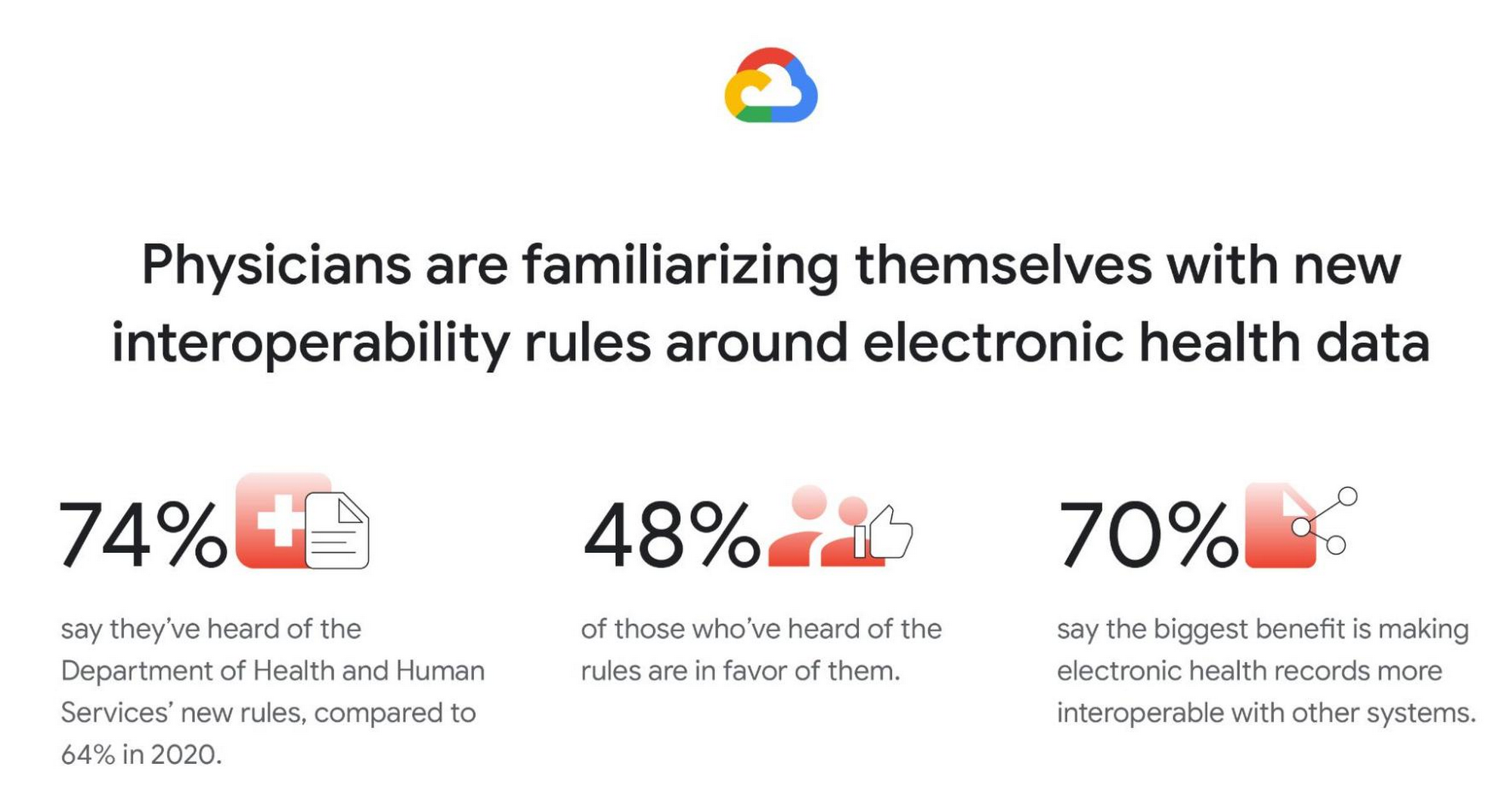
Familiarity with new Department of Health and Human Services (DHHS) interoperability rules grows, and many physicians are in favor. Most physicians (74%) say they have at least heard of the new DHHS rules (launched in 2019) to improve the interoperability of electronic health information. This is a clear rise from 2020 (64%), but deeper knowledge is fairly low. Only 30% of physicians say they are somewhat or very familiar with the new rules (though, again, this is a rise from 2020, when only 18% said they were very/somewhat familiar). Similar to in 2020, among those who have heard of the new rules, nearly half are in favor (48% in 2021; 45% in 2020) but a similar proportion remain unsure (46% in 2021; 50% in 2020). And like in 2020, by far the top potential benefit of the rules is thought to be forcing EHRs to be more interoperable with other systems (70%).
Google was founded on the idea that bringing more information to more people improves lives on a vast scale. In healthcare, that means creating tools and solutions that make data available in real time to help streamline operations and improve quality of care and patient outcomes. For example, our recently announced Healthcare Data Engine makes it easier for healthcare and life sciences leaders to make smart real-time decisions through clinical, operational, & groundbreaking scientific insights. To find out more about the Healthcare Data Engine, click here.
Survey methodology: The 2021 survey was conducted online within the United States by The Harris Poll on behalf of Google Cloud from June 9 – 29, 2021 among 303 physicians who specialize in Family Practice, General Practice, or Internal Medicine, who treat patients, and are duly licensed in the state they practice. The 2020 survey was conducted from February 18 – 25, 2020 among 300 physicians who specialize in Family Practice, General Practice, or Internal Medicine, who treat patients, and are duly licensed in the state they practice. Physicians practicing in Vermont were excluded from the research. This online survey is not based on a probability sample and therefore no estimate of theoretical sampling error can be calculated. For complete survey methodology, including weighting variables and subgroup sample sizes, please contact press@google.com.
What Are India’s Biggest Companies Doing on Google Cloud?
9302
Of your peers have already read this article.
6:30 Minutes
The most insightful time you'll spend today!
In the last year, there’s been an upward trend in cloud adoption in India. In fact, NASSCOM finds that cloud spending in India is estimated to grow at 30% per annum to cross the US$7 billion mark by 2022.
At Google, in our conversations with customers, discussions have evolved beyond cost savings and efficiencies. While those are still very relevant reasons for adopting cloud technologies, Indian enterprises are looking to Google Cloud to help them drive digital transformation, identify new revenue generating business models, reach previously untapped consumer markets, and build customer loyalty through greater insight and personalization.
Here are some companies and their stories.
Tata Steel: Mining data and maximizing its power
Tata Steel is a great example of an established enterprise from a traditional industry that is modernizing and embracing cloud computing. With an ambition to be a leader in manufacturing in India and a digital-first organization by 2022, Tata Steel believes smart analytics is key to enhancing operational efficiency and gaining business advantage.
To organize data from siloed systems across the organization and make it easily accessible to all employees, Tata Steel is using Cloud Search and plans to scale it to more than one million documents and 28 disparate enterprise content sources including enterprise resource planning (ERP) and SharePoint. In fact, Tata Steel is one of the first Indian enterprises to harness the power of Cloud Search to meet some of the most aggressive ingestion demands, with indexing durations reduced from weeks to seconds.
They are also leveraging Google Cloud Platform (GCP) services like Google Cloud Storage and BigQuery to build their data lake and enterprise data warehouse so they can take advantage of advanced analytics and machine learning. Managed services such as AI Platform further enable Tata Steel to manage end-to-end AI/ML workflows within the GCP console. This complements their existing on-premise reporting and analytics tools, and brings data management to the forefront of everything they do—from forecasting market demand to predictive equipment maintenance.
“Digital is not just a goal, it’s become a way of life. We are digitizing everything from the deployment of factory vehicles to improving material throughput to marketing and sales. As a result, we have petabytes of structured and unstructured data that is not only waiting to be mined, but that we can generate intelligence from to create opportunities across our multiple lines of business using GCP,” said Sarajit Jha, Chief Business Transformation & Digital Solutions at Tata Steel.
Helping L&T Financial Services reach customers in rural communities
In rural communities, quick access to financial services can make a tremendous difference to livelihoods. L&T Financial Services provides farm-equipment finance, micro loans and two-wheeler finance to consumers across rural India backed by a strong digital and analytics platform. Their digital-loan approval app, which runs on GCP, makes it significantly faster and easier for people to apply for financial assistance to purchase important things such as farming equipment and two-wheelers. It also helps rural women entrepreneurs get quicker access to funds for their businesses through micro loans.
L&T Financial found G Suite to be a far better collaborative tool to help staff work together efficiently. Employees can interact with each other in real time using Hangouts Meet, and the task of information sharing is more seamless and secure through Drive. BigQuery also helps L&T Financial Services generate behavior scorecards to track credit quality of its micro-loan customers.
“Cloud is the technology that enables us to achieve scale and reach. Today there are countless data points available about rural consumers which enable us to personalize our products to serve them better. With access to faster compute power, we can also on-board consumers more efficiently. Our rural businesses have clocked a disbursement CAGR of 60% over the past three years.” said Sunil Prabhune, Chief Executive-Rural Finance, and Group Head-Digital, IT and Analytics, L&T Financial Services.
Creating conversational connections for Digitate’s customers
Digitate, a venture of TCS (Tata Consultancy Services), has integrated Dialogflow into its flagship brand ignio, an award-winning artificial intelligence platform for driving IT operations, workload operations and ERP operations for diverse enterprises. This integration is the next step in ignio’s product development journey, and will enable users to chat or talk with ignio to detect issues, triage problems, resolve them and even predict system behavior.
“ignio combines its unique self-healing AIOps capabilities for enterprise IT and business operations with Dialogflow’s AI/ML-based, easy to use, natural and rich conversational capabilities to create an unparalleled, intuitive and feature-rich experience for our customers,” says Akhilesh Tripathi, Head of Digitate.
Indian enterprises going G Suite
The base of Indian enterprises that are making the switch to G Suite to streamline their productivity and collaboration also continues to grow. Sharechat, BookMyShow, Hero MotorCorp, DB Corp and Royal Enfield are now able to move faster within their organizations, using intelligent, cloud-based apps to transform the way they work.
A hybrid and multi-cloud future in India
IDC predicts that by 2023, 55% of India 500 organizations will have a multi-cloud management strategy that includes integrated tools across public and private clouds. (IDC FutureScape: Worldwide Cloud 2019 Predictions — India Implications (# AP43922319). We look forward to sharing more success stories of Indian enterprises that have taken the next step in their digital transformation journey.
Three months, 30x demand: How we scaled Google Meet during COVID-19

4176
Of your peers have already read this article.
10:30 Minutes
The most insightful time you'll spend today!
As COVID-19 turned our world into a more physically distant one, many people began looking to online video conferencing to maintain social, educational, and workplace contact. As shown in the graph below, this shift has driven huge numbers of additional users to Google Meet.
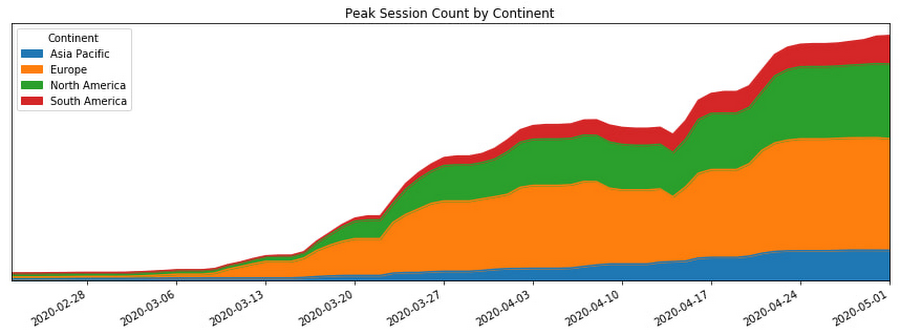
In this post, we’ll share how we ensured that Meet’s available service capacity was ahead of its 30x COVID-19 usage growth, and how we made that growth technically and operationally sustainable by leveraging a number of site reliability engineering (SRE) best practices.
Early alerts
As the world became more aware of COVID-19, people began to adapt their daily rhythms. The virus’s growing impact on how people were working, learning, and socializing with friends and family translated to a lot more people looking to services like Google Meet to keep in touch. On Feb. 17, the Meet SRE team started receiving pages for regional capacity issues.
The pages were symptomatic, or black-box alerts, like “Too Many Task Failures” and “Too Much Load Being Shed.” Because Google’s user-facing services are built with redundancy, these alerts didn’t indicate ongoing user-visible issues. But it soon became clear that usage of the product in Asia was trending sharply upward.
The SRE team began working with the capacity planning team to find additional resources to handle this increase, but it became obvious that we needed to start planning farther ahead, for the eventuality that the epidemic would spread beyond the region.
Sure enough, Italy began its COVID-19 lockdown soon thereafter, and usage of Meet in Italy began picking up.
A non-traditional incident
At this point, we began formulating our response. True to form, the SRE team began by declaring an incident and kicking off our incident response to this global capacity risk.
It’s worth noting, however, that while we approached this challenge using our tried-and-true incident management framework, at that point we were not in the middle of, or imminently about to have, an outage. There was no ongoing user impact. Most of the social effects of COVID-19 were unknown or very difficult to predict. Our mission was abstract: we needed to prevent any outages for what had become a critical product for large amounts of new users, while scaling the system without knowledge of where the growth would come from and when it would level off.
On top of that, the entire team (along with the rest of Google) was in the process of transitioning into an indefinite period of working from home due to COVID-19. Even though most of our workflows and tools were already accessible from beyond our offices, there were additional challenges associated with running such a long-standing incident virtually.
Without the ability to sit in the same room as everyone else, it became important to manage communication channels proactively to ensure we all had access to the information needed to achieve our goals. Many of us also had additional, non-work related challenges, like looking after friends and family members as we all adjusted. While these factors created extra challenges for our response, tactics like assigning and ramping up standbys and proactively managing ownership and communication channels helped us overcome these challenges.
Nevertheless, we carried on with our incident management approach. We started our global response by establishing an Incident Commander, Communications Lead, and Operations Lead in both North America and Europe so that we had around-the-clock coverage.
As one of the overall Incident Commanders, my function was like that of a stateful information router—albeit with opinions, influence, and decision-making power. I collected status information about which tactical problems lingered, who was working on what, and on the contexts that affected our response (e.g. governments’ COVID-19 responses), and then dispatched work to people who were able to help. By sniffing out and digging into areas of uncertainty (both in problem definition: “Is it a problem that we’re running at 50% CPU utilization in South America?” and solution spaces: “How will we speed up our turn-up process?”), I coordinated our overall response effort and ensured that all necessary tasks had clear owners.
Not long into the response, we realized that the scope of our mission was huge and the nature of our response would be long-running. To keep each contributor’s scope manageable, we shaped our response into a number of semi-independent workstreams. In cases where their scopes overlapped, the interface between the workstreams was well-defined.

We set up the following workstreams, visible in the diagram above:
- Capacity, which was tasked with finding resources and determining how much of the service we could turn up in which places.
- Dependencies, which worked with the teams that own Meet’s infrastructure (e.g., Google’s account authentication and authorization systems) to ensure that these systems also had enough resources to scale with the usage growth.
- Bottlenecks, which was responsible for identifying and removing relevant scaling limits in our system.
- Control knobs, which built new generic mitigations into the system in the case of an imminent or in-progress capacity outage.
- Production changes, which safely brought up all of the found capacity, re-deployed servers with newly-optimized tuning, and pushed new releases with additional control knobs ready to be used.
As incident responders, we continuously re-evaluated if our current operational structure still made sense. The goal was to have as much structure as required to operate effectively, but no more. With too little structure, people make decisions without having the right information, but with too much structure, people spend all of their time in planning meetings.
This was a marathon, and not a sprint. Throughout, we regularly checked in to see if anyone needed more help, or needed to take a break. This was essential in preventing burnout during such a long incident.
To help prevent exhaustion, each person in an incident response role designated another as their “standby.” A standby attended the same meetings as the role’s primary responder; got access to all relevant documents, mailing lists, and chat rooms; and asked the questions they’d need answers to if they had to take over for the primary without much notice. This approach came in handy when any of our responders got sick or needed a break because their standby already had the information they needed to be effective right away.
Building out our capacity runway
While the incident response team was figuring out how best to coordinate the flow of information and work needed to resolve this incident, most of those involved were actually addressing the risk in production.
Our primary technical requirement was simply to keep the amount of regionally available Meet service capacity ahead of user demand. With Google’s more than 20 data centers operating around the world, we had robust infrastructure to tap into. We quickly made use of raw resources already available to us, which was enough to approximately double Meet’s available serving capacity.
Previously, we relied on historical trends to establish how much more capacity we’d need to provision. But because we could no longer rely on the extrapolation of historical data, we needed to begin provisioning capacity based on predictive forecasts. To translate those models into terms our production changes team could act upon in production, the capacity workstream needed to translate the usage model into how much additional CPU and RAM we needed. Building this translation model is what later enabled us to speed up the process of getting available capacity in production, by teaching our tools and automation to understand it.
Soon, it became clear that merely doubling our footprint size was not going to be enough, so we started working against a previously unthinkable 50x growth forecast.
Reducing resource needs
In addition to scaling up our capacity, we also worked on identifying and removing inefficiencies in our serving stack. We could bucket much of this work into a couple of categories: tuning binary flags and resource allocations and rewriting code to make it cheaper to execute.
Making our server instances more resource-efficient was a multi-dimensional effort—the goal could be phrased as “the most requests handled at the cheapest resource cost, without sacrificing user experience or reliability of the system.”
Some investigative questions we asked ourselves included:
- Could we run fewer servers with larger resource reservations to reduce computational overhead?
- Had we been reserving more RAM than we needed, or more CPU than we needed? Could we better use those resources for something else?
- Did we have enough egress bandwidth at the edge of our network to serve video streams in all regions?
- Could we reduce the amount of memory and CPU needed by a given server instance by subsetting the number of backend servers in use?
Even though we always qualified new server shapes and configurations, at this point, it was very much worth reevaluating them. As Meet usage grew, its usage characteristics—like how long a meeting lasts, the number of meeting participants, how participants share audio time—also shifted.
As the Meet service required ever more raw resources, we began noticing that a significant percentage of our CPU cycles were being spent on process overhead like keeping connections to monitoring systems and load balancers alive, rather than on request handling.
In order to increase the throughput, or “number of requests processed per CPU per second,” we increased our processes’ resource specification in terms of both CPU and RAM reservation. This is sometimes called running “fatter” tasks.
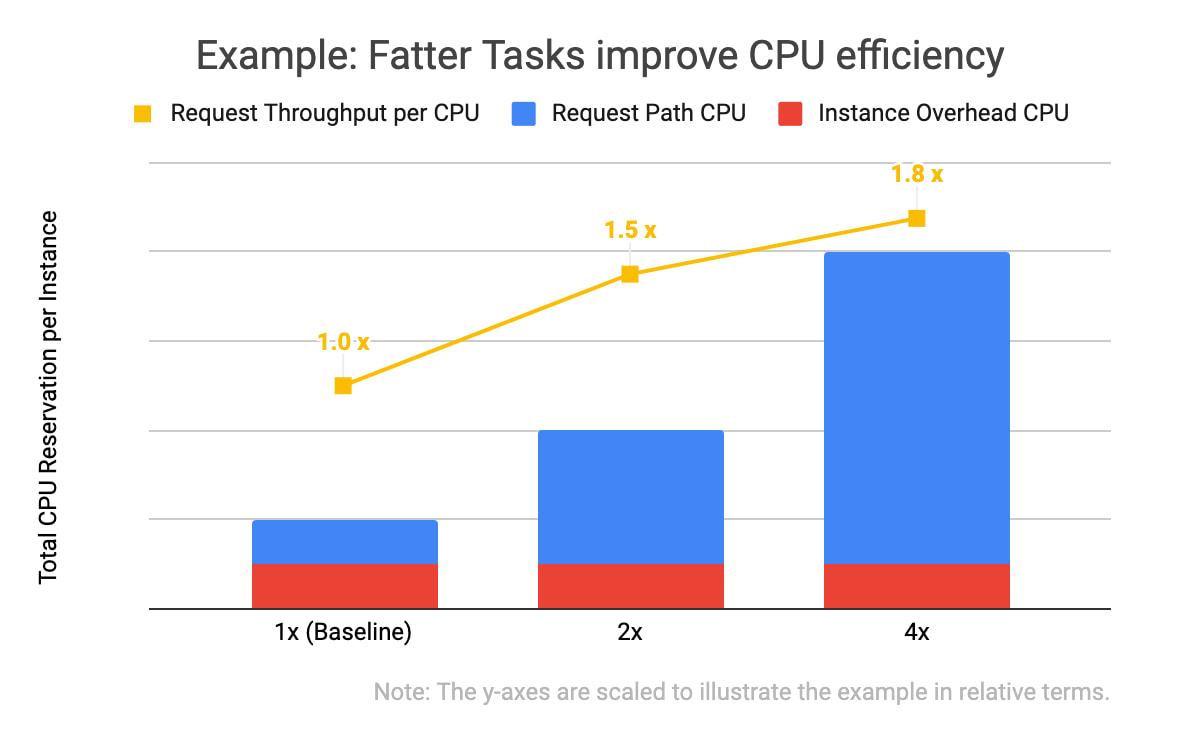
In the example data above, you will notice two things: that all three of the instance specifications have the same computational overhead (in red), and that the larger the overall CPU reservation of an instance, the more request throughput it has (in yellow). With the same total amount of CPU allocated, one instance of the 4x shape can handle 1.8 times as many requests as the four instances with the baseline shape. This is because the computational overhead (like persisting debug log entries, checking if network connection channels are still alive, and initializing classes) doesn’t scale linearly with the number of incoming requests the task is handling.
We kept trying to double our serving tasks’ reservations while cutting in half the number of tasks across our fleet until we hit a scaling limitation.
Of course, we needed to test and qualify each of these changes. We used canary environments to make sure that these changes behaved as expected and didn’t introduce or hit any previously undiscovered limitations. Similar to how we qualify new builds of our servers, we qualified that there weren’t any functional or performance regressions, and that the desired effects of the changes were indeed realized in production.
We also made functional improvements to our codebase. For example, we rewrote an in-memory distributed cache to be more flexible in how it sharded entries across task instances. This, in turn, let us store more entries in a single region when we grew the number of server instances in a cluster.
Crafting fire escapes
Though our confidence in our usage growth forecasts was improving, these predictions were still not 100% reliable. What would happen if we ran out of serving capacity in a region? What would happen if we saturated a particular network link? The control knob workstream’s goal was to provide satisfactory, if not ideal, answers to those kinds of questions. We needed an acceptable plan for any black swans that arrived on our consoles.
A group began working to identify and build more production controls and fire escapes—all of which we hoped we wouldn’t need. For example, these knobs would allow us to quickly downgrade the default video resolution from high-definition to standard-definition when someone joined a Meet conference. That change would buy us some time to course-correct using the other workstreams (provisioning and efficiency improvements) without substantial product degradation, but users would still be able to upgrade their video quality to high-definition if they wanted to.
Having a variety of instrumented controls like this built, tested, and ready to go bought us some additional runway if our worst-case forecasts weren’t accurate—along with some peace of mind.
Operational sustainability
This structured response involved large numbers of Googlers in a variety of roles. This meant that to keep making progress throughout the incident, we also needed some serious coordination and intentional communications.
We held daily handover meetings between our two time zones to accommodate Googlers based in Zurich, Stockholm, Kirkland, Wash., and Sunnyvale, Calif. Our communications leads provided regular updates to numerous stakeholders across our product team, executives, infrastructure teams, and customer support operations so that each team had up-to-date status information when they made their own decisions. The workstream leads used Google Docs to keep shared status documents updated with current sets of risks, points of contact, ongoing mitigation efforts, and meeting notes.
This approach worked well enough to get things going, but soon began to feel burdensome. We needed to lengthen our planning cycle from days to weeks in order to meaningfully reduce the amount of time spent coordinating, and increase the time we spent actually mitigating our crisis.
Our first tactic here was to build better and more trustworthy forecasting models. This increased predictability meant we could stabilize our target increase in serving capacity for the whole week, rather than just for tomorrow.
We also worked to reduce the amount of toil necessary to bring up any additional serving capacity. Our processes, just like the systems we operate, needed to be automated.
At that point, scaling Meet’s serving stack was our most work-intensive ongoing operation, due to the number of people who needed to be up-to-date on the latest forecast and resource numbers, and the number of (sometimes flaky) tools involved in certain operations.

As outlined in the life-cycle diagram above, the trick to automating these tasks was incremental improvements. First we documented tasks, and then we began automating pieces of them until finally, in the ideal case, the software could complete the task from start to finish without manual intervention.
To accomplish this, we committed a number of automation experts from within and outside the Meet organization to focus on tackling this problem space. Some of the work items here included:
- Making more of our production services responsive to changes in an authoritative, checked-in configuration file
- Augmenting common tools to support some of Meet’s more unique system requirements (e.g., its higher bandwidth and lower latency networking requirements)
- Tuning regression checks that had become more flaky as the system grew in scale
Automating and codifying these tasks made a significant dent in the manual operations required to turn up Meet in a new cluster or to deploy a new binary version that would unlock performance improvements. By the end of this scaling incident, we were able to fully automate our per-zone, per-serving job capacity footprint, which precluded hundreds of manually constructed invocations of command-line tools. This freed up time and energy for more than a few engineers to work on some of the more difficult (but equally important) problems.
At this point in scaling our operations, we could move to “offline” handoffs between sites via email, further reducing the number of meetings to attend. Now that our strategy was solidified and our runway was longer, we moved into a more purely tactical mode of execution.
Soon after, we wound down our incident structure and began to operate the remaining work more like how we’d run any long-term project.
Results
By the time we exited our incident, Meet had more than 100 million daily meeting participants. Getting there smoothly was not easy or straightforward; the scenarios the Meet team explored during disaster and incident response tests prior to COVID-19 did not encompass the length or the scale of increased capacity requirements we encountered. As a result, we formulated much of our response on the fly.
There were plenty of hiccups along the way, as we had to balance risk in a different way than we normally do during standard operations. For example, we deployed new server code to production with less canary baking time than normal because it contained some performance fixes that bought us additional time before we were due to run out of available regional capacity.
One of the most crucial skills we honed throughout this two month-long endeavour was the ability to catalog, quantify, and qualify risks and payoffs in a way that was flexible. Everyday, we learned new information about COVID-19 lockdowns, new customers’ plans to start using Meet, and available production capacity. Sometimes this new information made obsolete the work we’d started the day before.
Time was of the essence, so we couldn’t afford to treat each work item with the same priority or urgency, but we also couldn’t afford not to hedge our own forecast models. Waiting for perfect information wasn’t an option at any point, so the best we could do was build out our runway as much as possible, while making calculated but quick decisions with the data we did have.
All of this work was only possible because of the savvy, collaborative, and versatile people across a dozen teams and as many functions—SREs, developers, product managers, program managers, network engineers, and customer support—who worked together to make this happen.
We ended up well-positioned for what came next: making Meet available for free to everyone with a Google account. Normally, opening the product up to consumers would have been a dramatic scaling event all on its own, but after the intense scaling work we’d already done, we were ready for the next challenge.
3982
Of your peers have already watched this video.
22:21 Minutes
The most insightful time you'll spend today!
Boosting Chrome OS adoption with effective change management
Can you remember the last time you asked a child to do something how did you convince them to do what you wanted? How many times did they ask you why probably more than once, right? So we know change is hard when we ask someone to make a change we’re asking a lot from them. Very often with IT projects we expect people to change, we don’t really think through the implications of this.
The purpose of this video is to guide you to migrate to Chromebooks and help you understand the reason why. When putting together your change management plan there’s a much larger chance of your project being able to deliver on its business objectives.
Introducing new technology into your organization is an exciting step. However, change management and workforce adoption of the new technology can be challenging. Get insights from Google’s Chrome Enterprise expert on change management strategies and best practices for increasing Chromebook adoption in your organization.
How EDI empowers its workforce in the field, in the office, and at home

3890
Of your peers have already read this article.
5:12 Minutes
The most insightful time you'll spend today!
For consulting companies such as EDI Environmental Dynamics Inc. (EDI), interactions among employees and customers are the direct drivers of value, and helping them collaborate has a tangible impact on the bottom line. However, connecting people from the field to work-from-home spaces to the office is no easy task.
EDI, an environmental consulting company that helps organizations assess environmental impacts and meet government regulations, has eight offices across Western and Northern Canada. Frontline workers account for 80% of its total employees, ranging from biologists and scientists to safety inspectors and project managers. EDI’s success is directly linked to its remote workforce’s ability to work effectively in the field and to collaborate with coworkers and clients across Western Canada. With the help of Google Workspace and AppSheet, EDI is enabling its mobile workforce to function more efficiently and collaboratively than ever before.
Bringing efficiency to its frontline workers
Just four years ago, much of EDI’s fieldwork was still being tracked with pen and paper, resulting in frequent challenges, from error-prone data retention to inefficient collaboration. Luckily, EDI was able to address this using AppSheet, Google Cloud’s no-code application development platform.
With AppSheet, EDI has replaced the majority of its pen-and-paper processes with tailored apps. As EDI’s Director of IT, Dennis Thideman explains, “AppSheet allows us to be much more responsive to our field needs. Using it, we can spin up a basic industrial application, share it with our field workers, and have them adjust their workflows—all in just a few hours. Doing that from scratch might take weeks or months.”
For EDI, there are a couple of features that make AppSheet shine. First, AppSheet is platform-agnostic, meaning it works on most devices and most operating systems, so any employee can access their AppSheet apps. Secondly, because 90% of EDI’s projects involve working in remote areas, they can leverage AppSheet’s Offline Mode, allowing workers to collect data on their mobile devices in the field and have it automatically download when they reconnect to the internet.
Eliminating the challenges associated with pen and paper has resulted in even more benefits than EDI leaders originally anticipated: namely, employees work faster across an unexpectedly wide range of use cases. For example, governmental regulations require EDI to complete a pre-trip safety evaluation before heading into the field. Before using AppSheet, this evaluation would take upwards of four hours to complete. By streamlining the process with an AppSheet app, EDI employees have reduced that time down to one hour. EDI averages over 850 evaluations every year, and they’ve realized over 2,550 hours in annual savings—savings that can be passed on to clients and allow staff to focus more time on other tasks. This is just one of more than 35 mission-critical applications that EDI has built with AppSheet.
Time savings is a huge benefit, but as Logan Thideman, an IT manager at EDI, explains “At the end of the day, we realized that the biggest benefits of AppSheet aren’t about time savings as much as they are about high-quality data.” Collecting and analyzing good data is critical to EDI’s operations, as most data collected in the field can never be replicated. For example, if a water quality sample for a certain day is lost (which can happen easily when using pen and paper), that information can never be retrieved again. AppSheet makes data collection easy. Employees are much less likely to lose a smart device than they are a paper form, and any data entered would be immediately uploaded to a Google Sheet or SQL database when they return from the field, meaning data is always backed up in the cloud. From there, information can quickly be analyzed by coworkers, passed on to the client, or shared with government agencies to ensure proper compliance.
Overall, EDI found that the more they could enable their field workers with AppSheet apps, the more those employees could focus on providing quality research and recommendations to their clients and gain a stronger competitive advantage in the market.
Enhancing collaboration everywhere
Enabling collaboration in remote environments can be difficult, but Google Workspace has made this easy for EDI. Google Workspace lets employees effortlessly share documents and work together in real time. Given its ease of use for mobile workers, Google Meet has become all-important and is used as EDI’s tool of choice for face-to-face collaboration. It became even more essential when COVID-19 arrived. As Dennis Thideman explains, “Google Meet allowed us to adapt to the COVID-19 environment quickly as we were already conversant with it. In just two days, we were able to transition our employees from office to home because of it.” By leveraging Google Meet and the rest of the Google Workspace platform, EDI employees are able to remain productive, regardless of where they’re working.
Google Workspace also makes it easy to collaborate with customers. Because many of EDI’s customers leverage Microsoft Office tools such as Word, Excel, and PowerPoint, EDI still needs to use them. Google Workspace makes it easy to continue using Microsoft products in its environment, allowing employees to store Microsoft Office files on Google Drive and open, edit and save them using Google Docs, Sheets, and Slides.
AppSheet and Google Workspace’s deep integrations also make collaboration easy. Employees can update data in Google Sheets, save images and reports to Drive, and update Calendar events all from AppSheet apps. Together, the two platforms simplify many of the activities that consumed so much time in the past.
An empowered workforce
Empowering employees has been at the core of EDI’s success, and Google Workspace and AppSheet have given EDI a clear advantage. Collaboration has become easier and more agile using Google Workspace. Robust AppSheet apps have been built to streamline mission-critical processes. For unique project requirements, simple AppSheet apps are built in a matter of hours. As Dennis Thideman summarizes, Google Workspace and AppSheet “make managing a distributed, deskless workforce much simpler, giving EDI better growth opportunities and a competitive edge in the marketplace.”
More Relevant Stories for Your Company

New Study Suggests Public Sector Firms Must Move Over Legacy Productivity Tools
Prior to joining Google Cloud, I spent 20 years in the public sector serving in various security roles, most recently as the head of the cybersecurity division at the newly established Cybersecurity and Infrastructure Security Agency (CISA). I was responsible for delivering services and capabilities to about 100 civilian agencies,

Workspace powers business as usual for Optiva during COVID-19
Established companies in any industry, including telecommunications, often take a cautious approach when it comes to adopting new technology. This is true of any technology and especially of tools used across entire organizations and at all levels—like collaboration and communication tools. I joined Optiva Inc. as its Chief Marketing Officer

How PLAID’S Multi-cloud Approach with Anthos Clusters on AWS Drives Higher Business Growth
Editor’s note: Today’s post comes from Naohiko Takemura, Head of Engineering, and Kosukex Oya, Engineer, both from Japanese customer experience platform PLAID. The company runs its platform in a multicloud environment through Anthos clusters on AWS and shares more on its experiences and best practices. At PLAID, our mission is to maximize the value

Rethinking time management: Helping employees manage their time efficiently
As business leaders evaluate their hybrid work models, employee productivity is top of mind. They’re trying to understand how to balance organizational needs for productivity with employee needs for autonomy, flexibility, and work/life balance. In my role as Google’s Productivity Advisor, I help organizations and employees realize that being productive
