





How One Company Uses AI and Data Analysis to Boost Revenue

9483
Of your peers have already read this article.
4:30 Minutes
The most insightful time you'll spend today!
AI, deep learning, and image recognition is transforming the shopping experience. These technologies enable consumers to use product images or screenshots rather than text to search for similar products. This improves the customer experience and enables retailers with online and offline outlets to provide a genuine omnichannel experience.
The lack of complexity and the ease of use of BigQuery has enabled ViSenze to reduce its data infrastructure and management costs by 30%–50%, and scale up without incurring downtime.
—Renjie Yao, Data Platform Lead, ViSenze
Visual commerce provider ViSenze is helping some of the world’s leading retailers improve conversion rates through image-based search.
The business’s products also enable media companies to use the platform to turn images and videos into engagement opportunities—driving new and incremental revenues.
Created through NExT—a research center established by the National University of Singapore and Tsinghua University of China—ViSenze now operates in the United States, United Kingdom, India, China, and Singapore. The business is backed by Japan-based internet and ecommerce company Rakuten and cross-border investment specialist WI Harper Group.
Growth in SMB and Mobiles
Renjie Yao, Data Platform Lead at ViSenze, sees opportunities for growth in the small-to-medium business sector, where companies do not have the resources to build similar technologies, and with mobile device OEMs to integrate ViSenze natively on smartphones.
Phone owners can activate a “shopping lens” on camera and gallery apps to capture an image of a product. They then receive matching results from more than 800 partner merchants and retailers and can then click through to product pages on partner apps or mobile websites. Alternatively, they may use a photo to compare products sold on different sites or shop matching styles.
“Our research found Google Cloud provided a complete, integrated ecosystem rather than a disparate collection of tools and components, and so was ideal for our needs.”
—Renjie Yao, Data Platform Lead, ViSenze
The ViSenze API analyzes the contents of a selected or clicked image and sends the information back to the organization’s visual commerce platform. The platform feeds back similar results based on that information.
The ViSenze offering also extends to image analysis for the tagging of product attributes—such as a white turtleneck cardigan with full sleeves—to provide an improved search experience.
Data Vital to ViSenze
Capturing and analyzing large volumes of data is integral to ViSenze. “We have to understand how consumers interact with our customers’ ecommerce websites and apps,” says Yao. “For example, we need to know who has looked at a particular pair of jeans on a website and whether that visit led to a conversion. We can then tell that customer whether they need to make more stock available.”
ViSenze also relies on data to provide high-quality training for its image recognition models and its domain-specific models for online retail.
Protect Customer Data
Data is vital to ViSenze—but customer privacy is most important. “All the data we collect is transparent to our customers, meaning they can decide what they do not want us to collect. In addition, all personal data processing complies with privacy protection regulations in each region, such as the General Data Protection Regulation in Europe.”
A Quick Move to the Cloud
ViSenze started operations using servers, storage, networking, and associated systems in an on-premises data center operated by NExT.
However, to support rapid growth, the business decided to move its workloads to the cloud. ViSenze opted for a multi-cloud architecture, using in part a Google Cloud data infrastructure.
“Our research found Google Cloud provided a complete, integrated ecosystem rather than a disparate collection of tools and components, and so was ideal for our needs,” says Yao. “We could connect different components with the click of a mouse.” Further, the business found it could easily configure rules and pipelines to route data logs to relevant Google Cloud services.
The review found Google Cloud’s extensive managed services would also remove administration and maintenance tasks from ViSenze’s in-house technology team—freeing team members to focus on more valuable tasks.
In addition, Google Cloud provided the security features—including custom hardware running hardened operating systems and file systems and encryption of data at rest and in transit—needed to protect sensitive information. Finally, the location of Google Cloud regions in several countries would enable the business to meet regulatory and data sovereignty requirements.
A Three-Month Implementation
ViSenze opted to move to Google Cloud in mid-2017 and completed a three-month implementation using internal resources. “The process was very smooth and intuitive, and we had no problems building our entire data platform within Google Cloud,” says Yao.
The business now uses an architecture comprising Google Kubernetes Engine to manage and orchestrate Docker containers running in Google Cloud Platform; BigQuery to provide an analytics data warehouse, with Google Data Studio providing customizable visualization and reports; Stackdriver to monitor and manage virtual machine instances and services inside Google Cloud; Cloud SQL to manage its relational databases for real-time analytics; Compute Engine to provide compute resources; Cloud Storage to store files and objects; Cloud Pub/Sub to provide real-time messaging between applications; and Cloud Functions to build event-driven applications.
After collecting the request logs of users in virtual machine instances and Docker containers, ViSenze distributes them in three directions. “We export raw logs into Cloud Pub/Sub for indexing inside an Elasticsearch search engine, and to a BigQuery data warehouse for further analytics,” explains Yao. “We also use Cloud Functions-created applications to obtain the logs from Cloud Pub/Sub to perform some real-time calculations.”
“We are currently using Airflow workflow management on Compute Engine as our hosted ETL platform, but are likely to move to Cloud Composer in future.”
500 Million Records Per Day
With Google Cloud providing its data infrastructure, ViSenze is well positioned to meet internal and customer demands for more granular insights. The business is now processing 500 million records per day through BigQuery and saves up to one year’s aggregated data—excluding any personal data—in the data warehouse for analysis.
The nature of ViSenze’s business means most reports are generated for data processed on an hourly, daily, or monthly basis. “BigQuery is extremely stable and performance optimized, regardless of the volume of data it processes,” says Yao. “Across BigQuery and other Google Cloud Platform services, we’ve recorded 99.99% availability over the past year.”
The lack of complexity and the ease of use of BigQuery has enabled ViSenze to reduce its data infrastructure and management costs by 30%–50%, and scale up without incurring downtime.
“With BigQuery, we have saved the equivalent of two full-time engineers and now need only half of one person’s time to maintain our whole data platform,” says Yao.
“In addition, BigQuery integrates closely with Data Studio, enabling non-technical people in our product and business teams to create dynamic, detailed analysis dashboards. We now use Data Studio to create nearly 50 separate reports.”
The business has now grown to offer access to more than 1 billion users and a listing of more than 400 million purchasable products.
Next Steps
ViSenze is now researching the potential of the Cloud AutoML suite of machine learning products to improve the training of its models and run a fully managed NoSQL database through Cloud Datastore.
“A NoSQL database service is the only missing piece of our architecture for now, and using Cloud Datastore would enable us to focus almost exclusively on our business,” says Yao. “With Google Cloud Platform, we are ideally positioned to continue providing support to our business team and help them continue expanding into new markets.
“In addition, we can help retailers and consumers to unlock the potential of the web and apps to transform the purchasing experience.”
Attract Investor Funding by Harnessing the Power of Cloud Operations, Billing, and Customer Care

1397
Of your peers have already read this article.
4:30 Minutes
The most insightful time you'll spend today!
More and more startups are choosing to build their business on Google Cloud, and if yours is one of them — welcome! And even though Google Cloud is easy to use, there’s still a lot to learn, starting with how to create and activate your account, and how to create projects, folders, and organizations as part of Google Cloud’s resource hierarchy. If you prefer, you can also watch our video on how to get started with Google Cloud.
Once you’ve mastered those concepts, you’re ready to learn how to get the most out of your investment in Google Cloud. In this blog, we’ll show you how to manage and monitor your cloud resources with Google Cloud’s operations suite, administer your billing with Cloud Billing, and improve the support you receive with Google Cloud Customer Care. Whether you’re new to Google Cloud or an experienced user, these services will help improve your experience.
Let’s get started!
Improve the performance and reliability of your applications with the operations suite
Sometimes you want to check how your deployment is behaving, or if there is something happening with your server, database, or application that is affecting your customers. With so many tools to check, finding and solving the issue can become overwhelming very quickly. This is where Google Cloud’s operations suite comes in.
This suite of products for integrated monitoring, logging, and tracing managed services for applications and systems running on Google Cloud and beyond. It can help you visualize and monitor incidents with dashboards and Metrics Explorer, manage and analyze log data in real-time all in one place with Cloud Logging, visualize metrics at scale with Cloud Monitoring, manage latency with Cloud Trace, and perform performance and cost management with Cloud Profiler.
Learn more about the operations suite in the video below:
Manage budgets and alerts with Cloud Billing
Google Cloud billing management is easier than you might think. Google Cloud charges for compute resources monthly on a consumption basis, which is different from the traditional upfront purchase model. With the right tools and resources, you can more easily manage your costs and optimize your use of Google Cloud resources.
One of the most important things to do is to set up billing and alerts. This will help you avoid unexpected charges and ensure that you are only paying for the resources you use. You can also use budgets and alerts to track your costs and help ensure that you are staying within your budget.
You can also view your costs through console billing reports, monthly invoices or build customized dashboards on BigQuery, Google Data Studio, or a BI tool of your preference. This allows you to see where your costs come from and identify areas where you can save money. You can also use cost management to optimize your use of Google Cloud resources and get the most out of your investment.
Finally, Google Cloud offers a variety of discounts and optimization options. These can help you save money on your overall costs. For example, you can get a discount if you commit to using Google Cloud for a certain period of time. You can also save money by using preemptible VMs, which are VMs that are available at a lower price but can be terminated at any time.
Google Cloud Customer Care
To meet customer needs and deliver a better experience, we’ve reenvisioned our Customer Care portfolio, a scalable set of offerings built with your needs at the center, so you can simplify and streamline your support experience.
Choose from the core offerings:
- Basic – the support tier you receive when you sign up on Google Cloud. You can use this at no cost but support is offered for billing issues only.
- Standard – simple, flexible way to ensure that your workloads run smoothly on Google Cloud. Standard enables you to receive technical help from Google experts with a four hour response time and 8 hours response time during 5 days a week availability.
- Enhanced – rapid response times and additional services to boost your productivity and help you run in Google Cloud efficiently. There is both case and phone support for technical issues, with a one-hour response time. There is 24/5 availability overall with 24/7 for critical issues. You can also have add-ons or value-add services like Technical Account Adviser Service and Event management.
- Premium – the highest value support offering, supplying incredibly fast response times, a named Technical Account Manager, Customer Aware support and additional services. There is case and phone support for technical issues and also third-party technology support, with a 15-minute response time and a 24/5 availability overall with 24/7 for critical issues.
Watch the video to find out how to purchase support, create support cases and learn more about support.
Supercharge your growth with the Google for Startups Cloud Program
Growing a startup requires technology that can keep up with and enhance your ideas. The Google for Startups Cloud Program provides the tech you need to help develop better software and deliver innovative experiences with confidence. At the same time, you’ll help boost your team’s capabilities with expert cloud guidance, Google Cloud credits, training opportunities, and more.
The program has two tiers:
- Start: for pre-seed startups that have not yet received equity funding. Get up to $2,000 USD in Google Cloud credit that’s valid for two years toward Google Cloud services and even toward a Cloud Customer Care plan with unlimited access to technical support, networking opportunities with the global Google Cloud Startup Community, and more.
- Scale: for seed to series A startups with verified equity funding. Get Google Cloud and Firebase costs covered up to $100,000 USD a year for your first two years, unlimited access to technical support when credits are applied to a Cloud Customer Care plan, partnerships with Google Cloud Startup Customer Engineers and a dedicated Startup Success Manager, networking opportunities with the global Google Cloud Startup Community, co-marketing for select startups, and more.
Once enrolled, Google startup experts will recommend Google products and services that can help your startup grow in the cloud. Learn more about the Google for Startups program, eligibility criteria, credit usage and migration incentives in the our Startup Programs video linked down below.
That’s a wrap!
Let’s recap: The operations suite includes tools to monitor incidents, analyze log data in real-time, manage latency, and more. Cloud Billing offers billing management tools and resources to help you save costs and make the most of your resources. If you need help, Cloud Customer Care services are available to streamline your support experience. Also, if you’re a startup, don’t forget to check the Google for Startups Cloud Program!
The Google Cloud Technical Guides for Startups series has many detailed videos and handbooks to support you on all steps of your startup growth journey. Check out our full playlist on the Google Cloud Tech channel and website. Don’t forget to subscribe to stay up to date.
See you in the cloud!
How Google Cloud Helps SAP Admins Create Scalable, Secure Networks

6665
Of your peers have already read this article.
3:00 Minutes
The most insightful time you'll spend today!
SAP forms the critical backbone of thousands of enterprises, supporting critical business functions such as finance, supply chain, warehouse management, and more. Google Cloud provides a highly scalable and resilient infrastructure to run such workloads and offers tools, such as Smart Analytics and Machine Learning that can accelerate your organization’s digital transformation.
In fact, a recent study by Forrester found that running SAP on Google Cloud can generate a 160% return on investment and a payback period of six months or less, thanks to legacy infrastructure cost savings, downtime avoidance, and productivity improvements.
How you deploy your SAP systems across your network has a tremendous impact on its availability, resilience, and performance. In addition to separate production and high-availability (HA) environments, SAP deployments typically include sandbox, development, quality assurance (QA), and disaster recovery environments as well.
Because most of the Google network is virtual, SAP administrators can easily design complex landscapes that suit your organization’s SAP deployment and organizational structure while also meeting security and operational requirements.
As you get started with SAP on Google Cloud, you’ll need to decide how to configure your networking to ensure the availability and performance of various SAP systems. Here’s a look at your options.
VPC and shared VPC
A virtual private cloud (VPC) is a secure, isolated private network hosted within Google Cloud. VPCs are global in Google Cloud, so a single VPC can span multiple regions without communicating across the public internet. Similarly, subnets can span across zones within a region. A zone represents a single failure domain, so typical SAP deployments place production and HA systems in different zones to ensure resiliency. Google Cloud simplifies this type of deployment, because subnets containing both production and HA systems can span multiple zones.
This capability also simplifies SAP clustering, since the cluster’s virtual IP (VIP) address can be in the same range as those of the production and HA machines. This configuration shields the floating IP using Google internal load balancers and is applicable to HA clustering of the application layer (ASCS and ERS) and the HANA database layer (HANA Primary and Secondary).
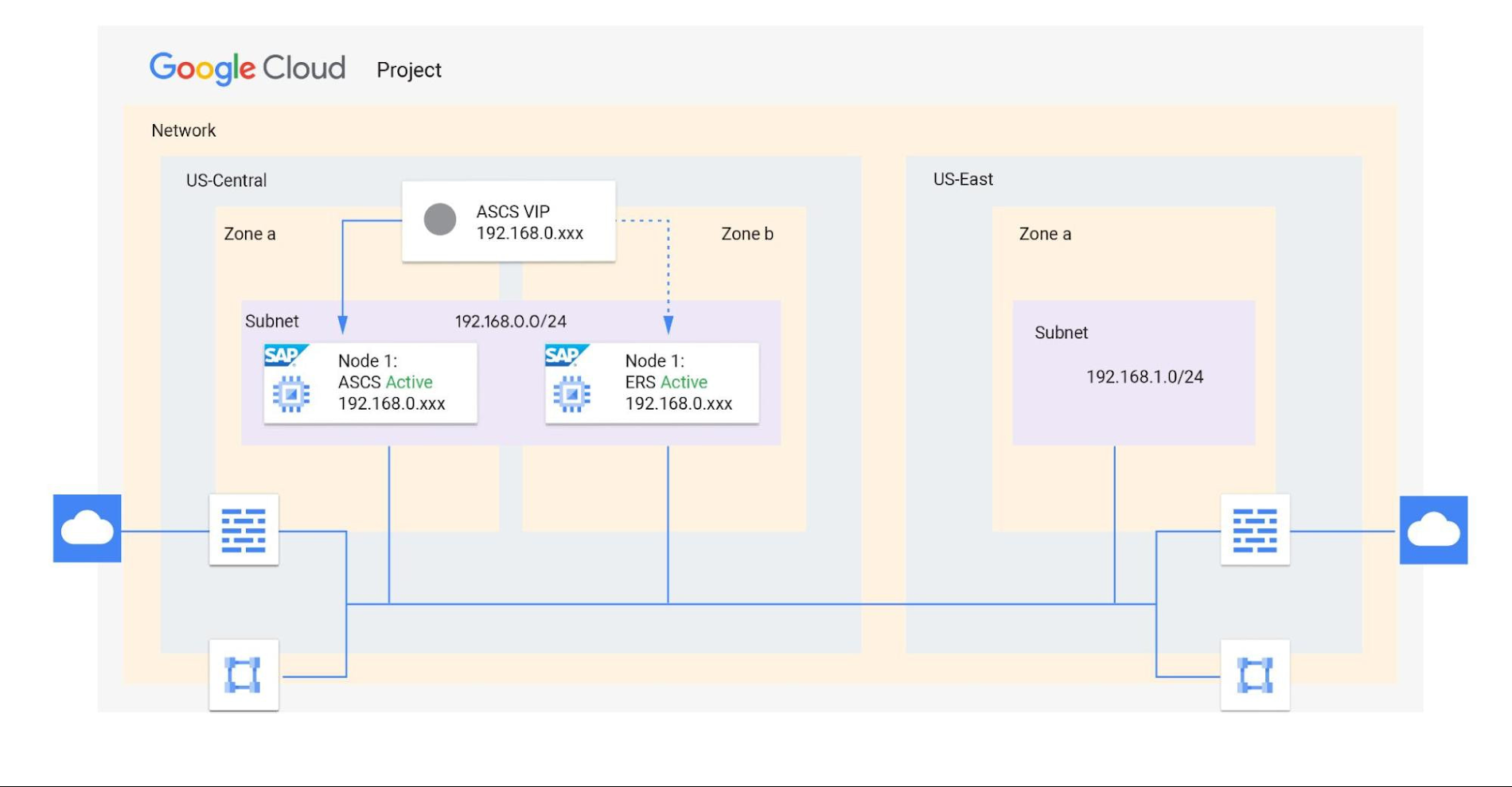
Shared VPCs are a feature unique to Google Cloud that allows an organization to connect resources from multiple projects to a common VPC network. This lets them communicate with each other securely and efficiently using internal IPs. You can also centrally control the network for all SAP projects (service) from the Host project while using firewalls to inspect communication between compute engines in the same subnet, and between those in different subnets. (Best practice is to limit the communication between these systems to only the required ports — typically via SAP remote function call (RFC) communication at Layer 4.)
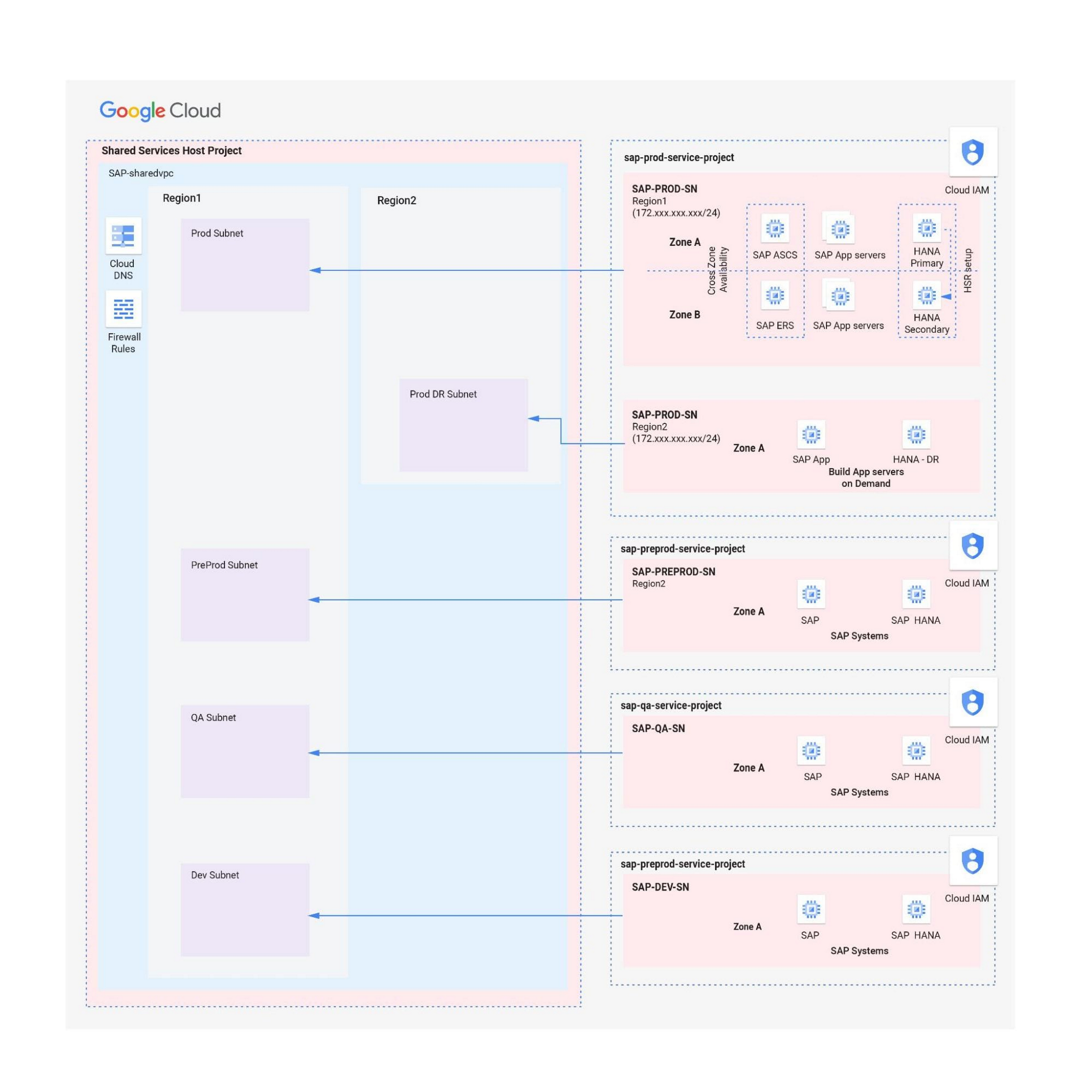
When designing your network, start with a host project containing one or more Shared VPC networks. You can attach additional service projects to a host project, which allows them to participate in the Shared VPC. It’s common practice to have multiple service projects operated and administered by various departments or teams in your organization.
Depending on your needs, you can deploy SAP on a single Shared VPC or multiple ones. The two scenarios differ in terms of network control, SAP environment isolation, and network inspection. Let’s look more closely at these differences.
Scenario 1: Deploying SAP on a single Shared VPC
If you require only a single network inspection, deploying SAP on a single Shared VPC has the advantage of simplicity and reduces administrative overhead.
- Network control: The Shared VPC serves as the network hub, allowing central network management based on identity access management (IAM) roles for the network team(s) in both production and non-production environments.
- SAP environment isolation: You can create projects and subnets for each SAP environment. Projects help group resources together for finer IAM control and billing visibility, while subnets provide network isolation for individual SAP environments. In service projects, compute engines can communicate by default; however, you can adopt simple firewall rules to block communication between compute engines within a subnet or in separate subnets.
- Network inspection: Use Google Cloud firewalls to allow only the required ports for communication between SAP systems. Leverage network tags and service accounts to define granular control for both north-south and east-west traffic.
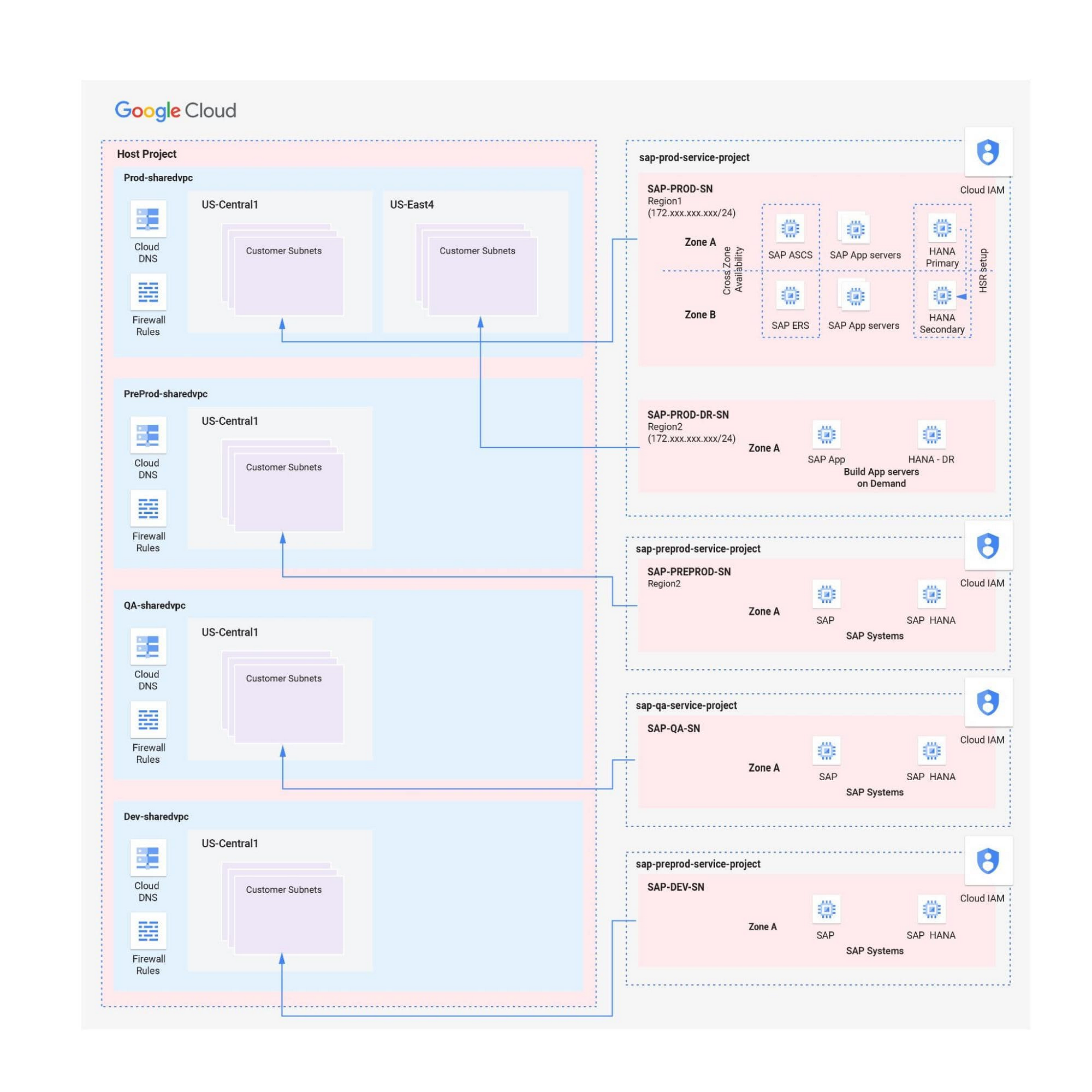
Scenario 2: Multiple Shared VPCs for SAP deployment
In scenarios requiring additional network inspections, you can create multiple Shared VPCs, typically one per environment. Use peering between these Shared VPCs to enable RFC communication among the SAP development, QA, and production systems.
- Network isolation: Multiple Shared VPCs are completely isolated from each other except via specific ports opened in Google Cloud firewalls. This allows additional East-West traffic inspection by a Network Virtual Appliance (NVA) within a Google Cloud network.
- Network control:As the number of Shared VPCs increases, activities such as peering and firewall policies also increase. This diminishes the central network control that Shared VPCs offer, so the network team should plan to manage the policies in each VPC separately.
Hybrid scenarios – for example, one Shared VPC for the production environment and one Shared VPC for all non-production systems — are also possible. This arrangement allows network inspection between production and non-production systems, and limits the number of central network administration layers to two.
Configuring the networking environment for multiple SAP systems can be a complex process. Thanks to Google Cloud’s Shared Virtual Clouds and other tools, SAP administrators can create scalable, secure networks that provide logic, resilience, and visibility to their cloud deployments.Learn more about these networking capabilities and our full offerings for SAP customers.
AWS to Google Cloud Translator: Which AWS Database Service Is Equal to Google Cloud Database?

6322
Of your peers have already read this article.
2:30 Minutes
The most insightful time you'll spend today!
There are multiple reasons a growing number of database administrators, enterprise architects, application developers and other technology practitioners are moving to Google Cloud’s various database services.
Some are being driven by missing features in offering from other providers such as AWS. In Gartner’s Magic Quadrant for Operational Database Management Systems, the research and advisory firm points out that, “AWS’s surveyed reference customers scored its overall product capabilities one standard deviation (STD) below the mean. Their responses identified missing features such as multiregion writes and autosharding.”
Others are moving to database services on Google Cloud Platform driven by a few benefits. According to Gartner, “Reference customers repeatedly commented on Google’s ease of use and implementation, reliability and integration (with other services and other systems). Reference customers scored Google a full STD above the mean for satisfaction with GCP’s pricing; it received the second-highest satisfaction score of any vendor in this Magic Quadrant.
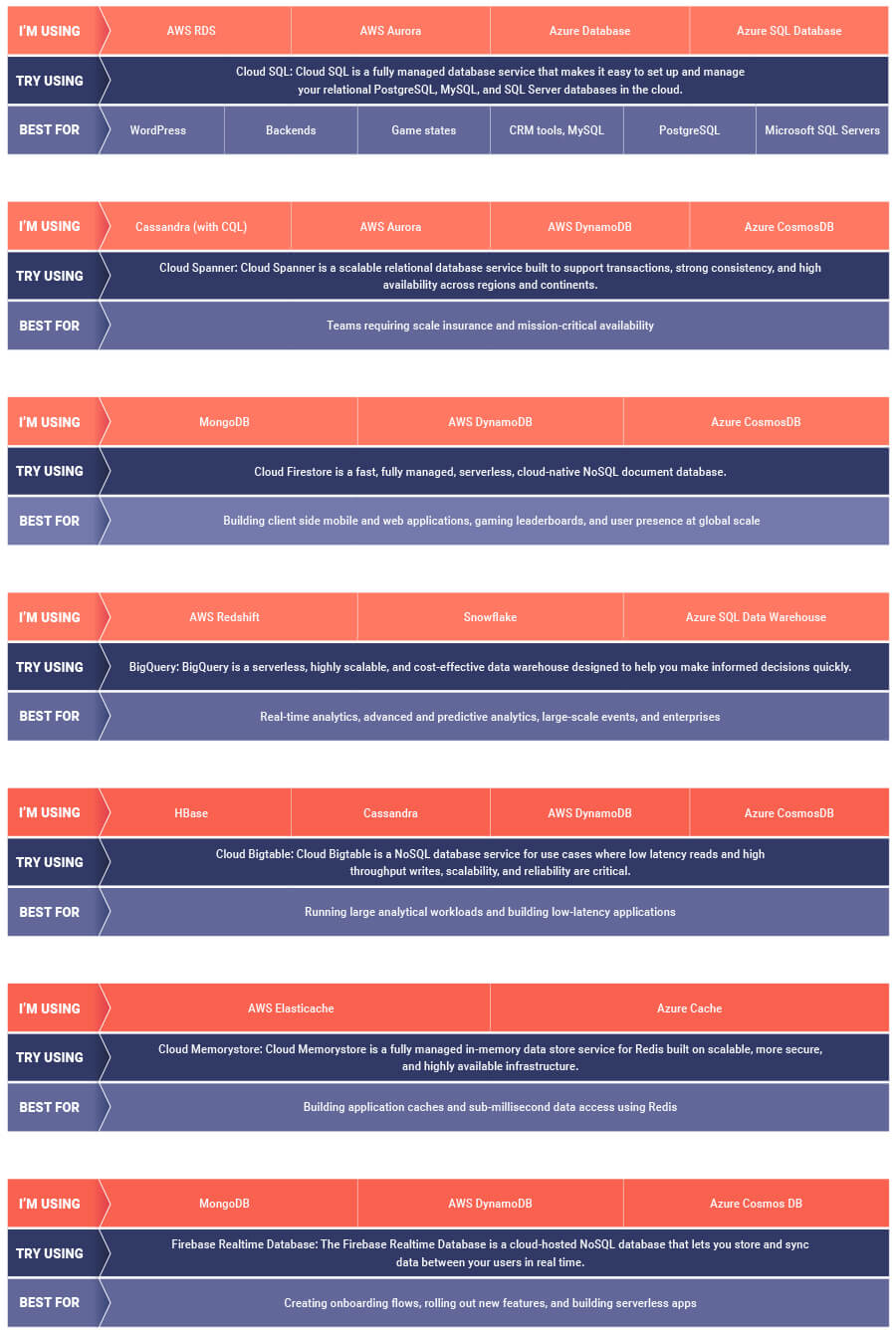
If you are looking to leverage the power of Google Cloud database offerings—but were unsure of which database services comes closest to the service you are currently using, here’s a handy map to find your way.
Google Cloud Introduces Enterprise-grade Scheduler across All GCP Regions

3423
Of your peers have already read this article.
1:30 Minutes
The most insightful time you'll spend today!
Reliably executing tasks on a schedule is critical for everything from data engineering, to infrastructure management, and application maintenance. Today, we are thrilled to announce that Google Cloud Scheduler, our enterprise-grade scheduling service, is now available in more GCP regions and multiple regions can now be used from a single project removing the prior limit of a single region per project.
With many enterprise customers deploying complex distributed cloud systems, Cloud Scheduler has helped solve the problem of single-server cron scheduling being a single point of failure. With this update you are now able to create Scheduler jobs across distinct cloud regions that can help satisfy cross-regional availability and fail-over scenarios.
Furthermore, you are no longer required to create an AppEngine application in order to use Cloud Scheduler. For existing Cloud Scheduler jobs, it is safe to disable the AppEngine application within the project. Jobs will continue to function without an AppEngine application.
Creating jobs in different regions is easy. You simply pick the location where you would like your job to run. For example you can specify a location when creating a job through the gcloud command line :
HTTP Targets
gcloud scheduler jobs create http <job-name>--location <cloud-region>--schedule <cron-schedule>--uri <target-uri>
Pub/Sub Topics
gcloud scheduler jobs create pubsub <job-name>--location <cloud-region>--schedule <cron-schedule>--topic <topic-name>(--message-body <message-body> | --message-body-from-file <file-path>)
AppEngine Services
gcloud scheduler jobs create app-engine <job-name>--location <cloud-region>--schedule <cron-schedule>
Or you can pick a location when creating a job through the Cloud Console:
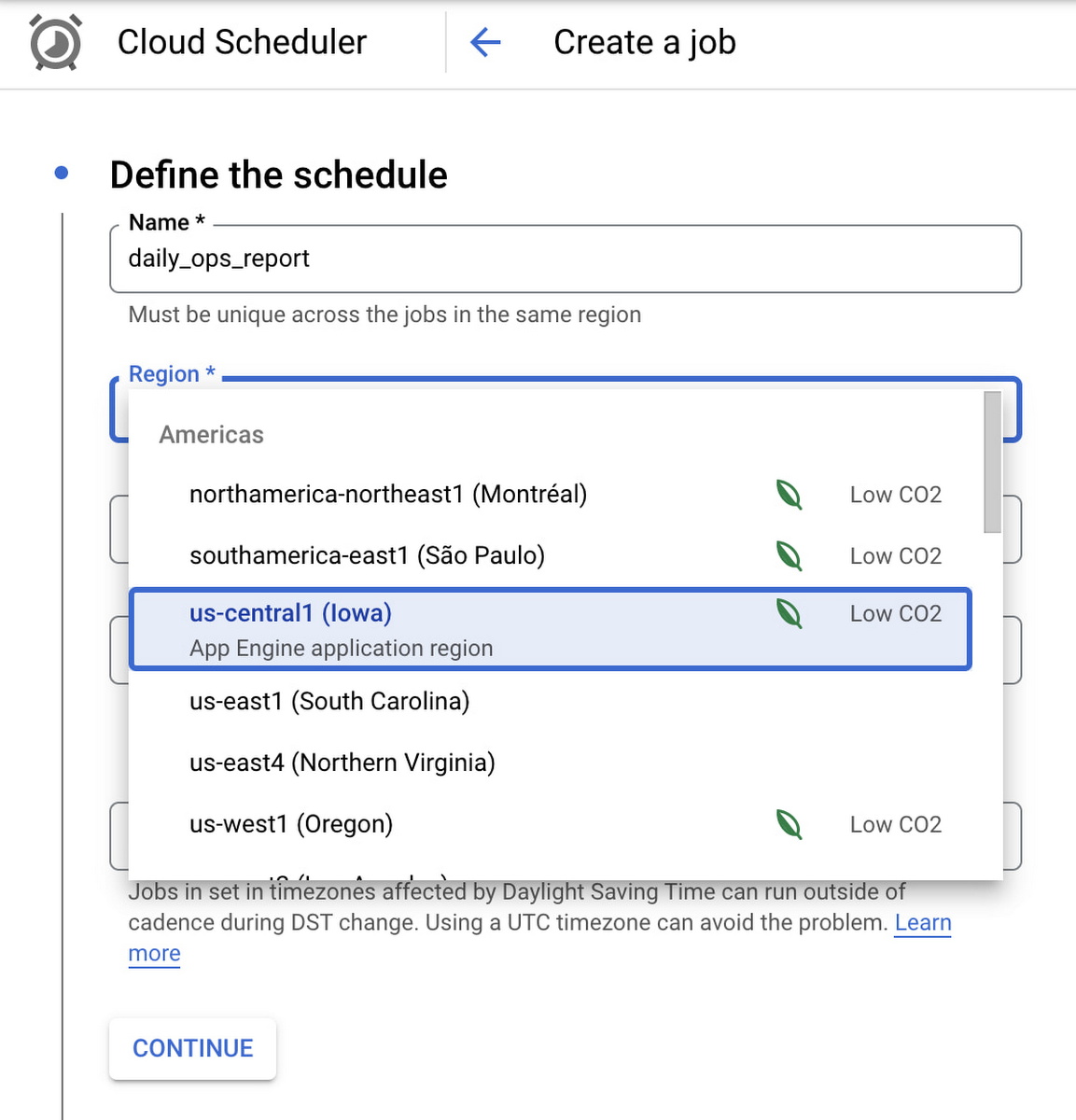
Google Cloud Scheduler is now available in 23 GCP Regions, and this number is expected to grow in the future. You can always find an up-to-date list of available regions by running:
gcloud scheduler locations list
We hope you are as excited about this launch as we are. Please reach out to us with any suggestions or questions in our public issue tracker.
4113
Of your peers have already watched this video.
10:00 Minutes
The most insightful time you'll spend today!
HSBC Looks to Google Cloud to Transform Banking
HSBC, a global bank that is a central part of global commerce with a presence in 67 countries, serving 38 million customers ranging from individuals to small businesses to corporations and governments, and having over $2.5 trillion assets in its balance sheet, had a vision of being a cloud first company and wanted to transform the banking experience for its customers.
The bank wanted to glean valuable insights from its huge data asset of about 100 petabytes and wanted to use those insights to manage its business better. What it needed was a managed service with elastic capability so that HSBC can focus on the data science and management, which enables better customer experience.
For many years HSBC had, like most large corporations, tried to build its own data centers, provision the infrastructure, and run it. However, to realize its ambition of focussing on customer experience, the bank decided to partner with Google Cloud.
However, the journey wasn’t an easy one. Being a globally systemically important financial institution, it had to convince regulators across the world that moving customer data to the cloud is a good thing. Towards that end, it formed a joint team to work through all the challenges and created a cloud framework for banking describing the controls needed.
The results have been quite stunning. Able to calculate the global liquidity for a country in minutes rather than hours, run better financial crime analytics with speeds that are 10 times faster with a higher level of precision and accuracy have been some of the benefits that the bank has derived.
See how HSBC and Google Cloud are bringing a new level of security, compliance and governance capabilities to one of the world’s leading banking institutions.
More Relevant Stories for Your Company




How L&T Financial Services Processes 95% of Motorcycle Loans in Less Than Two Minutes
L&T Financial Services is one of the largest lenders in India. India’s demonetization policy in recent years has led to a shift from cash transactions to digital payments. In 2016, the government withdrew 500 and 1000 rupee notes from circulation and encouraged a heavily cash-based population to deposit their canceled notes

Quick Migration, Zero Outages and Cost Savings: Rossi Residencial’s SAP to Google Cloud Journey!
After three migrations to different cloud providers, the company managed to migrate with no system outages for the first time, supported by partner Sky.One. Results Migrated four SAP environments and four servers in just one month with no system outagesZero unavailability periods since migratingLess time spent worrying about operational issues

Google Cloud Featured at TechCrunch Disrupt 2021
Startups need to move quickly and focus their limited resources on areas where they can differentiate. If infrastructure isn’t your differentiator, don’t put a lot of energy into your infrastructure when someone else can do it for you. What’s more, time-to-market matters to startups more now than ever. Successful early
Linking the Middle East with Southern Europe and Asia: Google’s New Subsea Cables to Be Ready by 2024!
Today, we’re announcing that we are collaborating with Sparkle and others to build and operate two submarine cable systems linking the Middle East with southern Europe and Asia: the Blue Submarine Cable System connecting Italy, France, Greece, and Israel; and the Raman Submarine Cable System connecting Jordan, Saudi Arabia, Djibouti, Oman and
