





How Firewall Insights can Simplify Corporate Firewall Rules

3114
Of your peers have already read this article.
3:30 Minutes
The most insightful time you'll spend today!
Corporate firewalls typically include a massive number of rules, which accumulate over time as new workloads are added. When rules stack up piecemeal like this, misconfigurations occur that, at best, create headaches for security administrators, and at worst, create vulnerabilities that lead to security breaches.
To address this, we have introduced the Firewall Insights module in our Network Intelligence Center, which provides a single console for managing Google Cloud network visibility, monitoring and troubleshooting.
What are Firewall insights?
Historically, there hasn’t been an easy way to deal with the accumulation of complicated firewall rules. That was until we created Firewall Insights, which provides metrics reports and insight reports. These two reports contain information about firewall usage and the impact of various firewall rules on your VPC network. Even better, these insights and metrics are integrated into your Google Cloud Console for the VPC firewall and are also available via APIs.
You can use metrics reports to verify that firewall rules are being used appropriately and as intended. This report can uncover leftover rules from the past that are not actively used, review that the firewall rules allow or deny what is intended, perform live debugging of connections dropped, and leverage Cloud Monitoring to discover malicious attempts to access your network.
You can use insight reports to identify firewall misconfigurations, detect security attacks, and optimize and tighten your security rules.
Let’s take a look at how these reports work.
Metrics Report, a deeper dive
Metrics insights analyzes your VPC firewalls usage by tracking metrics such as firewall hit counts and last used. Let’s check this out with an example:
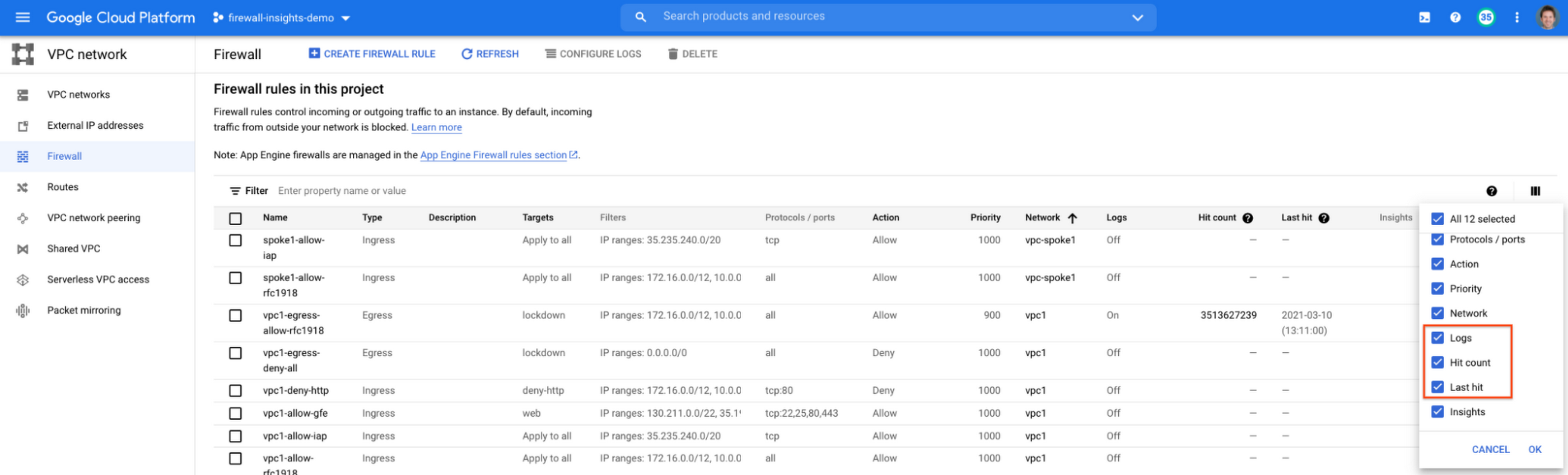
When you navigate to your VPC network and click on Firewall, ensure that you have selected Logs, Hit count and also Last hit in the column display options:
After this is enabled, now you should be able to see your VPC firewall rules with the hit count and last hit metrics. In the image below you can see that if logs are not enabled for rules, hit count and last hit metrics will not be collected. If logs are enabled, these details are collected, and shown in the VPC firewalls console.
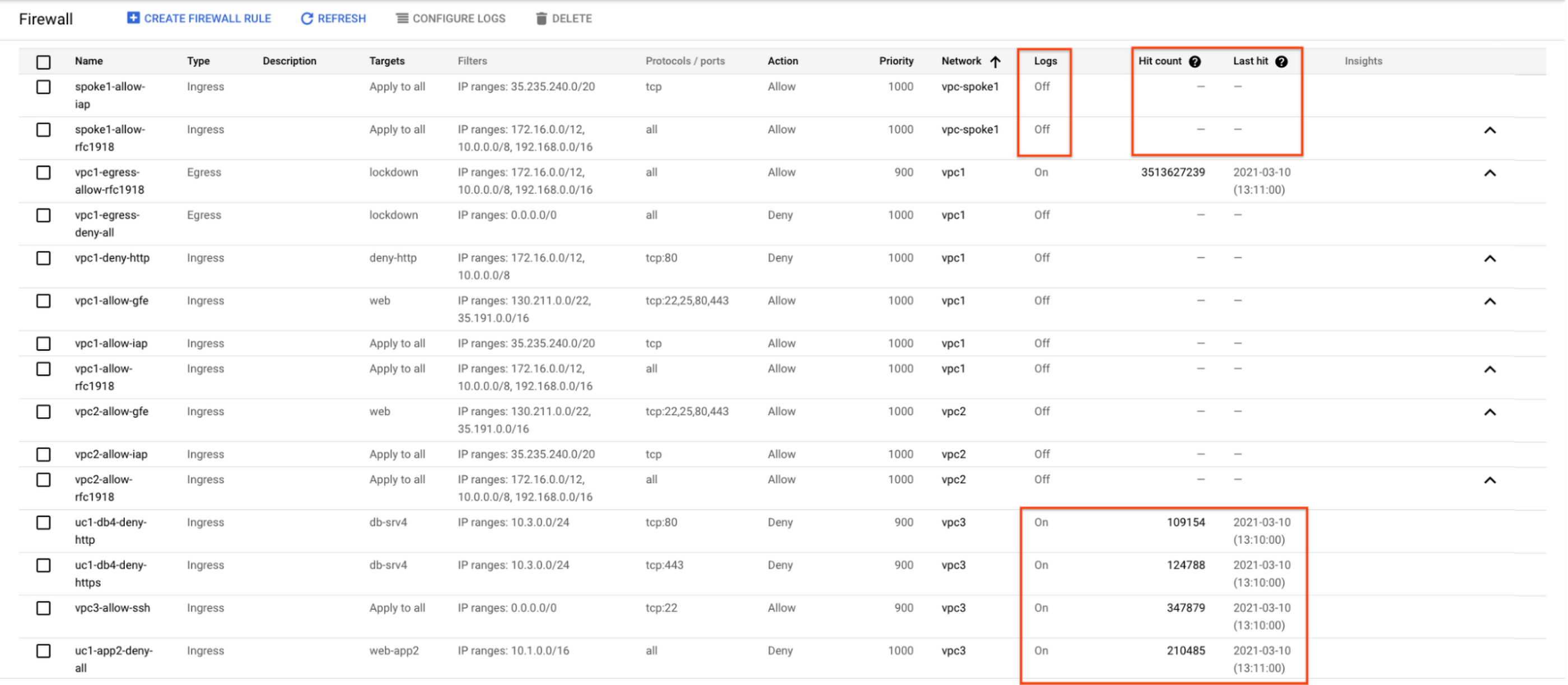
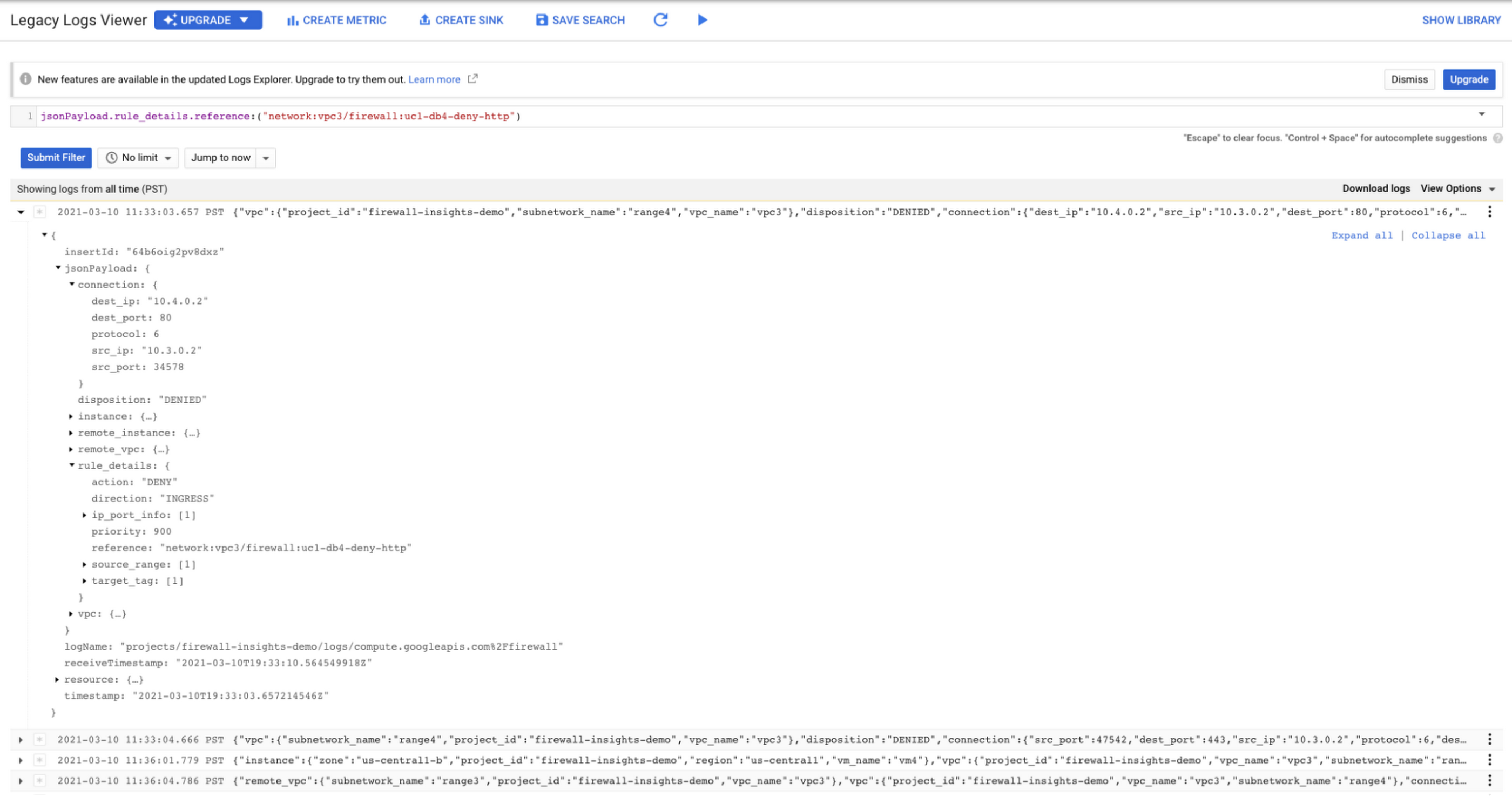
As you can see in Figure 1.2, each firewall rule which has logging enabled will show hit counts, so based on the example above, the rule “uc1-db4-deny-http” has been hit 109,154 times, the last time being 2021-03-10 (13:10:00). If you want to dive even deeper, you can click on the hit count and this will bring you to the logs viewer page where you can expand these logs and analyze all the details:
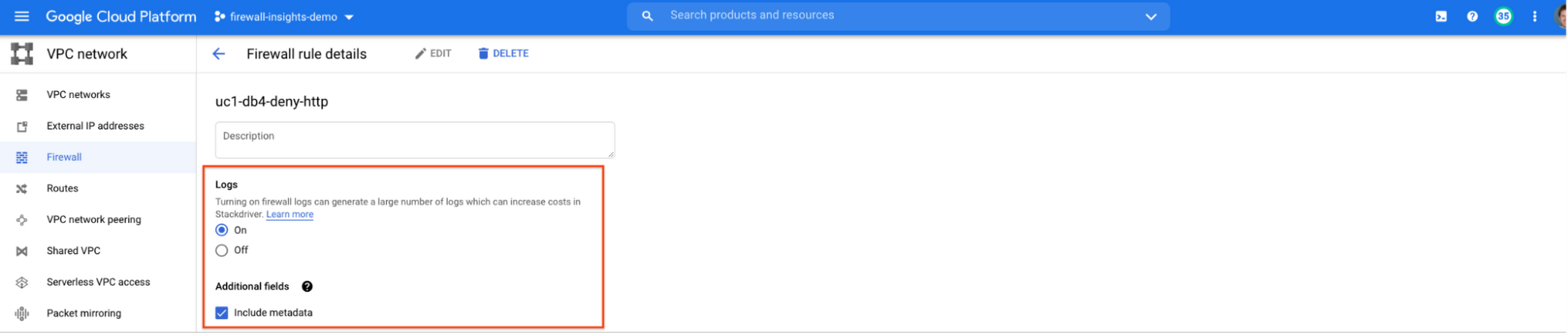
In order to enable logs for a particular firewall rule, you can edit it and turn logs on. By default, metadata is added in firewall logs. If you want to reduce the log size, you can do so by excluding these additional fields. Excluding these metadata fields will not impact the functionality of Firewall Insights.
From the “Firewall” page, you can also multi-select a group of firewall rules and turn on all logs at once.
Firewall rule usage metrics are accurate only for the period of time during which Firewall Rules Logging is enabled.
Insights Report, a deeper dive
Insights Report provides an intelligent analysis of the configuration of your firewalls. A report can contain one or more insights.
We will see examples now about the different insight reports which include:
- Shadowed firewall rules
- Allow rules with no hit in the last six weeks
- Deny rules with hits in the last 24 hours
By definition, a shadowed rule is a VPC firewall rule that is completely overshadowed by one or more firewall rules with higher or equal priority. We call that shadowing rules. Let’s see an example on how to find shadowed rules:Let’s say that you try to use ping between two VMs but it fails. Let’s take a look at the firewall rules applied to the VM:
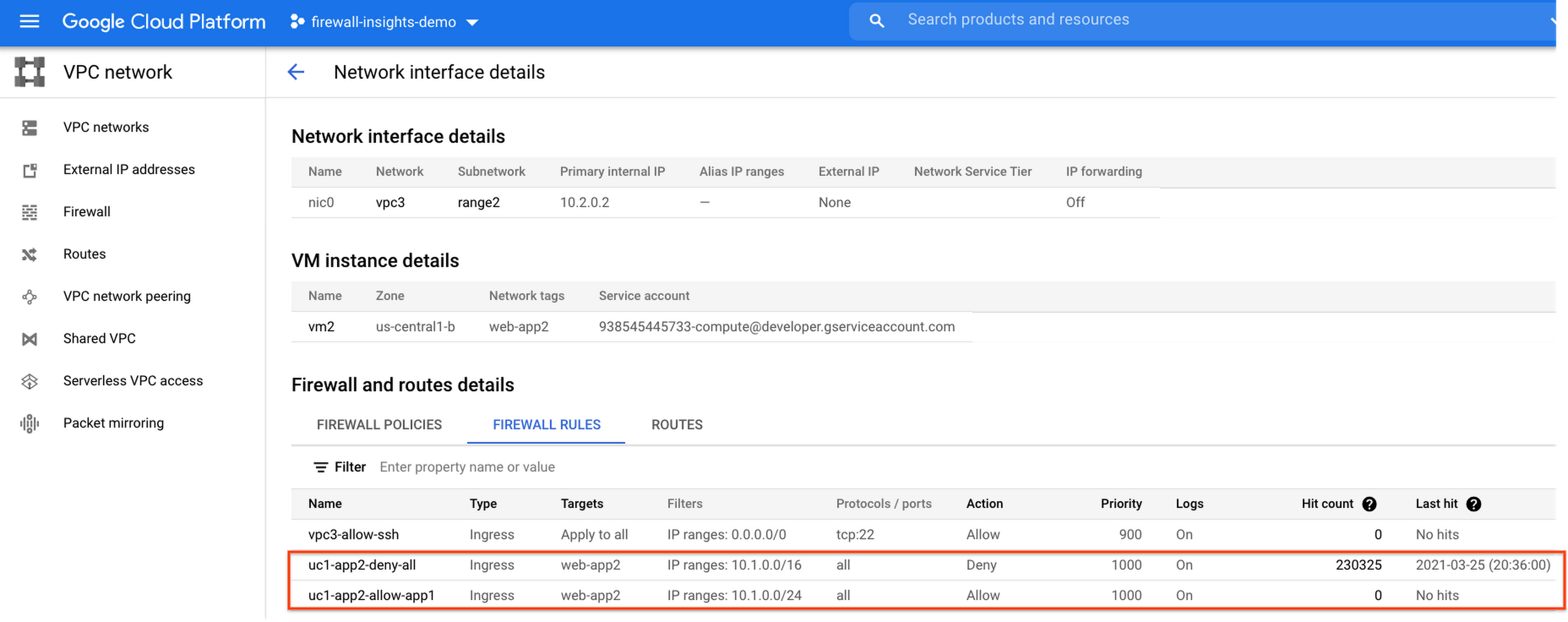
If we look closely, we can see that there are two rules with the same target tag, and those are almost identical except their source IP range. The IP range of the deny rule “uc1-app2-deny-all” includes the IP range of the rule allow “uc1-app2-allow-app1”. Therefore, we can see that “uc1-app2-allow-app1” is shadowed by “uc1-app2-deny-all”, and the ping between these VMs failed due to that.
To avoid such incidents in the future, Firewall Insights provides you with a convenient list of rules overshadowed by other firewall rules.
To see shadowed rules, you can click on the column selector, and add “Insights” to the firewall and route details:

Once this is applied, you will be able to see shadowed rules here:

Alternatively, you can navigate to Network Intelligence > Firewall Insights, where we will see the shadowed rule report:
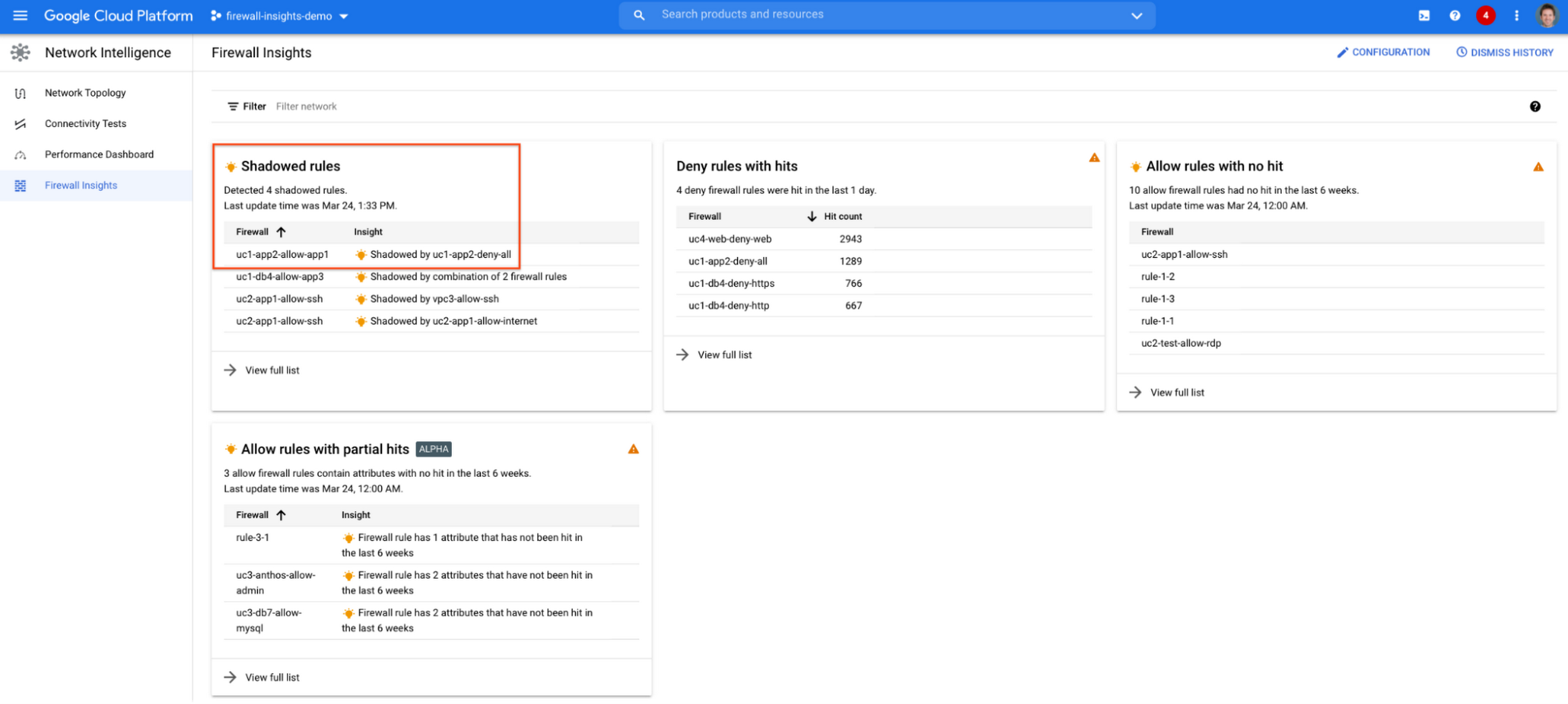
If we click on the insight we will get more details:

Going back to the firewall insights card (Figure 1.8), we can also identify that “uc1-db4-allow-app3” is shadowed by a combination of two rules and if we clicked on the insight this would provide all the details.
From the Firewall Insights dashboard, let’s move on to “allow rules with no hit”, where we can see firewall rules that have not logged any hits in the past six weeks. Such rules could be as a result of a misconfiguration, or leftover rules from past deployments. Tighten your security boundaries by identifying and removing such rules. If we go back to Network Intelligence > Firewall Insights, we can see allow rules with no hit:

We can drill down to view the full list of rules with no hit. We can see, for instance, one of the rules, the bottom one “uc2-app1-allow-internet”, might be a leftover rule to allow internet access from a past deployment, which means it has little likelihood of being hit in the future. So you may want to consider removing it from the rule set:

Click on the firewall rule to review all the details, and take a look at the prediction, which is made based on the hit pattern that we saw for similar rules in the same organization:

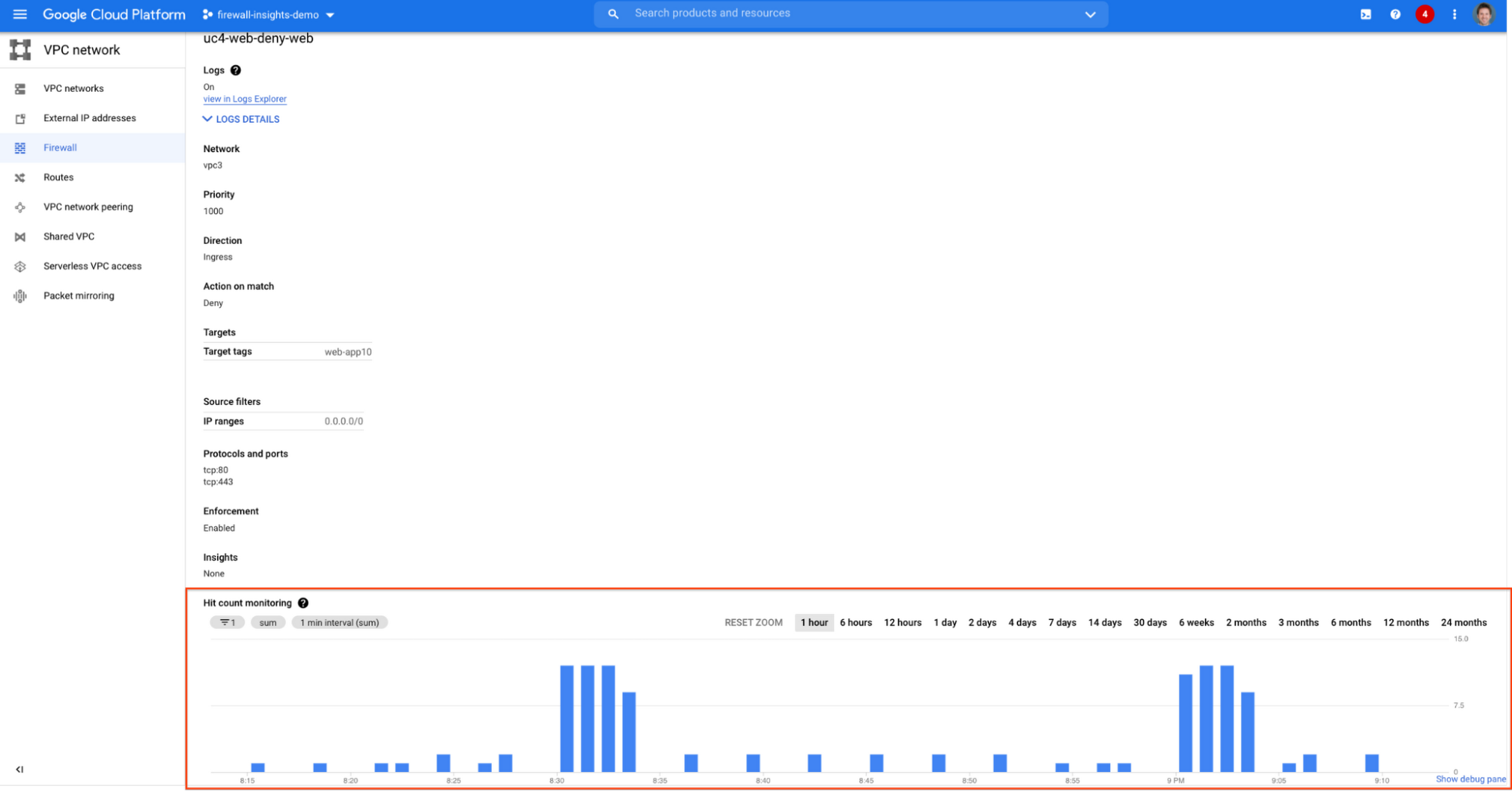
Let’s go back to the Firewall Insights dashboard and move on to the last category, “deny rules with hits in the last 24 hours”, which help you capture the traffic blocked by deny rules. These traffic types could indicate external attacks into your VPC network, or compromised VM instances attempting to send traffic out of your network. Let’s examine future hit prediction on a firewall rule. Navigate to Network Intelligence > Firewall Insights and take a look at the deny rules with hits card:

If your click on the “uc4-web-deny-web” rule, you can see the hit count monitoring, and if you click on the hit number we can dive deeper in the logs:

These tips should help you effectively leverage Firewall Insights to gain better control over a massive firewall rule set. Automate shadowed rule detection, quickly troubleshoot misconfigured rules, effortlessly pinpoint the overgranting rules hidden in the rule set, and identify the failed attempts to break into your network that were rejected by your firewall rules.
To learn more about Firewall Insights, please refer to our documentation. Additionally, to see how we’re advancing intelligent automation in network security, check our recent blog post.
How Air Asia’s CIO Ensures Its 22,000 Employees Service Customers Efficiently and Preserve Security

3519
Of your peers have already read this article.
2:48 Minutes
The most insightful time you'll spend today!
At AirAsia, we operate a fleet of more than 270 aircraft across 23 markets, fly to more than 150 destinations and carry 100m guests each year. We’ve also been named the world’s best low-cost carrier for 11 years running. To accomplish all of this, we rely heavily on our 22,000 Allstars (employees). As AirAsia co-founder Tony Fernandes likes to say, “it has always been about the people.”
In my role as CIO, it’s critical that I give our Allstars the tools and technology they need to get their jobs done, while at the same time ensuring that our company’s data is protected and secure. While this is challenging enough in normal circumstances, we’re also in the midst of rapidly moving from legacy on-premises technologies to the cloud. Google Cloud has been a critical partner for us on this journey.
Identity challenges
AirAsia, like many other enterprises, has relied on a legacy on-premises directory for many years. As our company has quickly grown and expanded to new markets and regions, we’ve had to manage multiple servers across a number of on-premises data centers and the public cloud, which has proved costly and time-consuming.
Our Allstars, located all across Asia, need to easily access a number of legacy on-premises apps in addition to a growing number of SaaS apps. As a business, we also needed a more seamless integration between our HR system of record and our identity solution for user provisioning and lifecycle management. Solving these challenges with our existing on-premises directory was simply not feasible for us.
In recent years, we partnered with Google Cloud to help drive our digital transformation, including moving dozens of workloads and apps to Google Cloud Platform (GCP), deploying G Suite as our collaboration and productivity solution for all of our employees, and replacing thousands of Windows laptops with fast and secure Chromebooks.
We brought up our identity concerns with the Google Cloud team, and after a number of conversations, we decided to deploy Cloud Identity, Google’s cloud-based identity, and access management solution, to help address the identity challenges we were facing.
Why Cloud Identity for AirAsia?
We ended up choosing Cloud Identity for a few key reasons. Here at AirAsia, we are eager to move to the cloud as quickly as possible, and moving identity management to the cloud is a key enabler of this and our broader digital transformation. Managing identities from the cloud also enables us to have a single identity and set of credentials for each employee, which they can use to access all of the applications they need to be productive, both in the cloud and on-premises.
In addition, deploying Cloud Identity is a key step towards enabling the BeyondCorp (or zero trust) security model, which we feel is the best approach to strengthen our security posture and fight modern threats. Cloud Identity also integrates seamlessly with our existing technologies, which includes not only Google Cloud products like GCP, G Suite, and Chrome OS, but also third-party tools like Citrix, Papercut, and others.
And finally, Cloud Identity offered us significant cost and resource savings. With Cloud Identity in place, our IT department can spend less time worrying about managing multiple on-premises directory servers and can instead focus on delivering value to our Allstar employees.
4876
Of your peers have already watched this video.
1:30 Minutes
The most insightful time you'll spend today!
Accelerate Your Digital Transformation Through a Modern Infrastructure
Learn about the latest advancements to Google Cloud Platform’s unique infrastructure to accelerate enterprise workloads and build planet scalable solutions. Hear how Google Cloud’s infrastructure enables you to solve problems faster, more securely, and at greater scale.
See how Google Cloud is accelerating the support for enterprise workloads like SAP, VMware, and Windows and augmenting new capabilities to better protect and secure your workloads. Discover how Google Cloud enables businesses to build high-scale applications with global scale and reach.
Security Talks: Addressing the Toughest SOC Challenges with SolarWinds, Chrome, Zero Trust, and More

2507
Of your peers have already read this article.
1:30 Minutes
The most insightful time you'll spend today!
Security operations teams are facing a “perfect storm” of challenges from nation-state actors turning their attention to financial crime, to rising uncertainty and potential complexities because of rapidly advancing cloud migration and IoT adoption, to the long-lamented skills shortage.
Now imagine having to face this trifecta without visibility into your IT and security infrastructure because scale and cost concerns have impeded your ability to ingest and monitor critical telemetry. To help organizations rethink threat detection and broader security team efforts, we showcased at this month’s Google Cloud Security Talks a keynote on why DEI is a cybersecurity imperative, Mandiant’s review of lessons for organizations two years after SolarWinds, how Google Chrome already helps protect your business (and what more you can make do with it,) how best to encourage your organization to pursue Zero Trust, and three key ways in which Chronicle Security Operations can help your organization scale threat detection and actionable outcomes. These include:
1. Operationalizing threat intelligence
Harnessing the power of threat intelligence to acquire context, prioritize risk, and act on detections requires more than just ingesting a set of indicator of compromise (IOC) feeds. Threat intelligence must have breadth and depth of coverage to provide custom details on the tools, tactics, and procedures of threat actors. Explore why part of the “magic” behind Google Cloud’s security is the sheer scale of threat intelligence we can share with our customers.
2. Driving detection as code
We want to enable organizations that are more advanced in their cybersecurity maturity to build their own custom detections and rules, which means offering our customers a powerful detection-authoring platform. Chronicle Security Operations can help analysts build specific detections around, for example, known bad files or a specific registry key change. We also demonstrated how to create more complex detections, such as flagging process execution patterns or crafting a suspicious-behavior trigger from a specific activity sequence.
3. Leveraging curated detections
With curated detections, which we announced in August, we are putting the power of Google Cloud’s intelligence in the hands of security operations teams everywhere. Our detections offer actionable, ready-to-use threat detection content curated, built, and maintained by Google Cloud Threat Intelligence (GCTI) researchers. These detection sets cover a wide variety of threats for your network and beyond, including attacks such as ransomware, remote-access tools (RAT), infostealers, data exfiltration, and suspicious activity.
You can watch all nine of our Security Talks recorded sessions here, and keep an eye out for our next Security Talks, coming in March 2023.
Tips and Best Practices: Ensuring Cloud Configuration Compliance

2669
Of your peers have already read this article.
2:30 Minutes
The most insightful time you'll spend today!
Security is often seen as a zero-sum game between “go fast” or “stay secure.” We would like to challenge this school of thought and introduce a framework to change that paradigm to a “win-win game,” so you can do both—“go fast” and “stay secure.”
Historically, application security tools have been implemented much like a gate at a parking lot. The parking lot has perimeter-based ingress and egress boom gates. The boom gates let one car through at a time, and vehicles often are backed up at the gates during busy hours. However, there are few controls once you get inside. You can access nearly any space on any level and easily move between levels.
When you apply this analogy to application development, AppSec tools are often implemented as “toll gates” within waterfall-native workflows. Developers are required to get in line, submit to a security scan, and wait to see the results. When the results are produced, developers spend significant time and energy investigating red flags raised by security. This process is slow and, not surprisingly, not very popular with developers. It’s why they often view traditional security programs as inhibitors to innovation.
Guardrails not gates
We suggest a workflow that’s less like a parking lot gate and more like a freeway with common-sense safety measures. Freeways have directive rules for all users. Speed limits, single direction of travel, and mandatory speed reduction zones when exiting contribute to freeway safety. Some freeways implement preventative measures based on these rules, such as physical walls dividing opposite flows of traffic and protective guardrails to reduce collisions and keep vehicles from veering off the road. While driving on a freeway comes with its own complications, there are no boom-style gates blocking your path.
Following the same directive rules, there are detective and responsive controls, such as speed detectors, cameras, signs reminding drivers which direction they are going, and how fast they are traveling. Some freeways have deployed rumble strips to remind a dozing driver to stay in their lane.
Applying lessons from freeways to application development and compliance in the cloud represents the perfect opportunity to build software more securely.
Modern application security tools should be fully automated, largely invisible to developers, and minimize friction within the DevOps pipeline. To do this, these security tools should work the way developers want to work. Security controls should integrate into the development lifecycle early and everywhere. These controls should live within the developer’s preferred tools and create rapid feedback loops so mistakes can be remediated as soon as possible.
A typical compliance cycle looks like this:
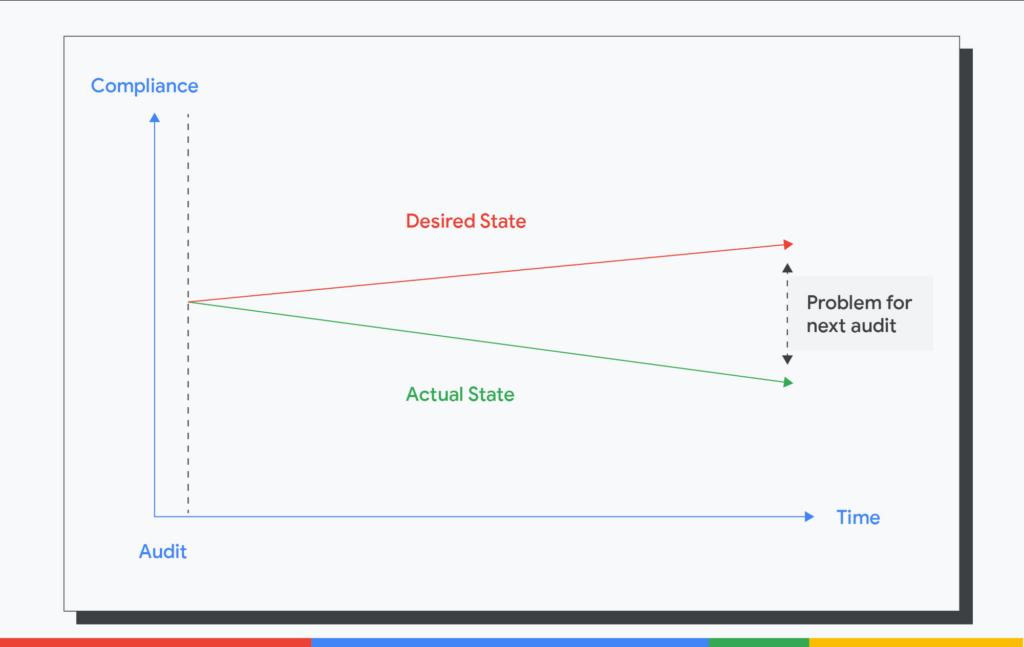
Here, we highlight the gap between the desired state and the actual state that becomes problematic when audit times come. This increases the overall cost of the audit and the time spent in generating the evidence of controls.
Instead, this is what we need.
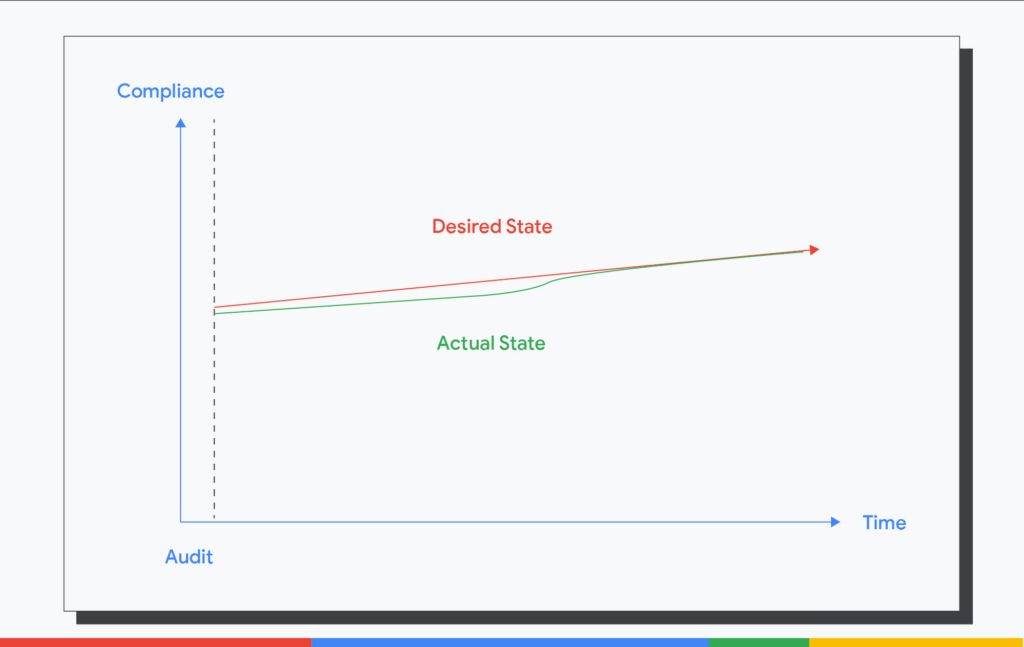
We need the actual state to track the desired state continuously. We need continuous preventative controls to stop insecure resources from being introduced. We need detective controls to find non-compliant resources promptly and constantly. We need responsive controls to fix non-compliant resources automatically. In all, we need continuous compliance.
Infrastructure continuous compliance reference architecture
How do we get started with continuous compliance? Here is the reference architecture that enables you to develop this capability.
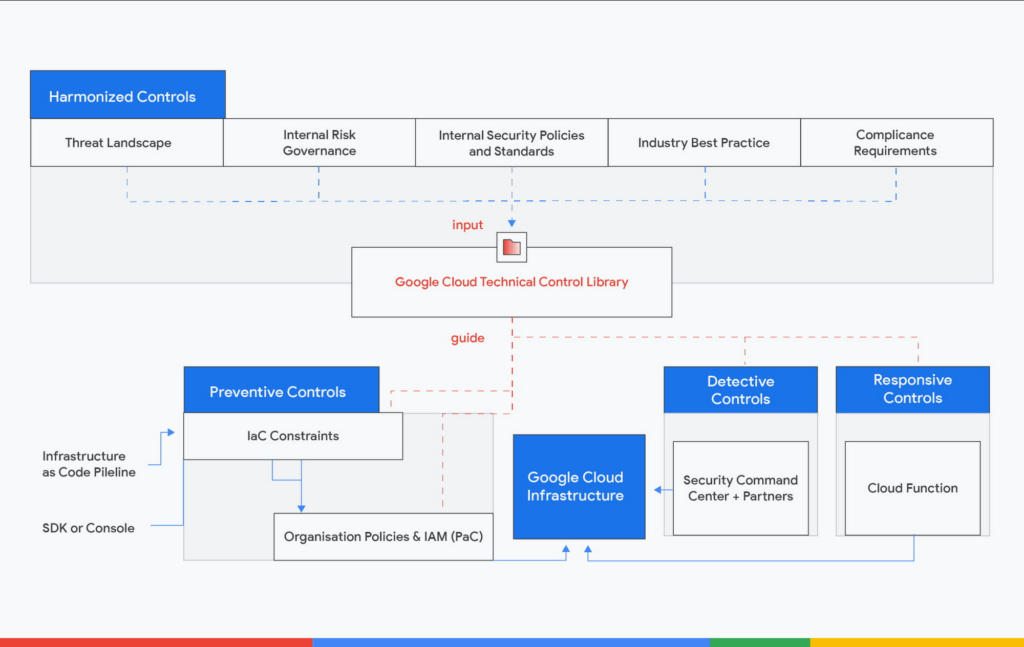
The architecture is centered on building a close-loop of directive, preventative, detective and responsive controls. It is also open and extensible. Although we reference Google Cloud architectures in this blog, you can use them for other cloud service platforms or even on-premise
The National Institute of Standards and Technology’s Open Security Controls Assessment Language (OSCAL) is a helpful resource to express your control library in a machine-readable format. OSCAL can allow organizations to define a set of security and privacy requirements, which are represented as controls, which then can be grouped together as a control catalog. Organizations can use these catalogs to establish security and privacy control baselines through a process that may aggregate and tailor controls from multiple source catalogs. Using the OSCAL profile model to express a baseline makes the mappings between the control catalog and the profile explicit and machine-readable.
Directive controls
The starting point of the close-loop is the directive and harmonized controls. Next, you should have control mappings rationalized to the technical controls against your compliance requirements. These requirements can come from various sources, such as the threat landscape of your industry, your internal security policies and standards, your external regulatory compliance, and industry best practice frameworks.
Control mappings will form a Technical Control Library. The library is a dataset mapping out harmonized controls to requirements written in different compliance frameworks. The control mapping justifies the security controls. It builds the linkage between security and compliance and helps you reduce your compliance audit cost. This dataset should be a living document.
An easy first step in building such as library is to begin with the CIS Google Cloud Platform Foundation Benchmark. The benchmark is lightweight and it constitutes foundational security any entity should get right on Google Cloud. In addition, Security Command Center Premium’s Security Health Analytics can help you to monitor your Google Cloud environment against these benchmarks on a continuous basis across all the projects within your organization.
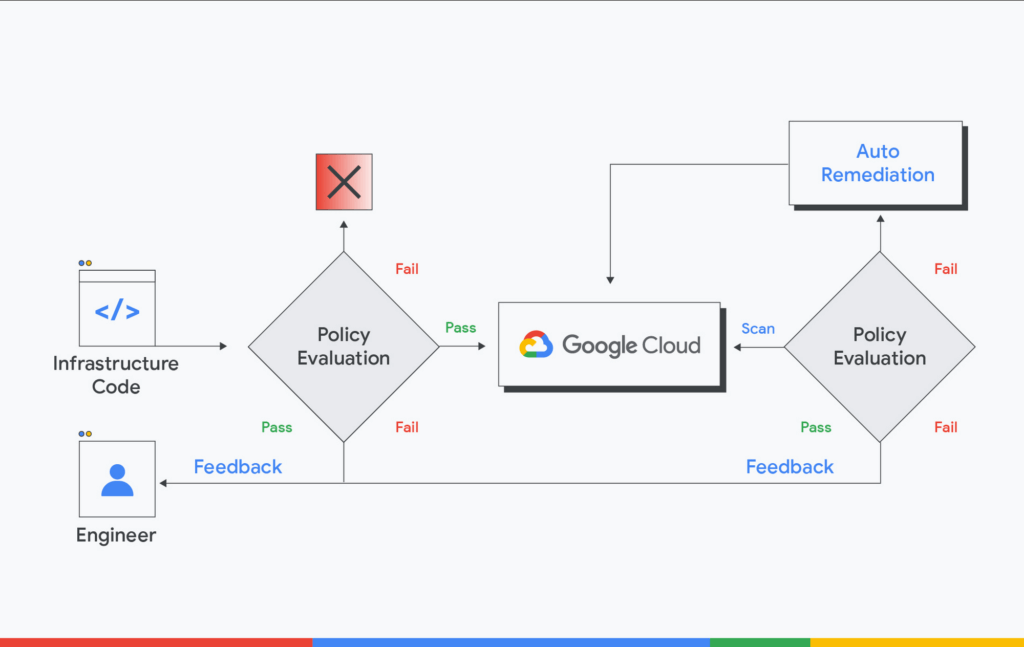
The Technical Control Library will guide the rest of the closed-loop. For every directive control, you should have corresponding preventative control to stop non-compliant resources from being deployed. You should have the detective control to look over the entire environment seeking non-compliant resources. And you should have the responsive control remedying non-compliant resources automatically or kicking off responsive workflow with your Security Operations function. Finally, every policy evaluation point should have a feedback loop to the engineers. A prompt and meaningful feedback loop provides a better engineering experience and increases development velocity in the short run. These feedback loops will breed good behaviors to write better and more secure code in the long run.
Preventive controls
Almost every action on the Google Cloud is an API call, such as when creating, configuring, or deleting resources, so preventative controls are all about API call constraints. There are different wrappers for these API calls, including Infrastructure-as-Code (IaC) solutions such as Terraform or Google Cloud Deployment Manager, the Cloud Console interface, Cloud Shell SDK, Python, or GO SDK.
As with any other application code deployment, the IaC solutions should use a Continuous Integration (CI) solution. On the CI, you could orchestrate IaC constraints, similar to writing unit tests for application code. Since all IaC solutions come in or can be converted to JSON format, you can use Open Policy Agent (OPA) as the IaC constraint solution. OPA’s Rego policy language is declarative and flexible, which allows you to construct almost any policy in Rego.
For the input sources that are not IaC, you could fall back to the organization policies and IAM as these two controls have the closest proximity to Google Cloud. That said, it’s considered a best practice to restrict non-IaC inputs for higher environments such as production-like or production, so you could codify your infrastructure, apply controls and workflows in the source repository.
Detective and responsive controls
Even if you’ve nailed the preventive controls, and the cloud environment is sterile, we still need detective and responsive controls. Here’s why.
For one, not all the controls can be safely implemented as preventative controls in the real world. For instance, we may not fail all the Google Compute Engine deployments at the CI if these VMs have external IP addresses because external IP addresses may be required for a specific software or use cases. Another reason is that we want to produce time-stamped compliance status for audit purposes. Taking the CIS compliance as an example, we could have enforced all the CIS check on the CI and set IaC as the only deployment source for cloud infrastructure.
However, we will still need to demonstrate the runtime CIS compliance report using Security Command Center. Security responsive controls are not limited to remediation actions. They can also take the form of notifications via email, messaging tools, or integration with ITSM systems. If you use Terraform to deploy the infrastructure and use Cloud Function for auto-remediation, you need to pay attention to the Terraform state. Since auto-remediation actions performed by Cloud Function are not recorded in the Terraform state file, you will need to inform the engineers to update the source Terraform code.
The future
The fact that manual processes around security and compliance don’t scale points to automation as the next enabler. The economics of automation require a systemic discipline and holistic enterprise-wide approach to regulatory compliance and cloud risk management.
By defining a data model of the compliance process, the aforementioned OSCAL represents a game-changer for automation in risk management and regulatory compliance. While we realize that adopting “as code” practices is a long-term investment for most of our customers, Risk and Compliance as Code (RCaC) has a number of building blocks to get you started. By adopting the RCaC tenets you shift towards codified policies and infrastructure for a secure cloud transformation. Stay tuned as we introduce exciting new capabilities and features to Google Cloud Risk and Compliance as Code in the months to come.
5183
Of your peers have already watched this video.
25:30 Minutes
The most insightful time you'll spend today!
Modernize Your Security Posture for Cloud-Native Applications with Anthos
Modern security approaches have moved beyond a traditional perimeter-based security model. As many organizations seek to adopt cloud-native architectures and are deploying applications in hybrid and multi-cloud environments they demand a more flexible and extensible approach towards security.
Learn how to address security issues as early in the development and deployment life-cycle as possible—when addressing security issues can be less costly—and do so in a way that is standardized and consistent. Help keep your organization secure and compliant with Anthos.
More Relevant Stories for Your Company

Cloud on Europe’s Terms: How Google Sets to Deliver Cloud Services for Driving Digital Sovereignty
Cloud computing is globally recognized as the single most effective, agile and scalable path to digitally transform and drive value creation. It has been a critical catalyst for growth, allowing private organizations and governments to support consumers and citizens alike, delivering services quickly without prohibitive capital investment. European organizations—in both

What Users and System Designers Must Learn from Google’s Best Practices for Password Management
Updated for 2021: This post includes updated best practices including the latest from Google's Best Practices for Password Management whitepapers for both users and system designers. Account management, authentication and password management can be tricky. Often, account management is a dark corner that isn't a top priority for developers or product managers. The resulting experience

Five Ways Cloud Computing Helps Companies Optimize Operations and Lower IT Costs
There is no one way to recover. The past year has seen unprecedented challenges for business across the world, with social distancing and quarantine measures forcing many organizations to quickly adapt to remote working. A new report from BCG Platinion, titled “Finding a New Normal in the Cloud”, points out that while companies

Google Cloud is Every Retailer’s Most Trusted Cloud
Whether they were ready for it or not, the COVID-19 pandemic transformed many retailers into digital businesses. Retailers made huge investments into commerce technologies, customer experience tools, sales and fulfillment technology, and improving digital experiences to continue providing their goods and services to their customers. Now, more than a year
