





How to Evolve Security for the Cloud: McKinsey with Google Cloud

3948
Of your peers have already read this article.
8:30 Minutes
The most insightful time you'll spend today!
Not too long ago, McKinsey released a report titled “Making a secure transition to the public cloud,” the result of interviews with IT security experts at nearly 100 enterprises around the world.
Leveraging the expertise of Google Cloud and McKinsey security experts, the research presents a strategic framework for IT security in cloud and hybrid environments, and provides recommendations on how to migrate to the cloud while keeping security top of mind.
The research shows what many already know: that public cloud adoption is accelerating thanks to increased technical flexibility, simpler scaling, and lower operating costs.
What’s exciting is that the research also reveals that many Chief Information Security Officers (CISOs) no longer view security as an inhibitor to adoption but instead an opportunity.
“In many cases [CISOs] acknowledge that cloud service providers’ security resources dwarf their own,” the authors write—and now these companies are focused on how to best adopt and configure cloud services for increased security.
The research identifies three common archetypes for perimeter security: backhauling, cleansheeting, and adopting cloud provider controls by default.
- Backhauling allows companies to continue managing IT security on-prem, with an external gateway connecting the data center to the public cloud. Approximately half of the companies surveyed currently use this model, but only 11% plan to continue doing so, since it can keep companies from realizing certain cloud benefits, such as agility.
- Cleansheeting requires greater investment and expertise, as it calls for redesigning IT security around a “virtual perimeter” and leveraging multiple cloud-native tools and services.
- Using cloud provider controls is the most cost-effective solution, but—depending on the cloud provider—can limit autonomy and may offer limited capabilities.
McKinsey uses these three models, along with the decision to re-architect applications for the cloud, to identify six “archetypes” for cloud security. Each archetype has its own tradeoffs.
The report also includes a tactical 10-step plan for successful cloud migration. Download it now.
The Ultimate Guide to VPC Service Controls: Strengthening Your Security Posture

2498
Of your peers have already read this article.
2:30 Minutes
The most insightful time you'll spend today!
While cloud security skeptics might believe that data in the cloud is just one access configuration mistake away from a breach, the reality is that a well-designed set of defense in depth controls can help minimize the risk of configuration mistakes and other security issues. Our Virtual Private Cloud (VPC) Service Controls can play a vital role in creating an additional layer of security while also making it easier to manage your data in a way that most cloud services can’t do today.
Organizations across industries and business models use cloud services for activities such as processing their data, performing analytics, and deploying systems. VPC Service Controls can empower an organization when deciding how users and data can cross the perimeter of the supported cloud services, if at all. While VPC Service Controls are designed to help stop attackers, they can also enable contextual trusted data sharing (similar to how Zero Trust allows contextual access).
What are VPC Service Controls
VPC Service Controls help administrators define a security perimeter around Google-managed services, which can control communication to and between those services. The Service Controls isolate your Google Cloud resources from unauthorized networks, including the internet. For example, this can help you keep a clear separation between services that are allowed to run in production and services that are not.
VPC Service Controls can help you prevent mistakes that lead to costly data breaches because they control access to your data at a granular level. They add context-aware access controls on these services, and can help you achieve your organization’s Zero Trust access goals.
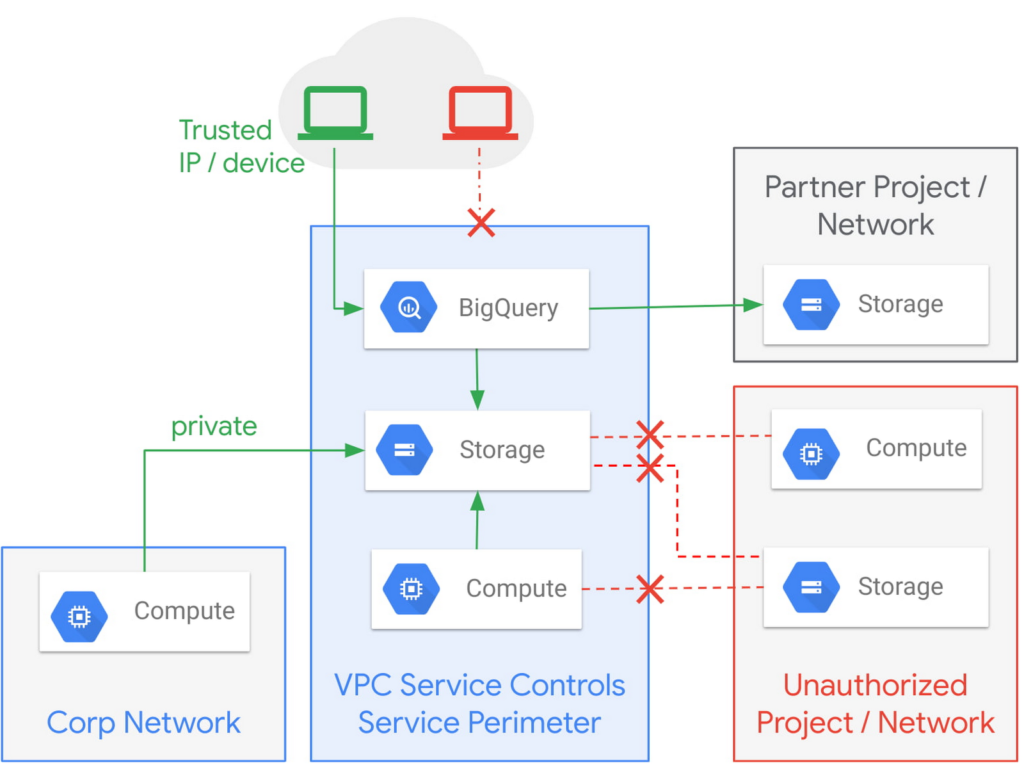
Example of the fine-grained policies based on access context that can be implemented with VPC Service Controls.
Like wearing two layers of clothing made from different fabrics to protect you from winter weather, VPC Service Controls may appear similar to Identity and Access Management (IAM) but they come from a different approach to implementing security. IAM enables granular identity based access control; VPC Service Controls create a security perimeter that protects your cloud resources and sets up private connectivity to Google Cloud’s APIs and services. While it’s recommended to use both, VPC Service Controls have an added bonus: They can support blocking data theft during a breach.
The additional layer of security that VPC Service Controls offer customers is challenging to achieve with on-premise systems or even with other cloud providers. You can think of it as an firewall for APIs that also adds a logical security control around three paths that data can take:
- From the public internet to your resources
- Inside your VPC and the cloud service perimeter
- For service-to-service communication (for example, denying access to someone who wants to load data to BigQuery or exfiltrate data from a BigQuery instance.)
How VPC Service Controls can help stop attackers
VPC Service Controls are used to enforce a security perimeter. They can help isolate resources of multi-tenant Google Cloud services, which can help reduce the risk of data exfiltration or a data breach.
For example, a bank that migrated financial data processing to Google Cloud can use VPC Service Controls to isolate their processing pipeline from public access (or any unauthorized access) by defining a trusted service perimeter.
How VPC Service Controls can enable trusted sharing
VPC Service Controls are used to securely share data across service perimeters with full control over what resource can connect to other resources, or outside the perimeter. This can help mitigate data exfiltration risks stemming from stolen identities, IAM policy misconfigurations, some insider threats, and compromised virtual machines.
Returning to our bank example, that same bank using VPC Service Controls may securely share or access data across Service Perimeters and Organizations. They may allow access to specific partners and for specific operations.
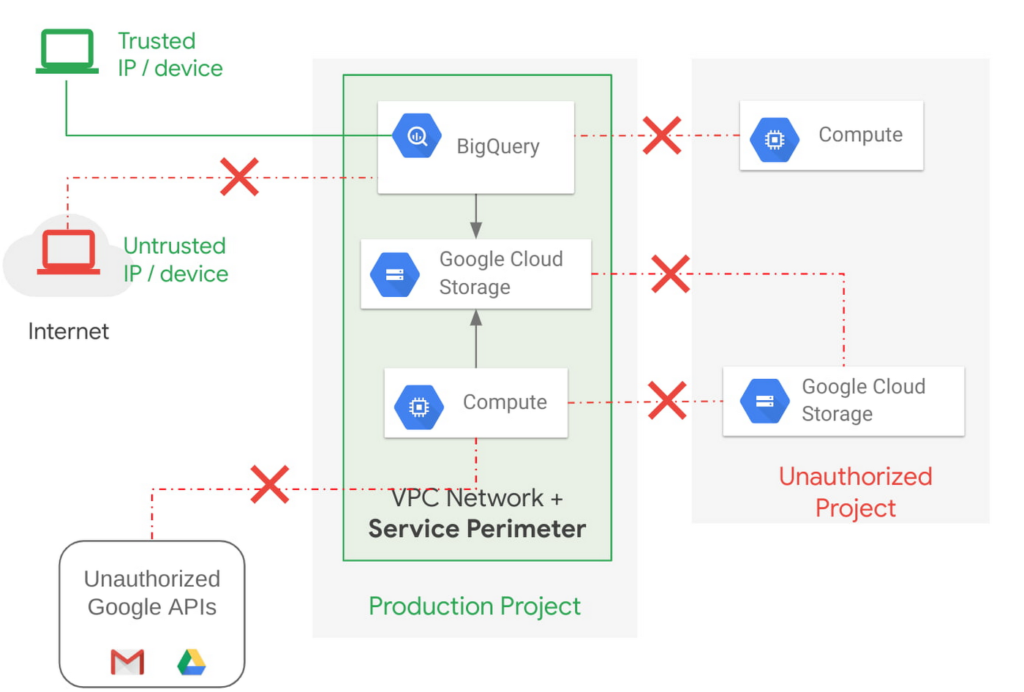
Example of allowing an authorized device plus authorized access.
How VPC Service Controls support Zero Trust access
VPC Service Controls deliver Zero Trust access to multi-tenant Google Cloud services. Clients can restrict access to authorized IPs, client context, user identity, and device parameters while connecting to multi-tenant services from the internet and other services.
A bank can use moving its services to the public cloud as an opportunity to abandon outdated access management approaches and adopt Zero Trust access. VPC Service Controls let them create granular access control policies in Access Context Manager based on attributes such as user location and IP address. For example, it would allow an analyst to only access Big Query from a corporate device on the corporate network during business hours. These policies can help ensure the appropriate security controls are in place when granting access to cloud resources from the Internet.
Next steps with VPC
Check out these pages to learn more about VPC Service Controls for your sensitive cloud deployments, especially for regulated workloads. This blog is the third in our Best Kept Security Secrets series, which includes how to tap into the power of Organization Policy Service and how Cloud EKM can help resolve the cloud trust paradox.
Private Services Connect in Google Cloud Regions Enables Customers to Consume Services Faster

4610
Of your peers have already read this article.
2:00 Minutes
The most insightful time you'll spend today!
At Google Cloud, we believe in making it simple and secure to consume services whether they’re from Google, a third party or customer-owned. With Private Service Connect, we have adopted a service-centric approach to our network that abstracts the underlying networking infrastructure. And today, we are announcing Private Service Connect is generally available in all Google Cloud regions.
Private Service Connect allows you to create private and secure connections from your cloud networks to services like Cloud Storage or Cloud Bigtable and third-party services like Elastic, MongoDB or Snowflake. It creates service endpoints in your VPCs that provide private connectivity and policy enforcement, allowing you to easily connect to services across different networks and organizations.
Customers told us they want to consume services faster while making sure that the connectivity is private and secure. In the past, achieving this was a challenge: networking teams had to negotiate IP address blocks, mutually agree on policies and coordinate as applications evolved to newer versions. With Private Service Connect, you can delegate the consumption and delivery of services to different teams without having to coordinate between teams.
How it works
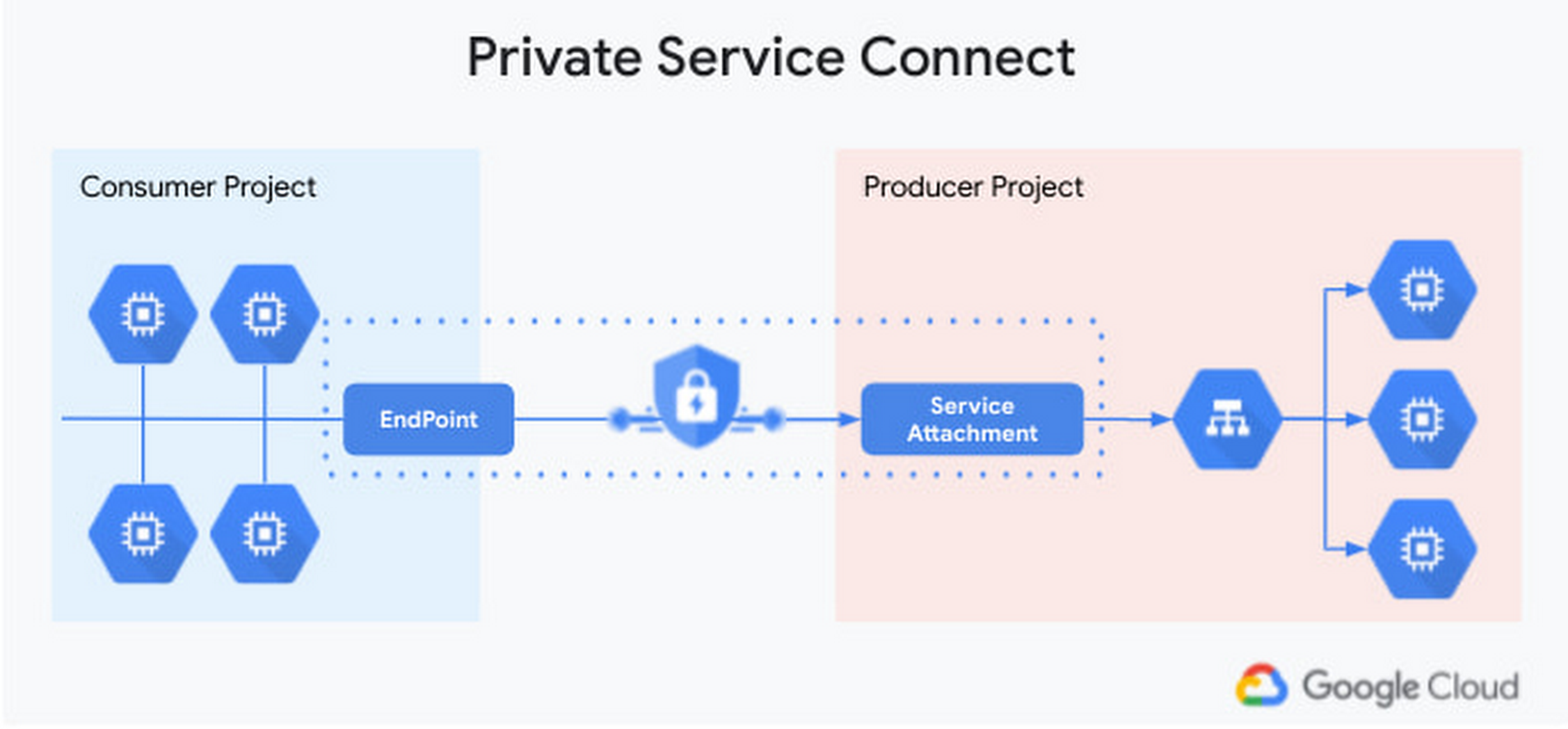
Private Service Connect makes it easy to consume services by leveraging service endpoints that are locally managed. The services can be in different projects or managed by different organizations. Access to the service is controlled by strict governance and IAM policies. Application teams and developers can focus on delivering their services easily by exposing their ‘service attachment’. No more worrying about networking constructs—Private Service Connect takes care of connecting to the service on the Google backbone for them.
Benefits to our partners
Being able to consume services from a variety of software vendors and service providers makes it possible for enterprises to innovate faster. For that, developers need to be able to compose services from third-party vendors, Google managed services, as well as their own services. To help, third-party partners can use Private Service Connect to deliver multi-tenant services securely and at massive scale, and make the connectivity to their services appear as if they are running on the enterprises’ network. Private Service Connect will also integrate with Service Directory to register many producer services, making service consumption even simpler.
“In today’s environment, where seamless access to real-time market information and the ability to handle increasingly vast volumes of data is essential, our clients are demanding native connectivity in the cloud. Google’s Private Service Connect offers the performance and reliability required by the types of mission critical apps that rely on Bloomberg’s tick for tick market data feed, B-PIPE.” —Cory Albert, Global Head of Cloud Strategy, Enterprise Data at Bloomberg
“One of the key goals for Elastic on Google Cloud is to monitor and protect our customers’ data. Google Cloud’s Private Service Connect with Elastic Cloud furthers our commitment to our customers that together we make it quick, easy and secure to gain insights and intelligence from their data.” —Uri Cohen, Product Lead for Elastic Cloud
“MongoDB’s partnership with Google is an integral part of our strategy to support modern apps and mission-critical databases and to become a cloud data company. Private Service Connect allows our customers to connect to MongoDB Atlas on Google Cloud seamlessly and securely and we’re excited for customers to have this additional and important capability.”—Andrew Davidson, VP of Cloud Product, MongoDB
Check out the Google Cloud Console to try it today.
5 ways a SOAR solution improves SOC analyst onboarding

3028
Of your peers have already read this article.
2:30 Minutes
The most insightful time you'll spend today!
Editor’s note: This blog was originally published by Siemplify on Feb. 19, 2021.
The number of unfilled cybersecurity jobs stretches into the millions, and a critical part of the problem is the length of time it takes to backfill a position.
Industry group ISACA has found that the average cybersecurity position lies vacant for up to six months. Some positions, like security analyst, are difficult to find suitable candidates for thanks to workplace challenges such as lack of management support and burnout.
As the old phrase goes, time is money. So when organizations are fortunate enough to fill a position with the appropriate talent, they want to be able to make up for lost time as quickly as possible. This is especially true for roles in the security operations center, a setting notorious for needing staff to field never-ending alerts generated by an often-disparate collection of security tools.
Training new analysts can be a daunting task. They need time to get acquainted with the SOC’s technology stack and processes. Without documentation, they often ask senior analysts for guidance. This can create distractions and consume time.
A reliance on community knowledge—undocumented, not widely-known information within an organization—creates inconsistency within the SOC that contributes to longer ramp-up times for new analysts. Undocumented processes, combined with security tools that don’t talk to each other, typically mean a SOC will need to spend nearly 100 hours—the equivalent of 2 1/2 weeks—getting a single new analyst up to speed.
Enter automation. Throughout an analyst’s career in the SOC, a security orchestration, automation, and response (SOAR) solution can be their best friend, helping expedite routine tasks and liberating them to perform more exciting work. But the technology can also allow even the most junior analysts to have an auspicious onboarding experience—hitting the ground running on day one, acclimated to their new environment, and feeling comfortable about and confident in their future.
Here are five ways a SOAR solution can, among many other activities, aid in analyst onboarding
1) The SOAR solution deploys automated playbooks
The average SOC receives large numbers of alerts per day, and many will be false positives. That amounts to a lot of dead-ends for analysts to chase and leaves little time to investigate legitimate anomalous network activity. The sheer volume of alerts has even prompted some analysts to turn off high-alert features on detection tools, potentially causing teams to miss something important.
SOAR helps analysts hurdle these roadblocks by allowing teams to create custom, automated playbooks, workflows that equalize resources and knowledge across the SOC, and help maintain consistency in the face of new hires and staff turnover. And if analysts should need to create or edit any of the steps in these playbooks, the optimal SOAR solution will enable them to do this without knowledge of specific coding or query languages, acumen that a novice analyst may lack.
2) The SOAR solution groups related alerts
As multiple alerts from different security tools are generated, some SOAR solutions allow you to automatically consolidate and group these alerts into one cohesive interface. This is what is known as taking a threat-centric approach to investigations, with the SOAR looking for contextual relationships in the alerts and, if identified, grouping these alerts into a single case. Having the ability to work more manageable and focused cases right off the bat will help ensure a smoother transition for new analysts.
3) The SOAR solution pieces together the security stack
https://www.siemplify.co/getstartedFrom next-generation firewalls to SIEM to endpoint detection and response, the security stack in any given organization can be vast and complex. No incoming analyst has reasonable time to familiarize themselves with every tool living within the stack—or to manually tap into these different tools to obtain the appropriate context to apply to alerts. A SOAR solution alleviates this challenge by delivering context-rich data that can be analyzed in one central platform, eliminating the need for multiple consoles for alert triage, investigation and remediation. Plus, with a SOAR solution, there is no need for the SOC to directly touch a detection tool that another group may manage.
4) The SOAR solution streamlines collaboration to enable easy escalation and information sharing
Often the SOC is not capable of responding to every threat, meaning other departments, such as networking, critical ops, or change management need to be involved. In addition, executive personnel are likely interested in security trends happening within the organization. Because not every group communicates in the same way—or consumes information in the same way—breakdowns can occur, and frustrations can mount, especially for a new analyst. A SOAR solution can even the playing field by automatically generating instructions, updates, or reports from the SOC to other teams, and vice versa. SOAR is also a useful solution for collaborating within the SOC team as well, especially in the age of remote and hybrid work.
5) The SOAR solution prevents analysts from quickly burning out.
There is a reason why the SOC has obtained the dubious acronym of “sleeping on chair.” Life in this environment can be a tedious, mental grind, prompting certain inhabitants to literally fall asleep from boredom.
SOAR solutions can counter this tedium in two notable ways. They can prevent analysts from having to stare at a multitude of monitors while working long shifts. They can also free analysts to work on more strategic and thought-provoking assignments, which can help improve the company’s overall security posture—and ensure a new entrant to the SOC doesn’t lose steam immediately.
To learn more about SOAR from Siemplify, now part of Google Cloud SecOps suite, including how to download the free community edition, visit siemplify.co/GetStarted.
Track metrics and stay focused on threats: Achieving Autonomic Security Operations

2829
Of your peers have already read this article.
2:30 Minutes
The most insightful time you'll spend today!
What’s the most difficult question a security operations team can face? For some, is it, “Who is trying to attacks us?” Or perhaps, “Which cyberattacks can we detect?” How do teams know when they have enough information to make the “right” decision? Metrics can help inform our responses to those questions and more, but how can we tell which metrics are the best ones to rely on during mission-critical or business-critical crises?
As we discussed in our blogs, “Achieving Autonomic Security Operations: Reducing toil” and “Achieving Autonomic Security Operations: Automation as a Force Multiplier,” your Security Operations Center (SOC) can learn a lot from what IT operations discovered during the Site Reliability Engineering (SRE) revolution. In this post, we discuss how those lessons apply to your SOC, and center them on another SRE principle—Service Level Objectives (SLOs).
Even though industry definitions can vary for these terms, SLI, SLO, and SLA have specific meanings, wrote the authors of the Service Level Objectives chapter in our e-book, “Site Reliability Engineering: How Google runs production systems.” (All subsequent quotes come from the SLO chapter of the book, which we’ll refer to as the “SRE book.”)
- SLI: “An SLI is a service level indicator—a carefully defined quantitative measure of some aspect of the level of service that is provided.”
- SLO: “An SLO is a service level objective: a target value or range of values for a service level that is measured by an SLI.”
- SLA: An SLA is a Service Level Agreement about the above: “an explicit or implicit contract with your users that includes consequences of meeting (or missing) the SLOs they contain.”
In practice, we measure something (SLI) and we set the target value (SLO); we may also have an agreement about it (SLA).
This is not about cliches like “what gets measured gets done” here, but metrics and SLIs/SLOs will to a large extent determine the fate of your SOC. For example, SOCs (including at some Managed Security Service Providers) that obsessively focus on “time to address the alert” end up reducing their security effectiveness while making things go “whoosh” fast. If you equate mean time to detect or discover (MTTD) with “time to address the alert” and then push the analyst to shorten this time, attackers gain an advantage while defenders miss things and lose.
How to choose which metrics to track
One view of metrics would be that “whatever sounds bad” (such as attacks per second or incidents per employee) needs to be minimized, while “whatever sounds good” (such as successes, reliability, or uptime) needs to be maximized.
But the SRE experience is that sometimes good metrics have an optimum level, and yes, even reliability (and maybe even security). The book’s authors, Chris Jones, John Wilkes, and Niall Murphy with Cody Smith, cite an example of a service that defied common wisdom and was too reliable.
“Its high reliability provided a false sense of security because the services could not function appropriately when the service was unavailable, however rarely that occurred… SRE makes sure that global service meets, but does not significantly exceed, its service level objective,” they wrote.
The SOC lesson here is that some security metrics have optimum value. The above-mentioned time to detect has an optimum for your organization. Another example is the number of phishing incidents, which may in fact have an optimum value. If nobody phishes you, it’s probably because they already have credentialed access to many of your systems – so in your SOC, think of SLI optimums, and don’t automatically assume zero or infinite targets for metrics.
Three specific quotes from the SRE book remind us that “good metrics” may need to be balanced with other metrics, rather than blindly pushed up:
- “User-facing serving systems generally care about availability, latency, and throughput.”
- “Storage systems often emphasize latency, availability, and durability.”
- “Big data systems, such as data processing pipelines, tend to care about throughput and end-to-end latency.”
In a SOC, this may mean that you can detect threats quickly, review all context related to an incident, and perform deep threat research—but the results may differ for various threats. A fourth guidepost explains why your SOC should care even about this: “Whether or not a particular service has an SLA, it’s valuable to define SLIs and SLOs and use them to manage the service.” Indeed, we agree that SLIs and SLOs matter more for your SOC than any SLAs or other agreements.
Metrics matter, but so does flexibility
When considering the list of most difficult questions a security operations team can face, it’s vital to understand how to evaluate metrics to reach accurate answers. Consider another insight from the book: “Most metrics are better thought of as distributions rather than averages.”
If the average alert response is 20 minutes, does that mean that “all alerts are addressed in 18 to 22 minutes,” or that “all alerts are addressed in five minutes, while one alert is addressed in six hours?” Those different answers point to very different operational environments.
What we’ve seen before in SOCs is that a single outlier event is probably the one that matters most. As the authors put it, “The higher the variance in response times, the more the typical user experience is affected by long-tail behavior.” So, in security land, that one alert that took six hours to respond to was likely related to the most dangerous activity detected.
To address this, the book advises, “Using percentiles for indicators allows you to consider the shape of the distribution.” Google detection teams track the 5% and 95% values, not just averages.
Another useful concept from SRE is the “error budget,” a rate at which the SLOs can be missed, and tracked on a daily or weekly basis. It’s a SLO for meeting other SLOs.
The SOC value here may not be immediately obvious, but it’s vital to understanding the unique role security occupies in technology. In security, metrics can be a distraction because the real game is about preventing the threat actor from achieving their objectives. Based on our own experiences, most blue teams would rather miss the SLO and catch the threat in their environment. The defenders win when the attacker loses, not when the defenders “comply with a SLA.” The concept of the error budget might be your best friend here.
The SRE book takes that line of thinking even further. “It’s both unrealistic and undesirable to insist that SLOs will be met 100% of the time: doing so can reduce the rate of innovation and deployment.”
More broadly, and as we said in our recent paper with Deloitte on SOCs, rigid obeisance is its own vulnerability to exploit. “This adherence to process and lack of ability for the SOC to think critically and creativity provides potential attackers with another opportunity to successfully exploit a vulnerability within the environment, no matter how well planned the supporting processes are.”
To be successful at defending their organizations, SOCs must be less like the unbending oak and more like the pliant but resilient willow.
Track metrics but stay focused on threats
A third interesting puzzle from our SRE brethren: “Don’t pick a target based on current performance.”
We all want to get better at what we do, so choosing a target goal for improvement based on our existing performance can’t be bad, right? It turns out, however, that choosing a goal that sets up unrealistic or otherwise unhelpful, or woefully insufficient, expectations can do more harm than good.
Here is an example: An analyst handles 30 alerts a day (per their SLI), and their manager wants to improve by 15% so they set the SLO to 35 alerts a day. But how many alerts are there? Leaving aside the question of whether it is the right SLI for your SOC, what if you have 5,000 alerts, and you drop 4,970 of them on the floor. When you “improve,” you still drop 4,965 on the floor. Is this a good SLO? No, you need to hire, automate, filter, tune, or change other things in your SOC, not set better SLO targets that seemingly improve upon today’s numbers.
To this, our SRE peers say: “As a result, we’ve sometimes found that working from desired objectives backward to specific indicators works better than choosing indicators and then coming up with targets… Start by thinking about (or finding out!) what your users care about, not what you can measure.”
In the SOC, this probably means start with threat models and use cases, not the current alert pipeline performance.
SOC guidance can sometimes be more cryptic than we’ve let on. One challenging question is determining how many metrics we really need in a typical SOC. SREs wax philosophical here: “Choose just enough SLOs to provide good coverage of your system’s attributes.”
In our experience, we haven’t seen teams succeed with more than 10 metrics, and we haven’t seen people describe and optimize SOC performance with fewer than 3. However, SREs offer a helpful, succinct test: “If you can’t ever win a conversation about priorities by quoting a particular SLO, it’s probably not worth having that SLO.”
SLOs will get to define your SOC, so define them the way you want your SOC to be, the book advises. “It’s better to start with a loose target that you tighten than to choose an overly strict target that has to be relaxed when you discover it’s unattainable. SLOs can—and should—be a major driver in prioritizing work for SREs and product developers, because they reflect what users care about.”
Importantly, make SLOs for your SOC transparent within the company. As the SREs say, “Publishing SLOs sets expectations for system behavior.” The benefit is that nobody can blame you for non-performance if you perform to those agreed upon SLOs.
Finally, here are some examples of metrics from our teams at Google. In addition to reviewing all escalated alerts, they collect and review weekly:
- event volume
- event source counts
- pipeline latency
- triage time median
- triage time at 95%
Analyzing these metrics can reveal useful guidance for applying SRE principles and ideas with their detection and response teams.
Event volume: What we need to know here is what is driving the volume. Is the event volume normal, high, or low—and why? Was there a flood of messages? New data source causing high volume? What caused it? Any bad signals? Or is there a problematic area of the business that needs strategic follow-up to implement additional controls?
Event source count: Are there signals or automation that’s behaving abnormally? Is there new automation that’s misbehaving? Counting events for each source call makes for a decent SLI.
Pipeline latency: Here at Google, we aim for a confirmed detection within an hour of an event being generated. The aspirational time is 5 minutes. This means that the event pipeline latency is something that must be tracked very diligently. This also means that we must scrutinize automation latency. To achieve this, we try to remove self-caused latency so that we’re not hiding the pain of bad signals or bad automation.
We triage median and 95p time: We track the response time to events. As the SRE book points out, tracking only a single average number can get you in trouble very quickly. Note that triage time is not the same as time to resolution, but more of a dwell time for an attacker before they are discovered.
Incident resolution times: When you have a SLI but not a SLO, this can be the proverbial elephant in the room and create all sorts of bad incentives to “go fast” instead of “go good.” Specifically, SLO without SLI causes harm from encouraging the analysis to resolve quickly and potentially increase the risk of missing serious security incidents, especially when subtle signals are involved.
When reviewing alert escalations, we look to determine if the analysis is deep enough, if handoffs contain the right information for our response teams, and to get a sense of analyst fatigue. If analysts are phoning in their notes, it’s a sign that they’re over a particular signal or that there are a ton of duplicate incidents and we need to drive the business in some way.
By measuring these and other factors, metrics allow us to drive down the cost of each detection. Ultimately, this can help our detection and response operation scale faster than the threats.
Related posts:
- “Achieving Autonomic Security Operations: Automation as a Force Multiplier”
- “Achieving Autonomic Security Operations: Reducing toil”
- “Taking an autonomic approach to security operations” video
- “New Paper: “Future Of The SOC: Process Consistency and Creativity: a Delicate Balance” (Paper 3 of 4)”
- “New Paper: “Autonomic Security Operations — 10X Transformation of the Security Operations Center””
- “EP75 How We Scale Detection and Response at Google: Automation, Metrics, Toil” podcast episode
Monitoring and defending threats in the cloud

2799
Of your peers have already read this article.
3:00 Minutes
The most insightful time you'll spend today!
As your organization transitions from on-premises to hybrid cloud or pure cloud, how you think about threat detection must evolve as well—especially when confronting threats across many cloud environments. A new foundational framework for thinking about threat detection in public cloud computing is needed to better secure digital transformations.
Because these terms have had different meanings over time, here’s what we mean by threat detection and detection and response. A balanced security strategy covers all three elements of a security triad: prevention, detection, and response. Prevention can improve, but never becomes perfect. Despite preventative controls, we still need to be on the lookout for threats that penetrate our defenses. Finding and confirming malicious activities, and automatically responding to them or presenting them to the security team constitutes detection and response.
Vital changes impact the transition from the traditional environment to the cloud and affect three key areas:
- Threat landscapes
- IT environment
- Detection methods
First, threat landscapes change. This means new threats evolve, old threats disappear, and the importance of many threats changes. If you perform a threat assessment on your environment and then migrate the entire environment to the public cloud, even if you use the lift and shift approach, the threat assessment will look very different. MITRE ATT&CK Cloud can help us understand how some threat activities apply to public cloud computing.
Second, the entire technology environment around you changes. This applies to the types of systems and applications you as a defender would encounter, but also to technologies and operational practices. Essentially, cloud as a realm where you have to detect threats is different —this applies to the assets being threatened and technologies doing the detecting. Sometimes cloud looks to traditional “blue teams” as some alien landscape where they would have only challenges. In reality, cloud does bring a lot of new opportunities for detection. The main theme here is change, some for the worse and some for the better.
After all, cloud is
- Usually distributed—running over many regions and data centers
- Often immutable—utilizes systems that are replaced, rather than updated
- Ephemeral uses workloads often created for the task and then removed
- API driven—enabled by pervasive APIs
- Centered on identity layer—mostly uses identities and not just network perimeter to separate workloads
- Automatically scalable—able to expand with the increasing workload
- Shared with the provider
Sometimes the combination of Distributed, Immutable, and Ephemeral cloud properties is called a DIE triad. All these affect detection for the cloud environment.
Third, telemetry sources and detection methods also change. While this may seem like it’s derived from the previous point we made, that’s not entirely true. For some cloud services, and definitely for SaaS, a popular approach of using an agent such as EDR would not work. However, new and rich sources of telemetry may be available—Cloud Audit Logs are a great example here.
Similarly, the expectation that you can sniff traffic on the perimeter, and that you even will have a perimeter, may not be entirely correct. Pervasive encryption hampers Layer 7 traffic analysis, while public APIs rewrite the rules on what a perimeter is. Finally, detection sources and methods are also inherently shared with the cloud provider, with some under cloud service provider control while others are under cloud user control.
This leads to several domains where we can and should detect threats in the cloud.
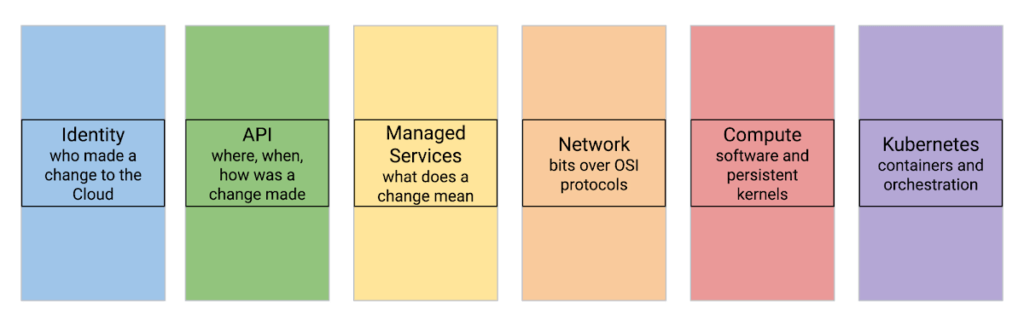
Let’s review a few cloud threat detection scenarios.
Everybody highlights the role of identity in cloud security. Naturally, it matters in threat detection as well—and it matters a lot. While we don’t want to repeat the cliche that in a public cloud you are one IAM mistake away from a data breach, we know that cloud security missteps can be costly. To help protect organizations, Google Cloud offers services that automatically and in real-time analyze every IAM grant to detect outsiders being added—even indirectly.
Detecting threats inside compute instances such as virtual machines (VM) using agents seems to be about the past. After all, VMs are just servers, right? However, this is an area where cloud brings new opportunities. For example, VM Threat Detection allows security teams to do completely agentless YARA rule execution against their entire compute fleet.
Finally, products like BigQuery require new ways of thinking about detecting data exfiltration. Security Command Center Premium detects queries and backups in BigQuery that would copy data to different Google Cloud organizations.
Naturally, some things stay the same in the cloud. These include broad threat categories such as insiders or outsiders; steps in the cyber exploit chain such as coarse-grained stages of an attack; and the MITRE ATT&CK Tactics are largely unchanged. It is also likely that broad detection use cases stay the same.
What does that mean for the defenders?
When you move to the cloud, your threats and your IT change—and change a lot.
This means that using on-premises detection technology and approaches as a foundation for future development may not work well.
This also means that merely copying all your on-premise detection tools and their threat detection content is not optimal.
Instead, moving to Google Cloud is an opportunity to transform how you can achieve your continued goals of confidentiality, integrity, and availability with the new opportunities created by the technology and process of cloud.
Call to action:
- Listen to “Threat Models and Cloud Security” (ep12)
- Listen to “What Does Good Detection and Response Look Like in the Cloud? Insights from Expel MDR” (ep72)
- Listen to “Cloud Threats and How to Observe Them” (ep69) and read the related blog “How to think about cloud threats today”
- Review how to test cloud detections
- Read the guidance on cloud threat investigation with SCC and Chronicle
More Relevant Stories for Your Company

DueDil Chooses Apigee to Leverage APIs for Customers’ Risk Monitoring with Better Insights
As their name reflects, DueDil provides due diligence services ranging from customer-specific risk evaluations and selections to customer onboarding and real-time risk monitoring for leading financial services, high-growth tech and insurance companies. Founded in 2009, the company helps more than 3,000 enterprise users from over 400 clients to not only understand with

Latest News: Secure Digital Infrastructure Services with Apigee Advanced API Security for Google Cloud
Organizations in every region and industry are developing APIs to enable easier and more standardized delivery of services and data for digital experiences. This increasing shift to digital experiences has grown API usage and traffic volumes. However, as malicious API attacks also have grown, API security has become an important

Strategic Consulting, Training & Implementation Guidelines with Public Sector PSO Helps Governments Stay Compliant
Did you know that by 2025, enterprise IT spending on public cloud computing will overtake traditional IT spending? In fact, 51% of IT spend in application software, infrastructure software, business process services, and system infrastructure will transition to the public cloud, compared to 41% in 20221.. As enterprises continue to

reCAPTCHA Enterprise Fraud Prevention: Stop Payment Fraud with Google’s Intelligence
Today, we are putting the power of Google’s insights and intelligence in the hands of risk, fraud, and security teams everywhere. We are pleased to announce the general availability of reCAPTCHA Enterprise Fraud Prevention, a new product that uses Google's own fraud models, machine learning, and intelligence from protecting more
