





Five Ways Cloud Computing Helps Companies Optimize Operations and Lower IT Costs

4800
Of your peers have already read this article.
1:30 Minutes
The most insightful time you'll spend today!
There is no one way to recover. The past year has seen unprecedented challenges for business across the world, with social distancing and quarantine measures forcing many organizations to quickly adapt to remote working. A new report from BCG Platinion, titled “Finding a New Normal in the Cloud”, points out that while companies have done well to survive so far, the overall business environment is still a tough one with contracted economies and lowered revenues. CIOs have to find the right balance between technological innovation and lowering their cash burn rate.
The report identifies five key ways in which companies can use cloud computing to optimize their operations and reduce overall IT costs by as much as 10%.
1. Go beyond VPN
The BCG Platinion report states that companies need “rapid, efficient, highly scalable, and device agnostic solutions”. Traditionally, when employees had to work offsite, companies provided them with VPNs. But the sheer scale of the COVID-19 pandemic has shown these solutions to be expensive, slow, inconvenient, and hard to manage when entire workforces are working remotely.
Instead, BCG Platinion emphasizes the need for cloud-based solutions such as BeyondCorp Enterprise for more secure, more effective, lower cost remote access at scale. BeyondCorp Enterprise offers customers a zero trust platform for simple and secure access with continuous end-to-end protection that can be used on any device at any time. Deliveroo, a global food delivery company headquartered in the UK, uses BeyondCorp Enterprise to bring the zero trust model to its distributed workforce.
“Having secure access to applications and associated data is critical for our business,” says Vaughn Washington, VP of Engineering at Deliveroo. “With BeyondCorp Enterprise, we manage security at the app level, which removes the need for traditional VPNs and associated risks.”1
With a low cost cloud subscription model, BeyondCorp Enterprise eliminates the need for hardware, operating, and maintenance costs that come with VPN solutions and can also enable organizations to offer protection to the extended workforce at a fraction of the cost. BCG Platinion estimates that solutions like BeyondCorp Enterprise can save companies as much as 50% versus the cost of a traditional VPN.
2. Use SaaS to keep productivity up
With so much of the workforce fragmented due to social distancing measures, the need for seamless, efficient collaboration is greater than ever. According to BCG Platinion, a fully functional Software-as-a-Service productivity solution such as Google Workspace helps to “alleviate the traditional costs and burdens around availability, backup, and maintenance of on-premise collaboration infrastructure.” BCG Platinion analysts estimate that adopting a SaaS solution can lower computing costs for end users by up to 35%.
But working in the cloud does more than lower costs. The BCG Platinion report cites a 2020 study from Forrester that found adopting Google Workspace boosted revenue growth by 1.5%, reduced the need for on-demand tech support by 20%, and cut the risk of data breaches by more than 95%. Over the last year, companies of all sizes have looked on the conditions of the pandemic as an opportunity to change the way they work.
“Airbus has spent the past year thinking about what it actually means to return to work and we’re looking to support greater flexibility with Google Workspace in a leading role,” says Andrew Plunkett, Airbus Vice President Digital Workplace. “In 2020, we held 5.6M Google Meet sessions and we now have more than 70,000 shared Drives where people collaborate. Google Workspace has changed the way people work at Airbus and that will continue as the solution empowers the hybrid work reality.”2
3. Reduce IT overhead and management costs with cloud-first devices
Working in the cloud can be made even more effective with devices specifically designed for the cloud, says the BCG Platinion report. “Cloud-native devices such as Google’s Chromebooks and Chromeboxes are cost-effective, easy to deploy, simple to use, and highly secure,” says BCG Platinion. Additionally, with “thin client” devices, companies can save on hardware costs compared with traditional laptops and desktops.The report suggests that a thin client approach can produce savings of up to 25% in end-user technology and support.
Organizations and businesses of all sizes have found that Chrome OS and devices have greatly enhanced their capacity to work together in even the most challenging circumstances. Chrome OS provides employees with a modern experience and devices that stay fast, have built-in security, deploy quickly, and reduce the total cost of ownership. “Chromebooks are simple-to-use and cost-effective devices that do everything that our staff need them to do, which is mainly accessing Google Workspace online,” says Henry Lewis, Head of Platform for the London Borough of Hackney. “As soon as the Grab and Go Chromebooks were available, they were well used every day.”3
4. Lift and shift for easier transitions
While migrating to the cloud is a priority for many organizations to succeed, it does not have to happen all at once and in the same way. A total cloud migration can be a huge undertaking, involving redesigns of architecture and refactoring of applications. For many organizations, this process can take several months, even years.
But in times like these, CIOs need to make decisions quickly and reduce cash burn as much as possible. When resources are stretched and time is tight, BCG Platinion recommends a “lift-and-shift” approach for minimal disruption. With Google Compute Engine, for example, organizations can simply rehost their existing workloads on virtual machines without transformation. BCG Platinion reports that moving non-critical workloads to the cloud with lift-and-shift approaches can reduce IT spend by as much as 4% in just three months. Additionally, a quick, effective migration paves the way for more advanced IT infrastructure changes, creating effects that ripple long into the future.
5. Make data work for you with the cloud
Data is central to any industry and making the most out of it is more important now than ever before. With business as usual upended by the pandemic, organizations have turned to data for urgent tasks like demand forecasting or predicting supply-chain disruptions. A McKinsey report from last year points out that while many organisations had already started to engage with analytics and AI technologies, their progress was dramatically accelerated by the urgency of the pandemic: “Analytics capabilities that once might have taken these organizations months or years to build came to life in a matter of weeks.”
With the right setup a company can use data to drive efficiencies, respond quickly to its customers and open new markets. But big wins require huge amounts of information and powerful analytics, which means that effective data handling can be very difficult and expensive to do with on-premises architecture.
Moving to a cloud-based infrastructure minimizes infrastructure costs while opening up cutting edge techniques like machine learning for greater insight. The BCG Platinion report found that using a cloud-based data platform was not only cheaper and more efficient for businesses, but could result in a 70% increase in “effectiveness” which it defined as increased sales, lower costs of procured goods, and reduced inventory holding costs. “Moving to cloud provides competitive advantage as you scale innovation, accelerating the creation of new services to keep ahead of the competition,” explains Norbert Faure, Managing Director, Platinion Western Europe at Boston Consulting Group (BCG).
The key mission of any data platform is to make sure that the right people have access to the right information at the right time. Google Cloud helps to unify data across the entire business, increase agility, and innovate faster with a range of products. BigQuery runs complex analytics at infinite scale while helping organizations save up to 34% on the total cost of ownership compared with alternative cloud-based data warehouse solutions.4 Cloud Spanner provides a fully managed relational database that operates at 99.999% availability. Meanwhile, with Vertex AI, businesses can access the same groundbreaking machine learning tools that Google uses itself for unprecedented insight on a unified AI platform. “The whole Google Cloud suite of products accelerates the process of getting established and up and running, so we can perform the ‘bread-and-butter’ work of data science,” says David Herberich, VP, Head of Data at fintech startup Branch.5
Minimize costs today, innovate for tomorrow
As the world recovers from the pandemic, continued success depends on staying nimble and adaptive, argues the BCG Platinion report. Cloud computing can make companies more resilient by helping them to keep costs low, reducing overall IT spend by as much as 10% overall according to BCG Platinion. “For CIOs, cloud migrations can offer important near-term savings and benefits, while also reinvigorating progress toward the long-term goal of digital transformation.“
To learn more, read the full report from BCG Platinion.
1. BeyondCorp Enterprise: Introducing a safer era of computing
2. Building the future of work with Google Workspace
3. Hackney Council: Empowering 4,000 staff to keep serving their community from home
4. The Economic Advantages of Google BigQuery versus Alternative Cloud-based EDW Solutions
5. Fintech startup, Branch makes data analytics easy with BigQuery
Workforce Identity Federation: A Seamless Experience for Users

2744
Of your peers have already read this article.
2:30 Minutes
The most insightful time you'll spend today!
At Google Cloud, we’re focused on giving customers new ways to strengthen their security posture. Managing identities and authorization is a core security control that underpins interactions inside and collaboration outside the organization. To address fraud, identity theft, and other security challenges associated with the proliferation of online accounts, many organizations have opted to use centralized identity provider (IdP) products that can help secure and manage identities for their users and SaaS applications, and we want to strengthen support for these solutions and the use cases they support.
Today we’re pleased to announce Workforce Identity Federation in Preview. This new Google Cloud Identity and Access Management (IAM) feature can rapidly onboard workforce user identities from external IdPs and provide direct secure access to Google Cloud services and resources. Workforce Identity Federation uses a federation approach instead of Directory Synchronization, the method currently used by most organizations for onboarding Google Cloud identities. Workforce Identity Federation provides flexibility to support third-party collaboration use cases and business requirements that can be better addressed by using a localized, customer-managed IdP.
Federating existing identities eliminates the need to maintain separate identities across multiple platforms. This means that organizations using Workforce Identity Federation no longer need to synchronize workforce user identities from their existing identity management solutions to Google Cloud. IdPs can include Identity-as-a-Service (IDaaS) and directory products such as those from ForgeRock, Microsoft, Okta, JumpCloud, or Ping Identity.
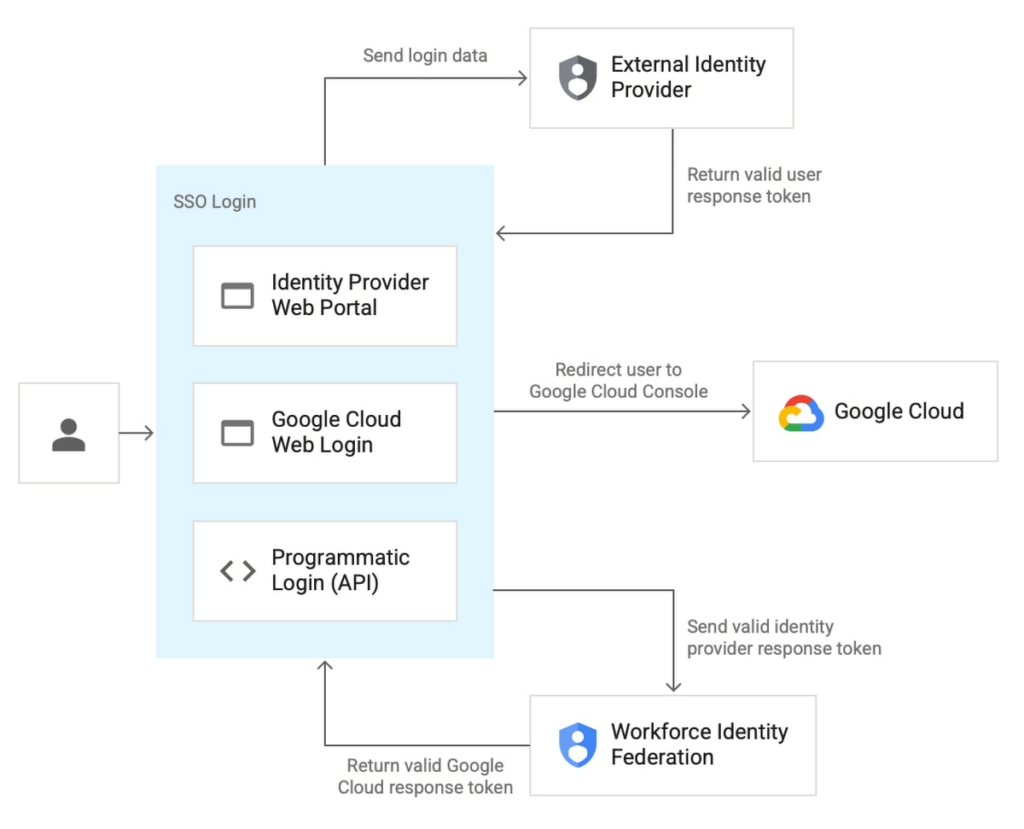
Workforce Identity Federation is another example of how we are working to make Google Cloud’s Invisible Security vision a reality, in this case delivering secure access leveraging customers’ current identity and access management solutions without the need for redundant user administration

VMware is one of our customers using Workforce Identity Federation in Preview. Thiru Bhat, director at VMware, explained why he’s excited for the new feature.
“VMware runs its own IdP and we needed a solution to allow our developers to access their Google Cloud projects while maintaining corporate control over identities and permissions. Syncing of user identities outside of our IdP is not permitted per our InfoSec policies and we deployed Google Cloud’s Workforce Identity Federation to fulfill our identity requirements. Workforce Identity Federation feature meets our needs with a solution that is robust and straightforward to configure.”
Here’s a closer look at a few use cases and the benefits from the new Workforce Identity Federation.
Use case: Employee sign-in and authorization
Streamlined authentication experience with fine-grained access control
Workforce Identity Federation can enable your organization’s users to access Google Cloud through the same login experience they already use for their existing IdP for single sign-on. Workforce Identity Federation also can enable fine-grained access through attribute mapping and attribute conditions. Attributes — which some IdPs call claims — contain additional information about users.
Google Cloud can use these attributes to further inform authentication decisions. Attribute mapping lets your administrators map identity attributes that are defined in your IdP to those that Google Cloud can use. Your administrators can configure Google Cloud with attribute conditions to authenticate conditionally — to let only a subset of external identities authenticate to your Google Cloud project based on attributes.
For example, your administrators might want to let only those employees who are part of the accounting team sign in. To do this, your administrators can configure an IdP attribute, such as EmployeeJobFamily. Using attribute mapping, they could map this attribute to a similar attribute in Google Cloud, such as employee_job_family. Then, they could configure an attribute condition, assertion.employee_job_family=="accounting".
Use case: Secure access for partners and vendors
Restricted and secure access to Google Cloud services from a partner or vendor that has their own IdP and associated privacy and data policies
Today, the modern enterprise depends on partners and vendors more than ever. Partners and vendors can help scale enterprise workflows, but they also can introduce new complexities for IT teams, such as how to secure partner or vendor identities in addition to the rest of their enterprise users.
Workforce Identity Federation can enable enterprises to selectively federate users from partner or vendor IdPs without requiring enterprise IT teams to sync or create a separate identity store to use Google Cloud resources.
One common scenario where Workforce Identity Federation can help is when a company hires a partner or vendor to provide outsourced development services using cloud resources (such as when Google Kubernetes Engine (GKE) DevOps services are outsourced to a partner.) The company creates a separate workforce pool for the partner or vendor’s administrator, who can then use their own IdP to grant access to their workforce.
This use case can also help support organizations who have requirements to store and maintain identity information locally in support of data residency or digital sovereignty initiatives. By using a local IdP, either customer-managed or partner-managed, and federating identities to Google Cloud, organizations can further strengthen control over their identity information.
Seamless experience for users, easy access management for administrators
Before Workforce Identity Federation, organizations would need to duplicate user identities from their IdP by creating user accounts in Google Cloud Identity. Workforce Identity Federation can help you access Google Cloud without having to first create Cloud Identity user accounts. It also reduces toil by eliminating the need to maintain two separate identity management systems.
Identity providers such as ForgeRock see tremendous value in the Workforce Identity Federation, and how Google Cloud can work with them to jointly help customers manage workforce identities. Peter Barker, ForgeRock’s Chief Product Officer, said that his company’s partnership with Google Cloud makes identity management easy and secure for administrators and users alike.
“Our strategic partnership with Google Cloud delivers great value to our customers and we’re excited to continue to expand our relationship. This integration with Google Cloud Workforce Identity Federation enables ForgeRock customers to leverage their current IAM investments and makes it easier for employees, contractors, and partners to securely access Google Cloud resources.”
Getting started with Workforce Identity Federation
Workforce Identity Federation is now available in Preview to customers already using Google Cloud. You can learn more about Workforce Identity Federation by visiting our webpage and watching this video.
Please contact your account manager to see if workforce identity federation is the right fit for your organization. And, you can get started with these new capabilities today using our product documentation.
Google Products Helps HMH’s Healthcare Staff Work from Anywhere Efficiently and Securely!

10220
Of your peers have already read this article.
3:00 Minutes
The most insightful time you'll spend today!
Hackensack Meridian Health (HMH) executive Mark Eimer explains how an ambitiously-timed rollout of a comprehensive suite of Google products helped the entire organization—from doctors to IT staff—achieve better security, cultivate a more equitable work environment, and ultimately, improve patient outcomes.
How does a recently merged, 17-hospital healthcare system fast-track a platform migration and hardware rollout securely and in a way that improves work for everyone, regardless of location or role? These are the questions that kept me up at night in early 2020, when the pandemic demanded a “big bang”—something our legacy laptops and operating systems couldn’t handle.
We began our work with Google in 2020 with the adoption of Chrome as our default browser. As we migrated platforms, keeping patient data safe was of the utmost importance to us, along with providing every staff member with the tools they needed to work virtually. Our staff often experienced issues accessing our web-based applications using Internet Explorer or Edge Browser, a problem that went away when we switched to Chrome. Chrome’s versatile compatibility also made it easier for my team to migrate all of our web-based operations, and Chrome’s security and manageability were key components to making this switch a huge win for the organization.
The success of this migration led us to extend our Google partnership to patient care applications—where Google’s expertise in AI and ML helps scale the use of diagnostics tools and improve other aspects of the patient journey.

Achieving security at every step
Like so many other healthcare organizations, we’ve been concerned about ransomware attacks. This is part of why we moved to Google Workspace and distributed over 3,000 Chrome OS devices in kiosk mode in March of 2020, when many of us went remote due to the pandemic. We were very concerned about team members accessing corporate applications through home devices that were running EOL operating systems (WIN7), as well as a general lack of antivirus and encryption measures.
We were protected by the fact that Google’s software and hardware both had built-in security features that we needed to stave off sophisticated attackers. For example, Chrome OS automatically updates to the latest security update and encrypts data living outside the cloud on the hardware. These features protected us from security-related disruptions, letting us securely move a huge library of file shares and emails across thousands of accounts to Google Chrome OS in just four months.
A year later, in March 2021, we migrated the enterprise over to Google Workspace and saw an immediate reduction in spam by 30% from the inherent built-in AI/ML. This meant staff were less likely to receive (and click through) phishing attempts. My team could connect, create, and collaborate easily and securely—even as more of us were working from home and needed to access sensitive data remotely.
Leveling the playing field
As an organization, we were surprised by how many team members didn’t have personal computers at home. We quickly decided that if we needed team members to work from home, the health network would have to supply hardware. Chromebooks’ lower price tag compared to PCs—on top of their built-in security controls—allowed us to purchase, deploy, and support that initial distribution of 3,000 Chromebooks to team members in less than three weeks, providing devices to every eligible remote employee instead of just a select few. This was vital to reaching our equitable technology goal as part of our diversity and inclusion initiative: everybody has the same tools to do good work.
When all employees have what they need to do their jobs well, we get better patient outcomes. Before we began this cloud adoption journey, patient and staff experiences were different within the hospitals and outside of them.
Now it’s the same wherever our staff is, and we’ve seen efficiency and accessibility benefits extend to the patient side. For example, we built a web-based contact center that supports 80 locations that use Workspace and Chrome OS devices. Since customer service, admin, and providers are all on the same system, it has become a one-stop shop for patients.
Furthermore, through the Grow with Google program, we were able to provide another benefit to employees that drove our equity goals. Google trained 50 non-IT staff members—from environmental services, food and nutrition, and other non-tech areas who were interested in making a career change to IT—on the Google products we were using. They may not have thought about switching to a career in IT before the Grow with Google program came to our organization, but through this partnership, they now have that opportunity.
A strategic, long-term partner
With any large-scale rollout, the work doesn’t end once laptops are in employee hands. Google has shown their commitment to long-term collaboration as they continuously optimize their products for the unique needs of healthcare providers and go the extra mile in tailoring tools to our staff’s workflows.
For example, on the Chrome OS side, the Google team has helped our registration desks and document centers with device integration for hardware like credit card readers and e-signature pads. They’ve also helped us meet security and privacy requirements mandated by state and federal governments around HIPAA, Medicaid, and Medicare reimbursements. Over this next year, we’ll look at a feature roadmap with Google Cloud to deliver further enhancements, iterating on the product itself to meet our needs for the present and the future.

Delivering the future of healthcare
The benefits we’ve seen around security and usability—and the ability to provide all staff with equal access to Google’s technology—are why we’re expanding our partnership with Google to both the administrative and clinical sides of HMH. In addition to further Google rollouts with corporate, next year we’re distributing Chromebooks to all 350 of our ambulatory clinics.
We’re also working with the Google professional services team to create a custom AI model that analyzes 3D mammogram images. This AI model will enable two providers to read mammograms—which adheres to international best practices but is currently rare in the US—without requiring additional time. Conducting double readings of mammograms will yield better health outcomes for our patients, such as a lower patient recall rate and an increased accuracy in detecting breast cancer.
We’re currently building the model using a variety of Google Cloud products, including Cloud Healthcare API. Once complete, this model is expected to be trained, deployed, and maintained in Google’s Vertex AI, allowing our providers to be more productive as they make clinical decisions with AI support. As the model is proven over time, we plan to make the predictive services accessible to other healthcare organizations.
With Google, we’re able to achieve a unified architecture for storing data as well as training and deploying AI models, which enable our staff to work more efficiently and securely from anywhere. While I may not be able to predict the future as accurately as AI can, I foresee our continued partnership with Google as a key part of HMH’s improved provider and patient outcomes.
5 ways a SOAR solution improves SOC analyst onboarding

3033
Of your peers have already read this article.
2:30 Minutes
The most insightful time you'll spend today!
Editor’s note: This blog was originally published by Siemplify on Feb. 19, 2021.
The number of unfilled cybersecurity jobs stretches into the millions, and a critical part of the problem is the length of time it takes to backfill a position.
Industry group ISACA has found that the average cybersecurity position lies vacant for up to six months. Some positions, like security analyst, are difficult to find suitable candidates for thanks to workplace challenges such as lack of management support and burnout.
As the old phrase goes, time is money. So when organizations are fortunate enough to fill a position with the appropriate talent, they want to be able to make up for lost time as quickly as possible. This is especially true for roles in the security operations center, a setting notorious for needing staff to field never-ending alerts generated by an often-disparate collection of security tools.
Training new analysts can be a daunting task. They need time to get acquainted with the SOC’s technology stack and processes. Without documentation, they often ask senior analysts for guidance. This can create distractions and consume time.
A reliance on community knowledge—undocumented, not widely-known information within an organization—creates inconsistency within the SOC that contributes to longer ramp-up times for new analysts. Undocumented processes, combined with security tools that don’t talk to each other, typically mean a SOC will need to spend nearly 100 hours—the equivalent of 2 1/2 weeks—getting a single new analyst up to speed.
Enter automation. Throughout an analyst’s career in the SOC, a security orchestration, automation, and response (SOAR) solution can be their best friend, helping expedite routine tasks and liberating them to perform more exciting work. But the technology can also allow even the most junior analysts to have an auspicious onboarding experience—hitting the ground running on day one, acclimated to their new environment, and feeling comfortable about and confident in their future.
Here are five ways a SOAR solution can, among many other activities, aid in analyst onboarding
1) The SOAR solution deploys automated playbooks
The average SOC receives large numbers of alerts per day, and many will be false positives. That amounts to a lot of dead-ends for analysts to chase and leaves little time to investigate legitimate anomalous network activity. The sheer volume of alerts has even prompted some analysts to turn off high-alert features on detection tools, potentially causing teams to miss something important.
SOAR helps analysts hurdle these roadblocks by allowing teams to create custom, automated playbooks, workflows that equalize resources and knowledge across the SOC, and help maintain consistency in the face of new hires and staff turnover. And if analysts should need to create or edit any of the steps in these playbooks, the optimal SOAR solution will enable them to do this without knowledge of specific coding or query languages, acumen that a novice analyst may lack.
2) The SOAR solution groups related alerts
As multiple alerts from different security tools are generated, some SOAR solutions allow you to automatically consolidate and group these alerts into one cohesive interface. This is what is known as taking a threat-centric approach to investigations, with the SOAR looking for contextual relationships in the alerts and, if identified, grouping these alerts into a single case. Having the ability to work more manageable and focused cases right off the bat will help ensure a smoother transition for new analysts.
3) The SOAR solution pieces together the security stack
https://www.siemplify.co/getstartedFrom next-generation firewalls to SIEM to endpoint detection and response, the security stack in any given organization can be vast and complex. No incoming analyst has reasonable time to familiarize themselves with every tool living within the stack—or to manually tap into these different tools to obtain the appropriate context to apply to alerts. A SOAR solution alleviates this challenge by delivering context-rich data that can be analyzed in one central platform, eliminating the need for multiple consoles for alert triage, investigation and remediation. Plus, with a SOAR solution, there is no need for the SOC to directly touch a detection tool that another group may manage.
4) The SOAR solution streamlines collaboration to enable easy escalation and information sharing
Often the SOC is not capable of responding to every threat, meaning other departments, such as networking, critical ops, or change management need to be involved. In addition, executive personnel are likely interested in security trends happening within the organization. Because not every group communicates in the same way—or consumes information in the same way—breakdowns can occur, and frustrations can mount, especially for a new analyst. A SOAR solution can even the playing field by automatically generating instructions, updates, or reports from the SOC to other teams, and vice versa. SOAR is also a useful solution for collaborating within the SOC team as well, especially in the age of remote and hybrid work.
5) The SOAR solution prevents analysts from quickly burning out.
There is a reason why the SOC has obtained the dubious acronym of “sleeping on chair.” Life in this environment can be a tedious, mental grind, prompting certain inhabitants to literally fall asleep from boredom.
SOAR solutions can counter this tedium in two notable ways. They can prevent analysts from having to stare at a multitude of monitors while working long shifts. They can also free analysts to work on more strategic and thought-provoking assignments, which can help improve the company’s overall security posture—and ensure a new entrant to the SOC doesn’t lose steam immediately.
To learn more about SOAR from Siemplify, now part of Google Cloud SecOps suite, including how to download the free community edition, visit siemplify.co/GetStarted.
Confidential Computing: Google Cloud Security, Project Zero and AMD Come Together to Secure Sensitive Workloads

4560
Of your peers have already read this article.
3:00 Minutes
The most insightful time you'll spend today!
At Google Cloud, we believe that the protection of our customers’ sensitive data is paramount, and encryption is a powerful mechanism to help achieve this goal. For years, we have supported encryption in transit when our customers ingest their data to bring it to the cloud. We’ve also long supported encryption at rest, for all customer content stored in Google Cloud.
To complete the full data protection lifecycle, we can protect customer data when it’s processed through our Confidential Computing portfolio. Confidential Computing products from Google Cloud protect data in use by performing computation in a hardware isolated environment that is encrypted with keys managed by the processor and unavailable to the operator. These isolated environments help prevent unauthorized access or modification of applications and data while in use, thereby increasing the security assurances for organizations that manage sensitive and regulated data in public cloud infrastructure.
Secure isolation has always been a critical component of our cloud infrastructure; with Confidential Computing, this isolation is cryptographically reinforced. Google Cloud’s Confidential Computing products leverage security components in AMD EPYC™ processors including AMD Secure Encrypted Virtualization (SEV) technology.
Building trust in Confidential Computing through industry collaboration
Part of our mission to bring Confidential Computing technology to more cloud workloads and services is to make sure that the hardware and software used to build these technologies is continuously reviewed and tested. We evaluate different attack vectors to help ensure Google Cloud Confidential Computing environments are protected against a broad range of attacks. As part of this evaluation, we recognize that the secure use of our services and the Internet ecosystem as a whole depends on interactions with applications, hardware, software, and services that Google doesn’t own or operate.
The Google Cloud Security team, Google Project Zero, and the AMD firmware and product security teams collaborated for several months to conduct a detailed review of the technology and firmware that powers AMD Confidential Computing technology. This review covered both Secure Encrypted Virtualization (SEV) capable CPUs, and the next generation of Secure Nested Paging (SEV-SNP) capable CPUs which protect confidential VMs against the hypervisor itself. The goal of this review was to work together and analyze the firmware and technologies AMD uses to help build Google Cloud’s Confidential Computing services to further build trust in these technologies.
This in-depth review focused on the implementation of the AMD secure processor in the third generation AMD EPYC processor family delivering SEV-SNP. SNP further improves the posture of confidential computing using technology that removes the hypervisor from the trust boundary of the guest, allowing customers to treat the Cloud Service Provider as another untrusted party. The review covered several AMD secure processor components and evaluated multiple different attack vectors. The collective group reviewed the design and source code implementation of SEV, wrote custom test code, and ran hardware security tests, attempting to identify any potential vulnerabilities that could affect this environment.

Working on this review, the security teams identified and confirmed potential issues of varying severity. AMD was diligent in fixing all applicable issues and now offers updated firmware through its OEM channels. Google Cloud’s AMD-based Confidential Computing solutions now include all the mitigations implemented during the security review.
“At Google, we believe that investing in security research outside of our own platforms is a critical step in keeping organizations across the broader ecosystem safe,” said Royal Hansen, vice president of Security Engineering at Google. “At the end of the day, we all benefit from a secure ecosystem that organizations rely on for their technology needs and that is why we’re incredibly appreciative of our strong collaboration with AMD on these efforts.”
“Together, AMD and Google Cloud are continuing to advance Confidential Computing, helping enterprises to move sensitive workloads to the cloud with high levels of privacy and security, without compromising performance,” said Mark Papermaster, AMD’s executive vice president and chief technology officer. ”Continuously investing in the security of these technologies through collaboration with the industry is critical to providing customer transformation through Confidential Computing. We’re thankful to have partnered with Google Cloud and the Google Security teams to advance our security technology and help shape future Confidential Computing innovations to come.”
Reviewing trusted execution environments for security is difficult given the closed-source firmware and proprietary hardware components. This is why research and collaborations such as this are critical to improve the security of foundational components that support the broader Internet ecosystem. AMD and Google believe that transparency helps provide further assurance to customers adopting Confidential Computing, and to that end AMD is working toward a model of open source security firmware.
With the analysis now complete and the vulnerabilities addressed, the AMD and Google security teams agree that the AMD firmware which enables Confidential Computing solutions meets an elevated security bar for customers, as the firmware design updates mitigate several bug classes and offer a way to recover from vulnerabilities. More importantly, the review also found that Confidential VMs are protected against a broad range of attacks described in the review.
Google Cloud’s Confidential Computing portfolio
The Google Cloud Confidential VMs, Dataproc Confidential Compute, and Confidential GKE Nodes have enabled high levels of security and privacy to address our customers’ data protection needs without compromising usability, performance, and scale. Our mission is to make this technology ubiquitous across the cloud. Confidential VMs run on hosts with AMD EPYC processors which feature AMD Secure Encrypted Virtualization (SEV). Incorporating SEV into Confidential VMs provide benefits and features including:
Isolation: Memory encryption keys are generated by the AMD Secure Processor during VM creation and reside solely within the AMD Secure Processor. Other VM encryption keys such as for disk encryption can be generated and managed by an external key manager or in Google Cloud HSM. Both sets of these keys are not accessible by Google Cloud, offering strong isolation.
Attestation: Confidential VMs use Virtual Trusted Platform Module (vTPM) attestation. Every time a Confidential VM boots, a launch attestation report event is generated and posted to customer cloud logging, which gives administrators the opportunity to act as necessary.
Performance: Confidential Computing offers high performance for demanding computational tasks. Enabling Confidential VM has little or no impact on most workloads.
The future of Confidential Computing and secure platforms
While there are no absolutes in computer security, collaborative research efforts help uncover security vulnerabilities that can emerge in complex environments and help to prevent Confidential Computing solutions from threats today and into the future. Ultimately, this helps us increase levels of trust for customers.
We believe Confidential Computing is an industry-wide effort that is critical for securing sensitive workloads in the cloud and are grateful to AMD for their continued collaboration on this journey.
To read the full security review, visit this page.
Acknowledgments
We thank the many Google security team members who contributed to this ongoing security collaboration and review, including James Forshaw, Jann Horn and Mark Brand.
We are grateful for the open collaboration with AMD engineers, and wish to thank David Kaplan, Richard Relph and Nathan Nadarajah for their commitment to product security. We would also like to thank AMD leadership: Ab Nacef, Prabhu Jayanna, Hugo Romero, Andrej Zdravkovic and Mark Papermaster for their support of this joint effort.
Building a Stronger Software Supply Chain: Five Essential Steps

2856
Of your peers have already read this article.
2:30 Minutes
The most insightful time you'll spend today!
Today, we published a new Google research report on software supply chain security because we’ve seen a sharp rise in software supply chain attacks across almost every sector —and expect these trends to continue for the foreseeable future. We urge all organizations to act now to improve their software supply chain security.
Among the report’s conclusions, there are two key findings we want to highlight. First, the lessons we’ve learned from various security events call for a more holistic approach to strengthen defenses against software supply chain attacks. Second, we have worked with the security community to develop and deploy a common Supply-chain Levels for Software Artifacts (SLSA) framework that can mitigate threats across the entire software supply chain ecosystem. These frameworks can help organizations securely build and verify the integrity of software. You can find more information on the report’s conclusions here.
We know that modern day software supply chains continue to grow deeper, wider, and more complex. That complexity can make it challenging for customers to even know where to begin analyzing their supply chains for security issues. Our research shows that organizations must deal with these same complex issues regardless of which environments they operate in.
At Google Cloud, we’re deeply committed to working with our customers to help ensure that they have the support they need to evaluate their security posture, resiliency, and hygiene. Below, we suggest five steps to protect software across processes and systems, and tap into relevant Google Cloud products and services. These recommendations can enable customers to benefit from Google’s extensive security experience and reduce their need to develop, maintain, and operate complex processes to secure their open source dependencies.
Implementing best practices with Google Cloud
Customers who are interested in improving their software supply chain security can take immediate steps to implement best practices.
- Enhance your existing Google Cloud security features with the Google Cloud security foundation guide. The guide can help you weigh important considerations including organizational structure, authentication and authorization, resource hierarchy, networking, logging, and detective controls. You can further engage Mandiant experts to assess your readiness.
You can also view centralized information about vulnerabilities and possible risks using Google Cloud services like Security Command Center, and get information about your service usage with Recommender, including recommendations that can help you to reduce risk. For example, you can identify IAM principals with excess permissions or unattended Google Cloud projects. You can also find additional resources from the Google Cybersecurity Action Team (GCAT), our premier security advisory team, here.
- Explore fast software delivery and reliable and secure software with Google Cloud’s DevOps capabilities. You also should review foundational practices for designing, developing, and testing code that apply to most programming languages.
We strongly recommend you evaluate how you distribute software and the terms of software licenses in all of your dependencies. For more information on Google’s approach to helping organizations address vulnerabilities in open source software, see Appendix B in the research report.
- Document the policies for your organization and incorporate validation of policies into your development, build, and deployment processes as you implement best practices. For example, your organization’s policies might include criteria for deployment that you implement with Binary Authorization. GCAT has published additional information on security policies and other cloud security transformation tips for CISOs here.
You can also explore Minimum Viable Secure Product, a security checklist of controls to establish a baseline security posture for a product. You can use the checklist to establish your minimum security control requirements and to evaluate software by third-party vendors.
Tapping into new Google product and service offerings
At Google Cloud, we continue to focus on delivering new and innovative security capabilities to help customers address the latest security threats. From the attack on SolarWinds to the community response to open source vulnerabilities such as Log4j, we’re seeing a spike in demand from customers on what we can do to help them manage software supply chain risk. We’ve made several recent announcements on that front that can help customers get started with Google Cloud today.
- Use Google Cloud’s Software Delivery Shield. It provides a fully managed software supply chain security solution that offers a modular set of capabilities to help equip developers, DevOps, and security teams with the tools they need to build secure cloud applications. Software Delivery Shield spans across a family of Google Cloud services from developer tooling to runtimes including GKE, Cloud Code, Cloud Build, Cloud Deploy, Artifact Registry, and Binary Authorization. To learn more about Software Delivery Shield, check out the solution page, or watch this Google Cloud Next session to get a quick overview of Software Delivery Shield.
- Enable our Assured Open Source Software (OSS) service, which can help enterprise and public sector open source software users to easily incorporate the same OSS packages that we use at Google into their own developer workflows. Packages curated by the Assured OSS service:
- are regularly scanned, analyzed, and fuzz-tested for vulnerabilities;
- have corresponding enriched metadata incorporating Container/Artifact Analysis data;
- are built with Cloud Build including evidence of verifiable Supply chain Levels for Software Artifacts (SLSA)-compliance;
- are verifiably signed by Google;
- and are distributed from an Artifact Registry that is secured and protected by Google.
If you are interested in learning more about software supply chain security in general, please contact us or reach out to your sales representative to schedule a software supply chain security workshop.
More Relevant Stories for Your Company

reCAPTCHA Keeps Unemployment Claims and COVID Vaccine Registration Portals Threat-free
More people than ever have been conducting more of their lives online due to the COVID-19 pandemic. This creates a new landscape for fraudsters to create and release new attacks. Research commissioned by Forrester Consulting showed 84% of companies have seen an increase in bot attacks. 71% of organizations have seen an

All About Cloud Run, its Scalability and Management Features
Mindful Containers is a fictitious company that is creating containerized microservice applications. They need a fully managed compute environment for deploying and scaling serverless containerized microservices. So, they are considering Cloud Run. They are excited about Cloud Run because it abstracts away the cluster configuration, monitoring, and management so they

Redefining Network Security with Google Cloud’s Secure Web Proxy
Google Cloud provides multiple layers of security to help customers stay ahead of evolving threats and keep their cloud workloads safe. Today at our annual Security Summit, we are excited to announce the general availability of Secure Web Proxy, a new cloud-first network security offering that provides web egress traffic inspection, protection,

Datashare for Financial Services: Securing the Publishers and Consumers’ Access to Market Data
Access to the cloud has advanced the distribution and consumption of financial information on a global scale. In parallel, the global financial data landscape has been transformed by an influx of alternative data sources, including social media, meteorological data, satellite imagery, and other data. Exchanges and market data providers now
