





What Users and System Designers Must Learn from Google’s Best Practices for Password Management

5272
Of your peers have already read this article.
3:00 Minutes
The most insightful time you'll spend today!
Updated for 2021: This post includes updated best practices including the latest from Google’s Best Practices for Password Management whitepapers for both users and system designers.
Account management, authentication and password management can be tricky. Often, account management is a dark corner that isn’t a top priority for developers or product managers. The resulting experience often falls short of what some of your users would expect for data security and user experience.
Fortunately, Google Cloud brings several tools to help you make good decisions around the creation, secure handling and authentication of user accounts (in this context, anyone who identifies themselves to your system—customers or internal users). Whether you’re responsible for a website hosted in Google Kubernetes Engine, an API on Apigee, an app using Firebase, or other service with authenticated users, this post lays out the best practices to follow to ensure you have a safe, scalable, usable account authentication system.
1. Hash those passwords
My most important rule for account management is to safely store sensitive user information, including their password. You must treat this data as sacred and handle it appropriately.
Do not store plaintext passwords under any circumstances. Your service should instead store a cryptographically strong hash of the password that cannot be reversed—created with Argon2id, or Scrypt. The hash should be salted with a value unique to that specific login credential. Do not use deprecated hashing technologies such as MD5, SHA1 and under no circumstances should you use reversible encryption or try to invent your own hashing algorithm. Use a pepper that is not stored in the database to further protect the data in case of a breach. Consider the advantages of iteratively re-hashing the password multiple times.
Design your system assuming it will be compromised eventually. Ask yourself “If my database were exfiltrated today, would my users’ safety and security be in peril on my service or other services they use?” As well as “What can we do to mitigate the potential for damage in the event of a leak?”
Another point: If you could possibly produce a user’s password in plaintext at any time outside of immediately after them providing it to you, there’s a problem with your implementation.
If your system requires detection of near-duplicate passwords, such as changing “Password” to “pAssword1”, save the hashes of common variants you wish to ban with all letters normalized and converted to lowercase. This can be done when a password is created or upon successful login for pre-existing accounts. When the user creates a new password, generate the same type of variants and compare the hashes to those from the previous passwords. Use the same level of hashing security as with the actual password.
2. Allow for third-party identity providers if possible
Third-party identity providers enable you to rely on a trusted external service to authenticate a user’s identity. Google, Facebook, and Twitter are commonly used providers.
You can implement external identity providers alongside your existing internal authentication system using a platform such as Identity Platform. There are a number of benefits that come with Identity Platform, including simpler administration, a smaller attack surface, and a multi-platform SDK. We’ll touch on more benefits throughout this list.
3. Separate the concept of user identity and user account
Your users are not an email address. They’re not a phone number. They’re not even a unique username. Any of these authentication factors should be mutable without changing the content or personally identifiable information (PII) in the account. Your users are the multi-dimensional culmination of their unique, personalized data and experience within your service, not the sum of their credentials. A well-designed user management system has low coupling and high cohesion between different parts of a user’s profile.
Keeping the concepts of user account and credentials separate will greatly simplify the process of implementing third-party identity providers, allowing users to change their username, and linking multiple identities to a single user account. In practical terms, it may be helpful to have an abstract internal global identifier for every user and associate their profile and one or more sets of authentication datavia that ID as opposed to piling it all in a single record.
4. Allow multiple identities to link to a single user account
A user who authenticates to your service using their username and password one week might choose Google Sign-In the next without understanding that this could create a duplicate account. Similarly, a user may have very good reason to link multiple email addresses to your service. If you’ve properly separated user identity and authentication, it will be a simple process to link several authentication methods to a single user.
Your backend will need to account for the possibility that a user gets part or all the way through the signup process before they realize they’re using a new third-party identity not linked to their existing account in your system. This is most simply achieved by asking the user to provide a common identifying detail, such as email address, phone, or username. If that data matches an existing user in your system, require them to also authenticate with a known identity provider and link the new ID to their existing account.
5. Don’t block long or complex passwords
NIST publishes guidelines on password complexity and strength. Since you are (or will be very soon) using a strong cryptographic hash for password storage, a lot of problems are solved for you. Hashes will always produce a fixed-length output no matter the input length, so your users should be able to use passwords as long as they like. If you must cap password length, do so based on the limits of your infrastructure; often this is a matter of memory usage (memory used per login operation * potential concurrent logins per machine), or more likely—the maximum POST size allowable by your servers. We’re talking numbers from hundreds of KB to over 1MB. Seriously. Your application should already be hardened to prevent abuse from large inputs. This doesn’t create new opportunities for abuse if you employ controls to prevent credential stuffing and hash the input as soon as possible to free up memory.
Your hashed passwords will likely already consist of a small set of ASCII characters. If not, you can easily convert a binary hash to Base64. With that in mind, you should allow your users to use literally any characters they wish in their password. If someone wants a password made of Klingon, Emoji, and ASCII art with whitespace on both ends, you should have no technical reason to deny them. Just make sure to perform Unicode normalization to ensure cross-platform compatibility. See our system designers whitepaper (PDF) for more information on Unicode and supported characters in passwords.
Any user attempting to use an extreme password is probably following password best practices (PDF) including using a password manager, which allows the entry of complex passwords even on limited mobile device keyboards. If a user can input the string in the first place (i.e., the HTML specification for password input disallows line feed and carriage return), the password should be acceptable.
6. Don’t impose unreasonable rules for usernames
It’s not unreasonable for a site or service to require usernames longer than two or three characters, block hidden characters, and prevent whitespace at the beginning and end of a username. However, some sites go overboard with requirements such as a minimum length of eight characters or by blocking any characters outside of 7-bit ASCII letters and numbers.
A site with tight restrictions on usernames may offer some shortcuts to developers, but it does so at the expense of users and extreme cases will deter some users.
There are some cases where the best approach is to assign usernames. If that’s the case for your service, ensure the assigned username is user-friendly insofar as they need to recall and communicate it. Alphanumeric generated IDs should avoid visually ambiguous symbols such as “Il1O0.” You’re also advised to perform a dictionary scan on any randomly generated string to ensure there are no unintended messages embedded in the username. These same guidelines apply to auto-generated passwords.
7. Validate the user’s identity
If you ask a user for contact information, you should validate that contact as soon as possible. Send a validation code or link to the email address or phone number. Otherwise, users may make a typo in their contact info and then spend considerable time using your service only to find there is no account matching their info the next time they attempt login. These accounts are often orphaned and unrecoverable without manual intervention. Worse still, the contact info may belong to someone else, handing full control of the account to a third party.
8. Allow users to change their username
It’s surprisingly common in legacy systems or any platform that provides email accounts not to allow users to change their username. There are very good reasons not to automatically release usernames for reuse, but long-term users of your system will eventually come up with significant reasons to use a different username and they likely won’t want to create a new account.
You can honor your users’ desire to change their usernames by allowing aliases and letting your users choose the primary alias. You can apply any business rules you need on top of this functionality. Some orgs might limit the number of username changes per year or prevent a user from displaying or being contacted via anything but their primary username. Email address providers are advised to never re-issue email addresses, but they could alias an old email address to a new one. A progressive email address provider might even allow users to bring their own domain name and have any address they wish.
If you are working with a legacy architecture, this best practice can be very difficult to meet. Even companies like Google have technical hurdles that make this more difficult than it would seem. When designing new systems, make every effort to separate the concept of user identity and user account and allow multiple identities to link to a single user account and this will be a much smaller problem. Whether you are working on existing or greenfield code, choose the right rules for your organization with an emphasis on allowing your users to grow and change over time.
9. Let your users delete their accounts
A surprising number of services have no self-service means for a user to delete their account and associated PII. Depending on the nature of your service, this may or may not include public content they created such as posts and uploads. There are a number of good reasons for a user to close an account permanently and delete all their PII . These concerns need to be balanced against your user experience, security, and compliance needs. Many if not most systems operate under some sort of regulatory control (such as PCI or GDPR), which provides specific guidelines on data retention for at least some user data. A common solution to avoid compliance concerns and limit data breach potential is to let users schedule their account for automatic future deletion.
In some circumstances, you may be legally required to comply with a user’s request to delete their PII in a timely manner. You also greatly increase your exposure in the event of a data breach where the data from “closed” accounts is leaked.
10. Make a conscious decision on session length
An often overlooked aspect of security and authentication is session length. Google puts a lot of effort into ensuring users are who they say they are and will double-check based on certain events or behaviors. Users can take steps to increase their security even further.
Your service may have good reason to keep a session open indefinitely for non-critical analytics purposes, but there should be thresholds after which you ask for password, 2nd factor, or other user verification.
Consider how long a user should be able to be inactive before re-authenticating. Verify user identity in all active sessions if someone performs a password reset. Prompt for authentication or 2nd factor if a user changes core aspects of their profile or when they’re performing a sensitive action. Re-authenticate if the user’s location changes significantly in a short period of time. Consider whether it makes sense to disallow logging in from more than one device or location at a time.
When your service does expire a user session or requires re-authentication, prompt the user in real time or provide a mechanism to preserve any activity they have not saved since they were last authenticated. It’s very frustrating for a user to take a long time to fill out a form, only to find all their input has been lost and they must log in again.
11. Use 2-Step Verification
Consider the practical impact on a user of having their account stolen when choosing 2-Step Verification (also known as two-factor authentication, MFA, or 2FA) methods. Time-based one-time passwords (TOTP), email verification codes, or “magic links” are consumer-friendly and relatively secure. SMS 2FA auth has been deprecated by NIST due to multiple weaknesses, but it may be the most secure option your users will accept for what they consider a trivial service.
Offer the most secure 2FA auth you reasonably can. Hardware 2FA such as the Titan Security Key are ideal if feasible for your application. Even if a TOTP library is unavailable for your application, email verification or 2FA provided by third-party identity providers is a simple means to boost your security without great expense or effort. Just remember that your user accounts are only as secure as the weakest 2FA or account recovery method.
12. Make user IDs case-insensitive
Your users don’t care and may not even remember the exact case of their username. Usernames should be fully case-insensitive. It’s trivial to store usernames and email addresses in all lowercase and transform any input to lowercase before comparing. Make sure to specify a locale or employ Unicode normalization on any transformations.
Smartphones represent an ever-increasing percentage of user devices. Most of them offer autocorrect and automatic capitalization of plain-text fields. Preventing this behavior at the UI level might not be desirable or completely effective, and your service should be robust enough to handle an email address or username that was unintentionally auto-capitalized.
13. Build a secure auth system
If you’re using a service like Identity Platform, a lot of security concerns are handled for you automatically. However, your service will always need to be engineered properly to prevent abuse. Core considerations include implementing a password reset instead of password retrieval, detailed account activity logging, rate-limiting login attempts to prevent credential stuffing, locking out accounts after too many unsuccessful login attempts, and requiring two-factor authentication for unrecognized devices or accounts that have been idle for extended periods. There are many more aspects to a secure authentication system, so please see the further reading section below for links to more information.
Further reading
There are a number of excellent resources available to guide you through the process of developing, updating, or migrating your account and authentication management system. I recommend the following as a starting place:
- Our Modern Password Security for System Designers whitepaper (PDF)
- The related Modern password security for users whitepaper (PDF)
- NIST 800-063B covers Authentication and Lifecycle Management
- OWASP continually updates their Password Storage Cheat Sheet
- OWASP goes into even more detail with the Authentication Cheat Sheet
- Google Cloud Identity Platform is a multi-protocol customer identity and access management solution, with robust authentication features
- Google’s Firebase Authentication site has a rich library of guides, reference materials and sample code
Google Cloud & Health-ISAC’s EMEA Collaborate to Boost Healthcare Security

1170
Of your peers have already read this article.
3:30 Minutes
The most insightful time you'll spend today!
Last July, Google Cloud launched our ambassador partnership with the Health Information Sharing and Analysis Center (Health-ISAC) and committed to working with industry leaders to better protect our healthcare ecosystem. Securing healthcare technology and data is a global challenge, and to meet it security professionals need to have better channels for sharing information and effective security practices.
To that end, we’re pleased to announce that our relationship with Health-ISAC is now expanding to include CISOs and security leaders in Europe, the Middle East, and Africa (EMEA).
On May 23, 2023, we’ll join the Health-ISAC on a 17-city tour across the region, starting in Zurich, Switzerland, as part of its European Healthcare Threat Landscape Tour. In each session, we will bring together experts from across the region with cybersecurity practitioners from the Health-ISAC, Google Cloud, law enforcement, and regulatory bodies.
Our goals is to focus the discussions on several topics:
- How the threat landscape is unique to each country we visit;
- How we can better share threat intelligence;
- What are the emerging European laws and regulations that can affect healthcare and cybersecurity;
- How ransomware continues to evolve and the threat that poses to healthcare; organizations;
- What we can do to improve cyber incident response;
- What impact digital sovereignty can have on European healthcare;
- And which initiatives Health-ISAC and Google Cloud are launching to better protect Europe’s healthcare system.
The timing for the tour could not come at a more critical time. Ransomware and digital extortion threatens healthcare and its subsectors, with national health systems in Ireland, UK, Germany, and Spain all recently experiencing extended outages because of ransomware. Threat actors continue to target proprietary data at biotechnology and pharmaceutical firms. Meanwhile, existing regulations such as the Digital Markets Act and GDPR, and new regulations such as the NIS2 Directive (Directive (EU) 2022/2555), which seek to protect EU citizens and businesses from risks posed by the digital world, are raising the bar that CISOs and security leaders must surpass to ensure their businesses can stay compliant and able compete in the global digital economy.
“The European Healthcare Threat Landscape Tour is one of many efforts we have undertaken to build a closer community of trust around threats and cybersecurity practices that keep health organization’s safe,” said Denise Anderson, executive director, Health-ISAC.
“We all rely on these organizations to take care of us and produce therapies that keep us healthy. Delivering these engagements alongside Google Cloud helps us achieve global scale and shows off both organizations’ commitments to building a sustainable, resilient healthcare ecosystem for entire societies.”
Each stop in the tour will provide opportunities to dive deep into these topics, grow an understanding of these challenges, create a space for collaboration, and build closer, trusted partnerships. The meetings are open to member and non-member organizations working in healthcare. Interested participants can contact the Health-ISAC through their contact form or register on their website for the nearest event.
“The Google Cybersecurity Action Team’s mission is to secure customers, secure the cloud, and secure the planet (and beyond). Working with industry groups like Health-ISAC helps us achieve this mission while respecting each other and the unique challenges European health systems face. Myself and our EMEA-based Google Cloud and Mandiant security teams are looking forward to another great collaboration,” said Phil Venables, chief information security officer, Google Cloud.
At Google Cloud, we’re committed to helping build a secure and resilient healthcare ecosystem for everyone. As we hit the road with the Health-ISAC this summer, we’ll be sure to send updates on what we learn through this collaboration and how we can all work together to secure smarter in 2023 and beyond.
Google’s ASO to Help U.S. Public Sector Achieve M-21-31 and EO 14028

3139
Of your peers have already read this article.
3:00 Minutes
The most insightful time you'll spend today!
As sophisticated cyberattack campaigns increasingly target the U.S. public and private sectors during the COVID era, the White House and federal agencies have taken steps to protect critical infrastructure and remote-work infrastructure. These include Executive Order 14028 and the Office of Management and Budget’s Memorandum M-21-31, which recommend adopting Zero Trust policies, and span software supply chain security, cybersecurity threat management, and strengthening cyberattack detection and response.
However, implementation can be a challenge for many agencies due to cost, scalability, engineering, and a lack of resources. Meeting the requirements of the EO and OMB guidance may require technology modernization and transformational changes around workforce and business processes.
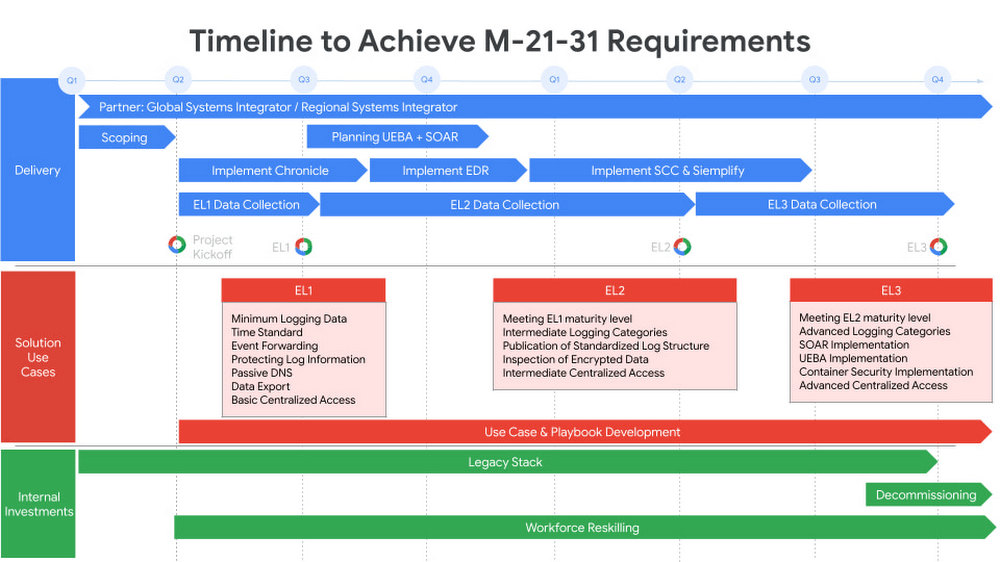
Today we are announcing Autonomic Security Operations (ASO) for the U.S. public sector, a solution framework to modernize cybersecurity analytics and threat management that’s aligned with the objectives of EO 14028 and OMB M-21-31. Powered by Google’s Chronicle and Siemplify, ASO helps agencies to comprehensively manage cybersecurity telemetry across an organization, meet the Event Logging Tier requirements of the White House guidance, and transform the scale and speed of threat detection and response. ASO can support government agencies in achieving continuous detection and continuous response so that security teams can increase their productivity, reduce detection and response time, and keep pace with – or ideally, stay ahead of – attackers.
While the focus of OMB M-21-31 is on the implementation of technical capabilities, transforming security operations will require more than just technology. Transforming processes and people in the security organization is also important for long-term success. ASO provides a more comprehensive lens through which to view the OMB event logging capability tiers, which can help drive a parallel transformation of security-operations processes and personnel.
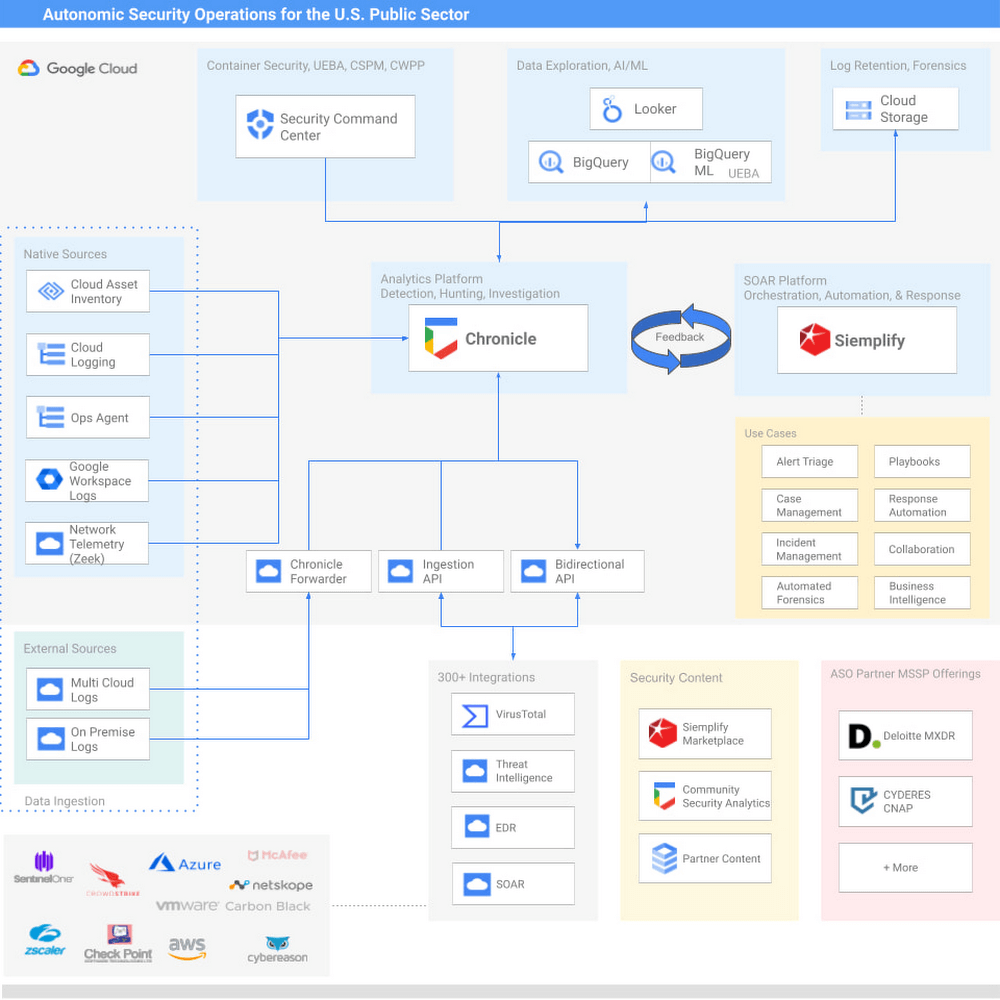
Modern Cybersecurity Threat Detection and Response
Google provides powerful technical capabilities to help your organization achieve the requirements of M-21-31 and EO 14028:
Security Information & Event Management (SIEM) – Chronicle provides high-speed petabyte-scale analysis, and is capable of consuming log types outlined in the Event Logging (EL) tiers in a highly cost-effective manner.
Security Orchestration, Analytics, and Response (SOAR) – Siemplify offers dozens of out-of-box playbooks to deliver agile cybersecurity response and drive mission impact, including instances of automating 98% of Tier-1 alerts and driving an 80% reduction in caseload.
User and Entity Behavior Analytics (UEBA) – For agencies that want to develop their own behavioral analytics, agencies can use BigQuery, Google’s petabyte scale data lake, to store, manage, and analyze diverse data types from many sources. Telemetry can be exported out of Chronicle, and custom data pipelines can be built to import other relevant data from disparate tools and systems, such as IT Ops, HR and personnel data, and physical security data. From there, users can leverage BQML to readily generate machine learning models without needing to move the data out of BigQuery. For Google Cloud workloads, our Security Command Center Premium product offers native, turnkey UEBA across GCP workloads.
Endpoint Detection and Response (EDR) – For most agencies, EDR is a heavily adopted technology that has broad applicability in Security Operations. We offer integrations to many EDR vendors. Take a look at our broad list of Chronicle integrations here.
Threat intelligence – Our solution offers a native integration with VirusTotal, has the ability to operationalize threat intelligence feeds natively in Chronicle, and integrates with various TI and TIP solutions.
Community Security Analytics
To increase collaboration across public-sector and private-sector organizations, we recently launched our Community Security Analytics (CSA) repository, where we’ve partnered with the MITRE Engenuity Center for Threat-Informed Defense, CYDERES, and others to develop open-source queries and rules that support self-service security analytics for detecting common cloud-based security threats. CSA queries are mapped to the MITRE ATT&CK® framework of tactics, techniques and procedures (TTPs) to help you evaluate their applicability in your environment and include them in your threat model coverage.
“Deloitte is excited to collaborate with Google Cloud on their transformational public sector Autonomic Security Operations (ASO) solution offering. Deloitte has been recognized as Google Cloud’s Global Services Partner of the Year for four consecutive years, and also as their inaugural Public Sector Partner of the Year in 2020,” said Chris Weggeman, managing director of GPS Cyber and Strategic Risk, Google Cloud Cyber Alliance Leader, Deloitte & Touche LLP. “Our deep bench of more than 1,000 Google Cloud certifications, capabilities spanning the Google Cloud security portfolio, and decades of delivery experience in the government and public sector makes us well-positioned to help our clients undertake critical Security Operations Center transformation efforts with Google Cloud ASO.”
Cost-effective for government agencies
To help Federal Agencies meet the requirements of M-21-31 and the broader EO, Google’s ASO solutions can drive efficiencies and help manage the overall costs of the transformation. ASO can make petabyte-scale data ingestion and management more viable and cost-effective. This is critical at a time when M-21-31 is requiring many agencies to ingest and manage dramatically higher volumes of data that had not been previously budgeted for.
Partners
We’re investing in key partners who can help support U.S. government agencies on this journey. Deloitte and CYDERES both have deep expertise to help transform agencies’ Security Operations capabilities, and we continue to expand our partners to support the needs of our clients. A prototypical journey can be seen below.
“Cyderes shares Google Cloud’s mission to transform security operations, and we are honored to deliver the Autonomic Security Operations solution to the U.S. public sector. As the number one MSSP in the world (according to Cyber Defense Magazine’s 2021 Top MSSPs List) with decades of advisory and technology experience detecting and responding to the world’s biggest cybersecurity threats, Cyderes is uniquely positioned to equip federal agencies and departments to go far beyond the requirements of the executive order to transform their security programs entirely via Google’s unique ASO approach,” said Robert Herjavec, CEO of CYDERES. “As an original launch partner of Google Cloud’s Chronicle, our deep expertise will propel our joint offering to modernize security operations in the public sector, all with significant cost efficiency compared to competing solutions.” said Eric Foster, President of CYDERES.
Embracing ASO
Autonomic Security Operations can help U.S. government agencies advance their event logging capabilities in alignment with OMB maturity tiers. More broadly, ASO can help the U.S. government undertake a larger transformation of technology, process, and people, toward a model of continuous threat detection and response. As such, we believe that ASO can help address a number of challenges presently facing cybersecurity teams, from the global shortage of skilled workers, to the overproliferation of security tools, to poor cybersecurity situational awareness and analyst burnout caused by an increase of data without sufficient context or tools to automate and scale detection and response.
We believe that by embracing ASO, agencies can help agencies achieve:
10x technology, through the use of cloud-native tools that help agencies meet event logging requirements in the near term, while powering a longer-term transformation in threat management;
10x process, by redesigning workflows and using automation to achieve Continuous Detection and Continuous Response in security operations;
10x people, by transforming the productivity and effectiveness of security teams and expanding their diversity; and
10x influence across the enterprise through a more collaborative and data-driven approach to solving security problems between security teams and non-security stakeholders.
To learn more about Google’s Autonomic Security Operations solution for the U.S. public sector, please read our whitepaper. More broadly, Google Cloud continues to provide leadership and support for a wide range of critical public-sector initiatives, including our work with the MITRE Engenuity Center for Threat-Informed Defense, the membership of Google executives on the President’s Council of Advisors on Science and Technology and the newly established Cyber Safety Review Board; Google’s White House commitment to invest $10 billion in Zero Trust and software supply chain security, and Google Cloud’s introduction of a framework for software supply chain integrity. We look forward to working with the U.S. government to make the nation more secure.
Visit our Google Cloud for U.S. federal cybersecurity webpage.
Related posts:
Autonomic Security Operations for the U.S. Public Sector Whitepaper
“Achieving Autonomic Security Operations: Reducing toil”
“Achieving Autonomic Security Operations: Automation as a Force Multiplier”
“Advancing Autonomic Security Operations: New resources for your modernization journey”
5562
Of your peers have already downloaded this article
1:30 Minutes
The most insightful time you'll spend today!
Protecting a global network against persistent and constantly evolving cyber threats is one of the most important challenges faced by Google Cloud. So, how does Google’s global network protects seven different global businesses, each with over 1 billion customers, including popular Google services such as Google Search, YouTube, Maps, and Gmail?
The answer is a multi-step process, which is constantly changing and evolving to stay one step ahead of the malicious hackers and attackers. For instance, it’s network communications protocols—the rules that enable communications between systems—change multiple times per second to make malicious intrusions much harder.
Data in Google Cloud is encrypted both in transit and at rest. Google’s network capacity far exceeds any traffic load it hosts to thwart and DDoS attack. In addition, it has numerous other products, tools, and processes at work to provide defense in depth.
Download this e-book to get a detailed overview of Google Cloud’s approach to security and privacy.
Create and Protect Admin Accounts

4859
Of your peers have already read this article.
1:30 Minutes
The most insightful time you'll spend today!
Setting up your new cloud infrastructure is scary. Extra scary when you realize that someone (is it gonna be you?) gets to have phenomenal cosmic power over the whole thing.
Yes, I’m talking about the admin account, and today we’ll dig into why they are important, dangerous and different.
When the team at pistach.io got their nuts-as-a-service business growing fruitfully, they knew they needed to think carefully about admin accounts. These people would have tremendous control over their use of Google Cloud, and they could potentially cause very big problems if any were compromised. Definitely resources that require a protective shell.

Early in pistach.io’s development, an employee named Walter Nutt wanted to play a prank by changing his co-worker’s profile photo from an almond to a peanut (pretty devious, since a peanut is actually a legume). He didn’t have access to his friend’s computer, but he did have access to the company’s Cloud Storage bucket. While searching for the profile photo in question, Wally inadvertently deleted the entire contents of the bucket!
As he searched for ways to restore its contents, Wally modified access to two other pistach.io buckets. The company was ground to a halt for a week while teams worked to crack through the permissions issues.
Time to rethink permissions a bit, so this couldn’t spoil their buttery smooth operations in the future.
Following the resource manager guide, the team made a super admin email address that wasn’t tied to a particular individual or Workspace account, and secured it with strong multi-factor authentication. This would be their backup in case an admin account were to be compromised, so they could recover and repair.
The team already uses Google Workspace, so they have an organization set up already. That creation process established initial super administrators, allowing them to create and modify all other resources inside the organization. As they looked toward using Google Cloud, the super administrators could:
- Give the admin role to people, for Cloud
- Act as a point of contact for account recovery
- Modify or delete the organization if needed
Making admin users for the organization allows other people to then flesh out the resources and policies for pistach.io, before they go nuts and give everyone all the permissions. While that would speed things up, it would make it easy for an attacker to crack through the security shell because any account compromise could give ousize access. Yikes!

Instead, the IT leads specified certain people to act as organization admins, and then gave them permissions to:
- Define Identity and Access Management policies
- Structure the Resource Hierarchy
- Delegate control of specific Cloud elements to others on the team
Once those organization admins were set up, they could give management and oversight of Compute, Storage, Networking and other resource types to the relevant leads, making sure each person had just the right amount of permission for the role they needed to perform. The organization admins don’t have permissions themselves to make these resources. They just delegate.
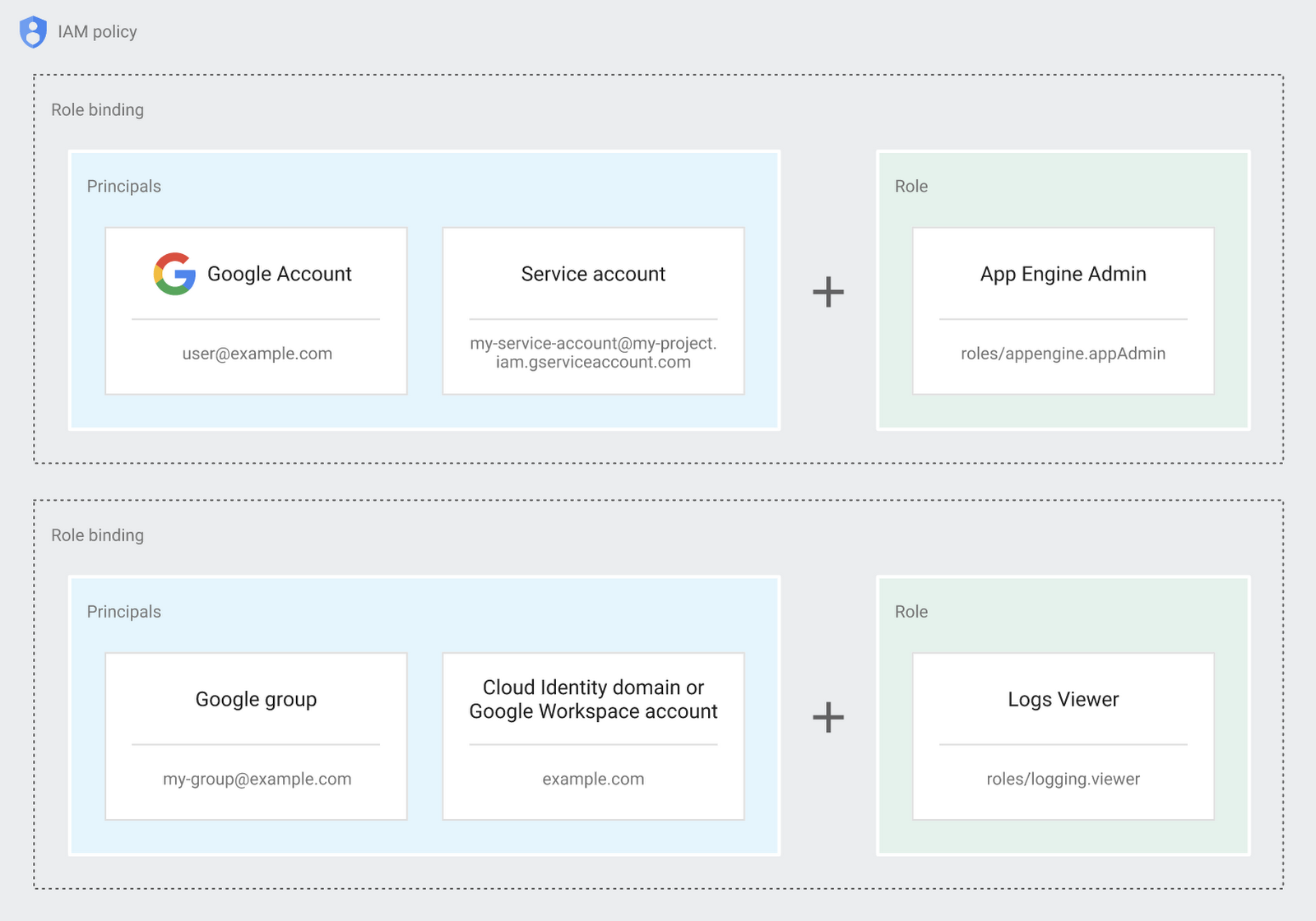
Now each person can accomplish the job they’re responsible for, but doesn’t have overly permissive access. Delegating like this keeps the entire organization safer, and limits the blast radius if someone does manage to break in.
You can go through these steps yourself with this tutorial.
By default the creation of an organization resource for the domain gives everyone the ability to create projects and billing accounts. Once they set up their Organization Admin at pistach.io they decided to remove some of these wide permissions and, in a nutshell, bring everything down to a much finer control. So people could get permissions for a folder or a project, but not the entire organization!
Remember to take care of your admin roles, as they have the power, and responsibility, to cause serious harm if not used safely. Be safe with your Identity and Access Management. And keep your data yours!
Next time we join you we’ll take a crack at creating and provisioning an app to run inside the policies and resource management frameworks created today.
The Right Datawarehouse Helps Fight Climate Change, While Improving Customer Experience

7064
Of your peers have already read this article.
4:30 Minutes
The most insightful time you'll spend today!
When you think about climate change, you might not consider a daily commute to work or a drive around town as big contributing factors. And yet, transport is the fastest growing source of CO2 emissions from fossil fuel, which in turn is the largest contributor to climate change. This is the key insight behind the mission of Spanish carbon-neutral multinational Acciona. The group, which provides sustainable solutions for infrastructure and renewable energy projects across 65 countries, launched an electric scooter sharing service called Acciona Mobility in 2018.
Aiming to contribute to the decarbonization of the transport sector while helping relieve traffic congestion within cities, Acciona Mobility enables users to rent electric scooters powered 100% by energy from renewable sources. Users can find, reserve, and rent the scooters at the tap of their mobile screens via the Acciona Mobility application and pay on the basis of minutes spent riding. The app, which is available free to download online, is also the gateway through which new users can register for the service, which welcomes anyone with a valid driver’s license for motorbikes. After having their right to drive, identity, and card details validated, citizens can start enjoying the service, available 24 hours a day, every day of the year.
“We needed to deploy a reliable infrastructure for a new service before understanding exactly what its scale and demand would be. Our strategy was to adopt a serverless architecture that can grow with us to sustain our long-term vision. This kind of thinking led us directly to Google Cloud.”
—Jose Luis Rosell, CIO Services Division, Acciona
“Acciona Mobility is exciting because it stems from our vision to make people’s lives easier in a sustainable way,” says Jose Luis Rosell, CIO of Acciona’s Services Division. “40% of the pollution near cities comes from private transportation. We want to help solve that problem with zero-carbon, electric, multimodal transportation that’s also convenient for people to use.”
However, Jose Luis says that building the appropriate IT infrastructure to bring the new service to life required external support. “We needed to deploy a reliable infrastructure for a new service before understanding exactly what its scale and demand would be. Our strategy was to adopt a serverless architecture that can grow with us to sustain our long-term vision,” he explains. “This kind of thinking led us directly to Google Cloud.”
Developing the transportation platform of the future
Because Acciona was already a Google Cloud customer, Jose Luis and his team reached the decision to develop the new service on Google Cloud with ease, as he explains: “We had a very positive experience working closely with the Google Cloud team during Acciona’s first project on Google Cloud, and that collaborative mentality is very important for us. We feel Google Cloud is a trustworthy partner that is willing to take risks with us and is flexible enough to lead us through business uncertainty with the right technology,” he says. “So we were confident that its technology and people could help us bring the Acciona Mobility service from theory to reality.”
This time, Acciona partnered with cloud consultancy Altostratus as well, to consult on a selection of Google Cloud products that would help develop the application quickly by making use of managed services. Acciona’s strategy was to launch the new services first in Madrid, where the company is headquartered, and then spread the vision across more cities later, if the idea worked out well in practice. Due to the scale of the project and its data needs, BigQuery was chosen as the primary data warehouse to store all the information related to the service, such as the location of scooters and their availability status. With all its data readily available on BigQuery, Acciona is able to run specific queries that help it to gain insights such as which urban areas have the highest volume of scooters being rented. Knowing this, Acciona can reorganize availability to make sure there are always enough scooters in that specific location.
Integrating it with Pub/Sub and Dataflow, Acciona ensures that the data generated by scooters is ingested and processed in real time so that users searching for scooters nearby, using the Acciona Mobility application on their phones, can always have up-to-date information at hand. Using Google Maps Platform APIs such as the Directions API, Acciona’s mobile app translates the geographical coordinates of scooters into an easy-to-read address displayed beside a visual map. Using Cloud SQL, Acciona automates the storage capacity management of the database as the number of scooters and active users grow.
Meanwhile, Google Cloud Armor protects the service against cyber breaches and distributed denial of service attacks to keep it running uninterrupted. In addition, Google Cloud itself helps to reinforce the cyber security measures with secure-by-default managed services, such as data encryption. “The managed services mean more resilience and more uptime, because we don’t need to worry about maintenance or external threats,“ says Jose Luis of the solutions protecting all information generated by the new service, which as CIO is a topic he holds dearly. “I face cybersecurity issues more confidently as a Google Cloud partner,” he adds.
“Today, we have data coming in every 15 seconds from 10,000 electric scooters around Europe. BigQuery and Cloud SQL-managed services help us handle that data very carefully and with precision so that our users don’t experience any lags when searching for scooters or returning them.”
—Jose Luis Rosell, CIO Services Division, Acciona
Expanding an 100% sustainable transport solution throughout Spain
Within two months of the decision to deploy Acciona Mobility on Google Cloud, the service was ready for launch, filling the streets of Madrid with 500 electric scooters that run 100% on renewable energy. By 2020, the number of scooters has grown to 10,000 and the service has scaled to multiple cities in and outside of Spain, including Lisbon, Milan, and Rome. To date, more than 3.5 million intracity rides have used the Acciona Mobility app, reducing CO2 emissions by more than 1,000 tons.
“Today, we have data coming in every 15 seconds from 10,000 electric scooters around Europe. BigQuery and Cloud SQL-managed services help us handle that data very carefully and with precision so that our users don’t experience any lags when searching for scooters or returning them,” says Jose Luis of the fast-growing scale of the project.
“Google Cloud enables us to keep our services always available and to scale quickly to respond to its growing demand. Our ratings have been very positive as a result. More importantly, our vision of transportation as a cleaner, more sustainable commodity is really spreading and resonating with the public.”
—Jose Luis Rosell, CIO Services Division, Acciona
Set to continue expanding, Acciona is using Google Kubernetes Engine to make sure the Acciona Mobility application has the computing capacity it needs to continue scaling to reach new markets and serve more users. On that note, Google operations tools (formerly Stackdriver) are also being deployed to help monitor, troubleshoot, and improve the performance of the application as it scales.
“Google Cloud enables us to keep our services always available and to scale quickly to respond to its growing demand. Our ratings have been very positive as a result. More importantly, our vision of transportation as a cleaner, more sustainable commodity is really spreading and resonating with the public,” he concludes.
More Relevant Stories for Your Company

Securing Sensitive Data in the Cloud: Google Cloud’s CDMC-Certified Solution
As enterprises accelerate adoption of cloud-based services and products, they face a common challenge: How can they effectively secure and govern rapidly expanding volumes of their most sensitive data in new environments? Today, Google Cloud released an architectural whitepaper and accompanying source code for a solution which successfully completed an assessment facilitated by KPMG

Utilizing Google Cloud’s PII Security Features
BigQuery is a leading data warehouse solution in the market today, and is valued by customers who need to gather insights and advanced analytics on their data. Many common BigQuery use cases involve the storage and processing of Personal Identifiable Information (PII)—data that needs to be protected within Google Cloud

Manage IAM permissions with the Google Cloud mobile app
What’s new with Permissions Management on the Cloud Mobile App Identity and Access Management (IAM) is the foundation of a strong cloud security posture, ensuring that the right access and permissions for cloud resources are granted across your organization. The Google Cloud mobile app gives cloud administrators the ability to quickly and easily

Efficient, Safe and Dynamic Gaming Experience: Aristocrat’s Digital Journey on Google Cloud
Since Aristocrat’s founding in 1953, technology has constantly transformed gaming and the digital demands on our gaming business are a far cry from challenges we faced when we started. As we continue to expand globally, security and compliance are top priorities. Managing IT security for several gaming subsidiaries and our
