





5089
Of your peers have already watched this video.
1:30 Minutes
The most insightful time you'll spend today!
Ramco Cements: Enhancing Intelligence with Data Visualization
Ramco Cements chose Google Maps to integrate with its Ramco ERP system. By layering its data onto Google Maps, the result was a rich data visualization tool that facilitated idea generation and improved productivity. Over 1,000 employees across India access reports and transactions on a daily basis from the Ramco ERP system and integrated Google Maps.
Management at Ramco Cements uses Google Maps for visual analysis – for monitoring benchmarks, identifying discrepancies and deviation. Google Maps serves as a tool to help them develop appropriate strategies for business growth.
Also, the field sales team now has the capability to easily view information on their mobile devices – information ranging from competitor distribution networks in their area, to the best and worst performing dealers.
Safeguarding time and attention with Google Workspace and Gmail

3997
Of your peers have already read this article.
3:30 Minutes
The most insightful time you'll spend today!
As the pandemic forced millions of people to work from home, many of us found ourselves spending more time in video meetings and in our inboxes as a way to bridge the distance from our colleagues. When the workplace became the living room or the makeshift home office, and as professional and personal responsibilities sometimes collided, we had to find new ways to manage time and attention and to sustain human connection.
When it comes to work emails during the pandemic, we were sending more of them, to more recipients, and we often sent them outside of normal business hours. A study conducted by the Organizational Behavior Unit of Harvard Business School assessed email statistics eight weeks before the start of the pandemic-related lockdowns and eight weeks after. The study concluded that after lockdowns, employees sent 5.2% more emails a day, emails had 2.9% more recipients, and about 8.3% more emails were sent after business hours.
Many of the latest Google Workspace features are designed to help people save time, find focus, and manage tasks more efficiently, whether it’s with smarter emails, writing suggestions, Google Assistant, segmentable working hours, or predictive search. These features combine to save the equivalent of a full working month every year, per person, so that you can spend more time on what matters instead of managing tools.
With that in mind, let’s take a deeper look at how Gmail can help you better manage time and attention.
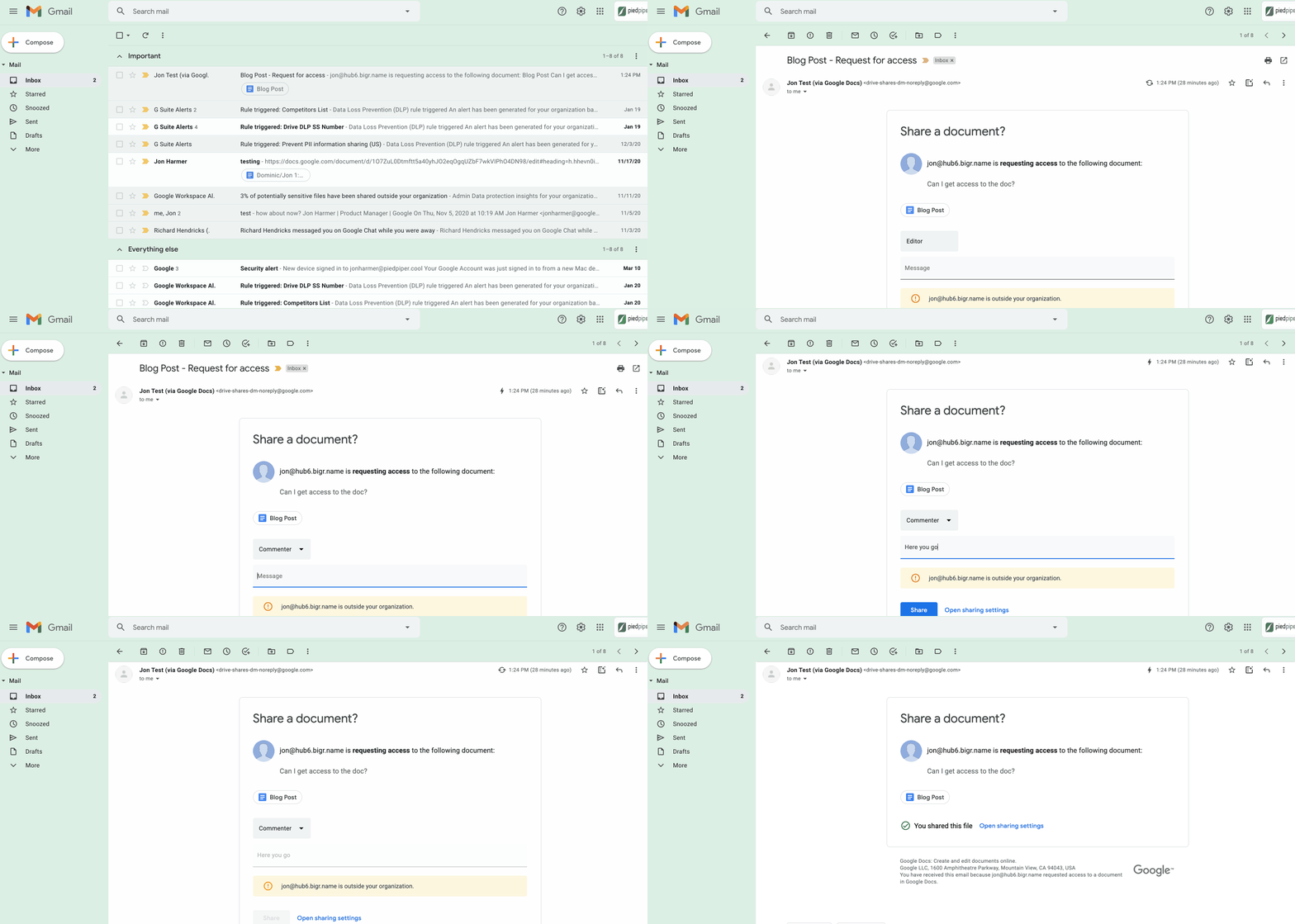
1. Use dynamic email to help recipients complete tasks directly inside an email message. With the new dynamic email support in Gmail, you can easily send and receive emails that enable the reader to take action directly from within the message. This removes the burden of opening multiple documents and tabs. Email recipients can grant access to Drive files, respond to or resolve comments in Docs, Slides, or Sheets, and RSVP to events—all without leaving the message. Learn more.
2. Stay productive, even when you’re offline. Gmail Offline lets you read, reply, delete, and search your Gmail messages when you’re not connected to the internet. Once you set it up, an outbox will appear in the left panel. When a connection later becomes available, Gmail will automatically send the messages from your outbox, and download any new messages to your inbox. This is great for those working on the frontlines who need to stay productive and informed, even when they’re offline.
3. Get organized and prioritize your work with Tasks in Gmail. This feature allows you to easily convert emails into tasks with just one click. You can create due dates that will automatically appear in your calendar, and check tasks off as you complete them. Baked directly into the side panel, you can create, view and manage your task lists without leaving Gmail.
4. Spend time innovating, not writing emails. Gmail’s template functionality lets you create standardized email messages that can be edited and sent out to different recipients in a matter of seconds. If this feature sounds appealing, check out Smart Reply and Smart Compose to learn more ways to write and reply to emails faster.
5. Get search results faster in Gmail. Search chips help you find what you’re looking for in Gmail faster, without needing to sort through irrelevant results or use search operators (e.g., from: marketing@company.com). For example, you can search a colleague’s name and further narrow your results by selecting search chips like attachment type (Doc, Sheet, PDF, etc.) or a specific timeframe. You can even exclude specific keywords and calendar invites from your results. You can also use search chips to search your Google Chat history, directly from within Gmail. To use search chips, all you need to do is type in a Gmail search, click on the search filter chips below the search box and Gmail will take care of the rest.

6. Tune out the irrelevant with the Gmail mute feature. Because we’ve all found ourselves trapped in unnecessary email threads, we created the Gmail Mute feature. With two clicks, you can mute email threads that aren’t relevant or that you no longer wish to follow. All future responses to that thread will now be automatically muted so you can focus your attention elsewhere. If you decide to rejoin the conversation, you can unmute the email thread just as easily.
Chrome OS’s Hybrid Work Model Powers Google’s Return to Work Strategy

7491
Of your peers have already read this article.
1:30 Minutes
The most insightful time you'll spend today!
The pandemic continues to deeply affect our lives around the globe. In some places, new cases are surging and returning to work is the last thing on people’s minds. In other areas, conditions are improving and companies are starting to think about transitioning their workforce back to the office.
Exactly when and how to do this remains complex and varies by country, industry, and company. What’s certain is that hybrid work will become an essential part of the business world moving forward. And finding solutions that bridge the gap between “in-person” and “somewhere else” are crucial.
At Google, we’ve been focused on what the hybrid transformation means for us. To prepare for hybrid work, using modern solutions is a key enabler.
Chrome OS: Supporting Google’s return to office strategy
At Google, we’ll move to a hybrid work week where most Googlers spend approximately three days in the office and two days wherever they work best. It’s no surprise that as the modern, secure, cloud-first platform, Chrome OS is playing a key role in our transition to a hybrid work model. Because Chrome OS devices can easily be shared, more flexible working models and spaces are now possible. And with user profiles stored in the cloud and collaboration solutions like Google Workspace, employees can log in to any Chrome OS device, access what they need and pick up where they left off.
Here are just a few ways we are using Chrome OS and its tools to support the return to the office:
- In select office locations, Googlers can reserve desks through an internal booking tool set up with a high-performance Chromebox, keyboard, mouse, and monitor. Employees can log in to the Chromebox which syncs their cloud profile, and start working with the same environment they have on all their Chrome OS devices.
- We’re announcing new docking stations that are designed for Chrome OS devices and allow employees to bring in their Chromebook from home, connect to the dock with one USB-C cable, and use a monitor, keyboard, and mouse for a full desktop experience.
- Every Chrome OS device enables a zero-trust security working model with BeyondCorp Enterprise providing our workforce with simple and secure access to applications while providing additional security controls for IT.
- We’ve deployed the new Chrome OS Readiness Tool to our extended workforce to identify employees that are able to switch to Chrome OS. This allows us to expand the latest security, deployment, and manageability benefits to more of the workforce.
Additional ways Chrome OS is helping organizations with return to office
We aren’t the only ones supporting our return to office and hybrid work strategy with Chrome OS. We’ve heard more ways our customers are using Chrome OS to make the transition as smooth as possible. These include:
- Streamlining deployment and management of Chrome OS devices using zero-touch enrollment which allows devices to automatically enroll into a corporate domain without IT configuration.
Grab & Go Chromebooks being used for frontline and hybrid information workers, allowing employees to grab a Chromebook from a cart and get to work right away. - Parallels Desktop for Chrome OS being deployed to allow employees to access Windows or legacy apps locally on their Chrome OS devices.
- Existing Windows and Mac devices being modernized and repurposed to run a Chrome OS experience using CloudReady. (Google is currently offering a CloudReady promotion. Learn more here.)
While the Chrome OS team has been working towards making remote working as seamless as possible for IT, we’ve also made advancements in supporting traditional technology that’s required in the office.
- In October, we announced Chrome Enterprise Recommended: a collection of identity, printing, productivity, communications, and virtualization solutions that are verified to run great on Chrome OS.
- With the increased usage of video conferencing on Chrome OS devices, we’ve made improvements to Google Meet and Zoom performance including camera and video improvements to reduce any unnecessary processing and features that intelligently adapt to your device, your network, and what you are working on.
- For improved access to Windows and legacy apps, VMware Horizon introduced multi-monitor support and USB redirection and Citrix Workspace released a tech preview with webcam enhancements and Microsoft Teams optimizations.
- We integrated with the Okta Workflows platform, so IT administrators can include Chrome OS in it’s access logic and deploy quickly without code. Recently, we’ve added the ability to require users to reauthenticate on their Chrome OS device once Okta has detected that the user has changed their password. Try out this new capability by signing up for our Trusted Tester program.
- We’ve increased our support for direct IP printing with additional printer models since the beginning of 2020. In addition, we have made improvements to management features, including support for multiple print servers and launched policy APIs to provide a better IT admin experience.
Join us for a digital event with Modern Computing Alliance and its newest member HP
Last year we announced the launch of the Modern Computing Alliance—a collaboration of industry leaders including Box, Chrome Enterprise, Citrix, Dell, Google Workspace, Imprivata, Intel, Okta, RingCentral, Slack, VMware, and Zoom aim to create the pioneering solutions that businesses need. We are thrilled to introduce HP, who brings their innovative hardware and enterprise hardware expertise to the Modern Computing Alliance and has been working closely with the alliance to ensure true silicon-to-cloud innovation.
As an alliance, we’ve been deeply engaged in the hybrid work shift. We invite you to join us for a digital event where we discuss questions about returning to work. Like how product design can encourage participation and collaboration regardless of where employees are, important security issues to keep in mind, and what factors businesses should consider to support a safe, working environment.
Home. Heading back. Hybrid.
Hear from the experts on hybrid work and return to office.
Date: May 20th, 2021
Register here.
If you are ready to try Chrome OS today, it’s easy to get started. You can contact us to get connected to a partner, sign up for a free 30-day trial of Chrome Enterprise Upgrade to start managing Chrome OS devices, or deploy the Chrome OS Readiness Tool to identify employees that are ready to switch to Chrome OS.POSTED IN:
How Buffalo Tours CEO Found a Way to Increase Bookings by Over 1 Percent

4403
Of your peers have already read this article.
2:30 Minutes
The most insightful time you'll spend today!
Buffalo Tours serves tons of passengers each month, helping them with various aspects of their travel. These involve tour booking requests from passengers, request processing and information checking. Prior to the Google implementation, Buffalo Tour’s email exchange was supported by another email server. Employees lamented the frequent loss of emails and the ineffective spam filtering system, which resulted in legitimate emails from customers being treated as junk mail. Prior to adopting Gmail, the trend of lost emails or failed delivery accounted for 5% of the business. This means that five out of every 100 incoming requests to Buffalo Tours were lost.
“We are in the business of servicing customers and when missing emails become a regularity, it damages our company’s credibility and image, not to mention a loss of company revenue. Internal communication with the various representative offices is mostly conducted online, and lost emails inhibits workplace collaboration,” said Bui Anh Tuan, IT manager of Buffalo Tours.
Managing the email server was also a challenge as the server was hosted by a network operator but located on-premise. Due to the logistical challenges, each time the server failed, it took some time before the server could be rebooted. The complex system configuration also meant it was not easy to get new employees on board.
Gmail emerged as a viable option to replace Buffalo Tour’s existing email server as it was cloud-based and user-friendly. At the start, Buffalo Tours made use of the free Gmail service for business. Happy with the results, Buffalo Tours decided to switch to G Suite on a permanent basis.
“G Suite has enabled us to manage our emails in a more professional manner. This means improved work efficiency and better customer service. Furthermore, it also offers many other essential services that benefit the work that we do,” said Tuan.
Many employees at Buffalo Tours have been utilizing Gmail as their main communication tool. Buffalo Tours is looking at ways to further utilize the other products within G Suite such as Google Sites, Google Docs, and Google Drive.
Since making the switch to Gmail, the company does not have to bear the cost of buying and maintaining a physical server, resulting in cost savings of around 17% annually. The rate of lost emails is now down to almost zero, which is the icing on the cake for Buffalo Tours.
One of the distinct advantages of Gmail is its impressive spam filter capabilities. For the premium version, this service is enhanced with Blacklist and Whitelist features, making the spam filter even more effective. With the enhanced control features, business and junk mail are easily categorised.
“Our staff can easily input the IDs of the entire office and regular customers to the Whitelist. With a click of a mouse, important business emails are never missed. There is a 10-15% increase in employee productivity now that the issue of lost emails is resolved,” Tuan commented. Gmail has also brought about increased convenience to Buffalo Tours. G Suite is easy to configure for any new employee. All employees need is their username, password and an Internet connection to check emails. What used to take a lot of time and resources is now a simple administration process.
With the current blooming mobility trend, Gmail provides Buffalo Tours with the flexibility to empower employees to work more efficiently. Employees can now access their work emails on their personal smartphones, tablets or other mobile devices. “Since we switched to G Suite, there have been zero customer complaints around the inability to contact the sales division. Meanwhile, our business continues to prosper and our yearly bookings increased by 1.5%. Together with Google, we are confident of our continued growth,” concluded Tuan.
Accelerate Developer Productivity with Google Workspace

5770
Of your peers have already read this article.
3:30 Minutes
The most insightful time you'll spend today!
The software development process requires complex, cross-functional collaboration while continuously improving products and services. Our customers who build software say that they value Google Workspace for its ability to drive innovation and collaboration throughout the entire software development life cycle. Developers can hold standups and scrums in Google Chat, Meet, and Spaces, create and collaborate on requirements documentation in Google Docs and Sheets, build team presentations in Google Slides, and manage their focus time and availability with Google Calendar.
Development teams also use many other tools to get work done, like tracking issues and tasks in Atlassian’s Jira, managing workloads with Asana, and incident management in PagerDuty. One of the benefits of Google Workspace is that it’s an open platform tailored to improve the performance of your tools by seamlessly integrating them together. We’re constantly expanding our ecosystem and improving Google Workspace, giving you the power to push your software development even further.
Make software development more agile
Google Workspace gives you real-time visibility into project progress and decisions to help you ship quality code fast and stay connected with your stakeholders, all without switching tools and tabs. By leveraging applications from our partners, you can pull valuable information out of silos, making collaborating on requirements, code reviews, bug triage, deployment updates, and monitoring operations easy for the whole team. This allows your teams to stay focused on their priorities while keeping everyone aligned, ensuring collaborators are always in the loop.
Plan and execute together
When combined with integrations, Google Workspace makes the software development planning process more collaborative and efficient. For example, many organizations use Asana—a leading work management platform—to coordinate and manage everything from daily tasks to cross-functional strategic initiatives. To make the experience more seamless, Asana built integrations so users can always have access to their tasks and projects with Google Drive, Gmail, and Chat. With these integrations for Google Workspace, you can turn your conversations into action and create new tasks in Asana—all without leaving Google Workspace.
“We’ve seen exceptional, heavy adoption of tasks being created from within the Gmail add-on. Our customers and community have also shown very strong interest in future development work, which is something we’ll continue to prioritize.” Strand Sylvester, Product Manager, Asana
To date, users have installed the Asana for Gmail add-on over 2.5 million times, as well as over 3.8 million installs of the Asana for Google Workspace add-on for Google Drive.

Start coding quickly
Google Workspace makes it easy for product managers, UX designers, and engineers to agree on what they’re building and why. By bringing all stakeholders, decisions, and requirements into one place—whether it’s a Gmail or Google Chat conversation, or a document in Google Docs, Sheets, or Slides—Google Workspace removes friction, helping your teams finalize product specifications and get started right away.
Integrations like GitHub for Google Chat make the entire development process fit easily into a developer’s workflow. With this integration, teams can quickly push new commits, make pull requests, do code reviews, and provide real-time feedback that improves the quality of their code—all from Google Chat.

Speed up testing
Integrations like Jira for Google Chat accelerate the entire QA process in the development workflow. The app acts as a team member in the conversation, sending new issues and contextual updates as they are reported to improve the quality of your code and keep everyone informed on your Jira projects.

Ship code faster
Developers use Jenkins—a popular open-source continuous integration and continuous delivery tool—to build and test products continuously. Along with other cloud-native tools, Jenkins supports strong DevOps practices by letting you continuously integrate changes into the software build.
With Jenkins for Google Chat, development and operations teams can connect into their Jenkins pipeline and stay up to date by receiving software build notifications directly in Google Chat.

Proactively monitor your services
Improving the customer experience requires capturing and monitoring data sources to improve application and infrastructure observability. Google Workspace supports DevOps teams and organizations by helping stakeholders collaborate and troubleshoot more effectively. When you integrate Datadog with Google Chat, monitoring data becomes part of your team’s discussion, and you can efficiently collaborate to resolve issues as soon as they arise.
The integration makes it easy to start a discussion with all the relevant teams by sharing a snapshot of a graph in any of your Chat spaces. When an alert notification is triggered, it allows you to notify each Chat space independently, precisely targeting your communication to the right teams.

Improve service reliability
Orchestrating business-wide responses to interruptions is a cross-functional effort. When revenue and brand reputation depends on customer satisfaction, it’s important to proactively manage service-impacting events. Google Workspace supports response teams by ensuring that urgent alerts reach the right people by providing teams with a central space to discover incidents, find the root cause, and resolve them quickly.
PagerDuty for Google Chat empowers developers, DevOps, IT operations, and business leaders to prevent and resolve business-impacting incidents for an exceptional customer experience—all from Google Chat. See and share details with link previews, and perform actions by creating or updating incidents. By keeping all conversations in a central space, new responders can get up to speed and solve issues faster without interrupting others.

Accelerate developer productivity
Integrating your DevOps tools with Google Workspace allows your development teams to centralize their work, stay focused on what’s important—like managing their work—build code quickly, ship quality products, and communicate better during service impacting incidents. For more apps and solutions that help centralize your work so you and your teams can connect, create, and get things done, check out Google Workspace Marketplace, where you’ll find more than 5,300 public applications that integrate directly into Google Workspace.
The Divercity Story: Using Google Cloud to Achieve a More Inclusive and Sustainable Workforce

4753
Of your peers have already read this article.
2:30 Minutes
The most insightful time you'll spend today!
Despite a growing number of diversity, equity, and inclusion (DEI) initiatives, Black and Latinx people remain highly underrepresented in tech. Although comprising 12.6% and 18% of the U.S. labor force respectively, Black professionals hold only 5% of tech positions, while Latinx professionals fill just 6% of tech roles.
Long-standing biases in hiring practices and non-inclusive work environments are the primary contributors to this lack of diversity. Even when underrepresented professionals are successfully recruited, invisible barriers to promotion and layoffs that disproportionally impact Black and Latinx employees make it extremely challenging for tech firms to retain top talent.
We founded Divercity to help employers build diverse workforces that are more inclusive and sustainable. With our comprehensive recruiting and retention platform, tech companies can accurately measure employee diversity and gender parity, seamlessly connect with underrepresented talent, and significantly reduce turnover.
As Divercity continues to grow, we’ll introduce new services and solutions that empower the tech world to build inclusive companies while improving compliance with state and federal equal opportunity laws. We also hope to expand the reach of Divercity to support DEI initiatives in non-tech industries and bolster recruiting underrepresented professionals in other countries as well.

Scaling Divercity with the help of the Google for Startups Black Founders Fund
Shortly after founding Divercity, we participated in the 2021 Techstars Workforce Development Accelerator. The incredible support and guidance we received during and after the program highlighted the importance of long-term collaboration with reliable technology partners who actively champion diversity and inclusion.
That’s why we became part of the Google for Startups Cloud Program. After completing the program, we used Google Cloud credits and Google for Startups Black Founders Fund funding to cost-effectively trial, deploy, and scale key Google Cloud solutions. In just months, we rolled out new inclusion tracking and recruiting tools on the highly secure-by-design infrastructure of Google Cloud to expedite the sourcing and hiring of underrepresented talent in the tech industry.
With the support and mentorship of the Google for Startups Cloud Program and the Black Founders Fund, Divercity is well on its way to becoming one of the industry’s most trusted sites for DEI measurement, recruitment, and retention.
Delivering predictive diversity analyses with a 99% accuracy rate
We rely on the expansive Google Cloud ecosystem to power all the services offered on the Divercity platform. Specifically, we leverage Colab to write and execute the sophisticated TensorFlow machine learning (ML) models that deliver our predictive diversity analyses with a 99% accuracy rate.
We also use BigQuery to democratize insights and run analytics at scale with 27% lower three-year TCO than cloud data warehouse alternatives. BigQuery seamlessly integrates with Looker and Data Studio to display company diversity and recruitment data on interactive dashboards—and automatically populate reports with detailed demographic information.
We also accelerate the development, launch, and management of new Divercity tools with Firebase, while taking advantage of key features such as A/B testing and messaging campaigns to boost user engagement.
In the future, we plan to explore how Google Cloud AI and machine learning products such as Vertex AI and AutoML can further refine our diversity score analyses and applicant recruiting pipeline. We’ll also continue leveraging the many resources provided by the Google Black Founders Fund, including opportunities for technical project partnerships, early access to new Google Cloud products and tools, and collaboration with dedicated Google experts.
The Google for Startups Cloud Program and Google Black Founders Fund have been invaluable to our success. Since completing the Black Founders Accelerator program, we’ve been named a top 10 HR tech product by HR Tech Outlook, significantly increased our subscriber base, and received positive feedback from investors. We can’t wait to see what we accomplish next as we empower tech companies to build more diverse, inclusive, and sustainable workforces.

If you want to learn more about how Google Cloud can help your startup, visit our page here to get more information about our program, and sign up for our communications to get a look at our community activities, digital events, special offers, and more.
More Relevant Stories for Your Company

How One of the World’s Largest Insurers Improved Sales Performance with Better Collaboration
When Generali Hungary, one of Hungary’s leading insurance agencies and one of the world’s largest insurance companies, was looking for a way to provide the company’s more than 1,800 employees and 2,200 self-employed agents with a tool to communicate efficiently, it turned to Google. For insurance companies whose agents are

An Insider’s Guide on the Future of Collaboration and Productivity
As Google’s productivity adviser, I’ve been closely following the evolving discussion around the future of work. Long before the pandemic, employees, business leaders, and analysts were already thinking about how work needed to evolve, but the crisis brought the future cascading into the present. Virtually overnight, millions of companies and

New Map Customization Features for Enhanced User Experiences
A customized map can be key to delivering a frictionless experience that engages users and sets you apart in users’ minds–whether you’re a real estate company fine-tuning points of interest (POIs) on a map to help buyers decide where to live, or a regional pharmacy styling a map to ensure

Learn to Easily Administer Multi-cluster Kubernetes Environs: Part 4 KRM Series
This is part 4 in a multi-part series about the Kubernetes Resource Model. See parts 1, 2, and 3 to learn more. Kubernetes clusters can scale. Open-source Kubernetes supports up to 5,000 Nodes, and GKE supports up to 15,000 Nodes. But scaling out a single cluster can only get you so far: if your cluster’s control plane
