





How Data Efficiency with Google Cloud Empower Governments to Make Data-first Decisions

5070
Of your peers have already read this article.
1:30 Minutes
The most insightful time you'll spend today!
Presently, every government agency has to take a hard look at their data capabilities and decide whether their current infrastructure supports their workflow. For many, it doesn’t. Most data systems are developed with a strict set of parameters in mind before implementation, which can limit flexibility and long-term use. Particularly during a crisis, flexible “living systems” offer tremendous advantages as they’re able to change capacity rapidly. Building living data systems with the cloud in mind allows organizations to respond to a changing world with confidence.
Last summer, the Government Business Council conducted a survey of government employees to understand the impacts of data efficiency on government operations. The report Built to Last: A Survey on Organizational Data Efficiency in Times of Crisis offers key insights into organizational efficacy and whether organizations can adapt to a crisis at speed. It also highlights differences between traditional data systems and living data systems.
Data needs to be readily available
When the pandemic first hit, many agencies needed to create or transition their systems to allow employees to work remotely. This change tested the limits of existing data systems. Even after finding a cloud service provider, agencies encountered the challenges of migrating their data to the cloud.
Government organizations had decades of data stored in paper records. Most have been working to transfer these records to a digital format, but the process has been slow. They are also faced with collecting sizable amounts of data in real time from their ongoing services, which involves interfacing with the public, external vendors, or third-party institutions.
Building the cloud into a flexible data system can solve both issues. Old records can be digitized and given an easy-to-access home for those who need them. Incoming data, both internal and external, can be made accessible as well. Migrating data to the cloud also doubles as a way to create backups of raw data, adding an extra layer of security. Most importantly, building in the cloud unlocked the capacity to scale when demand rises.
Data should be updated in real-time
One of the key takeaways from the Government Business Council report is the fact that agencies are better able to adapt at speed when data efficiencies are higher. 74% of organizations with pandemic related functions reported a moderate to severe impact to their jobs at the onset of the pandemic. Of those organizations, the ones reporting their data efficiency as “very good” have largely already recovered. That adaptability directly affects an agency’s ability to make informed decisions during a time of a crisis.
Having a real-time data solution in place lets agencies make near real-time decisions. A great example of this from early in the pandemic is vaccine distribution. Google Cloud supported multiple states, such as the State of Wyoming, in distributing vaccines efficiently while handling challenges such as reaching rural populations. Data systems that gathered real-time patient data made a difference in the number of vaccines distributed. Knowing population data and patient risk factors enabled quick and effective decision-making.
A global pandemic is far from the only crisis that needs effective data analytics. Natural disasters, food deserts, public health issues, and more can all be handled more efficiently by having real-time data at hand. Effective data analytics systems are the digital equal of “having your ear to the ground” in each community. They provide valuable insights into what people need.
Data needs to be accessible and easy to use
Making data easy to work with and understand sets phenomenal data systems apart from functional ones. Having data in the cloud is a great first step, but agencies need to be able to easily access and quickly use the data to accomplish their goals. This is where traditional data systems fail most often. Traditional IT systems and data strategies are designed for a specific purpose, usually identified before development and implementation begin. That means that when the data living in those systems needs to be used differently, adapting to new requirements can be difficult.
Data can often feel “locked” in traditional systems; the data is there, but there’s no way to get to it or work with it in a way that meets the needs of a crisis. Flexible data systems address this by allowing for greater accessibility. Google Cloud, for example, has customizable tools, such as Contact Center AI and Document AI, which let agencies work with data in ever-changing ways. This also produces greater data transparency since data sets can be worked with and accessed more easily.
Governments need to respond to the changing needs of their constituents in emergencies. While traditional data systems can handle slowly shifting demands on the system, they do not serve agencies well in a crisis. When urgency, accuracy, and accessibility all matter, flexible systems rise to the challenge. The pandemic has pushed agencies to adapt in real time, and many have realized they need a system that adapts with them.
Google Cloud has a suite of tools to create integrated data ecosystems. These ecosystems can scale with increasing demand, meet dynamic development needs, and adapt to a changing landscape. Data-first decision-making is a core tenet of “living data systems.” Google Cloud data systems have handled everything from administering vaccines to detecting fraud. In each of these applications, a core tenet of data-first decision making was implemented at scale.
For more insights on how flexible data systems help the public sector, download the full report “Built to Last: A Survey on Organizational Data Efficiency in Times of Crisis.”
Harnessing the Power of Data and AI to Transform Life Science Supply Chains

3983
Of your peers have already read this article.
3:30 Minutes
The most insightful time you'll spend today!
Global life science supply chains are lengthy and complex with many moving parts. One small disruption can create serious delays and affect your ability to deliver therapeutics for patients.
Supply chain disruptors
Over the last few years, healthcare organizations have encountered a range of obstacles, from both internal and external factors, that have resulted in supply networks failing to get drugs and medical devices to where they need to be on time. These obstacles include:
- Labor and supply shortages
- Rising material costs
- Raw material constraints
- Geo-political events
- Unpredictable weather
How do you overcome supply chain disruptors that are out of your control?
The intelligent healthcare supply chain
While many organizations have already implemented data-driven supply chains, organizations are still faced with the challenges of static, siloed, and different functional supply chain applications; limited data exchange with key trading partners across upstream and downstream operations; and the inability to effectively leverage relevant external data.
At Google Cloud, we believe the key to meaningful and effective change is a data-driven supply chain that allows you to achieve visibility, flexibility, and innovation.
Our solutions help you prepare for the unpredictable and enhance the value of your data. By unlocking AI-driven insights, you can strengthen distribution networks and optimize your workflows and supply chains to become more reliable, intelligent, and sustainable. Some of the business challenges we address include:
- Predicting demand with Vertex AI Forecast
- Visual inspection for quality and predictive maintenance with pre-built ML models
- Automating and optimizing pickup and delivery operations with Cloud Fleet Routing API
- Real time and holistic inventory visibility with Supply Chain Twin
Make sure you’re prepared for the unpredictable with real-time visibility over your distribution networks. Learn how you can harness the power of AI and analytics and gain actionable insights that enhance your supply chain.
Bitly’s Big Move: A Story of Massive Data Migration to Google’s Cloud Bigtable
965
Of your peers have already read this article.
3:30 Minutes
The most insightful time you'll spend today!
Editor’s note: Bitly, the link & QR Code management platform, migrated 80 billion rows of link data to Cloud Bigtable. Here’s how and why they moved this data from a MySQL database, all in just six days.
Our goal at Bitly is simple: Make your life easier with connections. Whether you’re sharing links online, connecting the physical and digital worlds with custom QR Codes or creating a killer Link-in-bio, we’re here to help make that happen.
Bitly customers run the gamut from your local middle school to most of the Fortune 500 with every use case you can think of in play. On a typical day, we process approximately 360 million link clicks and QR Code scans and support the creation of 6-7 million links or QR Codes for more than 350,000 unique users.
At the heart of our platform is link data consisting of three major datasets for the approximately 40 billion active links in our system (and counting). For years we stored this data in a self-managed, manually sharded MySQL database. While that setup served us well over time, it did present some challenges as we looked to expand and move into the future.
MySQL: Challenges and growing pains
First, performing operational actions like software and security upgrades or database host provisioning — all while keeping the databases 100% available for our customers — was challenging to say the least.
Additionally, the backup and restore process was both costly and time-consuming. Daily backups for the growing dataset took almost an entire day to complete. And if we ever had to restore the entire data set, it would have undoubtedly taken at least two people working for several days — not a fun prospect and thankfully something we never had to do.
While manual sharding for MySQL offers good key distribution across physical and logical shards, it’s pretty high-maintenance — we tried to avoid touching our sharding config because of how error-prone making changes was. And even with a forward-thinking shard allocation, we found this approach to have a limited lifespan.
And finally, when we turned our attention towards multi-region and global distribution, manually sharded MySQL proved to be a major hurdle, especially compared to the convenience of a managed service that handles geo-distribution for us.
As we thought about the future of our data and how to best meet our expansion goals, we determined that an update was necessary. We needed a system more set up for growth and increased reliability, preferably one with built-in functionality for replication and scaling. Investigation and research brought us to Cloud Bigtable, Google Cloud’s enterprise-grade NoSQL database service.
The Bitly link, in a nutshell
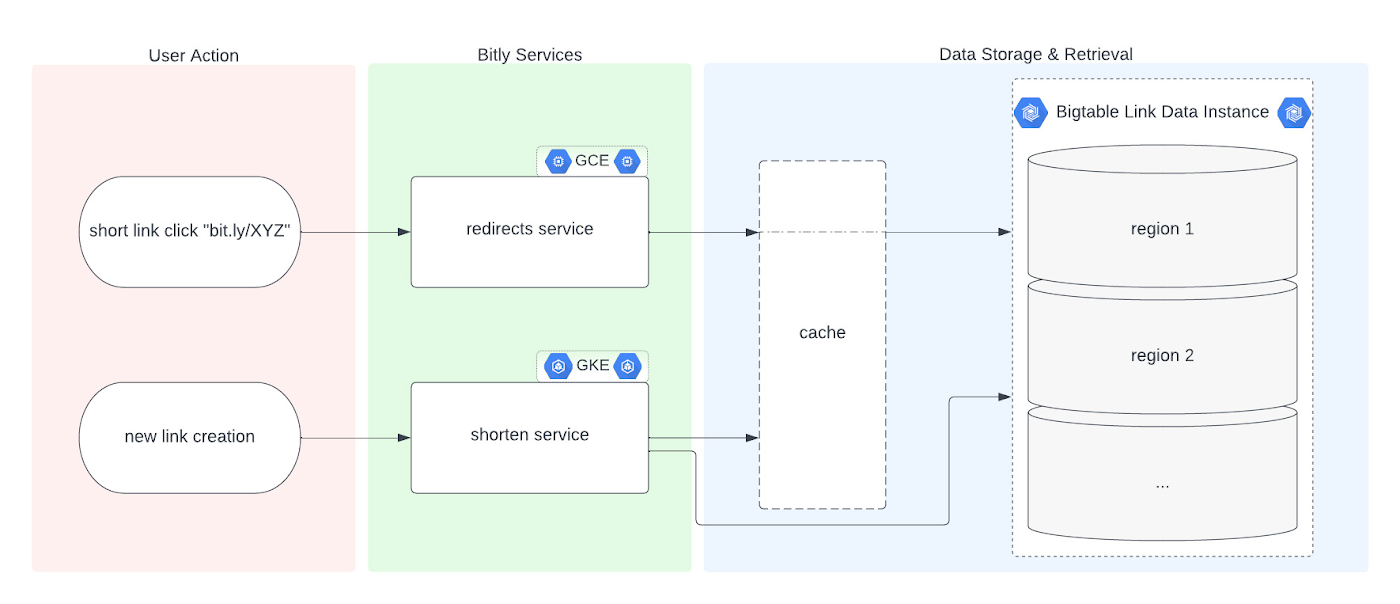
Before we dive into the Bigtable migration, it’s useful to understand the basics of our link management system. When a user shortens a long URL with Bitly, information is saved to the backend data stores through our API layer. This information consists of a Bitly short link and the corresponding destination link for proper routing, as well as some additional metadata. When a user clicks the Bitly short link, our services query these same backend data stores for the redirect destination for the request. This basic flow, which also includes other Bitly link options like custom back-halves, is the backbone of the Bitly link management platform.
Where Bigtable comes in
As mentioned, after researching our options, the solution that best fit our needs was Bigtable. It offered the features we were looking for, including:
- A 99.999% SLA
- Limitless scale
- Single-digit millisecond latency
- A built-in monitoring system
- Multi-region replication
- Geo-distribution, which allows for seamless replication of data across regions and reduces latency
- On-demand scaling of compute resources and storage, which adjusts to user traffic and allows our system to grow and scale as needed
- Seamless integration with our general architecture; we use Google Cloud services for many other parts of our system, including the APIs that interact with these databases
- A NoSQL database that doesn’t require relational semantics, as the datasets we’re migrating are indexed on a single primary key in our applications
Making the move
We targeted three of our major, self-managed datasets to migrate. The larger two were organized in a sharded database architecture. The first thing we did for migration was prepare the new Bigtable database. We iterated over a schema design process and conducted a thorough performance analysis of Bigtable to ensure an uninterrupted user experience during and after the migration. After that, we made minor adjustments to our application code so that it could seamlessly integrate and interact with Bigtable. Finally, we implemented a robust post-migration disaster recovery process to mitigate any potential risks.
During the actual migration, we enabled our applications to start a “dual writes” phase. This involved concurrently writing new link data to both our existing MySQL and the new Bigtable tables. Once data started writing to our Bigtable instance, we ran our migration scripts. We used a Go script to walk each of the existing MySQL datasets and insert each row into Bigtable. This enabled us to clean up outdated information and backfill older records with newer field data.
Cleaning up clutter along the way
In the process of migration, we were actually able to free up a huge amount of storage. Because of the elimination of an early feature of the Bitly platform, we were able to exclude from the migration to Bigtable a little less than half of the total data stored in MySQL. Since we were creating a completely clean dataset, we had the opportunity simply to skip those unneeded rows during the migration.
Altogether, the migration process walked through 80 billion MySQL rows, which resulted in just over 40 billion records finding their new home in Bigtable. In the end, our starting point with Bigtable is a 26 TB dataset, not including replication. A set of concurrent Go scripts running in parallel on a handful of machines allowed us to complete this migration project in six days. (Go rarely disappoints.)
Write twice, cut once – validation before migration
Next up was the data validation and cutover period when we started returning data from Bigtable, but continued to write to MySQL as a precaution in case we needed to roll back at any point.
As we dove into the validation process, we compared the data between MySQL and Bigtable and noted any discrepancies whenever a link was clicked or created. After verifying that all our responses were stable, we proceeded with a gradual cutover process, rolling out in percentages until we reached 100% Bigtable for all writes and reads. After a comfortable run period, we’ll turn off the dual writes completely and finally decommission our workhorse MySQL hosts to live on a farm upstate.
Google’s got Bitly’s back(ups)
Our data is our lifeline, and we’re doing everything we can to ensure it’s always protected. We put together a redundancy plan using both Bigtable backups as well as a process for keeping a copy of the data outside Bigtable for true disaster recovery.
The first line of defense involves a switchover to the backup Bigtable dataset in case we need it. Beyond that, we’ve implemented two more layers of defense to protect against instance failure, corrupted data, and any other data failure that would require a restore of one or more tables from backup.
For this process, we start by creating daily Bigtable backups of our tables that we store for a fixed number of days. Second, we execute a Dataflow job to export our data from Bigtable into Cloud Storage approximately every week. And, if the need arises, we can use Dataflow to import our data back from Cloud Storage into a new Bigtable table.
While running the Dataflow jobs to export from Bigtable to Cloud Storage, we’ve seen an impressive export speed of 7-8 million rows read per second on average and up to 15 million per second at times. All the while, our production reads and writes continued without disruption. When we tested the Cloud-Storage-to-Bigtable restore job, the write speed, expectedly, increased with instance scale — at the maximum node quota for our regions, we observed an average of just under 2 million rows per second written to our new table.
Short links for the long haul
As mentioned above, not only did Bigtable meet our technical requirements and operational needs, but we also chose Bigtable because it sets us up for future growth. Its ability to scale seamlessly over time while improving our system availability SLA was a major factor in our decision.
As we increase our scale by 5x, 10x, or more, it’s imperative that our data backbone scales accordingly and that the SLAs we provide to customers stay stable or even add another coveted “9”. We have big plans in the coming years and Bigtable will help us achieve them.
Interested in learning more? We found the following resources to be useful in our journey to Bigtable evaluation and ultimate adoption:
- Evaluate Bigtable schema design for your relational database and application workloads
- Understand how to increase availability and distribute data globally with Bigtable replication in any region combination of your choice
- Learn more about Bigtable backups and importing/exporting data with Bigtable Dataflow templates
Bonus: If you’re interested in learning more of the nuts and bolts of how we migrated the data, I’ll be talking all about that very topic at GopherCon 2023 this September in San Diego!
Demystifying Transactional Locking in Cloud Spanner

3012
Of your peers have already read this article.
3:30 Minutes
The most insightful time you'll spend today!
Cloud Spanner is a fully managed relational database with unlimited scale, strong consistency, and up to 99.999% availability. It is designed for highly concurrent applications that read and update data, for example, to process payments or for online game play. To ensure the consistency across multiple concurrent transactions, Cloud Spanner uses a combination of shared locks and exclusive locks to control access to the data. In this blog, we will explore the different types of locks present in Cloud Spanner. We will also discuss some common cases of transactional locking in Cloud Spanner, and what to look out for to detect when these cases might be occurring.
What is a lock?
Before we get into the details, let us first quickly recap and define a lock in the context of database systems.
“Locks” in databases are a mechanism for concurrency control. Locks are typically held on a resource, which may mean rows, columns, tables or even entire databases. When a resource is locked by a transaction, it cannot be accessed by another transaction until the lock is released.
Timeline view of transactions
Before we proceed to discuss transaction locking in the context of read and read-write transactions, it is important to recap the timeline view of the transactions in Spanner.
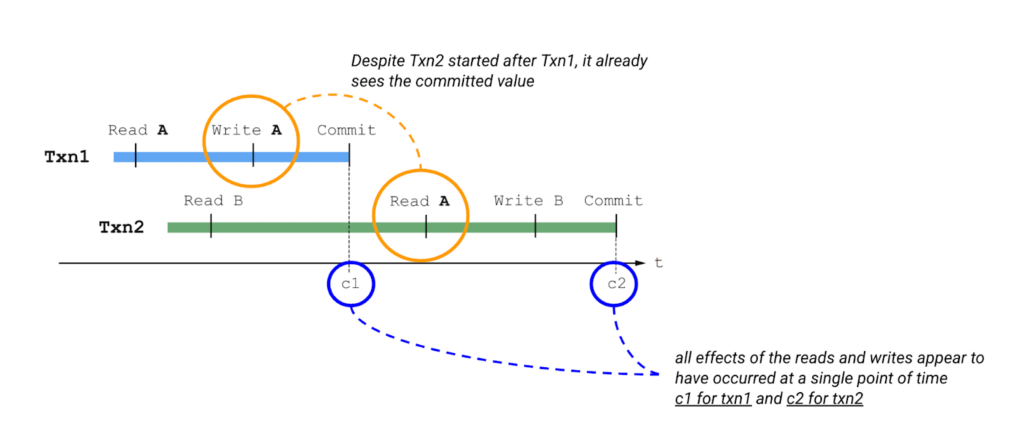
Please also keep in mind the concept of write buffering in transactions, since we refer to it in the Common Transaction Patterns section below. Write buffering refers to the Cloud Spanner server(s) accepting the writes. Note that these writes are not durable until a commit has been performed.
Types of locks in Cloud Spanner
Cloud Spanner operations acquire locks when the operations are part of a read-write transaction. Read-only transactions do not acquire locks. Unlike other approaches that lock entire tables or rows, the granularity of transactional locks in Spanner is a cell, or the intersection of a row and a column. This means that two transactions can read and modify different columns of the same row at the same time. To maximize the number of transactions that have access to a particular data cell at a given time, Cloud Spanner uses different lock modes.
Here is a brief description of the different lock types. Learn more about each lock type in the Cloud Spanner documentation.
- ReaderShared Lock – Acquired when a read-write transaction reads data.
- WriterShared Lock – Acquired when a read-write transaction writes data without reading it.
- Exclusive Lock – Acquired when a read-write transaction which has already acquired a ReaderShared lock tries to write data after the completion of read. It is a special case for a transaction to hold both the ReaderShared lock and WriterShared lock at the same time.
- WriterSharedTimestamp Lock – Special type of lock acquired when inserting new rows with the transaction’s commit timestamp as part of the primary key.
Handling Lock Conflicts
Since read-write transactions use locks to execute atomically, they run the risk of deadlocking. For example, consider the following scenario: transaction Txn1 holds a lock on record A and is waiting for a lock on record B, and Txn2 holds a lock on record B and is waiting for a lock on record A. The only way to make progress in this situation is to abort one of the transactions so it releases its lock, allowing the other transaction to proceed.
Cloud Spanner uses the standard “wound-wait” algorithm to handle deadlock detection. Under the hood, Spanner keeps track of the age of each transaction that requests conflicting locks. It also allows older transactions to abort younger transactions, where “older” means that the transaction’s earliest read, query, or commit happened sooner.
Common Transaction Patterns
Armed with the basics of transactions and locks in Cloud Spanner, we will now walk through a few practical use-cases. We take the example of an application which queries and updates users’ balance in a table named accounts. The accounts table has the following columns –
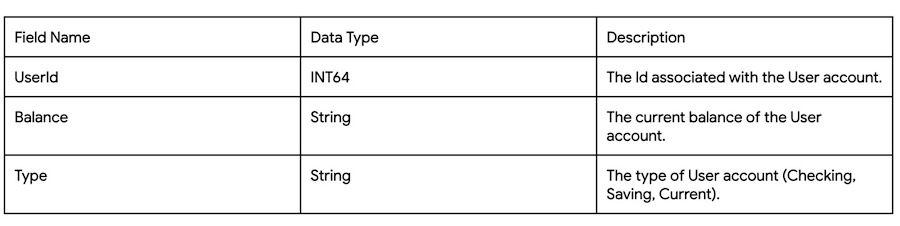
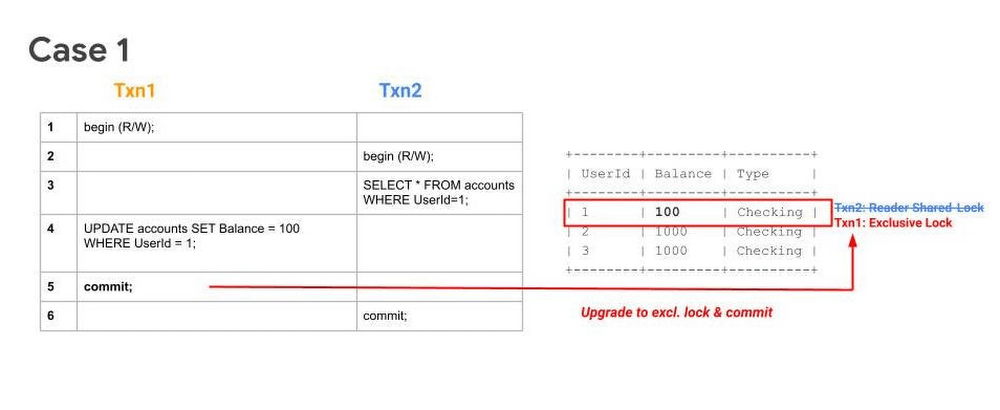
Case 1: Transaction waiting to get exclusive lock because of higher priority shared-lock
Sequence
- Txn1 begins.
- Txn2 begins.
- Txn2 reads the table and acquires a ReadShared Lock.
- Txn1 buffers its write.
- Txn1 tries to commit, but since Txn2 has higher priority (because it has executed its first operation first), Txn1 will have to wait until Txn2 releases the ReadShared Lock.
After committing, Txn2 releases its ReadShared Lock. Txn1 is now able to upgrade to an Exclusive Lock. It acquires the Exclusive Lock and commits.
Note 1: UPDATE WHERE is always transformed into SELECT WHERE, so an UPDATE statement is not a blind write, but a read-write operation.
Note 2: While the above example considers the use-case of querying and updating a single row, the same transaction pattern is also applicable across a key-range.
What to watch out for
- Timeouts due to Transactions waiting for acquiring locks. Refer to transaction statistics and lock statistics to understand how to detect this.
When does this typically happen
- Concurrent updates to a single key/key-range in a table.
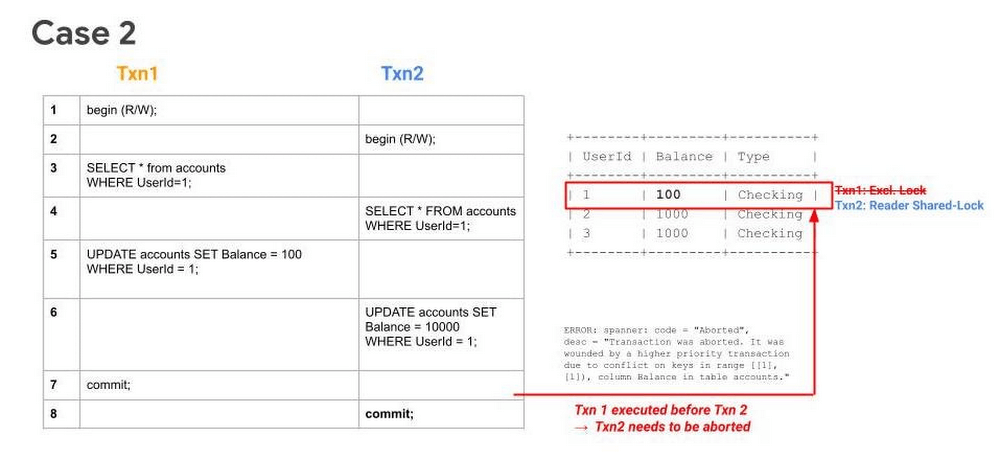
Case 2: Transaction aborted because of concurrent execution succeeding
Sequence
- Txn1 begins.
- Txn2 begins.
- Txn1 reads a row from the table and acquires a ReadShared Lock.
- Txn2 reads the same row as Txn1 and acquires a ReadShared Lock.
- Txn1 buffers its write.
- Txn2 buffers its write.
- Txn1 tries to commit, has higher priority (because it has executed its first operation first), it will get priority in upgrading to an Exclusive Lock. It acquires the Exclusive Lock and commits.
Since Txn1 has committed and was the higher priority transaction, Txn1 will abort Txn2.. The abort will likely happen before Txn2 tries to commit.
What to watch out for
- High number of transaction aborts due to wounding of transactions. Refer to transaction statistics and lock statistics to understand how to detect this.
When does this typically happen
- Concurrent updates to a single key/key-range. Typically this happens in the case of hot keys being present in the table.
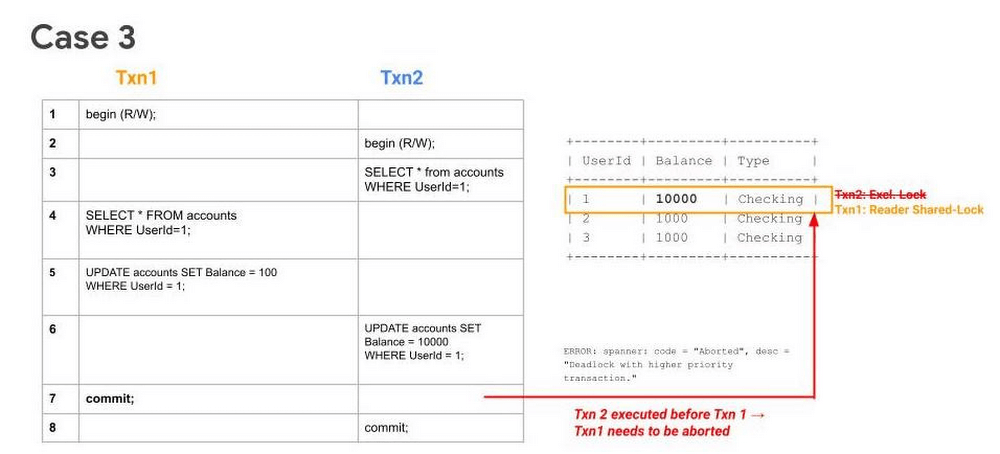
Case 3: Transaction waiting to get exclusive lock because of higher priority shared-lock & getting aborted because of prior succeeding concurrent execution
Sequence
- Txn1 begins.
- Txn2 begins.
- Txn2 reads the table and acquires a ReadShared Lock.
- Txn1 reads the table and acquires a ReadShared Lock.
- Txn1 buffers its write.
- Txn2 buffers its write.
- Txn1 tries to commit, but since Txn2 holds a ReadShared Lock, it has to wait until it gets cleared.
- Since Txn2 has higher priority (because it has executed its first operation first), it will acquire the Exclusive Lock first. Txn2 upgrades its ReaderShared Lock to an Exclusive Lock and commits.
Finally, after Step 8, when Txn1 tries to commit (since ReaderShared Lock from Txn2 is now cleared) it gets aborted. This is done to prevent deadlock with the higher priority transaction (Txn2).
Note: In Case 1, even though Txn2 had acquired a ReaderShared Lock earlier as in Case 3, it never upgraded to an Exclusive Lock (since there were no writes). Hence there was no need to abort Txn1, it could simply wait for Txn2 to release its ReaderShared lock and then commit.
What to watch out for
- High number of transaction aborts due to high contention between transactions. Refer to transaction statistics and lock statistics to understand how to detect this.
When does this typically happen
- Concurrent updates to a single key/key-range. Typically this happens in the case of hot keys being present in the table.
Recommendations
In order to mitigate these issues and reduce their occurrence. We recommend adopting the following best practices:
- If you need to perform more than one read at the same timestamp, and know in advance that you only need to read, consider using a read-only transaction. Because read-only transactions don’t write, they don’t hold locks and they don’t block other transactions. Further, read-only transactions never abort, so you don’t need to wrap them in retry loops.
- Always acquire ReadShared Locks on the smallest subset of keys or key ranges. This reduces the chances of lock contention.
- Analyze your code to only include critical path code within a transaction. Avoiding unneeded remote calls or complex, long-running business logic is a good way to ensure a transaction process quickly.
- Analyze your needs for multi-split transactions. Since transactions that update more than one split use a 2-phase commit protocol, they hold locks for a longer duration, thereby increasing chances of lock contention.
Get started today
Spanner’s unique architecture allows it to scale horizontally without compromising on the consistency guarantees that developers rely on in modern relational databases. Try out Spanner today for free for 90 days or for as low as $65 USD per month.
Two Ways to Deploy SAP HANA System on Google Cloud

7907
Of your peers have already read this article.
4:00 Minutes
The most insightful time you'll spend today!
Many of the world’s leading companies run on SAP—and deploying it on Google Cloud extends the benefits of SAP even further. Migrating your current SAP S/4HANA deployment to Google Cloud—whether it resides on your company’s on-premises servers or another cloud service—provides your organization with a flexible virtualized architecture that lets you scale your environment to match your workloads, so you pay only for the compute and storage capacity you need at any given moment. Google Cloud includes built-in features, such as Compute Engine live migration and automatic restart, that minimize downtime for infrastructure maintenance. And it allows you to integrate your SAP data with multiple data sources and process it using Google Cloud technology such as BigQuery to drive data analytics.
SAP server-side architecture consists of two layers: the SAP HANA database, and the Netweaver application layer. In this blog post, we’ll look at the options and steps for moving the database layer to Google Cloud as a lift and shift or rehost, a straightforward approach that entails moving your current SAP environment unchanged onto Google Cloud.
Deploying an SAP HANA system on Google Cloud
Google Cloud offers SAP-certified virtual machines (VMs) optimized for SAP products, including SAP HANA and SAP HANA Enterprise Cloud, as well as dedicated servers for SAP HANA for environments greater than 12TB. (For a complete list of VM and hardware options, visit the Certified and Supported SAP HANA Hardware Directory.)
Before proceeding with a rehost migration to Google Cloud, your current (source) environment and Google Cloud (target) environments should meet these specifications:
Prerequisites:
- The configuration of the Google Cloud environment (i.e., VM resources, SSD storage capacity) should be identical to that of the source environment. If the underlying hardware is different, however, you must use Option 2 for your migration, detailed below.
- Both environments should be running the same operating system (SUSE or RHEL Linux).
- The HANA version, instance number, and system ID (SID) should be identical.
- Schema names must remain the same.
- Establishing the network connection between the on-premises environment and Google Cloud will be required in this phase to support rehost of the SAP application.you can use Cloud VPN or Dedicated Interconnect. Learn more about Dedicated Interconnect and Cloud VPN.
Note: Depending on your internet connection and bandwidth requirements, we recommend using a Dedicated Interconnect over Cloud VPN for production environments.
We offer a number of automated processes to accelerate your cloud journey. To deploy the SAP HANA system on Google Cloud, you can use the Google Cloud Deployment manager or Terraform and Ansible scripts available on GitHub with configuration file templates to define your installation. For more details, see the Google Cloud SAP HANA Planning Guide.
Note: To deploy SAP HANA on Google Cloud machine types that are certified by SAP for production, please review the Certification for SAP HANA on Google Cloud page.
Moving an SAP HANA Database to Google Cloud
There are two different options you can use to rehost your SAP HANA database to Google Cloud, and each has pros and cons that you should consider when deciding on your approach.
Option 1: Asynchronous replication uses SAP’s built-in replication tool to provide continuous data replication from the source system (also known as the primary system) to the destination or secondary system—in this case residing on Google Cloud. It’s best for mission-critical applications for which minimum downtime is a high priority, and for large databases. In addition, the high level of automation means that the process requires less manual intervention. Here’s where you can learn more on HANA Asynchronous Replication.
Option 2: Backup and restore relies on SAP’s backup utility to create an image of the database that is then transferred to Google Cloud, where it is restored in the new environment. Downtime for this method varies by database size, so large databases may require more downtime via this method vs. asynchronous replication. It also involves more manual tasks. However, it requires fewer resources to perform, making it an attractive option for less urgent use cases. Here’s where you can learn more on SAP HANA database Backup and restore.

How to migrate the SAP HANA database to Google Cloud using Asynchronous Replication

- Create and configure Dedicated Interconnect or Cloud VPN between the current environment and Google Cloud.
- Set up SAP HANA asynchronous replication. You can configure system replication using SAP HANA Cockpit, SAP HANA Studio, or hdbnsutil. See Setting Up SAP HANA System Replication in the SAP HANA Administration Guide.
- Be sure to use the same instance number and HANA SID in the template as the primary instance.
- Configure the Google Cloud instance as the secondary node for using HANA Asynchronous replication.
- Perform data validation once full data replication is completed to the SAP HANA database in Google Cloud. To learn more: HANA System Replication overview.
- Perform an SAP HANA takeover on your standby database. This switches your active system from the current primary system onto the secondary system on Google Cloud. Once the takeover command runs, the system on Google Cloud becomes the new primary system.To learn more: HANA Takeover.
How to migrate the SAP HANA database to Google Cloud using Backup and Restore

- Create a full backup of your SAP HANA database in your current environment.
- Create a new storage bucket in your Google Cloud environment. Visit Creating Storage Buckets in the Google Cloud Storage documentation.
- Download and install gsutil onto the source environment and run it to upload the HANA backup to the Google Cloud storage bucket. To install gsutil utility on any computer or server, visit Install gsutil in the Google Cloud Storage documentation.
Note: You can run parallel multi thread/multi processing in gsutil to copy large files more quickly. - Recover the HANA database on Google Cloud using SAP’s RECOVER DATABASE statement. See RECOVER DATABASE Statement (Backup and Recovery) in the SAP HANA SQL Reference Guide for SAP HANA Platform.
Note: BackInt agent is an integrated SAP interface tool used for HANA database on Google Cloud.Backint agent for SAP HANA can be used to store and retrieve backups directly from Google Cloud Storage. It is supported and certified by SAP on Google Cloud. To learn more: SAP HANA Backint Agent on Google Cloud.
In summary, we recommend using Asynchronous Replication (Option 1) for mission-critical applications that require the lowest downtime window. For all other applications, we recommend Backup and Restore (Option 2), as this approach requires fewer resources. It’s also a great way to implement the backup and restore functionality on Google Cloud.
A rehost migration is the most straightforward path to getting your SAP on HANA system up and running on Google Cloud. And the sooner you migrate, the sooner you can take advantage of the many benefits Google Cloud brings to your SAP solution. For more information on the different migration options please review: SAP on Google Cloud: Migration strategies.
Learn more about deploying SAP on Google Cloud. Technical resources can be found here.
BigQuery Now Supports Multi-statement Transactions

3767
Of your peers have already read this article.
3:00 Minutes
The most insightful time you'll spend today!
Mercury, the Roman god of commerce, is often depicted carrying a purse, symbolic of business transactions, wearing winged sandals, illustrating his abilities to move at great speeds. Transactions power the world’s business systems today, ranging from millions of packages moving worldwide tracked in real time by logistics companies to global payments from personal loans to securities trading to intergovernmental transactions, keeping goods and services flowing worldwide. Today, we are very pleased to announce the public preview of multi-statement transactions in BigQuery.
BigQuery has long supported single-statement transactions through DML statements such as INSERT, UPDATE, DELETE, MERGE and TRUNCATE, applied to one table per transaction. Multi-statement transactions expand on this scope by supporting multiple SQL statements, including DML, spanning multiple tables in a single transaction. This means that the changes to data across multiple tables associated with all statements in a given transaction are committed atomically (all at once) if successful or all rolled back atomically in the event of a failure. These new multi-statement transaction capabilities now bridge the gap between online transaction processing (OLTP) systems and BigQuery through tighter and faster integration, just as Mercury’s speed enabled him to travel rapidly between the mortal and divine worlds.
Overview
A transaction is a set of tasks carried out against a database or a data warehouse representing a business unit of work. For example, an order expedite action may result in a series of changes to multiple tables, e.g., updating delivery dates on the order, adding new shipment lines on a shipment to create expedited delivery shipments and canceling (updating) prior normal delivery shipment lines. Correspondingly, when a batch job execute an ETL process in a data warehouse, it may perform data wrangling and data cleansing operations by transforming and saving the data in multiple tables. In both of these cases, if a failure occurs, then the entire transaction must be rolled back so that the system of record does not have partial data saved putting the dataset in an inconsistent state.
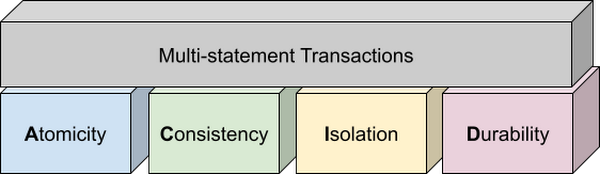
Transactions are known for their atomicity, consistency, isolation, and durability (ACID) properties. Atomicity indicates that all data changes (including metadata changes) are applied or reverted in a single operation, e.g. when a set of rows are added to a table with enrichment and the corresponding set of rows deleted, both operations happen together. Consistency refers to the consistency of data before and after the transaction has completed. When data is added to or updated in a table, the changes to data in tables are consistent with the constraints specified on the table or its columns, e.g. ensuring that the NOT NULL constraint is complied with when data gets added or modified in a table. Isolation indicates that multiple transactions can make changes to the table concurrently as long as the changes don’t conflict with each other, e.g. two transactions loading data into tables from different business units can proceed concurrently. Durability is the last and possibly the most important property of transactions which guarantees that in the event of a failure (after completing the transaction), all the changes committed by the transaction are saved for future transactions or queries.
Isolation level
All transactions in BigQuery including multi-statement transactions support snapshot isolation. At this isolation level, all statements in a transaction see a consistent snapshot of the database, as of the start of the transaction. BigQuery achieves this due to its multi-version property where it maintains the history of mutations to the database for a certain period. Transactions do not see any changes, committed or uncommitted, from other concurrent transactions while the transaction is in progress. BigQuery supports read-your-own-writes, where statements in a transaction can see all the changes applied by prior statements in the same transaction.
Example
Let’s run through an example to demonstrate how BigQuery supports the concept of multi-statement transactions with multiple sets of changes across multiple tables in one operation. In this example, we will set up this demo by creating 10 tables each with 100 partitions
Language: SQL
DECLARE num_tables DEFAULT 10;DECLARE x INT64 DEFAULT 0;# replace "demo" with your preferred dataset nameDECLARE ds STRING default "`00jathreya`";DECLARE prefix STRING DEFAULT "mst_demo";DECLARE table_name STRING;DECLARE pre_table_name STRING;/*Sets up 10 tables, with schema (partition_id:integer,value:timestamp).Each table has 100 partitions, with partition key 0, 10, 20, ..., 990.*/SET x = 0;WHILE x < num_tables DOSET table_name = format("%s.%s_%d", ds, prefix, x);EXECUTE IMMEDIATE format("""DROP TABLE IF EXISTS %s""", table_name);EXECUTE IMMEDIATE format("""CREATE OR REPLACE TABLE %s (partition_id INT64, value TIMESTAMP)PARTITION BY RANGE_BUCKET(partition_id, GENERATE_ARRAY(0, 1000, 10))AS SELECT partition_id, CURRENT_TIMESTAMP() AS value FROM UNNEST(GENERATE_ARRAY(0, 990, 10)) AS partition_id""", table_name);SET x = x + 1;END WHILE;# Verify the partitioned tables created and the timestampexecute immediate format("""select table_schema, table_name, count(partition_id), sum(total_rows), max(last_modified_time) from %s.INFORMATION_SCHEMA.PARTITIONSwhere starts_with(table_name,'%s')group by table_schema, table_name""", ds, prefix);# Verify data in table 9 based on the timestampEXECUTE IMMEDIATE format("""SELECT * FROM %s ORDER BY partition_id""", table_name);
Next, we will show how the new COMMIT and ROLLBACK commands in BigQuery allow you to save or reverse the changes in a transaction spanning multiple tables.
Language: SQL
DECLARE num_tables DEFAULT 10;DECLARE x INT64 DEFAULT 0;# Replace `mydataset` with your preferred dataset nameDECLARE ds STRING DEFAULT "`mydataset`";DECLARE prefix STRING DEFAULT "mst_demo";DECLARE table_name STRING;DECLARE pre_table_name STRING;/*Steps of the transaction:1. For table 0, updates the timestamp to CURRENT_TIMESTAMP.2. FOR table 1 to 9, merge table x using data from table x-1. All MERGE shouldsee the updated data in table x-1, so as a result the change in table 0 should bepropagated all the way to table 9.3. A total of 1000 partition changes on 10 tables.*/BEGIN TRANSACTION;SET x = 0;WHILE x < num_tables DOSET table_name = format("%s.%s_%d", ds, prefix, x);IF x = 0 THENEXECUTE IMMEDIATE format("""UPDATE %s SET value = CURRENT_TIMESTAMP WHERE true""", table_name);ELSESET pre_table_name = format("%s.%s_%d", ds, prefix, x-1);EXECUTE IMMEDIATE format("""MERGE %s t2 USING %s t1 ON t2.partition_id = t1.partition_idWHEN MATCHED THEN UPDATE SET value = t1.value""", table_name, pre_table_name);END IF;SET x = x + 1;END WHILE;# Verify data in table 9 inside transaction shows recently updated dataSET table_name = format("%s.%s_%d", ds, prefix, num_tables-1);EXECUTE IMMEDIATE format("""SELECT * FROM %s ORDER BY partition_id""", table_name);IF x = 9 THENCOMMIT TRANSACTION;ELSEROLLBACK TRANSACTION;END IF;# Verify data in table 9 outside transaction shows timestamp of original dataEXECUTE IMMEDIATE format("""SELECT * FROM %s ORDER BY partition_id""", table_name);
Monitoring and Management
Unlike single-statement transactions which map to a single DML command, multi-statement transactions are complex spanning multiple DML operations across multiple tables. To monitor these complex jobs, the BigQuery JOBS INFORMATION_SCHEMA views have been expanded to add a new column, TRANSACTION_ID, which contains a unique identifier for each transaction in BigQuery. You can query transactions that are in progress or the ones that have completed by querying these views.
Language: SQL
#Returns the list of transactions running under a parent job ID .;SELECTDISTINCT transaction_idFROM `region-us`.INFORMATION_SCHEMA.JOBS_BY_PROJECTWHERE parent_job_id = "job_id" AND state = "RUNNING";# Returns the active transactions and parent job id that are running and affect a named table.;WITHrunning_transactions AS (SELECT DISTINCT transaction_idFROM `region-us`.INFORMATION_SCHEMA.JOBS_BY_PROJECTWHERE state = "RUNNING")SELECTtransaction_id, parent_job_id, queryFROM `region-us`.INFORMATION_SCHEMA.JOBS_BY_PROJECT, running_transactionsWHERE destination_table = "mytable"AND transaction_id = running_transactions.transaction_id;# Returns all successfully committed transactionsSELECTtransaction_id, parent_job_id, queryFROM `region-us`.INFORMATION_SCHEMA.JOBS_BY_PROJECTWHERE statement_type = "COMMIT_TRANSACTION" AND error_result IS NULL;# Returns all rolled back transactionsSELECTtransaction_id, parent_job_id, queryFROM `region-us`.INFORMATION_SCHEMA.JOBS_BY_PROJECTWHERE statement_type = "ROLLBACK_TRANSACTION" AND error_result IS NULL;
To terminate a transaction, you will need to terminate the parent job under which the transaction is running by passing the parent job ID of the script containing the transaction to the BQ.JOBS.CANCEL system procedure.
Conclusion
As enterprises accelerate towards more real time insight-driven decisions, multi-statement transactions are a key enabler towards bringing transaction data into analytical data warehouses, such as BigQuery. With strong ACID properties, full transaction support for commit and rollback, and rich monitoring and management APIs built on proven transaction processing backbone, we are very pleased to help our BigQuery customers unlock the value of transactions through these new capabilities.
More Relevant Stories for Your Company

BigQuery Reference Guide: Understanding Tables within and Routine for Data Transformation
Last week in our BigQuery Reference Guide series, we spoke about the BigQuery resource hierarchy - specifically digging into project and dataset structures. This week, we’re going one level deeper and talking through some of the resources within datasets. In this post, we’ll talk through the different types of tables

Three New Features in Cloud SQL for SQL Server Extends its Functionality
As a product with a long history in the database ecosystem, SQL Server offers numerous native capabilities that help provide scalability and security to its users. However, it can be time consuming and complex to take advantage of these features. Google Cloud SQL for SQL Server saves your team time

Behind the Scenes: How eBay Provides its Customers New Shopping Experiences
“If it exists in the world, you are likely to find it on eBay.” So they say. With 180 million buyers and a global presence in over 190 markets, it’s probably true. A company that emerged out of the ashes of the dot-com bubble, eBay today is one of the
Takeaways from Forrester’s Cloud Data Warehouse Q1 2021 Report
Cloud data warehouse (CDW) solutions have transformed the delivery of modern analytics and are known to have the capabilities to provision data warehouse of any size in a matter of minutes, autotune queries, scale resources including compute and storage on demand and auto-upgrade to the latest version. As the need
