





Google Workspace’s Single Connected Experience Makes Workplaces Hybrid-ready

4034
Of your peers have already read this article.
1:30 Minutes
The most insightful time you'll spend today!
Our collective understanding of work—where it takes place and how it gets done—has been transformed over the last year. As companies and organizations across the globe reimagine work, new challenges and opportunities are emerging. How do people working “somewhere else” stay connected and part of the same conversations as those in the office? And if hybrid work is the sum of all the places and ways that work happens, how do employees create a shared experience, better manage their time and attention, and build stronger connections along the way?
For well over a decade, we’ve been building the future of work with products and experiences that transform how teams of all sizes connect, create, and collaborate together—on any device, from any location. Last October, we launched Google Workspace as an integrated solution with a singular promise: everything you need to get anything done, now in one place. In March, we introduced a series of innovations to help people better manage their time and build deeper connections with each other as the future of work continues to evolve. And at Google I/O last month, we took our next big step in transforming collaboration with smart canvas, a new product experience in Google Workspace. And today, we’re delivering additional innovations that address the specific challenges and opportunities of the hybrid work world.
A dedicated space for teamwork and collaboration
Chat and video meetings have been an essential part of work during the last year, serving as a bridge for separated colleagues to collaborate in real time. As we reflect on the lessons of a year where many people were working remotely, we know that distributed teams need a new type of dedicated, shared space. A place in Google Workspace to bring projects to life by connecting the right content, people, and conversations in new and powerful ways.
With the introduction of Spaces, we’re evolving the Rooms experience in Google Chat into a dedicated place for organizing people, topics, and projects in Google Workspace. Over the summer, we’ll evolve Rooms to become Spaces and launch a streamlined and flexible user interface that helps teams and individuals stay on top of everything that’s important. Powered by new features like in-line topic threading, presence indicators, custom statuses, expressive reactions, and a collapsible view, Spaces will seamlessly integrate with files and tasks, becoming a new home in Google Workspace for getting more done—together.

Spaces can provide a place to fuel knowledge sharing and community building for teams of all sizes, where all the relevant information, conversations, and files for a project can be organized, and where topics—even at the organization level—can be intelligently moderated. With the ability to pin messages where everyone can see them, Spaces will play a crucial role in helping people stay connected and informed as hybrid work evolves.
As we transition from Rooms to Spaces in Google Chat this summer we’ll be delivering new features on a rolling basis. Customers can have their admins turn on Google Chat in Gmail so their organizations can start using Rooms today, ensuring a seamless path to Spaces when it becomes available.
Keeping everyone in the conversation during hybrid meetings
Collaboration equity—the ability to contribute equally, regardless of location, role, experience level, language, and device preference—is a cornerstone of Google Workspace. When teammates were fully remote during the last year, everyone experienced meetings in much the same way and had access to the same communication features. But what happens when some colleagues are in a conference room together while others are joining from living rooms, home offices, or a remote co-working space? How do they all participate equally in the same conversation?
At Google I/O, we previewed Companion Mode in Google Meet as a way of fostering collaboration equity in a hybrid work world. Companion Mode is designed to seamlessly connect those in the room with their remote teammates, giving everyone advanced features to participate, while leveraging the best of in-room audio and video conferencing capabilities.

Companion Mode gives every meeting participant, no matter where they are, access to interactive features and controls like screen sharing, polls, in-meeting chat, hand raise, Q&A, live captions, and more. Colleagues who are in the same meeting room together will enable Companion Mode on their personal devices, giving them their own video tile in Meet and helping them to stay connected with their remote teammates. Companion Mode will be available on the web and our upcoming progressive web app in September, and it will be coming soon to mobile.
To allow meeting organizers to better plan for hybrid meetings, invitees will soon be able to RSVP with their join location, indicating whether they’ll be joining in a meeting room or remotely.
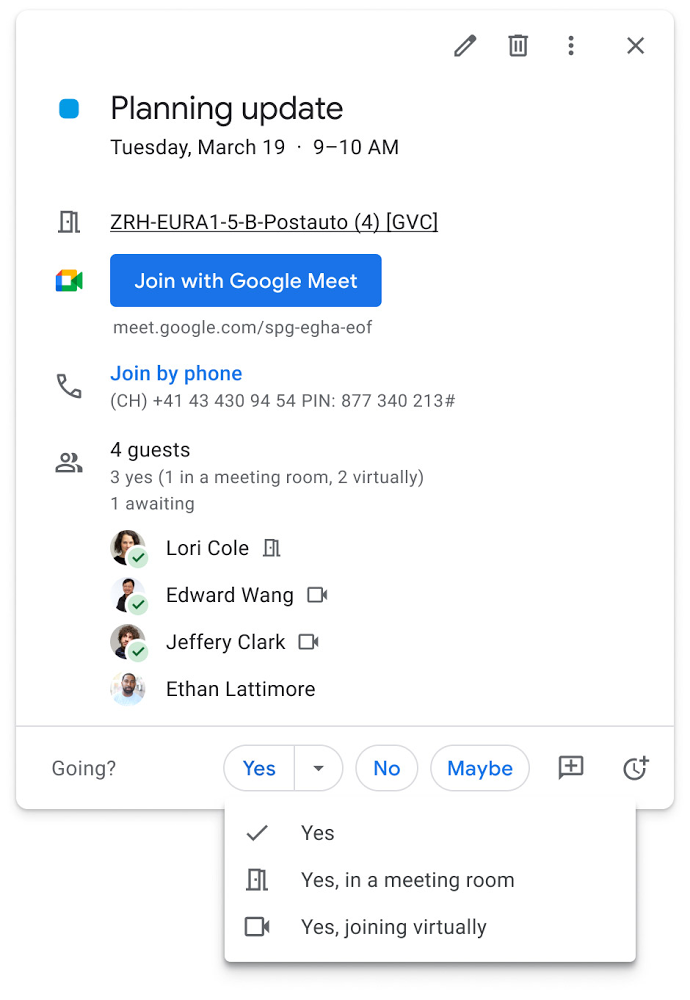
Updates to improve the in-room experience are also coming to Google Meet hardware in September, including the ability to see and use the hand-raise feature and receive notifications from polls and Q&As. The modular design of Meet’s Series One room kits can easily accommodate a variety of space layouts and be paired with an AV cart for optimum flexibility.
We’re also continually launching new controls to make meetings more safe and secure, including the ability for admins to set policies for who can join meetings, and how participants can engage within meetings. To help everyone stay focused in meetings without interruption, in the next few months we’ll introduce moderation controls for hosts, giving them the ability to prevent the use of in-meeting chat and prohibit presenting during meetings, as well as allowing them full control to mute and prevent participants from unmuting.
Together, these changes will make meetings a safer, more connected, and inclusive experience across all hybrid environments. Register today for our free webinar on how Google Workspace is enabling hybrid work and helping foster collaboration equity.
Trusted hybrid collaboration in Google Workspace
Security, data privacy, and trust continue to be the foundation that make anywhere, anytime collaboration possible. As organizations explore new ways for their teams to collaborate securely in a hybrid work world, we’re introducing several ways that we’re strengthening this foundation in Google Workspace.
Today, we’re announcing new security and privacy capabilities to help Google Workspace customers realize the full power of trusted, cloud-native collaboration. Google Workspace Client-side encryption will help customers strengthen the confidentiality of their data while addressing a range of data sovereignty and compliance needs. It will also strengthen meeting security when it comes to Google Meet this fall. Additionally, we’re rolling out a number of security enhancements for Google Drive, including trust rules for Drive that help control how files can be shared within and outside your organization; Drive labels that classify files and apply controls based on their sensitivity levels; and enhanced phishing and malware protections to help safeguard against insider threats and user error. For full details, please visit our security blog post.
A single, connected experience
As businesses move to a hybrid work environment, the importance of creating secure collaboration spaces and fostering human connection has never been more important. Because Google Workspace was designed to fuel anywhere, anytime collaboration, we’re now helping millions of organizations navigate the challenges and opportunities of the newly emerging work model. Our customers are using Google Workspace to rethink virtual meetings, provide people with modern tools to stay connected and manage their time and attention, and double down on security and privacy. In countless ways, Google Workspace was built for this moment.
See how we’re bringing Google Workspace to everyone. With this change, all of our 3 billion existing users across consumer, enterprise, and education now have access to the full Google Workspace experience, including Gmail, Chat, Calendar, Drive, Docs, Sheets, Meet and more.
How the Telegraph is Reimagining Media with Google Cloud

10175
Of your peers have already read this article.
3:30 Minutes
The most insightful time you'll spend today!
Whether they’re reading the newspaper on the way to work, or catching up on the latest headlines on their smartphones, readers expect up-to-the-minute news wherever and whenever makes the most sense for them. As a result, media companies are increasingly looking for ways to improve, expand, and simplify their offerings, and they’re increasingly looking to the cloud to do it.
For more than 160 years The Telegraph has been counted on by readers across the United Kingdom and globally for award-winning news and journalism. An early adopter of cloud technology, it’s been a G Suite customer since 2008 and has already been using Google Cloud Platform to analyze digital behaviors to improve engagement and advertising performance since 2016.
Recently, The Telegraph announced it’s migrating fully to Google Cloud. By migrating all their production and pre-production services, they aim to deliver content faster, provide compelling experiences to readers, and reduce environmental impact.
“We are delighted to announce our newest collaboration with Google Cloud,” said Chris Taylor, Chief Information Officer, The Telegraph. “We have always worked closely with Google as they help us to provide our readers with great experiences on our digital products, collaboration software and internet scale through search. Their continued leadership in projects such as Kubernetes are enabling us to build flexible development environments that truly support DevOps.”
Powering the Digital Publishing Ecosystem
The Telegraph produces large volumes of digital content every day. It was imperative for them to find a cloud provider they could trust to support this ecosystem. By working with Google Cloud they have changed the way they see and engage with data: they can collect new information about their products every second and use that to continually hone their strategy. The Telegraph are placing more confidence and trust in the data captured about their content and now have one of the best available pieces of technology for capturing and analyzing the stories they publish in real-time.
Leveraging AI to support journalists
Time is critical when journalists are on a story, and The Telegraph wants to put important data in the hands of its journalists right when they need it. To do this, it will be using AutoML to classify content for journalists and make it more discoverable. For example, a reporter will be able to bring up relevant assets that link to their stories. It will also apply AutoML to classify Telegraph stock photos to help journalists attach compelling visual content to their stories faster.
Building compelling reader experiences with the help of APIs
Readers have an ever-increasing expectation of personalization. To meet this need, The Telegraph launched My Telegraph, currently live in beta, to offer registered readers personalized news experiences based on their interests or the particular journalists they want to follow. My Telegraph was developed on an API management platform provided by Google Cloud’s Apigee. You can learn more about how it’s applying API management to My Telegraph, in this blog post.
Working for environmental good
The Telegraph is the biggest selling quality newspaper in the UK, an accolade which requires it to print and distribute hundreds of thousands of copies each day. Optimal management of print production is important, and by using a combination of the cloud and machine learning, The Telegraph is better able to predict demand for physical newspapers, maximizing sales and minimizing waste. This makes great business sense for The Telegraph but also has great environmental benefit.
Quick Recap on Google Cloud: Latest News, Launches, Updates, Events and More

12907
Of your peers have already read this article.
2:00 Minutes
The most insightful time you'll spend today!
Want to know the latest from Google Cloud? Find it here in one handy location. Check back regularly for our newest updates, announcements, resources, events, learning opportunities, and more.
Tip: Not sure where to find what you’re looking for on the Google Cloud blog? Start here: Google Cloud blog 101: Full list of topics, links, and resources.
Week of May 24-May 28 2021
- Google Cloud for financial services: driving your transformation cloud journey–As we welcome the industry to our Financial Services Summit, we’re sharing more on how Google Cloud accelerates a financial organization’s digital transformation through app and infrastructure modernization, data democratization, people connections, and trusted transactions. Read more or watch the summit on demand.
- Introducing Datashare solution for financial services–We announced the general availability of Datashare for financial services, a new Google Cloud solution that brings together the entire capital markets ecosystem—data publishers and data consumers—to exchange market data securely and easily. Read more.
- Announcing Datastream in Preview–Datastream, a serverless change data capture (CDC) and replication service, allows enterprises to synchronize data across heterogeneous databases, storage systems, and applications reliably and with minimal latency to support real-time analytics, database replication, and event-driven architectures. Read more.
- Introducing Dataplex: An intelligent data fabric for analytics at scale–Dataplex provides a way to centrally manage, monitor, and govern your data across data lakes, data warehouses and data marts, and make this data securely accessible to a variety of analytics and data science tools. Read more.
- Announcing Dataflow Prime–Available in Preview in Q3 2021, Dataflow Prime is a new platform based on a serverless, no-ops, auto-tuning architecture built to bring unparalleled resource utilization and radical operational simplicity to big data processing. Dataflow Prime builds on Dataflow and brings new user benefits with innovations in resource utilization and distributed diagnostics. The new capabilities in Dataflow significantly reduce the time spent on infrastructure sizing and tuning tasks, as well as time spent diagnosing data freshness problems. Read more.
- Secure and scalable sharing for data and analytics with Analytics Hub–With Analytics Hub, available in Preview in Q3, organizations get a rich data ecosystem by publishing and subscribing to analytics-ready datasets; control and monitoring over how their data is being used; a self-service way to access valuable and trusted data assets; and an easy way to monetize their data assets without the overhead of building and managing the infrastructure. Read more.
- Cloud Spanner trims entry cost by 90%–Coming soon to Preview, granular instance sizing in Spanner lets organizations run workloads at as low as 1/10th the cost of regular instances, equating to approximately $65/month. Read more.
- Cloud Bigtable lifts SLA and adds new security features for regulated industries–Bigtable instances with a multi-cluster routing policy across 3 or more regions are now covered by a 99.999% monthly uptime percentage under the new SLA. In addition, new Data Access audit logs can help determine whether sensitive customer information has been accessed in the event of a security incident, and if so, when, and by whom. Read more.
- Build a no-code journaling app–In honor of Mental Health Awareness Month, Google Cloud’s no-code application development platform, AppSheet, demonstrates how you can build a journaling app complete with titles, time stamps, mood entries, and more. Learn how with this blog and video here.
- New features in Security Command Center—On May 24th, Security Command Center Premium launched the general availability of granular access controls at project- and folder-level and Center for Internet Security (CIS) 1.1 benchmarks for Google Cloud Platform Foundation. These new capabilities enable organizations to improve their security posture and efficiently manage risk for their Google Cloud environment. Learn more.
- Simplified API operations with AI–Google Cloud’s API management platform Apigee applies Google’s industry leading ML and AI to your API metadata. Understand how it works with anomaly detection here.
- This week: Data Cloud and Financial Services Summits–Our Google Cloud Summit series begins this week with the Data Cloud Summit on Wednesday May 26 (Global). At this half-day event, you’ll learn how leading companies like PayPal, Workday, Equifax, and many others are driving competitive differentiation using Google Cloud technologies to build their data clouds and transform data into value that drives innovation. The following day, Thursday May 27 (Global & EMEA) at the Financial Services Summit, discover how Google Cloud is helping financial institutions such as PayPal, Global Payments, HSBC, Credit Suisse, AXA Switzerland and more unlock new possibilities and accelerate business through innovation. Read more and explore the entire summit series.
- Announcing the Google for Games Developer Summit 2021 on July 12th-13th–With a surge of new gamers and an increase in time spent playing games in the last year, it’s more important than ever for game developers to delight and engage players. To help developers with this opportunity, the games teams at Google are back to announce the return of the Google for Games Developer Summit 2021 on July 12th-13th. Hear from experts across Google about new game solutions they’re building to make it easier for you to continue creating great games, connecting with players and scaling your business. Registration is free and open to all game developers. Register for the free online event at g.co/gamedevsummit to get more details in the coming weeks. We can’t wait to share our latest innovations with the developer community. Learn more.
Geneva Business School: Empowering the business leaders of tomorrow with collaborative mindsets

3948
Of your peers have already read this article.
3:30 Minutes
The most insightful time you'll spend today!
Education is about more than just imparting information. For the Geneva Business School (GBS), education is about teaching the necessary skills to adapt, survive, and thrive in the world after pupils have graduated. With a diverse, international student body spread out over five campuses, the school prides itself on fostering leadership, communication, and productivity skills as well as academic achievement. In 2016, GBS began searching for ways to help its students work together and improve communication. To do that, it turned to Google Workspace for Education.
“We wanted our content stored in a digital environment where the students could collaborate on projects even when working remotely,” says Carlos Moreno Gonzalez, Barcelona Campus Director at Geneva Business School. “For us the solution was Google Workspace.”
Improving collaboration, increasing accountability
Prior to 2016, GBS’ online course components were designed to be worked on individually. Students could download course materials from extranet sites to work offline on traditional word processing and spreadsheet software. If they were working together, they had to be physically in the same room or would communicate over email. GBS places a strong emphasis on collaborative work, but in such a fragmented setup, it could be hard for professors to work out exactly who had contributed what in each group.
“In just a few clicks you can get a really good picture of the whole class. Whenever we tried this before Google Classroom, we would enter the grades manually and it took forever.”
Sabrina Espasandin, Instructional Designer and Google Trainer, Geneva Business School
For GBS, the solution came from its Barcelona campus, which has a reputation as something of an innovation hub, says Sabrina Espasandin, Instructional Designer and Google Trainer at the school. “It’s smaller than the main campus in Switzerland so there’s more scope for experimenting with new technologies,” she says. GBS wanted to do more than just upgrade its email. The objective was to build an entire online platform enabling students, faculty, and staff to not only communicate with each other, but also to use it as a productivity platform for documents, spreadsheets, presentations, and more.
Connecting students and professors with Google Classroom
After evaluating its options, the Barcelona campus chose to implement Google Workspace for Education in early 2016, largely because of the widespread adoption of Google tools by students in their personal lives. “Most of our students were very familiar with Google tools and how Google works,” says Carlos. “It made the transition much easier for them.” With such a radical change, GBS also made sure to provide adequate training for everybody to help them overcome any issues that might arise during the transition. “There was a little pushback from people who had been using the same tools for a long time,” says Sabrina. “But once they saw for themselves the benefits of the new system, we turned sceptics into believers.”
The core of the new system was Google Classroom, a single, online destination where teachers and students could quickly and easily interact with each other no matter where they were. Gmail replaced the traditional email system, easing the load on the campus servers. Live editing in Docs, Sheets, and Slides meant that students could work on projects and presentations at the same time without having to email multiple versions, which could get buried in long threads.
“It’s changed the whole way we work. Students would post questions online, and other students would answer them before the teacher got there. It means the knowledge comes from the class, not just from the professor.” –
Carlos Moreno Gonzalez, Barcelona Campus Director, Geneva Business School
The faculty used Sites as an opportunity to update their course materials from static slideshows that had to be downloaded for offline viewing, into animated, interactive pages online. Meanwhile, Forms proved itself useful as a way for professors to setup quizzes online and, in conjunction with Google Classroom, to help automate the marking process and quickly analyze results.
A new platform, a new way of working
The online hub that GBS built in Barcelona with Google Classroom and Google Workspace was very quickly seen as a success. So much so, that within six months, the school rolled out Google Workspace to all of its other campuses. As of Q3 2018, GBS has activated more than 2,300 user accounts. The students benefit from instant communication, frictionless collaboration, and the ability to work on projects outside the classroom. It also means they are in a better position to answer each other’s questions without having to wait for a response from their teacher.
Meanwhile, GBS’ teachers no longer have to deal with an extranet that required them to upload all their own content in an overly complicated way or spend hours bulk-creating new email addresses at the start of each year. “The time saved in administrative tasks has been massive,” says Sabrina. “User creation is a breeze compared to the past.” In addition, the faculty found a new efficiency with rote tasks, such as grading analysis, which allowed them to spend more time focusing on students and assessing their specific needs.
“In just a few clicks you can get a really good picture of the whole class,” says Sabrina. “Whenever we tried this before Google Classroom, we would enter the grades manually and it took forever.”
“We’ve built a very personalized online platform designed to engage students and reduce dropout rates. With Google, we hope to bring the collaborative spirit we have in our normal classes to our online classrooms.” –
Carlos Moreno Gonzalez, Barcelona Campus Director, Geneva Business School
Meanwhile, Professors have found that, despite fears of an always-online culture, the collaborative nature of the new platform empowers students to help each other instead of just relying on help from the faculty.
“It’s changed the whole way we work,” says Carlos. “Students would post questions online, and other students would answer them before the teacher got there. It means the knowledge comes from the class, not just from the professor.”
With all of GBS migrated to Google Workspace, the search is on for the next leap forward. The school is currently working hard to provide some of its courses entirely online, for students who wish to work remotely but still benefit from GBS’ superior teaching and strong reputation. The content for the new modules will be hosted on Sites, while Google Classroom will serve as a central hub for teacher-student communication. GBS is working to personalize the modules for teachers and students alike. For example, every teacher will have access to a classroom roster that provides quick links to students’ digital portfolios, also hosted on a Google Site.
Building on the knowledge it has acquired in the last two years with various Google tools, the school is trying to make online learning more effective, as well as develop more in-depth measurements of student growth and progression. As it becomes more comfortable with Google Workspace and Google Classroom, GBS can look forward to exploring its new metrics with tools such as Google Data Studio.
“We’ve built a very personalized online platform designed to engage students and reduce dropout rates,” says Carlos. “With Google, we hope to bring the collaborative spirit we have in our normal classes to our online classrooms.”
Groupe Dauphinoise Grows it Customer Base with G Suite and Google Cloud Platform

10385
Of your peers have already read this article.
2:45 Minutes
The most insightful time you'll spend today!
As a leading French agricultural cooperative, Groupe Dauphinoise places collaboration at the heart of its philosophy. Working with farmers in the Rhone-Alpes region, Groupe Dauphinoise takes on a diverse range of activities from agricultural production to research and development to running retail outlets.
As its operations expanded and strained its existing infrastructure, Groupe Dauphinoise saw the opportunity to upgrade its technology solutions and adopted G Suite, Chrome devices and ultimately Google Cloud Platform (GCP).
“We transitioned to G Suite to improve our staff’s collaboration. We quickly realized that as the company grew, we needed a new infrastructure. Based on our satisfaction with G Suite, we chose GCP. With Google, ‘any device, anytime, anywhere’ is not just a dream,” says Sylvain Claudel, Head of IT at Groupe Dauphinoise.
“We transitioned to G Suite to improve our staff’s collaboration. We quickly realized that as the company grew, we needed a new infrastructure. Based on our satisfaction with G Suite, we chose GCP. With Google, ‘any device, anytime, anywhere’ is not just a dream.”
—Sylvain Claudel, Head of IT, Groupe Dauphinoise
Flexible workforce, stable infrastructure
Many of Groupe Dauphinoise’s 1,500 employees spend their days out of the office. Five years ago, with the help of Google partner GoWizYou, the company transitioned to G Suite to improve the flexibility and collaboration of its staff.
As Groupe Dauphinoise began to expand and collect more data, the company reached the limits of its on-premise infrastructure. Adding new storage was not a simple matter. Acquiring, configuring and synchronising new servers costs Groupe Dauphinoise time as well as money. In addition, with all its servers stored in a single room, security was a concern. Groupe Dauphinoise needed a new infrastructure.
Google Cloud Platform was the only solution in mind after Groupe Dauphinoise’s experience with G Suite and Chromebooks. Disruption was kept to a minimum thanks to Google’s licensing agreements with Microsoft products, allowing the company to migrate without affecting its operations.
After migrating its infrastructure to Compute Engine, Groupe Dauphinoise can let Google look after the security and maintenance. Cloud IAM makes it easy for Groupe Dauphinoise to hand out permissions to sensitive resources across a number of sites with maximum security and minimum fuss. The company placed its archives in Cloud Storage, while Cloud SQL allows it to continue to make use of its MySQL databases without disrupting the day to day business. Meanwhile, BigQuery provides Groupe Dauphinoise with the raw power to analyse large datasets quickly.
“Our company is growing and we have more and more data to collect and analyze like sales data, weather patterns or production numbers. With GCP, we have more than a single on-premise data store, so our disaster recovery plan is much more flexible. Compute Engine allows us to add more storage quickly and easily, without having to spend days synchronizing data and installing new servers. We have improved security and maintained the stability of our infrastructure while keeping costs down,” says Sylvain.
Safeguarding the present, looking to the future
With Google Cloud Platform, Groupe Dauphinoise has expanded and secured its infrastructure without sinking costs into on-premise servers or DevOps staff. Its investment in Chrome devices and adoption of G Suite mean that its mobile workforce can fully reap the benefits of a cloud-based infrastructure while dramatically cutting the cost of hardware. Meanwhile, working with a 200 million line table of sales data in Google BigQuery, the cooperative found that queries ran ten times faster than with its previous database provider. Groupe Dauphinoise is experimenting with Google BigQuery to expand its BI capabilities. Products like Google BigQuery help Groupe Dauphinoise grow its business, safe in the knowledge that its infrastructure is stable and secure.
“The amount of data we collect is growing very quickly. We need to break our rules and evolve from the mindset that we had with on-premise infrastructure and our old databases. We can now look at collecting more customer fidelity data, or big data for our farmers. With our data and infrastructure in Google’s care, we can concentrate on growing our customer base instead of our IT department!” says Sylvain.
Iroquois Healthcare Association Leverages Chrome OS to Keep Staff, Patients and Families Remotely Connected

3969
Of your peers have already read this article.
3:00 Minutes
The most insightful time you'll spend today!
Editor’s note: Today’s post is by Eileen Murphy, Senior Director of Special Projects, and Andrew Nault, Director of Business Development, both from Iroquois Healthcare Association Workforce Investment Organization (IHA WIO). The health association represents 44 hospitals in 32 counties in New York State, providing advocacy, cost-saving initiatives, and business solutions. IHA WIO has provided its participating long-term care organizations with more than 5,000 Chromebooks to support 80 organizations in several ways, including training staff, connecting nursing home residents to their families, and helping administrative staff work safely from home.
Since early 2020, clinicians and staff at IHA WIO participant organizations have had to adapt to constant change—everything from implementing pandemic safety protocols to helping nursing-home residents stay in touch with families. We’re proud of the wonderful work they’ve done and continue to do.
During the pandemic, our use of Chrome OS and Chrome devices was expanded and changed to meet the needs of organizations dealing with an unprecedented event. Chrome devices were used to not only train staff but to enable remote work, as well as to connect residents to their friends and families during long periods of isolation. In the morning, a Chromebook could be in a managed guest session mode, helping a grandmother virtually attend her grandkids’ birthday party; at lunch, a nursing assistant could log in to her latest continuing education classes on that same Chromebook.
That evening, the Chrome OS devices could be found at check-in desks, helping visitors fill out a COVID-19 survey. All it took to change a device’s purpose were a few clicks in the Google Admin console, all of which could be done remotely.
Chrome OS for training
Most of our 5,000 Chrome OS devices came from a New York State grant to provide continued education training for long-term care organizations and its employees. We wanted to offer online classes, which meant we’d have to give people the technology to access that training. Our partner, CDW, recommended Chrome OS for us because it’s an operating system built for the cloud. In addition, devices running Chrome OS are easy to use, easily shared, and cost-effective.
Best of all, Chromebook Enterprise came with all the enterprise capabilities of Chrome OS unlocked. This allowed us to use the Google Admin console to manage our entire Chromebook Enterprise fleet remotely. We were able to set up one high-level organizational unit across IHA, with almost 80 organizational units for facilities and groups.
To support training, Lenovo helped us create a five-minute video that we added to our HealthStream learning platform so staff could learn the basics of using Chromebooks. This video was created because we didn’t realize there were people who have never touched a laptop before. The video and Chrome OS ease of use made it possible to get the folks who needed the most help up to speed quickly.
Chrome OS for connecting residents to loved ones
Once the pandemic began and people could no longer visit nursing home residents, the staff for one of our facilities asked about using a training Chromebook for video calls between residents and families. We loved this idea as it was still in line with our mission: to enable the workforce to provide higher-quality care.
With the Admin console, the process was easy. We changed the managed guest session to auto load, and changed what is populated on startup. With help from healthcare staff, residents were able to choose from several video apps including Google Meet, Zoom, and Facebook.
Chrome OS for remote workers
When office and administrative staff had to work remotely, Chromebooks again came to the rescue. Since staff could access all their work applications via Citrix—like Outlook, office phone systems, and other public documents—we placed the remote-work laptops in managed guest session mode and loaded the Citrix app at startup. All the employees had to do was connect to Wi-Fi and log into Citrix, and they were ready to work.
With our training program still running and virtual remote ability on the rise, we realized we would need more Chromebooks. CDW informed us that Chrome OS device supply was running low, but they located 1,000 Chromebooks for us and sent them to our home office in Clifton Park, New York.
Normally, the job of configuring and shipping 1,000 laptops would strike fear into the hearts of the IT team. Not this time: With zero-touch enrollment, all of the Chromebooks were enrolled in our high-level organizational unit before the boxes arrived at our Clifton Park office. We created a list of Chromebook serial numbers for each IHA location getting a shipment, then packed up the boxes. We never had to open a Chromebook box, or even turn the devices on before preparing them for use by employees.
Chrome OS for telehealth and clinic kiosks
There were more Chromebook transformations to come. In the interest of keeping residents and medical professionals safe, we enabled Chromebooks for non-urgent telehealth sessions. Doctors and nurses could see and talk to nursing home residents, using the same video conferencing apps that residents used to talk to loved ones. In these cases, we had PointClickCare, our electronic medical records app, loaded at startup on doctors’ Chromebooks.
We even turned a few Chromebooks into guest kiosks at IHA member hospitals that have walk-in clinics. If the clinics required visitors to fill out a COVID-19 screening form, the Chromebook, in kiosk mode, was stationed at the front desk. Once visitors submitted the form, a new blank form appeared, ready for the next visitor without any data stored on the device.
Chrome OS for whatever’s needed next
What’s amazing is that we could help people in all these different ways in just a few minutes—without visiting a nursing home, getting someone to ship laptops back to us, or loading software. Chromebooks are so versatile that sometimes they’re used in various modes several times a day. One user can log in, while another user can use managed guest sessions to login as a guest user. No matter what changes come to our healthcare association in the future, we’ll be ready.
More Relevant Stories for Your Company

How to Get Over 200 Percent ROI from Your Collaboration Tool
There’s no doubt that Google Cloud is one of the most recognizable user interfaces in the world—everybody knows how to use it to find the information they need. It has upheld this standard of ease-of-use throughout their entire suite of cloud applications for business. Simply put, G Suite—Google Cloud’s collaboration
How Mailjet Sends 1.5 billion Emails a Month with Google Cloud
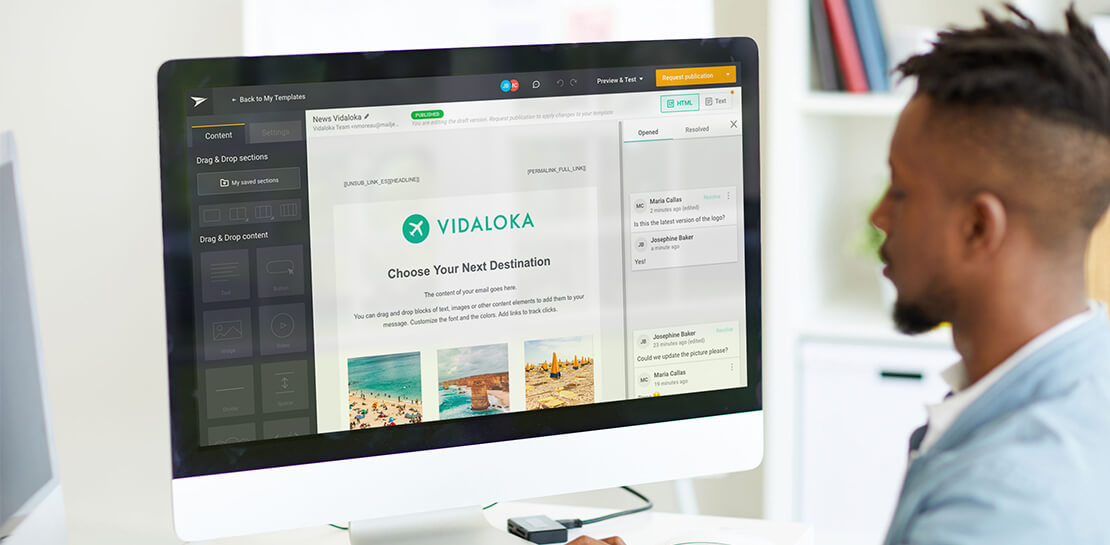
Mailjet allows companies to create, send, and track millions of emails to their customers and prospects around the world each month. The company’s offerings range from routing these emails to tailor-made tools that allow clients to design and send marketing campaigns with messages related to sales, user clubs, coupons and discounts,

Google Workspace: All in One Place for Everyone to Get Things Done!
Since the launch of Gmail in 2004, and Google Docs two years later, we’ve been building flexible, helpful and innovative solutions that allow people to connect, create and collaborate securely — from anywhere on the planet and on any device. When we debuted Google Workspace last October, we not only introduced

An Insider’s Guide on the Future of Collaboration and Productivity
As Google’s productivity adviser, I’ve been closely following the evolving discussion around the future of work. Long before the pandemic, employees, business leaders, and analysts were already thinking about how work needed to evolve, but the crisis brought the future cascading into the present. Virtually overnight, millions of companies and
