





An Insider’s Guide on the Future of Collaboration and Productivity

4323
Of your peers have already read this article.
1:00 Minutes
The most insightful time you'll spend today!
As Google’s productivity adviser, I’ve been closely following the evolving discussion around the future of work. Long before the pandemic, employees, business leaders, and analysts were already thinking about how work needed to evolve, but the crisis brought the future cascading into the present. Virtually overnight, millions of companies and workers went remote and stayed that way for over a year, pushing their collaboration and productivity tools to the test across living rooms and time zones. While some organizations were able to launch new solutions or adapt existing ones to keep their people connected and productive, many struggled.
The organizations that struggled quickly discovered their tools weren’t complete, scalable, secure, or built for the cloud era. Meanwhile, across all industries and business types, employees reported spikes in burnout, feelings of disconnection, and frustration with finding the latest information or using unfamiliar tools.
With many businesses headed into a hybrid model, the world of work has been transformed, possibly forever. There’s a fresh and fast-moving conversation about how organizations can succeed within the evolving future of work.
But at the center of that discussion are two familiar topics: collaboration and productivity. How will they evolve in an era of distributed teams and surging employee demand for flexibility? And how will businesses meet expectations to innovate quickly and deliver on rising customer expectations while navigating the new future of work?
Although 2020 was a major inflection point, a closer look reveals that many of the technologies, trends, and cultural norms shaping the future of work have been around for some time. For years, forward-thinking organizations have been wrestling with how to maximize collaboration, productivity, and wellbeing among their employees, and they’ve been developing the tools to make it happen at scale. By that measure, the future of work has been here for some time; it just hasn’t been evenly distributed or easily visible.
With this context in mind, we’re sharing our new guide Create what’s next: The future of collaboration and productivity, which highlights three areas of focus for organizations wanting to catch up with those leading the charge to empower the future of work.
- Making work-from-anywhere a reality with flexible solutions
- Giving people helpful tools to maximize their impact
- Enabling knowledge sharing and human connection
Armed with these three strategies, businesses can improve productivity and encourage innovation while better meeting the needs of their customers and their employees—now and in the years ahead.
We share some highlights from the guide in the infographic below (click to enlarge). You can also download the full guide now.

Maximize your downtime with these 12 cost-effective Google Cloud learning opportunities

2992
Of your peers have already read this article.
3:30 Minutes
The most insightful time you'll spend today!
The holiday season is upon us! If you are making your list and checking it twice, we’ve got a few learning gifts you can tick off the list and share with others too. For the season of giving, we’ve wrapped up some of our most popular training and certification opportunities and made them available at no-cost.
This December we’re aiming to offer something for everyone, whether you’re just getting started with cloud, or knee deep in preparing for a professional certification exam. Start with the fundamentals to gain a deeper understanding of cloud whether you’re in a business or technical role. Perhaps you’re looking to flex your data analytics and ML muscle with BigQuery and SQL, earn a Google Cloud skill badge, or enhance your technical cloud skills. Or jump into a hot topic like sustainability and learn about Google’s commitment to a clean cloud, and how to use sustainability tools. Read on to find something on your learning wishlist.
We also have a variety of learning formats to fit your needs. Complete hands-on labs, view courses and webinars, or jump into competitions like the Google Cloud Fly Cup Challenge or our most popular #GoogleClout Challenge of 2022 – and let the fun begin!
Are you ready to learn? Take a look at the training we’ve recommended below to work towards your goals as we head into the new year, with new skills, to make the most of new opportunities.
We’re giving plenty of learning gifts to choose from this month, so take your pick from the topics below:
ML, AI and data analytics
Who it’s for: ML, AI and data engineers
What you’ll take away: A deeper understanding of working in BigQuery and SQL.
Level: Foundational
Start learning now:
- Introduction to SQL for BigQuery and Cloud SQL – Get started with this one hour and 15 minute hands-on lab to learn fundamental SQL querying keywords, which you will run in the BigQuery console on a public dataset, and how to export subsets of a dataset into CSV files, then upload to Cloud SQL. You’ll also learn how to use Cloud SQL to create and manage databases and tables, with hands-on practice on additional SQL keywords that manipulate and edit data.
- Weather Data with BigQuery – In this 45 minute lab, you’ll use BigQuery to analyze historical weather observations, and run analytics on multiple datasets.
- Insights from Data with BigQuery – Earn a shareable skill badge when you complete this five hour quest. It includes interactive labs covering the basics of BigQuery, from writing SQL queries, creating and managing database tables in Cloud SQL, and querying public tables to loading sample data into BigQuery.
- The Google Cloud Fly Cup Challenge – This is a three-stage competition in the sport of drone racing in the Drone Racing League (DRL). You will use DRL’s race data to predict outcomes and give performance improvement tips to pilots (these are the best drone pilots in the world!). There’s a chance to win exclusive swag, prizes, and an expenses paid trip to the DRL World Championship. Registration closes on December 31, 2022.
CI/CD
Who it’s for: Software Developers
What you’ll take away: Take part in our most popular #GoogleClout challenge of 2022! Build a simple containerized application.
Level: Fundamental
Start learning now:
- GoogleClout – CI/CD in a Google Cloud World – Flex your #GoogleClout in this cloud puzzle that challenges you in a lab format to create a Cloud Build Trigger to rebuild a containerized application hosted on a remote repository. Register it in the Artifact Registry and deploy. You’ll be scored on your results and earn a badge to share.
Preparing for Google Cloud certification
Who it’s for: Cloud engineers and architects, network and security engineers and Google Workspace administrators
What you’ll take away: Explore the breadth and scope of the domains covered in the cloud certification exams, assess your exam readiness and create a study plan.
Level: Foundational to advanced
Start learning now:
- Preparing for Google Cloud certification – These courses are for Associate Cloud Engineers, Professional Cloud Architects, Professional Cloud Network Engineers, Professional Cloud Security Engineers, and Google Workspace Administrators preparing for Google Cloud certification exams. You’ll also earn a completion badge when you finish the course.
- Preparing for the Cloud Architect certification exam – Join this 30 minute on-demand webinar to learn about resources to maximize your study plan, and get tips from a #GoogleCloudCertified Professional Cloud Architect.
Intro to Google Cloud for technical professionals
Who it’s for: Software Developers
What you’ll take away: Boost your Google Cloud operational and efficiency skills to drive innovation by navigating the fundamentals of compute, containers, cloud storage, virtual machines, and data and machine learning services.
Level: Foundational
Start learning now:
- Getting Started with Google Cloud Fundamentals – This on-demand webinar takes a little less than three hours to complete. Navigate Compute Engine, container strategies, and cloud storage options through sessions and demos. You’ll also learn how to create VM instances, and discover Google Cloud’s big data and machine learning options.
Intro to Google Cloud for business professionals
Who it’s for: Business roles in the cloud space like HR, marketing, operations and sales
What you’ll take away: A deeper understanding of cloud computing and how Google Cloud products help achieve organizational goals.
Level: Foundational
Start learning now:
- Cloud Digital Leader learning path -There are four courses in this learning path covering digital transformation, innovating with data, infrastructure and application modernization, and Google Cloud security and operations.
- Preparing for the Cloud Digital Leader certification exam – In this 30 minute webinar continue your learning journey by preparing for the Google Cloud Digital Leader certification exam. The webinar covers all the resources we’ve made available to help you prepare.
Sustainability
Who it’s for: Software Developers
What you’ll take away: Learn how the cleanest cloud in the industry can help you save your cloud bill, and save the planet.
Level: Foundational
Start learning now
- A Tour of Google Cloud Sustainability -Work through this one hour, hands-on lab, to explore your carbon footprint data, use the Cloud Region Picker, and reduce your cloud carbon footprint with Active Assist recommendations.
Keep connected and learning with us in 2023
Accelerate your growth on Google Cloud by joining the Innovators Program. No-cost for users of Google Cloud (including Workspace), it’s for anyone who wants to advance their personal and professional development around digital transformation, drive innovation, and solve difficult business challenges.
Continue your learning with Google Cloud in 2023 by starting an annual subscription1 with Innovators Plus benefits. Gain access to $500 in Google Cloud credits, live learning events, our entire on-demand training catalog, a certification voucher, access to special events, and other benefits.
Build your skills, reach your goals and advance your career with 12 no-cost ways to learn Google Cloud!
- Start an annual subscription on Google Cloud Skills Boost with Innovators Plus for $299/year, subject to eligibility limitations.
How 4K+ Coffee Lovers Get their Cuppa at Costa Coffee with the Help of Google Maps

3831
Of your peers have already read this article.
1:30 Minutes
The most insightful time you'll spend today!
Editor’s note: Gordon Lucas, Global Head of Digital Engineering at Costa Coffee, explains how Google Maps Platform helps direct customers to each of its 4,000 plus Costa Coffee shops across the world, as well as streamline payments, and optimize deliveries.
When brothers Sergio and Bruno Costa opened the first Costa Coffee in central London in 1971, they relied on word of mouth to grow trade. Personal recommendations encouraged people who lived and worked locally to visit the coffee shop and sample what became (and still remains) our signature blend coffee, Mocha Italia.
Fast forward 50 years and we have more than 4,000 coffee shops spread over 31 countries. To make it as easy as possible for our global customers to pick up a Mocha Italia, a Costa Americano, or any other Costa Coffee product wherever we operate, we decided to create a visual app. We wanted the app to help customers across the world find their most convenient eat-in, takeaway, drive-thru, partner store, or delivery platform, and highlight which services are available and at what times.

Enhancing the customer experience with intelligent maps
We were already using Google Maps Platform products on our website to provide our customers with a basic store locator service. So when we launched our mobile app in 2017, we added more interactive geospatial features to make our customers’ journeys quicker and easier.
We chose to enhance our existing Google Maps Platform solution because our developers enjoyed using it. Google Maps Platform offered all the capabilities we needed to boost our solutions, and we were excited to see how we’d be able to leverage geospatial data to improve the experience of our customers.
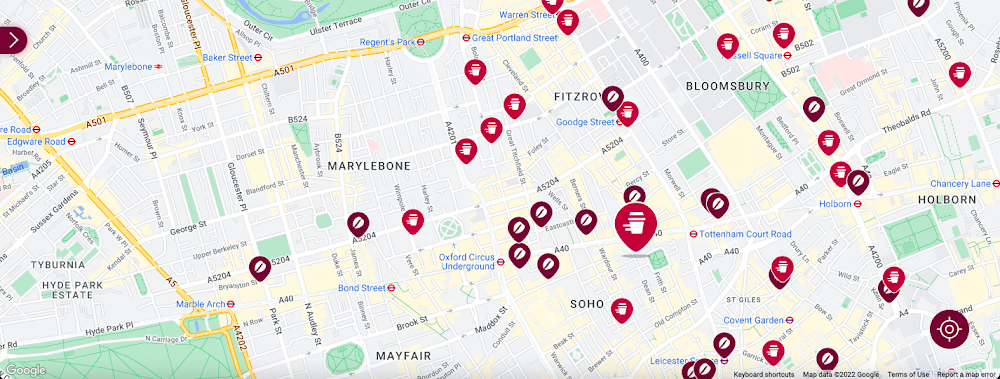
Our Google Cloud Premier Partner, Snowdrop Solutions, supported us in deploying all our requirements so the app’s new features could be rolled out globally. We wanted to direct pedestrians and vehicles to standalone Costa Coffee shops and kiosks in supermarkets and gas stations. We also wanted a dynamic map feature to highlight which locations offered click-and-collect, drive-thru, and delivery services. We then wanted to link these services to our online payments systems, seamlessly integrating our transaction process to make it as easy as possible for our customers.
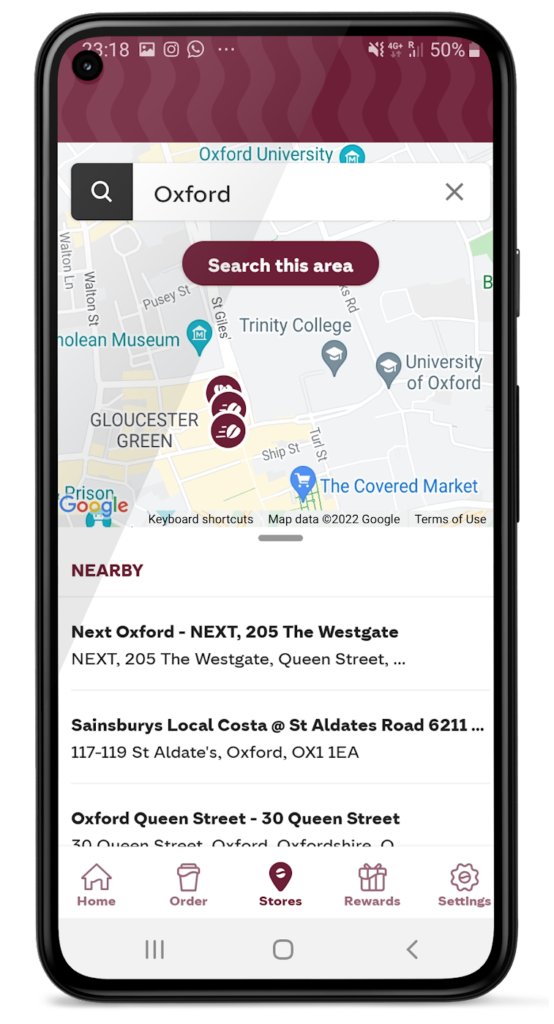
To that end, we used the Maps Static API to embed maps within our app, and the Geocoding API to convert addresses into coordinates to create markers on our maps. We also use the Places API to allow customers to search for a Costa Coffee facility based on their location.
A new route for customer satisfaction
We had one issue when it came to locating Costa Coffee shops, however. We noticed that some customers were selecting the wrong store to collect orders. Fortunately, Google Maps Platform provided a quick fix that solved this issue. We updated the service to provide customers with a map of their collection point upon receipt of their order, remindIng them which store to collect from. A tweak like adding a map to a receipt improves customer satisfaction. The drop in calls to our customer service is testimony to this.
Geospatial intelligence became invaluable in the pandemic
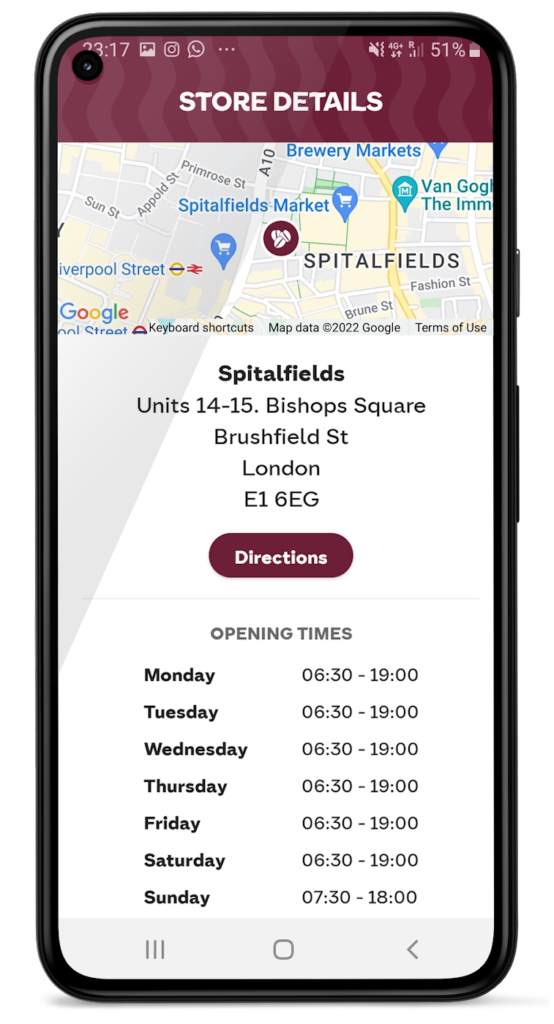
We had to adjust our service when the pandemic hit and Google Maps Platform was again instrumental in helping us. Because we had to comply with unique lockdown measures and travel restrictions across different locations, it could be challenging for our customers to stay up-to-date on the changing opening times and service guidelines of our shops. So we used Google Maps Platform Places API to show our customers which nearby stores, click-and-collect outlets, or drive-thrus were open, and when, during lockdowns.
Integrating this with our mobile ordering system also enabled us to promote COVID-safe contactless payments. Customers can locate a Costa Coffee shop, select, order, purchase, and collect their order or have it delivered to their cars without the need for any human contact. This reduces service wait times and minimizes the risk of transmission between customers and baristas. It also makes our employees feel more safe at work.
Geospatial data optimizes our entire operation
When the lockdown ended, our in-app order data showed a spike in demand, illustrating how much our customers miss their Costa Coffee experience. This data not only helps us to identify demand, it lets us track user preferences, informs where to direct supplies to meet a raised demand, and creates more accurate forecasts. This data can also help us manage costs.
Geospatial intelligence is also used to improve the experience of customers, from when they first look to order a cappuccino to when they arrive at the shop to enjoy it. We are using geomarketing to surface local offers. Say a Costa Coffee shop is trialing a new beverage, a pop-up can suggest users of our app try it next time they’re nearby.
Google Maps Platform has become integral to our digital operations. New features and capabilities of Google Maps Platform products have allowed us to continue innovating. The Costa Coffee footprint now spreads physically and digitally around the globe, and with the help of Google Maps Platform we can still offer the same tailored personal service that spurred the initial success of the Costa Brothers 50 years ago.
For more information on Google Maps Platform, visit our website.
Why settle for the status quo?

3962
Of your peers have already read this article.
2:30 Minutes
The most insightful time you'll spend today!
Virtual meetings, remote collaboration, flexible hours: it’s becoming clear that these new ways of working are here to stay.
Business leaders, since the onset of COVID-19, have seen workplace transformation go from an almost theoretical long-term goal to an urgent priority. Employers and employees want more flexible ways of working, and delivering on this requires the right technology.
But flexibility isn’t the only thing that employees want. Remote working has significantly increased the demands we’re getting from many directions—in both our professional and our personal lives. Employees feel overloaded with too much information and too many tasks across too many different tools. Instead of learning another tool, we need the tools we already use to be even more helpful, and work together, in an integrated, intuitive way.
Today’s teams need to re-imagine not only how they communicate and collaborate with each other remotely, but also how they continue to serve their own customers and support the communities they belong to. From doctors consulting with patients, to financial institutions providing critical advice to customers, to teachers delivering distant learning, to car dealerships creating virtual showrooms—it’s clear that these new ways of working are here to stay.
The future of work is here. COVID-19 has accelerated a shift in how organizations like yours get work done. Take this 2-minute assessment below to see where you’re at on the journey to the future of work, and get a free guide to help you take the next step.
Making Hybrid Work Human: Google Workspace and Economist Impact Survey

5471
Of your peers have already read this article.
2:30 Minutes
The most insightful time you'll spend today!
Google Workspace recently commissioned Economist Impact to complete a global survey (October 2021)* on the state of hybrid work, including its challenges and opportunities. We already knew that the pandemic had fundamentally changed the world of work, but the survey emphasizes the scale, reach, and longevity of those changes..
Over 75% of respondents believe that hybrid/flexible work will be a standard practice within their organizations in the coming three years. Given that 70% of respondents said they never worked remotely before the pandemic, it’s clear that hybrid has become the dominant model for work and that it’s here to stay.
But it’s also clear, as we’ll see below, that hybrid has some serious gaps that need to be addressed if it’s going to be sustainable and successful in the long term.
Defining hybrid work
As part of our work on the hybrid work survey and a broader project with The Economist Group, we interviewed a group of experts across research, consulting, business, and the advocacy world to arrive at a definition of hybrid work that captures all ways work is changing.
As Brian Kropp, one of the interviewees and vice president at Gartner, puts it: “Hybrid work is not just about different locations, but also different timings and different schedules.”
Harriet Molyneaux, managing director at HSM Advisory, a future-of-work research and advisory group, adds to this notion by describing the time-location work spectrum: “At one end of the spectrum is everyone in the office, nine till five, so both restricted time and location. And then at the other end of the spectrum is anywhere around the world at any time. So no restricted time or location. A hybrid is anything that sits in the middle of that.”
I agree with Brian and Harriet’s views. Flexibility in both location and hours is a core part of our working definition of hybrid work: a spectrum of flexible work arrangements in which an employee’s work location and/or hours are not strictly standardized.
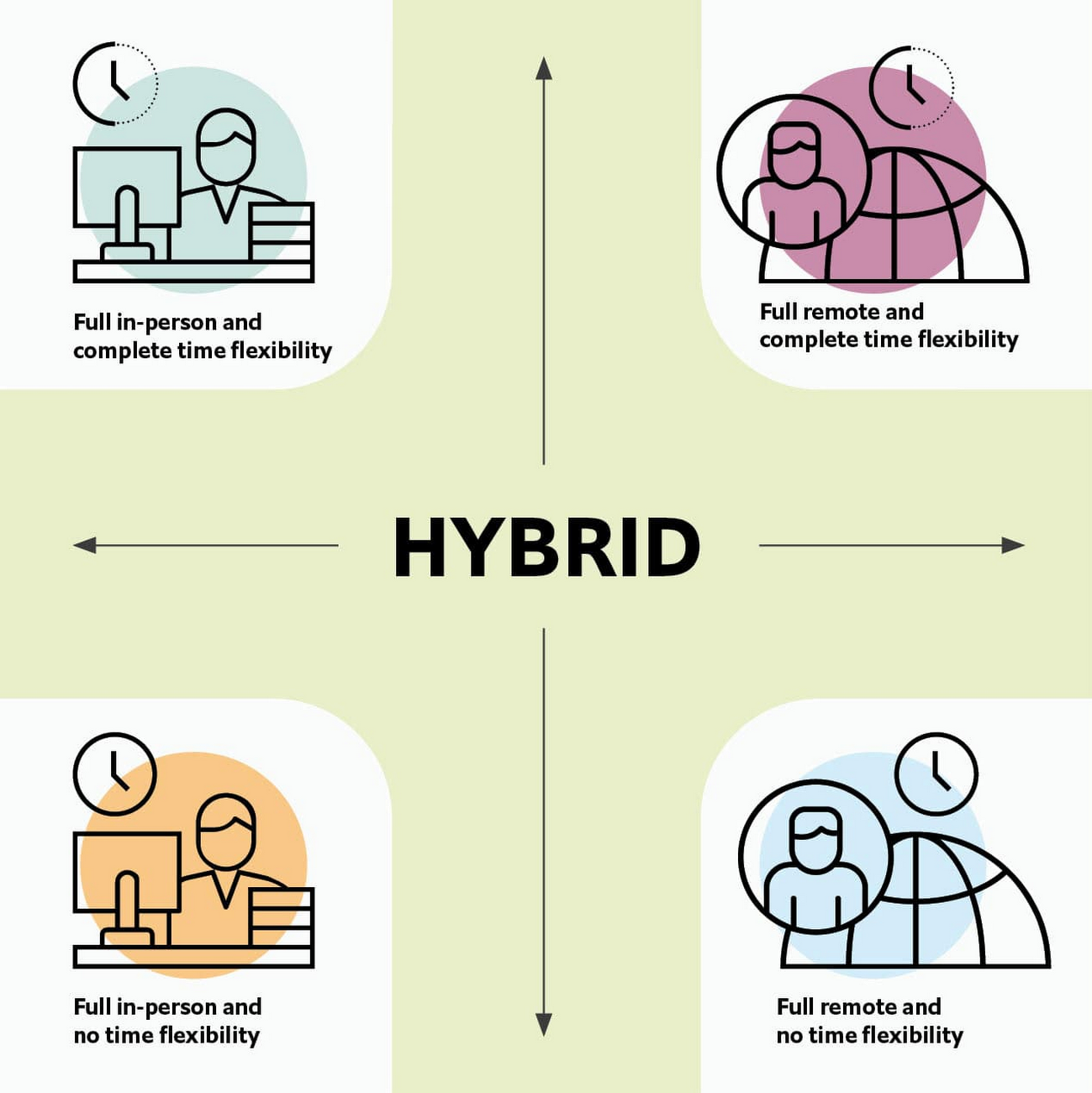
Given this definition and framework, how is hybrid work faring and what lies ahead?
Individual wellbeing is coming at the cost of organizational connection
Early on in the pandemic, productivity remained steady or even increased for many organizations. But it came at a cost, with levels of burnout spiking as employees juggled caregiving, homeschooling, and other demands in their personal lives with work responsibilities.
Based on the survey data, wellbeing has made an upward shift, no doubt aided by things like students returning to schools in many regions and fewer demands being made of working parents. The majority of respondents said that hybrid work, based on their own experiences, can have a positive impact on the physical, mental, financial, and social wellbeing of employees.
But it appears that individual wellbeing is coming at the cost of organizational connection. The majority of respondents said they feel disconnected from their organization and co-workers (57%), that limited networking opportunities negatively impact career growth (62%), and that limited social interactions with co-workers has had a negative impact on their mental health (54%).
To be sustainable, hybrid work models must address this sense of disconnection in real and tangible ways. And it won’t happen just by increasing the number of virtual meetings. Although 72% of people say that virtual meetings improve inclusion and participation, 68% also say there are too many virtual meetings to begin with. We need new ways for people to connect spontaneously.
Hybrid workers are often using tools built for a bygone desktop era
When asked about the most important conditions needed to achieve the long-term success of hybrid work models, the number one choice globally was “new technologies that allow for time and location flexibility.”
Naturally, it was gratifying to see this, since Google Workspace is built on a cloud-based platform that empowers collaboration from anywhere, on any device, but the survey answer also highlights how much organizations have had to scramble to meet the demands of the pandemic. Some had to take legacy, office-centric systems and make them work for a distributed workforce overnight, often leveraging less-than-ideal technologies like VPNs that introduce digital friction.
As a result, top technology concerns of respondents include:
- unreliable internet access (if only all our WiFi connections were hybrid-ready!)
- reliance on slow or outdated tools
- accessing and maintaining files in multiple places
- relying on too many applications in order to get work done
Hybrid work, it seems to me, doesn’t need more applications and collaboration surfaces. It needs deeper, more meaningful connections in the tools and surfaces we already have.
As organizations assess their tech stacks, they should consider whether they can shape the behaviors they want from hybrid employees (e.g., real-time collaboration, ease of information sharing) with the tools they have in place. Or are the limits of the technology determining hybrid employee behavior?
The management and culture gap
In the same way that tools have often been built for a shared physical workspace, organizational culture seems to lag behind the hybrid moment. The majority of respondents said that a lack of face-to-face supervision creates a sense of distrust among managers and employees, and that they feel stressed by increased monitoring associated with flexible work. And more than 62% said that limited networking opportunities with senior employees and co-workers has a negative impact on career growth.
Strikingly, more than 70% of respondents indicated that the culture of trust between managers and employees needed improvement. Training and management best practices (60% of people want more of both) might help fill some of the gaps, but a manager can’t build trust with their hybrid teams by going through a training program.
The role of manager must itself evolve to meet the demands of a hybrid model. How can we empower managers to be the bridge between the “office of one” and the “office of many”? And as I discussed previously on Forbes, driving towards impact rather than output is a more sustainable metric for team engagement and productivity. It also dispenses with monitoring as a core part of a manager’s role, freeing them up to be a coach-and-connector.
How Google Workspace can help bridge the hybrid work gaps
No one has all the answers for how to make hybrid work successful, and I suspect we will see iterations of the model into 2022 and beyond as organizations—including Google—experiment with the right mix of location, culture, processes, and tools.
On the technology front, Google Workspace is uniquely positioned to bridge many of the emerging hybrid work gaps. Over the last year, we’ve delivered a set of innovations that are designed to deepen collaboration experiences while strengthening social connections within and across teams.
For example, we launched smart canvas to bring new collaboration capabilities to the places where people are already working together, helping to keep them connected, rather than having them switch tabs or open new apps. And we delivered Spaces as a central place for collaboration, where teams can share ideas, work on documents together, and manage tasks from a single place. Because all their work is preserved for future reference, team members can easily jump in and contribute at a time that works best for them, seeing a full history of the conversations, context, and content along the way. Spaces helps people maintain individual wellbeing while preserving the health of a group project.
In Google Meet, we’ve introduced real-time captions in multiple languages (in preview now), the ability for people to customize their video tiles, including being able to turn off their own to help with meeting fatigue, and we’ve implemented automatic light adjustments and noise cancellation. These changes help ensure that everyone can be seen and heard.
Meanwhile, features like hand-raise, Q&A, and polls have helped make meetings more inclusive and companion mode (in preview) can bring these to life in hybrid settings, to help ensure that there’s one cohesive conversation between the people in the office and their colleagues working somewhere else. We view companion mode as a bridge between the office and “somewhere else.”
On the personal wellbeing front, we launched Focus Time, which lets people block out their calendars for uninterrupted focus work, and Time Insights in Google Calendar, where employees can look at how they’re spending their time and adjust as needed.
As hybrid work continues to evolve, Google Workspace is committed to supporting wellbeing and seamless collaboration with tools that can remove digital friction and help people maintain connections—to each other and the organizations they work for.
*Survey details: The survey, completed in October 2021, polled a total of 1,244 employees and managers in four regions (North America, Europe, APAC, and Latin America), from more than 15 industries, in every age group, and from both small and large organizations. The focus was on knowledge workers, though it’s important to note that some of those people have been working on the frontlines; 20% of respondents indicated they haven’t worked remotely at all during the pandemic. This includes people in hospitality, retail, transportation and logistics, and healthcare.
How This Company Doubled in Size and Expanded its Business in Just Six Months

4123
Of your peers have already read this article.
3:00 Minutes
The most insightful time you'll spend today!
In the past six months, Mynd Property Management has doubled in size—in part by hiring, but also through acquisitions that help build our business. It’s an exciting time to be at Mynd—every week brings new people who need to be set up with email and network access, which can also be a bit hectic. To speed onboarding, we use G Suite Enterprise to get our new people working as soon as they walk through the door.
Streamlined onboarding
We started using G Suite when we launched the business because it fit our overall approach to technology—that is, deploying cloud tools that are flexible for our employees and easy for IT to manage. Good thing we picked G Suite, because given the pace of our acquisitions—13 at last count—we have our hands full with combining business systems and keeping people productive. Onboarding is literally 80 percent of our daily work!
Some people on our team don’t have technical backgrounds, so we are careful to only introduce new software tools once people are prepared to use them. With G Suite, people need very little ramp-up time because it is an intuitive, integrated solution. In one of our in-person training sessions, we showed an accountant how to open up a Microsoft Excel file in Google Sheets, and he started working on it right away, without much help.
We’re a remote-first company, so working in the cloud is second nature to us. About 75 percent of our total workforce are remote full-timers. G Suite tools are optimized for mobile, so they’re especially useful for the 50 full-time property managers who work solely on mobile devices in the field.
Better meetings, easier file storage
In Mynd’s early days, we used G Suite Basic, but upgraded to G Suite Enterprise after Google Cloud Premier Partner Suitebriar showed us the benefits of using tools like Hangouts Meet and shared drives in Google Drive. They’ve really helped us scale the business, so we can stay productive even in the midst of acquisitions—and of course, onboard people more quickly.
Many G Suite tools have become things we can’t live without. Our executives got first crack at using Hangouts Meet Hardware, and loved it so much—especially the recording feature—that now all of our conference rooms have it.
Google Drive got the same love from everyone. It’s all we need for file sharing and storage, which means we don’t have to pay for another storage solution. Drive also helps with onboarding; as soon we assign an employee a Google Account, she or he automatically gets access to the shared drives (in Drive) that they need to do their jobs.
Customizing the tech stack
As much as we love G Suite, we still like to use some non-G Suite tools. It helps that we can tailor G Suite to fit in our technology stack any way we want. We’d never get that control and customization from other vendors in the productivity space.
For example, we love using Slack for internal chat and messaging, so we turned off Hangouts Chat. We like that we can control these channels, and that G Suite is not an all-or-nothing product. That means we’re not afraid to try out new G Suite features, since we can roll them back if they’re not right for us.
The result of our day-to-day G Suite use is that we don’t suffer much down time even during acquisitions. We can pull relevant data from users’ old systems and easily automate user creation from start to finish. When we merge with companies that already use G Suite, we can move their data over to the business in less than a week.
When we recently moved over 80 new employees and 50 different web domains to G Suite, it was much less challenging than we expected. Since we don’t plan to slow down on acquisitions, we breathe easier knowing that G Suite keeps everyone working in the middle of so much change.
More Relevant Stories for Your Company

Democratizing App Development and Innovation Further with PMI Citizen Developer Partner Program
Today, we are pleased to announce that Google Workspace has joined the Project Management Institute (PMI) Citizen Developer™ Partner Program. By doing so, we are joining organizations from across the globe who are supporting not only the future of work, but the empowerment of the workers who are leading this
Google’s Open Subsea Cable ‘Firmina’ to Improve South Americans’ Access to Google Products
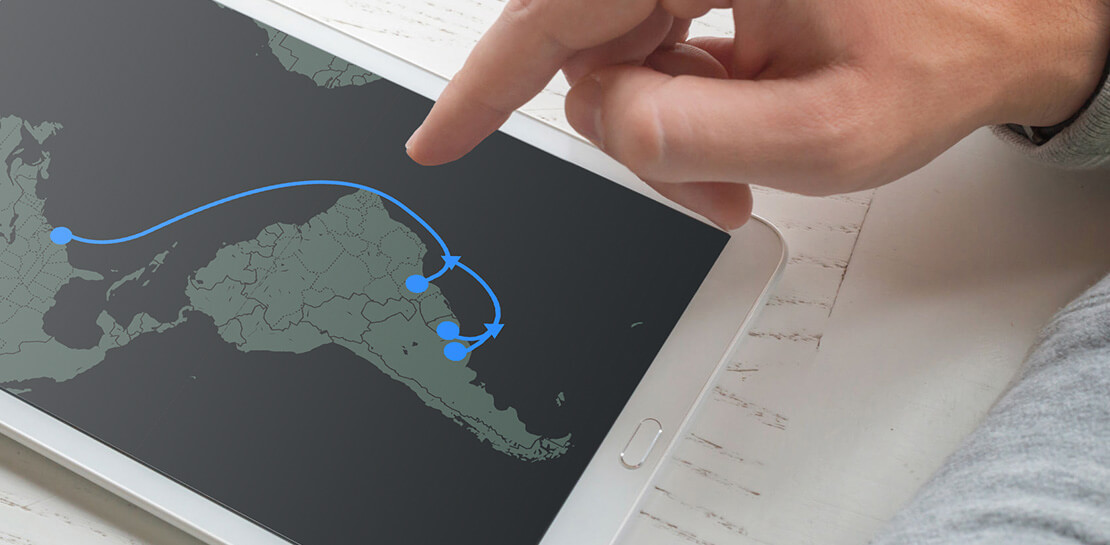
Today, we’re announcing Firmina, an open subsea cable being built by Google that will run from the East Coast of the United States to Las Toninas, Argentina, with additional landings in Praia Grande, Brazil, and Punta del Este, Uruguay. Firmina will be the longest cable in the world capable of



Helpful and human: G Suite’s vision for your future workspace
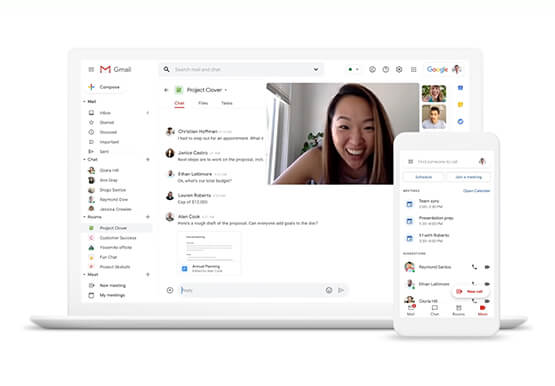
With an accelerated shift to remote working brought on by COVID-19, it's clearer than ever that an organization's success relies on its people and how they work. No matter where they're working from, who they're working with, or what projects they're working on, organizations need to enable their employees to

How to Get Over 200 Percent ROI from Your Collaboration Tool
There’s no doubt that Google Cloud is one of the most recognizable user interfaces in the world—everybody knows how to use it to find the information they need. It has upheld this standard of ease-of-use throughout their entire suite of cloud applications for business. Simply put, G Suite—Google Cloud’s collaboration
