





Google Cloud’s Virtual Appointment Scheduling Tool (VAST) Helps State of Arizona Recover from Unemployment Situation

6544
Of your peers have already read this article.
2:00 Minutes
The most insightful time you'll spend today!
When the world was forced to go primarily online, state governments also faced the reality of needing to provide community services without the health risk of meeting in person. Old systems that relied on interpersonal contact could not keep up. An unprecedented number of displaced workers swamped every unemployment system. The capacity challenges weren’t limited to state labor departments either. Everything from birth certificates and marriage licenses to apostilles and court system services that could usually be handled by a simple walk-in had to be scheduled in advance. Both internal and external communication suffered.
To meet these challenges, many organizations turned to new technology solutions and innovative approaches.
How VAST helped Arizona get back to work
The State of Arizona had tens of thousands of constituents who relied on pandemic unemployment insurance and would also need tools to reenter the workforce.Tim Tucker, Deputy Administrator of the Workforce Development Administration for the Arizona Department of Economic Security, started preparing in late 2020. He collaborated with Google Cloud and SADA to introduce the Virtual Appointment Scheduling Tool (VAST) to State of Arizona staff members. Using VAST reduced the excessive workload taken on by the Workforce Development Administration as they got Arizona back to work. VAST lets constituents book an appointment, upload documents and forms, and conduct career counseling virtually. This helped constituents move through the system faster so they could successfully reenter the workforce.
That preparation paid off. As of September 2021, Arizona had recovered the majority of the jobs lost during the pandemic. It has also seen one of the smallest percent change in employment compared with pre-pandemic numbers. Even more impressive, Arizona is one of only five states where unemployment claims are now lower than pre-pandemic numbers. Using VAST helped them get people back to work faster and has become a permanent part of their unemployment program.
Bringing streamlined services to the community
To fully realize a solution to the challenges faced by our public sector customers, we focused on three key areas in which we knew we needed VAST to excel:
- Efficient staff allocation
- Streamlined internal meetings
- Confident constituent interactions
We also knew our customers needed to get VAST online fast, and it needed to work with existing infrastructure without requiring a total overhaul. These areas informed the design of VAST’s features and have allowed us to meet the challenges faced by agencies such as the Arizona Department of Economic Security.
Virtual Agent support and integrations
VAST gives constituents 24×7 virtual agent support powered by Google Cloud’s contact center AI virtual agents. Virtual agents are custom programmed to fit the specific needs of each agency and community they serve. It’s easy to add new options and information whenever an update is needed. Virtual agents can be designed to understand the user’s intent and serve up relevant content for a smooth user experience on both ends of the system. Virtual agents run at scale and offer multi-language support, ensuring they can serve everyone in the community. By pairing these with VAST, constituents can experience seamless self-service.
6 week deployment time
Most of our public sector clients needed a solution yesterday. VAST can be deployed rapidly, taking about six weeks from start to finish, which includes everything–even staff training time.
Integration with Google Workspace and Chrome
VAST securely integrates with other Google solutions, such as Google Workspace and Chromebooks. We work to ensure VAST is fully functional within your existing systems.
Collaboration and support
SADA collaborates with each organization to ensure that the design, development, and functionality of VAST align with their needs. SADA specializes in helping public sector customers migrate to Google Cloud.
Analytics
Application administrators have access to analytic data gathered by VAST and options to customize and add additional datasets.This data helps organizations find blind spots in coverage, fix service bottlenecks, and better organize internal resources. Leveraging this data gives organizations the power to make changes, resulting in everything from a smoother customer experience to cost savings.
To learn more about how Google Cloud has supported Arizona during the pandemic, check out this blog on how their vaccination distribution system leveraged Google Cloud to get the vaccine to more people. For more information on how VAST can streamline a customer experience.
New ML-Powered API Abuse Detection

1574
Of your peers have already read this article.
3:30 Minutes
The most insightful time you'll spend today!
API security incidents are increasingly common and disruptive. With the growth of API traffic, enterprises across the world are also experiencing an uptick in malicious API attacks, making API security a heightened priority. According to our latest API Security Research Report, 50% of organizations surveyed have experienced an API security incident in the past 12 months and of those, 77% delayed the rollout of a new service or application.
At the RSA Conference 2023 today, we’re making it faster and easier to help detect API abuse incidents with the introduction of Advanced API Security Machine Learning powered abuse-detection dashboards. Our newly introduced Machine Learning models are trained to detect business logic attacks.
These types of attacks are notoriously hard to identify, and target APIs tied to intellectual property, business processes, or sensitive information, such as user data, listing of goods, or crediting accounts. These APIs must be accessible to provide business value, but have also become targets for attackers.
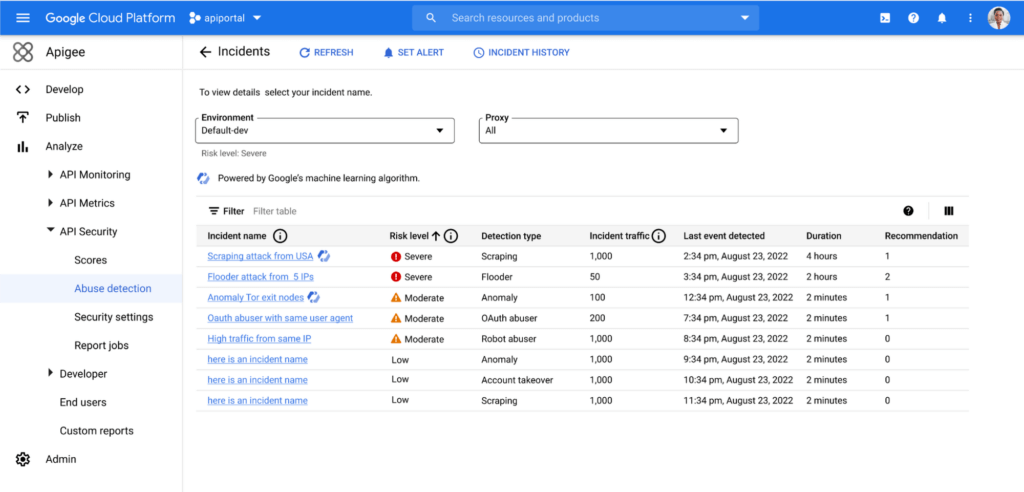
API security incidents can have a considerable impact on an organization’s operations and its bottom line. In June 2022, Imperva released a report titled Quantifying the Cost of API Insecurity, which estimates that lack of secure APIs could result in an average annual API-related total global cyber loss of between $41 billion to $75 billion annually. Furthermore, according to IBM’s 2022 Cost of a Data Breach Report, the average cost of a data breach is $4.35 million. It’s vital that organizations detect and mitigate API abuse incidents early to prevent prolonged fiscal and reputational damage to the business.
However, business logic attacks are harder to detect using static security policies, which allows attackers to manipulate legitimate functionality to achieve a malicious goal without triggering any static security alerts. For example, if a malicious actor gains control of a server and makes subtle changes, the shift in activity patterns of the server is generally undetectable to most monitoring tools. However, in this scenario, the Advanced API Security’s ML-powered API abuse detection model can help differentiate between legitimate and deviant traffic and immediately notify key stakeholders to act quickly and minimize blast radius of the problem.
The ML models that power API abuse detection have been trained and used by Google’s internal teams to help protect our public-facing APIs. The models rely on years of learning and best practices and are now available to all Apigee Advanced API Security customers.
Another challenge in detecting API abuse incidents is the volume of alerts. To reduce the risk of missing key security incidents, many static rules that detect less sophisticated attacks are incredibly sensitive: They generate a high volume of alerts. This makes finding the critical incidents within API traffic and acting to resolve them like “finding a needle in a haystack” for many IT teams. Apigee Advanced Security’s ML-powered dashboards more accurately identify critical API abuses and find similar patterns within the large number of bot alerts to help reduce the time to find and act on most important incidents.
With the help of Apigee Advanced API Security’s ML-powered abuse detection dashboards, customers can uncover critical API abuse incidents, including business logic attacks, scraping, and anomalies, faster. Critical threats are surfaced with clear and concise descriptions to capture the essence of the attack along with the most important characteristics such as the source of the attack, the number of API calls, and the duration of the attack, to help resolve the incident more rapidly.
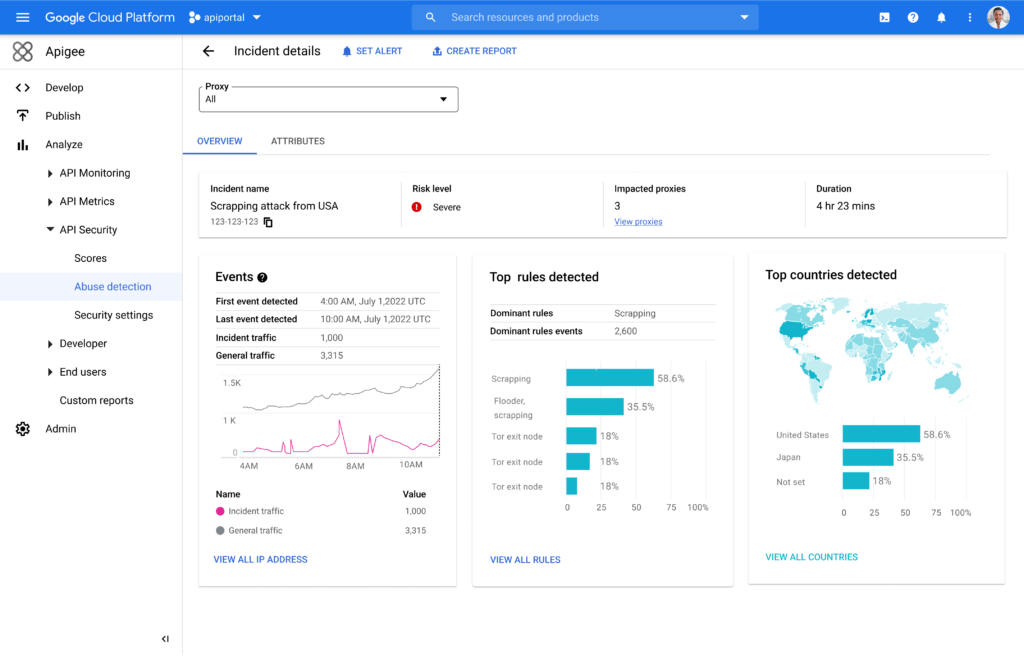
Machine Learning powered abuse-detection dashboards are available in Advanced API Security, a feature of Apigee API management that enables you to more easily detect API security misconfigurations, bad bots, and malicious activities.
To get started with Advanced API Security’s ML-powered dashboards, start your free Apigee trial now.
4 Methods How AI/ML Boosts Innovation and Reduces Costs

2923
Of your peers have already read this article.
2:30 Minutes
The most insightful time you'll spend today!
“Cloud Wisdom Weekly: for tech companies and startups” is a new blog series we’re running this fall to answer common questions our tech and startup customers ask us about how to build apps faster, smarter, and cheaper. In this installment, we explore how to leverage artificial intelligence (AI) and machine learning (ML) for faster innovation and efficient operational growth.
Whether they’re trying to extract insights from data, create faster and more efficient workflows via intelligent automation, or build innovative customer experiences, leaders at today’s tech companies and startups know that proficiency in AI and ML is more important than ever.
AI and ML technologies are often expensive and time-consuming to develop, and the demand for AI and ML experts still largely outpaces the existing talent pool. These factors put pressure on tech companies and startups to allocate resources carefully when considering bringing AI/ML into their business strategy. In this article, we’ll explore four tips to help tech companies and startups accelerate innovation and reduce costs with AI and ML.
4 tips to accelerate innovation and reduces costs with AI and ML
Many of today’s most innovative companies are creating services or products that couldn’t exist without AI—but that doesn’t mean they’re building their AI and ML infrastructure and pipelines from scratch. Even for startups whose businesses don’t directly revolve around AI, injecting AI into operational processes can help manage costs as the company grows. By relying on a cloud provider for AI services, organizations can unlock opportunities to energize development, automate processes, and reduce costs.
1. Leverage pre-trained ML APIs to jumpstart product development
Tech companies and startups want their technical talent focused on proprietary projects that will make a difference to the business. This often involves the development of new applications for an AI technology, but not necessarily the development of the AI technology itself. In such scenarios, pre-trained APIs help organizations quickly and cost-effectively establish a foundation on which higher-value, more differentiated work can be layered.
For example, many companies building conversational AI into their products and services leverage Google Cloud APIs such as Speech-to-Text and Natural Language. With these APIs, developers can easily integrate capabilities like transcription, sentiment analysis, content classification, profanity filtering, speaker diarization, and more. These powerful technologies help organizations focus on creating products rather than having to build the base technologies.
See this article for examples of why tech companies and startups have chosen Google Cloud’s Speech APIs for use cases that range from deriving customer insights to giving robots empathetic personalities. For an even deeper dive, see
- our AI product page to explore other APIs, including Translation, Vision, and more;
- and the Google Cloud Skills Boost for ML APIs.
2. Use managed services to scale ML development and accelerate deployment of models to production
Pre-trained models are extremely useful, but in many cases, tech companies and startups need to create custom models to either derive insights from their own data or to apply new use cases to public data. Regardless of whether they’re building data-driven products or generating forecasting models from customer data, companies need ways to accelerate the building and deployment of models into their production environments.
A data scientist typically starts a new ML project in a notebook, experimenting with data stored on the local machine. Moving these efforts into a production environment requires additional tooling and resources, including more complicated infrastructure management. This is one reason many organizations struggle to bring models into production and burn through time and resources without moving the revenue needle.
Managed cloud platforms can help organizations transition from projects to automated experimentation at scale or the routine deployment and retraining of production models. Strong platforms offer flexible frameworks, fewer lines of code required for model training, unified environments across tools and datasets, and user-friendly infrastructure management and deployment pipelines.
At Google Cloud, we’ve seen customers with these needs embrace Vertex AI, our platform for accelerating ML development, in increasing numbers since it launched last year. Accelerating time to production by up to 80% compared to competing approaches, Vertex AI provides advanced end-to-end ML Ops capabilities so that data scientists, ML engineers, and developers can contribute to ML acceleration. It includes low-code features, like AutoML, that make it possible to train high performing models without ML expertise.
Over the first half of 2022, our performance tests found that the number of customers utilizing AI Workbench increased by 25x. It’s exciting to see the impact and value customers are gaining with Vertex AI Workbench, including seeing it help companies speed up large model training jobs by 10x and helping data science teams improve modeling precision from the 70-80% range to 98%.
If you are new to Vertex AI, check out this video series to learn how to take models from prototype to production. For deeper dives, see
- this article about Vertex AI’s role in an ambitious project to measure climate change with AI;
- BigQuery has built-in Machine Learning (ML) and Analytics that you can use to create no-code predictions using just SQL queries.
- this blog about how Vertex AI and BigQuery work together to make data analysis easier and more powerful;
- and this blog about Example-based explanations, one of our most recent updates to make model iteration more intuitive and efficient.
3. Harness the cloud to match hardware to use cases while minimizing costs and management overhead
ML infrastructure is generally expensive to build, and depending on the use case, specific hardware requirements and software integrations can make projects costly and complicated at scale. To solve for this, many tech companies and startups look to cloud services for compute and storage needs, attracted by the ability to pay only for resources they use while scaling up and down according to changing business needs.
At Google Cloud, customers share that they need the ability to optimize around a variety of infrastructure approaches for diverse ML workloads. Some use Central Processing Units (CPUs) for flexible prototyping. Others leverage our support for NVIDIA Graphics Processing Units (GPUs) for image-oriented projects and larger models, especially those with custom TensorFlow operations that must run partially on CPUs. Some choose to run on the same custom ML processors that power Google applications—Tensor Processing Units (TPUs). And many use different combinations of all of the preceding.
Beyond matching use cases to the right hardware and benefiting from the scale and operational simplicity of a managed service, tech companies and startups should explore configuration features that help further control costs. For example, Google Cloud features like time-sharing and multi-instance capabilities for GPUs — as well as features like Vertex AI Training Reduction Server — are built to optimize GPU costs and usage.
Vertex AI Workbench also integrates with the NVIDIA NGC catalog for deploying frameworks, software development kits and Jupyter Notebooks with a single click—another feature that, like Reduction Server, speaks to the ways organizations can make AI more efficient and less costly via managed services.
4. Implement AI for operations
Besides using pre-trained APIs and ML model development to develop and deliver products, startup and tech companies can improve operational efficiency, especially as they scale, by leveraging AI solutions built for specific business and operational needs, like contract processing or customer service.
Google Cloud’s DocumentAI products, for instance, apply ML to text for use cases ranging from contract lifecycle management to mortgage processing. For businesses whose customer support needs are growing, there’s Contact Center AI, which helps organizations build intelligent virtual agents, facilitate handoffs as appropriate between virtual agents and human agents, and generate insights from call center interactions. By leveraging AI to help manage operational processes, startups and tech companies can allocate more resources to innovation and growth.
Next steps toward an intelligent future
The tips in this article can help any tech company or startup find ways to save money and boost efficiency with AI and ML. You can learn more about these topics by registering for Google Cloud Next, kicking off October 11, where you’ll hear Google Cloud’s latest AI news, discussions, and perspectives—in the meantime, you can also dive into our Vertex AI quickstarts and BigQuery ML tutorials. And for the latest on our work with tech companies and startups, be sure to visit our Startups page.
4352
Of your peers have already watched this video.
7:00 Minutes
The most insightful time you'll spend today!
Baking Gets Sweeter: Build ML Models that Help Predict the Best Recipe!
Baking recipes and ML models have one thing in common—they follow a pattern. Machine Learning is all about finding pattern in data sets, you can predict what you are baking based on the core ingredients and their respective amounts! Bread, cake or cookies, watch the video to make you make your baking experiences and learning with ML sweeter.
AutoML Tables, a no-code Google Cloud tool for ML models analyzes data from the databases and spreadsheets to help creates an automatic stats and dashboard with lists of ingredients and their values to predict a new recipe. Watch more episodes from Making with Machine Learning.
ML Workflow Made Simple: How to Automate ML Experiment Tracking with Vertex AI Experiments Autologging

1261
Of your peers have already read this article.
3:30 Minutes
The most insightful time you'll spend today!
Practical machine learning (ML) is a trial and error process. ML practitioners compare different performance metrics by running ML experiments till you find the best model with a given set of parameters. Because of the experimental nature of ML, there are many reasons for tracking ML experiments and making them reproducible including debugging and compliance.
But tracking experiments is challenging: you need to organize experiments so that other team members can quickly understand, reproduce and compare them. That adds overhead that you don’t need.
We are happy to announce Vertex AI Experiments autologging, a solution which provides automated experiment tracking for your models, which streamlines your ML experimentation
With Vertex AI Experiments autologging, you can now log parameters, performance metrics and lineage artifacts by adding one line of code to your training script without needing to explicitly call any other logging methods.
How to use Vertex AI autologging
As a data scientist or ML practitioner, you conduct your experiment in a notebook environment such as Colab or Vertex AI Workbench. To enable Vertex AI Experiments autologging, you call aiplatform.autolog() in your Vertex AI Experiment session. After that call, any parameters, metrics and artifacts associated with model training are automatically logged and then accessible within the Vertex AI Experiment console.
Here’s how to enable autologging in your training session with a Scikit-learn model.
# Enable autologging
aiplatform.autolog()

# Build training pipeline
ml_pipeline = Pipeline(...)

# Train model
ml_pipeline.fit(x_train, y_train)
This video shows parameters and training/post-training metrics in the Vertex AI Experiment console.
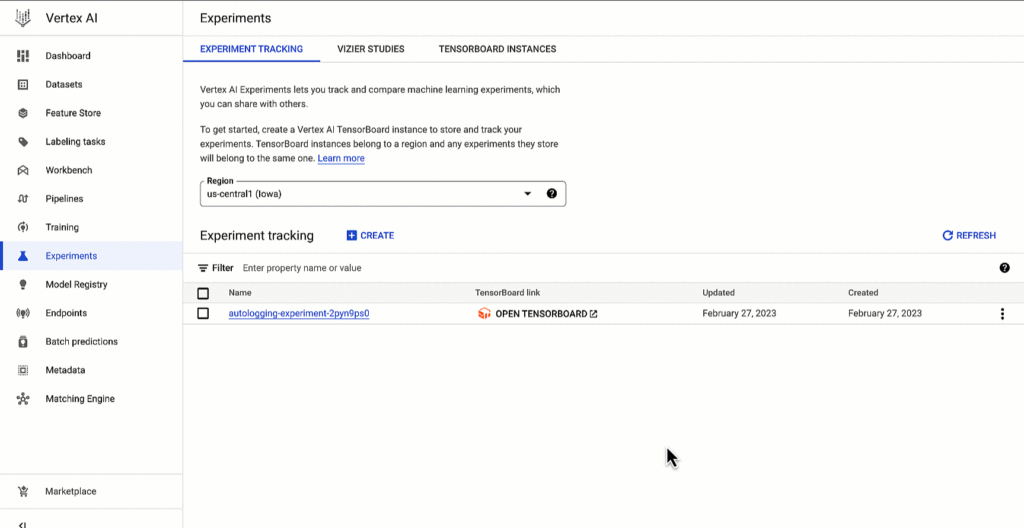
Vertex AI SDK autologging uses MLFlow’s autologging in its implementation and it supports several frameworks including XGBoost, Keras and Pytorch Lighting. See documentation for all supported frameworks.
Vertex AI Experiments autologging automatically logs model time series metrics when you train models along multiple epochs. That’s because of the integration between Vertex AI Experiments autologging and Vertex AI Tensorboard.
Furthermore, you can adapt Vertex AI Experiments autologging to your needs. For example, let’s say your team has a specific experiment naming convention. By default, Vertex AI Experiments autologging automatically creates Experiment Runs for you without requiring you to call `aiplatform.start_run()` or `aiplatform.end_run()`. If you’d like to specify your own Experiment Run names for autologging, you can manually initialize a specific run within the experiment using aiplatform.start_run() and aiplatform.end_run() after autologging has been enabled.
What’s next
You can access Vertex AI Experiments autologging with the latest version of Vertex AI SDK for Python. To learn more, check out these resources :
- Documentation: Autolog data to an experiment run
- Github: Get started with Vertex AI Experiments autologging
While I’m thinking about the next blog post, let me know if there is Vertex AI content you’d like to see on Linkedin or Twitter.
How Google Cloud’s PSO Supports Customers’ Migration Goals

5031
Of your peers have already read this article.
2:00 Minutes
The most insightful time you'll spend today!
Google Cloud’s Professional Services Organization (PSO) engages with customers to ensure effective and efficient operations in the cloud, from the time they begin considering how cloud can help them overcome their operational, business or technical challenges, to the time they’re looking to optimize their cloud workloads.
We know that all parts of the cloud journey are important and can be complex. In this blog post, we want to focus specifically on the migration process and how PSO engages in a myriad of activities to ensure a successful migration.
As a team of trusted technical advisors, PSO will approach migrations in three phases:
- Pre-Migration Planning
- Cutover Activities
- Post-Migration Operations
While this post will not cover in detail all of the steps required for a migration, it will focus on how PSO engages in specific activities to meet customer objectives, manage risk, and deliver value. We will discuss the assets, processes and tools that we leverage to ensure success.
Pre-Migration Planning
Assess Scope
Before the migration happens, you will need to understand and clarify the future state that you’re working towards. From a logistical perspective, PSO will be helping you with capacity planning to ensure sufficient resources are available for your envisioned future state.
While migration into the cloud does allow you to eliminate many of the considerations for the physical, logistical, and financial concerns of traditional data centers and co-locations, it does not remove the need for active management of quotas, preparation for large migrations, and forecasting. PSO will help you forecast your needs in advance and work with the capacity team to adjust quotas, manage resources, and ensure availability.
Once the future state has been determined, PSO will also work with the product teams to determine any gaps in functionality. PSO captures feature requests across Google Cloud services and makes sure they are understood, logged, tracked, and prioritized appropriately with the relevant product teams. From there, they work closely with the customer to determine any interim workarounds that can be leveraged while waiting for the feature to land, as well as providing updates on the upcoming roadmap.
Develop Migration Approach and Tooling
Within Google Cloud, we have a library of assets and tools we use to assist in the migration process. We have seen these assets help us successfully complete migrations for other customers efficiently and effectively.
Based on the scoping requirements and tooling available to assist in the migration, PSO will help recommend a migration approach. We understand that enterprises have specific needs; differing levels of complexity and scale; regulatory, operational, or organization challenges that will need to be factored into the migration. PSO will help customers think through the different migration options and how all of the considerations will play out.
PSO will work with the customer team to determine the best migration approach for moving servers from on-prem to Google Cloud. PSO will walk customers through different migration approaches, such as refactoring, lift-shift, or new installs. From there, the customer can determine the best fit for their migration. PSO will provide guidance on best practices and use cases from other customers with similar use cases.
Google offers a variety of cloud native tools that can assist with asset discovery, the migration itself, and post-migration optimization. PSO, as one example, will help work with project managers to determine the best tooling that accommodates the customer’s requirements for migrating servers. PSO will also engage Google product team to ensure the customer fully understands the capabilities of each tool and the best fit for the use case. Google understands from a tooling perspective, one size does not fit all, thus PSO will work with the customer on determining the best migration approach and tooling for different requirements.
Cutover Activities
Once all of the planning activities have been completed, PSO will assist in making sure the cutover is successful.
During and leading up to critical customer events, PSO can provide proactive event management services which deliver increased support and readiness for key workloads. Beyond having a solid architecture and infrastructure on the platform, support for this infrastructure is essential and TAMs will help ensure that there are additional resources to support and unblock the customer where challenges arise.
As part of event management activities, PSO liaises with the Google Cloud Support Organization to ensure quick remediation and high resilience for situations where challenges arise. A war room is usually created to facilitate quick communication about the critical activities and roadblocks that arise. These war rooms can give customers a direct line to the support and engineering teams that will triage and resolve their issues.
Post-Migration Activities
Once cutover is complete, PSO will continue to provide support in areas such incident management, capacity planning, continuous operational support, and optimization to ensure the customer is successful from start to finish.
PSO will serve as the liaison between the customer and Google engineers. If support cases need to be escalated, PSO will ensure the appropriate parties are involved and work to get the case resolved in a timely manner. Through operational rigor, PSO will work with the customer in determining if certain Google Cloud services will be beneficial to the customer objectives. If services will add value to the customer, PSO will help enable the services so it aligns with the customer’s goal and current cloud architecture. In cases where there are missing gaps in services, PSO will proactively work with the customer and Google engineering teams to close the gaps by enabling additional functionality in the services.
PSO will continue to work with the engineering teams to consistently review and provide recommendations on the customer’s cloud architecture in ensuring the most optimal and cost efficient design along with adhering to Google’s best practices guidelines.
Aside from migrations, PSO is also responsible for providing continuous training of Google Cloud to customers. To ensure consistent development of Google Cloud, PSO will work with the customer to jointly develop a learning roadmap to ensure the customer has the necessary skills to succeed in delivering successful projects in Google Cloud.
Conclusion
Google PSO will be actively engaged throughout the customer’s cloud journey to ensure the necessary guidance, methodology, and tools are presented to the customer. PSO will engage in a series of activities from pre-migration planning to post migration in key areas such as capacity planning to ensure sufficient resources are allocated for future workloads to providing support on technical cases for troubleshooting. PSO will serve as a long-term trusted advisor who will be the voice of the customer and provide the reliability and stability of the customer’s Google Cloud environment.
Click here if you’d like to engage with our PSO team on your migration. Or, you can also get started with a free discovery and assessment of your current IT landscape.
More Relevant Stories for Your Company

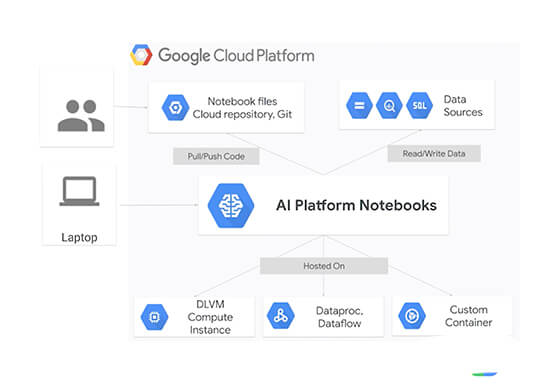

Overview of AI Notebooks on Google Cloud
Artificial intelligence and machine learning are one of the most disruptive technologies that enterprises have encountered in the last four or five years. And AI and ML will continue to disrupt enterprises going forward for the next 10 years. The key to unlocking value with artificial intelligence starts with a

Reasons to Leverage Vertex AI Custom Training Service
At one point or another, many of us have used a local computing environment for machine learning (ML). That may have been a notebook computer or a desktop with a GPU. For some problems, a local environment is more than enough. Plus, there's a lot of flexibility. Install Python, install



What are TPUs and Why Should Data Scientists Care?
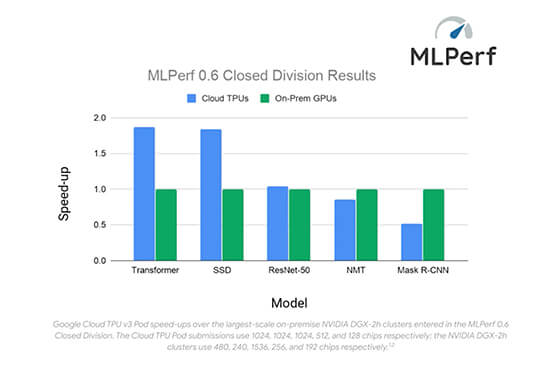
When it comes to machine learning, more data means better results. But processing more data also requires more computing power. CPUs are great for sequential arithmetic calculations. They offer low latency with this type of workload. But to speed up machine learning, models have to perform multiple calculations in parallel.


How Anthos Helps Organizations Implement Multi and Hybrid Cloud Strategy
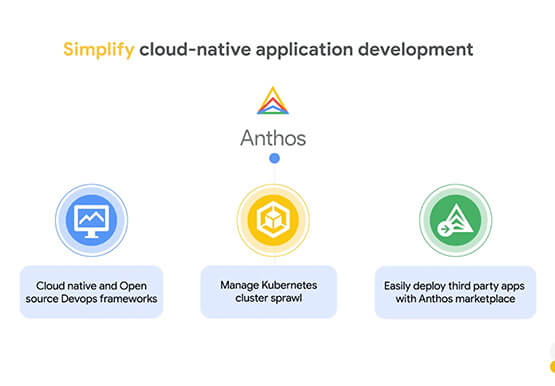
Organizations have become increasingly focused on using modernization solutions to build competitive advantage, for faster time to market, serve customers better and seamlessly operate in hybrid and multi-cloud environments. Anthos by Google Cloud, a managed application platform plays an important role in application modernization and also in empowering customers to
