





Reasons to Leverage Vertex AI Custom Training Service

2947
Of your peers have already read this article.
6:00 Minutes
The most insightful time you'll spend today!
At one point or another, many of us have used a local computing environment for machine learning (ML). That may have been a notebook computer or a desktop with a GPU. For some problems, a local environment is more than enough. Plus, there’s a lot of flexibility. Install Python, install JupyterLab, and go!
What often happens next is that model training just takes too long. Add a new layer, change some parameters, and wait nine hours to see if the accuracy improved? No thanks. By moving to a Cloud computing environment, a wide variety of powerful machine types are available. That same code might run orders of magnitude faster in the Cloud.
Customers can use Deep Learning VM images (DLVMs) that ensure that ML frameworks, drivers, accelerators, and hardware are all working smoothly together with no extra configuration. Notebook instances are also available that are based on DLVMs, and enable easy access to JupyterLab.
Benefits of using the Vertex AI custom training service
Using VMs in the cloud can make a huge difference in productivity for ML teams. There are some great reasons to go one step further, and leverage our new Vertex AI custom training service. Instead of training your model directly within your notebook instance, you can submit a training job from your notebook.
The training job will automatically provision computing resources, and de-provision those resources when the job is complete. There is no worrying about leaving a high-performance virtual machine configuration running.
The training service can help to modularize your architecture. As we’ll discuss further in this post, you can put your training code into a container to operate as a portable unit. The training code can have parameters passed into it, such as input data location and hyperparameters, to adapt to different scenarios without redeployment. Also, the training code can export the trained model file, enabling working with other AI services in a decoupled manner.
The training service also supports reproducibility. Each training job is tracked with inputs, outputs, and the container image used. Log messages are available in Cloud Logging, and jobs can be monitored while running.
The training service also supports distributed training, which means that you can train models across multiple nodes in parallel. That translates into faster training times than would be possible within a single VM instance.
Example Notebook
In this blog post, we are going to explain how to use the custom training service, using code snippets from a Vertex AI example. The notebook we’re going to use covers the end-to-end process of custom training and online prediction. The notebook is part of the ai-platform-samples repo, which has many useful examples of how to use Vertex AI.
Custom model training concepts
The custom model training service provides pre-built container images supporting popular frameworks such as TensorFlow, PyTorch, scikit-learn, and XGBoost. Using these containers, you can simply provide your training code and the appropriate container image to a training job.
You are also able to provide a custom container image. A custom container image can be a good choice if you’re using a language other than Python, or are using an ML framework that is not supported by a pre-built container image. In this blog post, we’ll use a pre-built TensorFlow 2 image with GPU support.
There are multiple ways to manage custom training jobs: via the Console, gcloud CLI, REST API, and Node.js / Python SDKs. After jobs are created, their current status can be queried, and the logs can be streamed.
The training service also supports hyperparameter tuning to find optimal parameters for training your model. A hyperparameter tuning job is similar to a custom training job, in that a training image is provided to the job interface. The training service will run multiple trials, or training jobs with different sets of hyperparameters, to find what results in the best model. You will need to specify the hyperparameters to test; the range of values to explore for those hyperparameters; and details about the number of trials.
Both custom training and hyperparameter tuning jobs can be wrapped into a training pipeline. A training pipeline will execute the job, and can also perform an optional step to upload the model to Vertex AI after training.
How to package your code for a training job
In general, it’s a good practice to develop your model training code that is self-contained when especially executing them inside containers. This means the training codebase would operate in a standalone manner when executed.
Below is a template of such a self-contained, heavily-commented Python script that you can follow for your own projects too.
# Imports go hereimport tensorflow_datasets as tfdsimport tensorflow as tf…# Define the hyperparameters and constants like epochs, batch size, number of GPUs, etcparser = argparse.ArgumentParser()parser.add_argument('--lr', dest='lr',default=0.01, type=float,help='Learning rate.')parser.add_argument('--epochs', dest='epochs',default=10, type=int,help='Number of epochs.')...args = parser.parse_args()...# Prepare data loadersdef make_datasets_unbatched():# Scaling CIFAR10 data from (0, 255] to (0., 1.]def scale(image, label):image = tf.cast(image, tf.float32)image /= 255.0return image, labeldatasets, info = tfds.load(name='cifar10',with_info=True,as_supervised=True)return datasets['train'].map(scale).cache().shuffle(BUFFER_SIZE).repeat()# Build our model, compile, and train itmodel = [define your model]model.compile(loss=..., optimizer=..., metrics=...)model.fit(...)# Serialize our modelmodel.save(MODEL_DIR)
Note that the MODEL_DIR needs to be a location inside a Google Cloud Storage (GCS) bucket. This is because the training service can only communicate with that and not with our local system. Here is a sample location inside a GCS Bucket to save a model: gs://caip-training/cifar10-model where caip-training is the name of the GCS bucket.
Although we are not using any custom modules in the above code listing, one can easily incorporate them as we would normally inside a Python script. Refer to this document if you want to know more. Next up, we will review how to configure the training infrastructure, including the type and number of GPUs to use, and submit a training script to run inside the infrastructure.
How to submit a training job, including configuring which machines to use
To train a deep learning model efficiently on large datasets, we need hardware accelerators that are suited to run matrix multiplication in a highly parallelized manner. Distributed training is also common when it comes to training a large model on a large dataset. For this example, we will be using a single Tesla K80 GPU. Vertex AI supports a range of different GPUs (find out more here).
Here is how we initialize our training job with the Vertex AI SDK:
job = aiplatform.CustomTrainingJob(display_name=JOB_NAME,script_path="task.py",container_uri=TRAIN_IMAGE,requirements=["tensorflow_datasets==1.3.0"],model_serving_container_image_uri=DEPLOY_IMAGE,)
(aiplatform is aliased as from google.cloud import aiplatform)
Let’s review the arguments:
display_namerefers to a unique identifier to the training job used for easily locating it.script_pathrefers to the path of the training script to run. This is the script we discussed in the section above.container_urirefers to the URI of the container that will be used to run our training script. For this, we have several options to choose from. For this example, we will usegcr.io/cloud-aiplatform/training/tf-gpu.2-1:latest. We will use this same container for deployment as well but with a slightly changed container URI. You can find the containers available for model training here and the containers available for deployment purposes can be found here.requirementslet us specify any external packages that might be required to run the training script.model_serving_container_image_urispecifies the container URI that would be used during deployment.
Note: Using separate containers for distinct purposes like training and deployment is often a good practice, since it isolates the relevant dependencies for each purpose.
We are now all set up to submit a custom training job:
model = job.run(model_display_name=MODEL_DISPLAY_NAME,args=CMDARGS,replica_count=1,machine_type=TRAIN_COMPUTE,accelerator_type=TRAIN_GPU.name,accelerator_count=TRAIN_NGPU)
Here, we have:model_display_name that provides a unique name to identify our trained model. This comes in handy later down the pipeline when we would deploy it using the prediction service. args are our command-line arguments typically used to specify things like hyperparameter values.replica_count denotes the number of worker replicas to be used during training. machine_type specifies the type of base machine to be used during training. accelerator_type denotes the type of accelerator to be used during training. If we are interested in using a Tesla K80, then TRAIN_GPU should be specified as aip.AcceleratorType.NVIDIA_TESLA_K80. (aip is aliased as from google.cloud.aiplatform import gapic as aip.)accelerator_count specifies the number of accelerators to use. For a single host multi-GPU configuration, we would set the replica_count to 1 and then specify the accelerator_count as per our choice depending on the resource available under the corresponding compute zone.
Note that model here is a google.cloud.aiplatform.models.Model object. It is returned by the training service after the job is completed.
With this setup, we can actually start a custom training job that we can monitor. After we submit the above training pipeline, we should see some initial logs resembling this:
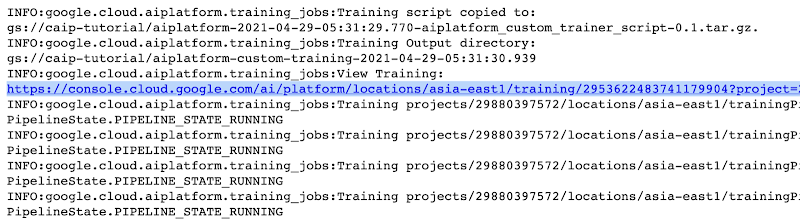
The link highlighted in Figure 2 will redirect to the dashboard of the training pipeline which looks like so:
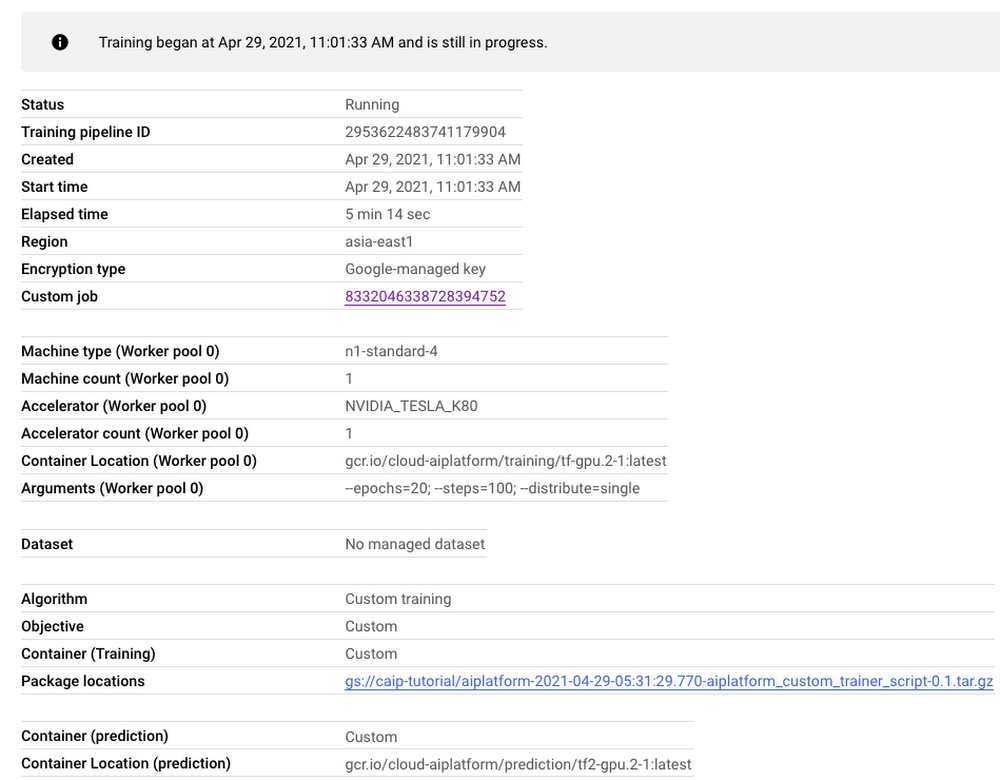
As seen in Figure 3, the dashboard provides a comprehensive summary of all the necessary artifacts related to our training pipeline. Monitoring your model training is also very important especially to catch any early training bugs. To view the training logs, we need to click the link beside the “Custom job” tab (refer to Figure 3). There also we are presented with roughly similar information as shown in Figure 3 but this time it includes the logs as well:
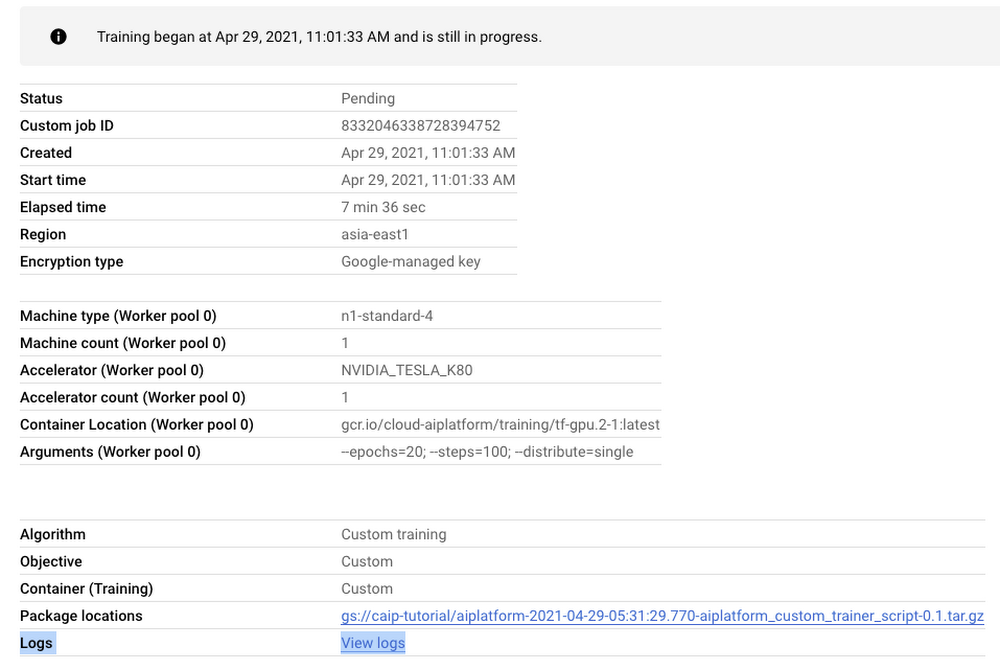
Note: Once we submit the custom training job, a training pipeline is first created to provision the training. Then inside the pipeline, the actual training job is started. This is why we see two very similar dashboards above but they have different purposes. Let’s check out the logs (which is maintained using Cloud Logging automatically):
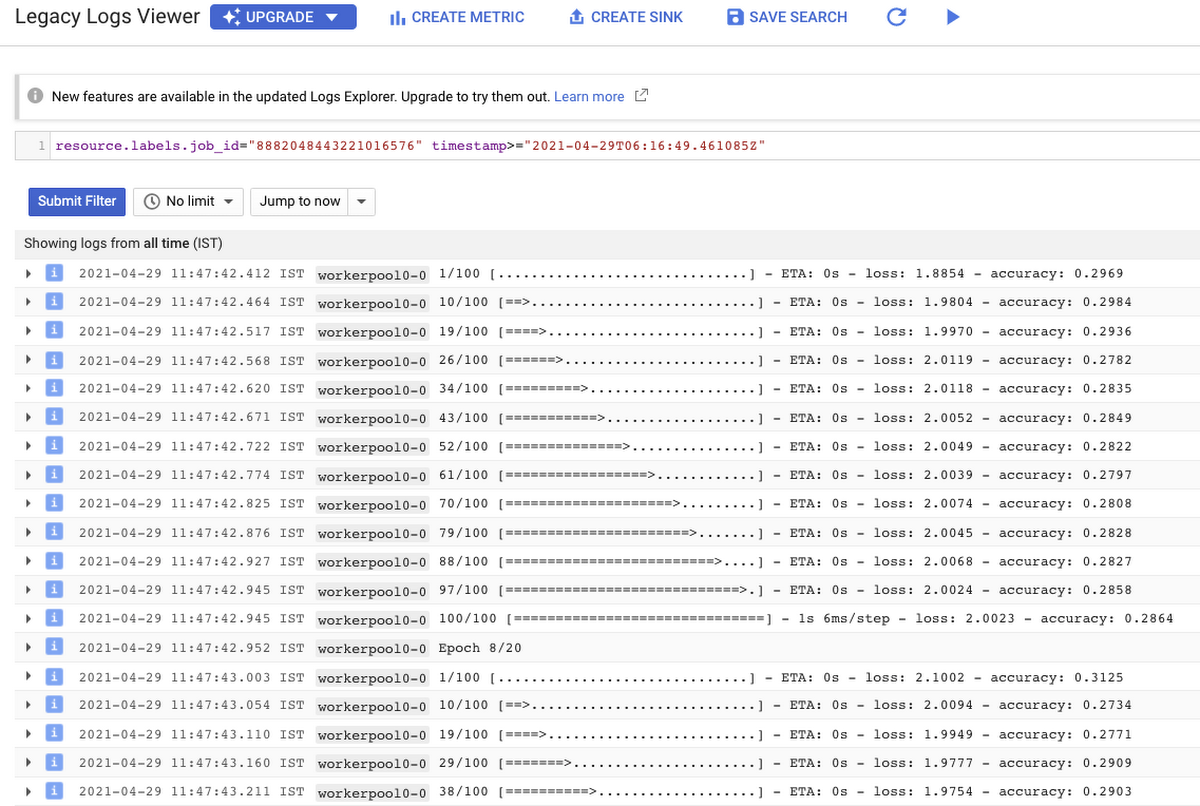
With Cloud Logging, it is also possible to set alerts on the basis of different criteria. For example, alerting the users when the training job fails or completes so that some immediate action could be taken. You can refer to this post for more details.
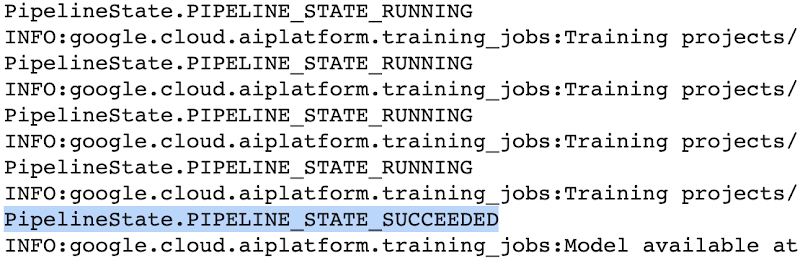
After the training pipeline is completed, on your end, you will notice the success status:
Accessing the trained model
Recall that we had to serialize our model inside a GCS Bucket in order to make it compatible with the training service. So, after the model is trained, we can access it from that location. We can even directly load it using the following line of code:
model = tf.keras.models.load_model('gs://[your-bucket-name]/[model-name]')
Note that we are referring to the TensorFlow model that resulted from training. The training service also maintains a similar “model” namespace to help us manage these models. Recall that the training service returns a google.cloud.aiplatform.models.Model object as mentioned earlier. It comes with a deploy() method that allows us to deploy our model programmatically within minutes with several different options. Check out this link if you are interested in deploying your models using this option.
Vertex AI also provides a dashboard for all the models that have been trained successfully and it can be accessed with this link. It resembles this:
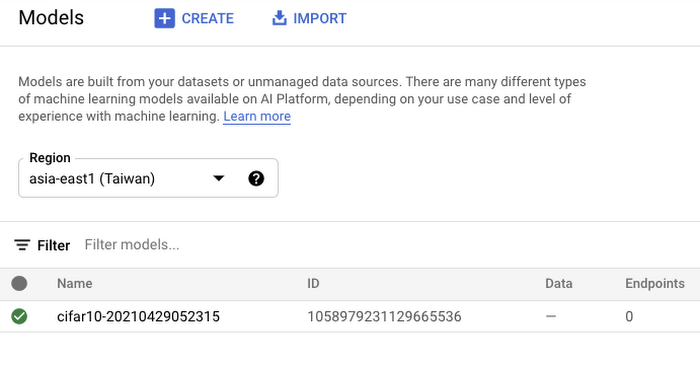
If we click the model as listed in Figure 7, we should be able to directly deploy from the interface:
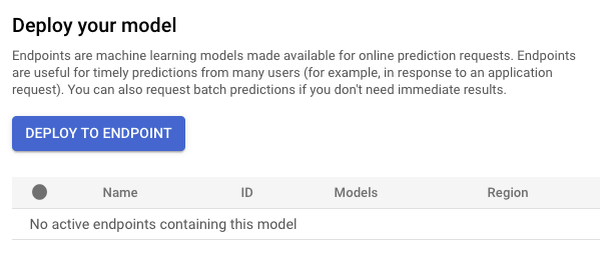
In this post, we will not be covering deployment, but you are encouraged to try it out yourself. After the model is deployed to an endpoint, you will be able to use it to make online predictions.
Wrapping Up
In this blog post, we discussed the benefits of using the Vertex AI custom training service, including better reproducibility and management of experiments. We also walked through the steps to convert your Jupyter Notebook codebase to a standard containerized codebase, which will be useful not only for the training service, but for other container-based environments. The example notebook provides a great starting point to understand each step, and to use as a template for your own projects.
Gyfted: Finding the Right Man for the Job Using Google Cloud AI/ML Tools

2559
Of your peers have already read this article.
2:00 Minutes
The most insightful time you'll spend today!
It’s no secret that many organizations and job seekers find the hiring process exhausting. It can be time consuming, costly, and somewhat risky for both parties. Those are just some of the experiences we wanted to change when we started Gyfted, a pre-vetted talent marketplace for people who complete tech training or degree programs and are looking for the right career move. At the same time, we’re helping businesses save time and improve recruiting outcomes with our automated candidate screening and sourcing tools.
Our vision is clear: To take a candidate through one structured hiring process, and then put them in front of thousands of companies. It’s similar to the common app system in higher education. Sounds simple, but it is a herculean technical and UX task. To succeed we had to combine advanced psychometric testing, machine learning, the latest in behavioral design, and develop the highest quality structured, relational dataset to represent candidate and manager profiles and preferences on our network. Fortunately, we were cofounded by world-leading experts in these areas including Dr. Michal Kosinski, one of the world’s top computational psychologists, and Adam Szefer, a gifted young technologist. We’ve been joined by a group of equally talented employees, most of whom work remotely in Poland, US, Switzerland, UK, Israel, and Ukraine.
The influence of dating platforms and matching
When seeking inspiration, we were influenced by the success of dating platforms, especially Bumble with its focus on commitment. These platforms have done a great job using design to match people together.
We like to think we’re doing the same for recruiters and candidates in terms of not only role and culture fit matching, but also through a fundamental feature of Gyfted, which is that our job-seekers are anonymous. This helps recruiters meet one of their goals today, which is to minimize bias in the hiring process and enable objective, diversity-oriented recruiting.
Another of our unique selling points is that we conduct candidate screening that is gamified and automated, with a structured interview, where the interview remains with the candidate’s profile. We roughly estimate that just for the 15 million open jobs on LinkedIn, if companies fill in 50% of those via external recruiting, and conduct a screening interview with 10 candidates per job filled at $50/hour paid to an employee to do the screening, that’s $3.75 billion and 75 million hours in direct costs. This is on top of applying for jobs, selecting CVs, and coordinating the process, which takes an even bigger financial and time toll on both applicants and recruiters. Instead, it would be better to take one interview for 1000 companies. The impact of what we want to achieve with our vision is enormous.
We also offer career discovery and career search tools for job candidates. This includes free, personalized feedback for every job-seeker. Right now, we’re aiming the service at students, bootcamp graduates and juniors, helping them to land jobs in tech and the creative industry at large. Next, we’ll expand into mid and senior roles. In the long run we want to reshape how recruiting happens through a common app that saves everyone in the market significant time and resources, helping people find jobs not only faster, but jobs that truly fit them.
Developing advanced AI applications with Google Cloud
We obtained our original funding from angel and institutional investors, and we were selected into the Fall 2021 batch of StartX, the non-profit start-up accelerator and founder community associated with Stanford University. But like most startups our budgets are tight, and we need to find ways to operate as efficiently as possible, especially when building out our technology stack and developer environment.
That’s where Google Cloud comes in. It’s a lot more affordable and flexible than competing solutions, and our developers love it. We use Google App Engine for the hosting and development of our applications giving us enormous flexibility. Vertex AI enables us to build, deploy, and scale machine learning models faster, within a unified artificial intelligence platform. On top of that we use Google Vertex AI Workbench as the development environment for the data science workflow, which allows us to have everything that we need to host and develop innovative AI-based applications.
BigQuery, Google Cloud’s serverless data warehouse, is another stand-out solution for us. We use it to crunch big data from all our systems and the UX is very intuitive and easy to use, allowing us to use it across the business and get insights from a wide range of employees, not just technical experts.
Above all, Google Cloud helps us solve the main platform challenges facing Gyfted including scalability and identity management, so we are perfectly positioned for growth. Right now, we handle about 2 million candidate interactions, a volume we expect to grow exponentially. As that number grows, we rely on Google Cloud to help us scale securely and with reliability.
Eliminating bias from the hiring process
Our technology partners have also been integral to helping us get to an advanced stage of our beta program. MongoDB on Google Cloud takes the data burden off our teams and reduces time to value of our applications. We can stay nimble and can scale database capacity at the push of a button.
Our collaboration with the Google team has been fantastic. Our Startup Success Manager is an expert when it comes to Google Cloud solutions, and he also understands our business from his own experience as an entrepreneur and an investor. It’s great to have an internal point of contact who can help us navigate all of Google’s resources.
I’d also stress the extent to which Google Cloud values align with ours. For example, a key benefit for our customers is the ability to strip unconscious bias out of the hiring process. Google Cloud tools support this commitment to diversity, especially when we are building out our AI models.
On a team level, we also appreciate the support that Google Cloud has shown through its Google Support Fund for Start-ups in Ukraine. This has helped many Ukrainian businesses to continue to operate at a very challenging time, including startups with remote, distributed teams in Poland where most of us stem from.
If I had to sum up Google Cloud and our collaboration with Google for Startups in a phrase, I’d say that it adds enormous value to our business while removing much of the risk when scaling up a start-up. We’ve seen the addition of many new tools and features in the past two years and our Google mentors are always looking at the best way these can be integrated with Gyfted’s own roadmap. That means that we can continue to transform recruiting and hiring processes with the support of one of the world’s most advanced tech companies as a strategic growth partner.

If you want to learn more about how Google Cloud can help your startup, visit our page here to get more information about our program, and sign up for our communications to get a look at our community activities, digital events, special offers, and more.
Companies Can Speed-up AI Developments with NVIDIA’s One Stop Catalog for AI Software

3139
Of your peers have already read this article.
2:00 Minutes
The most insightful time you'll spend today!
NVIDIA GPU-powered instances on Google Cloud provide an optimal platform for organizations to develop their AI applications on the latest hardware and software stack, then seamlessly deploy those applications at scale in production.
Simplifying Workflows to Speedup AI Developments
NVIDIA recently announced the One Click Deploy feature on the NVIDIA NGC catalog, the hub for GPU-optimized AI software. Developed in collaboration with Google Cloud, this feature simplifies the deployment of AI software, to a single click from the NGC catalog.
This allows data scientists to deploy frameworks, software development kits and Jupyter Notebooks directly to Google Cloud’s Vertex AI Workbench, a new managed Jupyter Notebook service on top of Vertex AI, Google’s service for machine learning operations.
Under the hood, this feature launches the JupyterLab instance on Google Cloud Vertex AI Workbench with optimal instance configuration, preloads the software dependencies, and downloads the NGC notebook in one go.
NGC Catalog – One Stop for AI Software
NVIDIA is expanding the rich trove of NVIDIA AI software in the catalog to ensure AI practitioners have everything they need to get started — from frameworks to models.
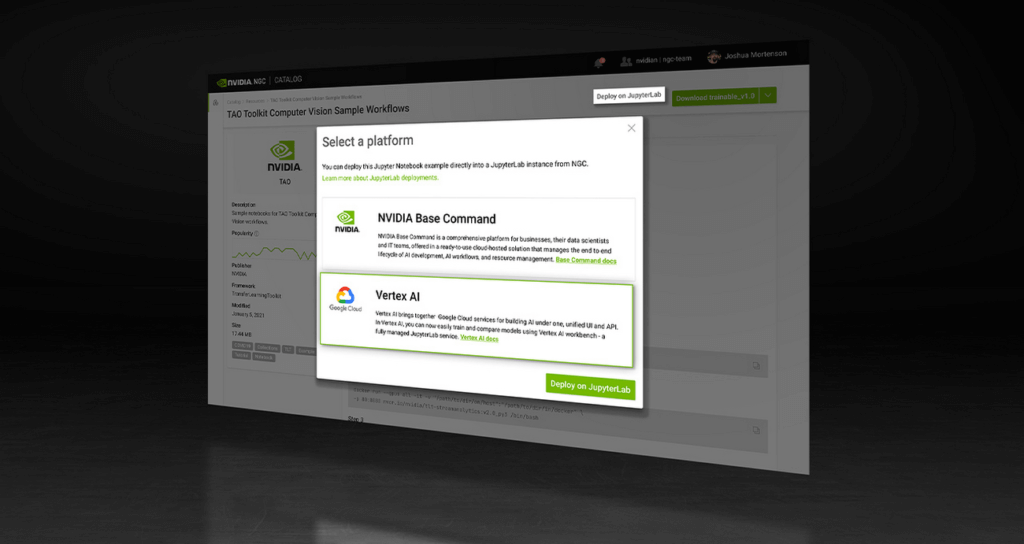
All of the AI models in the catalog come with credentials. They’re like resumes that show the model’s skills, the dataset that trained it, how to use the model and how it’s expected to perform.
These model credentials provide transparency, which gives developers the confidence in picking the right model for their use case.
The NGC catalog also hosts Jupyter Notebooks tailored for the most popular AI/ML applications. Examples include:
Computer Vision – A collection of models for detecting human actions, gestures and more.
Automatic Speech Recognition – An end-to-end workflow for text-to-speech training.
Recommendation – A collection of example notebooks to help build end-to-end recommendation services.
Serve Robotics uses Vertex AI and the simple easy-to-use interface that the NGC One Click Deploy delivers.
“NGC catalog allows our ML research engineers to launch environments for experiments on Vertex AI with a single click. This saves us the efforts on ML infra setup and lets researchers focus on the ML problem in the computer vision and robotics space more efficiently.”—Kaiwen Yuan, Director of ML/Head of Perceptions & Predictions at Serve Robotics
Accelerate ML Deployments
Explore hundreds of Jupyter notebook examples for speech, computer vision and recommenders and, if you’re just getting started with AI, browse NVIDIA’s collection of Jupyter notebook examples and run it using the One Click Deploy feature on Google Cloud Vertex AI.
Simplify Cloud Development with Duet AI on Google Cloud

1524
Of your peers have already read this article.
4:00 Minutes
The most insightful time you'll spend today!
Cloud developers — you’ve got it all. You can code in your choice of languages, enjoy portability with containers, minimize complexity with serverless, and manage the entire software lifecycle by following DevOps principles. But let’s face it, building and onboarding new cloud applications still requires a lot of manual planning, synthesis, and, yes, hard work. You need to research and plan your deployment, create a workable, secure architecture, and of course, you need to write the actual code,
For the last several decades, the cloud has been primarily a “do it yourself” model with volumes of options that have made development more complicated. The cloud went from overwhelmingly exciting to…. a bit overwhelming.
What if we all could bring that excitement back? What if you had some help that was available whenever and wherever you needed it?
Say hello to Duet AI for Google Cloud
Powered by Google’s state-of-the-art generative-AI foundation models, Duet AI for Google Cloud is an always-on AI collaborator that provides help to users of all skill levels where they need it. With Duet AI, we’re on a mission to deliver a new cloud experience that’s personalized and intent-driven, and can deeply understand your environment to assist you in building secure, scalable applications, while providing expert guidance.
As we evolve Google Cloud with Duet AI, we are looking to build a cloud platform that is more human-centric, holistic, and helpful, with responsible AI at the center of the experience:
- Human-centric: With Duet AI, we are making Google Cloud more accessible and personal to any type of user at any skill level by providing them with support whenever they need it, from code recommendations for developers, to prompt-based data insights for data engineers, to chat-based app creation for business users.
- Holistic: With generative AI at the center of the cloud experience, cloud development can be more cohesive, with fewer silos across functions, services, and tech stacks, providing a holistic picture in the format you want, wherever you are in Google Cloud.
- Helpful: To deliver smarter, contextual recommendations for building and operating apps with Google Cloud, we pre-trained Codey, one of the foundation models that powers Duet AI, with Google Cloud-specific content like documentation and sample code, and fine-tuned it based on Google Cloud user behaviors and patterns.
- Responsible: Our AI Principles set out our commitment to developing technology responsibly. Your code and recommendations will not be reused for any model learning and development. This helps ensure the privacy of your data and code, and also the integrity of the knowledge space from which our AI models are trained.
New capabilities available in Duet AI for Google Cloud
Here are some of the new capabilities available to get us started on our mission to deliver a new personalized and intent-driven cloud experience:
- Code assistance provides AI-driven code assistance for cloud users such as application developers and data engineers. It gives code recommendations as they type in real time, generates full functions and code blocks, and identifies vulnerabilities and errors in the code, while suggesting fixes.
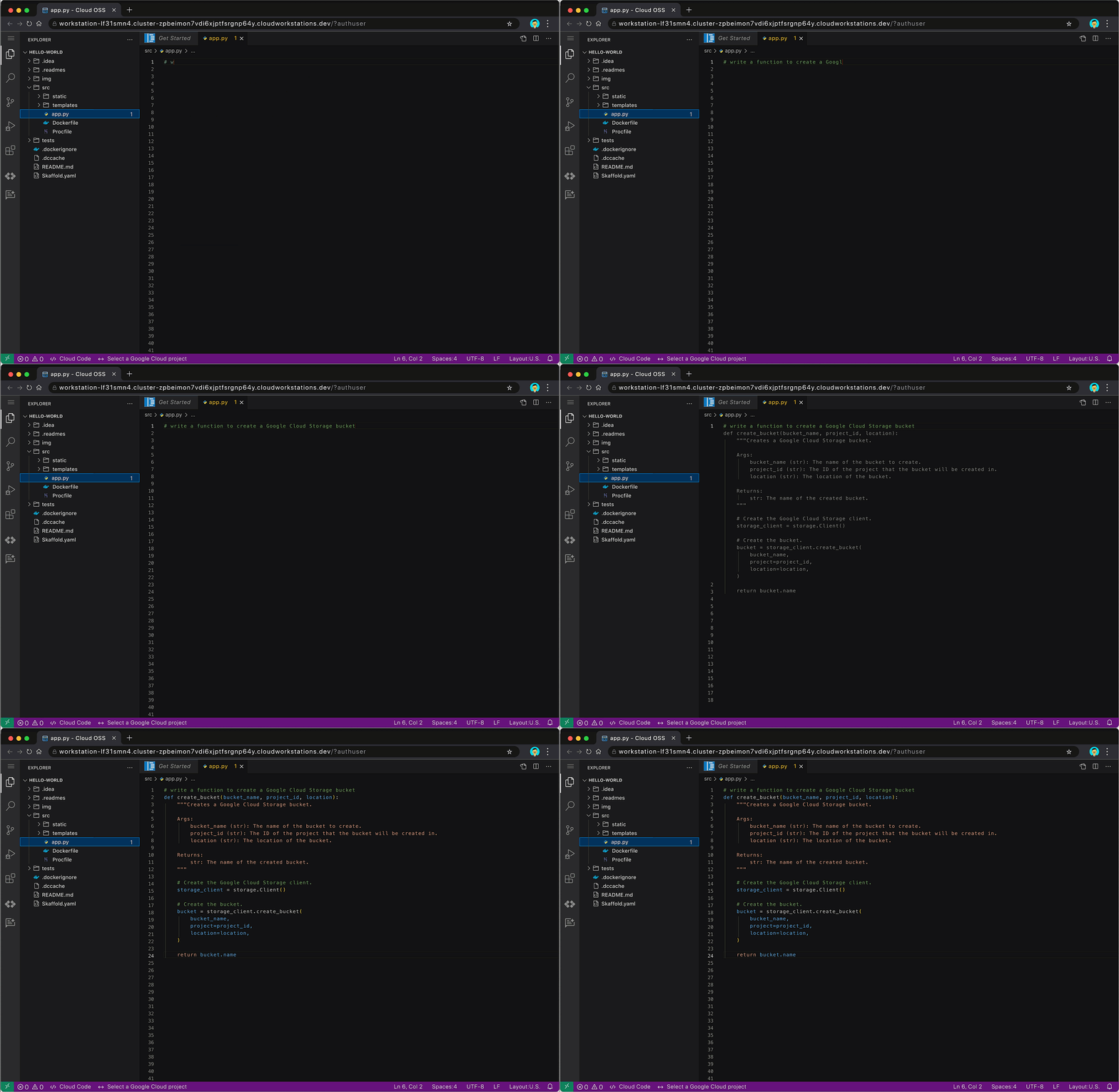
Code assistance auto-generates code for creating a Google Cloud Storage bucket
Code assistance will be available through multiple products and services across Google Cloud, such as in Cloud Workstations, our fully-managed secure development environment, and other code-editing experiences in the Google Cloud Console. Developers will also find code assistance in Cloud Shell Editor or via our Cloud Code IDE extensions for VSCode and JetBrains IDEs. It supports multiple languages including Go, Java, Javascript, Python, and SQL.
- Chat assistance allows people to use simple natural language to get answers on specific development or cloud-related questions. Users can engage with chat assistance to get real-time guidance on various topics, such as how to use certain cloud services or functions, or get detailed implementation plans for their cloud projects. It can also provide architectural or coding best practices, helping to reduce the need to go searching for relevant documents.

Use chat assistance to get the detailed steps for deploying an app on Cloud Run
Chat assistance will also be available across multiple Google Cloud surface areas, for example IDEs, the Cloud Console, and through products and services. Whether you’re a developer, operator, data engineer, or security professional, you’ll be able to leverage chat assistance to help get more work done faster.
Looking to optimize these features further for developers specialized in one particular area? With Generative AI support in Vertex AI, enterprises can fine-tune Codey using their own code base. They can consume these customized Codey models directly from Vertex AI today, and later this year, they will be able to connect it to the built-in Duet AI experience. And don’t worry, if you choose to train Codey with your code, your private data is kept private, and not used in the broader foundation model training corpus. You will have transparency and control over where data is stored and how or if it is used.
- Duet AI for AppSheet will let users create intelligent business applications, connect their data, and build workflows into Google Workspace via natural language. With no coding required, users will be able to build apps by describing their needs in a chat guided by AI-powered prompts. This makes app creation accessible to more users, which can allow developer teams to focus their time on other high-impact work.
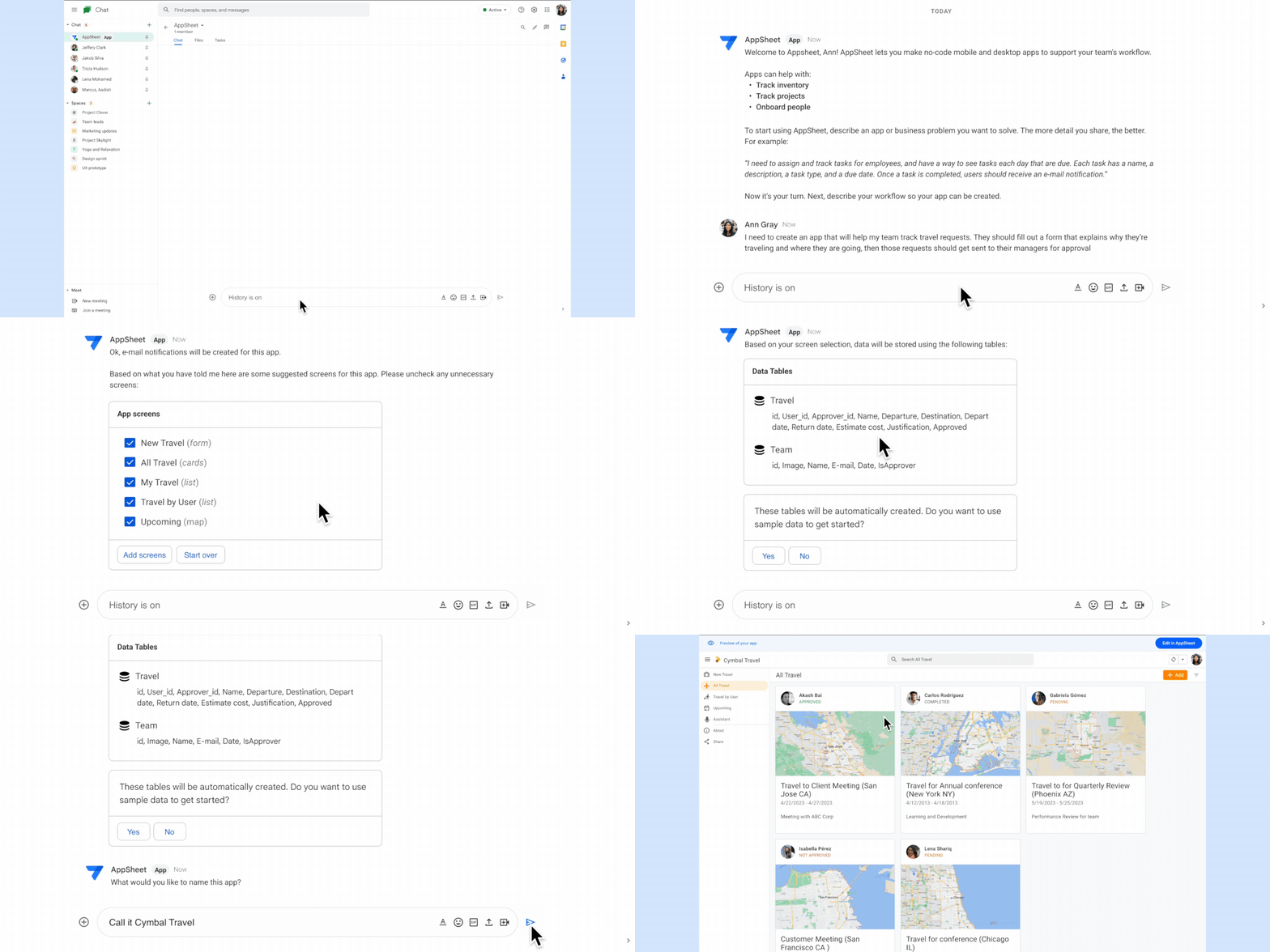
Create business applications with Duet AI for AppSheet using natural language
Experiment with Duet AI for Google Cloud today
We believe that having an assistant who is constantly evolving by your side will not only reduce an already overwhelmed developer’s workload, but also bring back the excitement of cloud development. With Duet AI, you can navigate the cloud with more confidence, ease, and — dare we say it — fun.
And this is just the beginning. The future of the cloud experience that we are shaping with Duet AI is full of possibilities. We believe the future of developer productivity is more targeted personalized assistance. Check here to see our vision for Duet AI for Google Cloud – the redefinition of productivity in the workplace through unique end-to-end AI assisted technologies.
These early features of Duet AI for Google Cloud are available today for limited users and we will be expanding access very soon. Sign up here to join Google Cloud’s AI Trusted Tester Program.
Introducing Duet AI on Google Cloud: AI-Powered Developer Productivity Unleashed

1236
Of your peers have already read this article.
3:30 Minutes
The most insightful time you'll spend today!
Last week we announced the private preview of Duet AI for Google Cloud, an always-on AI collaborator that uses generative AI to provide help to developers and cloud users. This article gives you a detailed look at Duet AI for developers, showing how Duet AI can help provide developers with real-time code suggestions, chat assistance, and enterprise-focused customization. You can sign-up here to join our waitlist for Google Cloud’s AI trusted tester program.
We believe that addressing these use cases with large language models (LLMs) will usher in a major leap in productivity in enterprise development. Duet AI uses Codey, a family of code models built on PaLM 2.
Developers continuously seek ways to improve their productivity and, over the past few decades, these efforts have resulted in massive productivity leaps due to technological changes. From advanced debuggers and online developer communities, to modern IDEs/notebooks and cloud computing, each advance brought massive changes in productivity. Despite these improvements, developers still face numerous challenges, some of which are unique to cloud development:
- Disruptive context switching and friction when integrating a new tool or service
- Excessive time spent on repetitive tasks
- Time required to understand a new code base or project
- Large cognitive workload when working on large code bases or complex APIs
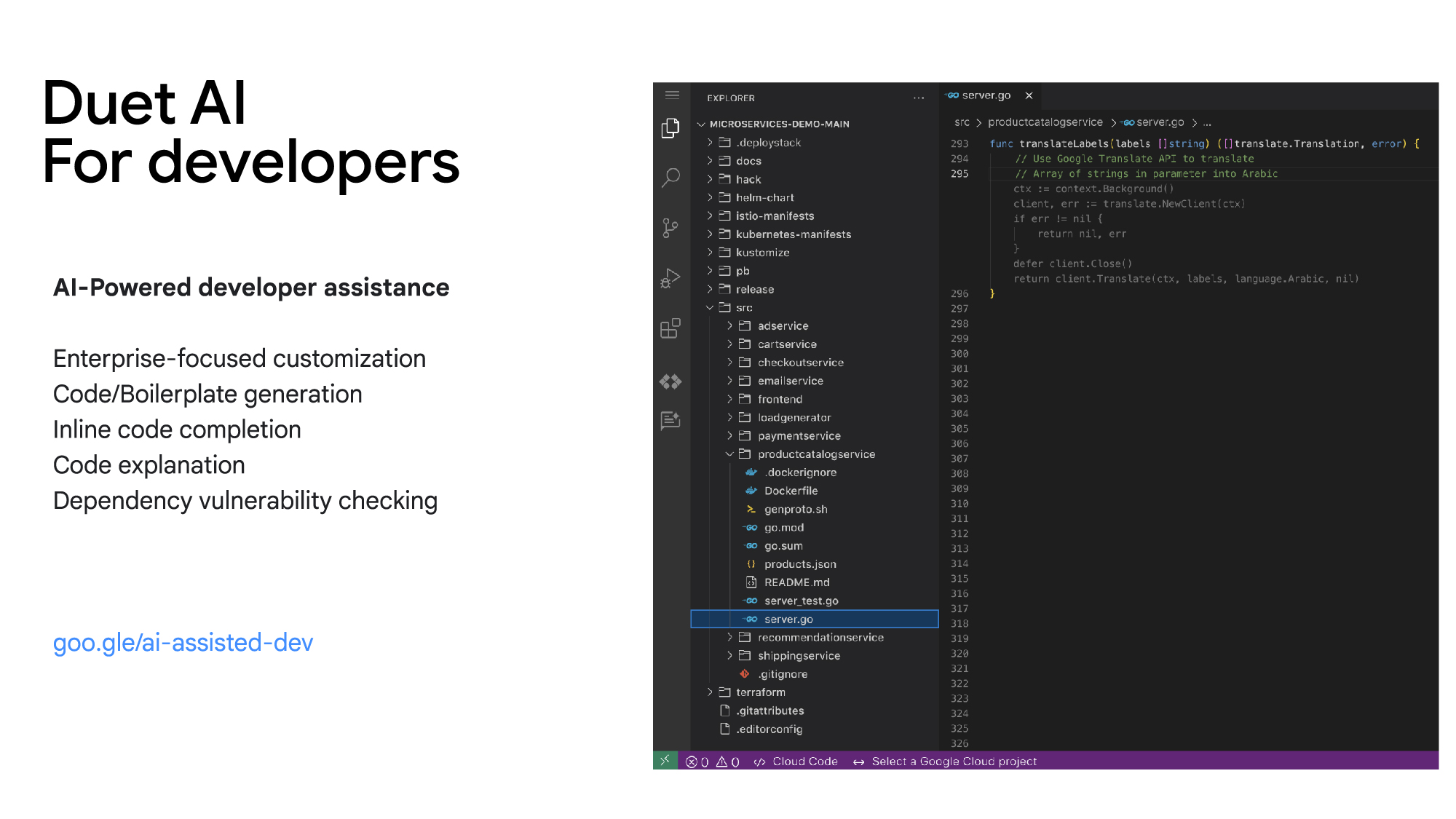
Duet AI for developers focuses on challenges and tasks across the development lifecycle:
Code/Boilerplate Generation — Developers can describe the tasks they have in mind as a comment or function name, such as creating a Cloud Pub/Sub topic. Duet AI will generate a reference implementation that can be reviewed and modified, so developers don’t need to spend time reading through multiple documentation pages.
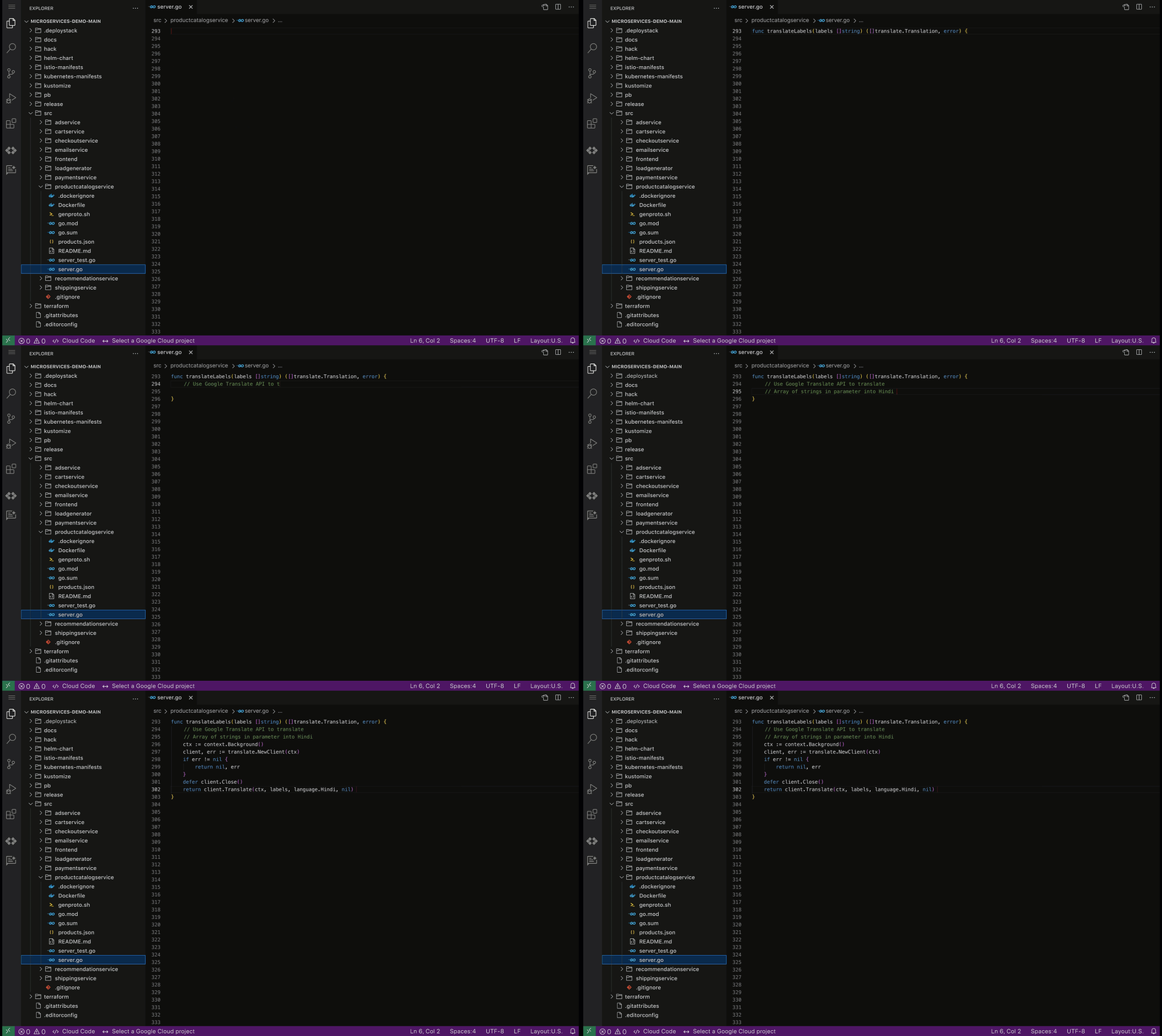
Inline Code Completion — To reduce the time spent on repetitive tasks and minimize the cognitive workload of tasks such as writing repetitive code or retrieving variable names, Duet AI provides intelligent, context-aware code completion, helping reduce the time spent on coding and enhancing the quality of the written code.
Enterprise Customization — Organizations frequently have massive code bases and specific recommended frameworks and best practices, which generic code assistance solutions may not be best positioned to support. With Vertex AI, developers will be able to tune and customize the underlying models and connect them to the Duet AI experience, allowing for assistance optimized to the needs of the organization.
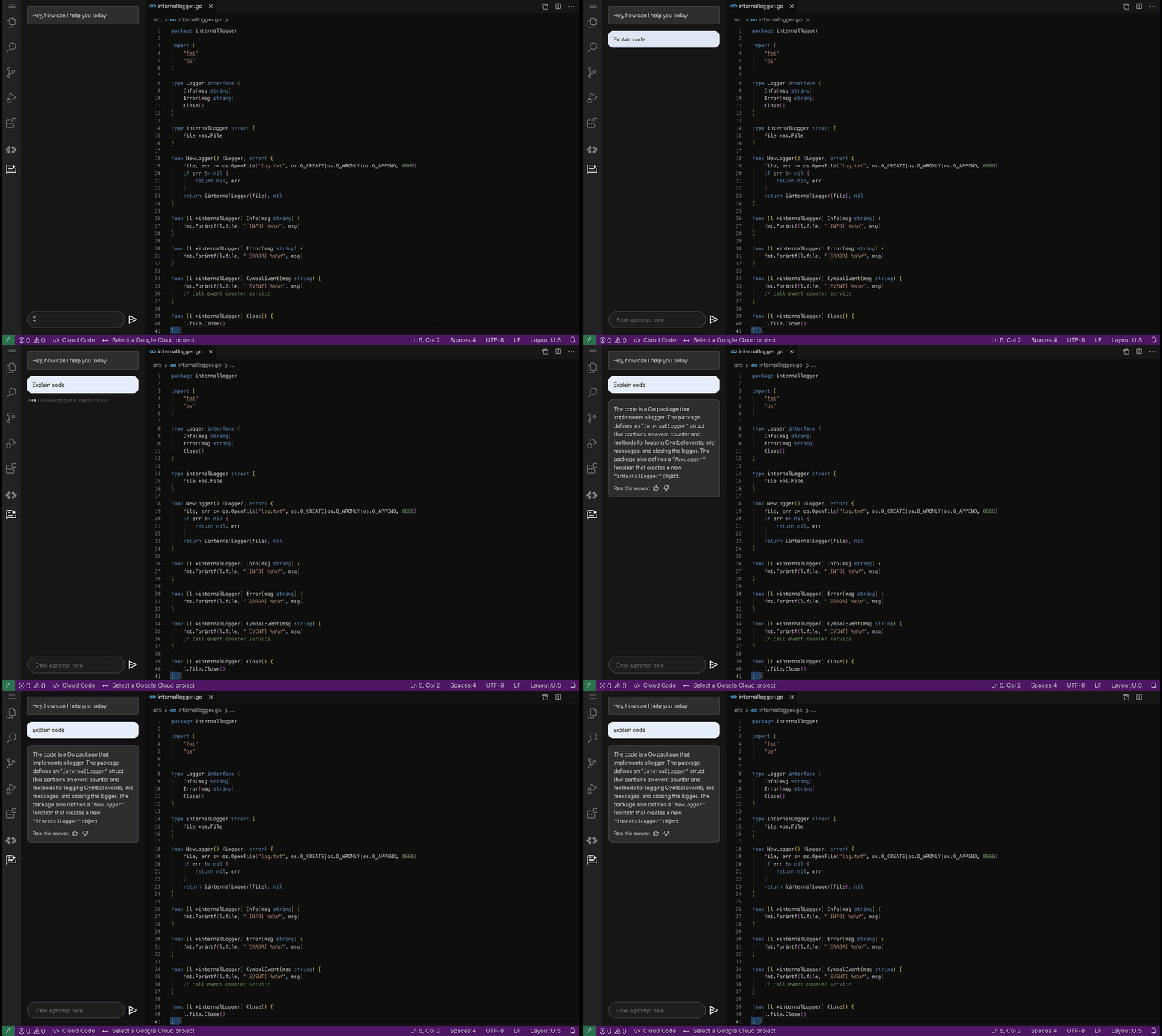
Code Explanation — Developers spend significant time and effort reading and understanding code written by their peers or external contributors. To help assist in this process, Duet AI for code assistance provides an “Explain this code” option available whenever a developer selects their code, allowing them to more quickly understand, map, and navigate unfamiliar code bases.
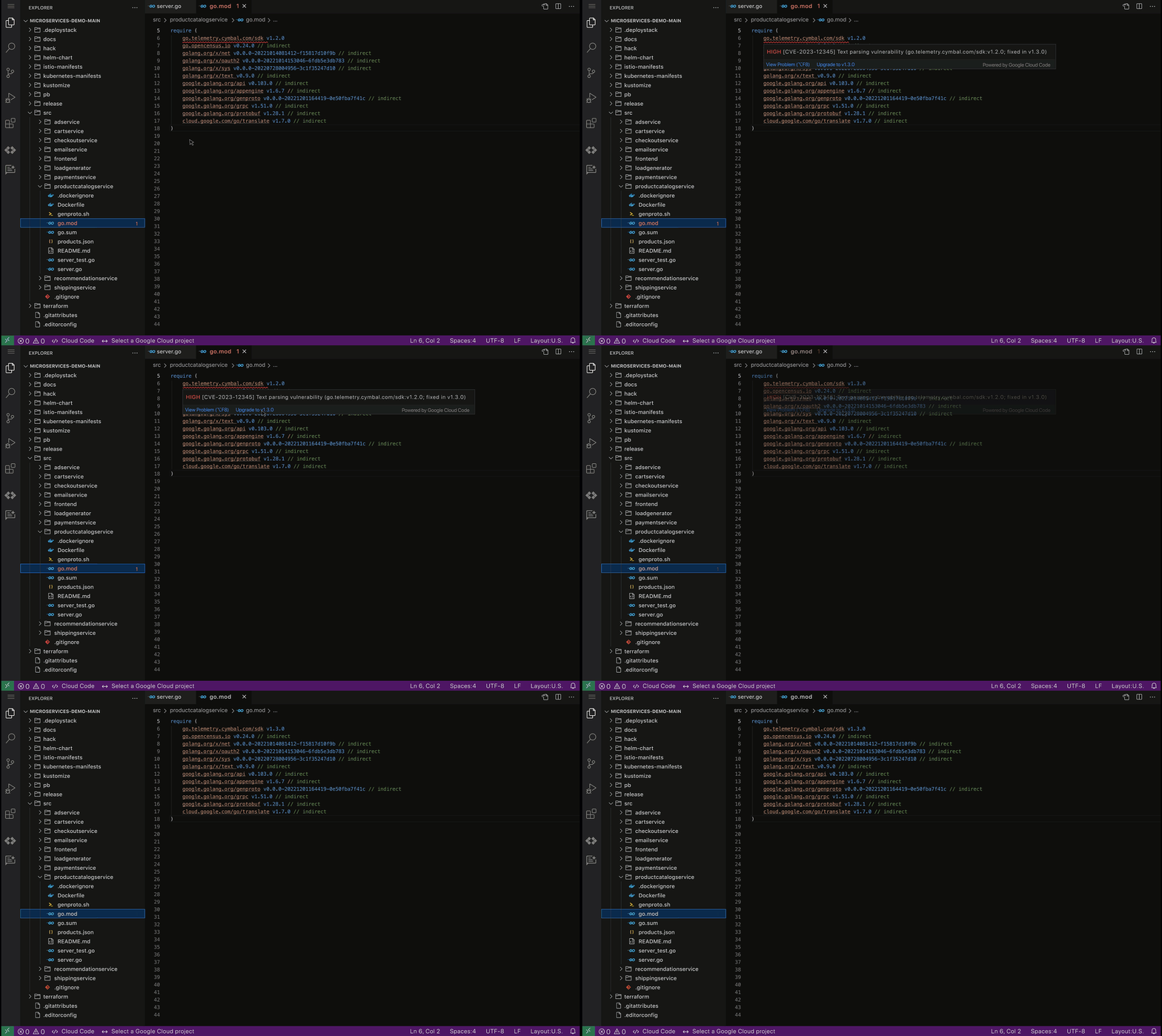
Code security guardrails — Code generated by Duet AI can also be scanned for vulnerable dependencies via Source Protect, helping surface known public vulnerabilities impacting code, along with suggested fixes when available, bringing additional security.
By harnessing the power of AI-driven developer assistance such as the one provided by Duet AI for developers, businesses can unlock unprecedented levels of productivity and efficiency in software development, paving the way for a new era of innovation and growth.
These early features of Duet AI for Google Cloud will be available for limited users and we will be expanding access very soon. Sign up here to join Google Cloud’s AI Trusted Tester Program.

How Domino’s Increased Monthly Revenue By 6% with Google’s Analytical Tools
DOWNLOAD CASE STUDY3893
Of your peers have already downloaded this article
4:15 Minutes
The most insightful time you'll spend today!
Pizza purveyor Domino’s is dominating delivery sales around the world. Today, Domino’s is the most popular pizza delivery chain operating in the U.K., the Republic of Ireland, Germany, and Switzerland—and sales just keep growing.
In these regions in 2014, Domino’s sold 76 million pizzas and generated £766.6 million (1.02 billion USD) in revenue — a 14.6% increase from the previous year.
In the U.K. and Ireland, online sales are increasing 30% year over year and currently account for almost 70% of all sales. Notably, 44% of those online sales are now made via mobile devices.
Multi-Device Purchasing Means Fresh Opportunities
Domino’s is a consistent digital innovator. Much of the company’s success stems from early investments in ecommerce and mobile commerce platforms that help people easily purchase pizzas from different devices.
Domino’s sold its first pizza online in 1999. It then launched an iPhone app in 2010, quickly followed by apps for Android and iPad in 2011, and a Windows app in 2012. By late 2014, Domino’s customers could even order pizzas from Xboxes.
The Domino’s marketing team had assembled a variety of tools to measure marketing performance, keeping pace with the company’s rapid innovations. Unfortunately, measuring siloed analytics and channel-focused tools restricted the team’s ability to fully understand all of the different paths to purchase.
Find out how they worked around this challenge with Google Marketing Platform. Download the case study!
More Relevant Stories for Your Company




The 5-Min Demo: How to Develop, Train and Deploy Training Models on Kubernetes
Machine learning has taken businesses by storm. A growing number of organizations, both large and small, and spread across a swathe of industries, are figuring out how to quickly adopt ML. But in the midst of that accelerated push, infrastructure and data science teams have to come to terms with

Analytics Hub for Secure Data Sharing and Analytics Unlocks True Data Value and Insights
Customers tell us that sharing and exchanging data with other organizations is a critical element of their analytics strategy, but it’s hamstrung by unreliable data and processes, and only getting harder with security threats and privacy regulations on the rise. Furthermore, traditional data sharing techniques use batch data pipelines that are

Contact Center AI & Automation Anywhere Help Virtual Agents Deliver Next Level CX
With the advent of the pandemic, contact center traffic has increased by as much as 300%, taxing center capabilities. To help handle the surge, and keep up with heightened customer demands, many customer experience providers have deployed automation in the form of virtual agents that serve as the first—and, sometimes the



Transitioning Kagglers to TPU with TF 2.x
Kaggle has, historically, become synonymous with machine learning competitions but it's much more than that. Kaggle is a data science platform. Over 5 million data scientists from all over the world come to Kaggle to not only not only participate in machine learning competitions but to learn data science build
